
AC09BQ - Air conditioner LG - Free user manual and instructions
Find the device manual for free AC09BQ LG in PDF.
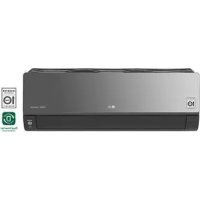



| Product type | Wall-mounted split air conditioner |
| Brand | LG |
| Model | AC09BQ |
| Refrigerant | R32 (flammable) |
| Operating modes | Cooling, Heating, Dehumidification, Fan, Auto |
| Jet Mode | Yes (rapid cooling or heating) |
| Timer | On/Off, Sleep (up to 7h), Simple |
| Wireless remote control | With LCD display, AAA batteries |
| Wi-Fi connectivity | LG ThinQ (2.4 GHz) |
| Smart Diagnosis | Yes (sound diagnosis via smartphone) |
| Silence function | Reduces outdoor unit noise |
| Auto cleaning | Yes (removes residual moisture) |
| Energy control | Power reduction of 20%, 40% or 60% |
| Consumption display | Yes (in kW) |
| Air filter | Washable, clean every 2 weeks |
| Ionizer | Optional |
| Recommended professional maintenance | Annual cleaning of coils, fan and drain pan |
| Number of manual pages | 758 pages |
Frequently Asked Questions - AC09BQ LG
User questions about AC09BQ LG
0 question about this device. Answer the ones you know or ask your own.
Ask a new question about this device
Download the instructions for your Air conditioner in PDF format for free! Find your manual AC09BQ - LG and take your electronic device back in hand. On this page are published all the documents necessary for the use of your device. AC09BQ by LG.
USER MANUAL AC09BQ LG
Read this owner's manual thoroughly before operating the appliance and keep it handy for reference at all times.
TYPE: WALL MOUNTED
Original instruction
EN ENGLISH
FR FRANÇAIS
EL EAAHNIKA
NL NEDERLANDS
PL POLSKI
HU MAGYAR
BG BbIgAPCKN
HR HRVATSKI
CZ CESTINA
ET EESTI
MT MALTI
RO ROMÁNA
SK SLOVENCINA
SL SLOVENSČINA
LV LATVIEŠU
LT LIETUVIŲ
GA GAEILGE
SR SRPSKI
MK MAKEDONSKI
SQ SHQIP
BS BOSANSKI
TABLE OF CONTENTS
This manual may contain images or content different from the model you purchased.
This manual is subject to revision by the manufacturer.
SAFETY INSTRUCTIONS 3
IMPORTANT SAFETY INSTRUCTIONS 4
OPERATION 11
Notes for Operation 11
Parts and Functions 11
Wireless Remote Control 12
Restarting the Air Conditioner Automatically 17
Using the Mode Function 17
Using the Jet Mode Function 20
Using the Fan Speed Function 21
Using the Air Flow Direction Function 21
Setting the On/Off Timer 22
Using the Sleep Function (Optional) 23
Using the Simple Timer Function (Optional) 23
Using the Energy Display Function (Optional) 24
Using the Light Off Function (Optional) 24
Using the Comfort Air Function (Optional) 24
Using the Energy Control Function (Optional) 25
Using Special Functions 25
SMART FUNCTIONS 27
LG ThinQ Application 27
Smart Diagnosis 29
MAINTENANCE 30
Clean the Air Filter 32
TROUBLESHOOTING 33
The following safety guidelines are intended to prevent unforeseen risks or damage from unsafe or incorrect operation of the appliance.
The guidelines are separated into 'WARNING' and 'CAUTION' as described below.

This symbol is displayed to indicate matters and operations that can cause risk. Read the part with this symbol carefully and follow the instructions in order to avoid risk.

WARNING
This indicates that the failure to follow the instructions can cause serious injury or death.

CAUTION
This indicates that the failure to follow the instructions can cause the minor injury or damage to the product.
The following symbols are displayed on indoor and outdoor units. (for R32)

This symbol indicates that this appliance uses a flammable refrigerant. If the refrigerant leaks and is exposed to an external ignition source, there is a risk of fire.

This symbol indicates that the Operation Manual should be read carefully.

This symbol indicates that service personnel should handle this equipment with reference to the Installation Manual.

This symbol indicates that information is available, such as the Operating Manual or Installation Manual.
IMPORTANT SAFETY INSTRUCTIONS

WARNING
To reduce the risk of explosion, fire, death, electric shock, injury, or scalding to persons when using this product, follow basic precautions, including the following:
Children in the Household
This appliance is not intended for use by persons (including children) with reduced physical, sensory, or mental capabilities, or lack of experience and knowledge, unless they have been given supervision or instruction concerning use of the appliance by a person responsible for their safety. Children should be supervised to ensure that they do not play with the appliance.
For use in Europe:
This appliance can be used by children aged from 8 years and above and persons with reduced physical, sensory, or mental capabilities or lack of experience and knowledge if they have been given supervision or instruction concerning use of the appliance in a safe way and understand the hazards involved. Children shall not play with the appliance. Cleaning and user maintenance shall not be made by children without supervision.
Installation
- Do not install the air conditioner on an unstable surface or in a place where there is a danger of it falling.
- Contact an authorized service center when installing or relocating the air conditioner.
- Install the panel and the cover of the control box safely.
- Do not install the air conditioner in a place where flammable liquids or gases such as gasoline, propane, paint thinner, etc., are stored.
- Make sure that the pipe and the power cable connecting the indoor and outdoor units are not pulled too tight when installing the air conditioner.
- Use standard circuit breaker and fuse that conform to the rating of the air conditioner.
- Do not input air or gas into the system except with the specific refrigerant.
- Use non-flammable gas (nitrogen) to check for leak and to purge air; using compressed air or flammable gas may cause fire or explosion.
- The indoor/outdoor wiring connections must be secured tightly, and the cable should be routed properly so that there is no force pulling the cable from the connection terminals. Improper or loose connections can cause heat generation or fire.
- Install dedicated electric outlet and circuit breaker before using the air conditioner.
- Do not connect the ground wire to a gas pipe, a lightning rod, or a telephone ground wire.
- Keep any required ventilation openings clear of obstruction. (for R32)
- Means for disconnection must be incorporated in the fixed wiring in accordance with the wiring rules.
Operation
- Be sure to use only those parts listed in the service parts list. Never attempt to modify the equipment.
- Make sure that children do not climb on or hit the outdoor unit.
- Dispose of the batteries in a place where there is no danger of fire.
- Use only the refrigerant specified on the air conditioner label.
- Cut off the power supply if there is any noise, smell, or smoke coming from the air conditioner.
- Do not leave flammable substances such as gasoline, benzene, or thinner near the air conditioner.
- Contact an authorized service center when the air conditioner is submerged by flood waters.
- Do not use the air conditioner for an extended period of time in a small place without proper ventilation.
- In the event of a gas leak (such as Freon, propane gas, LP gas, etc.) ventilate sufficiently before using the air conditioner again.
- To clean the interior, contact an authorized service center or dealer. Using harsh detergents may cause corrosion or damage to the unit.
- Be sure to ventilate sufficiently when the air conditioner and a heating appliance such as a heater are used simultaneously.
- Do not block the inlet or outlet of air flow.
- Do not insert hands or other objects through the air inlet or outlet while the air conditioner is operating.
- Make sure that the power cable is neither dirty, loose, nor broken.
- Never touch, operate, or repair the air conditioner with wet hands.
- Do not place any objects on the power cable.
- Do not place a heater or other heating appliances near the power cable.
- Do not modify or extend the power cable. Scratches or peeling insulation on the power cables may result in fire or electric shock, and should be replaced.
- Cut off the power supply immediately in the event of a blackout or a thunderstorm.
- Take care to ensure that power cable could not be pulled out or damaged during operation.
- Do not touch refrigerant pipe, water pipe and any internal parts while the unit is operating or immediately after operation.
Maintenance
- Do not clean the appliance by spraying water directly onto the product.
- Before cleaning or performing maintenance, disconnect the power supply and wait until the fan stops.
Technical Safety
- Installation or repairs made by unauthorized persons can pose hazards to you and others.
- Any person who is involved with working on or breaking into a refrigerant circuit should hold a current valid certificate from an industry-accredited assessment authority, which authorizes their competence to handle refrigerants safely in accordance with an industry recognized assessment specification. (for R32) Servicing shall only be performed as recommended by the equipment manufacturer. Maintenance and repair requiring the assistance of other skilled personnel shall be carried out under the supervision of the person competent in the use of flammable refrigerants. (for R32)
- The information contained in the manual is intended for use by a qualified service technician who is familiar with the safety procedures and equipped with the proper tools and test instruments.
- Failure to read and follow all instructions in this manual can result in equipment malfunction, property damage, personal injury and/or death.
- The appliance shall be installed in accordance with national wiring regulations.
- When the power cord is to be replaced, the replacement work shall be performed by authorized personnel using only genuine replacement parts.
- This appliance must be properly grounded to minimize risk of electric shock.
- Do not cut or remove the grounding prong from the power plug.
- Attaching the earth wire to the power outlet cover screw does not ground the appliance unless the cover screw is metal, uninsulated, and the power outlet is grounded through house wiring.
- If you have any doubt whether the air conditioner is properly grounded, have the power outlet and circuit checked by a qualified electrician.
- The refrigerant and insulation blowing gas used in the appliance require special disposal procedures. Consult a service agent or a similarly qualified person before disposing of them.
- If the supply cord is damaged, it must be replaced by the manufacturer, its service agent or similarly qualified person in order to avoid a hazard.
- The appliance shall be stored in a well-ventilated area where the room size corresponds to the room area as specified for operation. (for R32)
- The appliance shall be stored in a room without continuously operating open flames (for example an operating gas appliance) and ignition sources (for example an operating electric heater). (for R32)
- The appliance shall be stored so as to prevent mechanical damage from occurring. (for R32)

CAUTION
To reduce the risk of minor injury to persons, malfunction, or damage to the product or property when using this product, follow basic precautions, including the following:
Installation
- Do not install the air conditioner in an area where it is directly exposed to sea wind (salt spray).
- Install the drain hose properly for the smooth drainage of water condensation. Exercise caution when unpacking or installing the air conditioner.
- Do not touch the leaking refrigerant during installation or repair.
- Transport the air conditioner with two or more people or use a forklift.
- Install the outdoor unit such that it is protected from direct sunlight. Do not place the indoor unit in a place where it is directly exposed to sunlight via the windows.
- Safely dispose of packing materials such as screws, nails or batteries using proper packaging after installation or repair.
- Install the air conditioner in a place where the noise from the outdoor unit or the exhaust fumes will not inconvenience the neighbors. Failure to do so may result in conflict with the neighbors.
Operation
- Remove the batteries if the remote control is not to be used for an extended period of time.
- Make sure that the filter is installed before operating the air conditioner.
- Be sure to check if there is a refrigerant leak after installing or repairing the air conditioner.
- Do not place any object on the air conditioner.
- Never mix different types of batteries, or old and new batteries for the remote control.
- Do not let the air conditioner run for a long time when humidity is very high or when a door or a window has been left open.
- Stop using the remote control if there is a fluid leak in the battery. If your clothes or skin are exposed to the leaking battery fluid, wash off with clean water.
- Do not expose people, animals, or plants to the cold or hot wind from the air conditioner for extended periods of time.
- If the leaking battery fluid has been swallowed, rinse the inside of the mouth thoroughly and consult a doctor.
- Do not drink the water drained from the air conditioner.
- Do not use the product for special purposes, such as preserving foods, works of art, and etc. It is an air conditioner for consumer purposes, not a precision refrigeration system. There is risk of damage or loss of property.
- Do not recharge or disassemble the batteries.
Maintenance
- Never touch the metal parts of the air conditioner when removing the air filter.
- Use a sturdy stool or ladder when cleaning, maintaining, or repairing the air conditioner at a height.
- Never use strong cleaning agents or solvents when cleaning the air conditioner or spray water. Use a smooth cloth.
OPERATION
Notes for Operation
Suggestion for Energy Saving
- Do not over-cool the space. This may be harmful for your health and may consume more electricity.
- Block sunlight with blinds or curtains while you are operating the air conditioner.
- Keep doors or windows closed tightly while you are operating the air conditioner.
- Adjust the direction of the air flow vertically or horizontally to circulate indoor air.
- Speed up the fan to cool or warm indoor air quickly, within a short period of time.
- Open windows regularly for ventilation. The indoor air quality may deteriorate if the air conditioner is used for long durations.
- Clean the air filter once every 2 weeks. Dust and impurities collected in the air filter may block the air flow or reduce the unit performance.
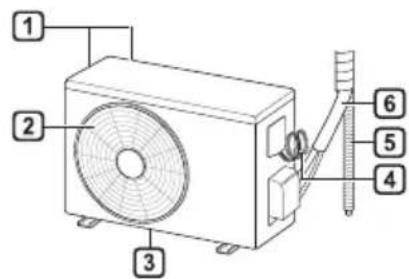
Parts and Functions Indoor Unit Outdoor Unit
Indoor Unit Display
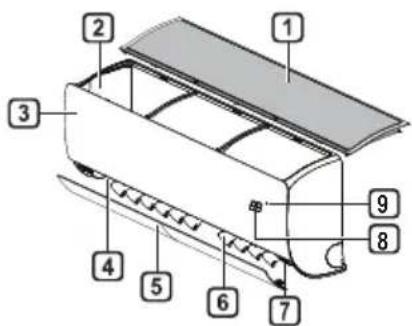
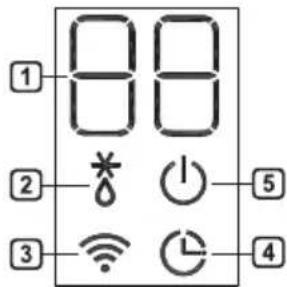
1 Air Filter 2 Air Intake 3 Front Cover 4 Air Outlet 5 Air Deflector (Horizontal Vane) 6 Air Deflector (Vertical Louver) 7 On/Off Button 8 Display 9 Signal Receiver
Air Intake Vents Air Outlet Vents 3 Base Plate 4 Power Supply Cable 5 Drain Hose 6 Refrigerant Pipes
1 Set-Point / Room Temperature 2 Defrost / Pre-Heat Operation 3 Wi-Fi 4 Timer 5 On/Off
NOTE
- The number and location of operation lamps may vary according to the model of the air conditioner. The feature may be changed according to the type of model.
Wireless Remote Control Inserting Batteries
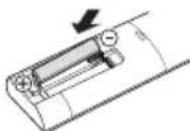
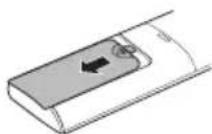
If the display screen of the remote control begins to fade, replace the batteries. Insert AAA (1.5 V) batteries before using the remote control.
1. Remove the battery cover.
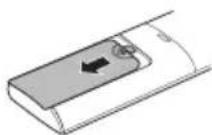
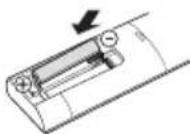
2. Insert the new batteries and make sure that the + and - terminals of the batteries are installed correctly.
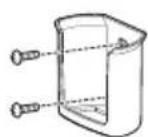
Installing the Remote Control Holder
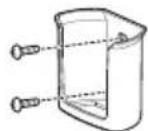
To protect the remote control, install the holder where there is no direct sunlight.
1. Choose a safe and easily accessible location. Fix the holder by fastening 2 screws firmly with a screwdriver.
Operating Method
Point the remote control towards the signal receiver at the right side of the air conditioner to operate it.
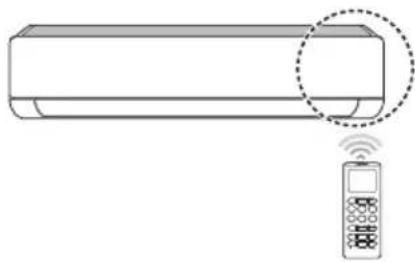
NOTE
- The remote control may operate other electronic devices if it is directed towards them. Make sure to point the remote control towards the air conditioner signal receiver.
- For proper operation, use a soft cloth to clean the signal transmitter and receiver. In case of a function not provided in the product, no buzzer sound occurs from the product when a button for such function on the remote control is pressed except for Air Flow Direction (SWING), Energy Display (kW[3 s]), Air Purification function.
Setting the Current Time
1. Insert batteries.
- The icon below blinks at the bottom of the display screen.

2. Press the or button to select the minutes. 3. Press SET/CANCEL button to finish.
NOTE
- The On/Off Timer is available after setting the current time.
Using the °C/°F Conversion Function (Optional)
This function changes the unit between °C and °F.
Press and hold the button for about 5 seconds.
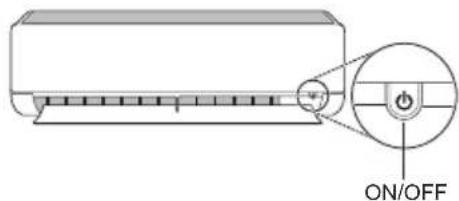
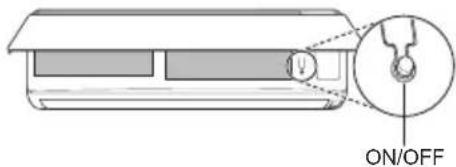
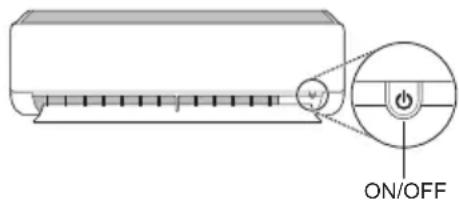
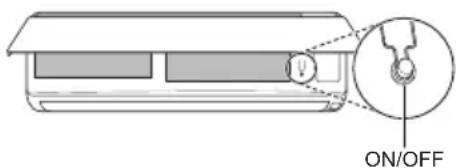
Operating the Air Conditioner without the Remote Control
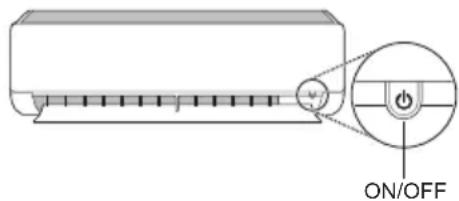
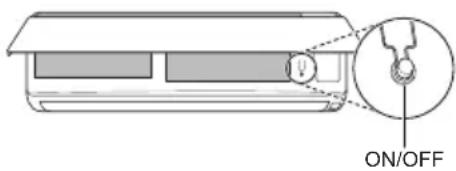
You can use the ON/OFF button of the indoor unit to operate the air conditioner when the remote control is unavailable.
1. Open the front cover (Type2) or horizontal vane (Type1). 2. Press the ON/OFF button.
Type1
Type2
NOTE
- The stepping motor may be broken if the horizontal vane opens rapidly. The fan speed is set to high. The feature may be changed according to the type of model. The temperature cannot be altered when using this emergency ON/OFF button.
- For cooling & heating models, the temperature is set from 22°C to 24°C.
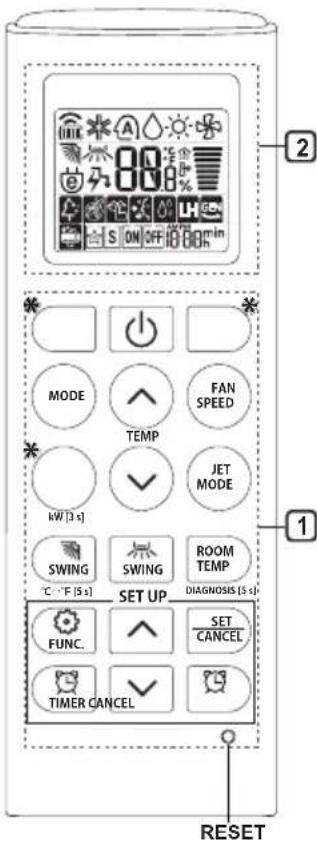
Using Wireless Remote Control
You can operate the air conditioner more conveniently with the remote control.
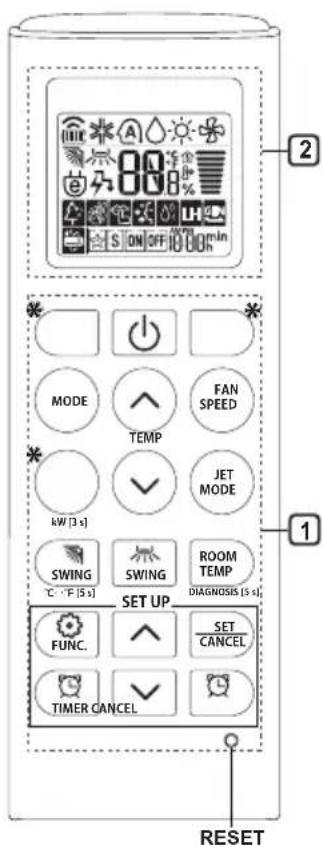
| 1Button | 2DisplayScreen | Description | Available Function | |
| SingleSplit | Multi | |||
| - | To turn on/off the air conditioner. | ○ | ○ | |
| TEMP | 88°C | To adjust the desired room temperature in cooling, heating or auto changeover mode. | ○ | ○ |
| MODE | ※ | To select the cooling mode. | ○ | ○ |
| ○ | To select the heating mode. | ○ | ○ | |
| △ | To select the dehumidification mode. | ○ | ○ | |
| ○ | To select the fan mode. | ○ | ○ | |
| A | To select the auto changeover/auto operation mode. | ○ | ○ | |
| JET MODE | Po | To change room temperature quickly. | ○ | ○ |
| FAN SPEED | To adjust the fan speed. | ○ | ○ | |
| SWING SWING | To adjust the air flow direction vertically or horizontally. | ○ | ○ | |
NOTE
- buttons may be changed according to the type of model.
- When connected to the Multi Outdoor unit, the Energy Display, Energy Control, Silent and Smart Diagnosis function may not be supported.
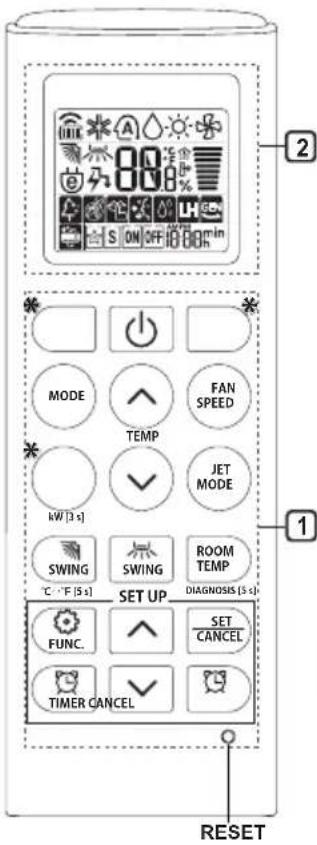
| 1Button | 2DisplayScreen | Description | Available Function | |
| SingleSplit | Multi | |||
| TIMER | ON OFF | To turn on/off air conditioner automatically at desired time. | ○ | ○ |
| SET/CANCEL | - | To set/cancel the special functions and timer. | ○ | ○ |
| CANCEL | - | To cancel the timer settings. | ○ | ○ |
| - To adjust time. ○○ | ||||
| *LIGHTOFF | - | To set the brightness of the display on the indoor unit. | ○ | ○ |
| ROOMTEMP | To display the room temperature. | ○ | ○ | |
| °C←°F[5 s] | °C°F | To change unit between °C and °F | ○ | ○ |
| *COMFORTAIR | To adjust the air flow to deflect wind. | ○ | ○ | |
| kW[3 s] | - | To set whether or not to display information regarding energy. | ○ | × |
| *ENERGYCTRL | 88 x | To bring the effect of the power saving. | ○ | × |
| DIAGNOSIS[5 s] | - | To conveniently check maintenance information of a product. | ○ | × |
| 1 Button | 2 Display Screen | Description | Available Function | |
| Single Split | Multi | |||
| FUNC. | 4 | The Ion generator uses millions of ions to help improve indoor air quality. | O (Optional) | O (Optional) |
| 5 | To reduce noise from outdoor units. | O | X | |
| 6 | To remove moisture generated inside the indoor unit. | O | O | |
| RESET - | To initialize the remote control settings. | O | O | |
NOTE
- Some functions may not be supported, depending on the model.
- buttons may be changed according to the type of model.
- Press the SET/CANCEL button to operate the selected FUNC.
Restarting the Air Conditioner Automatically
When the air conditioner is turned on again after a power failure, this function restores the previous settings.
Disabling Auto Restart
1 Open the front cover (Type2) or horizontal vane (Type1).
2 Press the ON/OFF button and hold it for 6 seconds, then the unit will beep twice and the lamp will blink twice 4 times.
To re-enable the function, press the ON/ OFF button and hold it for 6 seconds. The unit will beep twice and the lamp will blink 4 times.
Type1
Type2
NOTE
The feature may be changed according to the type of model.
- If you press and hold the ON/OFF button for 3 - 5 seconds, instead of 6 seconds, the unit will switch to the test operation. In the test operation, the unit blows out strong cooling air for 18 minutes and then returns to factory default settings.
Using the Mode Function
This function allows you to select the desired function.
| * | Cooling Mode |
| ↓ | |
| A | Auto Changeover Mode / Auto Operation(AI) Mode |
| ↓ | |
| ○ | Dehumidification Mode |
| ↓ | |
| - | Heating Mode |
| ↓ | |
| * | Fan Mode |
Cooling Mode
1 Turn the appliance on.
2 Press MODE button repeatedly to select the Cooling Mode.
- is displayed on the display screen.
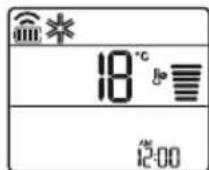
3 Press or button to set the desired temperature.
Auto Operation (Artificial Intelligence)
Multi Model
In this operation mode, the system is automatically operated by the electronic controls.
1 Turn the appliance on. 2 Press MODE button repeatedly to select the Auto Operation.
A is displayed on the display screen.
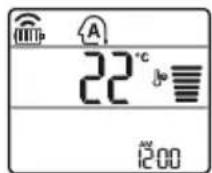
3 Press or button to set the desired temperature. 4 Press FAN SPEED button to adjust the fan speed.
Auto Changeover Mode
Single Split Model
This mode changes the mode automatically to maintain the set temperature at ±2°C.
1 Turn the appliance on. 2 Press MODE button repeatedly to select the Auto Changeover Mode.
A is displayed on the display screen.
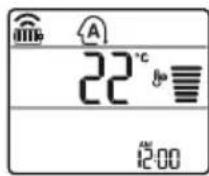
3 Press or button to set the desired temperature. 4 Press FAN SPEED button to adjust the fan speed.
Dehumidification Mode
This mode removes excess moisture from a highly humid environment or during the rainy season, in order to prevent mildew from setting in. This mode adjusts the room temperature and the fan speed automatically to maintain the optimal level of humidity.
1 Turn the appliance on.
2 Press MODE button repeatedly to select the Dehumidification Mode.
is displayed on the display screen.
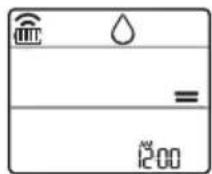
NOTE
- In this mode you cannot adjust the room temperature, it is adjusted automatically.
- The room temperature is not displayed on the display screen.
- In the dehumidification mode, compressor and indoor fan may not operate when the room temperature is below 24°C
Heating Mode
1 Turn the appliance on. 2 Press MODE button repeatedly to select the Heating Mode.
is displayed on the display screen.
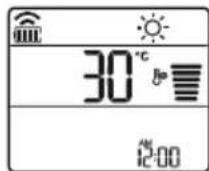
3 Press or button to set the desired temperature.
NOTE
will be displayed on the indoor unit when defrosting is operating.
- Furthermore, this indication will be displayed on the indoor unit:
- When preheating is operating.
- When the room temperature has been reached to the set temperature.
Fan Mode
This mode only circulates the indoor air without changing the room temperature.
1 Turn the appliance on.
2 Press MODE button repeatedly to select the Fan Mode.
is displayed on the display screen.
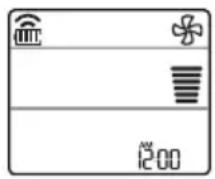
3 Press FAN SPEED button to adjust the fan speed.
Using the Jet Mode Function Changing Room Temperature Quickly
This function allows you to cool indoor air quickly during the summer or warm it quickly during winter.
- The Jet Mode function is available with Cooling, Heating and Dehumidification Mode.
1 Turn the appliance on. 2 Press MODE button repeatedly to select the desired mode. 3 Press JET MODE button.
is displayed on the display screen.
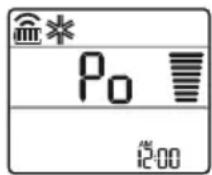
NOTE
- Jet Heating Mode is not available on some models.
- In Jet Cooling Mode, strong air blows out for 30 minutes. After 30 minutes later, setting temperature is maintaining 18°C. If you want to change the temperature, press
or button to set the desired temperature.
- In Jet Heating Mode, strong air blows out for 30 minutes. After 30 minutes later, setting temperature is maintaining 30°C. If you want to change the temperature, press
or button to set the desired temperature.
- This function may operate differently from the remote control display.
Using the Fan Speed Function
Adjusting the Fan Speed
- Press FAN SPEED button repeatedly to adjust the fan speed.
| Display Screen Speed | |
| High | |
| Medium - High | |
| Medium | |
| Medium - Low | |
| Low | |
| - Natural Wind | |
NOTE
- The fan speed of Natural Wind adjusts automatically.
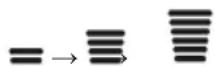
- The fan speed icons are displayed on some indoor units.

- Indoor unit display is displayed only 5 seconds and return to the setting temperature on some models.
Using the Air Flow Direction Function
This function adjusts the direction of the air flow vertically (horizontally).
- Press SWING (SWING) button repeatedly and select the desired direction.
-Select () to adjust the direction of the air flow automatically.
NOTE
- Adjusting the air flow direction horizontally may not be supported, depending on the model.
- Adjusting the air deflector arbitrarily may cause product failure.
- If you restart the air conditioner, it starts to operate with the previously set direction of air flow, so the air deflector may not match the icon displayed on the remote control. When this occurs, press the SWING button to adjust the direction of the air flow again.
- This function may operate differently from the remote control display.
Setting the On/Off Timer
This function sets the air conditioner to turn on/off automatically at a desired time.
The On/Off Timer can be set together.
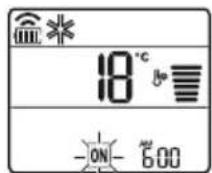
Setting the On Timer
1. Press the button repeatedly.
- The icon below blinks at the bottom of the display screen.
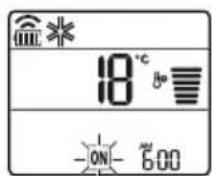
2. Press the or button to select the minutes.
3. Press the SET/CANCEL button to finish.
After setting the timer, the current time and the ON icon are displayed on the display screen, indicating that the desired time is set.
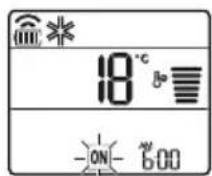
Canceling the On Timer
1. Press the button repeatedly.
- The icon below blinks at the bottom of the display screen.
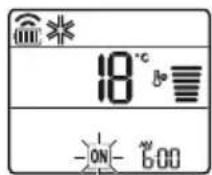
2 Press the SET/CANCEL button to cancel the setting.
Setting the Off Timer
1 Press the button repeatedly.
- The icon below blinks at the bottom of the display screen.
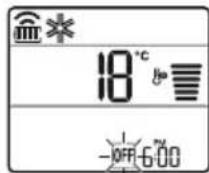
2 Press the or button to select the minutes.
3 Press the SET/CANCEL button to finish.
After setting the timer, the current time and the OFF icon are displayed on the display screen, indicating that the desired time is set.
NOTE
- This function is disabled when you set the Simple Timer.
Canceling the Off Timer
1 Press the button repeatedly.
- The icon below blinks at the bottom of the display screen.
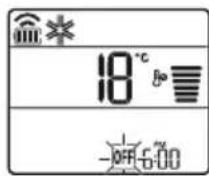
2 Press the SET/CANCEL button to cancel the setting.
Canceling the Timer Setting
- Press the button to cancel all timer settings.
Using the Sleep Function (Optional)
This function turns off the air conditioner automatically when you go to sleep.
1. Turn the appliance on.
2. Press the button repeatedly.
- The icon below blinks at the bottom of the display screen.
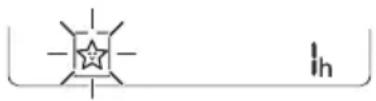
3. Press the Yr button to select the hour (up to 7 hours). 4. Press the SET/CANCEL button to finish. The setting is displayed on the display screen.
NOTE
The icon is displayed on some indoor units.
- The indoor unit display shows from 1H to 7H, which is displayed for only 5 seconds and then returns to the set temperature.
- In the Cooling and Dehumidification Mode, the temperature increases by 1°C after 30 minutes and an additional 1°C after another 30 minutes for a more comfortable sleep.
- The temperature increases up to 2°C from the preset temperature.
- Although the fan speed remark on the display screen may change, the fan speed is adjusted automatically.
Using the Simple Timer Function (Optional)
This function turns off the air conditioner automatically when you go to sleep.
1. Turn the appliance on. 2. Press the button repeatedly.
- The icon below blinks at the bottom of the display screen.
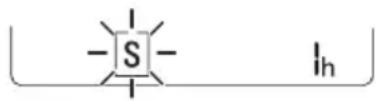
3 Press the or button to select the hour (up to 7 hours). 4 Press the SET/CANCEL button to finish. S is displayed on the display screen.
NOTE
- This function is disabled when you set the Off Timer.
Using the Energy Display Function (Optional)
This function displays the amount of electricity generated on the indoor display as the product operates.
Display the Current Energy Usage
1 Turn the appliance on.
2 Press the button and hold it for about 3 seconds.
The instantaneous power consumption (BB) is displayed for a while on some indoor units.
NOTE
It is not displayed on the wireless remote control. The unit of the displayed value is kW. If it is more than 99 kW, which is the range of expression, maintain it as 99 kW. - Display wattage under 10 kW with 0.1 kW unit, and display one over 10 kW with 1 kW unit. - The actual power may differ from the power displayed. - When connected to the Multi Outdoor unit, this function may not be supported.
Using the Light Off Function (Optional)
Display Screen Brightness
You can set the brightness of the indoor unit display screen.
- Press LIGHT OFF button.
NOTE
- Turn on/off the Display screen.
Using the Comfort Air Function (Optional)
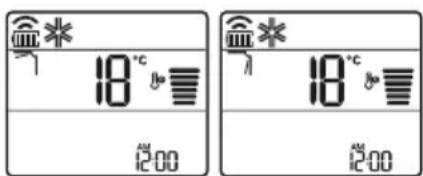
Comfort Vane Operation
This function conveniently sets the vane to a preset position to deflect the supply air away from blowing directly onto the occupants in the room.
1 Turn the appliance on. 2 Press COMFORT AIR button repeatedly and select the desired direction.
or displayed on the display screen.
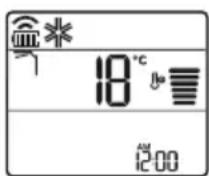
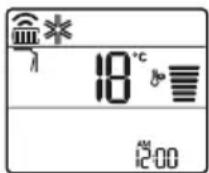
NOTE
or Lis displayed on some indoor units. - This function is disabled when you press MODE or JET MODE button. - This function is disabled and auto swing of vertical direction is set up when you press

button.
- When this function is off, the horizontal vane operates automatically depending on the set mode.
Using the Energy Control Function (Optional)
1 Turn the appliance on.
2 Press ENERGY CTRL button.
- Press ENERGY CTRL button repeatedly to select each step.
- 1 step: The power input is decreased by 20% compared to rated power input. 80 is displayed on the display screen.
- 2 step: The power input is decreased by 40% compared to rated power input. 60 is displayed on the display screen.
- 3 step (Optional): The power input is decreased by 60% compared to rated power input. 40 is displayed on the display screen. 80 (1 step), 60 (2 step), 40 (3 step) is displayed on some indoor units. (1 step), (2 step) is displayed on some indoor units.)
- This function is available with Cooling Mode.
- Capacity may decrease when Energy Control mode is selected.
- Desired temperature is displayed about 5 seconds if you press FAN SPEED, or button.
- Room temperature is displayed about 5 seconds if you press ROOM TEMP button.
- When connected to the Multi Outdoor unit, this function may not be supported.
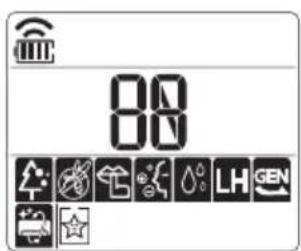
Using Special Functions
1 Turn the appliance on. 2 Press FUNC button repeatedly to select the desired function. 3 Press SET/CANCEL button to finish.
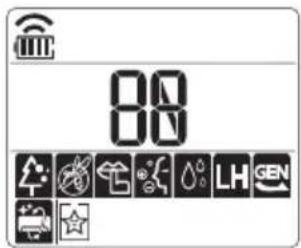
| Display Screen | Description |
| The Ion generator uses millions of ions to help improve indoor air quality. | |
| To reduce noise from outdoor units. | |
| To remove moisture generated inside the indoor unit. |
NOTE
Some functions may not be supported, depending on the model. Some functions may operate differently from the remote control display.
Canceling Special Functions
1 Press FUNC button repeatedly to select the desired function. 2 Press SET/CANCEL button to cancel the function.
Using the Air Purification Function
These functions supply clean and fresh air by ion particles and the filter.
| Function Display Description | |
| Ionizer | Ion particles from lonizer sterilize the aerial bacteria and other harmful substances. |
| Plasma | It removes microscopic contaminants from the intake air completely to supply clean and fresh air. |
NOTE
- You can use this function without turning the air conditioner on.
- Both the plasma lamp and the cooling lamp light up while Smoke Away/Plasma is in operation on some models.
- Do not touch ionizer during operation.
- This function may operate differently from the remote control display.
Using the Silent Function
This function prevents potential claims by neighbors, reducing noise from outdoor units.

is displayed on the display screen.
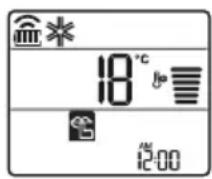
NOTE
- This function is disabled when you press MODE or ENERGY CTRL or JET MODE button.
- This function is available with Cooling, Heating, Auto Changeover, Auto Operation Mode.
- When connected to the Multi Outdoor unit, this function may not be supported.
Using the Auto Clean Function
In the Cooling and Dehumidification Mode, moisture is generated inside the indoor unit. This function removes such moisture.

is displayed on the display screen.
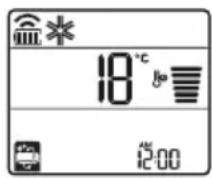
NOTE
- Some functions cannot be used while the Auto Clean function is in operation.
- If you turn off the unit, the fan continues to run for 30 minutes and cleans the inside of the indoor unit.
LG ThinQ Application
This feature is only available on models with the or ThinQ logo.
The LG ThinQ application allows you to communicate with the appliance using a smartphone.
LG ThinQ Application Features
Communicate with the appliance from a smartphone using the convenient smart features.
Smart Diagnosis
- If you experience a problem while using the appliance, this smart diagnosis feature will help you diagnose the problem.
Settings
- Allows you to set various options on the appliance and in the application.
NOTE
- If you change your wireless router, internet service provider, or password, delete the registered appliance from the LG ThinQ application and register it again.
- The application is subject to change for appliance improvement purposes without notice to users.
- Functions may vary by model.
Before Using LG ThinQ Application
1 Check the distance between the appliance and the wireless router (Wi-Fi network).
- If the distance between the appliance and the wireless router is too far, the signal strength becomes weak. It may take a long time to register or installation may fail.
2 Turn off the Mobile data or Cellular Data on your smartphone.
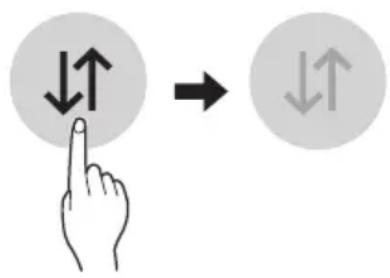
3 Connect your smartphone to the wireless router.
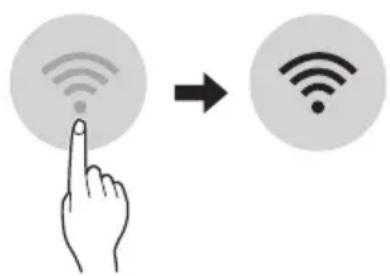
NOTE
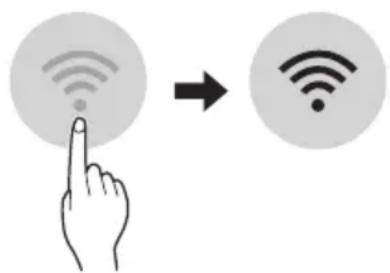
To verify the Wi-Fi connection, check that the Wi-Fi icon on the control panel is lit.
- The appliance supports 2.4 GHz Wi-Fi networks only. To check your network frequency, contact your Internet service provider or refer to your wireless router manual.
- LG ThinQ is not responsible for any network connection problems or any faults, malfunctions, or errors caused by network connection.
- If the appliance is having trouble connecting to the Wi-Fi network, it may be too far from the router. Purchase a Wi-Fi repeater (range extender) to improve the Wi-Fi signal strength.
- The Wi-Fi connection may not connect or may be interrupted because of the home network environment.
- The network connection may not work properly depending on the Internet service provider.
- The surrounding wireless environment can make the wireless network service run slowly.
- The appliance cannot be registered due to problems with the wireless signal transmission. Unplug the appliance and wait about a minute before trying again.
- If the firewall on your wireless router is enabled, disable the firewall or add an exception to it.
- The wireless network name (SSID) should be a combination of English letters and numbers. (Do not use special characters.)
- Smartphone user interface (UI) may vary depending on the mobile operating system (OS) and the manufacturer.
- If the security protocol of the router is set to WEP, you may fail to set up the network. Please change it to other security protocols (WPA2 is recommended) and register the product again.
Installing the LG ThinQ Application
Search for the LG ThinQ application from the Google Play Store or Apple App Store on a smartphone. Follow instructions to download and install the application.
Open Source Software Notice Information
To obtain the source code under GPL, LGPL, MPL, and other open source licenses, that is contained in this product, please visit http://opensource.lge.com.
In addition to the source code, all referred license terms, warranty disclaimers and copyright notices are available for download.
LG Electronics will also provide open source code to you on CD-ROM for a charge covering the cost of performing such distribution (such as the cost of media, shipping, and handling) upon email request to opensource@lge.com. This offer is valid for a period of three years after our last shipment of this product. This offer is valid to anyone in receipt of this information.
Smart Diagnosis
This feature is only available on models with the or logo.
Use this feature to help you diagnose and solve problems with your appliance.
NOTE
- For reasons not attributable to LGE's negligence, the service may not operate due to external factors such as, but not limited to, Wi-Fi unavailability, Wi-Fi disconnection, local app store policy, or app unavailability.
- The feature may be subject to change without prior notice and may have a different form depending on where you are located.
Using LG ThinQ to Diagnose Issues
If you experience a problem with your Wi-Fi equipped appliance, it can transmit troubleshooting data to a smartphone using the LG ThinQ application.
- Launch the LG ThinQ application and select the Smart Diagnosis feature in the menu. Follow the instructions provided in the LG ThinQ application.
Using Audible Diagnosis to Diagnose Issues
Follow the instructions below to use the audible diagnosis method.
- Launch the LG ThinQ application and select the Smart Diagnosis feature in the menu. Follow the instructions for audible diagnosis provided in the LG ThinQ application.
Plug the power plug in the outlet properly. 2 Place the mouthpiece of your smartphone close to the or logo. 3 Press and hold the DIAGNOSIS [5 s] button for 5 seconds or longer while holding the smartphone mouthpiece to the logo until the data transfer is complete.
- Keep the smartphone in place until the data transfer has finished. The time remaining for data transfer is displayed. 4 After the data transfer is complete, the diagnosis will be displayed in the application.
NOTE
- For best results, do not move the phone while the tones are being transmitted.
- Be sure to keep ambient noise to a minimum, or the phone may not correctly receive the buzzer beeps from the indoor unit.

WARNING
- Before cleaning or performing maintenance, disconnect the power supply and wait until the fan stops.
If the air conditioner will not be used for an extended period of time, dry the air conditioner to maintain it in best condition. Clean the product regularly to maintain optimal performance and to prevent possible breakdown.
- Dry the air conditioner in Fan mode for 3 to 4 hours and disconnect the power. There may be internal damage if moisture is left in its components.
- Before using the air conditioner again, dry the inner components of the air conditioner in Fan mode for 3 to 4 hours. This will help to remove the odor generated from moisture.
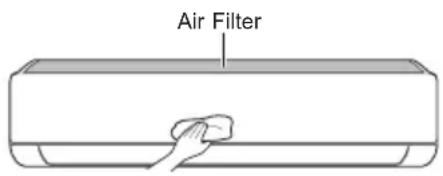
The feature may be changed according to the type of model.
| Type Description Interval | ||
| Air filter Clean with a vacuum or hand wash. 2 weeks | ||
| Ionizer (Optional) | Use dry cotton bud to remove any dust. Every 6 months | |
| Indoor unit | Clean the Indoor unit surface by using a soft, dry cloth. Regularly | |
| Have a professional clean the condensate drain pan. Once a year | ||
| Have a professional clean the condensate drain pipe. Every 4 months | ||
| Replace the remote control batteries. Once a year | ||
| Outdoor unit | Have a professional clean the heat exchanger coils and the panel vents. (Consult with technician.) | Once a year |
| Have a professional clean the fan. Once a year | ||
| Have a professional clean the condensate drain pan. Once a year | ||
| Have a professional verify that all the fan assembly is firmly tightened. | Once a year | |
| Clean the electric components with air. Once a year | ||
NOTE
- Never use water that is higher than 40°C when you clean the filters. It may cause deformation or discoloration.
- Never use volatile substances when you clean the filters. They may damage the surface of the product.
Clean the Air Filter
Clean the air filters once every 2 weeks, or more, if necessary.
NOTE
The air filter can be broken when it is bent. - When the air filter is not assembled correctly, dust and other substances can enter into the indoor unit.
Type1
If you look at the indoor unit from above, you can assemble the top filter easily.
1 Turn off the power to the unit. 2 Hold the knobs of the air filter, lift it up slightly.
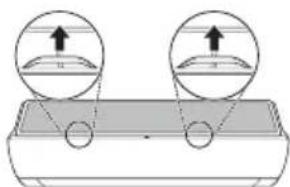
3 Remove it from the indoor unit.
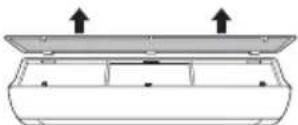
4 Clean the filter with a vacuum cleaner or with lukewarm water with neutral detergent. 5 Dry the filter in the shade. 6 Insert the hooks of the air filter into the front cover.
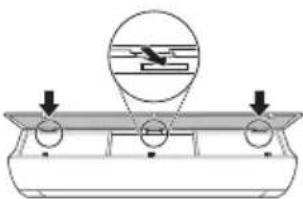
7 Push down hooks to assemble the air filter.
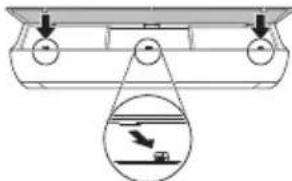
8 Check the side of the front cover for correct assembly of the air filter.
Type2
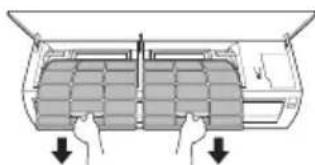
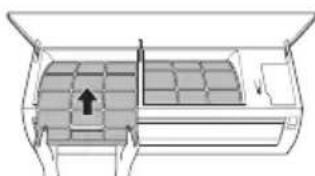
1 Turn off the power to the unit. 2 Open the front cover.
- Lift up both sides of the cover slightly.
3 Hold the knobs of the air filters, pull them down slightly and remove them from the indoor unit.
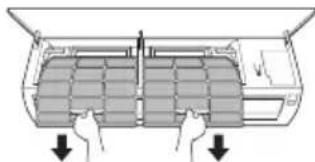
4 Clean the filters with a vacuum cleaner or with lukewarm water with neutral detergent. 5 Dry the filters in the shade. 6 Insert the hooks of the air filters into the front cover.
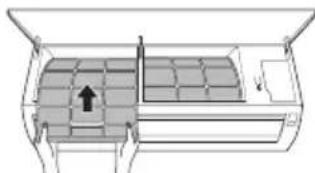
7 Check the side of the front cover for correct assembly of the air filters.
Self-diagnosis Function
This product has a built-in self-diagnosis function. If an error occurs, the lamp of the indoor unit will blink in 2 second intervals. If this occurs, contact your local dealer or service center.
Before Calling for Service
Please check the following before you contact the service center. If the problem persists, contact your local service center.
| Symptoms Possible Causes & Solution | |
| The air conditioner does not work normally. | Burning smell and strange sounds are coming from the unit. ·Turn off the air conditioner, switch OFF, or disconnect the power supply, and contact the service center. |
| Water leaks from the indoor unit even when the humidity level is low. ·Turn off the air conditioner, switch OFF, or disconnect the power supply, and contact the service center. | |
| The power cable is damaged or it is generating excessive heat. ·Turn off the air conditioner, switch OFF, or disconnect the power supply, and contact the service center. | |
| A switch, a circuit breaker (safety, ground), or a fuse is not operated properly. ·Turn off the air conditioner, switch OFF, or disconnect the power supply, and contact the service center. | |
| The unit generates an error code from its self-diagnosis. ·Turn off the air conditioner, switch OFF, or disconnect the power supply, and contact the service center. | |
| The air conditioner does not work. | The air conditioner is unplugged. ·Check whether the power cord is plugged into the outlet or the power isolators are switched on. |
| A fuse exploded, or the power supply is blocked. ·Replace the fuse or check if the circuit breaker has tripped. | |
| A power failure has occurred. ·Turn off the air conditioner when a power failure occurs. ·When the power is restored, wait 3 minutes, and then turn on the air conditioner. | |
| The voltage is too high or too low. ·Check if the circuit breaker has tripped. | |
| The air conditioner was turned off automatically at a preset time. ·Turn the air conditioner on. | |
| The battery setting in the remote controller is incorrect. ·Make sure that the batteries are inserted correctly in your remote controller. ·If the batteries are placed correctly, but the air conditioner still does not operate, replace the batteries and try again. | |
| Symptoms Poss | ble Causes & Solution |
| The air conditioner does not emit cool air. | Air is not circulating properly. • Make sure that there are no curtains, blinds, or pieces of furniture blocking the front of the air conditioner. |
| The air filter is dirty. • Clean the air filter once every 2 weeks. • See “Clean the Air Filter” for more information. | |
| The room temperature is too high. • In summer, cooling the indoor air fully may take some time. In this case, select the Jet Mode to cool the indoor air quickly. | |
| Cold air is escaping from the room. • Make sure that no cold air is escaping through the ventilation points in the room. | |
| The desired temperature is higher than the current temperature. • Set the desired temperature to a level lower than the current temperature. | |
| There is a heating source nearby. • Avoid using heat generators like electric ovens or gas burners while the air conditioner is in operation. | |
| Fan Mode is selected. • During Fan Mode, air blows from the air conditioner without cooling or heating the indoor air. • Switch the operation mode to cooling operation. | |
| Outside temperature is too high. • The cooling effect may not be sufficient. | |
| The fan speed cannot be adjusted. | The Jet Mode, or Auto Operation Mode is selected. • In some operation modes, you cannot adjust the fan speed. Select an operation mode in which you can adjust the fan speed. |
| The temperature cannot be adjusted. | The Fan Mode or Jet Mode is selected. • In some operation modes, you cannot adjust the temperature. Select an operation mode in which you can adjust the temperature. |
| The air conditioner stops during operation. | The air conditioner is suddenly turned off. • The Timer Function may have timed out, which turns the unit off. Check the timer settings. |
| A power failure has occurred during operation. • Wait for the power to come back. If you have the Auto Restart function enabled, your unit will resume its last operation several minutes after power is restored. | |
| Symptoms Possible Causes & Solution | |
| The indoor unit is still operating even when the unit has been turned off. | The Auto Clean function is being operated. ·Allow the Auto Clean function to continue since it removes any remaining moisture inside the indoor unit. If you do not want this feature, you can turn the unit off. |
| The air outlet on the indoor unit is discharging mist. | The cooled air from the air conditioner makes mist. ·When the room temperature decreases, this phenomenon will disappear. |
| Water leaks from the outdoor unit. | In the heating operations, condensed water drops from the heat exchanger. ·This symptom requires installing a drain hose under the base pan. Contact the installer. |
| There is noise or vibration. | A clicking sound can be heard when the unit starts or stops due to movement of the reversing valve. Creaking sound: The plastic parts of the indoor unit creak when they shrink or expand due to sudden temperature changes. Flowing or Blowing sound: This is the flow of refrigerant through the air conditioner. ·These are normal symptoms. The noise will stop. |
| The indoor unit gives off an odor. | Odors (such as cigarette smoke) may be absorbed into the indoor unit and discharged with airflow. ·If the smell does not disappear, you need to wash the filter. If this does not work, contact the service center to clean your heat exchanger. |
| The air conditioner does not emit warm air. | When Heating Mode starts, the vane is almost closed, and no air comes out, even though the outdoor unit is operating. ·This symptom is normal. Please wait until the unit has generated enough warm air to blow through the indoor unit. |
| The outdoor unit is in Defrosting Mode. ·In Heating Mode, ice/frost is built up on the coils when the outside temperature falls. This function removes a layer of frost on the coil, and it should finish in approximately 15 minutes. | |
| Outside temperature is too low. ·The heating effect may not be sufficient. | |
| Your home appliance and smartphone is not connected to the Wi-Fi network. | The password for the Wi-Fi that you are trying to connect to is incorrect. ·Find the Wi-Fi network connected to your smartphone and remove it, then register your appliance on LG ThinQ. |
| Mobile data for your smartphone is turned on. ·Turn off the Mobile data of your smartphone and register the appliance using the Wi-Fi network. | |
| The wireless network name (SSID) is set incorrectly. ·The wireless network name (SSID) should be a combination of English letters and numbers. (Do not use special characters.) | |
| The router frequency is not 2.4 GHz. ·Only a 2.4 GHz router frequency is supported. Set the wireless router to 2.4 GHz and connect the appliance to the wireless router. To check the router frequency, check with your Internet service provider or the router manufacturer. | |
| The distance between the appliance and the router is too far. ·If the distance between the appliance and the router is too far, the signal may be weak and the connection may not be configured correctly. Move the location of the router so that it is closer to the appliance. | |
NOTE
- Some functions may not be supported, depending on the model.
OWNER'S MANUAL
AIR CONDITIONER

Smart Diagnosis 29
MAINTENANCE 30
LG ThinQ Application
Smart Diagnosis
Smart Diagnosis
The manufacturer's instructions for the product.
SAFETY INSTRUCTIONS. 3
Important safety instructions. 4
OPERATION 11
Important safety instructions
1 GENERAL WARNINGS
To reduce the risk of fire, electric shock, or injury to persons when using the product, basic safety precautions must be followed, including the following:
Technical safety
- Installation or repair of the unplugged device may expose you or others to danger. Every person working on the refrigerating circuit must possess a valid certificate issued by an accredited organization in the industrial sector, which certifies their competence to work with refrigerants safely and in accordance with the applicable standards in the industry. (For R32) - Servicing shall only be performed in accordance with the manufacturer's recommendations. Maintenance and repairs requiring the assistance of another trained person shall be carried out under the supervision of the person competent in the use of flammable refrigerants. (For R32) - The information in this manual is intended for use by qualified service technicians who are familiar with safety procedures and possess the necessary tools and testing instruments. - Failure to read and follow all instructions may lead to incorrect operation of the equipment, material damage, physical injury, and/or death.
- The device must be installed in accordance with national electrical installation regulations. - If replacement of the supply cord is necessary, it must be done by authorized personnel using only original spare parts. - The device must be properly grounded to reduce the risk of electric shock. Do not disconnect or bypass the grounding conductor of the supply cord. - The grounding conductor of the appliance must be connected to the grounding terminal of the wall outlet. The appliance is not grounded unless the outlet's grounding terminal is metallic and not insulated, and the wall outlet is grounded through the electrical installation of the building.
- If you are not sure that the appliance is properly earthed, contact a qualified electrician to check the wall box and the wiring. The refrigerant and insulation blowing gas used in the appliance require special disposal procedures. Consult the service agent or a similarly qualified person before disposing of them. - If the supply cord is damaged, it must be replaced by the manufacturer, its service agents, or similarly qualified persons to avoid a hazard. - The appliance must be installed in a well-ventilated area whose size corresponds to the operating requirements of the appliance. (For R32) - The appliance must be installed in a room without ignition sources (e.g., gas appliances) and heat sources (e.g., electric heaters). (For R32)
- The appliance must be installed so as to prevent mechanical damage. (For R32)

WARNING
To reduce the risk of electric shock, incorrect operation, or damage to the product or materials, follow the basic safety precautions, including:
Installation
Do not install the air conditioner in a place exposed to direct sea breeze (salt spray). - Install the drain hose correctly to drain condensate water. - Be careful when unpacking and installing the air conditioner. Do not touch the refrigerant leak. - Transport the air conditioner with two or more people or use a lifting device. - Install the outdoor unit so that it is protected from direct sunlight. Do not install the indoor unit in a place exposed to direct sunlight through windows. - Dispose of packaging materials such as screws, nails, and batteries in a proper container after installation or maintenance. - Install the air conditioner in a place where the noise from the outdoor unit or exhaust gases will not disturb the neighbors. Otherwise, it may cause conflict with the neighbors.
Operation
- The remote control is the lower part of the display.

2 Press the button to select the minutes. 3 Press the SET/CANCEL button to finish the setting.
TIMER
The on/off timer is set according to the current time.
Using the temperature conversion function (°C/°F) (optional)
Function for converting temperature from °C to °F
Press the button for about 5 seconds.
Climate control without remote control
You can use the ON/OFF button on the indoor unit to control the climate when the remote control is not available.
1 Open the front panel (Type 2) or the horizontal louver (Type 1). 2 Press the ON/OFF button.
Type 1
Type 2
NOTE
- The horizontal louver will automatically return to its original position when the unit is turned off. The fan speed is set to high. - This function may vary depending on the model. The temperature cannot be adjusted when using this ON/OFF button (button for turning on/off) in certain situations. For models designed for cooling and heating, the temperature is set between 22°C and 24°C
Using the wireless remote control
You can control the climate with the remote control for greater comfort.
Press the Swing button several times to select the desired air direction.
- Select to adjust the air flow direction automatically.
NOTE
- Adjusting the air flow direction to the horizontal position may not be possible depending on the model.
- Remote control of the air conditioner
- The deflector can be used for various product displays.
- If you adjust the air conditioner, you must work with the last set direction of the air flow, so that the air deflector may not correspond to the icon shown on the remote control. When this happens, press the SWING or SWING button to adjust the direction of the air flow again. This function may vary when using the remote control.
Turning the timer on and off
This function sets the air conditioner to turn off/on automatically at a set time.
The timer for on/off can be set together with this.
Setting the timer for turning on
1 Press the TIMER button several times.
- The icon on the lower part of the display will flash.
2 Press the or button to select the minutes.
3 Press the SET/CANCEL button to finish the setting.
The timer setting for the current time will be displayed on the screen, which shows that the desired time is set.
Canceling the timer for turning on
1 Press the button several times.
- The icon on the lower part of the display will flash.
Press the SET/CANCEL button to cancel the setting.
Setting the timer for switching off
1 Press the TIMER button several times.
- The icon appears in the upper part of the display.
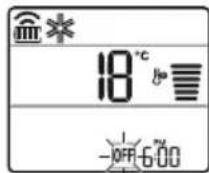
2 Press the + or - buttons to select the minutes.
3 Press the SET/CANCEL button to finish the setting.
The setting of the timer for the current time is shown on the display, which shows that the desired time has been set.
DELAY
This function is disabled when you set the standard timer.
Cancelling the timer for switching off
1 Press the TIMER button several times.
- The icon appears in the upper part of the display.
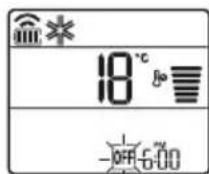
2 Press the SET/CANCEL button to cancel the setting.
Cancelling the timer setting
Press the button to cancel all timer settings.
Setting the unit for sleep (optional)
This function activates the air conditioner automatically when you sleep.
1 Turn on the unit.
2 Press the TIMER button several times.
- The lower part of the display shows the setting.
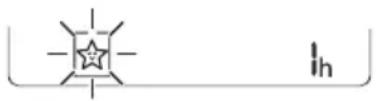
3 Press the + or - button to select the time (up to 7 hours). 4 Press the SET/CANCEL button to finish the setting.

It is shown on the screen.
DELAY

It shows the current time.
- The display of the internal temperature shows from 1 to 7, which is visible for only 5 seconds, after which it returns to the temperature setting.
The cooling and heating time increases by 1 degree Celsius every 30 minutes, and decreases by 1 degree Celsius every 30 minutes for more comfort. The temperature rises by 2 degrees Celsius from the previously set temperature. - Despite the adjustment of the fan speed, the fan speed can change, the fan speed is regulated automatically.
Using the standard timer function (optional)
This function activates the air conditioner automatically when you sleep.
1 Turn on the unit. 2 Press the TIMER button several times.
- The lower part of the display shows the setting.
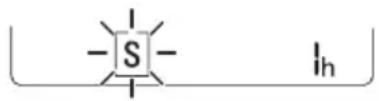
Press the button to select the hour (or hours). 4 Press the SET/CANCEL button to finish the setting.
This is shown on the display.
WARNING
- This function is disabled when setting the timer for switching off.
Using the function to display the consumed energy (optional)
This function shows the amount of electrical energy consumed by the indoor unit while the product is operating.
Displaying the current consumed energy
1 Turn on the device.
2 Press and hold the button for about 3 seconds.
The instantaneous power consumption () is shown briefly on the display of some indoor unit models.
WARNING
This is not shown on the remote control. - The unit of measure for the value shown on the display is kW. - If it is higher than 99 kW, which is an acceptable range, it is held at 99 kW. - Show the power below 10 kW with 0.1 kW increments and show the power above 10 kW with 1 kW increments. - The actual power may differ from the displayed power. - When connected to the outdoor unit of a multi-system, this function may not be supported.
Using the function to switch off the lighting (optional)
- Note 1: The input power is reduced by 20% compared to the nominal input power.
It is displayed on the screen.
Setting 2: Input power is 40% compared to nominal input power.
Displayed on the screen.
- Setting 3 (optional): Input power is 60% compared to nominal input power.
Displayed on the screen.
The current temperature is shown (Setting 1), (Setting 2), (Setting 3). (The current temperature is shown (Setting 1), (Setting 2).)
This function is used for cooling and dehumidification.
The capacity can be reduced when the energy management mode is selected.
The current temperature is displayed for about 5 seconds if you press the FAN SPEED button.
The current temperature is displayed for about 5 seconds if you press the ROOM TEMP button.
- When connected to a wired remote controller of a multi-split system, this function may not be supported.
Using special functions
1 Turn on the unit.
2 Press the FUNC button several times to select the desired position.
3 Press the SET/CANCEL button to finish the setting.
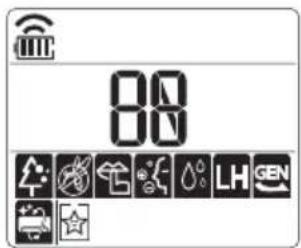
LG ThinQ is not responsible for any problems related to the network or for any damage, malfunction, or errors caused by the network connection.
If you experience difficulty connecting to the Wi-Fi network, the device may be too far from the router. Purchase a Wi-Fi repeater (signal booster) to extend the Wi-Fi signal range. The Wi-Fi connection may not be established or may be interrupted due to interference in the environment where the network is dominant. - The network connection may not work properly due to the internet service provider. - The wireless security environment may cause delays in the wireless network.
- The device may be restricted due to problems with the wireless signal transmission. Turn off the device and wait about a minute before trying again. If the firewall on your wireless router is enabled, deactivate it or add an exception for it.
- The name of the wireless network (SSID) must be a combination of English letters and numbers. (Do not use special characters.)
- The user interface (UI) of the smartphone may differ depending on the mobile operating system (OS) and the manufacturer.
- If the router's security protocol is set to WEP, you may not be able to configure the network. Change the security protocol setting to another protocol (WPA2 is recommended) and register the product again.
Software license with open source code
To obtain the source code under GPL, LGPL, MPL, and other open source licenses contained in this product, please visit the website http://opensource.lge.com.
In addition to the source code, you can also request the license terms, warranty disclaimers, and copyright notices.
LG Electronics will also provide open source code on CD-ROM for a charge covering the cost of performing such distribution (such as the price of the media, shipping, and handling) upon email request to: opensource@lge.com. This offer is valid for a period of three years after the last shipment of this product. This offer is valid to anyone in receipt of this information.
3 Remove the inner cover.
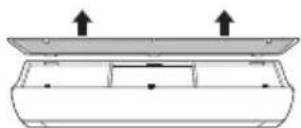
4 Clean the filter with a vacuum cleaner or with lukewarm water with a neutral detergent. 5 Dry the filter completely. 6 Insert the dry filter into the product.
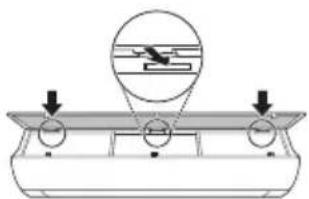
7 Press the cover until it clicks into place to install the dry filter.
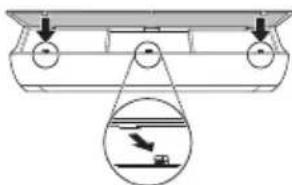
8 Check from the side of the product that the dry filter is installed correctly.
Type 2
1 Turn off the power and unplug the power cord. 2 Open the front cover.
- NOBUNHHeIeKOuDBeTe CtpaHn HaKanaka.
3 3aDpBxTe KOnyEtata Ha Bb3dyuHnTe cHnItpn, DpbHHeTe Hn HADony JekO n npemaxheTe OT BbTpEshHOTOrJIO.
4 NocTePe nntbpa c npaxocmyka k a nn c XnAka Boda c Heytpaen NoocCTBaU npenapat. 5 乌3cyweteΦnntpuTeHa cHka. 6 BkapaTe Kkynte Ha Bb3dUHHTe 0nItpn B npednna Kaak.
7 IpoBepTe OT cTpaHaTa Ha npEiHnKaIaK daJIb Bb3dUshHnTe fHJTPn ca npaBnHNo nOCTaBeHn.
ФункцязаимогнocTKa
To3n npodykt nma BrpaedeHa 9yHKcna 3a cAmOdaHocTnKa. Ako Bb3HNKHe rpeShka, JAMnata Ha BbTppeHOTo TJIIO ue 3anoHe da Mra c HTePBAI OT 2 cekyHdN. Ako ToBa ce Cnyu, CBpXeTe ce MeCTHnA DnCTPN6byTop IIN cepBn3eH ueHTbp.
Ipei da ce o6aNTe Ha cepBn3HnueHTbp
IpoBepTe cIeHTo, npEi Da ce CbPKeTe C cepBn3HnA ueHTbp. Ako npo6JIembT npOdbJxaba, o6bpHeTe Ce KbM Baunr MeCTe H cepBn3HnA ueHTbp.
VAŽNE SIGURNOSNE UPUTE

UPOZORENJE
Kako biste smanjili opasnost od eksplozije, požara, smrti, strujnog udara, ozljede ili opekotina osoba prilikom upotrebe ovog proizvoda, slijedite osnovne mjere opreza, uključujuci sljedeće:
Djeca u kućanstvu
Ovim se ureðajem ne bi trebale koristiti osobe (uključujuci djecu) smanjenih tjelesnih, osjetilnih ili mentalnih sposobnosti, ili s manjkom iskustva i znanja, osim ako ih osoba koja je odgovorna za njihovu sigurnost ne nadzire ili im daje upute u vezi's upotrebom ureðaja. Djecu treba naggledati kako bi se osiguralo da se ne igraju s ureðajem.
Za uporabu u Europa:
Olulised ohutusjuhised 4
USAGE 11
Important Safety Instructions

DANGER
Noti ghat-Thaddim 11
Wireless Remote Control 12
Setting the Air Conditioner to Automatically Turn On/Off 17
Using the Mode Functions 17
Using the Jet Mode Function 20
Using the Fan Speed Function 21
Wireless Remote Control
When Inserting the Batteries
If the display screen of the remote control starts to fade, replace the batteries. Insert AAA (1.5 V) batteries before using the remote control.
1 Remove the battery cover.
2 Insert the new batteries and make sure that the + and - terminals of the batteries are installed correctly.
Installing the Remote Control Holder
To protect the remote control, install the holder where there is no direct sunlight.
1 Choose a safe place that is easy to reach.
2 Attach the holder using two screws firmly tightened with a screwdriver.
Operating method
Point the remote control at the signal receiver on the right side of the air conditioner to operate it.

NOTE
- The remote control may operate other electronic devices if pointed at them. Make sure you are pointing the remote control at the signal receiver of the air conditioner.
For proper operation, use a soft cloth to clean the transmitter and the signal receiver.
3 Connect the smartphone to the wireless router.
NOTE
- To verify the Wi-Fi connection, check that the icon on the control panel is lit. This device supports only 2.4GHz Wi-Fi networks. To check the router frequency, contact your internet service provider or refer to the wireless router manual.
LG ThinQ is not responsible for network connection problems, damages, or malfunctions caused by the network connection.
- If the device is far from the router, it may not be able to connect to the Wi-Fi network. Purchase a Wi-Fi repeater (range extender) to improve Wi-Fi strength.
- The Wi-Fi connection may be interrupted or fail due to the home network environment.
- The network connection may not work properly due to the internet service provider.
- The surrounding wireless environment may cause the wireless network service to operate slowly.
- The device cannot be registered due to problems with wireless power transmission. Disconnect the device and wait about a minute before trying again.
- If the firewall on your wireless router is activated, disconnect the firewall or make an exception for this.
- The wireless network name (SSID) should be a combination of English letters and numbers. (Do not use special characters)
- The smartphone user interface (UI) may vary as it depends on the mobile operating system (OS) and the manufacturer.
- If the router's security protocol is set to WEP, you may not be able to operate the network. Please change it to other security protocols (WPA2 is recommended) and re-register the product.
How to install the LG ThinQ Application
TROUBLESHOOTING 33
"Smart Diagnosis" 29
MAINTENANCE 30
Cleaning the filter 32
TROUBLESHOOTING 33
Features of the "LG ThinQ" app
Connect the appliance to your smartphone using the convenient smart functions.
Smart Diagnosis
OWNER'S MANUAL
AIR CONDITIONER

Read this owner's manual before operating the device and keep it nearby at all times.
Display Brightness
The brightness of the indoor unit's display can be adjusted.
- Press the LIGHT OFF button.
NOTE
Turns the display screen on/off.
Using the comfort air function (optional)
Comfort Air Operation
This function easily sets the vane to a preset position to deflect the supplied air from blowing directly onto people in the room.
1 Turn the device on. 2 Press the COMFORT AIR button several times to select the desired direction.
as shown on the display.
NOTE
as shown by a few units inside.
- This function is disabled when MODE or JET MODE is pressed.
- This function is disabled and the automatic vertical air direction is set when SWING is pressed.
- When this function is off, the horizontal flap operates automatically according to the set mode.
Using the energy control function (optional)
1 Turn the device on.
2 Press the ENERGY CTRL button.
- Press the ENERGY CTRL button several times to select each step.
| Céim 1 Céim 2 Céim 3 | ||
| 80 % | 60 % | 40 % |
| 200 | 200 | 200 |
NOTE
- Step 1: The power input is reduced by 20% compared to the rated power input.
80 as shown on the display.
- Step 2: The power input is reduced by 40% compared to the rated power input.
60 as shown on the display.
- Step 3 (optional): The power input is reduced by 60% compared to the rated power input.
40 as shown on the display.
80 (1 step), 62 (2 steps), (3 steps) as shown by several indoor units.
(1 step), (2 steps) as shown by several indoor units.)
- This function is available with the Wired Remote Controller.
The capacity may decrease when the Power Control mode is selected.
The desired temperature will be displayed for 5 seconds if FAN SPEED is pressed.
The desired temperature will be displayed for 5 seconds if ROOM TEMP is pressed.
This function may not be supported when devices are connected to the Multi-split outdoor unit.
Using special functions
1 Turn the unit on.
2 Press the FUNC button several times to select the desired function.
3 Press SET/CANCEL to finish.
| Scáthlán C | ur sios |
| A | Baineann an gineadóir ian leas as na milliuin ian chun cuidiú le feabhsú na hearcháilíochta laistigh. |
| E | Chun torann a isliú on aonad amuigh. |
| D | Chun tais ginithe taobh istigh den aonad laistigh a bhaint. |
NOTE
Some functions may not be available depending on the model. This function may operate differently from the remote controller display.

WARNING
This appliance is intended for household use.
This mode automatically changes the mode, in order to maintain the set temperature at ±2°C.
1 Turn on the appliance.
2 Press the MODE button repeatedly, in order to select the automatic mode.
It is displayed on the display for display.
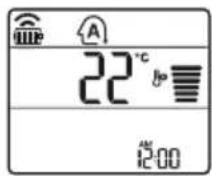
3 Press the button to set the desired temperature.
4 Press the FAN SPEED button to adjust the fan speed.
Humidity reduction mode
This mode removes excess moisture from the air in high humidity environments, or during the rainy season, in order to prevent the formation of condensation. This mode automatically adjusts the temperature and fan speed, in order to maintain the optimal level of humidity.
1 Turn on the appliance. 2 Press the MODE button repeatedly, in order to select the humidity reduction mode.
It is displayed on the display for display.
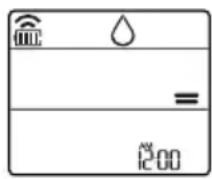
NOTE
In this mode you cannot adjust the temperature, it will be adjusted automatically. The temperature is not displayed on the display. In the dehumidification mode, the compressor and the indoor fan may not operate until the room temperature is 24 °C
Heating mode
1 Turn on the device. 2 Press the MODE button repeatedly to select the heating mode.
It is displayed on the display screen.
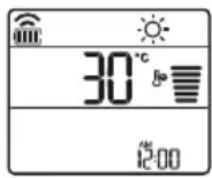
3 Press the button to set the desired temperature.
NOTE
The indoor unit will be displayed when the defrosting operation is working.
- The display shows the indoor unit and the outdoor unit:
When the preheating is working. When the outdoor temperature reaches the set temperature.
Fan mode
This mode only circulates the indoor air, without changing the outdoor temperature.
1 Turn on the device. 2 Press the MODE button repeatedly to select the fan mode.
It is displayed on the display screen.
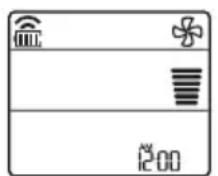
3 Press the FAN SPEED button to adjust the fan speed.
Using the fan mode
Adjusting the fan speed
- Press the FAN SPEED button repeatedly to adjust the fan speed.
| Екраза прикajувае | БрзINA |
| Виска | |
| Медим - Виска | |
| МEDIUM | |
| МEDIUM - Н sticka | |
| Н sticka | |
| - Ригореден ветар | |
Title: LG ThinQ
Read this owner's manual thoroughly before operating your appliance and keep it handy for reference at all times.
Smart Diagnosis
If you experience a problem with the appliance, the Smart Diagnosis feature will help you diagnose the problem.
Processed
You can set various options on the appliance and in the application.
If you change your wireless router, internet service provider, or password, delete the registered appliance from the LG ThinQ application and register it again. The application will notify you of any changes to the appliance without prior notice to users. - Features may vary depending on the model.
Before using the LG ThinQ application
1 Check the distance between the appliance and the wireless router (Wi-Fi).
If the distance between the appliance and the wireless router is too far, the signal strength weakens. It may take a longer time to register or may fail to install.
2 Turn off the Mobile data or cellular data on your smartphone.
3 Connect your smartphone to the wireless router.
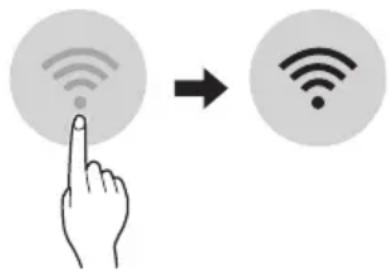
If the appliance does not connect to Wi-Fi, check the router and the indicator lights on the control panel. The appliance supports only 2.4 GHz Wi-Fi networks. To check the frequency of your network, contact your internet service provider or the administrator of your wireless router.
LG ThinQ is not responsible for any problems related to the network connection or any errors, defects, or malfunctions caused by the network connection. - If the appliance has problems connecting to the Wi-Fi network, it may be due to the router. Turn off the Wi-Fi (turned off at the outlet) to improve the Wi-Fi signal strength. The Wi-Fi connection may not connect or may be interrupted due to the home network environment. - Connection may not work - depending on the provider of - internet service. - The wireless connection may - require the wireless network service to - work properly.
The appliance cannot be registered, there are problems with the wireless signal transmission. Unplug the cable from the appliance and wait about a minute, then try again. - If the firewall is enabled on your wireless router, disable it or add an exception for it. - The name of the wireless network (SSID) should be a combination of English letters and numbers. (Do not use special characters) - The smartphone user interface (UI) may vary depending on the mobile operating system (OS) and the manufacturer. - If the router's security protocol is set to WEP, you may not be able to connect to the network. You can change to a different security protocol (WPA2 is recommended) and try registering the product again.
Installing the LG ThinQ application
Download the LG ThinQ application from Google Play Store & Apple App Store via your smartphone. Follow the instructions for downloading and installing the application.
Notice regarding Open Source software
To obtain the source code under GPL, LGPL, MPL, and other open source licenses used in this product, please visit http://opensource.lge.com. In addition to the source code, all referenced license terms, warranty disclaimers, and copyright notices are available for download.
LGE will also provide you with the open source code on CD-ROM for a charge covering the cost of performing such distribution (such as the cost of media, shipping, and handling) upon email request to opensource@lge.com. This offer is valid for a period of three years after the last shipment of this product. This offer is valid to anyone in receipt of this information.
Smart Diagnosis
This function is available only on models with the logo
Use this function to diagnose or solve problems with your appliance.
- If this is not due to a defect in the LG device, the service may not work due to external factors, such as, but not limited to, Wi-Fi unavailability, Wi-Fi connection loss, provider's application restrictions, or application unavailability.
- This function may be subject to change and may vary depending on the model you have.
Using LG ThinQ to diagnose problems
If you experience problems with your appliance connected via Wi-Fi, you can send the problem data to your smartphone using the LG ThinQ app.
- Turn on the LG ThinQ app and select Smart Diagnosis from the menu. Follow the instructions in the LG ThinQ app.
Using Sound Diagnosis to diagnose problems
Follow the instructions below to use the Sound Diagnosis method.
Turn on the LG ThinQ app and select Smart Diagnosis from the menu. Follow the instructions for Sound Diagnosis given in the LG ThinQ app. 1 Turn on the appliance by plugging it into the power outlet. 2 Place the phone's mouthpiece close to the DIAGNOSIS [5s] logo, then press and hold it until the data transfer is complete.
Do not move the smartphone until the data transfer is complete. The remaining time required for data transfer is displayed.
4 Once the data transfer is complete, the diagnosis will be displayed in the app.
NOTE
For best results, do not move the phone until the tones have finished transmitting. Make sure to keep the ambient noise to a minimum, otherwise the phone may not receive the sound signals from the internal unit correctly.
CLEANING AND MAINTENANCE
- Before cleaning or performing maintenance, turn off the appliance and wait until the fan has completely stopped.
If the appliance is not to be used for an extended period, unplug it to keep it in the best condition. Regularly clean the product to maintain optimal performance and prevent potential defects.
- Run the air conditioner in cooling mode for 3 to 4 hours, then turn it off. Internal parts may appear wet if the humidity remains in its components.
- After running the internal components of the air conditioner in cooling mode for 3 to 4 hours, before its repeated use, this will help in removing the moisture created by the humidity.
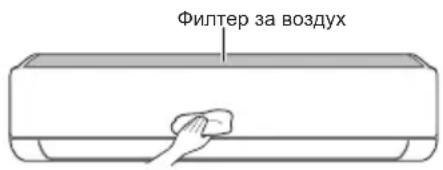
-The function may vary depending on the model.
| Тип Опис Иntервал | |
| Фильпер за ВОЗдух | Исучтete со правосмICALа ил рачно Исторе. 2 недени |
| JOизатор(оштоналho) | УлOTребete сУВа памуна вata за за ja otst相对较п'te пашинatable. |
| Виатrelша edиница | Исучтete ja повшинatable на Виатrelша та edиница, корисейки мека, сУВа крna. |
| Пробесионално Исучтete го садот каде ШTO се собра konданзиранatable влara. | |
| Пробесионално Исучтete ja севкatingа на ЗоюшTO се собра konданзиранatable влara. | |
| Замене ГБбатрines на далочинскnot уравувач.ЕдношToДишно | |
| Надворша edиница | Пробесионално Исучтete ГКалемпente 3a оддва.TableТоллina и Таблata co OTbори.(Посоветувajte ce co Тхничар.) |
| Пробесионално Исучтete го сфенOT.ЕдношToДишно | |
| Пробесионално Исучтete го садOT каде ШTO се собра konданзиранatable влara. | |
| Пробесионално Лиге НЕКNotВрди ДЕКа соctabнITE DeLOВИ на сфенOT сцьрст�о зATERгати. | |
| Исучтete ГЕLEКТРИЧNHTE KOMПОЕNTN CO ВОЗдух.ЕдношToДишно |
NOTE
- Never use water that has a temperature higher than 40°C when cleaning the filters. It may cause deformation or damage.
- Never use flammable materials when cleaning the filters. They may damage the product surface.
Cleaning the filter
Clean the air filter every 2 weeks, more often if needed.
NOTE
- The air filter may be damaged if it is bent. If the air filter is not properly installed, dust and other materials may enter the indoor unit.
Type 1
If you look at the front of the indoor unit, you can easily assemble the upper filter.
1 Turn off the power and unplug the power cord. 2 Hold the filter handle and pull it out.
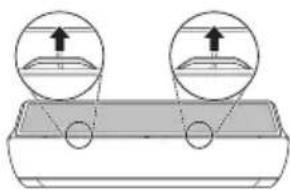
3 Remove it from the indoor unit.
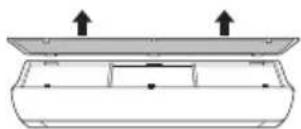
4 Clean the filter with a vacuum cleaner or with lukewarm water containing a neutral detergent. 5 Dry the filter in the shade. 6 Insert the filter hooks into the front panel.
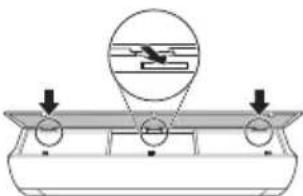
7. Install the filters to assemble the air filter.
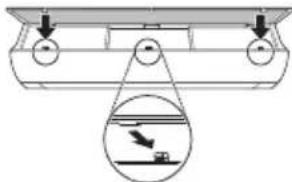
8. Check the side of the front cover for correct assembly of the air filter.
Type 2
1. Unplug the appliance and remove the power cord. 2. Open the front cover.
- Pull the tab and remove the cover.
3. Hold the air filter tabs, pull the tab down, and remove it from the inner unit.
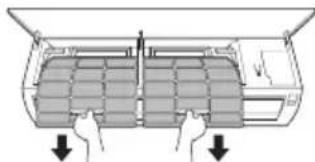
4. Clean the filters with a soft brush or running water with a neutral detergent. 5. Dry the filters in the shade. 6. Replace the air filter tabs into the front cover.
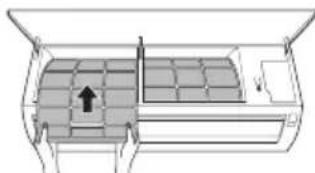
7. Check the side of the front cover for correct assembly of the air filters.
Self-diagnosis function
This product has a built-in self-diagnosis function. If an error occurs, the lamp on the inner unit will blink at intervals of a few seconds. If this happens, contact your local distributor or service center.
Before requesting service
Please check the following items before contacting the service center. If the problem persists, contact your local service center.
| Симптоми можни | Прочны и рeshенье |
| Клиma урекот неpbотиHopмлно. | Мирзба на ИЗrogenи и чуdenи 3Вуци доа fraат od endinhiцatura.ISCKnyechte ro Клиma урекot, ИЗвадete ro Ka6elenot 3a стура щьду влархоста e endko.Nscknyechte ro Клиma урекot, ИЗвадete ro Ka6elenot 3a стура щьду влархostа e endko.Nscknyechte ro ИЗворот на ИЗюйвашие, a noToa koNTakTIPajte ro cepBICHNOT ueHapr. |
| Туve ВODа OD BнATpeShnata edinhiца, KORA HNBOTO Na BnaxHoCSTa e endko.Nscknyechte ro Клиma урекot, ИЗвадete ro Ka6elenot 3a стура щьду влархostа e endko.Nscknyechte ro ИЗворот на ИЗюйвашие, a noToa koNTakTIPajte ro cepBICHNOT ueHapr. | |
| КабелOT 3a STpyja e oStTeTeHинсоэдама п配电умерна toponlinha.Nscknyechte ro Клиma урекot, ИЗвадete ro Ka6elenot 3a стура щьду влархostа,ЗазemjyBaJIeTo), Илс осигурУвачOT He habOTat npabINHO.Nscknyechte ro Клиma урекot, ИЗвадete ro Ka6elenOT 3a стура щьду влархostа,ИЗворOT Na HANOJYBaJIe, a noToa KOHTAKTIPajte ro cepBICHNOT ueHapr. | |
| Единцага соЗдава кOD Na rpeшka od conctbeHOTOcamodinjarHocTHnOuPahBe.Nscknyechte ro Клиma урекot, ИЗвадete ro Ka6elenOT 3a стура щьду влархostа e endko.Nscknyechte ro ИЗворOT Na HANOJYBaJIe, a noToa KOHTAKTIPajte ro cepBICHNOT ueHapr. | |
| Клиma урекот неpbotи. | Клиma урекOT He e prinknyech.NproBepete Далу КабелOT 3a HANOJYBaJIe e BmETnat BO prinknyochOT 3a STpyja, Илс можеби се ВКNUeHун ИЗOLaTopiNe 3a HANOH. |
| Има ИЗбен ocinrypauch, Илс e bLOknpaHOn HANOJYBaJIeTo co Stpyja.Nscknyechte ro ИЗворOT Na OINUpaCHOT Далу prinknychUvaOT Na STpyjHOTOKOо ce BKNUyHIn. | |
| Се сFlyчппruKIN Ha eIeleKTPnUHaTaNHeerriJa.Nscknyechte ro Клиma урекot,aCOse cSnyчппruKIN Ha eIeleKTPnUHaTaNHeerriJa.Kora HANOJyBaJIeTo nobTOpHо Ke ce BOCNoCTaBn, noChekajTe 3 MInHytNi, naNoToa BKNUeTe To Klnma upeDor. | |
| Волтжата e Илс premHory BnCoka, Илс premHory HnCKa.NproBepete Далу се ВКNUeHl npeKINHyBaUOT Na STpyjHOTOKOу. | |
| Клиma урекOT ABTomatcKn Ce IcKluyu Bo OBOJ Moment.T.BKnyechte ro Клиma урекOT. | |
| БateprinTE Bo daleuHcknOT uynpaBvBaU He ce npabinlu HaMeCTeH.N.Oscyrpete ce Deka sbateprinTe ce npabinlu BmETHaTb BO BaINOT daLeuHnckuynpaBvBaU.C.AKO sbateprinTe ce npabinlu HaMeCTeH, a Klnma upeDot i noHaTamy Hepbotni, Toraai 3ameHete ng sbateprinTe i obundete c Te NobTopHo. | |
| СимпTomи Рожни | Прочны и рeshенье |
| Клиma уреот не ( искneyта ладен Воздун. | Воздунот не циркулера правлино. • Осигурete се дeca Нем за вescи, ралетни, ялдегов од мебел, Што го 6лokираат пroduнот ду на клиma уреот. |
| Фильтерот за Воздун e валдан. • Устende ту Фильтерот за Воздун сднаш на секон 2 недени. • Видete BO "Чистende на Фильтерот" за по breaste Информаши. | |
| Собнаты Temnéратуа с пемногу виска. • 3a сеньocно ладене на винату СОДУв FO letnho в徕е сnotreбно В徕е BO takOB сдунaj, Изберete ту Млалзнот ржимь од побразу ладене HA BHTPEUHNOT BOZdUnx. | |
| Ладною Воздун ИЗлergува од собда. • Осигурete се дeca Нем за ведува сднаш на секон ВОЗдун пему ВECHINAUONITE TOOKI OД собда. | |
| Посakуванatura Temnéратуа с nobисока од сeraшнatura Temnéратуа. • Поставete ja посakуванatura Temnéратуа на поиско НИВО од сeraшнatura Temnéратуа. | |
| Во сизина лima ИЗВор на толлina. • Изberнунайда koportstite Извори на толлina, какошто се селистричны пechки ялгалейпоги на паменици, дodeka paBOTN Клиma уреот. | |
| Изbethан e ржимOT на сhen. • 3a в徕е на сhen ржимOT од Клиma уIntegralу воздун, кочто сн'tу олд, ниту олгу загрева BHTPEUHNOT BOZdUnx. • Посторлесуrelу ржимOT на павotas BO равotas на падене. | |
| Надворшнatura Temnéратуа с пемногу виска. •Ефektot на падене може на не сн'de doBoilen. | |
| Брзинatable на сhenot небе до се прилагду. | Изbethан e млалзнот ржимил ржимOT на АВТOMATСКО пботе; • Ви леси ржими на пботе; • Изberгете ржим на пботе; • Дэхлготы в��ы BO кочто к meжete на ja прилагдуппату на сhenot. |
| Temnéратура淘汰 не може до сibe прилагдуна. | Изbethан e сhen ржимOT лим млалзнOT ржим. • Ви леси ржими на пботе; • Изberгете ржим на пботе; • Дэхлготы в��ы BO кочто к meжete на ja прилагдуппату на сhenot. |
| Клиma уреот заразу зу в徕е на пбота. | Клиma уреот неаideяно с Isaacquч. • Можеби состача Функцилaja на мерачOT на В徕е, ошто ja Исклуч; Еденицата. П robерете Г поставке на мерачOT на В徕е. |
| Се сныnpлSpecин на селкову са в徕е на рботе; • Почекajte ду се врати селкову са в徕е. • Дэхл専а对接спспспспспспспспспспспспспспспспспспспспспспспспспспспспспспспспспспспспспспспспспспспспспспспспспспс? • Дэхл専а对接спспспспспспспспспспспспспспспспспспспспспспспспспспспспспспспспспспспспспспспспспспспспспc. • Дэхл専а对接спспспспспспспспспспспспспспспспспспспспспспспспспспспспспспспспспспспспспспспспспспспспс. • Дэхл専а对接спспспспспспспспспспспспспспспспспспс. • Дэхл専а对接спспспспспспспспспспспс. • Дэхл専а对接спспспспспс. • Дэхл専а对接спспспс. • Дэхл専а对接спспс. • Дэхл専а对接спс. • Дэхл専а对接с. • Дэхл専а对接с. • Дэхл専а对接с. • Дэхл専а对接с. • Дэхл専а对接с. • Дэхл専а对接с. • Дэхл専а对接с. • Дэхл専а对接с. • Дэхл専а对接с. • Дэхл専а对接c. • Дэхл専а对接c. • Дэхл専а对接c. • Дэхл専а对接c. • Дэхл専а对接c. • Дэхл専а对接c. • Дэхл専а对接c. • Дэхл専а对接c. • Дэхл専а对接c. • Дэхл専а对接c • Дэхл専а对接c. • Дэхл専а对接c. • Дэхл専а对接c. • Дэхл専а对接c. • Дэхл専а对接c. • Дэхл専а对接c. • Дэхл専а对接c. • Дэхл専а对接c. • Дэхл専а对接c. * Дэхл専а对接c. * Дэхл専а对接c. * Дэхл専а对接c. * Дэхл専а对接c. * Дэхл専а对接c. * Дэхл専а对接c. * Дэхл専а对接c. * Дэхл専а对接c. * Дэхл専а对接c. *Дэхл専а对接c. *Дэхл専а对接c. *Дэхл専а对接c. *Дэхл専а对接c. *Дэхл専а对接c. *Дэхл専а对接c. *Дэхл専а对接c. *Дэхл専а对接c. *Дэхл専а对接c. *Д�эхл専а对接c. *Дэхл専а对接c. *Дэхл専а对接c. *Дэхл専а对接c. *Дэхл専а对接c. *Дэхл専а对接c. *Дэхл専а对接c. *Дэхл専а对接c. *Дэхл専а对接c. *ДСоДунТу *ДСоДунТу *ДСоДунТу *ДСоДунТу *ДСоДунТу *ДСоДунТу *ДСоДунТу *ДСоДунТу *ДСоДунТу *ДСоДунТу *ДСоДунТу |
| Симпоми можни | Прочны и ршени | |
| Внатрeshнatable единиca сеушто ке разоти, дури и по пекиnot на елекtrpvнatable еергija. | РабOTи Функцилatable ватматско чир themselves. ДобOTи ВОзOTи КУнКцилatable ватматско чир themselves Дд подоглжи, биdeяки ja OTсТраНУВа пеocтэнтátа ВДага оД ВНаТршноctа на ВНаТршэнтatura единиca. Ако На са��ate obaa Функцилaj, можete Дд ja ИСКПЧИпЕ единиca.Tа. ЛаднOT BOЗdux od Kлиma у畴OT создава магna. ОьOTи ФенOMeH ce счува кORA doaЯdo Ha hamalvBaJIbe Na coБнATA temпepatура. ИстEVу BA Oda od надворшнatable единиca. | ПаднOT BOЗdux od Kлиma у畴OT создава магna. ОьOTи ФенOMeH ce счува кORA doaЯdo Ha hamalvBaJIbe Na coБнATA temпepatура. ИстEVу BA Oda od надворшнatable единиca. |
| ПостOTи БUCHА ВОДOD надворшнatable единиca. | ЗВУК Na KLINKHyBaJIte Може Дд ceчу КORA edinHицala TazочHyВа Или ЗАПИРа, Заради ДвижеTo HбовathNOT BeHTINJ. ЗВУК Na StKpRnIeHBe: Пл actTUnHITE DeLOBи Ha BHaTpeShHaTa.edinHиц ШКрИРа КORA doaЯdo DO HINBHO CTechHyBaJIe Или П proширУВаJIte 3apadi небeJHNTe TetePapTyprHn ПрмeHiN. ЗВУК Na TeчeJIe Или duYBaJIbe: Toa e TeчeJIeTO Ha cpeDCTBOTO 3a ЛадeJIe нИЗ KLINMA U畴OT. Тoa ce HopMaJIH NсIMTpOMi. Бuchavata Ke 3anpe. | |
| Внатрeshнatable единиca oДдава МириЗБa. | МириЗБпte (Касу Na prizimeр Ha idmOT od zuigapri) можат Дд boДд anscopбИраны BO HbAtpseшнATER eDinHицa Ид ce ocNoobodyBaAT co пpoTOKOT Ha BOZdUxOT. Ако МириЗБаТа Н ecYe3He, кe Mopa Дд ro ИЗМиeTeФиТерOT. Ако He paБOTи, КонтakTIPajTe ro cepBvCHNOT ueHTAP, 3a Дд ro ИСчeSTITE emITePOT нАТПИн. Кога ржIMOT Ha rpeeJIe Ke 3anoOHe, OTBOPOT e ckopo 3aTBopeHи reчис нЕ ИЗЛeгУВa BOZdUx, Иako HaNВopseшнATER eDinHицa pa6OTи. Тoa e HopMaJIEN CIMNTOM. Be moJIme noчeJaTe СдоDEka EdinHицаТа He СоЗдade DoBOvONTO TOnOII BOZdUx, кojшTO Ke ce DuBa HIN 3B HbAtpseшнATER edinHицa. | |
| Надворшнatable.edinHица e BO pexIMOT 3a Odmp3HyBaJIte. Кога у畴OT e BO pexIMOT Ha rpeeJIe, leiodOT/mpa3OT ce sobIPAAT Br3 КалEMITE, akO dojde Do nafAbe Ha HaNBopseшнATER Tempepatура. Obaa ФунHICJIja ro OTcTpaHvBa cNoJot od mpa3 KoJShTO ce HAOrA Br3 KaIeMOT, И SF Травалю за завши за okolny 15 minuTи. | ||
| Надворшнatable Tempepatура e ремногу niscka. ЕфektOT Ha rpeeJIe можe Дд Нбide doволен. | ||
| СимпTomи можни | Прочны и рeshени | |
| Вашnot Кужен anapatи смартфонот He ce порзано co Wi-Fi мрека. | Лоб生态系统а 3a Wi-Fi на кoeшто ce обидуне дуа ce поврзete, e неточна. • Нajдente ja Wi-Fi мрека kojaшто e поврзана co вшиот смартфони отстранete ja, a noToa Perinctprapajte ro вшиот anapat на LG ThinQ. | |
| Мышино падатои 3a вшиот смартфонс ce вклучeni. • Исклучete Ги Мышино падатои на вшиот смартфони ренистррajte ro anapatot, korpinctejectki ja Wi-Fi мрека. | ||
| И métета на бeзшинаха мрека (SSID), He e правлино поесен. • И métета на bезшинаха мрека (SSID) trpebaда bide komбihuшиja od anглески bukvin 和 boevi. (He corpinctete Ги спеццални� karakterи) | ||
| Ф��евеньцилaja на рутетор He e 2,4 GHz. • Повл婧аяе само 2,4 GHz Ф��евеньциja на рутетор. Поставete ro bезшино рутетор 2,4 GHz и порstete ro anapatot co bезшино рутет. 3aда ja пobерпite Ф��евеньцилaja на рутетор, пobерпete кaj вшиот снабдувач на Иnterpnet Yuclуги, ип кaj пoinizbodnitelot на рутетор. | ||
| Пэрелеме e pactojahneeto noméry anapatot и рутетор. • Ако e пэрелеме pactojahneeto noméry anapatot и рутетор, сигналot можеда bide сдд и кonekuшилata можеда He bide правлино конфигурирана. Поменete ja lokaшилata на рутетор, заudence пobлиicky do anapatot. | ||
NOTE
Some functions may not be supported, depending on the model.
AIR CONDITIONER

IMPORTANT SAFETY INSTRUCTIONS

WARNING
To reduce the risk of explosion, fire, death, electric shock, injury, or burns to persons when using this product, follow basic precautions, including the following:
Children in the household
This appliance is not intended for use by persons (including children) with reduced physical, sensory, or mental capabilities, or lack of experience and knowledge, unless they are under constant supervision or have been instructed on the use of the appliance by a person responsible for their safety. Children should be supervised to ensure that they do not play with the appliance.
- TABLE OF CONTENTS
- SAFETY INSTRUCTIONS
- OPERATION
- SMART FUNCTIONS
- MAINTENANCE
- TROUBLESHOOTING
- IMPORTANT SAFETY INSTRUCTIONS
- WARNING
- CHILDREN IN THE HOUSEHOLD
- FOR USE IN EUROPE
- INSTALLATION
- TECHNICAL SAFETY
- CAUTION
- NOTES FOR OPERATION
- SUGGESTION FOR ENERGY SAVING
- PARTS AND FUNCTIONS INDOOR UNIT OUTDOOR UNIT
- INDOOR UNIT DISPLAY
- NOTE
- WIRELESS REMOTE CONTROL INSERTING BATTERIES
- INSTALLING THE REMOTE CONTROL HOLDER
- OPERATING METHOD
- SETTING THE CURRENT TIME
- USING THE °C/°F CONVERSION FUNCTION (OPTIONAL)
- OPERATING THE AIR CONDITIONER WITHOUT THE REMOTE CONTROL
- TYPE
- USING WIRELESS REMOTE CONTROL
- RESTARTING THE AIR CONDITIONER AUTOMATICALLY
- DISABLING AUTO RESTART
- USING THE MODE FUNCTION
- COOLING MODE
- AUTO OPERATION (ARTIFICIAL INTELLIGENCE)
- MULTI MODEL
- AUTO CHANGEOVER MODE
- SINGLE SPLIT MODEL
- DEHUMIDIFICATION MODE
- HEATING MODE
- FAN MODE
- USING THE JET MODE FUNCTION CHANGING ROOM TEMPERATURE QUICKLY
- USING THE FAN SPEED FUNCTION
- ADJUSTING THE FAN SPEED
- USING THE AIR FLOW DIRECTION FUNCTION
- SETTING THE ON/OFF TIMER
- SETTING THE ON TIMER
- CANCELING THE ON TIMER
- SETTING THE OFF TIMER
- CANCELING THE OFF TIMER
- CANCELING THE TIMER SETTING
- USING THE SLEEP FUNCTION (OPTIONAL)
- USING THE SIMPLE TIMER FUNCTION (OPTIONAL)
- USING THE ENERGY DISPLAY FUNCTION (OPTIONAL)
- DISPLAY THE CURRENT ENERGY USAGE
- USING THE LIGHT OFF FUNCTION (OPTIONAL)
- DISPLAY SCREEN BRIGHTNESS
- USING THE COMFORT AIR FUNCTION (OPTIONAL)
- COMFORT VANE OPERATION
- USING THE ENERGY CONTROL FUNCTION (OPTIONAL)
- USING SPECIAL FUNCTIONS
- CANCELING SPECIAL FUNCTIONS
- USING THE AIR PURIFICATION FUNCTION
- USING THE SILENT FUNCTION
- USING THE AUTO CLEAN FUNCTION
- LG THINQ APPLICATION
- LG THINQ APPLICATION FEATURES
- SMART DIAGNOSIS
- SETTINGS
- BEFORE USING LG THINQ APPLICATION
- INSTALLING THE LG THINQ APPLICATION
- OPEN SOURCE SOFTWARE NOTICE INFORMATION
- USING LG THINQ TO DIAGNOSE ISSUES
- USING AUDIBLE DIAGNOSIS TO DIAGNOSE ISSUES
- CLEAN THE AIR FILTER
- SELF-DIAGNOSIS FUNCTION
- BEFORE CALLING FOR SERVICE
- OWNER'S MANUAL
- AIR CONDITIONER
- GENERAL WARNINGS
- TIMER
- USING THE TEMPERATURE CONVERSION FUNCTION (°C/°F) (OPTIONAL)
- CLIMATE CONTROL WITHOUT REMOTE CONTROL
- USING THE WIRELESS REMOTE CONTROL
- TURNING THE TIMER ON AND OFF
- SETTING THE TIMER FOR TURNING ON
- CANCELING THE TIMER FOR TURNING ON
- SETTING THE TIMER FOR SWITCHING OFF
- DELAY
- CANCELLING THE TIMER FOR SWITCHING OFF
- CANCELLING THE TIMER SETTING
- SETTING THE UNIT FOR SLEEP (OPTIONAL)
- USING THE STANDARD TIMER FUNCTION (OPTIONAL)
- USING THE FUNCTION TO DISPLAY THE CONSUMED ENERGY (OPTIONAL)
- DISPLAYING THE CURRENT CONSUMED ENERGY
- USING THE FUNCTION TO SWITCH OFF THE LIGHTING (OPTIONAL)
- SOFTWARE LICENSE WITH OPEN SOURCE CODE
- ФУНКЦЯЗАИМОГНOCTKA
- IPEI DA CE O6ANTE HA CEPBN3HNUEHTBP
- VAŽNE SIGURNOSNE UPUTE
- UPOZORENJE
- DJECA U KUĆANSTVU
- ZA UPORABU U EUROPA
- USAGE
- DANGER
- WIRELESS REMOTE CONTROL
- WHEN INSERTING THE BATTERIES
- HOW TO INSTALL THE LG THINQ APPLICATION
- FEATURES OF THE "LG THINQ" APP
- DISPLAY BRIGHTNESS
- COMFORT AIR OPERATION
- THIS APPLIANCE IS INTENDED FOR HOUSEHOLD USE
- HUMIDITY REDUCTION MODE
- USING THE FAN MODE
- TITLE: LG THINQ
- PROCESSED
- BEFORE USING THE LG THINQ APPLICATION
- NOTICE REGARDING OPEN SOURCE SOFTWARE
- USING LG THINQ TO DIAGNOSE PROBLEMS
- USING SOUND DIAGNOSIS TO DIAGNOSE PROBLEMS
- CLEANING AND MAINTENANCE
- CLEANING THE FILTER
- BEFORE REQUESTING SERVICE
Brand : LG
Model : AC09BQ
Category : Air conditioner