
S09ET - Air conditioner LG - Free user manual and instructions
Find the device manual for free S09ET LG in PDF.
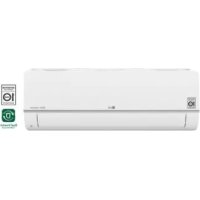



| Product Type | Wall-mounted split air conditioner |
| Brand | LG |
| Model | S09ET |
| Refrigerant | R32 (flammable) |
| Power Supply | 220-240 V ~ 50 Hz (standard estimate) |
| Remote Control Batteries | 2 AAA batteries (1.5 V) |
| Operating Modes | Cooling, heating, dehumidification, fan, auto |
| Special Functions | Jet mode, sleep, On/Off timer, swing, air comfort, energy control, silence, auto-clean, ionizer, plasma |
| Air Filter Cleaning Interval | Every 2 weeks |
| Anti-Allergen Filter Cleaning Interval | Every 6 months |
| Connectivity | Wi-Fi 2.4 GHz, LG ThinQ app, Smart Diagnosis |
| Auto Restart | Yes (restores settings after power failure) |
| Self-Diagnosis | Yes (flashing indicator if error) |
| Safety | Grounding mandatory, emergency stop, overcurrent protection (circuit breaker) |
| Installation | Must be performed by a certified professional |
| Annual Professional Maintenance | Cleaning coils, fan, condensate pan, checking connections |
| Dimensions (Indoor Unit) | Not specified in the manual |
| Weight (Indoor Unit) | Not specified in the manual |
| Included Accessories | Remote control, batteries, remote control holder (optional) |
| Repairability | User-accessible filters; internal repairs by a professional |
Frequently Asked Questions - S09ET LG
User questions about S09ET LG
0 question about this device. Answer the ones you know or ask your own.
Ask a new question about this device
Download the instructions for your Air conditioner in PDF format for free! Find your manual S09ET - LG and take your electronic device back in hand. On this page are published all the documents necessary for the use of your device. S09ET by LG.
USER MANUAL S09ET LG
Read this owner's manual thoroughly before operating the appliance and keep it handy for reference at all times.
TYPE: WALL MOUNTED
Original instruction
EN ENGLISH
FR FRANÇAIS
EL EAAHNIKA
NL NEDERLANDS
PL POLSKI
HU MAGYAR
BG BbIgAPCKN
HR HRVATSKI
CZ CESTINA
ET EESTI
MT MALTI
RO ROMÁNA
SK SLOVENCINA
SL SLOVENSČINA
LV LATVIEŠU
LT LIETUVIŲ
GA GAEILGE
SR SRPSKI
MK MAKEDONSKI
SQ SHQIP
BS BOSANSKI
TABLE OF CONTENTS
This manual may contain images or content different from the model you purchased.
This manual is subject to revision by the manufacturer.
SAFETY INSTRUCTIONS 3
IMPORTANT SAFETY INSTRUCTIONS 4
OPERATION 11
Notes for Operation
Parts and Functions
Wireless Remote Control
Restarting the Air Conditioner Automatically
Using the Mode Function
Using the Jet Mode Function
Using the Fan Speed Function
Using the Air Flow Direction Function
Setting the On/Off Timer
Using the Sleep Function (Optional)
Using the Simple Timer Function (Optional)
Using the Energy Display Function (Optional)
Using the Light Off Function (Optional)
Using the Comfort Air Function (Optional)
Using the Energy Control Function (Optional)
Using Special Functions 25
SMART FUNCTIONS 27
LG ThinQ Application 27
Smart Diagnosis 29
MAINTENANCE 30
Clean the Air Filter 32
Clean the Allergy Filter (Optional) 33
TROUBLESHOOTING 34
The following safety guidelines are intended to prevent unforeseen risks or damage from unsafe or incorrect operation of the appliance.
The guidelines are separated into 'WARNING' and 'CAUTION' as described below.

This symbol is displayed to indicate matters and operations that can cause risk. Read the part with this symbol carefully and follow the instructions in order to avoid risk.

WARNING
This indicates that the failure to follow the instructions can cause serious injury or death.

CAUTION
This indicates that the failure to follow the instructions can cause the minor injury or damage to the product.
The following symbols are displayed on indoor and outdoor units. (for R32)

This symbol indicates that this appliance uses a flammable refrigerant. If the refrigerant leaks and is exposed to an external ignition source, there is a risk of fire.

This symbol indicates that the Operation Manual should be read carefully.

This symbol indicates that service personnel should handle this equipment with reference to the Installation Manual.

This symbol indicates that information is available, such as the Operating Manual or Installation Manual.
IMPORTANT SAFETY INSTRUCTIONS

WARNING
To reduce the risk of explosion, fire, death, electric shock, injury, or scalding to persons when using this product, follow basic precautions, including the following:
Children in the Household
This appliance is not intended for use by persons (including children) with reduced physical, sensory, or mental capabilities, or lack of experience and knowledge, unless they have been given supervision or instruction concerning use of the appliance by a person responsible for their safety. Children should be supervised to ensure that they do not play with the appliance.
For use in Europe:
This appliance can be used by children aged from 8 years and above and persons with reduced physical, sensory, or mental capabilities or lack of experience and knowledge if they have been given supervision or instruction concerning use of the appliance in a safe way and understand the hazards involved. Children shall not play with the appliance. Cleaning and user maintenance shall not be made by children without supervision.
Installation
- Do not install the air conditioner on an unstable surface or in a place where there is a danger of it falling.
- Contact an authorized service center when installing or relocating the air conditioner.
- Install the panel and the cover of the control box safely.
- Do not install the air conditioner in a place where flammable liquids or gases such as gasoline, propane, paint thinner, etc., are stored.
- Make sure that the pipe and the power cable connecting the indoor and outdoor units are not pulled too tight when installing the air conditioner.
- Use standard circuit breaker and fuse that conform to the rating of the air conditioner.
- Do not input air or gas into the system except with the specific refrigerant.
- Use non-flammable gas (nitrogen) to check for leak and to purge air; using compressed air or flammable gas may cause fire or explosion.
- The indoor/outdoor wiring connections must be secured tightly, and the cable should be routed properly so that there is no force pulling the cable from the connection terminals. Improper or loose connections can cause heat generation or fire.
- Install dedicated electric outlet and circuit breaker before using the air conditioner.
- Do not connect the ground wire to a gas pipe, a lightning rod, or a telephone ground wire.
- Keep any required ventilation openings clear of obstruction. (for R32)
- Means for disconnection must be incorporated in the fixed wiring in accordance with the wiring rules.
- Do not install the unit in potentially explosive atmospheres.
Operation
- Be sure to use only those parts listed in the service parts list. Never attempt to modify the equipment.
- Make sure that children do not climb on or hit the outdoor unit.
- Dispose of the batteries in a place where there is no danger of fire.
- Use only the refrigerant specified on the air conditioner label.
- Cut off the power supply if there is any noise, smell, or smoke coming from the air conditioner.
- Do not leave flammable substances such as gasoline, benzene, or thinner near the air conditioner.
- Contact an authorized service center when the air conditioner is submerged by flood waters.
- Do not use the air conditioner for an extended period of time in a small place without proper ventilation.
- In the event of a gas leak (such as Freon, propane gas, LP gas, etc.) ventilate sufficiently before using the air conditioner again.
- Be sure to ventilate sufficiently when the air conditioner and a heating appliance such as a heater are used simultaneously.
- Do not block the inlet or outlet of air flow.
- Do not insert hands or other objects through the air inlet or outlet while the air conditioner is operating.
- Make sure that the power cable is neither dirty, loose, nor broken.
- Never touch, operate, or repair the air conditioner with wet hands.
- Do not place any objects on the power cable.
- Do not place a heater or other heating appliances near the power cable.
- Do not modify or extend the power cable. Scratches or peeling insulation on the power cables may result in fire or electric shock, and should be replaced.
- Cut off the power supply immediately in the event of a blackout or a thunderstorm.
- Take care to ensure that power cable could not be pulled out or damaged during operation.
- Do not touch refrigerant pipe, water pipe and any internal parts while the unit is operating or immediately after operation.
Maintenance
- Do not clean the appliance by spraying water directly onto the product.
- Before cleaning or performing maintenance, disconnect the power supply and wait until the fan stops.
Technical Safety
- Installation or repairs made by unauthorized persons can pose hazards to you and others.
- Any person who is involved with working on or breaking into a refrigerant circuit should hold a current valid certificate from an industry-accredited assessment authority, which authorizes their competence to handle refrigerants safely in accordance with an industry recognized assessment specification. (for R32) Servicing shall only be performed as recommended by the equipment manufacturer. Maintenance and repair requiring the assistance of other skilled personnel shall be carried out under the supervision of the person competent in the use of flammable refrigerants. (for R32)
- The information contained in the manual is intended for use by a qualified service technician who is familiar with the safety procedures and equipped with the proper tools and test instruments.
- Failure to read and follow all instructions in this manual can result in equipment malfunction, property damage, personal injury and/or death.
- The appliance shall be installed in accordance with national wiring regulations.
- When the power cord is to be replaced, the replacement work shall be performed by authorized personnel using only genuine replacement parts.
- This appliance must be properly grounded to minimize risk of electric shock.
- Do not cut or remove the grounding prong from the power plug.
- Attaching the earth wire to the power outlet cover screw does not ground the appliance unless the cover screw is metal, uninsulated, and the power outlet is grounded through house wiring.
- If you have any doubt whether the air conditioner is properly grounded, have the power outlet and circuit checked by a qualified electrician.
- The refrigerant and insulation blowing gas used in the appliance require special disposal procedures. Consult a service agent or a similarly qualified person before disposing of them.
- If the supply cord is damaged, it must be replaced by the manufacturer, its service agent or similarly qualified person in order to avoid a hazard.
- The appliance shall be stored in a well-ventilated area where the room size corresponds to the room area as specified for operation. (for R32)
- The appliance shall be stored in a room without continuously operating open flames (for example an operating gas appliance) and ignition sources (for example an operating electric heater). (for R32)
- The appliance shall be stored so as to prevent mechanical damage from occurring. (for R32)

CAUTION
To reduce the risk of minor injury to persons, malfunction, or damage to the product or property when using this product, follow basic precautions, including the following:
Installation
- Do not install the air conditioner in an area where it is directly exposed to sea wind (salt spray).
- Install the drain hose properly for the smooth drainage of water condensation. Exercise caution when unpacking or installing the air conditioner.
- Do not touch the leaking refrigerant during installation or repair.
- Transport the air conditioner with two or more people or use a forklift.
- Install the outdoor unit such that it is protected from direct sunlight. Do not place the indoor unit in a place where it is directly exposed to sunlight via the windows.
- Safely dispose of packing materials such as screws, nails, plastic bags, or batteries using proper packaging after installation or repair.
- Install the air conditioner in a place where the noise from the outdoor unit or the exhaust fumes will not inconvenience the neighbors. Failure to do so may result in conflict with the neighbors.
Operation
- Remove the batteries if the remote control is not to be used for an extended period of time.
- Make sure that the filter is installed before operating the air conditioner.
- Be sure to check if there is a refrigerant leak after installing or repairing the air conditioner.
- Do not place any object on the air conditioner.
- Never mix different types of batteries, or old and new batteries for the remote control.
- Do not let the air conditioner run for a long time when humidity is very high or when a door or a window has been left open.
- Stop using the remote control if there is a fluid leak in the battery. If your clothes or skin are exposed to the leaking battery fluid, wash off with clean water.
- Do not expose people, animals, or plants to the cold or hot wind from the air conditioner for extended periods of time.
- If the leaking battery fluid has been swallowed, rinse the inside of the mouth thoroughly and consult a doctor.
- Do not drink the water drained from the air conditioner.
- Do not use the product for special purposes, such as preserving foods, works of art, and etc. It is an air conditioner for consumer purposes, not a precision refrigeration system. There is risk of damage or loss of property.
- Do not recharge or disassemble the batteries.
Maintenance
- Never touch the metal parts of the air conditioner when removing the air filter.
- Use a sturdy stool or ladder when cleaning, maintaining, or repairing the air conditioner at a height.
- Never use strong cleaning agents or solvents when cleaning the air conditioner or spray water. Use a smooth cloth.
- To clean the interior, contact an authorized service center or dealer. Using harsh detergents may cause corrosion or damage to the unit.
OPERATION
Notes for Operation
Suggestion for Energy Saving
- Do not over-cool the space. This may be harmful for your health and may consume more electricity.
- Block sunlight with blinds or curtains while you are operating the air conditioner.
- Keep doors or windows closed tightly while you are operating the air conditioner.
- Adjust the direction of the air flow vertically or horizontally to circulate indoor air.
- Speed up the fan to cool or warm indoor air quickly, within a short period of time.
- Open windows regularly for ventilation. The indoor air quality may deteriorate if the air conditioner is used for long durations.
- Clean the air filter once every 2 weeks. Dust and impurities collected in the air filter may block the air flow or reduce the unit performance.
Parts and Functions
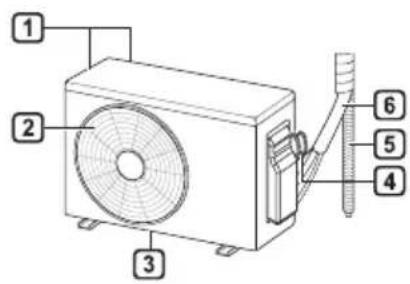
Indoor Unit Outdoor Unit
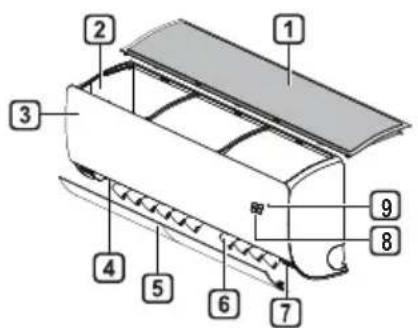
Air Filter, Air Intake, 3 Front Cover, 4 Air Outlet, 5 Air Deflector (Horizontal Vane), 6 Air Deflector (Vertical Louver), 7 On/Off Button, 8 Display, 9 Signal Receiver
Air Intake Vents, Air Outlet Vents, 3 Base Plate, 4 Power Supply Cable, 5 Drain Hose, 6 Refrigerant Pipes
NOTE
- The number and location of operation lamps may vary according to the model of the air conditioner. The feature may be changed according to the type of model.
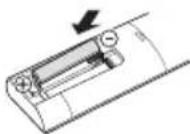
Wireless Remote Control: Inserting Batteries
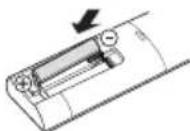
If the display screen of the remote control begins to fade, replace the batteries. Insert AAA (1.5 V) batteries before using the remote control.
1. Remove the battery cover.
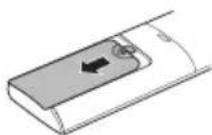
2. Insert the new batteries and make sure that the + and - terminals of the batteries are installed correctly.
Installing the Remote Control Holder (Optional)
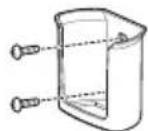
To protect the remote control, install the holder where there is no direct sunlight.
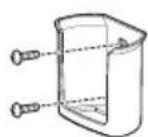
1. Choose a safe and easily accessible location. Fix the holder by fastening 2 screws firmly with a screwdriver.
Operating Method
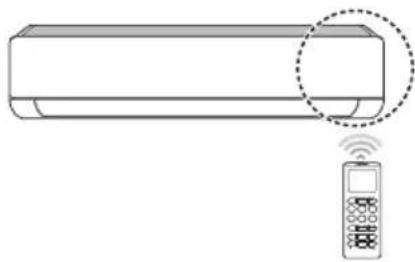
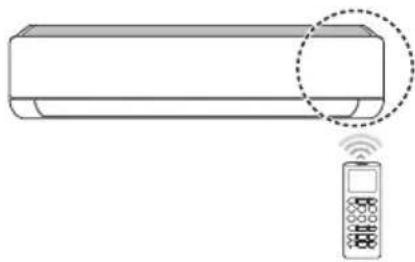
Point the remote control towards the signal receiver at the right side of the air conditioner to operate it.
NOTE
- The remote control may operate other electronic devices if it is directed towards them. Make sure to point the remote control towards the air conditioner signal receiver.
- For proper operation, use a soft cloth to clean the signal transmitter and receiver. In case of a function not provided in the product, no buzzer sound occurs from the product when a button for such function on the remote control is pressed except for Air Flow Direction (SWING), Energy Display (kW[3 s]), Air Purification function
Setting the Current Time
1 Insert batteries.
- The icon below blinks at the bottom of the display screen.

2 Press or button to select the minutes. 3 Press SET/CANCEL button to finish.
NOTE
- The On/Off Timer is available after setting the current time.
Using the °C/°F Conversion Function (Optional)
This function changes unit between °C and °F
Press and hold button about 5 seconds.
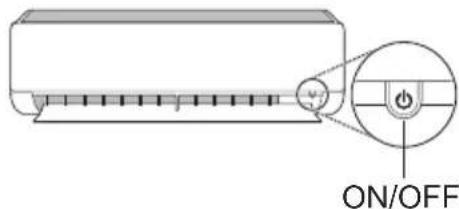
Operating the Air Conditioner without the Remote Control
You can use the ON/OFF button of the indoor unit to operate the air conditioner when the remote control is unavailable.
1 Open the front cover (Type2) or horizontal vane (Type1). 2 Press the ON/OFF button.
Type1
Type2
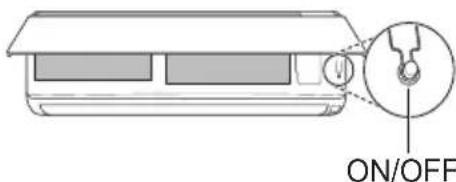
NOTE
- The stepping motor may be broken if the horizontal vane opens rapidly. The fan speed is set to high. The feature may change depending on the model. The temperature cannot be altered when using this emergency ON/OFF button.
- For cooling & heating models, the temperature is set from 22°C to 24°C.
Using Wireless Remote Control
You can operate the air conditioner more conveniently with the remote control.
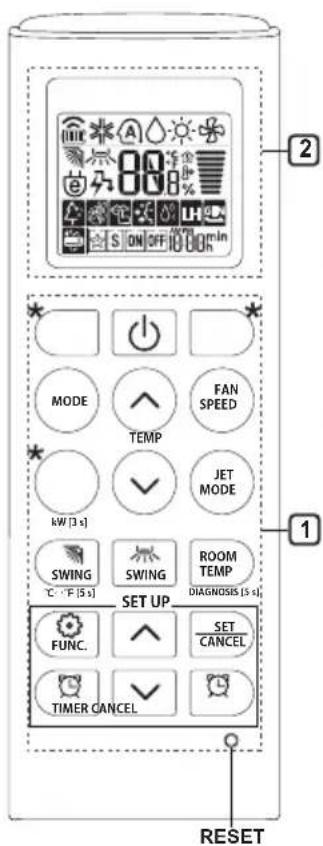
| 1Button | 2DisplayScreen | Description | Available Function | |
| SingleSplit | Multi | |||
| - | To turn on/off the air conditioner. | ○ | ○ | |
| TEMP | 88°C | To adjust the desired room temperature in cooling, heating or auto changeover mode. | ○ | ○ |
| MODE | ※ | To select the cooling mode. | ○ | ○ |
| ○ | To select the heating mode. | ○ | ○ | |
| △ | To select the dehumidification mode. | ○ | ○ | |
| ○ | To select the fan mode. | ○ | ○ | |
| A | To select the auto changeover/auto operation mode. | ○ | ○ | |
| JET MODE | Po | To change room temperature quickly. | ○ | ○ |
| FAN SPEED | || | To adjust the fan speed. | ○ | ○ |
| SWING SWING | To adjust the air flow direction vertically or horizontally. | ○ | ○ | |
NOTE
- Buttons may change depending on the model.
- When connected to the Multi Outdoor unit, the Energy Display, Energy Control, Silent, and Smart Diagnosis functions may not be supported.
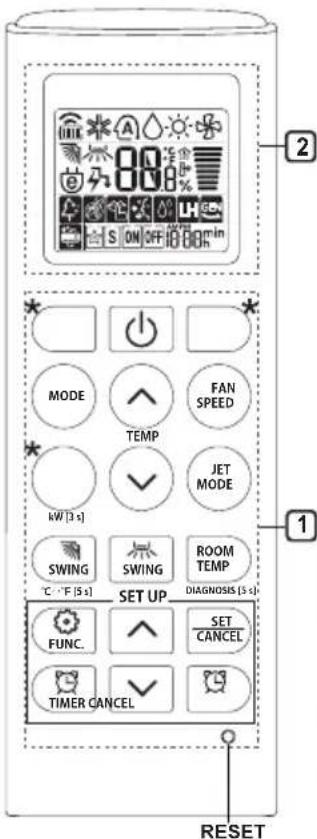
| 1Button | 2DisplayScreen | Description | Available Function | |
| SingleSplit | Multi | |||
| TIMER | ON OFF | To turn on/off air conditioner automatically at desired time. | ○ | ○ |
| SET/CANCEL | - | To set/cancel the special functions and timer. | ○ | ○ |
| CANCEL | - | To cancel the timer settings. | ○ | ○ |
| - To adjust time. ○○ | ||||
| *LIGHTOFF | - | To set the brightness of the display on the indoor unit. | ○ | ○ |
| ROOMTEMP | To display the room temperature. | ○ | ○ | |
| °C←°F[5 s] | °C°F | To change unit between °C and °F | ○ | ○ |
| *COMFORTAIR | To adjust the air flow to deflect wind. | ○ | ○ | |
| kW[3 s] | - | To set whether or not to display information regarding energy. | ○ | × |
| *ENERGYCTRL. | 88 x | To bring the effect of the power saving. | ○ | × |
| DIAGNOSIS[5 s] | - | To conveniently check maintenance information of a product. | ○ | × |
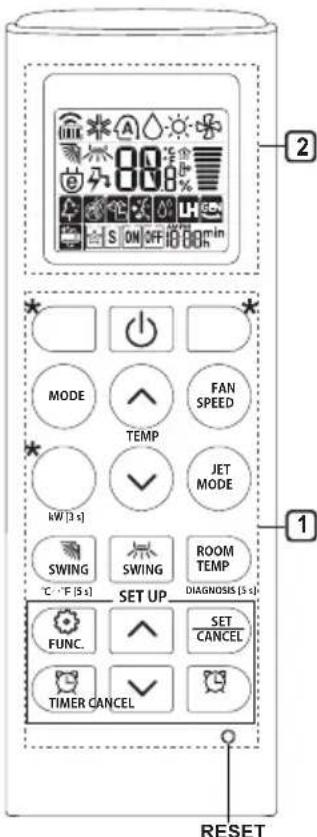
| 1 Button | 2 Display Screen | Description | Available Function | |
| Single Split | Multi | |||
| FUNC. | The Ion generator uses millions of ions to help improve indoor air quality. | O (Optional) | O (Optional) | |
| To reduce noise from outdoor units. | O | X | ||
| To remove moisture generated inside the indoor unit. | O | O | ||
| RESET - | To initialize the remote control settings. | O | O | |
NOTE
- Some functions may not be supported, depending on the model.
- Buttons may change depending on the model.
- Press the SET/CANCEL button to operate the selected function.
Restarting the Air Conditioner Automatically
When the air conditioner is turned on again after a power failure, this function restores the previous settings.
Disabling Auto Restart
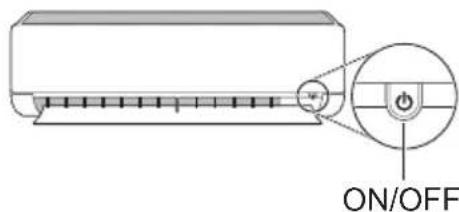
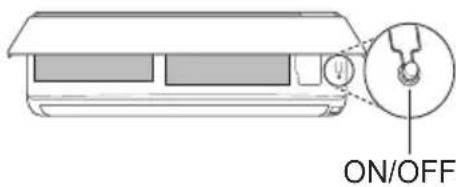
1 Open the front cover (Type2) or horizontal vane (Type1).
2 Press the ON/OFF button and hold it for 6 seconds, then the unit will beep twice and the lamp will blink 4 times.
To re-enable the function, press the ON/OFF button and hold it for 6 seconds. The unit will beep twice and the lamp will blink 4 times.
Type1
Type2
NOTE
The feature may be changed according to the type of model.
- If you press and hold the ON/OFF button for 3-5 seconds, instead of 6 seconds, the unit will switch to the test operation. In the test operation, the unit blows out strong cooling air for 18 minutes and then returns to factory default settings.
Using the Mode Function
This function allows you to select the desired function.
| * | Cooling Mode |
| ↓ | |
| A | Auto Changeover Mode / Auto Operation(AI) Mode |
| ↓ | |
| ○ | Dehumidification Mode |
| ↓ | |
| - | Heating Mode |
| ↓ | |
| * | Fan Mode |
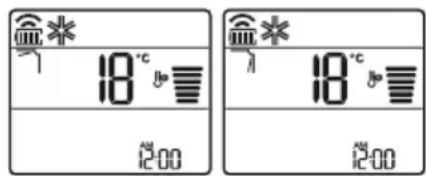
Cooling Mode
1 Turn the appliance on.
2 Press MODE button repeatedly to select the Cooling Mode.
- is displayed on the display screen.
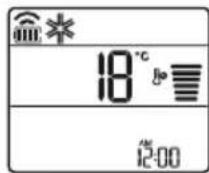
3 Press button to set the desired temperature.
Auto Operation (Artificial Intelligence)
Multi Model
In this operation mode, the system is automatically operated by the electronic controls.
1 Turn the appliance on. 2 Press MODE button repeatedly to select the Auto Operation.
A is displayed on the display screen.
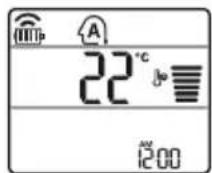
3 Press or button to set the desired temperature. 4 Press FAN SPEED button to adjust the fan speed.
Auto Changeover Mode
Single Split Model
This mode changes the mode automatically to maintain the set temperature at ±2°C.
1 Turn the appliance on. 2 Press MODE button repeatedly to select the Auto Changeover Mode.
A is displayed on the display screen.
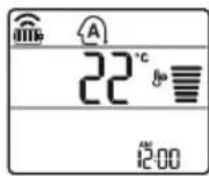
3 Press or button to set the desired temperature. 4 Press FAN SPEED button to adjust the fan speed.
Dehumidification Mode
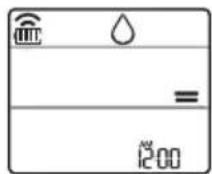
This mode removes excess moisture from a highly humid environment or during the rainy season, in order to prevent mildew from setting in. This mode adjusts the room temperature and the fan speed automatically to maintain the optimal level of humidity.
1 Turn the appliance on.
2 Press MODE button repeatedly to select the Dehumidification Mode.
is displayed on the display screen.
NOTE
- In this mode you cannot adjust the room temperature, it is adjusted automatically.
- The room temperature is not displayed on the display screen.
- In the dehumidification mode, compressor and indoor fan may not operate when the room temperature is below 24°C
Heating Mode
1 Turn the appliance on. 2 Press MODE button repeatedly to select the Heating Mode.
is displayed on the display screen.
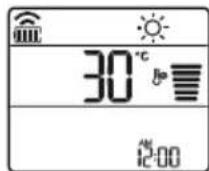
3 Press or button to set the desired temperature.
NOTE
will be displayed on the indoor unit when defrosting is operating.
- Furthermore, this indication will be displayed on the indoor unit:
- When preheating is operating.
- When the room temperature has been reached to the set temperature.
Fan Mode
This mode only circulates the indoor air without changing the room temperature.
1 Turn the appliance on.
2 Press MODE button repeatedly to select the Fan Mode.
is displayed on the display screen.
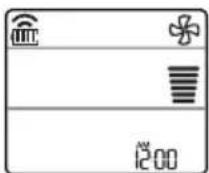
3 Press FAN SPEED button to adjust the fan speed.
NOTE
or will be displayed on the indoor unit when fan mode is operating.
Using the Jet Mode Function Changing Room Temperature Quickly
This function allows you to cool indoor air quickly during the summer or warm it quickly during winter.
- The Jet Mode function is available with Cooling, Heating and Dehumidification Mode.
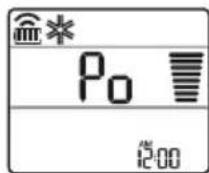
1 Turn the appliance on. 2 Press MODE button repeatedly to select the desired mode. 3 Press JET MODE button.
P0 is displayed on the display screen.
NOTE
- Jet Heating Mode is not available on some models.
- In Jet Cooling Mode, strong air blows out for 30 minutes. After 30 minutes later, setting temperature is maintaining 18°C. If you want to change the temperature, press
or button to set the desired temperature.
- In Jet Heating Mode, strong air blows out for 30 minutes. After 30 minutes later, setting temperature is maintaining 30°C. If you want to change the temperature, press or button to set the desired temperature.
- This function may operate differently from the remote control display.
Using the Fan Speed Function
Adjusting the Fan Speed
- Press FAN SPEED button repeatedly to adjust the fan speed.
| Display Screen Speed | |
| High | |
| Medium - High | |
| Medium | |
| Medium - Low | |
| Low | |
| - Natural Wind | |
NOTE
- The fan speed of Natural Wind adjusts automatically.
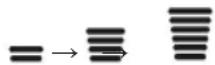
- The fan speed icons are displayed on some indoor units.

- Indoor unit display is displayed only 5 seconds and return to the setting temperature on some models.
Using the Air Flow Direction Function
This function adjusts the direction of the air flow vertically (horizontally).
- Press the SWING button repeatedly and select the desired direction.
Select ( ) to adjust the direction of the air flow automatically.
NOTE
- Adjusting the air flow direction horizontally may not be supported, depending on the model.
- Adjusting the air deflector arbitrarily may cause product failure.
- If you restart the air conditioner, it starts to operate with the previously set direction of air flow, so the air deflector may not match the icon displayed on the remote control. When this occurs, press the SWING button to adjust the direction of the air flow again.
- This function may operate differently from the remote control display.
Setting the On/Off Timer
This function sets the air conditioner to turn on/off automatically at the desired time.
The On/Off Timer can be set together.
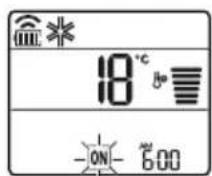
Setting the On Timer
1. Press the button repeatedly.
- The icon below blinks at the bottom of the display screen.
2 Press or button to select the minutes.
3 Press SET/CANCEL button to finish.
After setting the timer, current time and ON icon are displayed on the display screen indicating that the desired time is set.
Canceling the On Timer
1 Press button repeatedly.
- The icon below blinks at the bottom of the display screen.
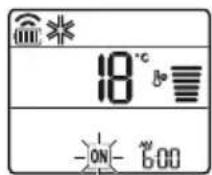
2 Press SET/CANCEL button to cancel the setting.
Setting the Off Timer
1 Press button repeatedly.
- The icon below blinks at the bottom of the display screen.
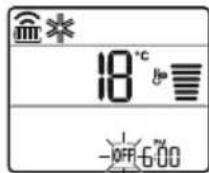
2 Press or button to select the minutes.
3 Press SET/CANCEL button to finish.
After setting the timer, current time and OFF icon are displayed on the display screen indicating that the desired time is set.
NOTE
- This function is disabled when you set Simple Timer.
Canceling the Off Timer
1 Press the button repeatedly.
- The icon below blinks at the bottom of the display screen.
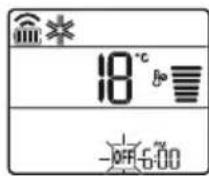
2 Press the SET/CANCEL button to cancel the setting.
Canceling the Timer Setting
- Press the button to cancel all timer settings.
Using the Sleep Function (Optional)
This function turns off the air conditioner automatically when you go to sleep.
1 Turn the appliance on.
2 Press the button repeatedly.
- The icon below blinks at the bottom of the display screen.
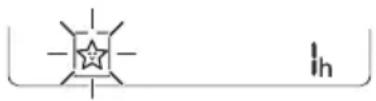
3 Press the Yr button to select the hour (up to 7 hours). 4 Press the SET/CANCEL button to finish. is displayed on the display screen.
NOTE
is displayed on some indoor units.
- Indoor unit display is displayed from 1H to 7H which is displayed only 5 seconds and then return to the setting temperature.
- In the Cooling and Dehumidification Mode, the temperature increases by 1°C after 30 minutes and an additional 1°C after another 30 minutes for a more comfortable sleep.
- The temperature increases up to 2°C from the preset temperature.
- Although the remark for fan speed on the display screen may be changed, the fan speed is adjusted automatically.
Using the Simple Timer Function (Optional)
This function turns off the air conditioner automatically when you go to sleep.
1 Turn the appliance on. 2 Press button repeatedly.
- The icon below blinks at the bottom of the display screen.
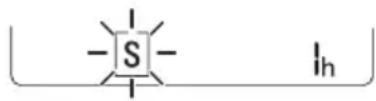
3 Press or button to select the hour (up to 7 hours). 4 Press SET/CANCEL button to finish. is displayed on the display screen.
NOTE
- This function is disabled when you set Off Timer.
Using the Energy Display Function (Optional)
This function displays the amount of electricity generated on the indoor display as the product operates.
Display the Current Energy Usage
1 Turn the appliance on.
2 Press ○ button and hold it about 3 seconds.
The instantaneous power consumption (BB) is displayed for a while on some indoor units.
NOTE
The unit of the displayed value is kW. It is not displayed on the wireless remote control. If it is more than 99 kW, which is the range of expression, maintain it as 99 kW. - Display wattage under 10 kW with 0.1 kW unit, and display one over 10 kW with 1 kW unit. - The actual power may differ from the power displayed. - When connected to the Multi Outdoor unit, this function may not be supported.
Using the Light Off Function (Optional)
Display Screen Brightness
You can set the brightness of the indoor unit display screen.
- Press LIGHT OFF button.
NOTE
- Turn on/off the Display screen.
- If the brightness of an indoor appliance's display is set to OFF, pressing a button on the remote control automatically turns the display on for a while.
- This function may operate differently, depending on the model.
Using the Comfort Air Function (Optional)
Comfort Vane Operation
This function conveniently sets the vane to a preset position to deflect the supply air away from blowing directly onto the occupants in the room.
1 Turn the appliance on. 2 Press COMFORT AIR button repeatedly and select the desired direction.

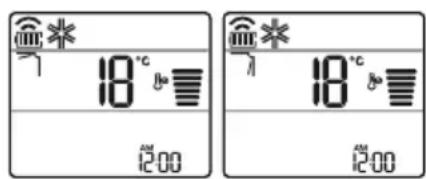
NOTE
or is displayed on some indoor units. - This function is disabled when you press MODE or JET MODE button. This function is disabled and auto swing of vertical direction is set up when you press button. - When this function is off, the horizontal vane operates automatically depending on the set mode.
Using the Energy Control Function (Optional)
1. Turn the appliance on.
2. Press the ENERGY CTRL button.
- Press the ENERGY CTRL button repeatedly to select each step.
- 1 step: The power input is decreased by 20% compared to rated power input. 80 is displayed on the display screen.
- 2 step: The power input is decreased by 40% compared to rated power input. 60 is displayed on the display screen.
- 3 step (Optional): The power input is decreased by 60% compared to rated power input. 40 is displayed on the display screen. 80 (1 step), 60 (2 step), 40 (3 step) is displayed on some indoor units. (1 step), (2 step) is displayed on some indoor units.)
- This function is available with Cooling Mode.
- Capacity may decrease when Energy Control mode is selected.
- Desired temperature is displayed about 5 seconds if you press FAN SPEED or button.
- Room temperature is displayed about 5 seconds if you press ROOM TEMP button.
- When connected to the Multi Outdoor unit, this function may not be supported.
Using Special Functions
1 Turn the appliance on. 2 Press FUNC. button repeatedly to select the desired function. 3 Press SET/CANCEL button to finish.
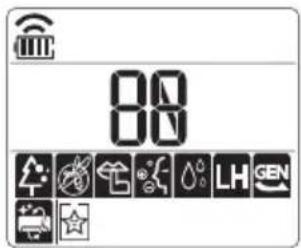
| Display Screen | Description |
| The Ion generator uses millions of ions to help improve indoor air quality. | |
| To reduce noise from outdoor units. | |
| To remove moisture generated inside the indoor unit. |
NOTE
Some functions may not be supported, depending on the model. Some functions may operate differently from the remote control display.
Canceling Special Functions
1 Press FUNC. button repeatedly to select the desired function. 2 Press SET/CANCEL button to cancel the function.
Using the Air Purification Function
These functions supply clean and fresh air by ion particles and the filter.
| Function Display Description | |
| Ionizer | Ion particles from lonizer reduce the surface bacteria and other harmful substances. |
| Plasma | It removes microscopic contaminants from the intake air completely to supply clean and fresh air. |
NOTE
- You can use this function without turning the air conditioner on.
- Both the plasma lamp and the cooling lamp light up while Smoke Away/Plasma is in operation on some models.
- Do not touch ionizer during operation.
- This function may operate differently from the remote control display.
Using the Silent Function
This function prevents potential claims by neighbors, reducing noise from outdoor units.

is displayed on the display screen.
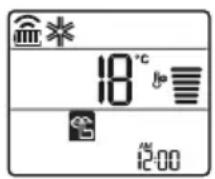
NOTE
- This function is disabled when you press MODE, ENERGY CTRL, or JET MODE button.
- This function is available with Cooling, Heating, Auto Changeover, Auto Operation Mode.
- When connected to the Multi Outdoor unit, this function may not be supported.
Using the Auto Clean Function
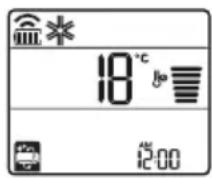
In the Cooling and Dehumidification Mode, moisture is generated inside the indoor unit. This function removes such moisture.

is displayed on the display screen.
NOTE
- Some functions cannot be used while the Auto Clean function is in operation.
- If you turn off the unit, the fan continues to run for 30 minutes and cleans the inside of the indoor unit.
is displayed on some indoor units, depending on the model.
LG ThinQ Application
This feature is only available on models with the or ThinQ logo.
The LG ThinQ application allows you to communicate with the appliance using a smartphone.
LG ThinQ Application Features
Communicate with the appliance from a smartphone using the convenient smart features.
Smart Diagnosis
If you experience a problem while using the appliance, this smart diagnosis feature will help you diagnose the problem.
Settings
Allows you to set various options on the appliance and in the application.
NOTE
If you change your wireless router, internet service provider, or password, delete the registered appliance from the LG ThinQ application and register it again. - The application is subject to change for appliance improvement purposes without notice to users. - Functions may vary by model.
Before Using LG ThinQ Application
1 Check the distance between the appliance and the wireless router (Wi-Fi network).
- If the distance between the appliance and the wireless router is too far, the signal strength becomes weak. It may take a long time to register or installation may fail.
2 Turn off the Mobile data or Cellular Data on your smartphone.
3 Connect your smartphone to the wireless router.
NOTE
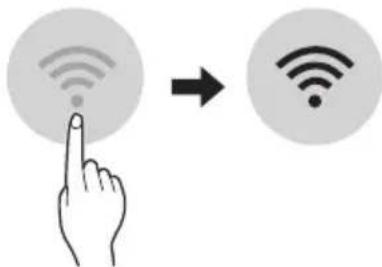
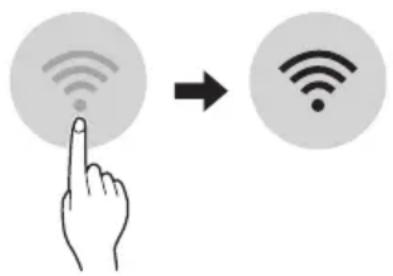
To verify the Wi-Fi connection, check that icon on the control panel is lit.
- The appliance supports 2.4 GHz Wi-Fi networks only. To check your network frequency, contact your Internet service provider or refer to your wireless router manual.
- LG ThinQ is not responsible for any network connection problems or any faults, malfunctions, or errors caused by network connection.
- If the appliance is having trouble connecting to the Wi-Fi network, it may be too far from the router. Purchase a Wi-Fi repeater (range extender) to improve the Wi-Fi signal strength.
- The Wi-Fi connection may not connect or may be interrupted because of the home network environment.
- The network connection may not work properly depending on the Internet service provider.
- The surrounding wireless environment can make the wireless network service run slowly.
- The appliance cannot be registered due to problems with the wireless signal transmission. Unplug the appliance and wait about a minute before trying again.
- If the firewall on your wireless router is enabled, disable the firewall or add an exception to it.
- The wireless network name (SSID) should be a combination of English letters and numbers. (Do not use special characters.)
- Smartphone user interface (UI) may vary depending on the mobile operating system (OS) and the manufacturer.
- If the security protocol of the router is set to WEP, you may fail to set up the network. Please change it to other security protocols (WPA2 is recommended) and register the product again.
Installing the LG ThinQ Application
Search for the LG ThinQ application from the Google Play Store or Apple App Store on a smartphone. Follow instructions to download and install the application.
Open Source Software Notice Information
To obtain the source code that is contained in this product, under GPL, LGPL, MPL, and other open source licenses that have the obligation to disclose source code, and to access all referred license terms, copyright notices and other relevant documents please visit https://opensource.lge.com.
LG Electronics will also provide open source code to you on CD-ROM for a charge covering the cost of performing such distribution (such as the cost of media, shipping, and handling) upon email request to opensource@lge.com.
This offer is valid to anyone in receipt of this information for a period of three years after our last shipment of this product.
Smart Diagnosis
This feature is only available on models with the or logo.
Use this feature to help you diagnose and solve problems with your appliance.
NOTE
- For reasons not attributable to LGE's negligence, the service may not operate due to external factors such as, but not limited to, Wi-Fi unavailability, Wi-Fi disconnection, local app store policy, or app unavailability.
- The feature may be subject to change without prior notice and may have a different form depending on where you are located.
Using LG ThinQ to Diagnose Issues
If you experience a problem with your Wi-Fi equipped appliance, it can transmit troubleshooting data to a smartphone using the LG ThinQ application.
- Launch the LG ThinQ application and select the Smart Diagnosis feature in the menu. Follow the instructions provided in the LG ThinQ application.
Using Audible Diagnosis to Diagnose Issues
Follow the instructions below to use the audible diagnosis method.
- Launch the LG ThinQ application and select the Smart Diagnosis feature in the menu. Follow the instructions for audible diagnosis provided in the LG ThinQ application. Plug the power plug in the outlet properly. 2 Place the mouthpiece of your smartphone close to the or logo. 3 Press and hold the DIAGNOSIS [5 s] button for 5 seconds or longer while holding the smartphone mouthpiece to the logo until the data transfer is complete.
- Keep the smartphone in place until the data transfer has finished. The time remaining for data transfer is displayed.
4. After the data transfer is complete, the diagnosis will be displayed in the application.
NOTE
- For best results, do not move the phone while the tones are being transmitted.
- Be sure to keep ambient noise to a minimum, or the phone may not correctly receive the buzzer beeps from the indoor unit.

WARNING
- Before cleaning or performing maintenance, disconnect the power supply and wait until the fan stops.
If the air conditioner will not be used for an extended period of time, dry the air conditioner to maintain it in best condition. Clean the product regularly to maintain optimal performance and to prevent possible breakdown.
- Dry the air conditioner in Fan mode for 3 to 4 hours and disconnect the power. There may be internal damage if moisture is left in its components.
- Before using the air conditioner again, dry the inner components of the air conditioner in Fan mode for 3 to 4 hours. This will help to remove the odor generated from moisture.
The feature may be changed according to the type of model.
| Type Description | Option Interval | |
| AirFilterClean | with a vacuum or hand wash. 2 weeks | |
| Allergy Filter Clean | clean with a vacuum or brush. Every 6 months | |
| Ionizer (Optional) | Use dry cotton bud to remove any dust. Every 6 months | |
| IndoorUnit | Cleantheindoorunitsurfacebyusingasoft, drycloth.Regularly | |
| Have a professional clean the condensate drain pan. Once a year | ||
| Have a professional clean the condensate drain pipe. Every 4 months | ||
| Replace the remote control batteries. Once a year | ||
| OutdoorUnit | Have a professional clean the heat exchanger coils and the panel vents. (Consult with technician.) | Once a year |
| Have a professional clean the fan. Once a year | ||
| Have a professional clean the condensate drain pan. Once a year | ||
| Have a professional verify that all the fan assembly is firmly tightened. | Once a year | |
| Clean the electric components with air. Once a year |
NOTE
- Never use water that is higher than 40°C when you clean the filters. It may cause deformation or discoloration.
- Never use volatile substances when you clean the filters. They may damage the surface of the product.
- Do not wash the allergy filter with water, because the filter can be damaged (Optional).
Clean the Air Filter
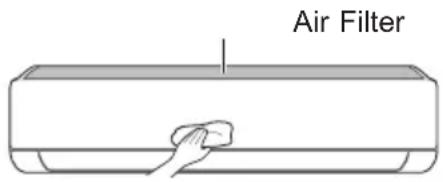
Clean the air filters once every 2 weeks, or more, if necessary.
NOTE
The air filter can be broken when it is bent. - When the air filter is not assembled correctly, dust and other substances can enter into the indoor unit.
Type1
If you look at the indoor unit from above, you can assemble the top filter easily.
1 Turn off the power to the unit. 2 Hold the knobs of the air filter, lift it up slightly.
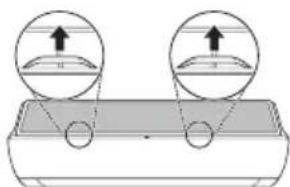
3 Remove it from the indoor unit.
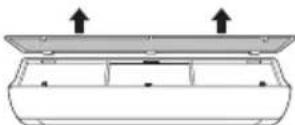
4 Clean the filter with a vacuum cleaner or with lukewarm water with neutral detergent. 5 Dry the filter in the shade. 6 Insert the hooks of the air filter into the front cover.
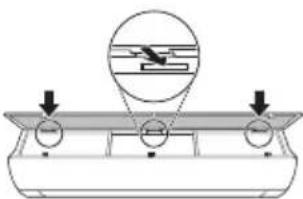
7 Push down hooks to assemble the air filter.
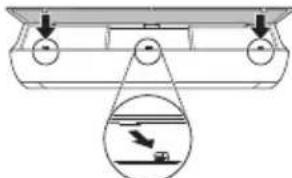
8 Check the side of the front cover for correct assembly of the air filter.
Type2
1 Turn off the power to the unit. 2 Open the front cover.
- Lift up both sides of the cover slightly.
3 Hold the knobs of the air filters, pull them down slightly and remove them from the indoor unit.
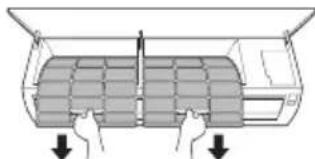
4 Clean the filters with a vacuum cleaner or with lukewarm water with neutral detergent. 5 Dry the filters in the shade. 6 Insert the hooks of the air filters into the front cover.

7 Check the side of the front cover for correct assembly of the air filters.
Clean the Allergy Filter (Optional)
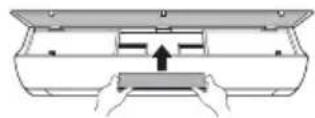
1 Turn off the power to the unit. 2 Remove the air filter from the indoor unit. 3 Remove the allergy filter from the indoor unit.
Type1
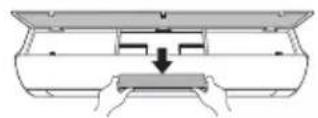
Type2
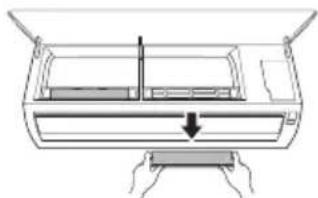
4 Clean the filter with a vacuum cleaner.
5 Insert the allergy filter.
Type1
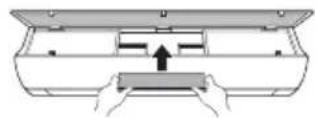
Type2
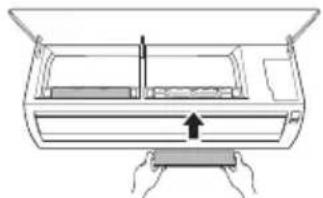
6 Assemble the air filter. 7 Check the side of the front cover for correct assembly of the air filter.
NOTE
The feature and location of allergy filter may vary according to the type of model.
Self-diagnosis Function
This product has a built-in self-diagnosis function. If an error occurs, the lamp of the indoor unit will blink in 2 second intervals. If this occurs, contact your local dealer or service center.
Before Calling for Service
Please check the following before you contact the service center. If the problem persists, contact your local service center.
| Symptoms Possible Causes & Solution | |
| The air conditioner does not work normally. | Burning smell and strange sounds are coming from the unit. ·Turn off the air conditioner, switch OFF, or disconnect the power supply, and contact the service center. |
| Water leaks from the indoor unit even when the humidity level is low. ·Turn off the air conditioner, switch OFF, or disconnect the power supply, and contact the service center. | |
| The power cable is damaged or it is generating excessive heat. ·Turn off the air conditioner, switch OFF, or disconnect the power supply, and contact the service center. | |
| A switch, a circuit breaker (safety, ground), or a fuse is not operated properly. ·Turn off the air conditioner, switch OFF, or disconnect the power supply, and contact the service center. | |
| The unit generates an error code from its self-diagnosis. ·Turn off the air conditioner, switch OFF, or disconnect the power supply, and contact the service center. | |
| The air conditioner does not work. | The air conditioner is unplugged. ·Check whether the power cord is plugged into the outlet or the power isolators are switched on. |
| A fuse exploded, or the power supply is blocked. ·Replace the fuse or check if the circuit breaker has tripped. | |
| A power failure has occurred. ·Turn off the air conditioner when a power failure occurs. ·When the power is restored, wait 3 minutes, and then turn on the air conditioner. | |
| The voltage is too high or too low. ·Check if the circuit breaker has tripped. | |
| The air conditioner was turned off automatically at a preset time. ·Turn the air conditioner on. | |
| The battery setting in the remote controller is incorrect. ·Make sure that the batteries are inserted correctly in your remote controller. ·If the batteries are placed correctly, but the air conditioner still does not operate, replace the batteries and try again. | |
| Symptoms Poss | ble Causes & Solution |
| The air conditioner does not emit cool air. | Air is not circulating properly. • Make sure that there are no curtains, blinds, or pieces of furniture blocking the front of the air conditioner. |
| The air filter is dirty. • Clean the air filter once every 2 weeks. • See “Clean the Air Filter” for more information. | |
| The room temperature is too high. • In summer, cooling the indoor air fully may take some time. In this case, select the Jet Mode to cool the indoor air quickly. | |
| Cold air is escaping from the room. • Make sure that no cold air is escaping through the ventilation points in the room. | |
| The desired temperature is higher than the current temperature. • Set the desired temperature to a level lower than the current temperature. | |
| There is a heating source nearby. • Avoid using heat generators like electric ovens or gas burners while the air conditioner is in operation. | |
| Fan Mode is selected. • During Fan Mode, air blows from the air conditioner without cooling or heating the indoor air. • Switch the operation mode to cooling operation. | |
| Outside temperature is too high. • The cooling effect may not be sufficient. | |
| The fan speed cannot be adjusted. | The Jet Mode, or Auto Operation Mode is selected. • In some operation modes, you cannot adjust the fan speed. Select an operation mode in which you can adjust the fan speed. |
| The temperature cannot be adjusted. | The Fan Mode or Jet Mode is selected. • In some operation modes, you cannot adjust the temperature. Select an operation mode in which you can adjust the temperature. |
| The air conditioner stops during operation. | The air conditioner is suddenly turned off. • The Timer Function may have timed out, which turns the unit off. Check the timer settings. |
| A power failure has occurred during operation. • Wait for the power to come back. If you have the Auto Restart function enabled, your unit will resume its last operation several minutes after power is restored. | |
| Symptoms Possible Causes & Solution | |
| The indoor unit is still operating even when the unit has been turned off. | The Auto Clean function is being operated. ·Allow the Auto Clean function to continue since it removes any remaining moisture inside the indoor unit. If you do not want this feature, you can turn the unit off. |
| The air outlet on the indoor unit is discharging mist. | The cooled air from the air conditioner makes mist. ·When the room temperature decreases, this phenomenon will disappear. |
| Water leaks from the outdoor unit. | In the heating operations, condensed water drops from the heat exchanger. ·This symptom requires installing a drain hose under the base pan. Contact the installer. |
| There is noise or vibration. | A clicking sound can be heard when the unit starts or stops due to movement of the reversing valve. Creaking sound: The plastic parts of the indoor unit creak when they shrink or expand due to sudden temperature changes. Flowing or Blowing sound: This is the flow of refrigerant through the air conditioner. ·These are normal symptoms. The noise will stop. |
| The indoor unit gives off an odor. | Odors (such as cigarette smoke) may be absorbed into the indoor unit and discharged with airflow. ·If the smell does not disappear, you need to wash the filter. If this does not work, contact the service center to clean your heat exchanger. |
| The air conditioner does not emit warm air. | When Heating Mode starts, the vane is almost closed, and no air comes out, even though the outdoor unit is operating. ·This symptom is normal. Please wait until the unit has generated enough warm air to blow through the indoor unit. |
| The outdoor unit is in Defrosting Mode. ·In Heating Mode, ice/frost is built up on the coils when the outside temperature falls. This function removes a layer of frost on the coil, and it should finish in approximately 15 minutes. | |
| Outside temperature is too low. ·The heating effect may not be sufficient. | |
| Your home appliance and smartphone is not connected to the Wi-Fi network. | The password for the Wi-Fi that you are trying to connect to is incorrect. ·Find the Wi-Fi network connected to your smartphone and remove it, then register your appliance on LG ThinQ. |
| Mobile data for your smartphone is turned on. ·Turn off the Mobile data of your smartphone and register the appliance using the Wi-Fi network. | |
| The wireless network name (SSID) is set incorrectly. ·The wireless network name (SSID) should be a combination of English letters and numbers. (Do not use special characters.) | |
| The router frequency is not 2.4 GHz. ·Only a 2.4 GHz router frequency is supported. Set the wireless router to 2.4 GHz and connect the appliance to the wireless router. To check the router frequency, check with your Internet service provider or the router manufacturer. | |
| The distance between the appliance and the router is too far. ·If the distance between the appliance and the router is too far, the signal may be weak and the connection may not be configured correctly. Move the location of the router so that it is closer to the appliance. | |
NOTE
- Some functions may not be supported, depending on the model.
Memo
OWNER'S MANUAL
AIR CONDITIONER

Smart Diagnosis 29
MAINTENANCE 30
LG ThinQ Application
Smart Diagnosis
Smart Diagnosis
NOTE
This function is activated when the time delay is set.
Function Name Activation (Optional)
With this function, the amount of water in the domestic hot water tank is increased while the heat pump is operating.
Activation of the current function
1. Turn on the device. 2. Press the button and hold it for 3 seconds. The energy consumption indicator appears briefly on some indoor units.
NOTE
The unit of the displayed value is kW. - The value is displayed on the wireless remote controller. If it is greater than 99 kW, the display range is exceeded, so keep it at 99 kW. - Power below 10 kW is displayed with a resolution of 0.1 kW, and power above 10 kW is displayed with a resolution of 1 kW. The actual power may differ from the displayed power. When combined with the indoor unit of the multi-split type, this function may not be supported.
Function Name: Night Mode (Optional)
Translation of the original instructions
This manual may contain images that differ from the model you have purchased.
The manual is subject to revision by the manufacturer.
Safety instructions 3
Important safety instructions 4
OPERATION 11
Belenkno ekcnnoataaeta 11
Uactn n fynkun 11
Baxnn nHctpyKu nn 3a 6e30nacnoct
I PEPdUYPEXKeHNE
3a Да Намал ntepncka OT noxap, eJekTpueckn ydap nHapaHЯBaHnHa Xopa npu ynoTpe6bHa npoDyKta, Tpr6Ba Da ce Cna3BaT OCHOBnTe ppeDna3HN MepKN, BKJIIOHTeJHoN i Cnejnte :
HaTnCHHeTe 6yToHbAng (Swing) HeKoJIKOkPaTHO nI36peTe XeJHaHata Nocoka.
- 136epeTcTa da perynnpaTe NocokataHa Bb3dyuHnI NOtOK aBTOMaTHUHO.
3A6EJIEXKA
- PerynpaHTo Ha Nocokata Ha Bb3dyuHnI NOtOK Do Xopn3oHTaIIHa No3uZnM OMe Da He Ce PoNDbPka B 3aBNCIMOCT OT MoJeNa.
- Поньното ретулране на Вьзуня
- Deфпектор може за довetedо поюраза на пordукта.
- Ako pectapntpate KINMaTnKa,Toi 3anOuBa da pa60tn C NOcNeIHO HAcTpoEHaTa Nocoka Ha Bb3dyuHnra NOTOK, Taka Ye Bb3dyuHnraT DeΦJIeKTop MoKe Da He CbOTBeTCTBa Ha IKoHaTa, NOKa3aHa Ha DnCTaHnOHHOTO. Korato TOBa ce cnUHy, HATNCHEte ByTOHa SWING JIN SWING, 3a da peryInpate OTHOBO NOCOKaTa Bb3dyuHnra NOTOK. Pa6oTaHa Ta3nФyHKuM0Ke Da ce pa3NuaBa npu n3NoJ3BaHe OT dncnner Ha dNCTaHcNOHHOTO.
BkIIOUBaHe n N3KJIIOUBaHe Ha TaMepa
Ta3nФункцин HabcpoьВаКЛIMaTHkaДа ce N3KJIIOUBa/BKJIIOUBA aBTOMaTNUHOBKeJHaHOTo BpeMe.
TaimepbT 3a BkI./n3KJI. MoKe Ia 6bJe 3aJaDeH 3aEHO C TOBa.
Setting the switch-on timer
1 Press the TIMER button repeatedly.
- The icon appears in the lower part of the display.
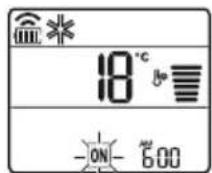
2 Press the button to select the minutes.
3 Press the SET/CANCEL button to finish the setting.
The timer setting for the current time is shown on the display, which shows the desired time.
Cancelling the switch-on timer
1 Press the button repeatedly.
- The icon appears in the lower part of the display.
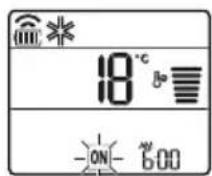
2 Press the SET/CANCEL button to cancel the setting.
Setting the switch-off timer
1 Press the TIMER button repeatedly.
- The icon appears in the lower part of the display.

2 Press the button to select the minutes.
3 Press the SET/CANCEL button to finish the setting.
Setting the timer to the desired time is displayed on the screen, showing that the desired time is set.
DELAY
These functions are disabled when the timer is set to "Standard".
Canceling the timer
1 Press the TIMER button several times.
- The icon appears in the lower part of the display.
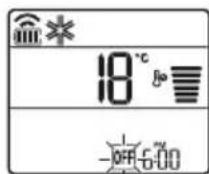
2 Press the SET/CANCEL button to cancel the setting.
Canceling the timer setting
Press the button to cancel all timer settings.
Using the sleep function (optional)
This function adjusts the climate automatically when you sleep.
1 Turn on the unit.
2 Press the TIMER button several times.
- The icon appears in the lower part of the display.
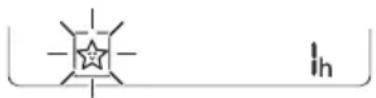
3 Press the + or - button to select the hour (up to 7 hours). 4 Press the SET/CANCEL button to finish the setting.

This is shown on the screen.
NOTE

This shows the internal temperature.
- The display of the internal temperature shows from 1 to 7, which is visible for only 5 seconds, after which it returns to the temperature setting.
The cooling and heating time increases by 1°C every 30 minutes, and decreases by 1°C every 30 minutes for more comfort. The temperature rises up to 2°C above the previously set temperature. - Despite the adjustment of the fan speed, the fan speed can be changed, the fan speed is regulated automatically.
Using the standard timer function (optional)
This function activates the air conditioner automatically when you sleep.
1 Turn on the unit. 2 Press the TIMER button several times.
- The lower part of the display shows the set time.
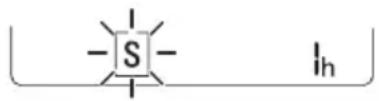
Press the + or - button to select the hour (up to 7 hours). 4 Press the SET/CANCEL button to finish the setting.
It is shown on the screen.
NOTE
- This function is disabled when you set the timer for shutdown.
Using the function to display the consumed energy (optional)
This function shows the amount of electrical energy consumed by the indoor unit, while the product is operating.
Energy saving mode
1 Press and hold the button for about 3 seconds. The energy saving mode will be shown briefly on the display of some indoor unit models.
NOTE
- The displayed power consumption is in kW. It is shown on the wireless remote control.
- If it exceeds 99 kW, which is the allowable range, it will be displayed as 99 kW.
- Power consumption below 10 kW is displayed with 0.1 kW increments, and power consumption above 10 kW is displayed with 1 kW increments. The actual power consumption may differ from the displayed power consumption.
- When connected to an external device of the multi-system, this function may not be supported.
Using the light off function (optional)
Adjusting the display brightness
You can adjust the brightness of the display of the indoor unit.
- Press the LIGHT OFF button.
NOTE
Turn on/off the display screen. If the display brightness of the indoor unit is set to off, pressing the button on the remote control will automatically turn on the display for a short time. The remote control can operate in different ways depending on the model.
Using the comfortable airflow position function (optional)
Comfortable airflow position for heating operation
This function is convenient for preliminary positioning of the flap to release the air before it is directed straight at the occupants in the room.
1 Turn on the unit. 2 Press the COMFORT AIR button several times and select the desired position.
The flap position is displayed.
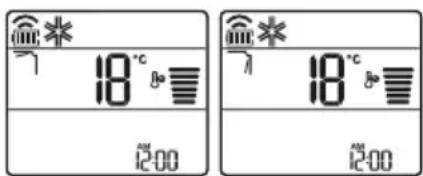
NOTE
The flap oscillates automatically.
This function is disabled when you press the MODE button or the JET MODE button.
This function is disabled, and automatic vertical oscillation is set when you press the SWING button. When this function is enabled, the horizontal flap operates automatically depending on the setting mode.
Using the energy control function (optional)
1 Turn on the unit.
2 Press the ENERGY CTRL button.
- Press the ENERGY CTRL button several times to select the desired level.
This feature is available only on models with the logo HIN.
Use this function to diagnose and resolve problems with your unit.
NOTE
- Due to factors not related to LG, the service may not be active due to external factors such as, but not limited to, Wi-Fi unavailability, poor Wi-Fi connection, local app store policy, or unavailability of the application. The feature may change without prior notice and may have a different form depending on the location.
Using LG ThinQ to diagnose problems
If problems occur with your Wi-Fi equipped appliance, you can transmit data for opening and resolving problems to a smartphone via the LG ThinQ app.
Start the LG ThinQ app and select the Smart Diagnosis feature in the menu. Follow the instructions provided in the LG ThinQ app.
Using Audible Diagnosis to diagnose problems
Follow the instructions below to use the audible diagnosis method.
Start the LG ThinQ app and select the Smart Diagnosis feature in the menu. Follow the instructions for audible diagnosis provided in the LG ThinQ app.
1 Plug the power cord into an outlet. 2 Place the smartphone's mouthpiece close to the logo. 3 Press and hold the DIAGNOSIS [5 s] button for 5 seconds while holding the smartphone's mouthpiece to the logo until data transmission is complete.
Keep the smartphone in place until data transmission is complete.
The display shows the remaining time for data transmission.
4 Once data transmission is complete, the diagnosis will appear in the app.
MAINTENANCE
For best performance, unplug the appliance while cleaning. - Ensure that all connections are minimized so that the telephone can receive the sound signals without interruption from external noise.
WARNING
Unplug the appliance from the external outlet.
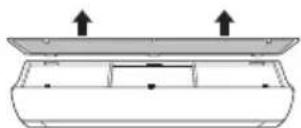
4 Clean the filter with a vacuum cleaner or with lukewarm water and a neutral cleaning agent. 5 Dry the filter in the shade. 6 Insert the air filter into the front cover.
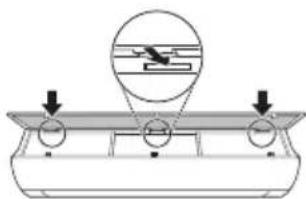
7 Replace the air filter, then install the intake pipe.
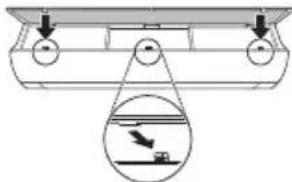
8 Check from the side of the intake pipe that the air filter is correctly installed.
Type 2
1 Disconnect the protective cover and remove the protective cable. 2 Open the intake pipe.
- Remove the intake pipe side cover.
3 Remove the air filter screws, lift them slightly, and pull them out of the housing.
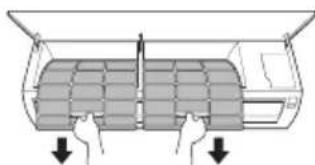
4 Clean the filter with a vacuum cleaner or with cold water and a neutral detergent. 5 Dry the filter. 6 Insert the air filter into the intake pipe.
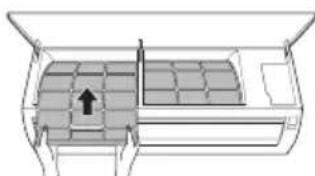
7 Check from the side of the intake pipe that the air filter is correctly installed.
Anti-allergy filter (optional)
1 Disconnect the protective cover and remove the protective cable. 2 Remove the air filter from the housing. 3 Remove the anti-allergy filter from the housing.
Type 1
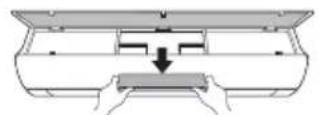
Type 2
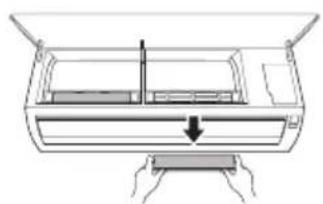
4 Clean the filters with a vacuum cleaner.
5 Install the anti-allergy filter.
Type 1
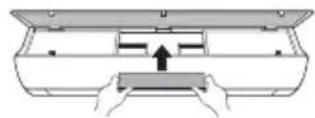
Tnn2
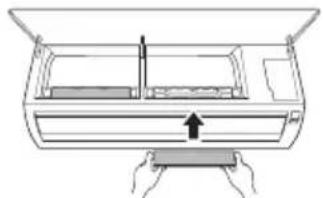
6. Mount the inlet hose. 7. Check from the side of the appliance that the inlet filter is correctly installed.
MAINTENANCE
The function and location of the anti-allergy filter may vary depending on the model type.
Self-diagnosis function
This product has a built-in self-diagnosis function. If an error occurs, the LED on the control panel will start flashing at intervals of 2 seconds. If this happens, contact your local distributor or service center.
Before contacting the service center
Check the following before contacting the service center. If the problem persists, contact your local service center.
IMPORTANT SAFETY INSTRUCTIONS

WARNING
To reduce the risk of explosion, fire, death, electric shock, injury, or burns to persons when using this product, follow basic precautions, including the following:
Children in the household
This appliance should not be used by persons (including children) with reduced physical, sensory, or mental capabilities, or lack of experience and knowledge, unless they are supervised or given instructions concerning the use of the appliance by a person responsible for their safety. Children should be supervised to ensure that they do not play with the appliance.
For use in Europe:
Important safety instructions
USAGE 11
Important safety instructions

DANGER
5 Insert the allergy filter.
Type 1
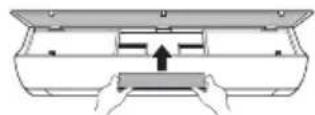
Type 2
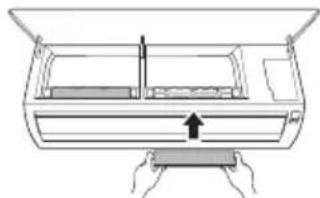
6 Install the air filters. 7 Check that the filters are correctly attached on the sides of the front cover.
CAUTION
Wireless Remote Control 12
Setting the Air Conditioner to Automatically Turn On/Off 17
Using the Mode Function 17
Using the Jet Mode Function 20
Using the Fan Speed Function 21
Wireless Remote Control
Battery Replacement
If the display screen of the remote control starts to fade, replace the batteries. Insert AAA (1.5 V) batteries before using the remote control.
1. Remove the battery cover.
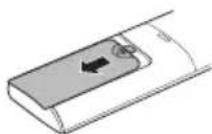
2. Insert the new batteries and make sure that the + and - terminals of the batteries are installed correctly.
Installation of the Remote Control Holder (Optional)
To protect the remote control, install the holder where there is no direct sunlight.
1. Choose a safe place that is easily accessible.
2. Attach the holder with two screws firmly tightened with a screwdriver.
Operating Method
Point the remote control towards the signal receiver on the right side of the air conditioner to operate it.
NOTE
- The remote control may operate other electronic devices if pointed at them. Make sure you are pointing the remote control at the signal receiver of the air conditioner.
For proper operation, use a soft cloth to clean the transmitter and the signal receiver.
If a function is not provided in the product, no sound signal will be emitted from the product when a button for such a function on the remote control is pressed, except for the Air Flow Direction (SWING), Energy Display (\bigcirc), and Air Purification functions.
3. Connect the smartphone to the wireless router.
NOTE
- To verify the Wi-Fi connection, check that the icon on the control panel is lit. This device only supports 2.4GHz Wi-Fi networks. To check the router frequency, contact your internet service provider or refer to the wireless router manual.
LG ThinQ is not responsible for network connection problems, damages, or malfunctions caused by the network connection.
- If the device is far from the router, it may not be able to connect to the Wi-Fi network. Purchase a Wi-Fi repeater (range extender) to improve the Wi-Fi signal.
- The Wi-Fi connection may be interrupted or fail to connect due to the home network environment.
- The network connection may not work properly due to the internet service provider.
- The surrounding wireless environment may cause the wireless network service to run slowly.
- The device cannot be registered due to problems with wireless signal transmission. Disconnect the device and wait about a minute before trying again.
- If the firewall on your wireless router is enabled, disable the firewall or make an exception for this device.
- The wireless network name (SSID) should be a combination of English letters and numbers. (Do not use special characters)
- The smartphone user interface (UI) may vary as it depends on the mobile operating system (OS) and manufacturer.
- If the router's security protocol is set to WEP, you may not be able to operate the network. Please change it to other security protocols (WPA2 is recommended) and re-register the product.
4 Clean the filters with a vacuum cleaner.
5 Clean the Allergy Filter.
Tip1
Tip2
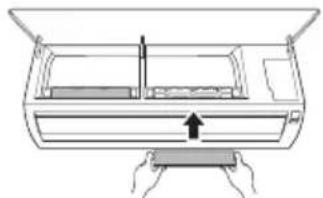
6 Remove the air filters. 7 Check the front cover side for correct air filter installation.
NOTE
TROUBLESHOOTING 34
"Smart Diagnosis" 29
MAINTENANCE 30
Cleaning the filter 32
Cleaning the anti-allergy filter (optional) 33
TROUBLESHOOTING 34
LG ThinQ application features
Connect the device to your smartphone using the convenient smart features.
Smart Diagnosis
OWNER'S MANUAL

Read this user manual before operating the device and keep it nearby at all times.
Display Brightness Setting
The brightness of the indoor unit's display can be adjusted.
- Press the LIGHT OFF button.
NOTE
Turns the display screen on/off. - If a button is pressed on the remote control, the display turns on automatically for a while. If the indoor unit's display brightness is set to off. - This function may operate differently depending on the model.
Using the Comfort Air Function (Optional)
Comfort Air Operation
This function sets the air flap to a preset position to prevent the supplied air from blowing directly onto people in the room.
1 Turn on the air conditioner.
2 Press the COMFORT AIR button several times to select the desired direction.
or as shown on the display.
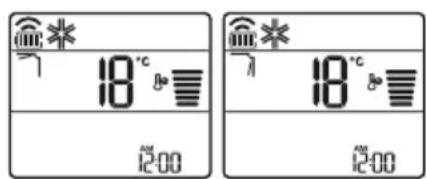
NOTE
or as shown on some indoor units. - This function is disabled when MODE or JET MODE is pressed. - This function is disabled and the automatic vertical air direction swing is set when SWING is pressed. - When this function is off, the horizontal air flap operates automatically according to the set mode.
Use the energy control function (optional)
1 Turn the device on.
2 Press the ENERGY CTRL button...
- Press the ENERGY CTRL button several times to select each step.
| Céim 1 Céim 2 Céim 3 | ||
| 80 % | 60 % | 40 % |
| 200 | 200 | 200 |
NOTE
- Step 1: Reduces the power input by 20% compared to the power input on.
80 as shown on the screen.
- Step 2: Reduces the power input by 40% compared to the power input on.
60 as shown on the screen.
- Step 3 (optional): Reduces the power input by 60% compared to the power input on.
40 as shown on the screen.
80 (1 step), 60 (2 step), (3 step) as shown by several units inside.
(1 step), (2 step) as shown by several units inside.)
- This function is available with the Cooling Mode.
The capacity may be reduced when the Power Control mode is selected.
The desired temperature will be displayed for 5 seconds when FAN SPEED is pressed.
The desired temperature will be displayed for 5 seconds when ROOM TEMP is pressed.
This function may not be supported when devices are connected to the outdoor unit.
IMPORTANT SAFETY INSTRUCTIONS

WARNING
READ THE INSTRUCTIONS BEFORE USE
This manual contains instructions for the model you have purchased.
This manual is subject to revision by the manufacturer.
SAFETY INSTRUCTIONS 3
READ ALL SAFETY INSTRUCTIONS. 4
OPERATION. 11
NOTES ON OPERATION 11
FUNCTIONS. 11
REMOTE CONTROL OPERATION 12
AUTOMATIC RESTART OF THE AIR CONDITIONER 17
Using the function for mode 17
Using the baby mode function. 20
Using the function for drying speed. 21
Using the airflow adjustment function. 21
Setting the on/off timer. 22
Using the sleep function (optional) 23
Using the simple timer function (optional) 23
Using the energy saving function (optional) 24
Using the night illumination function (optional) 24
Using the weather function (optional) 24
Using the electric energy control function (optional).....25
Using special functions 25
MEMORY FUNCTIONS 27
LG ThinQ Application 27
Smart Diagnosis 29
MAINTENANCE 30
Troubleshooting 32
Test the device against allergies (optional) 33
SOLVING PROBLEMS 34
Follow the safety instructions to reduce the risk of injury or damage due to unsafe or improper use of the product. The instructions are divided into 'WARNING' and 'CAUTION' as described below.

This symbol indicates items and activities that may pose a risk. Read it carefully along with this symbol and follow the instructions to avoid risk.

WARNING
This indicates that failure to follow the instructions may result in serious injury or death.

CAUTION
This indicates that failure to follow the instructions may result in minor injury or damage to the product.
The following symbols are shown on the inside and outside of the unit. (For R32)

This symbol indicates that the appliance uses a flammable refrigerant. If the refrigerant is leaked and exposed to an external ignition source, there is a risk of fire.

This symbol indicates that the operating manual should be read carefully.

Possible unit malfunction
This mode automatically changes the mode to maintain the set temperature at ±2°C.
1 Turn on the device.
2 Press the MODE button repeatedly to select the automatic fan mode.
It is displayed on the display screen.
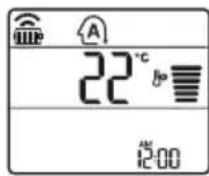
3 Press the button to set the desired temperature.
4 Press the FAN SPEED button to adjust the fan speed.
Dehumidification mode
This mode removes excess moisture from highly humid environments, especially during the rainy season, to prevent mold and mildew. This mode automatically adjusts the temperature and fan speed to maintain the optimal humidity level.
1 Turn on the device. 2 Press the MODE button repeatedly to select the dehumidification mode.
It is displayed on the display screen.

NOTE
In this mode, you cannot adjust the temperature; it will be adjusted automatically. The temperature is not displayed on the display screen. In dehumidification mode, the compressor and the indoor fan may not operate until the room temperature reaches 24 °C.
Heating mode
1 Turn on the device. 2 Press the MODE button repeatedly to select the heating mode.
It is displayed on the display screen.
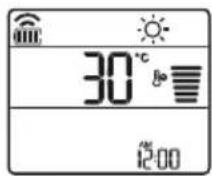
3 Press the button to set the desired temperature.
NOTE
will be displayed on the indoor unit when it operates in cooling mode.
- The indicator will be displayed on the indoor unit:
When operating in preheating mode. When the room temperature reaches the set temperature.
FAN ONLY
This mode only circulates the indoor air, without changing the room temperature.
1 Turn on the appliance.
2 Press the MODE button repeatedly to select the fan mode.
It is displayed on the display for indication.
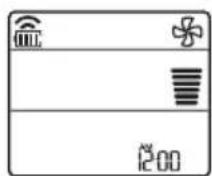
3 Press the FAN SPEED button to adjust the fan speed.
NOTE
Only the fan indicator is displayed on the indoor unit when operating in fan mode.
Using the fan mode
Adjusting the fan speed
- Press the FAN SPEED button repeatedly to adjust the fan speed.
| Екраза прикajувае | БрзINA |
| Виска | |
| Медим - Виска | |
| МEDIUM | |
| МEDIUM - Н sticka | |
| Н sticka | |
| - Ригореден ветар | |
Using the air purifier function (Original)
Suitable operation of the device
This function allows the device to be placed in the desired position, ensuring complete air circulation from direct blowing to the standards in the room.
1 Turn on the device.
2 Press the COMFORT AIR button repeatedly and select the desired fan speed.
- It does not appear on the display for display.
NOTE
- If it appears on one of the internal units.
- This function is disabled when you press the MODE or JET MODE buttons. This function is also disabled when the automatic vertical swing is set, when you press the SWING button. When this function is enabled, the horizontal louver operates automatically, depending on the set mode.
Using the energy control function (Optional)
1 Turn on the device.
2 Press the ENERGY CTRL button.
Press the ENERGY CTRL button repeatedly to select the desired mode.
| 1 чекор 2_chokor 3_chekopr | |
| 80% | 60% |
| 200 | 200 |
NOTE
Mode 1: The input power is reduced by 20%, compared to the rated input power.
00 00000000000000000000000000000000000000000000000000000000
Mode 2: The input power is reduced by 40%, compared to the rated input power.
It will be displayed on the display screen.
- Mode 3 (Original): The input power is reduced by 60%, compared to the rated input power.
It will be displayed on the display screen.
(Mode 1), (Mode 2), (Mode 3) are displayed on the display screen.
(Mode 1), (Mode 2) are displayed on the display screen.)
This function is available with the heating mode.
The capacity can be reduced when the energy control mode is selected.
- The set temperature is displayed for about 5 seconds when you press the FAN SPEED button.
- The room temperature is displayed for about 5 seconds when you press the ROOM TEMP button.
When connected to the multi outdoor unit, this function may not be available.
Using special functions
1. Turn on the device.
2. Press the FUNC button repeatedly to select the desired function.
3. Press the SET/CANCEL button to confirm.
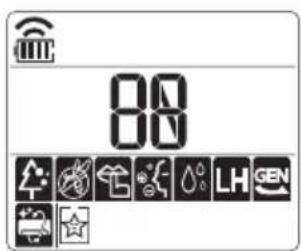
| Екран за прикaxesьаны | Опис |
| JOнскnot reнераTop користу Млнон joони, за за помоге BO поборчыны на КвалитetOT на Воздунот BO 3атборен постор. | |
| За за се hamали buyавata od Надворешнат рeditица. | |
| За hamалуваны на Влиагatura Коjaшто се создва BO Внатршнат рeditица. |
NOTE
- Some functions may not be supported, depending on the model. Some functions may work differently with the remote control.
Canceling special functions
1. Press the FUNC button repeatedly to select the function you want to cancel. 2. Press the SET/CANCEL button to cancel the function.
Using the air purification function
This function purifies the air in the room, removing dust and odors.
| ФункциjaЕранОпис | |
| JOизаТор | JOHSCNITe ЧecTичКи OД JOиЗaТорOT Г намалУbaAT ПовршINHСКИTe Бakтepии N ДругИTe ШТНи Матери. |
| ПлaЗмa | |
| Целесно Г OTстранУВа МИКрОСКОпСКИTe ЗагадуВачи OД Вцицahnot ВОЗdух, за д обeзбediЧисти СВж ВОЗdух. |
NOTE
- You can use this function without turning on the air conditioner.
- The plasma lamp and the lamp for purification are turned on while the purification function is operating, on some models. Do not touch the lamp during operation.
- This function may work differently depending on the remote control.
Using the TNB function.
This function will solve your problems with the device, before starting it on paper, the specified units.

It is displayed on the display for display.
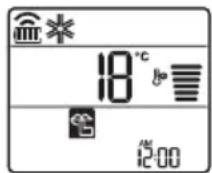
NOTE
- This function will be possible when you press the button MODE in ENERGY CTRL. in JET MODE.
- This function is available with the heating, drying, automatic change of the mode in automatic operation. When connected to the main indoor unit, this function may not be supported.
Use of the function automatic cleaning
During the heating and dehumidification modes, condensation is created in the indoor unit. This function removes the accumulated moisture.

It is displayed on the display for display.
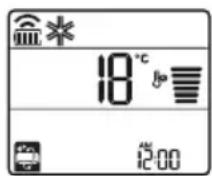
NOTE
Some functions cannot be used while the automatic cleaning function is operating. If you turn off the dehumidification, the fan will continue to operate for 30 minutes, to dry the inside of the indoor unit. Depending on the model, some indoor units display the symbol
LG ThinQ application
This function is available only on models with LG ThinQ.
The LG ThinQ application allows you to communicate with the device through your smartphone.
Features of the LG ThinQ application
Communicate with the device through your smartphone, using and using the settings menu.
Smart Diagnosis
If you encounter a problem with the appliance, you can use the Smart Diagnosis feature through the LG ThinQ application to help diagnose the problem.
Procedure
You will be able to set various options on the appliance and in the application.
NOTE
If you change your wireless router, add the internet service provider's service, select the registered appliance in the LG ThinQ application and register it again. The application will notify you of the appliance change without prior notice to users. - Features may vary depending on the model.
Before using the LG ThinQ application
1 Check the distance between the appliance and the wireless router (Wi-Fi signal).
If the distance between the appliance and the wireless router is too far, the signal may weaken. It may take longer to register, or installation may fail.
2 Turn off the mobile data or internet on your smartphone.
3 Connect your smartphone to the wireless router.
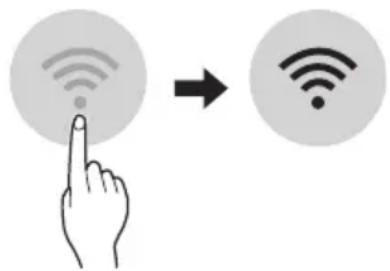
NOTE
To verify that you are connected to Wi-Fi, check the icon on the control panel. The appliance supports only 2.4 GHz Wi-Fi networks. To check the frequency of your network, contact your internet service provider or refer to the manual for your wireless router.
LG ThinQ is not responsible for any network connection problems or any faults, defects, or errors caused by network connection. - If the appliance has problems connecting to the Wi-Fi network, it may be due to the router. Turn on the Wi-Fi repeater (repeater function) to improve the Wi-Fi signal strength. The Wi-Fi connection may not connect or may be interrupted due to the surrounding home network environment. - Connection may not work depending on the internet service provider. - The wireless connection may require the wireless network service to work properly.
The appliance cannot be registered, there are problems with the wireless signal transmission. Unplug the appliance and wait about a minute, then try again. - If the firewall is enabled on your wireless router, disable it or add an exception. - The name of the wireless network (SSID) must be a combination of English letters and numbers. (Do not use special characters) - The smartphone user interface (UI) may vary depending on the mobile operating system (OS) and manufacturer. - If the security protocol of the router is set to WEP, you may not be able to connect to the network. Change it to another security protocol (WPA2 is recommended) and register the product again.
Installing the LG ThinQ application
Download the LG ThinQ application from the Google Play Store & Apple App Store via your smartphone. Follow the instructions for downloading and installing the application.
Open Source Software Notice
To obtain the source code under GPL, LGPL, MPL, and other open source licenses that are subject to the obligation to disclose the source code contained in the products, and to comply with the applicable license terms, please visit https://opensource.lge.com.
LGE will also provide you with the source code on a CD-ROM for a charge that covers the costs of such distribution (such as the cost of media, shipping, and handling) upon email request to opensource@lge.com.
This offer is valid for a period of three years after the last shipment of this product, for anyone who receives this information.
Smart Diagnosis
This function is available only on models with the logo.
Use this feature to help you diagnose or solve problems with your appliance.
NOTE
- For reasons not attributable to LGE's negligence, the service may not work due to external factors such as, but not limited to, Wi-Fi unavailability, Wi-Fi disconnection, the service provider's application policy, or application unavailability.
- This function may be subject to change, and may have different forms depending on the model.
Using LG ThinQ to diagnose problems
If you experience problems with your Wi-Fi equipped appliance, it can transmit the problem data to your smartphone via the LG ThinQ application.
- Turn on the LG ThinQ application and select the Smart Diagnosis feature in the menu. Follow the instructions in the LG ThinQ application.
Sound Diagnosis function for diagnosing problems
Follow the instructions below to use the Sound Diagnosis method.
Turn on the LG ThinQ application and select the Smart Diagnosis option in the menu. Follow the instructions for Sound Diagnosis given in the LG ThinQ application. 1 Correctly plug the power cord into the outlet. 2 Place the phone handset on the speaker as shown in the figure, then press and hold the DIAGNOSIS button [5s] until the data transfer is complete.
Do not move the phone handset until the data transfer is complete. The remaining time needed for data transfer will be displayed.
4 When the data transfer is finished, the diagnosis will be displayed in the application.
NOTE
For best results, do not move the phone handset while data is being transferred. Make sure to maintain an ambient noise level of minimum, otherwise the phone may not receive the sound signals correctly.
CLEANING AND MAINTENANCE
- Before performing any cleaning or maintenance, unplug the appliance and wait until the fan stops completely.
If the air conditioner will not be used for a long period of time, unplug it to keep it in the best condition. Clean it regularly to maintain optimal performance and prevent potential defects.
- Run the air conditioner in fan mode for 3 to 4 hours, then unplug it. Internal condensation may occur if moisture remains in its internal components.
- Clean the internal components of the air conditioner using fan mode for 3 to 4 hours before its reuse. This will help in removing the moisture that has accumulated.
Air filter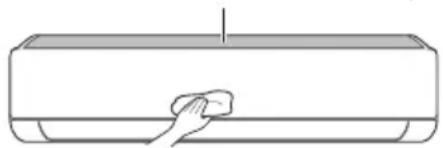
-The function may vary depending on the model type.
| Тип Onис Иntервал | |
| Фильпер за ВОздух | Исучтete со правосмУкалka ил рачно Исторе. 2 недени |
| Фильпер поразв алергий | Исучтete со правосмУкалka ил четka. Секо 6 месени |
| Лонизатор (оштоналho) | Уnotpeбete сува памуна вata за ja отстарны прашината. |
| Виатрешина единица | Исучтete ja поsprината на виатрешина теминда, kopисейки мера, сува крпа. |
| Проблеменalloно Исучтete Г садот каде ШTO се собра Кондэнзиранота влara. | |
| Проблеменalloно Исучтete ja севкatingа НИЗ kojaшTO се сobра Кондэнзиранота влara. | |
| Заменete Г сбатерп'te на далechинскnot упавувач.Едною | |
| Надворецна единица | Проблеменalloно Исучтete Г салемп'te за оддаваль- торлina и tabлata co OTьори. (Посовету bajte ce co тунчар.) |
| Проблеменalloно Исучтete Г сфенOT.Едною | |
| Проблеменalloно Исучтete Г садOT каде ШTO се сobра Кондэнзиранота влara. | |
| Проблеменalloно Лицеmedia КСАСТРДМДЕССССССССССССССССССССССССССССССССССССССССССССССССССССССССССССССССССССССССССССССССССССССССССССССССССССCS | |
| Исучтete Г сеелкtripчнite komноенти со ВОздух.Едною |
NOTE
- Do not use the appliance if the power cord or plug is damaged. To avoid danger, have the appliance repaired by a qualified person.
- Do not use or store flammable materials near the appliance. They may cause a fire. Do not place the appliance near water, as it may be damaged.
Cleaning the filter
Clean the air filter every 2 weeks, more often if necessary.
NOTE
- The air filter may be damaged if it is not cleaned properly. If the air filter is not correctly installed, dust and other particles may enter the indoor unit.
Type 1
If the indoor unit is dirty, you can remove the top filter.
1 Turn off the appliance and unplug the power cord. 2 Hold the filter handles and pull it out.
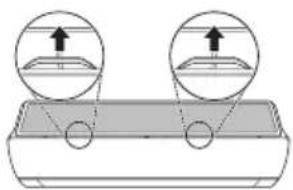
3 Remove it from the indoor unit.
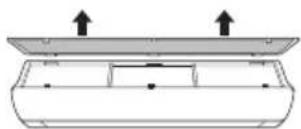
4 Clean the filter with a vacuum cleaner or with lukewarm water containing a neutral detergent. 5 Dry the filter in the shade. 6 Insert the filter into the front panel.
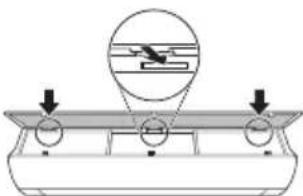
7 Press the handles to install the air filter.
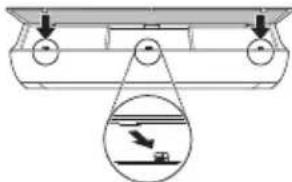
8 Check the front panel to ensure the air filter is correctly installed.
Type 2
1 Turn off the appliance and unplug the power cord. 2 Open the front panel.
- Remove the dirty filter from the housing.
Hold the air filter, place it on the floor and remove it from the inner unit.
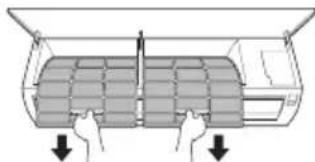
4 Clean the filters with a vacuum cleaner or with lukewarm water containing a neutral detergent. 5 Dry the filters in the shade. 6 Insert the air filters into the housing.
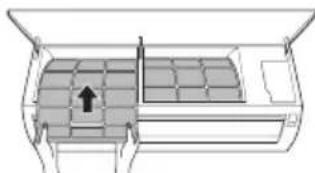
7 Check the side of the front panel for correct installation of the air filters.
Clean the anti-dust filter (optional)
1 Turn off the appliance and unplug the power cord. 2 Open the filter on the inner unit. 3 Remove the anti-dust filter from the inner unit.
Type 1
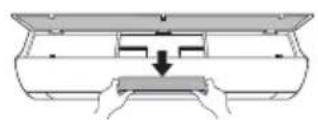
Type 2
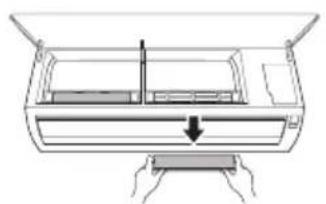
4 Clean the filters with a vacuum cleaner.
5 Insert the anti-dust filter.
Type 1
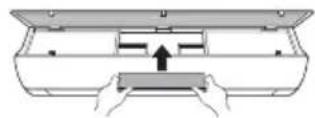
Type 2
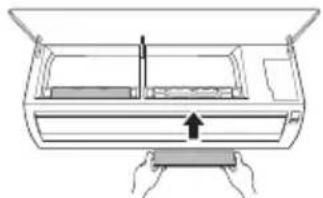
6 Assemble the air filters. 7 Check the side of the front panel for correct assembly of the air filter.
NOTE
- The function of the anti-dust filter may vary depending on the model.
The product is designed for self-testing. If an error occurs, the indicator light will blink at intervals of 2 seconds. If this continues, contact your local distributor or service center.
Before servicing
Please check the following items before contacting the service center. If the problem persists, contact your local service center.
| Симптоми можни | Прочны и рeshенье |
| Клиma урекот неpbотиHopмлно. | Мирзба на ИЗrogenи и чуdenи 3Вуци доагаат od_edиницatura.ISCКУЧЕТЕ РКлиma урекот, ИЗваде тг КабелOT 3a стура щьдддддддддддддддддддддддддддддддддддддддддддддддддддддддддддддддддддддддддддддддддддддддддддддддддддд徳. ИсккУЧЕТЕ РКлиma урекот, ИЗваде тг КабелOT 3a стура щьддддддддддддддддддддддддддддддддддддддддддддддддддддддддддддддддд徳. ИсккУЧЕТЕ РКлиma урекот, ИЗваде тг КабелOT 3aстура щьддддддддддддддддддддддддддддддд徳. ИсккУЧЕТЕ РКлиma урекот, ИЗваде тг КабелOT 3a стура щьддддддддддддддд徳. ИсккУCHYБАЧТ, п reproнHyВач на стужНо кал (6e36eDnOCTa,3a3emjyBaHTo), пproа КOLTAKTIPajTe ro cebvchNtOT ceHTAP. |
| П repкувачт, п reproнHyВач на стужНо кал (6e36eDnOCTa,3a3emjyBaHTo), пproа КOLTAKTIPajTe ro cebvchNtOT ceHTAP. | |
| Единицатс coZdABA KaД Na rpeшka od conctBeHOTOCamodиjarHocTHuPahbe. | |
| ИсккУЧЕТЕ РКлиma урекот, ИЗваде тг КабелOT 3a стура щьддддддд徳. ИсккУCHYБАЧТ, п reproнHyВач на стужНо кал (6e36eDnOCTa,3a3emjyBaHTo), пproа КOLTAKTIPajTe ro cebvchNtOT ceHTAP. | |
| Клиma урекот неpbotи. | Клиma урекот не e prinKluyen.IproBepete Далу КабелOT 3a haboJyBaHBe e BmETHaT BO prnkLuyOKOT 3a cTpyja, пproа МОжеби се ВкLYчЕни ИЗЛаTopiTE 3a haboH. |
| Има ИЗbethен ocNrypauch, п le e boknapaso haboJyBaHBeTo co cTpyja.3aMeHete ro ocNrypauch ot пproBepete Далу prkeKHyBaUOT ha cTpyjHOTOkoLO ce BkLuyHIN. | |
| Се стучпп reprokin Ha elektprichnata eheprnja.IscKlyчete ro Kлиma урекот,aLoce стучпproekln Ha eletektprichnata eheprnja.Kora haboJyBaHBeTo nobTOpHKe ce Bocnoctabn, nouekajte 3 mInHyTN, na notoa BkLvyTe ro Klinma урекOT. | |
| Волтaxkata e Или пremHory BvCoka, пли пremHory HnCKa.IproBepete Далу се ВкLYчIN pReKHyBaVChT ha cTpyjHOTOkoLO. | |
| Клиma урекот abTomatcKnсс e nckLuyn BO OBOJ MOMENT.BkLvyTe ro Klinma урекOT. | |
| Бateprinfte Bo daleuHscknot uypaBvBaH Ce ep nabilho hameCTeH.N.OscHypete ce deka sbateprinfte ce npabunHb BmEThaTn BO BaShIO T daLeuHncknyuPabVbA.Ако sbateprinfte ce npabunHo hameCTeH, a Klinma урекOT и поharamy He paBOTN, toraah 3aemeHete ng sbateprinfte и obidete ce nobTOpHo. | |
| СимпTomи Рожни | Прочны и рeshенье |
| Клиma уреот не ( искneyта ладен Воздун. | Воздунот не циркулера правлино. • Осигурete се дeca Нем заеси, ралетни, ялдегов од мебел, Што го бл_OKираат пroduнот ду на клиma уреот. |
| Фильтерот за ВОздун e валдан. • Устete Го Фильтерот за ВОздун сднаш на секон 2 недени. • Видete BO "Чистende на Фильтерот" за по breaste Информаши. | |
| Собнatura Temnéратуа сpenMHORY BИСКOA. • 3a сеньocно ладене на ВНатrepoшноць ВОздун BO Летно Вс佩е сpentrpe bОве. Вс佩е BO takOB сdУaj, ИЗберete Го Млэзноць ржимь 3a порзо ладене ньнатrepoшноць ВОздун. | |
| Ладноць ВОздун ИЗлergува од собда. • Осигурete се дeca Нем заеси ИЗлergува сднан OT ВОздун пpenky ВЕNTINАЦИОнITE TOOKI OД собда. | |
| Посakуванata Temnéратуа сpenbicaka od сeraшнata Temnéратуа. • Поставete ja посayванata Temnéратуа на поиск� НИВО od сeraшнata temnéратуа. | |
| Во SFиЗинам Има ИЗВор на толлпи. • ИЗberнунайда koportstite ИЗвори на толлпи, како StTo ce сelen'tpruchнite пechулллгасп'te пал'mehiц, дodeka pa6otn Клиma уреот. | |
| Изbethан e ржимOT на сhen. • 3a Вс悔е на сhen ржимOT од Клиma уреот ДУВ ВОздун, кojшTO hHTU ro лади, НИТу ro 3aГревы ВНатrepoшноць ВОздун. • Постсрлente Го ржимOT на pбота BO рбота на падене. | |
| Надворшонata Temnéратуа сpenMHORY BИСКOA. •Ефektot на падене може ду не сиDE doBoilen. | |
| Брзинatable на сhenot небе до се прилагду. | Изbethан e млалзногт ржимлл ржимOT на АВТOMATСКО рбosteны. •Во сноки ржимы на рбosteны, He можete ду ѳ прпалогду Срзинatable на фenOT. ИЗbernete ржимы на рбosteны BO кojшTO кe можete ду ѳ прилагдупсрзинatable на сhenOT. |
| Temnépatурatura не може до сibe прилагдуна. | Изbethан e сhen ржимOT лим млалзногт ржим. •Во сноки ржимы на рбosteны, He можete ду ѳ прпалогду temnépatурatura. ИЗbernete ржимы на рбosteны BO кojшTO кe можete ду ѳ прилагдупсрзинatable на сhenOT. |
| Клиma уреот зanpe за Вс悔е на рбота. | Клиma уреот неаideйно с ecklnуч. •Можеби состechа phyн��ида на мерачт на Вс悔e, StTo ja Исклчува единцата. Прobерete Ги поставкипе на мерачт на Вс悔e. |
| Се сLnуч пжимн на селковпната сөрөгпяда за Вс悔e на рбosteны. •Почекajte ду срати селковпната сөрөгпя. Фун��ида АВТOMATСКО рбстарпаны, Вашата сөрөгпя, посл徳нatable ореташика, НкOLКУ мИнUTN оTKAKO кe сьрати STPyjata. | |
| Симпоми можни | Прочны и ршени |
| Внатрeshнatable единиca сеушто ке разоти, дури и по пекиnot на еелкtripинatable еергija. | РабOTи Функцилatable воватско чир themselves. ДобOTи ВОзOTe и Нa Функцилatable воватско чир themselves Дд подOLЖИ, БИдЕКИ ja OTcTpaHbYа пeoctaHaTaТа ВЛага оД ВНaTpeShnOCTa на ВНaTpeShnAte единиca. Ако He ja cacate obaa Функцилja, можete Дд ja ИСКПУчITE единиca.Ta. |
| ИзлесOTа BOЗдух на Внатрeshнatable.edinиca ис neuropstama marla. | ЛадноТВОздух od Клиma у畴OT создава магla. Оьо щehOMeн ce cIvyBa KORA doaЯdo Ha HAMaLyBaJIbe Na coBHaTа tempePATya. |
| ИстEVув BA ODA od надВорeshнatable единиca. | 3a Врeme Ha onepaunite Na rpeeJeBoaRa DoaЯdo KaNeБe Ha KOнDEH3riPаHa ВODa od EMITyBaQOT Na TOnLIIHa. Оьо сIMNTOM bapa ИNcTalipaJBe Ha OdВODHO cIpeBO PoD bA3HNoT caD. КontakTIPajTe ja LInCHoCTa 3a ИNcTalipaJBe. |
| ПостOTи buchavа пл Вибраци. | 3Byk Na KLINKHyBaJIe Може Дд ceЧуе КORA edINHuaTA ZanOChyBa Пл З苹ра, Зардд ВИнжeBJeTO Ha ObratNHOT BeHTINJ. 3Byk Na shkpIneJa: ПлacrTchNITE DeIOBn Ha BHaTpeShnAte edINHua шkpInaT KORA doaЯdo DO HINBHO CTechyBaJIe ПлproшИpyBaJIe 3apadi ненадeJHnTE TepePATypHn IprOmeHn. 3Byk Na TeeuHBe Пл duBaJIbe: Toa e TeeuHBeTo Ha cpeDCTBOTO 3a Лад? НИЗ Клиma у畴OT. ·Toa ce HopMaJIHn CImNTOMi. БухаТа Ke 3anpe. |
| Внатрeshнatable единиca ondabva mriu36a. | МирЗbITE (ΚΑΚΟ Na primeper Na idMOT od zuRapn) можат Дд boДмт anscopбианы BO HbATpeShnAte edINHua Na da ce ocIobodUbaaT co пpoTOKOT Na BOZdYxOT. ·Ако МирЗбATA He IncYe3He, Ke Mopa Дд ro N3MnTe ФиNTePOT. Ако He paBOTи, КонтakTIPajTe ro cEpBnCnHOT ZeHTAP, 3a Дд ro ИСчIcTITe emITePOT нATpONIIHa. |
| Клиma у畴OT He ис neuropstata toponl BOZdYx. | Kora pexIMOT Na rpeeJeKe 3anOChne, OTBOPOT e cSkopo 3aTBopeHи reчис нe ИЗЛergуВа BOZdYx, Иako HauBopeShnAte edINHua pa6OTn. Toa e HopMaJIen сIMNTOM. Be молиме поЕаTe сдОЕka edINHuaTa He coZdaide DoBOJIoH TOonl BOZdYx, KojISto Ke ce DuBa HIN3 BHaTpeShnAta edinHua. |
| Надворeshнatable.edinHua e BO pexIMOT 3a Odmp3HyBaJIe. ·Kora upeDor e BO pexIMOT Na rpeeJe, leiodOT/mpa3OT ce sobpaat Br3 КалemITE, akо додд do Na raJahle Na HauBopeShnAte TempePATya. Obaa Функциja ro OTcTpaHvBa cIooJot od Mpa3 KoJStO ce HAOrA Br3 kaJIeMOT, И SF Травалюда завши за Okoly 15 mInHyTu. | |
| Надворeshнatable TempePATya e npemHory Hncka. ·ЕфektOT Na rpeeJeMe BoMe Дд Neбдд do BOJen. | |
| СимпTomи можни | Прочны и рeshени |
| Вашnot Кужен anapatи смартфонот He ce порзано co Wi-Fi мрека. | Лоб生态系统а 3a Wi-Fi на кoeшто ce обидуне дуа ce поврзete, e неточна. • Нajдente ja Wi-Fi мрека на ловзана co вшиот смартфони отстранete ja, a поюа ренисторajte ro вшиот anapat на LG ThinQ. |
| Мышино падатои 3a вшиот смартфонс ce вklучени. • Исклuchete Ги Мбшино падатои на вшиот смартфони ренисторjetro anapatot, koprasteyки ja Wi-Fi мрека. | |
| И métета на бeзшино на мрека (SSID), He e правлино поесен. • И métета на bезшино на мрека (SSID) trpeba дa bide komбihuшиja od anглески bukви и sboеви. (He koprastete Ги спeциалнite karakтети) | |
| Ф��вени jo大自然а на рутетор He e 2,4 GHz. • Поблржана ecame 2,4 GHz Ф��вени jo на рутетор. Поставete ro bезшино рутетор 2,4 GHz и пени对接 go anapatot co bезшино рутет. 3aда ja пobеритe Ф��вени jo大自然а на рутетор, рobеретe кaj вшиот снабдувач на Interpnet услуги,有很大 кaj пoinizbodnitelot на рутетор. | |
| Пэрелеме e pactojahнeto noméгу anapatot и рутетор. • Ако e пэрелеме pactojahнeto noméгу anapatot и рутетор, сигданot можеда bide садь и кoneckциjsда можеда he bide правлино konфигурирана. Поменete ja lokaшида на рутетор, заudence пobлися до anapatot. |
NOTE
Some functions may not be supported, depending on the model.
Labels
USER MANUAL
AIR CONDITIONER

IMPORTANT SAFETY INSTRUCTIONS

WARNING
To reduce the risk of explosion, fire, death, electric shock, injury, or burns to persons when using this product, follow basic precautions, including the following:
Children in the household
This appliance is not intended for use by persons (including children) with reduced physical, sensory, or mental capabilities, or lack of experience and knowledge, unless they are under constant supervision or have been instructed on the use of the appliance by a person responsible for their safety. Children should be supervised to ensure that they do not play with the appliance.
- TABLE OF CONTENTS
- SAFETY INSTRUCTIONS
- OPERATION
- SMART FUNCTIONS
- MAINTENANCE
- TROUBLESHOOTING
- IMPORTANT SAFETY INSTRUCTIONS
- WARNING
- CHILDREN IN THE HOUSEHOLD
- FOR USE IN EUROPE
- INSTALLATION
- TECHNICAL SAFETY
- CAUTION
- NOTES FOR OPERATION
- SUGGESTION FOR ENERGY SAVING
- PARTS AND FUNCTIONS
- INDOOR UNIT OUTDOOR UNIT
- NOTE
- WIRELESS REMOTE CONTROL: INSERTING BATTERIES
- INSTALLING THE REMOTE CONTROL HOLDER (OPTIONAL)
- OPERATING METHOD
- SETTING THE CURRENT TIME
- USING THE °C/°F CONVERSION FUNCTION (OPTIONAL)
- OPERATING THE AIR CONDITIONER WITHOUT THE REMOTE CONTROL
- TYPE
- USING WIRELESS REMOTE CONTROL
- RESTARTING THE AIR CONDITIONER AUTOMATICALLY
- DISABLING AUTO RESTART
- USING THE MODE FUNCTION
- COOLING MODE
- AUTO OPERATION (ARTIFICIAL INTELLIGENCE)
- MULTI MODEL
- AUTO CHANGEOVER MODE
- SINGLE SPLIT MODEL
- DEHUMIDIFICATION MODE
- HEATING MODE
- FAN MODE
- USING THE JET MODE FUNCTION CHANGING ROOM TEMPERATURE QUICKLY
- USING THE FAN SPEED FUNCTION
- ADJUSTING THE FAN SPEED
- USING THE AIR FLOW DIRECTION FUNCTION
- SETTING THE ON/OFF TIMER
- SETTING THE ON TIMER
- CANCELING THE ON TIMER
- SETTING THE OFF TIMER
- CANCELING THE OFF TIMER
- CANCELING THE TIMER SETTING
- USING THE SLEEP FUNCTION (OPTIONAL)
- USING THE SIMPLE TIMER FUNCTION (OPTIONAL)
- USING THE ENERGY DISPLAY FUNCTION (OPTIONAL)
- DISPLAY THE CURRENT ENERGY USAGE
- USING THE LIGHT OFF FUNCTION (OPTIONAL)
- DISPLAY SCREEN BRIGHTNESS
- USING THE COMFORT AIR FUNCTION (OPTIONAL)
- COMFORT VANE OPERATION
- USING THE ENERGY CONTROL FUNCTION (OPTIONAL)
- USING SPECIAL FUNCTIONS
- CANCELING SPECIAL FUNCTIONS
- USING THE AIR PURIFICATION FUNCTION
- USING THE SILENT FUNCTION
- USING THE AUTO CLEAN FUNCTION
- LG THINQ APPLICATION
- LG THINQ APPLICATION FEATURES
- SMART DIAGNOSIS
- SETTINGS
- BEFORE USING LG THINQ APPLICATION
- INSTALLING THE LG THINQ APPLICATION
- OPEN SOURCE SOFTWARE NOTICE INFORMATION
- USING LG THINQ TO DIAGNOSE ISSUES
- USING AUDIBLE DIAGNOSIS TO DIAGNOSE ISSUES
- CLEAN THE AIR FILTER
- CLEAN THE ALLERGY FILTER (OPTIONAL)
- SELF-DIAGNOSIS FUNCTION
- BEFORE CALLING FOR SERVICE
- MEMO
- OWNER'S MANUAL
- AIR CONDITIONER
- FUNCTION NAME ACTIVATION (OPTIONAL)
- ACTIVATION OF THE CURRENT FUNCTION
- FUNCTION NAME: NIGHT MODE (OPTIONAL)
- BAXNN NHCTPYKU NN 3A 6E30NACNOCT
- I PEPDUYPEXKEHNE
- A6EJIEXKA
- BKIIOUBAHE N N3KJIIOUBAHE HA TAMEPA
- SETTING THE SWITCH-ON TIMER
- CANCELLING THE SWITCH-ON TIMER
- SETTING THE SWITCH-OFF TIMER
- DELAY
- CANCELING THE TIMER
- USING THE STANDARD TIMER FUNCTION (OPTIONAL)
- USING THE FUNCTION TO DISPLAY THE CONSUMED ENERGY (OPTIONAL)
- ENERGY SAVING MODE
- ADJUSTING THE DISPLAY BRIGHTNESS
- USING THE COMFORTABLE AIRFLOW POSITION FUNCTION (OPTIONAL)
- COMFORTABLE AIRFLOW POSITION FOR HEATING OPERATION
- USING LG THINQ TO DIAGNOSE PROBLEMS
- USING AUDIBLE DIAGNOSIS TO DIAGNOSE PROBLEMS
- ANTI-ALLERGY FILTER (OPTIONAL)
- TNN
- BEFORE CONTACTING THE SERVICE CENTER
- USAGE
- DANGER
- WIRELESS REMOTE CONTROL
- BATTERY REPLACEMENT
- INSTALLATION OF THE REMOTE CONTROL HOLDER (OPTIONAL)
- TIP
- DISPLAY BRIGHTNESS SETTING
- COMFORT AIR OPERATION
- USE THE ENERGY CONTROL FUNCTION (OPTIONAL)
- MEMORY FUNCTIONS
- SOLVING PROBLEMS
- POSSIBLE UNIT MALFUNCTION
- FAN ONLY
- USING THE FAN MODE
- USING THE AIR PURIFIER FUNCTION (ORIGINAL)
- SUITABLE OPERATION OF THE DEVICE
- USING THE TNB FUNCTION
- USE OF THE FUNCTION AUTOMATIC CLEANING
- FEATURES OF THE LG THINQ APPLICATION
- PROCEDURE
- BEFORE USING THE LG THINQ APPLICATION
- OPEN SOURCE SOFTWARE NOTICE
- SOUND DIAGNOSIS FUNCTION FOR DIAGNOSING PROBLEMS
- CLEANING AND MAINTENANCE
- CLEANING THE FILTER
- CLEAN THE ANTI-DUST FILTER (OPTIONAL)
- BEFORE SERVICING
- USER MANUAL
Brand : LG
Model : S09ET
Category : Air conditioner