RBC450 SV - Freezer ROSIERES - Free user manual and instructions
Find the device manual for free RBC450 SV ROSIERES in PDF.



| Product type | Blast chiller / Shock freezer |
| Brand | Rosieres |
| Model | RBC450 SV |
| Blast chilling capacity | 3 kg |
| Freezing capacity | 3 kg |
| Number of shelves | 3 |
| Power supply | 220–240 V, 50 Hz |
| Maximum current | 2.5 A |
| Cooling power | 300 W |
| Heating power | 220 W |
| Refrigerant | R290 |
| Climate class | SN |
| Net weight | 38 kg |
| Gross weight | 40 kg |
| Touch screen | Yes, 4.3 inches |
| Programs | Blast chilling, freezing, pre-cooling, cooling, drinks, 0°C storage, raw fish, thawing, table ready, slow cooking, proofing |
| Core probe | Yes |
| Internal lighting | LED |
| Exterior material | Stainless steel |
| Cleaning | Interior and exterior with neutral products and soft cloth |
| Safety | Fuse, compressor thermal protection, double circuit breaker |
| Included accessories | Grids, core probe |
| Mobile application | Compatible with Rosieres Epicurien (for sous vide) |
Frequently Asked Questions - RBC450 SV ROSIERES
User questions about RBC450 SV ROSIERES
0 question about this device. Answer the ones you know or ask your own.
Ask a new question about this device
Download the instructions for your Freezer in PDF format for free! Find your manual RBC450 SV - ROSIERES and take your electronic device back in hand. On this page are published all the documents necessary for the use of your device. RBC450 SV by ROSIERES.
USER MANUAL RBC450 SV ROSIERES
Use and maintenance manual
Contents
1. INTRODUCTION 26
1.1 General notices 26
1.2 Safety notices 26
1.3 Transport and handling 26
1.4 Unpacking 26
2. INSTALLATION 27
2.1 Data on label 27
2.2 Notices for installation 27
2.3 Positioning 28
2.4 Ambient temperature and air circulation 28
2.5 Final checks 29
2.6 Protective devices 29
3. USE 29
3.1 User notices 29
3.2 Preliminary internal cleaning 29
3.3 The core probe 29
3.4 Containers and lids to use 30
3.5 Arranging food 30
3.6 Effectiveness of the blast chilling and freezing programmes 30
3.7 Storing blast-chilled or frozen foods 30
3.8 Programmes 31
3.9 The display and user interaction 32
3.10 Meaning of the icons 32
3.11 Turning on and off 33
3.12Programme selection 33
3.12.1 End of programme 33
3.12.2 Pre-cooling 34
3.12.3 Blast chilling 34
3.12.4 Freezing 35
3.12.5 Cooling 35
3.12.6 Drinks 36
3.12.7 Storage at 0ircC 36
3.12.8 Raw fish 36
3.12.9 Thawing 37
3.12.10 Ready to serve 37
3.12.11 Slow cooking 38
3.12.12 Proving 39
4. REGULAR MAINTENANCE 40
4.1 Safety information 40
4.2 Cleaning external surfaces 40
4.3 Cleaning the compartment 40
4.4 Periods of inactivity 40
5. EXTRAORDINARY MAINTENANCE 41
5.1 Malfunction 41
5.2 Disposing of the appliance 41
6. TROUBLESHOOTING 42
6.1 Alarm table. 42
7. TECHNICAL SPECIFICATIONS 42
7.1 Dimensions 42
8. WIRING DIAGRAM 43
9 INFO 43
9.1 Service 43
9.2 Customer details 43
10. EPICURIEN APP - EXTRA CONTENTS FOR SOUS VIDE E-PICURIEN 44
1. INTRODUCTION
1.1 General notices
This manual constitutes an integral part of the product. It contains information on the installation, use and safety of the appliance. Read the contained instructions carefully.
The user and installer must read this manual carefully and always refer to it.
You are advised to keep this manual in a known location accessible to all authorised operators (installer, user, maintenance operator), so that it can be consulted at all times, and to include it with the appliance in the event that it changes ownership.
During transport, handling and installation, rest the appliance with the base on a level surface, avoiding leaving it in an inclined position for extended periods.
The manufacturer of this appliance declares the conformity of every single appliance with the regulations in force.
1.2 Safety notices
The responsibility for the operations performed on the appliance, neglecting the indications provided in this manual, lies with the user.
The appliance may not be used by children or people with limited physical, sensory or mental capacities or lacking in experience or the necessary knowledge, without the supervision of and adult or guardian.
Children must not play with the appliance. Cleaning and maintenance that should be carried out by the user must not be carried out by unsupervised children.
It must be possible to reach the electrical cable and power socket even with the appliance installed. The cable must not be bent or crushed in a way that may compromise the insulation.
The openings for ventilation must not be obstructed with the appliance installed.
All the electrical parts and parts of the refrigerant circuit must be checked periodically and solely by authorised technical staff.
The manufacturer declines all responsibility and warranty obligation, should damage or harm to appliances, persons or property occur attributable to:
- installation and/use that is incorrect and/or not in accordance with the laws in force
- failure to observe accident-prevention regulations or the laws in force during installation
- modifications and/or interventions not specific to the model
- use of spare parts that are not original or not specific to the model
- failure to observe, even in part, the instructions in this manual.
1.3 Transport and handling
Loading and unloading the appliance from the vehicle must be carried out with suitable equipment, such as for example a fork lift, in the absence of which at least two people are required.
Warning! Every precaution required to prevent harm or damage to persons, property or the appliance itself must be observed during handling operations. Specific indications are provided on the packaging.
1.4 Unpacking
Open the box at the top, folding out its edges sideways to operate more easily, then remove the upper protection and the side corner elements in polystyrene (fig. 1). Remove the protective bag (fig. 2), then finally, using the appropriate lifting handles, take the appliance out of the box, lifting it upwards (fig. 3).

Fig.1 Fig.2 Fig.3
After removing the packaging and before any other operation, ensure that the appliance is intact. In the event that anomalies are observed, do not turn on the appliance and contact the Retailer.
The materials that make up the packaging must be disposed of in accordance with the laws in force in the country where the appliance is used and always in an environmentally responsible manner.
Lift the appliance with suitable equipment, using protective gloves, and position it in the appropriate location.
Remove any protective film, removing traces of adhesive using a soft cloth and a neutral product. Do not use scourers or sponges that may irreparably scratch the surfaces.
Warning! The materials that make up the packaging may potentially be dangerous to children or animals.
2. INSTALLATION
2.1 Data on label
The characteristics of the appliance are indicated on the data label attached to the side of the appliance itself (fig. 4).
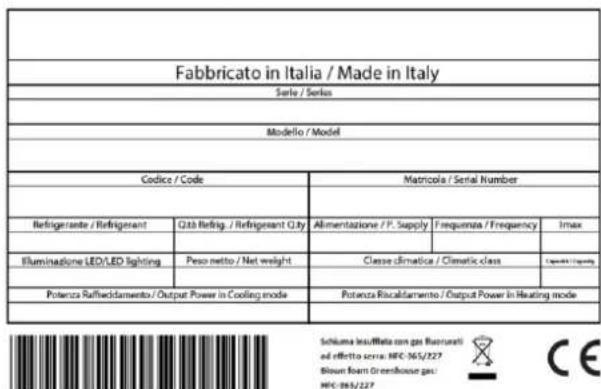
Fig. 4 - Data label for the appliance
Note: do not remove, alter, damage or modify the data label.
2.2 Notices for installation
Installation must be carried out solely by authorised, specialist staff, observing the notices, instructions and directions contained in this document.
Before installing the appliance, ensure that the pre-existing electrical systems are legally compliant and adequate with respect to the data on the label for the appliance to be installed in terms of voltage [V], frequency [Hz] and power [W].
The appliance has a power cable with a 16 A Schuko plug. Ensure that the power cable is not wrinkled, crushed or bent.
Don't wind the power cable up on itself and ensure that it is not an obstacle or hazard to people that pass.
The power cable must not be wet, or placed in contact with sharp or hot objects, or exposed to corrosive substances.
Do not touch the appliance with damp or wet hand/feet or without protection (e.g. appropriate gloves and shoes).
Do not insert screwdrivers, kitchen utensils or other items between the protections or in moving parts. Avoid children or animals coming into contact with the power cable.
Warning! The plug must be accessible with installation complete! Should this not be possible, the power system for the appliance must feature a suitable all-pole disconnection switch.
2.3 Positioning
Installation is not advised in locations with poor air circulation and high temperatures, as well as locations in direct sunlight or exposed to the elements. Avoid installation near heat sources.
Warning! Ensure that there are no obstacles to opening the door with installation complete.
Warning! Do not use extension leads for the power cable to prevent problems with overheating.
Note: for correct operation of the appliance, an area for air with a section of at least 250 cm2 (fig. 5) must be guaranteed behind the appliance itself.
Warning! After positioning in the recess, fix the appliance with appropriate screws.
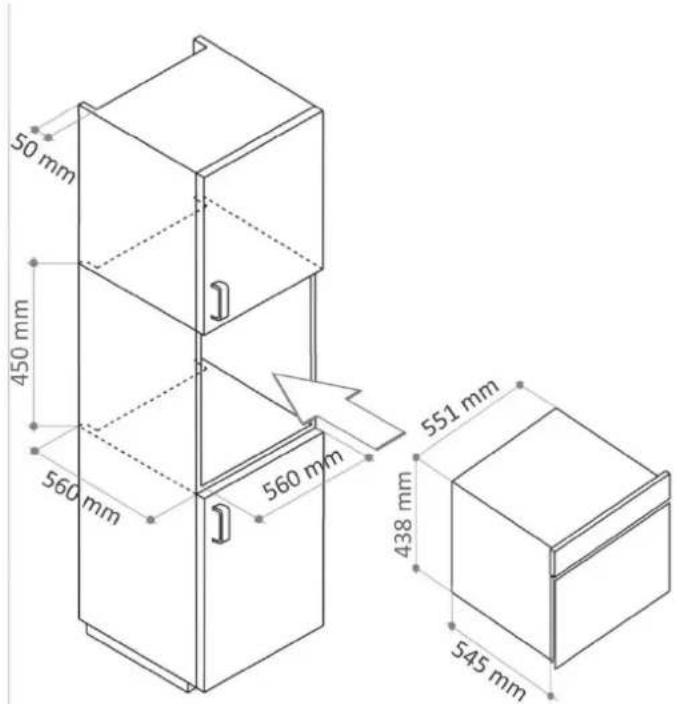
Fig. 5 - Dimensions of the recess and of the product
2.4 Ambient temperature and air circulation
The performance of the appliance is guaranteed up to an ambient temperature of 32ircC provided that adequate air recirculation is guarantee as indicated in paragraph 2.3.
2.5 Final checks
After positioning the appliance and connecting it electrically:
- check that the electrical connection is correct
- wait at least 4 hours before turning it on, to allow the thermodynamic circuit to stabilise.
2.6 Protective devices
The appliance features the following protective devices:
- fuse in the power board to protect against any overload
- overload cutout in the compressor to protect against any overload or malfunction
- dual trip unit to protect against heating element malfunction.
3. USE
This appliance is intended mainly for the blast chilling and freezing of food. If cooked and blast chilled, food maintains its organoleptic properties nearly unaltered for 5-7 days; if frozen, on the other hand, food maintains its consistency and original flavour after thawing.
3.1 User notices
- Read this booklet carefully and always refer to it.
- Should you notice anomalies in the appliance, for example damaged power cable or control panel failure, turn off the appliance immediately and contact the support centre.
This appliance is not intended for use by children or people with limited physical, sensory or mental capacities, or without experience or knowledge, unless they are supervised and instructed on using it. Children must not play with the appliance. - Do not introduce explosive substances, such as aerosols with flammable propellants, to the appliance.
- This appliance is intended for domestic use.
The appliance may become hot during operation in accordance with the programme running. Adopt appropriate precautions when working inside the appliance. Keep children at a distance.
This appliance is intended solely for the use for which it was designed: blast chilling, freezing, thawing, proving, slow cooking and cooling of food and drink in a domestic setting. All other use should be considered improper and potentially dangerous.
3.2 Preliminary internal cleaning
After making the electrical connection and positioning, the inside of the compartment must be cleaned using a soft cloth and a neutral detergent before turning on. Afterwards, remove any remaining detergent.
Do not use stainless steel scourers, scrapers, abrasive, acidic or aggressive substances that may irreparably damage the internal surfaces.
3.3 The core probe
The core probe is an accessory used to detect the temperature inside food. In programmes including the use of the core probe, the process ends automatically when the envisaged temperature is reached in the food.
If the core probe is not connected to the appliance and the user wants to use the core mode, "Connect the probe to start the programme" appears on the display.
Correct use involves inserting the probe inside the food before starting the programme.
Note: the probe must be inserted to the centre of the food so that it does not come out of the food. To improve the effectiveness of the programme, insert the probe in the biggest part.
If the core probe has not been inserted in the food because it has been forgotten at the bottom of the compartment or has fallen out of the food, the appliance automatically switches the programme to "recipe" mode 5 minutes after starting, retaining the set "Food type" and "Preparation".
Handle the probe with care and pay attention to its tip. After use, clean it with a soft cloth and lukewarm water, then put it away.
When "recipe" mode is selected for blast chilling or freezing, the use of the core probe has no effect on the execution of the programme.
3.4 Containers and lids to use
The use of shallow trays and containers assists internal ventilation and is therefore preferable.
Advice: to increase the effectiveness of the blast chilling and freezing programmes, it is advisable to extend the portion of food affected by the air flow to the greatest possible extent; so avoid covering trays and containers, since this increases the insulation.
Ensure that the containers are compatible with use at low temperatures (-40ircC)
In programmes with hot functions, favour the use of containers made of metal, ceramics or materials suitable for temperatures up to 80ircC .
3.5 Arranging food
When possible, it is advisable to avoid piling up food on trays, favouring an arrangement spread out over as wide a surface as possible, so as to promote better internal ventilation.
3.6 Effectiveness of the blast chilling and freezing programmes
The best blast chilling and freezing results are obtained by introducing the food to the appliance as soon as cooking is finished, avoiding prolonged exposure of the food to the ambient temperature, since this causes a loss of humidity and deterioration in the original colour, scent and taste characteristics.
Advice: blast chilling and freezing programmes performed on foods that is very hot or is of a certain weight are shorter and obtain better results if the pre-cooling programme is carried out beforehand.
3.7 Storing blast-chilled or frozen foods
The correct location for storing blast-chilled foods is the fridge, while the correct location for frozen foods is the freezer, so use these appliances to store these foods.
Since frozen food can be kept for long periods (6-12 months), it is advisable to mark containers with a label indicating the contents and preparation and expiry dates.
Advice: to further improve the storage times for blast-chilled or frozen foods, you can, with suitable appliances, vacuum-pack them, observing the instruction on temperatures and times.
3.8 Programmes
| BLAST CHILLING Allows food to be kept in the fridge for 5-7 days, thanks to rapid cooling of the food to +3° This cooling prevents evaporation of the water from products that have just been cooked and reduces the proliferation of bacteria, thus extending the food storage time. |
| FREEZING Allows food to be kept in the freezer for several months, thanks to rapid cooling of the food to -18 °C. The organoleptic properties, flavour, scent and appearance of foods are preserved intact through the micro crystallisation of the water that it contains, thus avoiding the destruction of the internal molecular structures. |
| PRE-COOLING Allows the reduction of time for programmes, like blast chilling or freezing, that involve the cooling of food that is very hot or is of a certain weight. It consists of cooling the internal parts of the appliance and therefore optimises kitchen working times because it can be performed while the recipes are prepared. |
| COOLING Allows the process of cooling a food that has just been cooked and is therefore very hot to the desired temperature to be accelerated, without waiting for natural acclimatisation, to permit rapid consumption. |
| DRINKS Allows the temperature of a drink to be reduced in accordance with the time available. Storage of drinks at the desired temperature is the task of a wine cellar, but the blast chiller has highly useful performance characteristics when not enough time is available. |
| STORAGE AT 0 °C Allows the organoleptic properties of raw food to be preserved and is appropriate when you wish to store food for a few hours before it is prepared. |
| RAW FISH Allows the process of low-temperature sanitation to be reproduced at home, using the high performance of the blast chiller. Poor storage of fishery products may generate health risks in relation to Anisakis, a parasite that can be eliminated through extended cooking processes or storage at -30 °C. |
| THAWING Allows food to be brought from freezing temperature to a temperature of 4°C approx. without losing liquids and without starting to cook it, thus avoiding the conversion of proteins the occurs, for example, when thawing meat in the microwave. |
| READY TO SERVE Allows food cooked previously and stored in the fridge to be heated and served at table at the right temperature for consumption. |
| SLOW COOKING Allows food to be cooked in an environment with a constant temperature for a given time. Thanks to the limited evaporation of water from food, this technique allows the qualities and tenderness of food to be preserved. |
| PROVING Permits the creation of a microclimate with controlled temperature and humidity, so that fermentation can occur in optimal conditions, causing dough to rise naturally. The amount of yeast can be reduced by programming the proving time, thus obtaining a lighter, more digestible product, favouring the development of the desired aroma. |
3.9 The display and user interaction
The control panel comprises a 4.3-inch touchscreen display and a power button at the side.

Fig. 6 - Main menu and example of select screen
- "Programme" icon: touching the icon takes you to the screen for running the corresponding programme.
- "Settings" icon: selecting this icon allows you to access the environment for setting the language, time, display brightness and tone volume.
- Current time: time indication of system clock.
- "Back" button: to return to the previous screen.
- "Home icon": to return to the "Main menu" programme select screen.
- Scroll icon: indicates the area of the screen that can be "browsed" to see all the selection options.
3.10 Meaning of the icons
Irrespective of the programme selected, there are some icons that appear repeatedly during user interaction with the display. Their meanings are described below.
| HOME To return to the Main Menu. Any information that may have been entered is deleted. | |
| SETTINGS To enter the mode for changing the main settings of the appliance: display brightness, tone volume, language, system time. | |
| BACK To return to the previous screen. If you are in a programme select screen, the information in the previous screen is kept. | |
| START To start the programme selected. Once this button has been pressed, the icon of the programme running will turn sky blue (cold cycles) or red (hot cycles), indicating the operating status of the appliance. | |
| STOP To suspend the programme running. Cancellation must be confirmed by pressing “yes” on the next screen. The programme will be interrupted and the display will return to the Main Menu screen. | |
| LIGHT To turn the internal compartment lighting on/off: the light will be on or off depending on whether the bulb is white or black respectively. Extended absence of user interaction with the appliance will cause the internal light to turn off. |
3.11 Turning on and off
To turn the appliance on, press the ON/OFF button at the side of the display for at least 2 seconds. The logo is displayed, then the "Main menu" screen.
In the absence of interaction for 5 minutes, the current time screen saver appears on the display.
To turn the appliance off, press the ON/OFF button at the side of the display for at least 2 seconds.
This operation can be performed at any time: in the event of turning off while a programme is running, the display shows a message and then the programme is interrupted definitively.
3.12 Programme selection
The programme is chosen in the "Main menu" screen by touching the desired icon. A long press on each icon produces a screen explaining the corresponding programme (fig. 7).
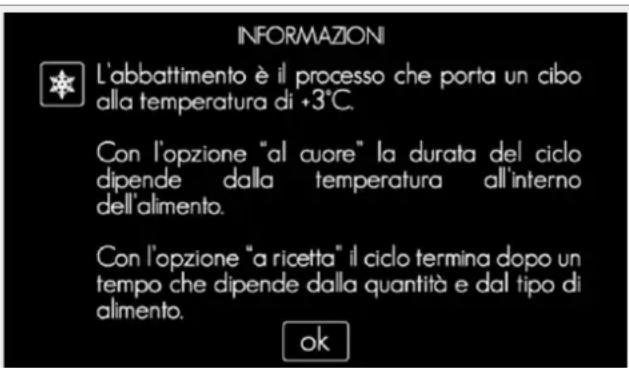
Fig. 7 - Example of information screen
With the programme started, in the absence of interaction for 2 minutes, a screen saver appears on the display with the icon of the programme running.
Just press any point of the display to make the screen saver disappear.
3.12.1 End of programme
At the end of each programme, the appliance emits a tone to advise that the food can be removed. Some programmes involve the appliance, with notification through an appropriate screen, automatically entering maintain mode, during which the food can remain inside the blast chiller. To interrupt this mode, just press the "stop" button, taking the food from the blast chiller at the same time.
The "Blast chilling", "Freezing", "Raw Fish" and "Storage at 0ircC " programmes also include an automatic defrosting phase which takes place at the end of maintain mode or when it is interrupted by the user. Defrosting is indicated by a dedicated screen and lasts 15 minutes, at the end of which the display returns to the Main Menu screen. The automatic defrosting can be interrupted at any time by pressing the "stop" button.
3.12.2 Pre-cooling
Pre-cooling is recommended to reduce the running times for blast chilling and freezing programmes.
| PRE-COOLING | |
| Before starting the programme | The information can be checked in the summary screen. |
| Programme running | The display shows the settings and the time remaining to the end of the cycle. |
| AT THE END OF THE PROGRAMME | |
| The appliance emits a tone and displays a notification screen. No maintain or defrosting action is envisaged. The appliance is ready to carry out other programmes. | |
3.12.3 Blast chilling
Blast chilling allows food to be stored in the fridge for 5 ÷ 7 days, thanks to a rapid cooling process that prevents evaporation of the water and loss of vitamins, proteins and minerals from products that have just been cooked. Reducing the time that the food remains in the temperature range in which bacteria proliferate extends the food storage time. Food that has just been cooked can also be handled, even at temperatures of 90ircC .
| BLAST CHILLING | |
| Two blast chilling modes can be selected: "recipe" and "core". Recipe blast chilling does not require the use of the core probe, but the weight and initial temperature of the food to process must be indicated. Core blast chilling allows the temperature at the centre of the food to be detected during the cycle. | |
| RECIPCE BLAST CHILLING | |
| Selections | Type of food: specify the nature of the food to process. Preparation: specify the characteristics of the food to process (consistency and form, e.g. pasta-meat and whole-in pieces...). Weight: specify the amount of the food to process. Initial state: if the food has just been cooked in the oven, or its temperature is in any case high, select "hot". If it is at ambient temperature or just lukewarm, select "ambient". |
| Before starting the programme | The information entered can be checked through a summary screen. |
| Programme running | The display shows the settings and the time remaining to the end of the cycle. |
| CORE BLAST CHILLING | |
| Selections | Type of food: specify the nature of the food to process. Preparation: specify the characteristics of the food to process (consistency and form, e.g. pasta-meat and whole-in pieces...). These settings are required by the appliance to determine the operating cycle that guarantees optimal blast chilling. |
| Before starting the programme | The information entered can be checked through a summary screen. |
| Programme running | The display shows the settings and the effective temperature of the food. |
| AT THE END OF THE PROGRAMME | |
| Whatever blast chilling mode is selected, at the end of the programme the appliance emits a tone and displays a notification screen. It then enters maintain mode, where it maintains the temperature of the compartment at +5 °C until the user intervenes. Defrosting is envisaged at the end. | |
Note: opening the door while blast chilling introduces hot, humid air, increasing the duration of the programme. The cycle duration in "recipe" mode is fixed: repeatedly opening the door of the appliance may result in imperfect blast chilling. Do not open the door of the appliance during the blast chilling cycle.
3.12.4 Freezing
Freezing permits a rapid reduction in the temperature of food to -18ircC , allowing it to be stored for several months afterwards in the freezer. The organoleptic properties, flavour, scent and appearance of foods are preserved intact through the rapid micro crystallisation of the water that it contains, thus avoiding the destruction of the internal molecular structures.
| FREEZING | |
| Two freezing modes can be selected: "recipe" and "core". Recipe freezing does not require the use of the core probe, but the weight and initial temperature of the food to process must be indicated. Core freezing allows the temperature at the centre of the food to be detected during the cycle. | |
| RECIPER FREEZING | |
| Selections | Type of food: specify the nature of the food to process. Preparation: specify the characteristics of the food to process (consistency and form, e.g. pasta-meat and whole-in pieces...). Weight: specify the amount of the food to process. Initial state: if the food has just been cooked in the oven, or its temperature is in any case high, select "hot". If it is at ambient temperature or just lukewarm, select "ambient". |
| Before starting the programme | The information entered can be checked through a summary screen. |
| Programme running | The display shows the settings and the time remaining to the end of the cycle. |
| CORE FREEZING | |
| Selections | Type of food: specify the nature of the food to process. Preparation: specify the characteristics of the food to process (consistency and form, e.g. pasta-meat and whole-in pieces...). These settings are required by the appliance to determine the operating cycle that guarantees optimal freezing. |
| Before starting the programme | The information entered can be checked through a summary screen. |
| Programme running | The display shows the settings and the effective temperature of the food. |
| AT THE END OF THE PROGRAMME | |
| Whatever freezing mode is selected, at the end of the programme the appliance emits a tone and displays a notification screen. It then enters maintain mode, where it maintains the temperature of the compartment at -21 °C until the user intervenes. Defrosting is envisaged at the end. | |
Note: opening the door during the freezing cycle introduces hot, humid air, increasing the duration of the programme. The cycle duration is fixed in "recipe" mode: repeatedly opening the door of the appliance may result in imperfect freezing. Do not open the door of the appliance during the freezing cycle.
3.12.5 Cooling
Cooling permits a reduction in the waiting time for using hot food. With this function, food that has just been cooked can be served at table or used for further preparation in the kitchen, without waiting for the normal acclimatisation.
| COOLING | |
| Selections | Air temperature: specify the temperature of the air used to cool the food.Duration: specify the desired length of time for cooling the food. |
| Before starting the programme | The information entered can be checked through a summary screen. |
| Programme running | The display shows the settings and the time remaining to the end of the cycle. |
| AT THE END OF THE PROGRAMME | |
| At the end of the programme, the appliance emits a tone and displays a notification screen. No compartment temperature maintain action is carried out.Defrosting is not envisaged at the end. | |
3.12.6 Drinks
The "drinks" programme allows the temperature of a drink to be reduced in accordance with the time available. The blast chiller has highly useful performance characteristics when not enough time is available for the normal drink tasting preparation.
Note: this appliance is not a bottle preserver and does not replace a wine cellar. Excessive cooling of bottles may make the liquid inside them freeze and cause the bottles to break.
| DRINKS PREPARATION | |
| Selections | Number of bottles: specify the quantity of bottles for which cooling is desired. Up to 6 bottles can be introduced.Duration: specify the desired length of time for cooling the bottles. |
| Before starting the programme | The information entered can be checked through a summary screen. |
| Programme running | The display shows the settings and the time remaining to the end of the cycle. |
| AT THE END OF THE PROGRAMME | |
| At the end of the programme, the appliance emits a tone and displays a notification screen.No compartment temperature maintain action is carried out and defrosting is not envisaged at the end. | |
Note: The bottle "type" is 75 cl "Bordeaux"; bear in mind that, capacity being equal, a glass container insulated more than an aluminium can, so it will be easier to cool a canned drink than a bottled drink.
3.12.7 Storage at 0ircC
Storage at 0ircC allows the environmental conditions in a zero-degree preserver to be replicated. Microbial growth in foods is a natural phenomenon that occurs according to the environmental conditions. Temperature is a factor capable of influencing the growth and reproduction of the bacteria that cause the deterioration of food. This programme maintains the internal temperature of the appliance at approximately +3ircC for a maximum of 36 hours and 20 minutes or until the user intervenes.
Note: this appliance is not a food preserver. If you wish to store food for long periods, it is advisable to use appliances designed for the purpose.
| STORAGE AT 0 °C | |
| Before starting the programme | The information entered can be checked through a summary screen. |
| Programme running | The display shows the settings and the time remaining to the end of the cycle. |
| AT THE END OF THE PROGRAMME | |
| At the end of the programme, the appliance emits a tone and displays a notification screen. No compartment temperature maintain action is carried out and defrosting is not envisaged at the end. | |
3.12.8 Raw fish
The Raw Fish programme allows the food to be maintained for 24 hours at -30ircC approx. (sanitation through low temperatures). Poor storage of fishery products may generate health risks in relation to Anisakis, a parasite that can be eliminated only through extended cooking processes or cooling.
Warning! The manufacturer declines all responsibility deriving from incorrect use of the appliance or from violation of the health regulations in force.
| RAW FISH | |
| Before starting the programme | The information entered can be checked through a summary screen. |
| Programme running | The display shows the settings and the time remaining to the end of the cycle. |
| AT THE END OF THE PROGRAMME | |
| At the end of the programme, the appliance emits a tone and displays a notification screen. It then enters maintain mode, where it maintains the temperature of the compartment at -21°C until the user intervenes. Defrosting is envisaged at the end of the cycle. | |
3.12.9 Thawing
Thawing allows food to be brought from freezing temperature to a temperature of +4ircC without losing liquids and without starting to cook it, thus avoiding the conversion of proteins that occurs, for example, when thawing meat in the microwave.
| THAWING | |
| Selections | Type of food: specify the nature of the food to process. Preparation: specify the characteristics of the food to process (consistency and form, e.g. pasta-meat and whole-in pieces...). Weight: specify the amount of the food to process. |
| Before starting the programme | The information entered can be checked through a summary screen. |
| Programme running | The display shows the settings and the time remaining to the end of the cycle. |
| AT THE END OF THE PROGRAMME | |
| At the end of the programme, the appliance emits a tone and displays a notification screen. It then enters maintain mode, where it maintains the temperature of the compartment at +4°C until the user intervenes. Defrosting is not envisaged at the end. | |
3.12.10 Ready to serve
Ready to serve allows food previously cooked and stored in the fridge, or that has reached ambient temperature, to be heated and served at table at the right temperature for consumption.
Warning! Accessible parts may become very hot during operation in this mode: children must be kept at a distance. Pay attention not to touch the hot surfaces of the appliance and always use oven mitts to remove or insert heat-resistant pots or accessories.
| READY TO SERVE | |
| Two Ready to Serve modes can be selected: "direct" and "delayed".In "Direct ready to serve", the heating begins when the cycle is started.In "Delayed ready to serve", the heating takes place after a waiting period during which the appliance keeps the food at a temperature of +4 °C, thus allowing the programme to be started in the morning in order to have the food at the right temperature for lunch/dinner. | |
| DIRECT READY TO SERVE | |
| Selections | Temperature: specify the temperature of the air that heats the food.Duration: specify the desired length of time for heating the food. |
| Before starting the programme | The information entered can be checked through a summary screen. |
| Programme running | The display shows the settings and the time remaining to the end of the cycle. |
| DELAYED READY TO SERVE | |
| Selections | Delay: specify at what interval from the start of the programme you want heating to start.Temperature: specify the temperature of the air that heats the food.Duration: specify the desired length of time for heating the food. |
| Before starting the programme | The information entered can be checked through a summary screen. |
| Waiting period | The display shows the settings selected, the end-of-cycle time and the time when heating will start. |
| Programme running | The display shows the settings and the time remaining to the end of the cycle. |
| AT THE END OF THE PROGRAMME | |
| At the end of the programme, the appliance emits a tone and displays a notification screen.It then enters maintain mode until the user intervenes (for the first 30 minutes at the set heating temperature, then at +4 °C). Defrosting is not envisaged at the end. | |
3.12.11 Slow cooking
Slow cooking, or low-temperature cooking, allows food to be cooked evenly, the structure of the cells that comprise it to be preserved and more water and fats to be retained with respect to other high-temperature cooking methods, with the aim of creating more tender and tasty dishes.
Depending on the recipe, slow cooking may require a greater degree of humidity. In this case, it is advisable to place a tray containing water in the appliance below the tray holding the food container.
Warning! Accessible parts may become very hot during operation in this mode: children must be kept at a distance. Pay attention not to touch the hot surfaces of the appliance and always use oven mitts to remove or insert heat-resistant pots or accessories.
| SLOW COOKING | |
| Two Slow Cooking modes can be selected: "direct" and "delayed".In "Direct slow cooking", cooking begins when the cycle is started.In "Delayed slow cooking", cooking takes place after a waiting period during which the appliance keeps the food at atemperature of +4 °C, thus allowing the programme to be started in the morning in order to have the food cooked forlunch/dinner. | |
| DIRECT SLOW COOKING | |
| Selections | Temperature: specify the temperature of the air that heats the food.Cooking duration: specify the desired length of time for cooking the food. |
| Before starting the programme | The information entered can be checked through a summary screen. |
| Programme running | The display shows the settings and the time remaining to the end of the cycle. |
| DELAYED SLOW COOKING | |
| Selections | End-of-cycle time: specify the time at which you want the entire cycle to end.Temperature: specify the temperature of the air that heats the food.Cooking duration: specify the desired length of time for cooking the food. |
| Before starting the programme | The information entered can be checked through a summary screen. |
| Waiting period | The display shows the settings selected, the end-of-cycle time and the time when cooking will start. |
| Programme running | The display shows the settings and the time remaining to the end of the cycle. |
| AT THE END OF THE PROGRAMME | |
| At the end of the programme, the appliance emits a tone and displays a notification screen.It then enters maintain mode until the user intervenes (for the first 30 minutes at the set cooking temperature, then at+4 °C). Defrosting is not envisaged at the end. | |
3.12.12 Proving
Proving permits the creation of a microclimate with controlled temperature and humidity to promote the activation and transformation of yeasts. In this way, fermentation can occur in optimal conditions, causing dough to rise naturally as desired. The amount of yeast can be reduced by programming the proving time, obtaining a lighter, more digestible product and at the same time favouring the development of the desired aroma.
For the best proving, it is advisable to place the dough in an open-topped container and cover the container with a damp cloth.
If you wish to prove in a particularly humid environment, it is advisable to place a pan of warm water next to the food container as well.
| PROVING | |
| Three proving modes can be selected: "direct", "maintained" and "delayed".In "direct" proving, the process takes place immediately.If you wish to start proving immediately but the dough can't be taken out at the end of proving itself, the dough can be kept at the right temperature with "maintained" mode.If you wish to start proving a few hours after putting it in the appliance, "delayed" mode is available. | |
| DIRECT PROVING | |
| Selections | Temperature: specify the desired air temperature for fermenting the yeasts.Duration: specify the desired length of time for proving the food.Humidity: specify the desired degree of humidity inside the appliance. If you desire a high degree of humidity, place a pan of water next to the food container as well. |
| Before starting the programme | The information entered can be checked through a summary screen. |
| Programme running | The display shows the settings and the time remaining to the end of the cycle. |
| MAINTAINED PROVING | |
| Selections | End-of-cycle time specify the time at which you want the entire cycle to end.Temperature: specify the desired air temperature for fermenting the yeasts.Duration: specify the desired length of time for proving the food. The appliance starts proving immediately, after which the dough is kept at +4 °C (maintain) to prevent fermentation, then brought to +15 °C ("wake-up").Humidity: specify the desired degree of humidity inside the appliance. If you desire a high degree of humidity, place a pan of warm water next to the food container as well. |
| Before starting the programme | The information entered can be checked through a summary screen. |
| Waiting period | The display shows the settings selected, the end-of-cycle time and the time when proving will start. |
| Programme running | The display shows the settings and the time remaining to the end of the cycle. |
| DELAYED PROVING | |
| Selections | End-of-cycle time specify the time at which you want the entire cycle to end.Temperature: specify the desired air temperature for fermenting the yeasts.Duration: specify the desired length of time for proving the food. The appliance does not start proving immediately, but first enters waiting mode in which the temperature is first kept at +4 °C (maintain), then at +15 °C ("wake-up"); proving takes place for the desired time after the waiting time.Humidity: specify the desired degree of humidity inside the appliance. If you desire a high degree of humidity, place a pan of warm water next to the food container as well. |
| Before starting the programme | The information entered can be checked through a summary screen. |
| Waiting period | The display shows the settings selected, the end-of-cycle time and the time when proving will start. |
| Programme running | The display shows the settings and the time remaining to the end of cycle. |
| AT THE END OF THE PROGRAMME | |
| Whatever proving mode is selected, at the end of the programme the appliance emits a tone and displays a notification screen. It then enters maintain mode until the user intervenes (for the first 45 minutes at +15 °C, then at +4 °C).Defrosting is not envisaged at the end. | |
4. REGULAR MAINTENANCE
4.1 Safety information

The cleaning and regular maintenance operations are to be carried out in safety, strictly observing the following directions:
- Disconnect the appliance from the mains before working on it.
- Do not pull the power cable to disconnect the appliance.
- Do not touch the appliance with damp or wet hand/feet or without protection (e.g. appropriate gloves and shoes).
- Do not insert screwdrivers, kitchen utensils or other items between the protections or in moving parts.
Deactivating or removing the safety devices during regular maintenance operations is prohibited: the Manufacturer declines all responsibility for accidents caused by the violation of this obligation.
4.2 Cleaning external surfaces
Casing: the stainless steel external surfaces of the appliance must be cleaned with a soft cloth or sponge and a neutral detergent in the direction of the satin finish. Avoid stainless steel scourers, scrapers or abrasive, acidic or aggressive substances that may decisively damage the stainless steel surfaces.
After cleaning, protecting the external surfaces using specific oil-based products for stainless steel is recommended.
Warning! The data label contains important information useful to technical support: pay attention not to remove it during cleaning.
Display: to clean the glass display easily, use specific products for glass surfaces and a soft cloth.
4.3 Cleaning the compartment
The inside of the compartment must be cleaned to guarantee the hygiene and quality of the products processed; cleaning of the appliance is therefore recommended after each time it is used. The curvature of the internal parts and arrangement of the accessories for the compartment are designed to facilitate cleaning, to be carried out with a soft cloth or a non-scratch sponge and a neutral detergent.
Avoid stainless steel scourers, scrapers or abrasive, acidic or aggressive substances that may decisively damage the stainless steel surfaces. After cleaning, rinse with lukewarm water and dry thoroughly.
4.4 Periods of inactivity
Should use of the appliance not be envisaged for a long time, it is advisable to disconnect it from the mains and clean it thoroughly both internally and externally, following the instructions in paragraphs 4.2 and 4.3. It is also advisable to leave the door slightly ajar for the entire period of inactivity.
The next time it is used, carry out the preliminary cleaning operations indicated in paragraph 3.2.
5. EXTRAORDINARY MAINTENANCE
5.1 Malfunction
The extraordinary maintenance and/or replacement of each part of the appliance, also as far as the lighting system is concerned, must be performed by qualified, authorised staff.
Note: if malfunction is observed, make sure that the power cable is inserted correctly and voltage is present before calling the support centre. If, having done this, the malfunction persists, call the support centre, indicating:
- the data on the label attached to the side of the appliance itself (par. 2.1, fig. 4)
the purchase date - any alarm code visible on the display.
Note: any attempt to modify or repair the appliance invalidates the warranty. Only employ qualified, authorised technicians.
5.2 Disposing of the appliance
INFORMATION FOR USERS

Pursuant to Directives 2011/65/EU and 2012/19/EU relating to the reduction of the use of hazardous substances in electrical and electronic appliances, as well as to the disposal of refuse.
The crossed out bin symbol on the appliance or its packaging indicates that the product, at the end of its working life, must be collected separately from other waste.
DISPOSING OF PACKAGING: the components of the packaging (bags, film, polystyrene) are potentially dangerous to children and animals (danger of suffocation). The packing is produced with materials that can be recycled in accordance with the Directives of the country where the appliance must be disposed of.
DISPOSING OF THE APPLIANCE: The user must deliver the product that has reached the end of its working life to the appropriate recycling centre for electronic and electrical refuse, or return it to the retailer when purchasing an equivalent type new product, on a one for one basis.
Adequate selective collection of the parts for the subsequent forwarding to recycling, treatment and/or environmentally compatible disposal contributes to avoiding possible negative effects on the environment and on health and promotes the recycling of the materials of which the appliance consists.
Illicit disposal of the product by the user will lead to the application of administrative sanctions envisaged by the regulations in force.
The main materials comprising the appliance under discussion are:
- Steel
Plastic
Copper
Aluminium
Polyurethane.
6. TROUBLESHOOTING
6.1 Alarm table
| CODE | DESCRIPTION | ACTION |
| AS1 | Air probe broken | Contact support for air probe replacement |
| AS4 | No data communication between power board and user interface | Contact support for repair |
7. TECHNICAL SPECIFICATIONS
| Blast chilling capacity | 3 kg |
| Freezing capacity | 3 kg |
| No. shelves (for racks) | 3 |
| Electrical parameters | 220/240 V 50 Hz |
| Maximum current | 2.5 A |
| Maximum power (cooling) | 300 W |
| Maximum power (heating) | 220 W |
| Power cable | 3-core cable with 16 A Schuko socket |
| Refrigerant | R290 |
| Climate class | SN |
| Net weight | 38 kg |
| Gross weight | 40 kg |
7.1 Dimensions
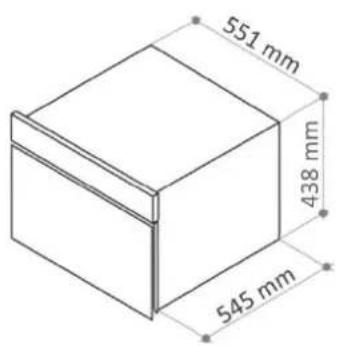
Fig. 8 - Dimensions of product

Fig. 10 - Dimensions of packaging
8. WIRING DIAGRAM

Fig. 12 - Wiring diagram
| 1 | Power board | 8 | Condenser fan |
| 2 | Fuse | 9 | Condenser fan |
| 3 | IEC socket with EMI filter | 10 | Display |
| 4 | Earth terminal | 11 | Spot-LED |
| 5 | Heating element | 12 | Evaporator fan |
| 6 | Compressor | 13 | Air probe |
| 7 | Bimetallic protection | 14 | Core probe |
9. INFO
9.1 Service
Technical support for the product is offered by authorised local Centres, with the reference addresses for the specific area indicated in the enclosure that completes this manual.
The product is guaranteed, as well as by law, by the terms and conditions shown on the manufacturer's warranty certificate with the product. The certificate must be kept and shown to our Authorised Technical Support Centre, if necessary, together with the receipt for proof of purchase of the appliance. You may also consult the warranty conditions on our website.
To obtain support, complete the dedicated online form or contact us at the number you will find on the support page of our website.
9.2 Customer details
A more rapid and efficient support service can be obtained if the customer promptly provides the following details concerning their purchase:
- invoice number
- person named on invoice
- purchase date
- appliance serial number.
10. EPICURIEN APP
EXTRA CONTENTS FOR SOUS VIDE
E-PICURIEN
To make the best use of the product, we recommend downloading the ROSIERES EPICURIEN * APP from your smartphone or tablet. Next, you need to access the SOUS VIDE section and enter the Serial Number of the purchased product. It is thus possible to register your product to the EPICURIEN app and take advantage of extra content dedicated to this type of product:
- OUT OF THE BOX: Notes on the Sous Vide System and the products that compose it: Vacuum drawer, steam oven, blast chiller.
- PRODUCT INFORMATION section: quick guide to the use of the purchased appliance, with link back to the online instruction manual and technical assistance number- Service.
- TIPS & TRICKS Section: useful and innovative tips for using the product through some of its main functions and tricks of the trade.
-
RECIPIES section: simple but tasty recipes for cooking with the vacuum system (vacuum drawer - compact steam oven - blast chiller)
-
Available on both Apple Store for lphone / lpad devices and Play Store for Android devices.
CELLULE DE REFROIDISSEMENT

Fig.10 - Dimensions de I'emballage
8. SCHEMA ELECTRIQUE


- Contents
- INTRODUCTION 26
- INSTALLATION 27
- USE 29
- REGULAR MAINTENANCE 40
- EXTRAORDINARY MAINTENANCE 41
- TROUBLESHOOTING 42
- TECHNICAL SPECIFICATIONS 42
- WIRING DIAGRAM 43
- INFO 43
- EPICURIEN APP - EXTRA CONTENTS FOR SOUS VIDE E-PICURIEN 44
- INTRODUCTION
- General notices
- Safety notices
- Transport and handling
- Unpacking
- INSTALLATION
- Data on label
- Notices for installation
- Positioning
- Ambient temperature and air circulation
- Final checks
- Protective devices
- USE
- User notices
- Preliminary internal cleaning
- The core probe
- Containers and lids to use
- Arranging food
- Effectiveness of the blast chilling and freezing programmes
- Storing blast-chilled or frozen foods
- Programmes
- The display and user interaction
- Meaning of the icons
- Turning on and off
- Programme selection
- End of programme
- Pre-cooling
- Blast chilling
- Freezing
- Cooling
- Drinks
- Storage at 0ircC
- Raw fish
- Thawing
- Ready to serve
- Slow cooking
- Proving
- REGULAR MAINTENANCE
- Safety information
- Cleaning external surfaces
- Cleaning the compartment
- Periods of inactivity
- EXTRAORDINARY MAINTENANCE
- Malfunction
- Disposing of the appliance
- INFORMATION FOR USERS
- TROUBLESHOOTING
- Alarm table
- TECHNICAL SPECIFICATIONS
- Dimensions
- WIRING DIAGRAM
- INFO
- Service
- Customer details
- EPICURIEN APP
- EXTRA CONTENTS FOR SOUS VIDE
- CELLULE DE REFROIDISSEMENT
- SCHEMA ELECTRIQUE
Brand : ROSIERES
Model : RBC450 SV
Category : Freezer