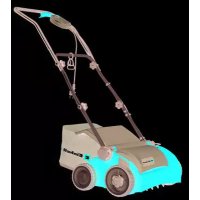
GESA 1433 - Electric mower EINHELL - Free user manual and instructions
Find the device manual for free GESA 1433 EINHELL in PDF.



| Product type | Electric scarifier/aerator |
| Brand | Einhell |
| Model | GESA 1433 |
| Weight | 13 kg |
| Power supply | 230 V ~ 50 Hz, 1400 W |
| Working width | 33 cm |
| Number of blades (scarifier) | 20 |
| Number of tines (aerator) | 48 |
| Depth adjustment | 0 / 3 / 7 / 9 mm |
| Protection class | II / □ |
| Protection type | IPX4 |
| Sound power level (LWA) | 99 dB(A) |
| Sound pressure level (LpA) | 76.1 dB(A) |
| Vibration emission (handle) | 3.159 m/s² |
| Main functions | Scarifying and aerating with interchangeable rollers |
| Care and cleaning | Clean after each use; check fastenings; store in dry place |
| Safety | Two-position switch, automatic stop when releasing lever, motor thermal protection |
| Spare parts and repairability | Replacement roller ref. 34.211.08; aerator cylinder ref. 34.211.09 |
| General information | Private use, domestic garden; warranty period 24 months |
Frequently Asked Questions - GESA 1433 EINHELL
User questions about GESA 1433 EINHELL
0 question about this device. Answer the ones you know or ask your own.
Ask a new question about this device
Download the instructions for your Electric mower in PDF format for free! Find your manual GESA 1433 - EINHELL and take your electronic device back in hand. On this page are published all the documents necessary for the use of your device. GESA 1433 by EINHELL.
USER MANUAL GESA 1433 EINHELL
GB Original operating instructions Electric Scarifi er and Lawn Aerator
natural_image
Illustration of hands holding a device with arrows indicating motion (no text or symbols)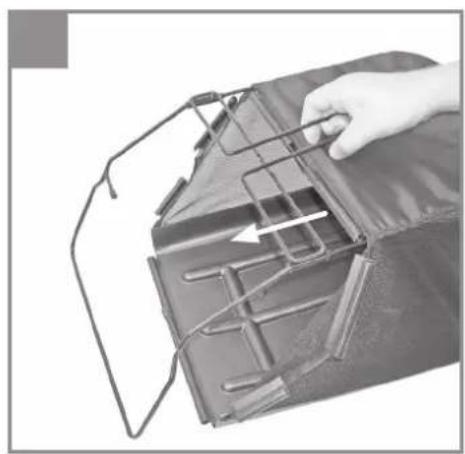
natural_image
Close-up of a hand holding a metal bracket with internal components, no visible text or symbols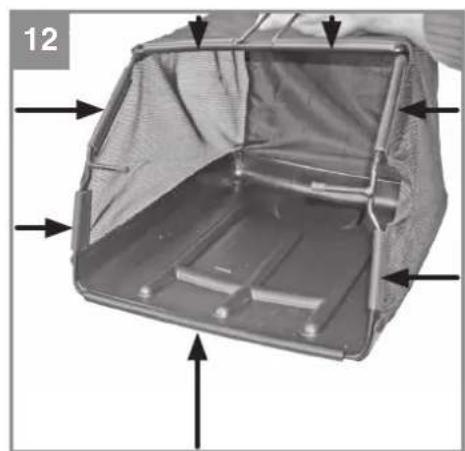
natural_image
Interior view of a metallic device with internal compartments and arrows indicating direction (no text or symbols)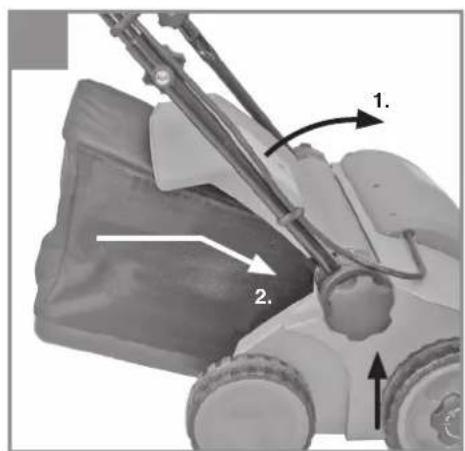
natural_image
Exterior view of a vacuum cleaner with attached paper filter (no text or symbols visible)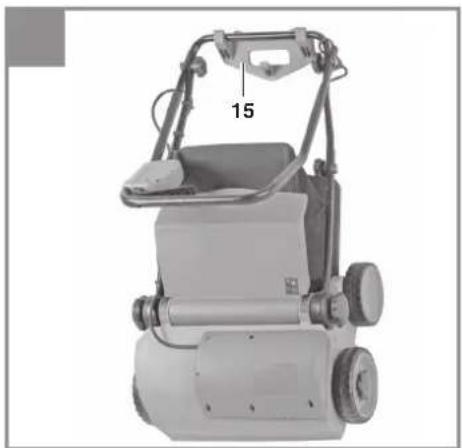
natural_image
Industrial machine with handle and wheels, labeled '15' (no visible text or symbols beyond label)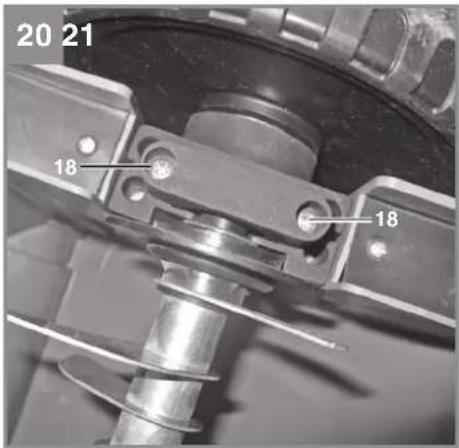
natural_image
Mechanical component with directional arrows indicating motion or flow (no text or symbols visible)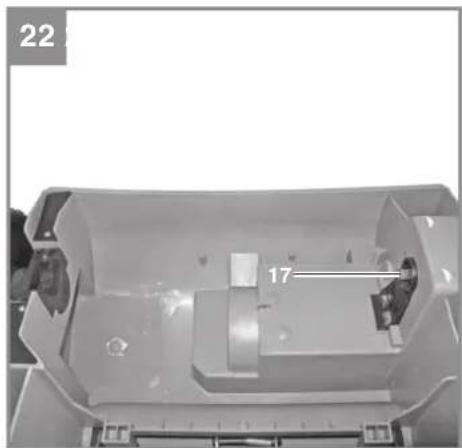
natural_image
Interior view of a mechanical housing or enclosure with labeled component '17' (no readable text or symbols beyond label)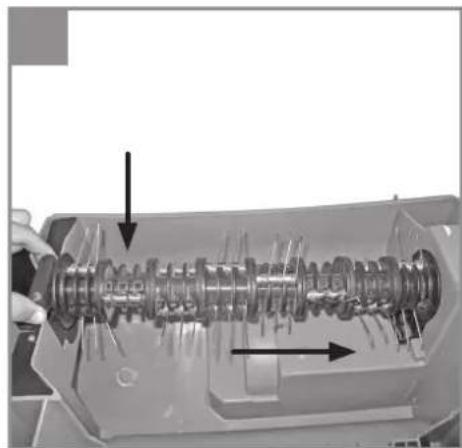
natural_image
Cross-sectional view of a mechanical gear assembly with internal components and directional arrows (no text or symbols)D

Danger! - Read the operating instructions to reduce the risk of injury
GB
Danger!
When using the equipment, a few safety precautions must be observed to avoid injuries and damage. Please read the complete operating instructions and safety regulations with due care. Keep this manual in a safe place, so that the information is available at all times. If you give the equipment to any other person, hand over these operating instructions and safety regulations as well. We cannot accept any liability for damage or accidents which arise due to a failure to follow these instructions and the safety instructions.
1. Safety regulations
The corresponding safety information can be found in the enclosed booklet.
Danger!
Read all safety regulations and instructions. Any errors made in following the safety regulations and instructions may result in an electric shock, fire and/or serious injury.
Keep all safety regulations and instructions in a safe place for future use.
Description of the warning logos (see Fig. 3)
A = Danger!
Read the directions for use before operating the tool.
B = Keep other persons (and animals) away from the danger zone.
C = Sharp work tools - Do not cut your fi ngers or toes! Switch off the device and pull the power plug before engaging in any maintenance/cleaning work or if the cable is tangled or damaged. Keep the power cable away from the cutting unit.
D = Wear hearing and eye protection.
E = Keep the power cable away from the roller.
2. Layout and items supplied
2.1 Layout (Fig. 1/2)
- ON/OFF switch
- Safety lock-off
- Power cable
- Cable grip
- Top push bar
- Lower push bar
- Push bar bracket
- Scarifying depth
-
Grass basket
-
Ejector fl ap
- Frame parts for grass basket
- Cable clips
- Fastening screws for push bar
- Fastening screws for wall mount
- Wall mount
- Aerating roller
2.2 Items supplied
Please check that the article is complete as specified in the scope of delivery. If parts are missing, please contact our service center or the sales outlet where you made your purchase at the latest within 5 working days after purchasing the product and upon presentation of a valid bill of purchase. Also, refer to the warranty table in the service information at the end of the operating instructions.
- Open the packaging and take out the equipment with care.
- Remove the packaging material and any packaging and/or transportation braces (if available).
• Check to see if all items are supplied. - Inspect the equipment and accessories for transport damage.
- If possible, please keep the packaging until the end of the guarantee period.
Danger!
The equipment and packaging material are not toys. Do not let children play with plastic bags, foils or small parts. There is a danger of swallowing or suff ocating!
• Original operating instructions
3. Proper use
The equipment can be used both as a scarifier and an aerator depending on the intended use. Only a few movements are required to change the roller. The scarifying roller is designed for ripping moss and weeds - complete with their roots - out of the soil and for loosening the soil. As a result your lawn can absorb nutrients better and is cleaned. We recommend you to scarify your lawn in the spring (April) and autumn (October).
The aerating roller scratches the surface of the lawn, helping water to drain off more easily as well as promoting oxygen intake. Aerate your lawn throughout the growing period.
GB
The equipment is intended for private use i.e. for use in home and gardening environments.
Scarifi ers for private use are machines whose annual operating time generally does not exceed 10 hours, during which the machine is primarily used to maintain small-scale, residential lawns and home/hobby gardens. Public facilities, sporting halls, and agricultural/forestry applications are excluded.
The operating instructions as supplied by the manufacturer must be kept and referred to in order to ensure that the equipment is properly used and maintained. The instructions contain valuable information on operating, maintenance and servicing conditions.
Danger! Due to the high risk of bodily injury to the user, the equipment may not be used to grind up branch or hedge clippings. Moreover, the equipment may not be used as a power cultivator to level out high areas such as mole hills.
For safety reasons, the scarifi er may not be used as a drive unit for other equipment or toolkits of any kind, unless specifi cally advised to do so by the manufacturer.
The equipment is to be used only for its prescribed purpose. Any other use is deemed to be a case of misuse. The user / operator and not the manufacturer will be liable for any damage or injuries of any kind caused as a result of this.
Please note that our equipment has not been designed for use in commercial, trade or industrial applications. Our warranty will be voided if the machine is used in commercial, trade or industrial businesses or for equivalent purposes.
4. Technical data
Voltage: 230 V \~ 50 Hz
Power consumption: 1400 W
Working width: 33 cm
Number of blades ....20 pieces
Number of claws: 48
Scarifying depth: - 3 / 3 / 7 / 9 mm
Protection class: ....II /☐
Protection type: IPX4
Weight 13 kg
Danger!
Sound and vibration
Sound and vibration values were measured in accordance with EN 60745.
L_pA sound pressure level ..... 76.1 dB(A)
K_pA uncertainty 3 dB
L_WA sound power level 99 dB(A)
K_WA uncertainty ....3 dB
Wear ear-muff s.
The impact of noise can cause damage to hearing.
Total vibration values (vector sum of three directions) determined in accordance with EN 60745.
Handle
Vibration emission value a_n=3.159 m/s^2
K uncertainty = 1.5 m/s²
The specified vibration value was established in accordance with a standardized testing method. It may change according to how the electric equipment is used and may exceed the specified value in exceptional circumstances.
The specified vibration value can be used to compare the equipment with other electric power tools.
The specified vibration value can be used for initial assessment of a harmful effect.
Keep the noise emissions and vibrations to a minimum.
- Only use appliances which are in perfect working order.
• Service and clean the appliance regularly.
• Adapt your working style to suit the appliance.
• Do not overload the appliance. - Have the appliance serviced whenever necessary.
- Switch the appliance off when it is not in use.
• Wear protective gloves.
Caution!
Residual risks
Even if you use this electric power tool in accordance with instructions, certain residual risks cannot be rules out. The following hazards may arise in connection with the equipment's construction and layout:
- Lung damage if no suitable protective dust
GB
mask is used.
- Damage to hearing if no suitable ear protection is used.
- Health damage caused by hand-arm vibrations if the equipment is used over a prolonged period or is not properly guided and maintained.
Danger!
The electric power tool generates an electro-magnetic fi eld during operation. Under certain circumstances this fi eld may actively or passively impede medical implants. To reduce the risk of serious or fatal injuries, we recommend persons with medical implants to consult their doctor and the manufacturer of the medical implant prior to using the equipment.
5. Before starting the equipment
Before you connect the equipment to the mains supply make sure that the data on the rating plate are identical to the mains data.
Warning!
Always pull the power plug before making adjustments to the equipment.
The scarifi er is delivered unassembled. The grass basket and the complete push bar must be assembled and mounted before using the scarifi er. Follow the operating instructions step-by-step and use the pictures provided as a visual guide to easily assemble the machine.
Fitting the push bar brackets
(see Figs. 4 and 5)
- Remove the star screw (Fig. 4/Item 1) and the pressure plate (Fig. 4/Item 2)
- Connect the push bar bracket (Fig. 4/Item 3) to the fastening screw. Ensure that the curve in the tube (Fig. 5/Item 1) is facing outside.
- Now remount the pressure plate and tighten with the star screw.
Notice! The identical tilt angle must be set for both push bar brackets.
Fitting the lower push bar (see Fig. 6)
- Slide the lower push bar (Fig. 6/Item 1) over the push bar brackets. Do not forget to slide the stress-relief clip (Fig. 6/Item 2) onto the tube beforehand.
- Now screw the tubes together using the screws supplied (Fig. 6/Item 3), the plastic
sleeves (Fig. 6/Item 4) and the star screw (Fig. 6/Item 5).
Fitting the upper push bar (see Fig. 7)
- Position the upper push bar (Fig. 7) such that its holes line up with the holes of the lower bar.
- Now screw the tubes together using the screws supplied (Fig. 7/Item 1), the plastic sleeves (Fig. 7/Item 2) and the star screw (Fig. 7/Item 3).
- Using the cable clips supplied (Fig. 8), attach the power cable to the tubes of the push bars so that it is possible to open and shut the ejector flap (Fig. 9/Item A).
Notice!
Please ensure that the ejector flap can be opened and closed easily!
Assembling the grass basket (see Figs. 10 - 13)
- Push both frame parts into each other (Fig. 10).
• Pull the grass basket over the metal frame (Fig. 11).
• Pull the rubber clips over the metal frame (Fig. 12). - To hang the grass basket on the scarifier you must lift the ejector flap (Fig. 13/Item 1) with one hand and with the other hand take hold of the grass bag by the handle and hook it onto the scarifier from above (Fig. 13).
Danger!
Before you ever hook the grass basket to the scarifier you must ensure that the motor is switched off and the cutting unit is not rotating.
Adjusting the handlebar height (see Fig. 17)
Loosen the star screw (Fig. 17/Item 1) on both sides of the scarifier by turning several revolutions. Now adjust the handlebar to the desired height.
Notice!
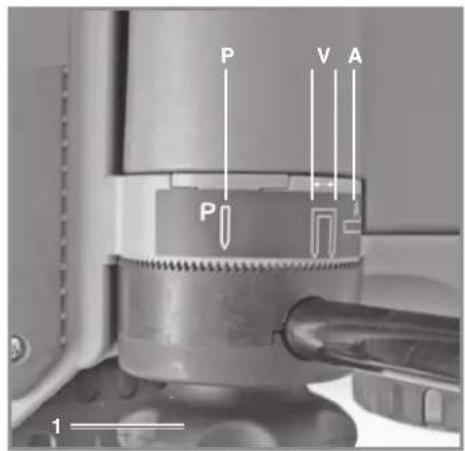
The height of the handlebar may be adjusted within the mark (Fig. 17/Item V) during operation. Retighten the star screws.
Notice!
The identical tilt angle must be set on both sides.
Adjusting the scarifi er depth (see Fig. 14)
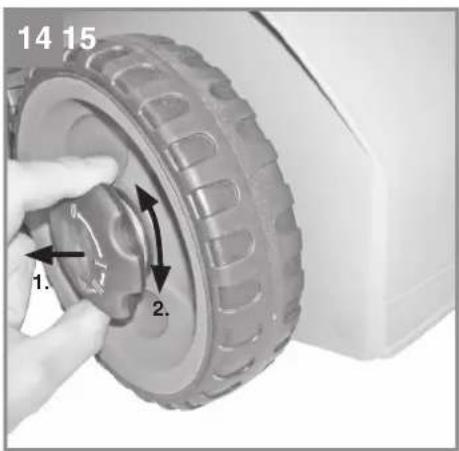
The scarifi er depth is adjusted at both front wheels via the adjustment mechanism. For this, pull out the adjusting screw and turn the wheel to the left or right into one of the available positions (0/I/II/III).
GB
Notice!
The scarifi er depth must always be identically set on both sides!
0 = drive/transport position
I = scarifi er depth 3 mm
II = scarifi er depth 7 mm
III = scarifi er depth 9 mm
Electrical connection
The equipment can be connected to any normal socket with 230V AC. It is only acceptable to connect it to a shockproof socket with a 16A circuit breaker. Furthermore, a residual-current-operated protective device with max. 30 mA should be connected upstream.
Power cable
Please only use power cables that are not damaged. The total length of the power cable should not exceed 50 meters; going beyond this distance will reduce the power output of the electric motor. The power cable must have a cross-section of 3 x 1.5 mm ^2 . The insulating sheath of scarifier power cables is frequently damaged.
Some of the causes for this are:
• Cracking from running over the cable
- Pinching when the power cable is dragging under doors and pulled through windows
• Cracking due to old age of the insulation
- Kinking by improperly fastening or guiding the power cable
The power cables must, at the very minimum, be of type HO5RN-F and 3-stranded. The cable type must be printed somewhere on the power cable. Only purchase power cables that are marked as such! Plugs and socket couplers for the power cables must be made from rubber and be splashproof. There is a limit to how long power cables can be. Longer power cables require larger conductor cross-sections. Power cables and connecting lines must be regularly checked for damage. Ensure that the lines are deenergized before checking them. Completely unwind the power cable. Also check power cable entry points, plugs and socket couplers for kinks.
6. Operation
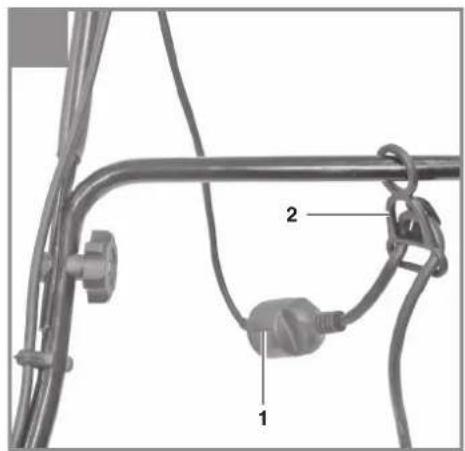
Connect the machine's power supply cable to the plug (Fig. 15/Item 1) and secure the power cable with the stress-relief clip (Fig 15/Item 2).
Danger!
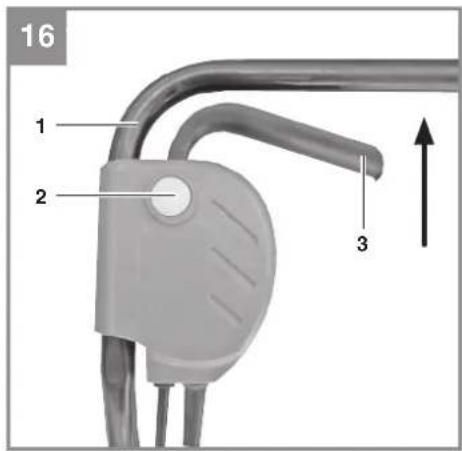
To prevent accidental start-up of the equipment, the push-bar (Fig. 16 / Item 1) is equipped with a safety lock-off (Fig. 16 / Item 2) which must be pressed before the lever switch (Fig. 16 / Item 3) can be pressed. If the lever switch is released, the equipment switches off. Repeat this process several times so that you are sure that the machine functions properly. Before you perform any repair or maintenance work on the machine, ensure that the cutting unit is not rotating and that the power supply is disconnected.
Danger!
Never open the ejector fl ap when the motor is running. A rotating cutting unit can cause injuries. Always fasten the ejector fl ap carefully. The flap flips back to the "Closed" position by the tension springs!
Always ensure that a safe distance (provided by the long handles) is maintained between the user and the housing. Be especially careful when scarifying and changing direction on slopes and inclines. Maintain a solid footing and wear sturdy, non-slip footwear and long trousers. Always scarify along the incline (not up and down).
For safety reasons, the scarifi er may not be used to scarify inclines whose gradient exceeds 15 degrees. Use special caution when backing up and pulling the scarifi er (tripping hazard)!
Tips for proper working
It is recommended that you overlap scarifying paths a little.
Try to scarify in straight lines for a nice, clean look. Insodoing, the aeration swaths should always overlap each other by a few centimeters in order to avoid bare strips.
As soon as grass clippings start to trail the scarifier, it is time to empty the grass basket.
Danger! Before taking off the grass basket, switch off the motor and wait until the roller has come to a stop.
To remove the grass basket, lift up the ejector flap with one hand, while unhooking the basket with the other.
How frequently you should scarify your lawn is determined primarily by the speed at which the grass grows and the hardness of the soil. Keep the underside of the equipment clean and
GB
remove soil and grass build-up. Deposits make it more difficult to start the aerator and decrease the quality of the scarifying.
Always scarify along inclines (not up and down). Switch off the motor before doing any checks on the roller.
Danger!
The roller rotates for a few seconds after the motor is switched off. Never attempt to stop the roller. In the event that the rotating roller strikes an object, immediately switch off the equipment and wait for the roller to come to a complete stop. Then inspect the condition of the roller. Replace any parts that are damaged (see section 8.4). Lay the power cable on the ground in loops in front of the power outlet. Scarify away from the power outlet and cable, making sure that the power cable always trails in the already scarified grass so that the equipment does not travel over the cable.
7. Replacing the power cable
Danger!
If the power cable for this equipment is damaged, it must be replaced by the manufacturer or its after-sales service or similarly trained personnel to avoid danger.
8. Cleaning, maintenance and ordering of spare parts
Danger!
Always pull out the mains power plug before starting any cleaning work.
8.1 Cleaning
- Keep all safety devices, air vents and the motor housing free of dirt and dust as far as possible. Wipe the equipment with a clean cloth or blow it with compressed air at low pressure.
• We recommend that you clean the device immediately each time you have finished using it. - Clean the equipment regularly with a moist cloth and some soft soap. Do not use cleaning agents or solvents; these could attack the plastic parts of the equipment. Ensure that no water can seep into the device. The ingress of water into an electric tool increases
the risk of an electric shock.
8.2 Carbon brushes
In case of excessive sparking, have the carbon brushes checked only by a qualified electrician.
Danger! The carbon brushes should not be replaced by anyone but a qualified electrician.
8.3 Maintenance
- A worn out or damaged cutting unit should be replaced by an authorised expert (see adress on the warranty certificate).
Take care that all fastening elements (screws, nuts, etc.) are firmly tightened, so that you can work safely with the scarifier.
• Store the scarifier in a dry place. - For longer life, all screw-fastened parts, such as wheels and axles should be cleaned and subsequently oiled.
- Regular servicing of the scarifier not only secures longer endurance and performance, but also contributes to an accurate and simple scarification of your lawn.
- At the end of the season, carry out a general check of the scarifier, and remove all residue collected. Before the start of every season, it is absolutely necessary to check the state of the scarifier. Contact our Customer Service (see address on the warranty certificate) if repair work is necessary.
To save storage space, the push bar has a P and an A position. (Fig. 17).
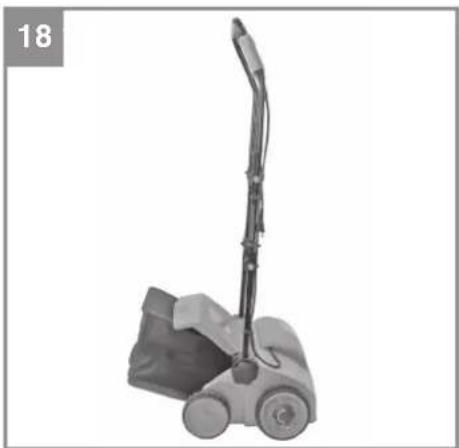
- In the P-position, the scarifier can be stored in a corner, to save space (Fig. 18).
- In the A-position, the scarifier can be hung (as shown in Fig 19) on the wall mount included, to save space.
8.4 Changing the roller (see Figures 20-23)
Caution! Be sure to wear work gloves!
Only replace the roller with a genuine Einhell roller, as this will ensure top performance and safety under all conditions.
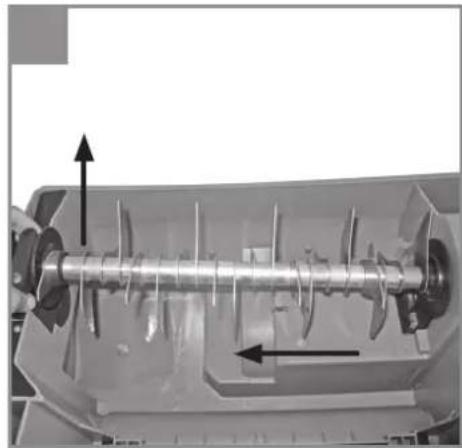
Remove the two hexagon socket screws (Fig. 20 / Item 18). Lift the roller on this side and pull out in the direction of the arrow (Fig. 21).
Now slide the new roller in the direction of the arrow (Fig. 23) onto the square-ended drive (Fig. 22 / Item 17) and press into the holder (Fig. 23). Refasten the roller with the two hexagon socket screws (Fig. 20 / Item 18).
GB
8.5 Ordering replacement parts:
Please quote the following data when ordering replacement parts:
• Type of machine
• Article number of the machine
• Identification number of the machine
- Replacement part number of the part required For our latest prices and information please go to www.isc-gmbh.info
Replacement cutting unit Art. No.: 34.211.08
Replacement aerating unit, Art. No.: 34.211.09
9. Disposal and recycling
The equipment is supplied in packaging to prevent it from being damaged in transit. The raw materials in this packaging can be reused or recycled. The equipment and its accessories are made of various types of material, such as metal and plastic. Never place defective equipment in your household refuse. The equipment should be taken to a suitable collection center for proper disposal. If you do not know the whereabouts of such a collection point, you should ask in your local council offices.
10. Storage
Store the equipment and accessories in a dark and dry place at above freezing temperature. The ideal storage temperature is between 5 and 30°C. Store the electric tool in its original packaging.
GB
11. Troubleshooting guide
| Fault Possible causes Rectifi cation | ||
| Motor does not start - | No electricity in plug- Cable defective- Switch, switch/plug block defec-tive- Connections to motor or capacitor disconnected- Housing clogged | - Check line and fuse- Check- Have machine checked by a cus-tomer service center- Have machine checked by a cus-tomer service center- If necessary adjust working depth. Clean housing so that the roller can run freely |
| Engine performance drops | - Soil is too fi rm- Housing clogged- Roller badly worn | - Change working depth- Clean housing- Replace roller |
| Imprecise scarifying result | - roller worn- Wrong working depth | - Replace roller- Correct working depth |
| Motor is running, roller is not rotating | - Toothed belt is torn - By customer service workshop | |
Danger! To protect the motor its equipped with a thermal overload switch which cuts out when overloaded and starts again automatically after a short cooling-down period.
GB

For EU countries only
Never place any electric power tools in your household refuse.
To comply with European Directive 2012/19/EC concerning old electric and electronic equipment and its implementation in national laws, old electric power tools have to be separated from other waste and disposed of in an environment-friendly fashion, e.g. by taking to a recycling depot.
Recycling alternative to the return request:
As an alternative to returning the equipment to the manufacturer, the owner of the electrical equipment must make sure that the equipment is properly disposed of if he no longer wants to keep the equipment. The old equipment can be returned to a suitable collection point that will dispose of the equipment in accordance with the national recycling and waste disposal regulations. This does not apply to any accessories or aids without electrical components supplied with the old equipment.
The reprinting or reproduction by any other means, in whole or in part, of documentation and papers accompanying products is permitted only with the express consent of the iSC GmbH.
Subject to technical changes
Notice!
A temporary voltage drop can occur when the equipment starts up, in particular if the power supply quality is poor. These voltage drops can influence other equipment (for example lamps may flicker). If the supply impedance Zmax is < 0.462 OHM, problems of this sort are not to be expected. (Please contact your local electricity supplier for further information).
GB
Service information
We have competent service partners in all countries named on the guarantee certificate whose contact details can also be found on the guarantee certificate. These partners will help you with all service requests such as repairs, spare and wearing part orders or the purchase of consumables.
Please note that the following parts of this product are subject to normal or natural wear and that the following parts are therefore also required for use as consumables.
| Category Example | |
| Wear parts* V-belt, Roller | |
| Consumables* | |
| Missing parts |
* Not necessarily included in the scope of delivery!
In the effect of defects or faults, please register the problem on the internet at www.isc-gmbh.info. Please ensure that you provide a precise description of the problem and answer the following questions in all cases:
• Did the equipment work at all or was it defective from the beginning?
• Did you notice anything (symptom or defect) prior to the failure?
• What malfunction does the equipment have in your opinion (main symptom)?
Describe this malfunction.
GB
Warranty certifi cate
Dear Customer,
All of our products undergo strict quality checks to ensure that they reach you in perfect condition. In the unlikely event that your device develops a fault, please contact our service department at the address shown on this guarantee card. You can also contact us by telephone using the service number shown. Please note the following terms under which guarantee claims can be made:
- These guarantee terms apply to consumers only, i.e. natural persons intending to use this product neither for their commercial activities nor for any other self-employed activities. These warranty terms regulate additional warranty services, which the manufacturer mentioned below promises to buyers of its new products in addition to their statutory rights of guarantee. Your statutory guarantee claims are not affected by this guarantee. Our guarantee is free of charge to you.
- The warranty services cover only defects due to material or manufacturing faults on a product which you have bought from the manufacturer mentioned below and are limited to either the rectification of said defects on the product or the replacement of the product, whichever we prefer. Please note that our devices are not designed for use in commercial, trade or professional applications. A guarantee contract will not be created if the device has been used by commercial, trade or industrial business or has been exposed to similar stresses during the guarantee period.
-
The following are not covered by our guarantee:
-
Damage to the device caused by a failure to follow the assembly instructions or due to incorrect installation, a failure to follow the operating instructions (for example connecting it to an incorrect mains voltage or current type) or a failure to follow the maintenance and safety instructions or by exposing the device to abnormal environmental conditions or by lack of care and maintenance.
- Damage to the device caused by abuse or incorrect use (for example overloading the device or the use or unapproved tools or accessories), ingress of foreign bodies into the device (such as sand, stones or dust, transport damage), the use of force or damage caused by external forces (for example by dropping it).
-
Damage to the device or parts of the device caused by normal or natural wear or tear or by normal use of the device.
-
The guarantee is valid for a period of 24 months starting from the purchase date of the device. Guarantee claims should be submitted before the end of the guarantee period within two weeks of the defect being noticed. No guarantee claims will be accepted after the end of the guarantee period. The original guarantee period remains applicable to the device even if repairs are carried out or parts are replaced. In such cases, the work performed or parts fitted will not result in an extension of the guarantee period, and no new guarantee will become active for the work performed or parts fitted. This also applies if an on-site service is used.
-
To make a claim under the guarantee, please register the defective device at: www.isc-gmbh.info. Please keep your bill of purchase or other proof of purchase for the new device. Devices that are returned without proof of purchase or without a rating plate shall not be covered by the guarantee, because appropriate identification will not be possible. If the defect is covered by our guarantee, then the item in question will either be repaired immediately and returned to you or we will send you a new replacement.
Of course, we are also happy offer a chargeable repair service for any defects which are not covered by the scope of this guarantee or for units which are no longer covered. To take advantage of this service, please send the device to our service address.
Also refer to the restrictions of this warranty concerning wear parts, consumables and missing parts as set out in the service information in these operating instructions.
F

0 = rij- / of transportstand
Negotovost K_bA .....3 dB
X 2006/42/EC
□ Annex IV
Notified Body:
Reg. No.:
X 2000/14/EC_2005/88/EC
X Annex V
□ Annex VI
Noise: measured L_w = 94.7 dB (A); guaranteed L_wA = 99 dB (A) P = 1,4 kW; L/∅ = 33 cm Notified Body:
□2012/46/EU_(EU)2016/1628
Emission No.:
Standard references: EN 60335-1:2012+A11+A13; EN 50636-2-92:2014; EN 62233:2008; EN 55014-1:2017; EN 55014-2:2015; EN 61000-3-11:2000; EN 61000-3-2:2014
Subject to change without notice
Archive-File/Record: NAPR016243
Documents registrar: Scheifl Alexander
Wiesenweg 22, D-94405 Landau/Isar
EH 04/2020 (03)