WIFICO40CBK - Surveillance Camera NEDIS - Free user manual and instructions
Find the device manual for free WIFICO40CBK NEDIS in PDF.



User questions about WIFICO40CBK NEDIS
0 question about this device. Answer the ones you know or ask your own.
Ask a new question about this device
Download the instructions for your Surveillance Camera in PDF format for free! Find your manual WIFICO40CBK - NEDIS and take your electronic device back in hand. On this page are published all the documents necessary for the use of your device. WIFICO40CBK by NEDIS.
USER MANUAL WIFICO40CBK NEDIS
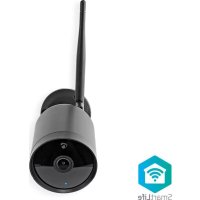
Full HD Outdoor Camera waterproof metal housing
WIFICO40CBK

natural_image
Technical line drawing of a mechanical component with a cylindrical shaft and flange (no text or symbols)
Quick start guide 4

Kurzanleitung 7

natural_image
Technical diagram of a mechanical assembly with labeled components (no readable text or symbols)Full HD Outdoor Camera
WIFICO40CBK

For more information see the extended manual online: ned.is/wifico40cbk
Intended use
The Nedis WIFICO40CBK is an IP security camera with a viewing angle of 130 degrees.
If the security camera detects movement or sound, you will receive a warning message on your phone.
With the app you can watch live video images, play back, but also listen in and talk back.
Consult the local laws and regulations for this product before installing and using.
Any modification of the product may have consequences for safety, warranty and proper functioning.
Specifications
| Product Full HD Outdoor Camera | |
| Article number WIFICO40CBK | |
| Dimensions (l x w x h) 163 x 163 x 60 mm | |
| Weight 0.3 kg | |
| Ambient temperatures -20 °C – 50 °C | |
| Input power 12 VDC ; 1 A | |
| Wireless connection 2.4G Wi-Fi, AP | |
| Memory SD card (8 - 128 GB) (not included) | |
| Resolution 1920 x 1080p | |
| Viewing angle 130 degrees | |
| Max. radio transmit power 18.5 dBm | |
| Antenna gain 2 dBi |
Frequency range 2412 - 2472 MHz
Waterproof IP65
Main parts (image A)
① Power adapter
② Microphone
③ Camera lens
④ Status indicator LED
⑤ Wi-Fi antenna
⑥ Reset button
⑦ MicroSD card slot
⑧ Speaker
Safety instructions
WARNING
- Ensure you have fully read and understood the instructions in this document before you install or use the product. Keep this document for future reference.
- Only use the product as described in this document.
- Do not use the product if a part is damaged or defective. Replace a damaged or defective product immediately.
- Do not drop the product and avoid bumping.
- This product may only be serviced by a qualified technician for maintenance to reduce the risk of electric shock.
- Unplug the product from the power source and other equipment if problems occur.
- Do not expose the product to water or moisture.
- Do not unplug the product by pulling on the cable. Always grasp the plug and pull.
- Consult the local laws and regulations for this product before installing and using.
Preparing the security camera
Use an SD card with a minimum of 8 GB and a maximum of 128 GB.
- Insert the new microSD card into the microSD card slot A⑦.
- Plug the power adapter into a power outlet.
The product switches on automatically.
Installing the Nedis SmartLife app
- Download the Nedis Smartlife app for Android or iOS on your phone via Google Play or the Apple App Store.
- Open the Nedis Smartlife app on your phone.
- Create an account with your e-mail address and tap Continue.
- Enter the received verification code.
- Create a password and tap Done.
- Tap Add Home to create a SmartLife Home.
- Set your location, choose the rooms you want to connect with and tap Done.
Connecting the product
- Open the Nedis Smartlife app on your phone.
- Tap + in the Nedis SmartLife app.
- Select the device type you want to add from the list.
- Confirm the status indicator LED A④ is blinking.
- Enter the Wi-Fi network data and tap Confirm.
- Tap Continue and a QR-code will appear.
- Hold your phone with a 15 – 20 cm distance in front of the camera.
- If the camera has detected the QR-code, you will hear a sound.
- Tap to confirm you heard the sound.
- Give the camera a name and tap Done. A④ will turn blue.
The product is now ready for use.
If the camera failed to connect, the A ④ will be continuously red. To reset the camera, push the reset button A⑥ for 5 seconds until you heard the sound.
Then repeat step 1 to 10 closer to the router.
Important instructions to reduce false alarms
- Do not place the camera facing the sun or any objects with bright lights.
- The ideal viewing distance is 2 - 10 meters.
- Do not place the camera close to frequently moving vehicles. The recommended distance between the camera and moving vehicles is 15 meters.
- Stay away from air outlets, including air conditioner and heat transfer vents, etc.
- Do not place the camera facing a mirror or highly reflective object.
- Keep the camera at least 1 meter away from any wireless devices, including Wi-Fi routers and phones, in order to avoid wireless interference.
Declaration of Conformity
We, Nedis B.V. declare as manufacturer that the product WIFICO40CBK from our brand Nedis ^® , produced in China, has been tested according to all relevant CE standards and regulations and that all tests have been passed successfully. This includes, but is not limited to the RED 2014/53/EU regulation.
The complete Declaration of Conformity (and the safety datasheet if applicable) can be found and downloaded via:
nedis.com/WIFICO40CBK#support
For additional information regarding the compliance, contact the customer service:
Web: www.nedis.com
E-mail: service@nedis.com
Nedis B.V., de Tweeling 28
5215 MC 's-Hertogenbosch, the Netherlands

Kurzanleitung
WIFICO40CBK
Full-HD Outdoor-Kamera
5215 MC 's-Hertogenbosch, the Netherlands

5215 MC 's-Hertogenbosch, the Netherlands
Full HD kamera do vonkajšieho prostredia