G2 II - Earphones EDIFIER - Free user manual and instructions
Find the device manual for free G2 II EDIFIER in PDF.



User questions about G2 II EDIFIER
0 question about this device. Answer the ones you know or ask your own.
Ask a new question about this device
Download the instructions for your Earphones in PDF format for free! Find your manual G2 II - EDIFIER and take your electronic device back in hand. On this page are published all the documents necessary for the use of your device. G2 II by EDIFIER.
USER MANUAL G2 II EDIFIER
7.1 Surround Sound USB Gaming Headset
www.edifier.com
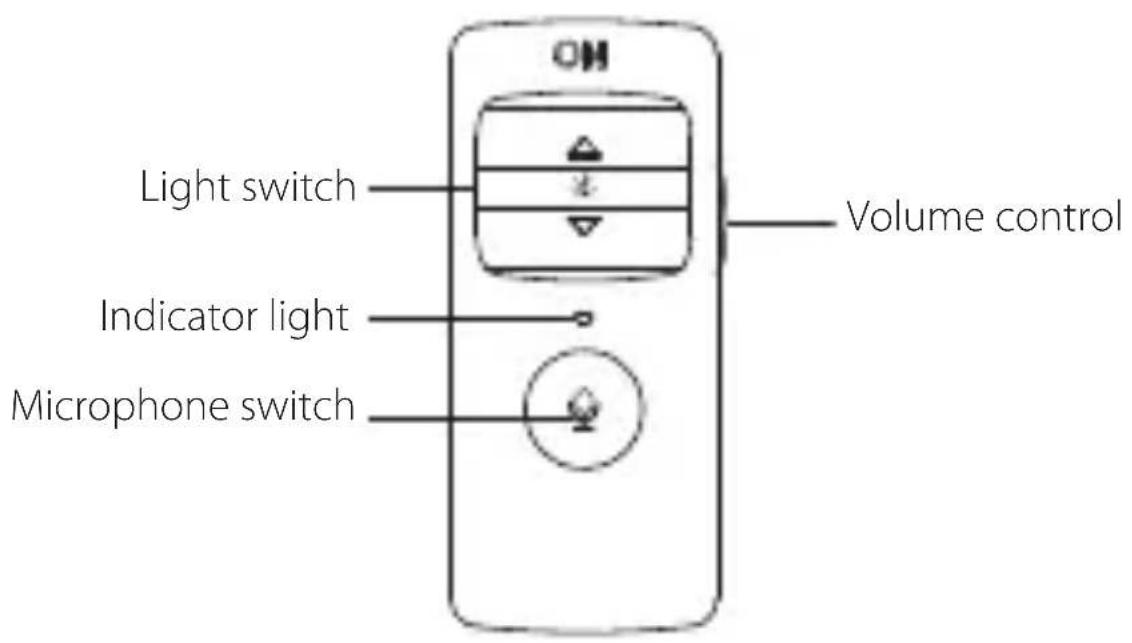
EN · Product Description
text_image
Light switch Indicator light Microphone switch Volume control■ Installation of the Sound Effect Adjustment Software
-
Please log in EDIFIER home page website: www.edifier.com to download software of G2 II, find the "setup.exe" file, and install the EDIFIER software (Windows 7, Windows 8, Windows 8.1 & Windows 10 systems supported).
-
Please follow the instructions to complete the installation.
Maintenance
- Keep the product away from humid places to avoid affecting internal circuit. Do not use the product during intense exercise or with much sweat to prevent sweat from dropping into the product to make damage.
- Do not put the product in places exposed to sun or with high temperature. High temperature will shorten service life of electronic components, damage battery and make plastic components deformed.
- Do not put the product in cold places to avoid damaging internal circuit board.
- Do not dismantle the product. Non-professional personnel may damage the product.
- Do not drop, strongly vibrate, strike the product with hard object to avoid damaging internal circuit.
- Do not use drastic chemicals or cleaner to clean the product.
- Do not use sharp objects to scratch product surface to avoid damaging shell and affecting facade.
Edifier International Limited
P.O. Box 6264
General Post Office
Hong Kong
Designed by DONGGUAN EDIFIER ESPORTS TECHNOLOGY CO.,LTD.
www.edifier.com
© 2019 Edifier International Limited. All rights reserved.
Printed in China
NOTICE:
For the need of technical improvement and system upgrade, information contained herein may be subject to change from time to time without prior notice.
Products of EDIFIER will be customized for different applications. Pictures and illustrations shown on this manual may be slightly different from actual product. Images are for illustrative purposes only and may differ from the actual product.
Designed by DONGGUAN EDIFIER ESPORTS TECHNOLOGY CO.,LTD.
www.edifier.com
Designed by DONGGUAN EDIFIER ESPORTS TECHNOLOGY CO.,LTD.
www.edifier.com
Designed by DONGGUAN EDIFIER ESPORTS TECHNOLOGY CO.,LTD.
www.edifier.com
Designed by DONGGUAN EDIFIER ESPORTS TECHNOLOGY CO.,LTD.
www.edifier.com
Designed by DONGGUAN EDIFIER ESPORTS TECHNOLOGY CO.,LTD.
www.edifier.com
General Post Off ice
Hong Kong
Designed by DONGGUAN EDIFIER ESPORTS TECHNOLOGY CO.,LTD.
www.edifier.com
©2019 Edifier International Limited. 禁無断転載
印刷: 中国