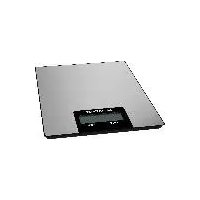
HG05706 - Scale SILVERCREST - Free user manual and instructions
Find the device manual for free HG05706 SILVERCREST in PDF.


| Product type | Digital kitchen scale |
| Brand | SilverCrest |
| Model | HG05706 |
| Dimensions | 14.5 x 1.65 x 20 cm (Model A) / 14.5 x 1.3 x 20 cm (Model B) |
| Weight | 410 g (Model A) / 260 g (Model B) |
| Power supply | 1 lithium CR2032 battery, 3 V |
| Maximum capacity | 5 kg / 11 lb |
| Graduation | 1 g / 0.05 oz / 1 ml |
| Units of measurement | g, oz, lb:oz, ml, fl.oz |
| Tare function | Yes |
| Automatic shut-off | Yes (after approx. 3 minutes) |
| Automatic turn-on | By load ≥ 250 g / 0.55 lb |
| Material | Plastic (estimated) |
| Food contact | Yes, CE compliant |
| Cleaning | Slightly damp cloth, without harsh products |
| Safety | Do not overload (>5 kg), do not immerse, avoid shocks |
| Warranty | 3 years |
| Spare parts | Available during warranty |
| Customer service | Phone: 0800 919270 (France), email: targa@lidl.fr |
| Manufacturer | TARGA GmbH, Coesterweg 45, 59494 Soest, Germany |
Frequently Asked Questions - HG05706 SILVERCREST
User questions about HG05706 SILVERCREST
0 question about this device. Answer the ones you know or ask your own.
Ask a new question about this device
Download the instructions for your Scale in PDF format for free! Find your manual HG05706 - SILVERCREST and take your electronic device back in hand. On this page are published all the documents necessary for the use of your device. HG05706 by SILVERCREST.
USER MANUAL HG05706 SILVERCREST
OB DIGITAL KITCHEN SCALES Operating instructions and safety instructions NL BE
natural_image
Simple line drawing of a rectangular frame with a small rectangular component and mounting holes (no text or symbols)B
natural_image
Pure diagram of a rectangular frame with a small square component and labeled dimension '5' (no text or symbols beyond the label)Deutsch 2
English....19
Français....35
Nederlands 55
Polski 72
Čeština 88
Slovensky 104
Español 120
Dansk 136
Inhaltsverzeichnis
natural_image
Black rectangular object with four legs, resembling a stylized backpack or container (no text or symbols visible)9. Problemlösung
natural_image
Two symbolic icons: a person sorting a trash bin and a recycling symbol (no text or labels)- Intended use....20
- Package contents.... 20
- Overview 21
- Technical specifications .... 21
- Safety instructions 22
- Copyright 26
- Before you start....27
7.1 Activating the battery 27
- Getting started 27
8.1 Switching on the kitchen scales / weighing 27
8.2 Weighing additional items....28
8.3 Auto power off....28
8.4 Replacing the battery 29
- Troubleshooting.... 29
9.1 Nothing is indicated on the display....29
9.2 "LO" is indicated on the display and the scales switch off 30
9.3 "EEEE" is indicated on the display....30
9.4 The scales are indicating wrong values....30
- Maintenance/cleaning 30
10.1 Maintenance....30
10.2 Cleaning 30
- Storage when not in use 31
- Environmental regulations and disposal information.... 31
12.1 Disposal of batteries 32
- Food-grade use.... 32
- Conformity notes 32
- Warranty and service information.... 33
Congratulations!
By purchasing the SilverCrest SKW 5 B1 kitchen scales, hereinafter referred to as the kitchen scales, you have opted for a quality product.
Before first using it, familiarise yourself with the way the kitchen scales work and read these operating instructions through carefully. Be careful to follow the safety instructions and only use the kitchen scales as described in the operating instructions and for the applications given.
Keep these operating instructions in a safe place. If you pass the kitchen scales on to someone else, make sure to give them all the relevant documents with it.
1. Intended use
These kitchen scales are used to determine the weight of food. It may not be used outdoors or in tropical climates. This kitchen scales have not been designed for corporate or commercial use. Use the kitchen scales in domestic environments for private applications only. Any other use does not correspond to the intended use. These kitchen scales fulfill all relevant norms and standards concerning CE conformity. Any modifications to the kitchen scales other than recommended changes by the manufacturer may result in these norms no longer being met. The manufacturer shall not be liable for any damage or malfunctions resulting from such modifications. Only use accessories recommended by the manufacturer.
Observe the regulations and laws in the respective country of use.
2. Package contents
• SilverCrest SKW 5 B1 kitchen scales
• Lithium battery, CR2032
• These operating instructions
3. Overview
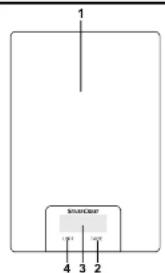
These operating instructions have a fold-out cover. On the inside of the cover, the kitchen scales (models A and B) are shown with figures indicated. The meanings of the numbers are as follows:
1 Weighing surface
2 TARE button
3 Display
4 UNIT button
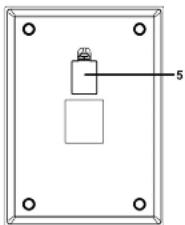
5 Battery compartment (back panel)
4. Technical specifications
Operating voltage: 3 V (direct current)

Battery: 1 Lithium batteries, 3 V, CR2032
Units of weight: g / oz / lb:oz / ml / fl.oz (adjustable)
Weighing range: max. 5 kg / 11 lb
Graduation: 1 g / 0.05 oz / 1 ml
Auto Power Off function: yes
Dimensions (W x H x D): approx. 14.5 x 1.65 x 20 cm (model A)
approx. 14.5 × 1.3 × 20 cm (model B)
Weight: approx. 410 g (model A)
approx. 260 g (model B)
Operating temperature: +10°C to +40°C
The technical data and design may be changed without prior notice.
5. Safety instructions
Before you use the kitchen scales for the first time, please read the following notes and heed all warnings, even if you are familiar with handling electronic devices. Keep these operating instructions in a safe place for future reference. If you sell the kitchen scales or give them away, pass on the operating instructions at the same time. The operating instructions are part of the product.

DANGER! This symbol and the word "Danger"
alert you to a potentially dangerous situation.
Ignoring it can lead to severe injury or even death.

WARNING! This symbol and the word
"Warning" denote important information required for the safe operation of the product and for the safety of its users.

This symbol denotes further information on the topic.
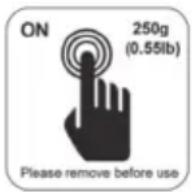
This symbol indicates that the kitchen scales switches on automatically when there is a load of at least 250 g or 0.55 lb on the weighing surface (1). Remove this sticker from the kitchen scales before using it.

DANGER! This kitchen scales may be used by children of 8 years or over or by persons with physical, sensory or mental impairments or those with no knowledge or experience providing they are supervised or they have been given instructions on the proper use of the kitchen scales and they understand the associated risks. Do not allow children to play with the kitchen scales. The product must not be cleaned or maintained by unsupervised children. Keep the packaging materials out of the reach of children. There is a risk of suffocation.

DANGER! Do not overload the kitchen scales with more than 5 kg or 11 lb. Otherwise, the kitchen scales could be damaged and there is a risk of injury.

DANGER! Make sure that no fire hazards (e.g. burning candles) are placed on or near the kitchen scales. Fire hazard!

DANGER! Insert the battery with the correct polarity. Refer to the diagram inside the battery compartment. Do not attempt to recharge the batteries and do not dispose of the batteries in a fire. Remove the battery if the device is not going to be used for a long time. Improper use could cause explosions or leaks. Batteries are not toys! If a battery is swallowed, seek medical help immediately. Batteries must never be opened or deformed, as this could result in chemicals leaking out which could cause injuries. If the battery fluid comes into contact with the skin or eyes, rinse immediately with plenty of water and seek medical aid.

WARNING! If smoke, unusual noises or smells are noticed, remove the battery from the kitchen scales immediately. If this occurs, the kitchen scales should not be used before they have been inspected by authorised service personnel. Never inhale smoke from a possible device fire. If you do inadvertently inhale smoke, seek medical attention. Smoke inhalation can be damaging to your health.

WARNING! The kitchen scales must not be damaged in order to avoid any further risks.
WARNING! Do not short-circuit the battery. Remove the battery from the device when you are not going to use it for a long period of time. If the battery has leaked, remove it to prevent damage to the kitchen scales. You can wipe off any leaked battery fluid by using a dry, absorbing cloth. Always wear protective gloves! Avoid any skin contact. If the battery fluid comes into contact with the skin or eyes, rinse immediately with plenty of water and seek medical aid.
⚠ WARNING! Non-rechargeable batteries must not be recharged.
⚠ WARNING! Do not short-circuit any battery contacts.
⚠ WARNING! Batteries must be inserted respecting the correct polarity.
⚠ WARNING! When it is empty, remove the battery from the device and dispose of safely.
⚠ WARNING! Do not expose the kitchen scales to any direct heat sources (e.g. heaters), direct sunlight or artificial light. The device must not be exposed to spray or dripping water or abrasive liquids. Do not use the kitchen scales near water.
The kitchen scales must never be submerged. Make sure that the kitchen scales are not subject to excessive impacts or vibrations. Do not introduce any foreign bodies into the device. This could damage the kitchen scales.
6. Copyright
All the contents of this user manual are protected by copyright and provided to the reader for information only. Copying data and information without the prior explicit written consent of the author is strictly forbidden. This also applies to any commercial use of the contents and information. All texts and diagrams are up-to-date as of the date of printing. Subject to change without notice.
7. Before you start
7.1 Activating the battery
Remove the strip from the battery compartment (5) on the bottom of the kitchen scales.

After removing the strip off the battery compartment (5), immediately place the scales onto a solid, horizontal surface but don't apply any pressure on the scales. Wait until the scales indicate "0 g". The scales have now been calibrated and are ready to be used. In case that the scales don't show "0 g", read the chapter "The scales are indicating wrong values".
8. Getting started

A solid surface is required to measure weight correctly. Thus always place the kitchen scales on a solid, horizontal surface. Otherwise this can distort the measurement result.
8.1 Switching on the kitchen scales / weighing
- Briefly press on the weighing surface (1), applying a little pressure to switch the kitchen scales on.

But you can also, for example, place a bowl with minimum 250 g or 0.55 lb on the weighing surface (1). The kitchen scales switch on and display the measurement result.
• The selected unit of measure is indicated on the display (3).
| Unit of | |
| Weight g, oz, lb:oz | |
| Liquids | ml, fl.oz |
mea
- Press the UNIT button (4) to toggle through the units of measure in sequence as follows: g / oz / lb:oz / ml / fl.oz
- Place the foodstuff on the weighing surface (1).
-
The measurement result is shown on the display (3).
-
Remove the foodstuff from the weighing surface (1) if you don't wish to weight any more items.
- If you want to add another item, refer to the next chapter "Weighing additional items".
8.2 Weighing additional items
- Press the TARE button (2) to weight additional items.
- The kitchen scales reset to "Zero". "T" is also shown on the display (3).
- Add the new item(s) to be weighted. The display (3) shows the measurement result of the new items.
- Repeat this procedure if you want to weight more items. Please note that the maximum weight of 5 kg must not be exceeded.
- Remove the foodstuff from the weighing surface (1) if you don't wish to weight any more items.
- Press the TARE button (2) to stop weighing additional items.
- The kitchen scales reset to "Zero". "T" is no longer shown on the display (3).
8.3 Auto power off
The kitchen scales have an automatic switch-off function (Auto Power Off function). When not using it for approx. 3 minutes, the kitchen scales switch off automatically.
Press and hold the TARE button (2) for approx. 3 seconds to switch the kitchen scales off manually.
8.4 Replacing the battery
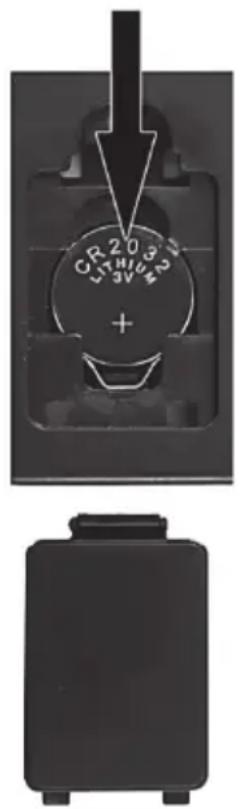
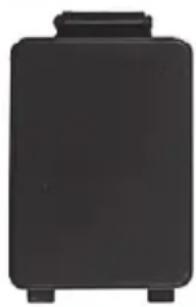
Replace the battery when it is empty. To replace the lithium battery CR2032, remove the cover of the battery compartment (5) at the rear of the kitchen scales by unlocking the locking mechanism of the cover with your finger and then taking the cover off.
To remove the battery, push it down a bit (see the direction of the arrow in the illustration). You can then remove the battery from the holder.
Then insert a new CR2032 lithium battery. Always pay attention to the polarity. This is indicated in the battery compartment (5), and the + symbol on the lithium battery CR2032 must be visible, as shown in the adjoining illustration.
Then insert the 2 guide lugs of the battery compartment cover back into the corresponding slots and press the battery compartment cover until the locking mechanism snaps into place.
After inserting the battery, immediately place the scales onto a solid, horizontal surface but don't apply any pressure on the scales. Wait until the scales indicate "0 g". The scales have now been calibrated and are ready to be used. In case that the scales don't show "0 g", read the chapter "The scales are indicating wrong values".
9. Troubleshooting
9.1 Nothing is indicated on the display
- The battery is empty. Replace the battery with new battery of the same type. Please note the instructions in the "Replacing the battery" section.
- The battery isn't inserted properly. Please note the instructions in the "Replacing the battery" section.
9.2 "LO" is indicated on the display and the scales switch off
- The battery is almost empty. Replace the battery with new battery of the same type. Please note the instructions in the "Replacing the battery" section.
9.3 "EEEE" is indicated on the display
- The weight exceeds the maximum load of 5 kg. Immediately remove the items from the weighing surface (1) to avoid damaging the kitchen scales.
9.4 The scales are indicating wrong values
- The scales must be re-calibrated. To do so, remove the battery from the scales, wait approx. 10 seconds and re-insert the battery. Then immediately place the scales onto a solid, horizontal surface but don't apply any pressure on the scales. Wait until the scales indicate "0 g". The scales have been re-calibrated and are ready to be used. If the scales don't show "0 g", repeat the above steps.
10. Maintenance/cleaning
10.1 Maintenance
Repairs are required if the kitchen scales have been damaged in any way, for example if the device housing is damaged, when liquids or objects have penetrated into the kitchen scales or when the product has been exposed to rain or moisture. Repairs are also necessary if the product does not perform normally or if it has been dropped. If smoke, unusual noises or smells are noticed, remove the battery from the kitchen scales immediately. If this occurs, the kitchen scales should not be used before they have been inspected by authorised service personnel. All servicing work must be carried out by qualified specialist personnel. Never open the housing of the kitchen scales.
10.2 Cleaning
Only use a clean, slightly dampened cloth to clean the kitchen scales. Never use any aggressive liquids. For stubborn dirt, add a little detergent to the damp cloth.
11. Storage when not in use
If the kitchen scales are not to be used for an extended period, store them in a safe, clean and dry place.
- Remove the battery.
• Before storing the kitchen scales, clean the device as described in in the previous chapter.
12. Environmental regulations and disposal information
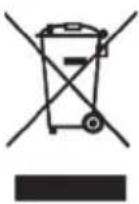
A symbol depicting a crossed-out rubbish bin on a product means it is subject to European Directive 2012/19/EU. All electrical and electronic devices must be disposed of separately from household waste at official disposal centres. Proper disposal of old devices prevents damage to the environment or your health. The battery must be removed from the device before it is scrapped.

For further information about proper disposal, contact your local council, recycling centre or the shop where you bought the device.
Dispose of all packaging in an environmentally friendly manner. Cardboard packaging can be taken to paper recycling centres or public collection points for recycling. Any film or plastic contained in the packaging should be taken to your public collection points for disposal.
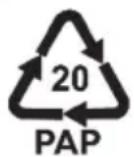
Please note the markings on the packaging material when disposing of it, it is labelled with abbreviations (a) and numbers (b), the meanings of which are as follows:
1-7: plastic / 20-22: paper and cardboard / 80-98: composite materials.
The packaging is made of corrugated cardboard and can be recycled into further packaging.
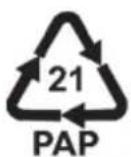
The egg-carton inlet tray is made of cardboard and can be recycled into further packaging.
The tissue paper in the packaging is made of paper and can be recycled into newspapers/magazines.
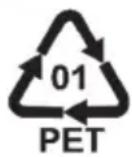
The battery isolation strips are made from polyethylene and can be recycled into polyester fibres, bottles for food and other liquids and food packaging.

Only relevant for France:
The product can be recycled, is subject to an extended producer responsibility and is collected separately.
12.1 Disposal of batteries
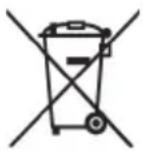
Respect the environment. Old batteries must not be disposed of with domestic waste. They must be handed in at a collection point for waste batteries. Please note that batteries must be disposed of fully discharged at appropriate collection points for old batteries. If disposing of batteries which are not fully discharged, take precautions to prevent short circuits.
13. Food-grade use

This symbol designates products whose physical and chemical composition has been tested and found to be non-hazardous to health when used in contact with food in accordance with the requirements of Regulation EU 1935/2004.
14. Conformity notes

The product complies with the requirements of the applicable European and national directives. Evidence of conformity has been provided. The manufacturer has the relevant declarations and documentation.
The product complies with the requirements of the applicable national directives of the Republic of Serbia.

The product complies with the requirements of the applicable national directives for Great Britain.
The complete EU Declaration of Conformity is available for download from this link: https://www.targa.gmbh/downloads/conformity/366111_2101.pdf
15. Warranty and service information
Warranty of TARGA GmbH
Dear Customer,
This device is sold with three years warranty from the date of purchase. In the event of product defects, you have legal rights towards the seller. These statutory rights are not restricted by our warranty as described below.
Warranty conditions
The warranty period commences upon the date of purchase. Please keep the original receipt in a safe place as it is required as proof of purchase. If any material or manufacturing faults occur within three years of purchase of this product, we will repair or replace the product free of charge as we deem appropriate.
Warranty period and legal warranty rights
The warranty period is not extended in the event of a warranty claim. This also applies to replaced and repaired parts. Any damage or defects discovered upon purchase must be reported immediately when the product has been unpacked. Any repairs required after the warranty period will be subject to charge.
Scope of warranty
The device was carefully manufactured in compliance with stringent quality guidelines and subjected to thorough testing before it left the works. The warranty applies to material and manufacturing faults. This warranty does not cover product components which are subject to normal wear and which can therefore be regarded as wearing parts, or damage to fragile components such as switches, rechargeable batteries or components made of glass. This warranty is void if the product is damaged, incorrectly used or serviced. To ensure correct use of the product, always comply fully with all instructions contained in the user manual. The warnings and recommendations in the user manual regarding correct and incorrect use and handling of the product must always be observed and complied with. The product is solely designed for private use and is not suitable for commercial applications. The warranty is rendered void in the event of incorrect handling and misuse, if it is subjected to force, and also if any person other than our authorised service technicians interfere with the device. No new warranty period commences if the product is repaired or replaced.
Submitting warranty claims
To ensure speedy handling of your complaint, please note the following:
- Before using your product for the first time, please read the enclosed documentation carefully. Should any problems arise which cannot be solved in this way, please call our hotline.
- Always have your receipt, the product article number as well as the serial number (if available) to hand as proof of purchase.
- If it is not possible to solve the problem on the phone, our hotline support staff will initiate further servicing procedures depending on the fault.

Service

Phone: 0800 404 7657
E-Mail: targa@lidl.co.uk

Phone: 1890 930 034
E-Mail: targa@lidl.ie

Phone: 800 62230
E-Mail: targa@lidl.com.mt

Phone: 8009 4409
E-Mail: targa@lidl.com.cy
IAN: 366111_2101

Manufacturer
Please note that the following address is not a service address. First contact the service point stated above.
TARGA GmbH
Coesterweg 45
59494 Soest
GERMANY
Table des matières
natural_image
Black rectangular object with four legs, resembling a stylized backpack or container (no text or symbols visible)natural_image
Two symbolic icons: a person sorting a document into a bin and a recycling symbol (no text or labels)Cher client, chère cliente,
Cher client, chère cliente,
circa 260 g (model B)
https://www.targa.gmbh/downloads/conformity/366111_2101.pdf
15. Garantie- en servicegegevens
natural_image
Solid black rectangular object with four legs, resembling a stylized backpack or container (no text or symbols visible)natural_image
Two symbolic icons: a person sorting a paper into a bin and a recycling symbol (no text or labels)natural_image
Black rectangular object with rounded corners and a small protrusion on top (no text or symbols visible)pribl. 260 g (model B)
natural_image
Black rectangular object with four legs, resembling a stylized backpack or container (no text or symbols visible)9. Odstraňovanie problémov
9.1 Na displeji sa nič nezobrazuje
https://www.targa.gmbh/downloads/conformity/366111_2101.pdf
15. Informácie o záruke a servise
Záruka spoločnosti TARGA GmbH
natural_image
Solid black rectangular object with rounded corners and a small protrusion on top (no text or symbols visible)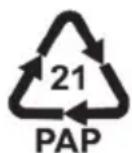
https://www.targa.gmbh/downloads/conformity/366111_2101.pdf
natural_image
Black rectangular object with four legs, resembling a stylized backpack or container (no text or symbols visible)9. Fejlfinding
Bortskaf al emballage på miljørigtig vis. Papemballage kan afleveres i papircontaineren eller på offentlige afleveringssteder til genvinding. Al folie og plastik i emballagen skal afleveres på den lokale genbrugsstation til bortskaffelse.
https://www.targa.gmbh/downloads/conformity/366111_2101.pdf