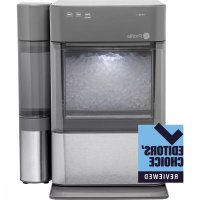
Profile Opal XPIO13SCSS - Ice machine GE - Free user manual and instructions
Find the device manual for free Profile Opal XPIO13SCSS GE in PDF.



| Product Type | Portable ice machine |
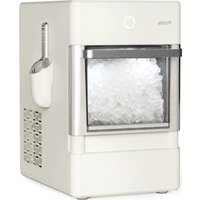
| Brand / Model | GE / Profile Opal XPIO13SCSS |
| Dimensions (L x W x H) | 34.1 x 44.5 x 41.9 cm (13.43 x 17.5 x 16.5 inches) |
| Weight (empty) | 17.5 kg (38.6 lb) |
| Power supply | 120 V ~ 60 Hz, 3.0 A |
| Ice storage capacity | 1.36 kg (3 lb) |
| Ice production rate | Up to 11 kg (24 lb) per day |
| Refrigerant | Isobutane (R600a), flammable |
| Connectivity | WiFi via SmartHQ app |
| Operating ambient temperature | 13 °C to 32 °C (55 °F to 90 °F) |
| Required clearances (sides and back) | At least 7.6 cm (3 inches) |
| Water filter | Optional, compatible with Opal filter |
| Side tank | Included with this model (XPIO13SCSS) |
| Main functions | Ice production, LED lighting (ON/DIM/OFF), cleaning cycle, drain |
| Display | Light ring with status indicators (making ice, add water, cleaning, defrosting) |
| Maintenance and cleaning | Weekly cleaning recommended; bleach solution for disinfection; vinegar for mineral deposits |
| Safety | Grounding required; do not use outdoors; UV lamp do not look directly; unplug before cleaning |
| Warranty | 1 year limited (exchange or refund by GE Appliances) |
| Normal sounds | Humming, buzzing, clicking, gurgling, whooshing, click, grinding |
| Spare parts and repairability | Opal water filter available; service by authorized personnel; do not repair UV lamp |
Frequently Asked Questions - Profile Opal XPIO13SCSS GE
User questions about Profile Opal XPIO13SCSS GE
0 question about this device. Answer the ones you know or ask your own.
Ask a new question about this device
Download the instructions for your Ice machine in PDF format for free! Find your manual Profile Opal XPIO13SCSS - GE and take your electronic device back in hand. On this page are published all the documents necessary for the use of your device. Profile Opal XPIO13SCSS by GE.
USER MANUAL Profile Opal XPIO13SCSS GE
SAFETY INFORMATION ....3
PARTS INCLUDED 5
GETTING STARTED 6
CARE AND CLEANING....7
DISPLAY SETTINGS....10
MAKING ICE....10
DRAINING....10
WATER FILTER....10
SIDE TANK ACCESSORY ..... 11
TROUBLESHOOTING....14
ICE MAKER PRODUCT SPECIFICATIONS....15
LIMITED WARRANTY....19
CONSUMER SUPPORT ..... 20
OWNER'S MANUAL
XPIO13BCBT
XPIO13SCSS
XPIO23BCBT
XPIO23SCSS
ENGLISH/FRANÇAIS/ ESPAÑOL
Write the model and serial numbers here:
Model # ____
Serial # ____
Find these numbers on a label on the back of the unit.

Profile™
THANK YOU FOR MAKING GE APPLIANCES A PART OF YOUR HOME.
Whether you grew up with GE Appliances, or this is your first, we're happy to have you in the family.
We take pride in the craftsmanship, innovation and design that goes into every GE Appliances product, and we think you will too. Among other things, registration of your appliance ensures that we can deliver important product information and warranty details when you need them.
The Good Ice™
IMPORTANT SAFETY INFORMATION READ ALL INSTRUCTIONS BEFORE USING THE APPLIANCE
WARNING
To reduce the risk of fire, explosion, electric shock, exposure to UV radiation, or injury when using your Opal, follow these basic safety precautions.
■ Do not, under any circumstances, alter or remove the third (ground) prong from the power cord. For personal safety, this product must be properly grounded.
- Do not exceed power outlet ratings. It is recommended that the ice maker is connected to its own circuit. Use only a 115 V, 60 Hz standard electrical supply that is properly grounded in accordance with the National Electric Code and local codes and ordinances.
■ Due to potential safety hazards under certain conditions, we strongly advise against the use of an extension cord. However, if you must use an extension cord, it is absolutely necessary that it is a UL-listed, 3-wire ground type appliance extension cord having a grounding type plug and that the electrical rating of the cord be 15 Amperes (minimum) and 120 Volts.
This product must be properly installed and located in accordance with the installation instructions before it is used. Product is for indoor household use only. Do not use outdoors.
■ Do not store or use flammable vapors or liquids near this product.
■ Do not allow children to climb, stand, or hang on the ice maker. They could seriously injure themselves.
■ Do not look directly at UV lamp when it is operating. The light emitted by the lamp will cause serious eye damage and burn unprotected skin.
■ In order to avoid exposure to UV radiation, disconnect
power to the ice maker before removing the external covers.
■ Do not use with water that is micro-biologically unsafe or of unknown quality.
■ Place power cord in such a way it cannot be pulled on by children or cause a tripping hazard.
■ Place power cord in such a way that it is not in contact with hot surfaces.
■ Do not operate if any component, including the cord or plug, is damaged.
■ Unplug the product before cleaning by hand and when not in use.
■ Do not immerse any part of the product in water.
■ Do not plug or unplug product with wet hands.
■ Do not attempt to disassemble, repair, modify, or replace any part of your product.
■ Use this product only for its intended purpose as described in this user manual.
■ Do not use any accessories not recommended by the manufacturer.
■ When handling, installing, and operating the appliance, care should be taken to avoid damage to the refrigerant tubing.
■ Servicing shall be performed by factory authorized service personnel and component parts shall be replaced with manufacturer authorized replacement components.
CAUTION
To reduce the risk of injury when using your Opal, follow these basic safety precautions.
■ Do not remove any safety, warning, or product information labels from your ice maker.
■ Lifting Hazard: It is recommended to have two people move and install the ice maker in order to prevent injury.
Refrigerant and Foam Disposal
Dispose of appliance in accordance with Federal and Local Regulations. Flammable refrigerant and insulation material used require special disposal procedures. Contact your local authorities for the environmentally safe disposal of your appliance.
WARNING

RE OR EXPLOSION HAZARD Flammable Refrigerant
This appliance contains isobutane refrigerant, also known as R600a, a natural gas with high environmental compatibility. Howber, it is also combustible. Adhere to the warnings below to reduce the risk of injury or property damage.
- When handling, installing, and operating the appliance, care should be taken to avoid damage to the refrigerant tubing.
- Service shall only be performed by authorized service personnel. Use only manufacturer-authorized service parts.
-
Dispose of refrigerator in accordance with Federal and Local Regulations. The flammable refrigerant and insulation material used in this product require special disposal procedures. Contact your local authorities for the environmentally safe disposal of your refrigerator.
-
Keep ventilation openings in the appliance enclosures or in the built-in structure clear of obstruction.
- To remove frost, scrape with a plastic or wood spatula or scraper. Do not use an ice pick or a metal or sharp-edged instrument as it may punture the freezer liner and then the flammable refrigerant tubing behind it.
- Do not use electrical appliances inside the food storage compartment of the appliance.
- Do not use any electrical device to defrost your appliance
READ AND SAVE THESE INSTRUCTIONS
CONSIGNES DE SÉCURITÉ IMPORTANTES LISEZ, SUIVRE, ET CONSERVER CES INSTRUCTIONS
AVERTISSEMENT
natural_image
Simple line drawing of a rectangular box with three horizontal sections (no text or symbols)Opal Ice Maker
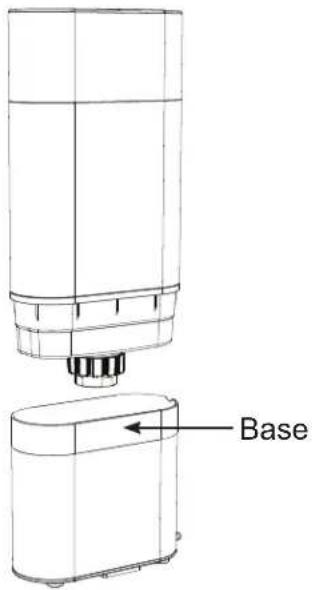
Side Tank
NOTE: Only included with models XPIO13BCBT and XPIO13SCSS
natural_image
Isometric line drawing of a mechanical component with stepped sections (no text or symbols)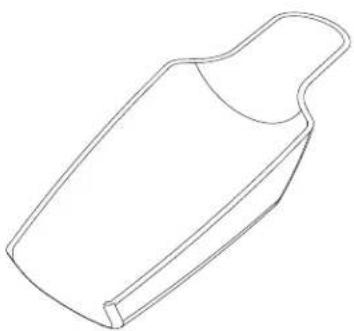
natural_image
Line drawing of a rectangular object with a curved handle and rounded top, resembling a stylized container or tool (no text or symbols)Ice ScoopSide Tank Clip
natural_image
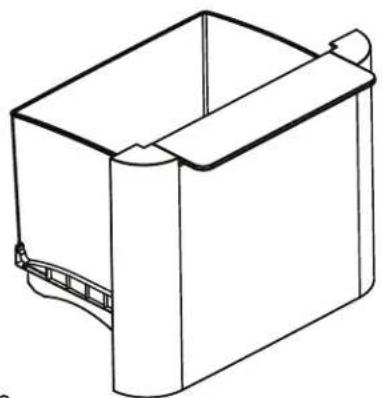
Line drawing of a rectangular container with a side panel and a curved base (no text or symbols)Ice Bin
Quick Start Guide
natural_image
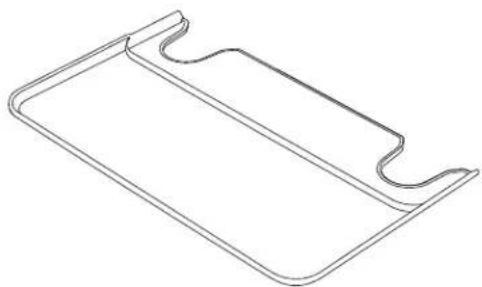
Line drawing of a rectangular object with two curved ends and a central horizontal line (no text or symbols)Drip Tray
Installation Requirements
CAUTION
Lifting Hazard: It is recommended to have two people move and install the ice maker in order to prevent injury.
■ Product is designed to be installed indoors. Do not use your ice maker outdoors.
■ Product must be installed upright on a flat, level surface that is able to support the total weight when full of water.
■ Ensure a minimum of three inches (3") clearance around the side and back walls of the ice maker for proper air circulation.
■ Install the product in a well-ventilated area with an ambient temperature between 55°F and 90°F.
■ Do not place the product near heat sources such as ovens or cooktops.
■ Do not place the product in direct sunlight.
Prepare Opal For Use
- Carefully remove packing material. Do not use sharp tools that can damage the box contents.
- Ensure all components are present. If any item is missing, please contact 1.866.907.6718.
-
Place the ice maker upright on a flat, level surface and plug it in.
-
Install drip tray by sliding it under the front edge of Opal. The tray slots should align with the front feet of Opal.
- Sanitize and rinse the ice maker with clean water for five minutes before first use.
NOTICE
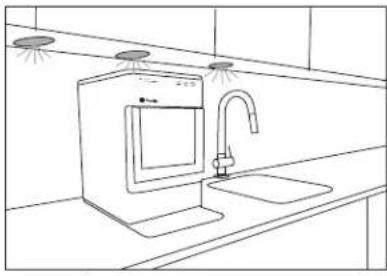
Some types of under-cabinet lamps can be hot enough to cause damage to your Opal top's appearance.
natural_image
Line drawing of a kitchen sink with a faucet and shower, no text or symbols presentCare and Cleaning
To keep your nugget ice tasting fresh and your Opal looking great, we recommend cleaning/sanitizing your Opal once per week.
To clean the exterior of the ice maker, unplug the product, then use a soft cloth dampened with soapy water to gently clean the exterior surfaces. Dry with a soft cloth.
The exterior stainless steel surfaces can be cleaned with commercially available stainless steel cleaner. Use only a liquid cleaner free of grit and rub in the direction of the brush lines with a damp, soft sponge. Do not use appliance wax, polish, solvents, or chemicals on the stainless steel. Do not use soap to clean the reservoir. Use a soft cloth moistened with water.
WARNING
Chemical Exposure Hazard, when each, use bleach in a well ventilated area bleach with other household cleaners.
WARNING
Unplug the product before cleaning by
hand, and when not in use.
System Cleaning / Sanitizing Procedure
To clean Opal's internal components, complete the following steps:
- Unplug Opal.
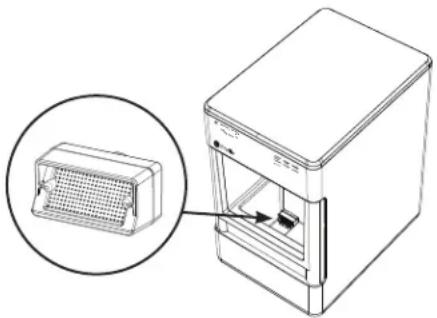
- Remove water filter (if present), and replace with the reservoir's screened intake cap. See Figure 1.
- Drain Opal (see page 8 for detailed instructions).
- Create a solution of five cups of water and one teaspoon household bleach. Skip to page 9 for further instructions on how to remove hard mineral deposits.
-
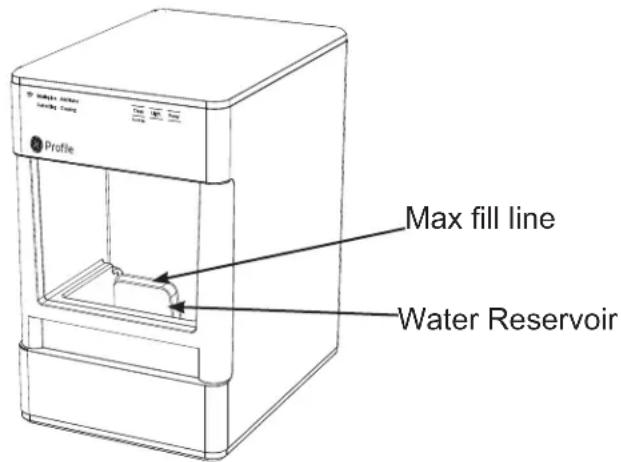
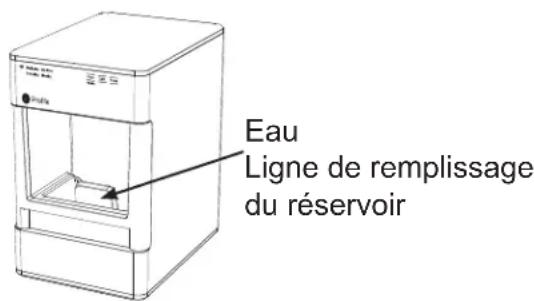
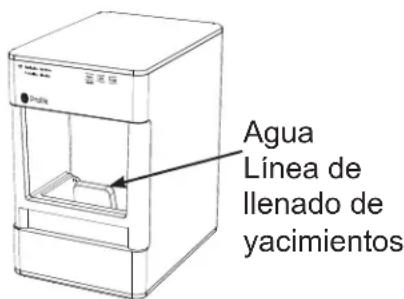
Pour solution into water reservoir, up to the fill line shown. See figure 2.
-
Plug in Opal and hold the 'Clean' button for 3 seconds to initiate the cleaning process. See figure 3.
-
Water will begin circulating and the 'Cleaning' indicator will light up on the left-hand side of the unit to confirm the unit is now in cleaning process. See figure 4. After three minutes the water will stop and the 'Cleaning' indicator light will turn off.
NOTE: Do not use soap to clean the water reservoir.
natural_image
Diagram of a refrigerator with a grid-patterned front panel and an inset showing the exterior view (no text or symbols)Figure 1
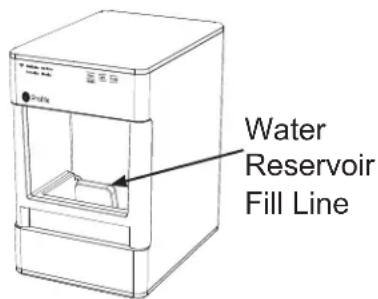
Figure 2
Clean
Hold 3 Sec
Light Power
Figure 3

Making Ice Add Water
Defrosting Cleaning
Figure 4
System Cleaning / Sanitizing Procedure (continued)
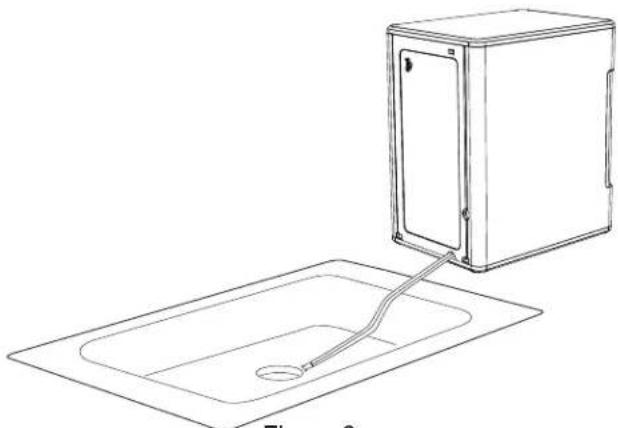
- When the 'Cleaning' indicator light turns off, drain the Opal.
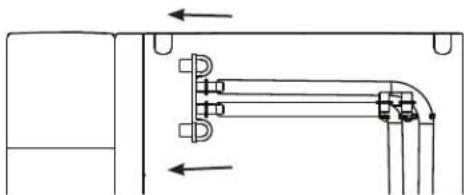
- Unhook the top of the drain hoses at the back of the unit. See figure 5.
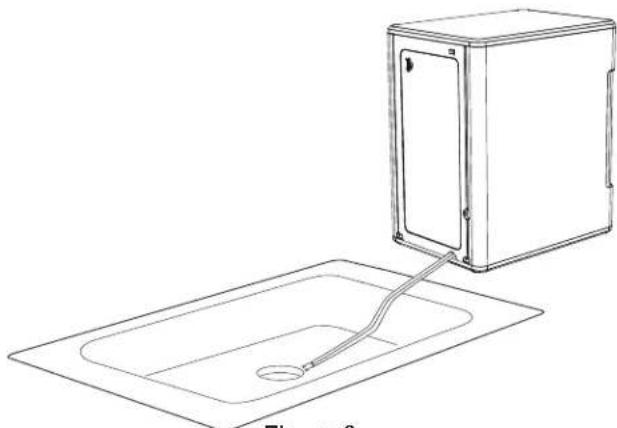
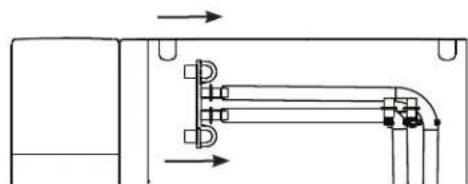
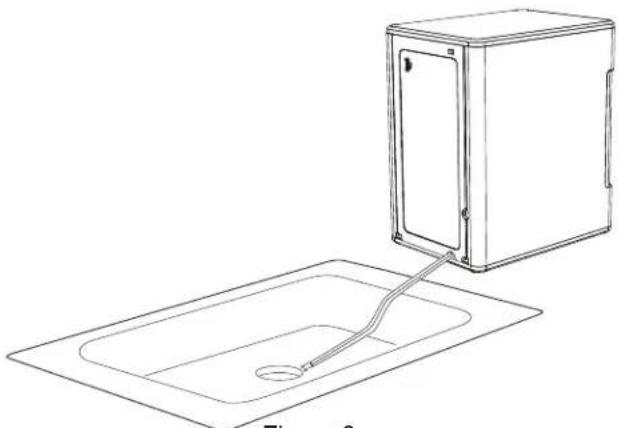
- Then lay them down to drain into a sink or bucket that is below the level of the ice maker. See figure 6 and 7.
- Remove the plugs and allow the water to completely drain. See figure 7.
- Once water stops flowing, re-insert the drain plugs.
- To rinse: add five cups of fresh water to the water reservoir, and press the 'Clean' button to initiate a second cleaning cycle. To exit the cleaning cycle at any time, press and hold the 'Clean' button for 3 seconds.
- Repeat steps 8 through 13 two more times, adding fresh water to the reservoir each time (you may continue to repeat the rinse cycle, for as many times as you like).
- Replace drain tubes on back. See figure 8.
- When complete, fill unit with fresh water and press the 'Power' button to start making ice. See figure 9.
Pull to the left to unhook
natural_image
Pure mechanical assembly diagram showing pipe connection with arrows indicating direction (no text or symbols)Figure 5
natural_image
Line drawing of a washing machine with a drain and cable, no text or symbols presentFigure 6
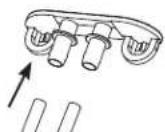
Figure 7
Replace drain tubes
natural_image
Pure mechanical assembly diagram showing pipe connections and arrows without any text or symbolsFigure 8

Light Power
Figure 9
Removal of Mineral Deposits
- Fill the reservoir with white vinegar to the max fill line and run up to three cleaning cycles. Or purchase an Opal Cleaning Kit and follow instructions inside.
- If using vinegar, leave the vinegar in the unit for 18 hours and set a vinegar-soaked towel on the ice chute overnight to further dissolve any mineral buildup. See figure 10.
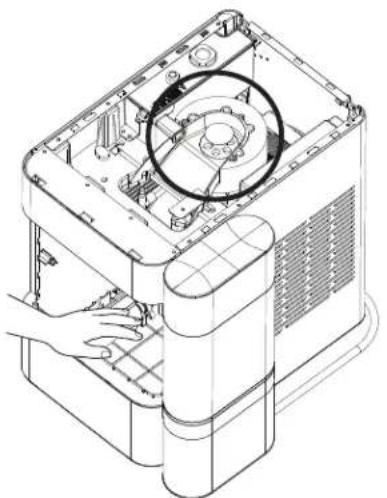
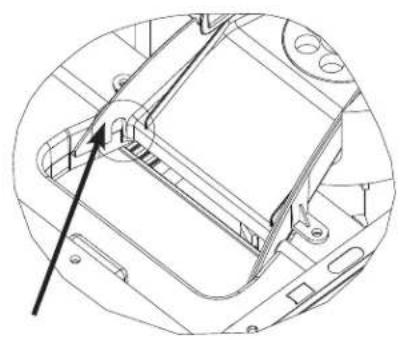
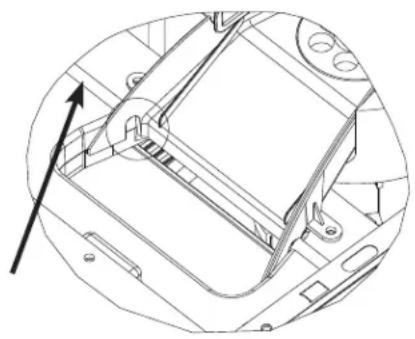
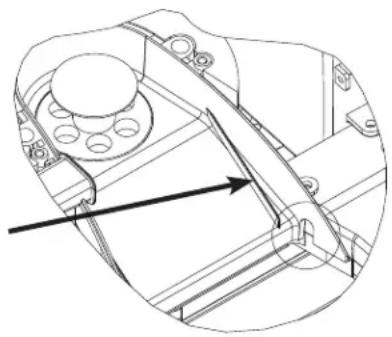
- Clean the sensors with vinegar and wipe clean with water. After draining the vinegar, run three rinse cycles, using fresh water for each rinse. See figures 11, 12, and 13 to reference location of the sensors.
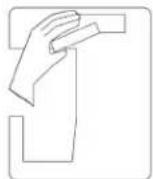
Figure 10
natural_image
Technical line drawing of a mechanical device with a hand adjusting the interior panel (no text or symbols visible)Figure 11 Figure 12
natural_image
Technical line drawing of a mechanical component with an arrow pointing to a section (no text or symbols present)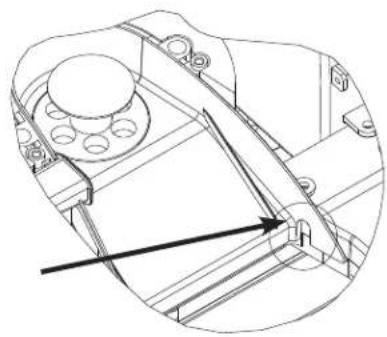
natural_image
Technical line drawing of a mechanical assembly with no visible text or symbolsFigure 13
Cleaning the Bin and Tray
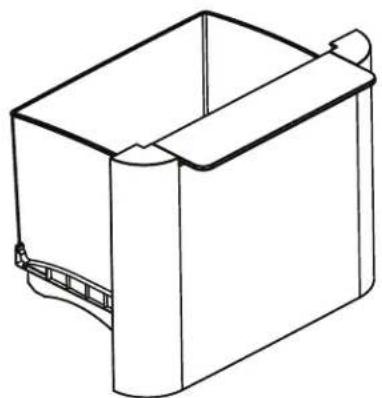
To clean the ice bin, remove the ice bin from the ice maker and clean with a soft cloth dampened with soapy water. Rinse thoroughly. Dry with a soft cloth. Do not use solvents or chemicals.
The drip tray should be wiped dry. Water left in this area may leave deposits. To clean the drip tray, remove the tray from Opal and use a soft cloth dampened with mild soapy water to gently clean the surface. Dry with a soft cloth. Do not use solvents or chemicals.
Understanding the display
| Making Ice Add Water Defrosting Cleaning | Clean Hold 3 Sec | Light Power |
Power
The Power button, when pressed, will begin the ice making process. When pressed, while ON, will turn the ice maker off.
Light
The light feature has three different modes: ON/DIM/OFF. Toggle between the three modes by pressing the light button until you reach your desired lighting mode.
Clean
The cleaning cycle is initiated by pressing and holding
the 'Clean' button for three seconds.
Indicator Lights
The four indicator lights on the left-hand side of the unit display the current status of the Opal. If 'Add Water' is highlighted, your unit needs more water before it can cycle to make ice or clean.
WiFi
Using the complimentary SmartHQ mobile app, customers can connect to their Opal and control it from their Android or iPhone. The indicator light on the left-hand side will confirm a successful connection. See page 14 for how to connect Opal 2.0 Ice Maker to WiFi Application.
Making Ice with Opal
Once Opal has been cleaned/sanitized, move the ice maker to its desired location and complete the following steps.
- Remove ice bin.
- Fill reservoir with potable (safe to drink) water up to the "Max Fill" line. Water hardness must be less than 12 grains per gallon. Do not fill reservoir with any liquid except water. Using any liquid except potable water is misuse and will void your warranty.
- Plug the ice maker into a grounded outlet.
- Touch the Power button to start the ice maker. The indicator on the left-hand side will light up 'Making Ice' to confirm that unit has begun to make ice.
- Opal will begin to produce ice in 15-30 minutes. It will continue to make ice until the bin is full, or it runs out of water. To continue making ice, just add more water.
Draining Opal
We recommend draining your Opal when:
- You put it away or anytime it's being relocated
-
You turn it off for more than a few days. (i.e. vacation)
-
You are not using much ice. Continuous recirculation of meltwater may affect taste. For best results, drain your Opal.
Water Filter
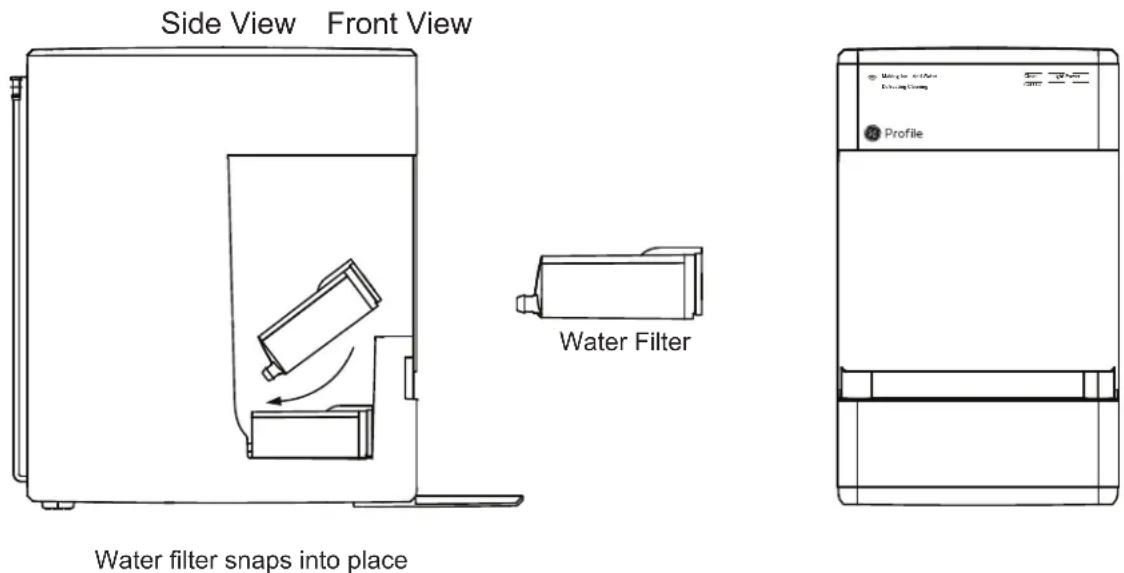
The Opal Water Filter, is available at GE Appliances and is the only water filter compatible with Opal. Please follow the installation instructions included with your filter.
NOTE: Remove your water filter (if installed) and reinstall the screened intake cap prior to cleaning your Opal.
NOTE: The Side Tank Accessory is only included with model number XPIO13BCBT and XPIO13SCSS.
NOTE: There are two drain tubes located on the back of your Opal Nugget Ice Maker indicated as drain tube A and B in the illustration on page 11.
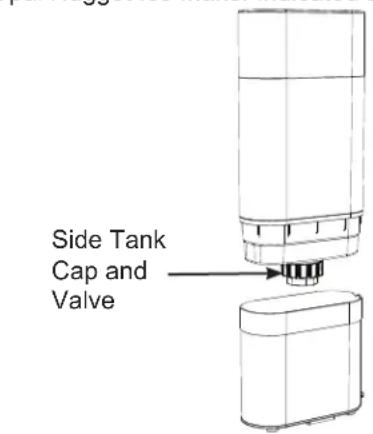
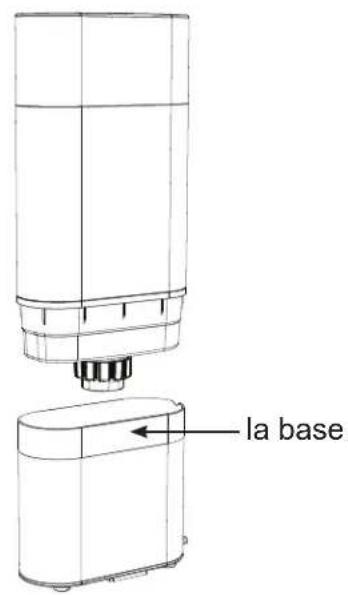
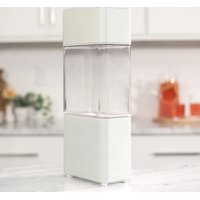
- Hand Wash Only: Rinse and hand wash Opal Side Tank with warm water and a mild dish soap. Remove Opal Side Tank's cap and wash the cap and rubber valve with water and a mild dish soap. The Side Tank base can be washed by disconnecting the hose and adding a small amount of soapy water to it. Scrub as needed and rinse thoroughly. The rinse water should drain out the port in the back.
Rinse the cap, rubber valve, tank and the base well to remove any residual soap (see illustration).
DO NOT WASH THE SIDE TANK IN THE DISHWASHER.
- Unplug Opal Nugget Ice Maker. Unhook Opal's drain tubes and drain the water from the reservoir.
- Connect drain tube, labeled B, to the back of Opal Side Tank's base.
- Make sure drain tube (A) is connected to the black hanger and installed on the back of Opal.
-
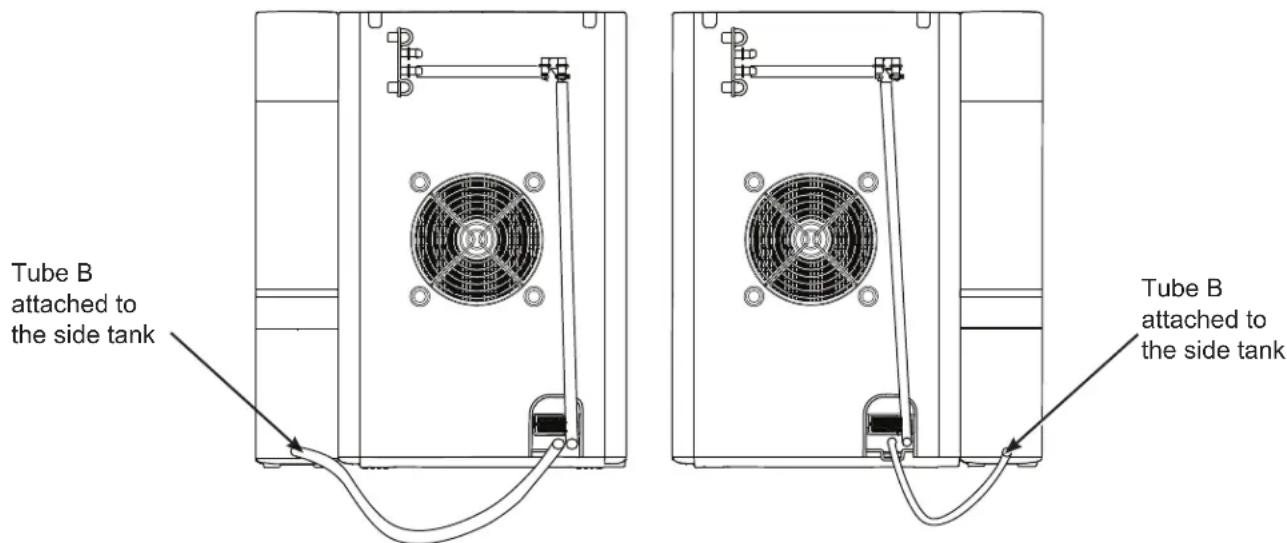
Make sure drain tube (B) connecting to the Side Tank is resting flat on the countertop.
-
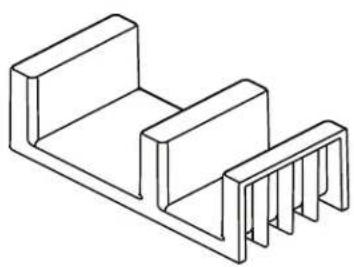
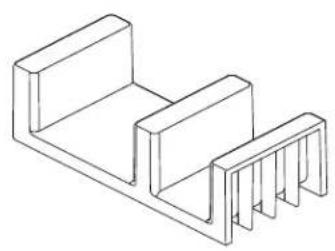
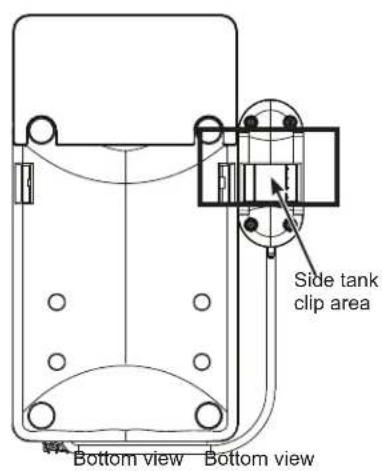
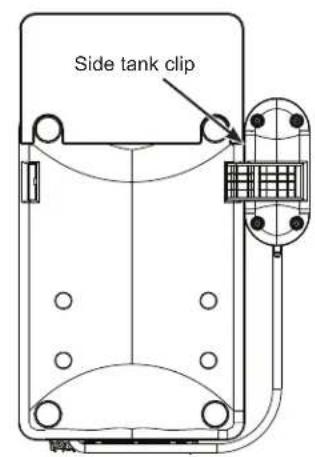
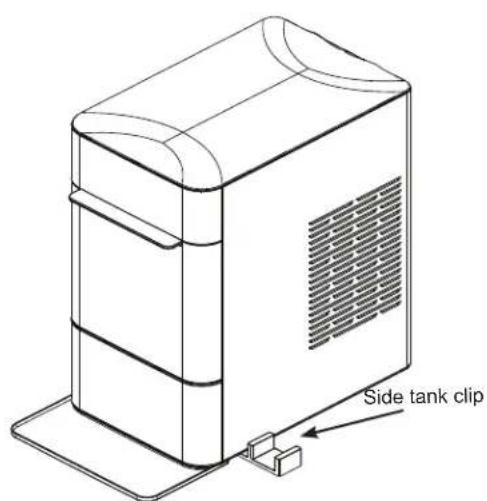
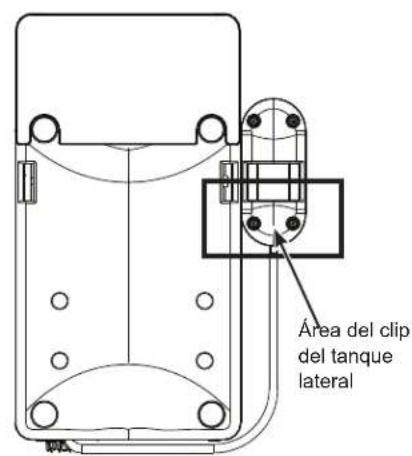
Place Opal Side Tank on the right or left-hand side of the the Opal Nugget Ice Maker. Using the side tank attachment, slide the shorter side of the attachment under the unit, near the front of the unit. The attachment will slide into a slot on the bottom of the unit. Once this is placed, the side tank can slide onto the opposite attachment. See figures below and on next page.
NOTE: Care should be taken to connect the correct tube to the Opal Side Tank. Tube (B) should always be connected to the Side Tank whether it is installed on the left or right side of the Opal Nugget Ice Maker. It is important to make sure the tube is lying flat, otherwise water may not flow from the side tank into the ice maker.
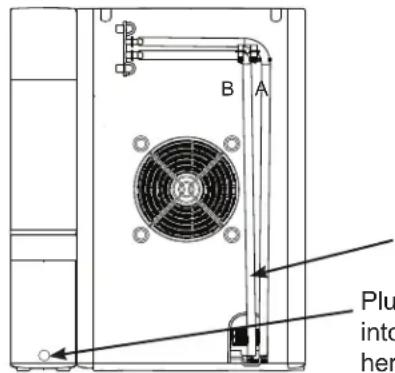
Unplug this drain tube (B) from the black hanger and connect this tube to the Side Tank.
Plug drain tube B into the side tank here.
Side Tank Accessory
NOTE: The Side Tank Accessory is only included with model number XPIO13BCBT and XPIO13SCSS.
- Continued.
natural_image
Isometric line drawing of a mechanical component with two rectangular blocks and a base (no text or symbols)Side tank clip
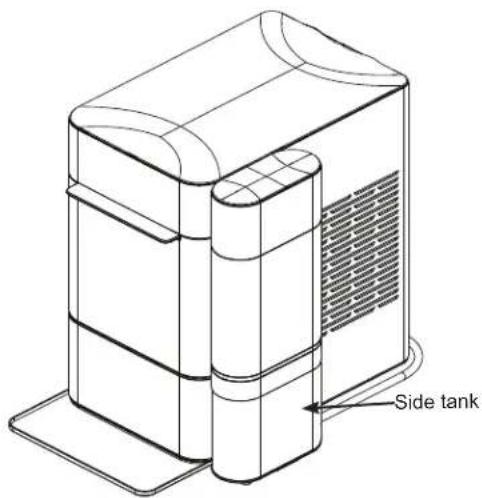
- Remove Opal Side Tank's reservoir from its base.
- Unscrew Opal Side Tank's cap from the reservoir. Fill the clear reservoir with water.
- Replace Opal Side Tank's cap. Ensure the cap is clean when installing.
- Carefully flip over Opal Side Tank's reservoir and place in the base. Water should start flowing into the Opal Nugget Ice Maker and bubbles in the Opal Side Tank will appear periodically during the time water is flowing to the ice maker.
NOTE: If water does not appear to flow into the ice maker, please check for the following:
- There may be bubbles in tube (B) connecting the Side Tank to the Opal.
- Tube (B) is not lying flat.
If either of the above issues are present, adjust tube (B) to allow the water to flow.
- Fill Opal Nugget Ice Maker's reservoir (if desired).
- Plug in Opal Nugget Ice Maker, and begin making ice.
NOTE: The Side Tank Accessory is only included with model number XPIO13BCBT and XPIO13SCSS.
⚠ WARNING
To reduce the risk of electrical shock or injury when using your Opal, follow these basic safety precautions:
■ Unplug the product before cleaning by hand and when not in use.
■ Do not use with water that is microbiologically unsafe or of unknown quality.
■ Use caution when filling and installing Opal Side Tank, as filled unit may be heavy.
■ Do not use this side tank for any liquid other than water.
■ Children should not fill or install Opal Side Tank, as filled unit may be heavy.
■ Side tank should be assembled to ice maker per installation instructions. Installing side tank in a different manner may result in overturning risk.
■ Make sure that Opal Nugget Ice Maker is unplugged when draining reservoir and installing Opal Side Tank.
■ Ensure that Opal Side Tank is installed on a level surface that will be stable even when Opal Side Tank is full.
■ Make sure the cap of the Side Tank remains clean during filling and operation. Hands should be washed and clean prior to opening and closing the cap.
Use and Care
Cleaning the Side Tank
■ Remove and drain the Side Tank.
If there is residual water in Opal Side Tank base unit, flip Opal Side Tank's base to drain.
- Remove and wash Opal Side Tank's cap and valve with dish soap and warm water as needed. Ensure the cap is clean after removing and re-installing by hand.
■ Only remove drain tubes while near a sink or bucket, as removing drain tubes from Opal or Opal Side Tank will drain any water in either unit.
Proper Installation and Location
The side tank should be installed flush to the front of the Opal Nugget Ice maker. Opal Side Tank needs to sit on the same level surface as your Opal Nugget Ice Maker. Do not elevate Opal Side Tank, or your Opal may overflow.
To Remove Mineral Deposits:
Mix two quarts of water with two quarts of white vinegar, OR use the Opal Cleaning Kit.
Clean any visible mineral buildup or deposits with this solution. If deposits are present in the tank, fill the tank with this solution and let soak. Be sure to drain and rinse the tank thoroughly after cleaning. Stubborn deposits may require more than one treatment.
Side Tank Troubleshooting
If water does not flow from the Side Tank to the Opal Ice Maker:
There may be bubbles in the tube connecting the side tank to the Opal if the tube is not lying flat. Try adjusting the tube to allow the water to flow. Once water starts flowing it typically will not need further adjusting.
Normal Operating Sounds
Your new ice maker may make sounds that are not familiar. Most of these sounds are normal. Hard surfaces like the floor, walls, and countertops can amplify these sounds. The following describes the sounds that may be new to you and what may be creating them.
■ WHIR - When Opal is first turned on, you may notice the condenser fan spinning.
■ BUZZ - When the water pump first turns on, it may be dry and slightly noisy. Once it is filled with water, the noise reduces significantly.
■ RATTLE - Rattling noises may be produced from the flow of the refrigerant. These noises should reduce significantly once the refrigerant system has stabilized.
■ GURGLE - When the refrigerant system shuts off, there may be a brief gurgle as the refrigerant stops flowing.
■ HUM - The compressor is a motor. It produces a low
toned humming sound while it is running.
- CLICK - As nugget ice is produced, it drops into the ice drawer. The first nuggets produced are the loudest, as they impact the bottom of the ice bin. As the bin fills, this noise reduces significantly.
■ SQUEAK – When Opal is in need of defrosting, it may start to squeak as ice starts to build up around the mechanisms. The defost cycle is automatic, and may take 30-45 minutes. During this time, the front button won't respond. More frequent squeaking usually requires white vinegar cleaning to remove internal mineral scale buildup.
Radio Frequency Interference
This product has been tested and found to comply with the limits set forth in Title 47 CFR Part 15 - Radio Frequency Devices. Operation is subject to the following conditions: (1) This device may not cause harmful interference, and (2) this device must accept any interference received, including interference that may cause undesired operation. This product generates, uses, and can radiate radio frequency energy, and if not used in accordance with the instructions, may cause harmful interference to radio communications. If this product does cause harmful interference to radio or television reception, which can be determined by unplugging Opal, the user is encouraged to try to correct the interference by one or more of the following measures:
WiFi Connect – SmartHQ
Your OPAL 2.0 ice maker is WiFi Connect Enabled. A WiFi communication card is built into the product allowing it to communicate with your Smart Phone for remote monitoring, control, and notifications.
■ Reorient or relocate the TV or radio antennas.
■ Increase the distance between the product and TV or radio.
- Plug Opal into a separate outlet from a radio or TV. The transmitter must not be co-located or operating in conjunction with other antennas or transmitters.
Please visit
geappliances.com/ge/connected-appliances/ to learn more about connected appliance features and to learn what connected appliance App's will work with your Smart Phone.
Ice Maker Product Specifications
| Description of product Portable nugget ice maker | |
| Model XPIO13BCBT / XPIO13SCSS / XPIO23B | CBT / XPIO23SCSS |
| Voltage/Frequency 120V AC/60Hz | |
| Current 3.0 A | |
| Ice storage capacity 3.0 lbs | |
| Ice making rate 24 lbs per day / 1 lb per hour* | |
| Dimensions (width x depth x height) 13.43 x 17.5 x 16.5 | |
| Installation clearance (sides and back) 3 in | |
| Operating environment 55°F - 90°F | |
| Weight (when empty) 38.6 lbs | |
NOTE: Technical data and performance information provided for reference only.
Specifications are subject to change. Check the rating label on your ice maker for the most accurate information.
*The actual quantity of ice produced will vary with environmental conditions.
Note: Products containing refrigerants
This product contains a refrigerant, which under Federal Law must be removed prior to product disposal. If you are disposing this, or any refrigeration product, check with your local waste company for guidance.
WARNING
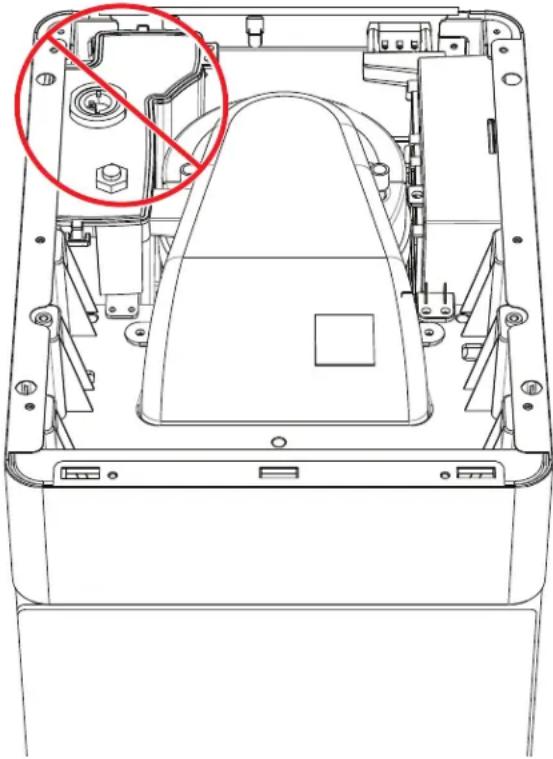
In order to avoid exposure to UV radiation, disconnect power to the ice maker before removing the external covers.
Do not Attempt to repair or replace the UV lamp
natural_image
Technical line drawing of a mechanical device interior with no visible text or symbolsGE Appliances Ice Maker Limited Warranty
GEAppliances.com
Please have your serial number and your model number available when calling for service. Call 1.866.907.6718 for service questions.
For the Period of: GE Appliances Covers
| One YearFrom the date of the original purchase | If the ice machine fails due to a defect in materials or workmanship, during the limited one-year warranty, GE Appliances will either replace your product with a new or remanufactured product, or refund the purchase price of the product at GE Appliances sole discretion. |
What GE Appliances Will Not Cover:
■ Service trips to your home.
■ Improper installation, delivery or maintenance.
■ Failure of the product if it is abused, misused, or used for other than the intended purpose or used commercially.
■ Replacement of house fuses or resetting of circuit breakers.
■ Damage caused after delivery.
■ Replacement of the light bulbs, if included.
■ Damage to the product caused by accident, fire, floods or acts of God.
■ Incidental or consequential damage caused by possible defects with this appliance.
■ Software bugs that can be corrected with an update via the SmartHQ App
■ Labor and other charges to install and/or remove the product
EXCLUSION OF IMPLIED WARRANTIES
Your sole and exclusive remedies are product exchange or refund as provided in this Limited Warranty. Any implied warranties, including the implied warranties of merchantability or fitness for a particular purpose, are limited to one year or the shortest period allowed by law.
For sale in the 50 United States and the District of Columbia only: For US Customers: This limited warranty is extended to the original purchaser for products purchased for home use within the USA. In Alaska and Hawaii, the limited warranty does not include the costs of shipping units.
Some states do not allow the exclusion or limitation of incidental or consequential damages. This warranty gives you specific legal rights, and you may also have other rights which vary from state to state. To know what your legal rights are, consult your local or state consumer affairs office or your state's Attorney General.
Warrantor: GE Appliances, a Haier company Louisville, KY 40225
Consumer Support
Service and Registration
Register your new appliance on-line at your convenience! Timely product registration will allow for enhanced communication and prompt service under the terms of your warranty, should the need arise.
Register your appliance at GEAppliances.com/register or visit myopalservice.com to submit a service request.
Contact Us
If you are not satisfied with the service you receive from GE Appliances, contact us on our Website with all the details including your phone number, or write to:
In the US: General Manager, Customer Relations | GE Appliances, Appliance Park | Louisville, KY 40225 GEAppliances.com/contact
In Canada: Director, Consumer Relations, MC Commercial Inc. | Suite 310, 1 Factory Lane | Moncton, N.B. E1C 9M3 GEAppliances.ca/en/contact-us
CONSIGNES DE SÉCURITÉ IMPORTANTES .... 3
Pièces Incluses 4
Write the model and serial numbers here:
Model # ____
Serial # ____
Find these numbers on a label on the back of the unit.
MANUEL D'UTILISATION
XPIO13BCBT
XPIO13SCSS
XPIO23BCBT
XPIO23SCSS
FRANÇAIS

Profile™
NOUS VOUS REMERCIONS D'INTÉGRER GE APPLIANCES À VOTRE DEMEURE.
natural_image
Simple line drawing of a rectangular box with three horizontal sections (no text or symbols)natural_image
Isometric line drawing of a mechanical component with two stacked blocks and a bracket (no text or symbols)natural_image
Line drawing of a rectangular object with a curved handle and rounded body (no text or symbols)cuillère à glace
natural_image
Line drawing of a rectangular container with a side panel and a curved base (no text or symbols)bac à glace
natural_image
Line drawing of a rectangular object with curved edges and a wavy top edge (no text or symbols)bac de récupération
natural_image
Line drawing of a kitchen sink with faucet and shower fixtures (no text or symbols)Entretien Et Nettoyage
natural_image
Diagram of a refrigerator with a grid-patterned front panel and an inset showing the exterior view (no text or symbols)Figure 1
natural_image
Pure mechanical assembly diagram showing a bracket with mounting holes and internal components (no text or symbols)Figure 5
natural_image
Line drawing of a washing machine with a drain and cable, no text or symbols presentFigure 6
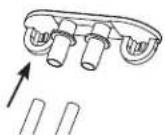
Figure 7
natural_image
Pure mechanical assembly diagram showing pipe connections and arrows without any text or symbolsFigure 8
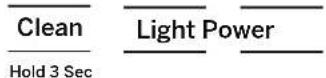
Figure 9
natural_image
Technical line drawing of a mechanical device with a hand operating the base panel (no text or symbols present)Figure 11 Figure 12
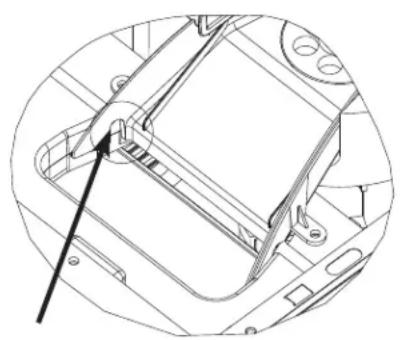
natural_image
Technical line drawing of a mechanical component with an arrow pointing to a specific part (no text or symbols present)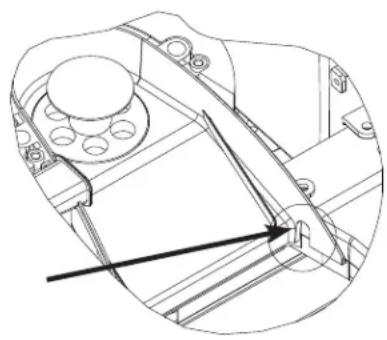
natural_image
Technical line drawing of a mechanical assembly with no visible text or symbolsFigure 13
| Making Ice Add Water Defrosting Cleaning | Clean Hold 3 Sec | Light Power |
Power
natural_image
Technical line drawing of a mechanical device with a cylindrical component and an attached housing (no text or symbols)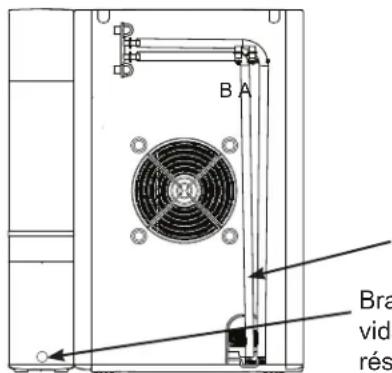
natural_image
Technical line drawing of a device rear panel with fan and cable, no text or symbols present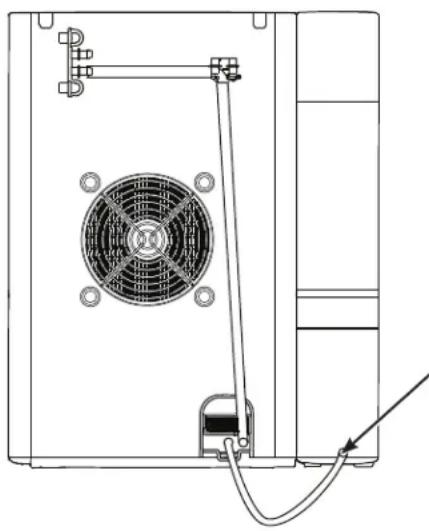
natural_image
Technical line drawing of a mechanical device with fan and wiring (no text or symbols)natural_image
Technical line drawing of an open electronic device casing with internal components and a red circle highlighting a specific part (no text or symbols present)Louisville, KY 40225
natural_image
Isometric line drawing of a rectangular box with a lid, showing three horizontal sections (no text or symbols)máquina de hielo opal
natural_image
Isometric line drawing of a mechanical or electronic component with three vertical supports (no text or symbols)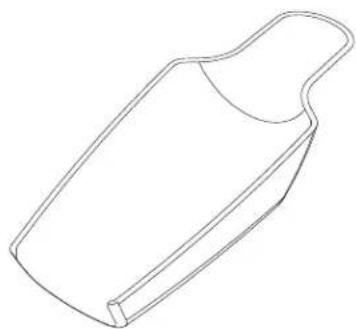
natural_image
Line drawing of a rectangular object with a curved handle and rounded top (no text or symbols)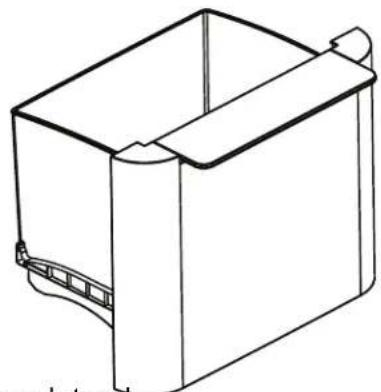
natural_image
Line drawing of a rectangular container with a side clip and a curved handle (no text or symbols)natural_image
Line drawing of a rectangular metal tray with two curved slots (no text or symbols)Bandeja de goteo
natural_image
Line drawing of a kitchen sink with a faucet and shower, no text or symbols presentCuidado y limpieza
natural_image
Diagram of a device with a grid box and internal components, showing an open lid and a magnified inset (no text or symbols)Figura 1
natural_image
Pure mechanical assembly diagram showing pipe connections and arrows without any text or symbolsFigura 5
natural_image
Line drawing of a washing machine with a drain and cable, no text or symbols presentFigura 6
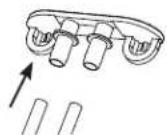
Figura 7
natural_image
Pure mechanical assembly diagram showing pipe connections and arrows without any text or symbolsFigura 8
Clean
Hold 3 Sec
Light Power
Figura 9
Cuidado y limpieza
natural_image
Technical line drawing of a computer case with a hand adjusting the internal components (no text or symbols visible)Figura 11
natural_image
Technical line drawing of a mechanical assembly with no visible text or symbolsFigura 12
natural_image
Technical line drawing of a mechanical assembly with no visible text or symbolsFigura 13
| Making Ice Add Water Defrosting Cleaning | Clean | Light Power | |
| Hold 3 Sec |
Encendido
natural_image
Isometric line drawing of a mechanical component with two rectangular blocks and a base (no text or symbols)Sie clip de tanque
natural_image
Technical line drawing of an open computer case with a red circle highlighting a component (no text or symbols present)Garante: GE Appliances, a Haier company Louisville, KY 40225
Soporte al Cliente
Registre su Electrodoméstico

- OWNER'S MANUAL
- Profile™
- THANK YOU FOR MAKING GE APPLIANCES A PART OF YOUR HOME.
- IMPORTANT SAFETY INFORMATION READ ALL INSTRUCTIONS BEFORE USING THE APPLIANCE
- WARNING
- CAUTION
- Refrigerant and Foam Disposal
- RE OR EXPLOSION HAZARD Flammable Refrigerant
- READ AND SAVE THESE INSTRUCTIONS
- CONSIGNES DE SÉCURITÉ IMPORTANTES LISEZ, SUIVRE, ET CONSERVER CES INSTRUCTIONS
- AVERTISSEMENT
- Installation Requirements
- Prepare Opal For Use
- NOTICE
- Care and Cleaning
- System Cleaning / Sanitizing Procedure
- System Cleaning / Sanitizing Procedure (continued)
- Removal of Mineral Deposits
- Cleaning the Bin and Tray
- Understanding the display
- Power
- Light
- Clean
- Indicator Lights
- WiFi
- Making Ice with Opal
- Draining Opal
- Water Filter
- NOTE: The Side Tank Accessory is only included with model number XPIO13BCBT and XPIO13SCSS.
- DO NOT WASH THE SIDE TANK IN THE DISHWASHER.
- Side Tank Accessory
- ⚠ WARNING
- To reduce the risk of electrical shock or injury when using your Opal, follow these basic safety precautions:
- Use and Care
- Cleaning the Side Tank
- Proper Installation and Location
- To Remove Mineral Deposits:
- Side Tank Troubleshooting
- Normal Operating Sounds
- Radio Frequency Interference
- WiFi Connect – SmartHQ
- Ice Maker Product Specifications
- Note: Products containing refrigerants
- GE Appliances Ice Maker Limited Warranty
- GEAppliances.com
- What GE Appliances Will Not Cover:
- EXCLUSION OF IMPLIED WARRANTIES
- Consumer Support
- Service and Registration
- Contact Us
- MANUEL D'UTILISATION
- NOUS VOUS REMERCIONS D'INTÉGRER GE APPLIANCES À VOTRE DEMEURE.
- Entretien Et Nettoyage
- Cuidado y limpieza
- Encendido
- Soporte al Cliente
- Registre su Electrodoméstico
Brand : GE
Model : Profile Opal XPIO13SCSS
Category : Ice machine