
5BD34250 - Oven BLAUPUNKT - Free user manual and instructions
Find the device manual for free 5BD34250 BLAUPUNKT in PDF.



| Brand | Blaupunkt |
| Model | 5BD34250 |
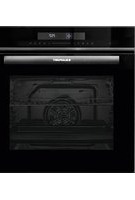
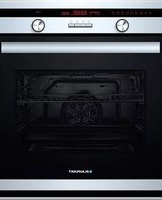
| Product type | Built-in oven |
| Dimensions (H x W x D) | Approx 59.5 x 59.5 x 54.8 cm (estimate) |
| Oven volume | 71 liters (estimate) |
| Power supply | Electrical connection, 230 V, 50 Hz |
| Maximum power | Approx 3.4 kW (estimate) |
| Cooking functions | Natural convection, 3D hot air, Bottom heat, Air fry grill, Large area grill, Rapid heating |
| Temperature ranges | 50°C to 270°C, grill positions 1-3 |
| Display | Digital screen with clock, timer, cooking duration and end time |
| Door material | Glass with removable for cleaning |
| Interior lighting | 40 W bulb (replaceable) |
| Included accessories | Grid, drip tray |
| Cleaning | Self-cleaning rear and side walls (enamel), removable racks, removable door |
| Safety devices | Child safety (key), auto shut-off, door lock |
| Energy class | A (estimate per EN 50304) |
| Hot air type | 3D hot air (rear heating ring + fan) |
| Cable length | Approx 1.5 m (estimate) |
| Net weight | Approx 35 kg (estimate) |
Frequently Asked Questions - 5BD34250 BLAUPUNKT
User questions about 5BD34250 BLAUPUNKT
0 question about this device. Answer the ones you know or ask your own.
Ask a new question about this device
Download the instructions for your Oven in PDF format for free! Find your manual 5BD34250 - BLAUPUNKT and take your electronic device back in hand. On this page are published all the documents necessary for the use of your device. 5BD34250 by BLAUPUNKT.
USER MANUAL 5BD34250 BLAUPUNKT
Instruction manual 42
Built-in oven 5BD324.0
Built-in oven 5BD324.0
de
Table of contents
A malfunction, what to do?......13
! Incorrect installation!
Risk of injury!
Hanging the door
Risk of injury!
A malfunction, what to do?
Installation of the supports
⚠️ Incorrect installation!
Risk of injury!
Hanging the door
Risk of injury!
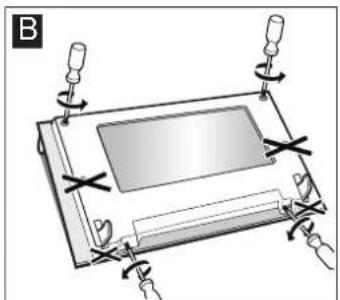
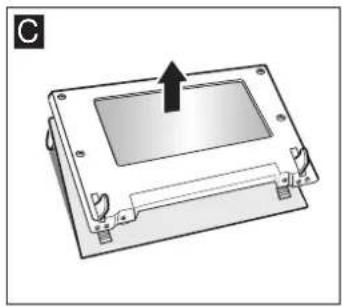
- Remove the cover (Figure C).
Important safety information 42
Causes of damage 44
Your new oven.... 44
Control panel 44
Function selector....45
Buttons and Displays 45
Temperature selector 45
Cooking compartment 45
Your accessories 46
Inserting the accessories ....46
Optional accessories 46
Before using the oven for the first time 47
Setting the clock 47
Heating up the oven....47
Cleaning the accessories....47
Setting the oven 47
Setting the type of heating and temperature.... 47
The oven should switch off automatically 47
The oven should switch on and off automatically 48
Rapid heating 48
Setting the time.... 48
Setting the timer.... 49
Childproof lock.... 49
Oven....49
Care and cleaning.... 49
Cleaning agents 49
Cleaning the self-cleaning surfaces in the oven.... 50
Detaching and refitting the rails 50
Detaching and attaching the oven door.... 51
Removing and refitting the door panels.... 51
Troubleshooting.... 52
Malfunction table....52
Replacing the bulb in the oven ceiling light 52
Glass cover....52
After-sales service.... 53
E number and FD number ....53
Energy and environment tips 53
Saving energy.... 53
Environmentally-friendly disposal.... 53
Measures to be noted during transport....53
Tested for you in our cooking studio.... 54
Cakes and pastries ....54
Baking tips ....55
Meat, poultry, fish....56
Tips for roasting and grilling.... 58
Bakes, gratins, toast with toppings ....58
Preprepared products....58
Special dishes 59
Defrosting 59
Drying....59
Preserving 59
Acrylamide in foodstuffs....60
Test dishes 61
Baking....61
Grilling....61
⚠️ Important safety information
Read these instructions carefully. Only then will you be able to operate your appliance safely and correctly. Retain the instruction manual and installation instructions for future use or for subsequent owners.
This appliance is only intended to be fully fitted in a kitchen. Observe the special installation instructions.
Check the appliance for damage after unpacking it. Do not connect the appliance if it has been damaged in transport.
Only a licensed professional may connect appliances without plugs. Damage caused by incorrect connection is not covered under warranty.
This appliance is intended for domestic use only. The appliance must only be used for the preparation of food and drink. The appliance must be supervised during operation. Only use this appliance indoors.
This appliance may be used by children over the age of 8 years old and by persons with reduced physical, sensory or mental capabilities or by persons with a lack of experience or knowledge if they are supervised or are instructed by a person responsible for their safety how to use the appliance safely and have understood the associated hazards.
Children must not play with, on, or around the appliance. Children must not clean the appliance or carry out general maintenance unless they are at least 8 years old and are being supervised.
Keep children below the age of 8 years old at a safe distance from the appliance and power cable.
Always slide accessories into the cooking compartment correctly. See "Description of accessories" in the instruction manual.
Risk of fire!
- Combustible items stored in the cooking compartment may catch fire. Never store combustible items in the cooking compartment. Never open the appliance door if there is smoke inside. Switch off the appliance and unplug it from the mains or switch off the circuit breaker in the fuse box.
- A draught is created when the appliance door is opened. Greaseproof paper may come into contact with the heating element and catch fire. Do not place greaseproof paper loosely over accessories during preheating. Always weight down the greaseproof paper with a dish or a baking tin. Only cover the surface required with greaseproof paper. Greaseproof paper must not protrude over the accessories.
Risk of burns!
■ The appliance becomes very hot. Never touch the interior surfaces of the cooking compartment or the heating elements. Always allow the appliance to cool down. Keep children at a safe distance. ■ Accessories and ovenware become very hot. Always use oven gloves to remove accessories or ovenware from the cooking compartment. - Alcoholic vapours may catch fire in the hot cooking compartment. Never prepare food containing large quantities of drinks with a high alcohol content. Only use small quantities of drinks with a high alcohol content. Open the appliance door with care.
Risk of scalding!
■ The accessible parts become hot during operation. Never touch the hot parts. Keep children at a safe distance. - When you open the appliance door, hot steam may escape. Open the appliance door with care. Keep children at a safe distance. ■ Water in a hot cooking compartment may create hot steam. Never pour water into the hot cooking compartment.
Risk of injury!
Scratched glass in the appliance door may develop into a crack. Do not use a glass scraper, sharp or abrasive cleaning aids or detergents.
Risk of electric shock!
- Incorrect repairs are dangerous. Repairs may only be carried out by one of our trained after-sales engineers. If the appliance is faulty, unplug the mains plug or switch off the fuse in the fuse box. Contact the after-sales service. The cable insulation on electrical appliances may melt when touching hot parts of the appliance. Never bring electrical appliance cables into contact with hot parts of the appliance.
- Do not use any high-pressure cleaners or steam cleaners, which can result in an electric shock.
- When replacing the cooking compartment bulb, the bulb socket contacts are live. Before replacing the bulb, unplug the appliance from the mains or switch off the circuit breaker in the fuse box.
- A defective appliance may cause electric shock. Never switch on a defective appliance. Unplug the appliance from the mains or switch off the circuit breaker in the fuse box. Contact the after-sales service.
Risk of fire!
- Loose food residues, grease and meat juices may catch fire during the Self-cleaning cycle. Remove coarse dirt from the cooking compartment and from the accessories before every Self-cleaning cycle.
- The appliance will become very hot on the outside during the Self-cleaning cycle. Never hang combustible objects, e.g. tea towels, on the door handle. Do not place anything against the front of the oven. Keep children at a safe distance.
Risk of burns!
The cooking compartment will become very hot during the Self-cleaning cycle. Never open the appliance door or move the locking latch by hand. Allow the appliance to cool down. Keep children at a safe distance. The appliance will become very hot on the outside during the Self-cleaning cycle. Never touch the appliance door. Allow the appliance to cool down. Keep children at a safe distance.
Causes of damage
Caution!
Accessories, foil, greaseproof paper or ovenware on the cooking compartment floor: do not place accessories on the cooking compartment floor. Do not cover the cooking compartment floor with any sort of foil or greaseproof paper. Do not place ovenware on the cooking compartment floor if a temperature of over 50 °C has been set. This will cause heat to accumulate. The baking and roasting times will no longer be correct and the enamel will be damaged. Water in a hot cooking compartment: do not pour water into the cooking compartment when it is hot. This will cause steam. The temperature change can cause damage to the enamel. Moist food: do not store moist food in the cooking compartment when it is closed for prolonged periods. This will damage the enamel. Fruit juice: when baking particularly juicy fruit pies, do not pack the baking tray too generously. Fruit juice dripping from
the baking tray leaves stains that cannot be removed. If possible, use the deeper universal pan.
Cooling with the appliance door open: only allow the cooking compartment to cool when it is closed. Even if the appliance door is only open a little, front panels of adjacent units could be damaged over time. ■ Very dirty door seal: If the door seal is very dirty, the appliance door will no longer close properly when the appliance is in use. The fronts of adjacent units could be damaged. Always keep the door seal clean. ■ Appliance door as a seat, shelf or worktop: Do not sit on the appliance door, or place or hang anything on it. Do not place any cookware or accessories on the appliance door. - Inserting accessories: depending on the appliance model, accessories can scratch the door panel when closing the appliance door. Always insert the accessories into the cooking compartment as far as they will go. - Carrying the appliance: do not carry or hold the appliance by the door handle. The door handle cannot support the weight of the appliance and could break.
Your new oven
Here you will learn about your new oven. The control panel and the individual operating controls are explained. You will find information on the cooking compartment and the accessories.
Control panel
Here you can see an overview of the control panel. The design depends on the respective appliance model.
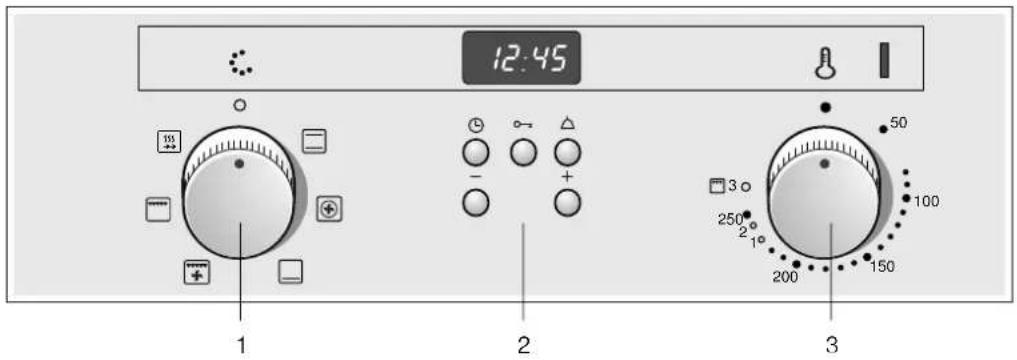
Explanations
| 1 Function selector |
| 2 Operating switches and display panel |
| 3 Temperature selector |
Control knobs
The control knobs can be pushed in and remain pressed down when they are in the "out" position. Press down on the control knob again to release it back up.
Function selector
Use the function selector to select the type of heating for the oven. The function selector can be rotated to the right or to the left.
When the function selector is set, the oven lighting is switched on.
| Position Use | ||
| 0 | Zero position The oven switches off | |
| Top/bottom heating | Baking or roasting is possible on a single level only. This setting is suitable for cakes and pizzas in baking tins or on a baking tray as well as for lean joints of meat such as beef, veal and game. Heat is emitted evenly from the top and bottom. | |
| 3D hot air* Cakes, pizzas, small baked items, muffins and puff pastry can be baked on two levels at the same time.The fan distributes the heat from the ring heating element in the back panel evenly around the cooking compartment. | ||
| Bottom heating For preserving and final baking or crisp browning. The heat is emitted from below. | ||
| Hot air grilling Hot air grilling is particularly suitable for grilling meat, poultry and whole fish. The grill element and the fan switch on and off alternately. The fan distributes the heated air around the food. | ||
| Grill, large area This is ideal if you want to grill several steaks, sausages, pieces of fish or slices of bread. The whole area below the grill element becomes hot. | ||
| Rapid heating For heating food rapidly. | ||
| *Type of heating used to determine the energy efficiency class in accordance with EN50304. | ||
Buttons and Displays
The buttons can be used to set additional functions. The set values can be read from the displays.
| Button Function | ||
| L | Clock button | Use this button to set the time, I→ICooking time, and →I End time. |
| o-π | Key button Use this button to switch the child-proof lock on or off. | |
| A | Timer button Use this button to set the timer. | |
| - | Minus button Use this button to adjust the setting values downwards. | |
| + | Plus button Use this button to adjust the setting values upwards. | |
Temperature selector
Use the temperature selector to set the temperature and the grill setting.
| Positions Function | ||
| ● | Off | Oven not hot. |
| 50-270 | Temperature range | Temperature in °C |
| 1, 2, 3 | Grill settings | The grill settings for "Grill, large □ area".Setting 1 = lowSetting 2 = mediumSetting 3 = high |
The small light above the temperature selector is lit when the oven is heating. It goes out during pauses in the heating. For some settings, it does not light up.
Grill settings
With ☐ Radiant grilling, use the temperature selector to set a grill setting.
Cooking compartment
The oven light is located in the cooking compartment. A cooling fan protects the oven from overheating.
Oven light
During oven operation, the oven light is on. By turning the function selector to any position, the oven light can also be switched on without the oven heating up.
Cooling fan
The cooling fan switches on and off as required. The hot air escapes above the door.
So that the cooking compartment cools down more quickly after operation, the cooling fan continues to run for a certain period afterwards.
Caution!
Do not cover the ventilation slots. Otherwise the oven will overheat.
Your accessories
The accessories supplied with your appliance are suitable for making many meals. Ensure that you always insert the accessories into the cooking compartment the right way round.
There is also a selection of optional accessories, with which you can improve on some of your favourite dishes, or simply to make working with your oven more convenient.
Inserting the accessories
The accessories can be inserted in the oven at 4 different levels. Always insert the accessories as far as they can go to ensure that they do not touch the door glass.
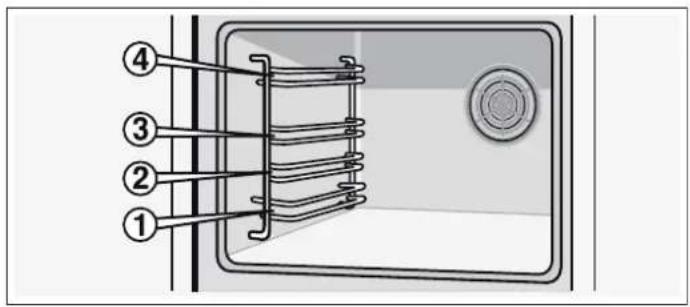
When the accessories are pulled approximately halfway out, they lock into position. This allows meals to be taken out easily.
When placing the accessories in the oven, check that the indentation is at the back. They can only lock correctly in place in this position.
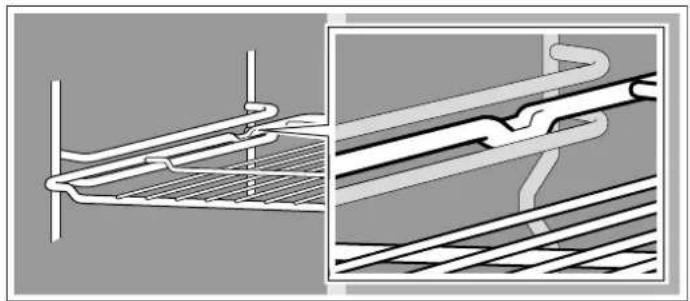
Note: Heat may cause the accessories to deform. As soon as the accessories cool down, they regain their original shape. Their function is not impaired.
Hold the baking tray securely on the sides with both hands and push it parallel into the frame. Avoid movements to the right or left when pushing the baking tray in. Otherwise, it will be difficult to push the tray in and the enamelled surfaces could be damaged.
Your oven does not have all of the accessories listed below.
You can buy accessories from the after-sales service, from specialist retailers or online. Please specify the 5Z number.
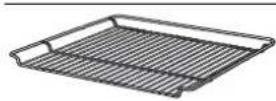
Wire rack
For ovenware, cake tins, joints, grilled items and frozen meals.
Insert the wire rack with the open side facing the oven door and the curvature pointing downwards ∼.
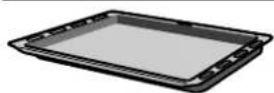
Universal pan
For moist cakes, pastries, frozen meals and large roasts. It can also be used to catch dripping fat when you are grilling directly on the wire rack.
Slide in the universal pan with the sloping edge facing the oven door.
Optional accessories
You can purchase optional accessories from the after-sales service or specialist retailers. You will find a comprehensive range of products for your oven in our brochures and online. The availability of optional accessories and whether it is possible to order them on the Internet will vary from country to country. You can find information on this in the sales brochures.
Not all optional accessories are suitable for all appliances. When purchasing, always quote the exact identification number (E no.) of your appliance.
Optional accessories 5Z number Application
| Aluminium baking tray 5Z 11BA11 For cakes and biscuits. | |
| Slide the baking tray into the oven with the sloping edge facing towards the oven door. | |
| Enamel baking tray 5Z 11BE11 For cakes and biscuits. | |
| Slide the baking tray into the oven with the sloping edge facing towards the oven door. | |
| 2-level telescopic shelf 5Z 11TA12 The pull-out rails at levels 1 and 3 allow you to pull accessories out fully without them tipping. | |
Oven door - Additional safety precautions
During long cooking times, the oven door may become very hot.
If you have small children, extra supervision is required during oven operation.
In addition, there is a safety device which prevents direct contact with the oven door. This optional accessory (440651) is available from the after-sales service.
Before using the oven for the first time
In this section, you can find out what you must do before using your oven to prepare food for the first time. First read the section on Safety information.
Setting the clock
After the oven has been connected, the Ⓛ symbol and three zeros light up in the display. Set the clock.
- Press the ⏻ button. The time 12:00 appears in the display and the ⏻ symbol flashes.
- Use the + or - button to change the clock. After a few seconds, the time that has been set is adopted.
Heating up the oven
To remove the new cooker smell, heat up the oven when it is empty and closed. An hour of ☐ Top/bottom heating at 240 °C is ideal for this purpose. Make sure that there are no remnants of packing in the cooking compartment.
- Use the function selector to set top/bottom heating.
- Set the temperature selector to 240°C. After an hour, switch off the oven. Turn the function selector and temperature selector to the off position.
Cleaning the accessories
Before you use the accessories for the first time, clean them thoroughly with hot soapy water and a soft dish cloth.
Setting the oven
You have several options for setting the oven. In this section, we will explain how you can select the required type of heating and temperature or grill setting. Set the cooking time and end time for your meal.
Setting the type of heating and temperature
Example in the picture: Top/bottom heating at 190 °C.
- Use the function selector to set the type of heating.
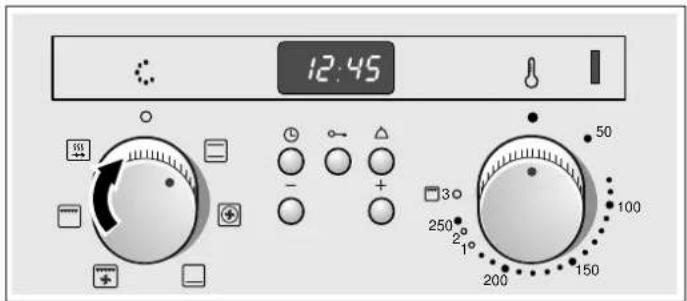
- Set the temperature or grill setting using the temperature selector.
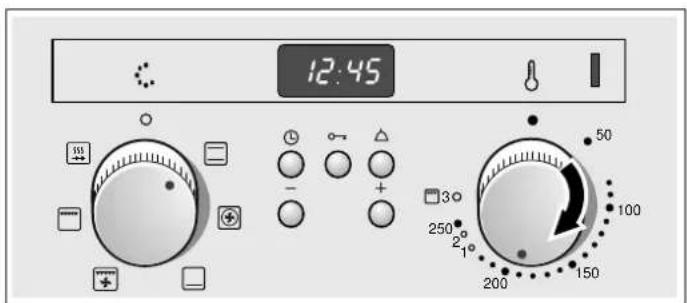
The oven heats up.
Switch off the oven
Turn the function selector to the off position.
Changing the settings
You can change the type of heating, temperature and grill setting as required.
The oven should switch off automatically
Enter a cooking time for your dish.
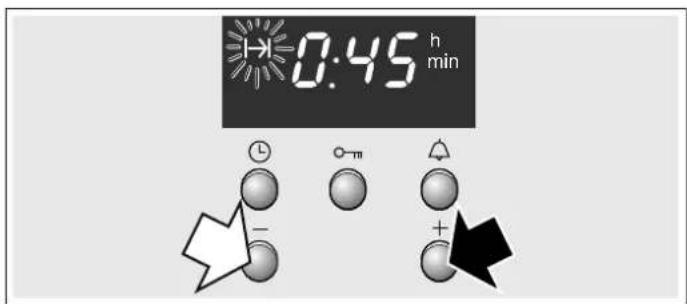
Example in the picture: ☐Top/bottom heat, 200 °C, cooking time 45 minutes.
- Use the function selector to select the required type of heating.
- Use the temperature selector to set the temperature or the grill setting.
- Press the ⏻ clock button. The I→I Cooking time symbol flashes.
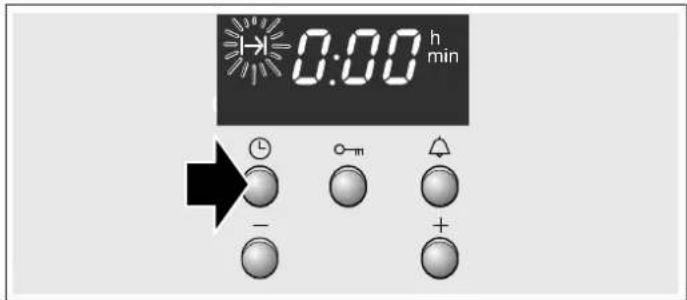
- Use the + or - button to set the cooking time. Default value for + button = 30 minutes Default value for - button = 10 minutes
The cooking time has elapsed
A signal sounds. The oven switches off. Press the Ⓛ button twice and switch off the function selector.
Changing the setting
Press the Ⓜ Clock button. Use the + or - button to change the cooking time.
Cancelling the setting
Press the Ⓛ Clock button. Press the - button until zero is shown on the display. Switch off the function selector.
Setting the cooking time if the clock is hidden
Press the Ⓛ Clock button twice and make your settings as described in point 4.
The oven should switch on and off automatically
Do not allow food to stand for too long in the oven. Meat and fish spoils easily if not kept chilled.
Example in the picture: Top/bottom heating ☐, 200 °C. It is 10:45. The meal takes 45 minutes to cook and should be ready at 12:45.
- Use the function selector to select the required type of heating.
- Use the temperature selector to set the temperature or the grill setting.
- Press the Ⓛ clock button. The → Cooking time symbol flashes.
- Use the + or - button to set the cooking time.
- Press the ⏻ Clock button repeatedly until the →|End time symbol flashes. You can see in the display when the meal will be ready.
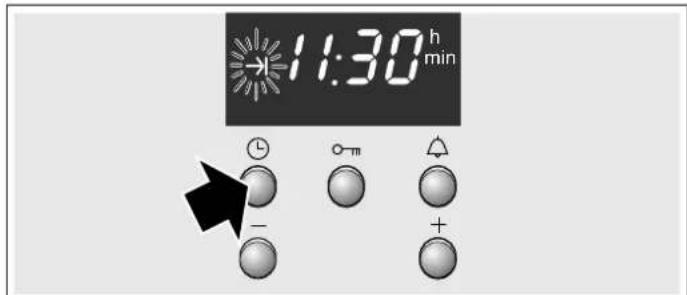
- Use the + button to set a later end time. The setting is adopted after a few seconds. The display shows the end time until the oven starts operating.
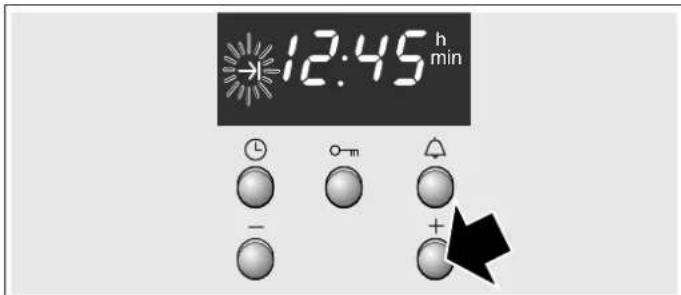
The cooking time has elapsed
A signal sounds. The oven switches off. Press the ⏻ button twice and switch off the function selector.
Note: You can make changes as long as the symbol is flashing. When the symbol lights up, the setting has been adopted.
Rapid heating
With rapid heating, the oven reaches the temperature selected more quickly.
Only use rapid heating when temperatures above 100 °C are selected.
Only place the food in the oven after rapid heating has finished, so as to ensure even cooking.
- Move the function selector to the 55 position.
- Use the temperature selector to set the temperature. The oven starts after a few seconds. The indicator lamp above the temperature selector lights up.
The rapid heating process is complete.
The indicator light above the temperature selector goes out. Place your dish in the oven and select the desired type of heating.
Cancelling rapid heating
Turn the function selector to the off position. The oven switches off.
Setting the time
Following a power cut or when the oven is used for the first time, the ⏻ symbol and three zeros flash in the display. Set the time. The function selector must be switched off.
Setting procedure
- Press the Ⓛ clock button. 12.00 appears and the Ⓛ symbol flashes.
- Use the + and - buttons to set the time. After a few seconds, the time is accepted. The symbol goes out.
Changing from summer to winter time.
Press the Ⓛ clock button twice and use the + or - buttons to change the time.
Setting the timer.
You can use the timer as a normal kitchen timer. It operates independently of the oven. The timer has a specific signal. This informs you when the timer or cooking time has elapsed. You can also set the timer if the childproof lock is active.
Setting procedure
- Press the △ timer button. The symbol flashes.
- Use the + or - buttons to set the timer time. Default value for button += 10 minutes Default value for button -= 5 minutes
The timer starts after a few seconds. The ⚠ symbol is lit in the display. The time counts down in the display.
The time has elapsed
A signal sounds. Press the 🔒 timer button. The timer display goes out.
Changing the alarm time
Press the 🔒 timer button. Use the + or - buttons to change the time.
Delete the setting
Press the 🔒 timer button. Press the - button until zeros appear in the display.
The timer and the cooking time run down in synchronisation
The symbols are lit. The timer time counts down in the display. Check the remaining cooking time, end time or time of day:
Press the Ⓛ clock button repeatedly until the relevant symbol is displayed.
The requested value appears in the display for several seconds.
Childproof lock
Oven
To ensure that the oven cannot be switched on by children when playing, a childproof lock is incorporated in the appliance.
Switching the childproof lock on and off
The function selector must be switched off.
Press the 0-π key button repeatedly until the 0-π symbol appears in the display. This procedure takes approx. 4 seconds.
Deactivating: Press the O-π key button repeatedly until the O-π symbol goes out.
Notes
■ You can set the timer and clock at any time. If the childproof lock is active, it will be cancelled following a power cut.
Care and cleaning
With good care and cleaning, your oven will remain clean and fully-functioning for a long time to come. Here we will explain how to maintain and clean your oven correctly.
Notes
■ Slight differences in the colours on the front of the oven are caused by the use of different materials, such as glass, plastic and metal. ■ Shadows on the door panel which look like streaks, are caused by reflections made by the oven light. Enamel is baked on at very high temperatures. This can cause some slight colour variations. This is normal and does not affect their function. The edges of thin trays cannot be completely enamelled. As a result, these edges can be rough. This will not impair the anti-corrosion protection.
Cleaning agents
Damage to the various different surfaces caused by using the wrong cleaning agent can be avoided by observing the following instructions.
When cleaning the oven do not use
■ sharp or abrasive cleaning agents, ■ cleaning agent with a high alcohol content, ■ scouring pads, ■ high-pressure cleaners or steam jets. ■ Do not clean individual parts in the dishwasher.
Wash new sponges thoroughly before first use.
| Control panel | Hot soapy water:Clean with a dish cloth and dry with a soft cloth. Do not use glass cleaner or glass scrapers for cleaning. |
| Stainless-steel surfaces | Clean with warm soapy water and a soft cloth. On stainless-steel surfaces, always wipe parallel to the natural grain. Otherwise, you may scratch the surface. Dry with a soft cloth.Remove flecks of limescale, grease, starch and albumin (e.g. egg white) immediately. Do not use any abrasive materials, scouring sponges or rough cleaning cloths. Polish the stainless-steel fronts using special care products. Follow the manufacturer's instructions. Special stainless-steel cleaning agents are available from the after-sales service or from specialist retailers. |
| Enamel surfaces and lacquered surfaces | Wipe with warm soapy water and a cloth. Dry with a soft cloth. |
| Rotary knobs | Wipe with warm soapy water and a cloth. Dry with a soft cloth. |
| Glass panel | Clean using glass cleaner. Do not use any abrasive cleaning agents or sharp metal objects. These may scratch and damage the surface of the glass panel. |
| Seal Wipe with a damp cloth. Dry with a soft cloth. | |
| Oven floor Warm soapy water or a vinegar solution. If there are heavy deposits of dirt, only use oven cleaner on cooled surfaces. | |
| Glass cover for the oven light | Wipe with warm soapy water and a cloth. Dry with a soft cloth. |
| Accessories Soak in warm soapy water. Clean with a brush or sponge. | |
| Aluminium baking tray (optional) | Do not clean in the dishwasher. Never use oven cleaner. To prevent scratches, never touch the metal surfaces with a knife or a similar sharp object. Clean horizontally with some washing-up liquid and a damp glass cleaning cloth or a microfibre cloth – do not press too hard. Dry with a soft cloth. Do not use any abrasive materials, scouring sponges or rough cleaning cloths. Otherwise, you may scratch the surface. |
| Childproof lock (optional) | If a childproof lock has been fitted on the oven door, it must be removed before cleaning. Soak all plastic parts in warm soapy water and clean with a sponge. Dry with a soft cloth. If it is very dirty, the childproof lock will not work properly. |
| Hob Refer to the hob instruction manual for information about care and cleaning. | |
Cleaning the self-cleaning surfaces in the oven
The back wall, roof and side walls of the oven are coated with self-cleaning enamel. This coating absorbs and dispels splashes from baking and roasting while the oven is in operation. You will obtain a better result, the higher the temperature and the longer the oven is in operation.
If the oven is still dirty even after repeated use, proceed as follows:
- First clean the oven floor.
- Then set ☑ 3D hot air or ☐ Top/bottom heating.
- Heat the empty oven for approx. 2 hours at maximum temperature.
The ceramic coating is regenerated. Brown and white residue can then be removed with water and a soft sponge.
Slight colour variations of the coating have no effect on the self-cleaning function.
Caution!
■ Never use abrasive cleaners. This could scratch or damage the highly porous surface coating. - Do not use oven cleaner on self-cleaning surfaces. If oven cleaner is accidentally applied to these surfaces, wipe it away immediately with a sponge and plenty of water.
Detaching and refitting the rails
The rails can be removed for cleaning. The oven must have cooled down.
Unhooking the rails
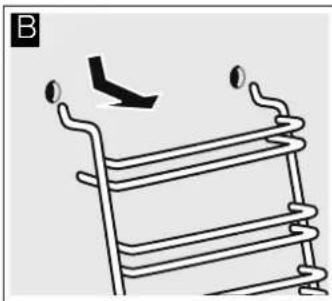
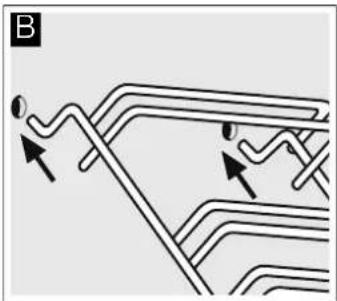
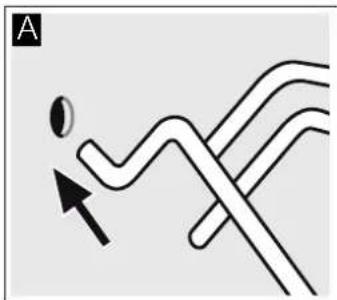
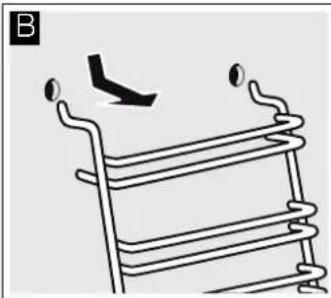
- Hold the shelf frames from underneath and pull slightly forward. Pull the extension pins at the bottom of the rails out of the mounting holes (Fig. A).
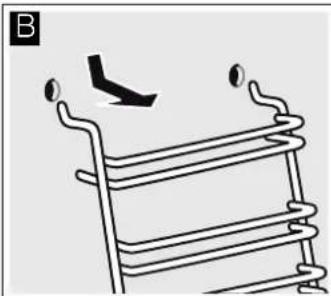
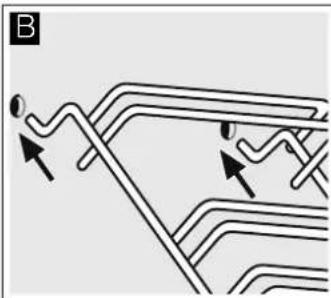
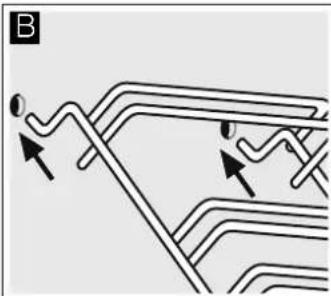
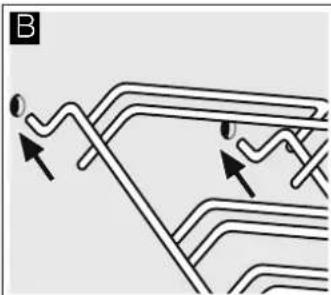
- Then fold the rails upwards and carefully remove them (Fig. B).
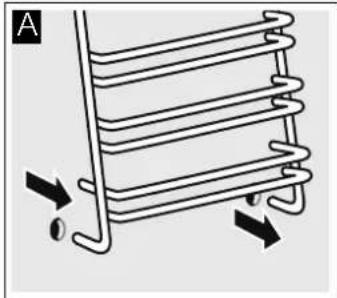
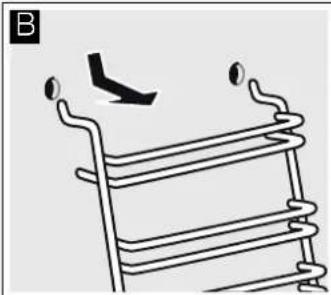
Clean the rails with washing-up liquid and a sponge. For stubborn deposits of dirt, use a brush.
Installing the frames
- Insert the two hooks carefully into the upper holes. (Figure A-B)
⚠️ Incorrect assembly!
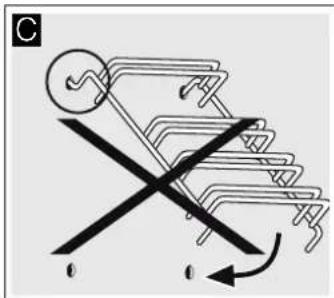
Never move the frame before the two hooks are fully anchored in the upper holes. The enamel could be damaged and may break (figure C).
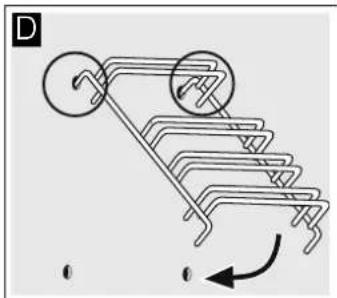
- The two hooks must be inserted fully into the upper holes. Now move the frame slowly and carefully downwards and insert it into the lower holes (figure D).
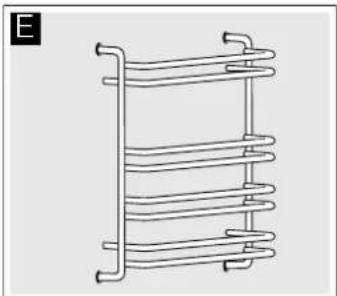
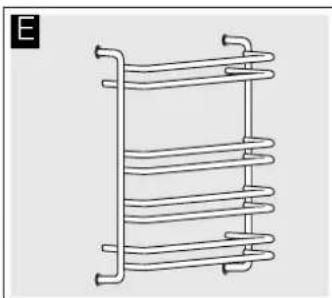
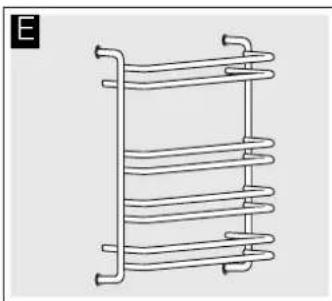
- Insert both frames into the side walls of the oven (figure E). If the rails are fitted correctly, the distance between the two upper shelf positions is greater.

Detaching and attaching the oven door
For cleaning purposes and to remove the door panels, you can detach the oven door.
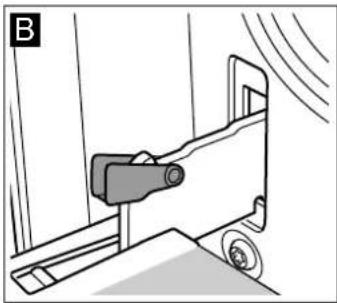
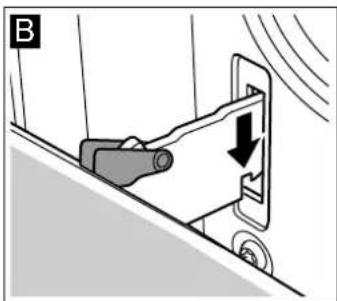
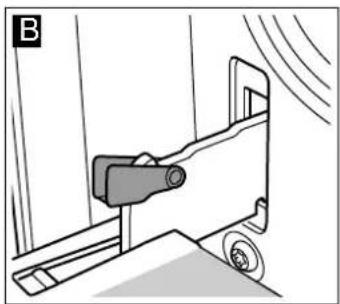
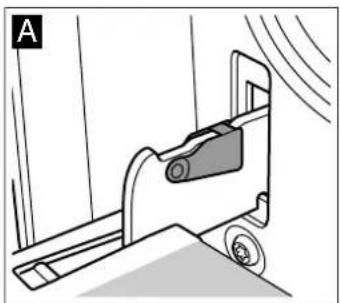
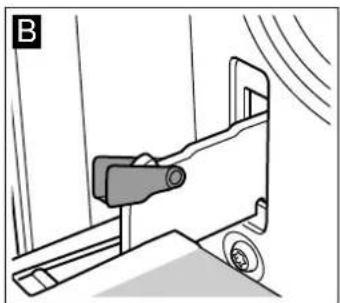
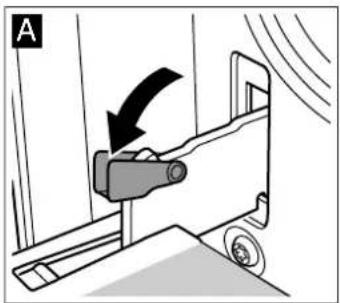
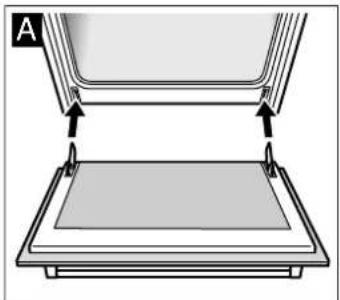
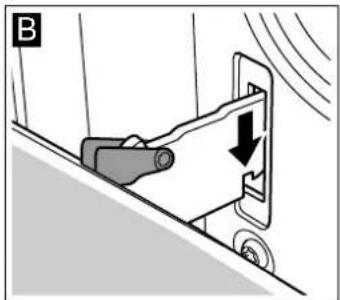
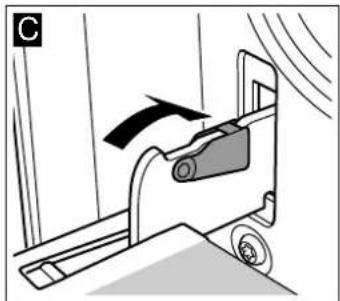
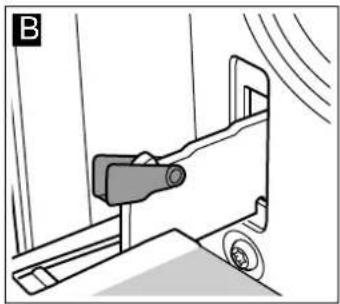
The oven door hinges each have a locking lever. When the locking levers are closed (figure A), the oven door is secured in place. It cannot be detached. When the locking levers are open in order to detach the oven door (figure B), the hinges are locked. They cannot snap shut.
Risk of injury!
Whenever the hinges are not locked, they snap shut with great force. Ensure that the locking levers are always fully closed or, when detaching the oven door, fully open.
Detaching the door
- Open the oven door fully.
- Fold up the two locking levers on the left and right (figure A).
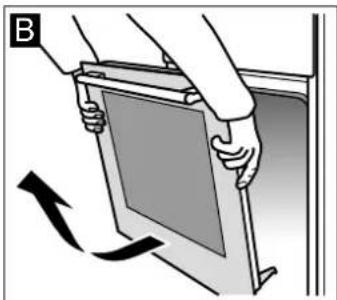
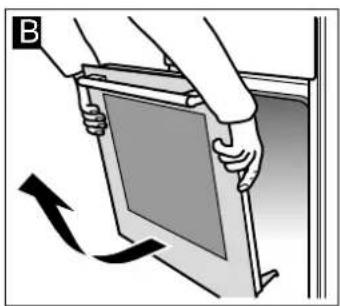
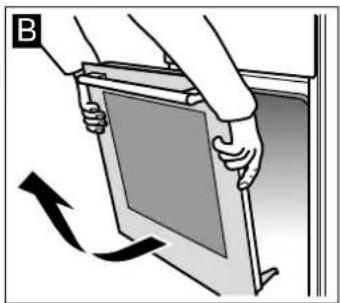
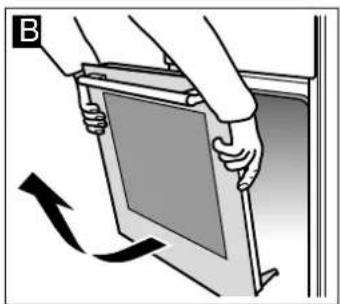
- Close the oven door as far as the limit stop. With both hands, grip the door on the left and right-hand sides. Close the door a little further and pull it out (figure B).
Attaching the door
Reattach the oven door in the reverse sequence to removal.
- When attaching the oven door, ensure that both hinges are inserted straight into the opening (figure A).
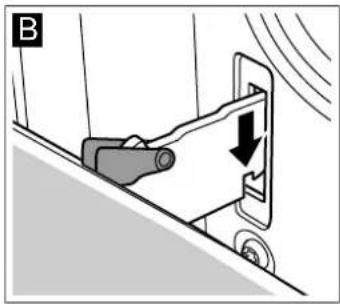
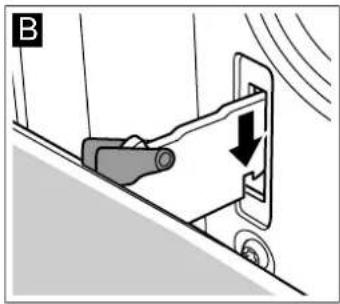
- The notch on the hinge must engage on both sides (figure B).
- Fold back both locking levers (figure C). Close the oven door.
Risk of injury!
Risk of injury. If the oven door falls out accidentally or a hinge snaps shut, do not reach into the hinge. Call the after-sales service.
Removing and refitting the door panels
The glass panels can be removed from the oven door to allow more thorough cleaning.
Removal
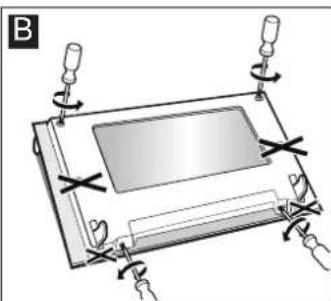
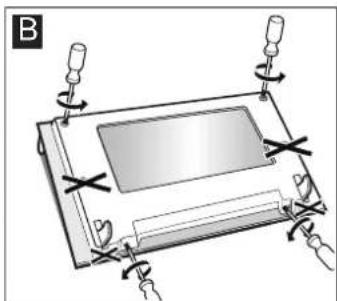
- Removing the oven door See the section Removing the oven door. Lay the oven door on a cloth with the handle facing downwards (Fig. A).
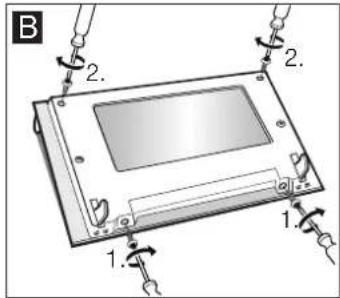
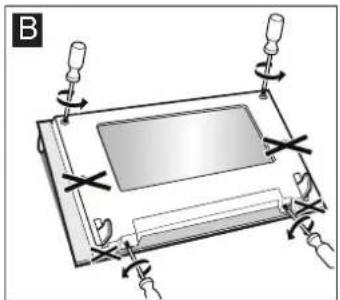
- First turn the two screws at the bottom anticlockwise, then the two screws at the top, also anticlockwise (Fig. B).
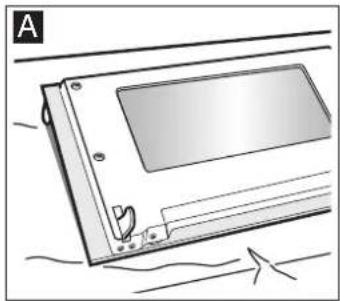
- Remove the cover (Fig. C).
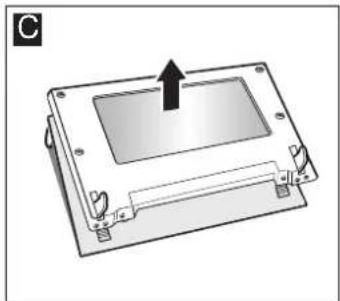
The parts that have been removed must not be washed. Clean the panels with a glass cleaner and a soft cloth.
Risk of injury!
Scratched glass in the appliance door may develop into a crack. Do not use a glass scraper, sharp or abrasive cleaning aids or detergents.
Refitting
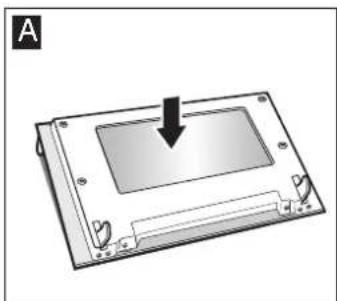
- Place the cover back in position (Fig. A).
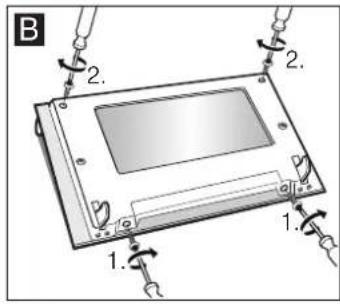
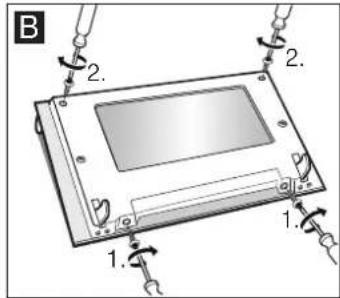
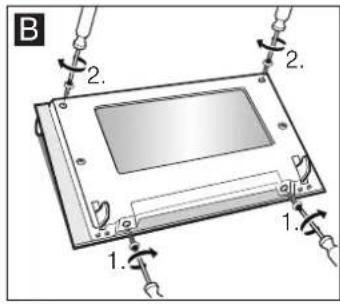
- First retighten the two screws at the bottom, then the two screws at the top (Fig. B).
- Fitting the oven door: See the section "Fitting the oven door". Do not use the oven again until the panels have been correctly fitted.
Troubleshooting
Malfunctions often have simple explanations. Refer to the table before calling the after-sales service, as you may be able to remedy the fault yourself.
Malfunction table
If your meal is not successful, please refer to the section. We have tested the recipe for you in our cooking studio. Here, you will find useful cooking tips and tricks for cooking, baking, and roasting.

Risk of electric shock!
Repairs that are not carried out properly are dangerous. Repairs must only be performed by one of our after-sales service technicians.
Malfunction | Possible cause | Remedy/information
| The oven does not work. | The circuit breaker is defective. | Look in the fuse box to see if the circuit breaker is defective. |
| Power cut. Check whether the kitchen light and other kitchen appliances are working. | ||
| The clock display flashes | Power cut. Reset the time of day | |
| Oven not hot. Dust on the contacts. | Turn the control knobs several times to the left and right. | |
Caution!
If the supply cord is damaged, it must be replaced by the manufacturer, its service agent, or similarly qualified persons in order to avoid a hazard.
Replacing the bulb in the oven ceiling light
If the bulb in the oven light fails, it must be replaced. Heat-resistant, 40-watt spare bulbs can be obtained from our after-sales service or a specialist retailer. Only use these bulbs.

Risk of electric shock!
Switch off the circuit breaker in the fuse box.
- Place a tea towel in the oven when it is cold to prevent damage.
- Unscrew the glass cover by turning it anti-clockwise.
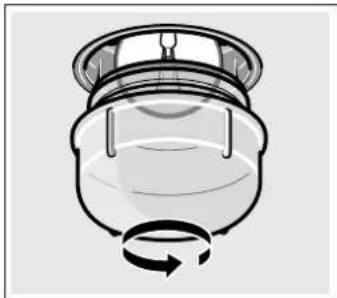
- Replace the bulb with one of the same type.
- Screw the glass cover back in.
- Remove the tea towel and switch on the circuit breaker.
Glass cover
You must replace a damaged glass cover. Suitable glass covers may be obtained from the after-sales service. Please specify the E number and FD number of your appliance.
After-sales service
Our after-sales service is there for you if your appliance needs to be repaired. We will always find the right solution in order to avoid unnecessary visits from a service technician.
E number and FD number
When calling us, please give the product number (E no.) and the production number (FD no.) so that we can provide you with the correct advice. The rating plate containing these numbers can be found on the right-hand side of the oven door. You can make a note of the numbers of your appliance and the telephone number of the after-sales service in the space below to save time should it be required.
E no.
FD no.
After-sales service
Please note that there will be a fee for a visit by a service technician in the event of a malfunction, even during the warranty period.
After-sales contact details for all countries can be found in the attached after-sales service directory.
Energy and environment tips
Here you can find tips on how to save energy when baking and roasting and how to dispose of your appliance properly.
Saving energy
■ Only preheat the oven if this is specified in the recipe or in the operating instruction tables. ■ Use dark, black lacquered or enamelled baking tins. They absorb the heat particularly well. - Open the oven door as infrequently as possible while you are cooking, baking or roasting. It is best to bake several cakes one after the other. The oven is still warm. This reduces the baking time for the second cake. You can also place two loaf tins next to each other. For longer cooking times, you can switch the oven off 10 minutes before the end of the cooking time and use the residual heat to finish cooking.
Environmentally-friendly disposal
Dispose of packaging in an environmentally-friendly manner.
This appliance is labelled in accordance with European Directive 2012/19/EU concerning used electrical and electronic appliances (waste electrical and electronic equipment - WEEE). The guideline determines the framework for the return and recycling of used appliances as applicable throughout the EU.
Measures to be noted during transport
Secure all mobile parts in and on the appliance using an adhesive tape that can be removed without leaving any traces. Push all accessories (e.g. baking tray) into the corresponding slots with cardboard at the edges, in order to avoid damaging the appliance. Place cardboard or similar between the front and rear side to prevent knocks against the inside of the door glass. Secure the oven door to the side walls of the appliance using adhesive tape.
Keep the original appliance packaging. Only transport the appliance in the original packaging. Observe the transport arrows on the packaging.
If the original packaging is no longer available
pack the appliance in protective packaging to guarantee sufficient protection against any transport damage.
Transport the appliance in an upright position. Do not hold the appliance by the door handle or the connections on the rear, as these could be damaged. Do not place any heavy objects on the appliance.
Tested for you in our cooking studio
Here you will find a selection of dishes and the ideal settings for them. We will show you which type of heating and which temperature are best suited for your dish. You can find information about suitable accessories and the height at which they should be inserted. There are also tips about cookware and preparation methods.
Notes
The values in the table always apply to dishes placed into the cooking compartment when it is cold and empty. Only preheat the appliance if the table specifies that you should do so. Do not line the accessories with greaseproof paper until after they have been preheated. ■ The times specified in the tables are guidelines only. They will depend on the quality and composition of the food. ■ Use the accessories supplied. Additional accessories may be obtained as special accessories from specialist retailers or from the after-sales service.
Before using the oven, remove any unnecessary accessories and ovenware from the cooking compartment.
■ Always use oven gloves when taking hot accessories or ovenware out of the cooking compartment.
Cakes and pastries
Baking on one level
When baking cakes and tarts, the best results can be achieved using ☐ Top/bottom heating.
When baking with ☑ 3D Hot air, use the following shelf positions for the accessories:
■ Cake in a cake tin: Shelf position 2 ■ Cake on a baking tray: Shelf position 3
Baking and roasting on two or more levels
Use ☑ 3D hot air.
Shelf positions for baking and roasting on 2 levels:
■ Universal pan: Shelf position 3 ■ Baking tray: Shelf position 1
Dishes that are put in the oven at the same time do not have to be ready at the same time.
The tables contain a selection of dishes.
Baking tins
It is best to use dark-coloured metal baking tins.
Baking times are increased when light-coloured baking tins made of thin metal or glass dishes are used, and cakes do not brown so evenly.
If you wish to use silicone baking tins, use the information and recipes provided by the manufacturer as a guide. Silicone baking tins are often smaller than normal tins. The amount of mixture and recipe instructions may differ.
Tables
The tables show the ideal type of heating for the various cakes and pastries. The temperature and baking time depend on the amount and composition of the mixture. This is why temperature ranges are given in the tables. You should try the lower temperature first, since a lower temperature results in more even browning. You can increase the temperature next time if necessary.
If you preheat the oven, the baking time is shortened by 5 to 10 minutes.
Additional information can be found in the Baking tips section following the tables.
| Cake in a mould Tin Level Type of | heating | Temperature, °C | Cooking time in minutes | ||
| Sponge cake, simple Fruit loaf tin 2 | ☐ | 160-180 55-65 | |||
| Sponge cake, delicate (e.g. sand cake) Fruit loaf tin 2 | ☐ | 155-175 65-75 | |||
| Shortcrust pastry base with crust Springform cake tin 1 | ☐ | 160-180 30-40 | |||
| Sponge flan base Flan-base cake tin 2 | ☐ | 160-180 25-35 | |||
| Sponge cake Springform cake tin 2 | ☐ | 160-180 30-40 | |||
| Fruit tart or cheesecake, shortcrust pastry* | Dark springform cake tin | 1 | ☐ | 170-190 70-90 | |
| Delicate fruit flan, sponge | Springform cake tin 2 | ☐ | 150-170 55-65 | ||
| Savoury cakes* (e.g. quiche/onion tart) Springform cake tin 1 | ☐ | 180-200 50-60 | |||
* Allow cakes to cool in the appliance for approx. 20 minutes.
| Cakes on trays | Accessories | Height | Type of heating | Temperature in °C | Cooking time in minutes |
| Sponge mixture or yeast dough with dry top-ping | Universal pan | 3 | 160-180 | 25-35 | |
| Enamelled baking tray* + universal pan** | 1+3 | 150-170 | 35-45 | ||
| Sponge mixture or yeast dough with moist topping (fruit) | Universal pan | 3 | 140-160 | 40-50 | |
| Enamelled baking tray* + universal pan** | 1+3 | 130-150 | 50-60 | ||
| Swiss roll (preheat) | Universal pan | 2 | 170-190 | 15-20 | |
| Plaited loaf with 500 g flour | Universal pan | 2 | 160-180 | 25-35 | |
| Stollen with 500 g flour | Universal pan | 3 | 160-180 | 50-60 | |
| Stollen, 1 kg flour | Universal pan | 3 | 150-170 | 90-100 |
* Enamelled baking trays can be obtained from the after-sales service or specialist retailers. ** When baking on two levels, always place the universal pan above the baking tray.
| Cakes on trays Accessories Height Type of | heating | Temperature in °C | Cooking time in minutes | |
| Strudel, sweet Universal pan 2 | ☐ | 180-200 55-65 | ||
| Pizza Universal pan 3 | ☐ | 180-200 20-30 | ||
| Enamelled baking tray* + 1+3 universal pan** | ☒ | 150-170 35-45 |
* Enamelled baking trays can be obtained from the after-sales service or specialist retailers. ** When baking on two levels, always place the universal pan above the baking tray.
Bread and bread rolls
If not specified otherwise, always preheat the oven for baking bread.
Never pour water directly into a hot oven.
| Bread and bread rolls Accessories Level Type of | heating | Temperature, °C | Cooking time in minutes | |
| Yeast bread, 1.2 kg flour Universal pan: 2 | ☐ | 270 | 8 | |
| 190 | 35-45 | |||
| Sourdough bread, 1.2 kg flour | Universal pan: 2 | ☐ | 270 | 8 |
| 190 | 35-45 | |||
| Bread rolls (e.g. rye rolls) | Universal pan: 2 | ☐ | 200-220 20-30 | |
| Small baked items Accessories | Height Type of | heating | Temperature in °C | Cooking time in minutes | |
| Biscuits | Universal pan | 3 | 150-170 10-20 | ||
| Enamelled baking tray* + universal pan** | 1+3 | 130-150 25-35 | |||
| Small cakes | Universal pan | 3 | 150-170 25-35 | ||
| Small cakes, preheat | Enamelled baking tray* + universal pan** | 1+3 | 140-160 30-40 | ||
| Meringue | Universal pan | 3 | 70-90 | 135-145 | |
| Cream puffs | Universal pan | 2 | 200-220 30-40 | ||
| Macaroons | Universal pan | 3 | 110-130 30-40 | ||
| Enamelled baking tray* + universal pan** | 1+3 | 100-120 35-45 | |||
| Puff pastry | Universal pan | 3 | 190-210 20-30 | ||
| Enamelled baking tray* + universal pan** | 1+3 | 180-200 25-35 | |||
* Enamelled baking trays can be obtained from the after-sales service or specialist retailers. ** When baking on two levels, always place the universal pan above the baking tray.
Baking tips
| You want to bake according to your own recipe. | Use similar items in the baking tables as a guide. |
| How to establish whether sponge cake is baked through. | Approximately 10 minutes before the end of the baking time specified in the recipe, stick a cocktail stick into the cake at the highest point. If the cocktail stick comes out clean, the cake is ready. |
| The cake collapses. | Use less fluid next time or set the oven temperature 10 degrees lower. Observe the specified mixing times in the recipe. |
| The cake has risen in the middle but is lower around the edge. | Do not grease the sides of the springform cake tin. After baking, loosen the cake carefully with a knife. |
| The cake goes too dark on top. | Place it lower in the oven, select a lower temperature and bake the cake for a little longer. |
| The cake is too dry. When it is done, make small holes in the cake using a cocktail stick. Then drizzle fruit juice or an alcoholic beverage over it. Next time, select a temperature 10 degrees higher and reduce the baking time. | |
| The bread or cake (e.g. cheesecake) looks good, but is soggy on the inside (sticky, with streaks of water). | Use slightly less fluid next time and bake for slightly longer at a lower temperature. For cakes with a moist topping, bake the base first. Sprinkle it with almonds or bread crumbs and then place the topping on top. Follow the recipes and baking times. |
| The cake is unevenly browned. | Select a slightly lower temperature to ensure that the cake is baked more evenly. Bake delicate pastries on one level using Top/bottom heating. Protruding greaseproof paper can affect the air circulation. For this reason, always trim greaseproof paper to fit the baking tray. |
| The bottom of a fruit cake is too light. | Place the cake one level lower the next time. |
| The fruit juice overflows. | Next time, use the deeper universal pan, if you have one. |
| Small baked items made out of yeast dough stick to one another during baking. | There should be a gap of approx. 2 cm around each item. This gives enough space for the baked items to expand well and turn brown on all sides. |
| You were baking on several levels. The items on the top baking tray are darker than that on the lower baking trays. | Always use 3D hot air to bake on more than one level. Baking trays that are placed in the oven at the same time will not necessarily be ready at the same time. |
| Condensation forms when you bake moist cakes. | Baking may create water vapour, which escapes above the door. The steam may settle and form water droplets on the control panel or on the fronts of adjacent units. This is a natural process. |
Meat, poultry, fish
Ovenware
You may use any heat-resistant ovenware. The universal pan is suitable for large roasts.
Glass ovenware is the most suitable. Ensure that the lid of the roasting dish fits well and closes properly.
Add a little more liquid when using enamelled roasting dishes.
With roasting dishes made of stainless steel, browning is not so intense and the meat may be somewhat less well cooked. Increase the cooking times.
Information in the tables:
Ovenware without a lid = open
Ovenware with a lid = closed
Always place the ovenware in the centre of the wire rack.
Place hot glass ovenware on a dry mat after cooking. The glass could crack if placed on a cold or wet surface.
Roasting
Add in a little liquid if the meat is lean. Cover the base of the ovenware with approx. 1/2 cm of liquid.
Add liquid generously for pot roasts. Cover the base of the ovenware with approx. 1 - 2 cm of liquid.
The amount of liquid depends on the type of meat and the material the ovenware is made of. If preparing meat in an enamelled roasting dish, it will need a little more liquid than if cooked in glass ovenware.
Roasting dishes made from stainless steel are not ideal. The meat cooks more slowly and browns less fully. Use a higher temperature and/or a longer cooking time.
Tips for grilling
Always grill with the oven door closed.
Heat the grill for approximately 3 minutes before placing the food to be grilled on the wire rack.
Place the food to be grilled directly on the wire rack. If you are grilling a single piece, the best results are achieved by placing it in the centre of the wire rack. The universal pan should also be inserted at level 1. The meat juices are collected in the pan, keeping the oven cleaner.
Do not insert the baking tray or universal pan at level 4. They may become deformed at high temperatures and damage the cooking compartment when they are removed.
If possible, grill items should be of equal thickness. This will allow them to brown evenly and remain succulent and juicy. Only add salt to steaks once they have been grilled.
Turn grilled items after 2/3 of the specified time.
The grill element switches on and off intermittently. This is normal. The grill setting determines how frequently this occurs.
Meat
Turn pieces of meat halfway through the cooking time.
When the roast is ready, turn off the oven and allow it to rest for an additional 10 minutes. This allows better distribution of the meat juices.
After cooking, wrap sirloin in aluminium foil and leave it to rest for 10 minutes in the oven.
For roast pork with a rind, score the rind in a crossways pattern, then lay the roast in the dish with the rind at the bottom.
| Meat Weight Accessories and ovenware | Level Type of heating | Temperature °C, grill setting | Cooking time in minutes | |
| Beef | ||||
| Joint of beef 1.0 kg Covered 2 | ☐ | 200-220 120 | ||
| 1.5 kg 2 | ☐ | 190-210 140 | ||
| 2.0 kg 2 | ☐ | 180-200 160 | ||
| Tenderloin, medium rare 1.0 kg Uncovered 1 | ☐ | 210-230 70 | ||
| 1.5 kg 1 | ☐ | 200-220 80 | ||
| Sirloin, medium rare 1.0 kg Uncovered 1 | ☐ | 230-250 50 | ||
| Steaks, 3 cm, medium rare Wire rack + universal pan | 4+1 | 3 | 15 | |
| Veal | ||||
| Joint of veal | 1.0 kg Uncovered 1 | ☐ | 200-220 100 | |
| 1.5 kg 1 | ☐ | 190-210 120 | ||
| 2.0 kg 1 | ☐ | 180-200 140 | ||
| Pork | ||||
| without rind (e.g. neck) | 1.0 kg Uncovered 1 | ☐ | 190-210 120 | |
| 1.5 kg 1 | ☐ | 180-200 150 | ||
| 2.0 kg 1 | ☐ | 170-190 170180-200 130 | ||
| with rind (e.g. shoulder) 1.0 kg Uncovered 1 | ||||
| 1.5 kg 1 | 190-210 160 | |||
| 2.0 kg 1 | 170-190 190 | |||
| Smoked pork on the bone 1.0 kg Covered 1 | 210-230 80 | |||
| Lamb | ||||
| Leg of lamb, boned, medium 1.5 kg Uncovered 1 | 170-190 120 | |||
| Minced meat | ||||
| Meat loaf approx. | Uncovered 1 | 180-200 70 | ||
| 750 g | ||||
| Sausage | ||||
| Sausage Wire rack + univer-sal pan | 4+1 | 3 15 | ||
| PoultryThe values in the table apply to dishes placed in a cold oven.The weights indicated in the table are for unstuffed poultry that is ready for roasting.If you are grilling directly on the wire rack, you should also insert the universal pan at level 1. | When cooking duck or goose, pierce the skin on the underside of the wings to allow the fat to escape.Place the bird onto the wire rack with the breast side facing downwards. Turn the whole bird when two thirds of the cooking time has elapsed.Poultry will turn out particularly crispy and brown if you baste it towards the end of the roasting time with butter, salted water or orange juice. | |||
| Poultry | Weight | Accessories and ovenware | Level | Type of heating | Temperature °C, grill setting | Cooking time in minutes |
| Chicken halves, 1-4 pieces 400g each | Wire rack | 2 | ‡ | 210-230 | 40-50 | |
| Chicken pieces | 250 g each | Wire rack | 3 | ‡ | 210-230 | 30-40 |
| Chicken, whole, 1-4 pieces | per 1 kg | Wire rack | 2 | ‡ | 200-220 | 55-85 |
| Duck, whole | 1.7 kg | Wire rack | 2 | ‡ | 170-190 | 80-100 |
| Goose, whole | 3.0 kg | Wire rack | 2 | ‡ | 160-180 | 110-130 |
| Small turkey, whole | 3.0 kg | Wire rack | 2 | ‡ | 180-200 | 80-100 |
| 2 turkey drumsticks | 800g each | Wire rack | 2 | ‡ | 180-200 | 80-100 |
Fish
Turn the pieces of fish after two-thirds of the specified time.
Whole fish do not need to be turned. Place the whole fish in the oven in swimming position with the dorsal fin facing upwards.
To ensure that the fish remains in position, place half a potato or a small, ovenproof container into the stomach cavity.
If you are grilling directly on the wire rack, also insert the universal pan at level 1. The fish juices are collected in the pan and the oven is kept cleaner.
| Fish | Weight | Accessories and ovenware | Level Type of heating | Temperature °C, grill setting | Cooking time in minutes |
| Fish, whole | 300 g each | Wire rack | 3 | 20-25 | |
| 1.0 kg Wire rack | 2 | 190-210 40-50 | |||
| 1.5 kg Wire rack | 2 | 180-200 60-70 | |||
| Fish, in slices (e.g. steaks) | 300 g each | Wire rack | 4 | 20-25 |
Tips for roasting and grilling
| The table does not contain information for the weight of the joint. | Select the next lowest weight from the instructions and extend the time. |
| How to tell when the roast is ready. | Use a meat thermometer (available from specialist shops) or carry out a “spoon test”. Press down on the roast with a spoon. If it feels firm, it is ready. If the spoon can be pressed in, it needs to be cooked for a little longer. |
| The roast is too dark and the crackling is partly burnt. | Check the shelf height and temperature. |
| The roast looks good but the juices are burnt. | Next time, use a smaller roasting dish or add more liquid. |
| The roast looks good but the juices are too clear and watery. | Next time, use a larger roasting dish and use less liquid. |
| Steam rises from the roast when basted. | This is normal and due to the laws of physics. The majority of the steam escapes through the steam outlet. It may settle and form condensation on the cooler switch panel or on the fronts of adjacent units. |
Bakes, gratins, toast with toppings
If you are grilling directly on the wire rack, the universal pan should also be inserted at level 1. This keeps the oven cleaner.
Always place the ovenware on the wire rack.
How well cooked the bake is will depend on the size of the dish and the height of the bake. The figures in the table are only average values.
| Dish Accessories and oven-ware | Level Type of heating | Temperature in °C | Cooking time in minutes |
| Bakes | |||
| Bake, sweet Ovenproof dish 2 | 170-190 50-60 | ||
| Pasta bake Ovenproof dish 2 | 210-230 25-35 | ||
| Gratin | |||
| Potato gratin made using raw ingredients, Ovenproof dish 2 Max. 2 cm deep | 150-170 50-60 | ||
| Toast | |||
| Toasting bread, 12 slices Wire rack 4 | 3 4-5 | ||
| Toast, with topping, 12 slices Wire rack 3 | 3 5-8 | ||
Preprepared products
Observe the instructions on the packaging.
If you line the accessories with greaseproof paper, make sure that the paper is suitable for these temperatures. Make sure the paper is a suitable size for the dish to be cooked.
The cooking result greatly depends on the quality of the food. Pre-browning and irregularities can sometimes even be found on the raw product.
| Dish Accessories | Level Type of | heating | Temperature in °C | Cooking time in minutes | ||
| Strudel with fruit filling | Universal pan | 3 | 190-210 45-55 | |||
| Chips | Universal pan | 3 | 210-230 25-30 | |||
| Pizza | Wire rack | 2 | 200-220 15-20 | |||
| Pizza baguette | Wire rack | 2 | 190-210 15-20 |
Note
The universal pan may warp when cooking frozen dishes. The reason for this is the large temperature differences that the accessory is subjected to. The deformation disappears as early as during the cooking process.
Special dishes
Low temperatures are particularly good for preparing yeast dough and home-made yoghurt.
Remove the accessories from the oven.
Preparing yoghurt
- Bring 1 litre of milk (3.5% fat) to the boil, let it cool to 40 °C.
- Add 150 g yoghurt (from the refrigerator) to the milk and stir well.
- Pour into small sealable jars and cover with cling film.
- Place the jars on a wire rack and slide in at level 1.
- Set the baking temperature to 50 °C and continue as indicated.
Proving yeast dough
- Prepare the yeast dough as usual, place it in a heat-resistant ceramic dish and cover with a lid.
- Preheat the oven as indicated.
- Close the oven door and allow the yeast dough to prove in the oven.
| Dish Ovenware Type of | heating | Temperature Cooking time | ||
| Yoghurt Sealable yoghurt jars | 1 | ☐ | 50 °C 6-8 hours | |
| Proving yeast dough Place the heat-resistant dish | on the oven floor | ☐ | preheat to 50 °CSwitch off the appliance and place the yeast dough in the oven | 5-10 minutes20-30 minutes |
Defrosting
The defrosting time depends on the amount and type of food. Observe the instructions on the packaging.
Take the food out of its packaging and place in a suitable dish on the wire rack.
Place poultry on a plate breast-side down.
| Frozen food Accessories Height Type of | heating | Temperature | |
| e.g. cream cakes, buttercream cakes, gateaux with chocolate or sugar icing, fruit, chicken, sausage and meat, bread and bread rolls, cakes and other baked items | Wire rack 2 | The temperature selector remains switched off | |
Drying
Use only fruit and vegetables that are in perfect condition and wash them thoroughly first.
Drain well and dry thoroughly.
Place the universal tray at level 3 and the wire shelf at level 1. Cover the enamel tray and wire shelf with special baking parchment or greaseproof paper.
| Food Level Type of heating | Temperature | in °C | Cooking time, hours | ||
| 600 g of sliced apples | 1+3 | ⊗ | 80 | approximately 5 h | |
| 800 g of pears cut into chunks | 1+3 | ⊗ | 80 | approximately 8 h | |
| 1.5 kg of plums | 1+3 | ⊗ | 80 | approximately 8-10 h | |
| 200 g of washed, fresh herbs | 1+3 | ⊗ | 80 | approximately 1 1/2 h |
Note: If the fruit or vegetables contain a lot of juice or water, they will have to be turned over several times. Once dried, remove them from the paper immediately.
Preserving
For preserving, the jars and rubber seals must be clean and intact. If possible, use jars of the same size. The information in the table is for round, one-litre jars.
Caution!
Do not use jars that are larger or taller than this. The lids could crack.
Only use fruit and vegetables in good condition. Wash them thoroughly.
The times given in the tables are a guide only. The time will depend on the room temperature, number of jars, and the quantity and temperature of the contents. Before you switch off the appliance or change the cooking mode, check whether the contents of the jars are bubbling as they should.
Preparation
- Fill the jars, but not to the top.
- Wipe the rims of the jars, as they must be clean.
- Place a damp rubber seal and a lid on each jar.
- Seal the jars with the clips.
Place no more than six jars in the cooking compartment.
Settings
- Insert the universal pan at level 2. Arrange the preserving jars so that they do not touch each other.
- Pour 1/2 litre of water (approx. 80 °C) into the universal pan.
- Close the oven door.
- Set Bottom heat.
- Set the temperature to 170 - 180 °C.
Preserving
Fruit
After approx. 40 to 50 minutes, small bubbles begin to form at short intervals. Switch off the oven.
After 25 to 35 minutes of residual heat, remove the preserving jars from the cooking compartment. If they are allowed to cool for longer in the cooking compartment, germs could multiply, promoting acidification of the preserved fruit.
Fruit in one-litre jars: When it starts to bubble, residual heat.
| Apples, redcurrants, strawberries Switch off approx. 25 minutes |
| Cherries, apricots, peaches, gooseberries Switch off approx. 30 minutes |
| Apple purée, pears, plums Switch off approx. 35 minutes |
Vegetables
| As soon as bubbles begin to form in the jars, set the temperature back to between 120 and 140 °C. Depending on |
Depending on the type of vegetable, heat for approx. 35 to 70 minutes. Switch off the oven after this time and use the residual heat.
Vegetables with cold cooking water in one-litre jars: When it starts to bubble, residual heat.
| Gherkins - approx. 35 minutes | |
| Beetroot approx. 35 minutes approx. 30 minutes | |
| Brussels sprouts approx. 45 minutes approx. 30 minutes | |
| Beans, kohlrabi, red cabbage approx. 60 minutes approx. 30 minutes | |
| Peas | approx. 70 minutes approx. 30 minutes |
Taking out the jars
| After preserving, remove the jars from the cooking compartment. |
Caution!
| Do not place the hot jars on a cold or wet surface. They could suddenly burst. |
Acrylamide in foodstuffs
Acrylamide is mainly produced in grain and potato products prepared at high temperatures, such as potato crisps, chips,
toast, bread rolls, bread or fine baked goods (biscuits, gingerbread, cookies).
Tips for keeping acrylamide to a minimum when preparing food
| General | ■ Keep cooking times to a minimum.■ Cook meals until they are golden brown, but not too dark.■ Large, thick pieces of food contain less acrylamide. |
| Baking | With top/bottom heating max. 200 °C.With 3D hot air or hot air max.180 °C. |
| Biscuits | With top/bottom heating max. 190 °C.With 3D hot air or hot air max. 170 °CEgg or egg yolk reduces the production of acrylamide. |
| Oven chips | Spread evenly over the baking tray, in a single layer. Bake at least 400 g per baking tray so that the chips do not dry out |
Test dishes
These tables have been produced for test institutes to facilitate the inspection and testing of the various appliances.
In accordance with EN 50304/EN 60350 (2009) and IEC 60350.
Baking
Baking on 2 levels:
Always insert the universal pan above the baking tray.
Piped cookies (such as Spritz cookies in sugar syrup):
Dishes that are put in the oven at the same time do not have to be ready at the same time.
German apple pie, level 1
Change the position of the dark springform cake tin, slide in diagonally.
German apple pie, level 2
Change the position of the dark springform cake tin.
Cakes in a metal springform cake tin:
Bake on level 1 with ☐ Top/bottom heating. Place the springform cake tin on the universal pan instead of on the wire rack.
| Dish Accessories and ovenware Height Type of | heating | Temperature in °C | Cooking time in minutes | ||
| Piped cookies Universal pan 3 | ☐ | 150-170 20-30 | |||
| Enamelled baking tray* + universal pan** | 1+3 | ☒ | 140-160 30-40 | ||
| Small cakes Universal pan 3 | ☐ | 150-170 25-35 | |||
| Small cakes, preheat Enamelled baking tray* + universal pan** | 1+3 | ☒ | 140-160 30-40 | ||
| Hot water sponge cake Springform cake tin on the wire rack | 2 | ☐ | 160-180 30-40 | ||
| Double crust apple pie Universal pan + 2 springform cake tins, dia. 20 cm*** | 1 | ☐ | 190-210 70-80 | ||
| 2 wire racks* + 2 springform cake tins, dia. 20 cm*** | 1+3 | ☒ | 170-190 65-75 | ||
* Additional baking trays and wire racks can be obtained as an optional accessory from the after-sales service or specialist retailers. ** When baking on two levels, always place the universal pan above the baking tray. *** Place the cake tins diagonally on the wire racks.
Grilling
If you are grilling food directly on the wire rack, the universal pan should also be inserted at level 1. The liquid is then collected, keeping the oven cleaner.
| Dish | Accessories and oven-ware | Level | Type of heating | Grill setting | Cooking time in minutes |
| Browning toastPreheat for 10 mins | Wire rack | 4 | 3 | 1/2 -2 | |
| Beefburgers, 12 pieces*No preheating | Wire rack + universal pan | 4+1 | 3 | 25-30 |
* Turn over after 2/3 of the cooking time.
Table of contents
Risk of injury!
Inserting the door
Risk of injury!

- DE
- TABLE OF CONTENTS
- INCORRECT INSTALLATION
- RISK OF INJURY
- HANGING THE DOOR
- A MALFUNCTION, WHAT TO DO
- INSTALLATION OF THE SUPPORTS
- ⚠️ INCORRECT INSTALLATION
- ⚠️ IMPORTANT SAFETY INFORMATION
- RISK OF FIRE
- RISK OF BURNS
- RISK OF SCALDING
- RISK OF ELECTRIC SHOCK
- CAUSES OF DAMAGE
- CAUTION
- YOUR NEW OVEN
- CONTROL PANEL
- CONTROL KNOBS
- FUNCTION SELECTOR
- BUTTONS AND DISPLAYS
- TEMPERATURE SELECTOR
- GRILL SETTINGS
- COOKING COMPARTMENT
- OVEN LIGHT
- COOLING FAN
- YOUR ACCESSORIES
- INSERTING THE ACCESSORIES
- WIRE RACK
- UNIVERSAL PAN
- OPTIONAL ACCESSORIES
- OVEN DOOR - ADDITIONAL SAFETY PRECAUTIONS
- BEFORE USING THE OVEN FOR THE FIRST TIME
- SETTING THE CLOCK
- HEATING UP THE OVEN
- CLEANING THE ACCESSORIES
- SETTING THE OVEN
- SETTING THE TYPE OF HEATING AND TEMPERATURE
- SWITCH OFF THE OVEN
- CHANGING THE SETTINGS
- THE OVEN SHOULD SWITCH OFF AUTOMATICALLY
- THE COOKING TIME HAS ELAPSED
- CHANGING THE SETTING
- CANCELLING THE SETTING
- SETTING THE COOKING TIME IF THE CLOCK IS HIDDEN
- THE OVEN SHOULD SWITCH ON AND OFF AUTOMATICALLY
- RAPID HEATING
- THE RAPID HEATING PROCESS IS COMPLETE
- CANCELLING RAPID HEATING
- SETTING THE TIME
- SETTING PROCEDURE
- CHANGING FROM SUMMER TO WINTER TIME
- SETTING THE TIMER
- THE TIME HAS ELAPSED
- CHANGING THE ALARM TIME
- DELETE THE SETTING
- THE TIMER AND THE COOKING TIME RUN DOWN IN SYNCHRONISATION
- CHILDPROOF LOCK
- OVEN
- SWITCHING THE CHILDPROOF LOCK ON AND OFF
- NOTES
- CARE AND CLEANING
- CLEANING AGENTS
- WHEN CLEANING THE OVEN DO NOT USE
- CLEANING THE SELF-CLEANING SURFACES IN THE OVEN
- DETACHING AND REFITTING THE RAILS
- UNHOOKING THE RAILS
- INSTALLING THE FRAMES
- ⚠️ INCORRECT ASSEMBLY
- DETACHING AND ATTACHING THE OVEN DOOR
- DETACHING THE DOOR
- ATTACHING THE DOOR
- REMOVING AND REFITTING THE DOOR PANELS
- REMOVAL
- REFITTING
- TROUBLESHOOTING
- MALFUNCTION TABLE
- REPLACING THE BULB IN THE OVEN CEILING LIGHT
- GLASS COVER
- AFTER-SALES SERVICE
- E NUMBER AND FD NUMBER
- ENERGY AND ENVIRONMENT TIPS
- SAVING ENERGY
- ENVIRONMENTALLY-FRIENDLY DISPOSAL
- MEASURES TO BE NOTED DURING TRANSPORT
- IF THE ORIGINAL PACKAGING IS NO LONGER AVAILABLE
- TESTED FOR YOU IN OUR COOKING STUDIO
- CAKES AND PASTRIES
- BAKING ON ONE LEVEL
- BAKING AND ROASTING ON TWO OR MORE LEVELS
- BAKING TINS
- TABLES
- BREAD AND BREAD ROLLS
- MEAT, POULTRY, FISH
- OVENWARE
- ROASTING
- TIPS FOR GRILLING
- MEAT
- FISH
- BAKES, GRATINS, TOAST WITH TOPPINGS
- PREPREPARED PRODUCTS
- NOTE
- SPECIAL DISHES
- PREPARING YOGHURT
- PROVING YEAST DOUGH
- DEFROSTING
- DRYING
- PRESERVING
- PREPARATION
- SETTINGS
- FRUIT
- ACRYLAMIDE IN FOODSTUFFS
- TEST DISHES
- BAKING
- GRILLING
- INSERTING THE DOOR
Brand : BLAUPUNKT
Model : 5BD34250
Category : Oven