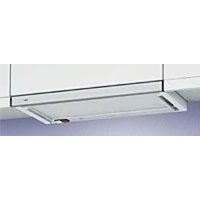
D613 - Basket Clarity - Free user manual and instructions
Find the device manual for free D613 Clarity in PDF.


| Product Type | Cordless phone with answering machine |
| Brand | Clarity |
| Model | D613 |
| Base dimensions | Approximately 20 x 15 x 8 cm |
| Handset weight | Approximately 150 g |
| Power supply | 6V DC power adapter included; Ni-MH rechargeable batteries 2.4V 550 mAh |
| Display type | LCD display on base |
| Main features | Caller ID, integrated answering machine, sound amplification (BOOST), directory up to 30 names, call list, hands-free speakerphone |
| Range | Up to 200 meters outdoors (depending on conditions) |
| Hearing aid compatibility | Compatible with hearing aids (amplification up to 30 dB) |
| Answering machine | Message recording, capacity up to 10 minutes |
| Number of supported handsets | Up to 5 additional handsets |
| Maintenance and cleaning | Unplug before cleaning; use a damp cloth; do not use liquid or abrasive products |
| Safety | Do not use near water, during a storm, or to report a gas leak; unplug before cleaning |
| Spare parts and repairability | Replaceable rechargeable batteries; power adapter; for repair, contact Clarity customer service |
| General information | Complies with FCC regulations section 68 and ICES-003 standard |
Frequently Asked Questions - D613 Clarity
User questions about D613 Clarity
0 question about this device. Answer the ones you know or ask your own.
Ask a new question about this device
Download the instructions for your Basket in PDF format for free! Find your manual D613 - Clarity and take your electronic device back in hand. On this page are published all the documents necessary for the use of your device. D613 by Clarity.
USER MANUAL D613 Clarity
Use Artwork For: Product Color: Printed Material:
APPP-USA
coloroflens
UserGuide
CTAP
colorofbutton
QuickGuide
ETRI
colorofLED
ProductGraphics
FTRICOMBO
housingcolor
ProductLabel
U.K.
BatteryWarningLabel
JAPAN
WarningLabel
ITAL
ProductInlay
BELL SOUTH
FunctionInlay
RADIOSHACKCANADA
Template
ProductSticker
BatterySticker
BoxSticker
Addendum
GiftBox
ProductDirectory
Others:
Product: D613 User Guide
| ✓ English | French | Spanish | Portuguese | Japanese | Italian |
| Vendor: VTech | |||||
| Issued for: | Revision | Creation | |||
| Prepared by: Corina Sandulescu Date: 04.10.2009 Revision: A | |||||
| Reason for Revision: Initial release for production | |||||
| Implement: | ✓ Immediately | AsRunningChange | |||
| Artwork Provided: | LaserOutput | FilmPos | FilmNegs | Lino | CD | Zip | jpg | Supplied By: | ||
| Printing: | Lithc | SilkScreen | DigitalPress | Xerox | ||||||
| Color Scheme: Others: | 1/0Color | (color on one side only) | ✓ 1/1color | (color on two sides) | 2/0colors | (two colors on one side only) | ||||
| Pms colors are: | Colors: | ✓ Black | White | Others: | ||||||
| 4ColorProcess | {CMYK} | SpotColor (PMOS) | GlossVarnish | DullVarnish |
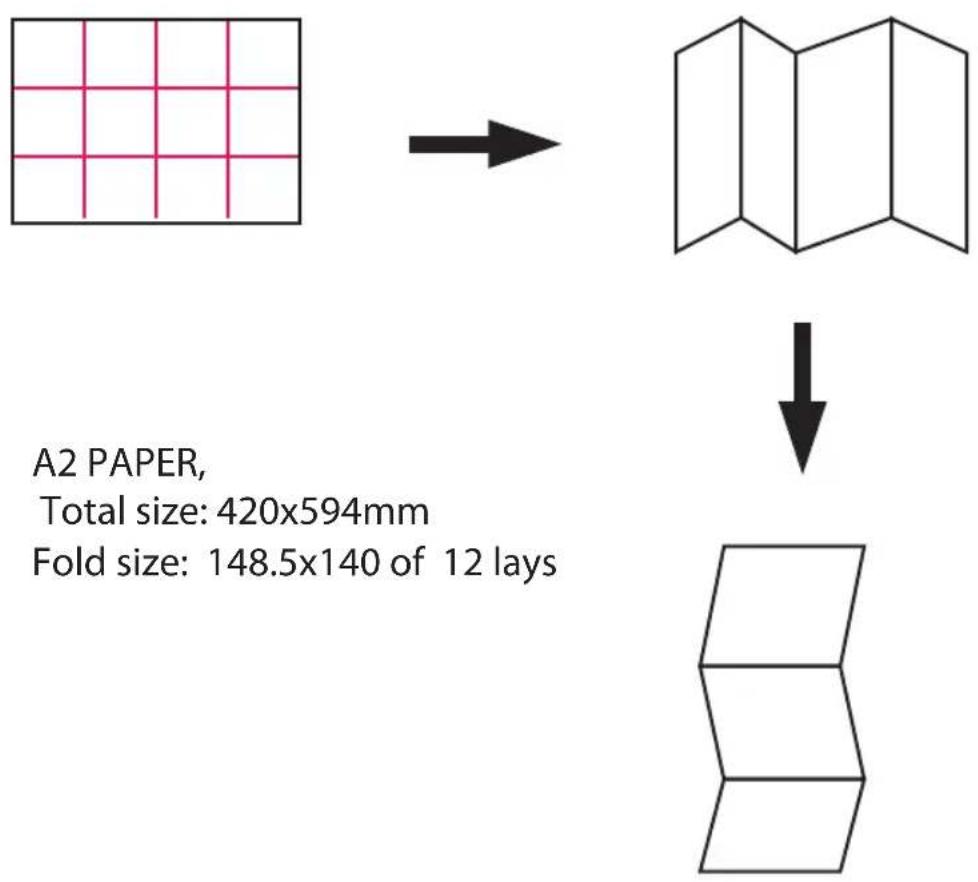
Size: 420 × 594 mm
| Paper Stock: Weight of Stock: 18-20 lbs Color of Stock: White | ||||||
| Gloss | c2(coated 2 sides) | c1s(coated 1 side) | Matte | |||
| Cover | ✓ Paper | Card | Cardboard | CorrugatedBoard | Others: | |
| Transparent | Self Adhesive Sticker | Paper Self Adhesive Sticker | Mylar Self Adhesive Sticker | MylarInlay | ||
| Cut: | Die-Cut | RadiusCorners | ✓ Trim | Others: | ||
| Binding/Folding: Others: | Fold | ParallelFold | AccordionFold | SaddleStitch (Staped) | PerfectBound | per vendor directions |
| Quantity: | ||||||
| Prototype/Sample(s): | Provided | ✓ NotProvided | ||||
| Prior to production sample(s) approval required by Clarity: | YES | ✓ NO | ||||
| Number of samples to be submitted for approval: N/A | ||||||
Special Instructions:
Print front and back, Black & White, Top-Top, one language per sheet - total 3 sheets.
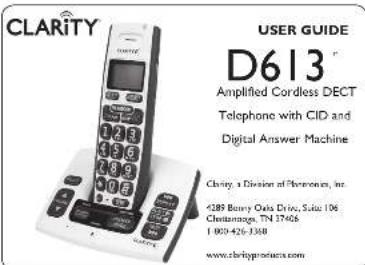
© 2007 Clarity, a division of Pluronics Inc., All rights reserved. Amplifying your life, Carlye the amplification device, Carney and the amplification device combined, Clarity, De13, Digital Carney Power and DCP are trademarks or registered trademarks of Pluronics, Inc.
Berl. A (4:09)
CONTENTS & PARTS CHECKLIST
Your package includes all the items as shown here. If there is anything missing, please contact our Customer Care Department immediately.
NOTE: PLEASE RETAIN A COPY OF PROOF OF PURCHASE FOR YOUR RECORDS.
Base unit


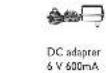
Handset
INSTALLING YOUR D613
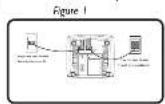
- Connect one and of the telephone card into the (quarry) INLF port on the bottom of the base, connect the other end of the phone cord into our wall telephone port. See Figure 1.
-
Connect the DC adaptor port into the DC 6V 60mA port on the bottom of the base, plug the adaptor into your wall port. See Figure 1.
-
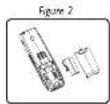
Slides open the battery compartment door and connect the rechargeable battery into the battery compartment. See Figure 2.
-
Put the hands on the hours to grams for at least 24 hours before first use. Subsequent charging time should be 6-8 hours a day.
Battery Performance
The history item will tick on the menu screen when this history is low. A fully chipped history will provide an estimated 10 hours of talk time and 100 hours of standby time.
To keep your battery pack in the best condition, leave the hardbox at the base for a few hours at a time. Running the battery pack down at least once will help it less as long as possible. The change of capacity for rechargeable battery pack will reduce with time as users will get the same amount of battery. Keep the battery pack charged and charged every day. Note: battery pack and hardbox may become warm during charging. This is normal.
FEATURE LIST AND OVERVIEW
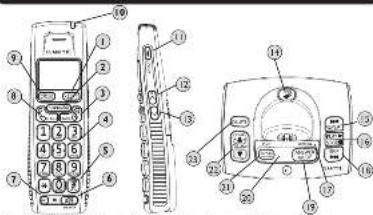
1 XCLEAR_MUTE button (PhotoClear/DotoAnswering Machine main menu): "This message! Press in across the main menu, of the answer motion and lean in the voice.
IF-distributing model Press once to delete a character or digit Press and hold to detect all characters in the data.
(During 31 cal: this tuns to mone a cell pssign an unrrn cll. Cil: lily Pnepbokr prs rir hnnr one nne
(Answering Machine mode): Press this button or the "0" key to reduce the current message packet.
2PHONEBOOK button pror this bute to aas the shhnebook.
hing Nover Press to mose the cscr to the le. Note: The above text will hold up to 30 years and
B. BACR D000, Press to run a menu
(4)partial NaN:Alpharmonic key pad. Emphasize number you wish to call or characters which using a name into the phonetic encode [ ] button (None). During a call, press this button to switch from pole to tone during timing (None). If the end has the dia, mode will resume. Note that you can print in full (before pressing S ) or press S and dial after hearing the direction.
PAUSEABCIFORMATButton
IdioPro-diaDuring a cal model Press to insert a symbol
1. Number editing model: Press once to insert the A Symbol and hold a key to insert a clause in name editing model. Toggle between ABC/ABCbrc
(In cells: fat entry). Press to toggle the Coller ID display formats among 7, 8, 10 and 11 digits.
(4) SPEAKER Button: Press the SPEAKER button to engage the speaker's function; press again to turn the feature off.
② INT (Intercom): This feature is only applicable when there are at least 2 registered terminals. The terminal can be either internal cells, transfer systems cells from the主机 to another and use the conjugate system.
(8) (Text|FLASH button: Print to make a call, answer in incoming call or to engage the Call Wiring/Call ID function (feature provided by local telephone company).
MENUHOLDSELECTION HURHOIN 1000000000000000000000000000000000000000000000000000000000000000000000
(During a call: Pres to pace the cat on hold
(12)Top Handkeright: The light will flash during an incoming call. The light will remain on when you are on a call and the BOOST is on.
SCREEN ICONS (HANDSET AND BASE)
Menu Screen on
Handset 00 Anwering Machins is ON. birk for new mssqgs.
NEeNew cale are reected torms of thar new cals are reesired.
New your mail, not yet signed up. From your col
Screen on Base
The following series will appear on the base ICRS screen to indicate the following:
1
01
99. Indicate how many messages are on the answering machine. [Example: There are 9 answering machines, messages in local]. Symbol will flash when you play a message.
1. Will flush when the answering machine memory is full. Note: The answering machine will hold up to 15 minutes of recordable message with a limit of 39 messages.
1.409 Symmbn wll hins boc and firth when reccrbing a peronal and annunmertment or
```python
TheNumber's count = 99, indicate the total number of messages in a sending machine when playing announcement.
In Flashing mode: Answering on incoming call recording on incoming call
A
LA09 Symbol will link back and forth when remote access is in progress. The number indicates the total number of new sessions.
L3 Indicate the basic space volume levels. Exemplify volume level is set at level 3. (Note: The speaker's local symbol will disappear after these amounts)
FEATURE LIST AND OVERVIEW
(1) BOOST ON/Off: Press BOOST to eave the open zoom/film screen(s) while slowly closing the zoom/film. The zoom/film is then moved to the top of the image and the top of the image of modalities in BOOST ON mode, the phone as a camera zooms up to 30 cm or medium zoom.
(12)UP:Scroll upVolume up/Call list
[le mode] Pw to srrn ra h
[Menu Mode]: Press on serial up
Eaking Mode Press to move cursor to the left.
During a call/Answer machine mode Press to increase volume
13DOWN:Scroll down/Volume down/Textual list
(1) the Medex Press to access the Federal list [up to 32 days, up to 35 days].
Mira Mira: Press to enroll down .Video Model: Press to enroll
(2018, 10)
(Collophonological item entry: Prose in scrol down the line.
(14) FIND: Press on find page all registered banks.
REPEAT (Backward) Press once to delay current message from the beginning. Press twice to discard the previous message;
16)PLAY/STOP-Prs no play a message:press agpt to stop playing message
(7) CHARGING light (Red) light will turn red when this hoods in the reds low charge
(8) SKIP (Forward): Press to skip a message and move forward to the next message.
ANSWER MODE bact: Press this button to tagge between the following answers
the mode: ANWVER OF ANNCLNCT & RICORD ANNNDENCE CNY
Answering Machine screen: See section on ICONS for details.
RECORD ANNouncement: Sherr pows to play current outgoing message. Prows and holds to record your on outgoing message and release to stop recording.
VOLUME UP/DOWN: Correct the pumping machine volume (level 0 to 3)
DELETE To delce message, press this button with message x pijing. press and hold to
e at reviewed messages. New messages cannot be copied before being reviewed:
ADDITIONAL HANDSETS
Registering Additional Handbooks
The original number is p registered for use. Up to 5 hours can be registered to one base.
See the "Registration" section of this document.
Prow and hold the FINO turpon for 6 seconds on the base
Release the FIND button onto the IN USE light source to flash.
4. A confirmation cone will sound when registration is successful. Handout X is displayed where X denotes the number of frames. The phone will then go back to kld.
--register All Handoes
In plug the power from the base
Pae and hold the FIND button on this base for 10 seconds.
Pug back in the power of the base.
X#12
hundreds. The IN USE light on the base will be OFF and NOT REGISTERED will display at each
RESET SETTINGS
Reset All Settings
The
Note: All entries in the Phonebook, Redial List and Call List will be cleared.
1. Press the MENU button and use the DOWN button to select Reset Settings. 2. Click now the MENU button and use the UPDOWN button on your All Settings.
3. Press the MENU button to select Yes.
MENU OPTIONS
There are six main menu options on the DEX: Stea & Time, Propanchock, Snap HS, Snap BS, Answer Machine and Risk Settings.
yep
Press the MENU button:
Pep the UPDCWN arre bounns in roll through the menr
3. Press the MFNLU button to open a sub menu or to select an option. Press the (Toll Off)-BACK button to go back to the previous menu entry or to cancel an action.
Note: If you do not press any button on the haptic for 20 seconds the display will automatically return to steady.
| Main Menu | Date & Time | Phone- books | Setup HS | Setup BS | Answer Machine | Reset Setting |
| Sub Mona | Year | View | Ranger Tone | Ranger Tone | Answer Machine | CUR Voo Mul |
| Dasic Time | Add | Ranger Volaric | Ranger Volume: | Please Aetr Number of Ring | All Seet ring | |
| Ede | Key Tone | |||||
| Delete | Low Bar Tone | |||||
| Dukti: All PB Capacity Speed Dcl | Cut Range Tone Hundred Name Language LCD Contrat | Dist Mandle Area Code: | Annunamcrture Record Pieme Call Sceretting Bemtta Aespon Securing Carle |
CALL LIST (CID)
This is a stretch posted through your local telephone company. The Do 3 will automatically convert the phone to a new number and number along with the extra and extra for the call. It will be recent up to 30 calls.
Note: The time and date will automatically register after receiving your first call.
Call List (CID)
The cell list consists of the missed and missing calls. Entities are displayed in chronological order, starting from the first call to the next call. If there is a missed call then it can be not received. NFW will display on the status table.
NotWhen the cell is a fL, a new cell replaces the old in the list. If you receive more
than one can from the same numoe only the most recent call is pect in the call list.
View Call List
To view the Call to intersection press the UP human with your phone is in this mode, the next recent number will be displayed. Press the BACKDOWN button to scroll through the link.
Formattng Call List Information
When reviewing an entry from the call list press the # button repeatedly to display the
number in discrete forms. For example, if the call number is eighty six 800-426-373B that various letters will be: 146 - 378 143 - 378 1009426-373B and 1009426 - 373B
50
SAe Nmber 100000000000000000000000000000000000000000000000
3.20%P1000000000000000000000000000000000000000000
3. Press the MENU button once again to click the 出 / 出 /
4. Press the MENU button and use the DOWN button to select your desired melody.
N
Note: U6 to 30 mm and number can be used in the formulae. Number can be stored up to 14 digits long and names can be used in the characters long. Numbers will be row
in alphalcalceal orer.
Dalee x Call List Entry
1. Press the LP button to enter the collist.
2. Pre-tp the UPDCWN bucture to your closed entry.
3. Press the CLEAR/DELTET button to delete the entry
e
1. Press the OP button to change the color. 2. Press the OK button to select the color.
dclcd:
3. Proo the MENJ in conirm and dlatral erer
BOOST FUNCTION AND
Power Function - Propidity Incursing Sources
- While no call paws the BOCST harns to enppes the ampifier The C613 has a BOCST
button that controls the loudness of the receiver. Once the BOOST button is pressed, an
call the IRGST pump on top of the Source Power pump on the SPC to shift according to this
are's means . The BOOST human will make automatically every time the phone is hung up for at least 5 seconds . The top right left smartphone ( video ) while the BOOST human is activated ,
- During a call, press UPDOWN button to adjust the volume to the desired sound level (up to 30 dB of amplification) on the carphone or loudspeaker. The Volume Control adjusts the level of volume in the handker and speaker in both BOCOST or non-BOCOST modes. The volume control provides up to 16 dB of volume below the BOCOST button activated.
CAUTION VOLUME MAY BE LOUD
PROCEED WITH CARE
MENU OPTIONS
SetupB5(Basic)MinMin
Submua 1
Answer Machine Can Eject
Tutumaru收费站 allows you to pass the following Answer Mathias (Answer OFA/ANSURS & Second Answer) Group, Message Aim (OnOff), Set Number of Birgs before the Answer Mathias (Answer OFA/ANSURS & Second Answer).
$ tripl -p RARAN ALESSIA (OnCoff) and ask your own security codes for RARAN security code: it's 123.
Reset Setting (Min Manu)
Submaru ating, allow you to Clear p.r. Voite Mll rvice prnivcd by yran loed
e
Date and Time (T&F: 10:30)
The shumou will show you to movusly input the Year Date and Time if you have CID
sivcvice prnice by your loci to enephe conmns, this mtnion wth tioe cemctory
Phonebank (Mun)
Submert aee: kows the folowing osens: Yee, Add, Edit, Depee, Depee All Cherd your
Phnbook Capcity and Set your Speed Dial for keys 1-9.
Setup HS (hondue) (Main Menu)
Submarq sages allow you to take your own personal recorded songs for the hardcover录音 Tone (Pickled songs 1-3), RingoVolume (OR, Vol. 1-5),KeyTone (On/Off), Law Bank Tone (ON/Off), Cut of录音 (ON/Off). Tone, H-indexer Name and Language (English/FRANCIS/ Espafted).
TROUBLESHOOTING
Charging
The battery icon is not showing that it is charging when the handset is placed on the base.
-
Bad battery contact move the handset slightly
-
Dirty contact. Clean the battery contact with a cloth moistened with alcohol. 3. Battery is full, no need to charge.
No dial tone
-
No power, check the connections. Reset the phone: unplag and plug back in the electrical outlet.
-
The Battery has lost its charge. Charge the battery pack for at least 24 hours.
-
You are too far from the base, move closer to the base.
-
Make sure that you have used the telephone line cord and DC power adapter provided.
-
Make sure that the DC power adaptor is connected correctly.
Poor audio quality
- The base may be too close to electrical appliances, reinforced concrete walls or metal door frames. Place the base away from any electrical appliances.
Caller ID service does not work
Check your subscription with your network provider.
A phonebook onry cannot be stored
The phonebook may be full. Delete an entry to free memory.
No display
-
Try recharging or replacing the battery pack.
-
Recess the telephone base. Unplug the unit's electrical power; then plug it back in.
Registration
Unable to register another handset
-
Be sure that it is a Clarity expanderable handset that is compatible to the D613
-
If there is a count of 3 hands registered, the maximum has been reached.
- You must NOT REGISTER. You must designt a hand in order to register a new one.
TROUBLESHOOTING
Handset loses the link to base during use
-
Check the power cord is connected properly into the telephone base. 2. Check the DQG cable is properly connected to the telephone base.
-
Make sure the DC power adapter is connected properly into an electrical outlet. 3. Move the endocell border closer to the telephone line. It has been cut out of power.
-
Reset the telephone base by unplugging the unit's electrical power. Wait for around 15 seconds and plug it back in again. Allow up to one minute for the cordless handset and the telephone base to synchronize.
Static On The Line
- Your phone may be located near a touch lamp, microwave, refrigerator or other
household appliances. Try refreshing your phone to another area.
Try changing the coordinates of your phone to make static. Try disconnecting the cordless phone. This may eliminate the problem.
-
Excr devices attached to the telephone, such as CID units and answering machines may cause static Disconnecting the devices may eliminate the problem.
-
If there is also a DSL service in the home, this will cause interference on the line. That interference is then amplified by the phone, causing a less than optimal quality of conversation. Install the phone line filter provided by the DSL service provider to reduce the amount of interference on the line.
Interference
- Check cords and connections. Prayed or poorly connected cords can cause
Hannrncce. Swap cirves if necessary.
Noise Interference on your radio or television
Your base or charger may be too close. Move it as far away as possible.
Answer Machine
- Make sure the answering machine is on.
2 The memory may be full. If so, you will need to delete some messages.
Still Not Working?
If, after going through this checklist, the D613 is still not functioning properly, call Clarity at 1.800.426.3738.
REGULATORY COMPLIANCE
Part 48 of FCC Rules Information
a) This equipment complies with Part 68 of the FCC rules and the requirements adopted by the ACTA. On the bottom of this equipment is a lab that contains, among other information, a product identifier in the format US:AAAQ#1XXXX. If requested, this number must be provided to the telephone company.
b) A plug and jack used to connect this equipment to the premises wiring and
telephone network must comply with the applicable FCC Part 10 regulations and the requirements of the Federal Aviation Administration (FAA). BULIC USOC is provided with this product. A claim is claimed to be connected to a
compatible modular jack that is also compatible. See installation instructions for detail c). The REN is used to determine the number of devices that may be connected to a telephone line. Excessive RENs on a telephone line may result in the devices not ringing in response to an incoming call. In most, but not all areas, the sum of RENs should not exceed five (5.0). To be certain of the number of devices that may be connected to a line, as determined by the total RLNs, contact the local telephone company. For products approved after July 23, 2001, the REN for this product is part of the product identifier that has the format US:AAAEQWITXXXX.
The digit represented by ill are the REN without a decimal point (e.g., 03 is a REN of 0.3). For earlier products, the REN is apparently shown on the label.
c) If this telephone equipment causes harm to the telephone network, the telephone company will notify you in advance that temporary discontinuation of service may cause a loss or damage to the customer. The telephone company will notify the customer as soon as possible. Also, you will be advised of your right to file a complaint with the FCC if you believe it is necessary.
a) The telephone company may make changes in its facilities, equipment, operations or procedures that could affect the operation of the equipment. If this happens the telephone company will provide advance notice in order for you to make necessary modifications to maintain uninterrupted service.
If it turns is experienced with this telephone equipment, for repair or warranty information, please contact Clarity, 1-800-352-3368. If the equipment is causing harm to the telephone network, the telephone company may request that you disconnect the equipment until the problem is resolved.
g) This telephone equipment is not intended to be repurised and it cannot be used for resale or distribution. The use of this equipment will violate the warranty for service or repairs, call 1-800-322-3368.
1) Contact to party line service a's subject to state tariffs. Contact the state department of commerce, public service commission or corporation commission for information.
REGULATORY COMPLIANCE
Part 68 of FCC Rules Information
If your home has specially wired alarm equipment connected to the telephone line, ensure the installation of this telephone equipment does not disable your alarm equipment. If you have questions about what will disable alarm equipment, consult your telephone company or a qualified installer.
ii This telephone equipment is hearing aid compatible.
Customer-Owned Coin/Credible Card Phoncs:
To comply with state tariffs, the telephone company must be notified notification prior to connection. In some states, the state public utility commission, public service commission or other regulatory agency may issue a notice to the telephone company.
Part 15 of FCC Rules Information
This device complies with Part 15 of the FCC Rules. Operation is subject to the following two conditions: (1) This device may not cause harmful interference, and (2) this device must accept any interference received, including interference that may cause undesired operation.
Your equipment has been tested and found to comply with the limits of a Class 8 digital test. The equipment is in good condition, free of defects, and ready to provide reasonable protection against harmful interference in residential installation.
This equipment generates, uses and can radiate radio frequency energy and, if not installed and used in accordance with the instructions, may cause harmful interference to radio communications. However, there is no guarantee that interference will not occur in a situation where the intended use of this equipment may be detrimental to the user's television reception, which can be determined by turning the equipment off and on, you are encouraged to try to correct the interference by one of the following measures: 1. Where it can be done safely, rewrites the receiving television or radio antenna.
-
To the extent possible, relocate the television, radio or other receiver with respect to the telephone equipment. (This increases the separation between the telephone equipment and the receiver.)
-
Connect the telephone equipment into an outlet on a circuit different from that to which the television, radio, or other receiver is connected.
-
Consult the dander or an experienced RadioTV Technician for help. CAUTION: Changes or modifications not expressly approved by the manufacturer are subject to regulatory action and will be subject to regulatory action if required.
IMPORTANT SAFETY INSTRUCTIONS
Privacy of communications may not be ensured when using this platform. Caution: To maintain the compliance with the FCC's RF exposure guidelines, place the device in a safe place and use a protective device.
For body worn operation, this handpiece has been tested and meets the FCC RF exposure guidelines when used with the Charity accessories supplied or designated for this product. Use of other accessories may not ensure compliance with FCC RF exposure guidelines.
When dying during a sports club sport, take timely preheatings instead always to reduce the risk of fire, electric shock and injury to persons including the following:
-
Read and understand all instructions.
-
Follow all warnings and instructions marked on the telephone.
-
Do not use this telephone near a bath/bus, wash basin, kitchen sink or laundry tub, in a wet basement near a swimming pool or any where else there is water.
-
Avoid using a telephone (other than a cordless type) during a storm. There may be a remote risk of electrical shock from lightning.
-
Do not use the telephone to report a gas leak in the vicinity of the leak.
(1) Is it important to take the gas from the well water before reporting? -
Unpin this telephone from the wall一下子 before cleaning. Do not use liquid cleaners or aerosol cleaners on the telephone. Use a damp cloth for cleaning.
-
Place this telephone on a stable surface. Serious damage and/or injury may result if the telephone fails.
B. Do not cover the slots and openings on this telephone. This telephone should never be placed in a building or building inside a building. The telephone should not be placed in a built-in installation unless proper ventilation is provided.
-
Operate this telephone using the electrical voltage as stated on the base unit or the device. The devices are not sure of the voltage in your home, consult your dealer or local power company.
-
Do not place anything on the power cord. Install the telephone where no one will stop or trip on the cord.
-
Do not overload wall outlets or extension cords as this can increase the risk of fire or electrical shock.
-
Never push any objects through the slots in the telephone. They can taud their dangerous voltage parts or short out parts that could result in a risk of fire. (See "Danger signs and hazards").
-
To reduce the risk of electrical shock, do not call this phone apart. Opening or closing the door with a heavy force is not safe. If you are in the house, the fire resistance can cause electric shock when the appliance is subsequently used.
REGULATORY COMPLIANCE
Industry Canada Technical Specifications
This product meets the applicable Industry Canada technical specifications. Before installing this equipment, users should ensure that it is permissible to be connected to the facilities of the local telecommunications company. The equipment must also be installed using an acceptable method of connection. In some cases, the company's inside wiring associated with a single line individual service may be extended by means of a separate installation. This should be considered a hazard. The customer should be aware that compliance with the above conditions may not prevent degradation of service in some situations. Repairs to certified equipment should be made by an authorized Canadian maintenance facility designated by the supplier.
Any repairs or alterations made by the user to this equipment, or equipment used for the purposes of telecommunications company cases to request the user to dismiss the equipment.
Users should ensure for their own protection that the electrical ground connections of the building are protected against any potential threats to the safety of users, property owners, and connected together. This precaution may be particularly important in rural areas.
CAUTION: Users should not attempt to make such connections themselves. They should contact the appropriate electrical inspection authority, or whichever, as appropriate.
The Ring-Average Number is an indication of the maximum number of terminals allowed to be connected to a telephone interface. The termination on an interface may consist of any combination of devices subject only to the requirement that the sum of the Ring-Average Numbers of all the devices does not exceed five.
This Class B digital apparatus complies with Canadian ICES-003.
(The term "C." below the certification/registration number only signifies that the Industry Canada technical specifications were not.)
TECHNICAL INFORMATION
Amplified dB Level: 30dB
Dimensions
P
Weighs
Handso Weight 3.1402
Bases: 5.04 oz
Power Requirements: 10kW (3.5kW)
ABAD2.4X550mHnMH
IMPORTANT SAFETY INSTRUCTIONS
-
Using this product from the wall outlet, and refer servicing to the manufacturer under the following conditions: when the power supply cord or plug is frayed or damaged; if it has been spilled into the product; if the telephone has been exposed to rain or water; if the telephone does not operate normally by following the operating instructions if the telephone has been dropped or the case has been damaged; if the telephone exhibits a distinct change in performance. Adjust only those controls that are covered by the operating instructions. Improper adjustment may require extensive work by a qualified technician to restore the telephone to normal operation; if the telephone does not operate normally by following the operating instructions. 15. Never install telephone wiring during a lightning storm.
-
Never install telephone jacks in wet locations unless the jack is specifically designed for wet locations.
-
Never touch unsolicited telephone wires or terminals unless the telephone line has been disconnected at the network interface.
-
Use caution when installing or modifying telephone lines.
BATTERY SAFETY INFORMATION
Dispos of used batteries according to the in
1. Do not dispose of the battery in a fire as it may explode. Check with local codes for possible special disposal instructions.
2. Do not open or mutilate the battery. Released electrolyte is corne
may cause damage to the eyes and skin. It may be toxic if swallowed.
3. Exercise care in handling batteries in order not to short the battery with conducting materials such as rings, brackets and keys. The battery or conductor should be carefully cleaned and stored in a temperature-controlled room.
PARTY RESPONSIBLE FOR REGULATORY COMPLIANCE
Clarity, A Division of Plantranics, Inc.
4289 Bonny Oaks Drive, Suite 106
Chattanooga, TN 37406
Phone:1-604-426-3738
WARRANTY SERVICE INFORMATION
Incidental or Consequential Damage: Neither curing nor repair shall render or acting distributors has any responsibility for any incidental or consequential damages including without the written express written and verbal consent, loss of profits, losses, expenses, loss of time, or income/interest. Same duties do not allow免除 or limitation of incidental or consequential damage, so the above limitation or exclusion may not apply to you.
Other Legal Rights: This warranty gives you specific legal rights and you may also have other rights which vary from state to state.
To obtain warranty service, please presey shipment and return the unit to the appropriate facility.
Carry Service Center. Pannonics Service Center
4289 Sonry Calx Drive, Suite 106, B112 Tnra Canad Highway
Chaneeep, Tarneele 37408 Wite Amelaray, Quebec M5 1A5 Tl. (423)619-3500 m/800 551-3368 Tl. (80%) 540-8161 m (514-956-5363
Fam (123) 622-7646 or (800) 325-8871 Fam: (51+9) 956-1825
Pee t t
A prochthorpe ntrione main mers and dne of p
Bis-azidrac
Number and deviation of warts sapped
Name and telephone number of person to call, should contact be necessary:
Reason for return and description of the problem
Damage occurring during shipment is deemed the responsibility of the carrier, and claims should be made directly with the carrier.
The following warranty and service information applies only to products purchased and used in the U.S. and Canada. For warranty information in other countries, please contact your institution's customer services.
Limited Warranty Contract, a division of Paneroitics, Inc. ("Panero") warrants the original contract pursuant to this provision for exclusive use of the "Warranty" and that the "Warranty" shall be written in full with a written notice from the parties (1) year from the date of original purchase [Warranty Period]. The obligation of "Panero under this warranty shall be at Panero's option, without charge, of any part or unit that has the power to deliver in material or otherwise to the other party."
Exclusions from Warranty: This warranty applies only to defects in factory materials and factory workmanship. Any condition caused by oxidizer, blase, moisture or improper operation, vibration of furniture furnished by Certi, renovation or alteration, improper electrical voltages or currents, or result or maintenance attempted by anyone other than Clarity or the manufacturer. The manufacturer's liability for any damage, loss, and expense in connection with any products manufactured different types of equipment and Clarity does not warrant that its equipment is compatible with the equipment of a particular phone company.
Implied Warranties: Under state law, you may be entitled to the benefit of termairn implied warrants. These implied warrants will continue in force only during the warranty period. Same status do allow limitations on how long an implied warrant lasts, so the above limitation may not apply to you.
© 2007 Charity, a division of Panoramic Inc., San Antonio, USA. Authoring your life. Charity, the amplification device, Charity and the amplification device combined. Charity, De 61, Digital Cherry Power and DCP cont des marques déposées ou des marques déposés de Panoramic Inc. Rien: A (4:09)
CONTENU DE PIECES DE LA LISTE DE VERIFICATION
2) INT (Interphone). This function n is not compatible due to any device, since it is a combination of two devices. The functions n and m are the same for all devices, as well as for all applications except for computers to enable use of the optimum Functioning.
-
Mauwuis contacte in ala: diacryl leirement in poin
-
Control process: Newsgood is control of the risk of risk of risks in
of legal
- La pio se a piiee capoae es n'a pue a fere chae
Appendix
Aucunr topalit
- Auure source dalfimentation; verifizhe le branchements Rinitiisz la
-
Assure you are in the correct directions for your car.
-
la mapeke nearre pote, Si ciir h cie, nour dure suprimer quinues
09日时间:8:30
No marche truquirn pei Si, ariis itre parr pa cttte lnt. In P613 pr
429 Bonny Gals Drive, Since 106
Tillahana 100564142
SERVICE ET GARANTIE
the name at the number of telephone of the parameon to contact, or tax eithant. the caison du coton et la disquisition du probleme
10 2007 Clarity's division of Electronics, Int. Teknis, Incusaurus nanowires Amplifying your life: Clarity, the amplification device. Clarity and the amplification device combined. Clarity (D61). Digital Clarity Power and DCP on buses commercialis a marics commercialis regidada do: Parnamicona, Inc.
Bert A.(49)
LISTA DE REVISION DE CONTENIDOY PIEZAS
(During a call: Piss to plass the call on hold
(Mode inactve) Prove that a student is at least 15 years of age.
1
Prrnne aee
1
Baben REPEAT, BACKWARD: preunlurr dvrz parr rnrnnn nannn actual choue
F
e
Banan DELETETeane nwn pannrnnn
measures of number or formularies; for example, a number or formularies to measureCOME 375-378; a linear formerware: 425-3738; 1425-3738; 820-4278; 1738; 1426-4278; 1738.
- Provisions for payment of the above fees and other charges
Pertal
1.
"DELETE ALL CALL LOG ENTRES ?BORRAR TODAS LAS ENTRADAS DEL REGISTRIO
DF LAMADAS
3.Prepaiae al MENU paaonfmrny hbarr sedas anrana.
FUNCION BOOST-AMPLIFICAR SONIDOS
ENTRANTES
D 103
prosperado et hensel 8006T, un solde extra de amplification a regulada a urea estero
de Cenr d. Volur, Durete an hmedd, bdoe BOOT pckc nncn o apy
Jnno n ce nrgo de Chndd de acuado a neceudde del uio. Eboon 10x51
se receabletcr autonimicamontede cae zout e tefono sea colgpo por to menes
egnre. la supner nurni (rno) mierne qu a funda BOOST
2.Durataa Lappn aasane aflchns hain ARIA/ASAO nnil de rana de
ha 30 d: amfikck) en e uor cai aovz EI Contol deVolumen de Energe d
Cuiid jia du ne de vumn del tufuana n an mdo BOOST cmo no BOOST
I marced de volmen prove hata 16 da se volumen anes de que el boton BOOST ses
m = 311 ;
Ajure TaT (Taiefnp) Man: Pincip
Ls janes de Sub-mnle permen n selectioner supropie jnes personale doe pao
teefam: Tere de Tredre (Aunus the mndra 1-3). Valman de Tredre (Aapnlo, Vul. 1-5).Tena
e 10
RESOLVIENDOPROBLEMAS
Bargands
Clarity, A Division of Planarotics, Inc.
4289 Bonny Oales Drive, Suite 106
Chattanooga, TN 37406
Telcfofo:1-800-564-4224
INFORMACION DE SERVICIO DE GARANTIA
versus den steuerung responsablen por eachukluk skid residential oocostsindividuon indusperan onliminancles, la piaere comrumente a previa, a qualier gmo nonemal, gmo, piroli de tlatrnn, e cieinverwands. Atonas alastare nenn per excludenion e inclusions de slats. A piaere o cieinverwands, de materiaque a la imputation e excursan antedir pae le opacitari estnne.
Ostrom Dearesto Legislatee Fora genitine la de uned ciehros legislatee quacifico y patei taurus arodu cndructs que varin de castrado a cunstio.