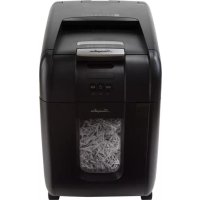
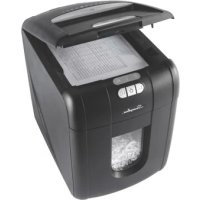
StackandShred 230X - Shredder Swingline - Free user manual and instructions
Find the device manual for free StackandShred 230X Swingline in PDF.



| Product Type | Document Shredder |
| Brand | Swingline |
| Model | StackandShred 230X |
| Auto-feed Capacity | 230 sheets (80 g/m²) |
| Manual Feed Capacity | 7 sheets (80 g/m²) |
| Duty Cycle | 10 min on / 40 min off |
| Initial Run Time | 14 minutes |
| Power | 120V, 60Hz, 1.2A, 270W |
| Main Functions | Auto, manual shredding, CD/DVD, credit cards, reverse, auto-clean, PIN lock, auto standby |
| Security | Automatic stop if bin or cover open, overheat protection, jam detection with auto/manual jam release, cover lock |
| Accepted Materials | Paper (with staples and small paper clips), thin cardboard, envelopes, glossy paper, CD/DVD, bank cards |
| Refused Materials | Plastics, laminated documents, adhesive labels, bound magazines, clips, large staples, large paper clips |
| Bin | With fill indicator |
| Separate CD/DVD bin | Yes |
| Maintenance | Clean rollers with dry cloth, clean IR sensor with cotton swab, lubricate with lubricating sheets only |
| Accessories | Paper waste bags (ref. 1765031, 20 pcs), plastic bags (ref. 1765016, 100 pcs), lubricating sheets |
| Warranty | 2 years limited (cutters and parts) |
Frequently Asked Questions - StackandShred 230X Swingline
User questions about StackandShred 230X Swingline
0 question about this device. Answer the ones you know or ask your own.
Ask a new question about this device
Download the instructions for your Shredder in PDF format for free! Find your manual StackandShred 230X - Swingline and take your electronic device back in hand. On this page are published all the documents necessary for the use of your device. StackandShred 230X by Swingline.
USER MANUAL StackandShred 230X Swingline
STACK-AND-SHRED230X&230XL™
SHREDDERS

start here
démarrez ici
empieza aquí
comece aqui


1


2
3
4

5

6

7

**
STACK-AND-SHRED SHREDDERS
| FEATURE COMPARISON | LIGHT USE EVERYDAY USE HEAVY USE | ||||||||||
| Model | 60X | 80X | 130X | 130M | 230X | 300X | 300M | 600X | 600M | 750X | 750M |
| Security level | P3 | P3 | P5 | P3 | P3 | P5 | P4 | P5 | P4 | P5 | |
| Bin Capacity (sheets) | 100 | 150 | 150 | 280 | 325 | 450 | 670 | 850 | 1100 | 1250 | 1400 |
| Users | 1 | 1-2 | 1-5 | 5-10 | 10-20 | 20+ | |||||
| HANDS FREE SHREDDING | |||||||||||
| Sheet Capacity | 60 | 80 | 130 | 130 | 230 | 300 | 300 | 600 | 600 | 750 | 750 |
| Staples and Paper Clips | √ | √ | √ | √ | √ | √ | √ | √ | √ | √ | √ |
| Intelligent Jam Clearance | √ | √ | √ | √ | √ | √ | √ | √ | √ | √ | |
| Lockable Chamber | Optional | √ | √ | √ | √ | √ | √ | ||||
| MANUAL FEED SHREDDING | |||||||||||
| Manual feed sheet capacity | 5 | 6 | 6 | 6 | 7 | 8 | 8 | 10 | 9 | 12 | 10 |
| Jam Assist | √ | √ | √ | √ | √ | √ | √ | √ | √ | ||
| Bin Capacity (Gallons) | 4gal | 5gal | 7gal | 7gal | 9gal | 11gal | 11gal | 21gal | 21gal | 31gal | 31gal |
| Shreds Credit Cards | √ | √ | √ | √ | √ | √ | √ | √ | √ | √ | √ |
| IntelligentTM Power Save | √ | √ | √ | √ | √ | √ | √ | √ | √ | √ | |
| Bin Full Indicator | √ | √ | √ | √ | √ | √ | √ | √ | √ | √ | |
| Illuminated Status Symbols | √ | √ | √ | √ | √ | √ | √ | √ | √ | ||
| Shreds CDs | √ | √ | √ | √ | √ | √ | √ | ||||
| Castors for Mobility | √ | √ | √ | √ | √ | √ | √ | ||||
| IntelligentTM SelfOilTM | √ | √ | √ | √ | |||||||
| Continuous operation | √ | √ | √ | √ | |||||||
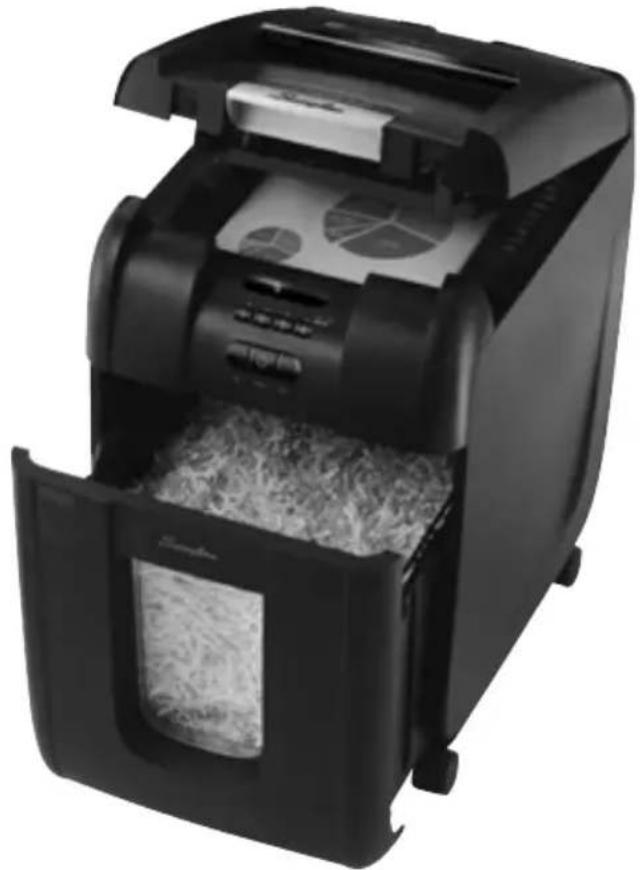
STACK-AND-SHRED230X&230XL™
SHREDDERS
English instruction manual 6
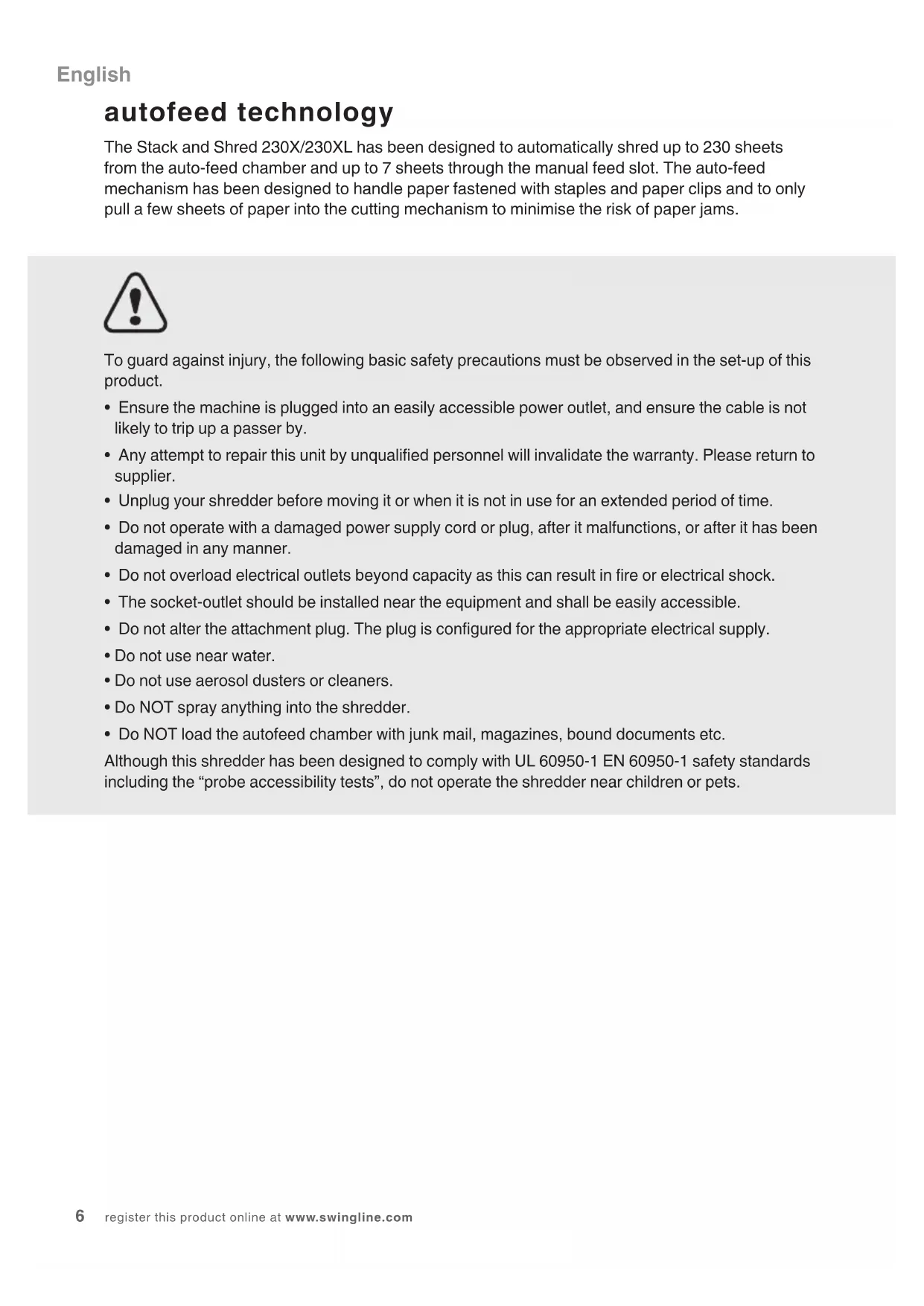
The Stack and Shred 230X/230XL has been designed to automatically shred up to 230 sheets from the auto-feed chamber and up to 7 sheets through the manual feed slot. The auto-feed mechanism has been designed to handle paper fastened with staples and paper clips and to only pull a few sheets of paper into the cutting mechanism to minimise the risk of paper jams.

To guard against injury, the following basic safety precautions must be observed in the set-up of this product.
- Ensure the machine is plugged into an easily accessible power outlet, and ensure the cable is not likely to trip up a passer by.
- Any attempt to repair this unit by unqualified personnel will invalidate the warranty. Please return to supplier.
- Unplug your shredder before moving it or when it is not in use for an extended period of time.
- Do not operate with a damaged power supply cord or plug, after it malfunctions, or after it has been damaged in any manner.
- Do not overload electrical outlets beyond capacity as this can result in fire or electrical shock.
- The socket-outlet should be installed near the equipment and shall be easily accessible.
- Do not alter the attachment plug. The plug is configured for the appropriate electrical supply.
- Do not use near water.
- Do not use aerosol dusters or cleaners.
- Do NOT spray anything into the shredder.
- Do NOT load the autofeed chamber with junk mail, magazines, bound documents etc.
Although this shredder has been designed to comply with UL 60950-1 EN 60950-1 safety standards including the “probe accessibility tests”, do not operate the shredder near children or pets.
warning symbols

Safety First


This means you should be careful because long hair can become entangled in the cutting head.

This means be careful of ties and other loose clothing which could become entangled in the cutting head.

This means be careful of loose jewellery which could become entangeld in the cutting head.

This means don't reach into the feed opening of the cutting head.

This means keep children away from shredder.

This means no aerosols.

Sheet capacity of manual feed entry slot.

This means the shredder can accept small staples.

This means the shredder can accept small paperclips.

This means the shredder can accept credit cards.

This means no oil lubrication, use Swingline oil sheets only.
control panel and indicators


Auto

Continuous Jam BoostReverse

Paper Loading Door/Bin Door Open indicator –
This means either:
- Loading door is open
- Bin is open

Bin Full indicator – This means the bin is full.

Lock indicator – This means the paper loading door is locked (during shredding).

Cool Down indicator – This means the machine is cooling down.

Paper jam indicator – This means there is a paper jam in the auto feed chamber.
If this symbol is flashing the shredder is attempting to clear a paper jam automatically. If this symbol is permanently illuminated red please follow the instructions under 'Rare Occasion of Jamming'.

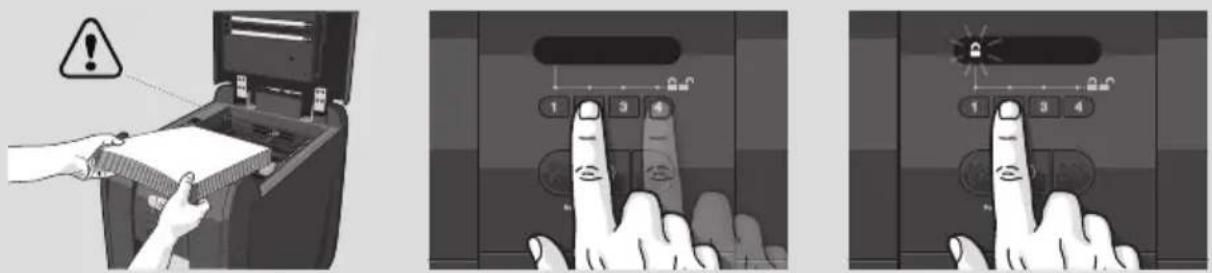
Loading Door Locking Mechanism – PIN Password Buttons – Enter a four digit code to lock the loading door during shredding.
Stack and Shred 230X/230XL shredding capability
Stack and Shred 230X/230XL CAN shred the following:

• 230 sheets
• Stapled paper, 25mm within the corner
• 26/6 and 24/6 or smaller staples
- Small sized paper loaded centrally
• 230 sheets
• Paper clip paper, 25mm within the corner (230XL through manual feed slot ONLY)
- Capable of shredding small/medium paper clips (max. wire thickness = 0.9 mm)
- >80/100gsm paper (through manual feed slot ONLY)

• A3 folded in half max. 2 sheets
- 230 sheets
- 80 gsm paper
- Letter and Legal
- A3 single sheet folded in half to make A4
Stack and Shred 230X/230XL CAN shred (through the manual feed slot):

THICK PAPER
Thick paper or card.

Multiple folded sheets (e.g. A3 sheets folded in half).
UNOPENED MAIL
Unopened mail (e.g. junk mail).

GLOSSY SHEETS
Glossy paper or a sheet covered with print on both sides.
Stack and Shred 230X/230XL CANNOT shred the following:

Heavy duty staples. Check the staple leg length is not greater than 6mm.

Large clips.
Check the length of the paperclip is not longer than 32mm.

Plastic sheets, laminated documents, plastic folders.

Bulldog clips

Bound documents

Adhesive labels.

Magazines or other documents bound by multiple staples or clips.
bin or loading door open safety function
As a safety precaution, if the bin or loading door is opened during shredding, the shredder will stop and the bin full indicator will illuminate (☐).
intelligent help
1 In the unlikely event of the shredder jamming, the Stack and Shred 230X & 230XL will stop shredding, and the jam icon will blink in orange.
2 The shredder will illuminate the FWD (▶) and REV (◀) buttons in the sequence necessary to clear the jam.
3 If the jam cannot be intelligently cleared, the jam icon (84v) will illuminate in red. At this point open the auto feed chamber to clear any jammed material.
automatic jam clearance
Intelligent Jam Clearance: In the unlikely event of the shredder jamming, the Stack and Shred 230X & 230XL will automatically reverse and forward the engine three times to clear a jam. During this operation the Paper Jam indicator will flash (8M).
** 230XL only locking the paper loading door
For additional security the paper loading door can be locked during the shredding of confidential material.
To lock shredder:
1 Place documents in tray. Close paper loading door.
2 Press any 4 digits. REMEMBER YOUR CODE!
Shredder unlocks automatically when:
• 4 digit code is re-entered.
- Shredding is complete.
- Shredder is inactive for 30 minutes (but documents remain in tray)
1. operation
1 Unpack the product.
2 Connect the shredder to mains supply.
3 Ensure the ON/OFF button on the back of the machine is in the ON position, which will illuminate the blue standby symbol (💡).
4 To commence shredding, press the Auto button (💡), which sets the shredder into auto mode. You are now ready to shred.
5 To load the shredder, simply lift the loading door handle to open the loading door and insert documents. You can open the door further to 90 degrees for easier access if required. Load up to 230 sheets at a time into the feed chamber. Do not fill above the 230 MAX level, this could damage the shredder.
6 The shredder will start the shredding cycle automatically ONLY after closing the loading door. If there is still paper in the Autofeed chamber after first attempt open and reclose the paper loading door a second time.
230XLonly
Attention: If required you can now lock the loading door by entering a 4 digit code (see Locking the Paper Loading Door section).
7 If you only have up to 7 sheets to shred, you can use the manual feed slot, provided the auto feed chamber is empty.
8 Insert paper to be shredded into the feed area. The shredder will detect the paper and start automatically.
9 If the shredder is left in auto mode for more than 2 minutes without being used, the shredder will automatically turn back to standby mode in order to save power.
10 The shredder will automatically 'wake up' from sleep mode when paper is inserted into the shred mouth or you open the loading door. There is no need to press the Auto button (💡).
2. reverse function
1 Should you wish to reverse paper out whilst shredding, a reverse button (◀◀) has been fitted for your convenience.
2 Reverse the paper out then turn the machine off using the ON/OFF switch at the rear of the shredder. Remove the paper from the manual feed slot (if being used) or open the loading door, remove the remaining stack of paper, then pull the jammed paper free of the cutting mechanism.
3 To resume shredding, turn the shredder on using the ON/OFF switch at the rear of the shredder. Return the switch to the auto position (☐).
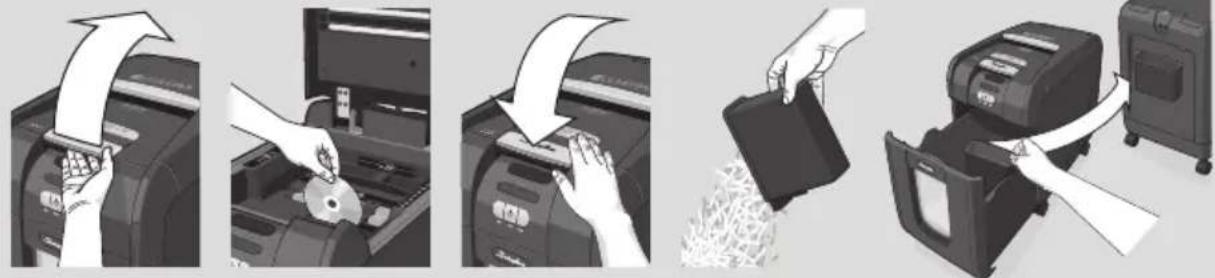
3. CD/DVD shredding

A separate CD/DVD tray is provided to collect the shredded CD/DVD shards, ensure that this is correctly mounted onto the bin before shredding.
1 Lift up the paper loading door.
2 Always insert CDs/DVDs in the CD/DVD slot. Only shred one CD/DVD at a time.
3 Close the paper loading door.
4 Empty the CD/DVD bin after 8 CDs/DVDs to avoid waste spilling over into the paper waste bin.
5 Remove the CD/DVD tray before recommencing to shred paper.
4. credit card shredding

1 Lift up the paper loading door.
2 Insert the credit card into the roller as shown. Only shred one credit card at a time.
3 Close the paper loading door.
Swingline encourages customers to recycle shredded paper.
Please note that shredded paper cannot be recycled if mixed with credit card shards. If recycling, please separate shredded paper and credit cards.
5. bin full
The shredder will not function when the bin is full and the bin full symbol ( ) is illuminated. You should empty the bin.
- Pull open the bin slowly to empty.
- Push the empty bin back into place and press the auto button to resume shredding.
over heating
If the Stack and Shred 230X & 230XL is used continuously for over 10 minutes the shredder may overheat and the cool down indicator will flash red ( ). Please allow the shredder to cool down. When the shredder is ready to be used the thermometer symbol will no longer illuminate. If the shredder needs to cool down while shredding, no action is needed. The shredder will automatically restart shredding paper once it has cooled down after periods of continuous use. All you need to do is ensure paper is loaded into the chamber and the bin is empty when the machine is cooling down.
6. self-cleaning cutters
After emptying and replacing a full bin, the shredder will run in forward for 4 seconds, stop for 2 seconds and then reverse for 4 seconds to clear away any remaining paper from the cutter mechanism. This unique ‘self-cleaning’ mechanism is additional jam prevention technology from Swingline.
lubrication of the shredder
Only use oil sheets to lubricate. ACCO Brands accepts no liability for product performance or safety when other types of lubricants are used on any part(s) of this machine. Insert the oil sheet into the manual feed slot and NOT in the auto-feed chamber. Using an oil sheet in the auto-feed chamber will contaminate the feed rollers preventing the auto-feed mechanism shredding. Follow the maintenance instructions if the rollers become contaminated. Do not directly oil the shredder.
7. maintenance
The rollers on the auto-feed mechanism may become dirty over time, please wipe clean with a dry cloth to maintain maximum product performance.
The auto-start infra-red sensor, located in the paper feed entry-slot, can occasionally become covered in paper-dust causing the shredder to run despite no paper being fed into the machine. Switch the shredder off at the rear of the machine and carefully clean the sensor using a cotton-swab.
service
We recommend these machines are serviced every 6 to 12 months by a Swingline service engineer – see back of this booklet for the contact details of your local service centre and for enquiries about maintenance contracts.
shredder accessories
We recommend that a paper waste sack for recycling shredded paper is used on all models.
| Accessory Part Number Box Quantity | ||
| Recycling Waste Sack | 1765031 | 20 sacks |
| Plastic Waste Sack | 1765016 | 100 sacks |
FCC CLASS B NOTICE
Note: This equipment has been tested and found to comply with the limits for a Class B digital device, pursuant to part 15 of the FCC Rules. These limits are designed to provide reasonable protection against harmful interference in a residential installation. This equipment generates, uses and can radiate radio frequency energy and, if not installed and used in accordance with the instructions, may cause harmful interference to radio communications. However, there is no guarantee that interference will not occur in a particular installation. If this equipment does cause harmful interference to radio or television reception, which can be determined by turning the equipment off and on, the user is encouraged to try to If this equipment does cause harmful interference to radio or television reception, which can be determined by turning the equipment off and on, the user is encouraged to try to correct the interference by one or more of the following measures:
Reorient or relocate the receiving antenna.
Increase the separation between the equipment and receiver.
Connect the equipment into an outlet on a circuit different from that to which the receiver is connected.
Consult the dealer or an experienced radio/TV technician for help.
CANADA CLASS B NOTICE
This Class B digital apparatus complies with Canadian ICES-003
MODIFICATIONS
Any modifications made to this device may void the authority granted to the user by the FCC and/or by Industry Canada to operate this equipment.
ACCO is a registered trademark of ACCO Brands.
© 2016 ACCO Brands. All rights reserved.
technical specifications
Swingline Stack and Shred 230X/230XL
| Sheet capacity:Manual feed slot | 7 sheets (80gsm) |
| Sheet capacity:Autofeed chamber | 230 sheets (80gsm) |
| Duty Cycle 10 min ON / 40 min OFF | |
| Run time from cold 14 minutes | |
| Volts / Hz 120V / 60Hz | |
| Amperage 1.2 Amps | |
| Motor Watts 270 Watts | |
Limited Warranty
Limited 2 year Cutter Warranty for Stack and Shred 230X/230XL Shredder and Limited 2 Year Warranty for all other Parts
ACCO Brands USA LLC, Four Corporate Drive, Lake Zurich, IL 60047-8997 (in Canada, ACCO Brands Canada Inc, 7381 Bramalea Road, Mississauga, L5S 1C4, Ontario, Canada; and in Mexico, ACCO Mexicana, S.A. de C.V. Av. Circuito Industrial Norte #6 Parque Industrial Lerma 52000, Lerma Edo. De México) (each, respectively, "ACCO Brands") warrants to the original purchaser that the cutters of this Swingline™ Stack and Shred 230X/230XL Shredder are free from defects in workmanship and material under normal use and service for a period of 2 years after purchase and all other parts are free from defects in workmanship and material under normal use and service for a period of 2 years after purchase.
ACCO Brands' obligation under this warranty is limited to replacement or repair, at ACCO Brands' option, of any warranted part found defective by ACCO Brands without charge for material or labor. Any replacement, at ACCO Brands' option, may be the same product or a substantially similar product that may contain remanufactured or refurbished parts. This warranty shall be void in the following circumstances:
(i) if the product has been misused,
(ii) if the product has been damaged by negligence or accident, or
(iii) if the product has been altered by anyone other than ACCO Brands or ACCO Brands' authorized agents.
For warranty execution, please call:
1-800-541-0094 in the USA
1-800-268-3447 in Canada
01-(55)-1500-5700 / 5778 in Mexico
Or go to www.swingline.com.
TO THE EXTENT ALLOWED BY APPLICABLE LAW, THIS WARRANTY IS IN LIEU OF ALL OTHER EXPRESSED WARRANTIES. REPRESENTATIONS OR PROMISES INCONSISTENT WITH OR IN ADDITION TO THIS WARRANTY ARE UNAUTHORIZED AND SHALL NOT BE BINDING ON ACCO BRANDS. TO THE EXTENT PERMITTED BY APPLICABLE LAWS, ANY IMPLIED WARRANTIES (IF APPLICABLE) ARE LIMITED IN DURATION TO THE DURATION OF THIS WARRANTY. SOME STATES AND JURISDICTIONS DO NOT ALLOW LIMITATIONS ON HOW LONG AN IMPLIED WARRANTY LASTS, SO THE ABOVE LIMITATION MAY NOT APPLY TO YOU. TO THE EXTENT PERMITTED BY APPLICABLE LAW, IN NO EVENT SHALL ACCO BRANDS BE LIABLE FOR ANY SPECIAL, INCIDENTAL, PUNITIVE, EXEMPLARY, CONSEQUENTIAL OR SIMILAR DAMAGES, WHETHER OR NOT FORSEEABLE. SOME STATES AND JURISDICTIONS DO NOT ALLOW THE EXCLUSION OR LIMITATION OF SPECIAL, INCIDENTAL, PUNITIVE, EXEMPLARY, CONSEQUENTIAL, OR SIMILAR DAMAGES, SO THE ABOVE EXCLUSION OR LIMITATION MAY NOT APPLY TO YOU.
FOR CONSUMERS WHO HAVE THE BENEFIT OF CONSUMER PROTECTION LAWS OR REGULATIONS IN THEIR JURISDICTION OF PURCHASE OR, IF DIFFERENT, IN THEIR JURISDICTION OF RESIDENCE, THE BENEFITS CONFERRED BY THIS WARRANTY ARE IN ADDITION TO ALL RIGHTS AND REMEDIES CONVEYED BY SUCH CONSUMER PROTECTION LAWS AND REGULATIONS.
To the extent permitted by law, this warranty is not transferable and will automatically terminate if the original product purchaser sells or otherwise disposes of the product.
This warranty gives you specific legal rights. Other rights, which vary from jurisdiction to jurisdiction, may exist. In addition some jurisdictions do not allow (i) the exclusion of certain warranties, (ii) limitations on how long an implied warranty lasts and/or (iii) the exclusion or limitation of certain types of costs and/or damages, so the above limitations may not apply.
Swingline Stack and Shred 230X / 230XL
Swingline Stack and Shred 230X/230XL
Swingline Stack and Shred 230X/230XL
Rexel Shredding / Destructeurs / Aktenvernichter
GBC Binding / Perforelieuses / Bindegeräte


- STACK-AND-SHRED230X&230XL™
- SHREDDERS
- WARNING SYMBOLS
- CONTROL PANEL AND INDICATORS
- PAPER LOADING DOOR/BIN DOOR OPEN INDICATOR
- STACK AND SHRED 230X/230XL SHREDDING CAPABILITY
- STACK AND SHRED 230X/230XL CAN SHRED THE FOLLOWING
- STACK AND SHRED 230X/230XL CAN SHRED (THROUGH THE MANUAL FEED SLOT)
- STACK AND SHRED 230X/230XL CANNOT SHRED THE FOLLOWING
- BIN OR LOADING DOOR OPEN SAFETY FUNCTION
- INTELLIGENT HELP
- AUTOMATIC JAM CLEARANCE
- 230XL ONLY LOCKING THE PAPER LOADING DOOR
- OPERATION
- 230XLONLY
- REVERSE FUNCTION
- CD/DVD SHREDDING
- CREDIT CARD SHREDDING
- BIN FULL
- OVER HEATING
- SELF-CLEANING CUTTERS
- LUBRICATION OF THE SHREDDER
- MAINTENANCE
- SERVICE
- SHREDDER ACCESSORIES
- FCC CLASS B NOTICE
- TECHNICAL SPECIFICATIONS
- LIMITED WARRANTY
Brand : Swingline
Model : StackandShred 230X
Category : Shredder