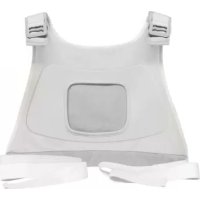
BlueTouch PR3721 - Pain therapy device PHILIPS - Free user manual and instructions
Find the device manual for free BlueTouch PR3721 PHILIPS in PDF.


| Product type | Strap for pain relief patch |
| Brand | Philips |
| Model | BlueTouch PR3721 |
| Application | Upper back |
| Compatibility | BlueTouch PR3092, PR3731, PR3733, PR3741, PR3743 |
| Material | Fabric with elastic bands and Velcro |
| Color | Black (typical) |
| Dimensions (estimated) | Adjustable length approx. 80-120 cm, width approx. 15 cm |
| Weight (estimated) | Approx. 100 g |
| Usage | Worn like a backpack, adjusted with elastic straps, secured with Velcro |
| Care | Machine wash at 30°C in a fine mesh bag, air dry, do not use bleach, do not iron, do not dry clean |
| Symbols | Wash temperature 30°C, no bleach, no tumble dry, no ironing, no dry cleaning, Oeko-Tex 100, CE, lot marking |
| Warranty | Limited warranty, does not cover straps |
| Customer service | www.philips.com/support, phone +971 6 5178727 |
| Alternative reference | PR3723 for lumbar region |
Frequently Asked Questions - BlueTouch PR3721 PHILIPS
User questions about BlueTouch PR3721 PHILIPS
0 question about this device. Answer the ones you know or ask your own.
Ask a new question about this device
Download the instructions for your Pain therapy device in PDF format for free! Find your manual BlueTouch PR3721 - PHILIPS and take your electronic device back in hand. On this page are published all the documents necessary for the use of your device. BlueTouch PR3721 by PHILIPS.
USER MANUAL BlueTouch PR3721 PHILIPS
Always here to help you
Register your product and get support at
www.philips.com/welcome
PR3723
PR3721







15

17

18
19
20

21
ENGLISH 6
FRANÇAIS 9
14
17
Introduction
Read this user manual carefully before you use the straps for the BlueTouch Pain Relief Patch and save it for future reference.
Intended use
The BlueTouch Pain Relief Patch is a device that is intended to be used on the upper or lower back and that can be positioned and adjusted on the treatment area by means of a fabric strap. There are separate straps for upper back and lower back.
- Lower back straps are available under type number PR3723.
- Upper back straps are available under type number PR3721.
The straps are designed to be used with BlueTouch product types PR3092, PR3731, PR3733, PR3741 and PR3743.
Important
- Use the BlueTouch Pain Relief Patch in one of the Philips straps that has been specially designed for it.
- To prevent damage to the BlueTouch Pain Relief straps, wash them in a fine-mesh washing bag.
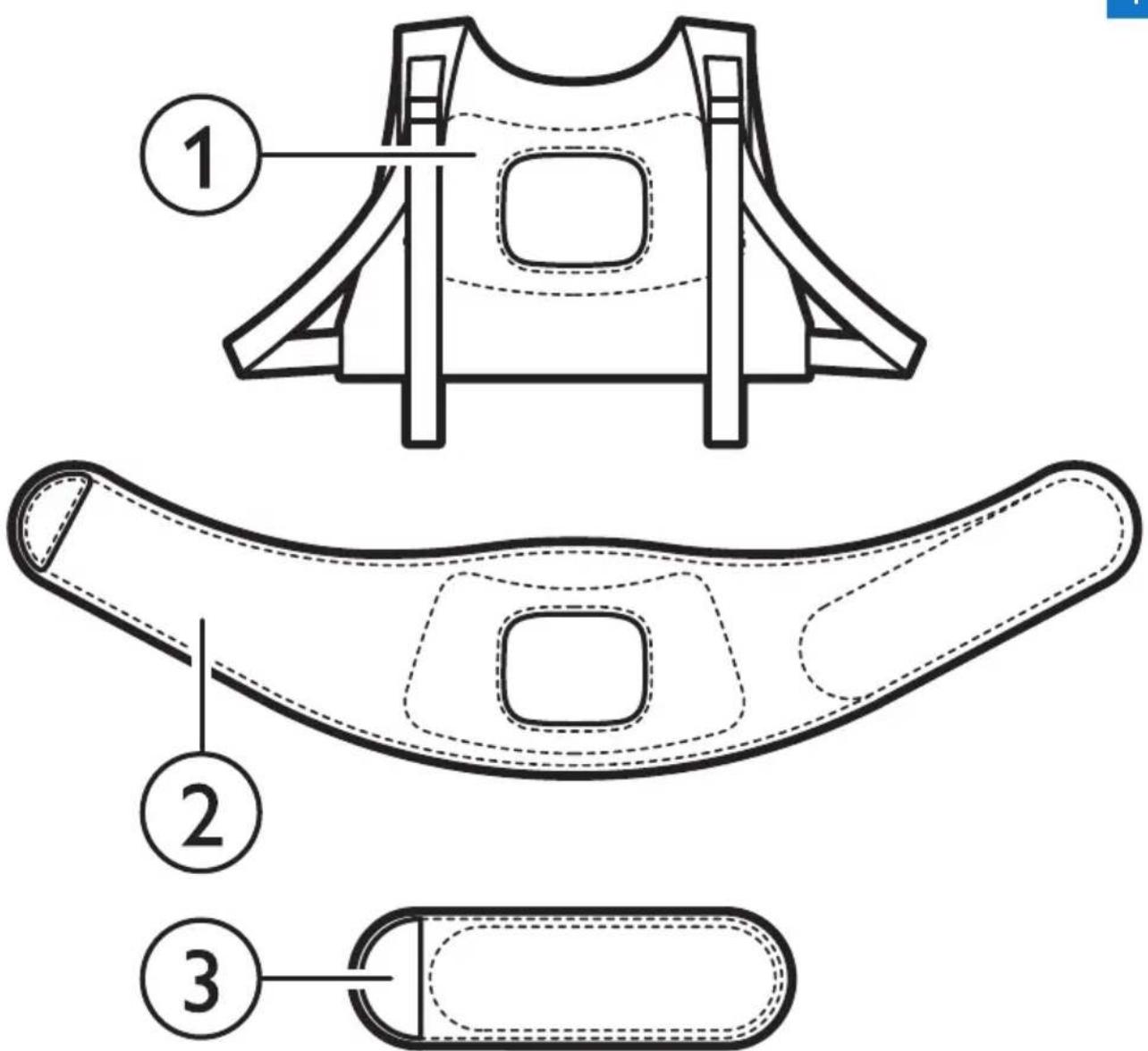
Product overview (Fig. 1)
1 Upper back strap PR3721
2 Lower back strap PR3723
3 Extension strap PR3723
Using your BlueTouch straps
You position the BlueTouch Pain Relief Patch on your body with one of the straps supplied with the device. There is a special strap for treatment of the upper back and a special strap for treatment of the lower back.
Note: Do not wear multiple layers of clothing or tight or thick clothing over the BlueTouch Pain Relief Patch.
Positioning the lower back strap
To place the BlueTouch Pain Relief Patch in the lower back strap, follow the steps below.
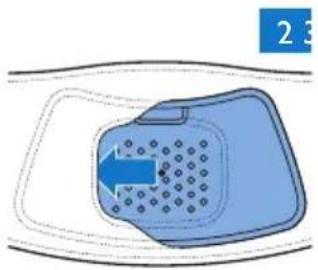
1 Place the lower back strap and the BlueTouch Pain Relief Patch in front of you on a table. Slide the left side of the BlueTouch Pain Relief Patch behind the elastic edge of the opening in the strap. (Fig. 2)
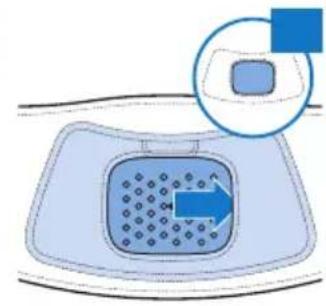
2 Then slide the other end of the BlueTouch Pain Relief Patch behind the opposite elastic edge of the opening so that the whole patch is inside the lower back strap. Check to make sure that material of the strap does not cover the LEDs. If necessary, shift the BlueTouch Pain Relief Patch a little (Fig. 3).
3 Remove clothing from the area to be treated.
Note: Make sure the skin in the area to be treated is clean, entirely dry and free from creams, lotions and other cosmetics.
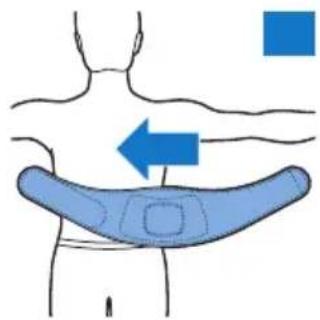
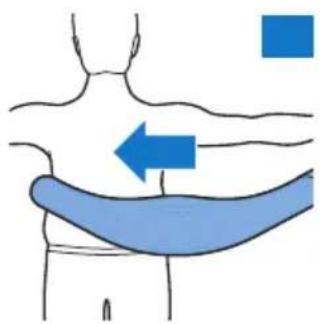
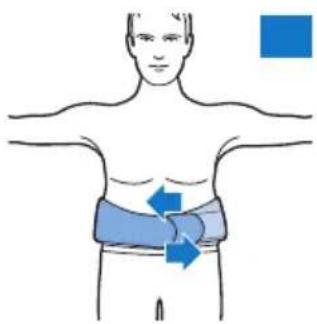
4 Wrap the lower back strap with the BlueTouch Pain Relief Patch in it around your waist with the treatment area of the device facing your back (Fig. 4).
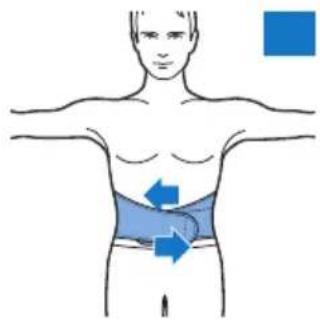
5 Fasten the lower back strap with the Velcro strips on both ends of the lower back strap (Fig. 5).
Note: Make sure the BlueTouch Pain Relief Patch in the strap is located on the area to be treated and the treatment area is in contact with the skin.
If the lower back strap does not fit around your body, you can do the following.
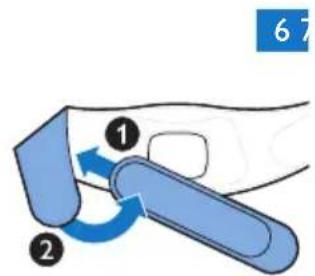
1 Attach the extension strap to the Velcro strip on one end of the lower back strip (Fig. 6).
2 Then wrap the extended lower back strip around your body (Fig. 7).
3 Fasten the lower back strap with the Velcro strip at a width that feels comfortable (Fig. 8).
Positioning the upper back strap
1 To put the BlueTouch Pain Relief Patch in the upper back strap, follow the same procedure as described in steps 1 and 2 in section 'Positioning the lower back strap' above.
2 Remove clothing from the area to be treated.
Note: Make sure the skin in the area to be treated is clean, entirely dry and free from creams, lotions and other cosmetics.
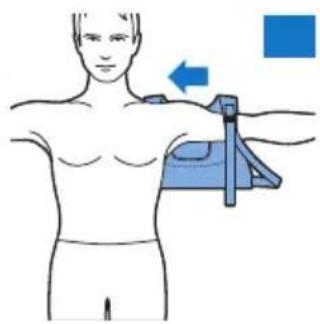
3 Put on the upper back strap like a backpack. First, put one arm through the shoulder sling on one side. Then do the same on the other side (Fig. 9).
Note: Make sure the BlueTouch Pain Relief Patch in the strap is located on the area to be treated and the LED area is in contact with the skin.
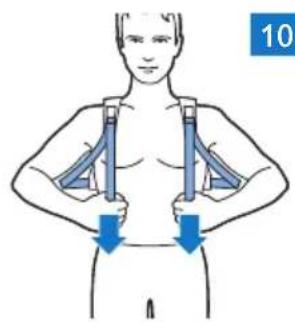
4 Tighten the shoulder slings by pulling the elastic straps (Fig. 10).
Cleaning
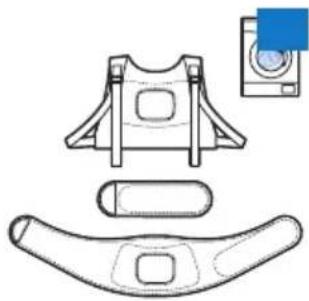
Always remove the BlueTouch Pain Relief Patch from the strap before you put the strap in the washing machine to clean it.
- The BlueTouch Pain Relief straps can be washed in the washing machine (Fig. 11).
Caution: To prevent damage to the BlueTouch Pain Relief straps, wash them in a fine-mesh washing bag.
- Use a gentle cycle and a temperature of 30^ maximum. Dry the BlueTouch Pain Relief straps on the air and not in the tumble dryer. Do not iron the straps.
Replacement
You can buy new straps from your dealer or in the online shop at www.shop.philips.com/service.
Lower back straps
- PR3723: Lower back strap
Upper back straps
- PR3721: Upper back strap
Guarantee and support
If you need service or information or if you have a problem, please visit our website at www.philips.com/support or contact the Philips Consumer Care Centre in your region. You can reach this centre at telephone number +971 6 5178727.
Guarantee restrictions
The guarantee of the BlueTouch Pain Relief device does not cover the straps.
Manufacturer's legal address
Philips Consumer Lifestyle B.V.
Tussendiepen 4, 9206 AD Drachten, Netherlands
Explanation of symbols
- This symbol means: Wash at a temperature of 30^ max (Fig. 12).
- This symbol means: Do not bleach (Fig. 13).
- This symbol means: Do not tumble-dry (Fig. 14).
- This symbol means: Do not iron (Fig. 15).
- This symbol means: do not dry clean (Fig. 16).
- This symbol means that the material has been tested for harmful substances according to Oeko-Tex standard 100. (Fig. 17)
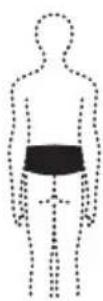
- This symbol means that you have to use this strap on the lower back. (Fig. 18)
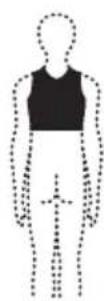
- This symbol means that you have to use this strap on the upper back (Fig. 19).
- This symbol means: Conforms to EC Directives. CE stands for 'Conformité Européenne'. 0344 indicates the notified body number (Fig. 20).
- This symbol means 'Manufactured by' and appears next to the address of the legal manufacturer (Fig. 21).
- This symbol means: read the user manual before you start using the device (Fig. 22).
- This symbol indicates the manufacturer's batch code so that the batch or lot can be identified (Fig. 23).
- This symbol means that the packaging material is recyclable (Fig. 24).
Introduction
www.shop.philips.com/service jj j j j j j j j j j j j j j j j j
yj y jy jy
PR3723
21 jiu yu sljgi
xLj:PR3721
juiy g iia
jy www.philips.com/support Philips jy j j j j j j j j j j j j j
J 1
Cilaw slgiuio
Blue Touch Pain Relief Patch
auiu jilai
Philips Consumer Lifestyle B.V
Netherlands,9206 AD Drachten,Tussendiepen 4
#
(17)
(irJ)aiaolaij:cllclc
(17)Sui 05aiuol Suij:cuwl cioclc jieo
(10J)gj:cll cslj
(15)S:
yjdaal ygoas xL cuao jduyjgi as wol iou 1d coxc
40120
y BlueTouch Pain Relief Patch, 1g j 1s
jbi jggo olaai
aIg a g a a a a a a a a a a a a a a a a a a a a a a a a a a a a a a a a a a a a a a a a a a a a a a a a a a a a a a a a a a a a a a a a a a a a a a a a a a a a a
#
a d s a d s d s d s d s d s d s d s d s d s d s d s d s d s d s d s d s d s d s d s d s d s d s d s d s d s d s d s d s d s d s d s d s d s d s d s d s d s d s d s d s d s d s d s d s d s d s d s d s d s d s d
(1)
PR3721 sUjg PR3723 uUjg PR3723 uUjg
BlueTouch
ybln 1 y 1 1 1 1 1 1 1 1 1 1 1 1 1 1 1 1 1 1 1 1 1 1 1 1 1 1 1 1
S J 15
BlueTouch 1 BlueTouch Pain Relief Patch gss y BnBn BnBn BnBn BnBn BnBn BnBn BnBn BnBn BnBn BnBn BnBn BnBn BnBn BnBn BnBn BnBn BnBn BnBn BnBn BnBn BnBn BnBn BnBn BnBn BnBn BnB n BnB n BnB n BnB n BnB n BnB n BnB n BnB n BnB n BnB n BnB n BnB n BnB n BnB n BnB n BnB n BnB n BnB n BnB n BnB n BnB n BnB n BnB n BnB n BnB n BnB
J 15 J 15 J 15 J 15 J 15 J 15 J 15 J 15 J 15 J 15 J 15 J 15 J 15 J 15 J 15 J 15 J 15 J 15 J 15 J 15 J 15 J 15 J 15 J 15 J 15 J 15
.(rrJ)jIJI pUwU C u JpUwUALL JdAeJgO:giyjll i 1
.(rrJ)aeJl Jc Jeyill juiy Jdeiauall Aaill aegj yjll joyll liu 1
.(rEJ)ugill aLx dlaiai Igo joyll iia
Lgale jall aebial no walsall allj
Jgwlglclssll no lalai loglsg lgsaegpiallo jall aabiaill oagagall aull albi no s: abdo
S ACD = S COD + S_ DCA
1 1
(9 J)J 1
aabio ggele jyall abioll jpljll sglgall BlueTouch Pain Relief Patch gog no Sli: abdo
.
(1.5) a|b|ball doj>xl jds no aiill cdoa b,
#
.
(11) BlueTouch Pain Relief Patch
.
BlueTouch Pain Relief Patch aojj jn .dagto drgg dgs
dojX15 egiao.ooall g 1g 1gell
J
www.shop.philips.com/service
jaiJaiJao
ai a ai 分母最小值为 k .
yall doj
ab|c|p>:PR3721
pcllg clawll
a 1
Philips jlll llll aas jyww.philips.com/support jgiell Jc Philips
. +97165178727 1
Jalall
. 品 _ 0 > 出 BlueTouch Pain Relief Patch
aiaall aill gialllgiall
Philips Consumer Lifestyle B.V.
Netherlands,9206 AD Drachten,Tussendiepen 4
j003
(1r)
(irJ)aagjgao:joill
(125) aaxall daxjgiao:joillia
(10):gjiaojjli
(17 J) 2b bii aai bi jgioo joll iie
(IV J) 1.000eKo-Tex8Jalallabjalllgally aolll caiisssu gall joiil iia
(inj)jabll jaiiaabio lc plall iipaxwol dggjogll jie
(19 J) jbl lcl aabio lc pljll iol plssuol dggjoyllie
J 10000000000000000000000000000000000000000000
(1)
(1)J5)aicaiill aieoall aajll agic jggybgy“abwglgceio”jolli
ao
Laiu 10000000000000000000000000000000000000000000000000000000000
plssuiwJgolg
Jc abgag gagagagagagagagagagagagagagagagagagagagagagagagagagagagagagagagagagagagagagagagagagagagagagagagagagagagagagagagagagagagagagagagagagagagagagagagagagagagagagagagag
.PR3723 aj,b cni adgio jbl Jawl aoj
.PR3721 pjbjcb cns jagio jblc aojai
. PR3743, PR3741, PR3733, PR3731, PR3092, BlueTouch go pssuul aoao dojx
plo
dL aannnll Philips aojf BlueTouch Pain Relief Patch pss
.
(1)
PR3721j.bjbjll jx pji 1
PR3723jbjjbjll jaxx pjj 2
PR3723j,ballb p
BlueTouch aojjplsi
J 100000000000000000000000000000000000000000000000000000
BlueTouch Pain Relief Patch ggs aSawg aas ylo g wll o clab 8: abx
jaiol p> gogu
a 1 a 1 1 1 1 1 1 1 1 1 1 1 1 1 1 1 1 1 1 1 1 1 1 1 1 1
1
.(J)pJl jai jai jai jai BlueTouch Pain Relief Patch
aaball Jss sasaaasaaasaaasaaasaaasaaasaaasaaasaaasaaasaaasaaasaaasaaasaaasaaasaaasaaasaaasaaasaaasaaasaaasaaasaaasaaasaaasaaasaaasaaasaaasaaasaaasaaasaaasaaasaaasaaasaaasaaasaaasaaasaaasaaasaaasaaasaaasaaasaaasaaasaaa
BlueTouch jj j j j j j j j j j j j j j j j j j j j j j j j j j j j j j j j j j j j j j j j j j j j j j j j j j j j j j j j j j j j j j j j j j j j j j j j j j j j j j
Lgale jall aebial no wslal alljpe
Jgwlglclssll co laai lgslg glaeglgeleoo jall aebioa jaggall ayilll ai bci no s:
S AOB = S AOC + S_ OBC
Jg jll aabio g Jg BlueTouch Pain Relief Patch 1
( , ) = ,1 - 12( + )
(0 J) jj 15 Velcro abj jj
g 1e 1yall abiaill Jc ggo pljll Jslu ggal BlueTouch Pain Relief Patch j no s: a
.3juiuul uuslo zxlal abio
J 151
(7 J) jbljai jbj jb jc Velcro abj allbxj bji
(VJ)
(√Sii)dl jyall yelly Velcro bui jbi jai plj bi
yallolpfo
g 1 oBssll g aagaaal lgljg jai gai gblg jg BlueTouch Pain Relief Patch
oei jolil Jaioi pjo go yoo" po







- Always here to help you
- Introduction
- Intended use
- Important
- Product overview (Fig. 1)
- Using your BlueTouch straps
- Positioning the lower back strap
- Positioning the upper back strap
- Cleaning
- Replacement
- Guarantee and support
- Explanation of symbols
- juiy g iia
- #
- 40120
- jbi jggo olaai
- (1)
- BlueTouch
- J
- pcllg clawll
- j003
- ao
- plssuiwJgolg
- plo
- BlueTouch aojjplsi
- jaiol p> gogu
- yallolpfo
Brand : PHILIPS
Model : BlueTouch PR3721
Category : Pain therapy device