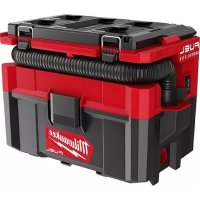
097020 - Vacuum Cleaner MILWAUKEE - Free user manual and instructions
Find the device manual for free 097020 MILWAUKEE in PDF.



| Product Type | Cordless Vacuum Cleaner |
| Brand | Milwaukee |
| Model | 097020 |
| Power Source | 18V M18 Lithium-ion Battery |
| Tank Capacity | 9.5 L (2.5 gallons) |
| Airflow | 23 L/s |
| Maximum Suction | 11 kPa |
| Main Filter | Washable Foam Filter |
| Optional Filter | Washable HEPA Filter (Part No. 49-90-1900) |
| Usage | Dry and Wet |
| Blow Mode | Yes |
| Automatic Shut-off for Liquids | Yes (Float) |
| Speeds | 2 (I and II) |
| Operating Temperature | -18°C to 50°C |
| Warranty | 5 years |
| Included Accessories | Hose, nozzles, tool adapter |
| Spare Parts Available | Dust bag (49-90-2016), brush (49-90-2017) |
| Weight | Approximately 4.5 kg |
Frequently Asked Questions - 097020 MILWAUKEE
User questions about 097020 MILWAUKEE
0 question about this device. Answer the ones you know or ask your own.
Ask a new question about this device
Download the instructions for your Vacuum Cleaner in PDF format for free! Find your manual 097020 - MILWAUKEE and take your electronic device back in hand. On this page are published all the documents necessary for the use of your device. 097020 by MILWAUKEE.
USER MANUAL 097020 MILWAUKEE
Cat. No. / No de cat.
0970-20
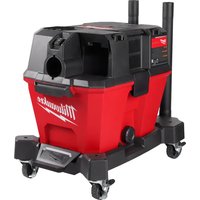
M18 FUEL™ PACKOUT™ 2.5 GALLON WET/DRY VACUUM ASPIRATEUR DE DÉTRITUS SECS ET HUMIDES DE 9,46 L (2,5 GAL) PACKOUT™ M18 FUEL™
ASPIRADORA EN SECO/HUMEDO PACKOUT™ M18 FUEL™ DE 9,46 L (2,5 GAL)
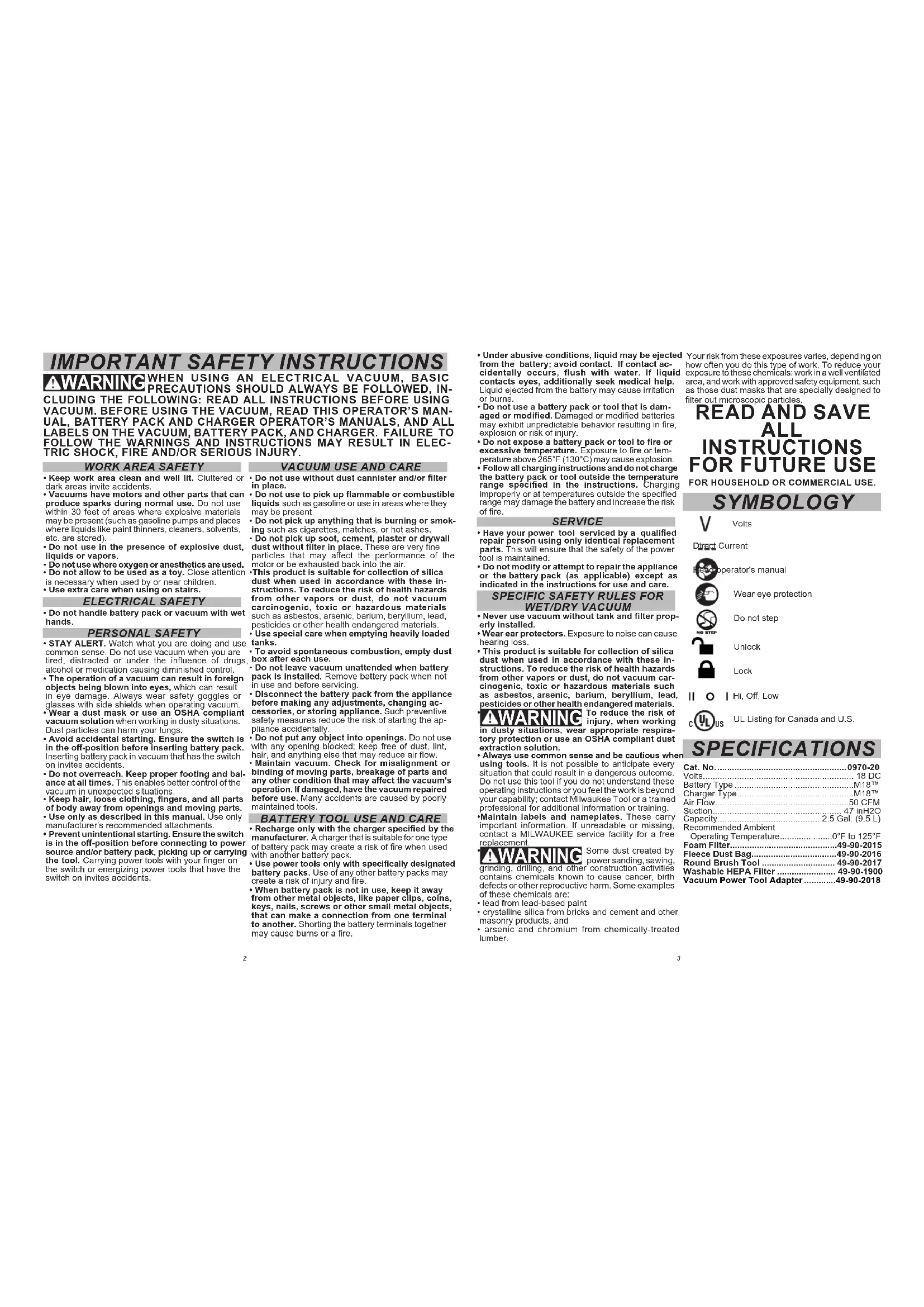
IMPORTANT SAFETY INSTRUCTIONS AWARNING WHEN USING AN ELECTRICAL VACUUM, BASIC PRECAUTIONS SHOULD ALWAYS BE FOLLOWED, INCLUDING THE FOLLOWING: READ ALL INSTRUCTIONS BEFORE USING VACUUM. BEFORE USING THE VACUUM, READ THIS OPERATOR'S MANUAL, BATTERY PACK AND CHARGER OPERATOR'S MANUALS, AND ALL LABELS ON THE VACUUM, BATTERY PACK, AND CHARGER. FAILURE TO FOLLOW THE WARNINGS AND INSTRUCTIONS MAY RESULT IN ELECTRIC SHOCK, FIRE AND/OR SERIOUS INJURY.
WORK AREA SAFETY
- Keep work area clean and well lit. Cluttered or dark areas invite accidents.
- Vacuums have motors and other parts that can produce sparks during normal use. Do not use within 30 feet of areas where explosive materials may be present (such as gasoline pumps and places where liquids like paint thinners, cleaners, solvents, etc. are stored).
- Do not use in the presence of explosive dust, liquids or vapors.
- Do not use where oxygen or anesthetics are used.
- Do not allow to be used as a toy. Close attention is necessary when used by or near children.
- Use extra care when using on stairs.
ELECTRICAL SAFETY
- Do not handle battery pack or vacuum with wet hands.
PERSONAL SAFETY
STAY ALERT. Watch what you are doing and use common sense. Do not use vacuum when you are tired, distracted or under the influence of drugs, alcohol or medication causing diminished control.
- The operation of a vacuum can result in foreign objects being blown into eyes, which can result in eye damage. Always wear safety goggles or glasses with side shields when operating vacuum.
- Wear a dust mask or use an OSHA compliant vacuum solution when working in dusty situations. Dust particles can harm your lungs.
- Avoid accidental starting. Ensure the switch is in the off-position before inserting battery pack. Inserting battery pack in vacuum that has the switch on invites accidents.
- Do not overreach. Keep proper footing and balance at all times. This enables better control of the vacuum in unexpected situations.
- Keep hair, loose clothing, fingers, and all parts of body away from openings and moving parts.
- Use only as described in this manual. Use only manufacturer's recommended attachments.
- Prevent unintentional starting. Ensure the switch is in the off-position before connecting to power source and/or battery pack, picking up or carrying the tool. Carrying power tools with your finger on the switch or energizing power tools that have the switch on invites accidents.
VACUUM USE AND CARE
- Do not use without dust cannister and/or filter in place.
- Do not use to pick up flammable or combustible liquids such as gasoline or use in areas where they may be present.
- Do not pick up anything that is burning or smoking such as cigarettes, matches, or hol ashes.
- Do not pick up soot, cement, plaster or drywall dust without filter in place. These are very fine particles that may affect the performance of the motor or be exhausted back into the air.
- This product is suitable for collection of silica dust when used in accordance with these instructions. To reduce the risk of health hazards from other vapors or dust, do not vacuum carcinogenic, toxic or hazardous materials such as asbestos, arsenic, barium, beryllium, lead, pesticides or other health endangered materials.
- Use special care when emptying heavily loaded tanks.
- To avoid spontaneous combustion, empty dust box after each use.
- Do not leave vacuum unattended when battery pack is installed. Remove battery pack when not in use and before servicing.
- Disconnect the battery pack from the appliance before making any adjustments, changing accessories, or storing appliance. Such preventive safety measures reduce the risk of starting the appliance accidentally.
- Do not put any object into openings. Do not use with any opening blocked; keep free of dust, lint, hair, and anything else that may reduce air flow.
- Maintain vacuum. Check for misalignment or binding of moving parts, breakage of parts and any other condition that may affect the vacuum's operation. If damaged, have the vacuum repaired before use. Many accidents are caused by poorly maintained tools.
BATTERY TOOL USE AND CARE
- Recharge only with the charger specified by the manufacturer. A charger that is suitable for one type of battery pack may create a risk of fire when used with another battery pack.
- Use power tools only with specifically designated battery packs. Use of any other battery packs may create a risk of injury and fire.
-
When battery pack is not in use, keep it away from other metal objects, like paper clips, coins, keys, nails, screws or other small metal objects, that can make a connection from one terminal to another. Shorting the battery terminals together may cause burns or a fire.
-
Under abusive conditions, liquid may be ejected from the battery; avoid contact. If contact accidentally occurs, flush with water. If liquid contacts eyes, additionally seek medical help. Liquid ejected from the battery may cause irritation or burns.
- Do not use a battery pack or tool that is damaged or modified. Damaged or modified batteries may exhibit unpredictable behavior resulting in fire, explosion or risk of injury.
- Do not expose a battery pack or tool to fire or excessive temperature. Exposure to fire or temperature above 265^ (130^) may cause explosion.
- Follow all charging instructions and do not charge the battery pack or tool outside the temperature range specified in the Instructions. Charging improperly or at temperatures outside the specified range may damage the battery and increase the risk of fire.
SERVICE
- Have your power tool serviced by a qualified repair person using only Identical replacement parts. This will ensure that the safety of the power tool is maintained.
- Do not modify or attempt to repair the appliance or the battery pack (as applicable) except as indicated in the Instructions for use and care.
SPECIFIC SAFETY RULES FOR WET/DRY VACUUM
- Never use vacuum without tank and filter properly installed.
- Wear ear protectors. Exposure to noise can cause hearing loss.
- This product is suitable for collection of silica dust when used in accordance with these instructions. To reduce the risk of health hazards from other vapors or dust, do not vacuum carcinogenic, toxic or hazardous materials such as asbestos, arsenic, barium, beryllium, lead, pesticides or other health endangered materials.
WARNING To reduce the risk of injury, when working in dusty situations, wear appropriate respiratory protection or use an OSHA compliant dust extraction solution. - Always use common sense and be cautious when using tools. It is not possible to anticipate every situation that could result in a dangerous outcome. Do not use this tool if you do not understand these operating instructions or you feel the work is beyond your capability; contact Milwaukee Tool or a trained professional for additional information or training.
- Maintain labels and nameplates. These carry important information. If unreadable or missing, contact a MILWAUKEE service facility for a free replacement.
WARNING Some dust created by power sanding, sawing, grinding, drilling, and other construction activities contains chemicals known to cause cancer, birth defects or other reproductive harm. Some examples of those chemicals are:
- lead from lead-based paint
crystalline silica from bricks and cement and other masonry products, and
- arsenic and chromium from chemically-treated lumber.
Your risk from these exposures varies, depending on how often you do this type of work. To reduce your exposure to these chemicals: work in a well ventilated area, and work with approved safety equipment, such as those dust masks that are specially designed to filter out microscopic particles.
READ AND SAVE ALL INSTRUCTIONS FOR FUTURE USE
FOR HOUSEHOLD OR COMMERCIAL USE.
SYMBOLOGY

Volts
Direct Current

rator's manual

Wear eye protection

Unlock

Lock

Hi, Off, Low

UL Listing for Canada and U.S.
SPECIFICATIONS
| Cat. No. | 0970-20 |
| Volts. | 18 DC |
| Battery Type | M18TM |
| Charger Type | M18TM |
| Air Flow | 50 CFM |
| Suction | 47 inH2O |
| Remarks | 3.6 Cat. (0.1) |
Recommended Ambient
| Operating Temperature | 0°F to 125°F |
| Foam Filter | 49-90-2015 |
| Fleece Dust Bag | 49-90-2016 |
| Round Brush Tool | 49-90-2017 |
| Washable HEPA Filter | 49-90-1900 |
| Vacuum Power Tool Adapter | 49-90-2018 |
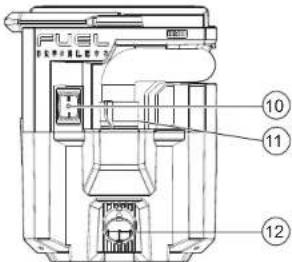
FUNCTIONAL DESCRIPTION
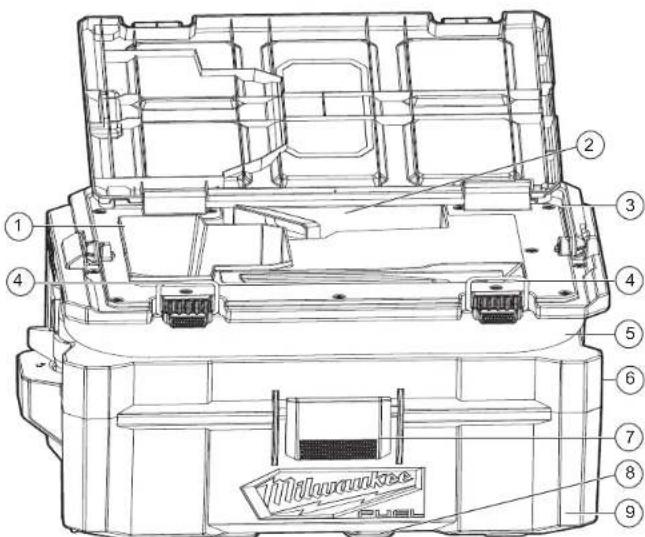
- Battery bay
- Accessory storage areas
3.Motor housing - Battery compartment latches
5.Hose - Blower port
- Tank latches (front and back)
- PACKOUT™ feet
- Tank
- Switch
- Inlet
- PACKOUTTM LOCK
ASSEMBLY
WARNING To reduce the risk of injury, always remove the battery pack before removing the tank.
CAUTION Keep filter clean. Efficiency of the vacuum is largely dependent on the filter. A dirty filter will reduce the air flow and overall efficiency of the system. Remove from tank and tap clean.
AWARNING Recharge only with the charger specified for the battery. For specific charging instructions, read the operator's manual supplied with your charger and battery.
Removing/Inserting the Battery
To remove the battery, push in the release buttons and pull the battery pack away from the tool.
AWARNING Always remove battery pack before changing
or removing accessories.
To insert the battery, slide the pack into the body of the tool. Make sure it latches securely into place.
Removing/Installing the Filter
Use the filter for dry pickup only.
1. Remove the battery pack. Close and latch the battery compartment.
2. Release the tank latches and lift off the motor housing. Place it upside down on a flat surface.
3. To remove the filter, turn it 1/2^n count clockwise and pull it off of the motor housing/float cage.
4. Empty all debris from the tank.
NOTE: When applicable, adhere to Jobsite guidelines pertaining to the disposal of silica dust.
5. To install the filter, slide it over the float cage. Line up the filter tabs with the motor housing notches and turn it 1/2 clockwise to lock in place.
6. Replace the motor housing and secure both latches.
Pick-Up/Blower
The vacuum can be used for debris pick-up or as a blower, depending on the port used.
1. For the debris pick-up, insert the large end of the hose into the intake port of the motor housing, lining up the tabs on the hose with the notches in the port. Twist to secure and form a tight fit.
2. To use as a blower, insert the large end of hose into the blower port ④ the motor housing, lining up the tabs on the hose with the notches in the port. Twist to secure and form a tight fit.
AWARNING Only use accessories specifically recom
mended for this tool. Others may be hazardous.
Installing/Removing the Accessories
To install the nozzles, hoses or extensions, push the accessory onto the vacuum inlet.
Installing the Vacuum Power Tool Adapter To install the vacuum power tool adapter, remove the general cleaning nozzle by unscrewing it from the end of the hose. Twist the power tool adapter onto the exposed hose section until tight for a secure fit.
OPERATION
AWARNINGTo reduce the risk of injury, always wear proper eye protection marked to comply with ANSI Z87.1.
When working in dusty situations, wear appropriate respiratory protection or use an OSHA compliant dust extraction solution.
To reduce the risk of fire and injury, do not use to pick up flammable or combustible materials. To reduce the risk of injury, wear safety goggles or glasses with side shields. Empty tank before use.
Before use, ensure the filter and float cage are properly installed. Remove filter before all wet pick-up operations.
Starting and Stopping Vacuum
To turn the vacuum on low, push the switch to the Speed One (I) position.
To turn the vacuum on high, push the switch to the Speed Two (II) position.
To turn off the vacuum, push the switch to the OFF (O) position.
CAUTION If the float is clean, moves freely, and the suction does not shut off when the tank is filled, contact a
MILWAUKEE service facility for repairs. A malfunctioning tool can cause personal injury or property damage.
Wet Pick-Up Operation
For wet pick-up operation, it is recommended to use the foam filter (Single pack, Cat. No. 49-90-2015).
2 Remove the filter. Ensure that the float cage remains in place.
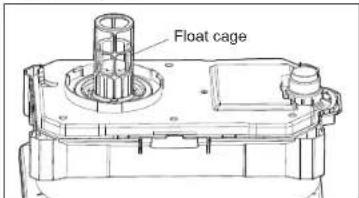
- A float cage shuts off suction when the tank is full Be sure that the float is clean and moves freely in the float cage to ensure that the float valve works. 4. Turn on the vacuum and begin pick-up.
- Turn off the vacuum immediately upon completing a wet pick-up job or when tank is full and ready to be emptied.
NOTE: If suction shuts off, turn off the vacuum
immediately and empty the tank - Remove the battery pack.
- Raise the hose to drain any excess liquid into the tank.
- Remove motor housing and pour liquid waste into a suitable drain.
- Clean the interior of the tank and pick-up accessories periodically, more often when used to pick up wet, sticky materials. Use warm, soapy water.
Automatic Suction Shut-Off
When picking up liquids, an internal float rises until it seats itself against a seal at the intake of the motor, shutting off suction. When this happens, the motor will develop a higher than normal pitch noise and the suction is drastically reduced. If this occurs, turn off the vacuum immediately.
CAUTION: Failure to turn off unit after float rise and shuts off suction will result in extensive damage to the motor.
To continue use, empty the liquid waste from the tank. NOTE: If the vacuum is accidentally tipped over, it could lose suction. Turn off the vacuum and return it to an upright position. The float will return to its normal position.
Fine Dust Collection
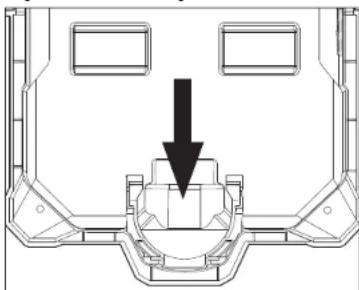
For increased filter life and ease of cleanup, use a fleece dust bag to collect fine dust particles (Single pack, Cat. No. 49-90-2016).
To install the fleece dust bag, slide the cardboard bag inlet into the dust bag holder.
Storage
Before storing your vacuum, empty and clean the tank, filter, and accessories. Remove the batter pack.
MAINTENANCE
AWARNING To reduce the risk of Injury, always unplug the charger and remove the battery pack from the charger or tool before performing any maintenance. Never disassemble the tool, battery pack or charger. Contact a MILWAAKEE service facility for ALL repairs.
Maintaining Tool
Keep your tool, battery pack and charger in good repair by adopting a regular maintenance program. Inspect your tool for issues such as undue noise, misalignment or binding of moving parts, breakage of parts, or any other condition that may affect the tool operation. Return the tool, battery pack, and charger to a MILWAUKEE service facility for repair. After six months to one year, depending on use, return the tool, battery pack and charger to a MILWAUKEE service facility for inspection.
If the tool does not start or operate at full power with a fully charged battery pack, clean the contacts on the battery pack. If the tool still does not work properly, return the tool, charger and battery pack, to a MILWAUKEE service facility for repairs.
AWARNINGTo reduce the risk of personal injury and
damage, never immerse your tool, battery pack or charger in liquid or allow a liquid to flow inside them.
Cleaning
Clean dust and debris from vents. Keep handles clean, dry and free of oil or grease. Use only mild oils soap and a damp cloth to clean, since certain cleaning agents and solvents are harmful to plastics and other insulated parts. Some of these include gasoline.
Borpentine, lacquer thinner, paint thinner, chlorinated cleaning solvents, ammonia and household detergents containing ammonia. Never use flammable or combustible solvents around tools.
Cleaning the Filter
To clean the filter, tap clean, or rinse in water. NOTE: If cleaning with water, let filter dry 24 hours before using with vacuum. Replace filter if damaged or suction decreases.
Repairs
For repairs, return the tool, battery pack and charger to the nearest authorized service center.
ACCESSIONS
WARNING Use only recommended accessories. Others may be hazardous.
For a complete listing of accessories, go online to www.milwaukeetool.com or contact a distributor.
SERVICE - UNITED STA
1-800-SAWDUST (1.800.729.3878)
Monday-Friday, 7:00 AM - 6:30 PM CST
or visit www.milwaukeetool.com
Contact Corporate After Sales Service Technical Support with technical, service/repair, or warranty questions.
Email: metproductsupport@milwaukeeetool.com
Become a Heavy Duty Club Member at www.mllwaukeeetool.com to receive important notifications regarding your tool purchases.
SERVICE- CANADA
Milwaukee Tool (Canada) Ltd
1.800.268.4015
Monday-Friday, 7:00 AM - 4:30 PM CST
or visit www.milwaukeetool.ca
LIMITED WARRANTY USA & CANADA
Every MILWAUKEE power tool (see exceptions below) is warranted to the original purchaser only to be free from defects in material and workmanship. Subject to certain exceptions, MILWAUKEE will repair or replace any part on an electric power tool/which, after examination, is determined by MILWAUKEE to be defective in material or workmanship. The Milwauke shall be notified of this defect and shall be otherwise noted. Return of the power tool to a MILWAUKEE factory Service Center location or MILWAUKEE Authorized Service Station, freight prepaid and insured, is required. A copy of the proof of purchase should be included with the return product. This warranty does not apply to damage that MILWAUKEE determines to be from repairs or workmanship problems other than MIL WAUKEE authorized personnel, misuse, alterations, abuse, normal wear and tear, lack of maintenance, or accidents.
Normal Wear: Many power tools need periodic parts replacement and maintenance. The tool should be used to replace the tool when it is damaged or needs to be repaired when normal use has exhausted the life of a part including, but not limited to, chucks, brushes, cords, saw, shoes, blade clamps, and other tools. Drivers, drivers, drivers, drivers, drivers, drivers, drivers, drivers, drivers, drivers, drivers, drivers, drivers, drivers, drivers, drivers, drivers, drivers, drivers, drivers, drivers, drivers, drivers, drivers, drivers, drivers, drivers
- This warranty does not cover Air Nailers & Staplers: Airless Paint Sprayer; Cordless Battery Packs; Gasoline Driven Portable Power Generators; Hand Tools; Hoist - Electric, Lever & Hand Chain; M12TM Healed Gear; Reconditioned Product; and Test & Measurement Products. There are separate and distinct warranties available for these products.
The warranty period for Job Site Radios, M12™ Power Port, M18™ Power Source, Jobsile Fan and Trade Titan™ Industrial Work Carts is one (1) year from the date of purchase. The warranty period for the product will be 3 years from the date of purchase. The warranty period for the M18™ Compact Heat Gun, 8 Gallon Dust Extractor, M18™ Framing Nails, M18 FUEL™ 1/2" Ext Arvil Conrolled Torque Impact Wrench or ONE-KEY M18 FUEL™ Pressure Drop, M18™ Airflow Filter, M18™ Flex, M18™ Compact Outlet Compressor, and M12™ Laser Levels is three (3) years from the date of purchase. The warranty period for the LED in the LED Work Light and the LED Upgrade Bulb for the Work Light is the lifetime of the product subject to the limitations above. If during normal use conditions the product has been modified, the Warranty Certificate will be required. Warranty Registration is not necessary to obtain the applicable warranty on a MILWAKEE power tool product. The manufacturing date of the product will be used to determine the warranty period if no proof of purchase is provided at the time warranty service is requested. ACCEPTANCE OF THE EXCLUSIVE REPAIR AND REPLACEMENT PROCEDURE FOR ALL MILWAKEE POWER工具件及配件. WARRANTY FOR THE PURCHASE OF EVERY MILWAKEE PRODUCT IF YOU DO NOT AGREE TO THIS CONDITION. YOU SHOULD NOT PURCHASE THE PRODUCT. IN NO EVENT SHALL MILWAKEE BE LIABLE FOR ANY INCIDENTAL, SPECIAL, CONSEJUNCTIONAL OR PUNITIVE DAMAGES. OR FOR ANY COSTS, ATTORNEY FEES, OR OTHER COSTS. YOUR WARRANTY WILL NOT BE ISSUED WITHOUT A PROVISION FOR FAILURE OF ALL OTHER EXPRESS WARRANTY. WRITTEN OR ORAL, TO THE EXTENT PERMITTED BY LAW. MILWAKEE DISCLAIMS ANY IMPLIED WARRANTY, INCLUDING WITHOUT LIMITATION ANY IMPLIED WARRANTY OF MERCHANTABILITY OR FITNESS OF CONTRACT. YOUR WARRANTY WILL NOT BE ISSUED WITHOUT A PROVISION FOR FAILURE OF ALL OTHER EXPRESS WARRANTY. WRITTEN OR ORAL, TO THE EXTENT PERMITTED BY LAW. MILWAKEE DISCLAIMS ANY IMPLIED WARRANTY OF ALL IMPLIED WARRANTY OF ALL MILWAKEE POWER工具件及配件.
This warranty applies to product sold in the U.S.A. and Canada only. Please consult the Service Center Search' in the Parts & Service section of MIL.WALKEE's website www.milwaukeesteel.com or call 1-500-823-4697. This service is an optional service that will be available for warranty and non-warranty service on a Milwaukee electric power tool.
RÉGLES GÉNÉRALES DE SECURITÉ
AVERAGEMENT
LORS DE L'UTILISATION D'UN ASPIRATEUR ELECTRIQUE, DES PRECAUTIONS ELEMENTAIREs, Y COMPRIS CELLES PRESENTES CIDESSOUS,DOIVENT TOUJOURS ETRE PRISES EN COMPTE: LIRE TOUTES LES INSTRUCTIONS AVANT D'UTILISER L'ASPIRATEUR. AVANT D'UTILISER L'ASPIRATEUR, LIRE LE PRESENT MANUEL D'UTILISATION, LE MANUEL D'UTILISATION DU BLOC-PILES ET DU CHARGEUR, AINSIQUE TOUTES LES ETQUETTES SE TRouvANT SUR L'ASPIRATEUR, LE BLOC-PILES,ET LE CHARGEUR. NE PAS SUIVRE L'ENSEMBLE DES AVERTISSEMENTS,ET INSTRUCTIONS PEAUT ENTRAINER UN CHOC ELECTRIQUE, UN INCENDIE ET/OU DES BLESSURES GRAVES.
SECURITE DU LIEU DE TRAVAIL
Milwaukee Tool (Canada) Ltd 1.800.268.4015
Monday-Friday, 7:00 AM - 4:30 PM CST
www.milwaukeetool.ca
GARANTIE LIMITEE -
AUX ETATS-UNIS ET AU CANADA
m = 311 ;

oquear

radura

equivalente, 33

11560 Polanco v. Section Miguel Hidalgo, Distrito Federal, Mexico
01 (800) 030-7777 p. (55) 4160-3540
Lunes a Viernes (9am a 6pm)
O contactanos en www.milwaukeetool.com.mx
13135 West Lisbon Road
Brookfield, WI 53005 USA

- IMPORTANT SAFETY INSTRUCTIONS AWARNING WHEN USING AN ELECTRICAL VACUUM, BASIC PRECAUTIONS SHOULD ALWAYS BE FOLLOWED, INCLUDING THE FOLLOWING: READ ALL INSTRUCTIONS BEFORE USING VACUUM. BEFORE USING THE VACUUM, READ THIS OPERATOR'S MANUAL, BATTERY PACK AND CHARGER OPERATOR'S MANUALS, AND ALL LABELS ON THE VACUUM, BATTERY PACK, AND CHARGER. FAILURE TO FOLLOW THE WARNINGS AND INSTRUCTIONS MAY RESULT IN ELECTRIC SHOCK, FIRE AND/OR SERIOUS INJURY.
- WORK AREA SAFETY
- ELECTRICAL SAFETY
- PERSONAL SAFETY
- VACUUM USE AND CARE
- BATTERY TOOL USE AND CARE
- SERVICE
- SPECIFIC SAFETY RULES FOR WET/DRY VACUUM
- READ AND SAVE ALL INSTRUCTIONS FOR FUTURE USE
- SYMBOLOGY
- SPECIFICATIONS
- FUNCTIONAL DESCRIPTION
- ASSEMBLY
- Pick-Up/Blower
- OPERATION
- Wet Pick-Up Operation
- Automatic Suction Shut-Off
- Fine Dust Collection
- MAINTENANCE
- Maintaining Tool
- Cleaning
- Cleaning the Filter
- Repairs
- ACCESSIONS
- SERVICE - UNITED STA
- 1-800-SAWDUST (1.800.729.3878)
- SERVICE- CANADA
- Milwaukee Tool (Canada) Ltd
- 1.800.268.4015
- LIMITED WARRANTY USA & CANADA
- RÉGLES GÉNÉRALES DE SECURITÉ
- AVERAGEMENT
- SECURITE DU LIEU DE TRAVAIL
- Milwaukee Tool (Canada) Ltd 1.800.268.4015
- www.milwaukeetool.ca
- GARANTIE LIMITEE -
- AUX ETATS-UNIS ET AU CANADA
Brand : MILWAUKEE
Model : 097020
Category : Vacuum Cleaner