
LUMIX DMW-MS1E - Photo Accessories PANASONIC - Free user manual and instructions
Find the device manual for free LUMIX DMW-MS1E PANASONIC in PDF.
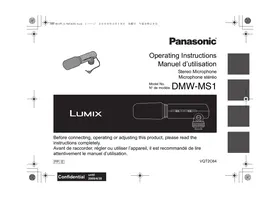


| Product Type | Stereo electret condenser microphone for Panasonic cameras |
| Brand | Panasonic |
| Model | LUMIX DMW-MS1E |
| Dimensions (W x H x D) | 47.0 x 55.0 x 158.0 mm (excluding cable) |
| Weight | Approx. 67.5 g (without battery) / 76.5 g (with battery) |
| Power supply | 1 AAA battery (1.5 V): manganese R03 or alkaline LR03 |
| Battery life | Approx. 500 h (manganese) / 1000 h (alkaline) |
| Frequency response | 100 Hz to 20,000 Hz |
| Directivity | Unidirectional (stereo) / Non-directional (monaural) |
| Sensitivity | -47 dB (0 dB = 1 V/Pa, 1 kHz) |
| Output impedance | 600 Ω |
| Signal-to-noise ratio | 67 dB or more |
| Cable | 2.5 mm L-shaped stereo mini plug (length 140 mm) |
| Main functions | Mode selector OFF/MONO/STEREO, wind cut switch OFF/ON, battery indicator |
| Mounting | Accessory shoe with locking ring |
| Compatibility | Panasonic cameras with microphone jack and shoe |
| Maintenance and cleaning | Remove battery before cleaning; wipe with a soft dry cloth; no solvents |
| Safety | Avoid moisture, strong vibrations, shocks; remove battery if not used for long time |
| Operating temperature | 0 °C to 40 °C |
| Operating humidity | 35% to 80% |
Frequently Asked Questions - LUMIX DMW-MS1E PANASONIC
User questions about LUMIX DMW-MS1E PANASONIC
0 question about this device. Answer the ones you know or ask your own.
Ask a new question about this device
Download the instructions for your Photo Accessories in PDF format for free! Find your manual LUMIX DMW-MS1E - PANASONIC and take your electronic device back in hand. On this page are published all the documents necessary for the use of your device. LUMIX DMW-MS1E by PANASONIC.
USER MANUAL LUMIX DMW-MS1E PANASONIC
Before connecting, operating or adjusting this product, please read the instructions completely.
Information for Your Safety 2
Precautions 4
Supplied accessories ....4
Names of the Components ....5
About the batteries ....5
Inserting and Removing the Unit's Battery....7
Mounting the Unit onto the Digital Camera, and Removing it ....8
Using the Microphone....10
Frequency Response and Directionality Pattern Diagrams ... 11
Cautions for Use 11
Specifications 13
Information for Your Safety
- This stereo microphone is exclusively for Panasonic digital cameras.
It is designed for use with a digital camera equipped with a microphone socket and a hot shoe.
- This stereo microphone can be switched to record sound in either stereo or monaural.
WARNING:
TO REDUCE THE RISK OF FIRE, ELECTRIC SHOCK OR PRODUCT DAMAGE,
- DO NOT EXPOSE THIS APPARATUS TO RAIN, MOISTURE, DRIPPING OR SPLASHING AND THAT NO OBJECTS FILLED WITH LIQUIDS, SUCH AS VASES, SHALL BE PLACED ON THE APPARATUS.
- USE ONLY THE RECOMMENDED ACCESSORIES.
- DO NOT REMOVE THE COVER (OR BACK); THERE ARE NO USER SERVICEABLE PARTS INSIDE. REFER SERVICING TO QUALIFIED SERVICE PERSONNEL.
-If you see this symbol-




Cd
Information for Users on Collection and Disposal of Old Equipment and used Batteries
These symbols on the products, packaging, and/or accompanying documents mean that used electrical and electronic products and batteries should not be mixed with general household waste.
For proper treatment, recovery and recycling of old products and used batteries, please take them to applicable collection points, in accordance with your national legislation and the Directives 2002/96/EC and 2006/66/EC.
By disposing of these products and batteries correctly, you will help to save valuable resources and prevent any potential negative effects on human health and the environment which could otherwise arise from inappropriate waste handling.
For more information about collection and recycling of old products and batteries, please contact your local municipality, your waste disposal service or the point of sale where you purchased the items.
Penalties may be applicable for incorrect disposal of this waste, in accordance with national legislation.
For business users in the European Union
If you wish to discard electrical and electronic equipment, please contact your dealer or supplier for further information.
[Information on Disposal in other Countries outside the European Union]
These symbols are only valid in the European Union. If you wish to discard these items, please contact your local authorities or dealer and ask for the correct method of disposal.
Note for the battery symbol (bottom two symbol examples):
This symbol might be used in combination with a chemical symbol. In this case it complies with the requirement set by the Directive for the chemical involved.
■ About the batteries
CAUTION
Danger of explosion if battery is incorrectly replaced. Replace only with the same or equivalent type recommended by the manufacturer. Dispose of used batteries according to the manufacturer's instructions.
- Do not heat or expose to flame.
- Do not leave the battery in an automobile exposed to direct sunlight for a long period of time with doors and windows closed.
Precautions
■ Handling the unit
- Do not subject the unit to strong vibration or impact. Doing so may not only cause the unit to malfunction but also cause the stereo microphone to break.
- Sand and dirt may cause the unit to malfunction. When using the unit in an environment such as a beach, take steps to protect it from sand and dirt.
- When using the unit on rainy days or on a beach, take care to keep the unit dry.
- The unit is not waterproof. If rain or drops of water splash onto the unit, wipe off the water with a dry cloth. If the unit does not operate normally, consult the dealer or your nearest servicenter.
- Read the operating instructions for your digital camera.
■ When the unit is not going to be used for a prolonged period
- Be absolutely sure to remove the battery from the unit.
- If the battery is left inside the unit, a faint current will flow continuously, even when the unit's power is off, gradually discharging the battery.
- Store the batteries in a cool, moisture-free location where the temperature is kept as constant as possible.
[Recommended temperature range: 15 °C to 25 °C (59 °F to 77 °F); recommended humidity range: 40% to 60%] - If you plan to store the unit and/or its batteries inside a closet or cupboard, it is recommended that you put a desiccant (silica gel) in with them.
Supplied accessories
[Inspection to be performed when you unpack the unit]
When removing the unit from its packing box, check that the main unit and its supplied accessory are there and also check their external appearance and functions to verify that they have not sustained any damage during distribution and transportation.
If you discover any trouble, contact your vendor before using the product.
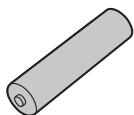
Manganese dry battery AAA, R03
Names of the Components
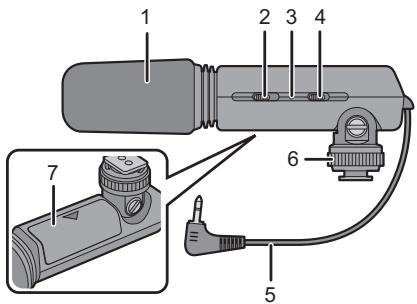
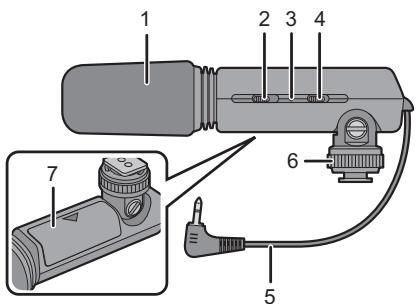
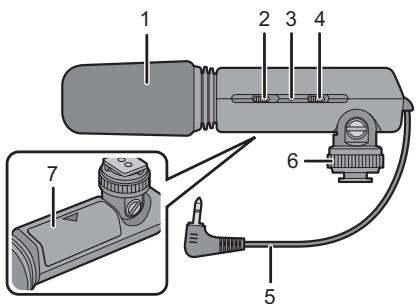
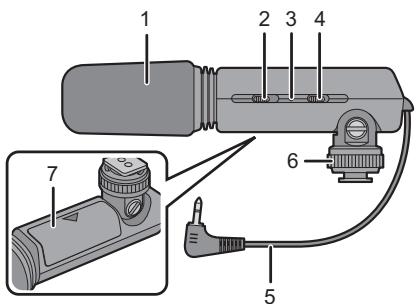
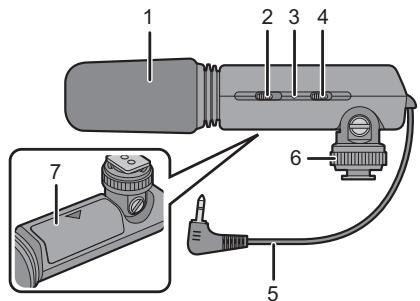
1 Wind Shield (Microphone condenser)
2 Off/On Mode Selector Switch [OFF/MONO/STEREO] (P10)
3 Battery Check Lamp [BATTERY] (P10)
4 [WIND CUT OFF/ON] Switch (P10)
5 φ 2.5 mm L shaped stereo mini plug cord (P9)
6 Lock ring (P8)
7 Battery cover (P7)
About the batteries
■ Types of batteries that can be used
AAA Manganese dry batteries (R03)
AAA Alkaline dry batteries (LR03)
- AAA EVOLTA/AAA EVOIA batteries (new Panasonic battery) can be used, too.
- The performance of the batteries used may significantly differ depending on which battery brand is used, how long the batteries have been stored since they were manufactured and how they have been stored.
- The performance of the batteries decreases temporarily at low temperatures [below 10°C (50 °F)], but will be restored when the temperature returns to room temperature.
- Malfunctioning may occur under certain ambient temperatures and operating conditions. However, this is not indicative of trouble.
- In order to ensure that the batteries will function for as long as possible, it is recommended that you turn off the unit's power during the intervals between using the unit.
- Once depleted, batteries may recover their performance when left standing for a while, but they will quickly become unusable again. For this reason, always make a point of replacing depleted batteries with fresh ones.
■ Types of batteries with which operation is not guaranteed
| Ni-Cd batteries |
| Nickel-manganese batteries |
| Nickel Hydrogen batteries |
| Lithium batteries |
| Oxyride (oxy-nickel-hydroxide) dry batteries |
- Panasonic offers no guarantees that the unit will operate properly when any of the batteries listed above are used. Furthermore, use of these batteries may result in electrolyte leakage, power failure, risk of explosion etc.
■ Batteries with shapes that cannot be used
- Installing batteries with irregular shapes in the unit may cause electrolyte leakage, heat generation and even rupturing of the batteries themselves.
- Some batteries sold on the market have part or all of their jackets missing: Under no circumstances should such batteries be used. (Refer to the figure below.)
- Batteries (bare batteries) with no external jackets or batteries with parts of their jackets missing
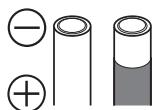
- Batteries whose ⊖ electrode is flat
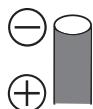
■ Handling the batteries
Mishandling of batteries may cause electrolyte leakage, heat generation and even rupturing of the batteries themselves. Note the following cautions:
- Do not expose batteries to water or seawater or allow their terminal areas to become wet.
- Do not remove their external jackets or damage them in any way.
- Do not drop the batteries, knock them into other objects or subject them to any other kind of strong impact.
- Stop using the batteries as soon as you notice any electrolyte leakage, deformation, discoloration or any other such trouble.
- Do not store batteries in locations where the temperature and/or humidity levels are high.
- Keep batteries out of the reach of infants and small children.
- Remove the battery from the unit when you do not intend to use the unit for a prolonged period.
- The battery may be hot immediately after the unit has been used. Before removing it from the unit, turn off the unit's power and wait until the temperature of the battery has dropped.
- At low temperatures [under 10°C (50 °F)], the performance of the battery will deteriorate and the operating time of the unit will be sharply reduced. The operating duration of batteries tends to be shorter particularly when alkaline/manganese dry batteries are used so warm them in your pocket before use. When warming batteries in your pocket, avoid direct contact with cigarette lighters and other metal objects as well as with pocket/body warmers.
- The operating time of the unit may also be sharply reduced if the and electrodes of the battery are exposed to oils from the skin or other forms of dirt. Before installing the battery, wipe the and electrodes carefully using a soft, dry cloth.
If electrolytes should leak from the battery, wipe away all traces of the electrolyte in the battery compartment, and then insert a fresh battery.
If you should get electrolyte on your hands or clothes, rinse it off thoroughly with water. If you should get electrolyte in your eyes, you risk losing your sight. In such a case, do not rub your eyes but immediately wash them with clean water, and then seek medical advice.
■ Service life of batteries
| Batteries used | Operating time |
| AAA Manganese dry batteries (R03) | Approx. 500 h |
| AAA Alkaline dry batteries (LR03) | Approx. 1,000 h |
Operating conditions
• Temperature: 23 °C (73.4 °F)

Note
- The operating time differs slightly depending on the storage status of the batteries and the operating conditions.
Inserting and Removing the Unit's Battery
- Check that the unit's power is off. (Make sure the Off/On Mode Selector Switch is set to [OFF].)
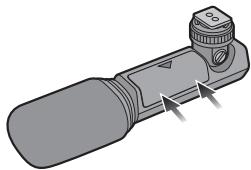
1 Open the battery cover.
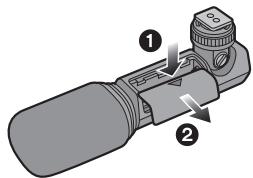
- Press the [≡] mark on the cover in the direction of arrow ① and slide the cover in the direction of arrow ②.
2 When inserting the battery, ensure that the and pole of the battery are aligned correctly.
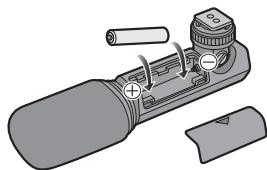
3 Close the battery cover.
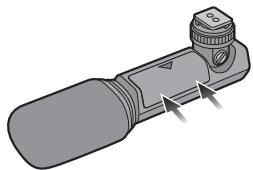

Note
• After using the unit, take out the battery.
- Keep the AAA battery out of reach of children to prevent swallowing.
- Keep the battery cover out of reach of children to prevent swallowing.
Mounting the Unit onto the Digital Camera, and Removing it
- Check that the power of the digital camera and unit is off. (Mounting the unit onto, or disengaging it from, the camera while the power is on may cause trouble and is not recommended.)
■ Mounting the unit
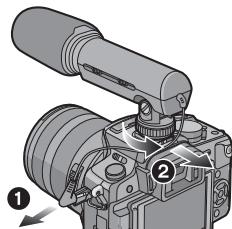
1 Loosen the lock ring.
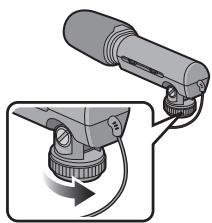
- Do not apply more force than is necessary to the lock ring.
2 Slide the unit into the hot shoe of the digital camera, ensuring that it is fully inserted.
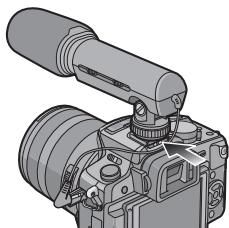
3 Rotate the lock ring in the direction of the arrow until it stops.
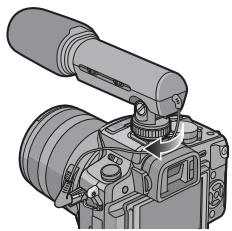
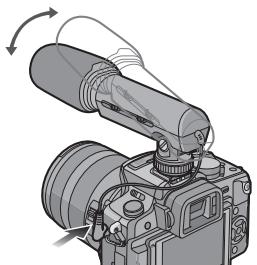
4 Securely connect the Stereo Mini-Plug Cord to the [MIC] socket of the digital camera.
- You can adjust the microphone angle within the range shown in the figure.
- Take care that the stereo microphone connection does not become loose while in use.
■ Removing the unit
Completely loosen the lock ring, and slide the unit off from the hot shoe.
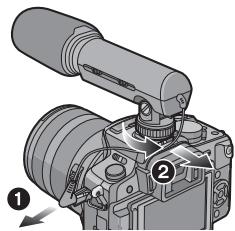

Note
- Hold the lock ring portion when attaching and removing the microphone.
Using the Microphone
■ Changing the Off/On Mode Selector Switch
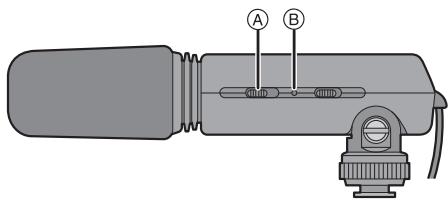
Ⓐ Off/On Mode Selector Switch [OFF/MONO/STEREO]
| [OFF] | Turn off the microphone power. |
| [MONO] | Records sound in front of the digital camera in monaural. |
| [STEREO] | Records sound in a wide area in stereo. |
Battery Check Lamp [BATTERY] Ⓑ
- When the Off/On Mode Selector Switch is changed from [OFF] to [MONO] or [STEREO], the Battery Check Lamp [BATTERY] will light temporarily if there is still plenty of power in the battery. If the Battery Check Lamp [BATTERY] does not light temporarily, replace the battery with a new one.
■ Changing the [WIND CUT OFF/ON] Switch
This microphone is equipped with a wind shield that is designed to cut down wind noise, but when the wind is so strong that even the wind shield is not adequate to keep down the noise, set the [WIND CUT OFF/ON] switch to [ON] to further reduce the wind noise.
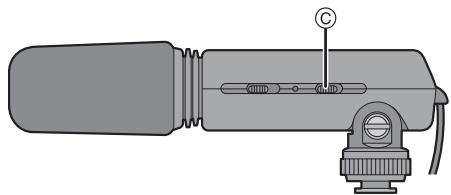
© [WIND CUT OFF/ON] Switch
| [OFF] | The microphone should usually be used with this position. |
| [ON] | Set the [WIND CUT OFF/ON] switch to this position to reduce wind noise. |
![PANASONIC LUMIX DMW-MS1E - ■ Changing the [WIND CUT OFF/ON] Switch - 2](/content/2019/11/53491/images/3dabe2fccfb710edfd3224b61a0a015fea871d4ead437e5e8a6b3c7af732b6f4.jpg)
Note
- Although you can change the setting of the Off/On Mode Selector Switch or the [WIND CUT OFF/ON] switch while recording, the sound of the switch being changed may be recorded.
- When this unit is connected, [WIND CUT] cannot be set on the digital camera. Set with this unit.
Frequency Response and Directionality Pattern Diagrams
■ Frequency Response (WIND CUT OFF/ON)
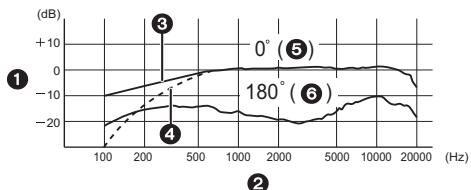
① Response
③ Wind Cut Off
5 Front
② Frequency
④ Wind Cut On
6 Rear
■ Directionality Pattern
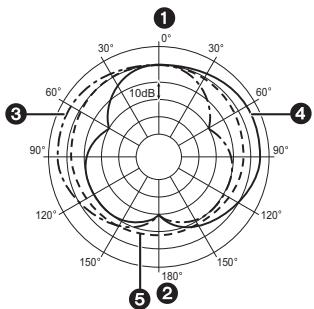
1 Front
③ Stereo (left)
⑤ Monaural
② Rear
4 Stereo (Right)
Cautions for Use
■ About the unit
Do not use the unit near radio transmitters or high-voltage lines.
- If you record near radio transmitters or high-voltage lines, the recorded pictures and sound may be adversely affected.
Keep the unit away from insecticide sprays and other volatile substances.
- If the unit is exposed to these sprays or substances, its external case may deteriorate and/or its paint may peel off.
- Do not leave the unit in contact with any items made of rubber or PVC for prolonged periods of time.
Do not carry the unit when it is still attached to the camera body.
- Under no circumstances should the unit be stored in any of the following locations since doing so may cause trouble in operation or malfunctioning.
• In direct sunlight or on a beach in summer
- In locations with high temperatures and humidity levels or where the changes in temperature and humidity are acute
- In locations with high concentrations of sand, dust or dirt
- Where there is fire
• Near heaters, air conditioners or humidifiers
- Where water may make the unit wet
- Where there is vibration
- Inside a vehicle
- The unit cannot be used with an external flash.
- The unit cannot be used with a remote shutter.
-
Do not drop the unit, knock it into other objects or subject it to any other kind of strong impact or shock.
-
A dirty plug may result in faulty contact. Be sure to wipe the plug with a dry soft cloth before connecting the microphone.
- Do not connect or disconnect the stereo mini-plug with the digital camera turned on.
- When the unit is not going to be used for a prolonged period, mold and other problems may cause failure of the unit. It is recommended that you check the unit's operation prior to use.
- Take care to not apply excessive force to the wind shield. It may cause malfunction.
■ Cleaning
Before cleaning the unit, remove the battery. Then wipe the unit with a dry soft cloth.
- When the unit is soiled badly, it can be cleaned by wiping the dirt off with a wrung wet cloth, and then with a dry cloth.
- Do not use solvents such as benzine, thinner, alcohol, kitchen detergents, etc., to clean the unit, since it may deteriorate the external case or the coating may peel off.
- When using a chemical cloth, be sure to follow the accompanying instructions.
■ About the batteries
Be sure to remove the battery when you will not be using the unit for a long period of time.
- If the temperature is too high or low, the terminals may rust causing a malfunction.
If you drop the battery accidentally, check to see if the body of the battery or the terminals are damaged.
- Inserting a damaged battery in the unit will damage the unit.
Bring charged spare batteries when going out.
- Be aware that the operating time of the batteries becomes shorter in low temperature conditions such as at a ski resort.
Dispose of unusable batteries.
- Batteries have a limited life.
- Do not throw batteries into fire because they may cause an explosion.
Do not allow battery terminals to come into contact with metal objects (such as necklaces, hairpins, etc.).
- This can cause short circuiting or heat generation and you may be badly burned if you touch the batteries.
Do not attempt to recharge dry batteries.
Do not throw batteries into a fire or expose to excessive heat such as sunlight.
Specifications
Power requirements: DC 1.5 V
| Batteries recommended for use | AAA Manganese dry batteries (R03)×1/ AAA Alkaline dry batteries (LR03)×1 |
| Model | Electret condensor type microphone |
| Directionality characteristics | Unidirectional (stereo) Nondirectional (monaural) |
| Frequency response | 100 Hz to 20,000 Hz |
| Sensitivity | -47 dB (0 dB=1 V/Pa, 1 kHz) |
| Output impedance | 600 Ω |
| S/N ratio | 67 dB or more |
| Cord | φ 2.5 mm L shaped stereo mini plug cord (length 140 mm) |
| Switch | Off/On Mode Selector Switch [OFF/MONO/ STEREO] [WIND CUT OFF/ON] Switch |
| Dimensions | Approx. 47.0 mm (W)×55.0 mm (H)× 158.0 mm (D) [1 7/8" (W)×2 3/16" (H)×6 3/4"(D)] (excluding the cord portion) |
| Mass (weight) | Approx. 67.5 g/2.381 oz (main unit) Approx. 76.5 g/2.698 oz (including battery) |
| Operating temperature | 0 °C to 40 °C (32 °F to 104 °F) |
| Operating humidity | 35% to 80% |
Panasonic Consumer Electronics Company, Division of Panasonic Corporation of North America One Panasonic Way, Secaucus, NJ 07094
Panasonic Canada Inc. 5770 Ambler Drive, Mississauga, Ontario, L4W 2T3
© Panasonic Corporation 2009
Printed in Japan
Table des matières


Nota

Nota
Panasonic Canada Inc.
5770 Ambler Drive,
Mississauga, Ontario
L4W 2T3
(905) 624-5010
www.panasonic.ca
© Panasonic Corporation 2009
Imprimé au Japon
Table des matières
Précautions ......28
Accessoires fournis....28

Cd
Pile manganèse
AAA, R03

Note

Note
© Commutateur [WIND CUT OFF/ON]
Mangan-Batterie
AAA, R03

Hinweis

Hinweis
© Schalter [WIND CUT OFF/ON]
Cd

Nota
■ Quitar la unidad

Nota
Ⓐ Interruptor selector Off/On [OFF/MONO/STEREO]
© Interruptor [WIND CUT OFF/ON]
Batteria a secco al manganese AAA, R03

Nota

Nota
© Interruttore [WIND CUT OFF/ON]
① Anteriore
③ Stereo (sinistra)
⑤ Monoaurale
② Posteriore
4 Stereo (destra)
本符號只適用於歐盟國家。
錳乾電池
AAA, R03
1 擋風罩(麥克風集音部)
2 Off/On 模式選擇開關 OFF/MONO/STEREO
3 電池檢查燈 BATTERY
4 [WIND CUT OFF/ON] 開關 (P82)
5 φ 2.5 mm L 形立體聲迷你插頭線 (P81)
6 鎖定環 (P80)
7 電池蓋 (P79)
關於電池
■ 關於可以使用的電池類型
AAA 錳乾電池 (R03)
AAA 鹼性乾電池 (LR03)
3 關閉電池蓋。

注意
- 不要對鎖定環用力過大。
■ 取下本装置
完全鬆開鎖定環,並從熱靴處滑下本裝置。

注意
Ⓐ Off/On 模式選擇開關 [OFF/MONO/STEREO]
© [WIND CUT OFF/ON] 開關

Примечание
■ Снятие вспышки
Примечание
Pursuant to at the directive 2004/108/EC, article 9(2)
Panasonic Testing Centre
Panasonic Marketing Europe GmbH
Winsbergring 15, 22525 Hamburg, Germany
- INFORMATION FOR YOUR SAFETY
- WARNING
- IF YOU SEE THIS SYMBOL
- INFORMATION FOR USERS ON COLLECTION AND DISPOSAL OF OLD EQUIPMENT AND USED BATTERIES
- FOR BUSINESS USERS IN THE EUROPEAN UNION
- [INFORMATION ON DISPOSAL IN OTHER COUNTRIES OUTSIDE THE EUROPEAN UNION]
- NOTE FOR THE BATTERY SYMBOL (BOTTOM TWO SYMBOL EXAMPLES)
- ABOUT THE BATTERIES
- CAUTION
- PRECAUTIONS
- HANDLING THE UNIT
- WHEN THE UNIT IS NOT GOING TO BE USED FOR A PROLONGED PERIOD
- SUPPLIED ACCESSORIES
- [INSPECTION TO BE PERFORMED WHEN YOU UNPACK THE UNIT]
- NAMES OF THE COMPONENTS
- TYPES OF BATTERIES THAT CAN BE USED
- TYPES OF BATTERIES WITH WHICH OPERATION IS NOT GUARANTEED
- BATTERIES WITH SHAPES THAT CANNOT BE USED
- HANDLING THE BATTERIES
- OPERATING CONDITIONS
- NOTE
- INSERTING AND REMOVING THE UNIT'S BATTERY
- OPEN THE BATTERY COVER
- WHEN INSERTING THE BATTERY, ENSURE THAT THE AND POLE OF THE BATTERY ARE ALIGNED CORRECTLY
- CLOSE THE BATTERY COVER
- MOUNTING THE UNIT ONTO THE DIGITAL CAMERA, AND REMOVING IT
- MOUNTING THE UNIT
- USING THE MICROPHONE
- CHANGING THE OFF/ON MODE SELECTOR SWITCH
- BATTERY CHECK LAMP [BATTERY] Ⓑ
- CHANGING THE [WIND CUT OFF/ON] SWITCH
- FREQUENCY RESPONSE AND DIRECTIONALITY PATTERN DIAGRAMS
- CAUTIONS FOR USE
- ABOUT THE UNIT
- KEEP THE UNIT AWAY FROM INSECTICIDE SPRAYS AND OTHER VOLATILE SUBSTANCES
- DO NOT CARRY THE UNIT WHEN IT IS STILL ATTACHED TO THE CAMERA BODY
- CLEANING
- BEFORE CLEANING THE UNIT, REMOVE THE BATTERY. THEN WIPE THE UNIT WITH A DRY SOFT CLOTH
- BE SURE TO REMOVE THE BATTERY WHEN YOU WILL NOT BE USING THE UNIT FOR A LONG PERIOD OF TIME
- IF YOU DROP THE BATTERY ACCIDENTALLY, CHECK TO SEE IF THE BODY OF THE BATTERY OR THE TERMINALS ARE DAMAGED
- BRING CHARGED SPARE BATTERIES WHEN GOING OUT
- DISPOSE OF UNUSABLE BATTERIES
- DO NOT ALLOW BATTERY TERMINALS TO COME INTO CONTACT WITH METAL OBJECTS (SUCH AS NECKLACES, HAIRPINS, ETC.)
- DO NOT ATTEMPT TO RECHARGE DRY BATTERIES
- DO NOT THROW BATTERIES INTO A FIRE OR EXPOSE TO EXCESSIVE HEAT SUCH AS SUNLIGHT
- SPECIFICATIONS
- TABLE DES MATIÈRES
- NOTA
- HINWEIS
- 關於電池
- 關於可以使用的電池類型
- 關閉電池蓋。
- 注意
- ПРИМЕЧАНИЕ
Brand : PANASONIC
Model : LUMIX DMW-MS1E
Category : Photo Accessories