B0930082E4UV - Server Tripp Lite - Free user manual and instructions
Find the device manual for free B0930082E4UV Tripp Lite in PDF.


User questions about B0930082E4UV Tripp Lite
0 question about this device. Answer the ones you know or ask your own.
Ask a new question about this device
Download the instructions for your Server in PDF format for free! Find your manual B0930082E4UV - Tripp Lite and take your electronic device back in hand. On this page are published all the documents necessary for the use of your device. B0930082E4UV by Tripp Lite.
USER MANUAL B0930082E4UV Tripp Lite
Register your product today and be automatically entered to win an ISOBAR® surge protector in our monthly drawing!
triplite.com/warranty


1111 W. 35th Street, Chicago, IL 60609 USA · triplite.com/support
Copyright © 2022 Tripp Lite. All rights reserved.
Package Includes
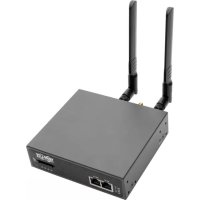
- B093-004-2E4U-V or B093-008-2E4U-V Console Server
4G LTE Blade Antenna (x2) - External Power Supply with NEMA 1-15P (North America), CEE 7/16 Schuko (Europe), BS1363 (UK) and AS2112 (Australia) Plug Adapters (Input: 100-240V, 50/60 Hz, 0.3A; Output: 5V 1A)
- Mounting Hardware
Rubber Feet
DB9-to-RJ45 Crossover Serial Adapter - Digital I/O Converter (Terminal Block)
- Quick Start Guide
Hardware Assembly
1A If free-standing: Attach the adhesive-backed rubber feet to the console server's base.
1A If rack-mounted: Attach the rack kit to the side of the console server to be fixed to the rack.
2 Screw the 4G LTE blade antennas into the main (M) and diversity (A) connectors Note: Do not screw in 4G LTE antennas any more than finger-tight. The SMA connectors used to connect 4G LTE antennas can be damaged if overtightened.
3 Screw any passive or active GPS antennas into the GPS connector Note: GPS connectors are available for purchase from Tripp Lite. Visit triplite.com for more information.
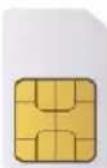
4 If you have a data plan, insert the SIMs into the SIM slotsIf you are only using one SIM, use slot 1.
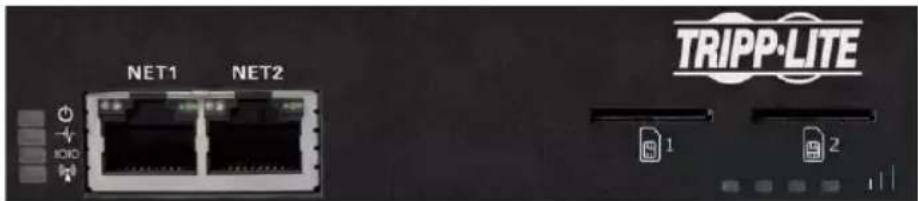
5 Connect the console server's NET1 port to your primary network.
Hardware Assembly
6 Connect the console server's NET1 port to your Out-of-Band (OOB) management network.
7 For cellular IP passthrough, connect the NET1 port to a secondary router's WAN port. IP passthrough allows a LAN router to use the console server's modem as a WAN connection.
8 Connect additional devices to the console server's serial ports and USB ports.
If you have external sensors, plug them into the terminal block and attach any sensors and DIO devices.
Plug in the 12V DC power supply and turn on the power to the console server.
Connect the Console Server
The B093-004-2E4U-V and B093-008-2E4U-V Console Servers are addressable at one of two IP addresses:
It's built-in address (192.168.0.1/24).
The default address its DHCP client accepts from a DHCP server on your network.
3 Using a browser on the same network as the console server's NET1 port with an IP address in one of the network ranges (i.e. 192.168.0.x/24, or the range used by your DHCP server):
Enter https://192.168.0.1/ or https://[DHCP-supplied address]/ and press Return.
Note: The console server's self-signed SSL certificate "untrusted connection" error will be present.
4 Click through the error to load the console server login page.
5 Enter the default system username and passcode.
Username: root
Password: default
Press Submit or Return. The console interface welcome page will load.
Note: The console interface will log out after 20 minutes of inactivity. The current page will remain loaded, however, and clicking any UI element loads the login page. Logging back in will reload the requested page.
Configuration and management options present themselves in expanded-by-default menus along the left side of the interface. The top-level menus are Manage, Status, Serial & Network, Alerts & Logging, and System.
The remainder of the page lists configuration tasks required to turn the console server into a usable unit. Some of these tasks will be marked as completed due to the console server's factory settings. The procedures in the next section document initial configuration using the menus, rather than the task list.
Set a Strong, High-Entropy Passcode for the Root User
1 Click Serial & Network > Users & Groups.
2 Click Edit for the Root User.
3 Enter a strong, high-entropy passcode in the Password field.
4 Re-enter the passcode in the Confirm field.
5 Click Apply.
Set the NET1 Port's Network Configuration Method
1 Click System > IP.
2 Click Network Interface if it is not the front-most tab.
3 For Configuration Method, click either the DHCP or Static radio button.
4 If Static, enter an IP Address and Subnet Mask for the NET1 interface.
Set the NET2 Port's Network Configuration Method
The NET2 port is set to inactive by default. To activate:
1 Click System > IP.
2 Click Management LAN Interface to make it the front-most tab.
3 Click the Deactivate this network interface checkbox to de-select this option and activate NET2.
4 For Configuration Method, click either the DHCP or Static radio button.
5 If Static, enter an IP Address and Subnet Mask for the NET2 interface.
For out-of-band (OOB), set these for your management network.
For IP passthrough, set these to match an unused private IP range.
Note: The console server's firewall determines which protocols and services can access ports and devices. HTTPS and SSH are enabled to the console server by default. To change access settings for the console server and connected serial ports, click System > Services. Then click the Service Access tab and adjust, as required.
Connect the Cellular Modem
Before proceeding, make sure at least one SIM card has been installed. For more information, see Hardware Assembly section.
1 Click System > Dial.
2 Click the Internal Cellular Modem tab.
3 Check the Allow outgoing modem communication radio button.
4 Enter your carrier's Access Point Name (APN) in the APN field.
5 If you use DNS servers other than your carrier's servers, check the Override returned DNS servers checkbox and enter your DNS addresses in the DNS server 1 and DNS server 2 fields.
Note: Your carrier may provide other connection details. In general, only the APN is needed and other fields can be left blank. If a pin code was provided, use it to unlock the SIM card.
6 Click Apply Modem Dial Settings. A data connection will be established with your carrier.
Check the Cellular Modem's Connection Status
1 Click Status > Statistics.
2 Click the Failover and Out-of-band tab.
3 Note the Always on Out-of-Band — Internal Cellular Modem's Connection Status is connected.
4 Note the modem's allocated IP Address and whether it is a public or private IP address.
Check the Cellular Modem's Signal Strength (RSSI)
1 Click Status > Statistics.
2 Click the Cellular tab.
3 Note the RSSI (received signal strength indication) coverage value:
| Signal Measurement Signal Quality | |
| ≤ -100 dBm Unacceptable | |
| -99 to -90 dBm Weak-to-medium | |
| -89 to -70 dBm Medium-to-strong | |
| ≥ -69 dBm Very strong |
Note: The cellular status and signal strength LEDs also show modem status: off for no connection, flashing while establishing, and on while established. Coverage is indicated by the number of LEDs illuminated: four (very strong); three (strong); two (medium); one (weak); zero (unacceptable).
Configure Remote Cellular Access
If the allocated IP address is fixed and public, access the console server's HTTPS and SSH services directly. If the IP address is dynamic and public, configure the console server's Dynamic DNS client:
1 Click System > Dial.
2 Click the Internal Cellular Modem tab.
3 Select your Dynamic DNS provider from the Dynamic DNS pop-up menu.
4 Enter their settings for fields such as DDNS Hostname, DDNSUsername and DDNS Password.
If the allocated IP address is private, direct remote access is not possible. Use a VPN instead.
Configure Managed Devices
1 Click Serial & Network > Serial Port.
To configure a port:
2 Click Edit.
3 Set the Common Settings for Port x to match the device connected to serial port x.
4 To enable remote access to the device, check the Console Server Mode radio button in Console Server Settings and click the checkboxes for allowed protocols (e.g. Telnet, SSH and Web Terminal).
5 Click Apply.
Note: Configure user access policies for connecting to such ports in Serial & Network > Users & Groups. An AAA server can configure them remotely. See the Owner's Manual for more information.
Configure IP Passthrough (Optional)
To transparently bridge the cellular IP settings and data traffic to a downstream Ethernet router:
1 Connect the console server's NET2 port to a downstream router's secondary WAN port.
2 Set NET2 to a static, unused private IP address (eg 192.168.23.23).
3 Set the downstream router to get its IP from DHCP.
4 Click Serial & Network > IP Passthrough.
5 Check the Enable IP passthrough from modem to downstream router checkbox.
6 Select Internal Cellular Modem from the modem pop-up menu.
7 Enter the downstream router's MAC address in the MAC address text-entry field.
8 Select Management LAN from the interface pop-up menu.
9 If the router does not accept cellular network settings from DHCP, check the Enable Force Subnet Mask checkbox and enter a Force Subnet Mask value of 24.
To access the console server (e.g. for OOB management) using the cellular IP address, check the Intercept Enabled checkboxes for the desired services (SSH, HTTPS and HTTP).
Note: This separates WAN and LAN traffic, but other NET2-connected devices may see WAN data.
Warranty and Product Registration
2-YEAR LIMITED WARRANTY
TRIPP LITE warrants its products to be free from defects in materials and workmanship for a period of two (2) years from the date of initial purchase. TRIPP LITE's obligation under this warranty is limited to repairing or replacing (at its sole option) any such defective products. To obtain service under this warranty, you must obtain a Returned Material Authorization (RMA) number from TRIPP LITE or an authorized TRIPP LITE service center. Products must be returned to TRIPP LITE or an authorized TRIPP LITE service center with transportation charges prepaid and must be accompanied by a brief description of the problem encountered and proof of date and place of purchase. This warranty does not apply to equipment, which has been damaged by accident, negligence or misapplication or has been altered or modified in any way.
EXCEPT AS PROVIDED HEREIN, TRIPP LITE MAKES NO WARRANTYES, EXPRESS OR IMPLIED, INCLUDING WARRANTYES OF MERCHANTABILITY AND FITNESS FOR A PARTICULAR PURPOSE.
Some states do not permit limitation or exclusion of implied warranties; therefore, the aforesaid limitation(s) or exclusion(s) may not apply to the purchaser.
EXCEPT AS PROVIDED ABOVE, IN NO EVENT WILL TRIPP LITE BE LIABLE FOR DIRECT, INDIRECT, SPECIAL, INCIDENTAL OR CONSEQUENTIAL DAMAGES ARISING OUT OF THE USE OF THIS PRODUCT, EVEN IF ADVISED OF THE POSSIBILITY OF SUCH DAMAGE. Specifically, TRIPP LITE is not liable for any costs, such as lost profits or revenue, loss of equipment, loss of use of equipment, loss of software, loss of data, costs of substitutes, claims by third parties, or otherwise.
PRODUCT REGISTRATION
Visit triplite.com/warranty today to register your new Tripp Lite product. You'll be automatically entered into a drawing for a chance to win a FREE Tripp Lite product!*
- No purchase necessary. Void where prohibited. Some restrictions apply. See website for details.
WEEE Compliance Information for Tripp Lite Customers and Recyclers (European Union)
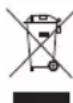
Under the Waste Electrical and Electronic Equipment (WEEE) Directive and implementing regulations, when customers buy new electrical and electronic equipment from Tripp Lite they are entitled to:
- Send old equipment for recycling on a one-for-one, like-for-like basis (this varies depending on the country)
- Send the new equipment back for recycling when this ultimately becomes waste
Use of this equipment in life support applications where failure of this equipment can reasonably be expected to cause the failure of the life support equipment or to significantly affect its safety or effectiveness is not recommended.
Tripp Lite has a policy of continuous improvement. Specifications are subject to change without notice. Photos and illustrations may differ slightly from actual products.


Manufacturing Excellence.
1111 W. 35th Street, Chicago, IL 60609 USA · triplite.com/support
KpaTKoe pyKOBoDCTBO NOIb30BaTeJia
COTOBbIJ ⅢJIIO3ДЯ KOHcOJIbHbIX cepBepOB
HacrpoKa npaMeTpOB ydaJIeHHOrO DocTyNa chepe3 COTOBbI MOdEm
Ecn npucboeHHb IP-adpc aBnaeTcA fKcnpoBaHHbIM n BHeuHM, noKluoyaTecb K HTTPS- u SSH-cepBucam KOHcoJIbHOrO cepBepa HanpamyU. Ecn IP-adpc aBnaeTcA dHaAMueckm n BHeuHM, hactpoIte kIneHTa Dynamic DNS KOHcoJIbHOrO cepBepa:
1 HaxMMTe System > Dial (CnCTema > Ha6op Homepa).
2 Haxmte Ha Bkndky Internal Cellular Modem (BnytpenHn coToBb moEm).
3 BbI6epuTe npoBaIepa Dynamic DNS u3 BCnIbIbAIOeO MeHIO Dynamic DNS.
4 BveiTe er npametbI b nol DaDNS Hostname (IMxocT-CnCTeMbI DDNS), DDNS Uname (IMma noB3oBaTeJy DDNS) u DDNS Password (Paponb DDNS).
Ecn npncboeHHb IP-apec ABnreTc BHyTpEHnM, To npmoy ydaenHbI DoCTyn HeBO3MoKeH. B 1om cnyae nCnoB3yute VPN.
HaCtpoIka ynpabJIaEmbIX yCTpoIcTB
1 Haxmte Serial & Network > Serial Port (Pocn. noKnqueneHne n cetb > PocneobatehBn npT).
Дянстори пота:
2 Haxmite Edit (PedaKtnpoBaTb).
3 3aJaTe Common Settings for Port x (06uHe NaCTpoiKn dIy npTa x) dIy corlaocBaHnry yctpoiCTBa, noKJIHOeHHoro K nocJeOBAteBHomy npTy x.
4 Дя обесенья ВОзмохноу удаленогу дocTyna К устpoичы постаьтЕ кнонку-пepeknюateNB Console Server Mode (Pexim koncoIbHoro cepBepa)! pIOM c oniuee Console Server Settings (HaCtpoiK KOchcIbHoro cepBepa) n noctabBe raLoUckn B NOIA, coOTBeTCTByOuIne pa3peSeHHbIM npoToKoJAM (HapnpMep, Telnet, SSH and Web Terminal).
5 HaxmTe Apply (PpMHeHtB).
PpmeHne. HactpoTe npabnna nolb3oBateIckoro DocTyna nIpaNkIIOHeHH K TakmnpTAM B pa3Je Serial & Network > Users & Groups (PiCn. noKnIOueHne u cetb > Nolb3oBATEIIu rpynnbl). CepBep AAA moKET HAcTpaNBaTB ux ydaJIeHNO. Boee noDpO6HyU HooMaHcM.B PykoOCTBe NoB3oBATEIa.
HactpoIka IP-tpaH3nTa (OncnoHaJIbHo)
Ipn03paHNo nepeaunnapaMeTPOB cOTOBOro IP-MOeMa nnotOKOB daHHbIX B peKIMe MoCTa Ha paCNOJoxEHbI danee MapuTyN3atOp loKaNbHOcTn:
1 CoeHHnHte npT NET2 KOHcOJIbHOro cepBepa cpe3epBbIM nopTom WAN paCnoIooJHoro daJe e MappTyI3aTopa
2 HacptpoTe npT NET2 Ha HeuCNoIb3yEmbl cTaTuueckn BHyTpEHHN IP-aDpec (HaPmMep, 192.168.23.23).
3 HacptpoTe paacnoIoxeHHbI daJIe e MapuTy3aTOp Ha noJIyueHne CBoero IP c DHCP-cepBepa.
4 HaxmTe Serial & Network > IP Passthrough (Iocn. noKniueHne n ceTb > IP-TpaH3nt).
5 IocTaBbTe ranoKy B none Enable IP passthrough from modem to downstream router (Pa3peuHTb IP-tpaH3nT oT MOneMa K MapuPyTu3aTopy).
6 BbIbepe Tne Onuio Internal Cellular Modem (BHytpenHn COToBb moMe) n3 BCnblBaIOoero MeHO MoDeMa.
7 BBeDnTe MAC-aDpe pacnoJooKeHHoro danee MapuTy3aTopa B TeKCTOBoe none MAC address (MAC-aDpe).
8 Bb6epnte onuio Management LAN (ynpaBnaJaua JIBC) n3 BCnblBaIooero MeHIO INTepeieca.
9 Ecmu MapuTn3atop He npHmMaet napaMeTpbl cToBOB CETn ot DHCP-cepBepa, noctabBe ranoUky B none Enable Force Subnet Mask (Pa3peuNTb npHynTeNbHyO MaCKy nOcETn) IN BBeDIne dIg PnHyDIneBHO MACKn noCtne 3HaueHne 24.
10Для пооченя дocу na K cohcoNBHomy cepBepy (HaNPIMep,дя упраьня no pe3epBHomy (OOB-) kaHany) c nOJIb3OBAHnEM IP-aIpeca B coToboi ceTu noCTabTe raIoUky B noJax Intercept Enabled (IpeBXbat pa3peWeH) dny JKeJaembIX cepBncOB (SSH, HTTPSи HTTP).
PnmeaHne.3o npBODNTK pa3eHnIO NOtOKOB daHHbIX NOKaIbHO Hrno6aIbHO cTeH, HO dpyrue yctpoCTBa, noKnIOeHHbIE K npTy NET2, MOrT BuDeTb DaHHbE B rno6aIbHO cTeH.
TapaHTnHbIe 06aTeJIbCTBa
OTPAHNUEHHHA TAPAHNTN CPOKOM 2 FOJA
KOMnHnTRIPP LITE rapaHTnpyET OTCYCTBNE deeKtOB MaTePnaIOB N M3rTOBJeHn B TeueHne DByx (2) let C MOMeTaNepBOHaayabHOH NOkynKn.
063aTeBCTBa KOMnHnTRIPP LITE no HactoJe rapaHTm OrpaHnUBAOTcpeMOHTom nI 3ameHO (no ee eHNOnuHOMy yCMOpTeHHO) IIO6bIX TAKNX deFeKTHbX 3dEeN.ДЯ nonyuEHeY cIyr no DaHnOH rapaHTm Heo6xoHmO nonyUHTb Homep Returnedred Material Authorization (RMA - pa3peHme Ha BO3bPaT MaepnAnOB) ot KOMnAHnTRIPP LITE nn ee abTOPn3OBAHHO rCBnCHOro CEHTpa. N3dEeN daONKbI b6bTB Bo3BpaueHb B KOMnHa
TRIPP LITE mnn ABtopn30BaHnhm cepBnchh yntp TRIPP LITE c npedonlato tpaHcnpTbix paXoIOB nCpOBoxDaTcK pKaTKM OINCAHNEM Bo3NkUe np6IeMb i n DokyMeHToM, noTBePkdAioiM dAtu H MeTo ero npno6peTeHn. DeicTBme hactoJe rapaHTm He pacnpoctpaHareTc Ha o6OpyDobAHne, nobpeJxHe B pe3yIbTaTe abapnn, He6peXHO 6paueHn Mnn HnepaBnBHO nCnOlb3OBaHnA, a TAKK BeDOn3MeHHe KAKM 6b To H N 6bl0 6pb30M.
3A NCKJIIOUHEMI PEPDYMOTPEHHBIX 3JECb CJYAEB KOMIAHNA TRIPP LITE HE I PEPIOCTABJREKAKNX-JIMBO ABHBIX JINIOIPA3YMEBAEMBX TAPAHNTM, BKJIOUARI TAPAHNTM KOMMEPYECKO PIPNFOHOCTN INPPIFOHOCTN JIA KAKOI-MIO KOHKPETHOLEIM.
B HeKoTOpbix uTaTAX/rocYapCTbax OrpaHnueHne NmNckNIOeHne NpOpa3yMeBaembIX rapaHTm He DOnyckaETc; CNeDObaTeNbHO, BblIeYka3aHHoe(-ble) OrpaHnueHne(-A) NmNckNIOeHne(-A) MOrTy He pacPiocpTaHrTaC HnokyataE.
3A INCKHIOYEHME NPEYCMOTPHBbX BbIe CNYAEKOMNAHNA TRIPP LITE HN INPIK KAKNX OBCOTATEBCTBAX HE HECET OTBETCTBEHHOCTH 3A INPMAIE, KOCBEHNbE, CNYAHbIE ININ IOBOUYbIE YbItk INIbOyBbTK, ONPDEJREMBie OCObIMN OBCOTATEBCTBAMN, BO3HKAOUHNE B CBA3N CNCIOJIb3OBAHMe IAHHOI N3DEINIA, DAXE B CLYaEE EINHOFPMPOBAHnO BO3MOXHOCTN HACTYNbIKOB. B acTHeoCTM, KOMNaHnTRIPP LITE He Hecet OTBETCTBEHHOCTH 3a KaKne-1n60 IN3depXKN, TAKHe KaK yNuueHbIe np6bln ININ DOxObl, NOTePAOByOBAHn, NOTePA BO3MOXHOCTM INcNoB3OBAHnI OOpdyOBaHnI, NoTePA nporpaMMHOrO oecneueHnI, NoTePA daHbIX, paXObl Ha 3aMeHHTeIN, ypeYInpoBaHnI ppeH3NI TpebIX NII np.
Hhopmaa no BbnonHeHHIO Tpe6OBaHH InepeKTHBbI WEEE nla nokynateJe H nepepaOHTKOB npOdykunn KOMnHn Tripp Lite (AIBNIOxXcpe3NDeHTAMn Ebponeckoro c03a)
Cornacno noonoxenam Dmpekmbb6 oytnnnaaun OTOxOOB 3eKtpueckoro n 3eKtponHoro o6opyoaba (WEE) mncnntbnbix pacnapxehen no ee npmehenpo, npn NOKyIKe NoTpe6ntaenn HOBOro 3eKtpueckoro nn 3eKtpoHHo o6opyoaba HPOn3BOdCTBa kOMNAHNI Tripp Lte OHN nOnyaot npabo Ha:
-Пюдачу староуоборавия по пинишиу"ODIN 3a OINH"m/нл На KBИВALEHTHOI OCHOBE(B 3ABNUMOCTN OT KOHNPEHTOH CTpaHbI)
- Otnpabky HOBOrO 6OpoyoBaHnHa Nepepa6Ot Ky NoCne OkOnHaTeNbHb BvIpa6OtKn erO pecypca
He peKoMeHdyETc HcNoJIb3OBAHme DaHnHO O6OpyOBaHn B CNTeMax JxN3Heo6ecneueHn, Ige Ero BByXOD 3CTPOgPdIIOJooKtBnHO MOKeT PnBecTM K nepe6oAM Bpa60te O6OpYOBaHn Km3Heo6ecneueHn mB 3HaHTeNbHO Mepe CHN3uTB er630NaCHOTb mE 0fkeKTMBHOCTb.
KoMaHnIa Tripp Ile noctoHHo COBepueHCTByet CBOO npDoyuKIO. B CBA3N C TMM BO3MOXHO 3MHeHneT EHXMeCkNX XapAKTePcTNK 6e3 npEbaPHTeBHO yBeDoMHeH.N BHeuH N D peAebHbIX 3dEeIM MOKeT HeckOBko OTnuaTcR O T PpEcdTaBHeHOrO Ha foTOrpaqnx HnnIOCTpaunx.


Praaunnua Bucucaen KaehctBa.
1111 W. 35th Street, Chicago, IL 60609 USA · tripplite.com/support