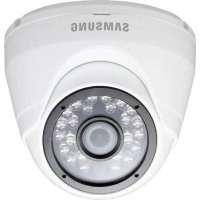
SDC9442DC - Surveillance Camera Hanwha - Free user manual and instructions
Find the device manual for free SDC9442DC Hanwha in PDF.



| Brand | Hanwha |
| Model | SDC9442DC |
| Product Type | Surveillance Camera |
| Dimensions (∅ x H) | Φ90 x 66 mm |
| Weight | 205 g |
| Power Supply | 12 V DC, 3.7 W |
| Sensor | 2 MP CMOS (1/2.9") |
| Maximum Resolution | 1920 x 1080 (Full HD) |
| Lens | 4 mm, F2.1 |
| Field of View | Horizontal: 72.2°, Vertical: 52.9° |
| Night Vision | Yes, IR LED up to 15 m, Auto True D/N |
| Minimum Illumination | 0 Lux (IR activated) |
| Video Output | 1 CH BNC, transmission length > 300 m (75Ω 3C2V) |
| Adjustment Ranges | Pan: -15° to +15°, Tilt: 0° to 70°, Rotation: 0° to 350° |
| Image Functions | Auto white balance, auto shutter, auto gain, 3D DNR |
| Protection Rating | IP66 (outdoor) |
| Operating Temperature | -10°C to +50°C |
| Housing Material | ADC12 (front and body), PC (cover) |
| Color | White |
| DVR Compatibility | Samsung SDR-C75300, SDR-C74300, SDR-B73300 |
| Package Contents | Camera, BNC cable 60 ft (18.3 m), anchors and screws, manual |
| Maintenance and Cleaning | Do not touch the lens; clean the housing with a soft, dry cloth |
| Safety | Mount on a sturdy surface (5x weight); avoid pinching cables; compliant with FCC Class A, RoHS |
Frequently Asked Questions - SDC9442DC Hanwha
User questions about SDC9442DC Hanwha
0 question about this device. Answer the ones you know or ask your own.
Ask a new question about this device
Download the instructions for your Surveillance Camera in PDF format for free! Find your manual SDC9442DC - Hanwha and take your electronic device back in hand. On this page are published all the documents necessary for the use of your device. SDC9442DC by Hanwha.
USER MANUAL SDC9442DC Hanwha
CAUTION : Changes or modifications not expressly approved by the part responsible for compliance could void the user's authority to operate the equipment.
NOTE : This equipment has been tested and found to comply with the limits for a Class A digital device, pursuant to part 15 of the FCC Rules.
These limits are designed to provide reasonable protection against harmful interference when the equipment is operated in a commercial environment.
This equipment generates, uses, and can radiate radio frequency energy and, if not installed and used in accordance with the instruction manual, may cause harmful interference to radio communications.
Operation of this equipment in a residential area is likely to cause harmful interference in which case the user will be required to correct the interference at his own expense.
CE
SAMSUNG
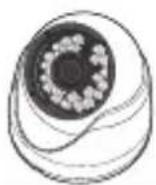
SDC-9442DC Plastic Achors / Screws User Manual Camera Cable (60ft)
PART NAMES
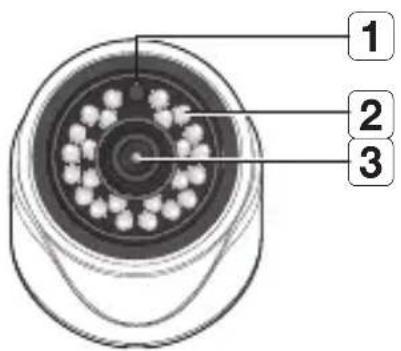
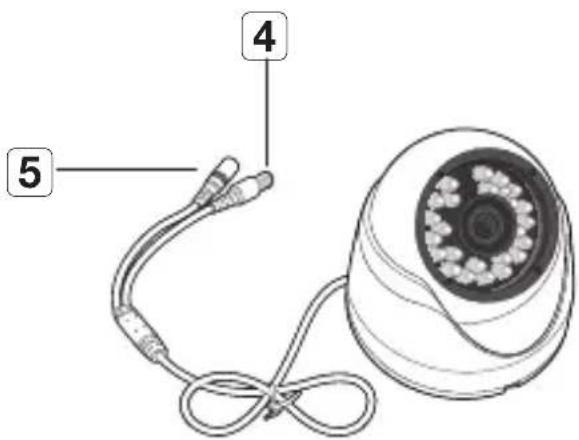
| Name Description | ||
| 1 | Illumination Sensor | Detects incoming light to control the IR LED. |
| 2 | IR LED | These infrared LED's are controlled by the illumination sensor. |
| 3 | Lens | Focal length of 4mm enables you to cover relatively longer range of monitoring. |
| 4 | BNC Cable | BNC terminal for video signal output. |
| 5 | Power Cable | Used to plug the power cable. |
2\_ English
Precautions before installation
Ensure you read out the following instructions before installing the camera:
- It must be installed on the area (ceiling or wall) that can withstand 5 times the weight of the camera including the installation bracket.
- Stuck-in or peeled-off cables can cause damage to the product or a fire.
- For safety purposes, keep anyone else away from the installation site. And put aside personal belongings from the site, just in case.
INSTALLATION
Disassembling
Insert a straight screwdriver into the slot and turn 45 degree to separate the bottom case and fixed cover, as shown in the following picture. The width of the screwdriver is 3-6mm.
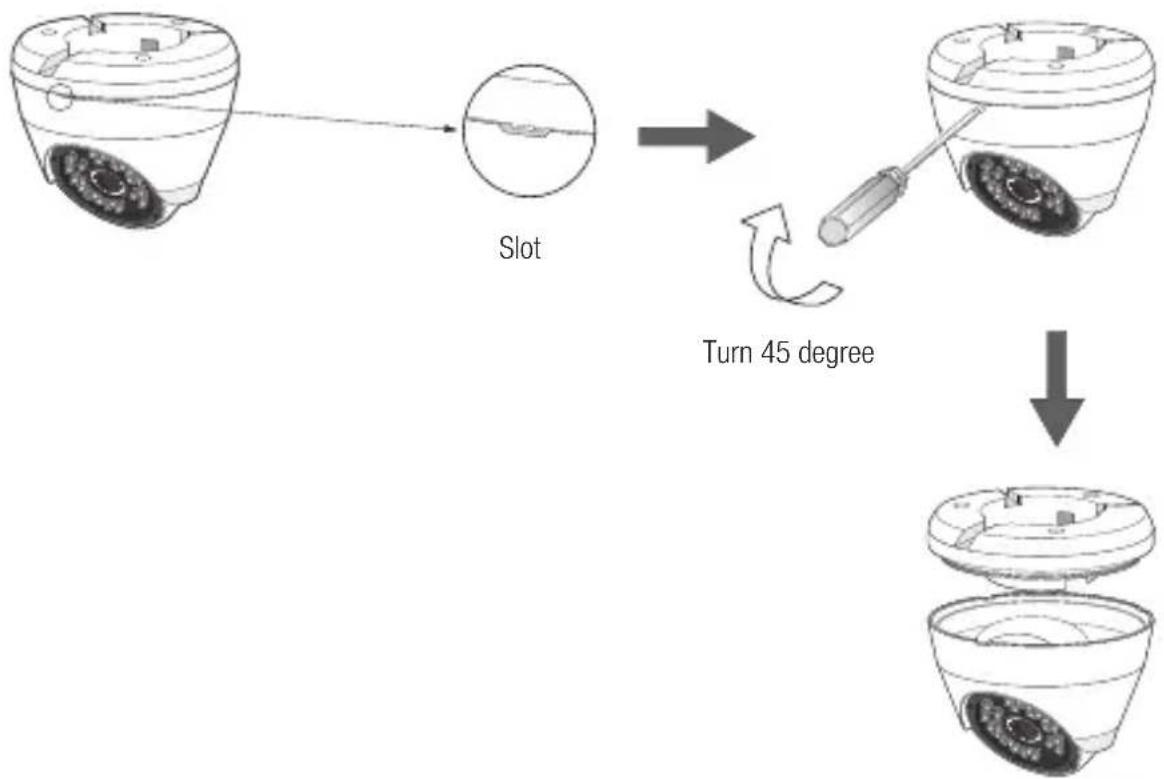
flowchart
graph TD
    A["Smart Home Control Device"] --> B["Slot"]
    B --> C["Turn 45 degree"]
    C --> D["After Rotation"]
Installation
- Select the installation area and mount the camera base onto the wall or ceiling with 3 attached screws.
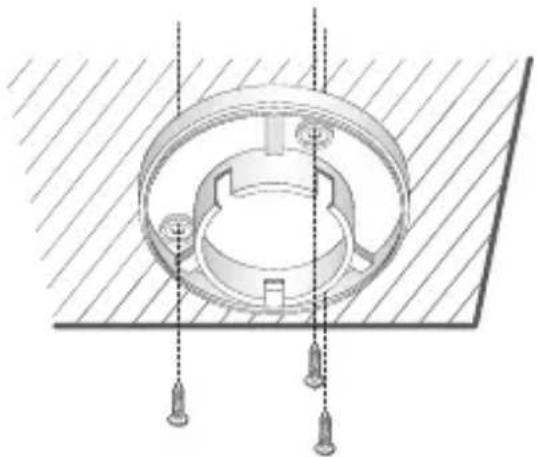
natural_image
Technical diagram of a mechanical assembly with mounting holes and a central circular component (no text or symbols)- Connect the power cable for camera.
- Adjust the monitoring direction of the camera to make it face the monitoring area.
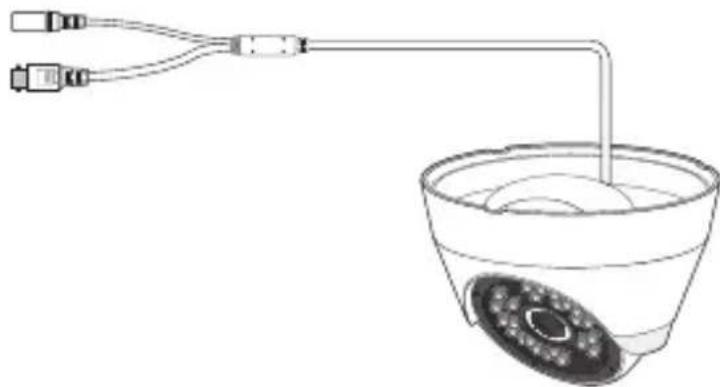
natural_image
Simple line drawing of a medical or laboratory setup with a bowl, tubing, and connectors (no text or symbols)- Mount the protective cover of the camera and the main body on the wall bracket, as shown in the picture.

■Pay attention to the assembly direction. The gap direction of wall bracket faces the monitoring direction.
- It is suggested that not to touch the lens during installation, as the camera lens focus has been adjusted correctly in the final manufacturing process. If you touch the lens, the lens may be stained and fail to be focused.
4\_ English
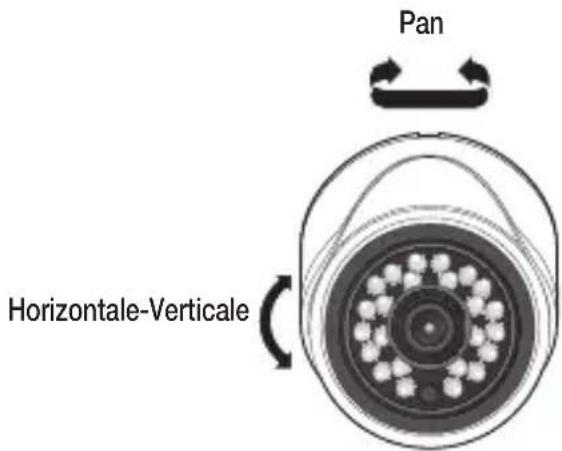
■ Adjusting the monitoring direction
You can adjust the camera direction only when the camera is fixed on the ceiling.
When you rotate the camera main body to the left or right is called Panning. And adjusting the slope is called Tilt.
- The effective range of pan is -15\~ +15 degrees.
- The effective range of tilt is 0\~70 degrees.
- The effective range of rotate is 0\~350 degrees.

■ The image can be covered up by the camera case depending on the angle.
■ Methods of adjustment
- After installing the camera, adjust the panning angle in consideration of the monitoring direction.
- Set the horizontal angle so that the image is not reversed.
- Adjust the tilt angle so that the camera faces the monitoring object.
If you use a 1080P High Resolution camera with the IR LED and a lighting sensor, you can perform monitoring at night as well as day. The camera is suitable for both internal and external use.
- SDC-9442DC 1080P High Resolution Camera is compatible with the following Samsung DVRs. (SDR-C75300 / SDR-C74300/ SDR-B73300)
- Connect the camera to the VIDEO IN port on the back of the DVR as shown below. Separate power adapter is not needed to power the camera
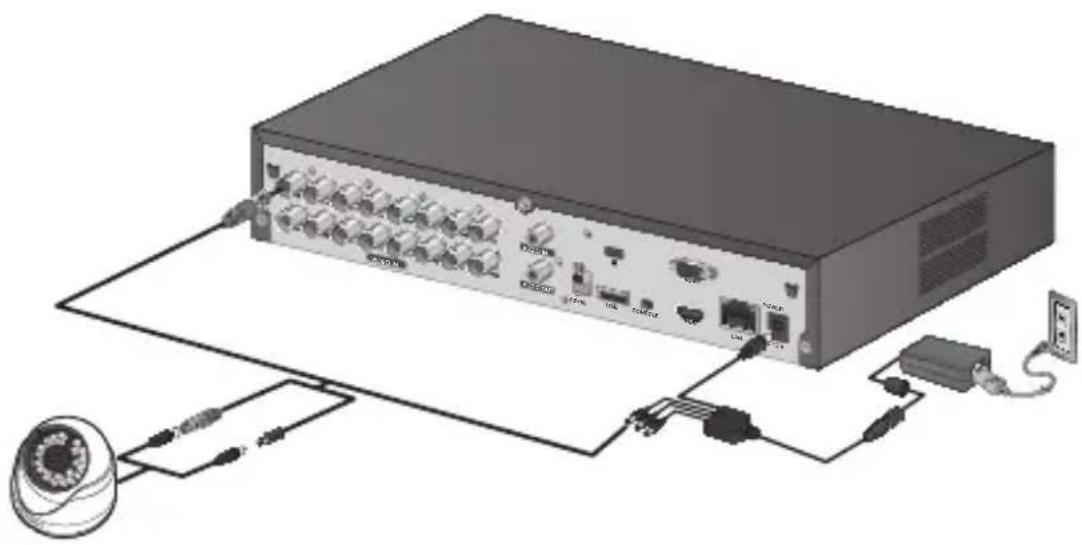
natural_image
Diagram of a network device with ports, cables, and connectors (no text or labels visible)| Item Details | |
| Electrical | |
| Input Voltage | DC 12V |
| Power consumption | 3.7W |
| Video | |
| Imaging Device | 2M CMOS (1/2.9") |
| Resolution | 1920 x 1080 |
| Horizontal Resolution | Color : 900 TVL ,B/W : 900 TVL |
| Scanning System | Progressive, 30fps(NTSC)/25fps(PAL) |
| Synchronization | Internal |
| Total Pixels | 2000(H) x 1121(V) approx. 2.24M pixels |
| Active Pixels | 1936(H) x1097(V) approx. 2.12M pixels |
| Number of recommended recording pixels | 1920(H) x1080(V) approx. 2.07M pixels |
| Min. Illumination | 0 Lux (IR LED ON) |
| Camera Output | 1CH BNC |
| Maximum Transmission Length: Over 300m (75Ω 3C2V) | |
| Accessory Cable Length | 60ft (18.3m) included |
| Lens | |
| Focus Length | 4mm |
| Max.Aperture Ratio | F 2.1 |
| Angular Field of View | H:72.2°, V: 52.9° (tolerance range ± 6%) |
| Pan/Tilt | |
| Pan range | -15° ~ +15° |
| Tilt range | 0°~ 70° |
| Rotate range | 0°~ 350° |
| Operational | |
| Shutter Mode Auto (Rolling Shutter) | |
| Gain Control Auto | |
| White Balance Auto (1800K~10500K) | |
PRODUCT SPECIFICATION
| Item Details | |
| Wide Dynamic Range | N/A |
| Contrast Enhancement | N/A |
| Digital Noise Reduction 3D DNR | |
| OSD N/A | |
| Flickerless Auto | |
| Day & Night TRUE D/N, Auto | |
| IR Distance | 15m |
| Environmental | |
| Operating Temperature / Humidity | -10°C ~ +50°C (+14°F ~ +122°F) / Less than 90% RH |
| Ingress Protection | IP66 |
| Appearance | |
| Color / Material | Front:White/ADC12, BODY:White/ADC12, COVER:White/PC |
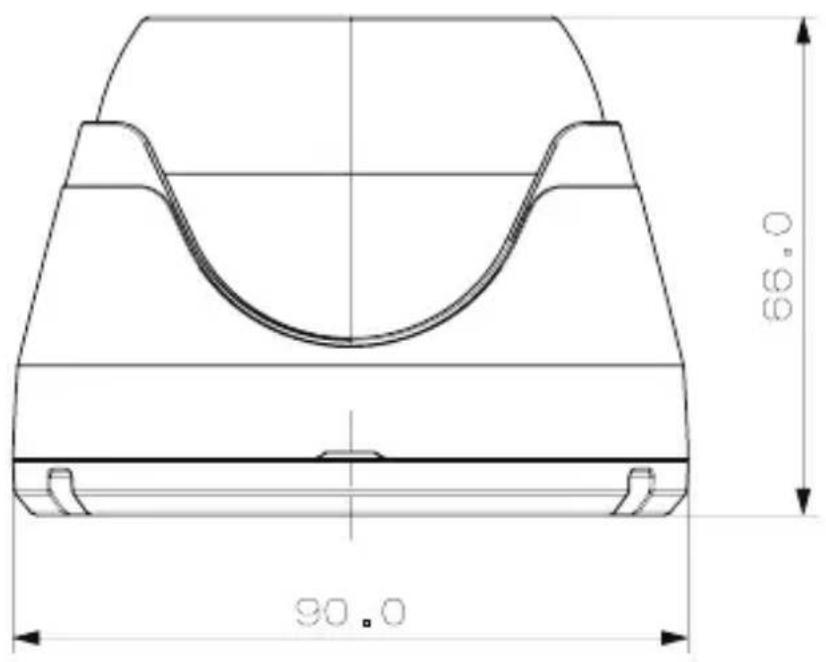
| Dimension (∅xH) | Φ90 X 66mm |
| Weight | 205g |
UNIT: mm

This equipment has been tested and found to comply with the limits for a Class A digital device, pursuant to part 15 of the FCC Rules. These limits are designed to provide reasonable protection against harmful interference when the equipment is operated in a commercial environment.
This equipment generates, uses, and can radiate radio frequency energy and, if not installed and used in accordance with the instruction manual, may cause harmful interference to radio communications. Operation of this equipment in a residential area is likely to cause harmful interference in which case the user will be required to correct the interference at his own expense.
Samsung cares for the environment at all product manufacturing stages, and is taking measures to provide customers with more environmentally friendly products.
The Eco mark represents Samsung's devotion to creating environmentally friendly products, and indicates that the product satisfies the EU RoHS Directive.
natural_image
Simple line drawing of a trash bin with crossed lines indicating no waste or prohibition (no text or symbols)Correct Disposal of This Product (Waste Electrical & Electronic Equipment)
(Applicable in the European Union and other European countries with separate collection systems)
This marking on the product, accessories or literature indicates that the product and its electronic accessories (e.g. charger, headset, USB cable) should not be disposed of with other household waste at the end of their working life. To prevent possible harm to the environment or human health from uncontrolled waste disposal, please separate these items from other types of waste and recycle them responsibly to promote the sustainable reuse of material resources.
Household users should contact either the retailer where they purchased this product, or their local government office, for details of where and how they can take these items for environmentally safe recycling.
Business users should contact their supplier and check the terms and conditions of the purchase contract. This product and its electronic accessories should not be mixed with other commercial wastes for disposal.
SALES NETWORK
HEAD OFFICE
6, Pangyo-ro 319beon-gil, Bundang-gu, Seongnam-si, Gyeonggi-do, SEOUL 463-400 Rep. of KOREA
Tel: +82-70-7147-8753, 8764 Fax: +82-31-8018-3740
www.samsungsecurity.com
100 Challenger Rd. Suite 700 Ridgefield Park, NJ 07660
Toll Free : +1-877-213-1222 Direct : +1-201-325-6920
Fax: +1-201-373-0124
www.samsung-security.com
SAMSUNG TECHWIN EUROPE LTD.
2nd Floor, No. 5 The Heights, Brooklands, Weybridge, Surrey, KT13 0NY, UK
Tel: +44-1932-82-6700 Fax: +44-1932-82-6701
www.samsungsecurity.co.uk
Caméra 1080P
Guide d'utilisation
SDC-9442DC

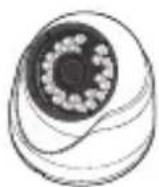
SDC-9442DC
natural_image
Technical diagram of a mechanical assembly with mounting holes and a central circular component (no text or symbols)natural_image
Simple line drawing of a medical or laboratory setup with two tubes connected to a central bowl (no text or symbols)natural_image
Illustration of a network equipment chassis with ports, cables, and connectors (no text or symbols visible)CARACTÉRISTIQUES DU PRODUITT
FCC
natural_image
Symbol of a trash bin crossed with a diagonal line, no text or labels present100 Challenger Rd. Suite 700 Ridgefield Park, NJ 07660
Toll Free : +1-877-213-1222 Direct : +1-201-325-6920
Fax: +1-201-373-0124
www.samsung-security.com
SAMSUNG TECHWIN EUROPE LTD.
2nd Floor, No. 5 The Heights, Brooklands, Weybridge, Surrey, KT13 ONY, UK
TEL: +44-1932-82-6700 FAX: +44-1932-82-6701
www.samsungsecurity.co.uk
Cámara 1080P
Manual del usuario
SDC-9442DC

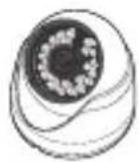
SDC-9442DC
flowchart
graph TD
    A["Image of Ranura"] --> B["Ranura"]
    B --> C["Gire 45 grados"]
    C --> D["Final bowl with granular structure"]
INSTALACIÓN
natural_image
Technical diagram of a mechanical assembly with circular components and vertical supports (no text or symbols)natural_image
Line drawing of a medical or laboratory setup with two connectors and a central bowl (no text or symbols)natural_image
Diagram of a network equipment setup with ports, cables, and a camera (no text or labels visible)FCC
natural_image
Simple line drawing of a trash bin with crossed lines indicating no waste or plastic discharge (no text or symbols)100 Challenger Rd. Suite 700 Ridgefield Park, NJ 07660
Toll Free : +1-877-213-1222 Direct : +1-201-325-6920
Fax: +1-201-373-0124
www.samsung-security.com
SAMSUNG TECHWIN EUROPE LTD.
2nd Floor, No. 5 The Heights, Brooklands, Weybridge, Surrey, KT13 0NY, UK
TEL: +44-1932-82-6700 FAX: +44-1932-82-6701
www.samsungsecurity.co.uk