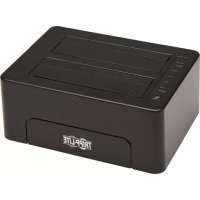
U339E02 - Hard Drive Docking Station Tripp Lite - Free user manual and instructions
Find the device manual for free U339E02 Tripp Lite in PDF.


| Product Type | Dual Bay Hard Drive Docking Station |
| Brand | Tripp Lite |
| Model | U339E02 |
| Drive Compatibility | SATA I/II/III, 2.5" and 3.5", up to 2TB (2.5") and 14TB (3.5") |
| Host Interface | USB 3.0 Type B (backward compatible with USB 2.0 and 1.1) |
| Maximum Transfer Rate | 5 Gbps (USB 3.0), UASP support for faster speeds |
| Offline Erasing Function | Yes, erases up to two drives simultaneously without a computer |
| Power Supply | External power adapter, input 100-240V, output 12V / 3A |
| LED Indicators | Power (red), drive activity (blinking red), erasing progress (blue, 4 levels) |
| System Requirements | Computer with USB port; Windows 8+, Mac OS X 10.8+, Linux |
| Warranty | 1-Year Limited |
| Package Contents | Docking station, power adapter, USB 3.0 cable (0.8m), user manual |
Frequently Asked Questions - U339E02 Tripp Lite
User questions about U339E02 Tripp Lite
0 question about this device. Answer the ones you know or ask your own.
Ask a new question about this device
Download the instructions for your Hard Drive Docking Station in PDF format for free! Find your manual U339E02 - Tripp Lite and take your electronic device back in hand. On this page are published all the documents necessary for the use of your device. U339E02 by Tripp Lite.
USER MANUAL U339E02 Tripp Lite
USB 3.0 to Dual SATA Docking Station with Erase Feature
Model: U339-E02
Español 9 • Français 17 • Русский 25
WARRANTY REGISTRATION
Register your product today and be automatically entered to win an ISOBAR surge protector in our monthly drawing!
tripplite.com/warranty

Manufacturing Excellence.
1111 W. 35th Street, Chicago, IL 60609 USA • tripplite.com/support
Copyright © 2019 Tripp Lite. All rights reserved. All trademarks are the property of their respective owners.
Package Includes
• U339-E02 Dual-Bay SATA Docking Station
- External Power Supply (Input: 100-240V)*
- USB 3.0 A to B Cable – 3 ft. (0.8 m)
- Owner's Manual
*Includes North America NEMA 1-15P plug.
Product Features
- Connects two 2.5" or 3.5" SATA I, II, or III hard drives
- Quickly access hard drive content without the hassle of time-consuming internal installation
- Accepts 2.5" hard drives up to 2 TB and and 3.5" hard drives up to 14 TB *
• Supports USB 3.0 data transfer rates up to 5 Gbps and is backward compatible with USB 2.0 and USB 1.1 standards
• Supports UASP (Serial Attached SCSI Protocol) for speeds faster than USB 3.0** - Offline Erase function clears the content of two SATA hard drives simultaneously without connecting to a host or computer
- Erasing status displays via progress LEDs
*Will work with larger hard drives as they become available.
**Requires UASP-enabled host controller. UASP is supported by Windows 8 and later, Mac OSX 10.8 and later and Linux.
System Requirements
• (x2) 2.5" or 3.5" SATA Hard Drives
• Computer with an available USB port
Notes:
- A USB 3.0 port is required to achieve speeds up to 5 Gbps.
- The offline erase function will not work if the U339-E02 is connected to a computer or any other source via USB cable.
Feature Identification
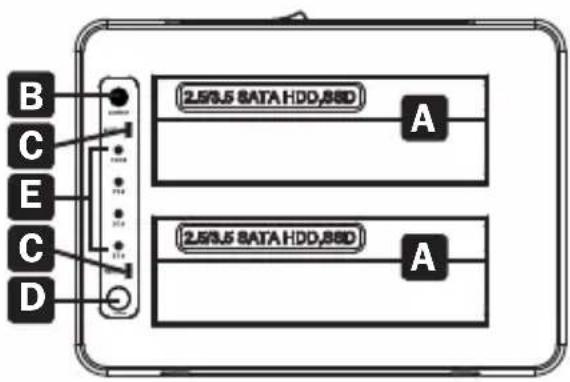
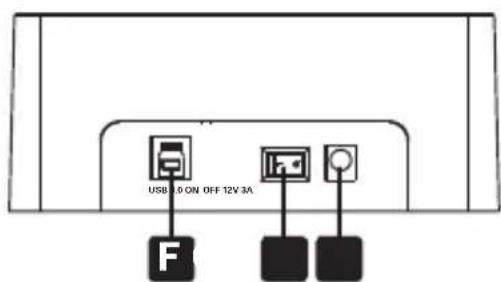
A 2.5"/3.5" SATA HDD/SSD Drive Bays
B Power LED
C HDD/SSD Drive Bay LEDs
D Erase Button
E Erase Process LEDs
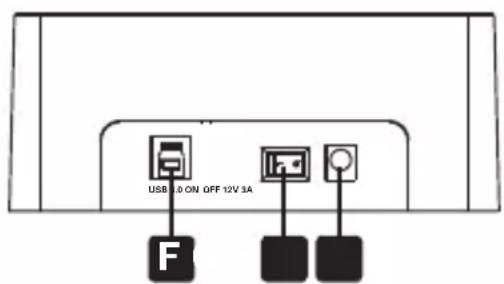
F USB 3.0 Type-B Port
G On/Off Switch
H DC-In Input
Operation
Note: If the SATA hard drive has not been formatted, it must first be formatted using a computer Disk Management utility in order to access drive contents.
- Connect the included power supply to the docking station, then to an available wall outlet or a Tripp Lite Surge Protector.
- Insert a 2.5" or 3.5" SATA hard drive into an available bay on the docking station, making sure it is securely seated on the SATA connector. Repeat this step to connect an additional hard drive.
- Connect the included USB 3.0 cable to the docking station and a computer.
- Use the ON/OFF switch on the back of the unit to power the docking station. The red Power LED will illuminate to indicate power is being received. The red drive bay LEDs (HDD1 & HDD2) will illuminate to indicate a hard drive is connected to the corresponding port and blink when data is being transferred.
Operation
Offline Erasing
Note: The offline erase function will not work if the U339-E02 is connected to a computer or any other source via USB cable.
-
Connect the included power supply to the docking station, then to an available wall outlet or a Tripp Lite Surge Protector.
-
Insert a 2.5" or 3.5" SATA hard drive into an available bay on the docking station, making sure it is securely seated on the SATA connector. Repeat this step to connect an additional hard drive.
Note: Two SATA hard drives can be erased simultaneously.
-
Use the ON/OFF switch on the back of the unit to power the docking station. The red Power LED will illuminate to indicate power is being received. The red drive bay LEDs (HDD1 & HDD2) will illuminate to indicate a hard drive is connected to the corresponding port and blink when the erase function is being performed.
-
Press and hold down the Erase button until the blue Progress LEDs begin to blink, then release the Erase button. The 25% Progress LED will start to blink, indicating the erasing process is underway.
-
Once all four blue Progress LEDs (25%, 50%, 75%, 100%) have stopped blinking and are glowing solid blue, the erasing process has completed.
Warranty and Product Registration
1-Year Limited Warranty
Tripp Lite warrants its products to be free from defects in materials and workmanship for a period of one (1) year from the date of initial purchase. Tripp Lite's obligation under this warranty is limited to repairing or replacing (at its sole option) any such defective products. To obtain service under this warranty, you must obtain a Returned Material Authorization (RMA) number from Tripp Lite or an authorized Tripp Lite service center. Products must be returned to Tripp Lite or an authorized Tripp Lite service center with transportation charges prepaid and must be accompanied by a brief description of the problem encountered and proof of date and place of purchase. This warranty does not apply to equipment, which has been damaged by accident, negligence or misapplication or has been altered or modified in any way. EXCEPT AS PROVIDED HEREIN, Tripp Lite MAKES NO WARRANTIES, EXPRESS OR IMPLIED, INCLUDING WARRANTIES OF MERCHANTABILITY AND FITNESS FOR A PARTICULAR PURPOSE. Some states do not permit limitation or exclusion of implied warranties; therefore, the aforesaid limitation(s) or exclusion(s) may not apply to the purchaser.
EXCEPT AS PROVIDED ABOVE, IN NO EVENT WILL Tripp Lite BE LIABLE FOR DIRECT, INDIRECT, SPECIAL, INCIDENTAL OR CONSEQUENTIAL DAMAGES ARISING OUT OF THE USE OF THIS PRODUCT, EVEN IF ADVISED OF THE POSSIBILITY OF SUCH DAMAGE. Specifically, Tripp Lite is not liable for any costs, such as lost profits or revenue, loss of equipment, loss of use of equipment, loss of software, loss of data, costs of substitutes, claims by third parties, or otherwise.
PRODUCT REGISTRATION
Visit tripplite.com/warranty today to register your new Tripp Lite product. You'll be automatically entered into a drawing for a chance to win a FREE Tripp Lite product!* *No purchase necessary. Void where prohibited. Some restrictions apply. See website for details.
Warranty and Product Registration
Regulatory Compliance Identification Numbers
For the purpose of regulatory compliance certifications and identification, your Tripp Lite product has been assigned a unique series number. The series number can be found on the product nameplate label, along with all required approval markings and information. When requesting compliance information for this product, always refer to the series number. The series number should not be confused with the marketing name or model number of the product.
WEEE Compliance Information for Tripp Lite Customers and Recyclers (European Union)
Under the Waste Electrical and Electronic Equipment (WEEE) Directive and implementing regulations, when customers buy new electrical and electronic equipment from Tripp Lite they are entitled to:
- Send old equipment for recycling on a one-for-one, like-for-like basis (this varies depending on the country)
- Send the new equipment back for recycling when this ultimately becomes waste
Tripp Lite has a policy of continuous improvement. Specifications are subject to change without notice. Photos and illustrations may differ slightly from actual products.

Manufacturing Excellence
1111 W. 35th Street, Chicago, IL 60609 USA • tripplite.com/support
19-07-475-9339DF_RevA
1111 W. 35th Street, Chicago, IL 60609 USA • tripplite.com/support
1111 W. 35th Street, Chicago, IL 60609 USA • tripplite.com/support
19-07-475-9339DF_RevA
1111 W. 35th Street, Chicago, IL 60609 USA • tripplite.com/support
1111 W. 35th Street, Chicago, IL 60609 USA • tripplite.com/support
19-07-475-9339DF_RevA

- USB 3.0 TO DUAL SATA DOCKING STATION WITH ERASE FEATURE
- WARRANTY REGISTRATION
- PACKAGE INCLUDES
- PRODUCT FEATURES
- SYSTEM REQUIREMENTS
- NOTES
- FEATURE IDENTIFICATION
- OPERATION
- OFFLINE ERASING
- WARRANTY AND PRODUCT REGISTRATION
- 1-YEAR LIMITED WARRANTY
- PRODUCT REGISTRATION
- REGULATORY COMPLIANCE IDENTIFICATION NUMBERS
- WEEE COMPLIANCE INFORMATION FOR TRIPP LITE CUSTOMERS AND RECYCLERS (EUROPEAN UNION)
Brand : Tripp Lite
Model : U339E02
Category : Hard Drive Docking Station