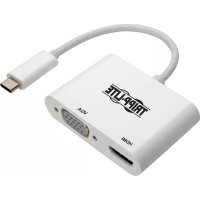
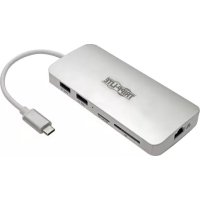
U44406NHV4K - Docking Station Tripp Lite - Free user manual and instructions
Find the device manual for free U44406NHV4K Tripp Lite in PDF.



| Product Type | USB-C to HDMI/VGA Converter |
| Category | Docking Station |
| Brand | Tripp Lite |
| Model | U444-06N-HV4K |
| Input Signal | USB Type-C (Thunderbolt 3 compatible) |
| Output Signal | VGA and HDMI (simultaneous possible) |
| Maximum HDMI Resolution | 3840 x 2160 @ 30 Hz (UHD 4K) |
| Maximum VGA Resolution | 1920 x 1200 @ 60 Hz (includes 1080p) |
| Color Depth | 30-bit Deep Color (10 bits per channel) |
| Bandwidth | 300 MHz / 3 Gbps per channel (9 Gbps total) |
| Supported Audio Formats (HDMI) | 7.1 surround channels |
| HDCP Compatibility | HDCP 1.4 |
| Power | Via USB-C port (5V @ 250 mA max, 1.25 W) |
| Maximum Recommended Cable Length | HDMI: 1.8 m (6 ft), VGA: 3 m (10 ft) |
| Operating Temperature | 0 to 45 °C |
| Storage Temperature | -10 to 70 °C |
| Operating Humidity | 10 to 85 % RH, non-condensing |
| Storage Humidity | 5 to 90 % RH, non-condensing |
| Warranty | 3-year limited |
| Dimensions (approx.) | 6 x 4 x 1.5 cm (estimated) |
| Weight (approx.) | 30 g (estimated) |
| Housing Material | Plastic (estimated) |
| Color | Black (estimated) |
| Package Contents | Converter, user manual |
Frequently Asked Questions - U44406NHV4K Tripp Lite
User questions about U44406NHV4K Tripp Lite
0 question about this device. Answer the ones you know or ask your own.
Ask a new question about this device
Download the instructions for your Docking Station in PDF format for free! Find your manual U44406NHV4K - Tripp Lite and take your electronic device back in hand. On this page are published all the documents necessary for the use of your device. U44406NHV4K by Tripp Lite.
USER MANUAL U44406NHV4K Tripp Lite
USB Type-C and USB-C are trademarks of USB Implementers Forum
Espanol 5 • Français 9 • Pycckn 13
PROTECT YOUR INVESTMENT!
Register your product for quicker service and ultimate peace of mind. You could also win an ISOBAR6ULTRA surge protector—a $100 value! www.triplite.com/warranty


Manufacturing Excellence
1111 W. 35th Street, Chicago, IL 60609 USA • www.triplite.com/support
Copyright © 2019 Tripp Lite. All rights reserved.
Product Features
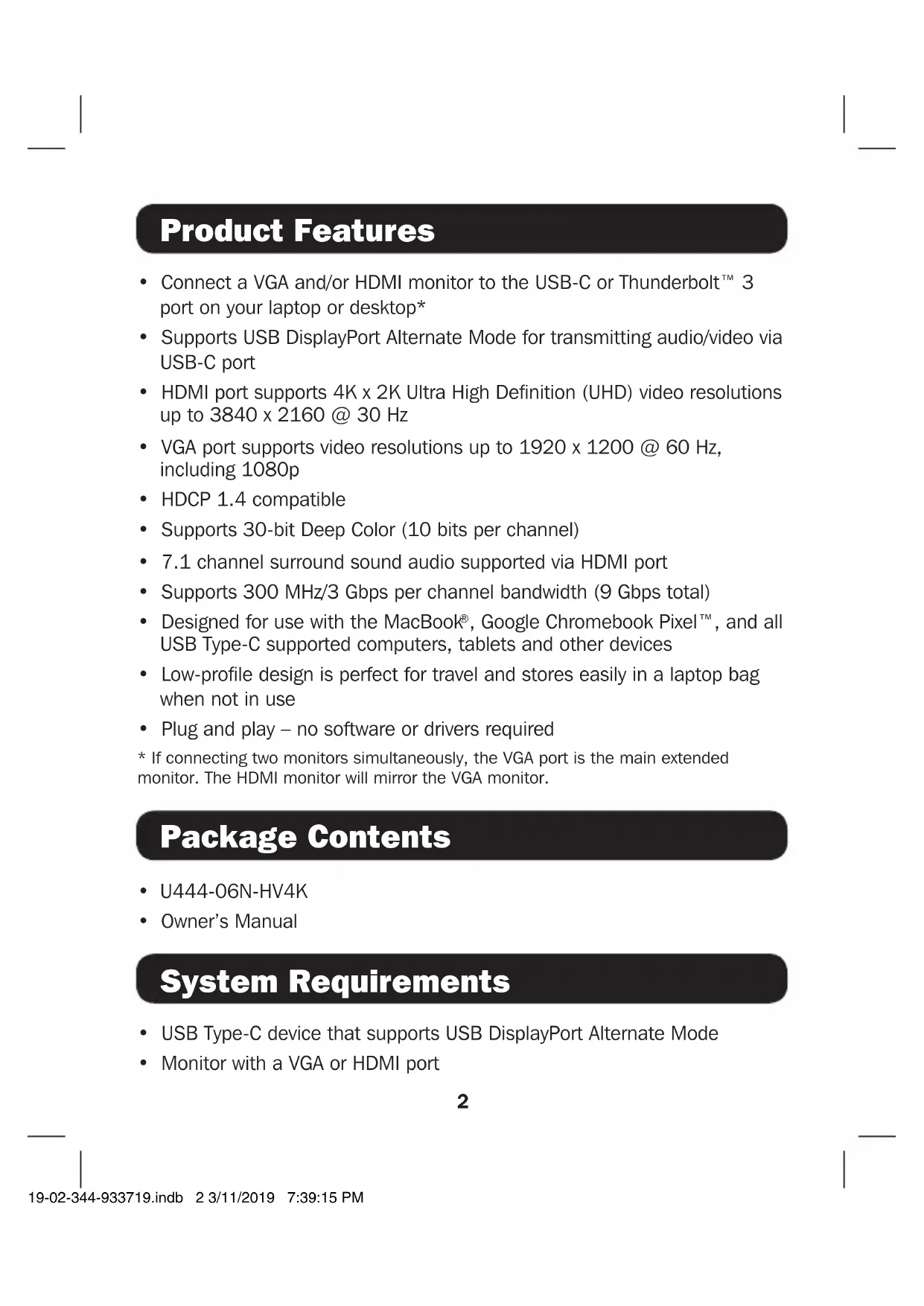
- Connect a VGA and/or HDMI monitor to the USB-C or Thunderbolt™ 3 port on your laptop or desktop*
Supports USB DisplayPort Alternate Mode for transmitting audio/video via USB-C port - HDMI port supports 4K x 2K Ultra High Definition (UHD) video resolutions up to 3840 x 2160 @ 30 Hz
VGA port supports video resolutions up to 1920 x 1200 @ 60 Hz, including 1080p - HDCP 1.4 compatible
Supports 30-bit Deep Color (10 bits per channel)
7.1 channel surround sound audio supported via HDMI port
Supports 300 MHz/3 Gbps per channel bandwidth (9 Gbps total) - Designed for use with the MacBook®, Google Chromebook Pixel™, and all USB Type-C supported computers, tablets and other devices
- Low-profile design is perfect for travel and stores easily in a laptop bag when not in use
-
Plug and play - no software or drivers required
-
If connecting two monitors simultaneously, the VGA port is the main extended monitor. The HDMI monitor will mirror the VGA monitor.
Package Contents
U444-06N-HV4K
- Owner's Manual
System Requirements
- USB Type-C device that supports USB DisplayPort Alternate Mode
Monitor with a VGA or HDMI port
Optional Accessories
P502-Series High-Resolution VGA Cables with RGB Coax
P569-XXX-CERT Premium High-Speed HDMI Cables
Installation
Notes:
- If connecting two monitors, the maximum resolution will be renegotiated automatically to the lowest video format, in this case 1080p.
- To connect a Mac to an HDMI monitor with audio, go to "System Preferences" and select "Sound." Then click the "Output" tab and select your HDMI device from the list.
-
When connecting an HDMI monitor, the distance between the converter and monitor must be no longer than 16 ft. (4.8 m) when using 28 AWG or heavier gauge cabling.
-
Connect the USB Type-C connector on the adapter to the USB Type-C port on your smartphone, tablet, Ultrabook or computer.
- Connect a monitor to the VGA or HDMI port on the converter.
Specifications
| Input Signal | USB Type-C |
| Output Signal | VGA and HDMI |
| Maximum HDMI Resolution 3840 x 2160 @ 30 Hz | |
| Maximum VGA Resolution 1920 x 1200, including 1080p @ 60 Hz | |
| Maximum Cable Length 6 ft. (1.8 m) for HDMI / 10 ft. (3 m) for VGA | |
| Color Depth 30-bit Deep Color (10 bits per channel) | |
| Environmental | |
| Operating Temperature 32 to | 113°F (0 to 45°C) |
| Storage Temperature 14 to 158°F (-10 to 70°C) | |
| Operating Humidity 10% to 85% RH, Non-Condensing | |
| Storage Humidity 5% to 90% RH, Non-Condensing | |
| Maximum Power Consumption | 1.25W (5V @ 250mA) |
Warranty and Product Registration
3-YEAR LIMITED WARRANTY
TRIPP LITE warrants its products to be free from defects in materials and workmanship for a period of three (3) years from the date of initial purchase. TRIPP LITE's obligation under this warranty is limited to repairing or replacing (at its sole option) any such defective products. To obtain service under this warranty, you must obtain a Returned Material Authorization (RMA) number from TRIPP LITE or an authorized TRIPP LITE service center. Products must be returned to TRIPP LITE or an authorized TRIPP LITE service center with transportation charges prepaid and must be accompanied by a brief description of the problem encountered and proof of date and place of purchase. This warranty does not apply to equipment, which has been damaged by accident, negligence or misapplication or has been altered or modified in any way.
EXCEPT AS PROVIDED HEREIN, TRIPP LITE MAKES NO WARRANTYES, EXPRESS OR IMPLIED, INCLUDING WARRANTYES OF MERCHANTABILITY AND FITNESS FOR A PARTICULAR PURPOSE.
Some states do not permit limitation or exclusion of implied warranties; therefore, the aforesaid limitation(s) or exclusion(s) may not apply to the purchaser.
EXCEPT AS PROVIDED ABOVE, IN NO EVENT WILL TRIPP LITE BE LIABLE FOR DIRECT, INDIRECT, SPECIAL, INCIDENTAL OR CONSEQUENTIAL DAMAGES ARISING OUT OF THE USE OF THIS PRODUCT, EVEN IF ADVISED OF THE POSSIBILITY OF SUCH DAMAGE. Specifically, TRIPP LITE is not liable for any costs, such as lost profits or revenue, loss of equipment, loss of use of equipment, loss of software, loss of data, costs of substitutes, claims by third parties, or otherwise.
PRODUCT REGISTRATION
Visit www.triplite.com/warranty today to register your new Tripp Lite product. You'll be automatically entered into a drawing for a chance to win a FREE Tripp Lite product!*
- No purchase necessary. Void where prohibited. Some restrictions apply. See website for details.
Regulatory Compliance Identification Numbers
For the purpose of regulatory compliance certifications and identification, your Tripp Lite product has been assigned a unique series number. The series number can be found on the product nameplate label, along with all required approval markings and information. When requesting compliance information for this product, always refer to the series number. The series number should not be confused with the marketing name or model number of the product.
WEEE Compliance Information for Tripp Lite Customers and Recyclers (European Union)
Under the Waste Electrical and Electronic Equipment (WEEE) Directive and implementing regulations, when customers buy new electrical and electronic equipment from Tripp Lite they are entitled to:
- Send old equipment for recycling on a one-for-one, like-for-like basis (this varies depending on the country)
- Send the new equipment back for recycling when this ultimately becomes waste
Use of this equipment in life support applications where failure of this equipment can reasonably be expected to cause the failure of the life support equipment or to significantly affect its safety or effectiveness is not recommended.
Tripp Lite has a policy of continuous improvement. Specifications are subject to change without notice.


1111 W. 35th Street, Chicago, IL 60609 USA • www.triplite.com/support
19-02-344 93-3719_RevB
1111 W. 35th Street, Chicago, IL 60609 EE UU • www.triplite.com/support
1111 W. 35th Street, Chicago, IL 60609 EE UU • www.triplite.com/support
19-02-344 93-3719_RevB
Dence Bnne Industries.
1111 W. 35th Street, Chicago, IL 60609 Etats Unis • www.triplite.com/support
19-02-344 93-3719_RevB
PyKOBODCTBO NOJIb3OBaTeJIa
Ппpeo6pa3OBaTeЛь USB Type-C™ - HDMI/VGA
1111 W. 35th Street, Chicago, IL 60609 USA • www.triplite.com/support
OxpanaTcA BTOPcNIM npaBOM © 2019 Tripp Lite. NepeneuataK3anpeuaetca.
XapakTepnCTnKn npOdykTa
- Пождочite VGA-н/ин HDMI-монтор к порту USB-C ин Thunderbolt™ 3 CBOERO HOуka ин HabToьНOrO KOMпьОТepa*
- Пордержka ржима USB DisplayPort Alternate张家界 удno-/Видаосигнада чешет пот USB-C
- IopT HDMI noДepeхиBaet BnДeocnHaJIbI B φopMaTe CBepXBblcOKo YeTKocTn 4K x 2K (UHD) c pa3peuHemdo 3840 x 2160 npn 30 Tc
- Порт VGA подерживает вideopaашени до 1920 x 1200 (Вклочая 1080p) рпчacтое 60 Гц
COBMECTMIOCTb C cncTeMaMuHDCP 1.4 - Póndépjká do 30-6nToBOrO KoDnpoBaHnIaBeta (no 10 6nT Ha KaHaI)
- Побдевская удионостем объемного 3вуань (7.1) черз пот HDMI
- Póndepkka noIocbI nponyckaHnA shpHNo 300 MΓu / 3 Γ6nt/c Ha KaHaJ (9 Γ6nt/c Na Bce KaHaJIbI)
- Праздаизаундя Испьзовая с устюстваMu MacBoK, Google Chromebook Pixel™ и BCeMn KOMnbIOTepaMn, ochaшениms pa3beMOM USB Type-C
Hn3KoPocnBna KOHCTpykunna IealbHO NOxOHT B KaueCTBe DOpoxHOrO yCtPOINCTBa, NERKO NOMEUaBcB Cymky dIg NOpTaTNBHO KOMNbIOTepa B TO BpeM, KOrDa OHO He NcNoJIb3yETcR - Поклоченье по Тхонори Plug-and-play 6e3 Heo6xOДМОCTи ИСпЛьЗОВАня Кakoro-ПИБО Рогамплдраьеров
*PnpOJHOBpeMeHHOM NOKIOueHIN DByX MOHTOpOB VGA-NOPT YBnEeTcR IaBHbIM peTpacnIpyEmbIM MOHTOpOM.HDMI-MOHITOp 6ydt3epKaIbHo OTo6paKaTb INΦopMaCIO c VGA-MOHITopa.
Copekmoe ynaKOBKn
U444-06N-HV4K
PykoBOIDCTBO NOIb3OBaTeJRA
1111 W. 35th Street, Chicago, IL 60609 USA • www.triplite.com/support
19-02-344 93-3719_RevB

- Espanol 5 • Français 9 • Pycckn 13
- PROTECT YOUR INVESTMENT!
- Product Features
- Package Contents
- System Requirements
- Optional Accessories
- Installation
- Notes:
- Specifications
- Warranty and Product Registration
- 3-YEAR LIMITED WARRANTY
- PRODUCT REGISTRATION
- Regulatory Compliance Identification Numbers
- WEEE Compliance Information for Tripp Lite Customers and Recyclers (European Union)
- PyKOBODCTBO NOJIb3OBaTeJIa
- Ппpeo6pa3OBaTeЛь USB Type-C™ - HDMI/VGA
- XapakTepnCTnKn npOdykTa
- Copekmoe ynaKOBKn
Brand : Tripp Lite
Model : U44406NHV4K
Category : Docking Station