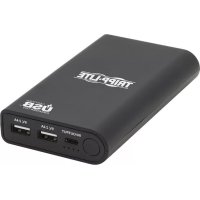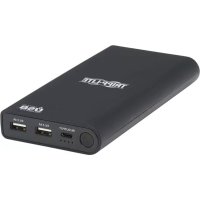
UPB20K02U1C - Power bank Tripp Lite - Free user manual and instructions
Find the device manual for free UPB20K02U1C Tripp Lite in PDF.


| Type de produit | Portable battery (power bank) |
| Marque | Tripp Lite |
| Modèle | UPB20K02U1C |
| Capacité de la batterie | 20,100 mAh |
| Ports de sortie | 2x USB-A (5V/2.4A per port) + 1x USB-C (PD up to 45W) |
| Puissance de sortie maximale | 57 W |
| Entrée/sortie USB-C | 5V/3A, 9V/3A, 12V/3A, 15V/3A, 20V/2.25A (45W max) |
| Dimensions (L x P x H) | 162.4 x 80 x 22 mm |
| Poids | 374 g |
| Couleur | Black |
| Protections intégrées | Overcurrent, overvoltage, overcharge, accelerated discharge, short circuit, excessive temperature |
| Efficacité | ≥ 85 % |
| Température de fonctionnement | 0 °C to 40 °C |
| Température de stockage | -20 °C to 60 °C |
| Humidité | 5 to 90% RH without condensation |
| Contenu de l'emballage | UPB-20K0-2U1C, USB-C to USB-C cable (0.9 m), user manual |
| Garantie | 1 year limited |
| Entretien et nettoyage | Clean with a dry, soft cloth; do not use corrosive products. |
| Sécurité | Do not expose to moisture, fire, or temperatures >45°C (use); do not puncture or disassemble. |
| Pièces détachées et réparabilité | No user-serviceable parts; recycle at end of life at an approved facility. |
Frequently Asked Questions - UPB20K02U1C Tripp Lite
User questions about UPB20K02U1C Tripp Lite
0 question about this device. Answer the ones you know or ask your own.
Ask a new question about this device
Download the instructions for your Power bank in PDF format for free! Find your manual UPB20K02U1C - Tripp Lite and take your electronic device back in hand. On this page are published all the documents necessary for the use of your device. UPB20K02U1C by Tripp Lite.
USER MANUAL UPB20K02U1C Tripp Lite
20,100mAh 3-Port Mobile Power Bank, USB-IF Certified
Model: UPB-20K0-2U1C
USB Type-C and USB-C are trademarks of USB Implementers Forum
Español 8 • Français 15 • Русский 22
WARRANTY REGISTRATION
Register your product today and be automatically entered to win an ISOBAR surge protector in our monthly drawing!
tripplite.com/warranty


1111 W. 35th Street, Chicago, IL 60609 USA • tripplite.com/support
Copyright © 2020 Tripp Lite. All rights reserved.
General Safety Instructions
- Make sure the power bank is fully charged prior to use.
- Use a cable suitable for your device when charging from the power bank.
- When charging the power bank, it is recommended you use the included USB Type-C cable.
- Under condition of low battery, the LEDs will turn off while charging a device. Recharge the power bank as soon as possible to avoid shortening the battery life.
- The battery should be charged at least every three months to avoid shortening the battery life.
- It is recommended to disconnect the charging device upon being fully charged in order to avoid further battery use.
- When the power bank enters protection mode (LEDs turn off and power bank will not charge) caused by issues such as a short circuit, use an external charger to charge the power bank so it can resume normal operation.
- Keep the power bank away from fire and avoid temperatures above 113°F (45°C) when in use and 140°F (60°C) when not in use.
- Do not expose the power bank to moisture or immerse it in water.
- Do not use a corrosive cleaner on the power bank.
- Do not squeeze or puncture the power bank. Doing so may may allow electrolyte leakage of the lithium-ion battery.
- Do not attempt to disassemble, modify or fix the power bank.
- Do not use a damaged cable or power charger to charge the power bank.
- Please recycle this device at an appointed disposal location for Lithium Ion batteries.
Product Features
- Simultaneously charge up to 3 phones, tablets or other mobile devices on-the-go, without the need for a power outlet
- USB-A and USB-C ports provide 57W maximum simultaneous charging power
- Dual USB-A ports provide 5V 2.4A (12W) of total power per port*
- USB-A ports are BC 1.2 compliant, providing up to 1.5A of fast charging power to Apple-compliant devices
- USB-C port supports PD Charging up to 5V 3A (15W), 9V 3A (27W), 12V 3A (36W), 15V 3A (45W) and 20V 2.25A (45W)
- 20,100mAh capacity lets you charge at maximum power draw for hours
- Includes short circuit, over-voltage, over-current, over-charge and over-discharge protection for safe and reliable charging
- USB-IF certified
- Four battery power LED indicators show remaining battery capacity
• Automatic power off turns off LED indicators when not in use - Sleek, portable design is perfect for on-the-go use
*When used simultaneously, the total power per port will be negotiated by device.
Package Includes
- UPB-20K0-2U1C
- USB-C to USB-C Cable (M/M), 3 ft. (0.9 m)
- Owner's Manual
System Requirements
- Smartphone, tablet or other mobile USB device
Optional Accessories
• M100-Series USB to Lightning Cables
• U030-Series USB 2.0 A to 5-Pin Mini-B Cables
• U038-Series USB 2.0 A to USB Type-C Cables
• U326-Series USB 3.0 A to Micro-B Cables
• U420-Series USB 3.1 Type-C M/M Cables
• U422-Series USB 3.1 Type-C to USB 3.0 Type-B Cables
• U426-Series USB 3.1 Type-C to USB 3.0 Micro-B Cables
• U428-Series USB 3.1 Type-C to USB Type-C Cables
• U280-W01-QC3-1 1-Port USB Wall Charger
Power Bank Charging Instructions
Notes:
- A power button is located on the side of the power bank. When pressed once, the LEDs will illuminate to indicate the power bank's remaining battery capacity. When all devices are disconnected, the power bank will stop any device charging taking place.
- When charging the power bank, the LEDs will illuminate to indicate the battery capacity level (see table below):
| LED Status Power Bank Battery Capacity | |
| ●●●● | 100% |
| ●●●○ | 75% - 99% |
| ●●○○ | 50% -74% |
| ●○○○ | 25%-49% |
| ○○○○ | 1% - 24% |
● = LED Illuminated
○ = LED Off
◎ = LED Flashing
- Using the included USB Type-C cable, connect the In/Output USB Type-C port on the power bank to the appropriate USB port on your computer or USB Charger.
- The power bank will begin charging, with the LEDs operating per the above notes and table.
USB Device Charging Instructions
Notes:
- Before charging your devices for the first time, first fully charge the power bank.
- A power button is located on the side of the power bank. When pressed once, the LEDs will illuminate to indicate the power banks's remaining battery capacity. When all devices are disconnected, the power bank will stop any device charging taking place.
- When a device is connected to the USB-C port, but appears as if the charge is being used for the power bank itself, hold the power button down for 3 seconds to switch the charge from the power bank to the device.
- When charging a USB device, the LEDs will illuminate to indicate the battery capacity level (see table below):
| LED Status Power Bank Battery Capacity | |
| ●●●● | 100%-75% |
| ●●●○ | 74%-50% |
| ●●○○ | 49% - 25% |
| ●○○○ | 24% - 1% |
| ○○○○ | 0 |
● = LED Illuminated
○ = LED Off
- Using the included USB Type-C cable or a USB cable suitable for your device, connect your mobile devices to the USB A and/or USB-C ports on the power bank.
- The devices will begin charging, with the LEDs operating per the above notes and table.
Specifications
| USB-C Input/Output 5V 3A (15W), 9V 3A (27W), 12V 3A (36W), 15V 3A (45W), 20V 2.25A (45W) | |
| USB-A Output 5V 2.4A (12W) | |
| Max Output 57W | |
| Ripple And Noise | ≤200mVp-p @5V<300mVp-p @9V<300mVp-p @12V<400mVp-p @15V<400mVp-p @20V |
| Operating Temperature Range 32°F to 104°F / 0°C to 40°C | |
| Storage Temperature Range -4°F to 140°F / -20°C to 60°C | |
| Operating Humidity Range 20 to 90% RH, Non-Condensing | |
| Storage Humidity Range 5 to 90% RH, Non-Condensing | |
| Color Black | |
| Dimensions (L x W x H) 6.4 x 3.2 x 1 in. / 162.4 x 80 x 22 mm | |
| Weight 0.8 lb. / 374 g | |
| Overcurrent Protection Yes | |
| Overvoltage Protection Yes | |
| Overcharge Protection Yes | |
| Overdischarge Protection | Yes |
| Short Circuit Protection | Yes |
| Over-Temperature Protection | Yes |
| Efficiency | ≥ 85% |
Warranty and Product Registration
1-Year Limited Warranty
TRIPP LITE warrants its products to be free from defects in materials and workmanship for a period of one (1) year from the date of initial purchase. TRIPP LITE's obligation under this warranty is limited to repairing or replacing (at its sole option) any such defective products. To obtain service under this warranty, you must obtain a Returned Material Authorization (RMA) number from TRIPP LITE or an authorized TRIPP LITE service center. Products must be returned to TRIPP LITE or an authorized TRIPP LITE service center with transportation charges prepaid and must be accompanied by a brief description of the problem encountered and proof of date and place of purchase. This warranty does not apply to equipment, which has been damaged by accident, negligence or misapplication or has been altered or modified in any way.
EXCEPT AS PROVIDED HEREIN, TRIPP LITE MAKES NO WARRANTIES, EXPRESS OR IMPLIED, INCLUDING WARRANTIES OF MERCHANTABILITY AND FITNESS FOR A PARTICULAR PURPOSE.
Warranty and Product Registration
Some states do not permit limitation or exclusion of implied warranties; therefore, the aforesaid limitation(s) or exclusion(s) may not apply to the purchaser.
EXCEPT AS PROVIDED ABOVE, IN NO EVENT WILL TRIPP LITE BE LIABLE FOR DIRECT, INDIRECT, SPECIAL, INCIDENTAL OR CONSEQUENTIAL DAMAGES ARISING OUT OF THE USE OF THIS PRODUCT, EVEN IF ADVISED OF THE POSSIBILITY OF SUCH DAMAGE. Specifically, TRIPP LITE is not liable for any costs, such as lost profits or revenue, loss of equipment, loss of use of equipment, loss of software, loss of data, costs of substitutes, claims by third parties, or otherwise.
Product Registration
Visit triplite.com/warranty today to register your new Tripp Lite product. You'll be automatically entered into a drawing for a chance to win a FREE Tripp Lite product!*
* No purchase necessary. Void where prohibited. Some restrictions apply. See website for details.
FCC Notice, Class B
This device complies with part 15 of the FCC Rules. Operation is subject to the following two conditions: (1) This device may not cause harmful interference, and (2) this device must accept any interference received, including interference that may cause undesired operation.
Note: This equipment has been tested and found to comply with the limits for a Class B digital device, pursuant to part 15 of the FCC Rules. These limits are designed to provide reasonable protection against harmful interference in a residential installation. This equipment generates, uses and can radiate radio frequency energy and, if not installed and used in accordance with the instructions, may cause harmful interference to radio communications. However, there is no guarantee that interference will not occur in a particular installation. If this equipment does cause harmful interference to radio or television reception, which can be determined by turning the equipment off and on, the user is encouraged to try to correct the interference by one or more of the following measures:
- Reorient or relocate the receiving antenna.
- Increase the separation between the equipment and receiver.
- Connect the equipment into an outlet on a circuit different from that to which the receiver is connected.
- Consult the dealer or an experienced radio/TV technician for help.
Any changes or modifications to this equipment not expressly approved by Tripp Lite could void the user's authority to operate this equipment.
WEEE Compliance Information for Tripp Lite Customers and Recyclers (European Union)
Under the Waste Electrical and Electronic Equipment (WEEE) Directive and implementing regulations, when customers buy new electrical and electronic equipment from Tripp Lite they are entitled to:
- Send old equipment for recycling on a one-for-one, like-for-like basis (this varies depending on the country)
- Send the new equipment back for recycling when this ultimately becomes waste
Use of this equipment in life support applications where failure of this equipment can reasonably be expected to cause the failure of the life support equipment or to significantly affect its safety or effectiveness is not recommended.
Tripp Lite has a policy of continuous improvement. Specifications are subject to change without notice.


Manufacturing Excellence.
1111 W. 35th Street, Chicago, IL 60609 USA • tripplite.com/support
1111 W. 35th Street, Chicago, IL 60609 USA • tripplite.com/support
1111 W. 35th Street, Chicago, IL 60609 USA • tripplite.com/support
1111 W. 35th Street, Chicago, IL 60609 USA • tripplite.com/support
1111 W. 35th Street, Chicago, IL 60609 USA • tripplite.com/support