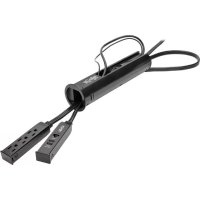
Protect It! TLP310DMUSB - Wall socket Tripp Lite - Free user manual and instructions
Find the device manual for free Protect It! TLP310DMUSB Tripp Lite in PDF.



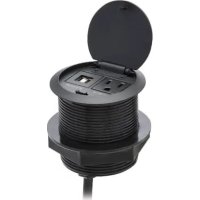
| Product Type | Surge protector with wall outlet and USB charger |
| Brand | Tripp Lite |
| Model | Protect It! TLP310DMUSB |
| Number of outlets | 3 AC outlets |
| USB charging ports | Yes (number not specified, typically 2 USB-A ports) |
| Ethernet port | Yes (RJ45) |
| Input voltage | 120 V AC |
| Outlet type | NEMA 5-15P (3-pin grounded) |
| Cutout diameter | 64 mm (2.5 in) |
| Installation | Flush mount in desk (cable pass-through) |
| Surge protection | Yes |
| Material | Flame-retardant plastic |
| Weight | Approximately 0.5 kg |
| Dimensions (L x W x H) | Approximately 10 x 8 x 5 cm (estimate) |
| Intended use | Indoor only |
| Warranty | Limited lifetime warranty |
| Maintenance | Wipe with a dry cloth |
| Safety | Do not open, do not use with 2-wire extension cords, do not use near water or heat |
| Repairability | No user-serviceable parts |
| Included accessories | Mounting clips |
Frequently Asked Questions - Protect It! TLP310DMUSB Tripp Lite
User questions about Protect It! TLP310DMUSB Tripp Lite
0 question about this device. Answer the ones you know or ask your own.
Ask a new question about this device
Download the instructions for your Wall socket in PDF format for free! Find your manual Protect It! TLP310DMUSB - Tripp Lite and take your electronic device back in hand. On this page are published all the documents necessary for the use of your device. Protect It! TLP310DMUSB by Tripp Lite.
USER MANUAL Protect It! TLP310DMUSB Tripp Lite
Surge Protector with
USB Charging
3-Outlet Model: TLP310DMUSB
4-Outlet Model: TLP410DMUSB
Important Safety Instructions 2
Installation 2
Product Registration 4
Lifetime Limited Warranty 4
Ultimate Lifetime 4
Insurance Policy
Español 5
Français 9
PROTECT YOUR INVESTMENT!
Register your product for quicker service and ultimate peace of mind.
You could also win an ISOBAR6ULTRA surge protector— a \$100 value!

text_image
QR code image containing encoded data, no visible human-readable textwww.tripplite.com/warranty

text_image
TRIPP·LITE
Manufacturing Excellence.
1111 W. 35th Street, Chicago, IL 60609 USA • www.tripplite.com/support
Copyright © 2016 Tripp Lite. All rights reserved. Protect It!® is a registered trademark of Tripp Lite.
Important Safety Instructions
SAVE THESE INSTRUCTIONS
CAUTION! DO NOT connect to an ungrounded outlet. DO NOT use with 2-wire extension cords or adapters. This surge protector is designed for indoor use only. Install the surge protector away from heat-emitting appliances such as radiators or heat registers. Do not install where excessive moisture is present. Do not plug extension cords into it. Never install electrical, telephone, network or coaxial wiring during a lightning storm. Do not drill into any part of the housing or open the housing for any reason. There are no user-serviceable parts inside.
- Use of this equipment in life support applications where failure of this equipment can reasonably be expected to cause the failure of the life support equipment or to significantly affect its safety or effectiveness is not recommended. Do not use this equipment in the presence of a flammable anesthetic mixture with air, oxygen or nitrous oxide.
Installation
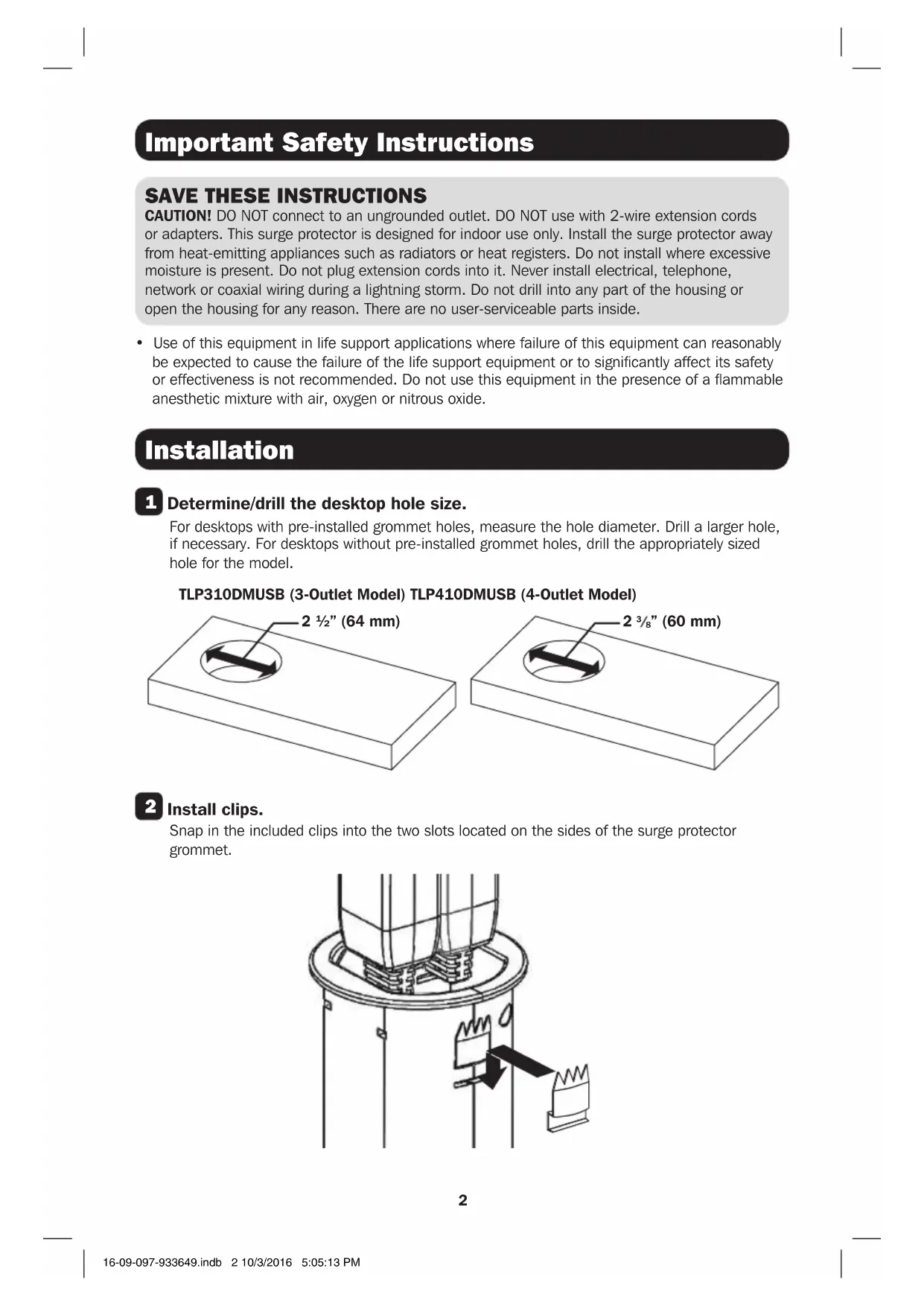
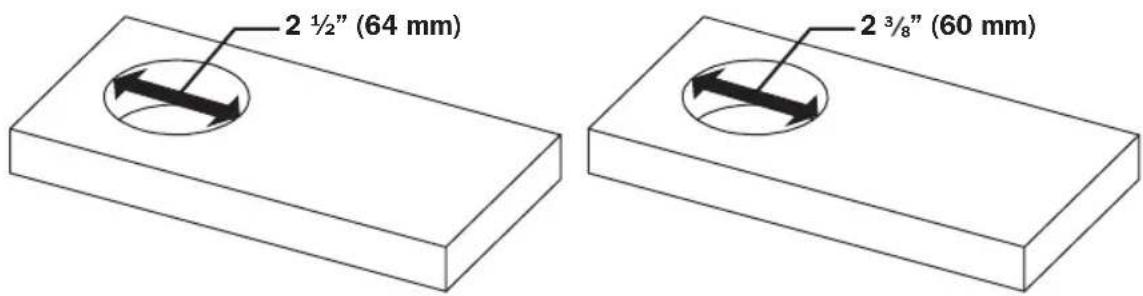
1 Determine/drill the desktop hole size.
For desktops with pre-installed grommet holes, measure the hole diameter. Drill a larger hole, if necessary. For desktops without pre-installed grommet holes, drill the appropriately sized hole for the model.
TLP310DMUSB (3-Outlet Model) TLP410DMUSB (4-Outlet Model)
text_image
2 ½" (64 mm) 2 ¾/₈" (60 mm)2 Install clips.
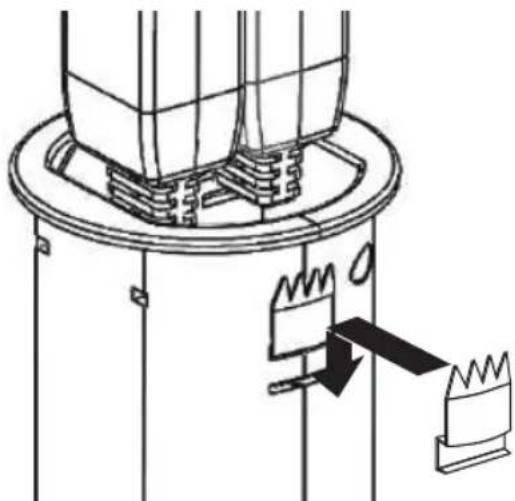
Snap in the included clips into the two slots located on the sides of the surge protector grommet.
natural_image
Technical line drawing of a mechanical assembly with no visible text or symbolsInstallation
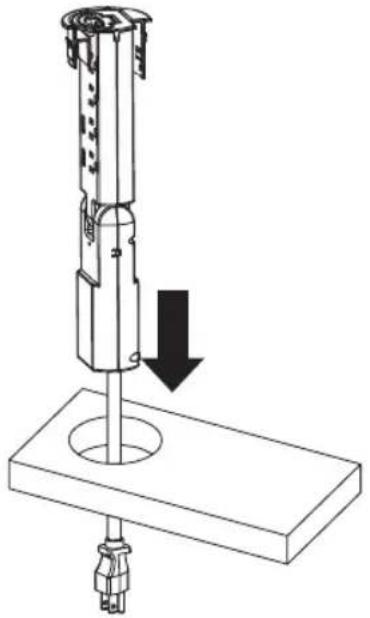
3 Insert the surge protector into the desktop's grommet hole.
natural_image
Technical line drawing of a mechanical device with a downward arrow indicating force or movement (no text or symbols present)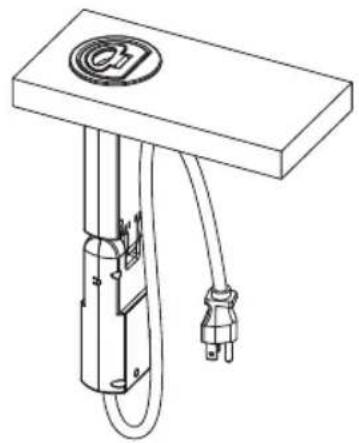
natural_image
Technical line drawing of a mechanical or electrical component with a circular top and two connected cables (no text or symbols)TLP410DMUSB model shown in illustration. Product appearance will vary by model.
4 Plug the surge protector's power cord into a standard, 3-wire grounded 120V AC outlet.
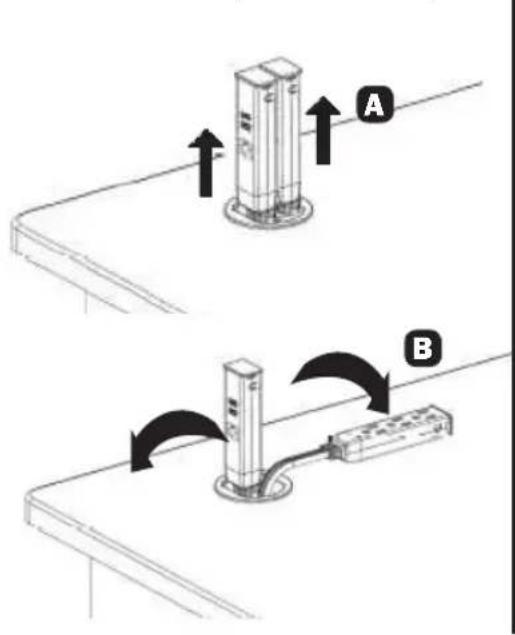
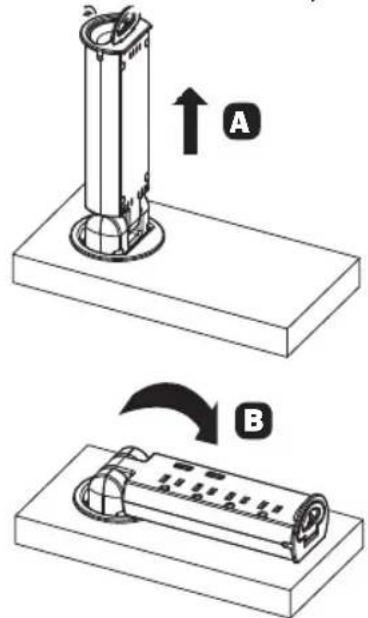
5 Pull the unit out of the grommet completely A, then fold the surge protector down onto the desktop B.
TLP310DMUSB (3-Outlet Model) TLP410DMUSB (4-Outlet Model)
text_image
Technical diagram showing two mechanical assembly steps labeled A and B, with arrows indicating direction of movement.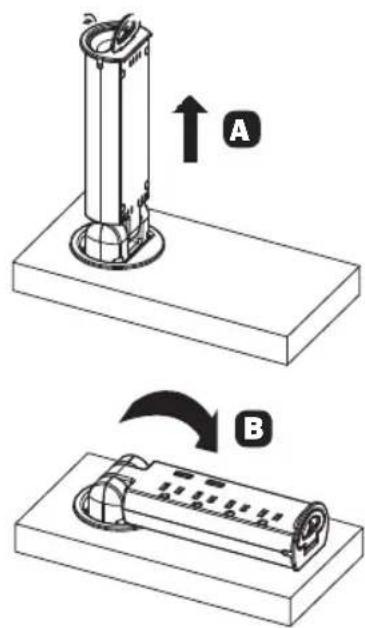
text_image
Diagram showing two mechanical components labeled A and B, with arrows indicating direction of movement or assembly.6 Connect equipment to the surge protector's AC outlets, USB charging ports and RJ45 Ethernet port (TLP310DMUSB only).
7 When not in use, disconnect equipment, pull the surge protector up to a straight, vertical position, then push the surge protector into the grommet for unobstructed storage.
Product Registration
Visit www.tripplite.com/warranty today to register your new Tripp Lite product. You'll be automatically entered into a drawing for a chance to win a FREE Tripp Lite product!* * No purchase necessary. Void where prohibited. Some restrictions apply. See website for details.
Lifetime Limited Warranty
Seller warrants this product, if used in accordance with all applicable instructions, to be free from original defects in material and workmanship for its lifetime. If the product should prove defective in material or workmanship within that period, Seller will repair or replace the product, in its sole discretion. Service under this Warranty can only be obtained by your delivering or shipping the product (with all shipping or delivery charges prepaid) to: Tripp Lite, 1111 W. 35th St., Chicago, IL 60609. Seller will pay return shipping charges.
The warranties of all TRIPP LITE surge suppressors are null and void if they have been connected to the output of any UPS system. The warranties of all TRIPP LITE UPS Systems are null and void if a surge suppressor has been connected to its output receptacles.
THIS WARRANTY DOES NOT APPLY TO NORMAL WEAR OR TO DAMAGE RESULTING FROM ACCIDENT, MISUSE, ABUSE OR NEGLECT. SELLER MAKES NO EXPRESS WARRANTIES OTHER THAN THE WARRANTY EXPRESSLY SET FORTH HEREIN. EXCEPT TO THE EXTENT PROHIBITED BY APPLICABLE LAW, ALL IMPLIED WARRANTIES, INCLUDING ALL WARRANTIES OF MERCHANTABILITY OR FITNESS, ARE LIMITED IN DURATION TO THE WARRANTY PERIOD SET FORTH ABOVE; AND THIS WARRANTY EXPRESSLY EXCLUDES ALL INCIDENTAL AND CONSEQUENTIAL DAMAGES. (Some states do not allow limitations on how long an implied warranty lasts, and some states do not allow the exclusion or limitation of incidental or consequential damages, so the above limitations or exclusions may not apply to you. This Warranty gives you specific legal rights, and you may have other rights which vary from jurisdiction to jurisdiction.)
WARNING: The individual user should take care to determine prior to use whether this device is suitable, adequate or safe for the use intended. Since individual applications are subject to great variation, the manufacturer makes no representation or warranty as to the suitability or fitness of these devices for any specific application. The policy of Tripp Lite is one of continuous improvement. Specifications are subject to change without notice.
Regulatory Compliance Identification Numbers
For the purpose of regulatory compliance certifications and identification, your Tripp Lite product has been assigned a unique series number. The series number can be found on the product nameplate label, along with all required approval markings and information. When requesting compliance information for this product, always refer to the series number. The series number should not be confused with the marketing name or model number of the product.
Ultimate Lifetime Insurance Policy
This is a limited warranty valid in the U.S. and Canada only.
Tripp Lite warrants, for the lifetime of the product, (at Tripp Lite's option) to repair or replace (on a pro rata basis) directly connected equipment that is damaged due to power transients while properly connected to Tripp Lite products offering the Ultimate Lifetime Insurance Policy. Power transients include spikes and surges on the AC power, data or telephone lines that the Tripp Lite products have been designed to protect against (as recognized by industry standards). The following four paragraphs are conditions that must be compiled with before the warranty becomes valid; failure to comply with these requirements will void the warranty.
AC Power Line Transients: To claim damages, the Tripp Lite product must be plugged into a properly wired and grounded outlet. No extension cords or other electrical connections may be used. The installation must comply with all applicable electrical and safety codes set forth by the National Electrical Code (NEC). Except as provided above, this warranty does not cover any damage to properly connected electronic equipment resulting from a cause other than an "AC power transient". If user meets all of the above requirements, Tripp Lite will repair or replace (at Tripp Lite's option) equipment up to the specified value (See Ultimate Lifetime Insurance Policy Limits). No coverage is allowed for damage entering from telephone or data lines, unless they are separately protected, as described below.
Telephone and Data Line Transients: Tripp Lite will repair or replace directly connected equipment that is damaged by transients on telephone and/or data lines only when all such paths are protected by a Tripp Lite protection product(s) and the AC power (utility) line is simultaneously protected by a Tripp Lite power protection device (UPS, surge suppressor or line conditioner) with Ultimate Lifetime Insurance coverage. Additional telephone and/or data line connected devices downstream must have their own telephone and/or dataline protectors.
Reimbursement dollar limits will be equal to that of the Tripp Lite power protection protector. Coverage is excluded where a suitable environment for the protection device is not provided, including, but not limited to, lack of a proper safety ground. Telephone service equipment must also include a properly installed and operating "primary protection" device at the telephone service entrance (such devices are normally added during telephone line installation).
All above warranties are null and void if the Tripp Lite product has been improperly installed, tampered with or altered in any way, or if the connected equipment was not used under normal operating conditions or in accordance with any labels or instructions. All claims under this warranty must be submitted in writing to Tripp Lite within 30 days of the occurrence or the claim will not be considered. This warranty does not include damage resulting from accident or misuse, and applies to the domestic (USA & Canada) use of these products only. Tripp Lite reserves the right to determine whether the damage to the connected equipment is due to malfunction of the Tripp Lite product by requesting the equipment in question be sent to Tripp Lite for examination. This policy is above and beyond, only to the extent needed, of that provided by any coverage of connected equipment provided by other sources, including, but not limited to, any manufacturer's warranty and/or any extended warranties.
EXCEPT AS PROVIDED ABOVE, TRIPP LITE MAKES NO WARRANTIES, EXPRESS OR IMPLIED, INCLUDING WARRANTIES OF MERCHANTABILITY AND FITNESS FOR A PARTICULAR PURPOSE. Some states do not permit limitation or exclusion of implied warranties; therefore, the aforesaid limitation(s) or exclusion(s) may not apply to purchaser. EXCEPT AS PROVIDED ABOVE, IN NO EVENT WILL TRIPP LITE BE LIABLE FOR DIRECT, INDIRECT, SPECIAL, INCIDENTAL OR CONSEQUENTIAL DAMAGES ARISING OUT OF THE USE OF THIS PRODUCT, EVEN IF ADVISED OF THE POSSIBILITY OF SUCH DAMAGE. Specifically, Tripp Lite is not liable for any costs, such as lost profits or revenue, loss of equipment, loss of use of equipment, loss of software, loss of data, costs of substitutes, claims by third parties or otherwise. Coverage also does not apply to connected medical and industrial equipment.
To receive service under this warranty, you must be the original purchaser/user of the product in question. You must obtain a Returned Material Authorization (RMA) number from Tripp Lite. Products must be returned to Tripp Lite with transportation charges prepaid and must be accompanied by a brief description of the problem encountered and proof of date and place of purchase

text_image
TRIPP·LITE
Manufacturing Excellence.
1111 W. 35th Street, Chicago, IL 60609 USA • www.tripplite.com/support
text_image
2 1/2" (64 mm) 2 3/8" (60 mm)2 Instale los clips.
natural_image
Technical line drawing of a mechanical assembly with no visible text or symbolsInstalación
natural_image
Technical line drawing of a mechanical device with a downward arrow indicating force or movement (no text or symbols present)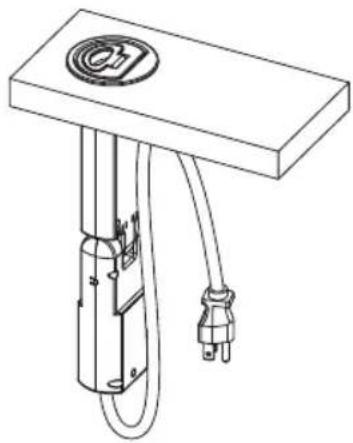
natural_image
Technical line drawing of a mechanical or electrical component with a cylindrical body and two connected wires (no text or symbols)text_image
Technical diagram showing two mechanical assembly steps labeled A and B, with arrows indicating direction of movement.TLP410DMUSB (Modelo de 4 Tomacorrientes)
text_image
Diagram showing two mechanical components labeled A and B, with arrows indicating direction of movement or assembly.Manufacturing Excellence.
1111 W. 35th Street, Chicago, IL 60609 USA • www.tripplite.com/support
natural_image
Technical line drawing of a mechanical assembly with no visible text or symbolsInstallation
natural_image
Technical line drawing of a mechanical device with a downward arrow indicating force or movement (no text or symbols present)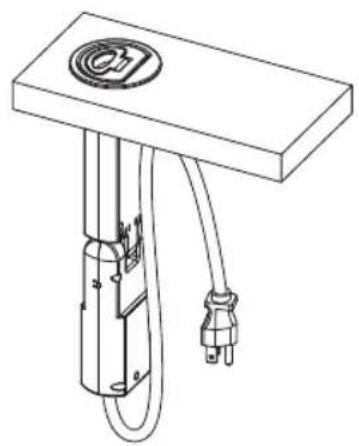
natural_image
Technical line drawing of a mechanical or electrical component with a circular top and two connected cables (no text or symbols)text_image
Technical diagram showing two installation steps labeled A and B, with arrows indicating direction of movement or assembly.text_image
Diagram showing two mechanical components labeled A and B, with arrows indicating direction of movement or assembly.
Manufacturing Excellence.
1111 W. 35th Street, Chicago, IL 60609 USA • www.tripplite.com/support
16-09-097 93-3649_RevA