B0930082E4U - Server Tripp Lite - Free user manual and instructions
Find the device manual for free B0930082E4U Tripp Lite in PDF.


User questions about B0930082E4U Tripp Lite
0 question about this device. Answer the ones you know or ask your own.
Ask a new question about this device
Download the instructions for your Server in PDF format for free! Find your manual B0930082E4U - Tripp Lite and take your electronic device back in hand. On this page are published all the documents necessary for the use of your device. B0930082E4U by Tripp Lite.
USER MANUAL B0930082E4U Tripp Lite
Register your product for quicker service and ultimate peace of mind.
You could also win an ISOBAR6ULTRA surge protector—a $100 value!
www.triplite.com/warranty
TRIPP·LITE

Manufacturing Excellence.
1111 W. 35th Street, Chicago, IL 60609 USA • www.triplite.com/support
Copyright © 2017 Tripp Lite. All rights reserved.
Package Includes
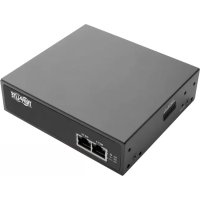
- B093-004-2E4U, B093-008-2E4U, or B093-008-2E4U-M Console Server
- External Power Supply with NEMA 1-15P (North America), CEE 7/16 Schuko (Europe), BS1363 (UK) and AS2112 (Australia) plug adapters (Input: 100-240V, 50/60 Hz, 0.4A; Output: 12V 1.25A)
- Mounting Hardware
Rubber Feet
DB9-to-RJ45 Crossover Serial Adapter - Digital I/O Converter (Terminal Block)
- Oquick Start Guide
Hardware Assembly
1 If free-standing: Attach the adhesive-backed rubber feet to the console server's base.
If rack-mounted: Attach the rack kit to the side of the console server to be fixed to the rack.
2 Connect the console server's NET1 port to your primary network.
3 Connect the console server's NET2 port to your Out-of-Band (OOB) management network.
Note: The B093-008-2E4U-M also includes Small Form-Factor Pluggable (SFP) ports for NET1 and NET2 fiber-optic connections. If an SFP module is plugged in and establishes a working link, the SFP port will activate and the paired RJ45 port will deactivate.
If you have a B093-008-2E4U-M, plug an RJ11 cable into the front-facing RJ11 port to connect to the built-in V.92 modem. Plug the other end of the RJ11 cable into a functioning landline port to allow the B093-008-2E4U-M's V.92 modem to dial-out
5 Connect additional devices to the console server's serial ports and USB ports.
If you have external sensors, plug them in to the terminal block and attach any sensors and DIO devices.
7 Plug in the 12V DC power supply and turn on the power to the console server.
Connect the Console Server
The B093-004-2E4U, B093-008-2E4U, and B093-008-2E4U-M Console Servers are addressable at one of two IP addresses:
It's built-in address (192.168.0.1/24).
2 The default address its DHCP client accepts from a DHCP server on your network.
3 Using a browser on the same network as the console server's NET1 port with an IP address in one of the network ranges (i.e. 192.168.0.x/24, or the range used by your DHCP server):
Enter https://192.168.0.1/ or https://[DHCP-supplied address]/ and press Return.
Note: The console server's self-signed SSL certificate "untrusted connection" error will be present.
4 Click through the error to load the console server login page.
5 Enter the default system username and passcode.
Username: root
Password: default
Press Submit or Return. The console interface welcome page will load.
Note: The console interface will log out after 20 minutes of inactivity. The current page will remain loaded, however, and clicking any UI element loads the login page. Logging back in will reload the requested page.
Configuration and management options present themselves in expanded-by-default menus along the left side of the interface. The top-level menus are Manage, Status, Serial & Network, Alerts & Logging, and System.
The remainder of the page lists configuration tasks required to turn the console server into a usable unit. Some of these tasks will be marked as completed due to the console server's factory settings. The procedures in the next section document initial configuration using the menus, rather than the task list.
Set a Strong, High-Entropy Passcode for the Root User
1 Click Serial & Network > Users & Groups.
2 Click Edit for the Root User.
3 Enter a strong, high-entropy passcode in the Password field.
4 Re-enter the passcode in the Confirm field.
5 Click Apply.
Set the NET1 Port's Network Configuration Method
1 Click System > IP.
2 Click Network Interface if it is not the front-most tab.
3 For Configuration Method, click either the DHCP or Static radio button.
4 If Static, enter an IP Address and Subnet Mask for the NET1 interface.
Set the NET2 Port's Network Configuration Method
The NET2 port is set to inactive by default. To activate:
1 Click System > IP.
2 Click Management LAN Interface to make it the front-most tab.
3 Click the Deactivate this network interface checkbox to de-select this option and activate NET2.
4 For Configuration Method, click either the DHCP or Static radio button.
5 If Static, enter an IP Address and Subnet Mask for the NET2 interface.
For out-of-band (OOB), set these for your management network.
For IP passthrough, set these to match an unused private IP range.
Note: The console server's firewall determines which protocols and services can access ports and devices. HTTPS and SSH are enabled to the console server by default. To change access settings for the console server and connected serial ports, click System > Services. Then click the Service Access tab and adjust, as required.
Configure Managed Devices
1 Click Serial & Network > Serial Port.
To configure a port:
2 Click Edit.
3 Set the Common Settings for Port x to match the device connected to serial port x.
4 To enable remote access to the device, check the Console Server Mode radio button in Console Server Settings and click the checkboxes for allowed protocols (e.g. Telnet, SSH and Web Terminal).
5 Click Apply.
Note: Configure user access policies for connecting to such ports in Serial & Network > Users & Groups. An AAA server can configure them remotely. See the Owner's Manual for more information.
Other Modes and Functions
Please refer to the Owner's Manual for details on advanced features, such as configuration, PDU and UPS power management, environmental monitoring, logging, and auto-response alerts.
Warranty and Product Registration
4-YEAR LIMITED WARRANTY
TRIPP LITE warrants its products to be free from defects in materials and workmanship for a period of four (4) years from the date of initial purchase. TRIPP LITE's obligation under this warranty is limited to repairing or replacing (at its sole option) any such defective products. To obtain service under this warranty, you must obtain a Returned Material Authorization (RMA) number from TRIPP LITE or an authorized TRIPP LITE service center. Products must be returned to TRIPP LITE or an authorized TRIPP LITE service center with transportation charges prepaid and must be accompanied by a brief description of the problem encountered and proof of date and place of purchase. This warranty does not apply to equipment, which has been damaged by accident, negligence or misapplication or has been altered or modified in any way.
EXCEPT AS PROVIDED HEREIN, TRIPP LITE MAKES NO WARRANTYES, EXPRESS OR IMPLIED, INCLUDING WARRANTY OF MERCHANTABILITY AND FITNESS FOR A PARTICULAR PURPOSE.
Some states do not permit limitation or exclusion of implied warranties; therefore, the aforesaid limitation(s) or exclusion(s) may not apply to the purchaser.
EXCEPT AS PROVIDED ABOVE, IN NO EVENT WILL TRIPP LITE BE LIABLE FOR DIRECT, INDIRECT, SPECIAL, INCIDENTAL OR CONSEQUENTIAL DAMAGES ARISING OUT OF THE USE OF THIS PRODUCT, EVEN IF ADVISED OF THE POSSIBILITY OF SUCH DAMAGE. Specifically, TRIPP LITE is not liable for any costs, such as lost profits or revenue, loss of equipment, loss of use of equipment, loss of software, loss of data, costs of substitutes, claims by third parties, or otherwise.
PRODUCT REGISTRATION
Visit www.triplite.com/warranty today to register your new Tripp Lite product. You'll be automatically entered into a drawing for a chance to win a FREE Tripp Lite product!*
- No purchase necessary. Void where prohibited. Some restrictions apply. See website for details.
WEEE Compliance Information for Tripp Lite Customers and Recyclers (European Union)

Under the Waste Electrical and Electronic Equipment (WEEE) Directive and implementing regulations, when customers buy new electrical and electronic equipment from Tripp Lite they are entitled to:
- Send old equipment for recycling on a one-for-one, like-for-like basis (this varies depending on the country)
- Send the new equipment back for recycling when this ultimately becomes waste
Use of this equipment in life support applications where failure of this equipment can reasonably be expected to cause the failure of the life support equipment or to significantly affect its safety or effectiveness is not recommended.
Tripp Lite has a policy of continuous improvement. Specifications are subject to change without notice.


Manufacturing Excellence.
1111 W. 35th Street, Chicago, IL 60609 USA • www.triplite.com/support
1111 W. 35th Street, Chicago, IL 60609 USA • www.triplite.com/support

Manufacturing Excellence.
1111 W. 35th Street, Chicago, IL 60609 USA · www.triplite.com/support
KpaTKoe pyKOBOdCTBO
Повытейя
Moden:
B093-004-2E4U, B093-008-2E4U,
B093-008-2E4U-M
English 1 • Espanol 6 • Français 11


Manufacturing Excellence.
1111 W. 35th Street, Chicago, IL 60609 USA · www.triplite.com/support
OxpaHaeTcA ABTopcKIM npaBOM © 2017 Tripp Lite. Npepeeta3a3npeaaetca.
KoMnJIeKT nOcTaBKN
KoHcOJIbHbI cepBep MoD. B093-004-2E4U, B093-008-2E4U nnn B093-008-2E4U-M
BHeHn6IOK nHTAHnco 8TeNceBHBIMn NepexOHNKAMN NEMA 1-15P (CeBepHaAmePKa), CEE 7/16 Schuko (Ebpona), BS1363 (BENko6pTuHn) n AS2112 (ABCTpaIIra) (BXoJ: 100-240 B; 50/60 T; 0,4 A; BbIXoJ: 12 B / 1,25 A)
- MoHTaxKhbIe npCnOc6JIeHnIa
- Pe3HOBbIe HOXKN
- Последоватьно розклочаимь перexodнк DB9-RJ45 с пeрекстно pa3bOdkоi
- Ppeo6pa3oBaTeIb IuΦpOBOrB BBOJa-BbIBOa (6JOK 3aKIMMOB)
KpaTkoepykoBODCTBONoJb30BaTeN
Popraok c6opkn
1 Pn HanoBHO yCTaHOBKe: npKpeNITe pe3HHoBble HOKKI c KJIeKoI o6paTHOIOBepxHOCTbIO KOCHOBAMIO KOHcOJIbHOr cepBepa.
Ipn MOHTaKe B CToiKy: npKpeNITe KOMnEKT IJIa MOHTaKa B CToiKy C 60KOBoI CTOpHbI KOHcBHorO cepBepa, yCTaHaBJIbAeMOro B CToiKy.
2 PoiocoeHNHTe npT KOHcONbHOro cepBepa NET1 K OCHOBHO cETN.
3 POncoeHnHte npT KOhCoIbHorO cepBepaNET2 K pe3epBHO (OOB) cTeu npBaHeHa.
PpmeHne. MoBb B093-008-2E4U-M TaKx He Meet npToI dIy IIOKnHoueHH KOMNaKTHO npMeOmepeaTnka (Moyn SFP) K BOLOKHO-OITMueCKm pa3bemAM NET1 n NET2. Ecm MOdyb SFP BKIOuH e N yctAHabMaet pa6oH kHaH, to aKTHBpyETc nopt SFP cOnHObpemHeH deakmbauee npota RJ45 nD BuTyIO npay.
4 Pn yctaHOBKe moeB B093-008-2E4U-M BCTaBbTe Ka6eB RJ11 B nopT RJ11 Ha nepeDne NaHEn dna noKIOUeHn K BcTpoEHHom My MoeMy V.92. BcTaBbTe BTOPOI KOHeu Ka6eR RJ11 B pa6oTAIOue rHe3do dna noKIOUeHn CtaIOHOAPHoro TelefoHa, YTO NO3BOUN T MoeMy V.92 yCtpoiCTBa B093-008-2E4U-M BbIXOHTB TelefoHHyIO cETb
5 IopKIOUHTe npyue yctpoICTBa KIOcJIeOBAteIbHbIM nopTAM NnpTAM USB KOHcoIbHOr cepBepa.
6 Pn HauuBHeunx DaTukOB NokKIOUHTe K 6NOKy 3aXIMOB N 3aKpeNTe BCE daTUKN uYCTPOIcTBa UΦpOBOr BBOda-BbIBoJa.
7 BKJIOUHTe NCTOUYHK NTaHnN IOCTOHHORo ToKa (12 B) IN BKJIOUHTe NITaHne KOHCOJIbHOrO cepBepa.
BBeDnTe https://192.168.0.1/ nnn https://[DHCP-supplied address]/ nHaKmTe Return (Ha3a).
PpmeaHne. B 3OM cIyue 6yET npCytCTBOBaT b OwN6ka "untrusted connection" ("HeHaJExKHOe coeHNHe") camoNoDncaHoro SSL-cePTnΦkata KOHcOJIbHoro cepBepa.
4 HaxmnteMbIbIbHOaOw6kyJn3aRpy3KnpeINCTpaunOHHcTpaHnCkoHcoJIbHoro cepBepa.
5 BBeDnTe 3aHaHbIe No yMonuHaHIO IIMr NpIb3oBaTeJI INapOJIb IINB XoDa B CnCTeMy.
mnaonb30BaTeTn: root
Paponb: default
HaxmTe Submit (OtpaBntb) nnn Return (Ha3a). 3arpykaetcstapTOBa cTpaHua nHTeppeKa KOhconn.
PnmeaHne. Ceanpabotc nHTepfemc MOHCOIN 3abepeaaeTcno MCTeueHHN 20 MNHYT OTCYCTBNA AKTHBHOCTn NOb3OBaTeNa. Ondako TeKyuzaa CTpaHua octaetc 3arpykeHHo, IN Pn HaxaTN Ha IIO6o NEMeNT NOb3OBaTeNbCKoro INTEpfeca 3arpykaetc perncpauohna CTpaHua. Pn BO3BpaueHH B CNTeMy NOBTOPO 3arpykaetc 3anpaunBaemr CTpaHua.
B pa3BepTbIaHuxcno yMOnuHaHIO MeHIO HaJeBOI CTOpOHe nHTepFeca npedCTabJeHb ONuHn HAcTroKn u npabHeHm. MeHIO BepxHero ypOBH: Manage (YnpabHeHne), Status (Ctaryc), Serial & Network (PocneobatbHoe noKnoueHne n cetb), Alerts & Logging (PpeDynpedntelhbcie cnHaJIb n perncTaun) n System (Cnctema).
Ha octaBweiCyaTn CTpaHnCbI nepeuCnIOTc HAcTpoeHbI 3aDaH, Heo6xOIMMbI dIy IpeBpaUeHnKOHcoNbHOrO cepBepa B nolE3hbl dI py a60tbl 3JeMeHT. HeKOTOpbl n3 3TuX 3aDaY o603HaueHb KaK BblOnHeHHbEB COOTBeTCTBm C 3aBOckMm HAcTPOJkAMN KOHcONbHorO cepBepa. IpoceDpybl, OINcaHbIe B cIeMyUeMa pa3dene, PIKCNpyOt HaauNbHyO HAcTPOJky C NcONb3ObaHnEM MeHIO, a He CNICOK 3aDaY.
3aДанг He NaDEJXHOrO napOJIc BbICOKoI CTepeHbIO XaOTnUHOCrI dIy npBUNeRnPoBaHHOrO I0JIb3OBaTeJIa
1 Haxmte Serial & Network > Users & Groups (Pocn. noKnoeHne n cetb > Pohb3oBATEn ngpnnbl).
2 Haxmte Edit (PedaTnpoBaTb) nra Root User (PnBnIe npoBaHHb noh3oBeIb).
3 BBeDnTe HaJeXHbI npoB CBBCOKO CTeNEHbIO XaOTNUHOCTN B NOJI PaOpB.
4 BBeIe 3TOn npoB nobToPHO B none Confirm (NoTbepXdHeHne).
5 HaxMnte Apply (PpMmHeNTb).
YcTaHOBJIeHHe cNoCo6a HaCTpoiKu cETn dIy nopTa NET1
1 Haxmte System > IP (CncTeMa > IP-aPec).
2 HaxmTe Network Interface (CeTeBoi INTepeEic), eCIN 3To He cAmaj nepeDnjaKa.
3 B MeHIO Configuration Method (Cnocob hacrpoiKn) noCTaBbTe KhoNky-apeKJIouaTeIb pAOM c onuuei DHCP nn Static (Ctunueckn).
4 B cnuyae bbybopa onuhi Static (Ctataueckn) BBeNTe 3auehen IA Address (IP-adpec) n Subnet Mask (Maoka nooctn) dny INTEpfeca NET1.
YCTaHOBJIeHHe cNoCo6a HacTpoiKn CetI nIy npTa NET2
IopT NET2 no ymonuHIO yctAHOBnEH KAK HeaKTHBbI. JIe erO aKTHBaUIN:
1 Haxmte System > IP (CucTeMa > IP-aPec).
2 Haxmte Ha BknaKy Management LAN Interface (HnTepc uypablaioe JBC), TTo6bI nepemecntb ee ha nepBOe MeCTO.
3 CHIMITE ranoKy B none Deactivate this network interface (DeakmbpoBaTb 3OT cTeBOHHTepcEic) nra OTMeHbBb6opa daHHoon onu nn akTBAu nn npTa NET2.
4 B MeHIO Configuration Method (Cnocob NaCTpOIKu) NoCTaBbTe KhoNky-NepeKJIouaTeIb pAOM c onUnei DHCP nn Static (CtAnueckn).
5 B cnuyae bblopoa onuui Static (Ctataueckn) BBeinte 3naueHn IP Address (IP-adpec) n Subnet Mask (MaKa npocetn) dny nHTepfneca NET2.
IЯнсгpoикpe3epBhoi cetn out-of-band (OOB) (pe3epBha (OOB) yCTaHOBNTe yKa3aHHbIe 3HaueHnI aCBOe ynpablaHouie cetn.
IpyTpaH3nTa yCTaHOBtE IN TaKIM O6pa3OM, YTO6bI OHN COOTBeTCTBOBaII HEnCIOJIb3yeMOMy BHyTppeHHemMy dnaNa3OHy IP-aDpecoB.
PnmeHne. MexcTeBoe 3KpaH KOHcIbHorO cepBepa onpeJenr, KaKne npToKoNbl n CepBncbl MoryT noLyuTaB Doctyn K nopTaM u yCtpoCTBaM. PtoKObl HTTPS u SSH no yMOUHaHIO pa3peWeHb dna KOHcIbHorO cepBepa. TObbl N3MeHHTb HaCTpOKn DocTyNa dna KOHcIbHorO cepBepa n NOkJIouHeHbIX nOcIeDoBaTeIbHbIX nOpTob, HaxMMte System > Services (CicTeMa > CepBncbl). 3aTeM HaxMMte HA BklaKy Service Access (DocTyN K cepBncam) u BheCite Heo6xOumble I3MeHeHna.
HactpoJa ynpaBnIeMbIX yCTpoIcTB
1 Haxmte Serial & Network > Serial Port (Pocn. noKIOUeHne n cetb > PocneObaTeIbHbI npT).
Дин actpoKn npota:
2 Haxmnte Edit (PeaKtnpoBaTb).
3 3aJaTe Common Settings for Port x (06uine hactpokn Ipa npTa x) Ipa cornaobahma yctpoCTBa, nodklueHHoro K nocleobatbHomy npTy x.
4ДЯ obecneueHn B03MOxHocTn ydaIeHHoro DoCTyna K ycTroNCTBy npOBepbTe KhonKny-nepeKnIOuATEnb Console Server Mode (Pexm KOhCoNbHoro cepBepa) B MeHIO Console Server Settings (HaCtpoKn KOhCoNbHoro cepBepa) n OTMeTbTe ranoUckamn noJa, coOTBeTCTByOUIne pa3peSeHHbIM npOTOKoJAM (HanpImEp, Telnet, SSH n Web Terminal).
5 Haxmnte Apply (PpIMeHntb).
PnmeHne. HacpoTe npabuna nonb3oBateNbCKoro doCTyna dna noKIOUeHn TaNX noptOB MeHIO Serial & Network > Users & Groups (NoCn. noKnIOUeHne u cetb > NlB3oBATEnn rpynnbl). CepBep AAA moKet hAcTpaNBaTB ux ydaenHNO. Bonee noDpO6Hyu IHOpMauncM. B PykoBODCTBe noB3oBATeNa.
Дрг nurse peximblnФункциN
Pndpo6hee o paacunpeHHbIX fynKcuaX, BkIIOUaHACTPOKY, ynpabHeHne nITaHnEM PDU u N5Pi, KOHTpObl ycNOBm cpebl, peNCTpaUIO u BXoD B CNTeMy u ABToMaTHueCKNe npdUnpeINTeNbHbe CNHaIbI, CM. B PyKOBoDCTBe pONb30BaTeJIa.
ГараHTиньеобяЗаTeльСТВa
OPAHUHEHHA TAPAHTN CPOKOM 4TOA
KOMnHnTRIPP LITE rapaHTnpyET OTCYCTBNE dekeKTOB mATEpnaIOB N3ROTOBHeNBA TceHne Ytebpe (4) rOda C MmEHTA nepBOHaayhboH NOkyTN. 063aTeIbCTBa KOMnAHn TRIPP LITE no Hactoae JraPANTU ORAPNHNAIBOTcpeMOTHMnn 3aMeHO (no ee eHNHOHUMOHYCMOTpeHH) IIO6bTxTAKHX deekthbIX 3denn. IINI ONUYeHn yCITN IO DAHHOR rapaHTMN Heo6xoHIMNO NOnyHTb HOpemRrtded Material Authorization (RMA - pa3peHne Ha BO3bpaMaTEPAOBnOB) OT KOMnAHn TRIPP LITE nn ee ABTop3OBAHHOR cEBPHCHOr CEHTPa. IN3diennoJONKHB6bTB Bo3bpaJeB B KOMnAHIO TRIPP LITE nABTOPI3OBAHHCBepBCHbI CEHTP TRIPP LITE c npedonlato TpAHCNPbTHbX paXoDBn CONPOBXDaTcKpATKM ONCAHMEM B03NKwe np6JIbMn DOKyMeHtOM, NOITBEpKDAIOUIM DaTy I MeTo erO npio6PeHn. DeiCTBNe HACTOaee rapaHTMN He pACnPoCTpaHReTcHa OBOPyOBAHme, NOBpeKDeHHoe B pe3yIbTaTe ABAPIN, He6peXHOrO 6paueHn IIN HeNPaBnIBHO NcNoB3OBAHHa, a TaKKe BNDOn3MeHHoe KaKM 6bTo H6bl0 6pb3OM.
3A NCKJIIOUHEM IPEYCMOTEHBIX 3DECb CUYAEKOMIAHNA TRIPP LITE HE IPEIOCTABJRET KAKNX-JIIBO ABHBIX JIN IOIPA3YMEBAEMBX TAPAHNTBI, BKNIOA HAPAHNTM KOMMEPUECKON PIPROIDHOCTN INPIRFOHOCTN JIA KAKOI-NMO KOHKPETHOLEIM.
B HeKoTOpbix uTaTAX/TOcYdApCTBax OrpAHueHne Mm NckNIOUeHne NODpa3yMeBaembIX rapaHTn He DoNyckaetc; CNeObaTeNbHO, BblEuyKa3aHHoe(-ble) orpAHueHne(-) mnn NckNIOUeHne(-) moryt He paacnpocpaHrTaC h Naokynatena.
3A INCKHIOYEHME NPEYCMOTPHBbX BbIe CNYAEB KOMNAHNA TRIPP LITE HN INPIK KAKNX OBCTORETBAX HE HECET OTBETCTBEHHOCT 3A INPRAMbIE, KOCBEHNbIE, CNYAHbIE ININ IOBOUYbIE YbITKN IINBO YbITKN, ONPDEJREMBIE OCObIMN OCBTORETBAMN, BO3HKAOUIIE B CBA3N C INCNOIB3OBAHMe DAHHOTN3DEINIA, DAXE B CNYAE EE NHOFOPMPOBAHNA O BO3MOXHOCTN HACTYNIIEHNA TAKNX YbITKOB. B aCTHOCTN, KOMNAHNA TRIPP LITE He Hecet OTBETCTBEHOCTH 3a KaKHe-Ni6o N3depKKn, TaKHe KaK yNyueHbIe npnbbln nIn DoxoNb, NoTePAOByDOBAHNA, NoTePA BO3MOXHOCTM INCNOIB3OBAHNA OOpdyOBAHNA, NoTePA nporpaMMHO oecneeyHNA, NoTePA daHHbX, paXOdbHa 3aMeHNTeIN, ypeylnpoBaHne npTeHNIu II np.
Hhopmaa no BbnoHennIO tpe6obAHn DnpeKTHBbI WEEE nnaokynatee n nepebaotukOB npdykunn Komn Hn Tripp Lite (Araioxpe3ndentamn Ebponeckoro coo3a)

Cornacno nooKeHnM DnpeKtmbbO 6yTmN3aun OTOxOBo 3eKnTpueckoro 3eKnTPOHHOrO 06OpdyobAHn (WEE) mncnHnTeNbHbX paocnpjKeHn no ee npmeHnIO, npn okyne nTope6ntenHMOBOr 3eKnTpueckoro nn 3eKnTPOHHOrO 6OpdyobAHn npOn3BODCTBa kOmnaHn Tripp Lte OHn nOnuAOT npAO Ha:
- PpOaJy CTaporo 06OpOuBaHnI No pInHcNHy "OINH 3a OINH" N/MLn Ha 3KBBaIeHTHO OCHOBE (B 3aBcIMMocTt OT KOHKeTHOCTpaHbI)
- Otnpabky HOBOrO 6OpoyoBaHnHa Nepepa6Ot Ky nocle OkOnHAtelbHoi Bbypa6OtKn eropcpa
HepeKoMeHdyTeHCIOJIb3OBAHMe DaHnHO O6OpDyOBaHn B CNTeMax JxN3Heo6cneueHn, Ige er0BbIXoI3 cTPO npEiIOIOXHTBHO MOKe TnpNBCTNK nepe6oAM Bpa6ote O6OpDyOBaHn KIN3Heo6cneueHn INB 3NaHTeBHO Mepe CHN3ntb er630NaCHOTb mN eΦeKTMBHOCtB.
KoMaHnIa Tripp Ile noctoHaHNO cOBepueHcTByET CBOIO npOdyKuIO. B CBA3N C 3TUM BO3MOxHO N3MeHeHne TexHHuecknx XapakTepuCTNK 6e3 npedBaupntelbHorO yBedeOMHeHn.


Manufacturing Excellence.
1111 W. 35th Street, Chicago, IL 60609 USA • www.triplite.com/support