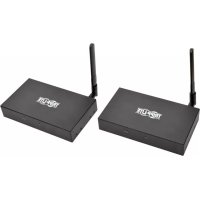
B1261A1WHD2 - Receiver Tripp Lite - Free user manual and instructions
Find the device manual for free B1261A1WHD2 Tripp Lite in PDF.


| Product Type | Wireless HDMI Receiver |
| Brand | Tripp Lite |
| Model | B126-1A1-WHD2 |
| Transmission Distance | 200 m (650 ft) |
| Maximum Resolution | 1920 x 1080 (1080p @ 60 Hz) |
| HDMI Version | 1.3 |
| HDCP Version | 1.2 |
| Bandwidth | 300 MHz / 3.4 Gbps per channel (10.2 Gbps total) |
| Encryption | AES 128 |
| Power Supply | External 5 V 3 A (UK, Europe, Australia adapters included) |
| Receiver Consumption | 6 W |
| Connectors | 1 x HDMI output female, 1 x IR-IN port (3.5 mm female) |
| Dimensions (H x L x D) | 195.4 x 137.5 x 30.8 mm |
| Receiver Weight | 528 g (1.16 lb) |
| Operating Temperature | 0 °C to 40 °C |
| Operating Humidity | 0 to 95% RH, non-condensing |
| Warranty | 1 year limited |
| Package Contents | Transmitter and receiver, IR-IN and IR-OUT cables, 2 external power supplies with adapters, mounting hardware, user manual |
| Key Features | Wireless transmission up to 200 m, remote IR control, HD stereo audio, AES 128 encryption, ready to use without software |
| Care and Cleaning | Clean with a dry, soft cloth. Do not use liquids or abrasive products. |
| Optional Accessories | High-speed HDMI cables series P568 |
Frequently Asked Questions - B1261A1WHD2 Tripp Lite
User questions about B1261A1WHD2 Tripp Lite
0 question about this device. Answer the ones you know or ask your own.
Ask a new question about this device
Download the instructions for your Receiver in PDF format for free! Find your manual B1261A1WHD2 - Tripp Lite and take your electronic device back in hand. On this page are published all the documents necessary for the use of your device. B1261A1WHD2 by Tripp Lite.
USER MANUAL B1261A1WHD2 Tripp Lite
Models: B126-1A1-WHD1 (165 ft./50 m), B126-1A1-WHD2 (650 ft./200 m)
Espanol 7 • Français 13 • Pycckn 19
PROTECT YOUR INVESTMENT!
Register your product for quicker service and ultimate peace of mind.
You could also win an ISOBAR6ULTRA surge protector—a $100 value!

www.triplite.com/warranty
TRIPP·LITE

Manufacturing Excellence.
1111 W. 35th Street, Chicago, IL 60609 USA · www.triplite.com/support
Copyright © 2017 Tripp Lite. All rights reserved.
Product Features
- Wirelessly extend a 1080p (60Hz) signal up to 165 ft./50 m (B126-1A1-WHD1) or 650 ft./200 m (B126-1A1-WHD2) from the source
- IR control functionality lets you control your HDMI source device remotely
- All-in-one wireless solution; no cabling infrastructure needed
Transmits High Definition video and stereo audio - Protects your transmissions with AES 128 encryption
HDMI 1.3 and HDCP 1.2 compatible
Supports up to 24-bit Deep Color (8-bits per channel)
Supports 300 MHz/3.4 Gbps per channel bandwidth (10.2 Gbps total) - Plug-and-play; no software or drivers required
- External power supplies feature US, UK, EU and Australian plug adapters
Package Contents
- Transmitter and Receiver Units
- IR-IN (Rx) Cable
- IR-OUT (Tx) Cable
- (x2) External Power Supplies* (Input: 100-240V, 50/60Hz, 0.6A Output: 5V 3A)
- Mounting Hardware
-
Owner's Manual
-
Include NEMA 5-15P (North America), CEE 7/16 Schuko (Europe), BS 1363 (UK) and AS/NZS 3112 (Australia) plug adapters.
Optional Accessories
P568-Series High Speed HDMI Cables
System Requirements
- HDMI source device, such as a Blu-ray™ player
- HDMI display device, such as a television or projector
Indicators and Connections
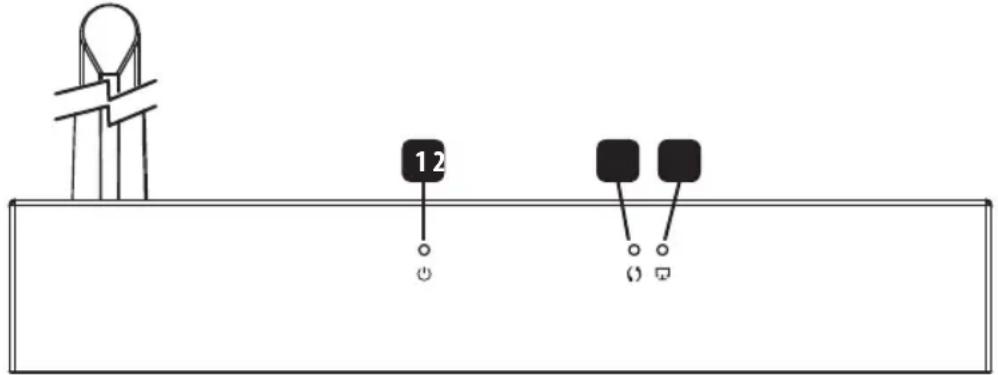
HDMI Receiver (Rx) and Transmitter (Tx) Front Panel
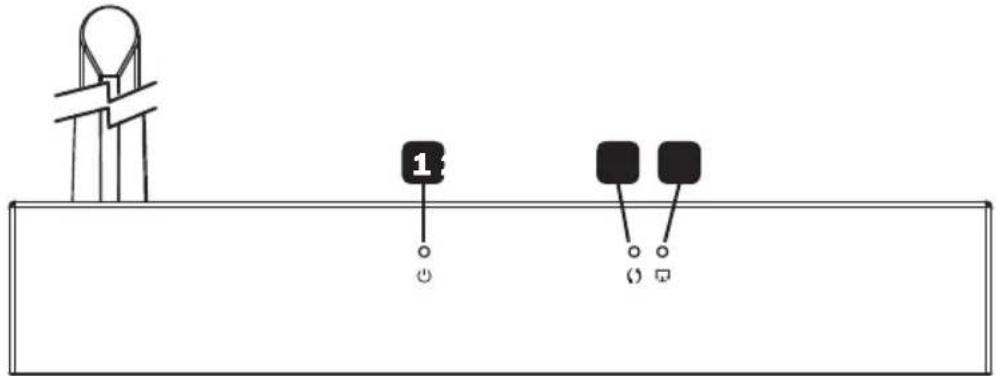
Power LED: This LED illuminates solid blue when the unit is receiving power.
2 Data Transmission LED: This LED illuminates orange and blinks slowly while a connection is being established. It blinks quickly when the unit is successfully connected and transmitting data.
3 Connection LED: This LED illuminates solid green when a wireless signal is connected.
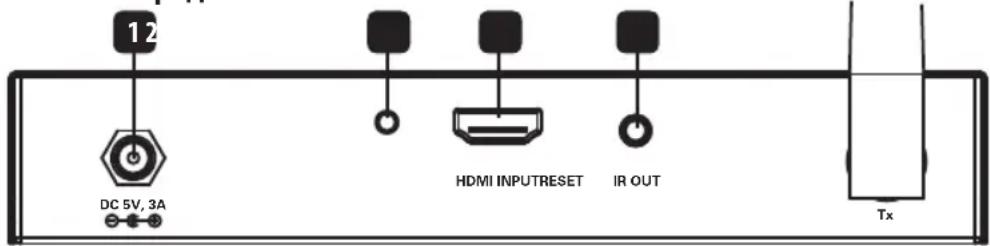
HDMI Tx Back Panel

1 Power Input: Connect included external power supply.
2 Reset Button: Press this button to restart the device.
3 HDMI Input: Connect to HDMI source with an HDMI cable.
4 IR-OUT (Tx) Port: Connect included IR-OUT (Tx) cable.
Note: Ensure the source device has a clear line of sight to the IR transmitter.
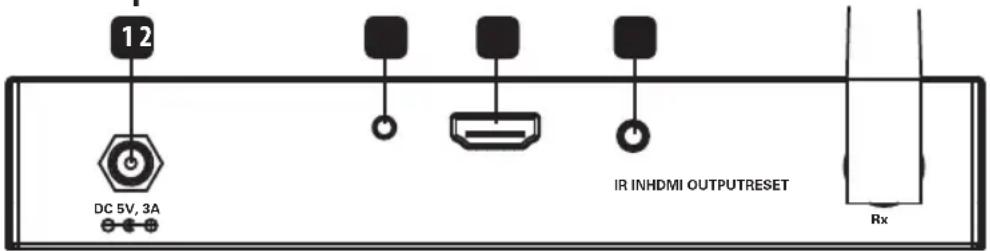
HDMI Rx Back Panel
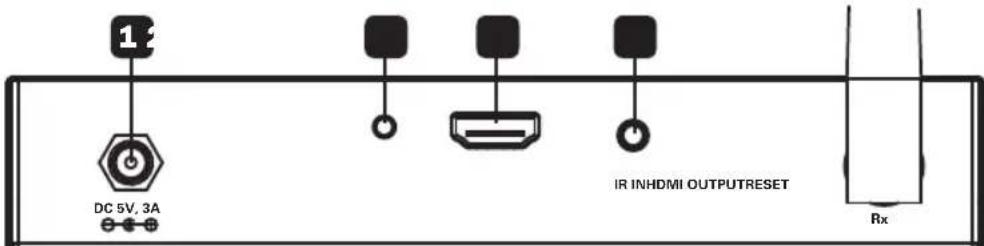
1 Power Input: Connect included external power supply.
2 Reset Button: Press this button to restart the device.
3 HDMI Output: Connect to HDMI display with an HDMI cable.
4 IR-IN (Rx) Port: Connect included IR-IN (Rx) cable.
Note: Ensure the source remote control has a clear line of sight to the IR receiver.
Installation
Notes:
- Ensure all equipment being connected is powered off prior to installation.
- For best results, position the IR transmitter near the HDMI source and the IR receiver near the display.
- If the wireless signal is obstructed by walls (especially brick or glass) or other obstacles, the quality and distance of the signal will likely be reduced.
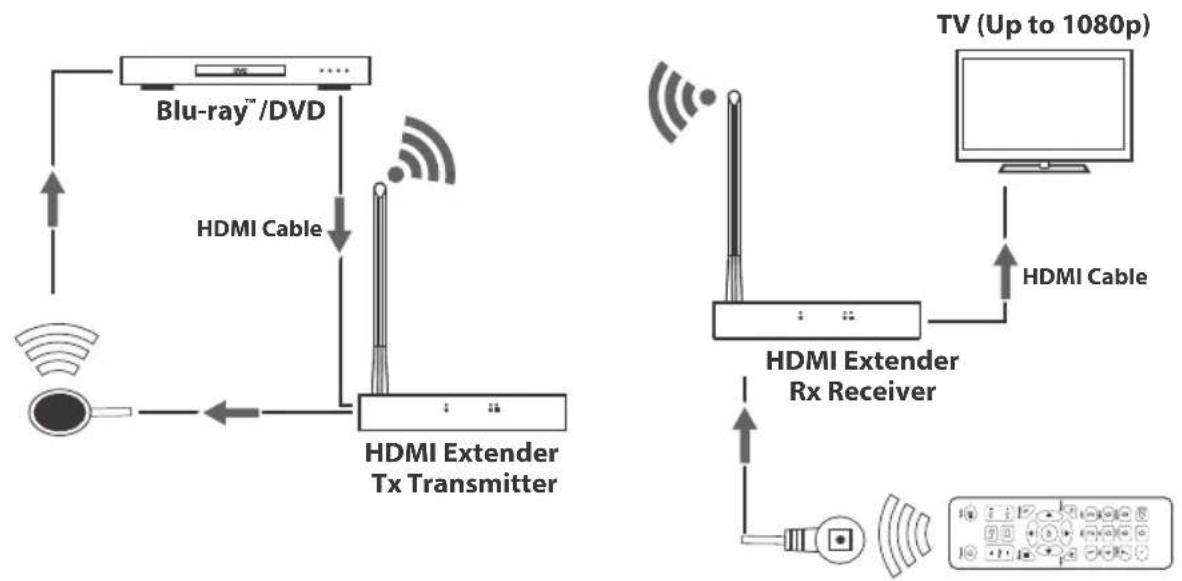
- Optional: Attach the included mounting hardware to the transmitter and receiver units, then mount them to a desired location.
- Connect the HDMI source device to the HDMI Input port on the transmitter unit using an HDMI cable, such as Tripp Lite's P568-Series High Speed HDMI Cables.
- Connect the IR-OUT (Tx) cable to the IR-OUT port on the transmitter unit. Note: IR-OUT (Tx) cable has IR-OUT marked on the bottom of the IR bulb. Place the bulb of the IR-OUT (Tx) cable in an area with a direct line of sight to the HDMI source device (e.g. Blu-ray player).
- Connect the external power supply to the transmitter unit and plug it into a Tripp Lite Surge Protector, Uninterruptible Power Supply (UPS) or Power Distribution Unit (PDU).
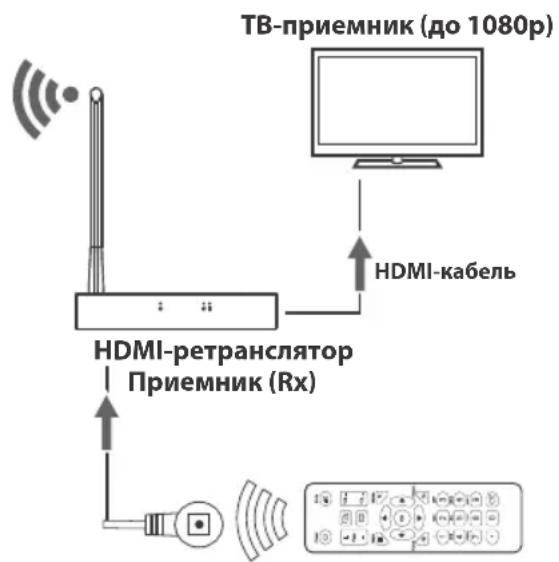
- Connect the HDMI display to the HDMI Output port on the receiver unit using a P568-Series High Speed HDMI Cable.
- Connect the IR-IN (Rx) extension cable to the IR-IN port on the receiver unit. Note: IR-IN (Rx) cable has IR-IN marked on the bottom of the IR bulb. Place the bulb of the IR receiver cable in the general area you will be using the source device's remote control.
- Connect the external power supply to the receiver unit, and plug it into a Tripp Lite Surge Suppressor, UPS or PDU.
- Turn on power to the connected equipment.
Troubleshooting
If you are unable to get an acceptable image after following the installation instructions, try the troubleshooting tips below.
- Are the external power supplies that came with the product connected and plugged into a working power source? For the product to function properly, the transmitter and receiver must be connected to and receiving power from an external power supply.
- Was the power to the HDMI source turned off prior to installation? If not, restart.
- What resolution are you trying to reach? See the Product Features and Installation sections in this manual for details on max distance and resolution. If you are not able to get an acceptable image, try lowering your computer's video resolution or adjusting the refresh rate.
- Does your HDMI display show a message saying "Waiting for Connection"? If so, ensure the power supply adapters are properly connected and the power indicator LEDs are illuminated solid blue.
- Does your HDMI display show a message saying "Please Check the TX Input Signal"? Ensure the HDMI signal connection LED on the transmitter unit is illuminated solid green. If the LED is not solid, connect the source device directly to the display device to see if the issue is with the source, display or HDMI cable you are using.
- Is the HDMI display transmitting a choppy picture? If so, ensure the position of the transmitter and receiver units are in the required range, then press the reset button on the RX back panel to reconnect. If this does not work, check for other signal disturbances between the transmitter and receiver.
- Test your cables to ensure they are working properly.
- Are the transmitter and/or receiver units located in an area that exposes them to elevated temperatures? If the product is overheating, it will not function properly.
Specifications
| Input Port HDMI Female; 3.5mm Female | |
| Output Port HDMI Female; 3.5mm Female | |
| IR Frequency Range 20-60Hz | |
| Transmission Distance 165 ft./50 m (B126-1A1-WHD1) or 650 ft./200 m (B126-1A1-WHD2) | |
| External Power 5V 3A | |
| Power Consumption Tx: 8.5W; Rx: 6W | |
| HDMI Version 1.3 | |
| HDCP Version 1.2 | |
| Max Video Resolutions 1920 x 1080/1080p @ 60Hz | |
| Mean Time Before Failure >30000 hours | |
| Operating Temperature 32° to 104°F (0° to 40°C) | |
| Storage Temperature -4° to 158°F (-20° to 70°C) | |
| Humidity 0 to 95% RH, Non-Condensing | |
| Unit Dimension (H x W x D) 7.69 x 5.41 x 1.21 in. / 195.4 x 137.5 x 30.8 mm | |
| Unit Weight Tx: 1.17 lb. / 53 g; Rx: 1.16 lb. / 528 g | |
Warranty and Product Registration
1-Year Limited Warranty
TRIPP LITE warrants its products to be free from defects in materials and workmanship for a period of one (1) year from the date of initial purchase. TRIPP LITE's obligation under this warranty is limited to repairing or replacing (at its sole option) any such defective products. To obtain service under this warranty, you must obtain a Returned Material Authorization (RMA) number from TRIPP LITE or an authorized TRIPP LITE service center. Products must be returned to TRIPP LITE or an authorized TRIPP LITE service center with transportation charges prepaid and must be accompanied by a brief description of the problem encountered and proof of date and place of purchase. This warranty does not apply to equipment, which has been damaged by accident, negligence or misapplication or has been altered or modified in any way.
EXCEPT AS PROVIDED HEREIN, TRIPP LITE MAKES NO WARRANTYES, EXPRESS OR IMPLIED, INCLUDING WARRANTYES OF MERCHANTABILITY AND FITNESS FOR A PARTICULAR PURPOSE.
Some states do not permit limitation or exclusion of implied warranties; therefore, the aforesaid limitation(s) or exclusion(s) may not apply to the purchaser.
EXCEPT AS PROVIDED ABOVE, IN NO EVENT WILL TRIPP LITE BE LIABLE FOR DIRECT, INDIRECT, SPECIAL, INCIDENTAL OR CONSEQUENTIAL DAMAGES ARISING OUT OF THE USE OF THIS PRODUCT, EVEN IF ADVISED OF THE POSSIBILITY OF SUCH DAMAGE. Specifically, TRIPP LITE is not liable for any costs, such as lost profits or revenue, loss of equipment, loss of use of equipment, loss of software, loss of data, costs of substitutes, claims by third parties, or otherwise.
Product Registration
Visit www.triplite.com/warranty today to register your new Tripp Lite product. You'll be automatically entered into a drawing for a chance to win a FREE Tripp Lite product!*
- No purchase necessary. Void where prohibited. Some restrictions apply. See website for details.
FCC Notice, Class B
This device complies with part 15 of the FCC Rules. Operation is subject to the following two conditions: (1) This device may not cause harmful interference, and (2) this device must accept any interference received, including interference that may cause undesired operation.
Note: This equipment has been tested and found to comply with the limits for a Class B digital device, pursuant to part 15 of the FCC Rules. These limits are designed to provide reasonable protection against harmful interference in a residential installation. This equipment generates, uses and can radiate radio frequency energy and, if not installed and used in accordance with the instructions, may cause harmful interference to radio communications. However, there is no guarantee that interference will not occur in a particular installation. If this equipment does cause harmful interference to radio or television reception, which can be determined by turning the equipment off and on, the user is encouraged to try to correct the interference by one or more of the following measures:
- Reorient or relocate the receiving antenna.
- Increase the separation between the equipment and receiver.
- Connect the equipment into an outlet on a circuit different from that to which the receiver is connected.
- Consult the dealer or an experienced radio/TV technician for help.
Any changes or modifications to this equipment not expressly approved by Tripp Lite could void the user's authority to operate this equipment.
WEEE Compliance Information for Tripp Lite Customers and Recyclers (European Union)

Under the Waste Electrical and Electronic Equipment (WEEE) Directive and implementing regulations, when customers buy new electrical and electronic equipment from Tripp Lite they are entitled to:
- Send old equipment for recycling on a one-for-one, like-for-like basis (this varies depending on the country)
- Send the new equipment back for recycling when this ultimately becomes waste
Use of this equipment in life support applications where failure of this equipment can reasonably be expected to cause the failure of the life support equipment or to significantly affect its safety or effectiveness is not recommended.
Tripp Lite has a policy of continuous improvement. Specifications are subject to change without notice.


1111 W. 35th Street, Chicago, IL 60609 USA • www.triplite.com/support
Modelos: B126-1A1-WHD1 (50 m [165 pies]), B126-1A1-WHD2 (198 m [650 pies])
English 1 • Français 13 • Pycckn 19


1111 W. 35th Street, Chicago, IL 60609 EE. UU. www.triplite.com/support
1111 W. 35th Street, Chicago, IL 60609 USA www.triplite.com/support
PykoBODCTBO N0JIb30BaTeJIA
KoMpIeKT 6ecnpoBODhblX HDMI-peTpapanctopob
Mодenv: B126-1A1-WHD1 (50 m), B126-1A1-WHD2 (200 m)
English 1 • Espanol 7 • Français 13


1111 W. 35th Street, Chicago, IL 60609 USA · www.triplite.com/support
OxpaHaeTcA ABTOPCKIM npaBOM © 2017 Tripp Lite. Ipepeueatka zanpeuaetca.
XapaKTepeNCTnKn npOdykTa
- 06ecneuBaHOT 6ecnpoBOnHyO petpaHcIaIeIO CmHaNoB cTaNdApTa 1080p (60 T) Ha paCtToHme do 50 M (MoD. B126-1A1-WHD1) mnn 200 M (MoD. B126-1A1-WHD2) ot nCTouHnka
-Функионал Ha OchOBe IK-n3IyueHnO obecneuBaet Bo3MoKHOCTb nCtahUOnHOro ynpaBHeHnNtOChnKOM HDMI-CnHaHa - YHnBepcaIbHoe 6ecnpoBodHoe peueHne, nckJIOuHOJIe e noTpe6HoCTb B Ka6eJIbHOI INHpactpyKtpe
-Пелердаа Вддевсгнганов ВьсКОй чЕТКОТи И СтЕео3ВукА - 3auneta nepedaaeMoH INHOpMaun npn nmooun aIropmtma uHpobAHmAES cncnoj3oBaHmE 128-6ntHOKIOUa
- CoBmectMIOCTb co CTaHdpTaMn HDMI 1.3 u HDCP 1.2
-Подержka24-6нтOBORKoДИрOBaHЯцБета(no86ntHaKaHaJI) - PóIDeprKKa pONcBIpOnyckAHa 300 Mf/3,4Γ6nt/c Ha KaHAn (10,2Γ6nt/c Ha BCE KaHaJIbI)
-Подклоченno TeXHOrnPlug-and-play 6e3 Heo6xOДmOCTn IcNoIb3OBAHnKaKOro-lIb6 nporpaMMHOro o6ecneHnIpyaBepOB
OchaueneBHEUHIX6IOKOB NITAHINIpeXoHNKaMnIJIPOKJIIOUeHnK P03eTKAM 3JIeKTpUeCKNX CeTeNceBepoAmePKaHCKORo,6PHTAHCKORo,EBPoneckoro andapTAPTOB
CopejxHmoe ynaKOBKN
- Peredeauoui n npneMhbl moyni
- Ka6eJIb IR-IN (IINI npHmHOrO mOyn)
Kabel IR-OUT (nna nepeaioe moyn)
BHeHHe NCTOCHNKIITaHnA* (BXoD:100-240 B;50/6Tg;0,6 A BbIXoD:5 B,3A) 2 wT.
MoHTaxKHeI npCnOc6NeHn
PykoBOJCTBO NOJIb3OBATeIa - KomnnekeTyeTeTcepexOdnKamDnpa3bEmoB Tuna NEMA 5-15P (CebepnaAmepka), CEE 7/16 Schuko (Ebpona), BS 1363 (Benvko6puTahma) n AS/NZS 3112 (Abctpanna).
OnuohbHbIe KOMnEKTyUoune
- BbICOKOcKOpocThbIe HDMI-ka6eHn cepnn P568
CnCTeMHbIe Tpe6oBaHna
- YCTPOINCTBO, BbICTyanaIOOee B KauceCTBe NcTOUHnKa HDMI-CnHana (HanpIMep, pponrpBbATEnb Blu-rayTM)
- YCTpoIcTBO OTO6paXeHnHAHMDI-CuHaJIaOB (HAnpImeP, TeJIeBUN3Op ININ InpoeKToP)
Hdikatopbl npa3beMbl
Ipeednnaheb: npneMnK (Rx) n nepeaTnuK (Tx) HDMl-cnrhanob
1 CND "PntanHe":3OT CBToDIOHbI INDIAKATOp HnpepbIBHO RopIT CMHM PpN HAnuHn HanpJxHn, NtAIOUeTO MOyIb.
2 CND "Pepedaa daHbix": 3OT CBeTODIOHbI INHIMKaTOP rOpNT opaHKeBIM Mmraet C MaIOJ YACTOTOINpny UCTAHOBJIeHMI COeINHeHNI. Iocne ycNeSHORIO NOKJIIOUeHNI MOyJI N HauJaIpeEDAHI DaHHbIX YAcTOTA ERO MMRHNI yDbaINBaETCA.
3 CND "PoiokluoyenHe": 3OT CBETOIOHbI INDkaTOp HnpepbIBHO ropIT 3eJIeHbIM npN HAIuHcN CnHaJa NO KaHaNy 6ecnpoBODHO CBa3N.
3aHna naHeIb: nepeaTuk HDMi-cnHaIOB
1 Bxodno pa3bem nHTaHnA: npedna3NaeH dny noKIOueHnBHeJIrO 6Ioka nTahn, NOCTABJREMO B KOMIIeKeTe.
2 Khonka nepezanycka: nCIOJIb3yETcIgI nepez3nycka yCTpoIcTBA.
3 BxodHDMI:noiknouaetcKIOCTOHNky HDMICunHaetaepe3HDMi-Ka6eb.
4 Nopr IR-OUT (nepeaoum moynb): nIIOB3yETcA IJIPOKJIUOeHn BByIOHO rIK-Ka6eN (pepeaouero Moyra) n3 KOMIIKeTka.
PnmuueaHne. YtpoNCTBO, MIOJIb3yEmoe B KaIcTeB NcTOUHIMKa, DoJIKHO HaxOJITCbB IpeJedax PnPmO BnIMMOCTM IO OTHoHEINIO KIK-NepeaTHyK.
3aHna naHeIb: npneMnK HDMI-cnrHaIOB
1 Bxodno pa3bem nHTaHn: noKIOUHTe K HeMy BHeuHm 6IOK NtAHn, NOCTABJREMbI B KOMNKeTe.
2 Khonka nepezanycka: HaxKMITE Ha 3Tu KhoNky dIy nepezaynya yctpoiCTBa.
3 BbIXoH HDMI: noKIOuOaEtca KcTpoiCTBy oTo6paKeHnH HDMI-CunHa nape3 HDMI-Ka6eb.
4 IopT IR-IN (npHemhbl Moynb): nCnOJIb3yETc dIa NpOKNIouEHn BxOJHO rIK-Ka6eN (npHemHO rOy) n3 KOMIIeKTA.
PnmeHne. YCTPOICTBO DNTAHUHHOY npaBNEHNA TOTOHKO IOnKHO HAXOJTB C PpeDEnax pnpMO BWDNMOCTN IOTHOeHIO KIK-ppMeHHky.
yctahOBka
Птумейанн:
1.Пелед наалом установки Сп подлоченhoe obopудане должно 6ытб оьсточedo.
2.ДЯ obecneueHna Hauynuuxpe3ynbTaTOB NK-nepeaTuK cneIyET pacnooxntb B6n3n nctouHnka HDMi-cnHa, a NK-npmeHnK B6n3n yCTPOJcTBa OTO6paXeHnA.
3. Pn Hnnn CTH (oc6eHHo KpHnHbix nI IN CTKJIHHbIX) INI DpyHX INpeYTACTBn HA Nytu pacnpoctpaehnna CnHana, nepedaBaemor 6ecnpoBDhIM cno60m, NOBbIaetc BepoTHOCb yxduHHeN KaueCTBa CNHana I cokpaeeHn PpeOdoNEBaEMOR IM paccToHnA.
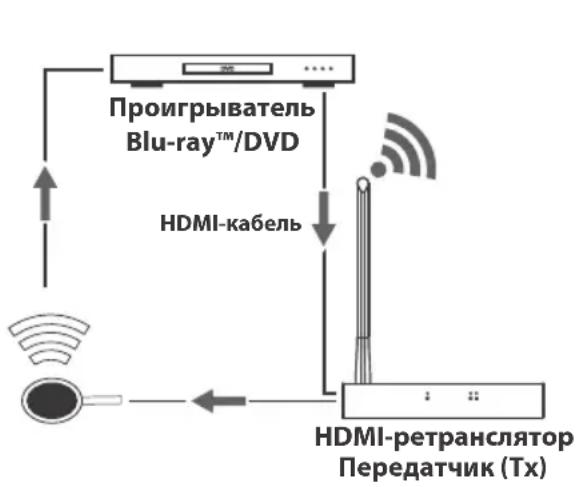
- OnuohalbHo: npKpeHnTe nOCTaBmble B KOMnEKeMoHTaXHbIe npncoc6neHnK nepeHaUeMy npneMHOMy MOyJAM uYCTaHOBnTE Hx B KeJaemom MeCTe.
- Пдкшчte nctouнн HDMI-cirHana ko BxodHomу nopTu HDMI nepeaioe moDyra c noMoIbHDMI-Kabela (hanpimep, n3 npednaraembIX komnaHne Tripp Lite bblcokocopocThbIX HDMI-Kabeen cepm P568).
3.BctabBe Ka6eBbIXoHoi NK-Ka6eB (pepeaiooMoyn) B npT IR-OUT pepeaioofo myna.
PnmuemaeHne. BixoHoi NK-ka6enb (nepeaioe moyn) nMeet Mapkpobky IR-OUT ha HxKHei nobepxocTu NK-nambl. Pomehtte naMny BixoHoro NK-ka6en (nepeaioe moyn) B npdeanpmao BuIMOCTo OTHOCTBO yctpoIcBA, nCnoB3yemoro kakntouHk HDMI-curhana (hanpimep, nponrpmbateaBlu-ray).
- IopKIOUHTe BHeHm 6Iok NITAHN K nepeaIoEmy MoyIIO IN BKIOHTe erO B po3ETky cTeBOrO fNtBtpa, 6Ioka pacnpedeneHH NITAHN (PDU) mI nctouHnka 6ecnepe6oHoro NITAHN (NbI) Tripp Lite.
- Пдкочуоctво отбрахеня HDMI-cnнала K bixoHomy HDMI-nopTu npneMHoro moyra c noMooub BbICOKocopocthoro HDMI-ka6eЯ cepm P568.
- Podknoute ydnnntelbni Ka6ebn IR-IN (npneemhoro moyn) KnopTy IR-IN npneemhoro moyn.
PpmeaHne. BxOIOHO NK-Ka6eIb (pnpemHoro MOyIa) IMeET MapKnOpBky IR-IN Ha HnKHe NIOBepXHOCTN IK-NaMnbl. PaCIOJNOJKe NaMny Ka6eIg NK-tpnEMHHKa B O6uE MeCe, rJe 6yEt NCNoB30BaTbc4 6nOK DnCTaHcHOro ynpabEnHa yctpoiCTBOM, CnykaUIM B KauCTBe ICTOCHKA.
- Пдкючite BHeHn 6Iok nITaHnK npneMHOMy Moynu BkIOUte ero B po3eTy ceTeBOrO fNtpa, PDU nnn NbT Tripp Lite.
- PoidaIte nIITAHHe Ha noDkJIIOUeHHeO o6OpdyoBaHne.
BbIaBHeHne uYcTpaHHe HEnCnpaBHOCTe
EcnBbIOnHeHne yKa3aHnNoYcTaHOBKe He No3BOJareT DoCTNBy PnEmMeMoRo KaYeCTBa N3O6paKeHnna, nonpo6ynt BocnoB3oBaTbcpNBBeHeHHbIMn Hxke peKOMeHNdaUHMn No BbIaBHeHIO u YcTaPaeHNIO HeNCnPabHOctTe.
1.ПОДКЛЮЧЕБЛ И NOCTABLAЯБBLEВ KOMПLEKTE BHeUHNE 6LOKN NHTAHNY K pa6OtaUOeMy NCTOHNKY NITAHNY?ДЯнадпесашeroФункционpoBaHNY DaHHORO N3DeJIIN OHO DOJXHO NOДКЛIOUaTBcA K BHeUHemy 6LOKY NITAHNYI 3aNTbIBaTcBcYOTHERO.
2.БblnoIINOTKIOUOHeHO NITaHHe NcTOUHnKa HDMl-cnrHana nepeHaJauAnom yctaHOBKn?EcHn HeT, BbINOJIHInTe ero nepe3aNvCK.
-
KaKoro pa3peweHn Bbl nbIaTeScb do6ntbc? Iopnp6Hee o MaKcMmaIbHbIX 3HaueHnx IInCTaHcN IN pa3peweHn CM.B pa3deJax OyHKUHOHaJIbHbIe BO3MOXHOCTn N3dEHN IN YCTAHOBKa. B cnYae HeBO3MOXHOCTn DO6NTcbn npMeMNeMoR KoceTBA n3O6paKeHn nonpo6yIte yMeHbUITb BNDeopa3peWeHne CBOero KOMNbIOTepa INN OTpErVIIPOBaT bYactOTy 06HOBJeHn.
-
BbIbOHTcI Ha mCnONb3yEmoe yCTpoCTBO OTO6paXeHna HDM-CrHana KaKoe-Ni6o COo6uHne Tmna "OxuaetcNoDKlouHne"? EcnI Da, y6eDntecB NpabNtBHOCTn NOckluOeHn NepExoHNKOB 6LoKa NITaHn I HENpePbIBHom TOpeHn CBeTOnIOdHbIX INHINKATOPOB NITAHN CNHM CBETOM.
-
BbIOHTcI Ha ha 3KpaH yCTpoCTBa OTO6paXeHn HDMl-CrHana KaOe-N6o COo6ueHne Tnna "PpOBepbTe HAnuHHe CmHana Ha BXoJe npEmHnka"?Y6eINTecbTOM, YTO CBeToDnHb INnHKaTOP CB3N NO KaHany HDMI Ha nepeDaHcEM MoUyne HenpepbIBHO rOpNT 3eneHbIM. Ppi OTCyTCTBn HnpepbIBHO rOpEHn DaHHoro CnJa IIOkJIouHTe NCTOuHnK HeNoCpeCDtBEHNO K yCTpoCTBy OTO6paXeHnca ZelbO ONpeDeHnTB, KaKoJ 3JeMeHT CnCTeMbl I nctOuHnK, yCTpoCTBO OTO6paXeHn NN NcNoBJ3yeMbI Ka6eJIb HDMI - co3daET daHHyo pno6nemy.
-
PnncyTCTByeT n p86b Ha KapTHHe, TpaHcHpyEmoY yctpoCTBOM oTO6paxHeH HDM-CrHana? EcnI da, paCnoJoxKte nepeDaiOuIi N npMeHbI MoUyn Ha DOnyCTUMOM ydaJeHm, a 3aTeM hXMMte Ha KHOkny nepe3anycka Ha 3aHne I NaHEn I npMeMHOrO MOyIa IIOBtOPHO r OCTAOHOBHeHr COeHNHeHr. EcnI peWntb IpO6NeMy TaKM O6pa30M He ydaIOcb, IPOBepbTe, Het IIN KaKnx-Im6 OpyRnx IpeNATCTBn Ha NyTN CrrHaHa MeKdy NepeDaTuHKOM I npMeMHIKOM.
-
IpoBepbTe nCNoJIb3yEmbIe Ka6eHn Ha npEIMET Hx HADJIeXaJero fYHKUHOHPOBaHn.
-
He noDBepraIOTcI INpepaIOUIN N/INn npneHMbIMoDyNBo3JeCTBIO NOBbiueHHbIX TeMnpaTpy B Tex MeCTax, rIe OHn yCTaHOBHeHb? B cnyae neperpeBa n3dEInne He MOxET FOYHKUOHNPOBaTB HaJIeKaUIM 06pa3OM.
TexHnueckne xapaKTepeNCTIKN
1111 W. 35th Street, Chicago, IL 60609 USA - www.triplite.com/support

- PROTECT YOUR INVESTMENT!
- Product Features
- Package Contents
- Optional Accessories
- System Requirements
- Indicators and Connections
- HDMI Receiver (Rx) and Transmitter (Tx) Front Panel
- HDMI Tx Back Panel
- HDMI Rx Back Panel
- Installation
- Notes:
- Troubleshooting
- Specifications
- Warranty and Product Registration
- 1-Year Limited Warranty
- Product Registration
- FCC Notice, Class B
- WEEE Compliance Information for Tripp Lite Customers and Recyclers (European Union)
- PykoBODCTBO N0JIb30BaTeJIA
- KoMpIeKT 6ecnpoBODhblX HDMI-peTpapanctopob
- XapaKTepeNCTnKn npOdykTa
- CopejxHmoe ynaKOBKN
- OnuohbHbIe KOMnEKTyUoune
- CnCTeMHbIe Tpe6oBaHna
- Hdikatopbl npa3beMbl
- yctahOBka
- Птумейанн:
- BbIaBHeHne uYcTpaHHe HEnCnpaBHOCTe
- TexHnueckne xapaKTepeNCTIKN
Brand : Tripp Lite
Model : B1261A1WHD2
Category : Receiver