Moto InstaShare Projector - Other computer accessories MOTOROLA - Free user manual and instructions
Find the device manual for free Moto InstaShare Projector MOTOROLA in PDF.



| Product Type | Portable smartphone projector (Moto Mod) |
| Dimensions | Approximately 152 x 72 x 15 mm |
| Weight | Approximately 100 g |
| Power | Built-in rechargeable battery; charges via phone or USB charger |
| Charge Indicators | Slow blinking green (charging), fast blinking or solid green (full), solid orange (16-50%), solid red (6-15%), fast blinking red (<6%) |
| Main Functions | Image projection from compatible Motorola smartphone; manual focus; keystone correction; brightness adjustment via app |
| Connection | Magnetic attachment (Moto Mod) to the back of the phone |
| Care and Cleaning | Use a soft, dry cloth to clean the lens and housing |
| Safety | Do not look directly at the projector lamp; avoid exposure to liquids and heat; contains magnets that may affect magnetic holders |
| Spare Parts and Repairability | Battery should only be replaced by an authorized service center; no user-serviceable parts |
| Warranty | Limited Motorola warranty; details available in phone settings or at motorola.com/device-legal |
| General Information | Brand: Motorola; Model: Moto InstaShare Projector; Category: Other computer accessories |
Frequently Asked Questions - Moto InstaShare Projector MOTOROLA
User questions about Moto InstaShare Projector MOTOROLA
0 question about this device. Answer the ones you know or ask your own.
Ask a new question about this device
Download the instructions for your Other computer accessories in PDF format for free! Find your manual Moto InstaShare Projector - MOTOROLA and take your electronic device back in hand. On this page are published all the documents necessary for the use of your device. Moto InstaShare Projector by MOTOROLA.
USER MANUAL Moto InstaShare Projector MOTOROLA
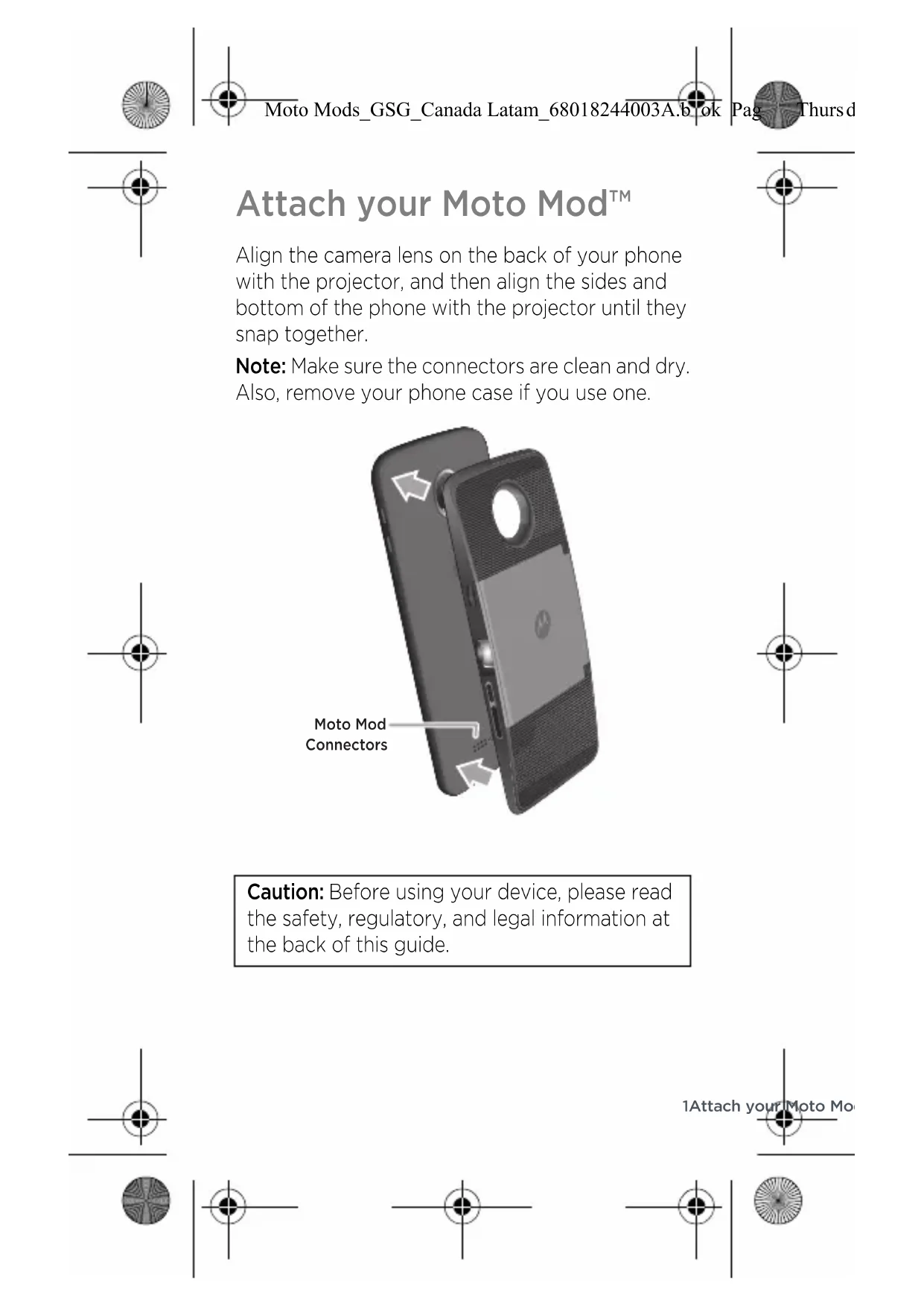
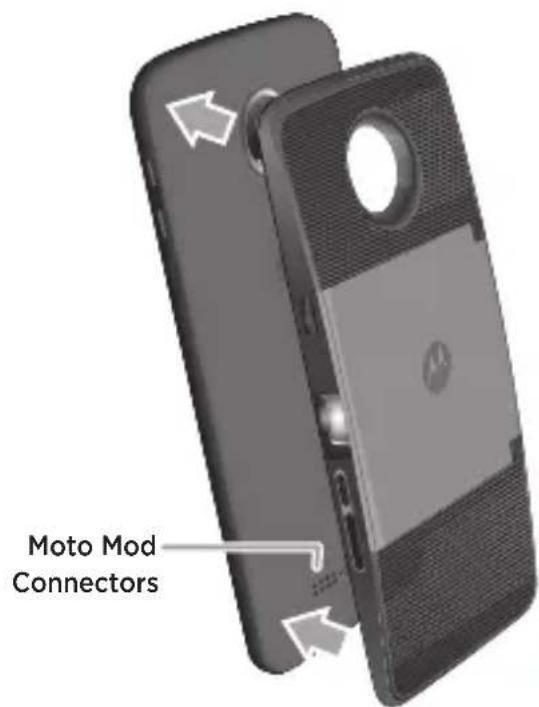
Attach your Moto Mod™
Align the camera lens on the back of your phone with the projector, and then align the sides and bottom of the phone with the projector until they snap together.
Note: Make sure the connectors are clean and dry. Also, remove your phone case if you use one.
Caution: Before using your device, please read the safety, regulatory, and legal information at the back of this guide.
Quick setup
When you attach the projector, your phone automatically guides you through setup. Follow the on-screen instructions to get started.
Start projecting
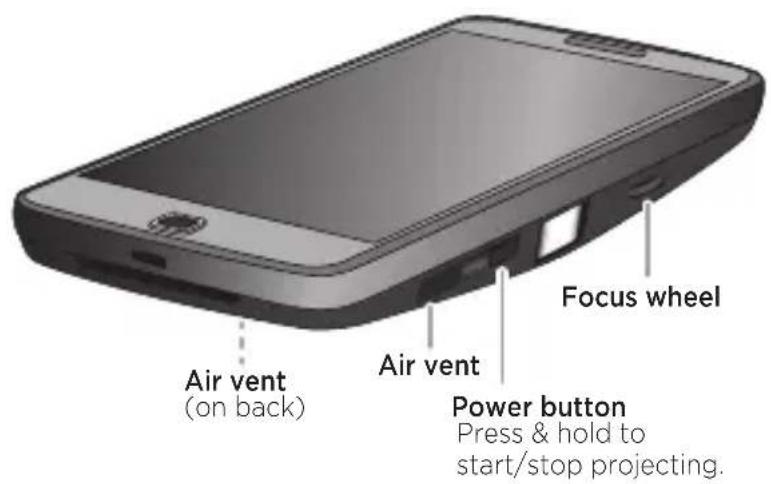
Aim the projector away from your eyes at a light-colored wall or ceiling in a darkened room. Press and hold the projector's Power button until the projector turns on to begin projecting.
Tip: While projecting, press the Power button to adjust settings, like brightness. See more settings on page 3.
Warning: Avoid looking directly at the projector lamp. The bright light may damage your eyes.
2 Q u i c k s e t
Adjust settings
To focus the image, use the focus wheel next to the projector's lamp.
Or, with the projector on, press the Power button to adjust these settings on your phone screen:
- Keystone image correction: Change the angle of the projection to make the image rectangular.
- Brightness: Adjust the projection brightness (not your phone's brightness).
Remove it
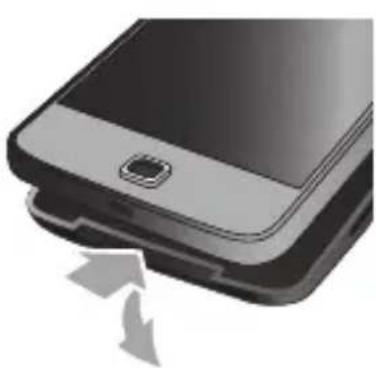
To detach the projector from your phone, place your finger in the notch at the bottom of the projector and pull it away from your phone.
Note: Be careful not to put your finger in the phone's USB charging port.
Charge it
Charge up fully before starting your projector.
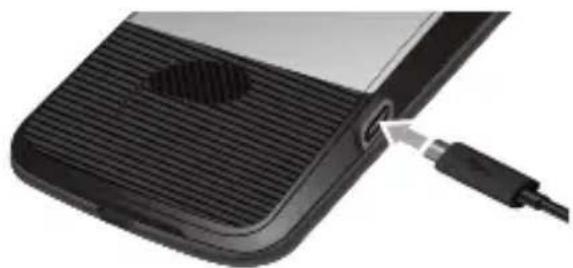
Tip: If your phone is still attached to the projector, charging the phone is the best way to charge both at the same time.
Charging status lights
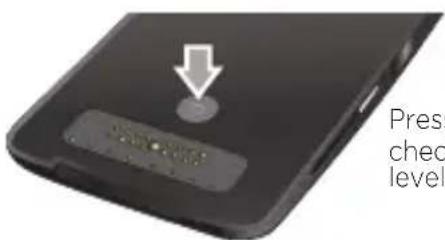
Press the button to check the battery level.
Charging slow blinking green
Full charge rapid binking green, or steady green when charging
Partially charged: 51-99% steady green, then off 16-50% steady amber, then off 6-15% steady red, then off
Very low power rapid blinking red
4 Charge it


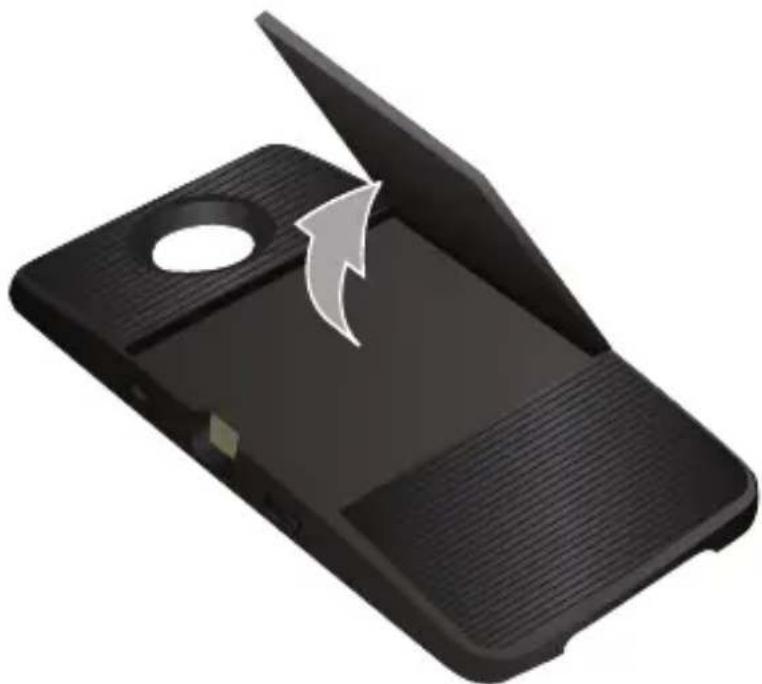
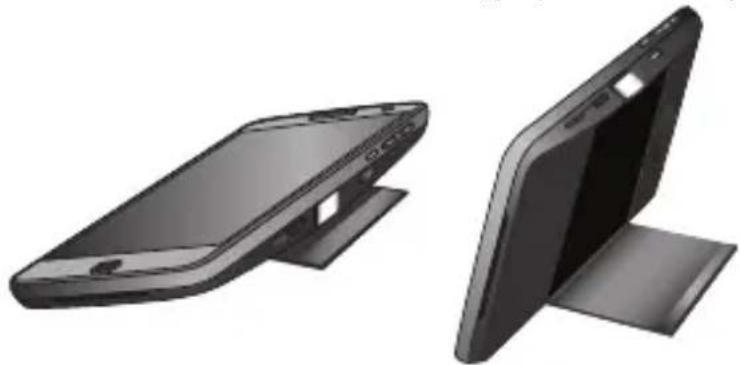
Use the kickstand
Pull out the kickstand and adjust the angle.
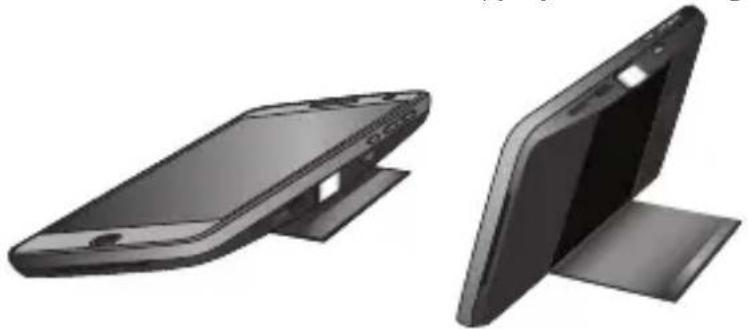
Project on a wall:
Or, project on a ceiling:
Tips & Tricks
Looking for more?
Air vent: Keep the air vents on the projector side and back unblocked. (See page 2).
- Cleaning: To keep your projector lens clean and free of dust, use a soft, dry cloth.
- Connection vibration: When you successfully attach your Moto Mod to your phone, you feel a slight vibration.
- Reset: Press and hold the battery check button (see page 4) for seven seconds until the light blinks green.
Help & more
Everything Moto: For tutorials, and helpful tips, visit www.motorola.com/mymotomods.
Get more Mods Moto Mods™ are sold separately.
View the complete collection at
www.motomods.com. Or, visit us at
www.moto.com/motomodsmobileapp
Help. For help and more on your phone, tap
Settings > Moto Mods>Help.
News: Get the latest news, apps, tips, and much more—join us on:
www.youtube.com/motorola
f www.facebook.com/motorola
www.twitter.com/moto
6 Tips & Tricks

Safety, Regulatory, & Legal
Important: This product contains magnets and may damage magnetic information, such as credit card strips and ID cards.
Where is my legal, safety and regulatory information?
In order to provide you with better access to this important information, we've made the materials accessible from the phone's settings menu and on the web. Review these materials prior to using your device. To access the materials from a connected phone, go to Settings > Legal information, and select a topic. To access the materials on the web, visit www.motorola.com/device-legal.
Battery Safety
Before assembling, charging or using your mobile device for the first time, please read the important product safety and legal information provided with your product.
If your mobile device becomes unresponsive, try a reboot—press and hold the Power button until the screen goes dark and your device restarts.
For your safety, the battery in your mobile device should only be removed by a Motorola approved service center or independent qualified professional. Don't try to remove or replace the battery yourself—doing so may damage the battery and could cause burning and injury. Don't crush, bend, or expose your mobile device to heat or liquid. This may damage the battery and may cause burning and injury.
European Union Directives Conformance Statement
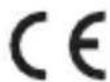
This product complies with the applicable EU requirements and carries the CE mark.
The Technical Construction File (TCF) is available from the Certifying Organization at Motorola Mobility UK Ltd., Redwood, Crockford Lane, Chineham Business Park, Basingstoke, RG24 8WQ, UNITED KINGDOM.

7Safety, Regulatory, &

FCC and IC Compliance
This device complies with part 15 of the FCC rules. Operation is subject to the following two conditions: (1) this device may not cause harmful interference, and (2) this device must accept any interference received, including interference that may cause undesired operation. This device complies with Industry Canada license-exempt RSS standard(s). Operation is subject to the following two conditions: (1) this device may not cause interference, and (2) this device must accept any interference received, including interference that may cause undesired operation.
Disposal & Recycling
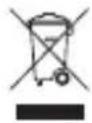
Help do your part! Please don't dispose of mobile devices or electrical accessories (such as chargers, headsets, or batteries) with your household waste. Product packaging and product guides should only be disposed of in accordance with national collection and recycling requirements. For details on approved national recycling sch Motorola recycling activities, go to: www.motorola.com/r
Open Source Information
This Moto Snap accessory is intended to be interfaced with a Motorola mobile device and may include Open Source Software (the "Software") Copyrighted and distributed under an MIT license and BSD-style licenses, including a Modified BSD license, a BSD-like license and a BSD compatible license.
The open source software is distributed WITHOUT ANY WARRANTY; without even the implied warranty of MERCHANTABILITY or FITNESS FOR A PARTICULAR PURPOSE. See for example the declaimer provisions in BSD Licenses identified above.
To view the text of the licenses, acknowledgments, and required copyright notices for the open source software used on this Moto Snap, tap Apps > Settings > Moto Mods > Legal Information > Open source licenses on the Motorola mobile device after it is connected to this Moto Snap.
8 Safety, Regulatory, & Legal


Warranty
This product is covered by Motorola's limited warranty. To review the warranty on your phone, go to Settings > Legal information > Warranty, or visit motorola.com/device-legal. You may also obtain a copy of the warranty by contacting Motorola at: Motorola Mobility LLC, Attention Customer Service--Warranty Request, 222 West Merchandise Mart Plaza, Suite 1800, Chicago, IL 60654.
Any controversy or claim arising out of or relating to any Motorola product will be resolved by binding arbitration, instead of in court, unless you opt-out. To opt-out, send a written rejection notice within 30 days of purchase that includes your name, address, phone number, device, and device serial number, and tells Motorola that you are rejecting this Arbitration provision to: Motorola Mobility LLC, 222 West Merchandise Mart Plaza, Suite 1800, Attn: Arbitration Provision Opt-Out, Chicago, IL 60654 or arbitrat@motorola.com. For more information on this arbitration provision, on your phone, go to Settings > Legal information > Arbitration and Opt-out, or visit www.motorola.com/device-legal.
Service & Repairs
If you have questions or need assistance, we're here to help. Go to www.motorola.com/support, where you can select from a number of customer care options. You can also contact the Motorola Customer Support Center at 1-800-734-5870 (United States), 1-888-390-6456 (TTY/TDD United States for hearing impaired), or 1-800-461-4575 (Canada).

9Safety, Regulatory, 8

Copyright & Trademarks
Motorola Mobility LLC
222 W. Merchandise Mart Plaza
Chicago, IL 60654
www.motorola.com
Certain features, services and applications are network dependent and may not be available in all areas; additional terms, conditions and/or charges may apply. Contact your service provider for details.
All features, functionality, and other product specifications, as well as the information contained in this guide, are based upon the latest available information and believed to be accurate at the time of printing. Motorola reserves the right to change or modify any information or specifications without notice or obligation.
Note: The images in this guide are examples only.
MOTOROLA, the stylized M logo, MOTO, and the MOTO family of marks are trademarks or registered trademarks of Motorola Trademark Holdings, LLC. All other product or service names are the property of their respective owners.
© 2016 Motorola Mobility LLC. All rights reserved.
Product ID: Motorola Moto Mods (Model MD100P)
Manual Number: 68018240003-A
10 Safety, Regulatory, & Legal
fr-CA
moto
INSTA-SHARE PROJECTOR

motomods

Moto Moda_GSG_Canada Latam_68018244003A.bok
Pa

Thursd


Power button Press & hold to start/stop projecting.
Press the button to check the battery level.
Installer le support folio
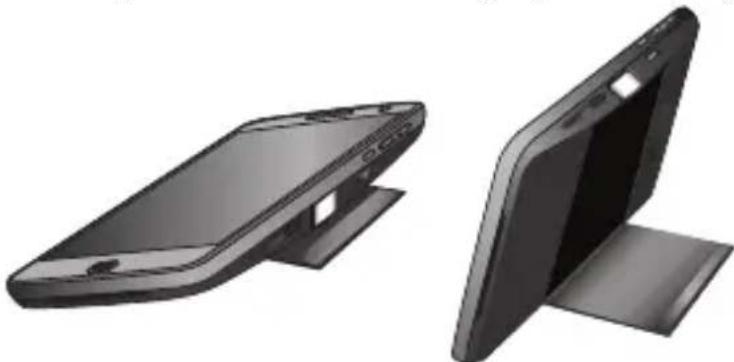
Project on a wall:
Or, project on a ceiling:
Conseils et astuces
Motorola Mobility LLC
222 W. Merchandise Mart Plaza
Chicago, IL 60654
www.motorola.com
Press the button to check the battery level.
Cargando intermitente lento de color verde
Carga completenesse rápido de color verde o fija de color verde durante la energia.
Parcialmente urgado:
51-99%
16 - 50%
6-15%
Muy pocaarga inter
fija de color verde,
luego se apaga
fija de color ambar,
luego se apaga
Project on a wall:
Or, project on a ceiling:
Consejos y truncos
¿Deseas saber más?
www.motorola.com/device-legal
Yotorola Mobility Argentina SA
Suipacha 111-Ps0 18
C1008AAW Buenos Aires
ARCENT NA
www.motorola.com
- Attach your Moto Mod™
- Quick setup
- Start projecting
- Adjust settings
- Remove it
- Charge it
- Charging status lights
- Use the kickstand
- Tips & Tricks
- Help & more
- Safety, Regulatory, & Legal
- Where is my legal, safety and regulatory information?
- Battery Safety
- European Union Directives Conformance Statement
- FCC and IC Compliance
- Disposal & Recycling
- Open Source Information
- Warranty
- Service & Repairs
- Copyright & Trademarks
- moto
- INSTA-SHARE PROJECTOR
- Installer le support folio
- Conseils et astuces
- Consejos y truncos
- www.motorola.com
Brand : MOTOROLA
Model : Moto InstaShare Projector
Category : Other computer accessories