ManualGo.com
EI30ES55PS - Cooker ELECTROLUX - Free user manual and instructions
Find the device manual for free EI30ES55PS ELECTROLUX in PDF.



Download the instructions for your Cooker in PDF format for free! Find your manual EI30ES55PS - ELECTROLUX and take your electronic device back in hand. On this page are published all the documents necessary for the use of your device. EI30ES55PS by ELECTROLUX.
USER MANUAL EI30ES55PS ELECTROLUX
P/N 318201633 (1602) Rev. C English – pages 1-13 Spanish - pages 14-26 Français – pages 27-40 Printed in United States Important Notes to the Installer
1. Read all instructions contained in these installation
instructions before installing range.
2. Remove all packing material from the oven and
the drawer compartments before connecting the electrical supply to the range.
3. Observe all governing codes and ordinances.
4. Be sure to leave these instructions with the
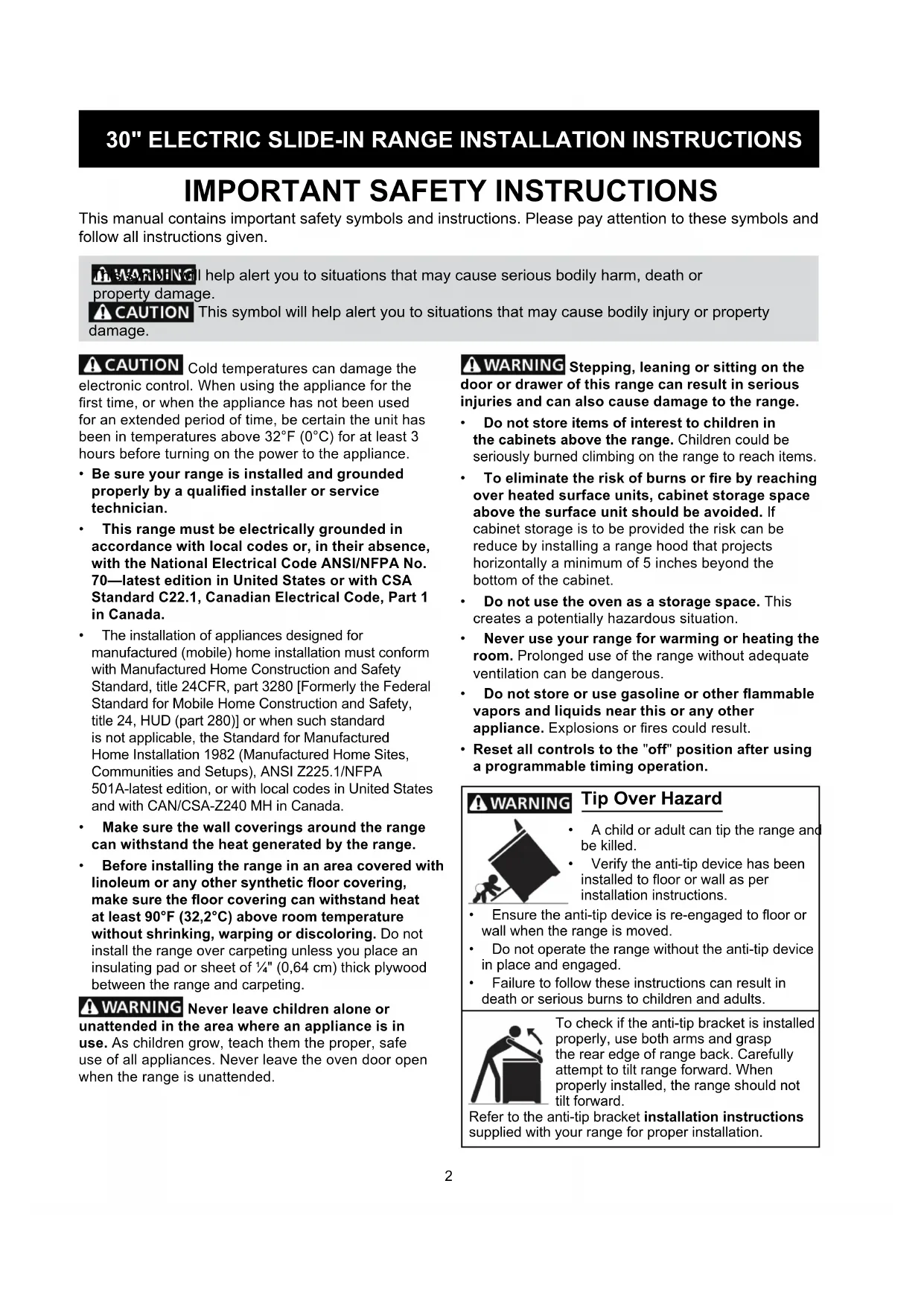
- A child or adult can tip the range and be killed.
- Verify the anti-tip device has been installedtooororwallasper installation instructions. Tip Over Hazard
- Ensuretheanti-tipdeviceisre-engagedtoooror wall when the range is moved.
- Do not operate the range without the anti-tip device in place and engaged.
- Failure to follow these instructions can result in death or serious burns to children and adults. To check if the anti-tip bracket is installed properly, use both arms and grasp the rear edge of range back. Carefully attempt to tilt range forward. When properly installed, the range should not tilt forward. Refer to the anti-tip bracket installation instructions supplied with your range for proper installation. Cold temperatures can damage the electronic control. When using the appliance for the rsttime,orwhentheappliancehasnotbeenused for an extended period of time, be certain the unit has been in temperatures above 32°F (0°C) for at least 3 hours before turning on the power to the appliance.
- Be sure your range is installed and grounded properly by a qualied installer or service technician.
- This range must be electrically grounded in accordance with local codes or, in their absence, with the National Electrical Code ANSI/NFPA No. 70—latest edition in United States or with CSA Standard C22.1, Canadian Electrical Code, Part 1 in Canada.
- Theinstallationofappliancesdesignedfor manufactured (mobile) home installation must conform with Manufactured Home Construction and Safety Standard, title 24CFR, part 3280 [Formerly the Federal Standard for Mobile Home Construction and Safety, title 24, HUD (part 280)] or when such standard is not applicable, the Standard for Manufactured Home Installation 1982 (Manufactured Home Sites, Communities and Setups), ANSI Z225.1/NFPA 501A-latest edition, or with local codes in United States and with CAN/CSA-Z240 MH in Canada.
- Make sure the wall coverings around the range can withstand the heat generated by the range.
- Before installing the range in an area covered with linoleum or any other synthetic oor covering, make sure the oor covering can withstand heat at least 90°F (32,2°C) above room temperature without shrinking, warping or discoloring. Do not install the range over carpeting unless you place an insulating pad or sheet of ¼" (0,64 cm) thick plywood between the range and carpeting. Never leave children alone or unattended in the area where an appliance is in use. As children grow, teach them the proper, safe use of all appliances. Never leave the oven door open when the range is unattended. Stepping, leaning or sitting on the door or drawer of this range can result in serious injuries and can also cause damage to the range.
- Do not store items of interest to children in the cabinets above the range. Children could be seriously burned climbing on the range to reach items.
- To eliminate the risk of burns or re by reaching over heated surface units, cabinet storage space above the surface unit should be avoided. If cabinet storage is to be provided the risk can be reduce by installing a range hood that projects horizontally a minimum of 5 inches beyond the bottom of the cabinet.
- Do not use the oven as a storage space. This creates a potentially hazardous situation.
- Never use your range for warming or heating the room. Prolonged use of the range without adequate ventilation can be dangerous.
- Do not store or use gasoline or other ammable vapors and liquids near this or any other appliance. Explosionsorrescouldresult.
- Reset all controls to the "off" position after using a programmable timing operation. This manual contains important safety symbols and instructions. Please pay attention to these symbols and follow all instructions given. This symbol will help alert you to situations that may cause serious bodily harm, death or property damage. This symbol will help alert you to situations that may cause bodily injury or property damage.
Do not install the unit in the cabinet before reading the next two pages. A. HEIGHT (Under Cooktop) B. WIDTH C. COOKTOP WIDTH
D. TOTAL DEPTH TO FRONT OF
Do not pinch the power supply cord between the range and the wall.
Do not seal the range to the side cabinets.
For cutouts less than 22 7/8" (58,1 cm), appliance will slightly show out of the cabinet.
Allow at least 19 ¼" (48,9 cm) clearance for door depth when it is open. Open Door(see note 5) Side Panel Product Dimensions4
Ref. 22 7/8"(58,1 cm) min.23 1/4"(59,05 cm) max.(see Note 4) IMPORTANT: Cabinet and countertop width should match the cutout width. ***IMPORTANT: To avoid cooktop breakage for cutout width (E dimension) of more than 30 1/16" (76,4 cm), make sure the appliance is centered in the counter opening while pushing into it. Raise leveling legs and the rear adjustable wheels at a higher position than the cabinet height (see page 5), insert the appliance in the counter and then level. Make sure the unit is supported by the leveling legs at the front and the wheels at the back and NOT by the cooktop itself.
(Countertop and cabinet)***
Slide the unit into the cabinet. Make sure the center of the unit is aligned with the center of the cabinet cut-out.
Remove the protective channels on each side of the cooktop (if provided).
ThemetalangeundereachsideofthecooktopMUST be placed over the cabinet countertop for proper unit support. The cooktop should NOT rest directly on the countertop (see illustration 2) or else it could cause damage to the cooktop voiding the warranty. Level the unit if needed.
After the installation, MAKE SURE that the unit is supported by the leveling legs and NOT by the cooktop.
Thecounter-toparoundthecut-outshouldbeatandleveled(see hatched area on illustration 1)
Before installing the unit, measure the heights of the two (2) cabinet sides (H1-4), front and back (see illustration 1) from theoortothetopofthe counter.
Level the range using the leveling legs and leveling device(ifequipped)sothattheheightfromtheoor to the underside of the cooktop glass frame is greater than the tallest cabinet measurement by at least 1/16" (0,16 cm) (see illustration 2).
If the appliance is equipped with leveling device: Remove and discard the two rear leveling legs (in this case, they are only in place to stabilize the unit for the transport). Illustration 2 To successfully install the range, the initial level height from oorto underside of cooktop frame should be at least 1/16" (0,16 cm) taller than cabinet sides as measured in step 2. Metal Flange6
Power Supply Cord Kit (U.S.A.) The user is responsible for connecting the power supply cord to the connection block located behind the back panel access cover. This appliance may be connected by means of permanent"hardwiring";exiblearmoredor nonmetallic shielded copper cable (when local code allow it) or by means of a power supply cord kit. NOTE: Electric Slide-in Range is shipped from factory with11/8"(2,9cm)dia.holeasshownongure3.Ifa larger hole is required, punch out the knockout. Risk of re or electrical shock exists if an incorrect size range cord kit is used, the Installation Instructions are not followed, or the strain relief bracket is discarded. For mobile homes, new installations or recreational vehicles, use only a power supply kit designed for a range at 125V/250V 50A recommended (minimum 40A). Cord must have either 3 (when local code permits grounding through neutral) or 4 conductors. Terminal on end of wires must be either closed loop or open spade lug with upturned ends. Cord must have strain-relief clamp. Do not loosen the nuts which secure the factory-installed range wiring to terminal block while connecting range. Electrical failure or loss of electrical connection may occur.
Access to Terminal Block & Grounding Strap (U.S.A.) Electrical Shock Hazard
- Disconnect power to the circuit breaker or fuse box before making the electrical connection.
- Electrical ground is required on this appliance.
- Do not connect to the electrical supply until appliance is permanently grounded.
- This appliance must be connected to a grounded, metallic, permanent wiring system, or a grounding connector should be connected to the grounding terminal or wire lead on the appliance. Failure to do any of the above could result in a re, personal injury or electrical shock.
Factory Connected Power Supply Cord (Canada only) This range is equipped with a factory-connected power cord (see Figure 1). Cord must be connected to a grounded 120/240 volt or 120/208 volt range outlet. If nooutletisavailable,haveoneinstalledbyaqualied electrician. This appliance is manufactured with the frame grounded by connection of a grounding strap between the neutral power supply terminal and the frame. If used in USA, in a new branch circuit installation (1996 NEC), mobile home or recreational vehicle, where local code do not permit grounding through neutral (white) wire or in Canada; remove the grounding strap from the frame and cut the other end, near the neutral terminal. Connect the appliance in usual manner.
Serial Plate Location Youwillndthemodeland serial number printed on the serial plate. The serial plate is located as shown. Remember to record the serial number for future reference. Remove the wire cover here for access to terminal block Figure 27
30" ELECTRIC SLIDE-IN RANGE INSTALLATION INSTRUCTIONS
Four Conductor Wire Connection to Range Where local codes DO NOT permit connection of the frame grounding conductor to the neutral wire of the copper power supply cord (see Figure 4):
1. Remove the screw holding the rear wire cover,
then remove the rear wire cover (access cover) to expose range terminal connection block (see Figure 2).
2. Remove the grounding strap. Remove the screw
that holds the strap against the appliance. Cut the strap off at the terminal block, or bend the strap back and forth to break it from the terminal block.
Electrical Connection to the Range (U.S.A.) Three Conductor Wire Connection to Range If local codes permit connection of the frame grounding conductor to the neutral wire of the copper power supply cord (see Figure 3):
1. Remove the screw holding the rear wire cover,
then remove the rear wire cover (access cover) to expose range terminal connection block (see Figure 2).
2. Using the nuts supplied in the literature package,
connect the neutral of the copper power supply cord to the center silver-colored terminal of the terminal block, and connect the other wires to the outer terminals. Match wires and terminals by color (red wires connected to the right terminal, black wiresconnectedtotheleftterminal)(seegure3).
3. Put back the rear wire cover using the screw
removed on step 1. Figure 3 Silver Colored Terminal 1 1/8" (2,9 cm) Dia. Direct Connection Hole. Punch Out Knockout for 1 3/8" (3,5 cm) Dia. Cord Kit Hole. To 240 V Receptacle A User Supplied Strain-relief Must Be Installed at This Location. Black Wire Terminal Block Cord Mounting Plate Neutral (White Wire) Grounding Strap Red Wire DO NOT loosen the screws that attach the terminal block to the appliance.
3. Using the nuts supplied with the literature package,
connect the ground wire (green) of the copper power supply cord to the frame of the appliance with the ground screw, using the hole in the frame where the ground strap was removed (see Figure 4).
4. Connect the neutral of the copper power supply
cord to the center silver-colored terminal of the terminal block, and connect the other wires to the outer terminals. Match wires and terminals by color (red wires connected to the right terminal, black wires connected to the left terminal).
5. Put back the rear wire cover using the screw
removed on step 1. Direct Electrical Connection to the Circuit Breaker, Fuse Box or Junction Box Disconnect power to the circuit breaker or fuse box before making the electrical connection. If the appliance is connected directly to the circuit breaker,fuseboxorjunctionbox,useexible,armored or nonmetallic sheathed copper cable (with grounding wire). Supply a U.L. listed strain-relief at each end of the cable. At the appliance end, the cable goes through the Direct Connection Hole (see Figure 4) on the Cord Mounting Plate. Wire sizes (copper wire only) and connections must conform to the rating of the appliance. Where local codes permit connecting the appliance-grounding conductor to the neutral (white) wire (see Figure 5): Terminal Block Silver Colored Terminal Red Wire Neutral (White Wire) Ground (Bare Copper Wire) To 240 V Receptacle A User Supplied Strain-relief Must Be Installed at This Location Black Wire 1 1/8" (2,9 cm) Dia. Direct Connection Hole. Punch Out Knockout for 1 3/8" (3,5 cm) Dia. Cord Kit Hole. Figure 48
30" ELECTRIC SLIDE-IN RANGE INSTALLATION INSTRUCTIONS
1. Be sure that no power is supplied on the cable from
2. DO NOT remove the grounding strap for 3-wire
3. In the circuit breaker, fuse box or junction box:
a) Connect the green (or bare copper) wire, the white appliance cable wire, and the neutral (white) wire together. b) Connect the 2 black wires together. c) Connect the 2 red wires together. Where local codes DO NOT permit connecting the appliance-grounding conductor to the neutral (white) wire, or if connecting to 4-wire electrical system (see Figure 6):
1. Be sure that no power is supplied on the cable
2. Remove the grounding strap from the terminal
block and from the appliance frame.
3. In the circuit breaker, fuse box or junction box:
a) Connect the white appliance cable wire to the neutral (white) wire. b) Connect the 2 black wires together. c) Connect the 2 red wires together. d) Connect the green (or bare copper) grounding wire to the grounding wire of the circuit breaker, fuse box or junction box. Figure 5 - 3-Wire (Grounded Neutral) Electrical System (Example: Junction Box) Cable from Residence Junction Box White Wire U.L.-listed Conduit Connector (or CSA listed) Cable from Appliance Green (or Bare Copper) Wire Red Wires Neutral (white) Wire Black Wires U.L.-listed Conduit Connector (or CSA listed) Figure 6 – 4-Wire Electrical System (Example: Junction Box) Cable from Residence Black Wires Junction Box White Wire Cable from Appliance Green (or Bare Copper) Wire Red Wires White Wire Green (or Bare Copper) Wire Min. Cutout WidthFormed or tile countertop trimmed ¾" (1,9 cm) back at front corners of countertop opening. Figure 7
Cabinet Construction
To eliminate the risk of burns orrebyreachingoverheatedsurfaceunits,donot have cabinet storage space above the range. If there is cabinet storage space above range, reduce risk by installing a range hood that projects horizontally a minimum of 5" (12,7 cm) beyond the bottom of the cabinet.
Countertop Preparation
- Thecooktopsidesoftherangetoverthecutout edge of your countertop.
- Ifyouhaveasquare nish (at) countertop, no countertop preparation is required. Cooktop sides lay directly on edge of countertop.
- Formed front-edged countertops must have moldededgeshavedat3/4"(1,9cm)fromeach front corner of opening (Figure 7).
- Tile countertops may need trim cut back 3/4" (1,9 cm) from each front corner and/or rounded edge attened(Figure7).
- If the existing cutout width is greater than 30 1/16" (76,4 cm), reduce the ¾" (1,9 cm) dimension.
- Countertop must be level. Place a level on the countertop,rstsidetoside,thenfronttoback.If the countertop is not level, the range will not be level. The oven must be level for satisfactory baking results.Cooktopsidesofrangetoveredgesof countertop opening9
30" ELECTRIC SLIDE-IN RANGE INSTALLATION INSTRUCTIONS
Figure 8 Figure 9 RangeAnti-Tip Bracket Floor Mount FloorRear of Range Wall Mount Wall
1. Drawacenterline(CL)ontheoorwheretherange
shouldbeinstalled.Alsodrawalineontheoorat the range back position if there is no wall.
2. Unfoldpapertemplateandplaceitatontheoor
with the right rear corner positioned exactly on the intersection of the center and back lines you just drew before. (Use the diagram below to locate brackets if template is not available. (Figure 8))
holesinbracketwithmarksonoor/wallandattach with screws provided. Bracket must be secured to solidoororwall(Figure9).Ifattachingtoconcrete oor,rstdrill3/16"(0,48cm)dia.pilotholesusing masonry drill bit.
5. Be sure the 4 levelling legs are at the highest
position they can be.
6. Slide range into place making sure structure of the
range is trapped by the anti-tip bracket (Figure 9). Lower the range by adjusting the levelling legs until the underside of the cooktop is sitting level on the countertop. Refer to “Levelling the Range” section.
7. After installation, verify that the anti-tip bracket is
engaged by grasping the top rear edge of the range and carefully attempt to tilt it forward to make sure range is properly anchored.
Models Equipped with Leveling Device To reduce the risk of tipping of the range,therangemustbesecuredtotheoorby properly installed anti-tip bracket and screws packed with the range. These parts are located in the oven. Failure to install the anti-tip bracket will allow the range to tip over if excessive weight is placed on an open door or if a child climbs upon it. Serious injury might result from spilled hot liquids or from the range itself. Follow the instructions below to install the anti-tip brackets. If range is ever moved to a different location, the anti- tip brackets must also be moved and installed with the range. Tools Required: Adjustable Wrench Ratchet Drill & 1/8" (0,32 cm) bit 5/16" (0,8 cm) Nutdriver Level Theanti-tipbracketattachestotheoor(orbackwall) at the back of the range to prevent range from tipping. Whenfasteningbrackettotheoor,besurethatscrews do not penetrate electrical wiring or plumbing. The screws provided will work in either wood or concrete.
B. Drill Pilot Holes and Fasten Bracket - Drill a 1/8" (0,3 cm) pilot hole where screws are to be located. If bracket is to be mounted to the wall, drill pilot hole at an approximate 20° downward angle. If bracket is to be mountedtomasonryorceramicoors,drilla3/16"(0,5cm) pilot hole 1-3/4" (4,4 cm) deep. The screws provided may be used in wood or concrete material. Use a 5/16" (0,8cm)nut-driveroratheadscrewdrivertosecurethebracket in place.C. Level and position the range - Slide range to its nalposition.Inserttherangelevelinglegintheanti-tipbracket. Visually verify if the anti-tip bracket is engaged. Lower the range by adjusting the 4 leveling legs alternatively until the range is level. Check if the range is level by placing a spirit level on the oven rack. Take 2 readings with the spirit level placed diagonally; take a reading in one direction and then in the other direction. Level the range if necessary by adjusting the leveling legs. Leg LevelerRaiseLower FASTEN BRACKET
ALL OR FLOOR MOUNTING) Leveling leg Wall mount Floor Mount Anti-Tip Bracket Rear of Range Wall Plate
Models Equipped with Leveling Legs To reduce the risk of tipping of the range,therangemustbesecuredtotheoorbytheproperly installed anti-tip bracket and screws packed with the range. Failure to install the anti-tip bracket will allow the range to tip over if excessive weight is placed on an open door or if child climbs upon it. Serious injury might result from spilled hot liquids or from the range itself.If range is ever moved to a different location, the anti-tip bracket must also be moved and installed with the range.Instructions are provided for installation in wood or cementoor.Whenfasteningtooor,besurethatscrews do not penetrate electrical wiring or plumbing.A. Locate the Bracket Using the Template - Locate the bracket position (right or left side) by placing the templatesymmetricallytothecenterofthenalrangeposition. Mark the location of the screw holes, shown on template.Figure 12Figure 13Figure 14Figure 11Figure 10 Range side11
30" ELECTRIC SLIDE-IN RANGE INSTALLATION INSTRUCTIONS
IMPORTANT If Accessories Needed : Installation With Backguard The cutout depth of (21 3/4" (55,2 cm) Min., 22 1/8" (56,2 cm) Max.) needs to be increased to 24" (61 cm) when installing a backguard. Installation With End Panel A End Panel kit can be ordered through a Service Center. Installation With Side Panels A Side Panels kit can be ordered through a Service Center. Note: Install cabinet doors 32" (81,3 cm) min. apart so as not to interfere with range door opening.
Range Installation Important Note: Door removal is not a requirement for installation of the range, but is an added convenience. Refer to the Use and Care Guide for oven door removal instructions. Standard Installation
The range cooktop overlaps the countertop at thesidesandtherangerestsontheoor.The cooktop is 31½" (80 cm) wide.
Install base cabinets 30" (76,2 cm) apart. Make sure they are plumb and level before attaching cooktop. Shave raised countertop edge to clear 31½" (80 cm) wide range top rim.
Install cabinet doors 32" (81,3 cm) min. apart so as not to interfere with range door opening.
Cutout countertop exactly as shown on page 4. Model equipped with leveling device or Model equipped with leveling legs For models equipped with Leveling Device:
Make sure the front leveling legs and the rear leveling device are setup higher than the height of the cabinet.
Install the anti-tip bracket at this point before placing the range at its nal position. Follow the installation instructions on page 9 or on the anti-tip bracket template supplied with the range.
To provide an optimum installation, the top surface of the countertop must be level and at(lieonthesameplane)aroundthe3sides that are adjacent to range cooktop. Proper adjustmentstomakethetopatshouldbemade or gaps between the countertop and the range cooktop may occur.
To reduce the risk of damaging your appliance, do not handle or manipulate it by the ceramic glass. Manipulate with care.
Position range in front of the cabinet opening.
Make sure the cooktop glass that overhangs the countertop clears the countertop before sliding range into position. If necessary, raise the unit by lowering the leveling legs.
Slide the range into the cutout opening and center it before leveling it.
Level the range (see section 9). Theoor where the range is to be installed must be level. Follow the instructions under "Leveling the Range- Models Equipped with Leveling Device".
On models with a leveling device, remove the rear legs and discard. Adjust the leveling legs on the front of the appliance so that the cooktop glass clears the countertop. Level the appliance (see Leveling the range: Models Equipped with Leveling Device). The glass should not be supported by the countertop or any hatched or shaved areas of the countertop. For models equipped with Leveling Leg only (no leveling device):
Make sure the four leveling legs (front and rear) are setup higher than the height of the cabinet.
Install the anti-tip bracket at this point before placing the range at its nal position. Follow the installation instructions on page 10 or on the anti-tip bracket template supplied with the range.
To provide an optimum installation, the top surface of the countertop must be level and at(lieonthesameplane)aroundthe3sides that are adjacent to range cooktop. Proper adjustmentstomakethetopatshouldbemade or gaps between the countertop and the range cooktop may occur.
To reduce the risk of damaging your appliance, do not handle or manipulate it by the ceramic glass. Manipulate with care.
Position range in front of the cabinet opening.
Make sure that the glass which overhangs the countertop clears the countertop. If necessary, raise the unit by lowering the leveling legs.
Level the range(seesection9).Theoor where the range is to be installed must be level. Follow the instructions under "Leveling the Range-Models Equipped with Leveling Legs".
Slide the range into the cutout opening. Figure 1512
Models Equipped with Leveling Device Level the range after installation in the cutout opening.
1. Open the range drawer. The leveling screws control
the height of the rear wheels.
2. Adjust the appliance wheels and legs as follows
until the underside of the cooktop surface is sitting level on the countertop (Figure 16). a. To adjust the front legs, use a wrench on the leg base and turn clockwise to lower or counterclockwise to raise. b. To adjust the rear wheels, use a ratchet or a nutdriver and turn the leveling screws counterclockwise to lower or clockwise to raise.
3. Check if the range is level by installing an oven rack
in the center of the oven and placing a level on the rack (Figure 17).
4. Take 2 readings with the level placed diagonally in
one direction and then the other. Level the range, if necessary, by adjusting the leveling legs and wheels.
5. If the range cannot be level, contact a carpenter to
correctsaggingorslopingoor. Figure 16
Models Equipped with Leveling Legs Level the range and set cooktop height before installation in the cut-out opening.
1. Install an oven rack in the center of the oven.
2. Place a level on the rack (see Figure 17). Take 2
readings with the level placed diagonally in one direction and then the other. Level the range, if necessary, by adjusting the 4 leg levelers with a wrench (see Figure 16).
3. Taking care to not damage the countertop, slide
range into cutout opening and double check for levelness. Figure 1713
Check Operation Refer to the Use and Care Manual packaged with the range for operating instructions and for care and cleaning of your range. Do not touch the elements. They may be hot enough to cause burns. Remove all packaging from the oven before testing.
Operation of Surface Elements Turn on each of the four surface elements and check to see that they heat. Check the surface element indicator light(s), if equipped.
Operation of Oven Elements The oven is equipped with an electronic oven control. Each of the functions has been factory checked before shipping. However, it is suggested that you verify the operation of the electronic oven controls once more. Refer to the Use and Care Manual for operation. Follow the instructions for the Clock, Timer, Bake, Broil, Convection (some models) and Clean functions. Bake–After setting the oven to 350°F (177°C) for baking, the lower element in the oven should become hot and heat the bottom of the oven cavity. Broil–When the oven is set to BROIL, the upper element in the oven should become red. Clean–When the oven is set for a self-cleaning cycle, the upper element should become red during the preheat portion of the cycle. After reaching the self- cleaning temperature, the lower element will become red. Convection (some models)–When the oven is set to CONV. BAKE/ROAST at 350°F (177°C), or when the oven is preheating for a BAKE function, the elements cycle off on and off alternately and the convection fan will turn. The convection fan will stop turning when the oven door is opened during convection baking or roasting. Warmer (some models)–Set the control to HI and check to see the drawer is heating. When All Hookups are Complete Make sure all controls are left in the OFF position. Model and Serial Number Location The serial plate is located on the oven front frame behind the oven door (see section 1). When ordering parts for or making inquiries about your range, always be sure to include the model and serial numbers and a lot number or letter from the serial plate on your range. Before You Call for Service Read the Before you call list and operating instructions in your Use and Care Manual. It may save you time and expense. The list includes common occurrences that are not the result of defective workmanship or materials in this appliance. Refer to the warranty and service information in your Use and Care Manual for our phone number and address. Please call or write if you have inquiries about your range product and/or need to order parts. Decorative Trim Screw (3) Distance between the oorand the surface underneath the cooktop frame. Figure 18
Decorative Rear Trim Installation (some models)
1. Disconnect the power from the range.
2. Make sure the range is leveled.
3. Pull range toward you.
4. Takethedistancebetweentheoorandthe
surface underneath the cooktop frame.
5. Mark that distance on the wall where the
decorative trim will be installed.
7. Place the top of the decorative trim under that line.
9. Slide the range back into position and reconnect
the power source (the bottom of the cooktop should be located over the decorative trim).INSTRUCCIONES DE INSTALACIÓN