
BS 04 - Telephone BLAUPUNKT - Free user manual and instructions
Find the device manual for free BS 04 BLAUPUNKT in PDF.
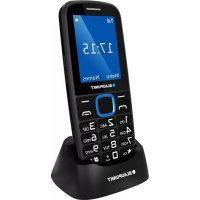



| Product Type | Mobile phone (feature phone) |
| Brand | Blaupunkt |
| Model | BS 04 |
| Network | GSM 900/1800 MHz |
| Battery Type | Li-ion, 3.7 V - 900 mAh |
| Charger | Input 100-240 V~50/60 Hz 0.1 A, Output 5 V - 500 mA - 2.5 W |
| SAR Value (head) | 0.375 W/kg |
| SAR Value (body) | 1.058 W/kg |
| Display | Not specified, probably color LCD |
| Camera | Yes (requires memory card to save) |
| Flashlight | Yes |
| SOS button | Yes, at the back |
| SIM card type | Micro SIM |
| Dimensions | Approximately 120 x 50 x 10 mm (estimated) |
| Weight | Approximately 80 g (estimated) |
| Maintenance and cleaning | Keep dry, clean with a soft dry cloth |
| Safety | Hearing protection, avoid high volumes, comply with restricted areas |
| Spare parts and repairability | Removable battery, repair by qualified personnel only |
| General information | Compliant with directives 2014/53/EU and 2011/65/EU |
Frequently Asked Questions - BS 04 BLAUPUNKT
User questions about BS 04 BLAUPUNKT
0 question about this device. Answer the ones you know or ask your own.
Ask a new question about this device
Download the instructions for your Telephone in PDF format for free! Find your manual BS 04 - BLAUPUNKT and take your electronic device back in hand. On this page are published all the documents necessary for the use of your device. BS 04 by BLAUPUNKT.
USER MANUAL BS 04 BLAUPUNKT
- Safety 2
- Product specifications .... 3
- Keys and device appearance.... 3
- Getting Started .... 4
4.1. Installation.... 4 4.2. Charging the battery.... 4 4.3. Maintaining the battery....5
- Use this unit....5
5.1. Power On/Off 5 5.2. Make a call.... 5 5.3. Receive call.... 5 5.4. Emergency calls....6 5.5. Reading new message ....6 5.6. Camera 6 5.7. SOS function settings....6 5.8. Phone password....7
- Declaration of Conformity .... 7
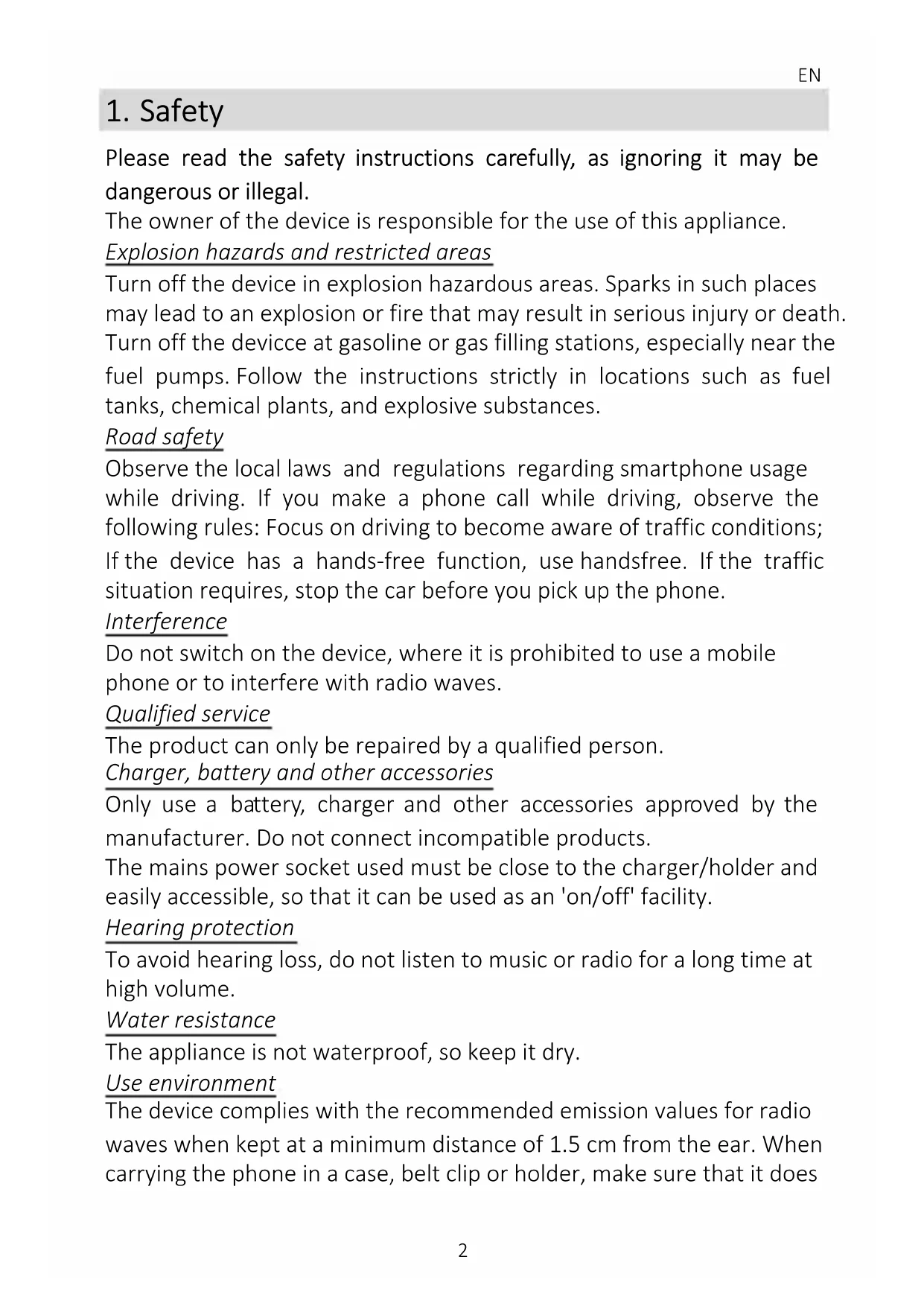
1. Safety
Please read the safety instructions carefully, as ignoring them may be dangerous or illegal.
The owner of the device is responsible for the use of this appliance.
Explosion hazards and restricted areas
Turn off the device in explosion hazardous areas. Sparks in such places may lead to an explosion or fire that may result in serious injury or death. Turn off the device at gasoline or gas filling stations, especially near the fuel pumps. Follow the instructions strictly in locations such as fuel tanks, chemical plants, and explosive substances.
Road safety
Observe the local laws and regulations regarding smartphone usage while driving. If you make a phone call while driving, observe the following rules: Focus on driving to become aware of traffic conditions; If the device has a hands-free function, use handsfree. If the traffic situation requires, stop the car before you pick up the phone.
Interference
Do not switch on the device where it is prohibited to use a mobile phone or where it may interfere with radio waves.
Qualified service
The product can only be repaired by a qualified person.
Charger, battery and other accessories
Only use a battery, charger and other accessories approved by the manufacturer. Do not connect incompatible products.
The mains power socket used must be close to the charger/holder and easily accessible, so that it can be used as an 'on/off' facility.
Hearing protection
To avoid hearing loss, do not listen to music or radio for a long time at high volume.
Water resistance
The appliance is not waterproof, so keep it dry.
Use environment
The device complies with the recommended emission values for radio waves when kept at a minimum distance of 1.5 cm from the ear. When carrying the phone in a case, belt clip or holder, make sure that it does
not contain metal and that the phone is slightly distracted from the body. When using other accessories, it is not possible to operate in accordance with radio frequency guidelines. If you do not use a case and do not hold the phone on your ear, keep it at least 2.5 cm away from your body, especially during data transfer.
2. Product specifications
The device handles a Micro SIM card.
Power Supply Features:
- Input: (AC), 100-240 V - 50/60 Hz - 0.1 A • Output: (DC), 5 V-500 mA - 2.5W
Battery Type and Voltage: Li-ion battery, 3.7 V-900 mAh
Network type: GSM 900/1800 MHz
SAR values: 0.375 W/Kg (Head) - 1.058 W/Kg (Body)
Note: Actual operating conditions depend on local conditions, network environment, and user habits.
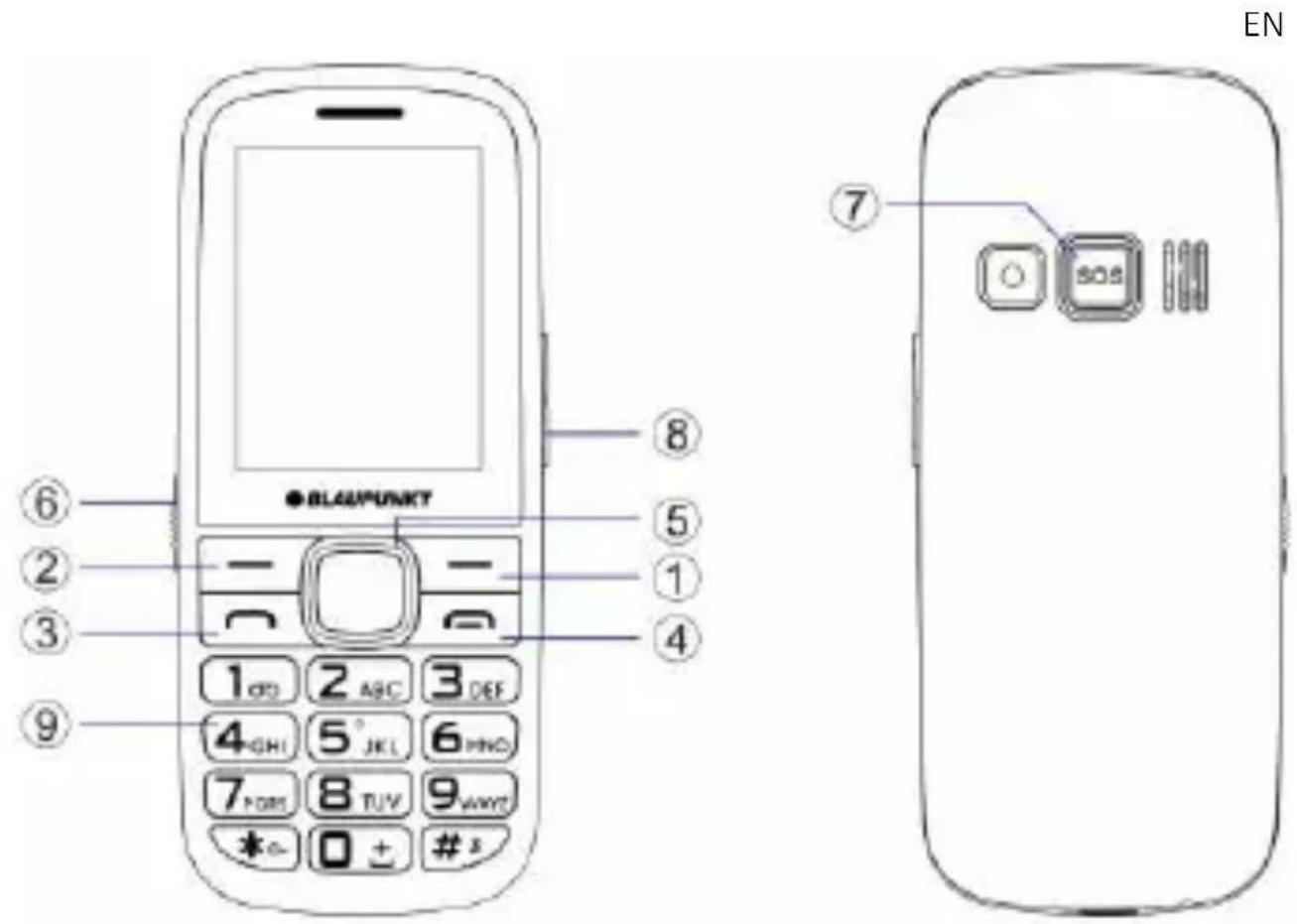
3. Keys and device appearance
- Right softkey: In standby mode, enter Names. In Menu mode: to return to the home screen
- Left softkey: In standby mode: enter the Main menu and select "OK" button in other menus
- Call (Dial) button: Dialing and Receiving calls. In Idle mode, open the Call list
- Call End Button: Press and hold to turn on/off the phone
- Navigation keys (scroll in the menu): In standby mode, various functions can be set in the directions.
- Flashlight button: Turning the flashlight on and off.
- SOS: In emergency, by pressing this button, alarms the previously set contacts for this function.
- Volume button: Increase and decrease the volume during calls
- Alphanumeric keypad: Press the corresponding keys to enter numbers when dialing or the characters of the numbers when writing text.
4. Getting Started
4.1. Installation
- Open and remove the phone back protection cover
- Insert the SIM into the device. The golden contacts on the SIM card face down and the edges align with the corresponding edges of the SIM card.
- Insert the battery chip into the protruding metal point in the battery slot, insert the battery, and push the top down until the battery engages in the recess.
- Put back the back cover.
4.2. Charging the battery
Connect the charger to the appliance and plug the other end into the socket. If the device is turned on while charging, the battery icon will move in the right corner of the display. Charging is completed when the charging indicator on the top right is lit. If charging is switched off, a charging indicator appears on the display. When charging is complete, unplug the charger from the unit.
Note: When the battery voltage is low, a warning message is displayed
on the display. Charge the battery as soon as you can, to avoid any inconvenience, the device can be switched off during a telephone conversation. Your device can automatically turn off when the power level is too low.
4.3. Maintaining the battery
The device has a rechargeable battery. When not using the charger, disconnect it from the power source. For more than a week, do not leave the phone charging. Temperature influences battery capacity. Battery may need to be cooled or warmed up before charging. If the battery temperature is lower than 0\ °C or higher than 45\ °C , do not charge the battery. Use the battery according to its intended purpose. Do not short-circuit the battery terminals. Do not use a damaged battery. If you are using an appliance under extreme temperature conditions, the battery will not work properly and its life span will be reduced. DO NOT throw the battery into fire, follow local laws and regulations regarding the disposal of the spent battery.
5. Use this unit
5.1. Power On/Off
- Press and hold the End / On-Off button to turn the unit on or off.
- If you require a PIN code after power on, enter the correct PIN. If you enter the wrong number, press the right soft key to delete the number.
- To turn off the phone, press and hold the power key until the screen turns off.
5.2. Make a call
When the network service provider name appears on the display, the phone is ready to make and receive calls.
In Standby mode, press the number keys to enter the number you want to call, press the right soft key to clear the wrong numbers, press the left soft key or the dial key to start the call if the specified number is correct.
To enter an international phone number format, press and hold the [0] key until [+] international call sign appears on the display.
5.3. Receive call
When an incoming call is alerted to your device if your service provider
supports the number display, the display shows the caller's number or the caller's name (depending on whether you have saved it in the phone book).
Press the dial key or the left soft key and answer [Answer] to the incoming call.
5.4. Emergency calls
You can immediately make an emergency call without a SIM card. Different networks can use different emergency numbers, so please contact your network operator.
5.5. Reading new message
When you receive a message, a beep or vibration (as previously configured in the menu) will alert you to this, or a graphic will appear on the display. Press the left soft key [View] or OK to view the message, and the right soft key to return to the SMS menu to read other incoming messages.
5.6. Camera
In Menu mode, select Camera to open the camera.
- Point the lens towards the object and adjust the image. • Take the photo with the Middle (Navigation) key.
Attention! To save the images, you need a memory card.
5.7. SOS function settings
To set the SOS function, go to Menu> Settings> SOS Settings.
- Status: activates the function (SOS button on the back of the device).
- SOS numbers: dial the numbers listed here by pressing the SOS button or sending an SMS message (if active) to the numbers in the list. The alarm chain lasts until one of the numbers in the list answers the call. Attention! Do not enter a number where call reception is automatic.
- SOS SMS on / off: Enable or disable SOS SMS function.
- SOS SMS: In this menu item, you can edit the text of an emergency message. At the end of editing, save the message text using Save (left soft key).
To start the SOS alarm, press and hold the SOS button on the back of the device. To cancel the chain, press again.
5.8. Phone password
The phone password can be a 4-8-digit code that protects your device from unauthorized use.
The factory default password is "1122". When the feature is active, the phone asks for this code every time you turn it on. To protect your privacy, change the default password as soon as possible (Menu>Settings>Security Settings>Phone Security>Password Change). Set a password you can easily remember.
6. Declaration of Conformity
The Blaupunkt BS 04 is compliant with the essential requirements and relevant provisions of RoHS Directive 2014/53/EU and 2011/65/EU. The Declaration of Conformity is available on our website.

Designed and Engineered by
Blaupunkt Competence Center Mobile Europe HTM Mobile Kft.
1118 Budapest, Dayka Gábor utca 3. Hungary Assembled in P.R.C by CSM Technology Co., Ltd.
5F, Bld. C, Hongshengyuan Industrial Park, Longgang District, Shenzhen, China
For more information on this product, visit our website at www.htmmobile.hu or www.blaupunkt.com.
Designed and Engineered by
Blaupunkt Competence Center Mobile Europe
HTM Mobile Kft.
Assembled in P.R.C by
CSM Technology Co., Ltd.
5F, Bld. C, Hongshengyuan Industrial Park, Longgang District, Shenzhen, China
Designed and Engineered by
Blaupunkt Competence Center Mobile Europe
Assembled in P.R.C by
CSM Technology Co., Ltd. - 5F, Bld. C, Hongshengyuan Industrial Park, Longgang District, Shenzhen, China
Designed and Engineered by
Blaupunkt Competence Center Mobile Europe
Assembled in P.R.C by
CSM Technology Co., Ltd. - 5F, Bld. C, Hongshengyuan Industrial Park, Longgang District, Shenzhen, China
Designed and Engineered by
Blaupunkt Competence Center Mobile Europe
HTM Mobile Kft.
Assembled in P.R.C by
CSM Technology Co., Ltd.
5F, Bld. C, Hongshengyuan Industrial Park, Longgang District, Shenzhen, China
Designed and Engineered by
Blaupunkt Competence Center Mobile Europe
HTM Mobile Kft.
Assembled in P.R.C by
CSM Technology Co., Ltd.
5F, Bld. C, Hongshengyuan Industrial Park, Longgang District, Shenzhen, China
Designed and Engineered by
Blaupunkt Competence Center Mobile Europe
Assembled in P.R.C by
CSM Technology Co., Ltd. - 5F, Bld. C, Hongshengyuan Industrial Park, Longgang District, Shenzhen, China
Designed and Engineered by
Blaupunkt Competence Center Mobile Europe
HTM Mobile Kft.
Assembled in P.R.C by
CSM Technology Co., Ltd.
5F, Bld. C, Hongshengyuan Industrial Park, Longgang District, Shenzhen, China
Designed and Engineered by
Blaupunkt Competence Center Mobile Europe HTM Mobile Kft.
Assembled in P.R.C by
CSM Technology Co., Ltd.
5F, Bld. C, Hongshengyuan Industrial Park, Longgang District, Shenzhen, China
Designed and Engineered by
Blaupunkt Competence Center Mobile Europe HTM Mobile Kft.
Assembled in P.R.C by
CSM Technology Co., Ltd.
5F, Bld. C, Hongshengyuan Industrial Park, Longgang District, Shenzhen, China
Designed and Engineered by
Blaupunkt Competence Center Mobile Europe
HTM Mobile Kft.
Assembled in P.R.C by
CSM Technology Co., Ltd.
5F, Bld. C, Hongshengyuan Industrial Park, Longgang District, Shenzhen, China



Brand : BLAUPUNKT
Model : BS 04
Category : Telephone