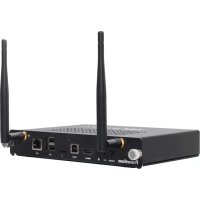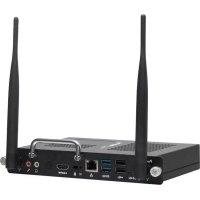
OPSM - Thin client Promethean - Free user manual and instructions
Find the device manual for free OPSM Promethean in PDF.



User questions about OPSM Promethean
0 question about this device. Answer the ones you know or ask your own.
Ask a new question about this device
Download the instructions for your Thin client in PDF format for free! Find your manual OPSM - Promethean and take your electronic device back in hand. On this page are published all the documents necessary for the use of your device. OPSM by Promethean.
USER MANUAL OPSM Promethean
Copyright information
•版权信息 •版權資訊 •Informace o autorských právech • Oplysninger om copyright • Informatie over copyright • Autoriõiguste teave •Tekijänoikeustiedot Informations sur le copyright • Copyright • Szerzõijogiinformációk • InformasiHak Informazioni sul copyright • 著作権情報 • Авторлық құқықтар туралы акқарат • Informācija par autortiesībām • Autorių teisiųinformacija•Maklumathak cipta • Informasjonomoppho•Informacje o prawachautorskich•Informação de direitos de autor • Сведения об і правах • Información de copyright • Information om upphovsrätt • tradedi gê�วกับลิขสิทธิ • Telif hakkıbilgileri • Thông tin bản quyền
Copyright information
TP-2072-ML-V04 © 2018 Promethean Limited. All rights reserved.
All software, resources, drivers and documentation supplied in the Promethean ClassFlow Desktop dov copyright Promethean Ltd 2018. Promethean grants a license to install and use Promethean ClassFlow software, including any resources, drivers and documentation supplied in the download. Refer to the agreement for information about the terms and conditions of this licence.
Promethean is owner of a number of trademarks in several jurisdictions across the world. The Prom- documented in this guide include aspects which are protected under their respective patent, copyright, registered design and trademark laws. HDMI, the HDMI logo and High-Definition Multimedia trademarks or registered trademarks of HDMI Licensing LLC. VESA is a registered mark of Video Ele Association.
Windows is a registered trademark or trademark of Microsoft Corporation in the United States and other trademarks remain the property of their respective owners. This guide is distributed online. It is reproduced for use within the institution in which the product is used.
For use outside of your institution, no part of this guide may be reproduced, transmitted, stored in a retrieval system or translated into any other language without the prior permission of Promethean Limited.
Please note that the content in this guide is protected under copyright law. Although every care the compilation of this guide, Promethean Limited accepts no responsibility for errors or omissions, o resulting from the use of information contained within the following pages.
نوع معلومات
TP-2072-ML-V04 © 2018 Promethean Limited. All rights reserved.
IMPORTANT: Before installing or using your OPS-M, make sure that you have read the online Safety and Compliance information. This can be found by searching for TP-2075 at: https://support.prometheanworld.com
https://support.prometheanworld.com
natural_image
Line drawing of a rectangular electronic device with internal components and ports (no text or symbols)OPS2-5P4R500H
OPS2-5P8R256S
x1
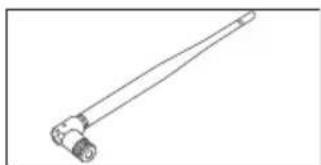
natural_image
Line drawing of a mechanical tool or connector with a long handle and two cylindrical ports (no text or symbols)x2
natural_image
Illustration of an open book with wavy pages and a grid pattern (no text or symbols)TP-2072
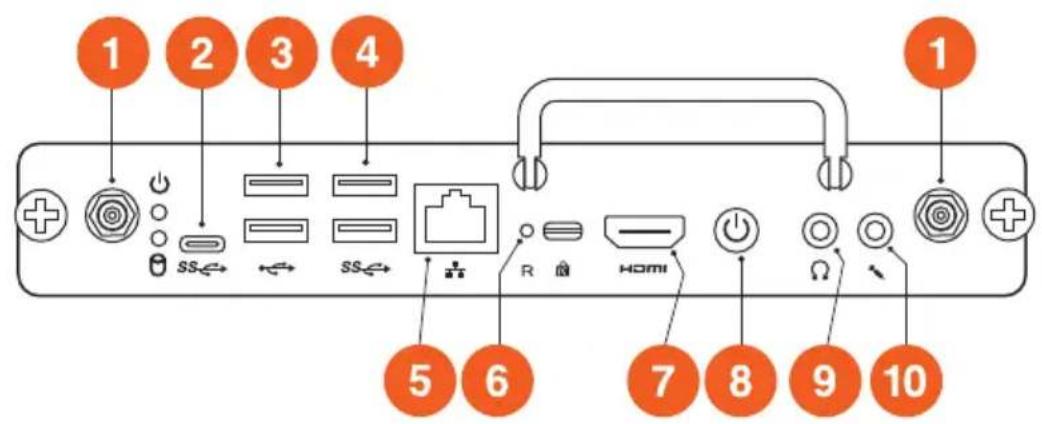
Connections
• 连接 • 連接 • Připojení • Forbindelser • Verbindingen • Ühendused • Yhteydet • Connexions • Anschlüsse • Kapcsolatok • Sambungan • Connessioni • 接続 • Байланыстар • Savienojumi • Jungtys • Sambungan • Tilkoblinger • Połączenia • Ligações • Подключения • Conexiones • Anslutningar • การเชื่อมต่อ • Bağlantılar • Két női
text_image
1 2 3 4 + SS←→ SS←→ R HOMI 5 6 7 8 9 10
text_image
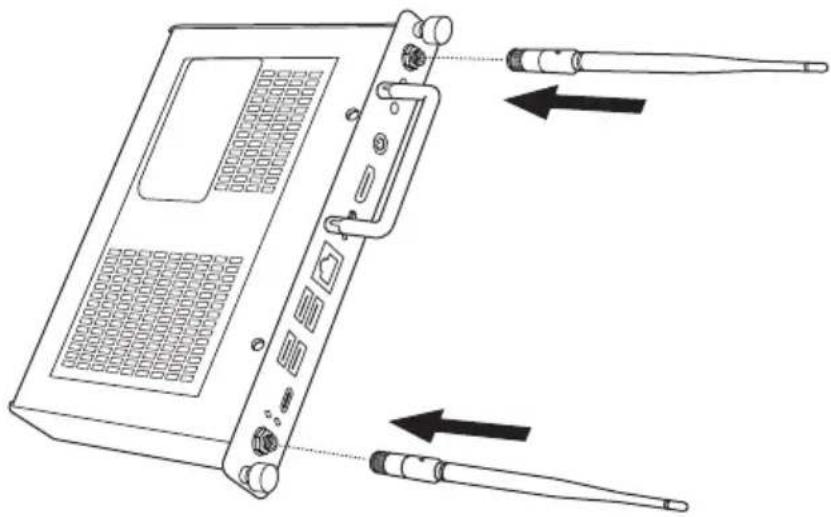
11| 1 | Wireless antenna • Antenna LASLAKI • 无线天线 • 無線天線 • Antena bezdrátové sítě • Wi-Fi-antenne • Draadloze antenne • Raadiovorgu USB-C • USB-C • USB-C • USB-C • Antenn • Langaton antenni • Antenne sans fil • WLAN-Antenne • USB-C • USB-C • USB-C • USB-C • Vezeték nélküli antenna • Antena nirkabel • Antenna wireless • ワリUSB-C • USB-C • USB-C • USB-C •ヤレスアンテナ • Сымсыз антенна • Bezvadu antena • Belaidè antena • Antena tanpa wayar • Trådlös antenne • Antena bezprzewodowa USB-C • USB-C • USB-CAntena sem fios • Внутренняя антенна • Antena inalámbrica • Trådlösantenn • เست아طICSIRSAI • Kablosuz anten • Äng-ten không dāy | 2USB-C • USB-C • USB-C • USB-C • USB-C • USB-C • USB-C • USB-C • USB-C • USB-C • USB-C • USB-C • USB-C • USB-C • USB-C • USB-C • USB-C • USB-C • USB-C • USB-C • USB-C • USB-C • USB-C • USB-C • USB-C • USB-C • USB-C • USB-C • USB-C • USB-C • USB-C • USB-C • USB-C • USB-C • USB - USB-C • USB-C • USB-C • USB-C • USB-C • USB-C • USB-C • USB-C • USB-C • USB-C • USB-C • USB-C • USB-C • USB-C • USB-C • USB-C • USB-C • USB-C • USB-C • USB-C • USB-C • USB-C • USB-C • USB-C • USB-C • USB-C • USB-C • USB-C • USB-C • USB-C • USB-C • USB-C • USB-C • IBM-C • USB-C • USB-C • USB-C • USB-C • USB-C • USB-C • USB-C • USB-C • USB-C • USB-C • USB-C • USB-C • USB-C • USB-C • USB-C • USB-C • USB-C • USB-C • USB-C • USB-C • USB-C • USB-C • USB-C • USB-C • USB-C • USB-C • USB-C • USB-C • USB-C • USB-C • USB-C • USB-C • USB-SUB-C • USB-C • USB-C • USB-C • USB-C • USB-C • USB-C • USB-C • USB-C • USB-C • USB-C • USB-C • USB-C • USB-C • USB-C • USB-C • USB-C • USB-C • USB-C • USB-C • USB-C • USB-C • USB-C • USB-C • USB-C • USB-C • USB-C • USB-C • USB-C • USB-C • USB-C • USB-C • USB-C • USB(C) USB-C • USB-C • USB-C • USB-C • USB-C • USB-C • USB-C • USB-C • USB-C • USB-C • USB-C • USB-C • USB-C • USB-C • USB-C • USB-C • USB-C • USB-C • USB-C • USB-C • USB-C • USB-C • USB-C • USB-C • USB-C • USB-C • USB-C • USB-C • USB-C • USB-C • USB-C • USB-C • USB-C •USB-C • USB-C • USB-C • USB-C • USB-C • USB-C • USB-C • USB-C • USB-C • USB-C • USB-C • USB-C • USB-C • USB-C • USB-C • USB-C • USB-C • USB-C • USB-C • USB-C • USB-C • USB-C • USB-C • USB-C • USB-C • USB-C • USB-C • USB-C • USB-C • USB-C • USB-C • USB-C • USB-C •USB - USB-C • USB-C • USB-C • USB-C • USB-C • USB-C • USB-C • USB-C • USB-C • USB-C • USB-C • USB-C • USB-C • USB-C • USB-C • USB-C • USB-C • USB-C • USB-C • USB-C • USB-C • USB-C • USB-C • USB-C • USB-C • USB-C • USB-C • USB-C • USB-C • USB-C • USB-C • USB-C • USB-C• USB-C • USB-C • USB-C • USB-C • USB-C • USB-C • USB-C • USB-C • USB-C • USB-C • USB-C • USB-C • USB-C • USB-C • USB-C • USB-C • USB-C • USB-C • USB-C • USB-C • USB-C • USB-C • USB-C • USB-C • USB-C • USB-C • USB-C • USB-C • USB-C • USB-C • USB-C • USB-C • USB-C • USCB • USB-C • USB-C • USB-C • USB-C • USB-C • USB-C • USB-C • USB-C • USB-C • USB-C • USB-C • USB-C • USB-C • USB-C • USB-C • USB-C • USB-C • USB-C • USB-C • USB-C • USB-C • USB-C • USB-C • USB-C • USB-C • USB-C • USB-C • USB-C • USB-C • USB-C • USB-C • USB-C • USB-C•USB-C • USB-C • USB-C • USB-C • USB-C • USB-C • USB-C • USB-C • USB-C • USB-C • USB-C • USB-C • USB-C • USB-C • USB-C • USB-C • USB-C • USB-C • USB-C • USB-C • USB-C • USB-C • USB-C • USB-C • USB-C • USB-C • USB-C • USB-C • USB-C • USB-C • USB-C • USB-C • USB-C • IBM - USB-C • USB-C • USB-C • USB-C • USB-C • USB-C • USB-C • USB-C • USB-C • USB-C • USB-C • USB-C • USB-C • USB-C • USB-C • USB-C • USB-C • USB-C • USB-C • USB-C • USB-C • USB-C • USB-C • USB-C • USB-C • USB-C • USB-C • USB-C • USB-C • USB-C • USB-C • USB-C • USB-C - USB-C • USB-C • USB-C • USB-C • USB-C • USB-C • USB-C • USB-C • USB-C • USB-C • USB-C • USB-C • USB-C • USB-C • USB-C • USB-C • USB-C • USB-C • USB-C • USB-C • USB-C • USB-C • USB-C • USB-C • USB-C • USB-C • USB-C • USB-C • USB-C • USB-C • USB-C • USB-C • USB-C .USB-C • USB-C • USB-C • USB-C • USB-C • USB-C • USB-C • USB-C • USB-C • USB-C • USB-C • USB-C • USB-C • USB-C • USB-C • USB-C • USB-C • USB-C • USB-C • USB-C • USB-C • USB-C • USB-C • USB-C • USB-C • USB-C • USB-C • USB-C • USB-C • USB-C • USB-C • USB-C • USB-C • IB - USB-C • USB-C • USB-C • USB-C • USB-C • USB-C • USB-C • USB-C • USB-C • USB-C • USB-C • USB-C • USB-C • USB-C • USB-C • USB-C • USB-C • USB-C • USB-C • USB-C • USB-C • USB-C • USB-C • USB-C • USB-C • USB-C • USB-C • USB-C • USB-C • USB-C • USB-C • USB-C • USB-C.4USB-C • USB-C • USB-C • USB-C • USB-C • USB-C • USB-C • USB-C • USB-C • USB-C • USB-C • USB-C • USB-C • USB-C • USB-C • USB-C • USB-C • USB-C • USB-C • USB-C • USB-C • USB-C • USB-C • USB-C • USB-C • USB-C • USB-C • USB-C • USB-C • USB-C • USB-C • USB-C • USB-C • 6Reset - إمتحة تعويين - 重设 - 重设 - Resetování - 9NULAN - Reset - Lähtestamine - Palaut - Rénitialiser - Zurücksetzen - Törles - Se ulang - Ripristino - リセット - Kaita a Atiestafisana - Atkurti - Tetap semula - Tilbakestilling - Resetuj - Repor - Cbpo - Restablecer - Återställ - ŋiðn - Sifirla - Đặt laí | |
| 3 | USB 2.0 • USB 2.0 • USB 2.0 • USB 2.0 • USB 2.0 • USB 2.0 • USB 2.0 • USB 2.0 • USB 2.0 • USB 2.0 • USB 2.0 • USB 2.0 • USB 2.0 • USB 2.0 • USB 2.0 • USB 2.0 • USB 2.0 • USB 2.5 | 4USB 3.0 • USB 3.0 • USB 3.0 • USB 3.0 • USB 3.0 • USB 3.0 • USB 3.0 • USB 3.0 • USB 3.0 • USB 3.0 • USB 3.0 • USB 3.0 • USB 3.0 • USB 3.0 • USB 3.0 • USB 3.0 • USB 3.0 • USB 3. 5 | |
| 5 | LAN - شبكة الاتصال المحالية LAN - LAN - LAN - LAN - LAN - LAN - LAN - LAN - LAN - LAN - LAN - LAN - LAN - LAN - LAN - LAN - LAN - LAN - LAN - LAN - LAN - LAN - LAN - LAN - LAN - LAN - LAN - LAN - LAN - LAN - LAN - LAN - LAN - LAN - LAN - LAN - LAN - LAN - LAN - LAN - LAN - LAN - LAN - LAN - LAN - LAN - LAN - LAN - LAN - LAN - LAN | 6Reset - إمتحة تعويين - 重设 - 重设 - Resetování - 9NULAN - Reset - Lähtestamine - Palaut - Rénitialiser - Zurücksetzen - Törles - Se ulang - Ripristino - リセット - Kaita a Atiestafisana - Atkurti - Tetap semula - Tilbakestilling - Resetuj - Repor - Cbo por - Restablecer - Återställ - ŋiðn - Sifirla - Đặt laí | |
| 7 | HDMI out • HDMI مخرج • HDMI 输出 • HDMI 输出 • Výstup HDMI • HDMI-udgang • HDMI-uitgang • HDMI välja • HDMI-lähtö • Sortie HDMI • HDMI-Ausgang • HDMI-kimenet • HDMI keluar • Uscita HDMI 出力 • HDMI ChaFTCSy - HDMI izeja • HDMI išvestis • HDMI keluar • HDMI ut • HDMI out • Saída HDMI • Выход HDMI • Salida HDMI-utgång • HDMI αοαn • HDMI çikış • Cổng ra HDMI | 8Power - 期望 - 电源 - 電源 - Na Strøm - Stroomtoevoer - Toide - Virta Alimentation - Stromversorgung - Teljesitmény - Daya - Alimentazione - HDMI Kyat - Barošana - Maitinimas - Ku Strøm - Zasilanie - Alimentação - Пит Alimentación - Strömförsörjning - ปุμπειδ - Güç - Cổng suát | |
| 9 | Audio out • صوت خارجي • 音频输出 • 音訊輸出 • Zvukový výstup Lydudgang • Audio uit • Heli välja • Äänilähtö • Sortie audio Audio-Ausgang • Hangkimenet • Keluaran audio • Uscita audio オーディオ出力 • Audiyo шыбыс • Audio izeja • Garso išvestis • Audio keluar • Lyd ut • Audio out • Saída de áudio • Аудиовыход audio • Ljudutgång • Seiingən oak • Ses çikış • Cổng Audio out | 10Audio in • صوت خارجي • 音频输入 • 音訊輸入 • Zvukový výstup • Lydindgang • Audio i sisse • Äänilähtö - Entrée audio • Audiyo šsire - Öndre audio • Audiyo šsire - Öndre audio • Audiyo šsire - Öndre audio • Audiyo šsire - Öndre audio • Audiyo šsire - Öndre audio • Audiyo šsire - Öndre audio • Audiyo šsire - Öndre audio • Audiyo šsire - Öndre audio • Audiyo šsire - Öndre audio • Audiyo šsire - Öndre Audio - Audiyo šsire - Öndre Audio - Audiyo šsire - Öndre Audio - Audiyo šsire - Öndre Audio - Audiyo šsire - Öndre Audio - Audiyo šsire - Öndre Audio - Audiyo šsire - Öndre Audio - Audiyo šsire - Öndre Audio - Audiyo šsire - Öndre Audio - Audiyo šsire - Öndre Audio - Audiyo šsire - Öndre Audio - Audiyo šsire - Öndre Audio - Audiyo šsire - Öndre Audio - Audiyo šsire - Öndre Audio - Audiyo šsire - Öndre Audio - Audiyo šsire - Öndre Audio - Audiyo šsire - Öndre Audio - Audiyo šsire - Öndre Audio - Audiyo šsire - Öndre Audio - Audiyuščina - Öndre Audio - Audiyuščina - Öndre Audio - Audiyuščina - Öndre Audio - Audiyuščina - Öndre Audio - Audiyuščina - Öndre Audio - Audiyuščina - Öndre Audio - Audiyuščina - Öndre Audio - Audiyuščina - Öndre Audio - Audiyuščina - Öndre Audio - Audiyuščina | |
| 11 | OPS connector • OPS موصل • OPS 连接器 • OPS 连接器 • Konektor OPS • OPS-stik • OPS-connector • OPS-i pesa • OPS-liitin • Connecteur OPS • OPS-Anschuss • OPS-csatlakoztató • Konektor OPS • Connettore OPS • OPS コネクタ • OPS κοςκηλως • OPS savienotājs • OPS jungtis • Penyambung OPS • OPS-kontakt • Łącznik OPS • Conector OPS • Соединитель OPS • Conector OPS • OPS-anslutning • ชีวต่อ OPS • OPS bağlayıcısı • Đấu kết nối OPS |
Installation
• 安装 • 安装 • Instalace • Installation • Installatie • Paigaldamine • Asennus • Installation • Installation • Telepítés • Instalasi • Installazione • 設置 • Орнату • Uzstādīśana • Montavimas • Pemasangan • Installasjon • Instalacja • Instalação • Установка • Instalación • Installation • m • Kurulum • Låp đặt

natural_image
Line drawing of a portable electronic device with two sensors and a screen, showing directional arrows (no text or symbols)Note: OPS installation position should allow for air circulation around the OPS-M by means of venting holes not being covered.
natural_image
Technical line drawing of a device enclosure with labeled panels and a highlighted internal component (no text or symbols present)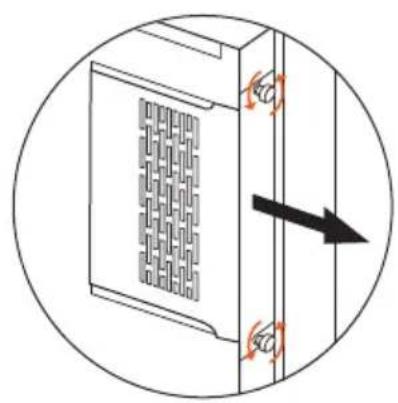
natural_image
Diagram of a server rack with ventilation grilles and directional arrows indicating movement (no text or symbols)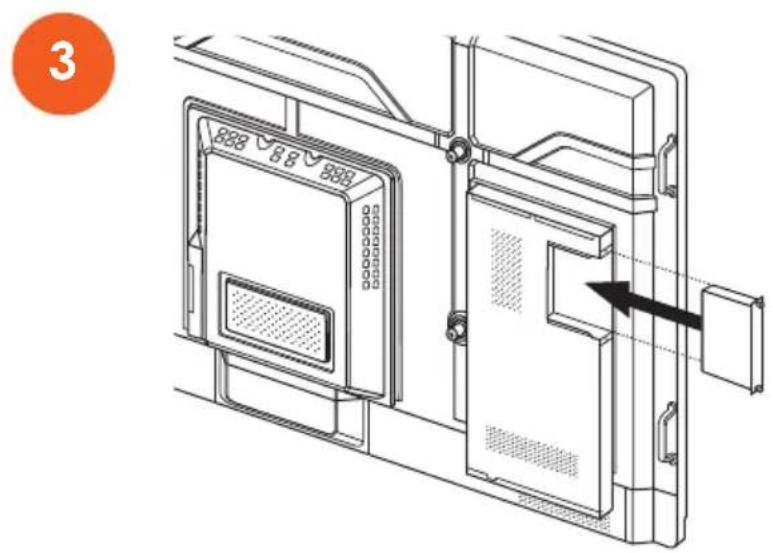
text_image
3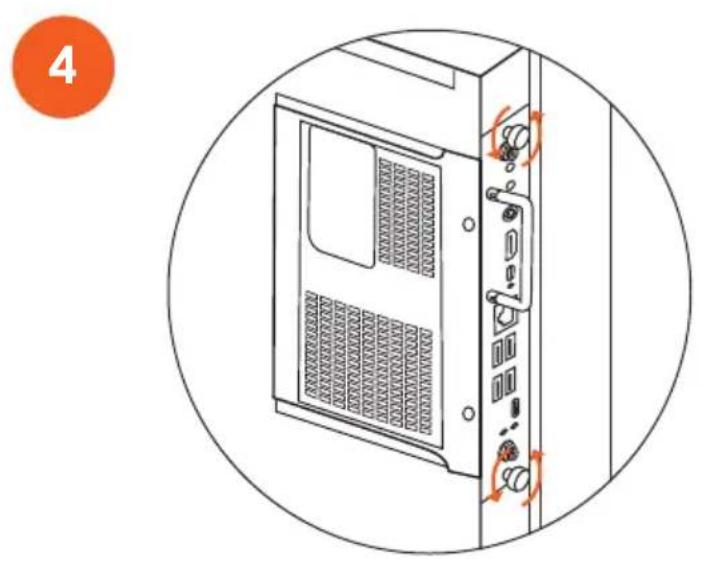
natural_image
Line drawing of a desktop computer tower case with ventilation slots and ports, enclosed in a circular frame (no text or symbols)Operation
• 操作 • 操作 • Provoz • Brug • Bewerking • Kasutamine • Käyttö • Fonctionnement • Betrieb • Üzemeltetés • Pengoperasian • Funzionamento • 操作 • Пайдалану • Ekspluatācija • Veikimas • Pengendalian • Drift • Obstuga • Funcionamento • Принцип действия • Uso • Drift • การทางงาน • İşletim • Vận hành
Switching on
الإ Instغيل • 开机 • 開啟 • Zapnutí • Taend • Inschakelen • Sisselülitamine • Virran kytkeminen • Activation • Einschalten • Bekapcsolás • Menyalakan • Accensione • スイッチオン • Iske κοςυ • leslēgsana • Ijungimas • Menghidupkan • Slå på • Włączanie • Ligar • Переключение • Encendido • Slå på • gradesังเป็ด • Açma • Bât nguồn
Note: The procedure for switching on the device may differ depending on the ActivPanel version.
text_image
Diagram showing two labeled views of a device interior with arrows indicating movement or force, numbered 1 and 2.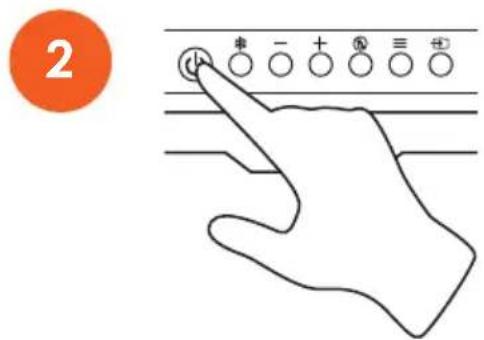
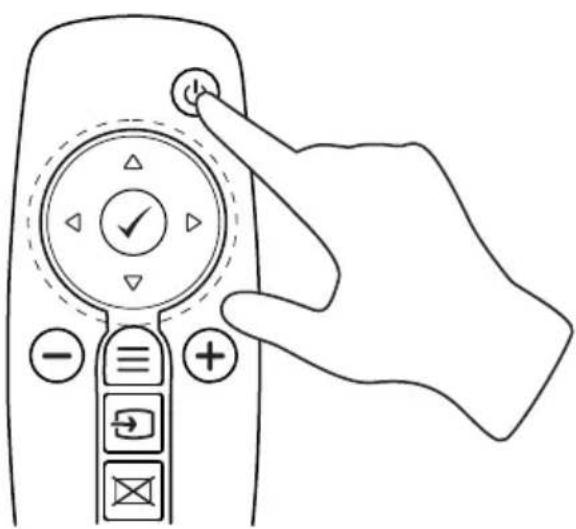
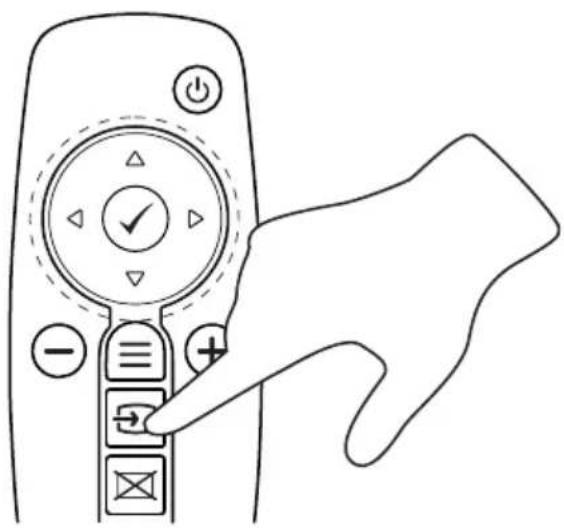
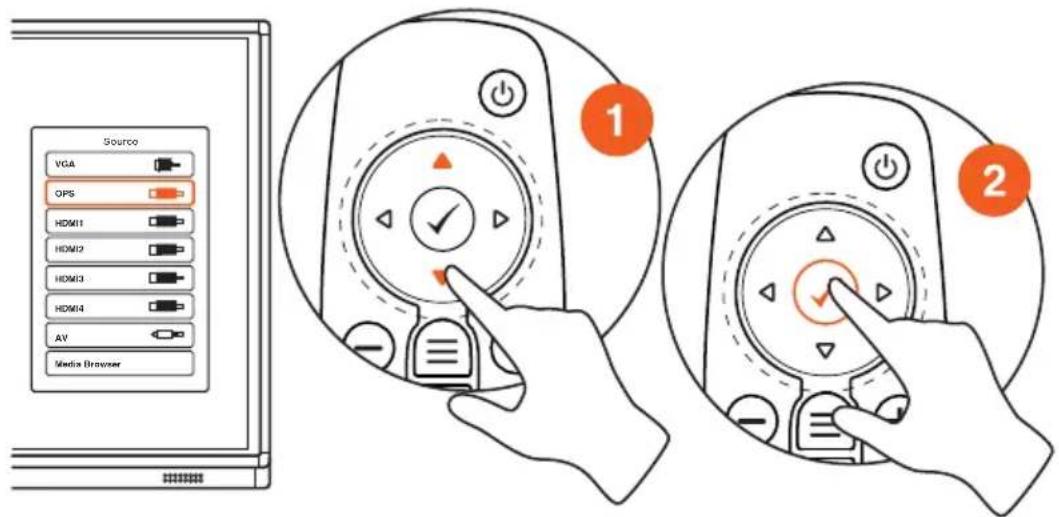
Switching on using the remote
• 使用遥控器开机 • 使用遥控器啟動 • Zapnutí pomocí dálkového ovladače • Tænd med fjernbetjeningen • Inschakelen met de afstandsbediening • Sisselülitamine kaugjuhtimispuldiga • Virran kaukosäätimellä • Activation à l'aide d'une télécommande • Einschalten mit der Fernbedienung • Bekapcsolás távi rányitóval • Nyalakan menggunakan pengontrol jarak jauh • Accensione tramite il telecomando • リモートコントローラを使用してスイッチオン • Kaшықтықтан басқару құралымен іске қосу • leslēgšana ar tālvadības pulti • ljungimas nuotoliniu būdu • Penukaran menggunakan alat kawalan jauh • Slå på med fjernkontrollen • Włąc pilota • Ligar com o controlo remoto • Переключение для использования пульта дистанционного управления • Encendido mediante el mando a distancia • Slå på med fjärrkontrollen • құлăลังเป็ดใช้งานโดยใช้รीโมต • Uzaktan açma • Bât nguồn sử dụng điều khiển từ xa

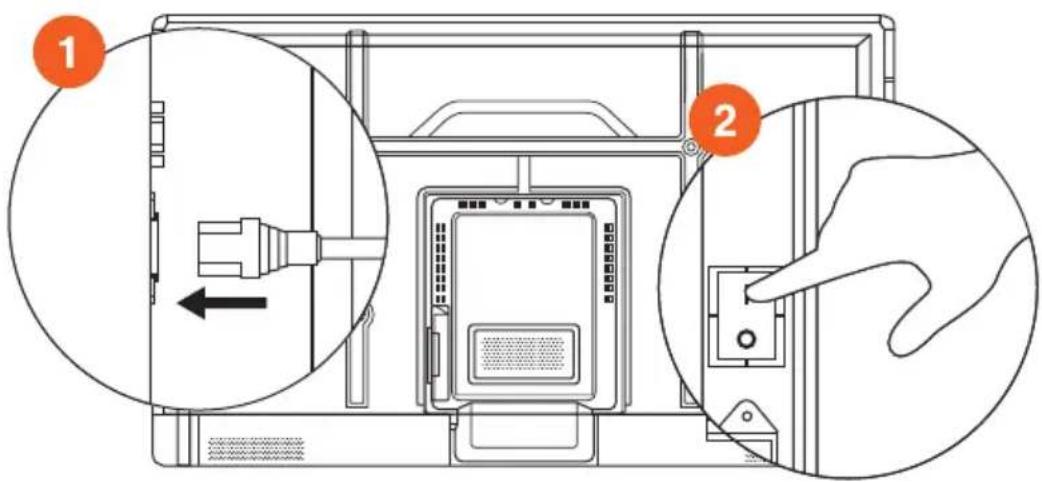
text_image
Diagram showing two labeled views of a computer case with an internal component and hand interacting with the door.
natural_image
Line drawing of a hand pressing down on a remote control panel with directional buttons (no text or symbols)
natural_image
Line drawing of a hand inserting a remote control into a key (no text or symbols)
text_image
Source VGA OPS HDMI1 HDMI2 HDMI3 HDMI4 AV Media Browser 1 2Switching off
• 关闭 • 關閉 • Vypnutí • Sluk • Uitschakelen • Väljalülitamine • Virran katkaiseminen • Désactivation • Ausschalten • Kikapcsolás • Mematikan • Spegnimento • スイッチオフ • θωριγ • Izslēgsana • Išjungimas • Mematikan • Slå av • Wyłączanie • Desligar • Переключение • Apagado • Stänga av • กลังปีดใช้งาน • Kapatma • Tất nguôn
Follow the standard powering off procedure for the ActivPanel.
إجراءاتبع
United States of America
NOTE: This equipment has been tested and found to comply with the limits for a Class B digital device, pursuant to part 15 of the FCC Rules. These limits are designed to provide reasonable protection against harmful in the equipment is operated in a commercial environment. This equipment generates, uses, and can frequency energy and, if not installed and used in accordance with the instruction manual, may be interference to radio communications. Operation of this equipment in a residential area is likely to interference in which case the user will be required to correct the interference at his own expense
Do not make any changes or modifications to the equipment.
Canada
This Class B digital apparatus complies with Canadian ICES-003.
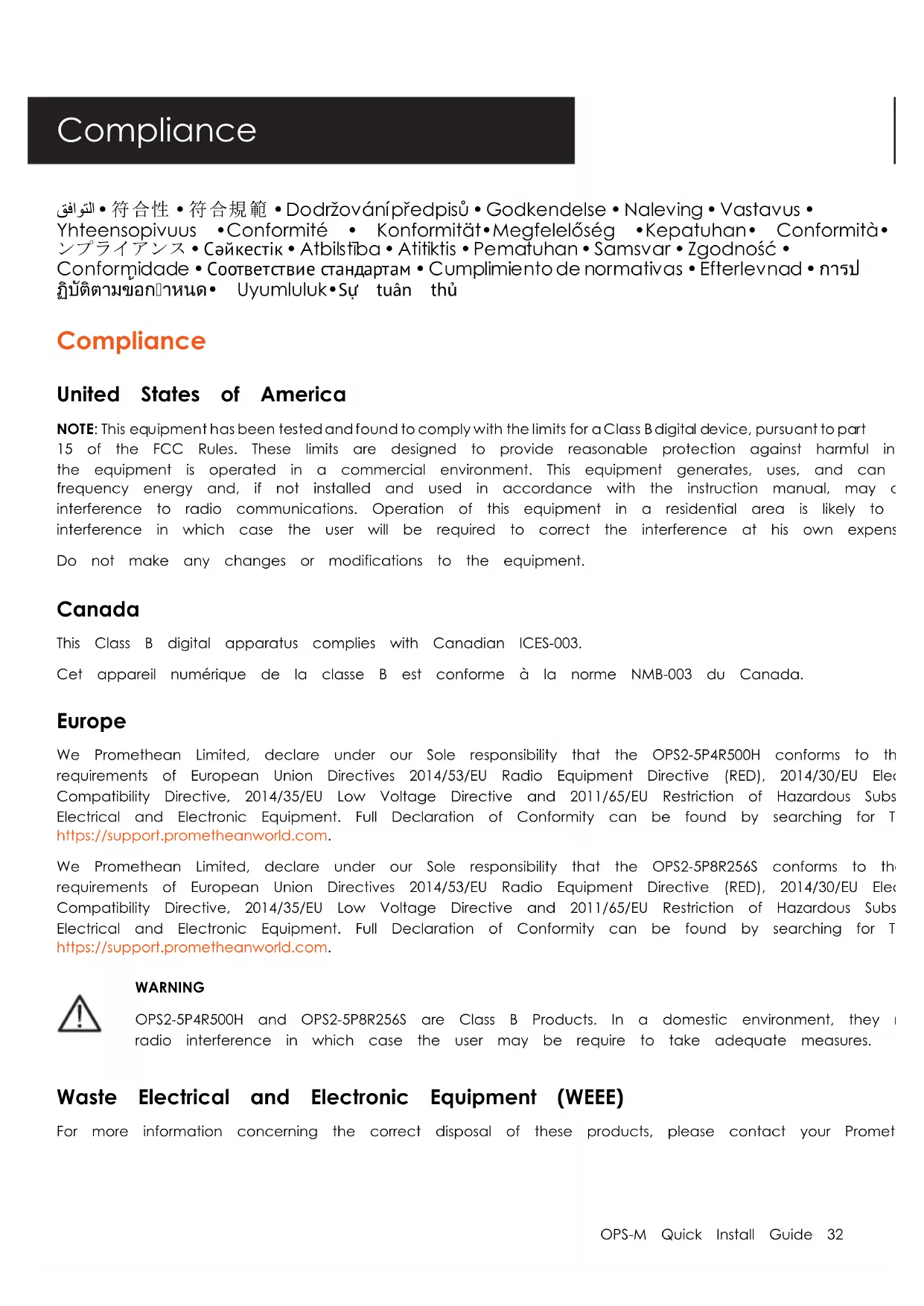
We Promethean Limited, declare under our Sole responsibility that the OPS2-5P4R500H conforms to the requirements of European Union Directives 2014/53/EU Radio Equipment Directive (RED), 2014/30/EU Electric Compatibility Directive, 2014/35/EU Low Voltage Directive and 2011/65/EU Restriction of Hazardous Subs Electrical and Electronic Equipment. Full Declaration of Conformity can be found by searching for T https://support.prometheanworld.com.
We Promethean Limited, declare under our Sole responsibility that the OPS2-5P8R256S conforms to the requirements of European Union Directives 2014/53/EU Radio Equipment Directive (RED), 2014/30/EU Electric Compatibility Directive, 2014/35/EU Low Voltage Directive and 2011/65/EU Restriction of Hazardous Subs Electrical and Electronic Equipment. Full Declaration of Conformity can be found by searching for T https://support.prometheanworld.com.

WARNING
OPS2-5P4R500H and OPS2-5P8R256S are Class B Products. In a domestic environment, they radio interference in which case the user may be require to take adequate measures.
Waste Electrical and Electronic Equipment (WEEE)
For more information concerning the correct disposal of these products, please contact your Promet
OPS2-5P4R500H and OPS2-5P8R256S incorporate a Wi-Fi module
See compliance label for details of the fitted Wi-Fi module.
United States of America
Model No: OPS2-5P4R500Hand OPS2-5P8R256S are open cell personal computers to be used with UL have installations detailing user installation and card cage accessories.
This equipment has been tested and found to comply with the limits for a Class B digital device FCC Rules. These limits are designed to provide reasonable protection against harmful interference in installation. This equipment generates, uses, and can radiate radio frequency energy. If not installed accordance with the instructions, it may cause harmful interference to radio communications. However guarantee that interference will not occur in a particular installation. If this equipment does cause interference to radio or television reception, which can be determined by turning the equipment of is encouraged to try and correct the interference by one or more of the following measures:
- Reorient or relocate the receiving antenna.
- Increase the distance between the equipment and the receiver.
- Connect the equipment to outlet on a circuit different from that to which the receiver is con
- Consult the dealer or an experienced radio/TV technician for help.
- Any changes or modifications not expressly approved by the party responsible for compliance could user's authority to operate the equipment.
This device complies with part 15 of the FCC rules. Operation is subject to the following two condit
- This device may not cause harmful interference; and
- This device must accept any interference received, including interference that may cause undesir operation.
RF Exposure
The equipment complies with FCC radiation exposure limits set forth for an uncontrolled environment.should be installed and operatedwith a minimum distance of 20 cm between the radiator and you
| Model | No | Wifi module | FCC-ID |
| OPS2-5P4R500H | PD93165NG | ||
| OPS2-5P8R256S | PD9825NG | ||
Canada
Canada - Industry Canada (IC)
Model No: OPS2-5P4R500Hand OPS2-5P8R256S are open cell personal computers to be used with CU that have installations detailing user installation and card cage accessories.
This device complies with RSS 210 of Industry Canada.
Operation is subject to the following two conditions:
- this device may not cause interference
- this device must accept any interference, including interference that may cause undesired operational device.
Radiation Exposure Statement:
This equipment complies with IC radiation exposure limits set forth for an uncontrolled environment. The should be installed and operated with a minimum distance of 20 cm between the radiator and yc
The term "IC" before the equipment certification number only signifies that the Industry Canada tec specifications were met.
Model No Wifi module IC-ID
OPS2-5P4R500H 1000M-3165NG
OPS2-5P8R256S 1000M-8265NG
Europe

text_image
C€OPS2-5P4R500H
We Promethean Limited, declare under our Sole responsibility that the OPS2-5P4R500H conforms to the requirements of European Union Directives 2014/53/EU Radio Equipment Directive (RED), 2014/30/EU Electric Compatibility Directive, 2014/35/EU Low Voltage Directive and 2011/65/EU Restriction of Hazardous Subs Electrical and Electronic Equipment. Full Declaration of Conformity can be found by searching for T https://support.prometheanworld.com.
| Type | Frequency | (MHz) | Max | power | (dBm) |
| BT | 2400-2483.4 | 10 | |||
| Wifi | 2400-2483.4 | 20 | |||
| Wifi | 5150-5725 | 20 | |||
| Wifi | 5725-5825 | 14 |
OPS2-5P8R256S
We Promethean Limited, declare under our Sole responsibility that the OPS2-5P8R256S conforms to the requirements of European Union Directives 2014/53/EU Radio Equipment Directive (RED), 2014/30/EU Elec Compatibility Directive, 2014/35/EU Low Voltage Directive and 2011/65/EU Restriction of Hazardous Subs Electrical and Electronic Equipment. Full Declaration of Conformity can be found by searching for T https://support.prometheanworld.com.
| Type | Frequency | (MHz) | Max | power | (dBm) |
| BT | 2400-2483.4 | 10 | |||
| Wifi | 2400-2483.4 | 20 | |||
| Wifi | 5150-5720 | 20 | |||
| Wifi | 5725-5825 | 14 |
|  | ||||
| AT | BE | BG | CZ | DK |
| EE | FR | DE | IS | IE |
| IT | EL | ES | CY | LV |
| LI | LT | LU | HU | MT |
| NL | NO | PL | PT | RO |
| SI | SK | TR | FI | SE |
| CH | UK | |||
OPS2-5P4R500H is for internal use only.
OPS2-5P8R256S is for internal use only.

These devices comply with RF specifications when the device is used at 20 cm from your
Promethean Ltd, Promethean House, Lower Phillips Road, Blackburn, Lancashire, BB1 5TH, UnitedKingdor
Promethean Ltd, Promethean House, Lower Phillips Road, Blackburn, Lancashire, BB1 5TH, United Kingdom
符合規範
歐洲
Promethean Ltd, Promethean House, Lower Phillips Road, Blackburn, Lancashire, BB1 5TH, United Kingdom
Dodržování předpisů
Evropa
Promethean Ltd, Promethean House, Lower Phillips Road, Blackburn, Lancashire, BB1 5TH, Spojené krák
Godkendelse
Europa
text_image
Symbolic diagram showing a crosshair and a stylized 'CE' with a horizontal bar beneath it.Promethean Ltd, Promethean House, Lower Phillips Road, Blackburn, Lancashire, BB1 5TH, United Kingd
Naleving
Europa
Promethean Ltd, Promethean House, Lower Phillips Road, Blackburn, Lancashire, BB1 5TH, Verenigd Koi
Vastavus
Euroopa
Promethean Ltd, Promethean House, Lower Phillips Road, Blackburn, Lancashire, BB1 5TH, Ühendkuningri
Yhteensopivuus
Eurooppa
https://support.prometheanworld.com.
| Typ | Frequenz (MHz) | Max. | Leistung (dBm) |
| BT 2400-2483.4 10 | |||
| W-LAN 2400-2483.4 20 | |||
| W-LAN 5150-5720 20 | |||
| W-LAN 5725-5825 14 | |||
|  | ||||
| AT | BE | BG | CZ | DK |
| EE | FR | DE | IS | IE |
| IT | EL | ES | CY | LV |
| LI | LT | LU | HU | MT |
| NL | NO | PL | PT | RO |
| SI | SK | TR | FI | SE |
| CH | UK | |||
Promethean Ltd, Promethean House, Lower Phillips Road, Blackburn, Lancashire, BB1 5TH, Inggris
Conformità
Europa
text_image
Symbolic representation of a battery with anode and capacitor, alongside a stylized 'CE' character.I dispositivi OPS2-5P4R500H e OPS2-5P8R256S includono un modulo Wi-Fi
Europa

text_image
C€OPS2-5P4R500H
Promethean Ltd, Promethean House, Lower Phillips Road, Blackburn, Lancashire, BB1 5TH, Regno Unito
コンプライアンス
ヨーロッパ
text_image
Image containing three stylized symbols: a crosshair with measurement lines, a partial circle with 'C', and a large letter 'E'.Promethean Ltd, Promethean House, Lower Phillips Road, Blackburn, Lancashire, BB1 5TH, United Kingdom
Сәйкестік
Еуропа
https://support.prometheanworld.com.
https://support.prometheanworld.com.

ECKEPTY
text_image
Symbolic diagram showing a crosshair and a stylized 'CE' with a horizontal bar beneath it.https://support.prometheanworld.com.
| Түр | Жиілік (МГц) | Макс. | қуат (дБм) | |
| ВТ | 2400-2483.4 | 10 | ||
| Wifi | 2400-2483.4 | 20 | ||
| Wifi | 5150-5725 | 20 | ||
| Wifi | 5725-5825 | 14 | ||
OPS2-5P8R256S
https://support.prometheanworld.com.
| Түр | Жиілік (МГц) | Макс. | куат (дБм) | |
| ВТ | 2400-2483.4 | 10 | ||
| Wifi | 2400-2483.4 | 20 | ||
| Wifi | 5150-5720 | 20 | ||
| Wifi | 5725-5825 | 14 | ||
|  | ||||
| AT | BE | BG | CZ | DK |
| EE | FR | DE | IS | IE |
| IT | EL | ES | CY | LV |
| LI | LT | LU | HU | MT |
| NL | NO | PL | PT | RO |
| SI | SK | TR | FI | SE |
| CH | UK | |||
text_image
Symbolic diagram showing a crosshair and a stylized 'CE' with a horizontal bar beneath it.OPS2-5P4R500H un OPS2-5P8R256S satur Wi-Fi moduli
Eiropa

text_image
CEOPS2-5P4R500H
https://support.prometheanworld.com.
| Tips | Frekvence | (MHz) | Maksimālā | jauda | (dBm) |
| BT | 2400-2483,4 | 10 | |||
| Wifi | 2400-2483,4 | 20 | |||
| Wifi | 5150-5725 | 20 | |||
| Wifi | 5725-5825 | 14 |
OPS2-5P8R256S
https://support.prometheanworld.com.
Tips Frekvence (MHz) Maksimālā jauda (dBm)
| BT | 2400-2483,4 | 10 |
| Wifi | 2400-2483,4 | 20 |
| Wifi | 5150-5720 | 20 |
| Wifi | 5725-5825 | 14 |
|  | ||||
| AT | BE | BG | CZ | DK |
| EE | FR | DE | IS | IE |
| IT | EL | ES | CY | LV |
| LI | LT | LU | HU | MT |
| NL | NO | PL | PT | RO |
| SI | SK | TR | FI | SE |
| CH | UK | |||
Promethean Ltd, Promethean House, Lower Philips Road, Blackburn, Lancashire, BB1 5T, United Kingdom
Atitiktis
Europa
text_image
Symbolic image containing a crosshair icon, a stylized 'C' shape, and a large 'E' symbol.OPS2-5P4R500H ir OPS2-5P8R256S turi „Wi-Fi“ moduli
Europa
CE
OPS2-5P4R500H
Promethean Ltd, Promethean House, Lower Phillips Road, Blackburn, Lancashire, BB1 5TH, United Kingd
Samsvar
Europa
Vi, Promethean Limited, erklærer under eneansvar at OPS2-5P4R500H samsvarer med de vesentlige krd direktiv 2014/53/EU Radioutstyrsdirektivet (RED), 2014/30/EU Direktiv om elektromagnetisk kompatibilitet, 201 Lavspenningsdirektivet og 2011/65/EU RoHS-direktivet om begrensning i bruk av farlige stoffer. Du finne fullstendige samsvarserklæringen ved å søke etter TP-2083 på: https://support.prometheanworld.com.
Vi, Promethean Limited, erklærer under eneansvar at OPS2-5P8R256S samsvarer med de vesentlige krc direktiv 2014/53/EU Radioutstyrsdirektivet (RED), 2014/30/EU Direktiv om elektromagnetisk kompatibilitet, 201 Lavspenningsdirektivet og 2011/65/EU RoHS-direktivet om begrensning i bruk av farlige stoffer. Du finne fullstendige samsvarserklæringen ved å søke etter TP-2084 på: https://support.prometheanworld.com.

ADVARSEL
WEEE (Waste Electrical and Electronic Equipment)
text_image
Symbolic representation showing a crossed-out box with cross and horizontal lines, next to a stylized 'CE' symbol.Promethean Ltd, Promethean House, Lower Phillips Road, Blackburn, Lancashire, BB1 5TH, Storbritannia
Zgodność
Europa
https://support.prometheanworld.com.
https://support.prometheanworld.com.
OSTRZEŻENIE

Promethean Ltd, Promethean House, Lower Phillips Road, Blackburn, Lancashire, BB1 5TH, United Kingd
Conformidade
Europa
Promethean Ltd, Promethean House, Lower Philips Road, Blackburn, Lancashire BB1 5TH, Reino Unido
Promethean Ltd, Promethean House, Lower Phillips Road, Blackburn, Lancashire BB1 5TH, Великобритания
Promethean Ltd, Promethean House, Lower Phillips Road, Blackburn, Lancashire, BB1 5TH, Reino Unido
Efterlevnad
Europa
https://support.prometheanworld.com.
https://support.prometheanworld.com.

WARNING
https://support.prometheanworld.com.
| Typ | Frekvens | (MHz) | Maximal | energi | (dBm) |
| BT | 2400-2483.4 | 10 | |||
| Wifi | 2400-2483.4 | 20 | |||
| Wifi | 5150-5725 | 20 | |||
| Wifi | 5725-5825 | 14 |
OPS2-5P8R256S
https://support.prometheanworld.com.
| Typ | Frekvens | (MHz) | Maximal | energi | (dBm) |
| BT | 2400-2483.4 | 10 | |||
| Wifi | 2400-2483.4 | 20 | |||
| Wifi | 5150-5720 | 20 | |||
| Wifi | 5725-5825 | 14 |
|  | ||||
| AT | BE | BG | CZ | DK |
| EE | FR | DE | IS | IE |
| IT | EL | ES | CY | LV |
| LI | LT | LU | HU | MT |
| NL | NO | PL | PT | RO |
| SI | SK | TR | FI | SE |
| CH | UK | |||
Promethean Ltd, Promethean House, Lower Phillips Road, Blackburn, Lancashire, BB1 5TH, Storbritannien
PrometheanLtd, PrometheanHouse, Lower Phillips Road, Blackburn, Lancashire, BB1 5TH, United Kingdom
Uyumluluk
Avrupa
Promethean Ltd, Promethean House, Lower Phillips Road, Blackburn, Lancashire, BB1 5TH, Birleşik Krallık
Sự tuân thủ
Châu Âu
Công Ty TNHH Promethean, Promethean House, Lower Philips Road, Blackburn, Lancashire, BB1 5TH, Vương Quốc
More information
• 更多信息 • 更多資訊 • Dalšíinformace • Flere oplysninger • Meer informatie • Lisateave • Lisätiedot • Autres informations • Weitere Informationen • További Informasi lebih lanjut • Ulteriori informazioni • 詳細情報 • Ćосымша мәлімет • Papildu informacija • Daugiauinformacijos • Maklumatlanjut • Mer informasjon • Więcejinformacji • Mais informação • Дополнительная информация • Más información • Mer information • ข้อมูลเพิ่มเติม • Daha fazlabilgi • Thêm thông tin
For more information on this product, visit support.prometheanworld.com
TP-2072-ML-V04 ©2018 Promethean Ltd. All Rights Reserved. Products are subject to availability by country. Product specifications are subject to change without notice.