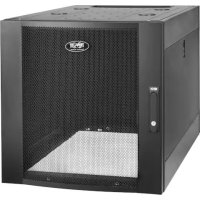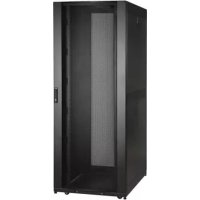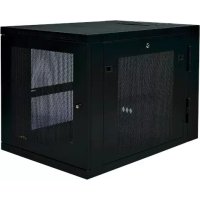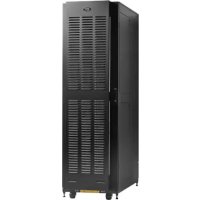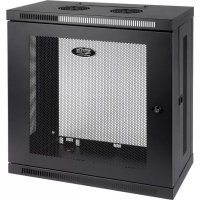
SmartRack SRW12U13 - Desktop Computer Tripp Lite - Free user manual and instructions
Find the device manual for free SmartRack SRW12U13 Tripp Lite in PDF.


| Product Type | Non-swinging wall-mount enclosure for 19-inch rack equipment |
| Brand | Tripp Lite |
| Model | SmartRack SRW12U13 |
| Rack Height | 12U (approximately 533 mm) |
| Rack Width | 19 inches (482.6 mm) |
| Mounting Depth | Adjustable in 6 mm increments (depth varies by configuration) |
| Material | Heavy-duty steel |
| Front Door | Lockable, reversible (opens left or right) |
| Side Panels | Removable and lockable (L-shaped lever) |
| Cable Access | Rectangular opening at top with removable panel |
| Mounting Rails | Depth-adjustable, with square and threaded holes |
| Cage Nuts | Included, for mounting on square holes |
| Grounding | Front/rear grounding point, M6 screw included, 8 AWG cable required |
| Wall Mounting | Separate mounting plate with hooks, M8 or 5/16" bolts (not included) |
| Load Capacity | Must support combined weight of installed equipment (consult specifications) |
| Environment | Indoor, protected from moisture, extreme temperatures, dust |
| Ventilation | Provide space in front and back for adequate airflow |
| Safety | Secure wall mounting, do not stack, do not place objects on enclosure |
| Maintenance | Clean with a dry cloth, store in original packaging if possible |
| Warranty | 5-year limited (parts and labor) |
| Optional Accessories | Caster kit (SRCASTER) for mobility |
| Repairability | Spare parts available through Tripp Lite, online support |
Frequently Asked Questions - SmartRack SRW12U13 Tripp Lite
User questions about SmartRack SRW12U13 Tripp Lite
0 question about this device. Answer the ones you know or ask your own.
Ask a new question about this device
Download the instructions for your Desktop Computer in PDF format for free! Find your manual SmartRack SRW12U13 - Tripp Lite and take your electronic device back in hand. On this page are published all the documents necessary for the use of your device. SmartRack SRW12U13 by Tripp Lite.
USER MANUAL SmartRack SRW12U13 Tripp Lite
Non-Swinging Wall-Mounted SmartRack® Enclosures
Applies to Model Series: SRWxxU
(Agency Series Number: AG-00E9)
Table of Contents
- Important Safety Instructions 2
- Overview 2
- Feature Identification 3
- Enclosure Installation 4
4.1 Preparation 4
4.2 Unpacking 4
4.3 Ground Connection 4
- Enclosure Configuration 5
5.1 Door Locks 5
5.2 Cable Access & Management 5
5.3 Reversing the Enclosure 5
5.4 Mounting Rails 6
5.5 Adjusting Mounting Rail Depth 6
- Wall Mounting the Enclosure 6
- Equipment Installation 7
7.1 Installing or Removing Cage Nuts 7
7.2 Alternate Mounting: 8 Tapped Hole Mounting Rail
8.Storage and Service 9
9. Warranty and Product Registration 9
Espanol 10
Français 19
Pycckn 28
PROTECT YOUR INVESTMENT!
Register your product for quicker service and ultimate peace of mind.
You could also win an ISOBAR6ULTRA surge protector—a $50 value!
www.triplite.com/warranty



1111 W. 35th Street, Chicago, IL 60609 USA · www.triplite.com/support
Copyright © 2015 Tripp Lite. All trademarks are the sole property of their respective owners.
1. Important Safety Instructions
SAVE THESE INSTRUCTIONS
This manual contains instructions and warnings that must be followed during the installation and operation of the product described in this manual. Failure to comply may invalidate the warranty and cause property damage or personal injury.
- Keep the enclosure in a controlled indoor environment, away from moisture, temperature extremes, flammable liquids and gasses, conductive contaminants, dust and direct sunlight.
- Leave adequate space at the front and rear of the enclosure for proper ventilation. Do not block, cover or insert objects into the external ventilation openings of the enclosure.
- The enclosure is extremely heavy. Use caution when handling the enclosure. Do not attempt to unpack, move or install it unassisted. Use a mechanical device such as a forklift or pallet jack to move the enclosure in the shipping container.
- Do not place any object on the enclosure, especially containers of liquid, and do not attempt to stack the enclosures.
- Inspect the shipping container and the enclosure for shipping damage. Do not use the enclosure if it is damaged.
- Leave the enclosure in the shipping container until it has been moved as close to the final installation location as possible.
- Install the enclosure in a structurally sound area capable of handling the load, or on a level floor that is able to bear the weight of the enclosure, all equipment that will be installed in the enclosure and any other enclosures and/or equipment that will be installed nearby.
- For permanent wall mounting, be sure to securely fasten the enclosure to the building structure before operation.
- Use caution when cutting packing materials. The enclosure could be scratched, causing damage not covered by the warranty.
- Save all packing materials for later use. Repacking and shipping the enclosure without the original packing materials may cause product damage that will void the warranty.
- Do not reship the enclosure with additional equipment unless the enclosure was shipped with a special shock pallet ("SP1" models only). The combined weight of the enclosure and installed equipment must not exceed the load capacity of the pallet. Tripp Lite is not responsible for any damage that occurs during reshipment.
- Use of this equipment in life support applications where failure of this equipment can reasonably be expected to cause the failure of the life support equipment or to significantly affect its safety or effectiveness is not recommended. Do not use this equipment in the presence of a flammable anesthetic mixture with air, oxygen or nitrous oxide.
2. Overview
Non-swinging wall-mounted SmartRack enclosures accommodate all standard 19-inch rackmount equipment, regardless of vendor, and ship fully assembled for quick and easy deployment. They feature adaptable, heavy-duty cabinets in various heights.
Non-swinging wall-mounted SmartRack enclosures have variable mounting depths, ideal for servers. The cabinets include quick-release doors and side panels for convenient maintenance. Front access doors are reversible for installation flexibility. Front door and side panels are lockable. An optional rolling caster kit (SRCASTER) is available for easy maneuvering of enclosures.
3. Feature Identification
Model SRW6U is shown. The other models have similar features, with the only differences being rack height and depth.
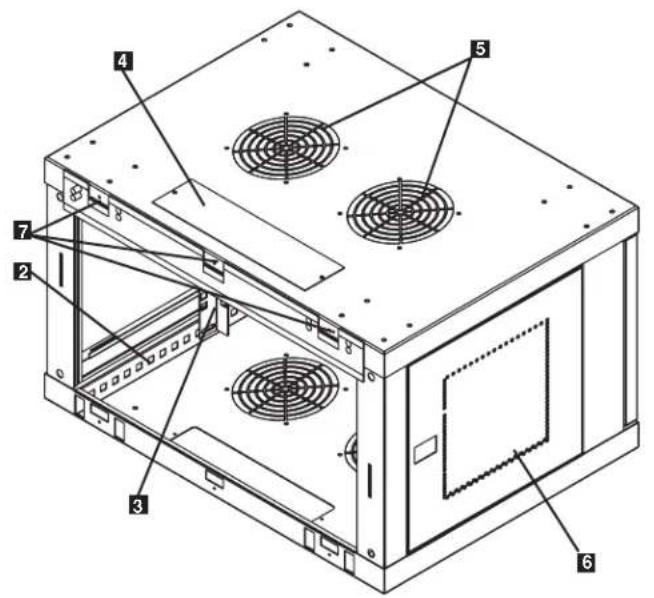
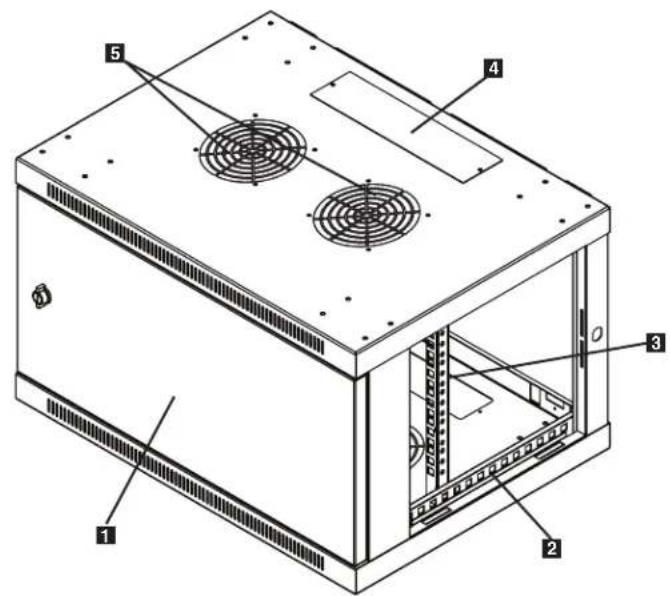
1 Front Door
Horizontal Rails
Vertical Mounting Rails
4 Removable Cable Access Hole Cover
5 Vents
6 Locking/Removable Side Panels
7 Mounting Notches (found on the enclosure's back panel)
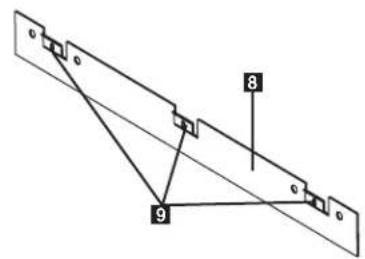
3 Mounting Plate (separate piece)
9 Mounting Plate Hooks
4. Enclosure Installation

Caution! Read All Instructions andWarnings Before Installation!

Warning: Rack enclosures can be extremely heavy. Do not attempt to unpack, move or install the enclosure without assistance. Use extreme caution when handling the enclosure and be sure to follow all handling and installation instructions. Do not attempt to install equipment without first stabilizing the enclosure.
4.1 Preparation
The enclosure must be installed in a structurally sound area that is able to bear the weight of the enclosure, all the equipment that will be installed in the enclosure and any other enclosures and/or equipment that will be installed nearby. Before unpacking the enclosure, you should transport the shipping container closer to the final installation location to minimize the distance you will need to move the unit after the protective packaging has been removed. If you plan to store the enclosure for an extended period before installation, follow the instructions in the Storage and Service section.
You need several tools:
You also need the following hardware:
- Level
- Appropriate hardware for wall mounting (not included)
- Phillips-head screwdriver
- Appropriate tools for wall mounting
4.2 Unpacking

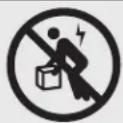
Use at least two people to unpack the enclosure.
1 Move shipping pallet to a firm, level surface.
2 Open box and remove the four foam corner protectors. Save all packing materials for later use unless you are certain they will not be required. Packing materials are recyclable.
3 With one person on each side, carefully lift the enclosure out of the box and place on a firm, level surface.
Examine the enclosure for any damage or loose parts. Confirm all parts are present. If anything is missing or damaged, contact Tripp Lite for assistance. Do not attempt to use the enclosure if it has been damaged.

Never extend more than one component from the enclosure at a time.


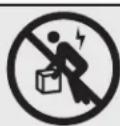
Warning: Never attempt to lift or install without adequate help. Do not try lifting the enclosure alone.
4.3 Ground Connection
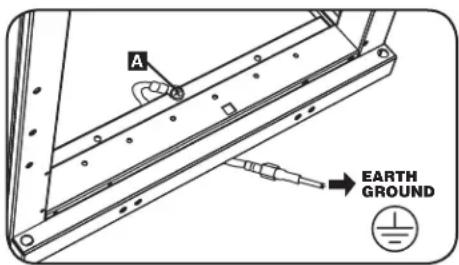
All parts of the enclosure are grounded to the frame of the enclosure. Use the enclosure's front or rear threaded grounding point A and an M6 screw (included) to connect the frame of the enclosure directly to your facility's earth ground connection with an 8 AWG (3.264 mm) wire. Route the ground wire under the enclosure's frame to ensure unhindered door operation. Warning: Attach each enclosure to earth ground separately. Do not use the enclosure without an earth ground connection.
5. Enclosure Configuration
Before installation, be sure to plan the location and arrangement of components within the enclosure. Be sure all mounting rails are reversed or adjusted for depth, depending on your equipment configuration.
5.1 Door Locks
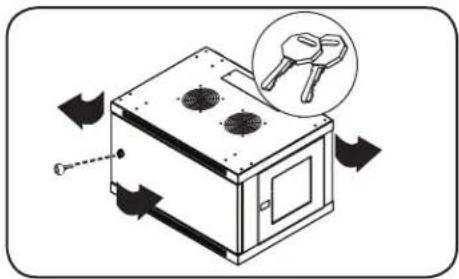
The front and back doors have locks that are accessible by the included keys.
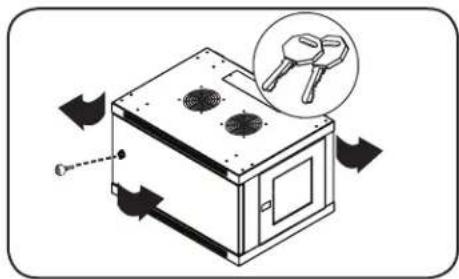
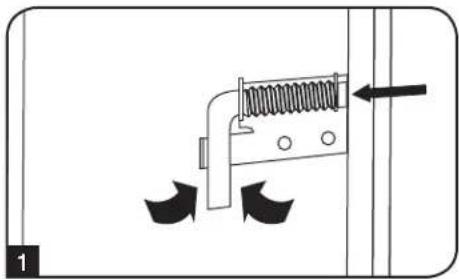
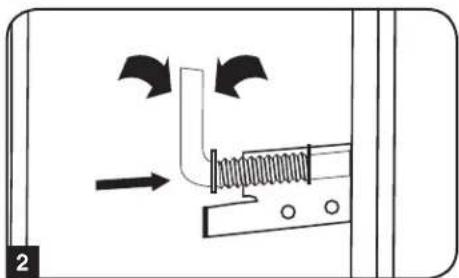
Each side panel locks using an L-shaped lever on the inside of the enclosure.
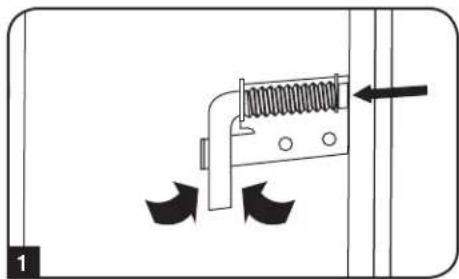
1 To unlock and remove the side panels, lift the shorter leg of the "L" up and pull it away from the side panel. Pull the tab on the side panel and remove it from the enclosure.
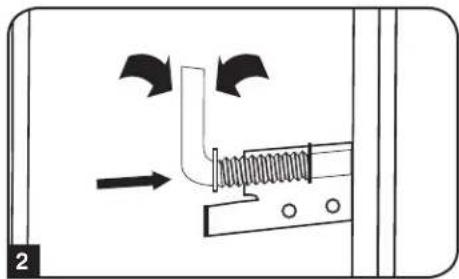
To re-lock the side panels, secure it in the proper position, lift the shorter leg of the "L" up and push it toward the side panel, back into the hole that it was in initially. Once it is in place, push the shorter leg of the "L" down to lock it. Note: To lock and unlock the side panels, you will need to have access to the interior of the enclosure.
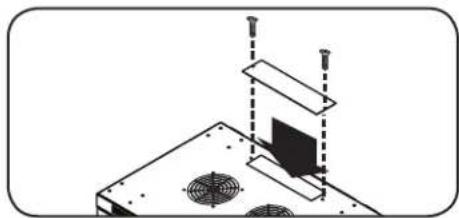
5.2 Cable Access and Management
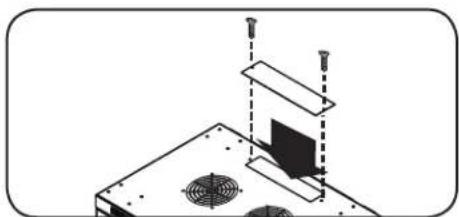
The top of the cabinet has a rectangular opening for cable access and management. This opening can be opened or closed by unscrewing or screwing in the removable cable access panel.
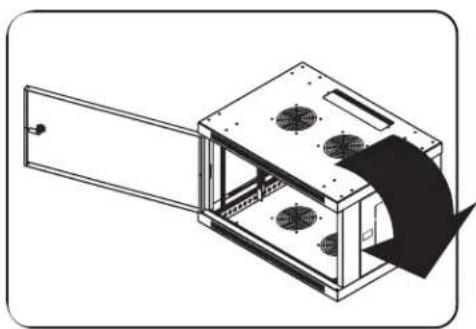
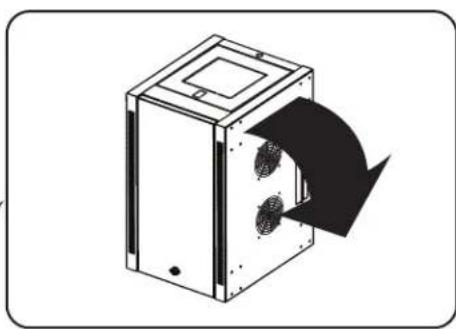
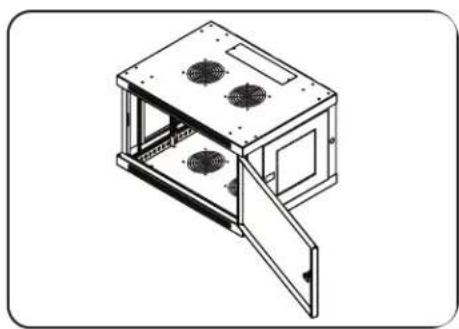
5.3 Reversing the Enclosure
In order to accommodate various rack configurations, the enclosure can be reversed. To do so, simply turn the enclosure over so that the doors open in the opposite direction.
5. Enclosure Configuration continued
5.4 Mounting Rails
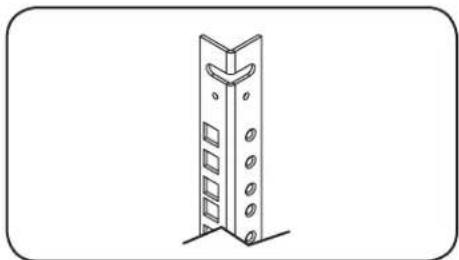
The enclosure comes with mounting rails that have both square and tapped holes for mounting rack equipment. To install equipment, use the included cage nuts and other hardware. (section 7.1 for installation of cage nuts.) Warning: Be sure to have the enclosure securely mounted to the wall, or in its final position on the floor, before mounting any equipment inside. Also be sure to have all the right adjustments on your rails before mounting equipment. (See below for Adjusting Mounting Rail Depth.)
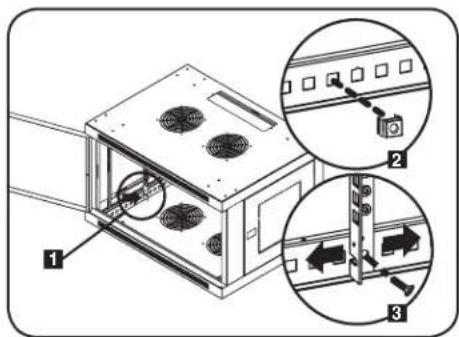
5.5 Adjusting Mounting Rail Depth
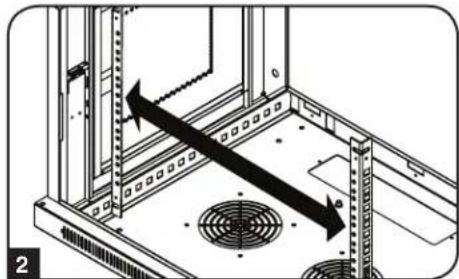
Warning: Do not attempt to adjust rails while equipment is installed in the enclosure. Do not attempt to use rails without screws installed. (2 per rail.)
The 2 mounting rails are pre-installed to accommodate different mounting depths, depending on the model. Do not adjust the mounting rails unless your equipment requires a different mounting depth. The front and rear sets of rails can be adjusted independently in 1/4-inch (6mm) increments.
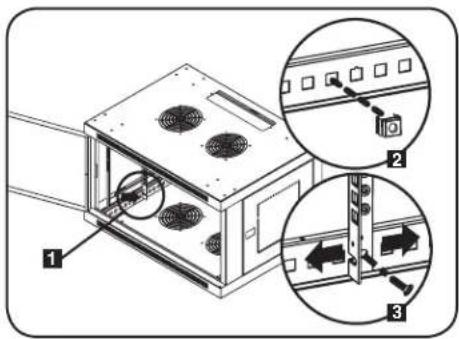
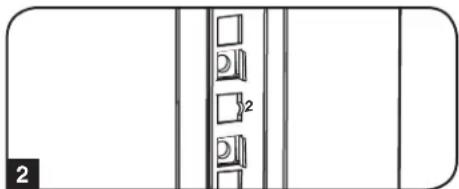
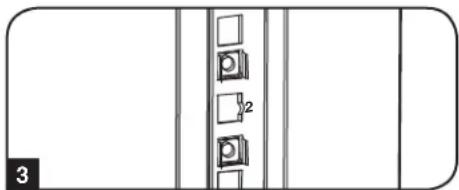
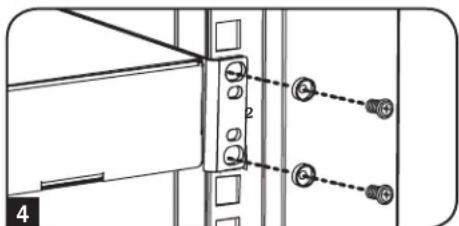
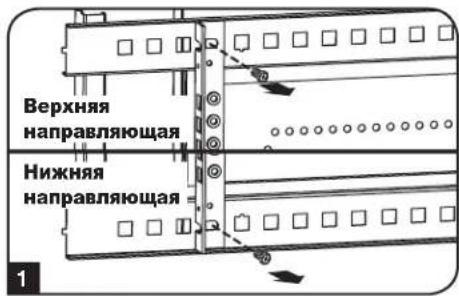
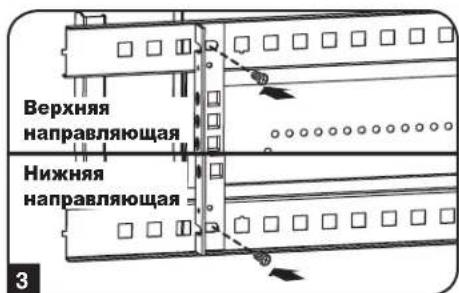
1 Each rail is connected to the enclosure with 2 screws and 2 cage nuts: 1 set in the upper corner and another in the lower corner. Using a Phillips-head screwdriver, remove the screws that fasten the rails to the enclosure.
2 Move cage nuts to the desired depth and reinstall.
3 Slide the mounting rails to the desired depth and reattach them using the screws you removed in Step 1.
6. Wall Mounting the Enclosure
Warning: Do not attempt to mount the enclosure to the wall with equipment in the enclosure.
Note: Enclosure must be installed by a qualified technician. Before mounting, use a level and tape measure to position your mounting area precisely. Use appropriate fasteners (not included) to secure the enclosure to the wall. Use suitable mounting means when installing to cinder block, concrete, drywall or wood studs. Warning: The supporting surface must be able to safely support the combined load of the equipment and all attached hardware and components. For the actual weight, size and load capacity of the enclosure, view the product specifications and other support resources at www.triplite.com/support.
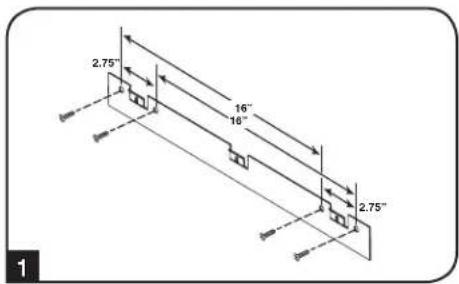
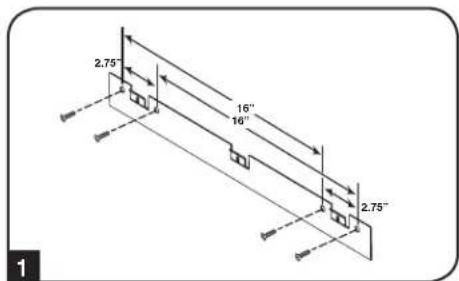
1 Using user-supplied hardware, attach the mounting plate to a wall or other suitable mounting surface. Each mounting hole can accommodate an M8 or 5/16" bolt and the holes are spaced 16" apart to accommodate standard stud placement as reflected in the diagram. Note: When mounting the mounting plate to the wall, be sure the three mounting hooks are facing outwards and away from the wall.
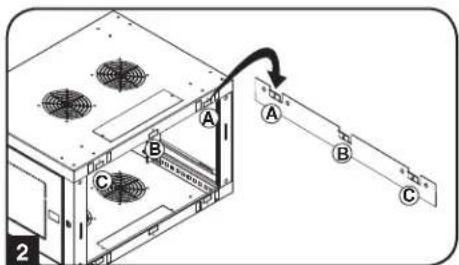
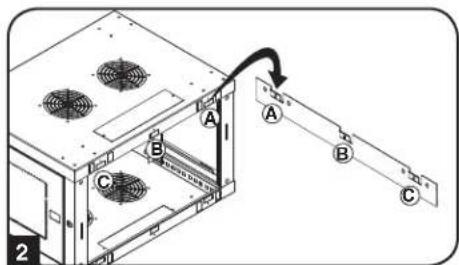
After the mounting plate has been securely attached to the mounting surface, hang the enclosure's three mounting notches onto the three mounting hooks on the plate attached to the wall. The notches will fit over the hooks and the enclosure should slide down onto the hooks until secure. Note: Mounting notches exist on both the upper and lower rails of the back panel. This allows for mounting in the standard or reversed positions.
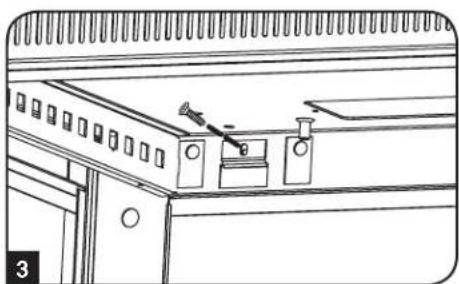
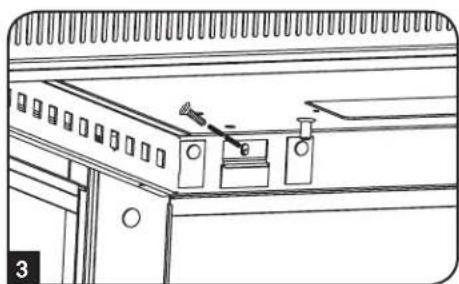
After the mounting plate has been secured and the enclosure hung properly, secure the enclosure to the mounting plate by installing the three supplied screws in the holes on the mounting hooks as shown.
7. Equipment Installation
Warning: Do not install equipment until you have stabilized the enclosure. Install heavier equipment first towards the bottom of the enclosure. Install equipment starting from the bottom of the enclosure and proceed toward the top of the enclosure - never the reverse. If using sliding equipment rails, be careful when extending the rails. Do not extend more than one set of sliding equipment rails at one time. Avoid extending sliding equipment rails near the top of the enclosure.
Note: The unit comes with two different kinds of screws for equipment installation, black and silver. Use the black mounting screws if you are securing your equipment to the square hole side of the mounting rail. Use the silver screws if you are securing your equipment to the tapped hole side of the mounting rail.
Note: The square holes in the middle of each rack unit are numbered and also include a small notch to aid identification. A single rack unit includes the space occupied by the numbered hole and the holes directly above and below.

7.1 Installing or Removing Cage Nuts
WARNING: The flanges of the cage nuts should engage the sides of the square opening in the rail, not the top and bottom. Follow the instructions in your equipment documentation to ensure proper installation of your equipment.
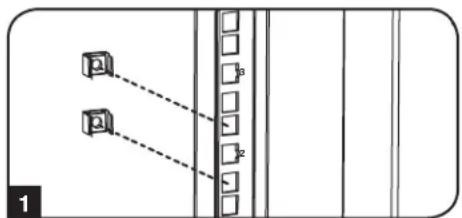
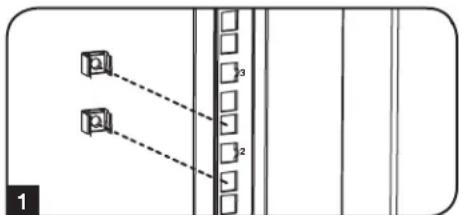
1 Locate the numbered square openings in the mounting rails where you plan to install your equipment. You will install cage nuts (included) into the square openings in order to provide an attachment point for the mounting screws (included). Note: Consult your equipment documentation to determine how many cage nuts will be required and where they will need to be installed.
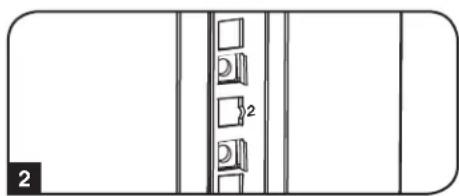
2 From the inside of the mounting rail, insert one of the flanges of the cage nut through the square opening. Press it against the side of the square opening. Each flange should engage one side of the square opening, not the top or bottom.
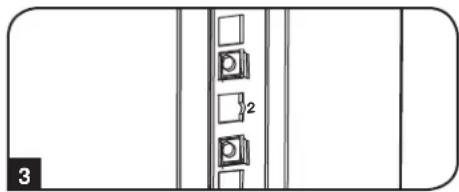
3 Compress the cage nut at the sides slightly to allow the remaining flange to fit through the square opening. When the cage nut is properly installed, both flanges will protrude through the square opening and will be visible on the outer surface of the mounting rail. Repeat steps 1-3 until all required cage nuts are installed.
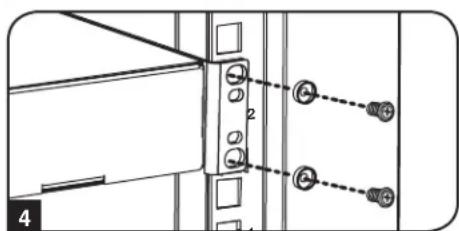
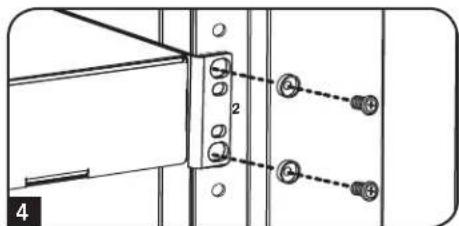
4 After installing the required cage nuts, use the included black mounting screws and cup washers to secure your equipment to the rack rail. Place the cup washers between the screws and the equipment mounting brackets.
Note: Your equipment may also include mounting hardware. Read the mounting instructions that came with your equipment before installing your equipment.
To Remove Cage Nuts, Reverse Steps 1-3
Note: You may wish to use a cage nut tool (user-supplied) to aid cage nut installation and removal.
7. Equipment Installation continued
7.2 Alternate Mounting: Tapped Hole Mounting Rail
Warning: Do not attempt to adjust rails while equipment is installed in the enclosure. Do not attempt to use rails without screws installed. (2 per rail.)
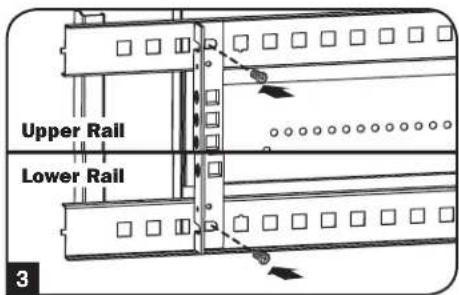
The 2 mounting rails are pre-installed for securing equipment using the square hole side of the mounting rail. To switch to the tapped hole side of the mounting rail, follow the steps below:
Each rail is connected to the enclosure with 2 screws: 1 in the upper corner and another in the lower corner. Using a Phillips-head screwdriver, remove the screws that fasten the rails to the enclosure.
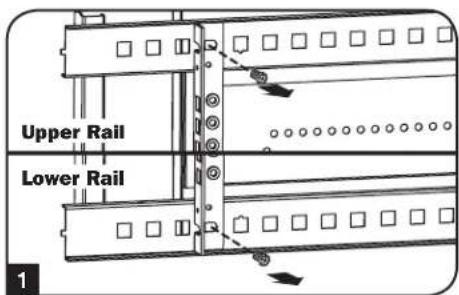
2 Switch the rail locations. Ensure the tapped hole side of each rail is facing the front door.
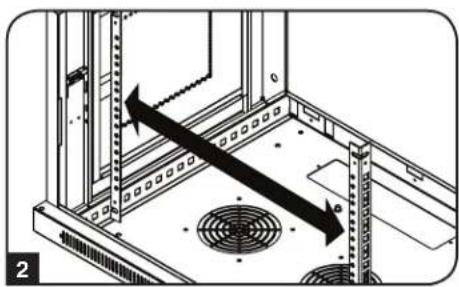
3 Reattach the mounting rails.
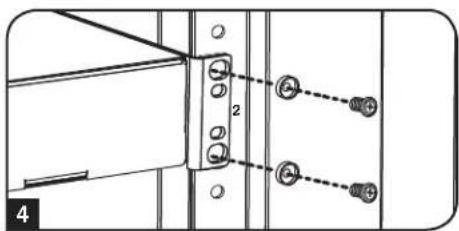
Use the included silver mounting screws to secure your equipment to the rack rail. Place the cup washers between the screws and the equipment mounting brackets.
Note: Your equipment may also include mounting hardware. Read the mounting instructions that came with your equipment before installing.
8. Storage and Service
Storage
The enclosure should be stored in a controlled indoor environment, away from moisture, temperature extremes, flammable liquids and gasses, conductive contaminants, dust and direct sunlight. Store the enclosure in its original shipping container if possible.
Service
Your Tripp Lite product is covered by the warranty described in this manual. A variety of Extended Warranty and On-Site Service Programs are also available from Tripp Lite. For more information on service, visit www.triplite.com/support. Before returning your product for service, follow these steps:
- Review the installation and operation procedures in this manual to insure that the service problem does not originate from a misreading of the instructions.
- If the problem continues, do not contact or return the product to the dealer. Instead, visit www.triplite.com/support.
- If the problem requires service, visit www.triplite.com/support and click the "Request Return (RMA)" link. From here you can request a Returned Material Authorization (RMA) number, which is required for service. This simple on-line form will ask for your unit's model and serial numbers, along with other general purchaser information. The RMA number, along with shipping instructions will be emailed to you. Any damages (direct, indirect, special or consequential) to the product incurred during shipment to Tripp Lite or an authorized Tripp Lite service center are not covered under warranty. Products shipped to Tripp Lite or an authorized Tripp Lite service center must have transportation charges prepaid. Mark the RMA number on the outside of the package. If the product is within its warranty period, enclose a copy of your sales receipt. Return the product for service using an insured carrier to the address given to you when you request the RMA.
9. Warranty and Product Registration
5-Year Limited Warranty
Seller warrants this product, if used in accordance with all applicable instructions, to be free from original defects in material and workmanship for a period of 5 years from the date of initial purchase. If the product should prove defective in material or workmanship within that period, Seller will repair or replace the product, at its sole discretion.
THIS WARRANTY DOES NOT APPLY TO NORMAL WEAR OR TO DAMAGE RESULTING FROM ACCIDENT, MISUSE, ABUSE OR NEGLECT. SELLER MAKES NO EXPRESS WARRANTIES OTHER THAN THE WARRANTY EXPRESSLY SET FORTH HEREIN. EXCEPT TO THE EXTENT PROHIBITED BY APPLICABLE LAW, ALL IMPLIED WARRANTYES, INCLUDING ALL WARRANTYES OF MERCHANTABILITY OR FITNESS, ARE LIMITED IN DURATION TO THE WARRANTY PERIOD SET FORTH ABOVE; AND THIS WARRANTY EXPRESSLY EXCUSES ALL INCIDENTAL AND CONSEQUENTIAL DAMAGES. (Some states do not allow limitations on how long an implied warranty lasts, and some states do not allow the exclusion or limitation of incidental or consequential damages, so the above limitations or exclusions may not apply to you. This warranty gives you specific legal rights, and you may have other rights which vary from jurisdiction to jurisdiction).
WARNING: The individual user should take care to determine prior to use whether this device is suitable, adequate or safe for the use intended. Since individual applications are subject to great variation, the manufacturer makes no representation or warranty as to the suitability or fitness of these devices for any specific application.
Product Registration
Visit www.triplite.com/warranty today to register your new Tripp Lite product. You'll be automatically entered into a drawing for a chance to win a FREE Tripp Lite product!*
- No purchase necessary. Void where prohibited. Some restrictions apply. See website for details.
Tripp Lite has a policy of continuous improvement. Specifications are subject to change without notice.


1111 W. 35th Street, Chicago, IL 60609 USA • www.triplite.com/support
1111 W. 35th Street, Chicago, IL 60609 USA • www.triplite.com/support

1111 W. 35th Street, Chicago, IL 60609 USA • www.triplite.com/support
1111 W. 35th Street, Chicago, IL 60609 USA • www.triplite.com/support
PykoBODCTBO NOJIb3OBaTeJIA
5. KomnohoBka wkaqpa
Ipeed yctahOBKO kkaopa 6ra3aTeJIbHO cneJeT coCTaBnTB IhaH erO pa3MeUeHnN CXemy paCIOJIOKeHnKOMIOHETOB BHTpyrHcR B TOM, UTO BCE MOHTaXHbIe HAnpaBIAHue NOBepHyTb HaDnEkaUm Oba3om NIN OTperyInpOBAHbI IO Tny6HnE B 3aBNCIMOCTHN OT KOMIOHOBNBaWero 06OpoyoBaHn.
5.1Дверныезамки
IpeenHn 3aHnra DBePbO OChAuEhbl 3aMKAMN, OTnnpaEMbIMN C NOMoUb BXOJxN X KOMnTeK KIOHcH.
KaJdaI360Kobix nahEn 3aHpaTc npn NOMOu I-6pa3HOro pbuaKc C BVHTpeHHe CTOpOBhI uka.
1 TnO TnnpaHn H ChTnB 60KOBbix NaHeNe CnEduyTe NoDnTb BBepx KopoTkoe PnEyo F-6pa3Horo pbMaXka N OCTpaHHTb erO 60KOBoi NaHeN. BbHyTB 60Koby NaHeNb n3 WkaFa, NotryBee 3a R3bl4OK.
2Дя NOBTOHOFФИKCAUIN6OKOBONAHENHACBOEMeCTCNEyETYCTAHOBHTeB HxKHOI NOJXEHME,NOHHTB BEPX KOPOTKOE NPEOΓ-OBpa3HORO pbyaKkA INHADABNTb HA HERO B CTOPHY6OKOBONaHEIN CUEbIO NOMECTHTBEROOBPAHBO TTOBTBepCTNe,ΓeOHAXOUNCnEPBOHaJIbHO.10cneToro kAK KOPOTKOE NPEOΓ-OBpa3HORO pbyaKkA OKaXETCR H CBOEM MeCT,CNEyET3aФнICUPOBATb ERO HAKATNEM BHN.IPumeyAue.ДЯ 3aIupaHua U omnpaHua 6OKOBbIX naHeneu He6xOdUMo umemb docmyn bHympb ukaFa.
5.2 OTbepctne IJIa BBOda Ka6eJeN OONMM3auNg Ka6eJbHbIX CoeHNHeHn
B BepxHn naHEn IkaFpa NmEeTc npMoyroIbHoe OTBepCTne Dn BABoDA KaBeJIe N IN ONTMaIbHOra pa3MeueHHN. 3TO OTBepCTne MOKeT 6bITb OTKpbIto NIN CKpbIto NyTeM BBHNHBAHn B Hero CbeMHOn naHeJI NaBeJIbHO r BOda.
5.3 NpebopaunbaHne ukaFa
Ipeaun3aun paanuHbix BapnAHTOB paameeHn Ikaqda Donyckaetra nepeBopaHbAHme erO Kopnyca. Ira 3rO cneyET npocTo nepeBepHyb Kopnyc IkaqtaTAKM oba30, Yto6bl erDbeU bIKpbBaNcB pntBOJONIOXHM HanpaBHeHn.
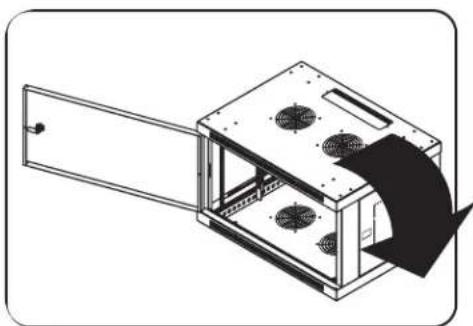
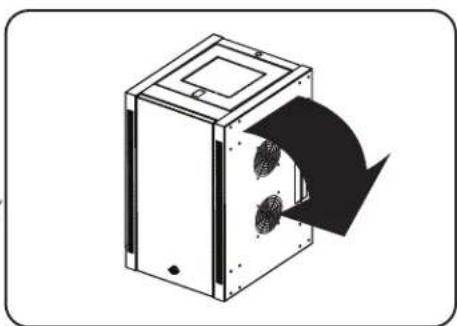

5. KomnohoBka wkaopa npoDOnxHne
5.4 MoHTaXHbIe HappaBnIoune
山kaФ noCTabJIeTcS c MOHTaXbHIMn HAnpaBnIOUmM, KOtOpIe IMeOT KAK KBaDpaTHbIe, TAK IN pe3b6ObIe OTBepCTnI dNMOHTaXa CToeHrO OobpyoBaHnA. IINy UcTaHOBKn OOBpyoBaHnCneYET nCNOIb3OaTb NOCTABnREMbE B KOMIIKeTe 3aKNaHbIe raIKN INpOHyO cHAcSTKy (npraOK yCTaHOBKn 3aKaNDbIX Raek CM. B pa3dene7). BHMmaHne! Npeed YCTaHOBKn KAKoro-Ni6o obopyoBaHnB HbTp bKFaCa Heo6xOJMo 06eHNtCBg TOM, qTO OH NaExHo 3aKpenHn Ha CTNe HIN B Dpyrom KOHeuHOM NoOnKeHn. Kpme Toro, nepeD MOHTaXkOM ObopyoBaHnHa Heo6xOJMo DoJnxHbIM O6pa3OM OTpeRyIpopoBaTb BCE HanpaBnIOUne. (CM. npDeCTabJIeHHbI HInke Pa3den "PerynpobKa rIy6nbHb MoHTaXbIX HApBaJIIOUnx").
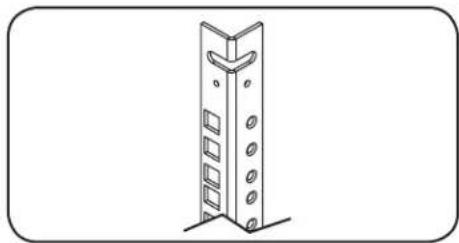
5.5 Perynnpobka rny6nhb MoTaNKhBx HappaNIOuix
BHHMaHHe He nbItaTeCb perynnpoBaTb HappaBnaOuIe npy uCTaHOBneHHOM B WkaΦ o6OpdyOBaHN. He nbItaTeCb nCnoJIb3ObaTb HappaBnaIOUme 6e3 yCTaHOBKn BHTOB (no 2 Ha KaXduO HappaBnaIOUyo).
2MOHTaXbIe HnPaBnIOUne yCTaHabNBAIOrTa Ha 3aBoDE-n3roTOBnTeNe n paCCHTaHbHa pa3MeueHHe
ObOpyOBaHnCpa3NNUHO MOtAXHO HmOTaxHO H 3aBNCIMoCTn OT KOHKpeTHoMdoHn. He
peYnpyTe MOtAXbIe HnPaBnIOUne 3a NCKJIOUeHMemTex CnyaeB, KOrDa DnY cTbAhabNBAeMORo
BAMn OobOpyOBaHn Tpe6yETc npyra MoTAtKHra IpybHa. PepedHry n 3adHry rpynnbHa npBaBnIOuHX
MoYr peYnpoBaTbc He3aBNCIMO dpyr OT dpyra C wArom 6 MM.
1 KaKaJa HApBaBnIouaŋ npKpEnIeHa K Kopnyc uKaΦa np Ni NmOuI 2 BnHTOB 2 3aKnlaHbIX rAeK OHa npa TakaX DeTaneepacNoIaraeTcB BepxHem yIy, a Dpyra-B HnxHem. C nOmoIbKpeToo6paHoi OTBePkn BbBepHnE BnHTbl, KOtOpIe KpeTn HapBaBnIOUne K Kopnyc uKaΦa.
2 Nepemecnte 3aknabHbIe raKn Ha XeNaemyIO rny6Hy uYCTaHOBtBE HHTbHa MeCTo.
3 CdbnHbte MOHTaXhBHe HappaBnaIOuIe Ha Jxenaemyu rny6Hy n ChOBa 3akpenTe Ix C nOMOuBBOHTOB, BbIbepHyTbIX Ha lare 1.
6. Nopraok HacteHHoro MOHTaJa WaKaΦa
BHHMaHHe! He nbItaTecb Kpenntb uKaΦ K cTeHe C hAxoAnmCBAHypn Hero o6OpdyobAHHeM.
PpumueaHue. YcmaHOka ukaFa doJHKHa pou3eOubcra monbko KeanuFpuOpaeHHbIM mexHuueckum cneuauncmom. Ipeo hauanom MOhmaKa cndyem moHo HAMmuB meCm0 dyduzeo pacnnoKeHue ukaFca c nmoUb yooH u pyemku. DnKpennHeu ukaF a K cme He ucNoB3yuMe noDxOaue du 3mol ueu KpeneKbhe deamlu (E KomNeKm nocMaKu He exOdAm). Ppu KpennHeu K 6EmOny, uNaKobemOny, auNcoKapmoHuy un CmoKam depoeBHHo2o Kapkaca UcNoB3yuMe coombemcMeyue MoHMAKbIe npucocobHue. BHumane! Onopna NoepxHocmb doJokna c 3anac om ebIdepkueamb cymmaphyho Haay3ky, co3daaemyo obopydoaHuem u csemu xodarMu Mu KpnnKm demaalmu Ochacmku u dpyaumu KomnoHemaMu. CM. mexHueckue xpakmepcmuu 3denu u dpyaue ecnomoAmeNBbIe pecypbcI c yHemom fakmuceko eeca, pa3mepa u donycmmuu Haay3ku ukaF aHa cmpaHue www.triplite.com/support.
1 C nomoubio co6ctBeHHo KpeJXHO OCHACTKN npKpeINTE MOHTaXHy IOIactHy K cTeHe NnDpyro IIOxOJaIeI dN MaTxAka NOBepXHOCTN. KaKDoe MOHTaXHOE OTBepCTne paCCHTaHO Ha 60NTM8, a paccToHne MExdy HmN COCTABIET 40,5 cm, qTO oecneYBaet BO3MOXHOCTb pa3MeueHnaHcTeHax Co CTaNapTHbIM KApKacOM, KaK NOKaHO HA CXEM. IpumeyueH. Ppu KpenHuuMOHmaxHo IIACmuHbIK cme He CJeDyem y6eumbcra e mom, ymo mpu MoHmaKhbIX KpokaHa npaeJIbH hapky om cmeHbl.
2 Pocne HadeXHoro npKpeIeHn MOHTaXHOI pNtHbK NOBepxHOCTn MOHTaXHa HaeCbTe KOpNy cKaopa TAKIM Oba3OM, YTO6bl TpN MOHTaXbIX KPOKA npKpeIeHNO K CTEHe NpAChTHbI BOUIN B TPN MOHTaXbIX OTBePCTN B KOpNYe. Ppi 3OM OTBePCTN HacXnBAOTc HA KPOKN, A KOpNYc DOJIKeH CNoT3n Ha KPOKN Do yOnpa. Ipumeyue. MoHaxhble omBepcmua UMeHOMc KaK Ha eepxHeu, maK u Ha HuxHeu HanpaBnIOuux 3aHeu naHenu. 3mo ObecneuBaem 6o3MOxHoCm b MOHMAka E O6bHuHOM U nepeepymom nonoKeHux.
3 Nocne HndexHoro npKpeIeHn MOHTaXHO nIpaBnBHO r HabeWnBaHrN KOpNyCa 1kaΦa npKpeIeT KOpYc K MOHTaXHO IJaCTHne, BBepyB TPN BXOJxN B KOMJIeKT BnHTA B OTBepCTN MOHTaXHbIX KpIOKOB, KaK NOKa3aHO Ha pncyHke.
7. yctaHObKa o6OpyDoBaHn
BHHMaHHe! He yctaHaBnBaIte o6OpyDobAHne do o6ecneueHn yctoynBOcTH uKaΦa. ChaNa cJeMyet yctaHaBnBaTb 6Oone TjKeJeoe o6OpyDobAHne, pa3MeIaer erO B HxKHe qAcTH uKaΦa. YcTaHaBnBaIte o6OpyDobAHne HaunHac C Hs3a uKaΦa No HAnpaBJIeHNIO BBepx - H N B Koem cnyae He HaOBopot. PpN nCnoIb3ObaHm HAnpaBraIOux dIy cTaHOBKn O6OpyDobAHn co6JIoAaTe octopoxhocTB npN IX BblBHXKeHN. He BblBraIte 6Oone ODHor rpynnbI HanpaBraIOux OHOBpeMeHNo.
CTapaTecb He BbIDBnraTb HnpaBnIoune dny yctaHOBKn O6OpydoBaHH, pacnoNoXeHHbIe B BepxHe YacTHu KaFa.
Ppumeyaue. TaHbMnOcmaenmec E KOMPnkeMe c BuHMaMu dey pa3nUhBx munoe dno MOnHaMa z ObopyoaeHua. MoHaxhbie eHmbI cepHOz oema cnedyem uonb3oaeMb e mom cnyae, ecu bKpenume c0e obopydoaHue K mo cmopone MOmaxxho Hapnaenoue, komopar Chabxena KeadpamHbIMU omepcmmu. MoHaxhbie buHmbi cepepcmozo ueema cnedyem uonb3oaeMb e mom cnyae, ecu bKpenume c0e obopydoaHue K mo cmopone MoHaxho Hapnaenoue, komopar cha6xena pe3b0obmu omeepcmmu.
Pumuehue.Keadpamhie omepcmue cepedune kao doo zkaopa npohmepoeahu u meom hobuy haceky dny yodcmea pao3haaHua. B kao doom ombohom wkafy uemeemc mecm, 2e paonanaemc hymepoeaHoe omeepcmue u omeepmua, haxoayuece herocpecmehno had u noHUM.

7.1 YctaHOBka IIN CHrTne 3aknaIbIX raeK
BHIMAHHE! OTRn6bI KpOMOK 3aKnadhblx rae kdoJXHbI 3auenPbCra 3a 6okobIe, a He BepXHm HnXHm Kpa KaBpaTHoro OTBepCTN B Hapabnlooien. Iy oecneueHH npabunbHOCTn yctahOBKn Baewero obopydOBAHN CneDyTe yka3AHM, N3IOKeHHbIM B cnpOBODntelHoH DOkymeHTauuN K HeMy.
HaHnIte HmepoBaHHbIe KBApaTHbIe OTBepTIN B MOHTaXhIX HAnpABJHOxN, KOtOpBe Bbl nHaHpyTe IcNoIb3ObaTb Iry yCTaHOBV CBOero O60pyDabHry. BCTaBtE 3akJaHbIe raIKu (n3 KOMJIeKTA) B KBaPaTHbIe OTBepTIN C cIeIbIO o6ecNeueHr TOKn KpeIIeHr Iy moHTaXhIX BNHTOB (NocTabnREMbIX B KomJIeKeTe). PumueHue. Iy onpeDeHr HEObXODUMO20 KOJueCmBa 3akJaHbIX 2aek U Meem ux YcmaHObKU O3HaKOMbMeCb C conpoBodumEnbHou dokymHeMaueu K eauemyobopyoaeahuio.
2IpoDHeTe OINH 3OTRn6OB KpOMK 3aKnadHO raIKN uee3 KBaPaTHOE OTBepCTNE C BHyTpENHe CTOpOHTMOHTaxHO HAnpaBnIOUe. BdaBITE ee NO HanpaBNeHIO K6OKOBMy KpaIO KBaPaTHORO OTBepTNI. OTn6bIKPOMK 3aKnadHbIX Raek DoJKNbI 3auePiYbcra 3a 6OKoBbIe, a He BepxHm IN HxHHK PpaKBaPaTHORO OTBepCTNI.
3 Cnerka HadaBHTe Ha 3aknadHyro raKy no 6okam, YTO no3BOHNT dpyROMy OTN6y KpOMKn npOHTupe3 KBaDpaTHoe OTBepCTne. Pnp npaBnblhoY cTahOBKe 3aknADHO raKNo 6ba OTN6e KpOMK BbIaIOTCs C o6paTHOH CTOPHO KBaDpaTHORO OTBepCTNA BnHbHa BHeUHe NOBepXHOCTM MOHTAKHO HapBaBnJOuei. NObTOPaTe 1-3 Do tex nop, noka He 6byt YcTaHOBHeBb BCE Heo6xOIMbIe 3aknAdHbe raKn.
1 Pocne yctahOBKn Heo6xOaMbX 3aKnadHbX rAek npKpenTe CBOe oBopyoBaHne K CToeuHO HnpaBIAIOUcE N NOMOJIIO NOCTABJIReMbx B KOMNKeTE MOHTaXHbX BNHTOB UEPHOUBIeTa I HaWeo6bpa3HbX WaiB. IomeCTte Yaweo6pa3HbIe Wai6bl MeJy BuHTAMN MONTaXHBIM KPOHtEnHAMn DnI KpeJIeHnna OobopyoBaHnra.
Pnmueyue.Baue obopyoohue makke mojem noCmaenbce E KOMNIeKe M c MOHmaku npucno6neHmu. Ipepe ycmaHOKou caoezo obopyoohua O3hakommbec c yka3AHmu NO MOHmky, nocmaenbEmbu e KOMNIeKe C HUM.
IIN3BneHn 3aKnadhbx raeK nobTOPte warn 1-3 B o6paTHOM nopAke
Ppumueaue. Ppu jenaau ycmahoeky u u3eneuehe 3aknaadhix 2aek moxho npou3oodmb c nomoubocnuaabhozo uhcmpymehma (e kOMnnekm nocmaebu he exoum).
7. YctaHOBka o6OpydoBaHnna npoDoJIxKeHne
7.2 AInbTePhaTHBbI CNOCo6 MOHTaXa: MOHTaXHa HAnpaBJIouaJc pe3b6OBbIMN OTBepCTnA M
BHMaHHe: He nbTaIaTeCb perynnpoBaTb HappaBnaIOuOne npy uCTaHOBJIeHHOM B WkaF o6OpydoBaHH. He nbTaIaTeCb HCNoIb3ObaTb HappaBnaIOuOne 6e3 yCTaHOBKn BHTOB (no 2 Ha KaKadyo HappaBnaIOUyo).
Ha 3aBoe-3nroBntene 2 MoHTaxKnhe HapPabNIOue yCTaHOBneHb NcKeIeHne O6OpOBAHN C nCnObl3oBAHNem ToT cToPOHb HapPABNIOue, KOTOPa CHa6XeHa KBaDpaTHbIM NTBepCTnM. IINpePexOda Ha NCNObl3oBAHne ToT cToPOHb MOtAXHOH HApPABNIOue, KOTOPa CHa6XeHa pe3b6OBbIM NTBePCTnM, Heo6xOdmo BInONHHTcNeDyUOuNE DeEChTBn:
Kakda HappaBnloa npkpenHe Ka Kopnyu kkaopa npn NMOUy BByx BNTOB, OINH 3 KOtopbix pacnoaraetc B BepxHem yJy, a pyro- - B HNHEm. C NOMOuBo KpceToo6pa3HOI OTBeptKu BBepHTe BNTbl, KOtOpble KpeTn HappaBnlouie K Kopnyu kkaopa.
2 NomeHnIe pacnoNoXeHne HAnpaBnIOxN. Y6eNITcB B TOM, YTO KaaJaIa I3 HAnpaBnIOxNpacnonaraetc TaKIM Obpa3OM, YTO ee CToPOHa C pe3bObIMN OTBepCTnMn ObpaUeHa K nepedHeiDbepue.
TIOBTOPHO3aKpeHnTeMOHTaXKhHbHeHaNPaBJIHOUne.
4 PnKpeNTe O6OpYOBaHHe K CToeHbIM HAnpaBraIOUcM C NcNoIb3OBAHNEM BXoJxN B KOMTNEKT MOHTaXbIX BnHTOB Ce6pncrTO rBaTe. IomeCTe YaWeo6pa3HbIe WaBb MExdy BnHTAMn MOHTaXbIM KPOHtEHHAM DnA KpeJIeHnO6OpYOBaHn.
PpumueaHue. B KOMnneKm nocmaeku baweO obopydoaHua Moay makke exodum MOHmaxhble npucno6nHeu. Npeed ycmaHOeKo obopydoaHua 03HaKOMbmec c yka3aHuaMu no MOHmaxy, nocmaenMeMU e KOMnneKme C HUM.
8. XpaheHne n TexHnueckoe o6cIyXnBaHne
XpaHne
KaФdoJIkeH XpaHnTcB C NOMeUeHmN C KOHTpOInpyEmbIM MKNpOKJImaTOM BdaIIN OT NCTOCHIKOB BlaIIN, 3KCTpeMaJIbHbIX TeMnepaTp, BOCIIaMeHryoXxCg KIqKocTe Hra3OB, 3NeKTpOnpoBOdHbIX 3arpa3HNteNe, PbIIN IN PpAmoro coJIHeHOro CBeta. IIO Bo3MOxHocn XpaHnTe 5kaΦ B erO 3aBoDcKor TpaHCnOpTHoi ynaKOBKe.
CepBnchoe o6cIyXnBaHne
Ha npdykun kOMnAHm Tripp Lite daetc orpaHueHHa rapaHTn yCIOBn KOTopo n3IOKeHb B HactoIeM pyKOBOCTBe. TaKoe dcTynhpa3JIMHbIe nporpammbl npdneBaemr rapaHTm n o6cyxuBAHn Ha o6beke T OKmAHm Tripp Lite. nnoNpyehn 6Oonee noDpoBHO m HfOpMaUN O cepBnCHOM o6cnyxBAHm nocTe NT Be6-caNT KOMnAHm www.triplite.com/support. PpeD Bo3BPaTOM npdykun dna obcnyxuBAHn, BInoINHte Cne dyUcne DeiCTBnA:
- Ppocmptne HNCTpykun no yctahOBKe n 3KcIpyatau, n3noxeHHbE B HactoJem pyKOBOdCTBe, YTO6bl y6eHTbcra, TTo npobnmbipnpcxOaTHe n3-3a He npabHbHO NOHIMAHIN IHCTpykun.
- Ecn npobnema coxpaHareTc, He obaaauTecb H He Bo3BpaauTe n3dene ToproBOMy nopeHNky. BmecTo 3toro nocette Be6-caNT www.triplite.com/support.
- Ecni nIpeHn np6bnmI trpeyctra pmoHT, nocTe NTBe 6b-caT Ww.trpllite.com/support n nepeDnTe no cblke Product Returns (Bo3bpat npdykun). 3decMoXHO cEnaTb 3anPoc O Homepe pa3peHnna HA Bo3bpat (RMA), KOTOpB Heo6xoDnIM IpnpeMOHa. B 3to npocTo INTEPAKTHBOHOF oFpme HyKHO 6ydt 3aONHtB Homep moENu yCtpOCTBa n erO cepNHyHbHOMep, a taKe 6bUIO IHOpmauio O noKynateHe. Homep RMA BmecTe C INCTpyKUNMn NO OTnpABKE 6ydt BbcNAH No 3eKTPHOH NOte. JIO6bIe NOBpeJXeHnRA pOdykUnn (npAMyE, KOcBEHbE, yMbIuNEHbE iIN NO6OHTbe), NOLyueHNbRE P3yNbTaTe TpaHCnOpTIpOBKn B KomnAnHIO Tripp Lite nB yIOnHomOeHHB CEpBCHbI CEHTp, rapaHTne He NOKpbBAOTc. TpaHCnOpTIpOBKa npOduKun B KomnAnHIO Tripp Lite nB ABTOpHZoBANHc cepBCHbI CEHTp DOxNHa 6bITb ONaueHa OTnpABHTenEM. Ha BHeuHe CTopoHe YnakobKn HNaEsCeHrne HOMep pa3peHnna HA Bo3bpat. Ecn npOdyKT HaxoNTcRa rapaHTnB, BNOxNte KOniU YoKa IIN DOKyMeHTa Ha npno6peTeHne. DoCTABky npOduKun dIra ObcnyKBaHnO cOyUeCTBnIe Yepe3 3acTpaxoBaNbIX PepeBO3uKNOB IO aDpccy, NOLyueHHOMy BmecTe c pa3peHnem Ha BO3BPAT.
9. rapaHTnHbIe 683aTeJbCTBa
OrpaHnueHHra rapaHTna 5 net
PpOaBcRapAHTpyETIIN DaHnro PPOyKTA OTCyTCTBne DepeKTOB B MaTePnaJax N TexHONrnx B TeueHe 5 let OT daTbI nepBvHou IpoaJx npu yCIOBmNCNtB30BaHnra ERO B COOTBeTCTBnco BCEMN pnpMeHNbIMN INCTpykUmaMn. B cnyae BblBneHnRA DepeKTOB, CB3aHHbIX CO CBOJCTBaMn MaTePnaJana INKaueCTBOM IN3rTOBJIeHnRA DAHHO IN3dEInNA B TeueHnE yka3aHHO nepNoDA, PpOaBeu o6aYetc, n CBOEmy YCMOTpeHNO, npOBecTN 3a CBOJ CHT eTo peMOHT INI 3aMeHy.
3TA TAPAHNTY HE PACNPOCTPAHRETCA HA HOPMAJbHbI N3HOC ININIOBPEXDEHENE IPODyKTABPE3yJIbTATEHECACTHO CUYAHA, HEPABUNBOHNOOBAHNA, HEBPEXKHOOBAHNA, HEBPEXKHOOBAHNA, HEBPEXKHOOBAHNA, HEBPEXKHOOBAHNA, HEBPEXKHOOBAHNA, HEBPEXKHOOBAHNA, HEBPEXKHOOBAHNA, HEBPEXKHOOBAHNA, HEBPEXKHOOBAHNA, HEBPEXKHOOBAHNa, HEBPEXKHOOBAHNA, HEBPEXKHOOBAHNA, HEBPEXKHOOBAHNA, HEBPEXKHOOBAHNA, HEBPEXKHOOBAHNA, HEBPEXKHOOBAHNA, HEBPEXKHOOBAHNA, HEBPEXKHOOBAHNA, HEBPEXKHOOBAHNA,HEBPEXKHOOBAHNA,HEBPEXKHOOBAHNA,HEBPEXKHOOBAHNA,HEBPEXKHOOBAHNA,HEBPEXKHOOBAHNA,HEBPEXKHOOBAHNA,HEBPEXKHOOBAHNA,HEBPEXKHOOBAHNA,HEBPEXKHOOBAHNA,HEBPEXKHOOBAHNA, HEBPEXKHOOBAHNA,HEBPEXKHOOBAHNA,HEBPEXKHOOBAHNA,HEBPEXKHOOBAHNA,HEBPEXKHOOBAHNA,HEBPEXKHOOBAHNA,HEBPEXKHOOBAHNA,HEBPEXKHOOBAHNA,HEBPEXKHOOBAHNa, HEBPEXKHOOBAHNA,HEBPEXKHOOBAHNA,HEBPEXKHOOBAHNA,HEBPEXKHOOBAHNA,HEBPEXKHOOBAHNA,HEBPEXKHOOBAHNA,HEBPEXKHOOBAHNA,HEBPEXKHOOBAHNA,HEBPEXKHOOBAHNA,HEBPEXKHOOBAHBW, HEBPABUNBOHBW, HEBPABUNBOHBW, HEBPABUNBOHBW, HEBPABUNBOHBW, HEBPABUNBOHBW, HEBPABUNBOHBW, HEBPABUNBOHBW, HEBPABUNBOHBW, HEBPABUNBOHBW, HEBPABUNBOHBW, HEBPABUNBOHBW, HEBPABUNBOBBW, HEBPABUNBOBBW, HEBPABUNBOBBW, HEBPABUNBOBBW, HEBPABUNBOBBW, HEBPABUNBOBBW, HEBPABUNBOBBW, HEBPABUNBOBBW, HEBPABUNBOBBW, HEBPABUNBOBBW, HEBPABUNBOBBW, HEBPABUNBOBBw, HEBPABUNBOBBW, HEBPABUNBOBBW, HEBPABUNBOBBW, HEBPABUNBOBBW, HEBPABUNBOBBW, HEBPABUNBOBBW, HEBPABUNBOBBW, HEBPABUNBOBBW, HEBPABUNBOBBW, HEBPABUNBOBBW, HEBPABUNBOBBW
BHIMAHHE: Npeed nncnbs0bAHem Hactoere 3dne Jnnn noJb30aTeB doJkeH cmoctore bHO onpeJeNTb cteene h er npiroDhOCTn dI npednonaraemoro npimehenra, a taKKe CTeNeB 6e3onachocTn TaKOro npimehenra. TaK KaHctouee 3dneMe IMeET MHOKeCTBO INHmBnAylbHbIX npimehenn, npou3BOuTeB He daet rapaHTnHbIX o63aTeB CTB B OTHouEHn pnproDhOCTn HactoUxN 3dneJIN TEx INN INhBX KOHKPeTbIX npimehenn.
KoMaHnri TrippLite noCToRHHo COBepueHcTByet CBOH npOdykUHO. B CBaN C 3TmM BO3MOXHO N3MeHeHne TexHnuecknx XapakTePncTK 6e3 npeDbapntelbHorO yBeOMHeHn.


1111 W. 35th Street, Chicago, IL 60609 USA • www.triplite.com/support