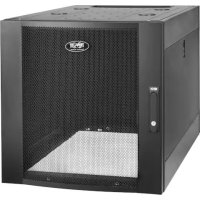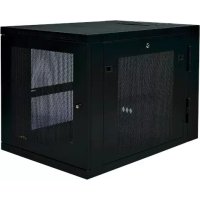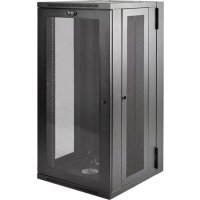
SmartRack SRW26US - Desktop Computer Tripp Lite - Free user manual and instructions
Find the device manual for free SmartRack SRW26US Tripp Lite in PDF.


| Product Type | SmartRack Wall-Mount Swing-Out Rack |
| Compatibility | Standard 19-inch rack-mounted equipment |
| Height | 26U (rack units) |
| Material | Heavy-duty steel |
| Assembly | Fully assembled |
| Doors | Lockable, reversible front and rear doors |
| Side panels | Removable and lockable |
| Mounting rails | Depth adjustable (6 mm increments), square and threaded holes |
| Cable access | Square cutout at rear and top, with removable panels |
| Grounding | Front/rear grounding point, M6 screw included, 8 AWG cable required |
| Ventilation | Do not block ventilation openings |
| Caster option | SRCASTER kit available (not included) |
| Warranty | Limited 5-year |
| Maintenance | Clean with a dry cloth; store in a controlled indoor environment |
| Safety | Do not stack; securely mount to wall; grounding required; use with assistance |
| After-sales service | Contact via www.tripplite.com/support for repair or RMA |
| Power | Not applicable (passive mechanical rack) |
Frequently Asked Questions - SmartRack SRW26US Tripp Lite
User questions about SmartRack SRW26US Tripp Lite
0 question about this device. Answer the ones you know or ask your own.
Ask a new question about this device
Download the instructions for your Desktop Computer in PDF format for free! Find your manual SmartRack SRW26US - Tripp Lite and take your electronic device back in hand. On this page are published all the documents necessary for the use of your device. SmartRack SRW26US by Tripp Lite.
USER MANUAL SmartRack SRW26US Tripp Lite
Swinging Wall-Mounted SmartRack® Enclosures
Applies to Model Series: SRWxxUS, SRWxxUSG
(Agency Series Number: AG-00EA)
Table of Contents
- Important Safety Instructions 2
- Overview 2
- Feature Identification 2
- Enclosure Installation 3
4.1 Preparation 3
4.2 Unpacking 3
4.3 Ground Connection 3 -
Enclosure Configuration 4
5.1 Door Locks 4
5.2 Cable Access and Management 4
5.3 Reversing the Enclosure 4
5.4 Mounting Rails 5
5.5 Adjusting Mounting Rail Depth 5 -
Wall Mounting the Enclosure 5
6.1 Mounting 5 - Equipment Installation 6
7.1 Installing or Removing Cage Nuts 6
7.2 Alternate Mounting: 7
Tapped Hole Mounting Rail
- Storage and Service 8
- Warranty and Product Registration 8
Espanol 9
Francais 17
Pycckn 25
PROTECT YOUR INVESTMENT!
Register your product for quicker service and ultimate peace of mind.
You could also win an ISOBAR6ULTRA surge protector—a $100 value!
www.triplite.com/warranty



Manufacturing Excellence.
1. Important Safety Instructions

SAVE THESE INSTRUCTIONS
This manual contains instructions and warnings that must be followed during the installation and operation of the product described in this manual. Failure to comply may invalidate the warranty and cause property damage or personal injury.
- Keep the enclosure in a controlled indoor environment, away from moisture, temperature extremes, flammable liquids and gasses, conductive contaminants, dust and direct sunlight.
- Leave adequate space at the front and rear of the enclosure for proper ventilation. Do not block, cover or insert objects into the external ventilation openings of the enclosure.
The enclosure is extremely heavy. Use caution when handling the enclosure. Do not attempt to unpack, move or install it unassisted. Use a mechanical device such as a forklift or pallet jack to move the enclosure in the shipping container. - Do not place any object on the enclosure, especially containers of liquid, and do not attempt to stack the enclosures.
- Inspect the shipping container and the enclosure for shipping damage. Do not use the enclosure if it is damaged.
- Leave the enclosure in the shipping container until it has been moved as close to the final installation location as possible.
- Install the enclosure in a structurally sound area capable of handling the load, or on a level floor that is able to bear the weight of the enclosure, all equipment that will be installed in the enclosure and any other enclosures and/or equipment that will be installed nearby.
- For permanent wall mounting, be sure to securely fasten the enclosure to the building structure before operation.
- Use caution when cutting packing materials. The enclosure could be scratched, causing damage not covered by the warranty.
- Save all packing materials for later use. Repacking and shipping the enclosure without the original packing materials may cause product damage that will void the warranty.
- Do not reship the enclosure with additional equipment unless the enclosure was shipped with a special shock pallet ("SP1" models only). The combined weight of the enclosure and installed equipment must not exceed the load capacity of the pallet. Tripp Lite is not responsible for any damage that occurs during reshipment.
- Use of this equipment in life support applications where failure of this equipment can reasonably be expected to cause the failure of the life support equipment or to significantly affect its safety or effectiveness is not recommended. Do not use this equipment in the presence of a flammable anesthetic mixture with air, oxygen or nitrous oxide.
2. Overview
Swinging wall-mounted SmartRack enclosures accommodate all standard 19-inch rackmount equipment, regardless of vendor, and ship fully assembled for quick and easy deployment. They feature adaptable, heavy-duty cabinets in various heights. All models have a hinged design that lets the cabinet swing away from the wall bracket for easy equipment access.
Swinging wall-mounted SmartRack enclosures have variable mounting depths, ideal for servers. The cabinets include quick-release doors and side panels for convenient maintenance. Front access doors are reversible for installation flexibility. Front door and side panels are lockable. An optional rolling caster kit (SRASTER) is available for easy maneuvering of enclosures.
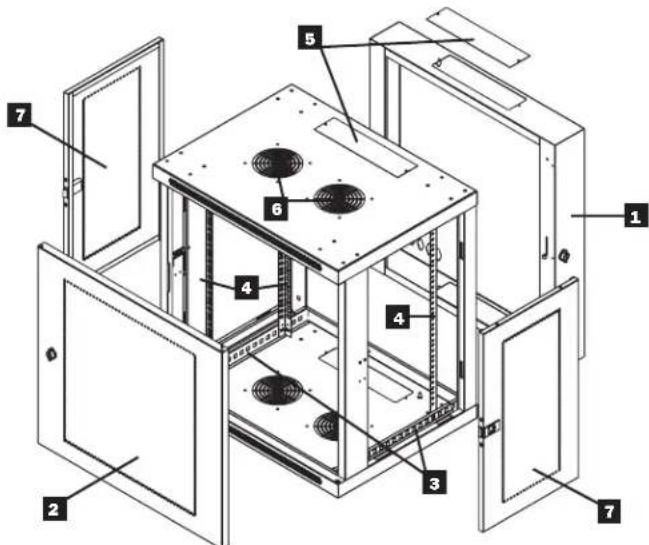
3. Feature Identification
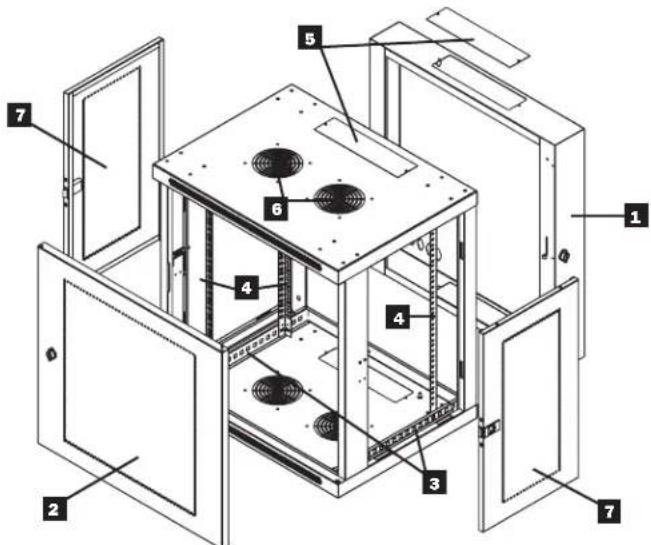
Model SRW12US is shown. The other models have similar features, with the only differences being rack height and depth.
Rear Door
2 Front Door
Horizontal Rails
4 Vertical Mounting Rails
5 Removable Cable Access Hole Covers
6 Vents
7 Locking/Removable Side Panels
4. Enclosure Installation

Caution! Read All Instructions andWarnings Before Installation!

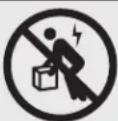
Warning: Rack enclosures can be extremely heavy. Do not attempt to unpack, move or install the enclosure without assistance. Use extreme caution when handling the enclosure and be sure to follow all handling and installation instructions. Do not attempt to install equipment without first stabilizing the enclosure.
4.1 Preparation
The enclosure must be installed in a structurally sound area that is able to bear the weight of the enclosure, all the equipment that will be installed in the enclosure and any other enclosures and/or equipment that will be installed nearby. Before unpacking the enclosure, you should transport the shipping container closer to the final installation location to minimize the distance you will need to move the unit after the protective packaging has been removed. If you plan to store the enclosure for an extended period before installation, follow the instructions in the Storage and Service section.
You need several tools:
You also need the following hardware:
- Level
- Appropriate hardware for wall mounting (not included)
- Phillips-head screwdriver
- Appropriate tools for wall mounting
4.2 Unpacking

Use at least two people to unpack the enclosure.
1 Move shipping pallet to a firm, level surface.
2 Open box and remove the four foam corner protectors. Save all packing materials for later use unless you are certain they will not be required. Packing materials are recyclable.
3 With one person on each side, carefully lift the enclosure out of the box and place on a firm, level surface.
Examine the enclosure for any damage or loose parts. Confirm all parts are present. If anything is missing or damaged, contact Tripp Lite for assistance. Do not attempt to use the enclosure if it has been damaged.

Never extend more than one component from the enclosure at a time.


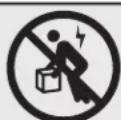
Warning: Never attempt to lift or install without adequate help. Do not try lifting the enclosure alone.
4.3 Ground Connection
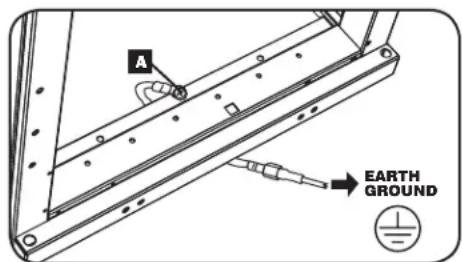
All parts of the enclosure are grounded to the frame of the enclosure. Use the enclosure's front or rear threaded grounding point A and an M6 screw (included) to connect the frame of the enclosure directly to your facility's earth ground connection with an 8 AWG (3.264 mm) wire. Route the ground wire under the enclosure's frame to ensure unhindered door operation. Warning:
Attach each enclosure to earth ground separately. Do not use the enclosure without an earth ground connection.
5. Enclosure Configuration
Before installation, be sure to plan the location and arrangement of components within the enclosure. Be sure all mounting rails are reversed or adjusted for depth, depending on your equipment configuration.
5.1 Door Locks
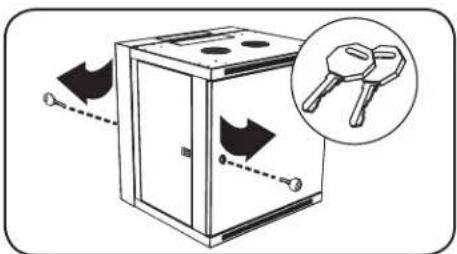
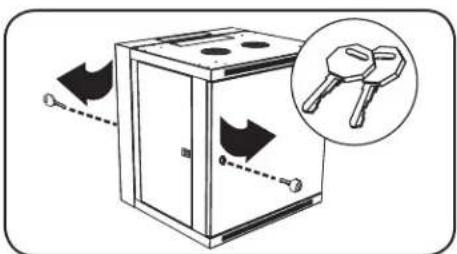
The front and back doors have locks that are accessible by the included keys.
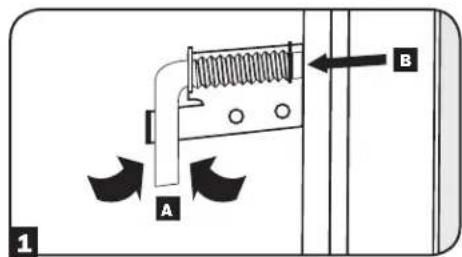
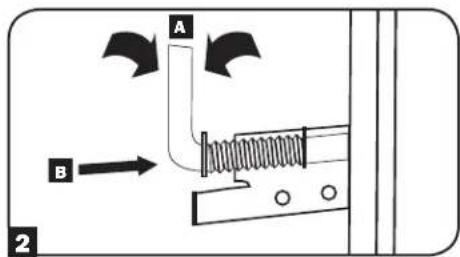
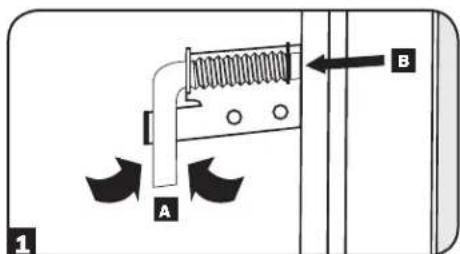
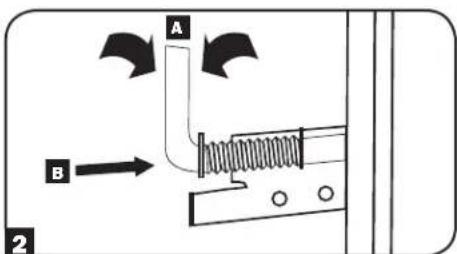
Each side panel locks using an L-shaped lever on the inside of the enclosure.
To unlock and remove the side panels, lift the shorter leg of the "L" up and pull it away from the side panel. Pull the tab on the side panel and remove it from the enclosure.
To re-lock the side panels, secure it in the proper position, lift the shorter leg of the "L" up A and push it toward the side panel, back into the hole that it was in initially B. Once it is in place, push the shorter leg of the "L" down to lock it. Note: To lock and unlock the side panels, you will need to have access to the interior of the enclosure.
5.2 Cable Access and Management
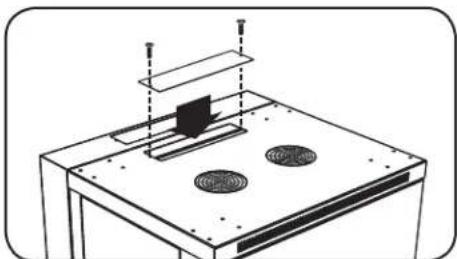
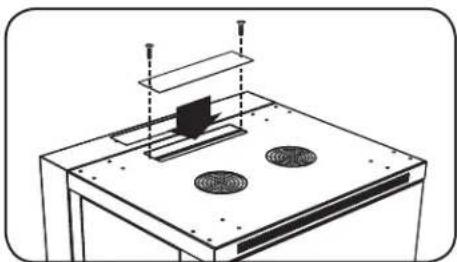
The back door of the enclosure has a square opening for cable access and management. An additional opening can be found on top of the main cabinet. Each opening can also be closed by screwing in the removable cable access panels.
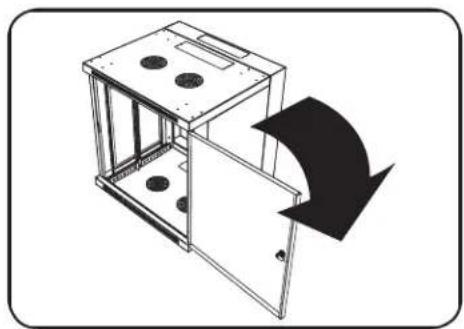
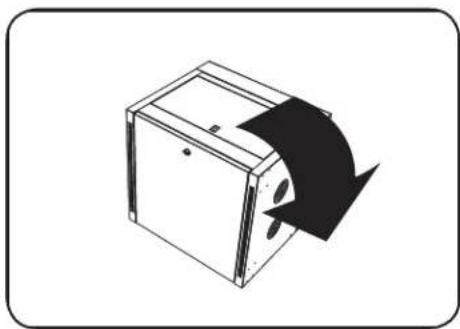
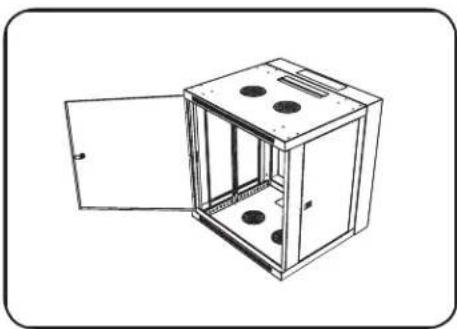
5.3 Reversing the Enclosure
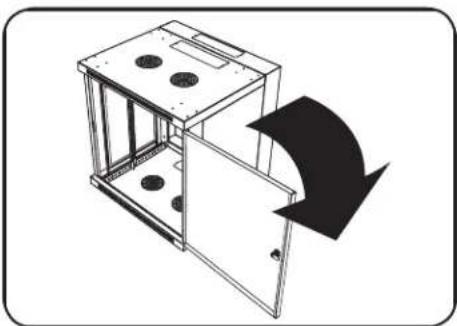
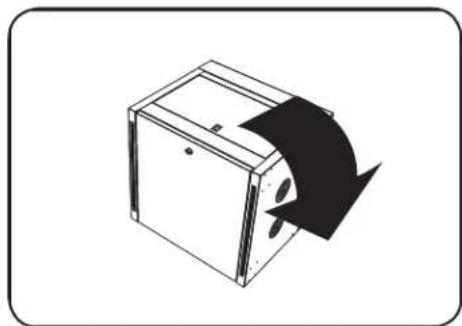
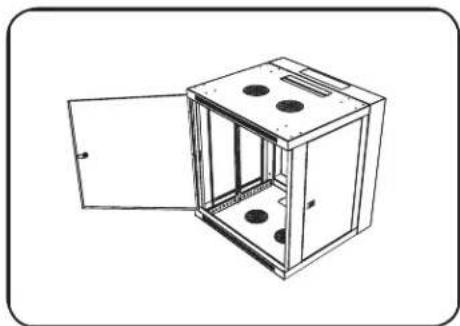
In order to accommodate various rack configurations, the enclosure can be reversed. To do so, simply turn the enclosure over so that the doors open in the opposite direction.
5. Enclosure Configuration (continued)
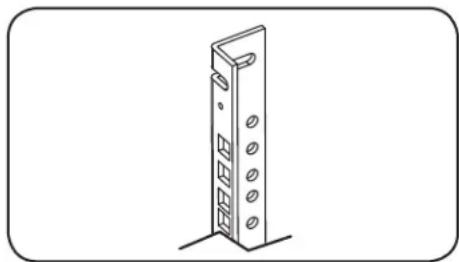
5.4 Mounting Rails
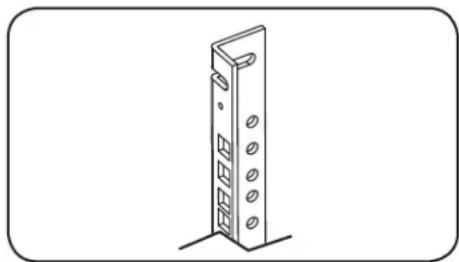
The enclosure comes with mounting rails that have both square and tapped holes for mounting rack equipment. To install equipment, use the included cage nuts and other hardware. (See section 7.1 for installation of cage nuts.) Warning: Be sure to have the enclosure securely mounted to the wall, or in its final position on the floor, before mounting any equipment inside. Also be sure to have all the right adjustments on your rails before mounting equipment. (See below for Adjusting Mounting Rail Depth.)
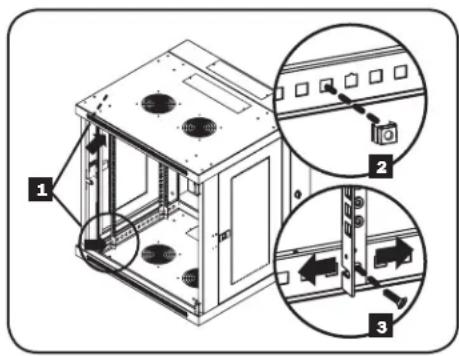
5.5 Adjusting Mounting Rail Depth
Warning: Do not attempt to adjust rails while equipment is installed in the enclosure. Do not attempt to use rails without screws installed. (2 per rail.)
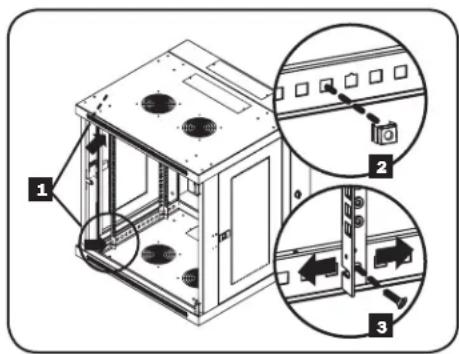
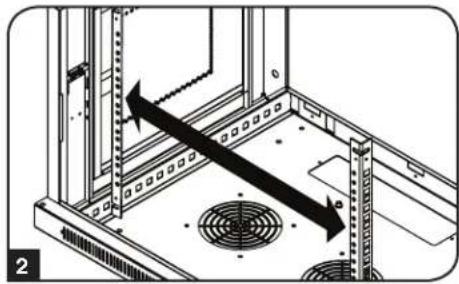
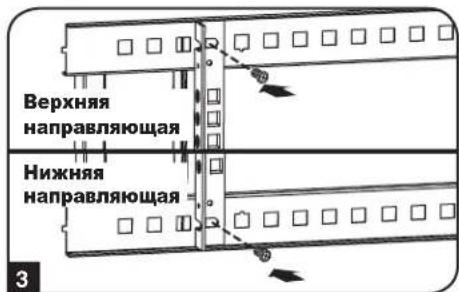
Depending on the model, either two or four mounting rails will be pre-installed in the cabinet. The preset mounting depth varies based on the model. Do not adjust the mounting rails unless your equipment requires a different mounting depth. The front and rear sets of rails can be adjusted independently in 1/4-inch (6mm) increments.
Each rail is connected to the enclosure with 2 screws and 2 cage nuts: 1 set in the upper corner and another in the lower corner. Using a Phillips-head screwdriver, remove the screws that fasten the rails to the enclosure.
2 Move cage nuts to the desired depth and reinstall.
3 Slide the mounting rails to the desired depth and reattach them using the screws you removed in Step 1.
6. Wall Mounting the Enclosure
Warning: Do not attempt to mount the enclosure to the wall with equipment in the enclosure.
6.1 Mounting
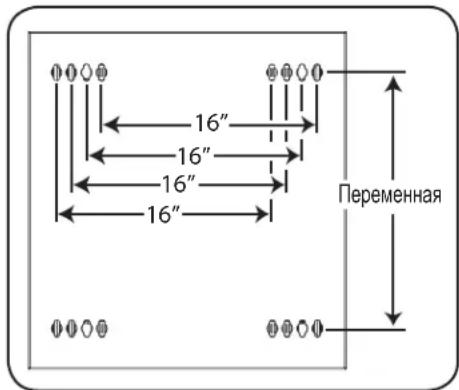
The number of keyhole cutouts on the back door of the enclosure will vary based on your model. Each keyhole can accommodate an M8, M10, 5/16" or 3/8 bolt. The holes are centered 16" apart horizontally to accommodate the standard placement of wall studs. The vertical distance between the holes will vary based on your model.
Note: Enclosure must be installed by a qualified technician. Before mounting, use a level and tape measure to position your mounting area precisely. Use appropriate fasteners (not included) to secure the enclosure to the wall. A minimum of four fasteners and appropriately-sized fender washers is recommended. Use suitable mounting means when installing to cinder block, concrete, drywall or wood studs. Warning: The supporting surface must be able to safely support the combined load of the equipment and all attached hardware and components. For the actual weight, size and load capacity of the enclosure, view the product specifications and other support resources at www.triplite.com/support.
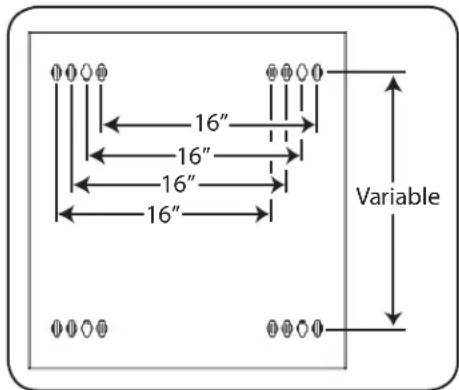
Your model's keyhole configuration may be different.
7. Equipment Installation
Warning: Do not install equipment until you have stabilized the enclosure. Install heavier equipment first and install it towards the bottom of the enclosure. Install equipment starting from the bottom of the enclosure and proceeding toward the top of the enclosure—never the reverse. If using sliding equipment rails, be careful when extending the rails. Do not extend more than one set of sliding equipment rails at one time. Avoid extending sliding equipment rails near the top of the enclosure.
Note: The unit comes with two different kinds of screws for equipment installation, black and silver. Use the black mounting screws if you are securing your equipment to the square hole side of the mounting rail. Use the silver screws if you are securing your equipment to the tapped hole side of the mounting rail.
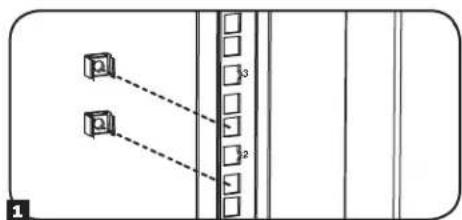
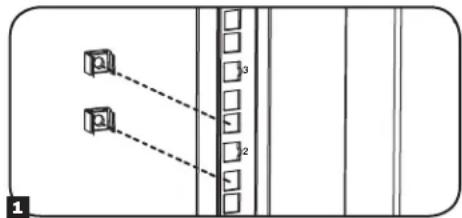
Note: The square holes in the middle of each rack unit are numbered and also include a small notch to aid identification. A single rack unit includes the space occupied by the numbered hole and the holes directly above and below.

7.1 Installing or Removing Cage Nuts
WARNING: The flanges of the cage nuts should engage the sides of the square opening in the rail, not the top and bottom. Follow the instructions in your equipment documentation to ensure proper installation of your equipment.
1 Locate the numbered square openings in the mounting rails where you plan to install your equipment. You will install cage nuts (included) into the square openings in order to provide an attachment point for the mounting screws (included). Note: Consult your equipment documentation to determine how many cage nuts will be required and where they will need to be installed.
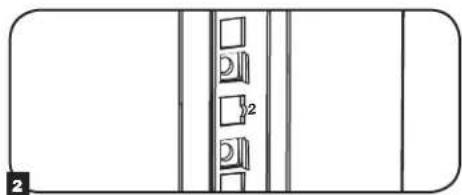
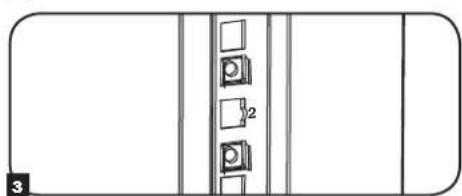
2 From the inside of the mounting rail, insert one of the flanges of the cage nut through the square opening. Press it against the side of the square opening. Each flange should engage one side of the square opening, not the top or bottom.
3 Compress the cage nut at the sides slightly to allow the remaining flange to fit through the square opening. When the cage nut is properly installed, both flanges will protrude through the square opening and will be visible on the outer surface of the mounting rail. Repeat steps 1-3 until all required cage nuts are installed.
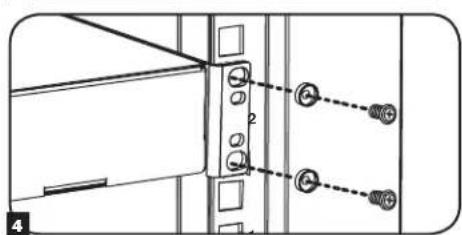
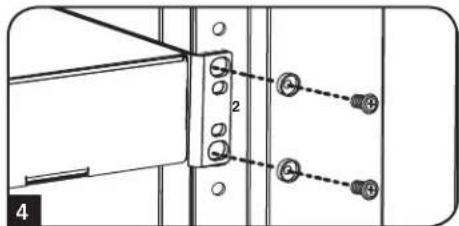
4 After installing the required cage nuts, use the included black mounting screws and cup washers to secure your equipment to the rack rail. Place the cup washers between the screws and the equipment mounting brackets.
Note: Your equipment may also include mounting hardware. Read the mounting instructions that came with your equipment before installing your equipment.
To Remove Cage Nuts, Reverse Steps 1-3
Note: You may wish to use a cage nut tool (user-supplied) to aid cage nut installation and removal.
7. Equipment Installation (continued)
7.2 Alternate Mounting: Tapped Hole Mounting Rail
WARNING: Do not attempt to adjust rails while equipment is installed in the enclosure. Do not attempt to use rails without screws installed. (2 per rail.)
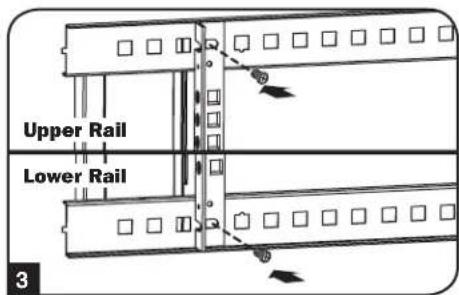
The 2 mounting rails are pre-installed for securing equipment using the square hole side of the mounting rail. To switch to the tapped hole side of the mounting rail, follow the steps below:
Each rail is connected to the enclosure with 2 screws: 1 in the upper corner and another in the lower corner. Using a Phillips-head screwdriver, remove the screws that fasten the rails to the enclosure.
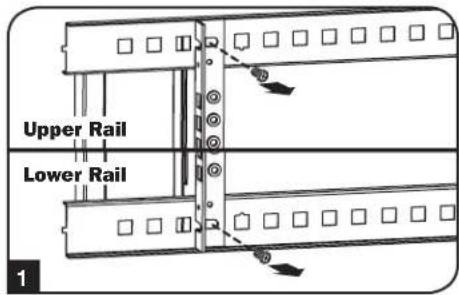
Switch the rail locations. Ensure the tapped hole side of each rail is facing the front door.
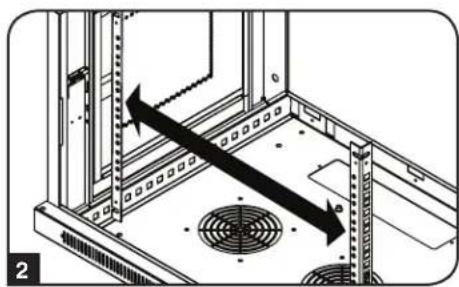
3 Reattach the mounting rails.
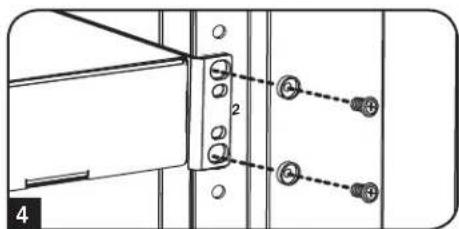
Use the included silver mounting screws to secure your equipment to the rack rail. Place the cup washers between the screws and the equipment mounting brackets.
Note: Your equipment may also include mounting hardware. Read the mounting instructions that came with your equipment before installing your equipment.
8. Storage and Service
Storage
The enclosure should be stored in a controlled indoor environment, away from moisture, temperature extremes, flammable liquids and gasses, conductive contaminants, dust and direct sunlight. Store the enclosure in its original shipping container if possible.
Service
Your Tripp Lite product is covered by the warranty described in this manual. A variety of Extended Warranty and On-Site Service Programs are also available from Tripp Lite. For more information on service, visit www.triplite.com/support. Before returning your product for service, follow these steps:
- Review the installation and operation procedures in this manual to insure that the service problem does not originate from a misreading of the instructions.
- If the problem continues, do not contact or return the product to the dealer. Instead, visit www.triplite.com/support.
- If the problem requires service, visit www.triplite.com/support and click the Product Returns link. From here you can request a Returned Material Authorization (RMA) number, which is required for service. This simple on-line form will ask for your unit's model and serial numbers, along with other general purchaser information. The RMA number, along with shipping instructions will be emailed to you. Any damages (direct, indirect, special or consequential) to the product incurred during shipment to Tripp Lite or an authorized Tripp Lite service center is not covered under warranty. Products shipped to Tripp Lite or an authorized Tripp Lite service center must have transportation charges prepaid. Mark the RMA number on the outside of the package. If the product is within its warranty period, enclose a copy of your sales receipt. Return the product for service using an insured carrier to the address given to you when you request the RMA.
9. Warranty and Product Registration
5-Year Limited Warranty
Seller warrants this product, if used in accordance with all applicable instructions, to be free from original defects in material and workmanship for a period of 5 years from the date of initial purchase. If the product should prove defective in material or workmanship within that period, Seller will repair or replace the product, at its sole discretion.
THIS WARRANTY DOES NOT APPLY TO NORMAL WEAR OR TO DAMAGE RESULTING FROM ACCIDENT, MISUSE, ABUSE OR NEGLECT. SELLER MAKES NO EXPRESS WARRANTY OTHER THAN THE WARRANTY EXPRESSLY SET FORTH HEREIN. EXCEPT TO THE EXTENT PROHIBITED BY APPLICABLE LAW, ALL IMPLIED WARRANTYES, INCLUDING ALL WARRANTYES OF MERCHANTABILITY OR FITNESS, ARE LIMITED IN DURATION TO THE WARRANTY PERIOD SET FORTH ABOVE; AND THIS WARRANTY EXPRESSLY EXCULES ALL INCIDENTAL AND CONSEQUENTIAL DAMAGES. (Some states do not allow limitations on how long an implied warranty lasts, and some states do not allow the exclusion or limitation of incidental or consequential damages, so the above limitations or exclusions may not apply to you. This warranty gives you specific legal rights, and you may have other rights which vary from jurisdiction to jurisdiction).
WARNING: The individual user should take care to determine prior to use whether this device is suitable, adequate or safe for the use intended. Since individual applications are subject to great variation, the manufacturer makes no representation or warranty as to the suitability or fitness of these devices for any specific application.
Product Registration
Visit www.triplite.com/warranty today to register your new Tripp Lite product. You'll be automatically entered into a drawing for a chance to win a FREE Tripp Lite product!*
- No purchase necessary. Void where prohibited. Some restrictions apply. See website for details.
Tripp Lite has a policy of continuous improvement. Specifications are subject to change without notice.


Manufacturing Excellence.
1111 W. 35th Street, Chicago, IL 60609 USA www.triplite.com/support
1111 W. 35th Street, Chicago, IL 60609 USA www.triplite.com/support

Manufacturing Excellence.
1111 W. 35th Street, Chicago, IL 60609 USA www.triplite.com/support
PykoBODCTBO NOJIb3OBaTeJia
Manufacturing Excellence.
1111 W. 35th Street, Chicago, IL 60609 USA www.triplite.com/support
Copyright © 2015 Tripp Lile. Bce ToproBle MapKn ABHIOr cNkHNOHTbHO Co6CTBENHOx COOTBeTcByIOx INaIeIbueB.
1. Baxhble yka3aHnno TExHnke 6e30nacHOCTN
COXPAHNTE HACTOUIE YKA3AHNA
B hactoIeM pykoBDCTBe coepkATc yka3aHn H npdynpckDnH, KOtOpbIe Heoo6xmoMo cObNDaT B npOceCe yCaHOKn 3KcnNpyTaun ONiCAHOrO B HEM n3dEHN. HecobIOeHHe 3nx yka3aHn H npdynpckDnH MOKeT npBecTN K aHHyIpOBAHIO rapaHTm N npuHInhTb MaTePnAIBh Myeep6nn BpE 3doPOBbIO IIOeN
- ⅢkaФdoJIKeH HaxOHTbCBA NOMeUHeHm C KOHTpOInpyEmB MKNKPOINMaTOM BdAnOT hCTOuHKnOB BnAaN, 3KCTpeMaJIbHbIX TeMnepaTyp, BOCIIaMeHHOxCXc KJDKoCTeI rA30B, 3JIeKTPoPnPoBOdBHix 3aRpa3HITeJe, nbJIN nPpAmoro COJIHeHOrO CBeta.
Ipeud WkafoM nno3aHrO Heo6xOIMo 0eocneHTb DocTaTOHO CBO6OnHO npocpaHCTBa dna erO HnEkaJero npoBeTpBHaHn. He 3aropaxuBaTe n He HAKpbAaTE BHeUHMe BEHTINLAIOHHbte OTBepCTN Wka, a TAKKe HE BCTABnTe B Hnx KaKNe-Imo ppeDmTb.
KpaHne TKeNoBecHbM. Pn nepeMeueHm WkaPc cobIOaIte octopoxhoctb. He NItaTeCpacNaKOBbBaTb, nepeMeaTaHnYcTaHaBnBaTb WkaB OINHOyky. Dn pepeMeueHn WkaPb BHTpN TpaHCnOpTnpoBOHO KOHeHepa NcnoJb3yTe MExAHueckoe YcTPOCTBO TnA BInIOHOrO Norpy3HkA INN BNIOHOrr IINpABNVNeckO TeJeKKN. - He KlaaIte Ha IkaKa KaKe-ImbO PpeMTebl, OcoBeHHO EMKoCTmN C XnKIOCTaMn, a TaKKe He yCtHaBnBaIte 1kaKbI dyur Ha dpyra.
Ocmotnpe TpaHcnopTnpOBOHbKOHTeHep HskaHnpeMet HannuHnoBpeKdHn, noyueHHbIX npn TpaHcnopTnpOBKe. He nolbyTeCb skaqom B cnlyae ero nobpeJdeHn.
He n3BnkeaTe ukaΦ nTpaHcnpTnpoBOuHOro KOnTeuHepa do ero nepemueeHna MaKcMaIbHo 6n3Koe paCtOHaHE K MeCTy OKOHaTeNbHO yCTaHOKn.
KoHCTpykUHO HPOOH MeTe CPOBbIM OCHOBaHE, CNOC6bIM BIDepKINBaT BEC CAMORO KkaPc, Bcero 0bOpyOBOAHn, KOtOpoe ByET YCTAHOBHeO BHTPN Hero, NIO6bIX DpynIX UkaFOBuN NIOOBOPaHn, KOtOpBe 6yDyt YCTAHOBHeHbNIm HeOr. - Npeed hauanom paobtco kkafoom o8a3atebno npnkpene er K Hecyue KOHCTpykun 3daHm.
CobnOaIe octopoknoctb npa pa3pe3aHm ynaKOBuHbIX MaTePnAIOB. 3To MOKe TnpBecTN K HaHeceHIO UapAnMH Ha NOBepxHOCTb uKaΦa, YTO npEcdTaNrTcOboy uep6, He nOKpbBaem dyecTByoJe rapaHTnei.
Bce ynaKOBOHyIe MaTePnAbIcneJeT coXpaHHTI nIPOCNeIyUoIero IcNIOb3OaHn. NOBTOpHaY naKOBKa I TpaHcnpTpOboKa IkaFpa 6e IcNOJIb3OBAHn OpInHAnbHbIX yNaKOBOHyBIX MaTePnAIOB MoKeT pINBeCTn K NOBpeKeDeHIO I3dEIN, KOToPoE NOBHeET 3a cO6oI aHHyIpOBAHn EaeCTByIoSeI rapaHTM.
HeOnyckaetcnoJeUOaTpaHcnpOpBOKa KkaopaCdoNolHntbHbIMobopyoBaHMe3aNckIoueHMeClyuaeBnpeBoHaJIbHONoCTaKko KkaopaCo CneuaJIbHbIM ydap03auuueHHbIM noDIOHOM (ToIbKO Ira MoDeNei SP1).CymMapHbI Bec 4ka pa N yctAHOBnEHHoro B HEM O6pOyOBAHnHE DoJKeHNpEBWtB rpy3oONoBemHoCTb noDIOHa. KomnaHn Tripp Lite He HecET OTBeTcBEHooCTNa Kaok-Nu6 yuepe, npunHeHHB n Ppocece nocJeyoue TpaHCnpOpBOKn.
He peKomeHdyetcNcONb3OBAHnE daHHoro obopydOBaHnB CntEmax Xm3HeoBeCneeyHn, rde erO BixoN 3 cTPOr npDIOJNOKHTBHO MOKe TpNBecTN K nepe6oR M pa6ote o6OpyOBaHnXm3HeoBeCneeyHn INI B 3NaHTeBHO Mepe ChINbTbe E630NAChOCTb INI 3ΦΦeKTMBHOCTb. He nCNoB3yIte DaHHoe o6OpvOBOAHn B pncYCTBn BOcPnAmehIOeJeAheCTeNUeCKOH CMECN C BO3DyXOM, KNCLOPOOM INI 3AKCbIO a3OTa.
2. Kpatkoe onncahne
Bpaauouee HacteHbIe 10kafo BceMctBa SmrRack Bmeaot Bce8cTaHapTHe 19-IOMOoe o6pOBOAHme He3ABNCMOOTero npou3BOHTen I nocTAbNIOCTcno NnHOCTbO B cOpe dna o6ecneHn 6bICPTpoB I neKoCTN BBOda B 3KcNpyaTuHIO. B coCTAB 30n cepIN BXoJAT aAnTIpyEmble uKafo pa3nnHOB BVtCIOBnIOuHOCTbIO KOHCTpykun. Bce moEeIMeOT KOHCTpykuio C wapHnPHBM KpenneHem, no3BOJIOUyO OTOBMRatb Kopnyc OT cTeHb, o6ceueHBaYdo6hN doctyn K o6opdyoBAHIO.
Bpaauouee hacteHbte ukafo bceMeCTBa SmrRack moeI perynpyemyIO ny6Hy moTtaxa, yto ndealho noxOHT dny yctahOBKn cepboB. Kkafo KOMJIeKTOCTBO BcIcTOCBEMHIM N DEpAMN I BOKOBIM N aHEnmN DnA yO6CTBA TEXHmckoro OBCNYMBAHnpeDnE DBePbI MOry T HabeUmbatcHa JIO6yTO cTPOHY, YTO oecneuHbaet yHbepcaIbHocTB yCTAHOBKn. Peepnra DBepa N 60Kobbe NaHEn 3aIIpaOTc H a3AMok. Kpome TORO, Bo3MOHO npio6peTeHeNe OOnHOHLBOr KOJIeKTo polIKOB (SRCASTER), obnervaounx npoueeC yCTAHOBKn MOHTXHO UkaPb A XeJaemoe PNOJKeHne.
3.Cxema pacnoJoxeHnApyHKuOHaJIbHbIX 3JIeMeHTOB
Ha nllnctpaun npedctabheha moelb SRW12US. pyrne moen mmeot aHAnoruHbIe cyHKUHOaHbHbIe 3JeMeHTbI N OTmuaIOTcra TOnbKO BbcOTOn I rny6HHoH.
3aDnA DBepua
2 PpeDnA DBepua
3 Topn3oHTaJIbHbIe HappaBraIOuane
4BepTNKaJIbHbIe MoHTaXHbIe WnHbI
5 CbemHbte 3aIyUKN OTBepcTn DnB BbOda Ka6ene
6 BeHTnIaHIOHHbIe OTBepCTN
7 3aHpaembIe/cbEmHbIe 60KOBblnHaHeJI
5. KomnohoBka wkaqpa
Ipeed yctahOBKO Wkaapa obaatbno cneyet cctabntb nnae rpoaMeHnN Cxemy paonoloxHnKOMnoHnTOB BHTpyn Hero.Heo6xoDIMO y6dntbcB TOM, YTO BCE MOHTaxKnHe HapabnOuune NOBepHyt bHaJIeXaum Opa3om IIN OTperynpObaHbI No Ipy6HHe B 3ABNCIMOCTN OT KOMNOHOBKn BaJero obopydoBaHn.
5.1Дверныезамки
IpeHnra 3aDnHra DBePbIO OChAaHeBb 3aMKaMn, OTINpaEmbIMN C IOMOuBbIO BXODJUX B KOMIIeK TKNoey.
Kakda n3 6okobix naheen 3aepaetc npn noomouI-06pa3Horo pbayka c BHTpeHHe CTOPHO kka.
I JnO TnpaHn H ChTnB 60Kobbix naHee CnEyET NoHrTB BBePx KopoTKoe Pneo I-6pa3HOro pbuXkA A nOTcPaHtB erO OT 60koBn NaHn B BbHyTb 60Koby np HeJIb n3 WkaFpa, NotraHyB ee 3a 3bHoc.
2IINOBTOHOFKCAUHN60KOBHOHAeHnHa CBOEM MeCTe CJeDyET YcTAHOBnTB eB HHyKHe NOIOXeHne,NOHrTB BBePb KopoTkoE PNeO I-6pa3HO 1pocne toro kak Kopotkoepno 60KOBOH aHcENo Nmecntb er O6paTHo B TO OTBepCTne, rde OHHXaUNC npBOHauNBo 73apuha u omnpaunu60kobix naheue He6xodmo umemb docmyn Eymphu Ka
5.2 OTBepCTne Inra BbOda Ka6eJeN n ONTNMn3aunna Ka6eJbHbIX CoeMHHeHH
3aHnra DBepu 1kKaFa 1mEe T KaDpaTHoe OTBepCTne Dn BBOda KaBeNe I ONTMMaUN KaBeIbHbIX coeHNHeHn. B BepXHe N aHEn OCHOBHO R KOpNyCa MMeTcN DOIOHNTEbHO EOTBepCTne. KpOme TOrO, KaKDoe OTBepCTne MOKeT 6bItb CkPbITo NytEm BBMHuBaHn B Hero CbeMHO NaHeN KaBeIbHO R BDOHa.
5.3 IpebopaunbaHne ukaFa
IpeaH3au pa3nHbBv BapnaHTOB pa3MeueHn 1kaFa Dnyckaetra nepebopaunBaHne erOpnyca. Iy 3TOrO cneJpyet npocTo nepeBepHyb Kopnyc 1kaFpa TAKM Oba3OM, UTo6blero DBepCb OTKpbBANCb BnpTUBONIOXHM HnPaBHeHH.
5. KomnoHObKa WkaΦa (npoJxHne)
5.4 MoTαxHbIe HappaBnIoune
UkaqnoctabnTcMoHTaKbHmHa npabnlouMn, KOtOpeIe HMeOT KAc KbaDpaTHbe, TaN I pe3b6obble OTBepCTnIA MOHTaKa CToeHOrO obopyoBaHn. IIny cTaHOKn ObopyoBaHnCneJyET 1ncNl3b0aBb NOCTABnREMbE B KOMnJIeKTE 3aKnadHBe rAKNI INPOyIO OChACTKY (NOPDK YCTAOBKn 3aKnADHbRAeK CM. B pao7e 7.1). BHMAnHe! Pepe yCTAHOBKn KaKoro-Ni6o ObopyoBaHn BHyTp b WkaFa Heo6xOmoY6eDnTB B TOM, YTO OH NaEKeHO 3aKpenIIe Ha CTHe NIN B DpyROM KoHeHOM NoNoXeHH. Kpome TOrO, nepe MoTAtXom ObopyoBaHn Heo6xOmoDOnKHBIM 6pa3oM OtperynpoBaTb BCE HapabnlouHne. (CM. npeCTaBneHHb Hnxke pa3dEN "PeynpobKa rnybHbMOHTaKhbHX HapabnlouX").
5.5 PerynnpobKa rJy6HbMoHTaXHbIX HappaBriaUx
BnmaHne: He nbTaTaeTcB peryInpoBaTb HapabJIOUne npu yCTaHOBJEHOM B shkaΦ o6OpydoBaHH. He nbTaTaeTcB nCnoIb3ObaTb HapabJIOUne 6e3 yCTaHOBJBnTOB (No 2 Ha kaxdyu HapabJIOUy).
B 3abncmocn OT KOHpeTHOHOmei, DBe HIN YeTbpe MOHTaXbIX HappaBnIOuNX yCTaHaBnBaOTc BHTpb KOpnyca WkaFa HeNocpeCTBeHNO Ha 3aObe-ntROBtTeNE. 3NaueHne MOHTaXHO rIy6nHbI, YCTaHaBnBAeMOH 3aBOOM-NTROBtENeM, 3aBNCIT OT KOHpeTHOHOmei. He perynpyte MOHTaXHbIE HAnpbaJIouHnce 3a NckIQUHeHem Tex CnyaeeB, KOrda Iy cTaHaBnBaEMoro Bamn o6OpydoBaHH Tpe6yETc dpyra MoTHaXHna rIy6nHa. IpeDnHry n 3aDnHry rpynnb HAppaBnHOuNX MOryt peYnpoBaTbc He3abncmo Dpyr OT dpyra c warom 6 MM.
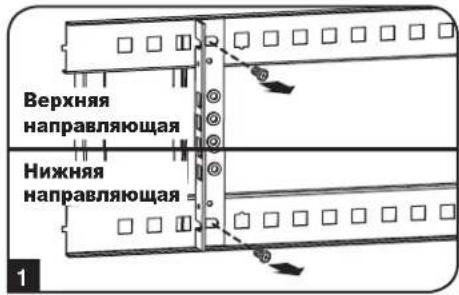
1 KaKaJdHa HApabnIouaepnKppeNHeKa KOpnyu KaPapn NmOOnu 2 BnHToB n 23aKaJbHex Raek: OHa npa TapaX DeTanePacNoIaraeCBAbeXHeM yIy, aDpyra-B HnKHeM. C NmOuBko KpecToo6pa3HOr OTBePTKn BBeBHeNTe BnHTbl, KOtpbE Kpenr HApabnIoume K KOpnyc uKaFa.
2 Nepemectite 3aKnaadHbIe rAknHa Jxenaemyu IybuHy uYctaHOBte BnHTbHa MeCTO.
3 CbHbTe MOHTaXhBie HnpaBraIOuHe Ha XeJaEMyIO rnybHy n CHOBa 3aKpeNITe IX C NOMUbHO BnHTOB, BbIePHyTbIX Ha Iare 1.
6.ПорадokнагенHoroMOHTaxaшkaфа
BHHMaHHe! He nbTaIaTeCb KpeNITb WkaΦ K CTHe C hXoAaUcMc BHyTpH Hero o6OpydoBaHHeM.
6.1 MoThax
KoIuYeCTBO MOtaxKnbIX OTBepCTn B 3aDHeN DBePue 1kaFa 3aBcNt OT BaWe KOnHKeTHO MoeJI. KaJdoe MoTataKHe OE TBPCTne paccHTaHO Ha 6oNT M8, M10, 5/16" uIN 3/8". PaCToHHe MeXy du CEHTpAMN OTBepCTn IIO rOpNZHTaIN COCTaBnIET 16 IOIMOB, YTO oBeCNEuMbAET BO3MOxHOCTb pa3MeUeHNI 1kaFa H a CTeHAX Co CTaNapTHbIM KapkacOM. PaCToHHe MeXy OTBepCTnMn No BePTKJaN 3aBcNt OT BaWe KOHKPeTHO MoeJI.
PpumueaHue. YcmaHOeKa ukaFpa dOJHKa npou3eodumbc moIbKO KbaUduuipoaeAHBM mexHuueckum cneuaunucmOM. IpeD hauanom MOmaxa cneyem moHOnHAMemub mecmo bdyuzeo pacnnojKeHHua kapa c nOoubIO ypoBHeu pynemku. DnKpenHueu kkaFpa Kcme He uonnb3yUme noXoohuue deA mou ueu KpeNekhble demAn (8 KomnEkmnocmaKu He exOdAm). PekomeHyemca Ucnlo3oabM he Meee yemipex KpeNekhbx demaneu C yebuueHHBuMu wauBamcoomeemcmEyoozepoazMepe. Ppu KpeNneHHu K6eMoHy, uNakobemohy, zunocakmoyu unu cmoukam depeeyHNOZ okapaca Ucnlo3yUme coombeemcmuyue MoHMaKHe NpcncocobHeu. BHumane! Onopna NoepxHocmb doJHKa c 3apanac Ebldepkueamb cymmapHyu Haay3ky, c03daeaemyo obOpdyoahuem U ecmU exOdoUmU e KomnEkm demaImu OchacmU npduzumu KomnoehmAmu. CM. mexHuece Xapakmpucmuku u3denui u dpyae ecNoMOaemlbHeIpe pcypbcI c yEmum paKmueeko beca, pa3MePa u donycmuoi Haay3ku ukaFpa ha cmpaHue www.triplite.com/support.
B BaaeM MoaEn CXema paacnoJooKeHHN MONTaXhBix OTBepCTn MOKeT 6bIb DpyroI.
7. установka оборуданья
BnmaHHe He yctaHaBnBaTe o6opyoBaHne Do o6ecneeyHn yToCHNBOCTn WkaPc. Chayana cJeIyET ycTaHaBnBaTb 6Oone TKeJe O6opyoBaHne, pa3meaer Ero B HxKHe YacTHn WkaPc. YCTaHaBnBaTe o6opyoBaHne HaHHa C Hn3a WkaPc no HappBHeHIO BBepx - Hn B KOem cnyae He Haobopot. Ppi HCNoJIb30BaHm HAnpaBnHOxN DnE yCTaHOBKn O6opyoBaHn CObHdAte OCtOpOKHoCTb pni IN BbIDBHXeHN. He BbIDBnraTe 6Oone OJHO rpynnbI HanpaBnHOxN OJHOBpeMeHNO. CtapaiTeCb He BbIDBnraTb HAppaBnHOuNe dIy ycTaHOBKn o6opyoBaHn, pacnoJoxHHBe B cepXHe YacTHn WkaPc.
PumueaHue. DAnhbl moyIb nocmaenmc 8 KomnneMe c BuHMam duy paunuHx munoe monmka oobpyoohua. MoHaxhble eHmbt cepnozouema cnedyem uonl3oabMb e mom ciuyae, ecu bkpenerme c0e obopyoahue k moi cmopone MOmaxho Hapraenoue, komopar chabxena KaadpamHmu omepcmmu. MoHaxhble eHmbt cepe6pcmozo ueema cnedyem uonl3oabMb e mom ciuyae, ecu bkpenerme c0e obopyoahue k moi cmopone MOmaxho Hapraenoue, komopar chabxena pe3b6obmu omepcmmu.
PpumueaHue.Keapamhhe omepmua cepedune kaozdo zu kapa npohymepoahbu u meom heonbwyu hadceky dya yod6mba pactno3haaun. B kaxdOm omdenbHom ukafpy uemeemcme mo, 2e paonanaemc hymepoaHHoe omepcmue u omepcmua, haxoayuec Hnocpecmehno had u noHUM.

7.1 YctaHOBKa NIN CHrTne 3aKnaIbIX raeK
BHIMAHHE! OTRb6kPOMOK 3aKnAdbHX raeKdoNkhBt 3aenTb63 60koBle, a He BepxHn HnxHKn Kpa KBaDpTHOrO OTBepCTN B HapabIIOe. Ira oecneueHH npabInbHocTN yctahOBKn BaWero 6opydoBaHH cNe dyTe yka3AHm, nJNOXeHHbIM B coNPoBOHTelbHOI DOKymentauu K hemy.
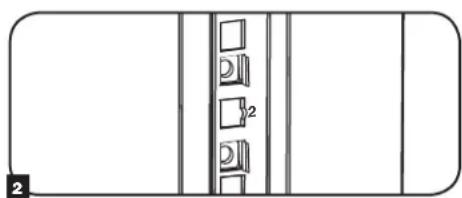
1 HauHnTe HymepoBaHHbIe KBaIpaTHbIe OTBepCTN B MOHTaXHbIX HAnpabJIHOxN, KOtOpbe Bbl PnAHHpyTe NcNoIb3ObaTb IJy UcTaHOBKn CBOero O6OpYDoBaHN. BCTaBte 3akJaHbIe raIKN (u3 KOMIIeKTA) B KBaDpaTHbIe OTBepCTN C cJIbHo O6ceNeHEN TOKN KpeINHeN DIn MOHTaXHbIX BNTOB (IOCTaBnEMyB KOMIIeKTe).PumueHue. JnOnpeDeHnH HeoXoDMoO KoJIuYeCeMea 3aKaNaDhBix 2aek U Meem ux YcmaHOeKo 03HaKOMbMecb C conpoBodmibHou DokyMeHauee K eauemy O6OpOBeaHuO.
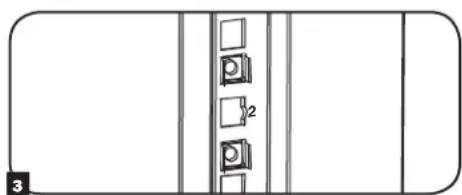
2 IpoodeHbTe OINH 3O OTn6OB KpOMK 3aKnadHO raKu Ype3 KBaDpaTHOE OTBepCTne CBHYtpHeN CTOpOHb MoTAtXHcH HapPABJHOuei. BdaBITE ee NO HanpaBNeHHo K bokOBMy KpaIO KBaDpaTHORO OTBepCTn. OTn6bI KpOMK 3aKnadHbIX Raek DOnKbI 3aCenIIbTcR 3a bokOBBe, a He BepxHn n HkHN Kpaq KBaDpaTHORO OTBepCTn.
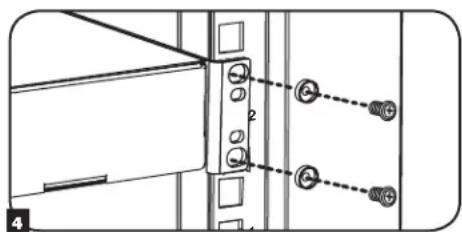
3 CnErKa Hauabnte Ha 3aknaDHyu raKy no 6okam, YTO no3BONHT dpyromy OTR6y KpOMKn npOtn Yupe3 KBaDpaTHoe OTBepCTne. Ipn npABInbHoi ycTaHOBKe 3aknaDHO raKu oBa OTN6a ee KpOMOK BbIaOTcra C obpaTHo CTOpHO bKaDpaTHoro OTBepCTnHa BHeHHe NOBepXHOCTn MOtAXHO HapRaBnIOuei. NObToprJte warr 1-3 do Tex nop, noka He 6dyT yCTaHOBNeHb BCE Heo6xOumble 3aknaDhbie raKu.
4 NocIe yCTaHOBKn Heo6xOaMbX 3aKnaAdHbX raeK npKpeNte CBoE o6OpyDobAHne K cToeUHO HnpaBIAHOSe C NOMOsbIO NOCTaBIAReMbx B KOMIIeKTe MOHTaXHbIX BnHTOB UeHOrO UBeTa I YaWeo6bpa3HbX Wai6. IomeCTte YaWeo6bpa3HbX Wa6b My6d By BnHTAMn MOnHTaXhBIMn KPOHtEiHAMn DnI KpEnJIeHnA O6OpYDoAHnI.
PumueaHue. Bae obopyoabue maKxe moxem noMaenbce 8 KOMnke m c MOHmaXbIMu npucno6bnHmu. Ipepe ycmaHOekou c0e2o obopyoaba Hua OsHaKOMbme C yka3aHuaMu nO MoHmaKy, noCMAENbEMbIMU e KOMnKeMe C HUM.
IIN3BneHnnaKnaHbIXraeknoBtOpntewar1-3BobpaTHmnpAke
PpumeyaHue. Ppu kehaHuu ycmahoeky u 3aeneeHue 3aknaedbix aaeK moxho npou3eoodmb c nomoubocneuaIbHOO uHcmpyMeHma (e KOMnEkm nocmaeku He exoDum).
7.YctaHOBka NnN CHrTne 3aKJaHbIX RaEK (npoJxHe)
7.2 AnbtephatNBbI cnoc06 MOtaxa: MoHTaxHa HnpaBIAOuaC pe3b6OBbIMN OTBepCTnAMN
BHIMAHNE: He nbitaTecb perynpoBaTb HappaBnaOuIe npy yctaHOBneHOM B ukaΦ o6opyoBaHn. He nbitaTeCb nCnoB3OBaTb HappaBnaIOUe 6e3 yctaHOBKn BuHTOB (no 2 Ha kaxdyu HappaBnaIOUyHo).
Ha 3aBoJe-3rTOBnTeJe 2 MoHTaxKbIe HAnpabNIOUne yCTaHOBNeHb IO KpeTneHne O6OpOBOAHm C NcNoIb3OBAHmE To CTOpOHb HAnpABJIOUe, KOtOpA CHa6KeHa KBaDpaTHbIMN OTBepCTnMn. IJIpePexOJa Ha NCIOB3OBAHme ToI CTOpOHb MOHTAXHOH HAnpABJIOUe, KOtOPa CHa6KeHa pe3b6oBbIMN OTBepCTnMn, HeoXoDMMO BblONHb TcNeIyOuine DeIcTBnIa:
1 KaKaJdHa HApBaBnIoua PnpKpeIeHa K Kopny Cy IkaFa npn NmOuN DByX BInTOB, OINH 3 KOtOpbIX pacNoJIraeTcB BepxHem yIpy, aDpyro-B HnxHem. C NOMoUbIO KpeCToo6pa3HOI OTBePTKn BBePHTe BInrbl, KoTopbIe KpenT HApBaBnIOUme K Kopny Cy IkaFa.
2 NomeHnIe pacnoNoXeHHe HappaBnIoox. Y6eNtEcB TOM, yTO KaKdA u3 HappaBnIOxuX pacnoNaTaEtcaTakIM oBa3OM, yTO ee cToPOHa Cpe3b6oBbIMN OTBepCTnMn Obaaune HA K npeDnei DBepue.
3 NOBTOHOZAKPERNTMOHTAXHBHe HnpaBnIOUe.
4PnKpeINTEOBOpYOBaHHe KCTOeHbIM HAnpaBIAIOUcM CNCNOb3oBaHHeM BXOJaIUX B KOMnEKT MOHTaXbIX BnHTOB CEpe6pictoro Ubeta. IomeCTne Taueo6pa3hie Waib Mykdy BnHTaMn MOHTaXbIM KPOuHTeHaMn DnKpeJIeHnOOBopyOBaHn.
PpumueaHue. B KOMnEkm NoCmaeku eaueoo obopyoehua Moay makxie exodm b MOhmaxhble npucno6bneHua. Ipeed ycmaHoekou obopyoehua 03HaKoMbmecb c yka3aHuaMu n oMhmaxy, noCmaenBmU e KomnEkm c Hum.
8. XpaHHeHne n TexHnueckoe o6cIyXnBaHne
XpaHHeHne
KaФdoJKeH XpaHnTbC B NOMeUeHmN C KOHTpOINpyEmbIM MKNPOKINMaTOM BdaI IN O T NCTOHNKOB BlaIIN, 3KCTpeMaJIbHBIX TEMpePaTyP, BOCnIaMeHryIOxXc KInkocTe Hra3OB, 3NeKTpOINpOBOdHbIX 3arpa3HNTeNe, PbIN IN PpMOrO coJIHeHOro CBeta. I NO Bo3MOXHOCTn XpaHnTe 5kaF B erO 3aBoDcKo TpaHCnOpTHoynakOBke.
CepBnchoe o6cnyKnBaHne
Ha npdykun kOMnAHm Tripp Lite daetc orpaHueHHa rapaHTn yCIOBn KOTopo n3IOKeHb B HactoIe m pyKOBOCTBe. TaKke docTyHb pa3JMHbIe nporpamm npodneBaemr rapaHTn u obcykubAHna Ha obekeTe OT kOMnAHm Tripp Lite. Ipynoyehn 6Oee noDpoBHO INHFPOMu O cepBnCHOM ocbnykubAHm nocTeTte Be6-caT kOMnAHm www.triplite.com/support. PpeD Bo3BPaTm npdykun dNOb cykubAHn, BInOnHNTe CneDyUcne DeiCTBnA:
- Pocmtpnte HnCTpykun no yctahOBke n3Kcnnyatau, n3IOKeHHbE B hactoHem pykoBodCTBe, YTO6bI y6eHTbcra, YTO npO6nmbi npOcXoJrT He n3-3a HnpabNlboHOro NoHMAMHn HnCTpykun.
- Ecnn npo6nema coxpanreTc, He obaaaiTeB n He Bo3bpaaiTe n3dene Tropobomy nopeHky. Bmcto 3toro nocetite Be6-caT www.triplite.com/support.
- Ecnn npepehenna np6bemblTre6yecpmeont, nocetnte Be6-caTt www.triplite.com/support n nepeinnte no cbbjke Product Returns (Bo3bpat npdykun). 3decb moxho cdenaTb 3anpoc o Homepe pa3pehenna Ha Bo3bpat (RMA), kotobn heo6xoim dm peomhta. B 3to npocto INTEPAKTHBOH OFopme Huxho 6ydt 3anolnlb Homep moden yctpoctBa n erc nepiHbHomep, a takke obuyu infopmauio o nokynatele. Homep RMA Bmecte c HNCTpykunmno OTnpabke 6ydt Biclan no 3neKtpoHnO noTe. IIObple nobpeXeHnra npdykun (PnMble, KOCBHeIbe, yMbIeHHe IIN NOOchte, NOpueHbBe TReyblTaTe TpaHCnoptpOBKn B KomnHIO Tripp Lite NIn B yONHOmOeHHbCepBnCHb CEHTp, rapaHTne He NOKpbBAOTcR. TpaHCnptpOBKa npdykun B KomnHIO Tripp Lite NIn ABTopn3oBaHHbCepBnCHb CEHTp DOJnxHa 6bItb ONNaeha OTnpaBHTenE. Ha BheHcETOPoH ynakOBKn HAeCtne Homep pa3pehenha Ha BO3bpat. Ecnn npdykt HaxoNTca H rapaHTn, BNOKTe KOIOU Yeka IIN DOKyMeHt ha npno6peTHe. DoCTABky npdykun dI gn OcnykBaHnO ocuiectBnIte uee3 3actpaxoBAHHbx nepeBO3uHKOB no aDpecy, NOyyeHHOMY Bmecte C paopeHnem Ha BO3bpat.
9. rapaHTnHbIe 6o3aTeJIbCTBa
OrpaHnueHHra rapaHTna 5 net
PpOdaeU rapaHTpyET nI daHnHO rpoyTA OTCYCTBne DepeKToB mATEpnaIax N TexHOIINX B TeueHne 5 net OT daTb nepBnHIO npOaONBM IcNOJIb3OBAHn ERO B COOTBETCBM CO BCEMnpIMEHMBIMN HCTpyKJAMM. B cnyae BbIaJIeHNE DEPEKTOB, C83AHHbIX CO CBOITBaMm MATEpNAI INI KAcE TBMOM 3r0TOBHeHn DAHHOR n3dENB VteHne Yka3AHoro nepoDA, PPOBaue o83yTe, NO CBOEMY yCMOTpeHIO, POBECTn 3a CBOI CHET erO pMOHT INI 3aMeHy. 3TA FAPAHTRHE PACNPOCTPAHRETC HA HOPMALbHbI IN3HOC INI IIOBPEXJEHNE PPOyKA TBA PE3yIBTATE HECYACTHO TCIyAR, HEPABINbHO IcNoJIb3OBAHn, HE6PEKHTOO OBpaUeHnI INI PIPHE6PEXEHNr IPABINAMN 3KCNPTAYALUN. IPODABEU CE 3AIBJRET HMKAKNX IPAHTNI, KPOME IBOH BO bIPAXEHHB X 3DECb. 3A NCKLIQUEHNE OM PPAHHEHNI, 3ATPEUeHHbIX DEIECTBYOUM 3AKOHODATENBOM, BCE IODPA3YMBAEMbIE TAPAHNTNI, BKIIHOAR BCE TAPAHNI PPINOHOCTN K PPODAKE INI IIOHOCTN INI KOHKPETHO TIPIMEHENR, ORPAHUYEHBI NO CPOKY DEICTBnI TAPAHNTNIbIM PEPNOOM, YKA3AHBBIM BblE; IN 3TA FAPAHTRN RBO NCKIOUAET BCE CNYAHbIE INI NIO5OuHbIE PPOBEXDEHNI. (PpImEHmoe 3akoHDateNBCTBO HeKOTopbIX CTpaH 3Appeaet OrpAHueHne cpoKa dTeCTBN IOpa3ymeaemor rapaTHIN; Bdpynx ctpaHs 3appeJeHo NckIOUeHne INI ORpAHueHne DEICTBnra raptAHm B OTOHOeHM CNayAHI INI NocpeDuOxN NobpeExHn. B C83nC tTM, BIIwenepeHCNEHhle OrpAHUEHNI INCKIOUeHn DEiCTBn HACTOAe PAHTN MOYt OKa3aTbc HEPIMEHMBIMB BAWEl KOHKPeTOM Cnuae. Hactoar aepaTn IpeDCTabnREt Bam onpeDeHHe hle OpDInCeKHe npaba, KOtopbI MOr7 bOdoNeHb DpymIM npabAMn BzABCIMoCTN TO opncndkun.
BHIMAHVE: Npeepncnonb3oBamHem HactoJero Iaednna Kajdbn nonb3oBaTeIb dOnkHe camocToTbe hO npdeJe b cTeenb erO npirodHoctn dnp npdeonaraeMOr npimHeHn, a taKxe CTeneH b630NaChOCTN TAKORo npimeHn. TaK kAc HactoJee u3dne Meet MHOKeCTBO INDINuAynbHex pImMeHn, npin3BODteH He daet rapaHTmHbIX 6o3aTeBCTB B OTHoWeHn PpiroDHOCTn HactoUxN 3dne n DnTex INN INhBX KOHKPeTHbx npimeHeHn.
KoMaHnri Tripp Lite noctoHHo coBepueHCTByET CBOHO npOdykuHIO. B CBA3N C 3TMM BO3MOXHO n3MeHeHne TexHmecx xapaKTePcTik 6e3 npedbapntelbHorO yBeDomHeHnI.


Manufacturing Excellence.
1111 W. 35th Street, Chicago, IL 60609 USA www.triplite.com/support