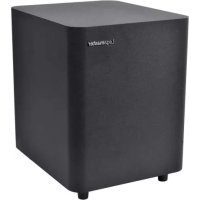
LS2000 - Soundbar Legamaster - Free user manual and instructions
Find the device manual for free LS2000 Legamaster in PDF.


| Brand | Legamaster |
| Model | LS2000 |
| Product type | Soundbar |
| Color | Black (estimated) |
| Power supply | 19V DC power adapter |
| Power | Not specified (estimated 20-40W) |
| Connectivity | Bluetooth, USB-A, optical input (Toslink), coaxial input, AUX input (3.5mm), stereo RCA input |
| Main functions | Play/Pause, volume, source selection, DSP modes (Cinema, Dialogue, Music), treble and bass adjustments |
| Remote control | Included with AAA batteries (2x) |
| Optional subwoofer | Legamaster LS3000 (sold separately) |
| Wall mounting | Mounting kit and template included |
| Included cables | Optical cable, RCA/3.5mm cable, 3.5mm/RCA adapter |
| Warranty | 2 years |
| Care and cleaning | Clean with a soft dry cloth. Do not use liquid or abrasive products. |
| Safety | Do not expose to water, do not open, use only the provided adapter, unplug if odor or smoke. |
| Spare parts and repairability | Contact the retailer or Legamaster for repairs. No user-serviceable parts. |
| General information | Manual available in multiple languages. Recycle according to local regulations. |
Frequently Asked Questions - LS2000 Legamaster
User questions about LS2000 Legamaster
0 question about this device. Answer the ones you know or ask your own.
Ask a new question about this device
Download the instructions for your Soundbar in PDF format for free! Find your manual LS2000 - Legamaster and take your electronic device back in hand. On this page are published all the documents necessary for the use of your device. LS2000 by Legamaster.
USER MANUAL LS2000 Legamaster
Version 1.0
USER MANUAL
Thank you for purchasing this Legamaster product.
Please read the following instructions prior to operating your unit.
Recycling Information
This product, when disposed of, is supposed to be collected and recycled according to your country's legislation to reduce environmental burden. When you dispose of this product, please contact a distributor or an affiliate in your country.
Warranty information
Legamaster guarantees the repair or replacement, free of charge, of faulty LS2000 and LS3000 products and/or parts by an authorised service partner or dealer for a warranty period of 2 years.
The warranty shall take effect on the date of purchase as stated on the receipt.
If you wish to make a claim under the warranty or you have any other service issues, please contact your dealer or Legamaster directly. For contact information please see the Legamaster website.
1. MAIN UNIT
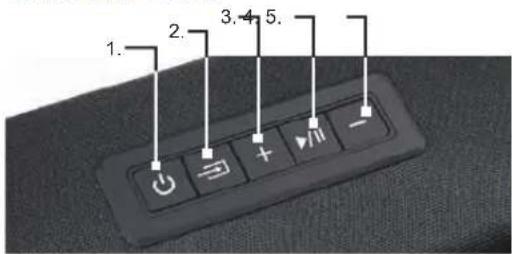
- ON/OFF BUTTON
- SOURCE SELECTION / RESET BUTTON: PRESS TO CHANGE SOURCE, HOLD TO RESET TREBLE AND BASS TO FACTORY SETTINGS
- VOLUME +
- PLAY / PAUSE
- VOLUME -

LS2000 / LS3000 - USER MANUAL - ENGLISH
USER MANUAL
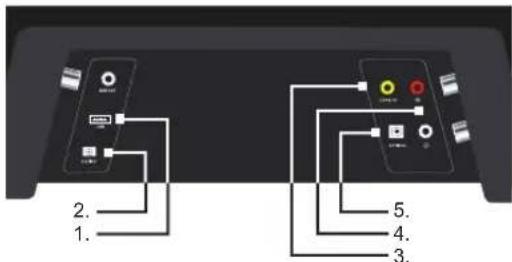
- USB-A PORT
-
POWER PORT
-
DIGITAL COAXIAL PORT
- AUX / STEREO RCA PORTS
- DIGITAL OPTICAL AUDIO / TOSLINK IN
2. REMOTE CONTROL
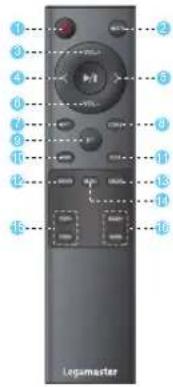
- POWER BUTTON
- MUTE / UNMUTE
- VOLUME +
- PREVIOUS
- NEXT
- VOLUME -
- OPTICAL
-
COAXIAL
-
BLUETOOTH
(Press and hold to
desconnect BT)
- USB
- RCA
- DSP SETTING: MOVIE
- DSP SETTING: DIALOG
- DSP SETTING: MUSIC
- TREBLE + / -
- BASS + / -
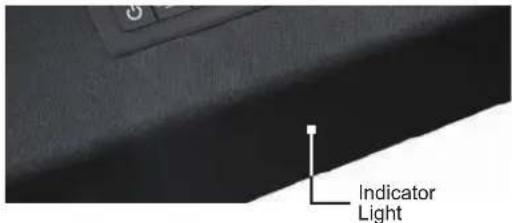
RED:
STANDBY
□ WHITE:
OPTICAL
GREEN:
COAXIAL
BLUE:
BLUETOOTH
PURPLE:
USB
LIGHT BLUE:
STEREO RCA
3. PACKAGE CONTENT
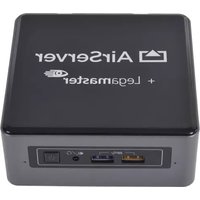
Legamaster Soundbar LS2000
Soundbar
• RCA / 3.5mm cable
• 19v power adapter
3.5mm / RCA adapter
- Remote Control
• Wall-mounting kit
- 2x AAA batteries
• Wall-mounting template
• Digital Optical Cable
Legamaster Subwoofer LS3000 (sold seperatly)
Subwoofer
• 19v power adapter

LS2000 / LS3000 - USER MANUAL - ENGLISH
USER MANUAL
Plug the AC power cord of the 19v adapter into a suitable AC power-outlet, and connect the other end to the power-port of the soundbar.
SOURCE
Connect a source to the soundbar using a suitable cable. Connect the cable to the RCA, AUX, Optical or USB port of the soundbar, or use the 3.5mm/RCA adapter to connect the cable.
SOURCE SELECTION
Use the source-selection button on the soundbar, or the source-buttons on the remote control to select the proper source. The indicator-light on the front of the soundbar will change color to show the different sources selected (see above for color-explanation).
• SOUND AND VOLUME SETTINGS
Use the volume up and down buttons on soundbar or remote to adjust the volume.
Using the DSP buttons (MOVIE, MUSIC, DIALOG) on the remote, pre-set setting can be chosen that adjust the sound settings (bass / treble) for specific scenario's.
With the BASS- and BASS+ buttons on the remote, the bass output can be regulated to your liking. With the TREBLE- and TREBLE+ buttons on the remote, treble can be set to your liking.
• CONNECTING A BLUETOOTH DEVICE
Pairing a new device is only possible when no other devices are connected.
Using the source selection button, or the BT button on the remote, switch to Bluetooth mode. The indicator will light up blue (when a device is already paired) or will blink blue when in pairing mode.
On a Bluetooth-enabled device, open the Bluetooth-settings. Make sure Bluetooth is enabled. Connect your device to by selecting LS2000 from the list of devices.
To disconnect your device, hold the BT button for a few seconds.

LS2000 / LS3000 - USER MANUAL - ENGLISH
USER MANUAL
NOTE:
- Once paired, a device will auto-connect to the soundbar when in range and when the soundbar is not paired to another device.
• The range of a Bluetooth-signal is limited. Please stay within 10 meters of the soundbar to guarantee a stable signal. - A device can be disconnected and prevented to auto-connect. Select LS2000 from the list of connected devices (sometimes called 'my devices / paired devices / etc.) and select 'forget device'.
5. CONNECTING THE LS3000 SUBWOOFER TO THE SOUNDBAR
The Legamaster LS2000 can be upgraded by connecting the Legamaster LS3000 subwoofer to the audio-system. (LS3000 sold separately).
To connect the LS3000 Subwoofer to the soundbar, first plug in the power adapter in a suitable power-outlet, and connect the other end to the subwoofer.
Press the 'connect' button on the back of the subwoofer. Please make sure no other soundbars than the soundbar that is intended to connect to the subwoofer are located close-by and are switched on, as the subwoofer may connect to the wrong soundbar unit.
After pressing the 'connect' button, the subwoofer will connect to the Legamaster LS2000 Sounbar.
6. PRECAUTIONS AND SAFETY INSTRUCTIONS
If smoke or a peculiar smell comes from the product, remove the power plug from the socket immediately.
Failure to do so may result in fire or electric shock.
If liquid is spilled or objects are dropped inside the product, remove the power plug from the socket immediately.
Failure to do so may result in fire or electric shock.
If the powercord is damaged or becomes hot, turn off the product. Make sure the plug has cooled down and remove the plug from the socket.

LS2000 / LS3000 - USER MANUAL - ENGLISH
USER MANUAL
If the product is still used in this condition, it may cause fire or an electric shock.
In all of the cases like above: contact your dealer for inspection / replacement.
To turn off the product completely, remove the plug from the socket.
7. INSTALLATION
Don't install in a high temperature or high humidity environment.
Don't install near any heat sources such as radiators, hot-air outlets, stoves or other devices that produce heat.
This may cause fire or electric shock.
Don't overload sockets or cables beyond electrical capacity.
Don't use extension leads as this may cause fire or electric shock.
Don't insert the power plug into any socket other than 100-240V AC
This may cause fire or electric shock.
- Don't use a damaged power plug or worn socket
- Don't insert the wrong plug as it may cause fire or electric shock
Make sure the product is mounted or placed properly. Dropping or falling may cause damage to the product and/or to it's environment.

Information in this document is subject to change without notice.
2019 Legamaster International B.V. All rights reserved.
Reproduction in any manner whatsoever without the written permission of Legamaster International is strictly forbidden.

LS2000 / LS3000 - USER MANUAL - ENGLISH
BENUTZERHANDBUCH
ROT:
STANDBY
□ WEISS:
OPTICAL
GRÜN:
COAXIAL
BLAU:
BLUETOOTH
VIOLETT:
USB
HELLBLAU:
STEREO RCA
3. PAKETINHALT
Legamaster Soundbar LS2000
ROUGE:
□ BLANC:
VERT:
BLEU:
POURPRE:
BLEU CLAIR:
STANDBY
OPTICAL
COAXIAL
BLUETOOTH
USB
STEREO RCA
3. CONTENU DU PAQUET
Legamaster Soundbar LS2000
ROOD:
STANDBY
□ WIT:
OPTICAL
GROEN:
COAXIAL
BLAUW:
BLUETOOTH
PAARS:
USB
LICHTBLAUW:
STEREO RCA
3. INHOUD VAN DE VERPAKKING
Legamaster Soundbar LS2000
Soundbar
• RCA / 3,5mm kabel
• 19v Adapter
• 3,5mm / RCA adapter
• Afstandsbediening
- Wandmontage kit
• 2x AAA batterij
• Muurbevestigingssjabloon
- Optische kabel
Legamaster Subwoofer LS3000
- BOTÓN DE ENCENDIDO
- MUTE / UNMUTE
- VOLUME +
- ANTERIOR
- SIGUIENTE
- VOLUME -
- OPTICAL
-
COAXIAL
-
BLUETOOTH
ROJO:
STANDBY
□ BLANCO:
OPTICAL
VERDE:
COAXIAL
AZUL:
BLUETOOTH
PÚRPURA:
USB
AZUL CLARO:
STEREO RCA
- USER MANUAL
- Recycling Information
- Warranty information
- MAIN UNIT
- REMOTE CONTROL
- PACKAGE CONTENT
- Legamaster Soundbar LS2000
- SOURCE
- SOURCE SELECTION
- • SOUND AND VOLUME SETTINGS
- • CONNECTING A BLUETOOTH DEVICE
- NOTE:
- CONNECTING THE LS3000 SUBWOOFER TO THE SOUNDBAR
- PRECAUTIONS AND SAFETY INSTRUCTIONS
- INSTALLATION
- BENUTZERHANDBUCH
- PAKETINHALT
- CONTENU DU PAQUET
- INHOUD VAN DE VERPAKKING
- Legamaster Subwoofer LS3000
Brand : Legamaster
Model : LS2000
Category : Soundbar