
HAFC9 TI32SX - Refrigerator HOTPOINT - Free user manual and instructions
Find the device manual for free HAFC9 TI32SX HOTPOINT in PDF.
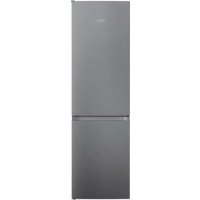



| Product Type | Refrigerator with freezer compartment |
| Brand | Hotpoint |
| Model | HAFC9 TI32SX |
| Dimensions (H x W x D) | Approximately 180 x 70 x 65 cm |
| Weight | Approximately 70 kg |
| Power supply | 220-240 V, 50 Hz |
| Energy efficiency class | F (LED light source class F/G) |
| Lighting system | LED (replacement by after-sales service) |
| Defrost | Automatic in refrigerator compartment |
| Door reversibility | Yes, possible (intervention recommended by two people) |
| Shelves and door bins | Removable and adjustable |
| Freezing capacity | According to the rating plate (quantity in 24h not specified) |
| Cold zone | Natural air circulation, different temperature zones |
| Quick freeze function | Not mentioned |
| Operating noises | Whistling, gurgling, rumbling, humming, cracking, clicking (normal) |
| Cleaning | Cloth and warm water and mild detergent solution; do not use steam |
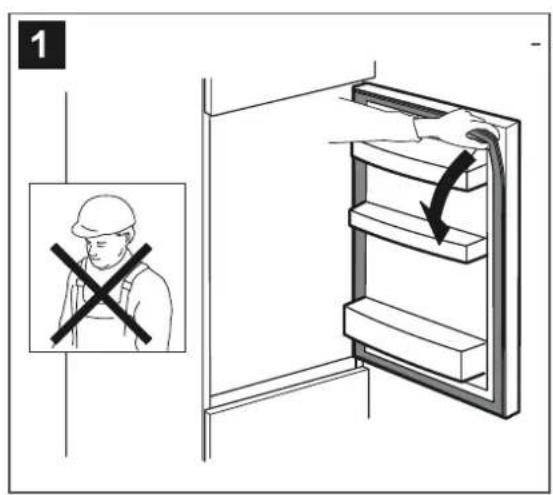
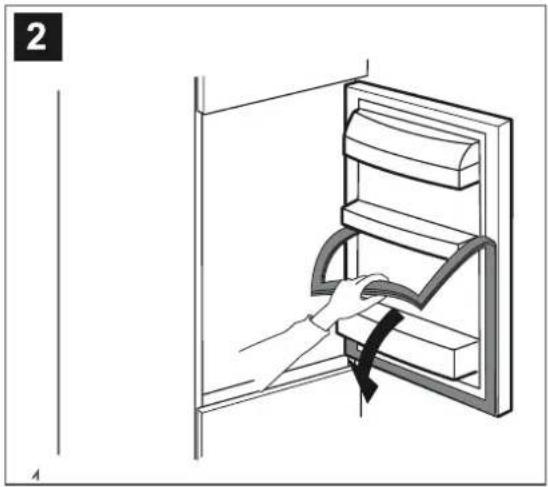
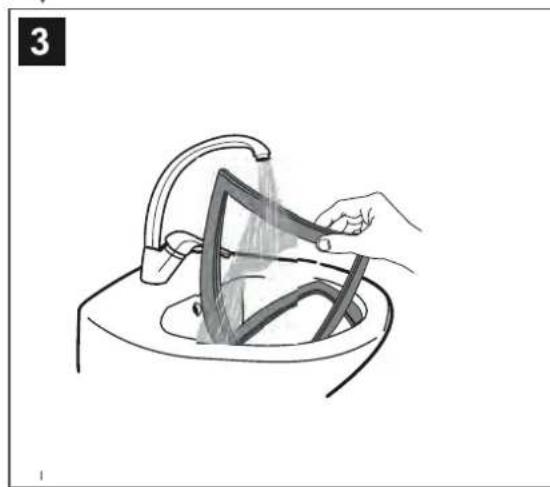
| Door gasket | Replaceable (manual provides instructions) |
| Supplied accessories | Defrost drain cleaning tool |
| Availability of spare parts | 7 to 10 years according to regulations |
| After-sales service | Contact the authorized service with model and service number |
Frequently Asked Questions - HAFC9 TI32SX HOTPOINT
User questions about HAFC9 TI32SX HOTPOINT
0 question about this device. Answer the ones you know or ask your own.
Ask a new question about this device
Download the instructions for your Refrigerator in PDF format for free! Find your manual HAFC9 TI32SX - HOTPOINT and take your electronic device back in hand. On this page are published all the documents necessary for the use of your device. HAFC9 TI32SX by HOTPOINT.
USER MANUAL HAFC9 TI32SX HOTPOINT
Light systems (depending on the model) 2
Shelves and door balconies 2
Door 2
How to use the appliance 3
First time use 3
Refrigerator compartment and food storage 3
How to store fresh food and beverages 3
Freezer compartment and food storage 3
Removing the freezer drawer container 3
Tips for freezing and storing fresh food 3
4
Food shelf life at different temperatures 4
Functional sounds 4
Recommendation in case of no use of the appliance 5
Cleaning and maintenance 6
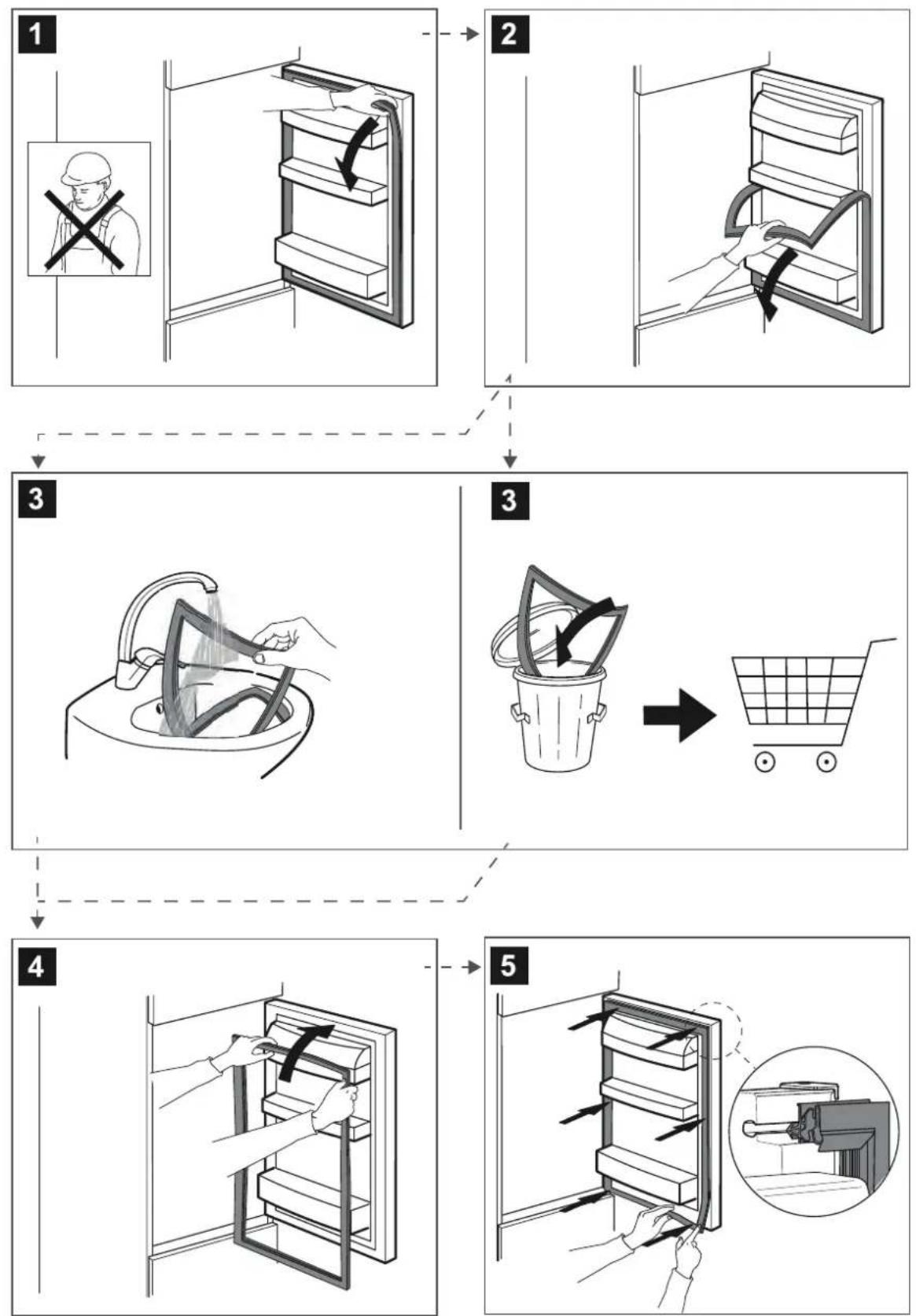
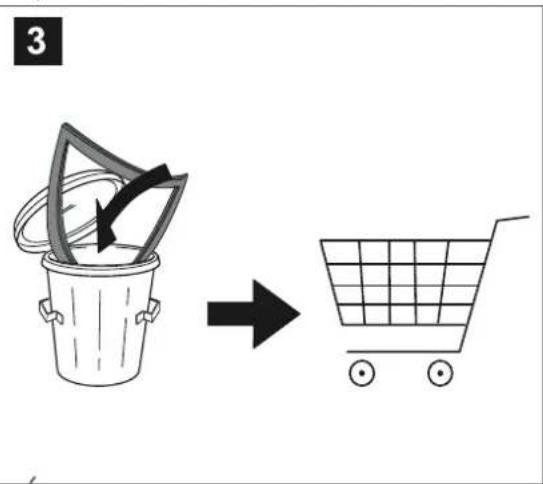
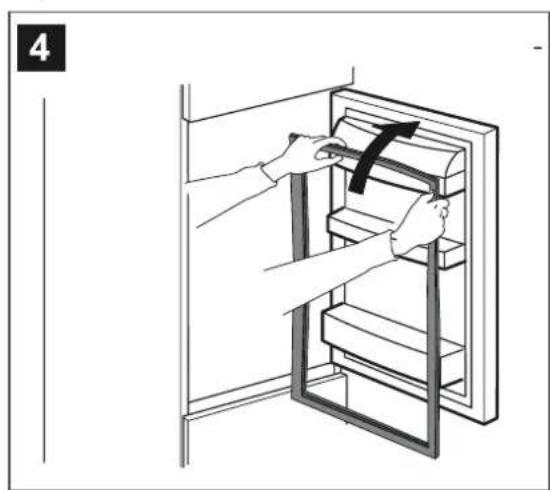
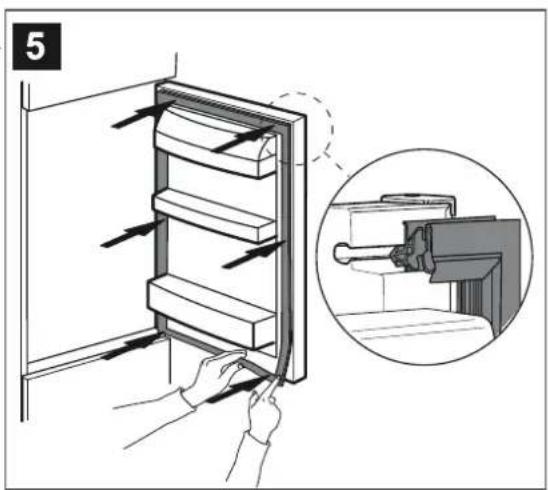
Gasket replacement 7
After-sales service 8
General Information
LED light
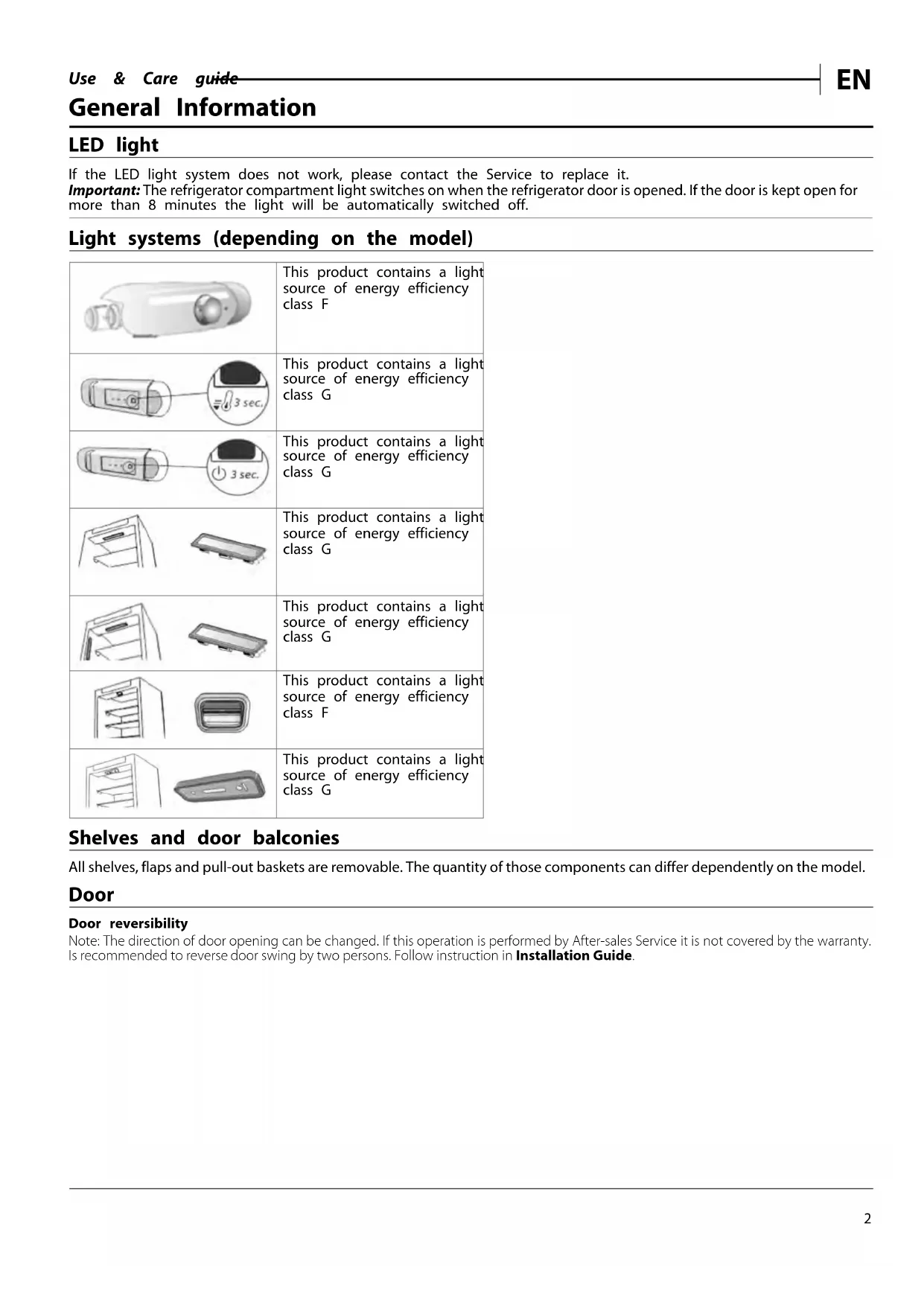
If the LED light system does not work, please contact the Service to replace it.
Important: The refrigerator compartment light switches on when the refrigerator door is opened. If the door is kept open for more than 8 minutes the light will be automatically switched off.
Light systems (depending on the model)
| This product contains a light source of energy efficiency class F |
| This product contains a light source of energy efficiency class G |
| This product contains a light source of energy efficiency class G |
| This product contains a light source of energy efficiency class G |
| This product contains a light source of energy efficiency class G |
| This product contains a light source of energy efficiency class G |
Shelves and door balconies
All shelves, flaps and pull-out baskets are removable. The quantity of those components can differ dependently on the model.
Door
Door reversibility
Note: The direction of door opening can be changed. If this operation is performed by After-sales Service it is not covered by the warranty. Is recommended to reverse door swing by two persons. Follow instruction in Installation Guide.
How to use the appliance
First time use
After installation, wait at least two hours before connecting the appliance to the power supply. Once connected, it will start working automatically. The ideal temperature settings are preset from the factory. After turning the appliance on, wait 4-6 hours for it to reach the correct food storage temperature.
Refrigerator compartment and food storage
The refrigerator compartment allows for the storage of fresh food and drink. The refrigerator compartment defrosts completely automatically. The occasional presence of drops of water on the internal back wall of the compartment is a sign of the automatic defrosting phase. The defrosting water is channelled into a drain and then collected in a container, where it evaporates.
Note: the ambient temperature, how often the doors are opened and the position of the appliance may affect the internal temperatures in the two compartments. Set the temperatures depending on these factors. In very humid conditions, condensation may form in the refrigerator compartment, especially on the glass shelves. In this case, it is recommended that you close containers with liquids in (e.g. a pot of stock), wrap up food with a high water content (e.g. vegetables) and turn on the fan, if there is one. All of the drawers, door shelves and shelves can be removed.
Air ventilation
The natural circulation of air in the refrigerator compartment results in zones with different temperatures. Insufficient ventilation results in an increase in energy consumption and reduction of the refrigerating performance.
How to store fresh food and beverages
Foods which give off a large amount ethylene gas (apples, apricots, pears, peaches, avocado, figs, prunes, blueberries, mellons, beans) and those that are sensitive to this gas, such as fruit vegetables and salad, should always be separated or wrapped so as not to reduce the storage life; for example do not store tomatoes together with kiwi fruits or cabbage. Do not store food too close together to enable sufficient air circulation. Use recyclable plastic, metal, aluminum and glass containers and cling film to wrap foods. If you have a little quantity of food to store in the refrigerator, we recommend to use the shelves above the crisper for fruits and vegetables since this is the coolest area of the compartment. Always use closed containers for liquids and for food that may give off or be tainted by odor or flavor transfer or cover them. To avoid bottles falling over, you can use the bottle holder (available on selected models).
Freezer compartment and food storage
The freezer compartment allows for the storage of frozen food and the freezing of fresh food. The quantity of fresh food that can be frozen in a specific time period is indicated on the rating plate. Arrange the fresh food in the freezing area inside the freezer compartment, leaving enough space around it to allow air to circulate freely. Avoid fresh food to come into direct contact with frozen food. Load limits are determined by baskets, flaps, drawers, shelves etc. Make sure that these components can still close easily after loading. To optimize freezing speed and get more storage space, the freezer compartment can be used without the freezer drawers.
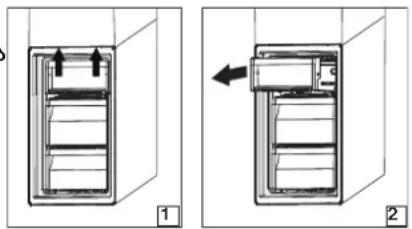
Removing the freezer drawer container
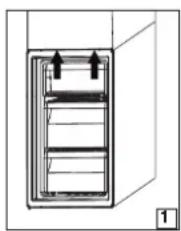
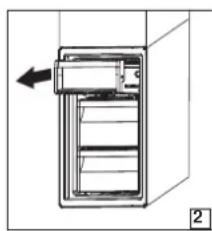
- Open the freezer door.
- Pull the upper container upwards by the right and left corners (1).
- Remove the drawer (2).
- Install the upper container in the reverse order.
Tips for freezing and storing fresh food
We recommend to label and date all your frozen food. Adding a label will help you to identify foods and to know they should be used before their quality deteriorates. Do not re-freeze defrosted food. Before freezing, wrap and seal fresh food in: aluminium foil, cling film, air and water-tight plastic bags, polythene containers with lids or freezer containers suitable for freezing fresh food. - Food must be fresh, mature and of prime quality in order to obtain high quality frozen food. - Fresh vegetables and fruit should preferably be frozen as soon as they are picked to maintain the full original nutritional value, consistency, colour and flavor. Some meat, especially game, should be hung before it is frozen. - Always leave hot food to cool before placing in the freezer. Eat fully or partially defrosted foods immediately. Do not refreeze unless the food is cooked after it has thawed. Once cooked, the thawed food can be refrozen. - Do not freeze bottles with liquid.
Frozen food: shopping tips
When purchasing frozen food products:
- Ensure that the packaging is not damaged (frozen food in damaged packaging may have deteriorated). If the package is swollen or has damp patches, it may not have been stored under optimal conditions and defrosting may have begun.
- When shopping, buy frozen foods at the end of your trip and transport them in a thermally insulated cool bag.
- Once at home, place the frozen foods immediately in the freezer.
- If food has defrosted even partially, do not refreeze it. Consume within 24 hours.
- Avoid or reduce temperature variations to the minimum. Respect the best-before date on the package.
- Always observe the storage information on the package.
Food shelf life at different temperatures
| FROZEN COMPARTMENT | |||
| Product Storage period (-12°C) Recommended Storage | period (-18°C) | Storage period (-24°C) | |
| Butter or margarine 1 month | 6 months 9 months | ||
| Fish 1 month 1-3 months 6 | months | ||
| Fruits (except citrus) & Vegetables | 1 month 8-12 months 12 months | ||
| Meat-Ham-sausage Roasts (beef-pork-lamb) Steaks or chops (beef-lamb-pork) | 1 month 2 months | 8-12 months 4 months | 12 months |
| Milk, Fresh fluid, Cheese, Ice cream or sherbet | 1 month 1-3 months 5 months | not recommended | for ice cream) |
| Poultry (chicken-turkey) 1 month 5-7 months 9 months | |||
| UNFROZEN COMPARTMENT | |||
| Product | Storage period 0-3°C | Storage period (3-6°C) | Storage period 6-8°C |
| Cans, drinks, eggs, sauces, pickles, butter, jam | 3-4 weeks | 3-4 weeks | 3-4 weeks |
| Tropical fruit | Not recommended 2-4 weeks | 3-4 weeks | |
| Cheese, milk, dairy food, deli food, yoghurt | i2-5 days | 2-5 days | 2-5 days |
| Cold cuts, desserts, meat and fish and home-cooked food | B-5 days | 1-2 days | Not recommended |
| Store vegetables and fruits (excluding tropical fruits and citrus) | 15 days | 10-12 days | 4-7 days |
Functional sounds
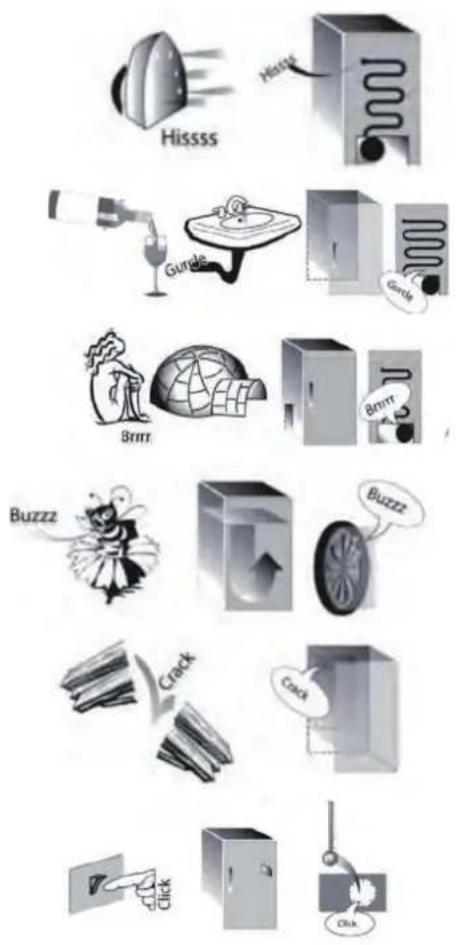
Sounds coming from your appliances are normal since it has a number of fans and engines to regulate performances that switch on and off automatically.
Some of the functional sounds can be reduced through:
- Leveling the appliance and installing it on an even surface.
- Separating and avoiding contact between the appliance and furniture.
- Checking if the internal components are correctly placed.
- Checking if bottles and containers are not in contact with each other.
Some of the functional sounds you might hear
- A hissing sound when switching on the appliance for the first time or after a long pause.
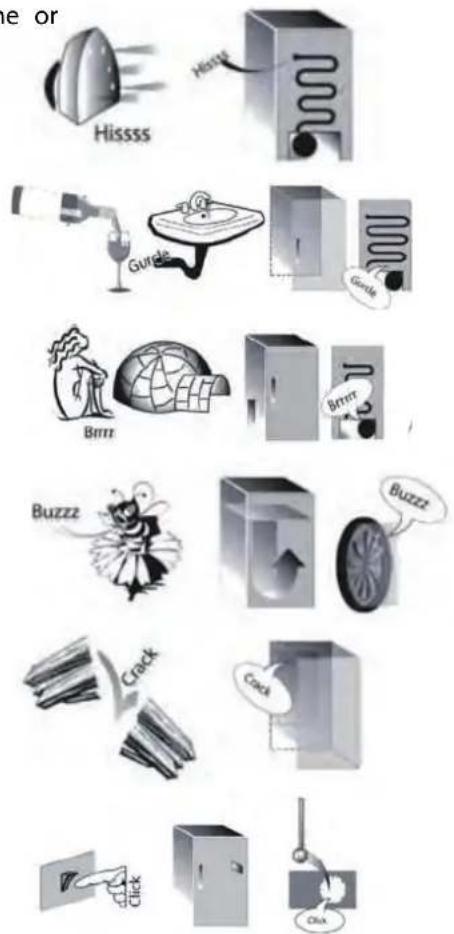
- A gurgling sound when refrigerant fluid enters into the pipes.
- BRRR sound is from the compressor running.
- Buzzing sound when water valve or fan start working.
- A cracking sound when compressor starts.
- The Click is from the thermostat which adjusts how often the compressor is running.
Recommendation in case of no use of the appliance
In the event of non-use of the appliance
Disconnect the appliance from the power supply, empty it, defrost it (if necessary) and clean it.
Keep the doors slightly ajar to let air circulate inside the compartments. By doing this, you avoid the development of mould and bad odours.
In the event of an interruption to the power supply
Keep the doors closed so the food stays cold for as long as possible. Do not re-freeze food that has partially defrosted. If there is a prolonged power cut, the black out alarm may also activate (in products with electronics).
Cleaning and maintenance
Before any cleaning or maintenance operation, unplug the appliance from the mains or disconnect the electrical power supply.
Never use abrasives. Never clean refrigerator parts with flammable fluids.
Do not use steam cleaners.
The buttons and control panel display must not be cleaned with alcohol or alcohol-derived substances, but with a dry cloth.
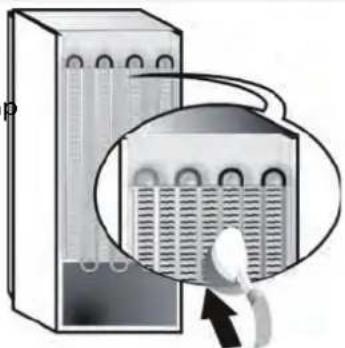
Periodically clean the appliance with a cloth and a solution of lukewarm water and neutral detergent specifically for refrigerator interiors. Clean the outside of the appliance and the door seal with a damp cloth and dry with a soft cloth. - The condenser placed in the rear of the appliance should be cleaned regularly using a vacuum cleaner.
Important:
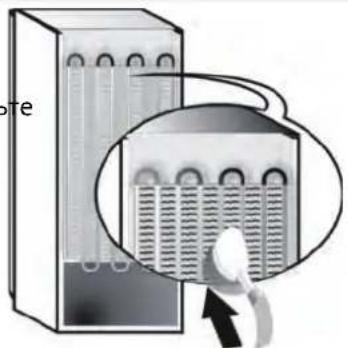
The buttons and control panel display must not be cleaned with alcohol or alcohol-derived substances, but with a dry cloth. The refrigeration system pipes are located near the defrost pan and can become hot. Periodically clean them with a vacuum cleaner.
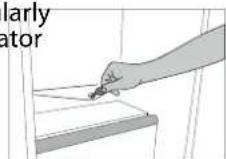
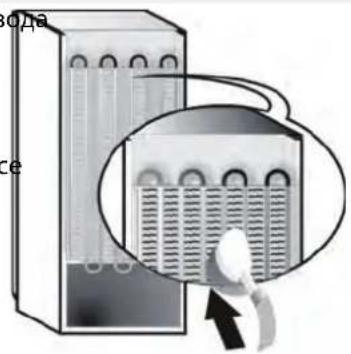
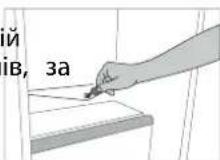
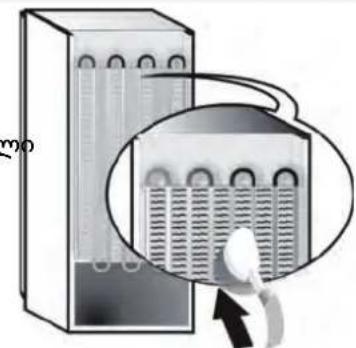
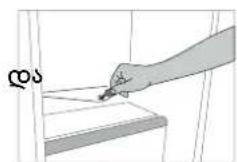
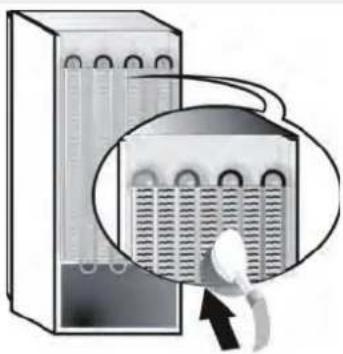
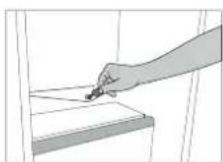
To ensure the constant and correct flow of the defrosting water, regularly clean the inside of the drain situated in the back wall of the refrigerator compartment near the fruit and vegetable drawer using the utensil provided *.
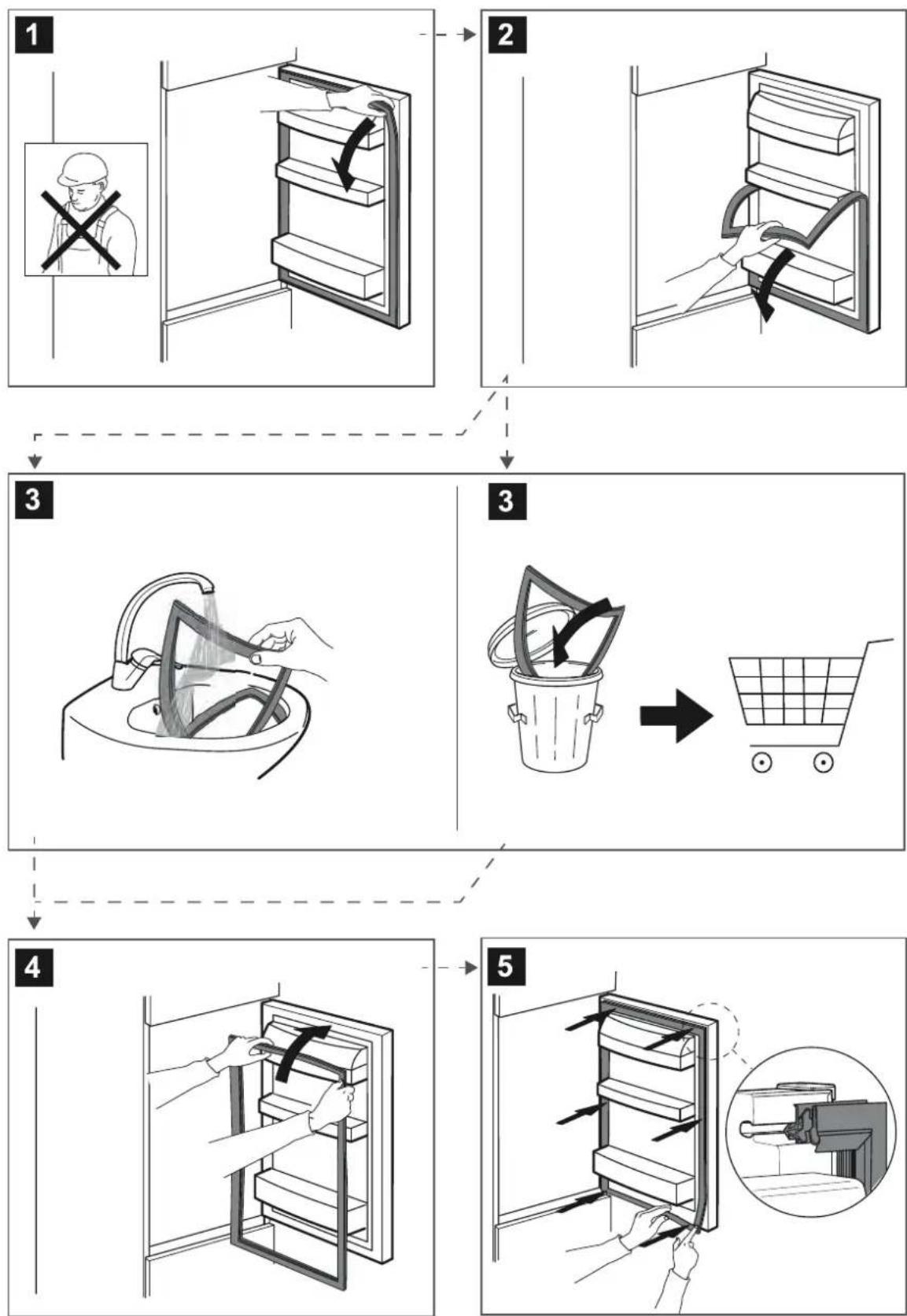
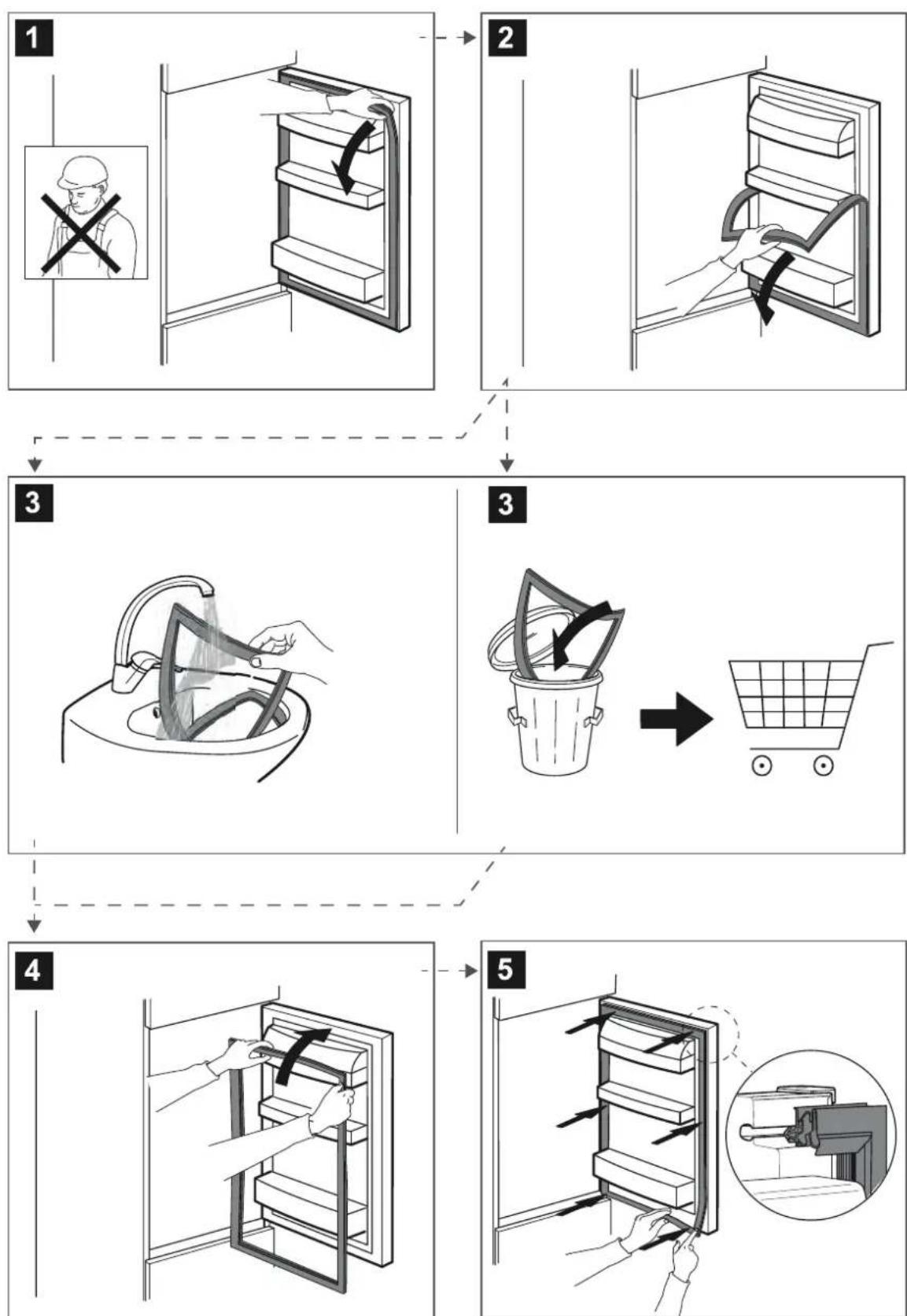
Gasket replacement
After-sales service
BEFORE CALLING THE AFTER-SALES SERVICE
- See if you can solve the problem by yourself with the help of the suggestions given in the TROUBLESHOOTING.
- Switch the appliance off and back on again to see if the fault persists.
IF AFTER THE ABOVE CHECKS THE FAULT STILL OCCURS, GET IN TOUCH WITH THE NEAREST AFTER-SALES SERVICE.
To receive assistance, call the number shown on the warranty booklet.
When contacting our Client After sales service, always specify:
a brief description of the fault; - the type and exact model of the appliance;
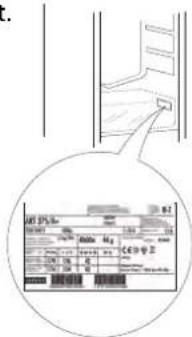
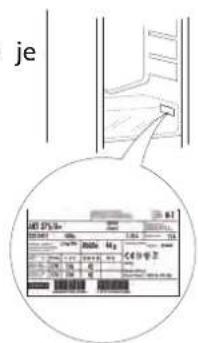
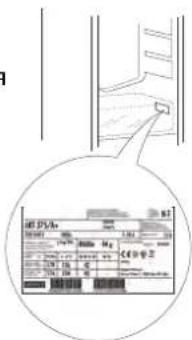
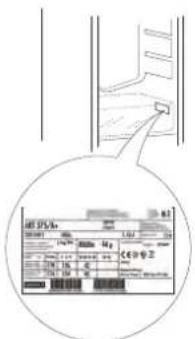
- the service number (number after the word Service on the rating
plate). The service number is also indicated on the guarantee booklet.
- your full address;
- your telephone number.
If any repairs are required, please contact an authorised aftersales service (to guarantee that original spare parts will be used and repairs carried out correctly).
Spare parts will be available for a period of either up to 7 or up to 10 years, according to the specific Regulation requirements.
INDEX
Never use abrasive agents. Never clean the parts of the refrigerator with flammable liquids.
Do not use sprays, clean with a cloth.
The buttons and the control panel display should not be cleaned with alcohol or alcohol-based substances, but with a dry cloth.
- Periodically clean the refrigerator with a cloth and a solution of lukewarm water and a neutral cleaning agent, specially designed for the interior of the refrigerator. Wipe the visible parts of the device and the gasket of the door with a damp cloth and dry with a soft cloth. The evaporator, the back part of the device, should be cleaned regularly with a vacuum cleaner.
Important:
The buttons and the control panel should not be cleaned with alcohol or alcohol-based substances, but with a dry cloth. The cooling system parts are located near the container for defrosting water and may become hot. Periodically clean them with a vacuum cleaner.
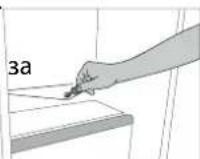
To guarantee the uninterrupted and correct flow of the defrosting water, clean regularly the outlet of the defrosting water, which is located at the back of the refrigerator, near the compressor and the vegetables, using the provided tool*.
Spare parts are available for a period of 7 to 10 years, in accordance with the specific requirements of the regulations.
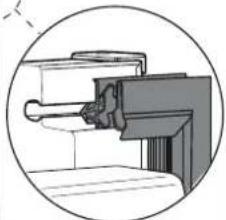
Replacement of the seal
1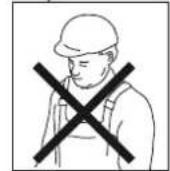
2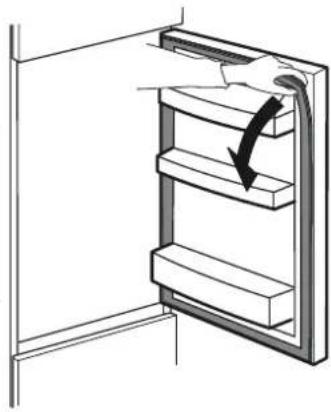
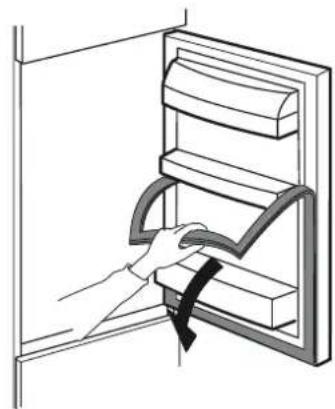
3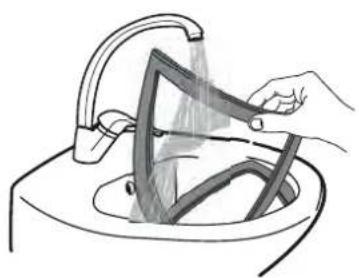
3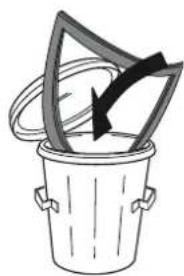

4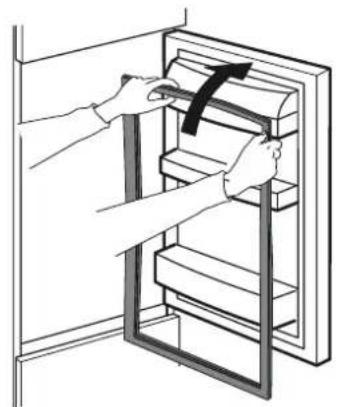
5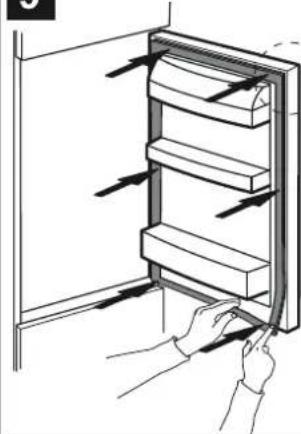
Customer service
Contact the after-sales service department.
- You can also contact us using the contact details provided in the TROUBLESHOOTING section. 2. TURN THE DEVICE OFF AND ON AGAIN, then check if the fault persists.
If after performing the above checks the fault is still not resolved, contact your nearest after-sales service department.
To receive service, please have the number given on the warranty card ready.
When you contact the after-sales service department, please provide:
A brief description of the fault; the exact type and model of the device;
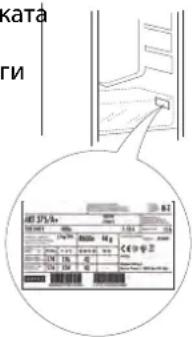
- The service number (the number after the word Service on the data plate). The service number is also indicated on the warranty card and on the address label; please have this information ready before you call.
SERVICE 0000 000 00000
If any repairs are necessary, please contact an authorized after-sales service department to ensure that original spare parts are used and that repairs are carried out correctly.
Environmental information 7
Disposal information 8
Installation and connection 9
General information
Auxvia LED
If the LED light is faulty, contact the Service Centre to replace it. Warning: The light source is activated when the appliance door is first opened. If the door remains open for more than 8 minutes, the light switches off automatically.
BEFORE CONTACTING THE AFTER-SALES SERVICE
- Check if you can solve the problem yourself with the help of the advice given in the TROUBLESHOOTING section.
- Switch the appliance off and on and check if the fault persists.
IF THE FAULT PERSISTS AFTER THE ABOVE CHECKS, CONTACT THE NEAREST AFTER-SALES SERVICE
To get help, call the number given in the warranty booklet.
When contacting our after-sales service for customers, you need to provide:
- a brief description of the problem;
- the type and exact model of the appliance;
SERVICE
- the service number (the number after the word Service on the data plate). The service number is also given in the warranty booklet;
- your full address; Always drain the water before opening the door.
If any repairs are needed, contact an authorised after-sales service (to ensure that original spare parts are used and that repairs are carried out correctly).
Instructions for use
INSTRUCTIONS FOR USE
CONTENTS
Shelves and door bins 2
Door 2
Using the appliance 3
First use 3
Refrigerator compartment and food storage 3
Shelves and door bins
If the appliance is not in use
Switch off the appliance at the mains, remove all food from it, and if necessary defrost and clean it. Keep the doors slightly open to ensure proper air circulation in the compartment. This will prevent the formation of mould and unpleasant odours.
In case of a power failure
Keep the doors closed so that food stays cold as long as possible. Do not refreeze partially thawed food. If the power is off for a long time, an alarm may sound (on models with electronic control).
Care and maintenance
Before performing any cleaning or maintenance, disconnect the appliance from the mains or unplug it from the socket.
Never use abrasive cleaning agents. Never use sharp objects to clean the refrigerator.
Do not use steam to clean the appliance.
The appliance and its control panel must not be wiped with cloths that are wet, but only with a dry cloth.
- Periodically, we recommend cleaning the gaskets and wiping the thermal parts with a neutral cleaning agent (especially if the internal parts of the refrigerator are dirty). Wipe the external surface of the appliance and the door seals with a damp cloth, then dry them.
- Periodically clean the condenser, located on the rear wall of the appliance, using a vacuum cleaner.
Important:
The appliance and its control panel must not be wiped with cloths that are wet, but only with a dry cloth. The cooling system pipes are located near the ice cube tray and can be damaged. Periodically clean these pipes with a vacuum cleaner.
To ensure safe and correct installation of the appliance, adjust the leveling feet located on the bottom front of the refrigerator using the supplied tool, which is included in the kit*.
Spare parts will be available for a period of 7 to 10 years, depending on specific regulations.
Replacing the door seal
BEFORE CALLING THE CUSTOMER SERVICE CENTER
- Check if you can solve the problem yourself using the instructions in the Troubleshooting section.
- Turn off the appliance and turn it on again to check if the malfunction persists.
AFTER-SALES SERVICE
To get help, call the number indicated in the warranty card.
When contacting our service after the warranty service, please specify:
KOPOTKNI ONNC HecnpaBHOCTI; TINI TOUY MOeInb npnnay;
- Service number (number of the word Service on the nameplate). The service number is also indicated in the warranty card SERVICE 0000 000 00000
- your full residential address;
- Before opening the doors, call the service.
If repair is needed, contact an authorized service center (to guarantee proper repair and use of original spare parts).
The appliance is intended for household use only. It should not be used for other purposes (e.g., commercial use). Use only original accessories and spare parts. The manufacturer is not responsible for damage caused by improper use.
The appliance must be installed on a stable surface.
Do not use the appliance if the power cord or plug is damaged. If the appliance malfunctions, contact a qualified technician. Do not attempt to repair the appliance yourself. Keep the appliance away from heat sources and open flames.
256035: The appliance must be connected to a properly grounded outlet. The voltage must match the rating on the nameplate. 20000000000000000000000000000000000000000000000000000000000000000000000000000000000
3050000000
Before cleaning, unplug the appliance. Do not immerse the appliance in water or other liquids.
The appliance must be used only for its intended purpose.
The appliance should be used only for its intended purpose (e.g., heating, cooking, drying, etc.) and not for any other use. Do not use the appliance if it is damaged or malfunctioning. Keep the appliance out of reach of children. Do not operate the appliance with wet hands. Do not cover the appliance while it is in use. The appliance should be placed on a stable, flat surface. Do not use the appliance near water or in damp environments. If the power cord is damaged, it must be replaced by the manufacturer, its service agent, or a similarly qualified person to avoid a hazard.
SERVICE
Service manual (for No Service use only 2008 or later). Service manual contains instructions for maintenance and repair of the device.

- LIGHT SYSTEMS (DEPENDING ON THE MODEL)
- SHELVES AND DOOR BALCONIES
- DOOR
- HOW TO USE THE APPLIANCE
- FIRST TIME USE
- REFRIGERATOR COMPARTMENT AND FOOD STORAGE
- HOW TO STORE FRESH FOOD AND BEVERAGES
- FREEZER COMPARTMENT AND FOOD STORAGE
- REMOVING THE FREEZER DRAWER CONTAINER
- TIPS FOR FREEZING AND STORING FRESH FOOD
- FOOD SHELF LIFE AT DIFFERENT TEMPERATURES
- FUNCTIONAL SOUNDS
- RECOMMENDATION IN CASE OF NO USE OF THE APPLIANCE
- CLEANING AND MAINTENANCE
- GASKET REPLACEMENT
- AFTER-SALES SERVICE
- GENERAL INFORMATION
- LED LIGHT
- DOOR REVERSIBILITY
- AIR VENTILATION
- FROZEN FOOD: SHOPPING TIPS
- SOME OF THE FUNCTIONAL SOUNDS CAN BE REDUCED THROUGH
- SOME OF THE FUNCTIONAL SOUNDS YOU MIGHT HEAR
- IN THE EVENT OF NON-USE OF THE APPLIANCE
- IN THE EVENT OF AN INTERRUPTION TO THE POWER SUPPLY
- IMPORTANT
- BEFORE CALLING THE AFTER-SALES SERVICE
- IF AFTER THE ABOVE CHECKS THE FAULT STILL OCCURS, GET IN TOUCH WITH THE NEAREST AFTER-SALES SERVICE
- INDEX
- REPLACEMENT OF THE SEAL
- CUSTOMER SERVICE
- CONTACT THE AFTER-SALES SERVICE DEPARTMENT
- IF AFTER PERFORMING THE ABOVE CHECKS THE FAULT IS STILL NOT RESOLVED, CONTACT YOUR NEAREST AFTER-SALES SERVICE DEPARTMENT
- ENVIRONMENTAL INFORMATION
- DISPOSAL INFORMATION
- INSTALLATION AND CONNECTION
- AUXVIA LED
- BEFORE CONTACTING THE AFTER-SALES SERVICE
- IF THE FAULT PERSISTS AFTER THE ABOVE CHECKS, CONTACT THE NEAREST AFTER-SALES SERVICE
- INSTRUCTIONS FOR USE
- CONTENTS
- USING THE APPLIANCE
- SHELVES AND DOOR BINS
- IF THE APPLIANCE IS NOT IN USE
- IN CASE OF A POWER FAILURE
- CARE AND MAINTENANCE
- REPLACING THE DOOR SEAL
- BEFORE CALLING THE CUSTOMER SERVICE CENTER
- THE APPLIANCE MUST BE INSTALLED ON A STABLE SURFACE
- THE APPLIANCE MUST BE USED ONLY FOR ITS INTENDED PURPOSE
Brand : HOTPOINT
Model : HAFC9 TI32SX
Category : Refrigerator