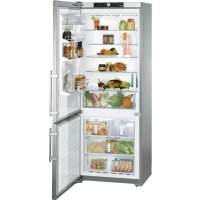
CS 1640 - Fridge LIEBHERR - Free user manual and instructions
Find the device manual for free CS 1640 LIEBHERR in PDF.



| Product type | NoFrost combined refrigerator-freezer with automatic ice maker |
| Brand | Liebherr |
| Model | CS 1640 |
| Height (A) | 2020 mm |
| Width (B) | 747 mm |
| Depth (C) | 630 mm |
| Depth with open door (D) | 1330 mm |
| Height with hinges (E) | 790 mm |
| Power supply | 110-120 V AC, 15 A, dedicated circuit with grounding |
| Climate class | SN, N, ST, SN-ST, SN-T, T (from 10°C to 43°C) |
| NoFrost technology | Automatic defrost of both compartments |
| SuperCool function | Quick cooling of refrigerator (6 hours) |
| SuperFrost function | Quick freezing (30 to 65 hours) |
| Electronic display | Actual temperatures and settings, power failure indicator |
| Alarms | Door open (180 s), temperature rise, power failure |
| Sabbath mode | Yes, automatic deactivation after 120 hours |
| Child safety | Control lock |
| Ice maker | Automatic, capacity up to 140 ice cubes/24h with SuperFrost |
| Water tank | Removable, for filtered decarbonized water |
| Interior lighting | 2 bulbs 125-130 V, 25 W max, socket E14 |
| Shelves | Adjustable tempered glass, with bottle slides |
| Vegetable drawer | With cover, removable |
| Vario Box | Removable storage boxes for butter and cheese |
| Cleaning | Manual, warm water and dish soap, no steam or abrasives |
| Warranty | 2 years parts and labor, 5 years sealed system, 6-12 years parts (sealed system) |
Frequently Asked Questions - CS 1640 LIEBHERR
User questions about CS 1640 LIEBHERR
0 question about this device. Answer the ones you know or ask your own.
Ask a new question about this device
Download the instructions for your Fridge in PDF format for free! Find your manual CS 1640 - LIEBHERR and take your electronic device back in hand. On this page are published all the documents necessary for the use of your device. CS 1640 by LIEBHERR.
USER MANUAL CS 1640 LIEBHERR
For NoFrost combined
refrigerator-freezers
Manuel
d'utilisation et
d'entretien
Pour les combinés
CFC-free
Energy-optimized refrigerant circuit
Energy-efficient insulation
Low energy consumption
- User-friendly electronic controls
Display of functions switched on - Temperature can be controlled within climate rating range, regardless of room temperature
- Refrigerator and freezer compartments defrost automatically - no need to spend time defrosting
Big net refrigerator capacity
Variable and practical features
- Safety-glass storage shelves
Big net freezer capacity
Automatic ice maker
Freezer temperature increase alarm
Audible door open alarm
Power failure/FrostControl display
- Fresh food can be fast-frozen as required
All drawers suitable for fast freezing
Integrated transport grips on appliance housing
Transport castors
Easy to clean
- This unit is certified as Sabbath compliant by the Star-K organization, thus allowing the appliance to be used during religious holidays. For more information please visit Star-K on the web at www.star-k.org.
Contents Page
Safety 3
Disposal of old appliance. 3
Disposal of carton 3 Important safety information. 4
Electrical safety 4
Safety regulations 5
Unit dimensions 5
Features 6
Description of appliance and equipment 6
Operating and control elements 7
Operation 8
Turning the appliance on and off. 8
Setting the temperature 8
Temperature display. 9 Ventilation. 9
Audible alarm signal 9
Power failure/FrostControl display 9 SuperCool 10
Setup mode. 10-12
Refrigerator compartment. 13
Arranging food. 13 Equipment. 13
Interior light 15
Freezer compartment. 16 Freezing 16
Information system 16
Freezing with SuperFrost. 16
Freezing and storage 17
Ice Maker 17
Safety instructions and warnings. 17
Making ice cubes. 17
Filling the water tank. 18
To start the ice maker 18
Ice maker at vacations. 19
Cleaning 20
Defrosting/Vacation 21
Defrosting. 21
Vacation tips. 21
Troubleshooting 22
Ice maker troubleshooting 23
Customer service 23
Appliance information 23
Lieberherr Warranty Plan 24
IMPORTANT
All types and models are subject to continuous improvement. The manufacturer reserves the right to make modifications to the shape, equipment and technology.
Please read and follow these instructions
These instructions contain Warning and Caution statements. This information is important for safe and efficient installation and operation.
Always read and follow all Warning and Caution statements!
DANGER!
Danger indicates a hazard which will cause serious injury or death if precautions are not followed.
WARNING!
Warning indicates a potentially hazardous situation which, if not avoided, could result in death or serious injury.
CAUTION!
Caution indicates a potentially hazardous situation which, if not avoided, may result in minor or moderate injury.
IMPORTANT
This highlights information that is especially relevant to a problem-free installation and operation.
Make sure incoming voltage is the same as the appliance rating.
To reduce the risk of fire, electric shock or personal injury, installation work and electrical wiring must be done by a qualified electrician in accordance with all applicable codes and standards, including fire-rated construction.
Disposal of Old Appliance
DANGER!
Risk of child entrapment. Before you discard your old refrigerator or freezer:
- Be sure to follow your local requirements for disposal of appliances. Discarded appliances can be dangerous.
- Remove the doors.
- Remove the freezer drawers.
- Leave the shelves in place so that children may not easily climb inside.
- Cut off the power cable from the discarded refrigerator. Discard separately from the refrigerator.
Following these instructions reduces the possibility of causing personal injury, especially to children playing.
Contact the trash collection agency in your area for additional information.
Disposal of Carton
The packaging is designed to protect the appliance and individual components during moving and is made of recyclable materials.
WARNING!
Keep packaging materials away from children. Polythene sheets and bags can cause suffocation!
- Please take the packaging material to your local recycling facility.
Important Safety Information
- To prevent injury to you or damage to the unit, the appliance should be unpacked and set up by two people.
- If the appliance is damaged on delivery, contact the supplier immediately before connecting to the power source.
- To guarantee safe operation, ensure that the appliance is set up and connected as described in these operating instructions.
- Disconnect the appliance from the power source if a fault occurs. Pull out the plug, turn off or remove the fuse.
- When disconnecting the appliance, use the plug. Do not pull on the cable.
- Any repairs and work on the appliance should only be carried out by the customer service department. Unauthorized work may be dangerous to the user. Changing the power source cable should only be done by the customer service department.
- Do not eat ice cream, particularly ice cream treats, or ice cubes, immediately from the freezer compartment. There is a risk of "burning" because of the very cold temperatures.
- Do not consume food which has been stored for too long; it could cause food poisoning.
- The appliance is designed for cooling, freezing and storage of food, and for making ice. It is intended for domestic use.
- Do not store explosives or sprays using combustible propellants such as butane, propane, pentane, etc. in the appliance. Electrical components might cause leaking gas to ignite. You may identify such sprays by the printed contents or a flame symbol.
- Do not use electrical appliances inside the appliance.
- To prevent possible injury due to an electrical shock, be sure to disconnect the power cord or turn off the circuit breaker before cleaning the appliance.
- To avoid injury or damage to the appliance, do not use steam cleaning equipment to clean the appliance.
-
Do not operate the appliance in the presence of explosive fumes.
-
In the event of a power outage, minimize opening the appliance door(s). Protect the food either by placing dry ice on top of the packages or using a local frozen food locker if the power failure is of a long duration. Do not attempt to re-freeze any previously frozen food that has thawed.
- To avoid possible injury, only adjust an empty shelf. Do not attempt to adjust a shelf with food on it.
- To protect the appliance from possible damage, allow the appliance to stand 1/2 to 1 hour in place before turning the electricity on. This allows the refrigerant and system lubrication to reach equilibrium.
Electrical Safety
Connect this appliance to a 110-120 V AC, 15 amp circuit that is controlled by a circuit breaker or fuse. This appliance should have its own separate grounded circuit. Do not use an extension cord.
The power cord is equipped with a three-prong (grounding) plug for your protection against possible shock hazards. To maintain this protection:
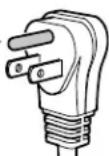
- Do not modify the plug by removing the round grounding prong.
- Do not use a two-prong adapter. Where a two-prong wall receptacle is encountered, contact a qualified electrician and have it replaced with a three-prong receptacle in accordance with all local codes and ordinances.
- Do not use a power cord that is frayed or damaged.
Safety Regulations
The appliance complies with UL 250 / CSA C22.2 #63 and is designed to cool, freeze and store food and to make ice (if equipped). It is designed as a household appliance.
The appliance is set to operate within specific ambient temperature limits according to its climate rating. These temperature limits should not be exceeded. The correct climate rating for your appliance is indicated on the model plate.
This is explained as follows:
Climate
Rating Set for Ambient Temperatures of
SN 50^ to 90^ (10^ to 32^)
N 61^ to 90^ (16^ to 32^)
ST 61^ to 100^ (16^ to 38^)
SN-ST 50^ to 100^ (10^ to 38^)
SN-T 50^ to 109^ (10^ to 43^)
T 61^ to 109^ (16°C to 43°C)
We recommend cleaning the appliance before turning it on for the first time. See Cleaning. Turn on the appliance several hours before loading it with frozen food for the first time. Do not load with frozen food until the temperature shows approximately 0^ (-18^)
WARNING!
Do not allow children to play with the appliance. Children must not climb, sit or stand on the appliance drawers. Failure to follow these instructions may result in death or serious injury.
CAUTION!
To avoid risk of personal injury or property damage, have two people unpack and move this appliance into place.
CAUTION!
Protect the finished floor surface before you uncrate the unit.
Avoid placing the appliance in direct sunlight or near the stove, range top, radiators and similar heat sources. Do not place microwave ovens, toaster ovens or other heat-emitting appliances on top of this unit.
Keep the appliance out of the weather.
The ventilation grilles should not be obstructed. Always ensure there is good ventilation all around the appliance.
As soon as you uncrate the unit:
- Examine the unit and packaging for shipping damage. Contact the carrier immediately if you suspect there is any damage.
Note the type (model number), index, serial number, date of purchase and where purchased on the spaces provided in the back of this manual.
Unit Dimensions
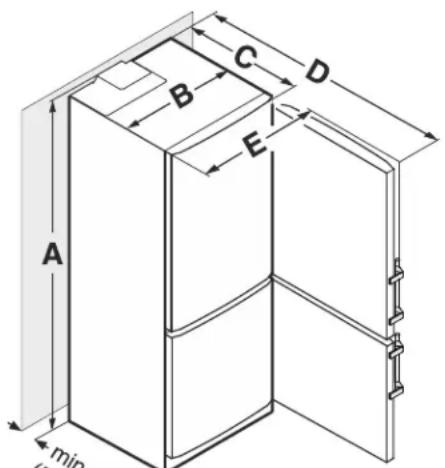
[ A = 79 - 1 / 2^{n} ] (2020 mm)
B=29-3/8" (747 mm)
C=24-13/16" (630 mm)
D=52-3/8" (1330 mm)
[ E = 31 - 3 / 32^{\prime \prime} (790 \, \text{mm}) ]
NOTE
If the gap between the rear of the appliance and the wall is less than 2 inch (51 mm), the power consumption level may increase.
Description of Appliance and Equipment - Figure 1

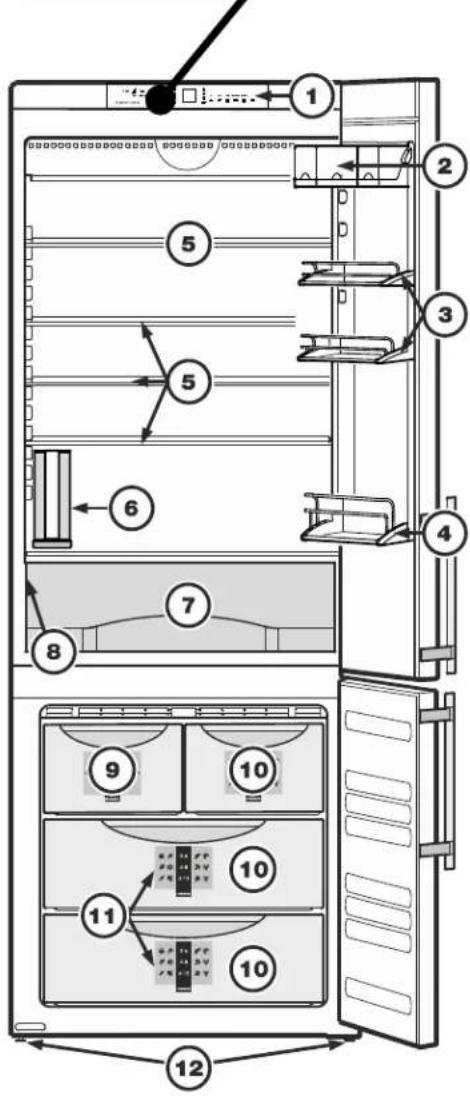
Figure 1
Description of refrigerator
(1) Operating and control elements
(2) Butter and cheese compartment - Vario Box
(3) Adjustable door racks
(4) Bottle rack
(5) Adjustable shelves
(6) Water tank
(7) Vegetable drawer
(8) Model plate (behind the vegetable drawer on the left hand side)
Description of freezer
(9) Ice maker (in the interior of the drawer)
(10) Freezer drawers
(11) Information system
(12) Adjustable-height feet
Operating and Control Elements - Figure 2, Figure 3
The electronic control panel uses touch capacitance technology. Any function can be activated by a fingertip on the symbol of the operating icons.
The exact contact point is between the symbol and its label On/Off
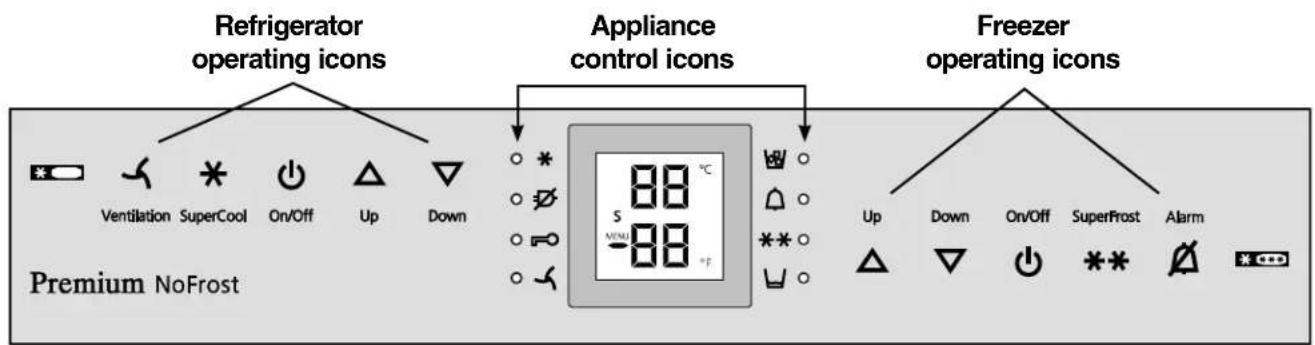
Figure 2
Refrigerator operating icons
Ventilation (circulation) On/Off
* SuperCool
Refrigerator On/Off
Temperature Up control (to increase the refrigerator temperature)
Temperature Down control (to reduce the refrigerator temperature)
Appliance control icons
Power failure LED
Ventilation ON LED
* SuperCool LED
Child lock LED
AlarmLED
Ice maker ON LED
Top up water tank LED
** SuperFrost LED
Freezer operating icons
Temperature Up control (to increase the freezer temperature)
Temperature Down control (to reduce the freezer temperature)
Freezer On/Off
** SuperFrost
Alarm mute (refrigerator and freezer)
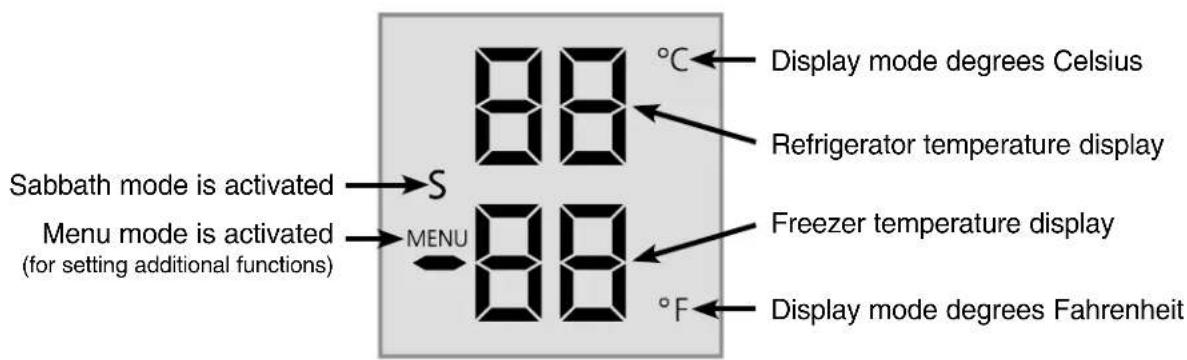
Temperature and control display
Figure 3
Turning the Appliance On and Off - Figure 4
Clean the appliance before turning it on for the first time. See Cleaning.
Do not place frozen food in the freezer until the temperature shows at least 0^ (-18^) . The refrigerator and freezer compartments can be operated separately.
1. Turning on:
Touch the Refrigerator On/Off icon
and the Freezer On/Off icon
so the temperature displays light up.
The interior light will turn on when the refrigerator door is open.
- Turning off: to turn off the refrigerator or freezer, touch the corresponding On/Off icon for approximately 3 seconds so the temperature display and interior lights go out.
Setting the Temperature - Figure 4
The appliance is pre-set for normal operation. We recommend temperatures of 38^ (3^) in the refrigerator and 0^ (-18^) in the freezer.
To reduce the temperature:
Touch the DOWN icon on the left to reduce the refrigerator temperature
and the DOWN icon on the right to reduce the freezer temperature.
To increase the temperature:
Touch the UP icon on the left to increase the refrigerator temperature
and on the right to increase the freezer temperature.
- While you are entering the temperature, the set temperature will flash on the display.
- When you touch the temperature setting icons for the first time, the most recent setting is displayed.
- You can change the settings in increments of 1^ (1^) by briefly touching the icons again. If the icons are held, the temperature setting will change faster.
- Approximately five seconds after the icon has been released, the display will automatically show the actual freezing or cooling temperature.
- You can change the temperatures:
in the refrigerator - between 36^ and 44^ (2^ and 7^) and
- in the freezer - between -15^ and 6^ (-26^ and -14^)
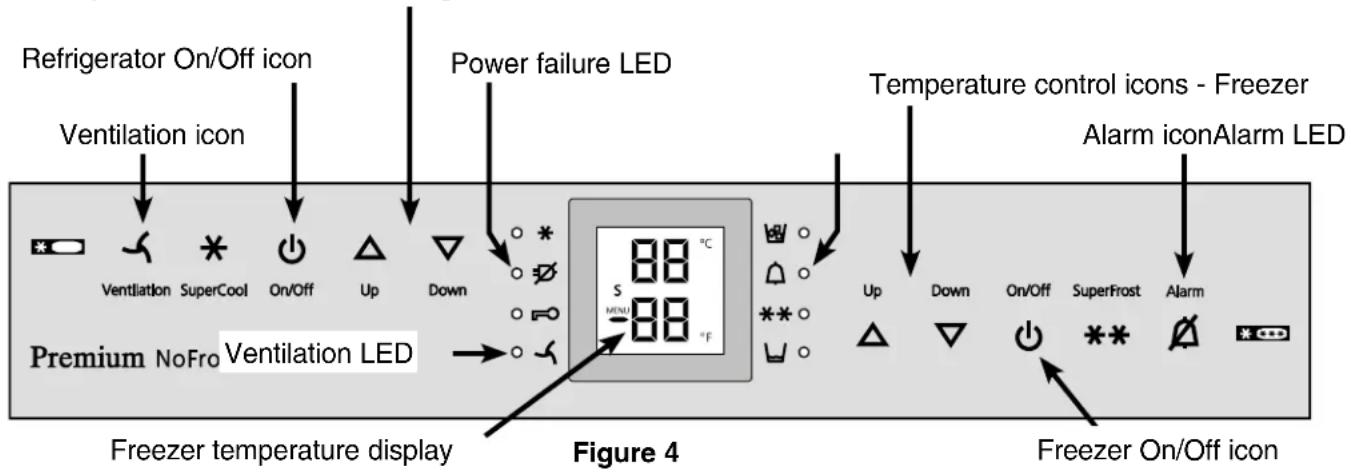
Temperature control icons - Refrigerator
Temperature Display - Figure 4
In normal operation, the following settings will be displayed:
the average refrigerator temperature
the warmest frozen food temperature.
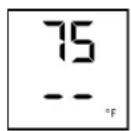
When starting up for the first time or when the appliance is warm, dashes will appear in the freezer temperature display, until the temperature in the freezer compartment is 32^ (0^) .
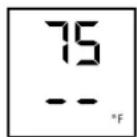
The display will flash:
- if you change the temperature or
- if the temperature rises by several degrees, indicating cold loss, e.g. if you place fresh, "warm" food in the freezer or if you remove or repack frozen food, the temperature may rise for a short time due to warm air flowing into the freezer.
- If "F1" to "F5" appears in the display, the appliance has a fault. Have the fault number available when you contact the customer service department.
Ventilation - Figure 4
The Ventilation switch is used for re-circulated cool air.
You can use the switch as required to:
- chill large quantities of fresh food fast.
- keep the temperature evenly distributed throughout the entire refrigerator compartment. The air will circulate more intensively, keeping all the different areas in the compartment at the same temperature and ensuring all the food inside is chilled at the same temperature.
We recommend you use the ventilation fan if:
- room temperatures are too high (approximately 95^ [35°C] or higher).
- the air humidity is high, during high heat and humidity.
Turning on: touch the Ventilation icon briefly so the LED turns on.
Turning off: touch the Ventilation icon again until the LED turns off.
Audible Alarm Signal - Figure 4
The audible alarm signal helps to protect frozen food and to save energy.
The audible alarm signal is switched off by touching the alarm icon.
Audible door alarm
This sounds when the door has been left open for longer than about 180 seconds. The sound switchoff function is active as long as the door is left open. The alarm automatically switches back to standby when the door is shut.
Audible/visual temperature alarm
It always sounds if the freezer temperature is not low enough. The temperature display and the alarm LED flash at the same time.
This can be caused by:
- warm, fresh food being placed in the freezer,
- too much warm air from the outside entering when re-arranging or removing frozen food,
- a fault in the appliance.
The temperature display will continue to flash until the cause of the alarm has been rectified. It will then stop flashing and light up continually. The audible warning signal is now automatically reset.
Power Failure/FrostControl Display - Figure 4
If the power failure LED is lit, this means the freezer temperature has risen too high during the last few hours or days due to a power failure. The freezer temperature display flashes at the same time.
If you touch the Alarm icon now, the highest temperature registered during the power failure will be displayed.
- Check the quality of the food in case it has become too warm or even defrosted.
- The highest temperature will appear for approximately one minute. After that, the actual temperature in the freezer will reappear.
The display can be turned off by touching the Alarm icon again.
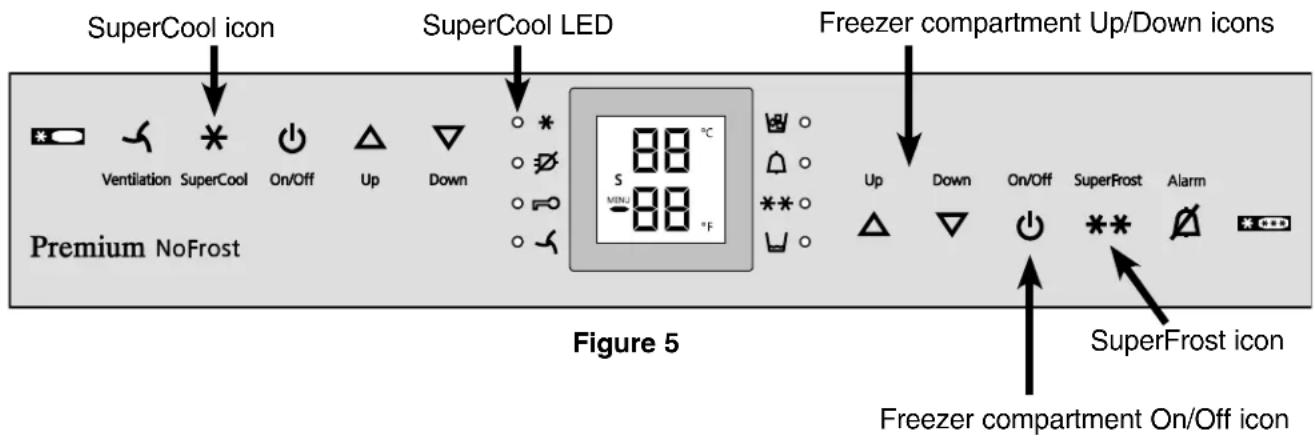
SuperCool - Figure 5
Touching the SuperCool icon switches the refrigerator compartment to maximum cooling. It is recommended particularly if you wish to cool large quantities of food, drinks, freshly baked goods or meals rapidly.
- Turning on: touch the SuperCool icon briefly so the LED turns on. The refrigerator temperature will drop to its lowest value.
Note
The SuperCool function uses slightly more energy. After approximately six hours, however, the refrigerator switches back automatically to normal energy-saving operation. If required, the SuperCool function can be turned off sooner.
- Turning off: touch the SuperCool icon again until the LED turns off.
Setup Mode - Figure 5
In the setup mode, you can activate the following functions:
Sabbath mode
h = Display brightness
= Temperature display mode
E = Water quantity for ice cube tray
= Ice maker vacation state
C = Child lock
How to activate the setup mode:
- Touch the SuperFrost icon for approximately five seconds
- the SuperFrost LED 其 turns on for 5 seconds
- after 5 seconds will flash in the display.
The appliance is in the setup mode now.
You can select the setup mode functions by touching the freezer compartment Up/Down icons.
Note
In the setup mode, the display will flash continuously.
Exit setup mode:
- Touch the freezer compartment On/Off icon. The appliance will change back to normal operation.
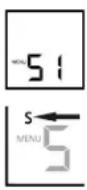
S = Sabbath mode
This feature considers the religious requirements on Sabbath or Holidays. When the Sabbath mode is active, some functions of the electronic controls are switched off.
The door can be opened and closed at any time.
The lighting remains off.
- The cooling fan remains in its actual state: If it is on, it remains on; if it is off, it remains off.
There is no door alarm.
There is no temperature alarm.
- Defrost cycles are independent of the number of times and length of door openings.
- The unit will return into Sabbath mode after a power failure.
How to activate the Sabbath mode
-
Activate the setup mode by touching the SuperFrost icon for 5 seconds.
-
the display shows 5
-
Touch the SuperFrost icon
-
the display shows
-
Touch the SuperFrost icon again
-
the display shows
-
the Sabbath mode is activated.
-
Exit setup mode by touching the freezer compartment On/Off icon.
Sabbath mode switches off automatically after 120 hours if it is not manually switched off beforehand.
How to deactivate the Sabbath mode
- Activate the setup mode by touching the SuperFrost icon for 5 seconds.
- the display shows 5
- Touch the SuperFrost icon
- the display shows
- Touch the SuperFrost icon again
- the 5 symbol in the display disappears, the Sabbath mode is deactivated.
- Exit setup mode by touching the freezer compartment On/Off icon.
h = Display brightness
How to adjust the display brightness
Activate the setup mode by touching the SuperFrost icon for 5 seconds.
- Touch the freezer compartment Down icon until h appears in the freezer temperature display.
-
Touch the SuperFrost icon
-
the display shows
-
Touch the freezer compartment
Up/Down icons to select
h = minimum to
h 5 = maximum brightness
- Touch the SuperFrost icon at the desired value.
- Exit setup mode by touching the freezer compartment On/Off icon.
= Temperature display mode
You can choose the unit of temperature for the display in degrees Fahrenheit or degrees Celsius.
Note
The factory setting is degrees Fahrenheit.
How to change the temperature display to degrees Celsius
- Activate the setup mode by touching the SuperFrost icon for 5 seconds.
- Touch the freezer compartment Down icon until appears in the freezer temperature display.
-
Touch the SuperFrost icon
-
the display shows

- Touch the SuperFrost icon again
- the temperature reading is now displayed in degree Celsius.
- Exit setup mode by touching the freezer compartment On/Off icon.
Note
To change the temperature display back to degrees Fahrenheit, follow the steps above.
Setup Mode - Figure 6
E = Water quantity for ice cube tray
If the produced ice cubes of the ice maker are too small, the inflowing water quantity can be adjusted.
How to adjust the water quantity
- Activate the setup mode by touching the SuperFrost icon for 5 seconds.
- Touch the freezer compartment Down icon until E appears in the freezer temperature display.
- Touch the SuperFrost icon
- the display shows -E3
- Touch the freezer compartment Up icon once only so E4 appears in the display.
IMPORTANT
Do not increase for more than one step. If the adjusted value is too high, the ice cube tray of the ice maker could overflow.
- Touch the SuperFrost icon again.
- Exit setup mode by touching the freezer compartment On/Off icon.
Check the ice cube size within the next days. If the ice cubes are still smaller than desired, follow the steps above again.
C = Child lock
The child lock is designed to protect the appliance from being turned off accidentally.
How to activate the child lock
- Activate the setup mode by touching the SuperFrost icon for 5 seconds.
- Touch the freezer compartment Down icon until appears in the freezer temperature display.
- Touch the SuperFrost icon
-
the display shows
-
Touch the SuperFrost icon again
- the LED is lit and the child lock is activated.
- Exit setup mode by touching the freezer compartment On/Off icon.
How to deactivate the child lock
- Activate the setup mode by touching the SuperFrost icon for 5 seconds.
-
Touch the freezer compartment Down icon until appears in the freezer temperature display.
-
Touch the SuperFrost icon
- the display shows c0
- Touch the SuperFrost icon again
- the LED goes out. The child lock is deactivated.
- Exit setup mode by touching the freezer compartment On/Off icon.
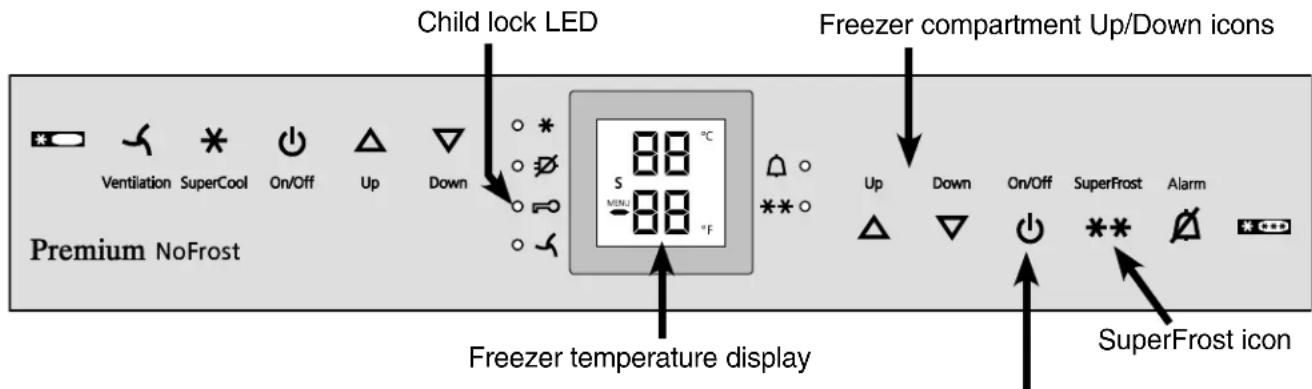
Figure 6
Freezer compartment On/Off icon
REFRIGERATOR COMPARTMENT
Arranging Food - Figure 7
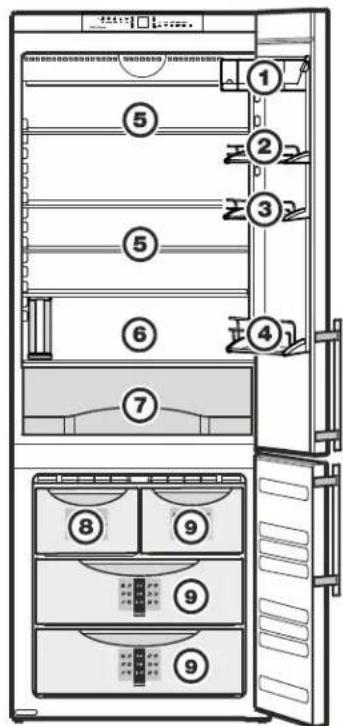
Figure 7
(1)Butter,cheese
(2) Eggs
(3) Cans, drinks
(4) Gallon containers, bottles
(5) Meat and sausage products, dairy products
(6) Baked goods, pre-cooked meals
(7) Fruit, vegetables, salad
(8) Ice cubes
(9) Frozen food
IMPORTANT
- Liquids and food which give off or absorb odors and flavors should always be stored covered or in closed containers.
High-percentage alcohols should be tightly sealed and stored upright. - Fruit, vegetables and salad can be stored unpacked in the bin (7).
Equipment
CAUTION!
To avoid possible injury, only adjust an empty shelf or door rack. Do not attempt to adjust a shelf or door rack with food on it.
You can rearrange the height of the shelves and door racks as required.
Repositioning the door racks - Figure 8
Slide the door rack up, pull out toward you and replace in reverse order.
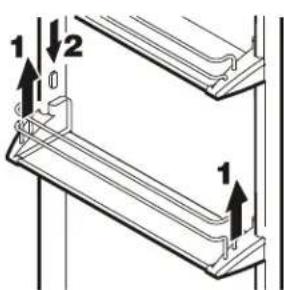
Figure 8
Vario Box - Figure 9
The boxes can be removed and placed on the table as a single unit.
Repositioning the boxes: Lift them for removal and re-position them as required.
The box support bar can be removed by lifting upwards and inserted in another position (e.g. swapped with a door rack).
Important! Box lids must be shut when you close the door - risk of damage.
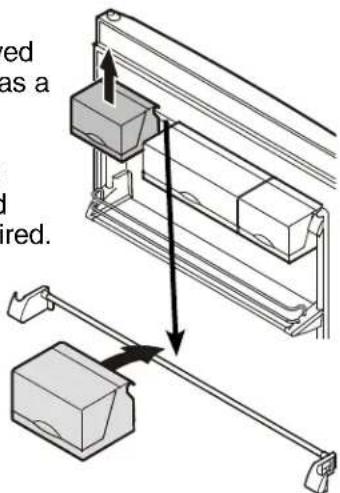
Figure 9
REFRIGERATOR COMPARTMENT
Repositioning the shelves - Figure 10
- Hold the shelf underneath with your hand to avoid from tipping down backwards when removing.
- Lift the shelf at the front.
- Remove the shelf forward until the circular cutout of the shelf is in line with the front supports.
- Lift the shelf up or down and replace in the desired position.
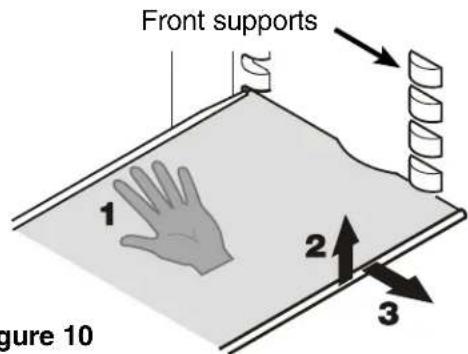
Figure 10
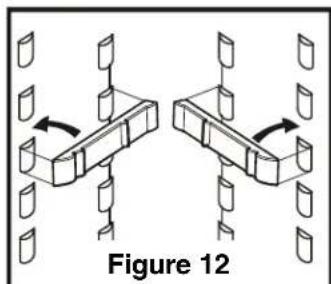
If you need space for large bottles and containers
Place the shelf rails provided on the supports on the left and right at the desired height - Figure 12.
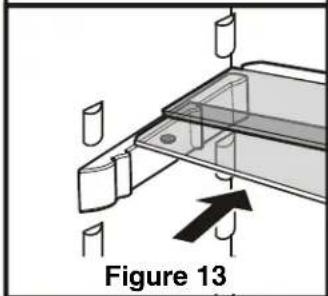
Insert the glass shelves as shown in fig. 13. The glass shelf with the raised edge must go at the back.
If you need to make space for tall containers, simply slide the front half of the sectioned glass shelf carefully underneath the back half - Figure 13.
Removing the shelves - Figure 11
- Follow the first three steps in the chapter above.
- Lift the shelf down and stop just over the upper vegetable bin.
- Move the front of the shelf upwards until the shelf is in a vertical position.
- Turn the shelf out at left and remove.
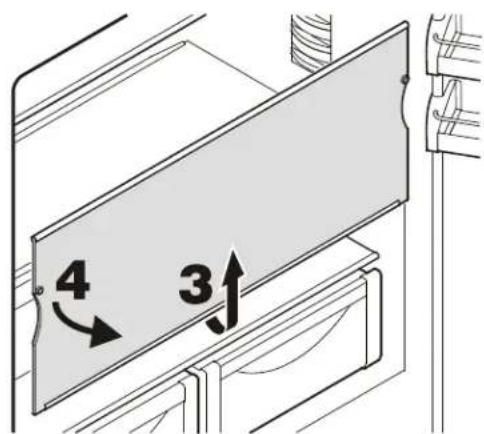
Figure 11
To remove the vegetable drawer
Pull the drawer straight out, grip at the back and lift out - Figure 14.
To install the vegetable drawer
Place the drawer on the rails. The rails must be fully extended and aligned with the front of the drawer. Slide the drawer in.
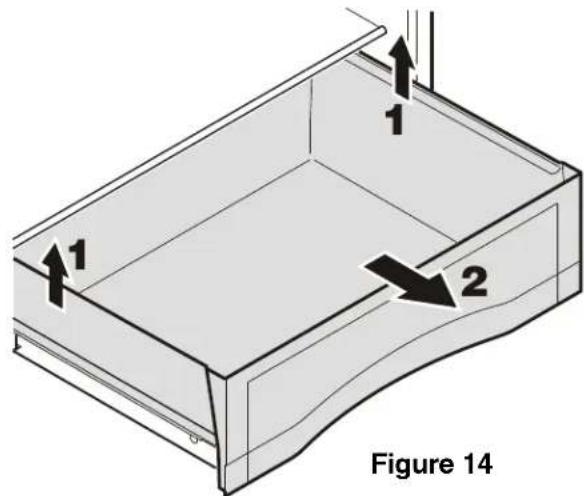
Figure 14
REFRIGERATOR COMPARTMENT
Interior Light
This turns off automatically after the door has been opened for approximately 15 minutes. If it does not turn on when the door is opened briefly, but the temperature display is working, the bulb(s) may be defective.
The light is located behind the cover located at the top of the refrigerator compartment and has two bulbs.
Bulldata:
125-130 V, maximum wattage - 25 W Bulb fitting - E14
Current and voltage must agree with details on the model plate.
Replacing the bulb:
WARNING!
To prevent possible injury due to an electrical shock, be sure to disconnect the power cord or turn off the circuit breaker before replacing the interior light bulb(s).
CAUTION!
To prevent possible injury due to broken glass, use hand protection when replacing the interior light bulb(s).
- Unlatch carefully the cover at left, middle and right using a screwdriver - Fig. 15.
Remove the cover.
- Remove the glass plate - Fig. 16.
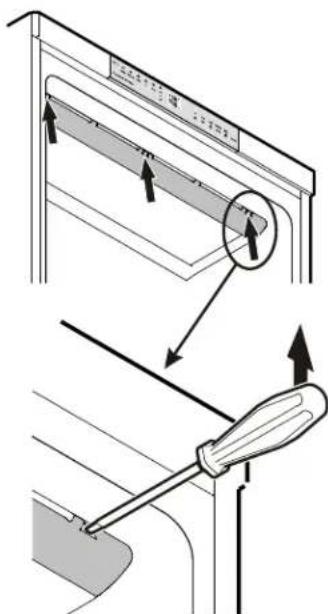
Figure 15
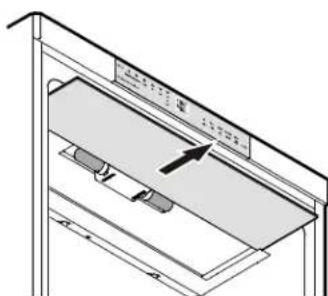
Figure 16
-
Remove the defective bulb. Make sure the seal (Fig. 17) is placed on the new bulb before installing it.
-
Install glass plate and cover.
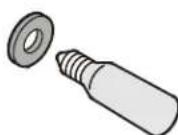
Figure 17
IMPORTANT
The glass plate must be inserted to the back completely, otherwise it is not possible to click the cover into place correctly.
Freezing
Fresh food should be frozen completely and as rapidly as possible. This is provided by the SuperFrost feature and ensures that the nutritional value, appearance and flavor of the food remains intact.
Information System - Figure 18
Use frozen food within the recommended period. The numbers between the symbols indicate the storage period in months for different kinds of frozen foods. Storage times given are guidelines for food frozen at home. Whether or not the lower or upper value is applicable depends on the food quality and how it was processed prior to freezing. The lower values always apply to food with a high fat content.
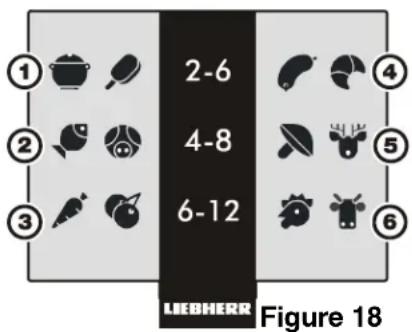
(1) Pre-cooked meals, ice cream
(2) Fish, pork
(3) Vegetables, fruit
(4) Sausages, bread
(5) Mushrooms, game
(6) Poultry, beef
Freezing with SuperFrost - Figure 19
- Touch the SuperFrost icon briefly so the LED turns on.
Wait 24 hours. - Then place the fresh food inside the freezer.
- The SuperFrost function turns off automatically. Depending on the quantity of food placed in the freezer, this will normally be between 30 and a maximum 65 hours.
The freezing process is now complete; the SuperFrost LED ** will turn off and the freezer will change back to normal energy-saving operation.
IMPORTANT
You should not turn on the SuperFrost function:
- when placing frozen food in the freezer;
- when freezing up to approximately 4-1/2 lbs (2 kg) fresh food daily.
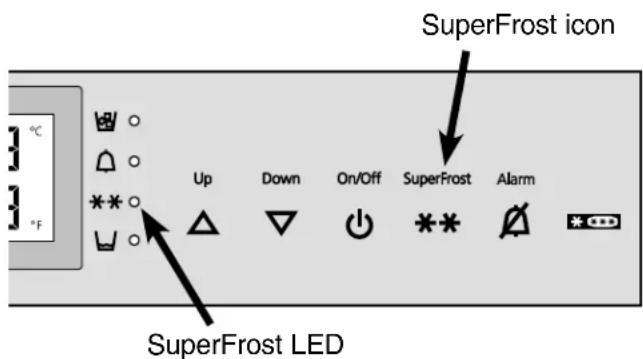
Figure 19
Freezing and Storage
- Pack frozen food in standard freezer bags or reusable plastic, metal or aluminum containers.
- Do not allow fresh food which is to be frozen to come into contact with food already frozen. Always keep packages dry in order to avoid them sticking together.
Always write the date and contents on the package and do not exceed the stated storage time for the food. This prevents spoiling. - Pack food which you are freezing yourself in quantities right for your household. To ensure the food freezes right through quickly, the following quantities should not be exceeded per package: - fruit, vegetables: up to 2-1/4 lbs (1 kg); - meat: up to 5-1/2 lbs (2.5 kg).
- Do not freeze bottles and cans which contain carbonated drinks as they might burst. Drinks can be cooled down quickly, but take the bottles out of the freezer compartment after an hour at the most.
-
Only take out as much food as needed for thawing. Cook food which has been thawed as quickly as possible. Frozen food can be thawed in the following ways:
-
in a microwave oven
- in the refrigerator: the safer way to thaw food because there is less chance of bacteria growth. Use this method for high density food such as roasts or poultry.
Safety Instructions andWarnings for the Automatic Ice Maker
- The ice maker is designed exclusively to make ice cubes in quantities needed by a household.
- All repairs and work on the ice maker may only be done by customer service personnel or other appropriately trained personnel.
- Do not consume or use the first three batches of ice. This applies both to using the appliance for the first time and also using it after it has not been used for a long period of time.
- The manufacturer cannot accept liability for damage caused by equipment or water lines between the solenoid valve and the water supply.
- The ice maker will only work if the combined refrigerator-freezer is connected to the electrical outlet. It will only make ice cubes if the freezer compartment is operating.
- The ice maker can only make ice cubes if the drawer is completely closed.
Making Ice Cubes
The ice maker is in the top left drawer in the freezer compartment of the combined refrigerator-freezer. You can identify this drawer by its labeling IceMaker.
Filling the Water Tank
Use only filtered, de-carbonated water to fill the water tank.
The use of filtered, de-carbonated water ensures the supply of drinking water with top quality flavor for problem-free ice cube production.
You can achieve this water quality by using a tabletop water filter available from specialist shops.
IMPORTANT
Do not fill with any kind of alcoholic drinks or sugary liquids. This will damage the ice maker.
- Pull out the water tank forwards (Figure 20).
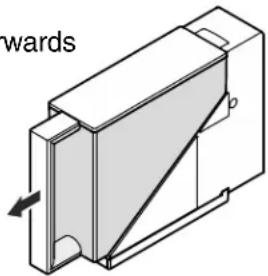
Figure 20
- Remove cover and fill tank with water (Figure 21).
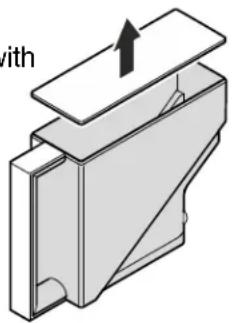
Figure 21
- Reinsert the water tank and slide into the holder as far as it will go (Figure 22).
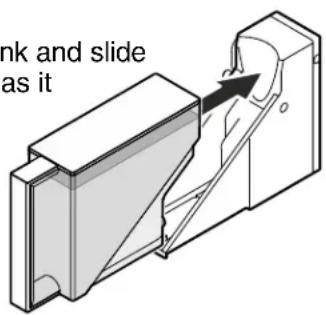
Figure 22
IMPORTANT
If the water tank has not been slid right to the back, no ice cubes will be produced.
To Start the Ice Maker
To turn the ice maker on
Pull out the drawer.
- Press the On/Off button so the Ice Maker LED comes on (Figure 23).
- Close the drawer.
After you start the ice maker for the first time, it may take up to 24 hours before the first ice cubes are ready.
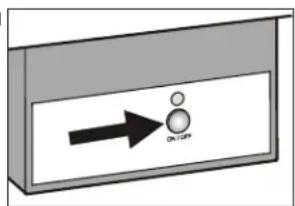
Figure 23
Note
The first three batches of ice must not be consumed or used.
The production capacity is 90 - 100 ice cubes in 24 hours at a temperature of 0^ (-18^) inside the freezer compartment.
To have the maximum capacity of approx. 140 ice cubes in 24 hours, activate the SuperFrost function.
Be aware that this increases the energy consumption because the compressor will run constantly.
The ice cubes fall out of the ice maker into the drawer. When the ice reaches a certain level in the drawer, the appliance stops producing ice automatically. The ice maker will not fill the drawer to the top.
If you need a large quantity of ice, you can change out the drawer to the right with the complete IceMaker drawer.
To turn the ice maker off
If you do not need any ice cubes, the ice maker can be turned off independently of the freezer compartment.
- Press the On/Off button for approximately 1 second so the control lamp goes out.
Note
If the ice maker is turned off, the empty drawer can also be used to freeze and store food.
Top up water tank LED - Figure 25
The LED lights up when the water tank needs topping up.
Ice Maker at Vacations
In case of longer vacations, the ice maker tray (arrow in Figure 24) should be emptied.
By setting the ice maker into the vacation state, the tray will rotate down and no water remains in the tray.
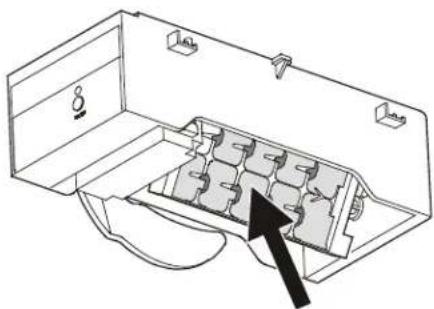
Figure 24
The freezer door must be left open, so the surface of the tray dries up and no mold or unpleasant odors can occur.
How to activate the Ice Maker Vacation State - Figure 25
Be sure the drawer is completely closed (Figure 20).
- Activate the setup mode by touching the SuperFrost icon for 5 seconds.
- Touch the freezer compartment Down icon until it appears in the freezer temperature display.
- TouchtheSuperFrost icon
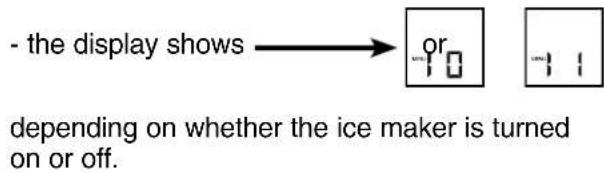
- Touch the freezer compartment Down icon

- Touch the SuperFrost icon -the digit 1 flashes.
The ice maker tray rotates down.
When the interior temperature appears in the display, the tray is in the down position (Figure 24) and the ice maker is turned off automatically.
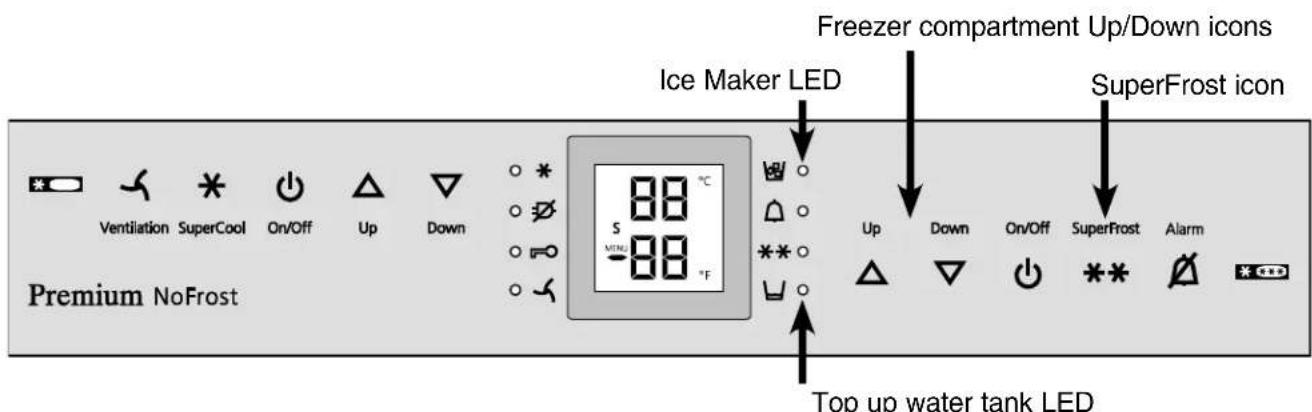
Figure 25
Cleaning
WARNING!
- To prevent possible injury due to an electrical shock, be sure to disconnect the power cord or turn off the circuit breaker before cleaning the appliance.
- To avoid injury or damage, do not use steam cleaning equipment to clean the appliance.
- To avoid short-circuits, ensure no cleaning water penetrates into the electrical components when cleaning the appliance. Do not use a sponge or cloth that is overly wet.
- Clean the side panels and door surfaces with a clean and soft cloth. If necessary, use a moist cloth (water + detergent). Alternatively, use a microfiber cloth.
Do not use abrasive or scouring sponges. Do not use concentrated cleaning agents. NEVER use abrasive or acid cleaners or chemical solvents.
- Remove all food from the refrigerator and freezer compartments and store in a cool place temporarily. Store frozen food in other freezers if available.
- Remove the door racks as shown in Figure 8, 9.
- Remove glass shelves as shown in Figure 11.
- Remove vegetable drawers.
- Clean the equipment parts by hand with lukewarm water and dishwasher detergent.
CAUTION!
Do not clean the equipment parts in a dishwasher. Strips of these parts could get loose.
-
Clean the refrigerator and freezer drawers' interior with lukewarm water and dishwasher detergent.
-
Clean the drain opening.
Remove deposits using a thin instrument, e. g. a cotton bud (Figure 26).
IMPORTANT
Water will overflow into the refrigerator compartment if the drain becomes plugged.
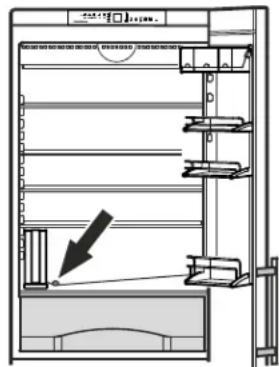
Figure 26
Dry all parts well with a cloth.
- Do not damage or remove the model plate on the inside of the appliance. It is very important for servicing your appliance.
- To empty the water collecting tray: remove the water tank. Carefully disengage the tray forwards and then lower for removal (Figure 27).
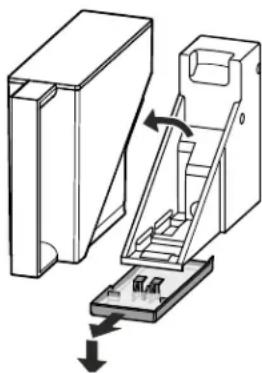
Figure 27
Defrosting
Refrigerator compartment
The refrigerator compartment defrosts automatically. The water that forms on the rear wall drains into a reservoir at the back of the appliance and evaporates automatically through the compressor heat.
Freezer compartment
The NoFrost system automatically defrosts the freezer compartment. Any moisture will collect on the evaporator and freeze. It will periodically defrost and evaporate.
Vacation Tips
Short vacations
It is not necessary to turn off the refrigerator and freezer if you will be away for less than four weeks.
Use all perishables.
- Freeze other items.
- Turn off the ice maker.
- Empty the water tank.
Long vacations
If you will be away for a month or more:
- Set the ice maker to the vacation state. Refer to chapter "Ice Maker at Vacations" - page 19.
- Remove all food from the refrigerator and freezer compartments.
- Turn off the refrigerator and freezer compartments.
Clean the appliance. Refer to Cleaning. - Leave the door open to prevent unpleasant odors. This will also keep mold from building up.
Empty the water tank.
TROUBLESHOOTING
If a problem occurs during operation, check whether it is due to an operating error.
Please note that even during the warranty period, some repair costs may be your responsibility. You may be able to correct the following faults by checking the possible causes yourself:
| Problem Possible Cause and Remedy | |
| Appliance does not work, display is off | - Is the appliance turned on properly?- Is the power cord properly inserted in the outlet?- Is the circuit breaker or fuse in operating condition? |
| The interior light does not come on | - Is the refrigerator compartment turned on?- Has the door been open for more than 15 minutes? |
| Loud running noise | - Is the appliance standing firmly on the floor, or does the compressor cause nearby items of furniture or objects to vibrate? If necessary, move the appliance slightly, align by adjusting the adjustable feet, or adjust bottles and containers. |
| Motor seems to run too long | - Is the ambient temperature too hot? See Safety Regulations.- Has the appliance been opened too often or left open too long?- A large amount of food has been added.- Unit is in SuperCool mode. Verify unit is in normal operation mode. |
| The temperature is not cold enough | - Is the temperature setting correct? See Setting the Temperature.- Has an excessive amount of fresh food been placed in the appliance?- Does a separately installed thermometer show the correct reading?- Is the ventilation system working properly?- Is the appliance set up too close to a heat source? |
| Freezer temperature display shows two dashes - - | The freezer temperature display will only show temperatures that are below freezing. When initially starting the freezer, it will not be below freezing. It will take three to five hours (depending on ambient conditions) for freezing temperatures to be achieved and thus displayed numerically. This may also occur after a power failure. |
| Ice or water drops appear on the rear wall in the inter-rior of the refrigerator compa-ment | This is completely normal. During the cooling process, the humidity in the refrigerator compartment will condense on the rear wall and freeze. During the compressor idle period, the ice layer will defrost. The condensate on the rear wall drains through the defrost water drain for evaporation. |
Ice Maker Troubleshooting
You may be able to correct the following faults yourself:
Problem Possible Cause and Remedy
| Ice maker cannot be turned on. | Is the combined refrigerator-freezer connected to the electrical outlet? |
| Ice maker is not making - Is the ice maker turned on? any ice. - Is the IceMaker drawer closed properly? - Is there enough water in the water tank? - Has the water tank been inserted correctly? | |
| The control lamp above the - Is there enough water in the water tank? ON/OFF button flashes. - Has the water tank been inserted correctly? | |
Customer Service - Figure 28
If none of the above causes apply and you cannot correct the fault yourself, this means there is a fault. Please contact your nearest customer service department (see enclosed list for addresses).
Give the fault number displayed, together with the Type Designation 1 Service Number 2 and Appliance/Serial Number 3
as given on the model plate, to ensure prompt, accurate servicing. The model plate is located inside the appliance on the left-hand side.
Leave the appliance closed until the customer service engineer arrives to prevent any further cold loss.
Appliance Information
Record this information when the appliance is installed.
Type Designation:
Service Number:
Appliance / Serial Number:
Date of Purchase:
Where Purchased:
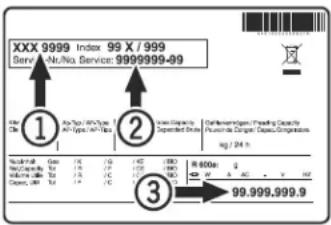
Figure 28
LIEBHERR WARRANTY PLAN
FULL TWO YEAR WARRANTY
For two years from the date of original purchase, your Liebherr warranty covers all parts and labor to repair or replace any part of the product which proves to be defective in materials or workmanship.
FULL FIVE YEAR WARRANTY
For five years from the date of original purchase, your Liebherr warranty covers all parts and labor to repair or replace any components that prove to be defective in materials or workmanship in the sealed system. The "Sealed System" means only the compressor, condenser, evaporator, drier and all connecting tubing.
LIMITED 6TH THROUGH 12TH YEAR WARRANTY
From the 6th through 12th year from the date of original purchase, your Liebherr warranty covers all parts that prove to be defective in materials or workmanship in the Sealed System (parts only).
TERMS APPLICABLE TO EACH WARRANTY
All service provided by Liebherr under the warranty must be performed by authorized Liebherr service representatives, unless otherwise specified by Liebherr. Service will be provided in the home during normal business hours. This warranty applies only to products installed for normal residential use. Details regarding a non-residential warranty are available on request.
The warranty applies only to products installed in Canada and any one of the fifty states of the United States or the District of Columbia. This warranty does not cover any parts or labor to correct any defect caused by negligence, accident or improper use, maintenance, installation, service or repair, including but not limited to improper removal and reinstallation of the condensing unit.
THE WARRANTY DESCRIBED ABOVE ARE MADE EXPRESSLY IN LIEU OF ANY OTHER WARRANTYES, EXPRESSED OR IMPLIED, INCLUDING ANY IMPLIED WARRANTY OF MERCHANTABILITY OR FITNESS FOR A PARTICULAR PURPOSE, AND OF ANY OTHER OBLIGATION OR LIABILITY ON THE PART OF LIEBHERR. IN NO EVENT SHALL LIEBHERR BE LIABLE FOR SPECIAL, INCIDENTAL OR CONSEQUENTIAL DAMAGES ASING FROM THE BREACH OF THESE WARRANTYES OR ANY OTHER WARRANTYES, WHETHER EXPRESS, IMPLIED OR STATUTORY.
Some States do not allow the exclusion or limitation of incidental or consequential damages so the above limitation or exclusion may not apply to you. This warranty gives you specific legal rights and you may also have other rights which vary from State to State.
To receive parts and/or service and the name of the Liebherr authorized service representative nearest you, contact your Liebherr dealer or distributor or contact the Liebherr designated national service provider:
in the US: Service-appiances.us@lieb Herr.com, or call 1-866-LIEBHER or 1-866-543-2437 in Canada: www.euro-parts.ca, or call 1-888-LIEBHER, 1-888-543-2437.
LIEBHERR
Compartment congélateur
N 61^ a 90^ (16°C a 32^ )
ST 61^ a 100^ (16°C a 38°C)
SN-ST 50^ a 100^ (10^ a 38^)
SN-T 50^ a 109^ (10^ a 43^)
T 61°Fa109°F(16°Ca43°C)
For Service in the U.S.
Lieb Herr Service Center
Toll Free: 1-866-LIEBHER or 1-866-543-2437
Email: Service-appiances.us@liebherr.com
PlusOne Solutions, Inc.
3501 Quadrangle Blvd, Suite 120
Orlando, FL 32817
For Service in Canada
Lieb Herr Service Center
Toll Free: 1-888-LIEBHER or 1-888-543-2437
www.euro-parts.ca
EURO-PARTS CANADA
39822 Belgrave Road
Belgrave, Ontario, N0G 1E0
Phone: (519) 357-3320
Fax: (519) 357-1326