
FPA40UWRB - Air purifier SHARP - Free user manual and instructions
Find the device manual for free FPA40UWRB SHARP in PDF.



| Brand | Sharp |
| Model | FPA40UWRB |
| Product type | Air purifier |
| Power supply | 120 V, 60 Hz |
| Rated power (MAX) | 43 W |
| Rated power (MED) | 12 W |
| Rated power (LOW) | 5.3 W |
| Standby power consumption | 0.3 W |
| Dimensions (W × D × H) | 356 mm × 180 mm × 510 mm |
| Weight | 5.5 kg |
| Cable length | 2.5 m |
| Fan speed | Low / Med / Max |
| Airflow (MAX) | 151 CFM |
| Airflow (MED) | 81 CFM |
| Airflow (LOW) | 46 CFM |
| Sound level (MAX) | 53 dBA |
| Sound level (MED) | 40 dBA |
| Sound level (LOW) | 29 dBA |
| Recommended room size | Up to 200 ft² (18.6 m²) |
| CADR (dust / smoke / pollen) | 140 / 129 / 160 |
| Filter type | HEPA filter + Deodorizing filter + Washable pre-filter |
| Ionization technology | Plasmacluster Ion |
| HEPA filter lifespan | Approximately 2 years |
| Deodorizing filter lifespan | Approximately 2 years |
| Replacement filter model | FZ-A40SFU |
| Warranty (parts and labor) | 1 year |
| Certifications | ENERGY STAR, CISPR 11 Class B |
| Maintenance | Clean the pre-filter and rear panel every 2 months |
| Safety tips | Unplug before cleaning; do not use near heat sources or humidity |
Frequently Asked Questions - FPA40UWRB SHARP
User questions about FPA40UWRB SHARP
0 question about this device. Answer the ones you know or ask your own.
Ask a new question about this device
Download the instructions for your Air purifier in PDF format for free! Find your manual FPA40UWRB - SHARP and take your electronic device back in hand. On this page are published all the documents necessary for the use of your device. FPA40UWRB by SHARP.
USER MANUAL FPA40UWRB SHARP
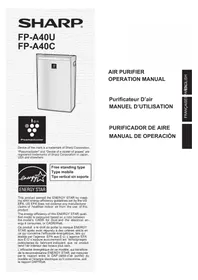
Device of this mark is a trademark of Sharp Corporation. "Plasmacluster" and "Device of a cluster of grapes" are registered trademarks of Sharp Corporation in Japan, USA and elsewhere.
ENERGY STAR
This product earned the ENERGY STAR by meeting strict energy efficiency guidelines set by the US EPA. US EPA does not endorse any manufacturer claims of healthier indoor air from the use of this product.
The energy efficiency of this ENERGY STAR qualified model is measured based on a ratio between the model's CADR for Dust and the electrical energy it consumes, or CADR/Watt.
Please read before operating your new Air Purifier
Some odor ingredients absorbed by the filter may become separated and may be discharged through the air outlet and result in additional odor.
Depending on the usage environment, especially when the product is used in a condition significantly more severe than household use, this odor may become strong in a shorter period than expected.
In this case we recommend purchasing the optional replacement filter kit FZ-A40SFU.
NOTE
- The air purifier is designed to remove air-suspended dust and odor, but not harmful gases (for example, carbon monoxide contained in cigarette smoke). If the odor sources still exist, it cannot completely remove the odor (for example, odors from construction materials and pet odors). It is suggested to open the window a bit when you are smoking in order to facilitate ventilation.
FEATURES
Unique Combination of Air Treatment Technologies
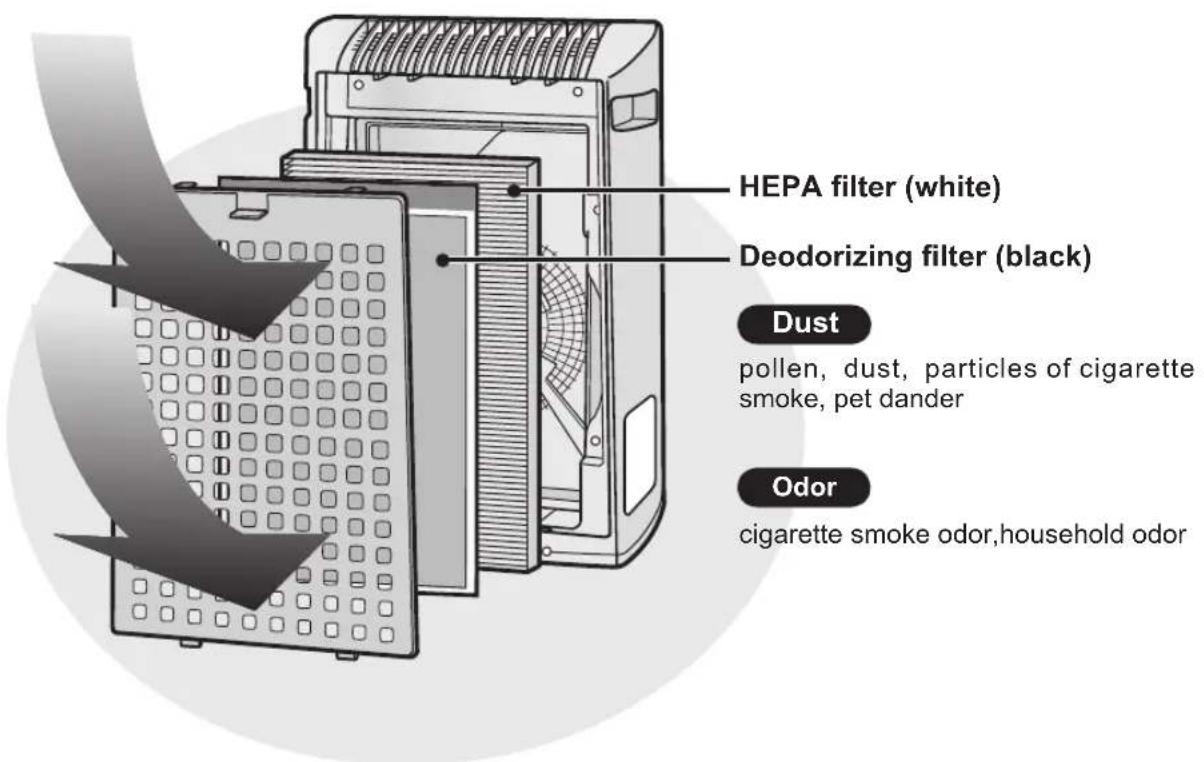
Triple Filtration System + Plasmacluster Ion
TRAPS DUST*
Washable pre-filter traps dust and other large airborne particles.
DECREASES ODORS
Deodorizing filter absorbs many common household odors.
REDUCES POLLEN & MOLD*
HEPA filter traps 99.97% of particles as small as 0.3 microns.
FRESHENS
Plasmacluster refreshes the air similar to the way nature cleans the environment by emitting a balance of positive and negative ions.
*When air is drawn through the filter system.
Room size: up to 200 sq. ft.
CONTENTS
FOR CUSTOMER ASSISTANCE (U.S)......E-2
CONSUMER LIMITED WARRANTY (U.S)....E-3
FOR CUSTOMER ASSISTANCE (CANADA)....E-4
LIMITED WARRANTY (CANADA)......E-5
IMPORTANT SAFETY INSTRUCTIONS...E-6
WARNING E-6 - CAUTIONS CONCERNING OPERATION.E-7 - INSTALLATION GUIDELINES...E-7 - FILTER GUIDELINES...E-7
PART NAMES. E-8
- MAIN UNIT DISPLAY ILLUSTRATIVE DIAGRAM. E-8
- INCLUDED E-9
- BACK. E-9
PREPARATION E-10
- FILTER INSTALLATION .E-10
Declaration of Conformity
SHARP AIR PURIFIER FP-A40U
This device complies with Part 18 of FCC rules.
Responsible Party:
SHARPE ELECTRONICS CORPORATION
Sharp Plaza,
Mahwah, New Jersey 07495-1163
Declaration of Conformity
SHARP AIR PURIFIER FP-A40U
This ISM device complies with Canadian ICES-001.
Responsible Party:
SHARP ELECTRONICS OF CANADA LTD.
335 Britannia Road East Mississauga, Ontario
L4Z 1W9 Canada
TEL: (905) 568-7140
Thank you for purchasing the SHARP Air Purifier. Please read this manual carefully for the correct usage information. Before using this product, be sure to read the section: "Important Safety Instructions."
After reading this manual, retain it in a convenient location for future reference.
FOR CUSTOMER ASSISTANCE (the United States)
To aid in answering questions if you call for service or for reporting loss or theft, please use the space below to record the model and serial number located on the back of the unit.
| MODEL NUMBER FP-A40U |
| SERIAL NUMBER |
| DATE OF PURCHASE |
| Dealer Name |
| Address |
| City |
| State |
| Zip |
| Telephone |
TO PHONE: Dial 1-800-BE-SHARP (237-4277) for: SERVICE (for your nearest Sharp Authorized Servicer) PARTS (for your Authorized Parts Distributor) ACCESSIONS ADDITIONAL CUSTOMER INFORMATION
TO WRITE: For service problems, warranty information, missing items and other assistance: Sharp Electronics Corporation Customer Assistance Center 1300 Naperville Drive Romeoville, IL 60446-1091
TO ACCESS OUR WEB SITE: www.sharpusa.com
Please provide the following information when you write or call: model number, serial number, date of purchase, your complete mailing address (including zip code), your daytime telephone number (including area code) and description of the problem.
CONSUMER LIMITED WARRANTY
CONSUMER LIMITED WARRANTY FOR U.S. USERS
SHARP ELECTRONICS CORPORATION warrants to the first consumer purchaser that this Sharp brand product (the "Product"), when shipped in its original container, will be free from defective workmanship and materials, and agrees that it will, at its option, either repair the defect or replace the defective Product or part thereof with a new or remanufactured equivalent at no charge to the purchaser for parts or labor for the period(s) set forth below.
This warranty does not apply to any appearance items of the Product nor to the additional excluded item(s) set forth below nor to any Product the exterior of which has been damaged or defaced, which has been subjected to improper voltage or other misuse, abnormal service or handling, or which has been altered or modified in design or construction.
In order to enforce the rights under this limited warranty, the purchaser should follow the steps set forth below and provide proof of purchase to the servicer.
The limited warranty described herein is in addition to whatever implied warranties may be granted to purchasers by law. ALL IMPLIED WARRANTIES, INCLUDING THE WARRANTIES OF MERCHANTABILITY AND FITNESS FOR USE, ARE LIMITED TO THE PERIOD(S) FROM THE DATE OF PURCHASE SET FORTH BELOW. Some states do not allow limitations on how long an implied warranty lasts, so the above limitation may not apply to you.
Neither the sales personnel of the seller nor any other person is authorized to make any warranties other than those described herein, or to extend the duration of any warranties beyond the time period described herein on behalf of Sharp.
The warranties described herein shall be the sole and exclusive warranties granted by Sharp and shall be the sole and exclusive remedy available to the purchaser. Correction of defects, in the manner and for the period of time described herein, shall constitute complete fulfillment of all liabilities and responsibilities of Sharp to the purchaser with respect to the Product, and shall constitute full satisfaction of all claims, whether based on contract, negligence, strict liability or otherwise. In no event shall Sharp be liable, or in any way responsible, for any damages or defects in the Product which were caused by repairs or attempted repairs performed by anyone other than an authorized servicer. Nor shall Sharp be liable or in any way responsible for any incidental or consequential economic or property damage. Some states do not allow the exclusion of incidental or consequential damages, so the above exclusion may not apply to you.
THIS WARRANTY GIVES YOU SPECIFIC LEGAL RIGHTS. YOU MAY ALSO HAVE OTHER RIGHTS WHICH VARY FROM STATE TO STATE.
Your Product Model Number & Description:
FP-A40U Air Purifier. Be sure to have this information available when you need service for your Product.
Warranty Period for this Product:
One (1) year parts and labor from date of purchase.
Additional Item(s) Excluded From Warranty Coverage:
Appearance items of the Product, filters, accessories, or any printed materials. Product which has been used for rental and/or commercial purposes.
Where to Obtain Service:
From a Sharp Authorized Servicer located in the United States. To find the location of the nearest Sharp Authorized Servicer, call Sharp Toll Free at 1-800-BE-SHARP.
What to Do to Obtain Service:
Ship prepaid or carry in your Product to a Sharp Authorized Servicer. Be sure to have Proof of Purchase available. If you ship the Product, be sure it is insured and packaged securely.
TO OBTAIN SUPPLY, ACCESSORY OR PRODUCT INFORMATION, CALL 1-800-BE-SHARP, OR VISIT OUR WEBSITE AT www.sharpusa.com
SHARP®
SHARP ELECTRONICS CORPORATION
Sharp Plaza, Mahwah, New Jersey 07495-1163
FOR CUSTOMER ASSISTANCE (Canada)
To aid in answering questions if you call for service or for reporting loss or theft, please use the space below to record the model and serial number located on the back side of the unit.
| MODEL NUMBER FP-A40C |
| SERIAL NUMBER |
| DATE OF PURCHASE |
| Dealer Name |
| Address |
| City |
| Province |
| Postal Code |
| Telephone |
TO PHONE: Dial 1-905-568-7140 for:
SERVICE (for your nearest Sharp Authorized Servicer)
PARTS (for your Authorized Parts Distributor)
ACCESSIONS
ADDITIONAL CUSTOMER INFORMATION
TO WRITE: For service problems, warranty information, missing items and other assistance:
Sharp Electronics of Canada Ltd.
Customer Care
335 Britannia Road East
Mississauga, Ontario L4Z 1W9
TO ACCESS OUR WEB SITE: www.sharp.ca
Please provide the following information when you write or call: model number, serial number, date of purchase, your complete mailing address (including Postal Code), your daytime telephone number (including area code) and description of the problem.
SHARP®
LIMITED WARRANTY
Consumer Electronics Products
Congratulations on your purchase!
Sharp Electronics of Canada Ltd. (hereinafter called "Sharp") gives the following express warranty to the first consumer purchaser for this Sharp brand product, when shipped in its original container and sold or distributed in Canada by Sharp or by an Authorized Sharp Dealer:
Sharp warrants that this product is free, under normal use and maintenance, from any defects in material and workmanship. If any such defects should be found in this product within the applicable warranty period, Sharp shall, at its option, repair or replace the product as specified herein.
This warranty shall not apply to: (a) Any defects caused or repairs required as a result of abusive operation, negligence, accident, improper installation or inappropriate use as outlined in the owner's manual. (b) Any Sharp product tampered with, modified, adjusted or repaired by any party other than Sharp, Sharp's Authorized Service Centres or Sharp's Authorized Servicing Dealers. (c) Damage caused or repairs required as a result of the use with items not specified or approved by Sharp, including but not limited to head cleaning tapes and chemical cleaning agents. (d) Any replacement of accessories, glassware, consumable or peripheral items required through normal use of the product including but not limited to earphones, remote controls, AC adapters, batteries, temperature probe, stylus, trays, filters, belts, ribbons, cables and paper. (e) Any cosmetic damage to the surface or exterior that has been defaced or caused by normal wear and tear. (f) Any damage caused by external or environmental conditions, including but not limited to transmission line/power line voltage or liquid spillage. (g) Any product received without appropriate model, serial number and CSA/cUL markings. (h) Any products used for rental or commercial purposes. (i) Any installation, setup and/or programming charges.
Should this Sharp product fail to operate during the warranty period, warranty service may be obtained upon delivery of the Sharp product together with proof of purchase and a copy of this LIMITED WARRANTY statement to an Authorized Sharp Service Centre or an Authorized Sharp Servicing Dealer. In-home warranty service may be provided at Sharp's discretion on any Sharp television with a screen size of 27 inches or larger and on any Sharp Over-the-Range Microwave Oven.
This warranty constitutes the entire express warranty granted by Sharp, and no other dealer, service centre, or their agent or employee is authorized to extend, enlarge, or transfer this warranty on behalf of Sharp. To the extent the law permits, Sharp disclaims any and all liability for direct or indirect damages or losses or for any incidental, special, or consequential damages or loss of profits resulting from a defect in material or workmanship relating to the product, including damages for the loss of time or use of this Sharp product or the loss of information. The purchaser will be responsible for any removal, reinstallation, transportation, and insurance costs incurred. Correction of defects, in the manner and period of time described herein, constitutes complete fulfillment of all obligations and responsibilities of Sharp to the purchaser with respect to the product and shall constitute full satisfaction of all claims, whether based on contract, negligence, strict liability, or otherwise.
WARRANTY PERIODS: Parts & Labour (exceeds noted)
Audio Product: 1 year
Coot
DVD Product
Projection
LCD TV
Microwave Oven
Air Purifier
Portable Air Conditioner
Plasmacluster Ion Generator
1 year
1 year; 1 year (lamp 90 days); 1 year; 1 year (magnetron component - 4 additional years); 1 year; 1 year; 1 year
To obtain the name and address of the nearest Authorized Sharp Service Centre or Dealer, please contact:
SHARP ELECTRONICS OF CANADA LTD. 335 Britannia Road East Mississauga, Ontario L4Z 1W9
For more information on this Warranty, Sharp Extended Warranty Offers, Sharp Canada Products, Accessory Sales, Dealer or Service
Locations, please call (905) 568-7140
Visit our Web site: www.sharp.ca

SERVICE
IMPORTANT SAFETY INSTRUCTIONS
When using electrical appliances, basic safety precautions should be followed, including the following:
WARNING - To reduce the risk of electrical shock, fire or injury to persons:
- Read all instructions before using the unit.
- Use only a 120 volt outlet.
- The air purifier has a polarized plug (one blade is wider than the other). This plug will fit in a polarized outlet only one way. If the plug does not fit into the outlet, reverse it. If it still does not fit, contact a qualified electrician or service person. Do not alter the plug in any way.
- Do not use the unit if the power cord or plug is damaged or the connection to the wall outlet is loosened. Periodically remove dust from the power plug.
- Do not insert fingers or foreign objects into the intake or air outlet.
- When removing the power plug, always hold the plug and never pull the cord.
Electrical shock and/or fire from short circuit may occur as a result.
- Do not remove the plug when your hands are wet.
- Do not use this unit near gas appliances or fireplaces.
- Remove the power plug from the wall outlet before cleaning the unit and when not using the unit.
Electrical shock from bad insulation and/or fire from short circuit may occur as a result.
- If the power cord is damaged, it must be replaced by the manufacturer, its service agent, Sharp Approved Service Centre or similarly qualified person in order to avoid a hazard.
- Do not operate when using aerosol insecticides or in rooms where there is oily residue, incense, sparks from lit cigarettes, chemical fumes in the air or in very high humidity conditions, such as a bathroom.
- Be cautious when cleaning the unit. Corrosive cleansers may damage the exterior.
- Only Sharp Approved Service Centre should service this air purifier. Contact the nearest Service Centre for any problems, adjustments, or repairs.
- This appliance is not intended for use by persons (including children) with reduced physical, sensory or mental capabilities, or lack of experience and knowledge, unless they have been given supervision or instruction concerning use of the appliance by a person responsible for their safety. Children should be supervised to ensure they do not play with the appliance.
NOTE - Radio or TV Interference
If this air purifier should cause interference to radio or television reception, try to correct the interference by one or more of the following measures:
- Reorient or relocate the receiving antenna.
- Increase the separation between the unit and radio/TV receiver.
- Connect the equipment into an outlet on a circuit different from that to which the receiver is connected.
- Consult the dealer or an experienced radio/TV technician for help.
This product fulfils the requirement of the International standard CISPR 11.
In conformity with this standard, this product is classified as group 1 class B equipment.
Group 1 means that the equipment in which there is intentionally generated or used conductively coupled RF energy that is necessary for the internal functioning of the equipment itself.
Class B equipment means that the equipment suitable to be used in domestic establishments.
CAUTIONS CONCERNING OPERATION
- Do not block the intake and/or air outlet.
- Do not use the unit near or on hot objects, such as stoves or heaters or where it may come into contact with steam.
- Do not lay the unit down when using.
- Always hold the handle on both sides of the unit when moving it.
Holding the back panel when carrying may cause it to detach, thus dropping the unit and resulting in bodily injury.
- Do not operate the unit without the filters.
- Do not wash and reuse the filters.
Not only does it not improve filter performance, but also may cause electrical shock or malfunction.
- Clean the exterior with a soft cloth only.
Do not use volatile fluids and/or detergents.
The unit surface may be damaged or cracked.
INSTALLATION GUIDELINES
- During the operation of the product, please place the unit at least 6.5ft (2m) away from equipment utilizing electrical waves such as televisions, radios or wave clocks.
- Avoid locations where curtains, etc., come into contact with the intake or air outlet.
Curtains, etc., may become dirty or a malfunction may occur.
- Avoid locations where the unit is exposed to condensation, due to rapid temperature changes.
(If it is unavoidable, please allow the unit to stand for 1 hour before switching on.)
(Use under appropriate conditions between 32 - 95°F (0 - 35°C) in the room.)
- Place on a stable surface with sufficient air circulation.
When placing the unit on a heavily carpeted area, it may cause the unit to vibrate slightly. - Avoid use in locations where grease or oily smoke is generated (such as in a kitchen, etc.).
The unit surface may crack or the sensor may malfunction as a result. - Place the unit about 1-2 ft (30 - 60cm) away from the wall in order to ensure proper airflow.
The wall directly behind the air outlet may become dirty over time. When using the unit for an extended period of time in the same location, periodically clean the wall and protect the wall with a vinyl sheet, etc. to prevent the wall from becoming dirty.
FILTER GUIDELINES
- Follow the instructions in this manual for correct care and maintenance of the filters.
Use only filters designed for this product.
PART NAMES
MAIN UNIT DISPLAY
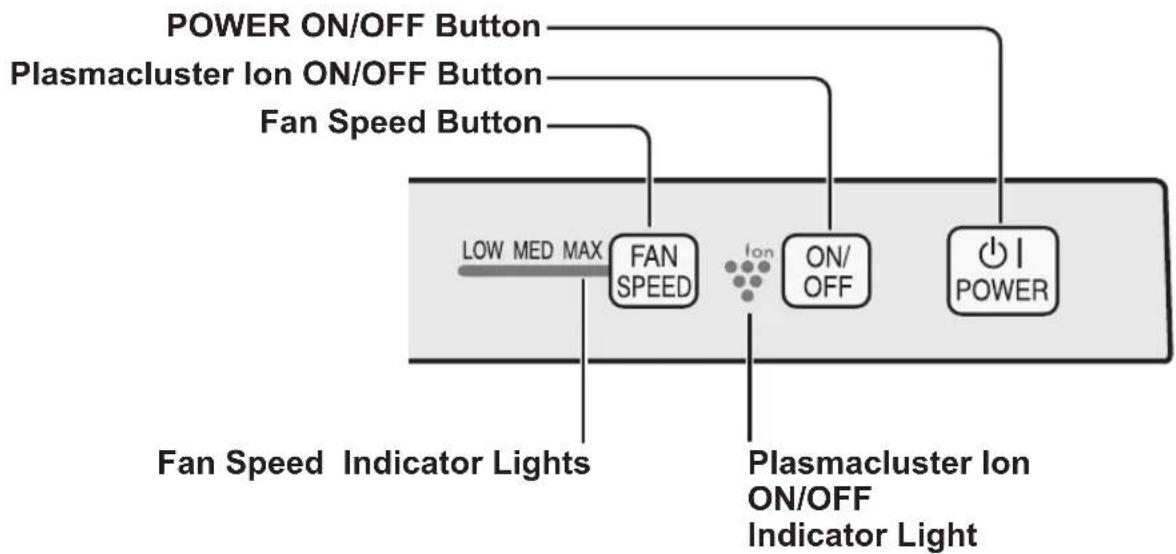
ILLUSTRATIVE DIAGRAM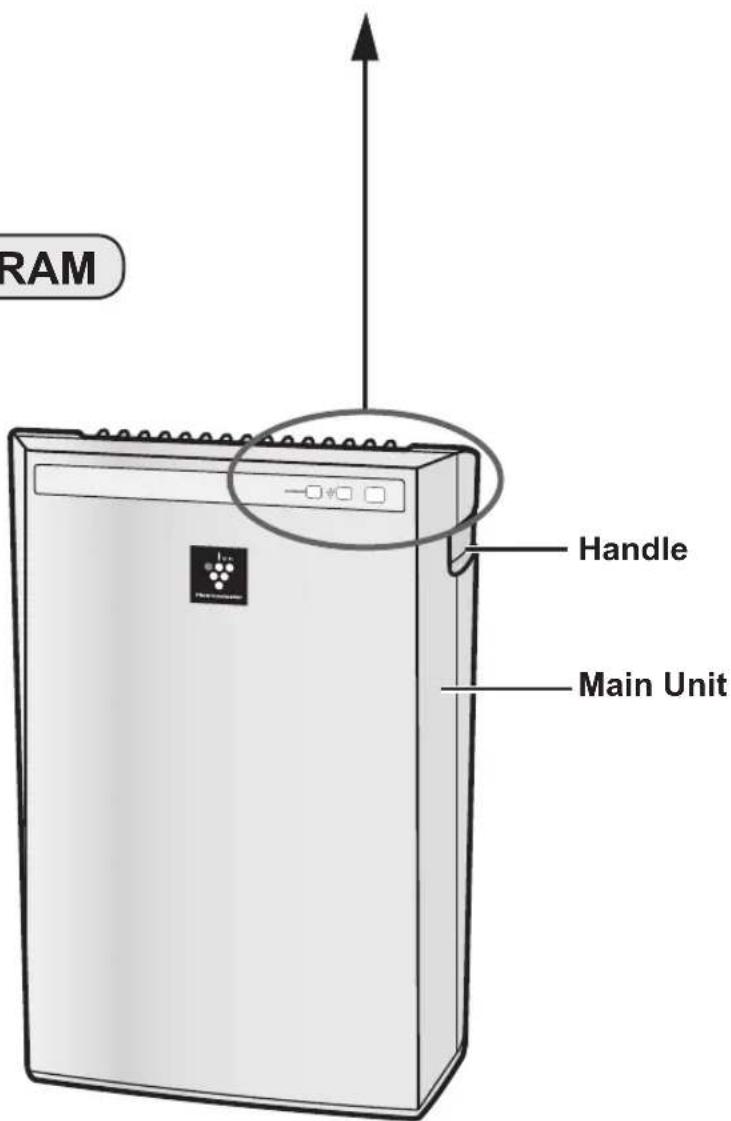
INCLUDED
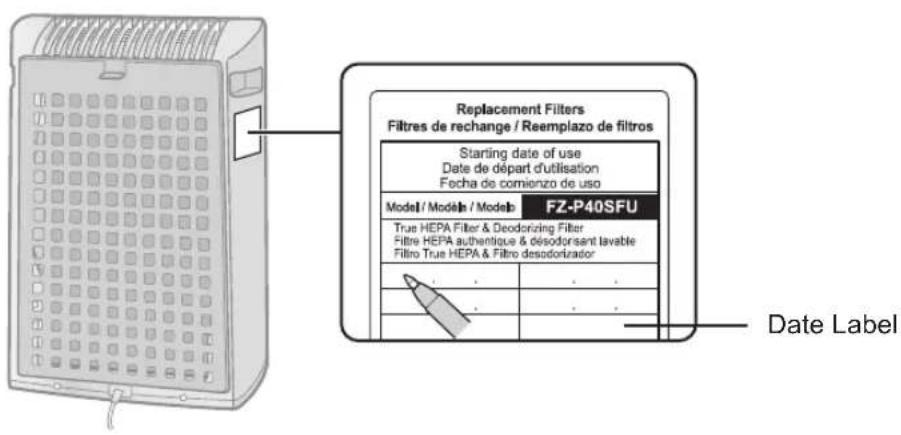
Operation manual - Date Label
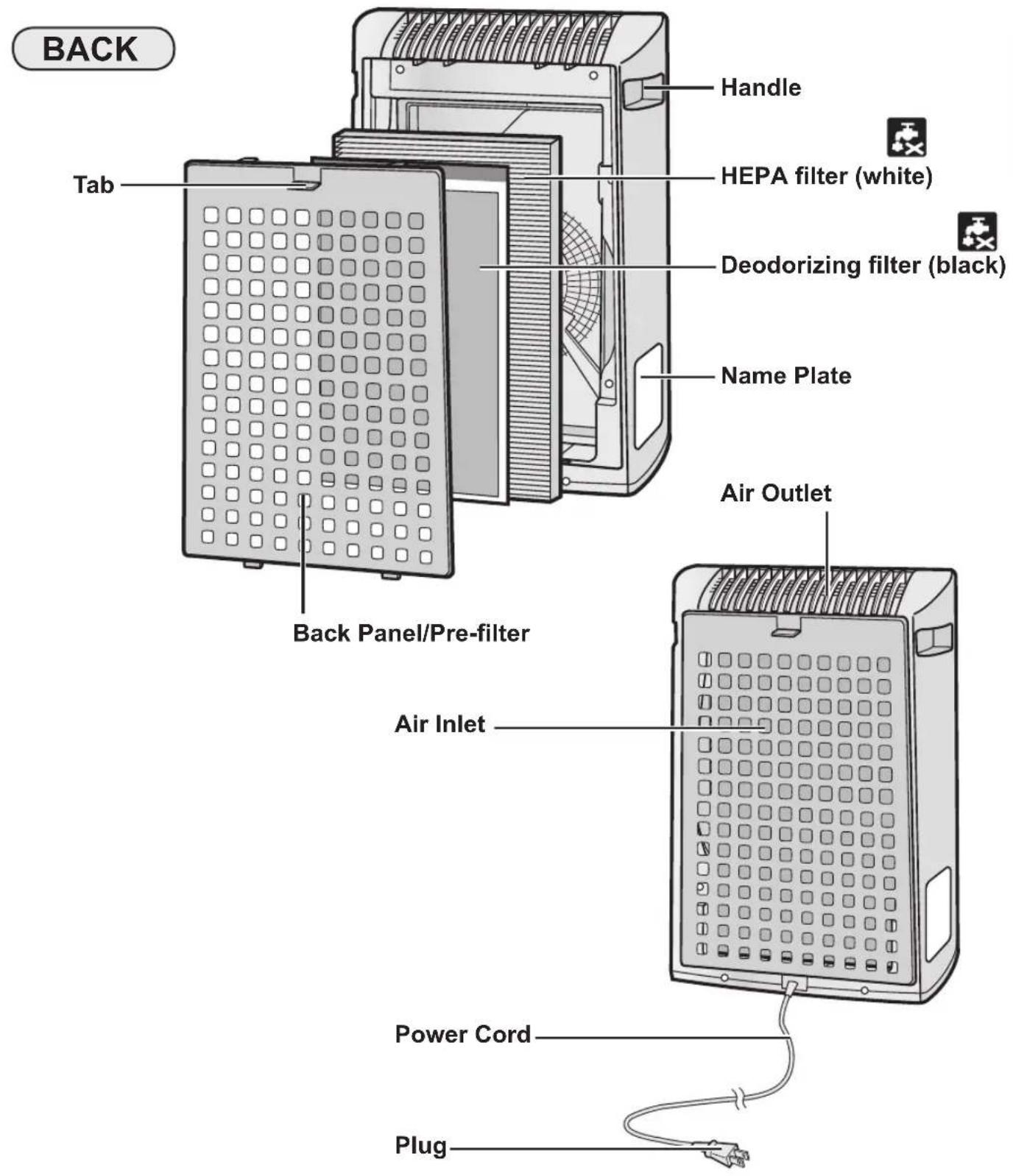
FILTER INSTALLATION
To maintain the quality of the filters, they are installed in the main unit and packed in plastic bags. Be sure to remove the filters from the plastic bags before using the unit.

remove the filters
1 Remove the Back Panel.
Pull the tab at the top of the Back Panel.
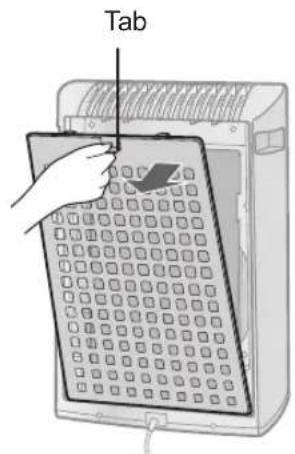
2 Remove the Deodorizing filter (black) and HEPA filter (white) from the plastic bags.
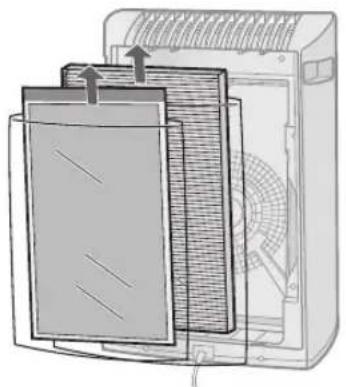
Install the filters
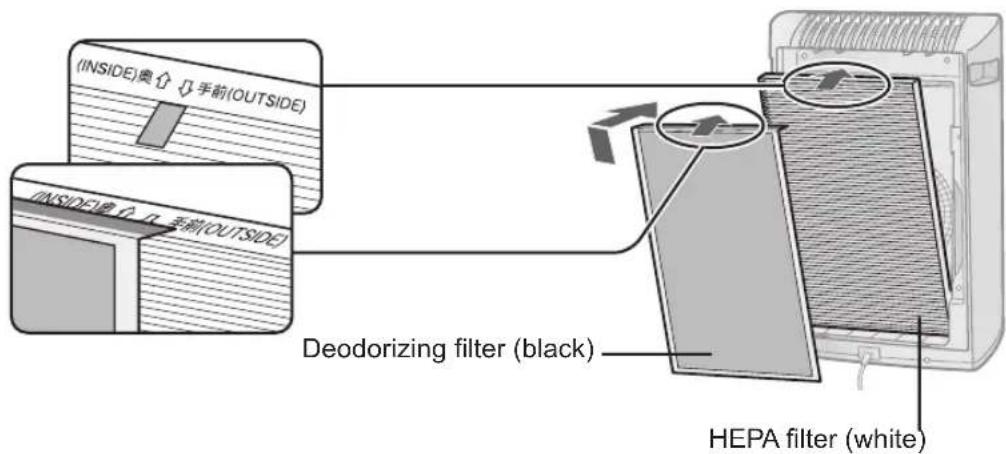
1 Place the HEPA filter and Deodorizing filter within the main unit.
Do not install the HEPA filter backwards or the unit will not operate properly.
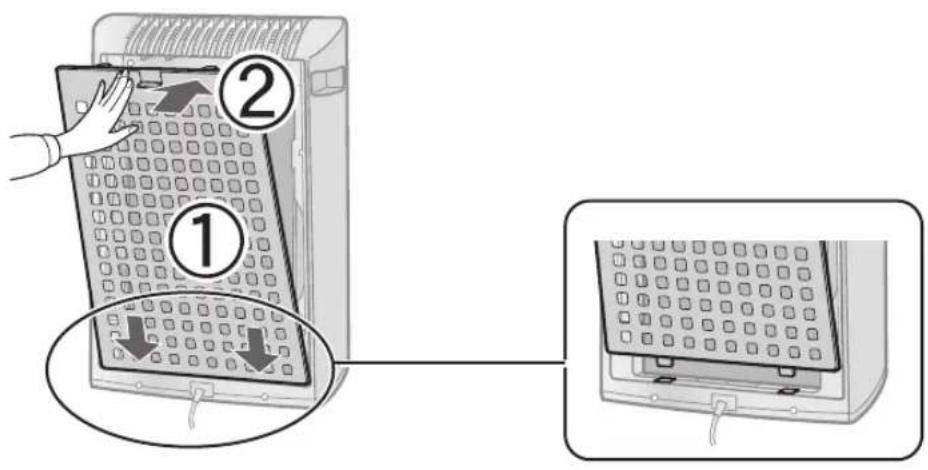
Replace the Back Panel to the main unit.
Push until it clicks into place.
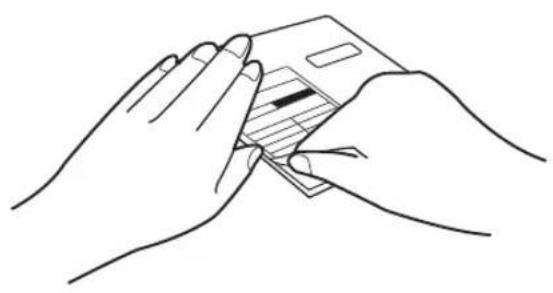
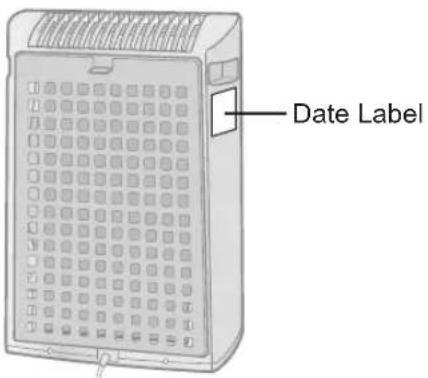
3 Fill in the usage start date on the Date Label and place on the unit as guide for when the filters should be replaced.
MAIN UNIT OPERATION
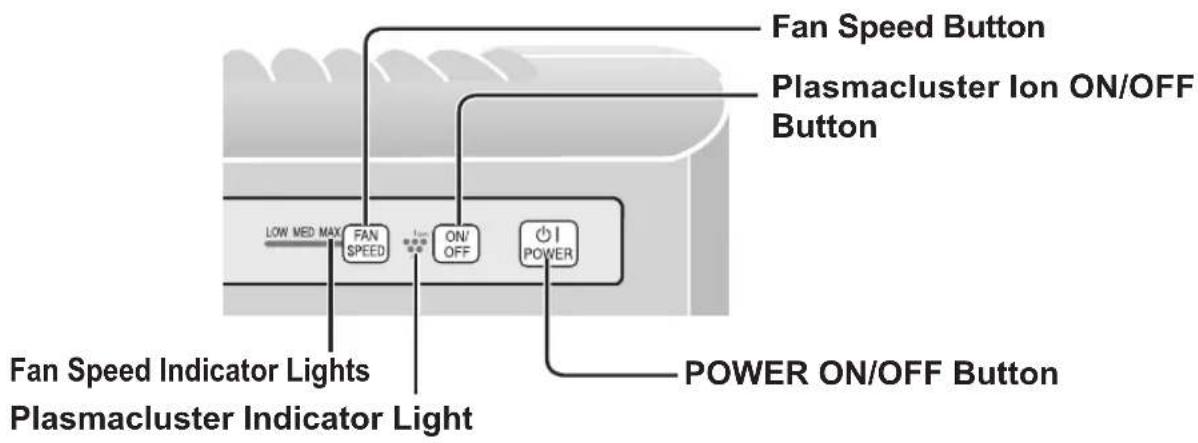
Power ON/OFF Button
- Press to start operation (short beep) and stop operation (long beep)
- Plasmacluster Indicator Light and Fan Speed Indicator Light turn on/off.
- Unless the power cord has been unplugged, the operations starts in the previous mode it was operated in.
Fan Speed Button
- Press the Fan Speed Button to select the desired fan speed. Indicator Lights will show the fan speed currently selected.
- The operation mode can be switched as below.
LOW
The unit will operate quietly using minimal air intake.
MED
The unit will operate at a fan speed of MEDIUM.
MAX
The unit will operate at a fan speed of MAX.
Plasmacluster Ion ON/OFF Button
Press the Plasmacluster Ion ON/OFF Button to turn Plasmacluster Ion Mode ON and OFF.
When Plasmacluster is ON, the Plasmacluster Indicator Light will turn on (blue).
CARE AND MAINTENANCE
To maintain optimum performance of this air purifier, please clean the unit including the filters periodically.
When cleaning the unit, be sure to first unplug the power cord, and never handle the plug with wet hands. Electrical shock and/or bodily injury may occur as a result.
BACK PANEL (Pre-filter)
Care Cycle
Whenever dust accumulates on the unit or every 2 months
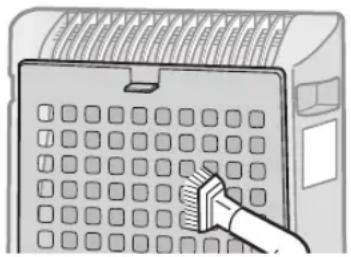
Gently remove dust from the back panel, using a vacuum cleaner attachment or similar tool.
1 In case of heavy dirt, soak the back panel in water with a small amount of kitchen detergent.
(Approx. 10 min.)
(Avoid scrubbing the back panel when washing.)
2 Rinse the back panel repeatedly with clean water to remove the solution residue.
3 Drip dry the panel to remove excess water.
Back Panel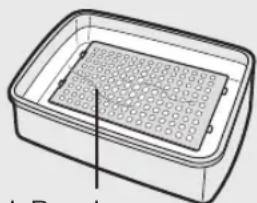
UNIT
Care Cycle
Whenever dust accumulates on the unit or every 2 months
To prevent dirt or stains on the main unit, clean as often as necessary. If stains are allowed to remain, they may become difficult to remove.
Wipe with a dry, soft cloth
For stubborn stains or dirt, use a soft cloth dampened with warm water.
Do not use volatile fluids
Benzine, paint thinner, polishing powder, etc., may damage the surface.
Do not use detergents
Detergent ingredients may damage the unit.
FILTER REPLACEMENT GUIDELINES
Filter life varies depending on the room environment, usage, and location of the unit.
If dust or odor persists, replace the filters.
(Refer to "Please read before operating your new Air Purifier")
Guide for filter replacement timing
- The presence of cigarette smoke, pet dander and other concentrated airborne particles may cause the filters to become clogged more quickly. Please check the filters regularly and replace as needed.
We recommend to replace the filter more frequently if the product is used in a condition significantly more severe than normal household use.
HEPA filter About 2 years after opening Deodorizing filter About 2 years after opening
REPLACING THE FILTER
1 See page E-10,11 for directions on how to install the filter when replacing. 2 Fill in the usage start date of the filter on the Date Label.
Replacement Filters
Model:FZ-A40SFU HEPA filter:1 unit Deodorizing filter:1 unit
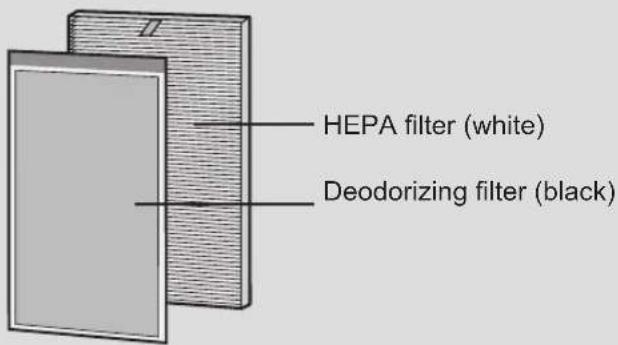
Please consult your dealer for purchase of replacement filter.
Disposal of Filter
Please dispose of the replaced filter according to the local disposal laws and regulations.
HEPA filter materials : Filter: Polypropylene Frame: Polyester
Deodorizing filter materials : Polypropylene, Polyester, Activated charcoal
TROUBLESHOOTING
Before calling for repair, please review the list below, since the problem may not be a unit malfunction.
| SYMPTOM REMEDY (not a malfunction) | |
| Odors and smoke are not removed. | Clean or replace the filters if they appear to be heavily soiled.(Refer to E-13,14) |
| A clicking or ticking sound is heard from the unit. | Clicking or ticking sounds may be audible when the unit is generating ions. |
| The discharged air has an odor. | Check to see if the filters are heavily soiled. Replace the filters. Plasmacluster Air Purifiers may produce a slight odor. This is normal and is a result of the Plasmacluster lons refreshing the air. |
SPECIFICATIONS
| Model FP-A40U / FP-A40C | ||||
| Power supply 120V 60Hz | ||||
| Fan Speed Operation | Fan Speed Adjustment MAX MED | LOW | ||
| Rated Power (W) 43 12 5.3 | ||||
| Fan Speed (CFM) 151 81 46 | ||||
| Noise level (dBA) 53 40 29 | ||||
| Recommended Room Size *1 | 200 sq.ft (18.6 m²) | |||
| CADR (Dust/Smoke/Pollon) 140 / 129 / 160 | ||||
| Filter type HEPA filter / Deodorizing filter | ||||
| Cord Length 8.3ft (2.5m) | ||||
| Dimensions | 356mm(W)x180mm(D)x510mm(H)14in(W)x71/8in(D)x201/8in(H) | |||
| Weight | 12.1 lbs (5.5 kg) | |||
*1 Size of a room which is appropriate for operating the unit at maximum fan speed.
Standby Power
In order to operate the electrical circuits while the power plug is inserted in the wall outlet, this product consumes about 0.3W of standby power.
For energy saving, unplug the power cord when the unit is not in use.
SHARPE ELECTRONICS CORPORATION
Sharp Plaza,
Mahwah, New Jersey 07495-1163
This ISM device complies with Canadian ICES-001
Partie responsible:
SHARP ELECTRONICS OF CANADA LTD.
335 Britannia Road East Mississauga, Ontario L4Z 1W9 Canada
TEL.: (905) 568-7140
Parte responsible: SHARP ELECTRONICS CORPORATION Sharp Plaza,
Mahwah, New Jersey 07495-1163
NOTE - Radio or television interference
SHARP ELECTRONICS CORPORATION
Sharp Plaza, Mahwah,
New Jersey 07495-1163 U.S.A.
SHARP CORPORATION
Osaka, Japan
SHARP®
SHARP ELECTRONICS OF CANADA LTD.
335 Britannia Road East Mississauga,
Ontario L4Z 1W9 Canada
SHARP CORPORATION
Osaka, Japan
IMPORTANT! Please fill out and return within the next 10 days.
Register ONLINE at www.sharpusa.com
- Mr. 2. Mrs. 3. Ms. 4. Miss
First Name Initial Last Name
Street
Apt. No.
CCV01
Air Purifier
City
State
ZIP Code
E-mail Address:
- Your date of birth: / Month Year
- Marital status: 1. Married 2. Single
- Date of purchase: // /Month Day Year
- Model number:
- Serial number:
- Price paid (excluding sales tax) .00
- Where did you purchase this product?
- What was the most important reason for buying this air purifier?
1. Doctor/Pharmacist recommendation - 4. Eliminate odors - 5. Reduce pet allergens - 2. Reduce smoke - 6. Reduce asthma-causing air - 3. Reduce pollen, dust and impurities - 7. Reduce dust mite allergens
mite allergens
- What features most influenced your decision to purchase this
product?
- Cleaning Mode Indicator/
- Plasmacluster technology 2.1 Design CLEAN-SIGN
- Triple Filtration System 7. Filter Replace 4.1 Washable Filter Schedule
- HEPA Filter 8. Silent Mode
- What factors most influenced your decision to purchase this product?
- Brand reputation 7. Friend/Relative
- Advertisement recommendation 3. Price 8. Warranty coverage
- Specific product feature 9. Doctor/Pharmacist
- Style/Appearance recommendation
- Salesperson-10. Other
recommendation
- In what room will this product be installed?
- Adult's bedroom 4. Family room
- Children's bedroom 5. Kitchen
- Living room 6. Other
To help us understand our customers' lifestyles, please indicate the interests and activities in which you or your spouse enjoy participating on a regular basis.
| Home Life | 11. □ | Art/Antique Collecting | Investing and Money | 30. □ | Wildlife/Environmental Issues | ||
| 01. □ | Grandchildren | 12. □ | Stamp/coin Collecting | 21. □ | Shopping by Catalog/ | 31. □ | Boating/Sailing |
| 02. □ | Home Improvement/Do-It-Yourself | 13. □ | Crafts | Mail Order | Sports, Fitness & Health | ||
| 03. □ | Gardening | 14. □ | Sewing/Needlework/Knitting | 22. □ | Shopping by Internet | 32. □ | Physical Fitness/Exercise |
| 04. □ | Own a Dog | Travel | 23. □ | Use Credit Cards Regularly | 33. □ | Walking for Health | |
| 05. □ | Own a Cat | 15. □ | Airline Club/Frequent Flyer | 24. □ | Donate to Charitable Causes | 34. □ | Health/Natural Foods |
| Leisure | 16. □ | Travel in USA | 25. □ | Investments/Money Making | 35. □ | Dieting/Weight Control | |
| 17. □ | Foreign Travel | Opportunities | 36. □ | Self-Improvement | |||
| 06. □ | Cultural/Art Events | 18. □ | Cruise Ship Vacations | 26. □ | Contests/Sweepstakes | 37. □ | Golf |
| 07. □ | Avid Book Reading | 19. □ | RV Vacations | Great Outdoors | 38. □ | Biking | |
| 08. □ | Bible/Devotional Reading | 20. □ | Casino Gambling | 27. □ | Hunting/Shooting | 39. □ | Snowboarding/Snow skiing |
| 09. □ | Gourmet Cooking/Fine Foods | 28. □ | Fishing | 40. □ | NASCAR | ||
| 10. □ | Wines | 29. □ | Camping/Hiking | ||||
PRODUCT REGISTRATION DEPARTMENT
Please do not send any products or other correspondence to this address.
If you have comments or suggestions about our product, please write to:
First-Class Postage Required
Post Office will not deliver without proper postage.
Consumer Electronics Group
Sharp Plaza, Mahwah, NJ 07495-1163 U.S.A.
Register online at www.sharpusa.com
CCV01
SHARP ELECTRONICS CORPORATION
POBOX171098
DENVER CO 80217-1098
11.111.111.111.111.111.111.111.1
SHARP®
Protect Your Investment
Register your product for:

Recall Notifications
We contact our customers in case of recall.

Owner Verification
Registration can serve as verification of your ownership in the event of product theft or loss.

Efficient Service
Completing this card will help you obtain more efficient warranty service in case there is a problem with your product.

Don't forget
We know you are busy, but registering is important, quick and easy!
Or register online at www.sharpusa.com

- ENERGY STAR
- PLEASE READ BEFORE OPERATING YOUR NEW AIR PURIFIER
- NOTE
- FEATURES
- TRAPS DUST
- DECREASES ODORS
- REDUCES POLLEN & MOLD
- FRESHENS
- CONTENTS
- DECLARATION OF CONFORMITY
- SHARP AIR PURIFIER FP-A40U
- RESPONSIBLE PARTY
- FOR CUSTOMER ASSISTANCE (THE UNITED STATES)
- TO ACCESS OUR WEB SITE: WWW.SHARPUSA.COM
- CONSUMER LIMITED WARRANTY
- CONSUMER LIMITED WARRANTY FOR U.S. USERS
- YOUR PRODUCT MODEL NUMBER & DESCRIPTION
- WARRANTY PERIOD FOR THIS PRODUCT
- ADDITIONAL ITEM(S) EXCLUDED FROM WARRANTY COVERAGE
- WHERE TO OBTAIN SERVICE
- WHAT TO DO TO OBTAIN SERVICE
- SHARP®
- SHARP ELECTRONICS CORPORATION
- FOR CUSTOMER ASSISTANCE (CANADA)
- TO ACCESS OUR WEB SITE: WWW.SHARP.CA
- LIMITED WARRANTY
- CONSUMER ELECTRONICS PRODUCTS
- CONGRATULATIONS ON YOUR PURCHASE
- COOT
- YEAR
- IMPORTANT SAFETY INSTRUCTIONS
- NOTE - RADIO OR TV INTERFERENCE
- CAUTIONS CONCERNING OPERATION
- INSTALLATION GUIDELINES
- FILTER GUIDELINES
- PART NAMES
- MAIN UNIT DISPLAY
- INCLUDED
- FILTER INSTALLATION
- REMOVE THE FILTERS
- INSTALL THE FILTERS
- REPLACE THE BACK PANEL TO THE MAIN UNIT
- FILL IN THE USAGE START DATE ON THE DATE LABEL AND PLACE ON THE UNIT AS GUIDE FOR WHEN THE FILTERS SHOULD BE REPLACED
- MAIN UNIT OPERATION
- POWER ON/OFF BUTTON
- FAN SPEED BUTTON
- LOW
- MED
- MAX
- PLASMACLUSTER ION ON/OFF BUTTON
- CARE AND MAINTENANCE
- BACK PANEL (PRE-FILTER)
- CARE CYCLE
- UNIT
- FILTER REPLACEMENT GUIDELINES
- GUIDE FOR FILTER REPLACEMENT TIMING
- REPLACING THE FILTER
- REPLACEMENT FILTERS
- DISPOSAL OF FILTER
- TROUBLESHOOTING
- SPECIFICATIONS
- STANDBY POWER
- PARTIE RESPONSIBLE
- NOTE - RADIO OR TELEVISION INTERFERENCE
- IMPORTANT! PLEASE FILL OUT AND RETURN WITHIN THE NEXT 10 DAYS
- REGISTER ONLINE AT WWW.SHARPUSA.COM
- PRODUCT
- PRODUCT REGISTRATION DEPARTMENT
- POBOX
- DENVER CO
- PROTECT YOUR INVESTMENT
Brand : SHARP
Model : FPA40UWRB
Category : Air purifier