RM4060 - Lawn mower REMINGTON - Free user manual and instructions
Find the device manual for free RM4060 REMINGTON in PDF.


| Product Type | Cordless Lawn Mower |
| Brand | REMINGTON |
| Model | RM4060 |
| Power Source | 40 V Lithium-Ion Battery |
| Cutting Width | 46 cm (18 in) |
| Cutting Height | Adjustable with front and rear levers |
| Blade Type | Steel Rotary Blade |
| Weight | Approximately 18 kg |
| Safety | Blade control, push button, safety key/battery selector |
| Compatible Battery | RM4140, RM4150 (one included, second optional) |
| Runtime | Up to 45 min depending on battery and conditions |
| Charge Time | Approximately 2 h |
| Functions | Mulching, side discharge, rear bagging |
| Maintenance | Clean after use, sharpen/replace blade, store dry |
| Included Accessories | Grass bag, discharge deflector, RM4110 charger, battery (1) |
| Warranty | Separate document provided with the appliance |
Frequently Asked Questions - RM4060 REMINGTON
User questions about RM4060 REMINGTON
0 question about this device. Answer the ones you know or ask your own.
Ask a new question about this device
Download the instructions for your Lawn mower in PDF format for free! Find your manual RM4060 - REMINGTON and take your electronic device back in hand. On this page are published all the documents necessary for the use of your device. RM4060 by REMINGTON.
USER MANUAL RM4060 REMINGTON
Safe Operation Practices.... 2
Assembly & Set-Up 7
Controls & Operation....10
Service 12
Troubleshooting....14
Parts/Warranty......See Separate Supplement
WARNING
READ AND FOLLOW ALL SAFETY RULES AND INSTRUCTIONS IN THIS MANUALBEFORE ATTEMPTING TO OPERATE THIS MACHINE.
FAILURE TO COMPLY WITH THESE INSTRUCTIONS MAY RESULT IN PERSONAL INJURY.
NOTE: This Operator's Manual covers several models. Features may vary by model. Not all features in this manual are applicable to all models and the model depicted may differ from yours.
Important Safe Operation Practices

WARNING! When using electric lawn mowers, basic safety precautions should always be followed to reduce the risk of fire, electric shock, and personal injury, including the following:

WARNING! Read and follow all instructions in this manual before attempting to operate this machine. Failure to comply with these instructions may result in personal injury.

WARNING! This symbol points out important safety instructions which, if not followed, could endanger the personal safety and/or property of yourself and others. When you see this symbol.
HEED ITS WARNING!

DANGER: This machine was built to be operated according to the safe operation practices in this manual. As with any type of power equipment, carelessness or error
on the part of the operator can result in serious injury. This machine is capable of amputating fingers, hands, toes and feet and throwing foreign objects. Failure to observe the following safety instructions could result in serious injury or death.
CALIFORNIA PROPOSITION 65
WARNING! This product contains a chemical known to the state of California to cause cancer, birth defects or other reproductive harm.
Operation
General Operation:
-
Read this operator's manual carefully in its entirety before attempting to assemble this machine. Read, understand, and follow all instructions on the machine and in the manual(s) before operation. Be completely familiar with the controls and the proper use of this machine before operating it. Keep this manual and supplement in a safe place for future and regular reference and for ordering replacement parts.
-
This machine is a precision piece of power equipment, not a plaything. Therefore, exercise extreme caution at all times. Your machine has been designed to perform one job: to mow grass. Do not use it for any other purpose.
-
Do not overload the lawn mower — it will do the job better and safer at the rate for which it was designed.
- Never allow children under 14 years old to operate this machine. Children 14 years old and over should read and understand the instructions in this manual and should be trained and supervised by a parent. Only responsible individuals who are familiar with these rules of safe operation should be allowed to use this machine.
- Thoroughly inspect the area where the equipment is to be used. Remove all stones, sticks, wire, bones, toys and other foreign objects which could be tripped over or picked up and thrown by the blade. Thrown objects can cause serious personal injury. Plan your mowing pattern to avoid discharge of material toward roads, sidewalks, bystanders and the like. Also, avoid discharging material against a wall or obstruction which may cause discharged material to ricochet back toward the operator.
- To help avoid blade contact or a thrown object injury, stay in operator zone behind handles and keep children, bystanders and pets out of the area while mower is in operation. Stop machine if anyone enters area.
- Always wear safety glasses or safety goggles during operation and while performing an adjustment or repair to protect your eyes. Thrown objects which ricochet can cause serious injury to the eyes.
- Always use a face or dust mask if operation is dusty.
- Dress properly - Do not wear loose clothing or jewelry. They can be caught in moving parts. Use of rubber gloves and footwear is recommended when working out doors.
- Wear sturdy, rough-soled work shoes and close-fitting slacks and shirts. Shirts and pants that cover the arms and legs and steel-toed shoes are recommended. Never operate this machine in bare feet, sandals, slippery or light weight (e.g. canvas) shoes.
- Do not put hands or feet near rotating parts or under cutting deck. Contact with blade can amputate hands and feet.
- A missing or damaged discharge cover can cause blade contact or thrown object injuries.
-
Many injuries occur as a result of the mower being pulled over the foot during a fall caused by slipping or tripping. Do not hold on to the mower if you are falling; release the handle immediately.
-
Never pull the mower back toward you while you are walking. If you must back the mower away from a wall or obstruction first look down and behind to avoid tripping and then follow these steps:
a. Step back from mower to fully extend your arms.
b. Be sure you are well balanced with sure footing.
c. Pull the mower back slowly, no more than half way toward you.
d. Repeat these steps as needed. -
Do not operate the mower while under the influence of alcohol or drugs.
-
Stay alert — Watch what you are doing. Use common sense. Do not operate lawn mower when you are tired.
-
The blade control is a safety device. Never attempt to bypass its operation. Doing so makes the safety device inoperative and may result in personal injury through contact with the rotating blade. The blade control must operate easily in both directions and automatically return to the disengaged position when released.
-
Never operate the mower in rain or wet grass. Always be sure of your footing. A slip and fall can cause serious personal injury. If you feel you are losing your footing, release the blade control immediately and the blade will stop rotating within three seconds.
-
Mow only in daylight or good artificial light. Walk, never run.
-
Stop the motor when crossing gravel drives, walks or roads.
-
If the equipment should start to vibrate abnormally, stop the mower and check immediately for the cause. Vibration is generally a warning of trouble.
-
Shut the mower off and wait until the blade comes to a complete stop before removing the grass catcher or unclogging the chute. The cutting blade will stop rotating within three (3) seconds. Never place any part of the body in the blade area until you are sure the blade has stopped rotating.
-
Never operate mower without proper trail shield, discharge cover, grass catcher, blade control or other safety protective devices in place and working. Never operate mower with damaged safety devices. Failure to do so, can result in personal injury.
-
Only use parts and accessories made for this machine by manufacturer. Failure to do so can result in personal injury.
-
If situations occur which are not covered in this manual, use care and good judgment. Telephone Customer Support for the name of your nearest dealer.
Slope Operation:
Slopes are a major factor related to slip and fall accidents which can result in severe injury. Operation on slopes requires extra caution. If you feel uneasy on a slope, do not mow it. For your safety, use the slope gauge included as part of this manual to measure slopes before operating this machine on a sloped or hilly area. If the slope is greater than 15 degrees, do not mow it.
Do not overreach - Keep proper footing and balance at all times.
Do:
- Mow across the face of slopes; never up and down. Exercise extreme caution when changing direction on slopes.
- Watch for holes, ruts, rocks, hidden objects, or bumps which can cause you to slip or trip. Tall grass can hide obstacles.
- Always be sure of your footing. A slip and fall can cause serious personal injury. If you feel you are losing your balance, release the blade control handle immediately, and the blade will stop rotating within three (3) seconds.
Do Not:
- Do not mow near drop-offs, ditches or embankments, you could lose your footing or balance.
- Do not mow slopes greater than 15 degrees as shown on the slope gauge.
- Do not mow on wet grass. Unstable footing could cause slipping.
Children
Tragic accidents can occur if operator is not alert to presence of children. Children are often attracted to mower and mowing activity. They do not understand the dangers. Never assume that children will remain where you last saw them.
- Keep children out of the mowing area and under watchful care of a responsible adult other than the operator.
- Be alert and turn mower off if a child enters the area.
- Before and while moving backwards, look behind and down for small children.
- Use extreme care when approaching blind corners, doorways, shrubs, trees, or other objects that may obscure your vision of a child who may run into the mower.
- Never allow children under 14 years old to operate a power mower. Children 14 years old and over should read and understand operation instructions and safety rules
in this manual and should be trained and supervised by a parent.
Service
-
Remove key and store mower indoors when not in use. Allow motor to cool before storing in any inclosure. Mower should be stored indoors in a dry place, out of the reach of children.
-
Remove the battery(ies) from the machine when not in use.
-
When servicing use only identical replacement parts listed in this manual. "Use of parts which do not meet the original equipment specifications may lead to improper performance and compromise safety!"
-
Before cleaning, repairing, or inspecting, make certain the blade and all moving parts have stopped. Remove the key to prevent accidental starting.
-
Remove key before servicing, cleaning, or removing material from the lawn mower.
-
Follow instructions for lubricating and changing accessories.
-
Never douse or hose the machine with water. Avoid getting any liquid in the motor and electrical connections. Clean the machine after each use. Refer to Cleaning and Storage. Do not use solvents or strong detergents.
-
Keep handles dry, clean and free from oil and grease.
-
To reduce a fire hazard, keep the motor free of grass, leaves and debris build-up.
-
Check the blade and motor mounting bolts at frequent intervals for proper tightness. Also, visually inspect blade for damage (e.g., bent, cracked, and worn). Replace blade with the original equipment manufacturer's (OEM) blade only, listed in this manual.
-
Maintain your mower with care — Keep mower blade sharp and clean for best and safest performance. Mower blades are sharp and can cut, wrap the blade or wear gloves and use extra caution when servicing them.
-
Keep all nuts, bolts, and screws tight to be sure the equipment is in safe working condition.
-
Never tamper with safety devices. Check their proper operation regularly.
-
Never attempt to make cutting height adjustments while the mower is running.
-
After striking a foreign object, stop the motor, remove the key, and thoroughly
inspect the mower for any damage. Repair the damage before operating the mower.
-
Grass catcher components, discharge cover, and trail shield are subject to wear and damage which could expose moving parts or allow objects to be thrown. For safety protection, frequently check components and replace immediately with original equipment manufacturer's (OEM) parts only, listed in this manual.
-
According to the Consumer Products Safety Commission (CPSC) and the U.S. Environmental Protection Agency (EPA), this product has an Average Useful Life of seven (7) years, or 140 hours of operation. At the end of the Average Useful Life have the machine inspected annually by an authorized service dealer to ensure that all mechanical and safety systems are working properly and not worn excessively. Failure to do so can result in accidents, injuries or death.
-
Do not dispose of the battery(ies) in a fire. The cell may explode. Check with local codes for proper disposal instructions.
-
Do not open or mutilate the battery(ies). Released electrolyte is corrosive and may cause damage to the eyes or skin. It may be toxic if swallowed.
-
Do not touch the motor or heat sink. These parts can get extremely hot from operation, even after the machine is turned off.
-
Exercise care in handling batteries in order not to short the battery with conducting materials such as rings, bracelets, and keys. The battery or conductor may be hot and cause burns.
General Electric Safety
- Do not expose the machine to rain or wet conditions.
- Do not handle the machine with wet hands.
- Do not operate the machine in the rain, in wet conditions or on wet surfaces.
- To reduce the risk of electric shock, avoid body contact with grounded conductors, such as metal pipes or wire fences.
- Do not operate the machine in explosive atmospheres, such as in the presence of flammable liquids, gases or dust.
Battery Charger Safety

WARNING: Only charge RM4140 or RM4150 batteries with a RM4110 battery charger. DO NOT attempt to use any other battery charger to charge RM4140 or RM4150
batteries. Other types of battery chargers may cause the batteries to burst, resulting in fire, personal injury or property damage.
- A nameplate on the charger indicates the voltage used. Never connect the charger to an AC voltage that differs from this voltage.
- An extension cord should not be used unless absolutely necessary. Use of an improper extension cord could result in a risk of fire, electric shock or electrocution.
- Do not use multiple extension cords.
- Make sure the extension cord is heavy enough to carry the current drawn by the charger. An undersized extension cord will cause a drop in line voltage, resulting in a loss of power and overheating. If in doubt, use the next heavier gauge cord. The smaller the gauge number, the heavier the cord.
| MINIMUM WIRE SIZE FOR EXTENSION CORDS FOR 120 VOLT APPLIANCES USING 0-6 AMPS | ||||
| Cord Length (ft.) | 25 | 50 | 100 | 150 |
| Wire Size (AWG) 16 | 6 16 | 14 | ||
- Make sure the cords are in good condition. Inspect the power cord and extension cord periodically. Look closely for deterioration, cuts or cracks in the insulation. If a cord is damaged in any manner while plugged in, disconnect the cord from both the outlet and the charger. Do not use a damaged cord. Damaged cords should be repaired or replaced.
- Do not abuse cords. Never pull or carry the charger by a cord. Keep cords away from heat, oil, water, sharp edges, and moving objects. Always grasp the plug when disconnecting a cord.
- Never modify a plug, cord or outlet in any way.
- Ground Fault Circuit Interrupter (GFCI) protection should be provided on the circuit(s) or outlet(s) to be used with this charger. For an extra measure of safety, use receptacles with built-in GFCI protection.
- Do not place the battery charger where cords might be stepped on, tripped over or subjected to damage.
-
Do not charge batteries in the rain or in wet conditions. Keep the battery charger in a cool and dry area.
-
Keep the battery charger away from all liquid.
-
Do not allow small metal items or material such as steel wool, aluminum foil or other foreign particles into the charger port.
-
Do not probe the charger with conductive material. There is a risk of electric shock.
-
Do not cover the battery charger. The battery charger may overheat.
-
Do not allow the battery or battery charger to overheat. If they are warm, allow them to cool down. Only charge batteries in temperatures between 32° and 104°F (0° and 40°C).
-
Always unplug the battery charger before cleaning it. Always unplug the battery charger when it is not in use.
Battery Safety
- Do not expose the battery to fire or to temperatures over 176^ F ( 80^ C). Doing so could cause an explosion.
- Handle batteries with care. Do not short the battery with conductive materials, such as rings, bracelets, keys, etc. Shorting the battery may cause personal injury, damage to the battery or a fire.
- When the battery is not in use, keep it away from small metal objects, such as paper clips, coins, nails, etc. These items could connect one terminal to another and short the battery.
- Do not attempt to charge a cracked or damaged battery.
- Do not use a damaged or modified battery. Doing so could result in a fire, explosion or personal injury.

WARNING: The battery may present a risk of fire or chemical burn if mistreated. Do not disassemble, overheat or incinerate the battery.

WARNING: The battery may develop a small leak under extreme usage or temperature conditions.
IF battery fluid contacts skin:
• Immediately wash the area with soap and water.
• Neutralize the battery fluid with a mild acid (lemon juice, vinegar, etc.).
- Seek immediate medical attention.
If battery fluid gets in the eyes:
• Immediately flush the eyes with clean water for at least 15 minutes.
- Seek immediate medical attention.

WARNING: Only use RM4140 or RM4150 batteries with this machine. DO NOT use any other type of battery, attachment or accessory with this machine. Other
types of batteries, attachments or accessories could lead to serious injury, property damage or damage to the machine.

WARNING: Only charge RM4140 or RM4150 batteries with a RM4110 battery charger. DO NOT attempt to use any other battery charger to charge RM4140 or RM4150
batteries. Other types of battery chargers may cause the batteries to burst, resulting in fire, personal injury or property damage.
FCC Statement

CAUTION: Changes or modifications not expressly approved by the party responsible for compliance could void the user's authority to operate the
equipment.
NOTE: This equipment has been tested and found to comply with the limits for a Class B digital device, pursuant to part 15 of the FCC Rules. These limits are designed to provide reasonable protection against harmful interference in a residential installation. This equipment generates, uses and can radiate radio frequency energy and, if not installed and used in accordance with the instructions, may cause harmful interference to radio communications. However, there is no guarantee that interference will not occur in a particular installation. If this equipment does cause harmful interference to radio or television reception, which can be determined by turning the equipment off and on, the user is encouraged to try to correct the interference by one or more of the following measures:
• Reorient or relocate the receiving antenna.
• Increase the separation between the equipment and receiver.
- Connect the equipment into an outlet on a circuit different from that to which the receiver is connected.
• Consult the dealer or an experienced radio/TV technician for help.
Safety Symbols
This page depicts and describes safety symbols that may appear on this product. Read, understand, and follow all instructions on the machine before attempting to assemble and operate.
| SymbolDescription | |
 | READ THE OPERATOR'S MANUAL(S)Read, understand, and follow all instructions in the manual(s) before attempting to assemble and operate |
 | DANGER — ROTATING BLADESTo reduce the risk of injury, keep hands and feet away. Do not operate unless discharge cover or grass catcher is in its proper place. If damaged, replace immediately. |
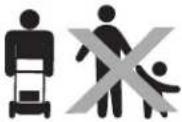 | DANGER — BYSTANDERSDo not mow when children or others are around. |
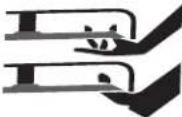 | DANGER — HAND/ FOOT CUTKeep hands and feet away from rotating parts. |
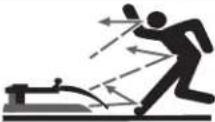 | DANGER — THROWN OBJECTSRemove foreign objects that can be thrown by the blade in any direction. Wear safety glasses. |
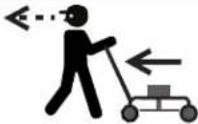 | DANGER — TRIPPING HAZARD/OBSTACLESNever pull the mower back toward you while walking. If you must back the mower away from a wall or obstruction first look down and behind to avoid tripping. Be sure you are well balanced with sure footing. |
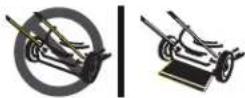 | DANGER — FLYING DEBRISThe trail shield is attached to protect the operator form flying debris. Do not operate with out trail shield installed. |
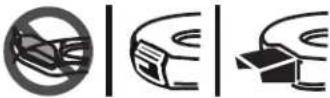 | DANGER — FLYING DEBRISTo reduce the risk of injury, keep deck opening covered. Do not operate unless mulch cover or discharge cover is in its proper place. If damaged, replace immediately. |
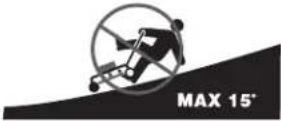 | DANGER — SLOPESUse extra caution on slopes. Do not mow slopes greater than 15°. |
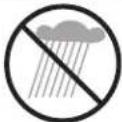 | WARNING— ELECTRICAL SHOCKAvoid dangerous environments. Never operate the mower in the rain or in damp or wet conditions.Moisture is a shock hazard. |

WARNING! Your Responsibility—Restrict the use of this power machine to persons who read, understand and follow the warnings and instructions in this manual and on the machine.
SAVE THESE INSTRUCTIONS!
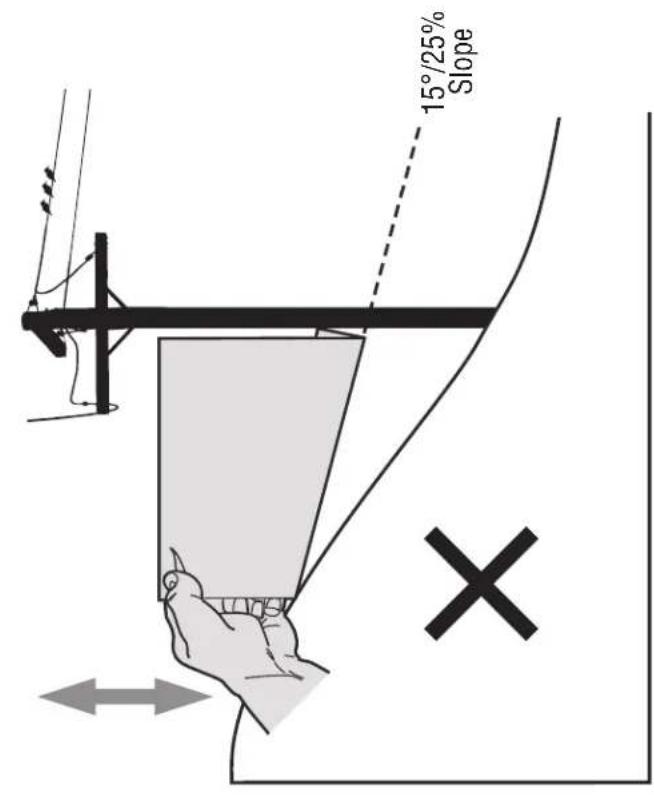
Figure 2Figure 1
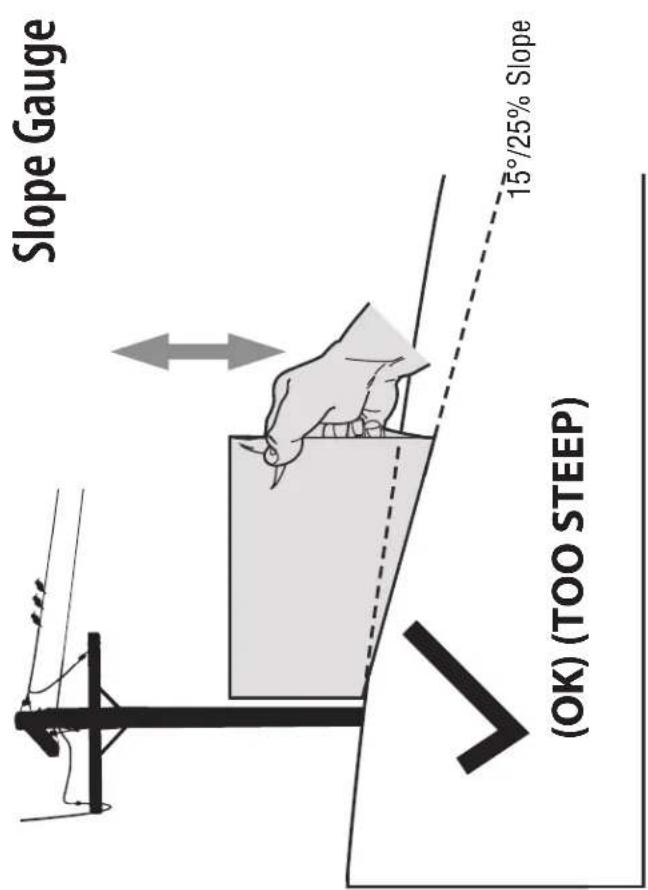
15°/25%
USE THIS SLOPE GAUGE TO DETERMINE IF A SLOPE IS TOO STEEP FOR SAFE OPERATION!
To check the slope, proceed as follows:
-
Remove this page and fold along the dashed line.
-
Locate a vertical object on or behind the slope (e.g. a pole, building, fence, tree, etc.)
-
Align either side of the slope gauge with the object (See Figure 1 and Figure 2).
-
Adjust gauge up or down until the left corner touches the slope (See Figure 1 and Figure 2).
-
If there is a gap below the gauge, the slope is too steep for safe operation (See Figure 2 above).
WARNING! Slopes are a major factor related to slip and fall accidents which can result in severe injury or death. The machine is heavy and can speed up when going downhill. Be prepared to maintain control of the machine. To avoid loss of control, operate across slopes, not up and down. When turning, turn uphill, not down. Do not operate machine on slopes in excess of 15 degrees.
Thank You
Thank you for purchasing this product. It was carefully engineered to provide excellent performance when properly operated and maintained.
Please read this entire manual prior to operating the equipment. It instructs you how to safely and easily set up, operate and maintain your machine. Please be sure that you, and any other persons who will operate the machine, carefully follow the recommended safety practices at all times. Failure to do so could result in personal injury or property damage.
All information in this manual is relative to the most recent product information available at the time of printing. Review this manual frequently to familiarize yourself with the machine, its features and operation. Please
be aware that this Operator's Manual may cover a range of product specifications for various models. Characteristics and features discussed and/or illustrated in this manual may not be applicable to all models. We reserve the right to change product specifications, designs and equipment without notice and without incurring obligation.
If you have any problems or questions concerning the machine, phone your local authorized service dealer or contact us directly. We want to ensure your complete satisfaction at all times.
Throughout this manual, all references to right and left side of the machine are observed from the operating position.
Contents of Carton
- Battery Mower (1)
Grass Catcher Assembly (1)
• Side Discharge Chute (1)
- Battery (1) · Charger (1) · Mower Operator's Manual (1)
- Parts/Warranty Document (1) - Fast Start Guide † (1)
† If Equipped
NOTE: This Operator's Manual covers several models. Features may vary by model. Not all features in this manual are applicable to all models and the model depicted may differ from yours.
NOTE: This mower is shipped as a mulching mower. To convert from a mulching mower to a grass catcher or side discharge mower refer to the Set-Up instructions in this manual.
Assembly
- Remove any packing material which may be between upper and lower handles.
- Remove wing knobs (a) and carriage bolts (b) from handle as shown in Figure 2-1. Do not loosen or remove adjacent hex head screws.

Figure 2-1
- While stabilizing mower so it doesn't move, pivot upper handle up as shown in Figure 2-2. Do not crimp cable while lifting the handle up.
IMPORTANT: When pivoting the upper handle up ensure the cable (a) does not tangle on the T-bolts or handle brackets (b).
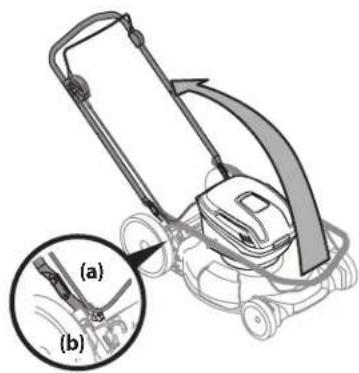
Figure 2-2
- Remove the T-bolts (a) from the handle brackets as shown in Figure 2-3.
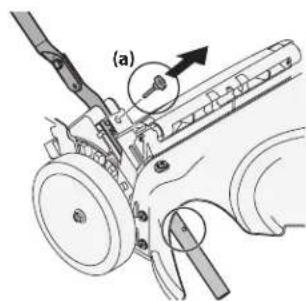
Figure 2-3
- Follow the steps below to complete handle assembly:
a. Pull upward on the handle until holes in lower handle (shown in Figure 2-3 deck cutaway) line up with holes in handle bracket. See Figure 2-4.
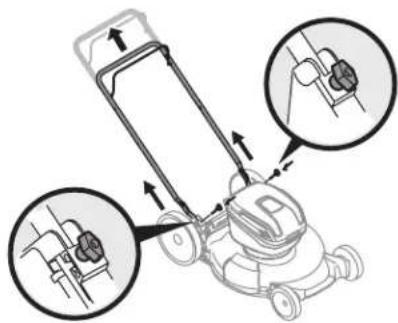
Figure 2-4
NOTE: When pulling upward on handle, make sure not to pull handle all the way out.
b. Insert the T-bolts (a) removed in Step 4 through the handle brackets and lower handle and securely tighten to secure the handle in place. See Figure 2-4.
c. Reattach wing knobs (a) and carriage bolts (b) removed in Step 2 into lower holes of handle as shown in Figure 2-5.
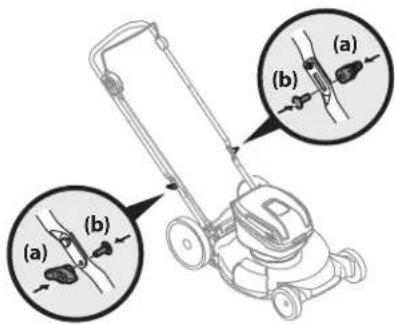
Figure 2-5
- Use cable clips to secure cable to the upper and lower handles.
NOTE: When securing the cable to the lower handle, ensure the cable is clear of the rear wheel and will not interfere with using the grass catcher.
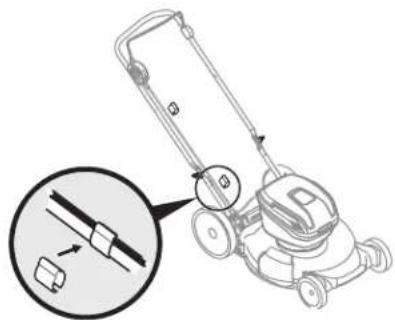
Figure 2-6
Grass Catcher Assembly
- Follow steps below to assemble the grass catcher (if needed). Make certain bag is turned right side out before assembling (warning label will be on the outside). See Figure 2-7.
a. Place bag over frame so that its black plastic side is at the bottom.
b. Slip plastic channel of grass bag over and hook onto the frame.
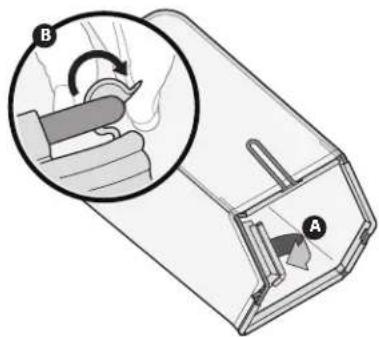
Figure 2-7
Set-Up
Checking the Battery Charge Level
IMPORTANT: Read the battery operator's manual thoroughly before using the battery.
Press the charge meter button on the battery. See Figure 2-8. The number of lights that illuminate will indicate the current charge level of the battery. If all four lights are dark, charge the battery before any further use. See Charging Battery on page 8 in the Assembly & Set-Up section.
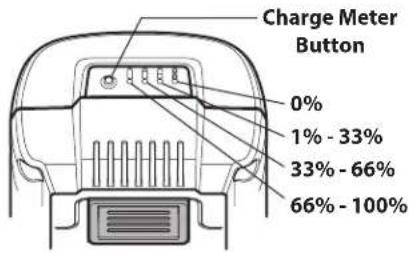
Figure 2-8
NOTE: While in use, lithium-ion batteries provide power with minimal power fade. When the battery is fully discharged, it will immediately cut power to the mower and require charging.
IMPORTANT: The battery charge level dose not indicate battery temperature. The charge meter will still indicate the current charge level if the battery exceeds the operational temperature.
WARNING: Do not expose the mower to rain or wet conditions.
Charging Battery
WARNING: Only charge RM4140 or RM4150 batteries with a RM4110 battery charger. DO NOT attempt to use any other battery charger to charge RM4140 or RM4150 batteries. Other types of battery chargers may cause the batteries to burst, resulting in fire, personal injury or property damage.
IMPORTANT: Read the battery charger operator's manual thoroughly before using the battery charger.
IMPORTANT: The battery is not shipped fully charged.
NOTE: Lithium-ion batteries will not develop a memory and may be charged at any time.
For maximum run time, fully charge the battery before each use.
-
Plug the battery charger into an appropriate Ground Fault Circuit Interrupter (GFCI) power outlet. See manual shipped with battery charger.
-
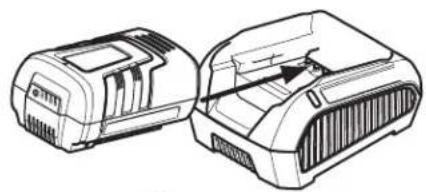
Insert the battery into the charging dock. The LED should illuminate. See Figure 2-9.
natural_image
Technical line drawing of two electronic device enclosures (no text or symbols)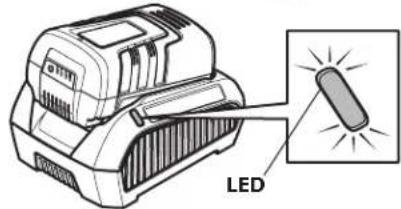
Figure 2-9
NOTE: If LED does not light:
• Make sure the battery is fully inserted into the charging dock.
• Make sure the battery charger is fully plugged into an appropriate power outlet.
• Make sure the power outlet is functioning by testing it with another electrical device.
- Examine the LED. The LED will indicate the battery status:
- Green (blinking): The battery is charging. Charge the battery until the green light stops blinking.
- Green (constant): The battery is fully charged.
- Red (blinking): The battery and/or charger are too hot or too cold. Make sure the battery and charger are in an environment between 32^ and 104^ (0^ and 40^) . Allow time for the battery and/or charger to warm up or cool down.
- Red (constant): The battery is not charging. Remove the battery, make sure the terminals on the battery and battery charger are clean. Re-insert the battery into the battery charger. If necessary refer to battery charger operator's manual.
- Once the battery is fully charged, remove it from the battery charger.
NOTE: The battery can be stored in the battery charger, but the battery charger should be unplugged from the power outlet.
Grass Catcher
- Follow steps below to attach grass catcher to mower. See Figure 2-10.
b. Lift mower rear discharge door.
c. Place grass catcher into the slots in the handle brackets. Release discharge door so that it rests on the grass catcher.
NOTE: Ensure the cable does not interfere with placing grass catcher into the slots in the handle brackets.
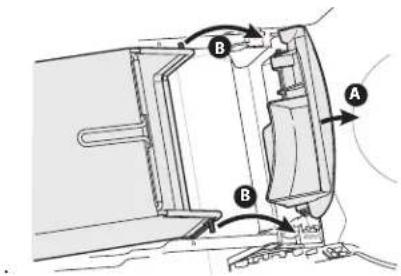
Figure 2-10
To remove grass catcher, lift mower rear discharge door. Lift grass catcher up and off the slots in the handle brackets. Release mower rear discharge door to allow it to close.
Side Discharge Chute/Mulch Plug
Your mower was shipped as a mulcher. To convert to side discharge, make sure grass catcher is not installed and rear discharge door is closed.
- On the right side of the mower, lift the mulch plug. See Figure 2-11.
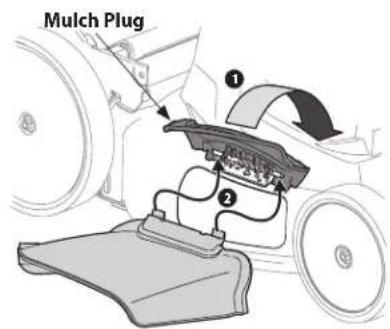
Figure 2-11
- Slide two hooks of side discharge chute under hinge pin on mulch plug assembly. Lower the mulch plug.
IMPORTANT: Do not remove mulch plug at any time.
To remove side discharge chute, lift the mulch plug. Lift the side discharge chute up to release the slide hooks from under the mulch plug hinge pin. Release mulch plug to allow it to close.
Cutting Height
The cutting height adjustment lever is located above the front and rear left wheel.
- Pull the cutting height adjustment lever towards wheel.
- Move lever to desired position for a change in cutting height. See Figure 2-12.
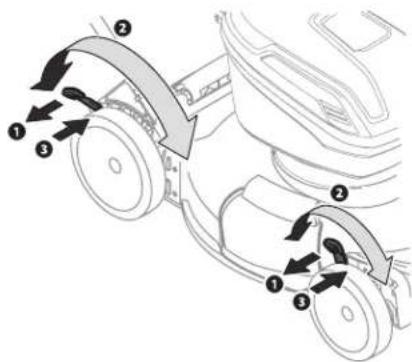
Figure 2-12
IMPORTANT: Both the front and rear wheels must be placed in the same relative position. For rough or uneven lawns, move the height adjustment levers to a higher position. This will stop scalping of grass.
- Release lever towards deck.
WARNING: Do not at any time make any adjustment to lawn mower without first stopping motor and removing safety key.
Installing Battery
IMPORTANT: Use only with model RM4140 or RM4150 batteries.
NOTE: This mower requires only one battery to operate and is shipped with one RM4150 Battery. If desired a second battery (sold separately) may be installed to increase run time.
- Pull the housing lid release (a) and lift the battery housing lid (b) up.
- With the battery release button (c) facing down, slide the battery (d) into empty battery port. See Figure 2-13.
- Push the battery firmly until the battery locks into place. There should be an audible "click".
- If necessary, repeat STEPS 2-3 to install an optional second battery.
-
If necessary, insert the safety key and select the desired battery, refer to Operation - Starting Motor in the Controls & Operation section.
-
Close battery housing lid.
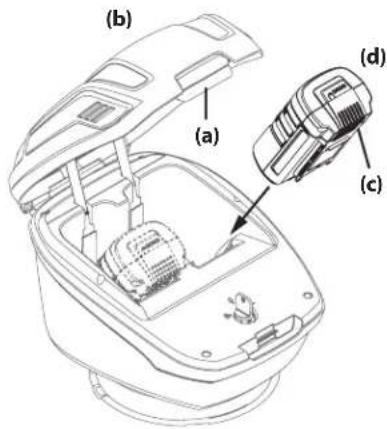
Figure 3-1
Controls and Features
Safety Key/Battery Selector
The safety key/battery selector is located under the battery housing lid. the safety key must be installed and turned to select the desired battery/battery port.
WARNING: The safety key/battery selector is a safety device. Never attempt to bypass its operations.
Push Start Safety Button
The push start safety button is located on the right side of the upper handle.

WARNING: The push start safety button is a safety device. Never attempt to bypass its operations.
Blade Control
The blade control is attached to the upper handle of the mower. Depress and squeeze it against the upper handle to operate the mower. Release it to stop motor and blade.
WARNING: The blade control is a safety device. Never attempt to bypass its operations.
Cutting Height Adjustment Levers
The rear height adjustment lever is located on the left rear wheel. The front height adjustment lever is located on the left front wheel. Both levers must be at the same relative position to ensure a uniform cut. To adjust the cutting height, refer to Cutting Height Adjustment on page 9.
Mulch Plug
The mulch plug is used to cut clippings multiple times while recirculating them back into the lawn.
Grass Catcher
The grass catcher, located at the rear of the mower, is used to collect the grass clippings for disposal. Refer to Grass Catcher on page 9 to install the grass catcher.
Side Discharge Chute
The side discharge chute is typically used to cut high grass that can not be mulched effectively. Refer to Side Discharge/Mulch Plug on page 9 to attach the side discharge chute.
Operation
Using Your Lawn Mower

WARNING: The operation of any lawn mower can result in foreign objects being thrown by the blade. Always wear safety glasses while operating the mower, or while performing any adjustments or repairs.
Be sure lawn is clear of stones, sticks, wire, or other objects which could damage mower or be thrown by the blade in any direction and cause serious injury to the operator, others, or the equipment.
DO NOT use mower in the rain.
For a healthy lawn, always cut off one-third or less of the total length of the grass.
Battery
This mower requires only one battery (included) to operate. Install this battery in the right or left side battery port. If desired, install an optional second battery (sold separately) in the remaining battery port.
Only use model RM4140 or RM4150 batteries with this mower.
Using the safety key/ battery selector, chose the active battery/battery port before attempting to start the mower.
The mower will not start or run if the battery has become too warm or cold. This condition may be due to operational environment, storage conditions or heavy use. Allow the battery to return to 32° and 104° F (0° and 40°C) before use.
Any installed battery that has become too warm or cold will prevent the mower from starting. When two batteries are installed, remove the first (active) battery before switching to the second battery.
Starting Motor

WARNING: Avoid accidental starting. Make sure you are in the operating position behind the mower when using it. To avoid serious injury, the operator and mower should be in a stable position while starting.
- Pull the housing lid release (a) and lift the battery housing lid (b) up.
- Insert the safety key (c) and select the right or left battery port. See Figure 3-2.
- Close battery housing lid.
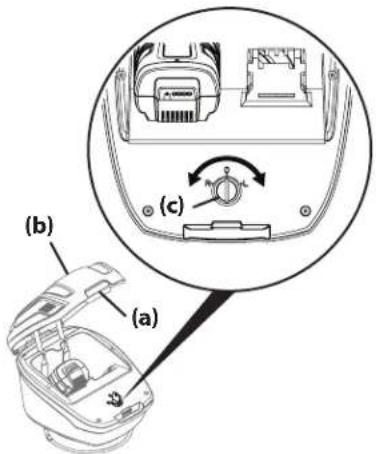
Figure 3-2
- Standing behind the mower, press and hold the push start safety button. See Figure 3-3.
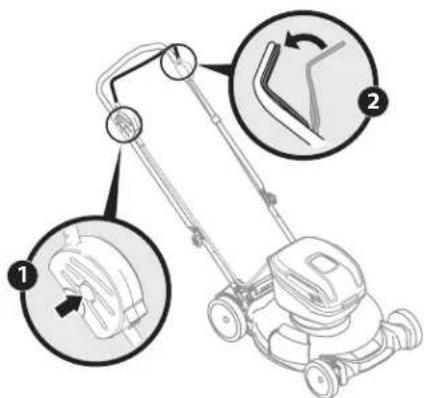
Figure 3-3
- Pull the blade control back against the upper handle to start the motor.
NOTE: Allow three (3) seconds for motor to start and reach operational speed. - Release the push start safety button.
Stopping Motor
- Release the blade control to stop the motor and blade.
WARNING: The blade continues to rotate for three (3) seconds after the motor is shut off. If motor does not come to a stop when the blade control is released, remove the safety key/battery selector and contact an authorized service dealer.
2. Turn the safety key/battery selector to the center off position and remove the safety key if mower is to be left unattended, stored, or serviced. Keep key in a safe place out of the reach of children.
Using Grass Catcher
To collect clippings while you are operating the mower.
- Attach grass catcher following instructions in the Grass Catcher section on page 9. Grass clippings will automatically collect in bag as you run mower. Operate mower until grass bag is full.
-
Stop motor completely by releasing the blade control handle. Make sure that the blade has come to a complete stop before removing the grass catcher.
-
Lift discharge door and pull grass bag up and away from the mower. Dispose of the grass clippings and reinstall the bag when complete.
WARNING: If you strike a foreign object, stop the motor. Thoroughly inspect mower for any damage, and repair damage before restarting and operating. Excessive vibration of mower during operation is an indication of damage. The mower should be promptly inspected and repaired.
Using as Mulcher
Remove the side discharge chute or grass catcher and allow the rear discharge door to close. For effective mulching, do not cut wet grass. If the grass has been allowed to grow in excess of four inches, mulching is not recommended. Use the grass catcher to bag clippings instead.
Using Side Discharge
Attach the side discharge chute following the instructions on page 8 in the Assembly & Set-Up section. When using the side discharge, the most effective mowing pattern is one that allows the clippings to discharge towards the uncut part of the lawn.
Removing the Battery
IMPORTANT: Use only with model RM4140 or RM4150 batteries.
- Pull the housing lid release (a) and lift the battery housing lid (b) up.
- If necessary, turn the safety key/battery selector (c) to the center off position and remove the safety key.
- Locate the battery release button (d) on the underside of the battery (e). See Figure 3-4.
- While pressing the battery release button, firmly pull the battery out of the battery port.
- If necessary, repeat STEPS 2-3 to install second battery.
- Close battery housing lid.
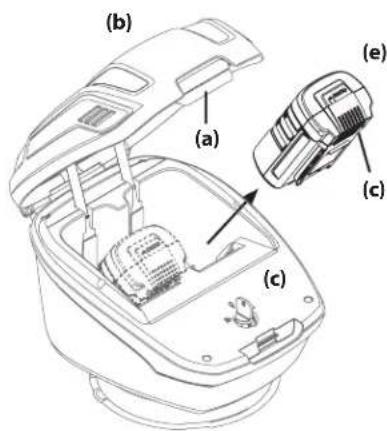
Figure 3-4
Maintenance
General Recommendations
• Always observe safety rules when performing any maintenance.
- The warranty on this lawn mower does not cover items that have been subjected to operator abuse or negligence. To receive full value from warranty, operator must maintain the lawn mower as instructed here.
- All adjustments should be checked at least once each season.
• Periodically check all fasteners and make sure these are tight.

WARNING: Always stop the motor and remove the push start safety key before cleaning, lubricating or performing any repairs or maintenance on the mower. Always remove the battery to prevent accidental starting. Always allow the machine to cool before maintaining the mower. Before maintaining the battery charger, always unplug it from the power outlet.
Deck Care
WARNING: To prevent serious injury, do not use water to clean the mower, battery or battery charger. Do not use strong detergents. Household cleaners that contain aromatic oils such as pine and lemon, and solvents such as kerosene, can damage plastic.
The underside of mower deck should be cleaned after each use as grass clippings, leaves, dirt and other debris will accumulate. This accumulation of grass clippings, etc., is undesirable as it will promote rust and corrosion.
- Remove any buildup of grass and leaves on or around the motor (do not use water). Wipe the mower clean with a dry cloth.
- If debris is allowed to build up on the underside of the machine, tilt the mower forward or on its side and clean with a suitable tool.
IMPORTANT: Do not use a pressure washer or garden hose to clean your mower. These may cause damage to electric components or the electric motor. The use of water will result in shortened life and reduce serviceability.
Blade Care
WARNING: When removing the cutting blade for sharpening or replacement, protect your hands with a pair of heavy gloves or use a heavy rag to hold the blade. Be certain to remove the battery(ies).
Periodically inspect the blade adapter for cracks, especially if you strike a foreign object. Replace when necessary. Follow the steps below for blade service.
- Stop the motor and remove the push start safety key.
- With the battery(ies) removed, turn the mower on its side.
- Remove bolt (a) and blade bell support (b) which hold the blade and the blade adapter to the motor shaft. See Figure 4-1.
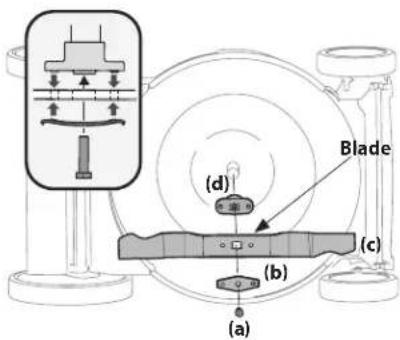
- Remove blade (c) and adapter (d) from the shaft. See Figure 4-1.
- Remove blade from the adapter for testing balance. Balance the blade on a round shaft screwdriver to check. Remove metal from the heavy side until it balances evenly. When sharpening the blade, follow the original angle of grind. Grind each cutting edge equally to keep the blade balanced.
WARNING: An unbalanced blade will cause excessive vibration when rotating at high speeds. It may cause damage to mower or may break causing personal injury.
- Lubricate the motor shaft and the inner surface of the blade adapter with light oil. Slide the blade adapter (d) onto the motor shaft. Place the blade on the adapter such that the side of the blade marked "Bottom" (or with part number) faces the ground when the mower is in the operating position. Make sure that the blade is aligned and seated on the blade adapter flanges.
See Figure 4-1 inset.
- Place blade bell support (b) on the blade (c). Align notches on the blade bell support with small holes in blade.
- Replace hex bolt (a) and tighten hex bolt to torque: 450 in-lb (min.), 600 in lb (max.).
To ensure safe operation of your mower, periodically check the blade bolt for proper torque.
Battery Charger Care
- Keep the battery charger clean and clear of debris. Do not allow foreign material into the charging dock or onto the terminals. See Figure 4-2. Inspect the battery charger for foreign material before each use.
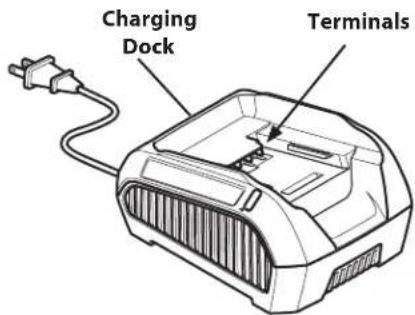
Figure 4-2
- Make sure the charger has not been shorted by debris. Inspect the terminals for soot and signs of melting. Do not attempt to use a damaged charger.
Wall-Mounting The Charger
The battery charger can be mounted to a wall. Use mounting fasteners (not included) capable of supporting the combined weight of the battery and battery charger. Wall-mounting holes are located on the bottom of the charger. See Figure 4-3.
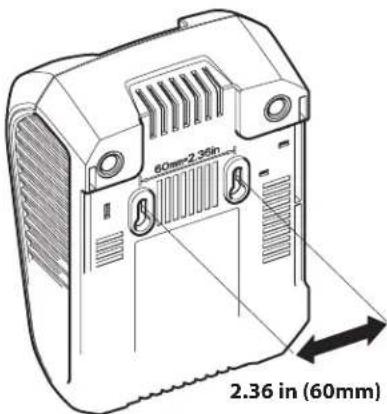
Figure 4-3
Battery Disposal
Disposing of Damaged or Worn-Out Batteries

WARNING: The following toxic and corrosive material is used in this battery: LITHIUM-ION, a toxic material.

WARNING: To prevent contamination of the environment, contact your local waste disposal agency for specific instructions before disposing of damaged or worn-out lithium-ion batteries. Take batteries to a local recycling and/or disposal center, certified for lithium-ion battery disposal.

WARNING: Do not use broken or cracked batteries, even if there is no leakage. Replace damaged or worn-out batteries with new batteries. DO NOT ATTEMPT TO REPAIR BATTERIES! Repair attempts may result in severe personal injury, due to explosion or electrical shock.
To avoid personal injury and damage to the environment:
- Do not attempt to remove or destroy any of the battery components. Do not open or mutilate the battery. If a leak develops, released electrolytes are corrosive and toxic. Do not get the solution in your eyes or on your skin, and do not swallow it.
- Do not dispose of the battery in the regular household trash.
- Do not dispose of the battery in a fire. The cell may explode.
- Do not dispose of the battery where it will become part of any waste landfill or municipal solid waste stream.
- Cover the battery terminals with heavy-duty adhesive tape.
- Dispose of the battery according to local, state and federal regulations.
- Dispose of the battery promptly.

About Call2Recycle Battery Seals
Call2Recycle's industry steward program helps battery and product manufacturers fulfill recycling
requirements in the U.S. and Canada, including compliance with extensive state, provincial and federal regulations, such as the Mercury-Containing and Rechargeable Battery Act (The Battery Act). Call2Recycle® Licensees/Industry Stewards, participating battery and product manufacturers and marketers, purchase the rights to imprint the Call2Recycle Battery Seals on their rechargeable batteries and products. When you see the Call2Recycle Battery Seal, you can feel confident knowing that your battery or product can be safely and responsibly recycled.
About Call2Recycle
Since 1994, Call2Recycle has diverted more than 75 million pounds of rechargeable batteries from local landfills and established a network of 30,000 recycling drop-off locations. More than 200 battery and/or product manufacturers, Call2Recycle Industry Stewards, have united to ensure that batteries are responsibly recycled when they reach their end of life and fund the program that is operated by Call2Recycle, Inc., a 501(c)4 nonprofit public service organization.
To locate the nearest recycling center, please call 1-800-822-8837.
Mower Storage
The following steps should be taken to prepare your lawn mower for storage.

WARNING: Wait for motor and controller heat sink to cool before wiping.
- Remove the safety key/battery selector.
- Allow the mower, battery and/or battery charger to cool.
- Remove the batteries from the mower.
- Use air or a dry rag to clean the outside of the mower, battery and battery charger.
IMPORTANT: DO NOT wash the mower with water. The warranty will be voided if water is used on the mower.
- Inspect mower, battery and battery charger for any loose or damaged parts. Replace damaged parts and tighten loose screws, nuts or bolts.
- For storage between mowing seasons, coat mower's cutting blade with chassis grease or oil to prevent rusting.
- Store mower indoors, in a dry, well-ventilated area. Do not store next to corrosive materials, such as fertilizer.
- Store the battery and battery charger in an area that is between 65 and 75^ (18 and 24^ ).
• Always unplug the battery charger when it is not in use. - Store the mower, battery and battery charger out of the reach of children.
- Lock up the mower, battery and battery charger to prevent unauthorized use or damage.
- If the battery is left unused for more than two months, fully charge the battery before use.
| ProblemCauseRemedy | ||
| Battery will not charge | 1. The battery charger is not plugged in.2. The battery is not fully inserted into the battery charger.3. The battery and/or charger are too hot or too cold.4. The battery and/or charger are no longer functional. | 1. Plug the battery charger into a 120V 60hz AC source.2. Remove and then reinsert the battery into the battery charger.3. Make sure the battery and charger are in an environment between 32^ and 104^ F ( 0^ and 40^ C). Allow time for the battery and/or charger to warm up or cool down.4. Refer to the Warranty Supplement for replacement information. |
| Mower fails to start 1. Safety key not inserted into starter housing.2. Blade control disengaged.3. Battery not selected.4. Battery discharged.5. The battery is not installed correctly.6. Battery is too hot or cold.7. Mower deck clogged with grass and debris. | 1. Insert safety key fully into starter housing.2. Engage blade control.3. Use the safety key to select proper battery port.4. Charge battery.5. Remove and reinstall battery.6. Remove battery. Allow the battery to return to 32^ and 104^ F ( 0^ and 40^ C).7. Unclog mower deck. Make certain blade is free to move. | |
| Battery dies quickly 1. The battery is not fully charged.2. The battery and/or charger are no longer functional.3. Using unit outside temperature range. | 1. Charge the battery completely.2. Refer to the Warranty Supplement for replacement information.3. Allow battery to cool. | |
| Mower stops while mowing | 1. Battery discharged or lacks sufficient charge.2. Cutting too much grass.3. Clogged deck.4. Using unit outside temperature range. | 1. Charge battery completely.2. Raise cutting height.3. Unclog mower deck. Raise cutting height or cut a narrower swath.4. Allow battery to cool. |
| Excessive vibration 1. Cutting blade loose or unbalanced.2. Bent cutting blade.3. Bent motor shaft. | 1. Tighten blade and adapter. Balance blade.2. Replace blade.3. Contact nearest authorized service center. | |
| Mower will not mulch grass | 1. Mower deck clogged.2. Wet grass.3. Excessively high grass.4. Dull blade. | 1. Unclog mower deck. Make certain blade is free to move.2. Do not mow when grass is wet; wait until grass is dry to cut.3. Mow once at a high cutting height, then mow again at desired height or make a narrower cutting swath (1/2 width).4. Sharpen or replace blade. |
| Uneven cut | 1. Dull blade. | 1. Sharpen or replace blade. |
MANUAL DEL OPERADOR
Figura 2-1
Figura 2-4
Figura 2-5
Figura 2-6
Figura 2-7
Instalación
natural_image
Technical line drawing of two mechanical components (no text or symbols)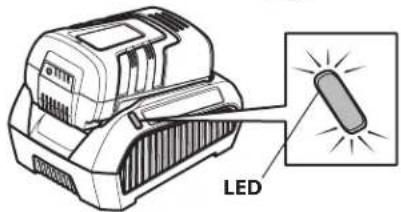
Figura 2-9
Figura 2-10
Figura 2-12
Figura 3-19
Figura 3-20
Mantenimiento
Figura 4-3
CONSERVEZ CES INSTRUCTIONS!
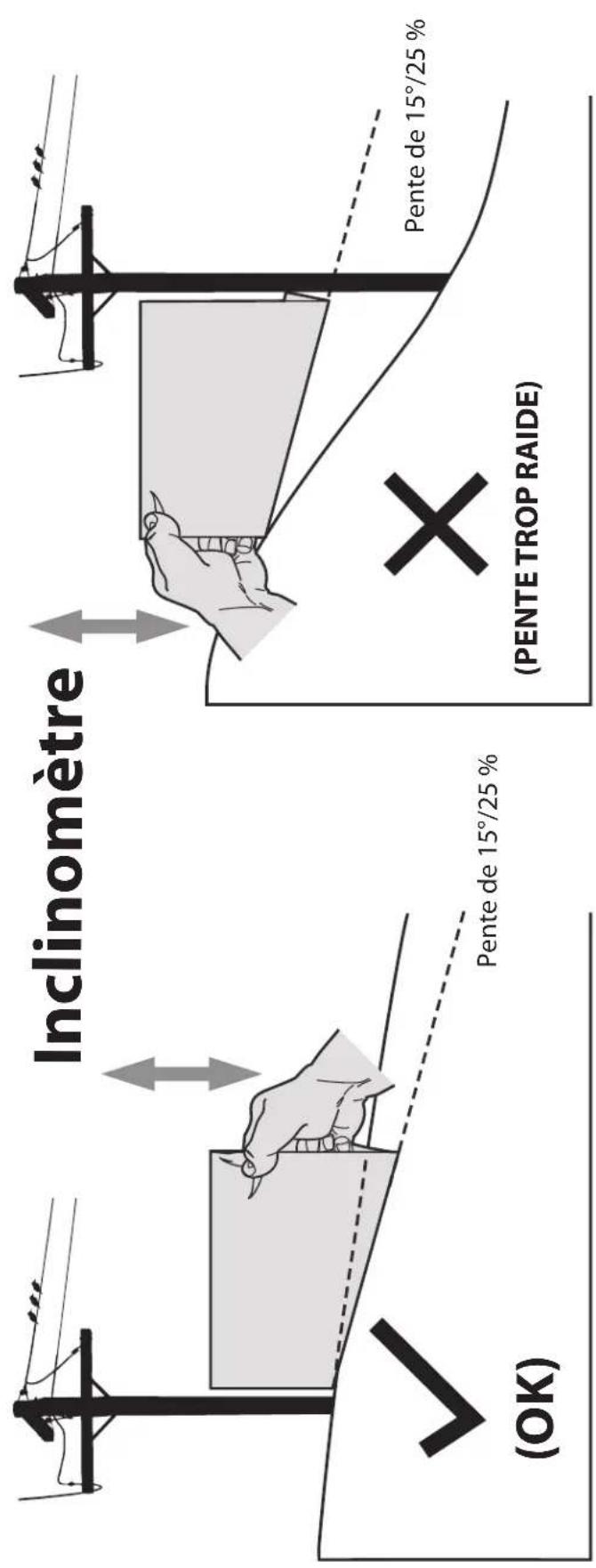
Figure 2Figure 1
Figure 2-1
Figure 2-4
Figure 2-5
natural_image
Line drawing of a vacuum cleaner with a magnified inset showing the blade assembly (no text or symbols)Figure 2-6
Sac à herbe
Figure 2-7
Figure 2-10
Figure 2-11
Figure 2-12
Figure 1-2
Figure 1-3
Figure 1-4
Entretien
Figure 4-3
natural_image
Completely blank white image with no visible content, text, or symbols.
natural_image
Blank white image with no visible content, text, or symbols.
natural_image
Completely blank white image with no visible content, text, or symbols.
natural_image
Blank white image with no visible content, text, or symbols.
natural_image
Completely blank white image with no visible content, text, or symbols.
natural_image
Completely blank white image with no visible content, text, or symbols.
natural_image
Blank white image with no visible content, text, or symbols.
natural_image
Blank white image with no visible content, text, or symbols.
natural_image
Blank white image with no visible content, text, or symbols.
- Important Safe Operation Practices
- HEED ITS WARNING!
- CALIFORNIA PROPOSITION 65
- Operation
- General Operation:
- Slope Operation:
- Do:
- Do Not:
- Children
- Service
- General Electric Safety
- Battery Charger Safety
- Battery Safety
- IF battery fluid contacts skin:
- If battery fluid gets in the eyes:
- FCC Statement
- Safety Symbols
- USE THIS SLOPE GAUGE TO DETERMINE IF A SLOPE IS TOO STEEP FOR SAFE OPERATION!
- Thank You
- Contents of Carton
- Assembly
- Grass Catcher Assembly
- Set-Up
- Checking the Battery Charge Level
- Charging Battery
- Grass Catcher
- Side Discharge Chute/Mulch Plug
- Cutting Height
- Installing Battery
- Controls and Features
- Safety Key/Battery Selector
- Push Start Safety Button
- Blade Control
- Cutting Height Adjustment Levers
- Mulch Plug
- Side Discharge Chute
- Using Your Lawn Mower
- Battery
- Starting Motor
- Stopping Motor
- Using Grass Catcher
- Using as Mulcher
- Using Side Discharge
- Removing the Battery
- Maintenance
- General Recommendations
- Deck Care
- Blade Care
- Battery Charger Care
- Wall-Mounting The Charger
- Battery Disposal
- Disposing of Damaged or Worn-Out Batteries
- About Call2Recycle Battery Seals
- About Call2Recycle
- Mower Storage
- MANUAL DEL OPERADOR
- Instalación
- Mantenimiento
- Sac à herbe
- Entretien
Brand : REMINGTON
Model : RM4060
Category : Lawn mower