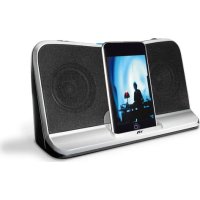
CA492 - Loudspeaker Cyber Acoustics - Free user manual and instructions
Find the device manual for free CA492 Cyber Acoustics in PDF.



| Brand | Cyber Acoustics |
| Model | CA492 |
| Product type | Portable speaker with docking station |
| Power supply | AC adapter (included) or 4 AA batteries (not included) |
| Output power | ~3 W (estimated) |
| Audio input | 3.5mm auxiliary jack and iPod/iPhone docking station |
| iPod/iPhone compatibility | iPod (with dock connector) and iPhone (adjustable support included) |
| Dimensions (W x D x H) | Approximately 20 x 15 x 10 cm (estimated) |
| Weight | Approximately 600 g (estimated) |
| Functions | iPod/iPhone charging, standby, volume +/- control, LED indicator (red standby, blue on) |
| Included accessories | 3.5mm cable, AC power adapter, carrying case |
| Warranty | 1 year against defects in materials and workmanship |
| Care and cleaning | Wipe with a soft, dry cloth. Do not use solvents. |
| Safety | Compliant with FCC Class B and Canada NMB-003. Use on a flat surface. |
| Recommended batteries | Alkaline AA (remove if using AC adapter for extended periods) |
Frequently Asked Questions - CA492 Cyber Acoustics
User questions about CA492 Cyber Acoustics
0 question about this device. Answer the ones you know or ask your own.
Ask a new question about this device
Download the instructions for your Loudspeaker in PDF format for free! Find your manual CA492 - Cyber Acoustics and take your electronic device back in hand. On this page are published all the documents necessary for the use of your device. CA492 by Cyber Acoustics.
USER MANUAL CA492 Cyber Acoustics
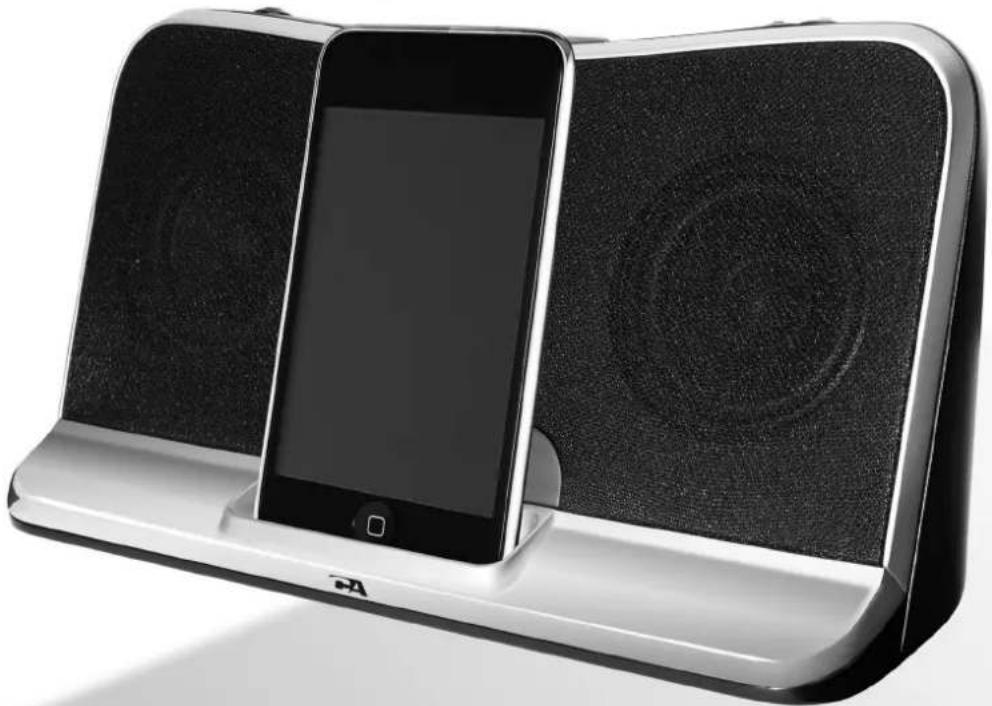
Digital Docking Speaker ™
Made for

iPod

Phone
CA 492
user's guide
bedienungsanleitung
This equipment has been tested and found to comply with the limits for a Class B digital device, pursuant to Part 15 of the FCC Rules. These limits are designed to provide reasonable protection against harmful interference in a residential installation. This equipment generates, uses and can radiate radio frequency energy and, if not installed and used in accordance with the instructions, may cause harmful interference to radio communications. However, there is no guarantee that interference will not occur in a particular installation. If this equipment does cause harmful interference to radio or television reception, which can be determined by turning the equipment off and on, the user is encouraged to try to correct the interference by one of the following measures:
- Reorient or relocate the receiving antenna.
- Increase the separation between the equipment and receiver.
- Connect the equipment into an outlet on a circuit different from that to which the receiver is connected.
- Consult the dealer or an experienced radio/TV technician for help.
FCC Caution: To assure continued compliance, (example – use only shielded interface cables when connecting to computer or peripheral devices). Any changes or modifications not expressly approved by the party responsible for compliance could void the user's authority to operate this equipment.
This device complies with Part 15 of the FCC Rules. Operation is subject to the following two conditions: (1) This device may not cause harmful interference, and (2) this device must accept any interference received, including interference that may cause undesired operation
This Class B digital apparatus complies with Canadian ICES-003
Reglement FCC
To reduce the risk of fire or electric shock, do not expose this apparatus to rain or moisture. The apparatus shall not be exposed to dripping or splashing and that no objects filled with liquids, such as vases, shall be placed on apparatus.
The mains plug is used as disconnect device, the disconnect device shall remain readily operable.
The apparatus is classified as class II apparatus.
CAUTION:
To reduce the risk of fire or electric shock, do not expose this appliance to rain or moisture.


CAUTION - TO REDUCE THE RISK OF ELECTRIC SHOCK, DO NOT REMOVE COVER (OR BACK). NO USER-SERVICING TO QUALIFIED SERVICE PERSONNEL.

The lightning flash with arrowhead symbol, within an equilateral triangle, is intended to alert the user to presence of uninsulated "dangerous voltage" within the product's enclosure that may be of sufficient magnitude to constitute a risk of electric shock to persons.

The exclamation point within an equilateral triangle is intended to elent the user to the presence of important operating and maintenance (servicing) instructions in the literature accompanying the appliance.
IMPORTANT SAFETY INSTRUCTIONS
- Read Instructions - All the safety and operating instruction should be read before the product is operated.
- Retain Instructions - The safety and operating instruction should be retained for future reference.
- Heed Warnings - All warning on the product and in the operating instructions should be adhered to.
- Follow instructions - All operating and use instructions should be followed.
- Cleaning - Unplug this product from the wall outlet before cleaning. Do not use liquid cleaners or aerosol cleaners. Use a dry cloth for cleaning.
- Attachments - Do not use attachments not recommended by the product manufacturer as they may cause hazards.
- Water and Moisture - Do not use this product near water - for example, near a bath tub, wash bowl, kitchen sink, or laundry tub; in a wet basement, or near a swimming pool, and the like.
- Accessories - Do not place this product on an unstable cart, stand tripod, bracket, or table. The product may fall, causing serious injury to a child or adult, and serious damage to the product. Use only with a cart, stand, tripod, bracket, or table recommended by the manufacturer, or sold with the product. Any mounting of the product should follow the manufacturer? instructions, and should use a mounting accessory recommended by the manufacturer.
9.A product and cart combination should be moved with care. Quick stops, excessive force, and uneven surfaces may cause the appliance and cart combination to overturn.

- Ventilation - Slots and openings in the cabinet are provided for ventilation and to ensure reliable operation of the product and to protect it from overheating, and these openings must not be blocked or covered. The openings should never be blocked by placing the product on a bod, sofa, rug, or other similar surface. This product should not be placed in a built-in installation such as a bookcase or rack unless proper ventilation is provided or the manufacturer? Instruction have been adhered to.
-
Power Sources - This product should be operated only from the type of power source indicated on the marking label. If you are not sure of the type of power supply to your home, consult your product dealer or local power company. For products intended to operate from battery power, or other sources, refer to the operating instruction.
-
Grounding or Polarization - This product may be equipped with a polarized alternating-current line plug (a plug having one blade wider than the other). This plug will fit into the power outlet only one way. This is a safety feature. If you are unable to insert the plug fully into the outlet, try reversing the plug. If the plug should still fail to fit, contact your electrician to replace your obsolete outlet. Do not defeat the safety purpose of the polarizes plug.
Alternate Warnings - This product is equipped with a three-wire grounding-type plug, a plug having a third (grounding) pin. This plug will only fit into a grounding-type power outlet. This is a safety feature. If you are unable to insert the plug into the outlet, contact your electrician to replace your obsolete outlet. Do not defeat the safety purpose of the grounding-type plug.
- Power-Cord Protection - Power supply cords should be routed so that they are not likely to be walked on or pinched by items placed upon or against them, paying particular attention to cords at plugs, convenience receptacles, and point where they exit from the product.
- Protective Attachment Plug - The product is equipped with an attachment plug having overload protection. This is a safety feature. See Instruction Manual for replacement or resetting of protective device. If replacement of the plug is required, be sure the service technician has used a replacement plug specified by the manufacturer that has the same overload protection as the original plug.
IMPORTANT SAFETY INSTRUCTIONS
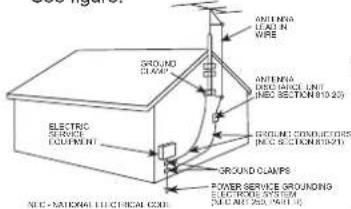
- Outdoor Antenna Grounding - If an outside antenna is connected to the receiver, be sure the antenna system is grounded so as to provide some protection against voltage surges and built-up static charges. Article 810 of the National Electrical Code, ANSI/NFPA 70, provides information with regard to proper grounding of the mast and supporting structure, grounding of the mast and supporting structure, grounding of the lead-in wire to an antenna-discharge unit, size of grounding conductors, location of antenna-discharge unit, connection to grounding electrodes, and requirements for the grounding electrode.
See figure:
-
Lightning - For added protection for this product during a lightning storm, or when it is left unattended and unused for long periods of time, unplug it from the wall outlet and disconnect the antenna or cable system. This will prevent damage to the product due to lightning and power-line surges.
-
Power Lines - An outside antenna system should not be located in the vicinity of overhead power lines or other electric light or power circuits, or where it can fall into such power lines or circuits. When installing an outside antenna system, extreme care should be taken to keep from touching such power lines or circuits as contact with them might be fatal.
- Overloading - Do not overload wall outlets, extension cords, or integral convenience receptacles as this can result in a risk of fire or electric shock.
- Object and Liquid Entry - Never push objects of any kind into this product through openings as they may touch dangerous voltage points or short-out parts that could result in a fire or electric shock. Never spill liquid of any kind on the product.
- Servicing - Do not attempt to service this product yourself as opening or removing covers may expose you to dangerous voltage or other hazards. Refer all servicing to qualified service personnel.
- Damage Requiring Service - Unplug this product from the wall outlet and refer servicing to qualified service personnel under the following conditions:
a) When the power-supply cord or plug is damaged,
b) If liquid has been spilled, or objects have fallen into the product,
c) If the product has been exposed to rain or water,
d) If the product does not operate normally by following the operating instructions. Adjust only those controls that are covered by the operating instructions as an improper adjustment of other controls may result in damage and will often require extensive work by a qualified technician to restore the product to its normal operation.
e) If the product has been dropped or damaged in any way, and
f) When the product exhibits a distinct change in performance - this indicates a need for service.
22. Replacement Parts - When replacement parts are required, be sure the service technician has used replacement parts specified by the manufacturer or have the same characteristics as the original part. Unauthorized substitutions may result in fire, electric shock, or other hazards.
23. Safety Check - Upon completion of any service or repairs to this product, ask the service technician to perform safety checks to determine that the product is in proper operating condition.
24. Wall or Ceiling Mounting - The product should be mounted to a wall or ceiling only as recommended by the manufacturer.
25. Heat - The product should be situated away from heat sources such as radiators, heat registers, stoves, or other products (including amplifiers) that produce heat.
26. The main plug is used as disconnect device, it shall remain readily operable.
Introduction
Congratulations on your choice of the CA-492 portable speaker system from Cyber Acoustics. This self contained digital docking speaker is ideal for iPod / iPhone and other portable audio devices. Powerful enough to fill a room with quality audio performance yet small enough for travel. The CA-492 is your lifestyle speaker.
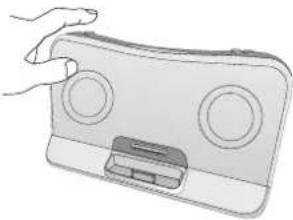
This product comes with an adjustable supporter that can adjust for different iPod / iPhone models to stabilize the iPod / iPhone.
The Package
Contents of this system include:

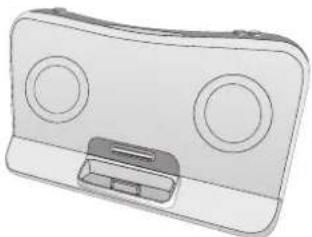
3.5mm cablePower Supply Carry Pouch
Digital Docking Speaker TM
Before you start using your system
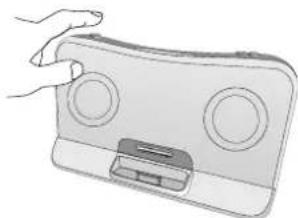
The system must operate on a firm flat surface
Damage caused to the pin connector due to misuse or lack of use of the adjustable supporter is not covered under warranty
The drivers in your Cyber Acoustics system are magnetically shielded.
Connections
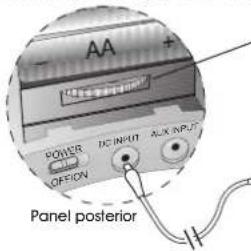
The power supply cord plugs into the DC jack located on the back of the system. Plug the adapter into your AC wall socket or surge protector.
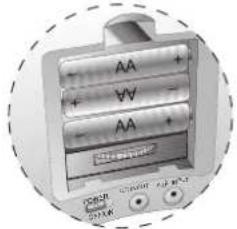
For use with batteries simply install 4 AA batteries in the battery compartment in the back. Follow the battery indicator (+/-) to ensure they are in the correct position. If The speaker is going to be used by an AC source for a long period of time it is recommended to remove the batteries.
Once again, make sure the supporter in the speaker is adjusted to a suitable level for your iPod / iPhone. Plug your iPod / iPhone into the connector pin that comes through the well.
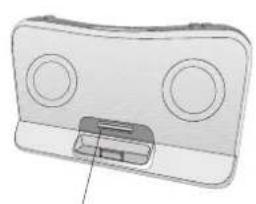
Adjustable iPod / iPhone supporter
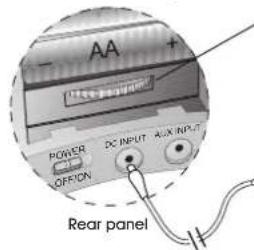
Rotary knob for supporter length adjustment (inside the battery door)
Rotate clockwise to extend the support bar. Rotate counter-clockwise to retract.

AC power adapter
4


CA492_MANUA_3rd.FH9 Tue Jun 29 11:05:47 2010 Page 6

Battery Option
The CA-492 can also be powered by batteries making it a perfect portable solution. Simply install 4 AA batteries in the battery compartment located at the back. Make sure to follow the battery indicators for correct installation.
Using The System
Turn the power switch on.
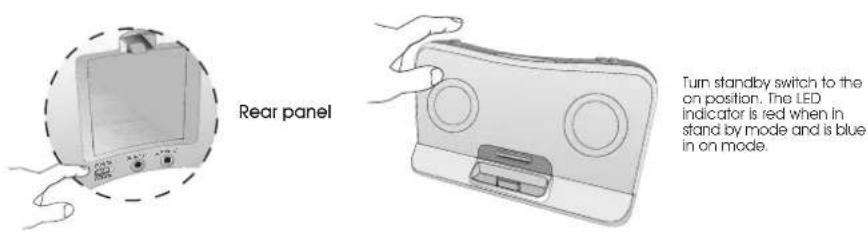
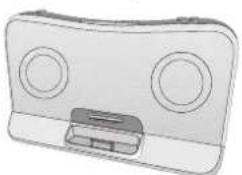
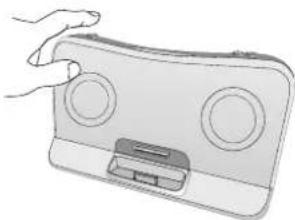
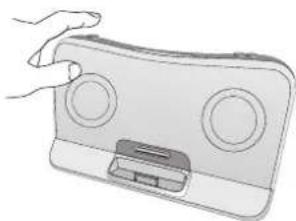
Your iPod / iPhone can be on or off when you place it into the dock connector. If your iPod / iPhone is on and a music track is playing you should hear sound immediately. If you don't hear anything recheck that the track is playing and the volume on the system is turned up slightly. The volume can be turned up or down using the volume + / - buttons on the front of the speaker.
NOTE: When using the speaker with batteries be sure and turn off the main power switch when you are not listening to the speaker. Stand by mode will put a slight drain on the batteries if the main power switch is not turned off.
Charging your iPod / iPhone
This docking speaker will charge most iPod / iPhone models when the AC adapter is in use. It will not charge the iPod / iPhone when used in the battery mode as this puts an additional drain on the speaker batteries.
This unit will not charge the "iPod with dock connector" (otherwise known as 3rd generation) as this iPod model requires higher voltage. It also does not charge iPod shuffle.



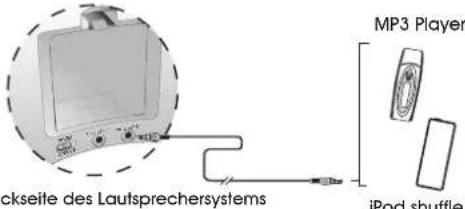
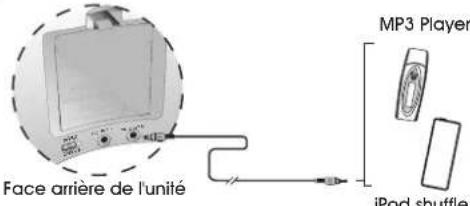
Connecting to iPod shuffle or other source
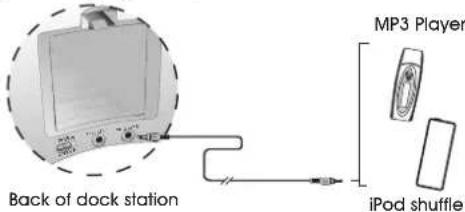
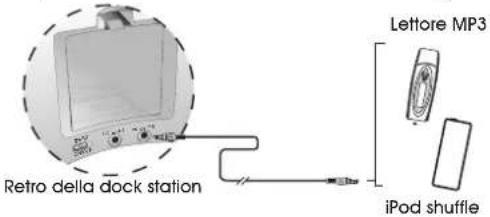
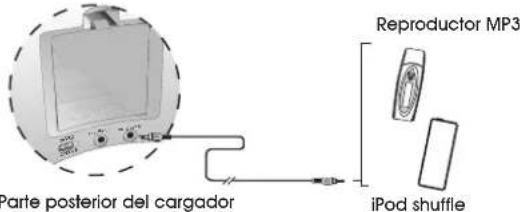
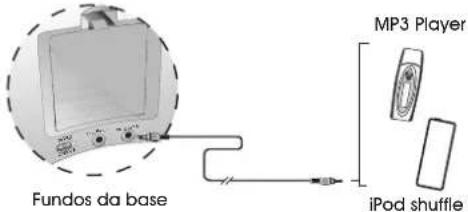
Your speaker system has a 3.5mm input jack located on the back. Just connect the 3.5mm plug cable that comes with the system to the headphone output jack on your iPod shuffle or other music source.
Trouble Shooting
No Power
• Power adapter is not plugged in or there are no batteries inserted.
• Power switch is not on.
No Sound
- iPod / iPhone is not docked properly.
• Volume is turned down.
• Music track on your iPod / iPhone is not playing. Check the music isn't paused or in between tracks. - Check and make sure your iPod / iPhone is running the latest software version.
Not Charging and No Sound
- Make sure the iPod / iPhone is seated properly in the well and dock and that it is getting good contact to the connector pin.
NOTE: The unit only charges the iPod / iPhone when used with the power adapter. The iPod / iPhone won't charge when used with batteries. This helps extend your speakers battery life.
Warranty
Cyber Acoustics warrants to the purchaser that this product shall be free from defects in materials or workmanship for a period of one year from original purchase date. Proof of purchase is required. Please retain your receipt. The warranty registration card should also be filled out completely and immediately returned to Cyber Acoustics.
During the warranty period, if this product is found to be defective under normal use and service, Cyber Acoustics shall at its option repair or replace it with new or reconditioned product.
This warranty does not cover defects resulting from accidents, abuse, misuse, or unauthorized service. This warranty gives you specific rights. You may have other legal rights which vary from state to state.
To obtain warranty service, return the product with shipping prepaid to Cyber Acoustics. Cyber Acoustics reserves the right to replace any discontinued product with one of equal value.
Note:
1) For technical support and questions, please contact Cyber Acoustics U.S.A. 360-823-4100
2) You can now register your Cyber Acoustics product on line through our web site in lieu of filling out and mailing this card: www.cyberacoustics.com

Einführung
Anschlüsse Anschlüsse
Rückseite
Face arrière
Antes de que empiece a utilizar su sistema
Soporte ajustable iPod / iPhone
Panel posterior
Painel traseiro


- DIGITAL DOCKING SPEAKER ™
- REGLEMENT FCC
- CAUTION
- IMPORTANT SAFETY INSTRUCTIONS
- INTRODUCTION
- THE PACKAGE
- BEFORE YOU START USING YOUR SYSTEM
- CONNECTIONS
- BATTERY OPTION
- USING THE SYSTEM
- CHARGING YOUR IPOD / IPHONE
- CONNECTING TO IPOD SHUFFLE OR OTHER SOURCE
- TROUBLE SHOOTING
- WARRANTY
- EINFÜHRUNG
- ANSCHLÜSSE ANSCHLÜSSE
- ANTES DE QUE EMPIECE A UTILIZAR SU SISTEMA
Brand : Cyber Acoustics
Model : CA492
Category : Loudspeaker