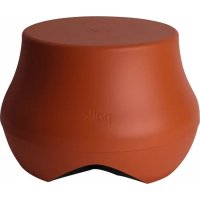
AM3386A - Subwoofer POLK - Free user manual and instructions
Find the device manual for free AM3386A POLK in PDF.


| Product type | Outdoor subwoofer |
| Brand | Polk Audio |
| Model | AM3386A (Atrium Sub10) |
| Power source | Passive (requires external amplifier) |
| Impedance | Dual voice coil (can be configured to 4 ohms or 8 ohms depending on wiring) |
| Recommended power | 20-200 W per channel (depending on amplifier) |
| Frequency response | Not specified (typical outdoor subwoofer: 30-150 Hz) |
| Dimensions (approx.) | Approximately 30 x 30 x 30 cm (estimate) |
| Weight (approx.) | Approximately 5 kg (estimate) |
| Enclosure material | Weather-resistant polymer, molded color |
| Main features | Powerful outdoor bass, dual voice coil, wall or ground installation, paintable |
| Installation | On deck (keyhole slots) or in garden (on stable slab) |
| Wiring | 4 conductors (white, green, red, black) with waterproof connection caps |
| Supplied cable length | 90 cm (CL3) |
| Cleaning and maintenance | Disconnect before cleaning, use a damp cloth, no liquid or aerosol cleaners |
| Safety | Do not open enclosure, do not insert objects, avoid liquids, use stable support |
| Spare parts and repairability | Optional anti-intrusion grille (AM3387-A), repair by qualified technician only |
| Warranty | 5 years for original purchaser (parts and labor) |
| General information | Manufactured by Polk Audio, 5601 Metro Drive, Baltimore, MD 21215, USA. Support: 1-800-377-7655 |
Frequently Asked Questions - AM3386A POLK
User questions about AM3386A POLK
0 question about this device. Answer the ones you know or ask your own.
Ask a new question about this device
Download the instructions for your Subwoofer in PDF format for free! Find your manual AM3386A - POLK and take your electronic device back in hand. On this page are published all the documents necessary for the use of your device. AM3386A by POLK.
USER MANUAL AM3386A POLK
IMPORTANT SAFETY INSTRUCTIONS
This product was designed and manufactured to meet strict quality and safety standards. There are, however, some installation and operation precautions which you should be particularly aware of.
- Read Instructions. All the safety and operating instructions should be read before the system is operated.
- Retain Instructions. The safety and operating instructions should be retained for future reference.
- Heed Warnings. All warnings on the appliances and in the operating instructions should be adhered to.
- Follow Instructions. All operating and use instructions should be followed.
- Cleaning. Unplug the appliance from wall outlet before cleaning. Do not use liquid cleaners or aerosol cleaners. Use a damp cloth for cleaning.
- Attachments. Do not use attachments not recommended by the product manufacturer as they may cause hazards
- Accessories. Do not place these appliances on an unstable cart, stand, tripod, bracket, or table. The audio/video products may fall, causing serious injury to a child or adult, and serious damage to the products. Use only with a cart, stand, tripod, bracket, or table recommended by the manufacturer, or sold with the appliances. Any mounting of the appliances should follow the manufacturer's instructions, and should use mounting accessories recommended by the manufacturer.
- Power Sources. This product should be operated only from the type of power source indicated on the marking labels. If you are not sure of the type of power supply to your home, consult your appliance dealer or local power company.
-
Lightning. For added protection for this audio/video product during a lightning storm, or when it is left unattended and unused for long periods of time, unplug it from the wall outlet and disconnect the antenna or cable system. This will prevent damage to the product due to lightning and power-line surgas.
-
Object and Liquid Entry. Never push objects of any kind into this product through openings, as they may touch dangerous voltage points or short out parts that could result in a fire or electric shock. Never spill liquid of any kind on this audio/video product.
- Servicing. Do not attempt to service this product yourself, as opening or removing covers may expose you to dangerous voltage or other hazards. Refer all servicing to qualified service personnel.
- Damage Requiring Service. Unplug this product from wall outlets and refer servicing to qualified service personnel under the following conditions:
a. If liquid has been spilled, or objects have fallen into the product.
b. If the product does not operate normally by following the operating instructions. Adjust only those controls that are covered by the operating instructions, as an improper adjustment of other controls may result in damage and will often require extensive work by a qualified technician to restore the product to its normal operation.
c. If the product has been dropped or the cabinet has been damaged.
d. When the product exhibits a distinct change in performance—this indicates a need for service - Replacement Parts. When replacement parts are required, be sure the service technician has used replacement parts specified by the manufacturer or that the parts have the same characteristics as the original part. Unauthorized substitutions may result in fire, electric shock or other hazards.
- Safety Check. Upon completion of any service or repairs to this product, ask the service technician to perform safety checks to determine that the products are in proper operating condition.
Polk Audio specifies the recommended amplification range for each of its passive (non-amplified) loudspeakers. Typically that specification will be expressed as a range of power such as 20-200 Watts (per channel). It is important to understand what those numbers mean when choosing a receiver or amplifier for your Polk Audio loudspeakers. The lower number indicates the lowest continuous rated power that will yield acceptable performance in a typical listening environment. The higher number indicates the highest per channel power that should be used with your Polk Audio speakers. That number should not be confused with a "Power Handling" specification and it does not imply that the speaker will safely handle that full amount of power on a long-term basis. We specify a wide range of power ratings because not all electronics manufacturers use the same method for rating power. In fact, high quality lower-rated amplifiers sound better and play louder than low quality units with higher power rating.
Automobile horsepower is a good analogy. Your car probably has far more horsepower than it needs for your daily commute and is likely capable of going well over 120mph (190km/hr). Having that extra power is good for on-ramp acceleration and danger avoidance (like getting away from brain-eating zombies) but that doesn't mean that it is advisable to operate your car on North American highways at full power and maximum speed for an extended period of time. Just ask your local state trooper if you are in doubt. Similarly, we recommend using amplifiers and receivers with rated power above the power handling limits of our speakers because having extra power available for short term peaks is conducive to better sound quality, maximum dynamic range and effortless high volume output. But we strongly urge you not to use the full power of your amplifier or receiver for daily listening.
Loudspeakers can be damaged when an amplifier, regardless of its wattage, is made to play at higher listening levels than its power can clearly produce. Operation at this level can result in very high levels of audible distortion originating in the amplifier, which can add a harsh, gritty sound to your listening material. If you hear distortion—turn the volume down or risk damaging your speakers. You can damage just about any speaker, regardless of power rating, if you drive an amplifier to or beyond the point of distortion.
PRODUCT DISPOSAL
Certain international, national and/or local laws and/or regulations may apply regarding the disposal of this product. For further detailed information, please contact the retailer where you purchased this product or the Polk Audio Importer/Distributor in your country. A listing of Polk Audio Importer/Distributors can be found on the Polk Audio website www.polkaudio.com or by contacting Polk Audio at: 5801 Metro Drive, Baltimore, Maryland 21215, USA
If, after following the hookup directions, you experience difficulty, please double check all wire connections. Should you isolate the problem to the speaker, contact the authorized Polk Audio dealer where you made your purchase, or contact Polk Audio Customer Service 800-377-7650 (M-F, Bam-Bpm.rst, US & Canada only) or via email pkcs@polkaudio.com. Outside the US & Canada, call 410-358-3600. More detailed information including audio how to articles, FAQs and online manuals are available on our award-winning website: www.polkaudio.com/nome.
INVENTORY LIST
Important Note: If anything is missing or damaged, or if your speaker fails to operate, notify Polk Audio Customer Support Services immediately at 800-377-7655.
Atrium Sat30 Satellite Carton Contents
| 1 Atrium Sat30 Satellite Loudspeaker (with attached bracket assembly) |
1 Ground Stake
1 Security Plate
1 Rubber Bumper
1 Pendant Cap
1 Eyebolt (with nut)
1 1/4" Split Ring Lock Washer
2 #20 Wirenuts
1 #10 Pan Head Screw
2 #6 Pan Head Screws
2 Faston Connectors
1 Atrium Sat30/Sub10 Manual
1 Mounting Template
1 Registration Card
1 Product Brochure
Atrium Sub10 Subwoofer Carton Contents
| 1 Atrium Sub10 Subwoofer |
4 #20 Wirenuts
1 Atrium Sat30/Sub10 Manual
1 Mounting Template
1 Registration Card
1 Product Brochure
Atrium Sat30
PAINTING THE Sat30 LOUDSPEAKER
While the Atrium Sat30 has a color-impregnated finish that enables it to blend in with your landscaping and outdoor furnishings, the cabinet is paintable. Should you choose to paint your speakers, follow these instructions:
Before you begin, you will need:
- A spray can of primer paint (Krylon Sandable Spray Primer #1318).
- A spray can of the outdoor paint of your choice.
- A paperclip or thin blade (for removing the paintable grille).
- Masking tape.
- Paint mask (not included) to cover un-paintable parts.
PREPARING TO PAINT
-
Separate the parts of the speaker: Remove the knob, clamp and bracket. Remove the grille by carefully hooking it with a bent paper clip or thin blade and prying it gently away from the cabinet.
-
Carefully mask off the following:
-
Driver
- Tweeter
- Terminals
- Threaded Insert
PAINTING THE CABINET, CLAMP, BRACKET KNOB AND BRACKET
- Apply two thin coats of primer to the cabinet, clamp, knob and bracket.
- When the primer is completely dry, apply the finish color. Multiple coats may be required for a consistent look.
- When the paint is completely dry, remove the masking material.
- Try to keep all handling of freshly painted parts to a minimum.
PAINTING THE GRILLE
Note: Make sure the grille is removed and remove the logo badge before painting the grille.
- Paint the Atrium Sat30 grille using a primer.
- Using spray paint, spray two thin coats of finish color. If you're using a compressor and spray gun, use the finest, most diffuse setting. Be careful not to fill the holes in the grille with paint.
- Paint the logo badge.
- Replace the logo badge once the paint is completely dry on the badge and the grille.
- Carefully fit the grille into its recess so that it is just resting on the cabinet. Go around the speaker and push the grille into the grille notch a little bit at a time. Be gentle; the grille may be easily bent out of shape by rough handling.
MOUNTING THE ATRIUM Sat30
GROUND MOUNT
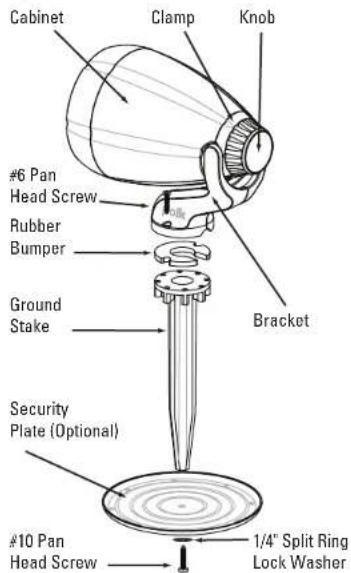
To mount the Sat30 into the ground with a security plate, you will need the following hardware:
- Sat30 Loudspeaker
- Ground Stake
• Security Plate - Rubber Bumper
• 1 A10 Pan Head Screw (for security plate)
• (1) 1/4" Split Ring Lock Washer
• 2 #6 Pan Head Screws (for loudspeaker assembly to the stake)
Exploded View Of Sat30
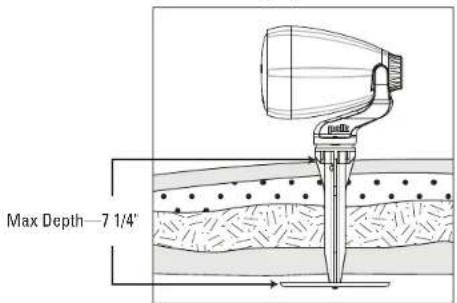
Ground Mounting Depth
Instructions:
- Attach stake to security plate using the #10 pan head screw and 1/4" split ring lock washer.
- Dig a hole to the diameter of the security plate (6 1/2") and to a depth (max 7 1/4" / min 2 1/4") that will stabilize and secure the speaker once the earth has been tamped down around the plate.
- Place the stake/security plate assembly in the hole and cover with dirt, tamping down the soil with your foot as you fill in the hole.
- Attach the Atrium Sat30 to the stake using the rubber bumper and the #6 pan head screws.
- Loosen the knob to aim the speaker. When the speaker is aimed properly, tighten the knob.
WARNING: Aiming the Sat30 to an angle greater than 45 degrees to the horizontal may result in water buildup inside the grille that could cause damage to the speaker, especially during cold weather when freezing may occur.
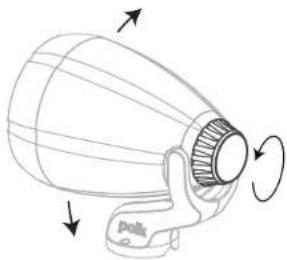
Aiming the Speaker
Ground Mount Without Security Plate
If you choose to mount the Sat30 loudspeaker in the ground without the security plate, be sure the ground is compact enough to hold the speaker and stake securely in the ground. Gently drive the ground stake into the ground using a rubber mallet and follow instructions from step 4.
PENDANT MOUNT
To pendant mount the Sat30, you will need the following hardware:
- Sat30 Loudspeaker
- Eyebolt (with nut)
• (1) 1/4" Split Ring Lock Washer - Two Faston Connectors
- Pendant Cable (not included)
• Loudspeaker Wire (not included) - Pendant Cap
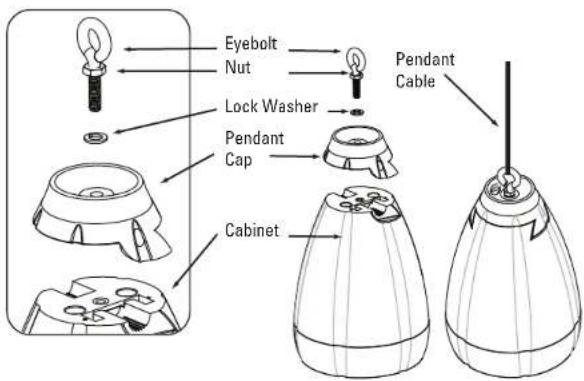
Instructions:
Note: A pendant cable (not included) is required to hang the Atrium Sat30 loudspeaker from a ceiling or overhead beam. Use a cable that meets or exceeds the safety and/or building codes applicable to the mounting situation. The speaker weighs 3.5 lbs. on its own.
- Determine how far down from your ceiling or beam you want your loudspeaker to hang.
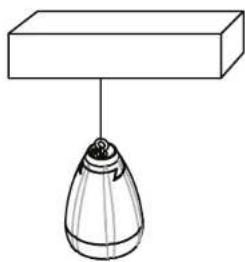
- Secure the pendant cable to the ceiling or beam and run loudspeaker wire along the pendant cable.
- Attach the supplied faston connectors to the loudspeaker wires. (Large = “+”, Small = “-”)
- Expose the loudspeaker spade terminals on the back of the cabinet by removing the knob, clamp and bracket.
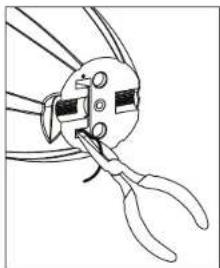
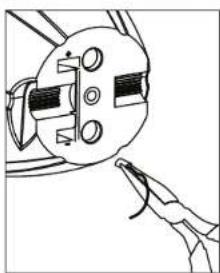
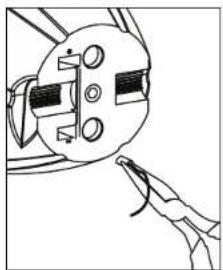
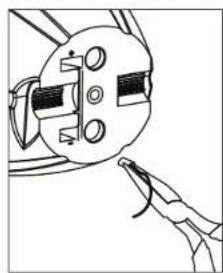
- Disconnect the existing loudspeaker wire from the spade terminals using needle-nose pliers and remove the bracket assembly.
- Thread the new loudspeaker wire through the wire hole in the pendant cap and connect the wires to the loudspeaker spade terminals, observing correct polarity.
- Attach the pendant cap to the loudspeaker using the eyebolt, lock washer and nut.
- Secure the pendant cable to the eyebolt.
Caution: Secure mounting is required to prevent personal injury or damage to the loudspeaker.
BRACKET MOUNT
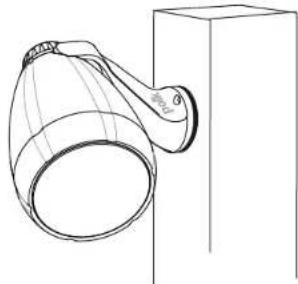
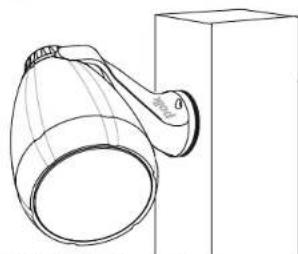
For more solid mounting, screw the bracket directly into a weight-bearing stud on the mounting surface.
To bracket mount the Sat30, you will need the following hardware:
- Sat30 Loudspeaker
• Rubber Bumper (optional)
• 2 #6 Pan Head Screws - Sat30 Mounting Template
Instructions:
- Determine where you want to mount the loudspeaker.
- Hold the mounting template to the mounting surface and mark the screw hole locations with a pencil.
- Use an 1/8" drill bit and drill the mounting holes (if necessary). Note: Use wall anchors if mounting the loudspeaker into drywall.
- Loosen the knob on the back of the loudspeaker so it can swivel.
Note: The loudspeaker bracket has a notch for the speaker wires, which allows you to run the speaker wires up the mounting surface, or you may drill a hole in the mounting surface and run the speaker wires through the hole.
5. Place the rubber bumper underneath the bracket (optional).
6. Hold the loudspeaker to the mounting surface.
7. Attach the loudspeaker assembly using the supplied #6 pan head screws.
8. Once the loudspeaker has been adjusted to the desired angle, tighten the knob on the back of the loudspeaker to hold it in place.
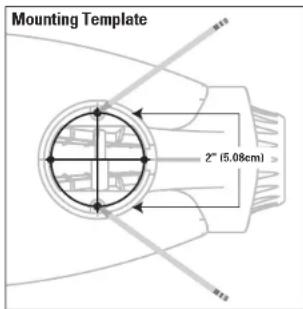
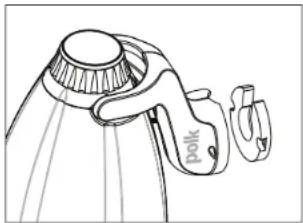
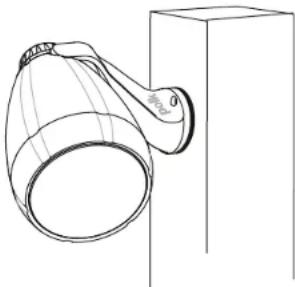
WARNING: Aiming the Sat30 to an angle greater than 45 degrees to the horizontal may result in water buildup inside the grille that could cause damage to the speaker, especially during cold weather when freezing may occur.
Atrium Sub10
PAINTING THE Sub10 SUBWOOFER
While the Atrium Sub10 has a color-impregnated finish that enables it to blend in with your landscaping and outdoor furnishings, the cabinet is paintable. Should you choose to paint your speakers, follow these instructions:
Before you begin, you will need:
- A spray can of primer paint (Krylon Sandable Spray Primer #1318).
• A spray can of the outdoor paint of your choice. - Masking tape.
- Paint mask (not included) to cover un-paintable parts.
PREPARING TO PAINT
- Carefully mask off the following:
- Driver
- Eyebolt
• Cable
PAINTING THE CABINET
- Apply two thin coats of primer to the cabinet.
- When the primer is completely dry, apply the finish color. Multiple coats may be required for a consistent look.
- When the paint is completely dry, remove the masking material.
- Try to keep all handling of freshly painted parts to a minimum.
MOUNTING THE ATRIUM Sub10
The Sub10 can be located anywhere you desire.
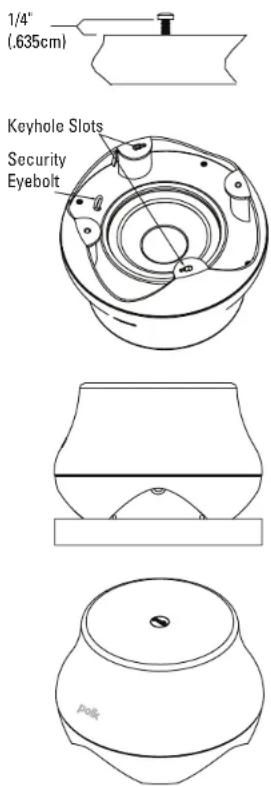
DECK MOUNT
- Determine where you want to locate the subwoofer.
- Measure the center-to-center distance between the key-hole slots and install two #10 mounting screws into the deck, leaving 1/4" of the screws exposed above the surface.
- Place the subwoofer onto the pan head screws and rotate the Sub10 clockwise so that the keyhole slots lock down onto the pan head screws.
GARDEN PLACEMENT
You may locate your Atrium Sub10 anywhere you can run speaker wire. If you place your subwoofer in a garden bed, upon soft ground or mulch, we recommend you place it on a paver or other hard surface. This will prevent mulch or dirt from building up underneath the subwoofer, which must remain clear for optimum performance and to prevent damage to driver.
An optional accessory grille is available to prevent wildlife from taking residence under your subwoofer (Part# AM3387-A).
Note: The Sub10 has a built-in security eyebolt that enables you to anchor it to its location.
ATRIUM Sat30 & ATRIUM Sub10 HOOKUP DIRECTIONS:
Connect only two Sat30 Loudspeakers per stereo channel.
(Not sold in pairs.)
The Atrium Sat30 and Atrium Sub10 each come with 3 feet of CL3 speaker wire, which is rated for underground burial. The Sat30 has two conductors—one red that is labeled "+" and one black that is labeled "−". The Sub10 has four conductors (white, green, red and black) because it has a dual voice coil. Follow the correct polarity during hookup to avoid performance issues and/or damage to your amplifier.
A standard configuration for outdoor listening includes two Sat30 loudspeakers and a single Sub10 subwoofer.
Amplifier
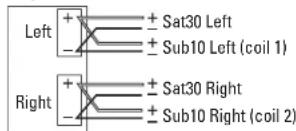
Connect one Sat30 loudspeaker to the +/- terminals of the amplifier's left output channel (red wire to "+" and black wire to "−"). Connect the other Sat30 loudspeaker to the +/- terminals of the amplifier's right output channel. Next, connect the white and green wires of the Sub10 to the amplifier's left output channel and connect the red and black wires of the Sub10 to the amplifier's right output channel.
| Amplifier Output | Sat30 #1 | Sat30 #2 | Sub10 | |
| Left | + Red White | |||
| - Black Green | ||||
| Right | + Red Red | |||
| - Black Black | ||||
An alternate configuration utilizes the left and right outputs from separate amplifiers to drive the Sat30's and the Sub10.
Bi-Amplifier
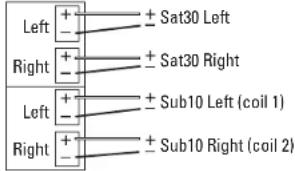
Connect one Sat30 loudspeaker to the +/- terminals of the first amplifier's left channel output and connect the other Sat30 loudspeaker to the +/- terminals of the first amplifier's right channel output. Connect the white and green wires of the Sub10 to the second amplifier's left channel and the red and black wires to the second amplifier's right channel.
| Amplifier Output | Sat30 #1 | Sat30 #2 | Sub10 | ||
| Amp #1 | Left | + Red | |||
| - Black | |||||
| Right | + Red | ||||
| - Black | |||||
| Amp #2 | Left | + White | |||
| - Green | |||||
| Right | + Red | ||||
| - Black | |||||
You must always connect the left and right channels to achieve maximum output. Observe positive (+) and negative (−) polarity. Reversing polarity of a dual voice coil subwoofer will result in very little bass output and possibly damage the speaker or amplifier.
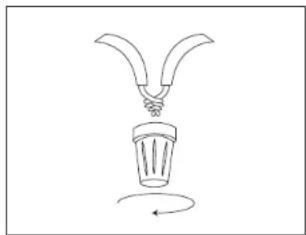
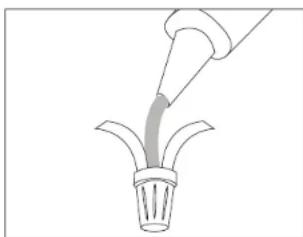
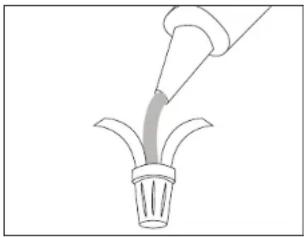
All speaker connections should be made with the provided wire nuts. We recommend filling each wire nut with a little silicone sealant to ensure a weatherproof connection.

Any number of Sat30 loudspeakers can be used in an installation. For applications requiring more than two Sat30 loudspeakers, use a separate amplifier channel for each additional pair of Sat30 loudspeakers. Do not use the A and B channels on your receiver to hook up two pairs of Sat30 loudspeakers, as this may overload and damage your receiver/amplifier circuitry. If you need help with wiring or connecting more than one pair of Sat30 loudspeakers, please contact tech support
FRANÇAIS
CONSIGNES DE SÉCURITÉ IMPORTANTES
Polk Audio, Inc. warrants to the original purchaser only that this Polk Audio Loudspeaker Product (the "Product") will be free from defects in materials and workmanship for a period of five (5) years from the date of original retail purchase from a Polk Audio Authorized Dealer. However, this Warranty will automatically terminate prior to the expiration of the five (5) years if the original retail purchaser sells or otherwise transfers the Product to any other party. The original retail purchaser shall hereinafter be referred to as "you." To allow Polk Audio to offer the best possible warranty service, please fill out the Product Registration Card(s); and send it to the Factory, at the address provided on the Product Card(s) within ten (10) days of the date of purchase. Defective Products must be shipped, together with proof of purchase, prepaid insured to the Polk Audio Authorized Dealer from whom you purchased the Product, or to the Factory at 1 Viper Way, Vista, California 92061. Products must be shipped in the original shipping container or its equivalent; in any case the risk of loss or damage in transit is to be borne by you. If upon examination at the Factory or Polk Audio Authorized Dealer it is determined that the unit was defective in materials or workmanship at any time during this Warranty period, Polk Audio or the Polk Audio Authorized Dealer will, at its option, repair or replace this Product at no additional charge, except as set forth below. All replaced parts and Products become the property of Polk Audio. Products replaced or repaired under this warranty will be returned to you, within a reasonable time, freight prepaid.
This warranty does not include service or parts to repair damage caused by accident, disaster, misuse, abuse, negligence, inadequate packing or shipping procedures, commercial use, voltage inputs in excess of the rated maximum of the unit, cosmetic appearance of cabinetry not directly attributable to defect in materials or workmanship, or service, repair, or modification of the Product which has not been authorized or approved by Polk Audio. This warranty shall terminate if the Serial number on the Product has been removed, tampered with or defaced. This warranty is in lieu of all other expressed Warranties. If this Product is defective in materials or workmanship as warranted above, your sole remedy shall be repair or replacement as provided above. In no event will Polk Audio, Inc. be liable to you for any incidental or consequential damages arising out of the use or inability to use the Product, even if Polk Audio, Inc. or a Polk Audio Authorized Dealer has been advised of the possibility of such damages, or for any claim by any other party. Some states do not allow the exclusion or limitation of consequential damages, so the above limitation and exclusion may not apply to you.
All implied warranties on this Product are limited to the duration of this expressed Warranty. Some states do not allow limitation on how long an implied Warranty lasts, so the above limitations may not apply to you. This Warranty gives you specific legal rights, and you also may have other rights which vary from state to state.
This Warranty applies only to Products purchased in the United States of America, its possessions, and U.S. and NATO armed forces exchanges and audio clubs. The Warranty terms and conditions applicable to Products purchased in other countries are available from the Polk Audio Authorized Distributors in such countries.
Garantie Limitée
- IMPORTANT SAFETY INSTRUCTIONS
- PRODUCT DISPOSAL
- INVENTORY LIST
- ATRIUM SAT30
- PAINTING THE SAT30 LOUDSPEAKER
- PREPARING TO PAINT
- PAINTING THE CABINET, CLAMP, BRACKET KNOB AND BRACKET
- PAINTING THE GRILLE
- MOUNTING THE ATRIUM SAT30
- GROUND MOUNT
- INSTRUCTIONS
- GROUND MOUNT WITHOUT SECURITY PLATE
- PENDANT MOUNT
- BRACKET MOUNT
- ATRIUM SUB10
- PAINTING THE SUB10 SUBWOOFER
- PAINTING THE CABINET
- MOUNTING THE ATRIUM SUB10
- DECK MOUNT
- GARDEN PLACEMENT
- ATRIUM SAT30 & ATRIUM SUB10 HOOKUP DIRECTIONS
- CONNECT ONLY TWO SAT30 LOUDSPEAKERS PER STEREO CHANNEL
- FRANÇAIS
- CONSIGNES DE SÉCURITÉ IMPORTANTES
- GARANTIE LIMITÉE
Brand : POLK
Model : AM3386A
Category : Subwoofer