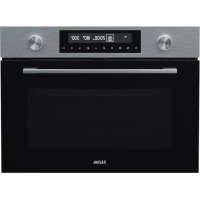
CM450RVS - Oven ETNA - Free user manual and instructions
Find the device manual for free CM450RVS ETNA in PDF.



User questions about CM450RVS ETNA
0 question about this device. Answer the ones you know or ask your own.
Ask a new question about this device
Download the instructions for your Oven in PDF format for free! Find your manual CM450RVS - ETNA and take your electronic device back in hand. On this page are published all the documents necessary for the use of your device. CM450RVS by ETNA.
USER MANUAL CM450RVS ETNA
Specifications techniques
Your combi microwave oven
| Introduction | 4 |
| Control panel 5 | |
| Appliance description 6 | |
| Guide rails 6 | |
| Cooling fan 6 | |
| Accessories | 7 |
Before use
| Before you begin 8 Setting the clock 8 Microwave use 9 |
Operation
| General | 11 |
| Explanation of the knobs and the keys 12 | |
| Description of the mains functions 14 | |
| Description of the sub functions 14 | |
| Microwave functions 17 | |
| Oven functions 18 | |
| Combi microwave functions 19 | |
| Automatic cooking programs 20 | |
| Defrosting programs 20 | |
| Preheating | 22 |
| Childlock | 23 |
| Pause | 23 |
Cooking tips
| Cooking tips | 24 | |
| Maintenance | Keeping your appliance neat | 27 |
| Faults | What to do if... | 28 |
Technical specifications
| Product specifications | 29 |
Your oven and the environment
| Disposing of the appliance and the packaging | 30 |
Introduction
Cooking with your new microwave oven is safe and relaxing. You can have the tastiest dishes on the table in no time at all. The appliance is extremely easy to use, partly thanks to the automatic cooking and defrosting programmes.
You will find information about the installation, safety, operation and maintenance of your appliance in this instruction manual.

Read the separate safety instructions before using the appliance!
Read this user instruction before using the appliance and keep it in a safe place for future use.
The installation instructions are included separately.
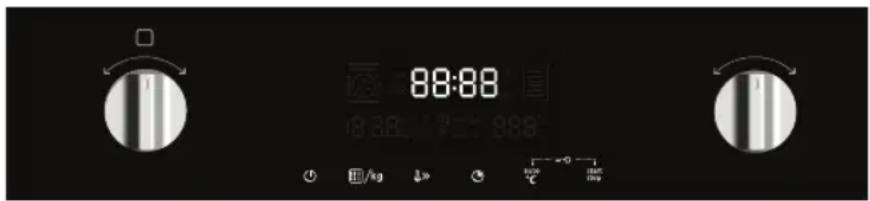
Control panel
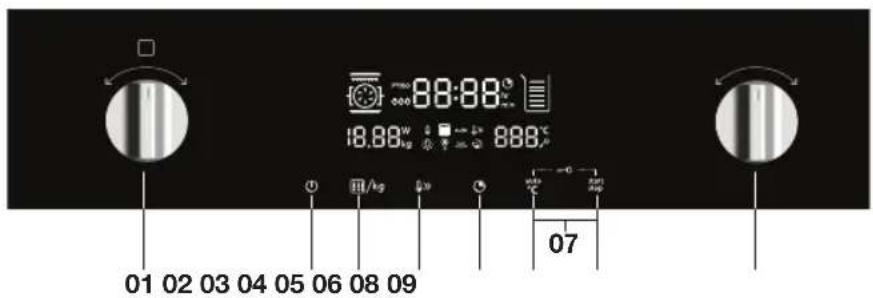
- Function knob
- On/off key
- Power/weight key
- Quickly preheating key
- Clock key
- Temperature/autocomnuk key
- Childlock (press 06 + 08 simultaneously)
- Start/pause key
- Selection knob
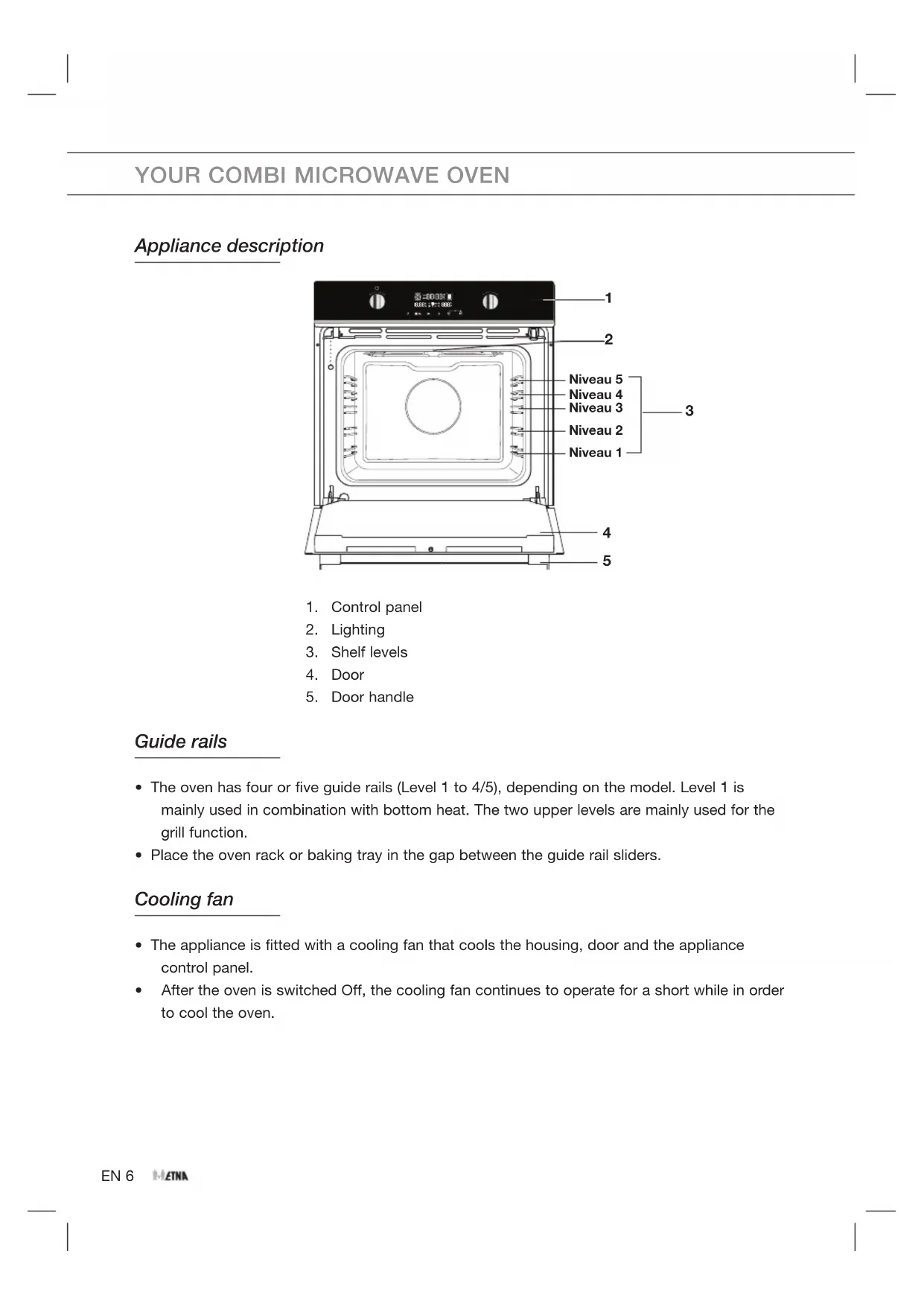
Appliance description
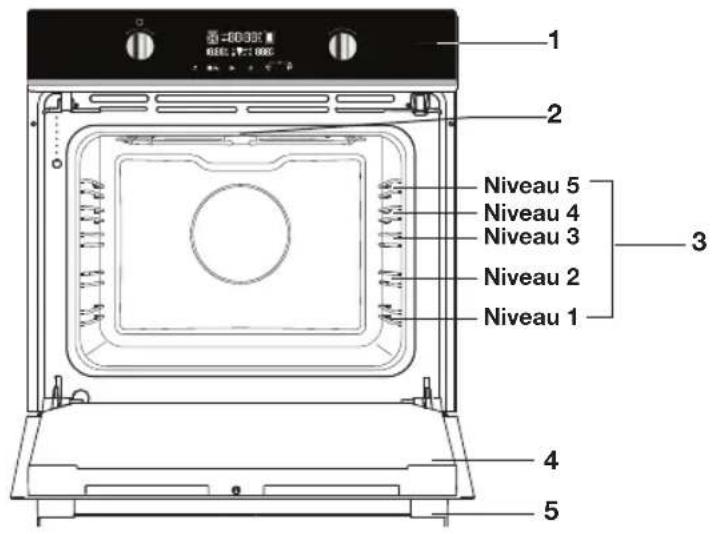
- Control panel
- Lighting
- Shelf levels
- Door
- Door handle
Guide rails
- The oven has four or five guide rails (Level 1 to 4/5), depending on the model. Level 1 is mainly used in combination with bottom heat. The two upper levels are mainly used for the grill function.
- Place the oven rack or baking tray in the gap between the guide rail sliders.
Cooling fan
- The appliance is fitted with a cooling fan that cools the housing, door and the appliance control panel.
After the oven is switched Off, the cooling fan continues to operate for a short while in order to cool the oven.
Accessories
Your appliance is accompanied by a range of accessories, depending on the model. Only use original accessories; they are specially suited to your appliance.

Not all accessories are suitable/available for every appliance (it may also differ by country). All the accessories that are being used must be able to withstand the highest temperature of the appliance. When purchasing, always provide the exact identification number of your appliance. Please see the sales brochures or check online for more details about optional accessories.
| Accessories that can be supplied with your appliance (depending on the model) | |
| Enamelled baking tray; to be used for pastries and cakes. | |
| Oven rack; mainly used for grilling. A steam dish or pan with food can also be placed on the oven rack. The oven rack is equipped with a safety peg. Lift the rack slightly at the front to slide it out of the oven. | |
| Glass baking tray; for microwave and oven use. · NOT suitable for pyrolysis cleaning. | |

Consult the cooking guidelines in this user manual to select the correct accessory for your dishes.

As baking accessories heat up, their form may change. This does not affect their functionality and their original form will be restored when they cool down.
The grid or the tray should always be inserted into the groove between the two wire profiles.
- Insert the grid so that the small railing is in the oven interior (toward the back of the oven).
Before you begin
- Open the door and remove the packaging material.
- Do not use the microwave oven when it is damaged, but contact the manufacturer.
- Remove the protection foil from the outside of the microwave oven.
- Clean the inside of the oven and the accessories with a damp cloth. Do not use abrasive cleaners or any strongly smelling detergents.
Setting the clock
When the power is first supplied to the microwave oven, you must set the clock. In the display '00:00' will blink. The clock will work as long as the microwave oven is connected to the mains.
- Turn the selection knob to set the right time (between 00:00 and 23:59).
- Press the clock key.
The clock has been set.
Notes
If you want to change the time later on, you have to press and hold the clock key. The actual time will blink in the display.
- Turn the selection key to set the new time and press the clock key again to confirm the setting.
Microwave use
Microwaves are high-frequency electromagnetic waves; the energy released enables food to be cooked or reheated without changing either the form or the colour.
Microwave is used in:
- Microwave mode
- Combi-function
Cooking Principle
- The microwaves generated by the microwave are distributed uniformly, using a rotating distribution system to ensure that the food is cooked evenly. The food is thus cooked evenly.
- The microwaves are absorbed by the food up to a depth of about 1 inch (2.5 cm). Cooking then continues as the heat is dissipated within the food.
- Cooking times vary according to the container used and the properties of the food:
Quantity and density
Water content
Initial temperature (refrigerated or not)

Important
As the centre of the food is cooked by heat dissipation, cooking continues even when you have taken the food out of the oven.
Standing times specified in recipes and in this booklet must therefore be respected to ensure:
Even cooking of the food right to the centre.
An even temperature throughout the food.
Microwave cookware guide
Cookware used for 'Microwave Mode' must allow microwaves to pass through and penetrate food. Metals such as stainless steel, aluminum and copper reflect microwaves. That is why cookware made of metallic materials should not be used. Cookware marked 'microwave - safe' is always safe for use. For additional information on appropriate cookware refer to the following guide and always use the glass tray on shelf Level 1 when using microwave mode.
| Cookware | Microwave-Safe | Comments |
| Aluminium Foil √× Can | be used in small | quantities to protect areas against overcooking. Arcing can occur if the foil is too close to the oven wall or if too much foil is used. |
| China and Earthenware | √ | Porcelain, pottery, earthenware and bone china are usually suitable, unless decorated with a metal trim. |
| Disposable Polyester Cardboard Dishes | √ | Some frozen foods are packaged in these dishes. |
| Fast - Food Packaging • Polystyrene cups containers • Paper bags or newspaper • Recycled paper or metal trims | √ × × | Can be used to warm food. Overheating may cause the polystyrene to melt. May catch fire. May cause arcing. |
| Glassware • Oven-to-table ware • Fine glassware • Glass jars | √ | Can be used, unless decorated with a metal trim. Can be used to warm foods or liquids. Delicate glass may break or crack if heated suddenly. Must remove the lid. Suitable for warming only. |
| Metal | × | May cause arcing or fire. |
| Paper • Plates, cups, Kitchen paper • Recycled paper | √ × | For short cooking times and warming. Also to absorb excess moisture. May cause arcing. |
| Plastic | √ | Particularly if heat-resistant thermoplastic. Some other plastics may warp or discolour at high temperatures. Do not use Melamine plastic. Can be used to retain moisture. Should not touch the food. Take care when removing the film as hot steam will escape. Only if boilable or oven-proof. Should not be airtight. Prick with a fork, if necessary. |
:Recommended
X : Use with caution
X:Unsafe
General
Microwave power levels
You can see from the table below from which five power levels you can choose and for which foods the power levels are suitable. During use it is possible to change the power by pressing the power/weight key.
| Power level Food | |
| 900 W - Boiling water, reheating - Cooking chicken, fish, vegetables | |
| 700 W - Reheating - Cooking mushrooms, shellfish - Cooking dishes containing eggs and cheese | |
| 500 W - Cooking rice, soup | |
| 300 W - Defrosting - Melting chocolate and butter | |
| 100 W - Defrosting sensitive/delicate foods - Defrosting irregularly-shaped foods - Softening ice cream - Allowing dough to rise | |
Changing the temperature
During use it is possible to change the temperature. The temperature status can be viewed in the LED status bar. The set temperature is reached when all LED units in the status bar are lit.
Changing the cooking time
During use it is possible to change the cooking time. The step quantities for adjusting the time are as follow (the maximum cooking time that can be set depends on the chosen mode):
- Heating liquids in the microwave can result in delayed boiling. This means that the liquid may start to boil furiously after it is removed from the microwave, with the risk of scalding. You can offset the delayed boiling effect by placing a plastic or glass spoon in the liquid prior to heating it in the microwave.
Take care with baby food:
Shake or stir the content of babies' bottles or pots of baby food after heating.
Check the temperature of the food carefully prior to consumption to prevent scalding injuries.
- Cutlery and tableware may become hot after using the microwave.
Explanation of the knobs and the keys
Function knob
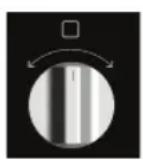
Select a function
Turn this knob to select the desired function.
Selection knob
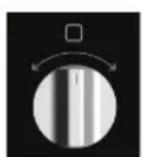
To choose an sub oven function
Turn this knob to choose a sub oven function.
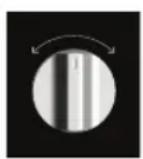
Change the settings
Turn this knob to change the settings that are in the active area.
On/off key and stop key

To switch the appliance on or off
Touch and hold the key for several seconds to switch the appliance on or off.
Microwave power and weight key
| /kg | Microwave power Set the microwave power: 100W, 300W, 500W, 700W and 900W Set the combi-microwave power: 100W, 300W and 500W |
| /kg | Weight Set the weight of cooking. |
Preheat key
| Touch to select preheat function. With the preheat function your oven reaches the set temperature particularly quickly. Preheat function is available for the Hot Air function, Top and bottom heat function and Top and Bottom + Fan function |
Clock and cooking time key
| Clock key Touch this key to select clock settings. | |
| Cooking time key Touch this key to select the cooking time. |
Temperature and Auto-programs key
| auto °C | Temperature key Touch this key to set a cooking temperature. The default temperature is 180 °C. |
| auto °C | Auto-programs key Touch this key to select a Auto-program. There are 13 Auto-programs available. The type of heating and the cooking time are set by weight. |
Start or stop key
| start stop | Touch to key to start or stop the selected cooking program. |
Description of the mains functions
Consult the tables to select the preferred function. Also consult the instructions for preparation on the dish packaging. Some main functions have sub functions.

In 'Microwave function': do not use metal cookware or utensils and do not preheat the oven. Be sure that all the accessories that are being used are able to withstand the temperature settings of the chosen oven function.
Main functions (to select with the function knob)
| Function Description |
| Oven functions ·Use one of the functions available for grilling, baking or roastig. ·Sub functions are available (consult Oven functions table). |
| Combi microwave functions ·Use one of the functions for (fast) cooking of meals. ·Sub functions are available (consult Combi microwave functions table). |
| Auto-programs ·The Auto-programs enable you to prepare food very easily. ·You select the program and enter the weight of the food you want to prepare. You can choose between 13 programs. |
| Defrosting programs ·You can use the 4 defrosting programs to defrost meat, poultry and bread. |
Description of the sub functions
Oven functions (to select with the selection knob)
| Function Description | |
| Hot air ·Heating by means of hot air from the back of the oven. This mode provides uniform heating and is ideal for baking. ·Place the baking tray or oven rack in the middle of the oven. ·Suggested temperature: 180 °C. Preheating is recommended. | |
| Large grill + Fan ·Heating by means of the top heating elements. The heat is distributed by the fan. This mode can be used for grilling meat, fish and vegetables. ·Place the oven rack in the upper part of the oven and the baking tray in the middle of the oven. ·Suggested temperature: 170 °C ·Monitor the cooking process at all times. The dish may burn quickly due to the high temperature. Preheating is recommended. | |
| Hot Air + Bottom heat ·Heating by means of hot air from the back of the oven and the bottom heating element. ·This mode can be used to bake pizza, moist pastry, fruitcakes, leavened dough and short crust. ·Place the baking tray or oven rack in the middle of the oven. ·Suggested temperature: 200 °C ·Preheating is recommended. | |
| Large Grill ·Heating by means of the upper element and grill element. ·This mode can be used with dishes and baked goods that require a distinctive bottom crust or browning. Use just before the end of the baking or roasting time. Place the oven rack in the upper part of the oven and the baking tray in the middle of the oven. Monitor the cooking process at all times. The dish may burn quickly due to the high temperature. ·Maximum allowed temperature: 235 °C | |
| Top + Bottom heat ·Heating by means of the upper and lower heating elements. ·This mode can be used for traditional baking and roasting. ·Place the baking tray or oven rack in the middle of the oven. ·Suggested temperature: 200 °C ·Preheating is recommended. | |
| Top + Bottom heat + Fan ·Heating by means of the upper and lower heating element. The heat is distributed by the fan. ·This mode can be used for baking low leavened cakes, as well as for preservation of fruit and vegetables. ·Place a not too high baking tray in the lower part of the oven, so that hot air can also circulate over the upper surface of the food. ·Suggested temperature: 180 °C | |
| Top heat ·Heating only by means of the upper heating element. ·This mode can be used when you wish to bake/roast the top part of your dish. ·Place the baking tray or oven rack in the middle of the oven. ·Suggested temperature: 150 °C | |
| Bottom heat ·Heating only by means of the lower heating element. ·This mode can be used with dishes and baked goods that require a distinctive bottom crust or browning. ·Place the baking tray or oven rack in the lower part of the oven. ·Use just before the end of the baking or roasting time. ·Suggested temperature: 160 °C | |
Combi microwave functions (to select with the selection knob)
| Function Description | |
| Hot air + Microwave ·This system employs a combination of microwaves and hot air; therefore, the cooking time is shorter. ·Use this for all types of meat, stews, vegetables, pies, cakes, bread and dishes au gratin (i.e. food that require longer cooking time). ·Place the Glass baking tray on level 1. ·Suggested temperature: 160 °C ·Suggested power: 500 W | |
| Grill + Fan + Microwave ·The food is cooked with a combination of microwaves and grill with fan. ·Use this combination for smaller chunks of meat, fish and vegetables. ·It allows fast cooking and the food will have a nicely browned crispy crust. ·Place the glass dish on level 1. ·Suggested temperature: 200 °C ·Suggested power: 500 W | |
| Hot air + Bottom heat + Microwave ·This function is suitable where quick under browning is required. ·Will cook the ingredients down to the core. | |
Microwave functions

Warning! Microwave heating of liquids (such as water) can result in delayed eruptive boiling. This means that liquid starts boiling without you seeing any movement.
Once removed from the oven, the liquid can start to boil rapidly and spatter out of the cup with the risk of injury. The effect of eruptive boiling can be eliminated by placing a plastic / glass spoon in the fluid before cooking it in the microwave oven.
Warning! Take care with baby food and jars:
Caution! The contents of feeding bottles and baby food jars must be stirred or shaken after heating.
Caution! Carefully check the temperature of the contents before consumption, in order to avoid burns.
Warning! Utensils can be hot after use in the microwave oven!

- Press the on/off key to activate the microwave function.
'01:00' is blinking in the display and the microwave icon appears in the display. - Turn the selection key to set the cooking time. The max. cooking time depends on the power that has been set.
- Press the power/weight key to adjust the microwave power.
'900' is blinking in the display.
- Turn the selection key to set the microwave power (between
100 W and 900 W). Press the power/weight key again to confirm the setting or wait for the power to stop blinking in the display.
You will hear a beep.
- Press the start/pause key to start the cooking process.
When the cooking process is ready, you will hear 5 beeps. The fan continues to operate for some time and then stops automatically.
If you do not press the start/pause key, the combi microwave oven switches itself off automatically after 15 minutes.
OPERATION
Oven functions

- Press the on/off key to activate the microwave function.
'01:00' is blinking in the display and the microwave icon appears in the display.
- Turn the function knob one position to the right.
The hot air icon is blinking. Time, temperature and the oven icon are shown in the display.
-
Turn the selection knob to the right to choose a mode (see chapter 'Oven functions table'). If the symbols stop blinking, the chosen mode has been activated. You can go back one step by turning the function knob one position to the left.
-
You can adjust the time and/or the temperature in every mode (grill; setting 1, 2 or 3, 3 is the highest setting). Press the clock key or the temperature/automenu key. The time or temperature (grill setting 1, 2 or 3) is blinking. By turning the selection knob you can set the preferred time and/or temperature (grill setting).
-
To confirm the setting, press the clock key or the temperature/automenu key again.
The time and temperature that can be set depends on the mode that you have chosen.
- Press the start/pause key to start the cooking process.
When the cooking process is ready, you will hear 5 beeps. The fan continues to operate for some time and then stops automatically.
If you do not press the start/pause key, the combi microwave oven switches itself off automatically after 15 minutes.
OPERATION
Combi microwave functions

- Press the on/off key to activate the microwave function.
'01:00' is blinking in the display and the microwave icon appears in the display.
- Turn the function knob two positions to the right.
The hot air icon is blinking. Time, temperature, the microwave icon and the oven icon are shown in the display.
- Turn the selection knob to the right to choose a mode (see the oven functions table).
If the symbols stop blinking, the chosen mode has been activated. You can go back one step by turning the function knob one position to the left.
You can adjust the power, the time and/or the temperature in every mode.
- Press the power/weight key, the clock key or the temperature/automenu key.
The power, time or temperature is blinking.
By turning the selection knob you can set the desired power level (100, 300 or 500 W), time and/or temperature.
To confirm the setting, press the power/weight key, the clock key or the temperature/automenu key again.
The power, time and temperature that can be set depends on the mode that you have chosen.
- Press the start/pause key to start the cooking process.
When the cooking process is ready, you will hear 5 beeps. The fan continues to operate for some time and then stops automatically.
If you do not press the start/pause key, the combi microwave oven switches itself off automatically after 15 minutes.
Automatic cooking programs
There are 13 automatic cooking programs. You only have to choose the program and set the weight. The power, the time and the temperature are already set.
| Program Category Item | ||
| P 01** | Vegetables Fresh vegetables | |
| P 02** | Side dishes Potatoes - peeled/cooked | |
| P 03 | Side dishes Potatoes - roasted | |
| P 04 | Poultry/fish Chicken pieces | |
| P 05* | Bakery Cake | |
| P 06* | Bakery Apple pie | |
| P 07* | Bakery Quiche | |
| P 08** | Reheat Drink/soup | |
| P 09** | Reheat Plated meal | |
| P 10** | Reheat Sauce/stew/dish | |
| P 11 | Convenience Frozen - pizza | |
| P 12* | Convenience Frozen - oven chips | |
| P 13 | Convenience Frozen - lasagne | |
| * Preheated programs. During preheating, the cooking time pauses and the preheating symbol is on. After preheating, you will hear an alarm and the preheating symbol will blink. ** Only uses the microwave function. | ||
Defrosting programs
You can use the 4 defrosting programmes to defrost meat, poultry and bread.
| Program Defrost Weight range in kg | ||
| d01 | Meat 0.10 - 1.50 | |
| d02 | poultry 0.10 - 1.50 | |
| d03 | fish 0.10 - 0.80 | |
| d04 | Bread, cake and fruit | 0.10 - 0.50 |
| During defrosting, place the food on the glass tray If you hear 3 beeps, turn the food. Then touch start key to continue defrost. | ||
Attention!
- During the automatic cooking programmes, the microwave function is switched on. Therefore do not use metal utensils (see chapter 'Microwave use').
-
Put the dish on the glass baking tray, and insert it in the oven on level 1. Press the start/ pause key.
-
Press the on/off key to activate the microwave function.
'01:00' is blinking in the display and the microwave icon appears in the display.
- Turn the function knob three positions (P01) or four positions (d01) to the right.
Time, weight, the first number of the automatic programs and the defrost icon/ automatic cooking program icon are shown in the display. - Turn the selection knob to the right to choose an automatic cooking program. If the symbols stops blinking, the chosen program has been activated. You can go back one step by turning the function knob one position to the left.
- Press the power/weight key to set the weight.
The weight is blinking in the display.
-
With the selection knob you set the right weight. Press the power/weight key again to confirm the setting.
The weight that can be set depends on the program that you have chosen. -
Press the start/pause key to start the automatic cooking program.
When the cooking program is ready, you will hear 5 beeps. The fan continues to operate for some time and then stops automatically.
If you do not press the start/pause key, the combi microwave oven switches itself off automatically after 15 minutes.
Preheating
The preheating function can be activated after you have chosen one of the following functions:
| Mode Preheating | ||
| Microwave functions | Microwave | X |
| Oven functions | Hot air | ✓ |
| Large grill with Fan | ✓ | |
| Hot air + Bottom heat | ✓ | |
| Large Grill | X | |
| Top + Bottom heat | ✓ | |
| Top + Bottom heat + Fan | ✓ | |
| Top heat | X | |
| Bottom heat | X | |
| Combi microwave functions | Microwave + Hot air | ✓ |
| Microwave + Grill with fan | ✓ | |
| Microwave + Bottom heat + Hot air | ✓ |
- The preheating function only works if you have already chosen one of the modes above. During preheating, the microwave function is switched off.
- You can adjust the other settings before or after choosing the preheating function

- Press the quickly preheat key.
The prehaet icon appears in the display.
- Press the start/pause key to start the preheating.
If the right temperature is reached, you will hear three beeps.
You can stop the preheating by opening the oven door or by pressing the on/off key.
3. Press the start/pause key to start the previously set cooking process.
If you do not press the start/pause key, the combi microwave oven switches itself off automatically after 15 minutes.
Childlock
You can 'lock' your combi microwave oven, to predend a cooking process from starting.
Attention:
- You can only activate the childlock if the combi microwave oven is switched off.
The (current) time appears in the display.
Activating the childlock:
- Press the temperature/auto menu key and start/pause key at the same time and hold the keys until you hear a beep.
In the display a key icon appears. You cannot operate the combi microwave oven.
Deactivating the childlock:
- Press the temperature/auto menu key and start/pause key at the same time and hold the keys until you hear a beep.
In the display the key icon disappears. You can now operate the combi microwave oven again.
Pause
If your combi microwave oven is working, you can set it to 'pause'.
- Press the start/pause key.
The symbol of the mode that has been set is blinking.
- Press the start/pause key again to start the process again.
The symbol of the mode that has been set stops blinking.
Heating and cooking
- The microwave oven always heats with the same intensity. The more you put in the microwave oven, the longer the cooking time.
- Wide, flat dishes become hot more quickly than narrow, tall dishes.
- Covering dishes with cling film or a suitable lid prevents spattering, shortens cooking time and helps maintaining humidity of the dish.
- Caution! Remove the cling film or lid carefully afterwards. The steam that comes off can be very hot!
- If necessary, moisten foods that quickly dehydrate. First soak potatoes and vegetables in cold water for a moment before placing them in the microwave oven. This prevents a skin forming on them.
- For uniform results, it is best to stir or turn meals once or twice.
- When reheating foods that have already been cooked before, always select the highest microwave power level.
- When cooking in a microwave oven, only small quantities of water, salt and seasoning are necessary. Best add salt after cooking. This prevents moisture being drawn out of the food.
- Food continues to cook for some time after the microwave oven has been switched off. Keep this in mind, don't overcook your meals.
- Caution! When heating small quantities of powdery products (such as when drying herbs), always place a glass of water in the microwave. Otherwise, due to the small quantity, there is a chance of spontaneous combustion.
Defrosting
- Always defrost large, dense pieces using the defrosting programme. The food will defrost gradually and evenly, you will not run the risk of the outside drying while the centre is still frozen.
- To speed up the defrosting process, it is recommended that after a while the food be divided up into smaller pieces.
- For large pieces of meat and dense food, introduce a couple of breaks into the defrosting process.
- When defrosting irregularly shaped food, halfway through the defrosting time you can cover or wrap the thin parts with aluminium foil.
- Preferably use the oven grid when preparing meals. Never place cold (frozen) meals directly on the glass turntable. The difference in temperature may cause it to crack!
Factors that affect the cooking process
- The temperature of the ingredients affects the cooking times. A cold meal will require a longer cooking time than a meal that is already at room temperature.
- Light, delicate foods cook more quickly than heavy, solid foods, such as stews and rolled meats. Take care when cooking light, delicate foods. The edges quickly become dry and tough.
- Small pieces of food are heated more evenly if you place them separately in the microwave, preferably in a circle.
- When using microwave-/combi microwave functions, first position the round wire rack on the turntable and then place the dish on the wire rack. This way, the heat can circulate properly and your dish will be done in no time.
- Bones and fat conduct heat better than meat. Covering chicken legs and wings with aluminium foil prevents burning these parts.
- Microwaves penetrate food to a depth of about 3cm . The centre of thick foods is heated as a result of heat from the heated part (the outside) spreading to the inside.
- Meat and poultry that is cooked in the microwave for more than about 15 minutes becomes lightly browned. Any food cooked for a shorter time can be rubbed beforehand with a 'browning' sauce, such as Worcestershire sauce, soya bean oil or barbecue sauce.
- Greaseproof paper prevents splattering. It also retains heat better.
Basic techniques
- Arranging food
Place thicker pieces on the edge on the turntable. Foods placed on the edge of the turntable receive the most microwaves.
- Stirring
By stirring dishes regularly you distribute the heat stored in them. Always stir from outside to inside, since the outside of the dish always becomes hot first.
- Turning
Turn large, thick foods frequently. They then cook more evenly and quickly.
- Pricking
Foods with a skin or shell, such as egg yolks, shellfish and fruit, burst in the microwave. You can prevent this by pricking them a few times with a fork or skewer beforehand.
- Checking
Foods cook quickly. You should therefore check them frequently. Take food out of the microwave just before it is done.
- Standing
Once you have taken it out of the microwave, let the food stand covered for, in general, 3 to 10 minutes. The food continues to cook. Foods that have a dry crust, such as cake, should not be covered.
Cooking vegetables
- Use fresh vegetables if possible. If the vegetables have become limp because they have been kept for too long, you can refresh them by soaking them in cold water for a little while.
- Use a large dish to cook vegetables, so the bottom of the dish is not covered by too thick a layer.
- Preferably cook vegetables with the water that clings to them.
Always cover the dish with a lid or microwave cling film. - Do not add salt. The salts naturally present in the vegetables usually provide enough flavour. If you must add salt, do so after cooking.
Cook vegetables for as short a time as possible. Allow for them continuing to cook after the microwave has been switched off. - Check whether the vegetables are done by pricking them with a fork or skewer.
Cooking fish
- Fish should be cooked gradually. With thin fish, fatty fish or small portions, therefore, set the power level to 30% . In other cases, you can safely set the power level a bit higher. Allow, however, for the food continuing to cook after the microwave has been switched off. Fish is done when the flesh has become opaque.
Keeping your appliance neat
- Salts are very abrasive. If salt is deposited in the cooking compartment, rust could develop in places.
- Acidic sauces, such as ketchup and mustard, or salted foods, e.g. cured roasts, contain chloride and acids. These affect the stainless steel surface. Clean the cooking compartment after each use.
DO NOT use harsh abrasive cleaners or sharp metal scrapers to clean the oven door glass since they can scratch the surface, which may result in shattering of the glass (if provided). - DO NOT use a steam cleaner to clean the microwave oven.
- If the seal on the outside of the cooking compartment is very dirty, the cooking compartment door will no longer close properly during operation. The fronts of adjacent units could be damaged. Keep the seal clean.
- Clean the inside and outside of the oven regularly using soapy water and dry it thoroughly with a dry cloth. Make sure that the microwave distributor cover (inside the oven on the right) is clean. A cover which is not clean may cause sparking.
- Clean the inside immediately after use. Use a damp cloth to remove any condensation, liquid that has boiled over and food remains. Crumbs and liquid that remain behind absorb microwave energy and lengthen cooking times.
- Clean the accessories regularly; use soapy water and a brush and dry the accessories thoroughly with a dry cloth. The accessories may also be washed in a dishwasher.
- Odours will disappear if you put a glass of vinegar or water - with lemon juice added - in the oven space. Switch the microwave on for two minutes on full power. Then wipe with a damp cloth.
FAULTS
What to do if...
If the microwave oven does not cook as well as it should do, if there is sparking inside it, or if it does not start, etc., first try to find the reason for the problem yourself before calling the service department.
Check:
- Is the plug in the socket?
Is the door closed properly? - Have the power level and the cooking time been set properly?
- Are there any objects in the microwave oven which shouldn't be there?
- Are you using the correct cooking utensils?
- Is the turntable in the microwave oven?
- Are the vents blocked?
- Has the food been defrosted sufficiently?
- Did you stir or turn the food during cooking?
Is the childproof lock turned on?
TECHNICAL SPECIFICATIONS
On the label on the inside of this equipment, you will find the total wattage, the required voltage and the frequency.
Product specifications
| External dimensions (wxdxh) 595 | mm x 548 mm* x 454 mm |
| Building in dimensions 560 mm x | 550 mm x 450 mm |
| Oven capacity 50 liter | |
| Rated voltage 230 V ~ / 50 Hz | |
| Rated input power 3000 W | |
| Rated output power 900 W |
- Depth excluding the 20 mm depth of the dashboard.
Disposing of the appliance and the packaging
This product is made from sustainable materials. However, it must be disposed of in a responsible manner at the end of its useful life. The government can provide you with information about this.
The packaging of the appliance can be recycled. The following materials have been used:
cardboard
polyethylene wrap (PE)
CFC-free polystyrene (hard PS foam)
You should dispose of these materials in a responsible manner, according to the government regulations.
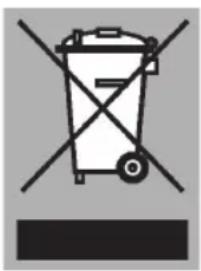
The product shows a pictogram of a crossed-out waste container to point out that domestic electrical appliances must be disposed of separately. Thus the appliance may not be processed via the regular waste flow at the end of its useful life. It must be handed in at a special municipal waste depot or at a sales outlet which does this for you.
By collecting household appliances separately, we prevent negative consequences to the environment and our health which could be the result of incorrect disposal. The materials used to make this appliance can be re-used, which means tremendous savings in energy and raw materials.
Declaration of conformity
We hereby declare that our products comply with the relevant European directives, standards and regulations as well as all requirements referred to in the standards.

798732