 ManualGo.com
HLB 8418 P - Oven TEKA - Free user manual and instructions
Find the device manual for free HLB 8418 P TEKA in PDF.



Download the instructions for your Oven in PDF format for free! Find your manual HLB 8418 P - TEKA and take your electronic device back in hand. On this page are published all the documents necessary for the use of your device. HLB 8418 P by TEKA.
USER MANUAL HLB 8418 P TEKA
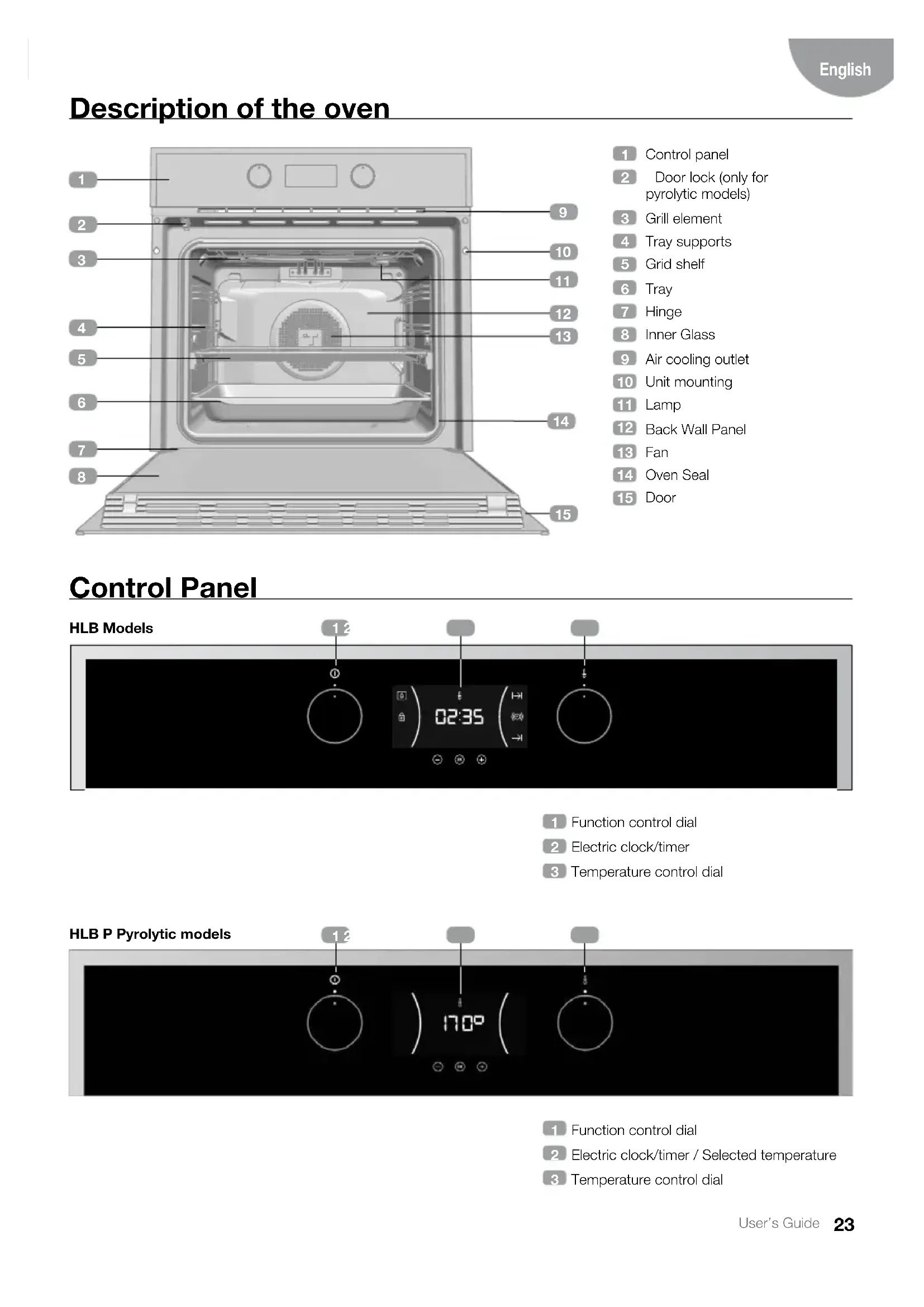
Description of the oven
Door lock (only for pyrolytic models)
Function control dial
Electric clock/timer
Temperature control dial
Function control dial
Electric clock/timer / Selected temperature
Temperature control dial
HLB P Pyrolytic models24 User’s Guide Function selector symbols HLB 830 Model HLB 840, HLB 850 Model HLB 830 P Model HLB 840 P Model Oven functions INFORMATION For a description of how to use each of the features, see the cooking guide that comes with your oven. OVEN SWITCH-OFF CONVENTIONAL GRILL MAXIGRILL LOWER ELEMENT
CONVENTIONAL WITH FAN
KEYS , and : Enable you to programme the electronic clock/timer functions. : For models with electronic temperature control, press this button to see the tem- perature during cooking.
SYMBOLS Clock Settings AVISADOR: Lights up when the clock/ timer is selected. Generates an acoustic signal when the time is up. The oven does not turn off at the end of the timer period. This function can also be used while the oven is cooking. and PROGRAMMING: Light up to indi- cate that the oven is programmed (cooking time, stop time or total).
Cooking Time: This function allows you to programme the cooking time, after which the oven will turn off automatically.
Cooking Stop Time: This setting al- lows you to programme the time for cook- ing to stop, after which the oven will turn off automatically.
and Cooking Time and Cooking Stop Time: This setting allows you to pro- gramme the cooking time and cooking stop time. The oven switches on automatically at the set time and operates for the select- ed cooking time (Cooking Time). It then switches off automatically at the indicated time (Cooking Stop Time). CLOCK/TIMER LOCK: Indicates that the touch keys for the clock/timer are locked, preventing modifications by small children. Other functions HEATING: Indicates that the oven is trans- mitting heat to the food. HYDROCLEAN: Lights up while the Teka Hydroclean
function is in progress. PYROLYSIS: For pyrolytic models only. Lights up while the Pyrolytic function is in progress. DOOR LOCK: For pyrolytic models only. Indicates that the door is locked, either manually or automatically while the pyrolytic function is in progress. WARNING The sensitivity of the touch keys adapts continually to environmental conditions. Make sure the surface of the control panel is clean and free of obstacles when plugging in the oven. If the clock does not respond correctly when you touch the keys, unplug the oven for a few seconds and then plug it in again. Doing this causes the sensors to adjust au- tomatically so that they will react once more to fingertip control.
- To set the time on the oven, the function and temperature dials must be in the posi- tion.
- When you plug in the oven, you will see the clock flashing 12:00.
- Touch or to adjust the hours and then the minutes. You will hear a double beep confirming the time is set.
- If you wish to modify the time, touch or until the time starts flashing. Touch and and follow the instructions in the previ- ous point. NoTE The clock light has a night mode so the display light will dim between 00:00 and 6:00 hours. WaRNING In the event of a power failure, your elec- tronic clock/timer settings will be erased. If this happens, turn the function and tem- perature dials to the position. The indication 12:00 will show, and you will then be able to set the time as described above. If the oven door was locked before the pow- er cut, the locked symbol will show until it is unlocked. This may take several minutes, depending on the temperature inside the oven, and during this time you cannot reset the time. Once the door is unlocked, you can set the time as described above. oven use
- You will notice that the symbol lights up during cooking to indicate that heat is being transmitted to the food. This symbol disap- pears when the selected temperature has been reached.
- Set the controls to to turn off the oven. INFoRMaTIoN When you start cooking, your oven will show the time the oven has been cooking. MaNUal opERaTIoN
- After setting the clock, the oven is ready for use. Select a cooking function and tempera- ture. INFoRMaTIoN In models with an electronic temperature control, when the selector switch is turned, the clock display will show the temperature. After selecting the temperature, the clock display will automatically reappear. To see the temperature again during cook- ing, press the button and turn the tem- perature dial if you want to change it.27 User’s Guide English
OVEN TIMER OPERATION
Programming the Buzzer
or until the symbol on the display starts flashing, then press . The indication ‘00:00’ will appear on the display.
2. Select the time after which you want the
alarm to sound by pressing or . You will hear 2 beeps to confirm that the time has been set and the clock will start counting down from the selected time. The sym- bol will flash slowly.
3. Once the time has expired, an acoustic sig-
nal will sound for 90 seconds and the symbol will flash quickly. NOTE With the Buzzer function, the oven will not turn off when the time expires.
4. Touch any key to stop the alarm. The
symbol will then disappear. If you wish to modify the time on the buzzer, re- peat the steps shown. Upon entering the timer control, the time currently remaining will appear, which you will be able to adjust. NOTE With the Buzzer function, the remaining time will show permanently on the display. With this programmed function, it is not possible to view the time or the total programmed cooking time. Programming Cooking Time
or until the symbol on the display starts flashing, then press . The indication ‘00:00’ will appear on the display.
2. Select the time after which you want the
alarm to sound by pressing or . You will hear 2 beeps to confirm that the time has been set and the clock will start counting down from the selected time.The sym- bol will flash slowly.
3. Select a function and a cooking temperature
using the oven commands.
4. Once the cooking time is up, the oven will
turn off, an alarm will sound and the symbol will flash quickly.
5. Touch any key to stop the alarm and turn off
the symbol. The oven will switch on again.
6. Set the controls to the
position to turn off the oven. You can change the remaining cooking time at any time by touching or until the symbol starts to flash quickly. Now press to change the time. NOTE With the Cooking Time function, the remain- ing time will show permanently on the dis- play. You cannot see the current time on the display when this function is set. Programming the Cooking Stop Time
or until the symbol on the display starts to flash and press . You will see the current time on the timer display.
2. Select the time after which you want the
alarm to sound by pressing or . You will hear 2 beeps to confirm that the time has been set and the clock will start counting down from the selected time. The sym- bol will flash slowly.
3. Select a cooking function and temperature.
4. When the cycle is finished, the oven will turn
itself off, a buzzer will sound and symbol will flash quickly.
5. Touch any sensor to stop the alarm and to
turn off the , symbol. The oven will switch on again.
6. Set the controls to the
position to turn off the oven.28 User’s Guide You can change the remaining cooking time at any time by touching or until the symbol starts to flash quickly. Now press
change the time. Programming Cooking Time and Cooking Stop Time
or until the symbol on the display starts flashing, then press . The indication ‘00:00’ will appear on the display.
2. Select the cooking time by touching
. Next, a double beep will sound, the re- maining time will appear on the display and the symbol will flash slowly.
or until the symbol on the display starts flashing, then press . You will see the expected completion time on the timer display.
4. Select the cooking end time by touching
. Next, a double beep will sound and the current time will be displayed on the display.
5. Select a cooking function and temperature.
The oven will remain disconnected with the and symbols lit up. The oven is now programmed.
6. When it is time to start cooking, the oven will
turn on and will operate for the programmed cooking time.
7. While cooking, the cooking time remaining
will be displayed and the symbol will flash slowly.
8. When the cooking time is up, the oven will
turn off, a buzzer will sound, and the symbol will flash quickly.
9. Touch any sensor to stop the buzzer and
turn off the symbol. The oven will switch on again.
10. Set the controls to the
position to turn off the oven. You can change the remaining cooking time at any time by touching or until the symbol starts to flash quickly. Now press
change the time. Safety instructions
This function can be selected at any time while using the oven. To activate the function, touch and hold key for several seconds until you hear a beep and the symbol appears on the display. The clock/ timer is locked. If the oven is off and you activate the child safety function, the oven will not work even if a cooking function is selected. If this function is activated while you are cooking, it will only lock the electronic clock/ timer settings. To disable the function, press key for sever- al seconds until you hear a beep.
Available in pyrolytic models only. This function allows the oven door to be locked.29 User’s Guide English IMPORTANT This function can only be selected when the oven command functions are set to the rest position
Once the door has been locked, you can start cooking normally. To activate/deactivate the door lock, follow these steps:
or until the symbol on the display starts flashing. The current door lock status will be dis- played: “On” if it is active and “Off” if deac- tivated.
2. Press . You will then hear a beep and the
block will start to activate if it was “Off”, or deactivate if it was “On”. WARNING Before locking, ensure that the oven door is properly closed. If not, it will not lock and an alarm will sound. If this happens, switch off the alarm by pressing any clock button, close the door properly and lock again as per the instruc- tions above.
3. Once the door has been fully locked/un-
locked, the display will show the new door status. In the event that the locking system is ac- tive, the symbol will appear constantly lit on the display. IMPORTANT To unlock the door during cooking, turn the function dial to standby and unlock the door as described above. Once the door is unlocked, turn the function dial back to its former position to continue cooking. Teka Hydroclean
function This function makes it easy to remove grease and other food debris that may have stuck to the sides of the oven. For easier cleaning, do not allow dirt to accu- mulate. Clean the oven frequently.
PROGRAMMING THE TEKA
FUNCTION WARNING Do not pour water into a hot oven as this can damage the enamel of the oven. Always run the cycle on a cold oven. The result could be affected and the varnish damaged if it is run when the oven is too hot. First remove the trays and all accessories from the oven interior, including the tray supports and telescopic guide rails. To do this, follow the instructions in the in- stallation and maintenance guide accom- panying the oven.
1. With the oven cold, spread a cloth out on the
bottom of the oven30 User’s Guide Pyrolytic self-cleaning function Function available in pyrolytic models HLB P. WARNING Before setting the pyrolytic cleaning cycle, carefully read the safety instructions, which you will find at the start of the Installation and Maintenance guide. This function allows you to carry out a pyrolyt- ic cleaning cycle during which, due to the high
2. Gently pour 200 ml of water into the bottom
of the oven cavity. INFORMATION For best results, add a teaspoon of mild washing up detergent to the glass of water before pouring onto the cloth.
3. Turn the control dial to the
4. You will hear a beep indicating that the Teka
cycle has started. The sym- bol will flash slowly and the time remaining to complete the cycle will appear on the display. IMPORTANT The duration of this cycle cannot be changed. To stop the cycle before it is finished, turn the control dial to the position.
5. When the cycle is finished, the oven will turn
itself off, an alarm will sound and the symbol will flash quickly. IMPORTANT Do not open the oven door until the Hydro- clean
function is complete. The cooling cycle is necessary for the func- tion to work properly.
6. Touch any sensor with your fingertip to stop
the alarm and turn off the symbol.
7. Turn the control dial to the
8. Any traces of dirt and excess water can now
be removed from the oven with the damp cloth. The Hydroclean
function takes place at a low temperature. However, cooling times can vary depending on the room temperature. WARNING Before touching the inside surface of the oven, make sure that it has cooled properly. If a deeper clean is required after using the Hy- droclean
function, use neutral detergents and non-abrasive sponges.31 User’s Guide English temperatures reached inside the oven, accu- mulated grease undergoes a carbonisation process. The general recommendation is to perform a pyrolytic cycle every 4-5 uses, using the most suitable programme according to the level of stains present in the oven. The more stained the oven, the longer the duration of the pro- gramme. During the pyrolytic cycle the light inside the oven will remain off. pRoGRaMMING THE pYRolYTIC FUNCTIoN IMpoRTaNT Before carrying out the pyrolysis, you must remove all accessories and dishes from the oven, including the shelves and/or telescop- ic guide rails. To do this, follow the instruc- tions in the installation and maintenance guide accompanying the oven. WaRNING Clean any spillages or excess dirt from the inside, as these could ignite during the py- rolysis and create a fire hazard. WaRNING Before running the pyrolytic function, ensure that the oven is properly closed.
1. Turn the cooking control dial to the Pyrolysis
2. TAfter a few seconds, the
symbol will light up on the clock display, reading ‘P2’ (Pyrolysis programme 2.
3. You can now change the pyrolysis pro-
gramme to P1, P2 or P3 by pressing the
4. Once the desired programme has been se-
lected, press . The automatic door lock will be activated immediately. WaRNING If the door is not properly closed, it will not lock and an alarm will sound. If this happens, switch off the alarm by pressing any clock button, close the door properly, turn the function dial to the po- sition and re-select the pyrolytic programme as described above.
5. Once the door is locked, the
symbol will light up on the clock display and the time remaining before the end of the pyrolysis will appear. IMpoRTaNT At this point, the oven is programmed and the pyrolytic cleaning cycle is under way. During the cycle, none of the oven timer functions may be chosen (except the child lock). Do not try to open the oven door as this may interrupt the cleaning process.
6. When the pyrolytic cleaning cycle has fin-
ished, an alarm will sound, the symbol will flash and you will see the time ‘0:00’ on the clock display.
7. Press any of the timer’s keys to disable the
8. Turn the control dial to the
9. The oven’s heating process has finished.
However, the oven is extremely hot and can- not be used. The cooling process will continue to oper- ate and the symbol will remain lit until the oven cools down.32 User’s Guide IMPORTANT As a result of the high temperatures inside the oven, the cooling process may vary de- pending on the room temperature.
10. Once the oven has cooled down, the
symbol will turn off.
11. Open the oven door and wipe the inside
with a damp cloth, removing the ash from the cleaning cycle. Hard-to-reach areas in the oven will need to be cleaned with a non-metallic fibre scourer.
12. Once the oven is clean, do not forget to
replace the supports and accessories.
13. The oven is now ready to be used.
IMPORTANT If any incident is detected in the program- ming or use of this function, consult the in- stallation and maintenance guide included with your oven.
CANCELLING THE PYROLYTIC FUNCTION
Pyrolysis is an automatic function and there- fore it can only be activated from the timer programme. To cancel a pyrolysis in progress it is necessary to reset the oven, following the instructions below:
1. Set the control dial to the
position. The timer display will appear as follows
2. Depending on the internal temperature of the
oven, either of the two following situations could arise: a) Dangerous internal temperature: In this case, the door will remain locked until the temperature reaches safe levels. b) Safe internal temperature: If the temper- ature inside the oven is safe, the door will be unlocked immediately.
3. Once the door has been unlocked and can
26 kg HLB 830 kWh/cycle* kWh/cycle*
29 kg HLB 838kWh/cycle* kWh/cycle*
27 kg HLB 840 kWh/cycle* kWh/cycle*
30 kg HLB 850kWh/cycle* kWh/cycle*