 ManualGo.com
HLF940 - Oven TEKA - Free user manual and instructions
Find the device manual for free HLF940 TEKA in PDF.



Download the instructions for your Oven in PDF format for free! Find your manual HLF940 - TEKA and take your electronic device back in hand. On this page are published all the documents necessary for the use of your device. HLF940 by TEKA.
USER MANUAL HLF940 TEKA
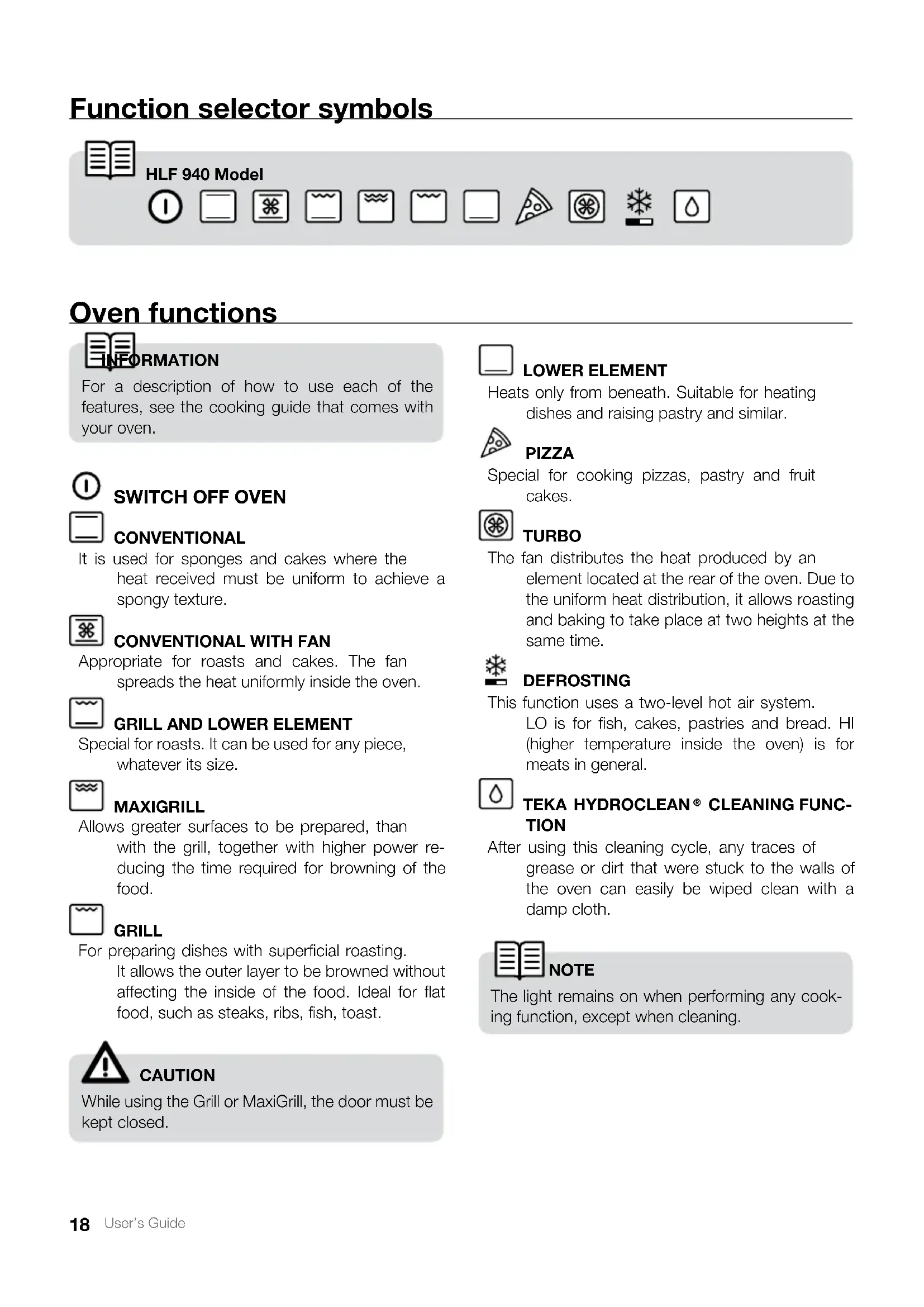
User’s Guide Oven functions LOWER ELEMENT Heats only from beneath. Suitable for heating dishes and raising pastry and similar. PIZZA Special for cooking pizzas, pastry and fruit cakes. TURBO The fan distributes the heat produced by an element located at the rear of the oven. Due to the uniform heat distribution, it allows roasting and baking to take place at two heights at the same time. DEFROSTING This function uses a two-level hot air system. LO is for fish, cakes, pastries and bread. HI (higher temperature inside the oven) is for meats in general. TEKA HYDROCLEAN
CLEANING FUNC- TION After using this cleaning cycle, any traces of grease or dirt that were stuck to the walls of the oven can easily be wiped clean with a damp cloth. NOTE The light remains on when performing any cook- ing function, except when cleaning.
CONVENTIONAL It is used for sponges and cakes where the heat received must be uniform to achieve a spongy texture.
CONVENTIONAL WITH FAN
Appropriate for roasts and cakes. The fan spreads the heat uniformly inside the oven.
GRILL AND LOWER ELEMENT
Special for roasts. It can be used for any piece, whatever its size. MAXIGRILL Allows greater surfaces to be prepared, than with the grill, together with higher power re- ducing the time required for browning of the food. GRILL For preparing dishes with superficial roasting. It allows the outer layer to be browned without affecting the inside of the food. Ideal for flat food, such as steaks, ribs, fish, toast. CAUTION While using the Grill or MaxiGrill, the door must be kept closed. INFORMATION For a description of how to use each of the features, see the cooking guide that comes with your oven. Function selector symbols HLF 940 Model19 User’s Guide English Using the Oven Caution The electronic clock features Touch-Control technology. To operate, simply touch the glass control symbols with your fingertip. The touch control sensitivity continuously adapts to ambient conditions. Make sure the glass surface of the control panel is clean and free of obstacles when plugging in the oven. If the clock does not respond correctly when you touch the glass, unplug the oven for a few seconds and then plug it in again. Doing this causes the sensors to adjust automatically so that they will react once more to fingertip con- trol.
ELECTRONIC CLOCK SETTINGS
Symbol : lights up during the TEKA Hydro- clean
function. Symbol : lights up when the clock timer is selected. Symbol AUTO: lights up to indicate that the oven is programmed. Symbol : indicates that the oven is transmit- ting heat to the food. + / – Sensors : enable you to select a time. Sensors , and : enable you to pro- gramme the electronic clock functions.
- When you turn on the oven, you will see the clock flashing 12:00.
- Set the clock by touching the + or – sensor. You will hear 2 beeps confirming that the time has been set.
- To change the time, press the + and – sen- sors at the same time. The current time will then flash on the screen. Change the time by pressing the + or – sensors. Two beeps will then confirm that the new time has been set. NOTE The clock light has a night mode so the dis- play light will dim between 00:00 and 6:00 hours. MANUAL OPERATION
- After setting the clock, the oven is ready for use. Select a cooking function and temp-era- ture.
- During cooking, symbol will light up to indicate that heat is being transmitted to the food.
- This symbol turns itself off when the selected temperature has been reached.
- Set the controls to to turn off the oven. CAUTION After cooking, you will notice that the oven cooling system is still on. This is normal and is used to cool the oven down quickly.20 User’s Guide Electronic Clock Settings If you want to change the timer alarm, simply touch sensor with your fingertip and then press the + or – sensor. You will hear 2 beeps to confirm that the time has been changed. The clock will start counting down from the new time and symbol will flash slowly. NOTE You cannot see the current time on the dis- play when the timer alarm is set.
PROGRAMMING COOKING TIME
with your fingertip until the AUTO symbol starts to flash and 00:00 ap- pears on the display.
2. Select the cooking time by pressing the +
3. You will hear 2 beeps, the AUTO symbol will
flash slowly and the display will show the time left before the oven switches off auto- matically.
4. Select a cooking function and temperature.
5. Once the cooking time is up, the oven will
turn off, an alarm will sound and the AUTO symbol will flash quickly.
6. Touch any sensor to stop the alarm and
to turn off the AUTO symbol. The oven will switch on again.
7. Set the controls to
to turn off the oven. You can change the remaining cooking time at any time by touching sensor with your fingertip until the AUTO symbol starts to flash quickly. Now touch the + or – sensor to change the time. Timer Alarm: The alarm will go off at the pro- grammed time, even if the oven has finished cooking. Cooking Time: This function allows you to programme the cooking time, after which the oven will turn off automatically. Cooking Stop Time: This setting allows you to programme the time for cooking to stop, after which the oven will turn off automatically. Cooking Time and Cooking Stop Time: This setting allows you to programme the cooking time and cooking stop time. The oven switches on automatically at the set time and operates for the selected cooking time (Cooking Time). It then switches off automatically at the indicated time (Cooking Stop Time). Child Safety Function: This function locks the electronic clock, preventing small children from playing with it. TEKA HYDROCLEAN
Cleaning Function: Help with the oven-cleaning function.
with your fingertip until symbol starts flashing on the display. The clock will also flash 00:00.
2. Select the time after which you want the
alarm to sound by pressing the + or – sen- sor.
3. You will hear 2 beeps to confirm that the
time has been set. The clock will start count- ing down from the selected time and symbol will flash slowly.
4. When the time is up, the alarm will go off and
symbol will flash quickly.
5. Touch any sensor to stop the alarm. Symbol
will switch off.21 User’s Guide English
4. Touch sensor until the AUTO symbol
starts to flash quickly. The display will show the current time and the programmed cooking time.
5. Select the cooking stop time by pressing
6. You will hear 2 beeps and the display will
show the current time.
7. Select a cooking function and temperature.
8. The oven will remain off and the AUTO light
will be on. The oven is now programmed.
9. When it is time to start cooking, the oven
will turn on and will operate for the pro- grammed cooking time.
10. While cooking, the display will show the
cooking time remaining and the AUTO symbol will flash slowly.
11. When the cooking time is up, the oven will
turn off, an alarm will sound, and the AUTO symbol will flash quickly.
12. Touch any sensor to stop the alarm and
to turn off the AUTO symbol. The oven will switch on again.
13. Set the controls to
to turn off the oven. If you want to change the remaining cooking time while the oven is on, press sensor until the AUTO symbol starts to flash quickly. Now press the + or – sensor to change the time. CHILD saFETY FUNCTIoN This function can be selected at any time while using the oven. To activate the function, press the + and – sen- sors at the same time for several seconds. You will hear a beep and the display will show the word saFE. The clock is locked. If the oven is off and you activate the child safe- ty function, it will not work even if a cooking function is selected. NoTE You cannot see the current time on the dis- play when the cooking time is set. pRoGRaMMING THE CooKING sTop TIME
with your fingertip until the AUTO symbol starts to flash.
2. Select the cooking stop time by pressing the
3. You will hear 2 beeps, the display will show
the current time and the AUTO symbol will flash slowly to indicate that the oven will switch off automatically.
4. Select a cooking function and temperature.
5. When the cooking time is up, the oven will
turn off, an alarm will sound and the AUTO symbol will flash quickly.
6. Touch any sensor to stop the alarm and
to turn off the AUTO symbol. The oven will switch on again.
7. Set the controls to
to turn off the oven. You can change the stop cooking time at any time by touching sensor with your fingertip until the AUTO symbol starts to flash quickly and you see the stop time on the display. Now touch the + or – sensor to change the time. pRoGRaMMING CooKING TIME aND CooKING sTop TIME
with your fingertip until the AUTO symbol starts to flash and 00:00 appears on the display.
2. Select the cooking time by pressing the +
3. You will hear 2 beeps, the display will show
the remaining cooking time, and the AUTO symbol will flash slowly.22 User’s Guide CAUTION In the event of a power failure, your electron- ic clock settings will be erased and 12:00 will flash on the clock display. Reset the clock and programme again. If this function is activated while you are cook- ing, it will only lock the electronic clock settings. If a clock sensor is touched while the child safe- ty function is on, the word SAFE will appear on the display. The clock is locked. To disable the function, press the + and – sen- sors at the same time for several seconds until you hear a beep. Teka Hydroclean
Cleaning function CAUTION Do not clean the oven and tray at the same time using the Teka Hydroclean
function as you will not obtain good results. To clean the tray, follow the instructions provided later on.
2. With the oven cold, pour 300 ml of water
into the bottom of the oven cavity. With this function, any grease or dirt that is stuck to the walls of the oven can easily be re- moved through the combined action of steam and the excellent properties of the new Teka Hydroclean
enamel. Thanks to the new Teka Hydroclean
technolo- gy, the oven does not need to be cleaned with a grease removal product. When the water and dirt are removed, the walls of the oven are clean and grease-free.
HOW TO USE THE OVEN CLEANING
CYCLE Always use the cleaning programme with a cold oven. Running it with a hot oven may have ad- verse effects.
1. First remove the trays and all accessories
from the oven interior, including the tray sup- ports and telescopic guide rails.23 User’s Guide English
3. Turn the control dial to position .
4. You will hear a beep indicating that the Teka
cycle has started. Symbol will flash slowly and the time remain-ing to complete the cycle will appear on the dis- play. IMpoRTaNT The duration of this cycle cannot be changed. To stop the cycle before it is fin- ished, turn the control dial to position
5. When the cycle is finished, the oven will turn
itself off, an alarm will sound and symbol will flash quickly.
6. Touch any sensor with your fingertip to stop
the alarm and to turn off symbol
7. Turn the control dial to position
8. Any traces of dirt and excess water can now
be removed with a damp cloth. IMpoRTaNT Do not open the oven door until the clean- ing programme has completely finished as the cooling phase is necessary for it to work properly. The cleaning programme should be done at a low temperature. When it has finished, any residue can be safely removed with a damp cloth. Cooling times vary depending on the room temperature. Before touching any inside surface of the oven, check that it is cool. How To UsE THE TRaY-CLEaNING CYCLE Teka Hydroclean
enamel’s excellent properties mean that any traces of cooked food can easily be removed from the trays. If stubborn traces of cooked food remain after normal cleaning, do the following:
1. Place the tray that needs cleaning on the
middle shelf support.
2. With the oven cold, slowly pour 300 ml of
water into the tray.
3. Select the Teka Hydroclean
cleaning func- tion. IMpoRTaNT Teka Hydroclean enamel has been designed to be cleaned using the oven’s automat- ic cleaning programme and other clean- ing methods can damage it. Anti-limescale products in particular can seriously damage the enamel’s properties. Teka Hydroclean enamelled oven trays should not be cleaned in the dishwasher. If deep cleaning is needed, use a gentle de- tergent. Some foods such as tomato, vinegar or salt- cooked roasts, can make the enamel’s sur- face appear to change; this is normal.24 Guide d’utilisation Description du four