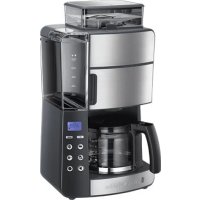
Grind & Brew 2561056 - Coffee machine RUSSELL HOBBS - Free user manual and instructions
Find the device manual for free Grind & Brew 2561056 RUSSELL HOBBS in PDF.



| Product type | Coffee machine with built-in grinder |
| Brand | Russell Hobbs |
| Model | Grind & Brew 2561056 |
| Main functions | Grinding and brewing with whole beans, pre-ground coffee, programmable timer, keep warm (40 min), strength setting (normal, medium, strong), cup selection (2, 4, 6, 8, 10) |
| Grind type | Conical burr grinder with adjustable fineness (fine, medium, coarse) |
| Water tank capacity | Up to 10 cups (indications on tank) |
| Filter type | Paper filter No. 4 (not supplied) |
| Carafe | Glass carafe with pouring spout and handle |
| Hot plate | Keeps coffee warm for 40 minutes |
| Display screen | LED display for clock, timer, strength and error codes |
| Control panel | Buttons for hours, minutes, strength, number of cups, timer, mode selection, start and self-clean |
| Operating modes | Grind & Brew mode (beans) and Pre-ground Coffee mode |
| Timer | Programmable up to 24 hours in advance |
| Automatic shut-off | Keep warm stops after 40 minutes |
| Anti-drip valve | Allows removing carafe during brewing without dripping |
| Cleaning | General cleaning, grinder cleaning (removable), self-cleaning/descaling cycle (after 60 cycles) |
| Descaling | Self-cleaning with descaling solution, takes about 45 minutes |
| Descaling indicator | Displays "CLE" after 60 brews |
| Error codes | E01: hopper not properly mounted; E02/E03: bypass lid open or blocked |
| Safety | Hot surface after use; do not immerse; damaged cable must be replaced by manufacturer; keep out of reach of children; do not use in a cabinet |
| Included accessories | Cleaning brush |
| Spare parts | Paper filter No. 4 (not included), carafe, filter holder, hopper (removable) |
| Repairability | Damaged cable must be replaced by the manufacturer or an authorized technician |
| Intended use | Household and similar (offices, hotels, bed and breakfasts, farms) |
Frequently Asked Questions - Grind & Brew 2561056 RUSSELL HOBBS
User questions about Grind & Brew 2561056 RUSSELL HOBBS
0 question about this device. Answer the ones you know or ask your own.
Ask a new question about this device
Download the instructions for your Coffee machine in PDF format for free! Find your manual Grind & Brew 2561056 - RUSSELL HOBBS and take your electronic device back in hand. On this page are published all the documents necessary for the use of your device. Grind & Brew 2561056 by RUSSELL HOBBS.
USER MANUAL Grind & Brew 2561056 RUSSELL HOBBS
natural_image
Rational Rooster brand air fryer with digital display and control buttons (no visible text or symbols on the device itself)25610-56
natural_image
Technical diagram of a mechanical component with concentric rings and directional arrows indicating motion (no text or symbols)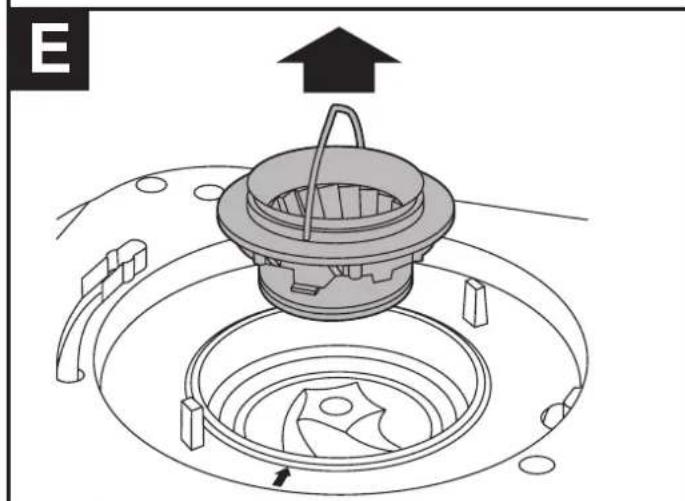
natural_image
Technical diagram of a mechanical component with a central housing and surrounding circular components (no text or symbols)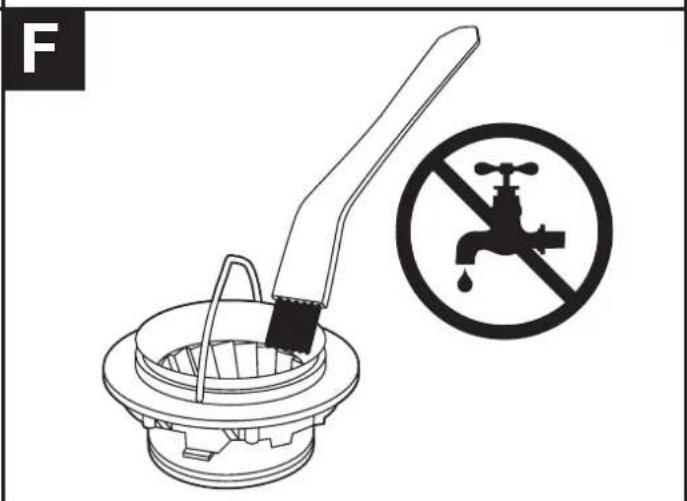
IMPORTANT SAFEGUARDS
Follow basic safety precautions, including:
This appliance can be used by persons with reduced physical, sensory or mental capabilities or lack of experience and knowledge if they have been supervised/instructed and understand the hazards involved.
Children must not use or play with the appliance.
Keep the appliance and cable out of reach of children.
Misuse of the appliance may cause injury.
The surfaces of the appliance will get hot. Residual heat will keep the surfaces hot after use.
Don't immerse the body of the appliance in liquid.
If the cable is damaged, it must be replaced by the manufacturer, its service agent, or someone similarly qualified, to avoid hazard.
The surface of the heating element is subject to residual heat after use.
The coffee-maker shall not be placed in a cabinet during use.
Use the appliance according to these instructions. Any misuse may cause potential injury, electric shock or other hazards.
This appliance can be used by persons with reduced physical, sensory or mental capabilities or lack of experience and knowledge if they have been given supervision or instruction concerning use of the appliance in a safe way and understand the hazards involved.
This appliance is intended to be used in household and similar applications such as:
- staff kitchen areas in shops, offices and other working environments;
- by clients in hotels, motels and other residential type environments;
• bed and breakfast type environments; - farm houses.
Do not use this appliance near bathtubs, showers, basins or other vessels containing water. - Sit the appliance on a stable, level, heat-resistant surface.
- Keep the appliance and cable away from the edges of worktops.
- Don't use accessories or attachments other than those we supply.
- Don't use the appliance for any purpose other than those described in these instructions.
- Don't use the appliance if it's damaged or malfunctions.
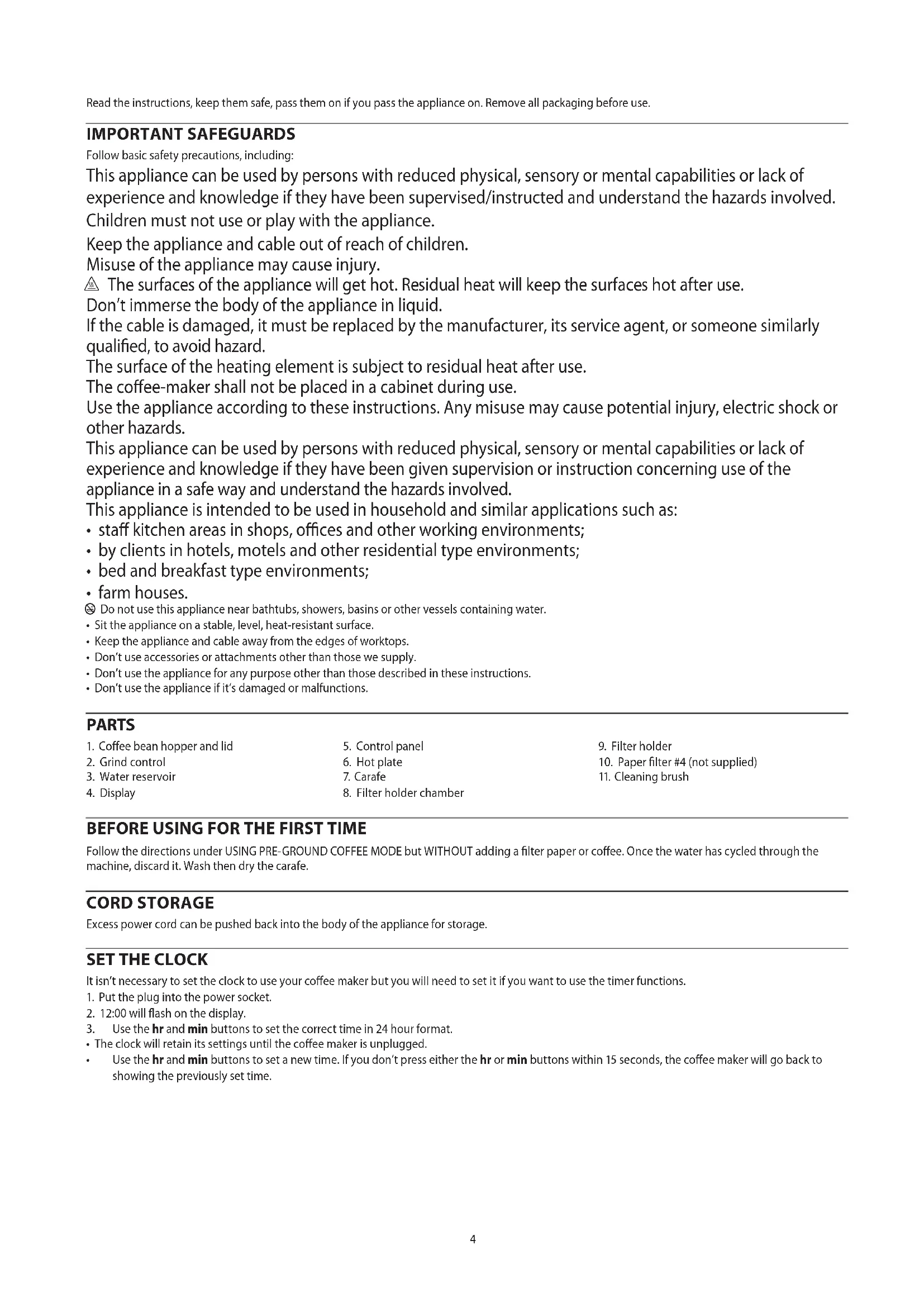
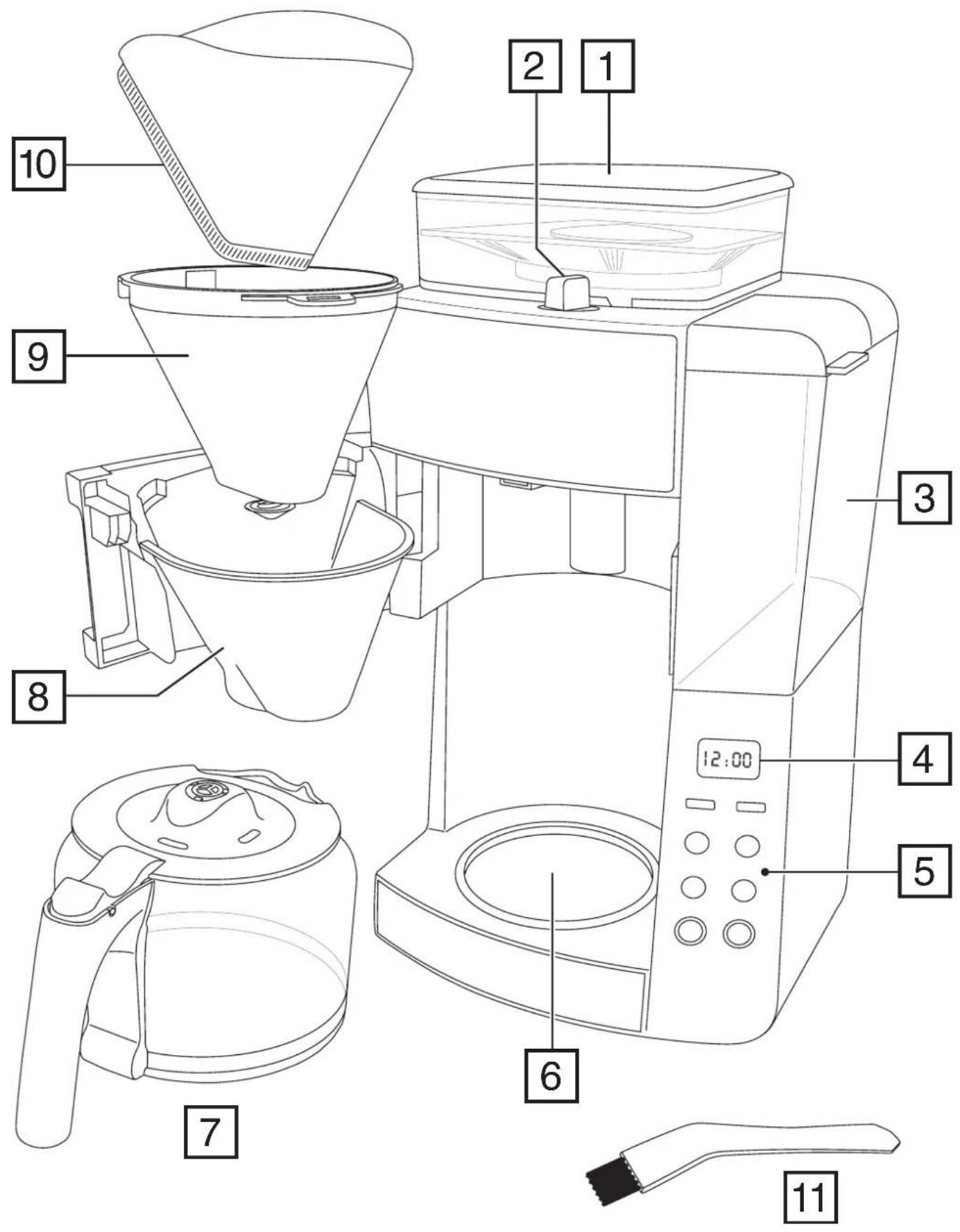
PARTS
- Coffee bean hopper and lid
- Grind control
- Water reservoir
-
Display
-
Control panel
- Hot plate
- Carafe
-
Filter holder chamber
-
Filter holder
- Paper filter #4 (not supplied)
- Cleaning brush
BEFORE USING FOR THE FIRST TIME
Follow the directions under USING PRE-GROUND COFFEE MODE but WITHOUT adding a filter paper or coffee. Once the water has cycled through the machine, discard it. Wash then dry the carafe.
CORD STORAGE
Excess power cord can be pushed back into the body of the appliance for storage.
SET THE CLOCK
It isn't necessary to set the clock to use your coffee maker but you will need to set it if you want to use the timer functions.
- Put the plug into the power socket.
- 12:00 will flash on the display.
- Use the hr and min buttons to set the correct time in 24 hour format.
- The clock will retain its settings until the coffee maker is unplugged.
- Use the hr and min buttons to set a new time. If you don't press either the hr or min buttons within 15 seconds, the coffee maker will go back to showing the previously set time.
CONTROLS AND DISPLAY
| CONTROLS | |
| hr, min | Used to set the time (hours and minutes) |
| Used to select the coffee strength. For Grind & Brew mode the options are: ☐ normal ☐ medium ☐ strong. Default value is ☐. For pre-ground coffee mode the options are OFF or ON. | |
| Number of cups that are being brewed (Grind & Brew mode only). Selects the amount of coffee which will be ground based on the amount of water in the reservoir. Options: 2, 4, 6, 8 and 10. Default values is 8. | |
| Used to set up the timer. | |
| Mode select. This button selects Grind & Brew mode (display will show ☐), or pre-ground coffee mode (display will show ☐). | |
| Starts the brewing process. | |
| Initiates self clean mode. | |
| DISPLAY ICONS | |
| Shows the currently selected coffee strength. For Grind & Brew mode the display shows: ☐ normal ☐ medium ☐ strong. For pre-ground coffee mode if the strength mode is set to OFF no ☐ icon will be shown. If the strength mode is set to ON the display will show ☐. | |
| 2, 4, 6, 8 or 10 | Shows the currently selected number of cups being brewed (Grind & Brew mode only). |
| Grind & Brew mode selected. | |
| Pre-ground coffee mode selected. | |
| CLE +●+ | The machine needs cleaning. Use the self clean function. |
OPERATING MODES
Your coffee maker has two operating modes.
GRIND & BREW MODE
This mode uses fresh coffee beans to make the coffee.
PRE-GROUND COFFEE MODE
This mode uses pre-ground coffee added directly to the filter to make the coffee.
USING GRIND & BREW MODE
The quality and flavour of your coffee is determined by the type of beans, the grind size and the brewing time. We recommend experimenting with the grind size and coffee strength button until you find the settings that work best for you.
- To select Grind & Brew mode, press the button until the icon shows on the display.
- Fill the reservoir with the required amount of water. Note that during the brewing cycle, ALL of water you put in the reservoir will be used.
- Open the filter compartment and place a #4 paper filter into the filter holder. Close the compartment.
- Open the coffee bean hopper lid and fill it with fresh coffee beans. Don't overfill the hopper so that you can't refit the lid. The lid seal will help to keep the coffee beans fresh between uses.
- Turn the grind control to the required setting (● fine, ● medium and ● coarse).
- Press the 📄 button to select the number of cups you are brewing. The setting you choose will depend on how much water you have added to the reservoir. For example, if you have filled the reservoir to the 6 cups mark, set the number of cups to 6 as well. The default setting is 8.
- Select the desired coffee strength using the 🔗 button. The default setting is 🔗.
- Press the ▶ button to start brewing. After a short time, the grinder will operate and the light around the button will flash while the coffee is brewing.
- Once the coffee is brewed, the light will stop flashing and remain lit.
USING PRE-GROUND COFFEE MODE
- To select pre-ground coffee mode, press the button until the icon shows on the display.
- Fill the reservoir with the required amount of water. Note that during the brewing cycle, ALL of water you put in the reservoir will be used.
- Open the filter compartment and place a #4 paper filter into the filter holder.
- For each large cup, add 6g of ground filter coffee to the filter. The amount of ground coffee you add will depend on how much water you have added to the reservoir. For example, if you have filled the reservoir to the 6 cups mark, add 6 measures of ground coffee.
- Close the filter compartment.
- Select the desired coffee strength using the 🔗 button. The default setting is OFF. Setting coffee strength to ON will give a stronger brew by slowing down the rate that water passes through the pre-ground coffee.
- Press the ▶ button to start brewing. After a short time, the light around the button will flash while the coffee is brewing.
- Once the coffee is brewed, the light will stop flashing and remain lit.
KEEP WARM
- Once brewed, the hotplate will keep the coffee warm for 40 minutes after brewing. The keep warm mode is indicated by the light around the button coming on. After 40 minutes, the light will go out.
USING THE TIMER
Note: Make sure the clock is set to the correct time. Use the hr and min buttons.
- Prepare the coffee maker according to which mode you are using but do not press the ▶ button to start brewing.
- Press the button. The button will flash and the icon will flash on the display.
- Within 10 seconds of pressing the button, use the hr and min buttons to enter the time you want your coffee maker to start brewing.
- If a time has previously been programmed, it will flash on the display otherwise the display will show the default setting of 8:00.
- 10 seconds after you have finished entering the time, the button will stop flashing and remain lit. The icon on the display will also stop flashing and remain lit. Your coffee maker is now programmed to brew at the time you have entered.
- If you want to check the program time press the button. The programmed time will show for 3 seconds and then return to the time of day.
- If you want to cancel the timer before brewing has started, press and hold the disappears from the display.
- button for 5 seconds until the light goes out and the icon
- If you want to stop the coffee maker while it's brewing, press the ▶ button.
A QUICK CUP
If you want a quick cup of coffee before the brewing cycle has finished:
- You can remove the carafe at any time. The non-drip valve will prevent coffee dripping on to the hotplate.
- To prevent the filter holder overflowing, replace the carafe on the hotplate within about 20 seconds.
- When you replace the carafe on the hotplate the non-drip valve opens to let any remaining coffee through.
CARE AND MAINTENANCE
GENERAL CLEANING
- Unplug the appliance and let it cool.
- Tip the contents of the filter holder into the bin.
- Wipe all surfaces with a clean damp cloth.
- Hand wash the carafe and filter holder. Wipe out the hopper with kitchen paper.
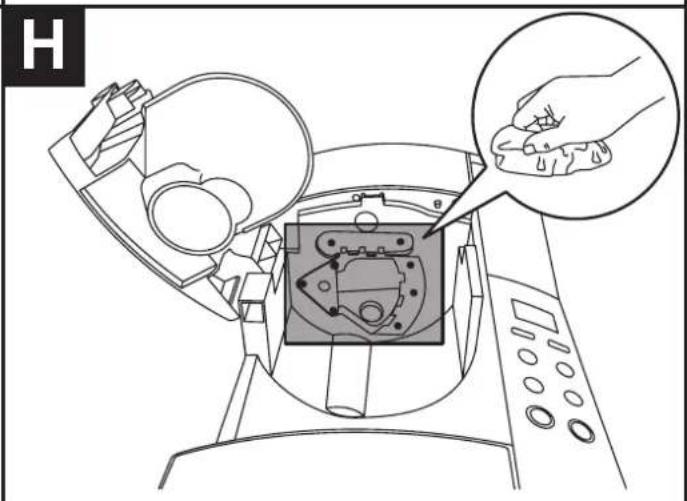
- Wipe the shaded area shown in Fig H with a piece of damp kitchen paper. Use the brush if necessary to loosen any coffee debris.
Note: If you haven't used your coffee maker for more than 4 weeks, we recommend that you follow the steps under BEFORE USING FOR THE FIRST TIME before brewing coffee again.
CLEANING THE GRINDER
The grinder can be disassembled in order to clean it. If you try to disassemble the grinder without first removing any surplus coffee beans, it will be very difficult to reassemble correctly. The grinder cannot be cleaned if the coffee maker is in keep warm mode. Follow these steps:
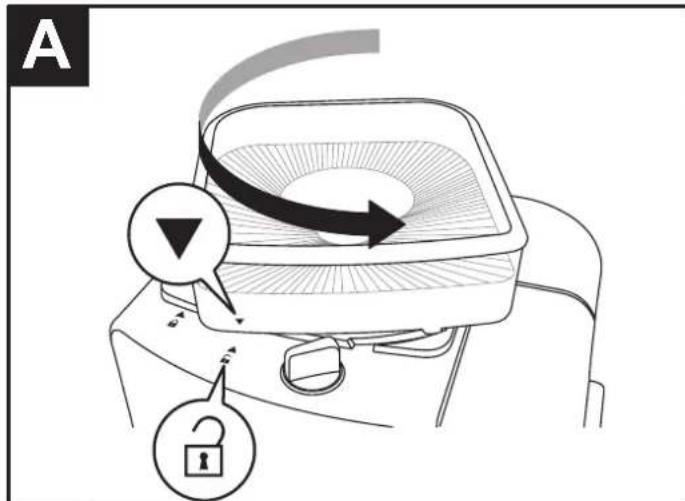
- Twist the coffee bean hopper and lid counterclockwise until the ▼ symbol aligns with the ⏻ symbol (Fig A).
- Lift off the hopper, remove the lid and empty out any coffee beans. Wipe out the hopper with kitchen paper.
-
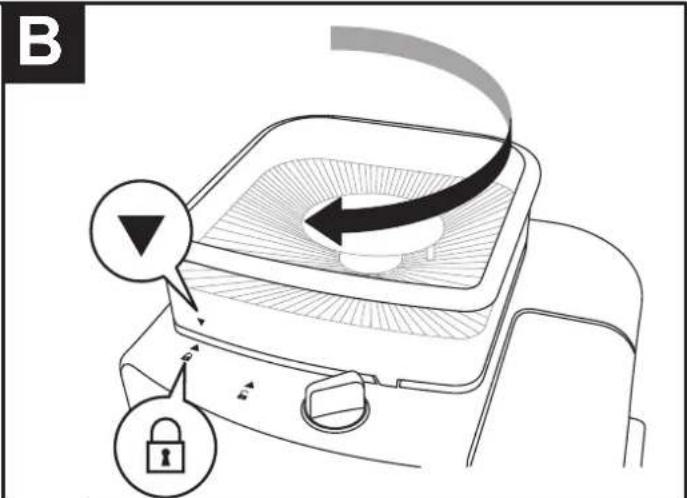
Replace the lid then refit the hopper onto the coffee maker aligning the ▼ symbol with the 🔒 symbol. Twist the hopper clockwise until the ▼ symbol aligns with the 🔒 symbol (Fig B).
-
Turn the grind control to the fine (●) setting.
-
Press the 🎩 button to select the 6 cup setting.
-
Press the ▶ button. After a few moments the grinder will start. Once it has stopped, press the ▶ button until the ▶ light goes out.
-
Follow step 1 again to remove the bean hopper.
-
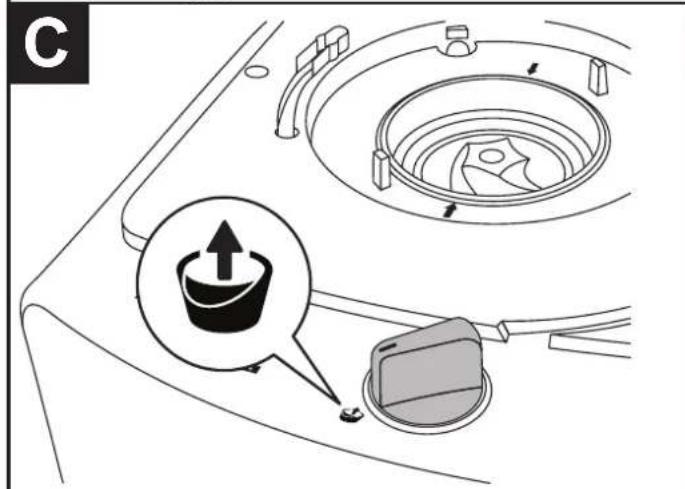
Turn the grind control to the ☐ setting (Fig C).
-
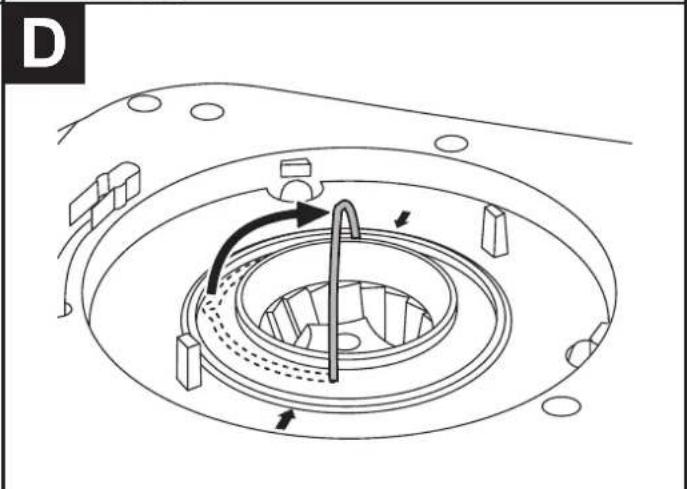
Lift up the handle on the grinding head (Fig D).
-
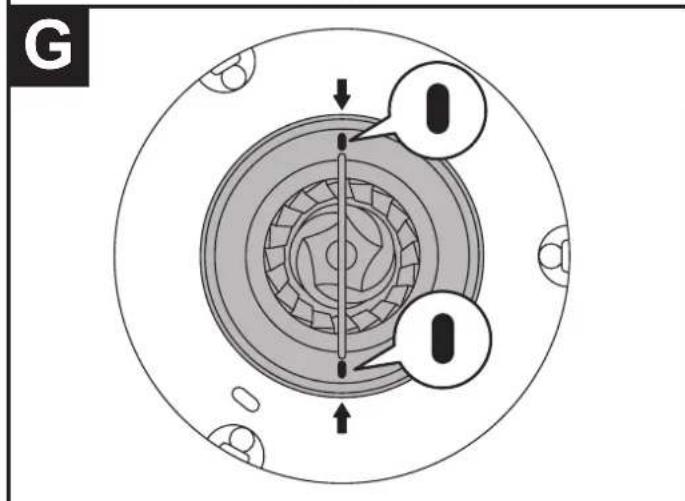
Lift the grinding head out of the body of the appliance (Fig E). If it doesn't lift out easily, make sure that the ⚪ marks on the grinding head are aligned with the ↑ markings (Fig G).
-
Use the cleaning brush to clean the grinding head and the area where it fits into the appliance. Do not use water.
-
Refit the grinding head by aligning the ⬆ marks on the grinding head with the ↑ markings and pressing it down (Fig G). Fold the handle back down.
-
Turn the grind control to any of the grind settings.
-
Refit the hopper.
SELF CLEAN
After 60 brewing cycles, the display will show CLE and the icon to indicate that the appliance needs descaling. Descaling flushes out the deposits that naturally build up over time.
- Use a proprietary brand of descaler suitable for use in plastic-bodied products. Follow the instructions on the package of descaler.
- Pour the descaling solution into the water reservoir to the max mark.
- Press the + button.
- The automatic self clean process will start and will continue for about 45 minutes.
- After the process has finished, your coffee maker will switch off.
- Products returned under guarantee with faults due to scale will be subject to a repair charge.
CLEANING FREQUENCY
Daily - Remove any used coffee grounds and filter papers as required. Clean the filter holder and carafe. Wipe the shaded area shown in Fig H with a piece of damp kitchen paper. Use the brush if necessary to loosen any coffee debris.
Weekly - Clean the grinder.
ERROR CODES
To assist in troubleshooting, your coffee maker may show one of the following error codes.

| CODE MEANING | |
| E01 The coffee bean hopper is not fitted correctly. Remove then refit the bean hopper. | |
| E02 | The shutter is open (located under the grinding head). Unplug the appliance and let it cool. Wipe the shaded area shown in Fig H with a piece of damp kitchen paper. Use the brush if necessary to loosen any coffee debris . |
| E03 | The shutter cannot close (located under the grinding head). Unplug the appliance and let it cool. Wipe the shaded area shown in Fig H with a piece of damp kitchen paper. Use the brush if necessary to loosen any coffee debris. |
RECYCLING
To avoid environmental and health problems due to hazardous substances, appliances and rechargeable and non-rechargeable batteries marked with one of these symbols must not be disposed of with unsorted municipal waste. Always dispose of electrical and electronic products and, where applicable, rechargeable and non-rechargeable batteries, at an appropriate official recycling/collection point.