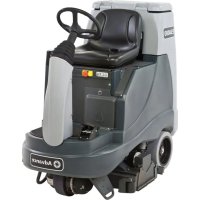
ES4000 - Scrubber ADVANCE - Free user manual and instructions
Find the device manual for free ES4000 ADVANCE in PDF.


| Brand | Advance |
| Model | ES4000 |
| Product Type | Ride-on scrubber dryer |
| Usage | Commercial (hotels, schools, hospitals, factories, offices) |
| Power Supply | Battery 24 V, 238 Ah (VRLA or lead-acid) |
| Solution Tank Capacity | 110 liters |
| Recovery Tank Capacity | Approximately 110 liters (estimated) |
| Gross Weight (GVW) | 656 kg (1447 lbs) |
| Cleaning Modes | Sweeping, Extraction, Maintenance, Restoration, Pre-evaporation |
| Detergent System | Removable cartridge (max 4.73 L), adjustable percentage (1:64 to 1:250) |
| Brushes | Two mechanical brushes (front and rear), tool-free removal |
| Squeegee Blades | Two blades, removable for cleaning |
| Recommended Working Speed | 4-5 km/h |
| Safety | Emergency stop, seat switch, full tank float, low voltage cutout, circuit breakers (10 A and 70 A) |
| Maintenance | Daily: drain tanks, clean brushes/blades/filters; weekly: drain detergent, check electrolyte; annual: carbon brushes |
| Optional Accessories | Suction extension kit, furniture accessories |
| Protection Level | IPX3 |
| Sound Pressure | 65 dB(A) (ISO 11201) |
| Vibrations | Manual controls: 0.22 m/s²; seat: 0.02 m/s² (ISO 5349-1, ISO 2631-1) |
| Max Slope in Cleaning | 9% (5°) |
| Max Slope in Transport | 16% (9°) |
| Materials and Recyclability | Steel (39% recyclable), polyethylene (26% recyclable at 93%), aluminum (1%), plastic (12%), etc. |
Frequently Asked Questions - ES4000 ADVANCE
User questions about ES4000 ADVANCE
0 question about this device. Answer the ones you know or ask your own.
Ask a new question about this device
Download the instructions for your Scrubber in PDF format for free! Find your manual ES4000 - ADVANCE and take your electronic device back in hand. On this page are published all the documents necessary for the use of your device. ES4000 by ADVANCE.
USER MANUAL ES4000 ADVANCE
Instructions for use
Instructions for Use Original Instructions Instrucciones de uso Mode d'emploi
2/2011 revised 1/2018 REV B Form no. 56091013

A-English B-Español C-Français
natural_image
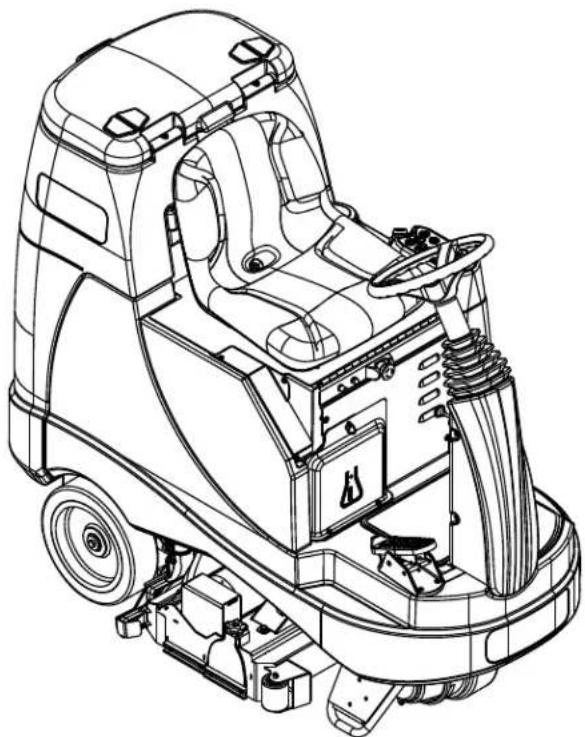
Technical line drawing of a cleaning or cleaning machine (no text or symbols present)Advance Models: 56344200, 56344210
TABLE OF CONTENTS
| page | |
| Introduction | A-2 |
| Cautions and Warnings | A-3 |
| Know Your Machine | A-4 - A-5 |
| Control Panel | A-6 |
| Prepare the Machine for Use | |
| Install the Batteries | A-7 |
| Filling the Solution Tank | A-8 |
| Pre-Spraying the Carpet | A-8 |
| Plan for Cleaning | A-8 |
| Detergent System Preparation & Use | A-8 - A-9 |
| Operating the Machine | |
| Operating the Machine-Sweep Mode | A-10 - A-11 |
| Operating the Machine-Extract Mode | A-12 - A-13 |
| Using Attachments | A-12 |
| page | |
| After Use | A-14 |
| Maintenance Schedule | A-14 |
| Vacuum Shoe Maintenance | A-14 |
| Spray Nozzle Maintenance | A-14 |
| Lubricating the Machine | A-14 |
| Electromagnetic Brake | A-14 |
| Cleaning the Vacuum Motor Filters | A-15 |
| Power Brush Maintenance | A-15 |
| Removing the Front Brush | A-15 |
| Removing the Rear Brush | A-15 |
| Removing the Vacuum Shoes | A-16 |
| Removing the Spray Nozzles | A-16 |
| Charging the Batteries | A-17 |
| Check the Battery Electrolyte Level | A-17 |
| Troubleshooting | A-18 |
| Technical Specifications | A-19 |
INTRODUCTION
This manual will help you get the most from your Advance Rider Extractor. Read it thoroughly before operating the machine.
Note: Bold numbers in parentheses indicate an item illustrated on pages 4-6.
This product is intended for commercial use only.
PARTS AND SERVICE
Repairs, when required, should be performed by your Authorized Advance Service Center, who employs factory trained service personnel, and maintains an inventory of Advance original replacement parts and accessories.
Call the ADVANCE DEALER named below for repair parts or service. Please specify the Model and Serial Number when discussing your machine.
MODIFICATIONS
Modifications and additions to the cleaning machine which affect capacity and safe operation shall not be performed by the customer or user without prior written approval from Nilisk Inc. Unapproved modifications will void the machine warranty and make the customer liable for any resulting accidents.
NAME PLATE
The Model Number and Serial Number of your machine are shown on the Nameplate on the machine. This information is needed when ordering repair parts for the machine. Date of Manufacture "Date Code" is also marked on the Nameplate. For example, Date Code "A17" = January 2017.
Use the space below to note the Model Number and Serial Number of your machine for future reference.
MODEL No. ____
SERIAL No. ____
UNCRATE THE MACHINE
When the machine is delivered, carefully inspect the shipping packaging and the machine for damage. If damage is evident, save the shipping carton (if applicable) so that it can be inspected. Contact the Advance Customer Service Department immediately to file a freight damage claim. Refer to the unpacking instruction sheet included with the machine to remove the machine from the pallet.
WARNING!
The Products sold with this Manual contain or may contain chemicals that are known to certain governments (such as the State of California, as identified in its Proposition 65 Regulatory Warning Law) to cause cancer, birth defects or other reproductive harm. In certain locations (including the State of California) purchasers of these Products that place them in service at an employment job site or a publicly accessible space are required by regulation to make certain notices, warnings or disclosures regarding the chemicals that are or may be contained in the Products at or about such work sites. It is the purchaser's responsibility to know the content of, and to comply with, any laws and regulations relating to the use of these Products in such environments. The Manufacturer disclaims any responsibility to advise purchasers of any specific requirements that may be applicable to the use of the Products in such environments.
CAUTIONS AND WARNINGS SYMBOLS
Advance uses the symbols below to signal potentially dangerous conditions. Always read this information carefully and take the necessary steps to protect personnel and property.
DANGER!
Is used to warn of immediate hazards that will cause severe personal injury or death.
WARNING!
Is used to call attention to a situation that could cause severe personal injury.
CAUTION!
Is used to call attention to a situation that could cause minor personal injury or damage to the machine or other property.

Read all instructions before using.
GENERAL SAFETY INSTRUCTIONS
Specific Cautions and Warnings are included to warn you of potential danger of machine damage or bodily harm.
This machine is for commercial use, for example in hotels, schools, hospitals, factories, shops and offices other than normal residential housekeeping purposes.
WARNING!
- This machine shall be used only by properly trained and authorized persons.
* This machine is not intended for use by persons (including children) with reduced physical, sensory or mental capabilities, or lack of experience and knowledge.
* While on ramps or inclines, avoid sudden stops. Avoid abrupt sharp turns. Use low speed down ramps. - Keep sparks, flame and smoking materials away from batteries. Explosive gases are vented during normal operation.
- Charging the batteries produces highly explosive hydrogen gas. Charge batteries only in well-ventilated areas, away from open flame. Do not smoke while charging the batteries.
- Remove all jewelry when working near electrical components.
• Turn the key switch off (O) and disconnect the batteries before servicing electrical components. - Never work under a machine without safety blocks or stands to support the machine.
- Do not dispense flammable cleaning agents, operate the machine on or near these agents, or operate in areas where flammable liquids exist.
- Do not clean this machine with a pressure washer.
• Do not use for cleaning purposes on surfaces having a gradient exceeding that marked on the machine - Observe the Gross Vehicle Weight, GVW, of the machine when loading, driving, lifting or supporting the machine.
CAUTION !
- This machine is not approved for use on public paths or roads.
- This machine is not suitable for picking up hazardous dust.
- When operating this machine, ensure that third parties, particularly children, are not endangered.
• Before performing any service function, carefully read all instructions pertaining to that function. - Do not leave the machine unattended without first turning the key switch off (O), removing the key and applying the parking brake.
• Turn the key switch off (O) and remove the key, before changing the brushes, and before opening any access panels.
• Take precautions to prevent hair, jewelry, or loose clothing from becoming caught in moving parts. - Use caution when moving this machine in below freezing temperature conditions. Any water in the solution, recovery or detergent tanks or in the hose lines could freeze, causing damage to valves and fittings. Flush with windshield washer fluid.
- The batteries must be removed from the machine before the machine is scrapped. The disposal of the batteries should be safely done in accordance with your local environmental regulations.
• All doors and covers are to be positioned as indicated in the instruction manual before using the machine.
SAVE THESE INSTRUCTIONS
KNOW YOUR MACHINE
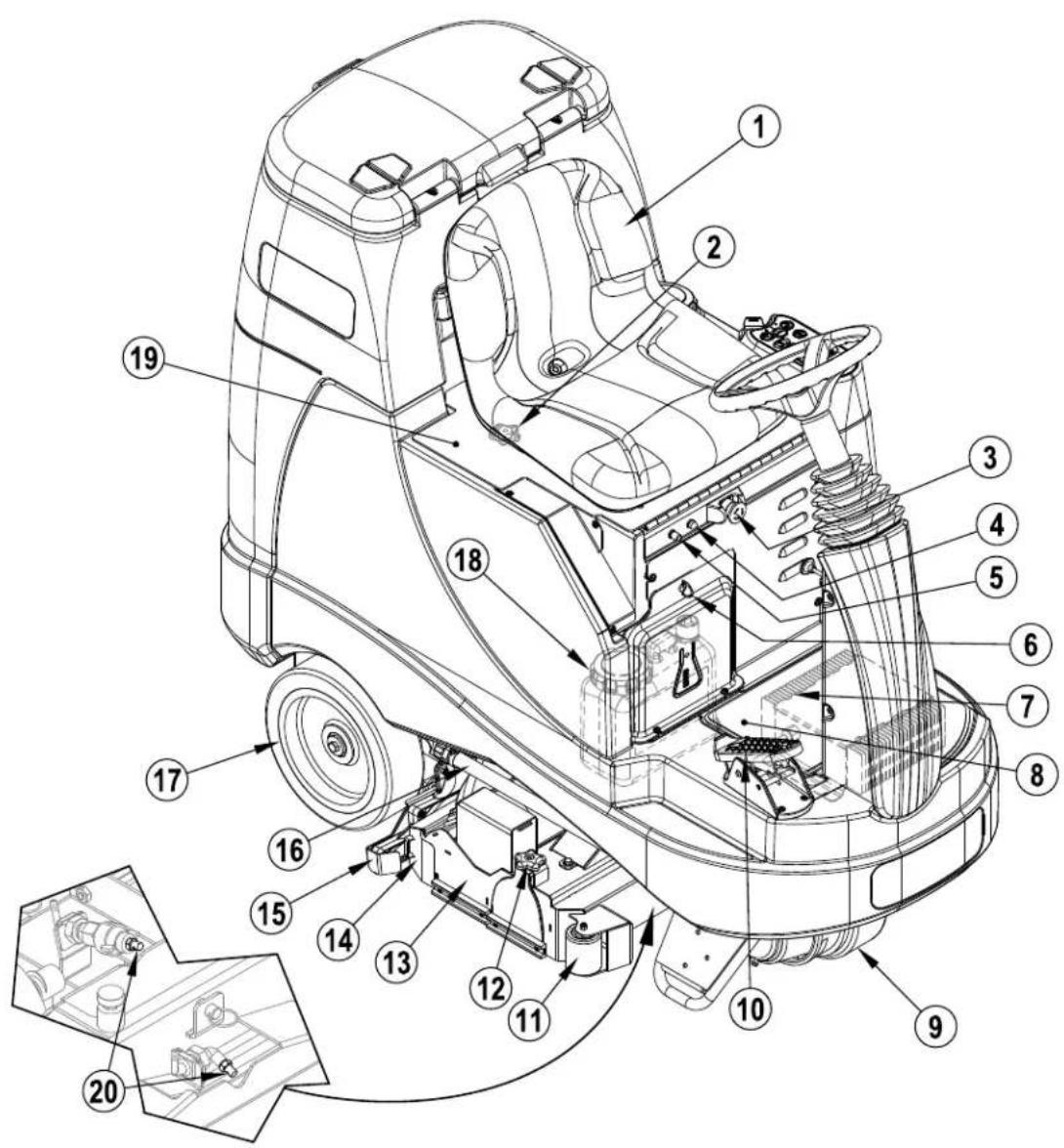
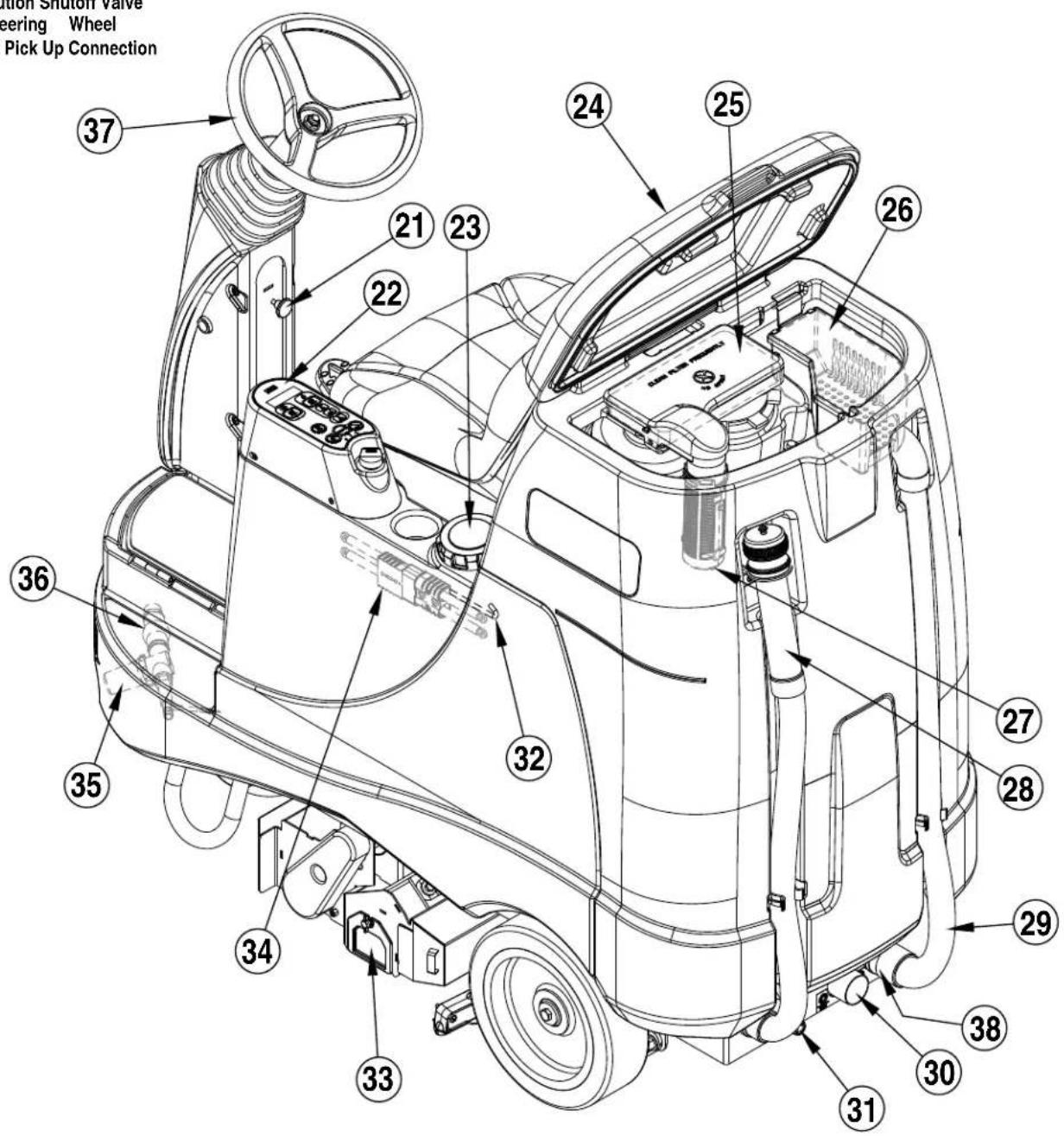
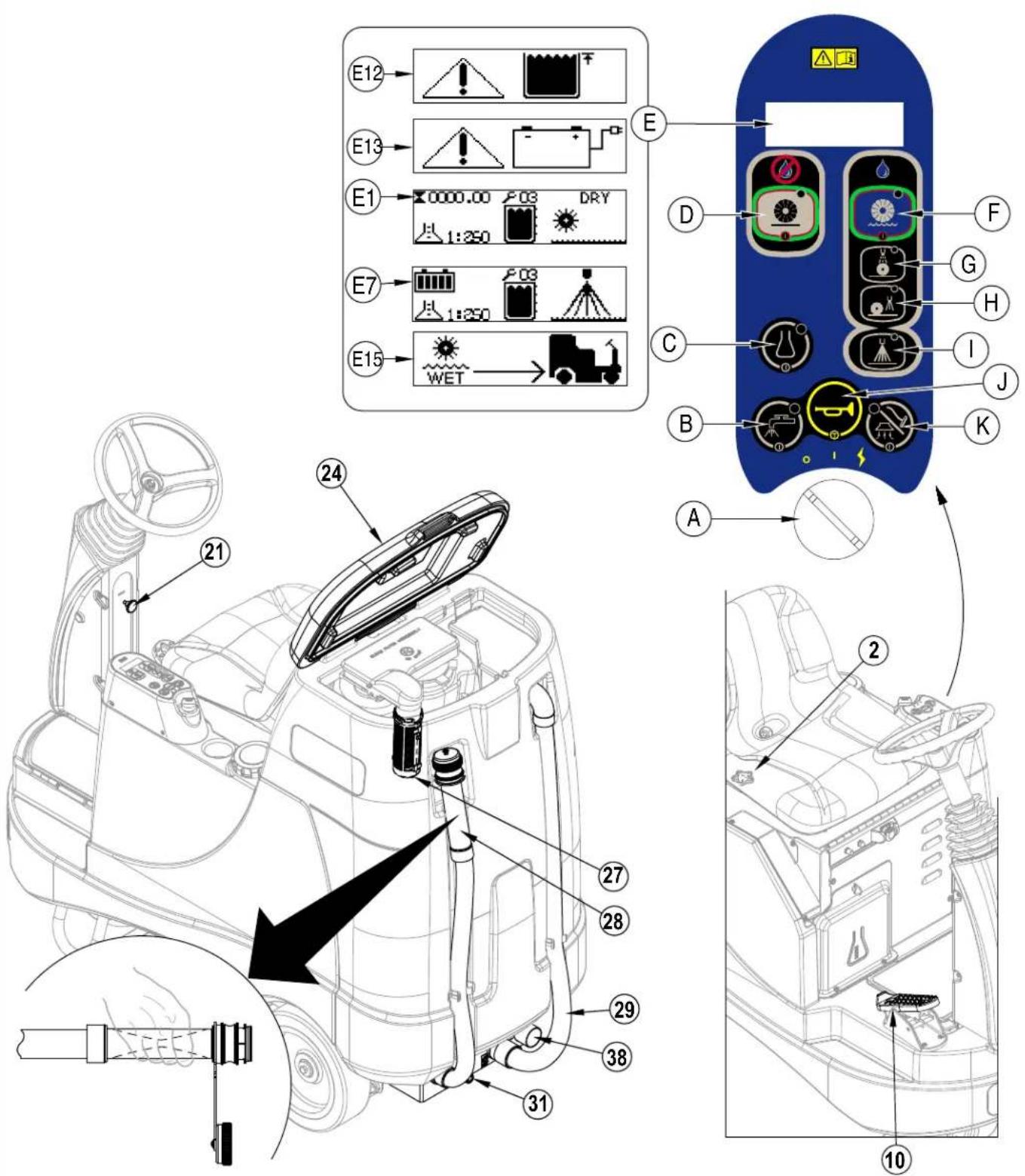
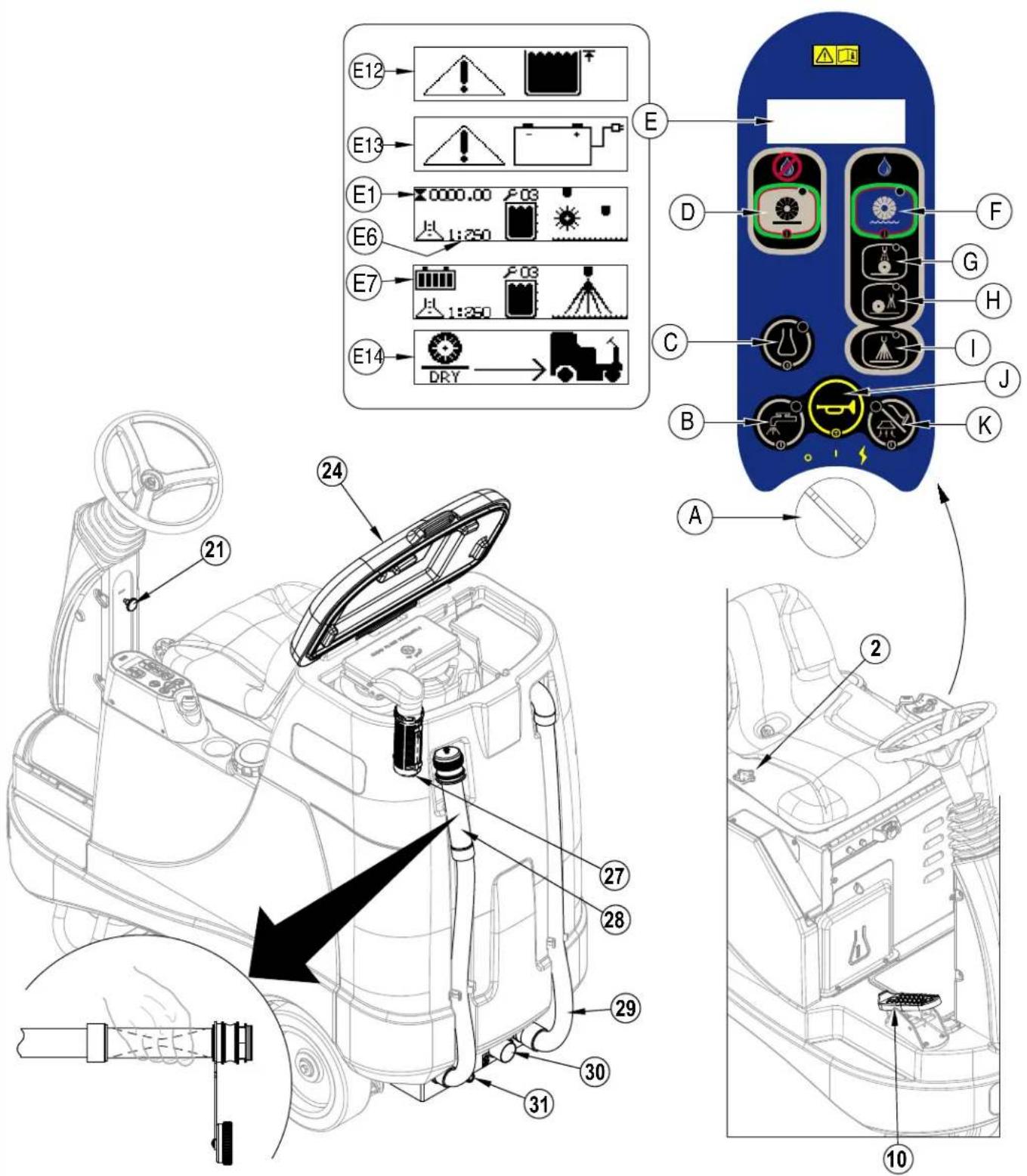
As you read this manual, you will occasionally run across a bold number or letter in parentheses - example: (2). These numbers refer to an item shown on these pages unless otherwise noted. Refer back to these pages whenever necessary to pinpoint the location of an item mentioned in the text. NOTE: Refer to the service manual for detailed explanations of each item illustrated on the next 3 pages.
1 Operator's Seat
2 Seat Adjustment Knob
3 Emergency Stop
4 Control Circuit Circuit Breaker (10 Amp)
5 Drive Wheel Circuit Breaker (70 Amp)
6 Detergent Cartridge Access Cover
7 Battery Charger (optional)
8 Battery Charger Access Door
9 Drive Wheel
10 Drive Pedal, Directional/Speed
11 Front Roller Bumper
12 Brush Idler Removal Knob
13 Brush Deck
14 Debris Hopper
15 Vacuum Shoes
16 Solution Tank Drain Hose
17 Rear Wheel
18 Detergent Cartridge
19 Battery Compartment (under seat)
20 Solution Spray Jets
KNOW YOUR MACHINE
21 Steering Wheel Tilt Adjust Knob
22 Control Panel
23 Solution Tank Fill Cover
24 Recovery Tank Cover
25 Vacuum Motor Filter Housing
26 Strainer Basket
27 Recovery Tank Shutoff Float
28 Recovery Tank Drain Hose
29 Recovery Hose
30 Dry Pick Up Connection
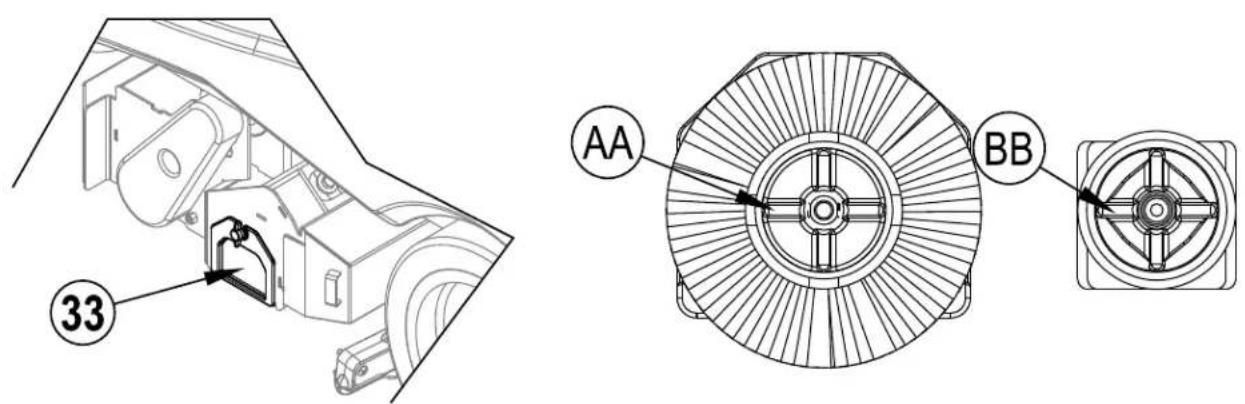
31 Accessory Port
32 Seat Prop-Rod
33 Rear Brush Access Panel
34 Machine Battery Connector
35 Solution Filter
36 Solution Shutoff Valve
37 Steering Wheel
38 Wet Pick Up Connection
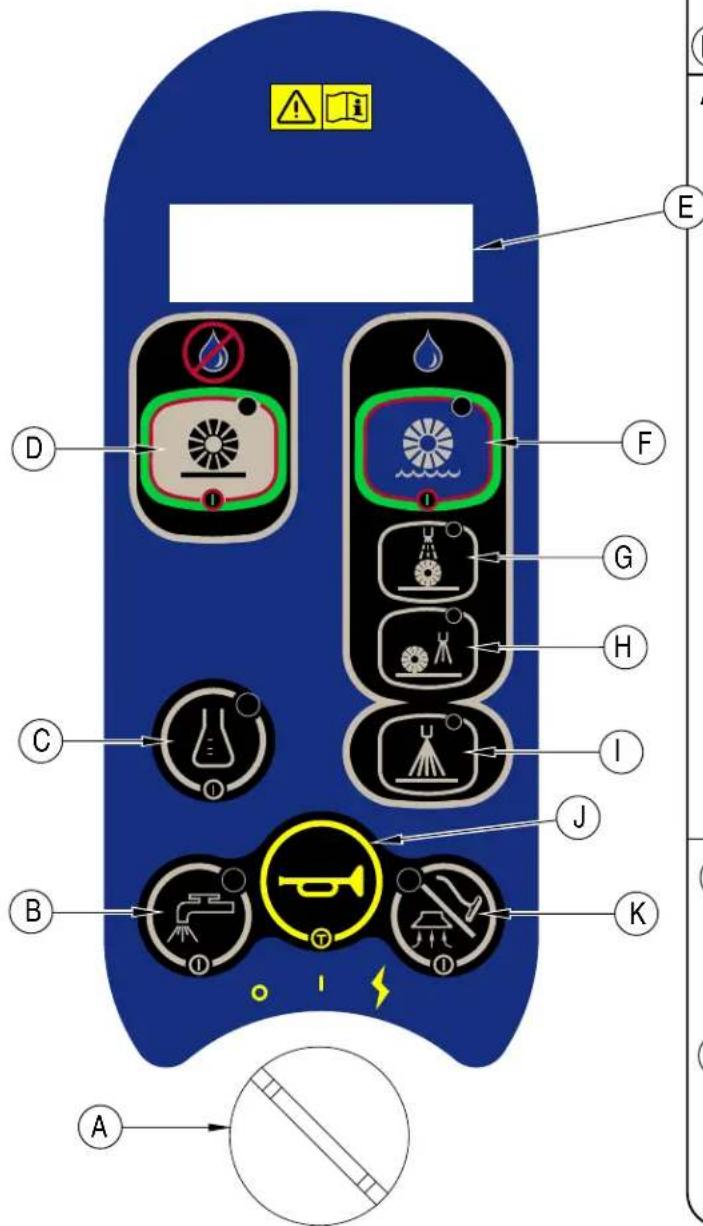
CONTROL PANEL
A Key Switch / Main Power
B Solution ON / OFF Switch
C Detergent ON / OFF Switch
D Sweep ON/OFF Switch
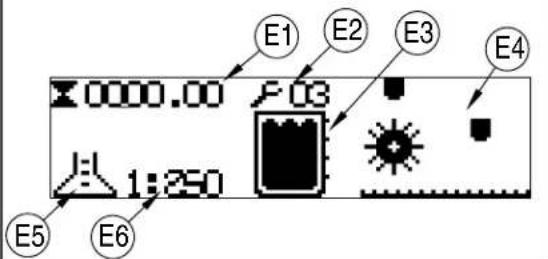
E LCD Display
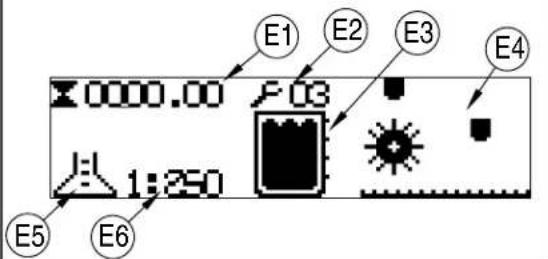
E1 Hour Meter
E2 Fault Codes
E3 Solution Tank Level Indicator
E4 Transport Mode Indicator
E5 Detergent Indicator
E6 Detergent Ratio Indicator
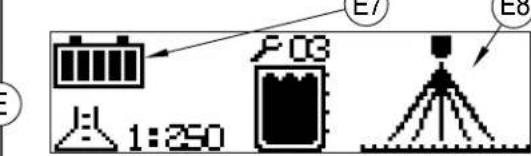
E7 Battery Indicator
E8 Prespray Mode Indicator
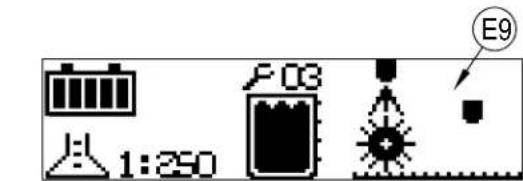
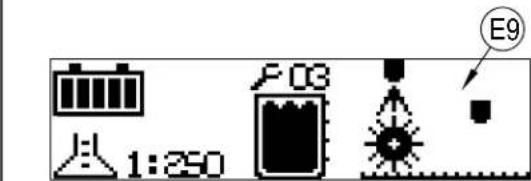
E9 Maintenance Mode Indicator
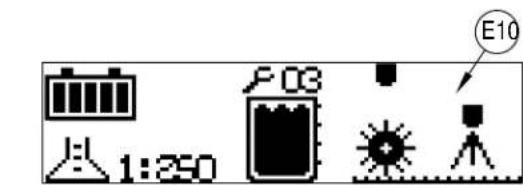
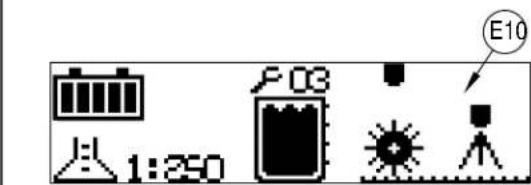
E10 Restore Mode Indicator
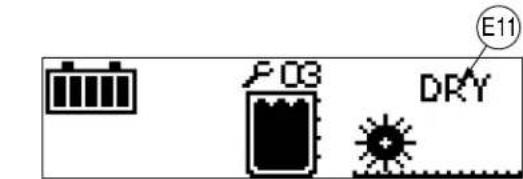
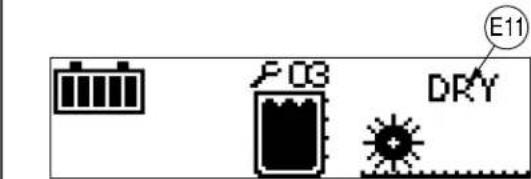
E11 Sweep Mode Indicator
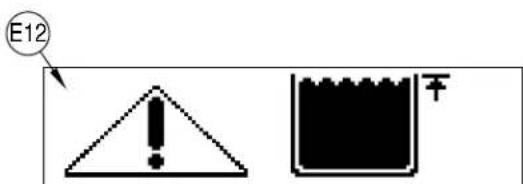
E12 Recovery Tank Full Indicator
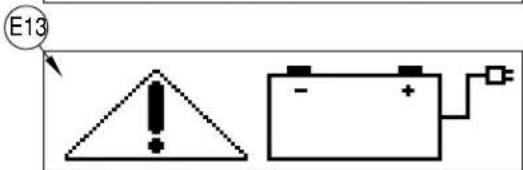
E13 Low Voltage Cutout Indicator
F Extract ON / OFF Switch
G Maintenance Mode Switch
H Restoration Mode Switch
I Prespray Mode Switch
J Horn Switch
K Vacuum ON / OFF Switch
APPEARS FOR FIRST 10 SECONDS
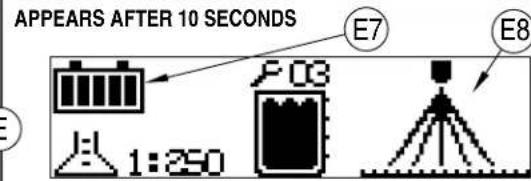
BATTERIES
If your machine shipped with batteries installed do the following:
• Check that the batteries are connected to the machine (34).
- Turn ON the Key Switch (A) and check the Battery Indicator (E7). If the gauge is completely filled the batteries are ready for use. If the gauge is less than full the batteries should be charged before use. See the "Charging The Batteries" section.
- IMPORTANT!: IF YOUR MACHINE HAS AN ONBOARD BATTERY CHARGER REFER TO THE OEM PRODUCT MANUAL FOR INSTRUCTIONS REGARDING SETTING THE CHARGER FOR BATTERY TYPE.
If your machine shipped without batteries installed do the following:
- Consult your Authorized Advance dealer for recommended batteries.
• Install the batteries by following the instructions below.
• DO NOT install two 12 volt batteries in your machine. This affects the stability of the machine. - IMPORTANT! IF YOUR MACHINE HAS AN ONBOARD BATTERY CHARGER REFER TO THE OEM PRODUCT MANUAL FOR INSTRUCTIONS REGARDING SETTING THE CHARGER FOR BATTERY TYPE.
INSTALL THE BATTERIES

WARNING !
Use extreme caution when working with batteries. Sulfuric acid in batteries can cause severe injury if allowed to contact the skin or eyes. Explosive hydrogen gas is vented from inside the batteries through openings in the battery caps. This gas can be ignited by any electrical arc, spark or flame.
When Servicing Batteries...
* Remove all jewelry.
* Do not smoke.
* Wear safety glasses, a rubber apron and rubber gloves.
* Work in a well-ventilated area.
* Do not allow tools to touch more than one battery terminal at a time.
* ALWAYS disconnect the negative (ground) cable first when replacing batteries to prevent sparks.
* ALWAYS connect the negative cable last when installing batteries.

CAUTION !
Electrical components in this machine can be severely damaged if the batteries are not installed and connected properly. Batteries should be installed by Advance or by a qualified electrician.
1 Turn the Key Switch (A) off (O) and remove the key. Then swing open the Battery Compartment Cover (19) and set the Prop-Rod (32).
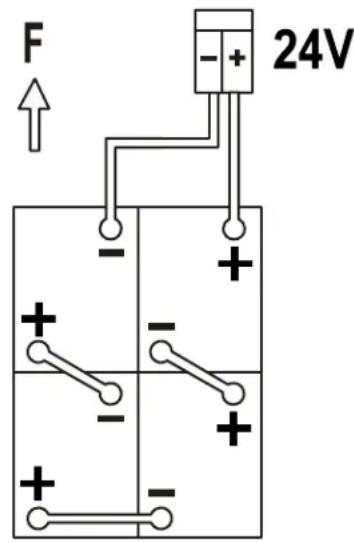
2 Using (2) people and an appropriate lifting strap, carefully lift the batteries into the compartment tray exactly as shown. Refer to decal 56601416 battery cable layout.
3 See Figure 1. Install battery cables as shown and tighten the nuts on the battery terminals.
4 Install the battery boots and secure tightly to the battery cables with the supplied tie straps.
5 Connect the battery pack connector to the machine connector (34) and close the battery compartment cover.
When changing batteries or the charger, please contact your local authorized service center for correct battery, charger and machine settings to prevent battery damage.
FIGURE 1
420Ah,20Hr.Rate
FILLING THE SOLUTION TANK (REQUIRED FOR BOTH SWEEP MODE AND EXTRACT MODE)
1 Read the cleaning chemical label and calculate the proper amount of chemical to mix for a tank that holds 28 US gallons (110 liters).
2 Open the Solution Tank Cover (23).
3 Fill the tank 1/3 full of water, add the cleaning chemical then fill the tank to 7.62cm(3 inches) from the top of the tank opening.
NOTE: The machine can either be used conventionally with detergent mixed in the tank or the detergent system can be used. When using the detergent dispensing system do not mix detergent in the tank, plain water should be used.
CAUTION!
Use low-sudsing, liquid detergents designed for carpet extraction. Water temperature should not exceed 130 degrees Fahrenheit (54.4 degrees Celsius).
BEFORE USING THE ES4000
Thorough vacuuming of the carpet to be cleaned is not necessary before using the ES4000 automatic extractor, due to the on-board sweeping broom and debris hopper. The area should be cleaned in Sweep Mode before being cleaned in Extract Mode.
PRE-SPRAYING THE CARPET
Pre-spray spots and heavy traffic areas before extracting. Use a hand-held bottle sprayer or a pressurized "Hudson" type sprayer. Mix the pre-spray according to the chemical manufacturer's directions.
PLAN FOR CLEANING
Before you begin extracting, look at the area to be cleaned and plan your work. Divide the space into sections. Overlap each pass 2 inches (5 cm).
DETERGENT SYSTEM PREPARATION AND USE (ONLY USED IN EXTRACT MODE)
COMMON INSTRUCTIONS:
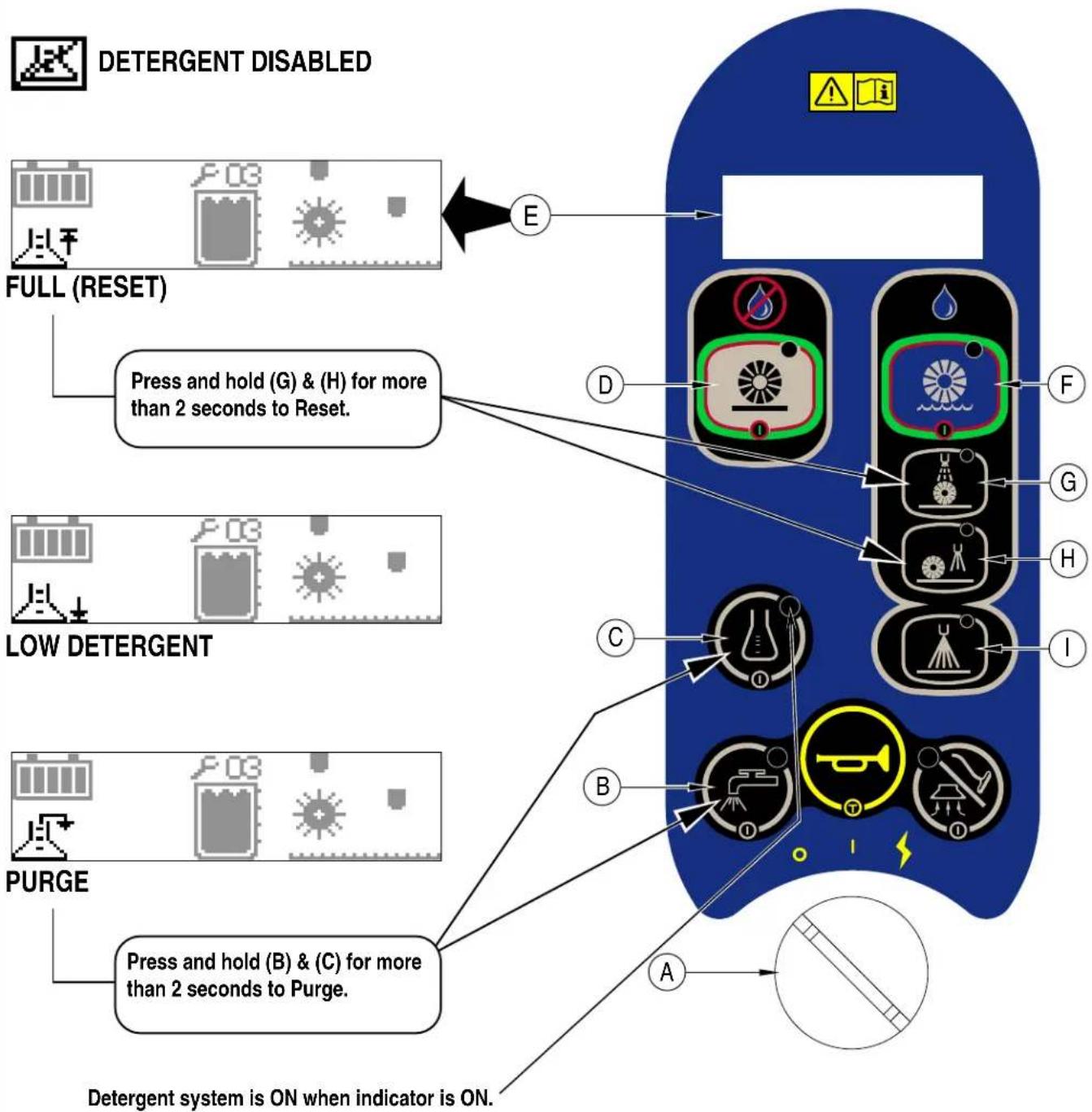
Pressing and releasing the Detergent Switch (C) while in Restoration (H), Maintenance (G) or Prespray (I) mode will cause the detergent system to alternately turn on and off. When the detergent system is ON, the detergent pump will be activated at a specific rate while the solution pump is running. The detergent pump will turn OFF whenever the solution pump is not running or when the detergent system is turned OFF. Unless Prespray Mode (I) is selected, the detergent system will be OFF by default each time the machine is powered up with the Key Switch (A). The detergent system will be selected by default when Prespray Mode (I) is active. The Detergent ON / OFF Switch (C) is inactive when Sweep Power (D) is ON. The system should be purged of previous detergent when switching to a different detergent. SERVICE NOTE: Move machine over floor drain before purging because a small amount of detergent will be dispensed in the process.
To Purge When Changing Chemicals:
1 Disconnect and remove the detergent cartridge.
2 Turn the Key Switch (A) ON. Press and hold the Detergent ON / OFF Switch (C) and the Solution ON / OFF Switch (B) for more than 2 seconds while the controller is in any mode except standby to initiate a purge cycle. NOTE: Once activated the purge process takes 10 seconds. See illustration on next page for Detergent System indicators. Normally one purge cycle is adequate to purge the system.
To Purge Weekly:
1 Disconnect and remove the detergent cartridge. Install and connect a Cartridge filled with clean water.
2 Turn the Key Switch (A) ON. Press and hold the Detergent ON / OFF Switch (C) and the Solution ON / OFF Switch (B) for more than 2 seconds while the controller is in any mode except standby to initiate a purge cycle. NOTE: Once activated the purge process takes 10 seconds. See illustration on next page for Detergent System indicators. Normally one purge cycle is adequate to purge the system.
When the Detergent Cartridge (18) is almost empty a Display Panel (E5) indicator will come on. The "Low Detergent" indicator will remain on until you reset the system. Once this indicator comes on you should be able to simply pour an entire gallon bottle of detergent into the Cartridge to refill without worrying about measuring. NOTE: Only reset the system when the cartridge is full. When switching cartridges, the "Low Detergent" indicator is only accurate if the replacement cartridge is at the same level as the cartridge being replaced.
To Reset:
1 Turn the Key Switch (A) ON. Press and hold the Maintenance Mode Switch (G) and the Restoration Mode Switch (H) for more than 2 seconds while the solution and detergent are ON. The Detergent Reset Icon will display for 5 seconds. See illustration on next page for Detergent System indicators.
Detergent Ratio:
1 The pre-programmed ratio can be adjusted. With the detergent system OFF, press and hold the Detergent ON/OFF Switch (C) for 2 seconds. The detergent indicator will flash and each press of the switch will cycle through the available ratios (1:64, 1:75, 1:100, 1:125, 1:150, 1:175, 1:200, 1:250). Once the desired ratio is displayed on the screen (E6), stop and it will lock in after 5 seconds.
CARTRIDGEINSTRUCTIONS:
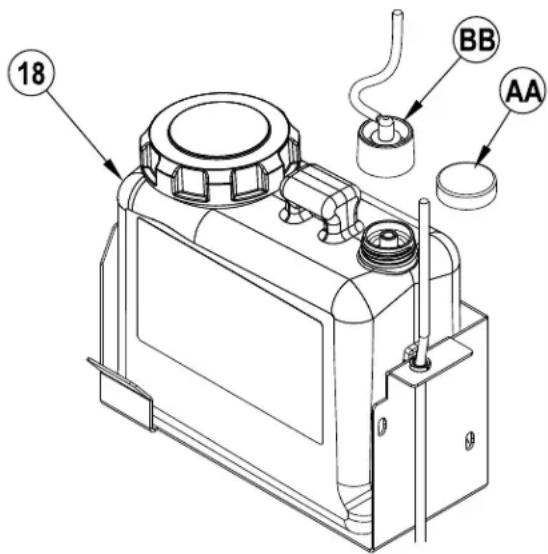
The Detergent Cartridge (18) is located behind the Detergent Cartridge Access Cover (6) in the operator's compartment. Fill the detergent cartridge with a maximum of 1.25 gallons (4.73 Liters) of detergent. SERVICE NOTE: Remove the detergent cartridge from the detergent box prior to filling to avoid spilling detergent on the machine.
It is recommended that a separate cartridge be used for each detergent you plan to use. The detergent cartridges have a white decal on them so you can write the detergent name on each cartridge to avoid mixing them up. When installing a new cartridge, remove the Cap (AA) and place the cartridge in the detergent box. Install the Dry Break Cap (BB) and detergent hose as shown.
FIGURE 2
DETERGENT SYSTEM PREPARATION AND USE (ONLY USED IN EXTRACT MODE)

DETERGENT ENABLED

Be sure you understand the operator controls and their functions.
While on ramps or inclines, avoid sudden stops when loaded. Avoid abrupt sharp turns. Use low speed down hills. Clean only while ascending (driving up) the ramp.

CAUTION!
Sweeping with a dry solution tank could reduce the life of the solution pump that powers the misting system.
FILLING THE SOLUTION TANK
While sweeping the ES4000 uses a misting system which sprays water into the airstream to dampen dust as it is drawn into the recovery tank. It is important that there be water in the solution tank at all times during sweeping so dust does not escape the system. Refill the solution tank before sweeping whenever the batteries have been recharged. Under normal conditions, a full solution tank should be adequate to supply the misting system through an entire battery cycle.
To Sweep...
Follow the instructions in preparing the machine for use section of this manual. Before cleaning in extraction mode the entire area should be cleaned in Sweep Mode fi rst.
1 See Figure 3. While seated on the machine, adjust the steering wheel to a comfortable position using the Steering Wheel Tilt Adjust Knob (21). The seat can be adjusted if necessary by tipping up the seat and using the adjustment knob (2).
2 Turn the Master Key Switch (A) ON (I). This will display the control panel indicator lights, reference the Battery Condition Indicator (E7) and Hour Meter (E1) before proceeding.
3 To transport the machine to the work area, apply even pressure with your foot on the front of the Drive Pedal (10) to go forward or the rear of the pedal for reverse. Vary the pressure on the foot pedal to obtain the desired speed.
4 If the machine was last used for extraction, follow the "To Switch to Sweep Mode..." instructions at the end of the "Operating the Machine-Extract Mode" section. If the machine was last used in sweep mode simply press the Sweep ON / OFF Switch (D) to activate the sweep system.
5 After turning ON the Sweep System the deck will immediately lower to the floor. When the Drive Pedal (10) is engaged in forward or reverse, the solution pump, brush motors, vacuum motors and the misting chamber valve will turn ON. NOTE: When the Drive Pedal (10) is in neutral, the solution pump, brush motors and the misting chamber valve turn OFF. After 10 seconds, if the Drive Pedal (10) is not engaged, the vacuum motors turn OFF.
6 Begin cleaning by driving the machine forward in a straight line at a normal walking speed and overlap each path by 2-3 inches (50-75 mm). If there is little or no fluid entering the recovery tank, the solution tank may be empty. Refill the solution tank with water.
7 The recovery tank has an automatic float shut-off (27) to prevent solution from entering the vacuum system when the recovery tank is full. When the float shut-off is activated, the control system will shut down the scrub, vacuum, solution and detergent systems. The Recovery Tank FULL Indicator (E12) will display. To clear the display, cycle the Key Switch (A). When the float closes, the recovery tank must be emptied. The machine will not pick up water with the float closed. NOTE: If the control repeatedly gives a full indication when the tank is not full, the automatic shut-off feature can be disabled, have a qualified service technician refer to the service manual to perform this function.
8 When the operator wants to stop cleaning or the recovery tank is full, press the Sweep ON / OFF Switch (D). The solution pump and misting chamber valve will turn OFF immediately. The deck will raise to its upper limit and the brush motors will turn OFF. Once the deck is raised, the vacuum motors will turn OFF after a 10 second delay.
9 Drive the machine to a designated waste water "DISPOSAL SITE" and empty the recovery tank. To empty, pull the Drain Hose (28) from its rear storage area, then remove the plug (hold the end of the hose above the water level in the tank to avoid sudden, uncontrolled flow of waste water). Refill the solution tank and continue cleaning.
To Switch to Extract Mode...
1 See Figure 3. Press the Sweep ON / OFF Switch (D) to turn OFF Sweep Mode.
2 Press Extract ON / OFF Switch (F) to activate Extract Mode.
3 The LCD Display (E) will display screen (E15) and the Horn will beep to indicate that the Recovery Hose (29) needs to be switched to the Wet Pick Up Connection (38).
4 After switching the Recovery Hose (29) to the Wet Pick Up Connection (38) press the Extract ON / OFF Switch (F) to acknowledge the hose change. Press the Extract ON / OFF Switch (F) again to turn ON Extract Mode
5 Refer to OPERATING THE MACHINE-EXTRACT MODE section for further operating instructions.
FIGURE 3
Be sure you understand the operator controls and their functions.
While on ramps or inclines, avoid sudden stops when loaded. Avoid abrupt sharp turns. Use low speed down hills. Clean only while ascending (driving up) the ramp.
To Extract...
Follow the instructions in preparing the machine for use section of this manual. Before cleaning in extraction mode the entire area should be cleaned in Sweep Mode fi rst.
1 See Figure 4. While seated on the machine, adjust the steering wheel to a comfortable position using the Steering Wheel Tilt Adjust Knob (21). The seat can be adjusted if necessary by tipping up the seat and using the adjustment knob (2).
2 Turn the Master Key Switch (A) ON (I). This will display the control panel indicator lights, reference the Battery Condition Indicator (E7) and Hour Meter (E1) before proceeding.
3 To transport the machine to the work area, apply even pressure with your foot on the front of the Drive Pedal (10) to go forward or the rear of the pedal for reverse. Vary the pressure on the foot pedal to obtain the desired speed.
4 If the machine was last used for sweeping, follow the "To Switch to Extract Mode..." instructions at the end of the "Operating the Machine-Sweep Mode" section. If the machine was last used in extract mode simply press the Extract ON / OFF Switch (F), Maintenance Mode Switch (G), Restoration Mode Switch (H) or the Prespray Mode Switch (I) to activate the extraction system. NOTE: Maintenance Mode (G) is the default setting upon initial startup. The detergent system is OFF by default. It can be turned ON or OFF at any time by pressing the Detergent ON / OFF Switch (C).
5 If either the Maintenance Mode Switch (G) or the Restoration Mode Switch (H) is selected, the brush deck and vacuum shoes are automatically lowered to the floor. When the Drive Pedal (10) is engaged forward, the solution pump, brush motors, vacuum motors and either the maintenance valve or the restore valve are activated. NOTE: When the Drive Pedal (10) is in neutral or reverse, the solution pump, brush motors and either maintenance valve or the restore valve turn OFF. After 10 seconds, if the Drive Pedal (10) is not engaged forward, the vacuum motors turn OFF.
If the Prespray Mode Switch (I) is selected, the brush deck is automatically lowered to the floor. When the Drive Pedal (10) is engaged forward, the solution pump, brush motors and the restore valve are activated. The detergent pump will be activated at a specific rate. NOTE: When the Drive Pedal (10) is in neutral or reverse, the solution pump, brush motors, detergent pump and restore valve turn OFF.
6 Begin cleaning by driving the machine forward in a straight line at a normal walking speed and overlap each path by 2-3 inches (50-75 mm). Turn the Solution Switch (B) OFF prior to turns to ensure complete extraction of solution from carpet. Adjust when necessary the machine speed according to the condition of the carpet.
If there is little or no fluid entering the recovery tank, the solution tank may be empty. Refill the solution tank with water.
7 The recovery tank has an automatic float shut-off (27) to prevent solution from entering the vacuum system when the recovery tank is full. When the float shut-off is activated, the control system will shut down the scrub, vacuum, solution and detergent systems. The Recovery Tank FULL Indicator (E12) will display. To clear the display, cycle the Key Switch (A). When the float closes, the recovery tank must be emptied. The machine will not pick up water with the float closed. NOTE: If the control repeatedly gives a full indication when the tank is not full, the automatic shut-off feature can be disabled, have a qualified service technician refer to the service manual to perform this function.
8 When the operator wants to stop cleaning or the recovery tank is full, press the Extract ON / OFF Switch (F). The solution pump, detergent pump and all three solution solenoids will turn OFF immediately. The deck will raise to its upper limit and the brush motors will turn OFF. After a 3 second delay the vacuum shoes will raise to the up position. Once the deck is raised, the vacuum motors will turn OFF after a 10 second delay.
9 Drive the machine to a designated waste water "DISPOSAL SITE" and empty the recovery tank. To empty, pull the Drain Hose (28) from its rear storage area, then remove the plug (hold the end of the hose above the water level in the tank to avoid sudden, uncontrolled flow of waste water). Refill the solution tank and continue cleaning.
NOTE: Make sure the Recovery Tank Cover (24) and the Recovery Tank Drain Hose (28) cap are properly seated or the machine will not pick-up water correctly.
When the batteries require recharging the Low Voltage Cutout Indicator (E13) will come on. The brushes, pumps and solenoids will turn OFF and the deck will raise up. Transport the machine to a service area and recharge the batteries according to the instructions in the Battery section of this manual.
To Switch to Sweep Mode..
1 See Figure 4. Press the Extract ON / OFF Switch (F) to turn OFF Extract Mode.
2 Press Sweep ON / OFF Switch (D) to activate Sweep Mode.
3 The LCD Display (E) will display screen (E14) and the Horn will beep to indicate that the Recovery Hose (29) needs to be switched to the Dry Pick Up Connection (30).
4 After switching the Recovery Hose (29) to the Dry Pick Up Connection (30) press the Sweep ON / OFF Switch (D) to acknowledge the hose change. Press the Sweep ON / OFF Switch (D) again to turn ON Sweep Mode.
5 Refer to OPERATING THE MACHINE-SWEEP MODE section for further operating instructions.
USING ATTACHMENTS
Steps to follow in fitting the machine with optional attachments for detail or upholstery cleaning.
1 Disconnect the recovery hose at the rear of the machine. Connect the coupler and hose from suitable wet pick-up tools to the recovery hose.
2 Attach the solution connection to the accessory port, located at the rear of the machine on the chassis. (An optional Wand Caddy Kit is available from Advance).
3 Turn the Master Key Switch (A) ON while the machine driver seat is unoccupied, next press the Vacuum ON / OFF Switch (K). The vacuum motor will run continuously until the switch is pressed again to turn it OFF. NOTE: If the control repeatedly gives a full indication when the tank is not full, the automatic shut-off feature can be disabled, have a qualified service technician perform this function.
SERVICE NOTE: Refer to the service manual for detailed functional descriptions of all controls and optional programmability.
FIGURE 4
AFTER USE
1 When finished cleaning, press the Extract ON / OFF Switch (F) or the Sweep ON / OFF Switch (D), this will automatically raise, retract and stop all the machine systems (brush, vacuum & solution). Then drive the machine to a service area for daily maintenance and review of other needed service up-keep.
2 To empty the solution tank, remove the Solution Tank Drain Hose (16) from its storage clamp. Direct the hose to a designated "DISPOSAL SITE" and remove the plug. Rinse the tank with clean water.
3 To empty the recovery tank, pull the Recovery Tank Drain Hose (28) from its storage area. Direct the hose to a designated "DISPOSAL SITE" and remove the plug (hold the end of the hose above the water level in the tank to avoid sudden, uncontrolled flow of waste water). Rinse the Recovery Tank with clean water.
4 Remove the Brushes, rinse with warm water and remove any built-up string, hair or carpet fibers.
5 Disconnect the Recovery Hose from the Recovery Tank and flush with warm water to wash any debris out of the Recovery Hose / Vacuum Shoe Assembly.
6 Remove the debris hopper and clean thoroughly. Remove from left or right side of machine by lifting hopper up and tilting it forward then pull out.
7 Check the maintenance schedule below and perform any required maintenance before storage.
MAINTENANCE SCHEDULE
| MAINTENANCE | ITEM | Daily | |
| Charge | Batteries | ||
| Check/Clean Tanks & Hoses X | |||
| Check/Clean/ Power Brushes X | |||
| Check/Clean Vacuum Shoes X | |||
| Check/Clean Vacuum Shut-Off Float X | |||
| Check/Clean the vacuum motor foam filter(s) | X | ||
| Empty Debris Hopper X | |||
| Clean Spray Nozzles | X | ||
| Check Each Battery Cell(s) Water Level | X | ||
| Inspect Brush Deck Skirts | X | ||
| Inspect and clean Solution Filter | X | ||
| Check Foot/ Parking Brake for Wear & Adjustment | X | ||
| Purge the Detergent Injection System | X | ||
| Lubrication - Grease Fittings | X | ||
| * Check Carbon Brushes | X | ||
* Have Advance check the vacuum motor carbon motor brushes once a year or after 300 operating hours. The brush and drive motor carbon brushes check every 350 hours or once a year.
NOTE: Refer to the Service Manual for more detail on maintenance and service repairs.
8 Store the machine indoors in a clean dry place. Keep from freezing. Leave the tanks open to air them out.
9 Turn the Key Switch / Main Power (A) OFF (O) and remove the key.
Check the vacuum shoes daily, they can be removed to aid in cleaning, see "Removing the Vacuum Shoes". Remove any built-up string, hair or carpet fibers.
SPRAY NOZZLE MAINTENANCE
Remove the spray nozzles once a week, see "Removing the Spray Nozzles". Soak the nozzles overnight in a vinegar and water solution to remove chemical deposits. NOTE: DO NOT attempt to clean the nozzles by poking anything into them. This can damage the nozzle and affect the spray pattern.
LUBRICATING THE MACHINE
Once a month, pump a small amount of grease into each grease fitting on the machine until grease seeps out around the bearings.
Grease fitting locations are:
• Steering Wheel Shaft Universal joint
Once a month, apply light machine oil to lubricate the:
- Steering Chain
• General Pivot Points For the Brush Deck Linkage
ELECTROMAGNETIC BRAKE
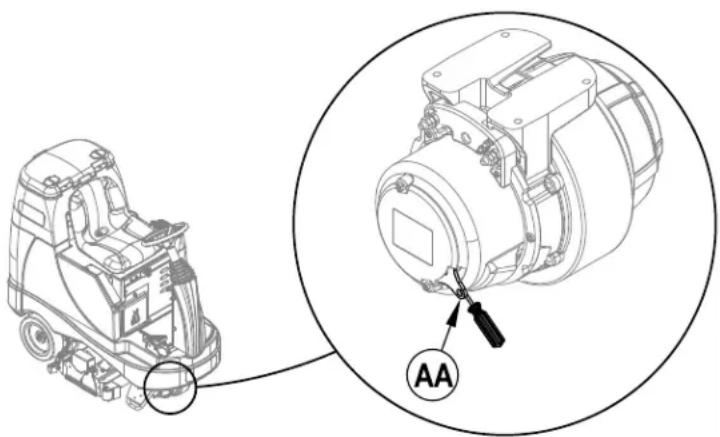
See Figure 5. The Drive Wheel Assembly (9) has a built in electromagnetic brake that is engaged whenever the Key Switch (A) is OFF or the Drive Pedal (10) is in the neutral position. This brake can be manually over ridden if necessary by inserting a medium to large screwdriver behind the Yoke (AA) as shown. This should only be done in the event you need to push or pull the unit.
FIGURE 5
natural_image
Technical line drawing of a mechanical device with an inset close-up showing a labeled component (no text or symbols present)CLEANING THE VACUUM MOTOR FILTERS
Clean the vacuum motor filters daily with compressed air. For extremely dirty filters, wash with warm, soapy water and rinse thoroughly with clean water. Allow the filters to dry completely before re-installing in the machine. MAINTENANCE NOTE: Keep a second set of filters on hand to use while first set is drying.
Check the brushes daily. Remove any built-up string, hair or carpet fibers. Check the bristle length. Have a service technician change the brushes when the brush bristles are worn to 1/2 inch (12.7 mm).
REMOVING THE FRONT BRUSH
1 See Figure 6. Turn the Key Switch (A) OFF.
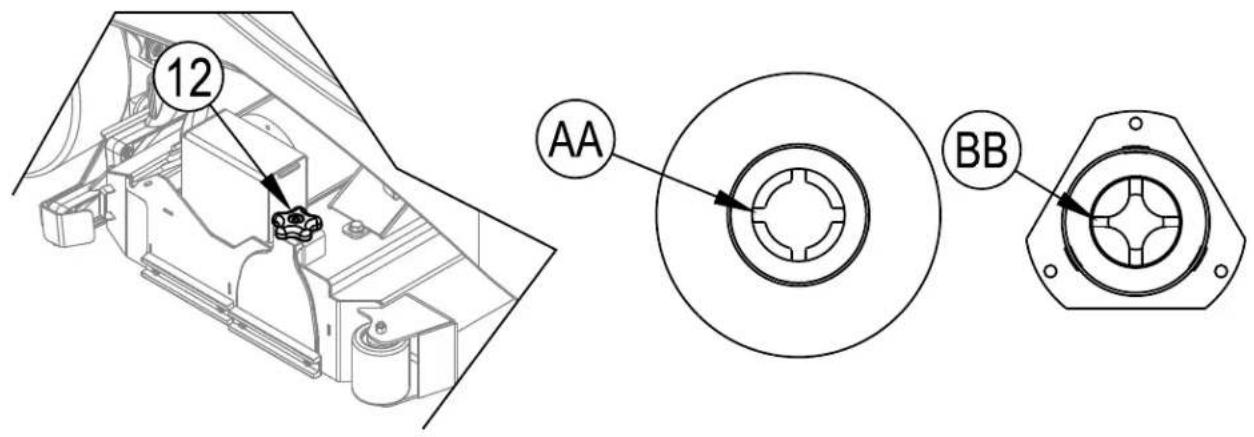
2 Loosen the Brush Idler Removal Knob (12) on top of the idler assembly and remove the idler assembly. Slide the brush out of the brush deck housing.
3 To reinstall, slide the brush into the housing, lift slightly, push and turn until it seats. NOTE: Make sure Slots (AA) in end of Brush line up with and seat firmly on Lugs (BB) on the Drive End Assembly. Re-install the idler assembly and tighten Knob (12).
FIGURE 6
REMOVING THE REAR BRUSH
1 See Figure 7. Turn the Key Switch (A) OFF.
2 Loosen the T-Knob holding the Rear Brush Access Panel (33) and slide the Panel (33). Slide the brush out of the brush deck housing.
3 To reinstall, slide the brush into the housing, lift slightly, push and turn until it seats. NOTE: Make sure Slots (AA) in end of Brush line up with and seat firmly on Lugs (BB) on the Drive End Assembly. Re-install the idler assembly and tighten Knob (12).
FIGURE 7
REMOVING THE VACUUM SHOES
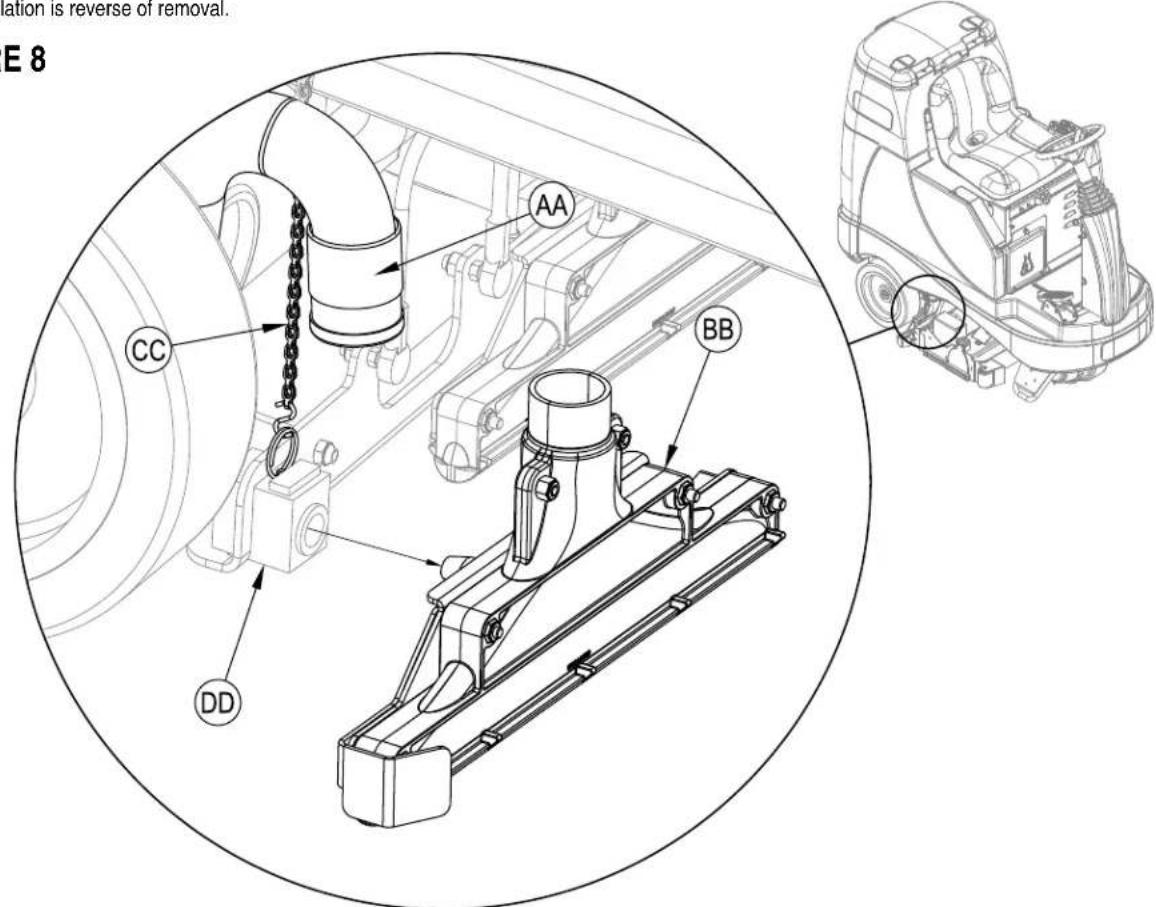
1 See Figure 8. Turn the Key Switch (A) OFF and remove the Debris Hopper (14).
2 Disconnect the Vacuum Hose (AA) from the Vac Shoe (BB) and pull up on the gold Chain (CC). Slide the Vac Shoe (BB) out of the Shoe Support Weldment (DD). NOTE: The procedure is the same for both vac shoes but the right side shoe must be removed before removing the left side shoe.
3 Reinstallation is reverse of removal.
FIGURE 8
REMOVING THE SPRAY NOZZLES
1 Turn the Key Switch (A) ON and Lower the Brush Deck (13) by pressing the Extract ON/OFF Switch (F).
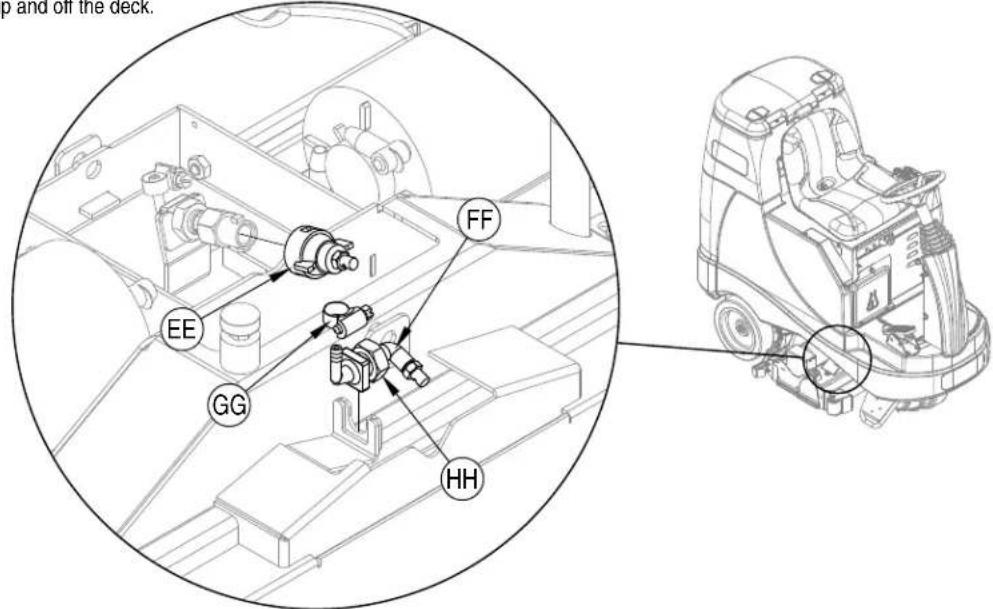
2 See Figure 9. Remove the Maintenance Nozzle (EE) by turning counter-clockwise and then pulling straight off.
3 Remove the Restoration Nozzle (FF) by loosening Hose Clamp (GG) and disconnecting the solution hose and then loosening Nut (HH). The Nozzle assembly can then be lifted straight up and off the deck.
FIGURE 9
CHARGING WET BATTERIES
Charge the batteries each time the machine is used or when the Battery Indicator (E7) is reading less than full.

WARNING!
Do not fill the batteries before charging.
Charge batteries in a well-ventilated area.
Do not smoke while servicing the batteries.
When Servicing Batteries...
* Remove all jewelry
* Do not smoke
* Wear safety glasses, rubber gloves and a rubber apron
* Work in a well-ventilated area
* Do not allow tools to touch more than one battery terminal at a time
* ALWAYS disconnect the negative (ground) cable first when replacing batteries to prevent sparks.
* ALWAYS connect the negative cable last when installing batteries.
If your machine shipped with an onboard battery charger do the following:
Turn the Key Switch (A) OFF. Open the Battery Compartment (19) and the Battery Charger Access Door (8) for proper ventilation. Unwind the electrical cord from the side of the onboard charger and plug it into a properly grounded outlet. Refer to the OEM product manual for more detailed operating instructions.
If your machine shipped without an onboard battery charger do the following:
Open the Battery Compartment (19) and set the Prop-Rod (32). Disconnect the batteries from the machine and push the connector from the charger into the Battery Pack Connector (34). Follow the instructions on the battery charger. SERVICE NOTE: Make sure you plug the battery charger into the connector that attaches to the batteries.

CAUTION!
To avoid damage to floor surfaces, wipe water and acid from the top of the batteries after charging.
CHECKING THE BATTERY WATER LEVEL
Check the water level of the batteries at least once a week.
After charging the batteries, remove the vent caps and check the water level in each battery cell. Use distilled or demineralized water in a battery filling dispenser (available at most auto parts stores) to fill each cell to the level indicator (or to 10 mm over the top of the separators). DO NOT over-fill the batteries!

CAUTION!
Acid can spill onto the floor if the batteries are overfilled.
Tighten the vent caps. Wash the tops of the batteries with a solution of baking soda and water (2 tablespoons of baking soda to 1 liter of water).
CHARGING GEL (VRLA) BATTERIES
Charge the batteries each time the machine is used or when the Battery Indicator (E7) is reading less than full.

WARNING!
Charge batteries in a well-ventilated area.
Do not smoke while servicing the batteries.
When Servicing Batteries...
* Remove all jewelry
* Do not smoke
* Wear safety glasses, rubber gloves and a rubber apron
* Work in a well-ventilated area
* Do not allow tools to touch more than one battery terminal at a time
* ALWAYS disconnect the negative (ground) cable first when replacing batteries to prevent sparks.
* ALWAYS connect the negative cable last when installing batteries.

CAUTION!
Your voltage regulated lead acid (VRLA) battery will deliver superior performance and life ONLY IF IT IS RECHARGED PROPERLY! Under or overcharging will shorten battery life and limit performance. Be sure to FOLLOW PROPER CHARGING INSTRUCTIONS! DO NOT ATTEMPT TO OPEN THIS BATTERY! If a VRLA battery is opened, it loses its pressure and the plates become oxygen contaminated. THE WARRANTY WILL BE VOIDED IF THE BATTERY IS OPENED.
If your machine shipped with an onboard battery charger do the following:
Turn the Key Switch (A) OFF. Open the Battery Compartment (19) and the Battery Charger Access Door (8) for proper ventilation. Unwind the electrical cord from the side of the onboard charger and plug it into a properly grounded outlet. Refer to the OEM product manual for more detailed operating instructions.
If your machine shipped without an onboard battery charger do the following:
Open the Battery Compartment (19) and set the Prop-Rod (32). Disconnect the batteries from the machine and push the connector from the charger into the Battery Pack Connector (34). Follow the instructions on the battery charger. SERVICE NOTE: Make sure you plug the battery charger into the connector that attaches to the batteries.
IMPORTANT: Make sure you have an appropriate charger for use on Gel cell batteries. Use only “voltage-regulated” or “voltage-limited” chargers. Standard constant current or taper current chargers MUST NOT be used. A temperature-sensing charger is recommended, as manual adjustments are never accurate and will damage any VRLA battery.
GENERAL MACHINE TROUBLESHOOTING
| Problem Possible Cause Remedy | ||
| Poor water pick-up Recovery tank full | Empty recovery tank | |
| Recovery tank drain hose leak Secure drain hose cap or replace | ||
| Recovery tank cover gasket leak Replace gasket / Seat cover properly | ||
| Debris caught in vacuum shoes Clean vacuum shoes | ||
| Vacuum hose clogged Remove debris | ||
| Foam ifiter cover not seated Seat cover properly | ||
| Poor extracting performance Worn brushes | Rotate or replace brushes | |
| Wrong cleaning chemical Consult Advance | ||
| Moving machine too fast Slow down | ||
| Inadequate solution ifow or no solution | Solution tank empty Fill solution tank | |
| Solution lines, valves, filter, or spray jets clogged | Flush lines and clean solution filter & spray jets | |
| Solution control valve is in closed position | Place control valve handle in open position | |
| Solution solenoid valves Clean or replace valves | ||
| Machine does not run | Emergency stop switch tripped | Reconnect battery connectors |
| Operator seat safety switch | Check for open circuit and replace | |
| Main system controller | Check for error fault codes (see service manual) | |
| Tripped 10 Amp circuit breaker | Check for electrical short circuit & reset | |
| No FWD/REV wheel drive | Drive system speed controller | Check for error fault codes (see service manual) |
| Tripped 70 Amp circuit breaker | Check for drive motor overload | |
| Emergency stop switch tripped | Reconnect battery connectors | |
| Vacuum shuts off and display shows Recovery Tank FULL Indicator (E12) when recovery tank is not full | Plugged vacuum hose(s) | Clear debris |
| Vacuuming large amounts of water at a high travel speed | Slow down or disable auto shut-off feature (see service manual) | |
| Poor Sweeping Performance | Debris Hopper Full | Empty and clean hopper |
| Brushes worn | Replace brushes | |
| Bristles have taken a set | Rotate brushes | |
| No Detergent Flow Empty detergent cartridge | Fill detergent cartridge | |
| Plugged or kinked detergent flow line | Purge system, straighten lines to remove any kinks | |
| Dry seal cap on detergent cartridge not sealed | Reseat dry seal cap | |
| Detergent pump wiring disconnected or backwards | Connect or reconnect wiring | |
TECHNICAL SPECIFICATIONS (as installed and tested on the unit)
ES4000
Model
Model No. 56344200 / 56344210
Voltage, Batteries V 24V
Battery Capacity Ah 238 Ah
Protection Grade IPX3
Sound Pressure Level (ISO 11201) dB(A) 65dB LpA, 3dB KpA
Gross Vehicle Weight / Transport Weight lbs(kg) 1447 lbs(656 kg)
Maximum Wheel Floor Loading (center front) psi / N/mm ^2 178.64 / 1.232
Maximum Wheel Floor Loading (right rear) psi / N/mm² 150.81 / 1.040
Maximum Wheel Floor Loading (left rear) psi / N/mm² 130.61 / 0.901
Vibrations at the Hand Controls (ISO 5349-1) m/s ^2 .22m/s ^2 (.044 m/s ^2 uncertainty)
Vibrations at the Seat (ISO 2631-1) m/s² .02m/s² (.004 m/s² uncertainty)
Gradeability
Transport
Cleaning
16% (9°)
9% (5°)
Material Composition and Recyclability
| Type | % of machine weight | % recyclable |
| Aluminum | 1% 67% | |
| Electrical / motors / engines - misc | 18% 33% | |
| Ferrous metals | 39% | 100% |
| Harnesses / cables | 3% 75% | |
| Liquids | 0% 100% | |
| Plastic - non-recyclable | 6% | 0% |
| Plastic - recyclable | 6% 57% | |
| Polyethylene | 26% 93% | |
| Rubber | 1% 50% |
ÍNDICE
página
Introducción: B-2
CONOZCA SU MÁQUINA
APARECE DURANTE LOS PRIMEROS 10 SEGUNDOS
APARECE DESPUÉS DE 10 SEGUNDOS
E12
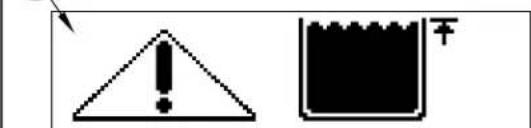
E13
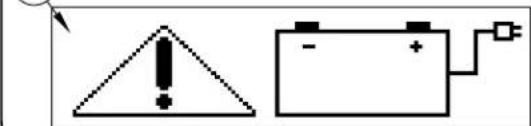
natural_image
Simple electrical warning symbol and battery circuit diagram (no text or labels)BATERÍAS
natural_image
Technical line drawing of a mechanical device with an inset close-up showing a labeled component (no text or symbols present)APPRENEZ À CONNAÎTRE VOTRE MACHINE
PANNEAU DE COMMANDE
E13
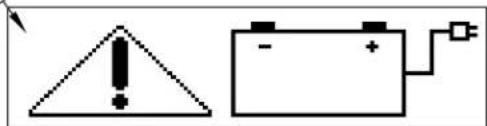
natural_image
Two electrical symbols: a triangular warning triangle with an exclamation mark and a battery with a fuse (no text or labels)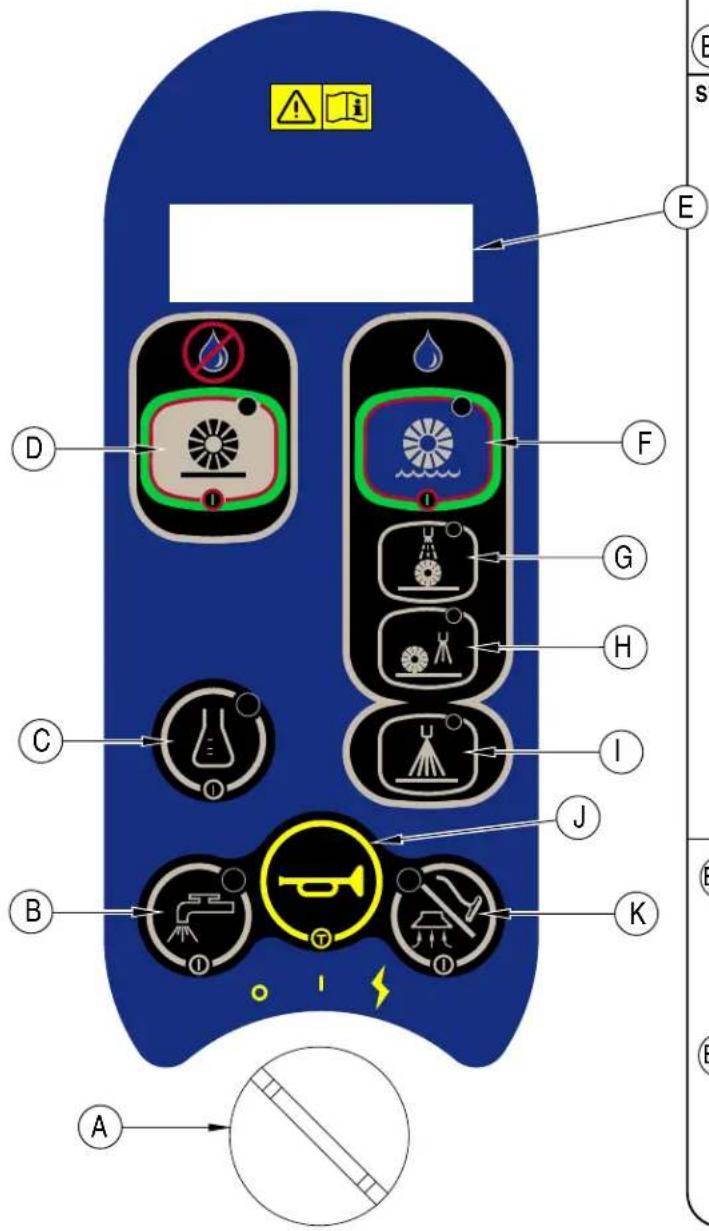
BATTERIES
FONCTIONNEMENT DE LA MACHINE – MODE EXTRACTION
⚠ AVERTISSEMENT !
APRÈS L'UTILISATION
natural_image
Technical line drawing of a mechanical device with an inset close-up showing a labeled component (no text or symbols present)NETTOYAGE DES FILTRES DU MOTEUR D'ASPIRATION
CHARGEMENT DES BATTERIES HUMIDES
Tension, batteries V 24V
The undersigned certify that the above mentioned model is produced in accordance with the following directives and standards. The technical file is compiled by the manufacturer.

Authorized signatory: Lars Gjodsbol, Executive Vice President
Date: Signature: 8-15-13
- Instructions for use
- INTRODUCTION
- PARTS AND SERVICE
- MODIFICATIONS
- NAME PLATE
- UNCRATE THE MACHINE
- WARNING!
- CAUTIONS AND WARNINGS SYMBOLS
- DANGER!
- CAUTION!
- GENERAL SAFETY INSTRUCTIONS
- CAUTION !
- SAVE THESE INSTRUCTIONS
- KNOW YOUR MACHINE
- CONTROL PANEL
- BATTERIES
- INSTALL THE BATTERIES
- WARNING !
- FILLING THE SOLUTION TANK (REQUIRED FOR BOTH SWEEP MODE AND EXTRACT MODE)
- BEFORE USING THE ES4000
- PRE-SPRAYING THE CARPET
- PLAN FOR CLEANING
- DETERGENT SYSTEM PREPARATION AND USE (ONLY USED IN EXTRACT MODE)
- COMMON INSTRUCTIONS:
- To Purge When Changing Chemicals:
- To Purge Weekly:
- To Reset:
- Detergent Ratio:
- CARTRIDGEINSTRUCTIONS:
- FILLING THE SOLUTION TANK
- To Sweep...
- To Switch to Extract Mode...
- To Extract...
- To Switch to Sweep Mode..
- USING ATTACHMENTS
- AFTER USE
- SPRAY NOZZLE MAINTENANCE
- LUBRICATING THE MACHINE
- Grease fitting locations are:
- Once a month, apply light machine oil to lubricate the:
- ELECTROMAGNETIC BRAKE
- CLEANING THE VACUUM MOTOR FILTERS
- REMOVING THE FRONT BRUSH
- REMOVING THE REAR BRUSH
- REMOVING THE VACUUM SHOES
- REMOVING THE SPRAY NOZZLES
- CHARGING WET BATTERIES
- When Servicing Batteries...
- CHECKING THE BATTERY WATER LEVEL
- CHARGING GEL (VRLA) BATTERIES
- TECHNICAL SPECIFICATIONS (as installed and tested on the unit)
- Model
- ÍNDICE
- página
- CONOZCA SU MÁQUINA
- BATERÍAS
- APPRENEZ À CONNAÎTRE VOTRE MACHINE
- PANNEAU DE COMMANDE
- FONCTIONNEMENT DE LA MACHINE – MODE EXTRACTION
- ⚠ AVERTISSEMENT !
- APRÈS L'UTILISATION
- NETTOYAGE DES FILTRES DU MOTEUR D'ASPIRATION
- CHARGEMENT DES BATTERIES HUMIDES
Brand : ADVANCE
Model : ES4000
Category : Scrubber