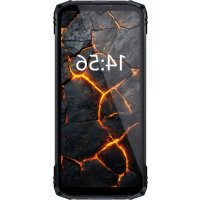
Sicuro Smart STS650 - Telephone Saiet - Free user manual and instructions
Find the device manual for free Sicuro Smart STS650 Saiet in PDF.



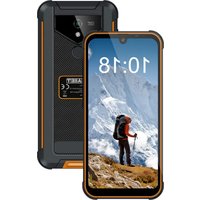
| Product Type | Rugged mobile phone |
| Brand | Saiet |
| Model | Sicuro Smart STS650 |
| Dimensions | 172 x 80 x 11 mm |
| Weight | 250 g |
| Power | Li-Polymer battery 3.85 V, 5100 mAh |
| Charger | Input 230 VAC 50 Hz, output 5.0 VDC, 2.0 A, 10.0 W |
| Display | Touchscreen, unspecified |
| Processor | Unspecified |
| Memory | Supports up to 2 nano-SIM and 1 microSD (or 2 SIM) |
| Network | LTE Band 1/3/7/8/20/28/38/40, WCDMA Band 1/8, GSM 900/1800 |
| Connectivity | Bluetooth, Wi-Fi 2.4/5 GHz, USB Type-C |
| Resistance | IP68 (waterproof) and drop from 1.5 m |
| Battery | Built-in, non-user replaceable |
| Fast charging | 10 W maximum with included charger |
| Safety | Keep 15 cm away from pacemakers, turn off on planes/in hospitals |
| Maintenance | Clean with a soft, dry cloth |
| Repairability | Do not open, contact technical support |
| SAR (head) | 0.653 W/kg |
| SAR (body) | 1.589 W/kg |
| Warranty | Compliant with Directive 2014/53/EU |
Frequently Asked Questions - Sicuro Smart STS650 Saiet
User questions about Sicuro Smart STS650 Saiet
0 question about this device. Answer the ones you know or ask your own.
Ask a new question about this device
Download the instructions for your Telephone in PDF format for free! Find your manual Sicuro Smart STS650 - Saiet and take your electronic device back in hand. On this page are published all the documents necessary for the use of your device. Sicuro Smart STS650 by Saiet.
USER MANUAL Sicuro Smart STS650 Saiet
natural_image
Simple line drawing of a rectangular electronic component with two leads (no text or symbols)
For more information
Visit the website www.saiet.it.
Operational elements
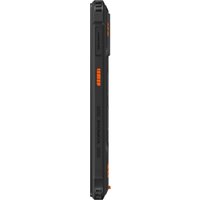
1 SIM and Micro SD holder
2 Multifunction key
3 Volume keys
4 ON/OFF key
5 USB Type-C connector
SIM and Micro SD
Turn off the device. Extract the SIM holder, insert 1 or 2 nano SIM and 1 Micro SD.
Turn on turn off the device
Press and hold the ON/OFF key.
Turn the screen on and off
Press the ON/OFF key.
Screen unlock
Touch the screen and swipe up.
Forced restart
If the device freezes and does not respond, press and hold the ON/OFF key for more than 5 seconds to restart it.
Multifunction button
The phone has an additional key. Select phone settings and "Smart Key" to configure it.
Notifications and Quick Settings panel
To open notifications swipe downwards on the top left of the screen, for quick settings swipe downwards on the top right of the screen.
Battery
The phone has a built-in battery, do not try to open it and replace the battery but contact specialized technical assistance personnel.
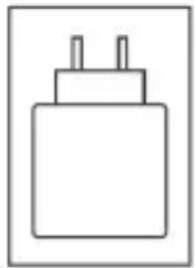
Battery charger
natural_image
Simple line drawing of a rectangular electronic component with two leads (no text or symbols)
Use the included charger or a 10W charger for maximum charging speed.
Safety information
Read the following warnings, failure to comply with them may be dangerous or illegal.
- Switch off the phone when its use is prohibited or when it may cause interference and danger.
- Switch off the phone in hospitals and near medical equipment.
- Turn off the phone on the airplane. Mobile phones can cause interference with on-board instrumentation.
- Do not use the mobile phone while driving. In any case, comply with the road rules in force.
- Switch off the phone when refueling, near combustibles, explosive materials.
-
Maintain a minimum distance of 15 cm between the mobile phone and the pacemaker to avoid possible interference with the pacemaker. Do not carry your cell phone in a breast pocket.
-
The phone does not contain serviceable parts, do not open it. The phone is equipped with a built-in battery, do not try to replace it but contact specialized technical assistance personnel.
- Use only original batteries, chargers and accessories. The use of unauthorized accessories may cause damage to the phone and be dangerous.
- Never use damaged batteries and chargers.
- Do not short-circuit the battery.
- Do not use the phone to make calls while it is charging.
Health information
SAR
This smartphone is a radio transceiver and has been designed do not to exceed the limits for exposure to radio waves, as required by Directive 2014/53/EU.
Relevant regulations use the unit of measurement SAR Specific Absorption Rate. The SAR limit for mobile devices is 2.0 W/Kg. During testing, the highest value measured for this device was 0.653 W/Kg for the head and 1.589 W/Kg for the body.
Protect your hearing

Caution: To avoid possible hearing damage, do not listen to audio at high volume levels for extended periods of time. Also, be careful when holding the phone to your ear while using the loudspeaker.
Specifications
| Standard LTE Band | 1/3/7/8/20/28/38/40, P max 25.7dBmWCDMA Band 1/8, P max 25.7dBmGSM 900/1800 MHz, P max 35dBmBT P max 20dBmWiFi 2.4GHz/5GHz P max 20dBm |
| Charger Input 230 | Vac 50Hz,Output 5.0Vdc, 2.0A, 10.0W |
| Battery Li polymer | 3.85V, 5100 mAh |
| Connectorcharge / data /earphone | USB Type-C |
| Protection IP68 and drop 1.5m | |
| Size, Weight 172x | 80x11mm, 250g |
SIMPLIFIED EU DECLARATION OF CONFORMITY
Hereby, SAIET Telecomunicazioni Srl declares that the radio equipment type, LTE smartphone model STS650 is in compliance with Directive 2014/53/EU.
The full text of the EU declaration of conformity is available at the following internet address: www.saiet.it/uedocs
CE marking information

The CE marking is affixed to the product to express compliance with the relevant European harmonization legislation.
Restrictions or Requirements
Operation in the 5GHz band, in the frequency range 5150-5350 MHz is only allowed indoors, in the following countries:
 | AT BE BG CH CY | |||
| CZ DE DK EE EL ES | ||||
| FI FR HR HU IE IS | ||||
| IT LI LT LU LV MT | ||||
| NL NO PL PT RO SE | ||||
| SI SK TR UK(NI) |
Information on product disposal
With reference to Directive 2006/66/EC, concerning batteries, accumulators and related waste and to Directive 2012/19/EU, concerning the disposal of waste electrical and electronic equipment.

The crossed-out wheeled bin symbol on the device, battery and accumulator or on its packaging indicates that both the device and the batteries/accumulators contained therein must be collected separately from other waste at the end of their useful life. The user must, therefore, deliver the aforementioned products that have reached the end of their life to the appropriate differentiated collection centres, or return them to the retailer.
Adequate differentiated collection for the subsequent sending of the device and batteries/accumulators decommissioned for environmentally compatible recycling, treatment and disposal helps to avoid possible negative effects on the environment and health and favors the re-use and/or recycling of materials of which it is made. To remove the batteries/accumulators, refer to the relative paragraph in the manual. Illegal disposal of equipment, batteries and accumulators by the user involves the application of the sanctions referred to in current legislation.
3. Español
natural_image
Simple line drawing of a rectangular electronic component with two leads (no text or symbols)
natural_image
Simple line drawing of a rectangular electronic component with two leads (no text or symbols)
natural_image
Simple line drawing of a rectangular electronic component with two leads (no text or symbols)
- Do not use the mobile phone while driving. In any case, comply with the road rules in force.
- For more information
- Operational elements
- SIM and Micro SD
- Turn on turn off the device
- Turn the screen on and off
- Screen unlock
- Forced restart
- Multifunction button
- Notifications and Quick Settings panel
- Battery
- Battery charger
- Safety information
- Health information
- SAR
- Protect your hearing
- SIMPLIFIED EU DECLARATION OF CONFORMITY
- CE marking information
- Restrictions or Requirements
- Information on product disposal
- Español
Brand : Saiet
Model : Sicuro Smart STS650
Category : Telephone