ManualGo.com
K7519 - Faucet KOHLER - Free user manual and instructions
Find the device manual for free K7519 KOHLER in PDF.



Download the instructions for your Faucet in PDF format for free! Find your manual K7519 - KOHLER and take your electronic device back in hand. On this page are published all the documents necessary for the use of your device. K7519 by KOHLER.
USER MANUAL K7519 KOHLER
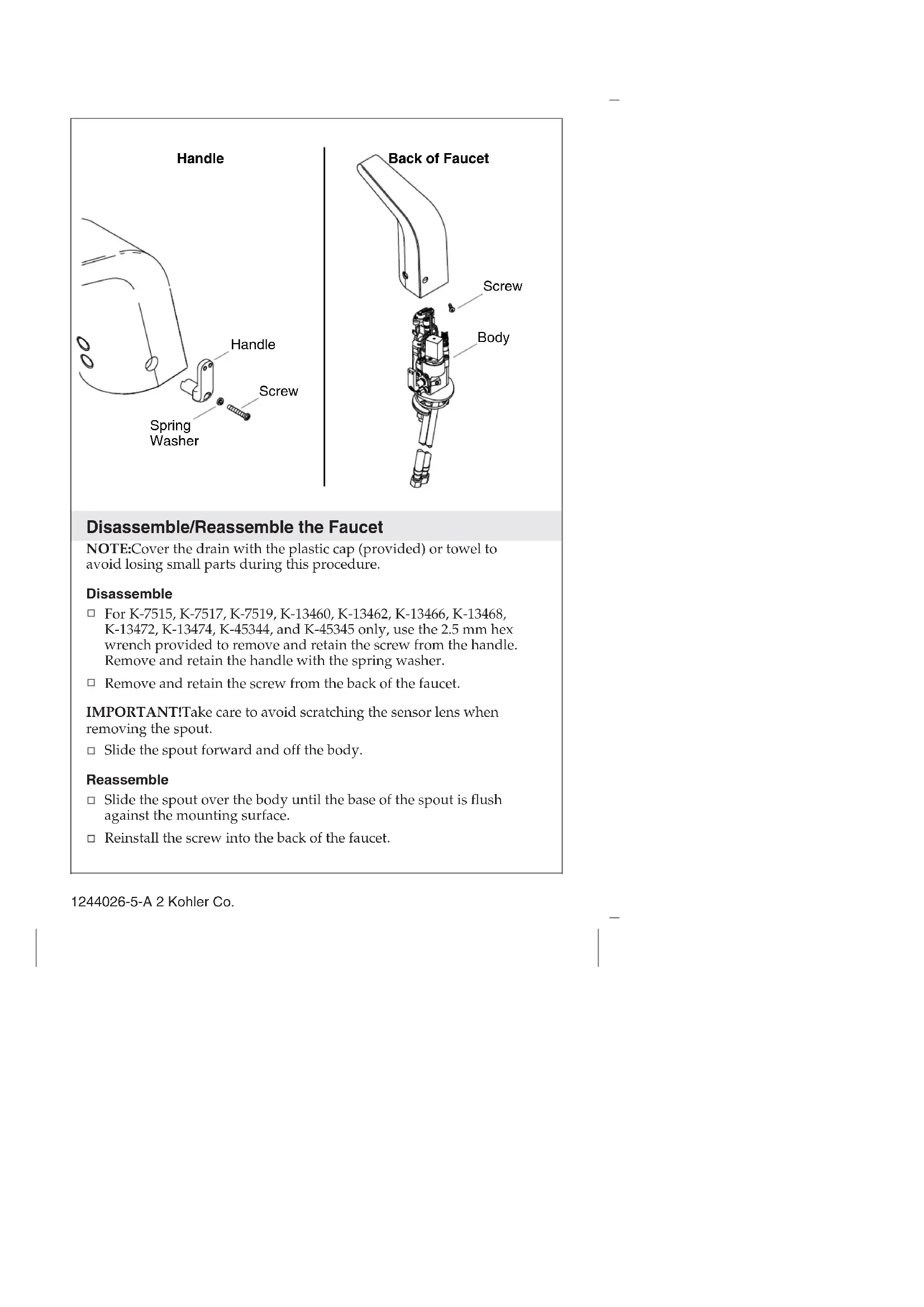
Homeowners Guide Bathroom Sink Faucet K-7514, K-7515, K-7516, K-7517, K-7518, K-7519, K-13460, K-13461, K-13462, K-13463, K-13466, K-13467, K-13468, K-13469, K-13472, K-13473, K-13474, K-13475, K-45344, K-45345 M product numbers are for Mexico (i.e. K-12345M) Los números de productos seguidos de M corresponden a México (e.j. K-12345M) Français, page “Français-1” Español, pagina “Español-1” 1244026-5-ADisassemble/Reassemble the Faucet NOTE: Cover the drain with the plastic cap (provided) or towel to avoid losing small parts during this procedure. Disassemble For K-7515, K-7517, K-7519, K-13460, K-13462, K-13466, K-13468, K-13472, K-13474, K-45344, and K-45345 only, use the 2.5 mm hex wrench provided to remove and retain the screw from the handle. Remove and retain the handle with the spring washer. Remove and retain the screw from the back of the faucet. IMPORTANT! Take care to avoid scratching the sensor lens when removing the spout. Slide the spout forward and off the body. Reassemble Slide the spout over the body until the base of the spout is flush against the mounting surface. Reinstall the screw into the back of the faucet. Handle Spring Washer Screw Handle Body Screw Back of Faucet 1244026-5-A 2 Kohler Co.Disassemble/Reassemble the Faucet (cont.) For K-7515, K-7517, K-7519, K-13460, K-13462, K-13466, K-13468, K-13472, K-13474, K-45344, and K-45345 only, reinsert the handle with spring washer into the faucet. Reinstall the screw to secure the handle to the faucet. If the Hybrid Energy Cell (HEC) has just been replaced, wait approximately 2 minutes to allow the faucet to cycle through the automatic sensing distance. If the power was interrupted, wait approximately 2 minutes to allow the faucet to cycle through the automatic sensing distance. Kohler Co. 3 1244026-5-ARemoving the Vandal Resistant Plug NOTE: Disassemble the faucet following the steps in the ″Disassemble/Reassemble the Faucet″ section. From inside the faucet body, use a screwdriver to pop out the vandal-resistant plug button. If you are adjusting the temperature, go to the ″Temperature Limiting Adjustment″ section and follow the instructions. If you are installing the handle assembly, refer to the illustration in the ″Temperature Limiting Adjustment″ section. Position the plug button and firmly press into place. Vandal-Resistant Plug Button 1244026-5-A 4 Kohler Co.Temperature Limit Adjustment CAUTION: Risk of personal injury. Scalding may result if the temperature limit is not properly set. NOTE: The water temperature does not need to be adjusted if the water temperature is below 105°F (41°C). NOTE: Use a thermometer rated for 120°F (49°C) or greater. NOTE: When using a tempered water supply, install the vandal-resistant plug button. Adjust the Water Temperature Limit – Handle Installations Turn on the water and adjust to full hot by turning the handle toward the back of the faucet until it stops. Determine the water temperature using a thermometer. If the temperature exceeds 105°F (41°C), complete the following steps. NOTICE: Do not rotate the handle when removing the screw. Using the 2.5 mm hex wrench provided, remove and retain the handle screw. Remove and retain the handle with the spring washer. Handle Screw Vandal-Resistant Plug Button Spring Washer Kohler Co. 5 1244026-5-ATemperature Limit Adjustment (cont.) Insert the handle at the desired maximum temperature. If the handle is inserted horizontally: This is the maximum hot temperature, where the water will be the same temperature as the water from the hot water supply. If the handle is inserted vertically (shown): This is the lowest cold temperature, where the water will be the same temperature as the water from the cold water supply. NOTICE: Do not rotate the handle when reinstalling the screw. Reinstall the spring washer into the handle, then attach the handle to the faucet. Secure the handle to the faucet with the screw. Adjust the Water Temperature Limit – Vandal-Resistant Installations NOTE: Save the handle to adjust the water temperature at a later date. Using the handle, adjust the water to the desired temperature. Using the 2.5 mm hex wrench provided, remove and retain the screw, spring washer, and handle. Position the vandal-resistant plug button and firmly press into place. 1244026-5-A 6 Kohler Co.Service the Battery Applies to K-13460, K-13461, K-13466, K-13467, K-13472, and K-13473. Disassemble the faucet to access the battery case. Refer to the ″Disassemble/Reassemble the Faucet″ section. Using a small torx screwdriver, remove and retain the two screws from the battery case cover. Insert two AAA Alkaline batteries (not provided) into the battery case. Reinstall the two screws into the battery case. Reassemble the faucet. Wait approximately 2 minutes to allow the faucet to cycle through the automatic sensing distance before use. Battery Case Battery Cover Screws AAA Alkaline batteries Kohler Co. 7 1244026-5-ARemove Aerator Using the key provided, remove the aerator from the spout. If applicable, uncover the drain. Turn on the water supply and check for leaks. Allow the water to run through the spout for about 1 minute to remove any debris. Check for leaks and adjust as needed. Temporarily cover the sensors on the faucet or close the water supplies. Using the key provided, reinstall the aerator to the spout. Uncover the sensors on the faucet or turn on the water supplies. Care and Cleaning For best results, keep the following in mind when caring for your KOHLER product:
Use a mild detergent such as liquid dishwashing soap and warm water for cleaning. Do not use abrasive cleaners that may scratch or dull the surface.
Carefully read the cleaner product label to ensure the cleaner is safe for use on the material.
Always test your cleaning solution on an inconspicuous area before applying to the entire surface. Aerator Key 1244026-5-A 8 Kohler Co.Care and Cleaning (cont.)
Do not allow cleaners to sit or soak on the surface.
Wipe surfaces clean and rinse completely with water immediately after cleaner application. Rinse and dry any overspray that lands on nearby surfaces.
Use a soft, dampened sponge or cloth. Never use an abrasive material such as a brush or scouring pad to clean surfaces. For detailed cleaning information and products to consider, visit www.kohler.com/clean. To order Care & Cleaning information, call 1-800-456-4537. Warranty KOHLER
Electronic Faucets, Valves and Controls
FIVE-YEAR LIMITED WARRANTY
Kohler Co. warrants that its electronic faucets, valves and controls will be free of defects in material and workmanship during normal residential use for five years from the date the product is installed. This warranty applies only to electronic faucets, valves and controls installed in the United States of America, Canada and Mexico (″North America″). If a defect is found in normal residential use, Kohler Co. will, at its election, repair, provide a replacement part or product, or make appropriate adjustment where Kohler Co.’s inspection discloses any such defect. Damage caused by accident, misuse, or abuse is not covered by this warranty. Improper care and cleaning will void the warranty*. Proof of purchase (original sales receipt) must be provided to Kohler Co. with all warranty claims. Kohler Co. is not responsible for labor charges, installation, or other incidental or consequential costs other than those noted above. In no event shall the liability of Kohler Co. exceed the purchase price of the faucet, valve or control. If the electronic faucets, valves or controls are used commercially or are installed outside of North America, Kohler Co. warrants that the faucet, valve or control will be free from defects in material and workmanship for one (1) year from the date the product is installed, with all other terms of this warranty applying except duration. If you believe that you have a warranty claim, contact your Home Center, Dealer, Plumbing Contractor or E-tailer. Please be sure to provide all pertinent information regarding your claim, including a complete description of the problem, the product, model number, the date the product was purchased, from whom the product was purchased and the installation date. Also include your original invoice. Kohler Co. 9 1244026-5-AWarranty (cont.) For other information, or to obtain the name and address of the service and repair facility nearest you, write Kohler Co., Attn: Customer Care Center, Kohler, Wisconsin 53044 USA, or by calling 1-800-4-KOHLER (1-800-456-4537) from within the USA and Canada, and 001-800-456-4537 from within Mexico, or visit www.kohler.com within the USA, www.ca.kohler.com from within Canada, or www.mx.kohler.com in Mexico. THE FOREGOING WARRANTIES ARE IN LIEU OF ALL OTHER WARRANTIES, EXPRESS OR IMPLIED, INCLUDING BUT NOT
PURPOSE. KOHLER CO. AND/OR SELLER DISCLAIM ANY LIABILITY FOR SPECIAL, INCIDENTAL OR CONSEQUENTIAL DAMAGES. Some states/provinces do not allow limitations on how long an implied warranty lasts or the exclusion or limitation of such damages, so these limitations and exclusions may not apply to you. This warranty gives the consumer specific legal rights. You may also have other rights that vary from state/province to state/province. This warranty is to the original consumer purchaser only, and excludes product damage due to installation error, product abuse, or product misuse, whether performed by a contractor, service company, or the consumer. This is Kohler Co.’s exclusive written warranty. *Never use cleaners containing abrasive cleansers, ammonia, bleach, acids, waxes, alcohol, solvents or other products not recommended for chrome. This will void the warranty. Troubleshooting Symptoms Probable Causes Recommended Action
immediately after installation. A. Water is not turned on or the water pressure is low. A. Verify that the water supply is turned on and that pressure is at least 20 psi (137 kPa). B. Power is not connected or batteries are incorrectly installed. B. Plug in the power supply or check the batteries for correct installation. 1244026-5-A 10 Kohler Co.Troubleshooting (cont.) Symptoms Probable Causes Recommended Action C. Incorrect installation. C. Verify that the faucet is mounted as instructed in the installation guide. Ensure that the sensor eyes are above the rim of the sink. Refer to the installation instructions.
2. No water flow. A. Filter is plugged. A. Turn off the water.
Disconnect the fittings from the flex hoses. Remove and clean the filter screens. B. Sensor eyes are dirty. B. Wipe the sensor eyes with a damp soft cloth. Wipe dry with a dry soft cloth. C. The aerator is plugged. C. Remove and clean the aerator. For calcium/mineral deposits, soak the plastic insert in a 50:50 mix of water and vinegar. Soak only the plastic insert. D. Sensor eyes are scratched. D. Replace the sensor assembly. E. A flex hose is kinked. E. Check the flex hoses to make certain they are not kinked. If a flex hose is kinked, disconnect it, straighten, and reconnect. F. Power was interrupted, batteries were replaced, or Hybrid Energy Cell (HEC) has just been replaced. F. Wait 2 minutes after the power is restored as the sensor cycles through the automatic sensing distance. G. HEC or battery life is expired. G. Replace the HEC, power supply, or batteries (two standard AAA batteries and 1.5V alkaline battery). Kohler Co. 11 1244026-5-ATroubleshooting (cont.) Symptoms Probable Causes Recommended Action H. Bleed hole in the diaphragm is plugged or debris exists on the seal. H. Remove the spout body. Clean or replace the diaphragm.
I. Wires are pinched
damage. Verify the wires are tucked inside the spout. Replace the assembly with damaged wires if needed. J. There is a loose connection. J. Check the solenoid and sensor connections. Confirm the arrows are aligned and connections are secure. K. There is water leaking internally. K. Determine the cause of the leak. Check for corrosion on connections. Inspect the valve O-ring for damage. Replace if needed. Clean the terminals. Replace damaged parts. L. Solenoid is not working. L. Install a new solenoid service kit.
3. Low flow. A. Filter is plugged. A. Clean or replace the
filters. B. Supply pressure is low. B. Check incoming water pressure. Pressure should be at least 20 psi (137 kPa). C. Aerator is plugged. C. Remove the aerator and clean it. For calcium/mineral deposits, soak the aerator plastic insert in a 50:50 mixture of vinegar and water. Soak only the insert and no other components. 1244026-5-A 12 Kohler Co.Troubleshooting (cont.) Symptoms Probable Causes Recommended Action
4. There is no power
to the faucet. A. Ground Fault Circuit Interrupter (GFCI) or Residual Current Device (RCD) is tripped. A. Reset the GFCI or RCD. B. The AC power is not plugged in. B1. The AC power is not connected. Connect the AC power. B2. Measure the voltage. There should be 5V at 1.2A. If there is no power or insufficient power replace the AC unit. C. HEC or batteries are dead. C. Replace the HEC or batteries (two standard AAA batteries and 1.5V alkaline battery).
flow. A. Filter is plugged. A. Clean or replace the filters. B. HEC or batteries are dead. B. Replace the HEC or batteries (two standard AAA batteries and 1.5V alkaline battery). C. The AC power source is unstable, off, or a circuit is tripped. C. Disconnect and reconnect the power. Wait 2 minutes after the power is restored as the sensor cycles through the automatic sensing distance. D. Diaphragm seal is damaged or dirty. D. If the diaphragm is cut or torn, order a new diaphragm assembly. Clean or replace the diaphragm. E. Solenoid is plugged or is not working. E. Remove debris from the solenoid or install a new solenoid assembly. Kohler Co. 13 1244026-5-ATroubleshooting (cont.) Symptoms Probable Causes Recommended Action
flow. A. The faucet is angled incorrectly to deck or misaligned with user area. A. Verify that the faucet is mounted according to the installation instructions. Ensure that the faucet is installed in a position that is above the rim of the sink. B. The wires are pinched or damaged. B. Remove the spout and verify that the wires are tucked inside the spout before reassembling.
onto the deck. A. The valve O-ring is missing, cut, or damaged. A. Replace the O-ring.
once approximately every 2 seconds. The product continues to operate. A. The HEC, batteries, or voltage is low. A. Replace the HEC, power supply, or batteries (two standard AAA batteries and 1.5V alkaline battery).