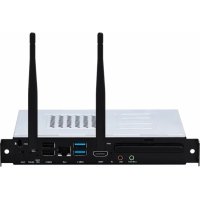
VPC12WPO - Desktop computer VIEWSONIC - Free user manual and instructions
Find the device manual for free VPC12WPO VIEWSONIC in PDF.



| Product Type | Mini PC (OPS module) |
| Brand | Viewsonic |
| Model | VPC12WPO |
| Dimensions (L x W x H) | 180 x 119 x 30 mm |
| Weight | 0.84 kg |
| Power Supply | 12 V DC, 5.0 A |
| Power Consumption | 60 W |
| Video Connectivity | 1 x HDMI |
| Network Connectivity | 1 x LAN (RJ45) |
| USB Connectivity | 2 x USB 3.0, 2 x USB 2.0 |
| Audio Connectivity | 1 x Line out, 1 x Microphone |
| Other Connections | 1 x Infrared (IR) |
| Wireless | Wi-Fi (2.4 GHz / 5 GHz) and Bluetooth 4.2 |
| Main Functions | Intel Unite® solution for presentations, annotation, sharing |
| Operating Conditions | Temperature: -5 °C to 45 °C, humidity: 10% to 90% non-condensing |
| Storage Conditions | Temperature: -20 °C to 70 °C, humidity: 10% to 90% non-condensing |
| Maintenance and Cleaning | Clean with a soft, dry cloth. Do not use solvents. |
| Safety | Do not open the housing. Disconnect before cleaning. |
| Spare Parts and Repairability | Contact Viewsonic support for any repairs. |
Frequently Asked Questions - VPC12WPO VIEWSONIC
User questions about VPC12WPO VIEWSONIC
0 question about this device. Answer the ones you know or ask your own.
Ask a new question about this device
Download the instructions for your Desktop computer in PDF format for free! Find your manual VPC12WPO - VIEWSONIC and take your electronic device back in hand. On this page are published all the documents necessary for the use of your device. VPC12WPO by VIEWSONIC.
USER MANUAL VPC12WPO VIEWSONIC
http://www.viewsonic.com/support/

中国
http://www.viewsonic.com.cn
电话:4008 988 588
香港
http://www.hk.viewsonic.com
電話:852 3102 2900
澳門
http://www.hk.viewsonic.com
電話:853 2833 8407
台灣
http://www.viewsonic.com.tw
電話:0800 899 880
한국
http://ap.viewsonic.com/kr/
Tel: 080 333 2131
Singapore/Malaysia/Thailand
http://www.viewsonic.com.sg
Tel: 65 6461 6044
India
http://www.in.viewsonic.com
Tel: 1800-419-0959
United States
http://www.viewsonic.com
Tel: 1-800-688-6688
Canada
http://www.viewsonic.com
Tel: 1-866-463-4775
Europe
http://www.viewsoniceurope.com
Australia/New Zealand
http://www.viewsonic.com.au
Tel: 1800 880 818 (AUS)
0800 008 822 (NZ)
South Africa
http://ap.viewsonic.com/za/
Latin America
http://www.viewsonic.com/la/
Chile
Tel: 1230-020-7975
Mexico
Tel: 001-8882328722
Peru
Tel: 0800-54565
Argentina
Tel: 0800-4441185
Puerto Rico & Virgin Islands
http://www.viewsonic.com
Tel: 1-800-688-6688 (English)
1-866-379-1304 (Español)
VPC12-WPO Rev. 1c 07-16-19. Model No. VS17041
Copyright © 2019 ViewSonic Corporation. All rights reserved.

ViewSonic
VPC12-WPO
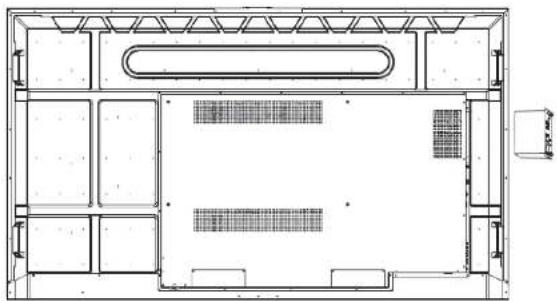
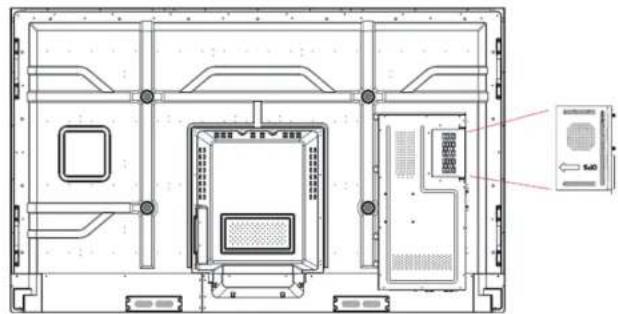
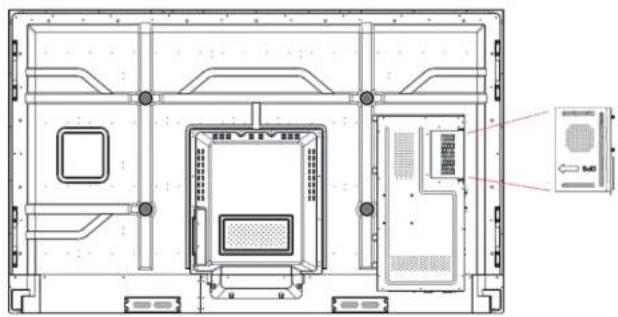
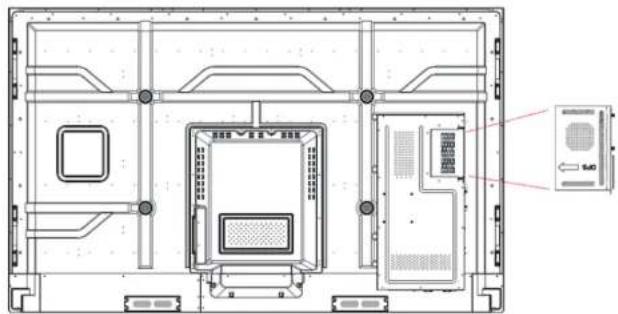
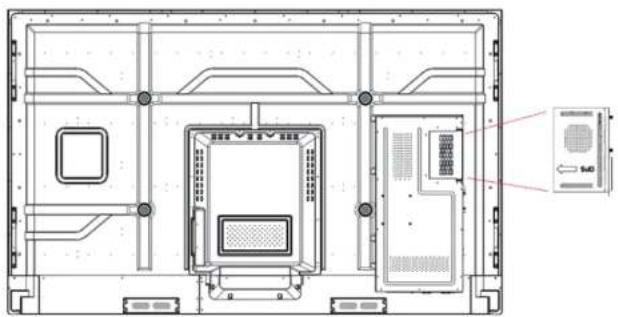
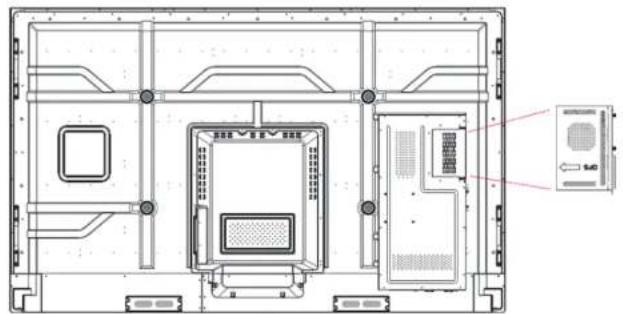
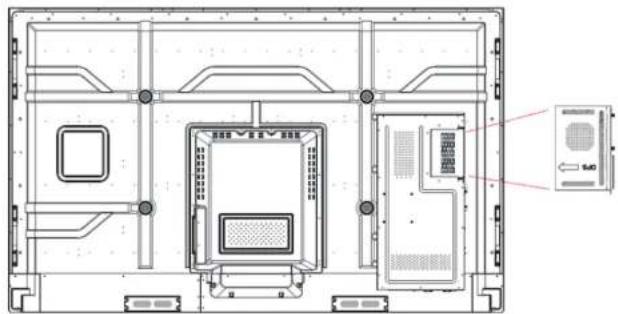
Slot in PC module
Quick Start Guide

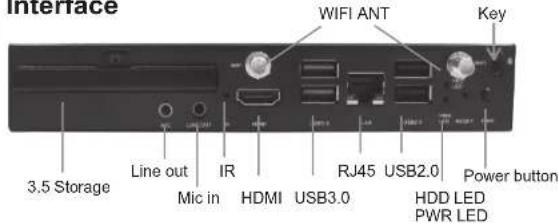
Interface

Installation
CDE7500 / IFP7500
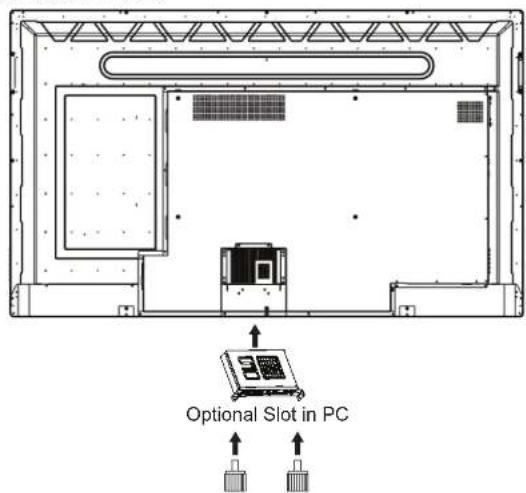
CDE8600 / CDE9800
natural_image
Architectural floor plan showing room layouts and structural elements (no text or labels)IFP6560 / IFP7560 / IFP6530 / IFP7530
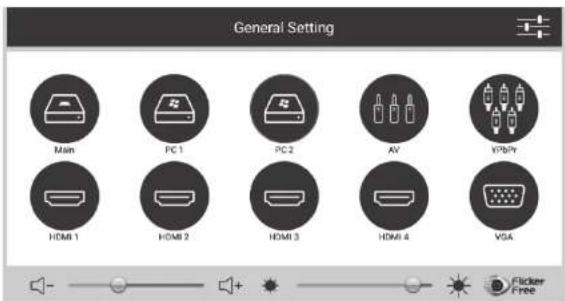
3 Input Selection
CDE7500 / IFP7500 / CDE8600
Select PC1 on the General Setting
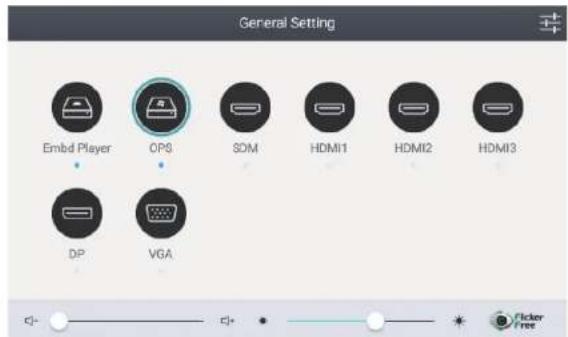
IFP6560 / IFP7560 / IFP6530 / IFP7530
Select OPS from general setting
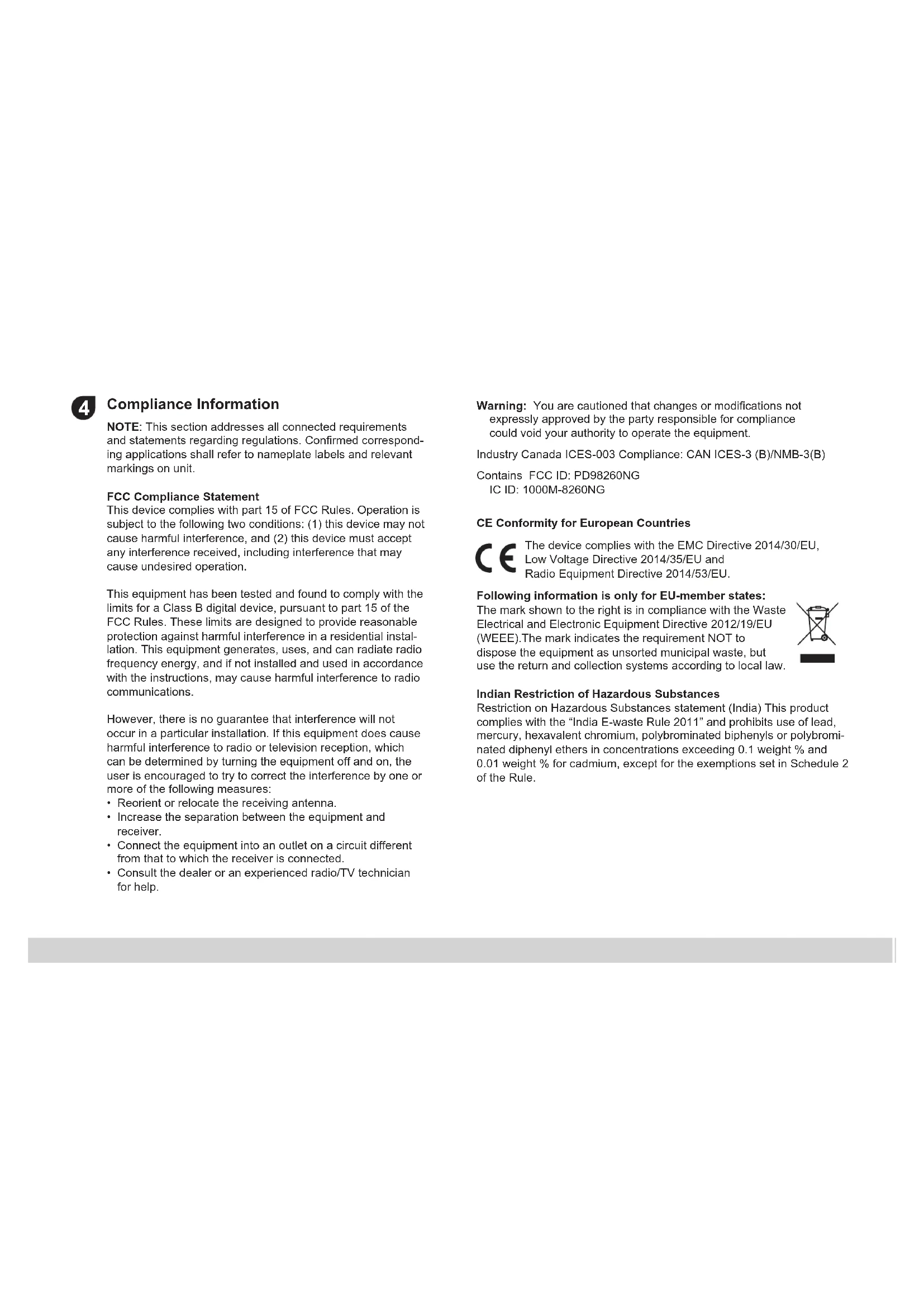
4 Compliance Information
NOTE: This section addresses all connected requirements and statements regarding regulations. Confirmed corresponding applications shall refer to nameplate labels and relevant markings on unit.
FCC Compliance Statement
This device complies with part 15 of FCC Rules. Operation is subject to the following two conditions: (1) this device may not cause harmful interference, and (2) this device must accept any interference received, including interference that may cause undesired operation.
This equipment has been tested and found to comply with the limits for a Class B digital device, pursuant to part 15 of the FCC Rules. These limits are designed to provide reasonable protection against harmful interference in a residential installation. This equipment generates, uses, and can radiate radio frequency energy, and if not installed and used in accordance with the instructions, may cause harmful interference to radio communications.
However, there is no guarantee that interference will not occur in a particular installation. If this equipment does cause harmful interference to radio or television reception, which can be determined by turning the equipment off and on, the user is encouraged to try to correct the interference by one or more of the following measures:
- Reorient or relocate the receiving antenna.
- Increase the separation between the equipment and receiver.
- Connect the equipment into an outlet on a circuit different from that to which the receiver is connected.
- Consult the dealer or an experienced radio/TV technician for help.
Warning: You are cautioned that changes or modifications not expressly approved by the party responsible for compliance could void your authority to operate the equipment.
Industry Canada ICES-003 Compliance: CAN ICES-3 (B)/NMB-3(B)
Contains FCC ID: PD98260NG
IC ID: 1000M-8260NG
CE Conformity for European Countries
CE The device complies with the EMC Directive 2014/30/EU, Low Voltage Directive 2014/35/EU and Radio Equipment Directive 2014/53/EU.
Following information is only for EU-member states:
The mark shown to the right is in compliance with the Waste Electrical and Electronic Equipment Directive 2012/19/EU (WEEE). The mark indicates the requirement NOT to dispose the equipment as unsorted municipal waste, but use the return and collection systems according to local law.

Indian Restriction of Hazardous Substances
Restriction on Hazardous Substances statement (India) This product complies with the "India E-waste Rule 2011" and prohibits use of lead, mercury, hexavalent chromium, polybrominated biphenyls or polybrominated diphenyl ethers in concentrations exceeding 0.1 weight % and 0.01 weight % for cadmium, except for the exemptions set in Schedule 2 of the Rule.
Declaration of RoHS2 Compliance
This product has been designed and manufactured in compliance with Directive 2011/65/EU of the European Parliament and the Council on restriction of the use of certain hazardous substances in electrical and electronic equipment (RoHS2 Directive) and is deemed to comply with the maximum concentration values issued by the European Technical Adaptation Committee (TAC) as shown below:
| Substance | Proposed Maximum Concentration | Actual Concentration |
| Lead (Pb) 0.1% < 0.1% | ||
| Mercury (Hg) 0.1% < 0.1% | ||
| Cadmium (Cd) 0.01% < 0.01% | ||
| Hexavalent Chromium ( Cr^8+ ) 0.1% < 0.1% | ||
| Polybrominated biphenyls (PBB) 0.1% < 0.1% | ||
| Polybrominated diphenyl ethers (PBDE) 0.1% < 0.1% |
**Certain components of products as stated above are exempted under the Annex III of the RoHS2 Directives as noted below:
Examples of exempted components are:
- Lead in glass of cathode ray tubes
- Lead in glass of fluorescent tubes not exceeding 0.2% by weight
- Lead as an alloying element in aluminium containing up to 0.4% lead by weight
- Copper alloy containing up to 4% lead by weight
- Lead in high melting temperature type solders (i.e. lead-based alloys containing 85% by weight or more lead)
- Electrical and electronic components containing lead in a glass or ceramic other than dielectric ceramic in capacitors, e.g. piezoelectronic devices, or in a glass or ceramic matrix compound.
- Lead as an alloying element in steel for machining purposes and in galvanized steel containing up to 0.35% lead by weight.
- Lead in dielectric ceramic in capacitors for a rated voltage of 125V AC or 250V DC or higher.
- Cadmium and its compounds in electrical contacts.
EU Regulation (EC) No 1907/2006 (REACH) Compliance:
The substance(s) listed below may be contained in the products above the threshold level of 0.1%(w/w) by weight of the listed article.
| Substance | CAS no. | Where use in article |
| 1, 2-dimethoxyethane, ethylene glycol dimethyl ether (EGDME) | 110-71-4 | cell |
5 Specifications
| IO ports | 1 x HDMI1 x LAN2 x USB 3.0, 2 x USB 2.01 x Line out1 x Microphone1 x IR | |
| Rating 12V 5.0A | == | |
| Operation Conditions | Temperature Humidity Altitude | 23°F to 113°F (-5°C to 45°C)10% ~ 90% non-condensing0 meter to +2000 meters above sea level |
| Storage Conditions | Temperature Humidity Altitude | -4°F to 158°F (-20°C to 70°C)10% ~ 90% non-condensing0 meter to +2000 meters above sea level |
| Dimensions Physical(mm) 180 x 119 x 30 | ||
| Weight | Physical(kg) | 0.84 |
| Power consumption | 60W | |
| Frequency Range and Output Power (Max.) | 2402 to 2480 MHz(BT) 2.0 dBm2402 to 2480 MHz(LE) 3.73 dBm2412 to 2472 MHz 17.41 dBm5150 to 5250 MHz 18.94 dBm5250 to 5350 MHz 18.94 dBm5470 to 5725 MHz 18.94 dBm | |

Using the Intel Unite ^3 Solution
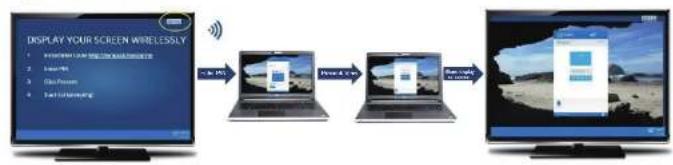
flowchart
graph LR
    A["Display your screen wirelessly"] --> B["Laptop"]
    B --> C["USB Port"]
    C --> D["TV Output"]
Launch, Connect and Present with the Intel Unite Solution in 3 steps
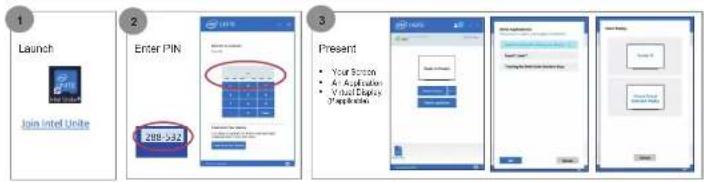
View Presentation on your Device
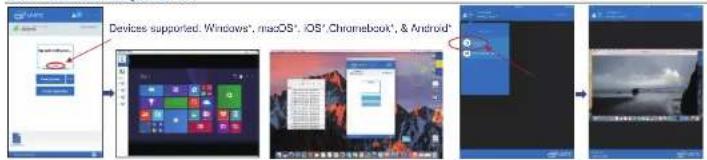
flowchart
graph TD
    A["Devices supported: Windows', macOS', iOS' Chromebook', & Android'"] --> B["Device 1: Windows"]
    B --> C["Desktop Setup"]
    C --> D["Chromebook Interface"]
    D --> E["UI Interface"]
But all these are expected on the world this book shows of the first United
Lock a Meeting
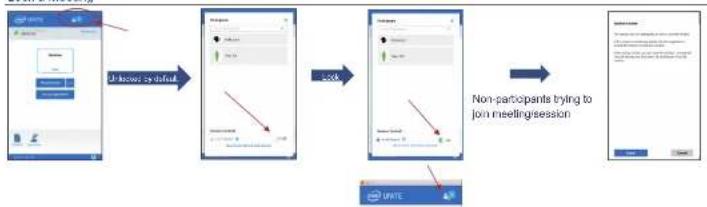
flowchart
graph LR
    A["Initial Setup"] --> B{Initial Setup is default}
    B --> C["Lock"]
    C --> D["Non-participants trying to join meeting session"]
    D --> E["Final Setup"]
Copyright © and Corporation, 2017. 6 Rights reserved. *Other names and brands may be claimed as the property of others.
Play a Video with Audio Support Take Over a Presentation
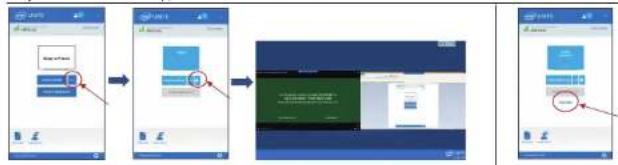
flowchart
graph LR
    A["User login"] --> B["Login form submission"]
    B --> C["Form submission with status bar"]
    C --> D["Form completion with status bar and header icon"]
    D --> E["User login with status bar and header icon"]
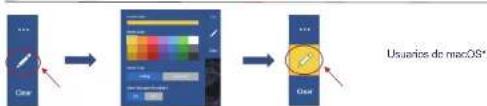
Annotate on Presentations
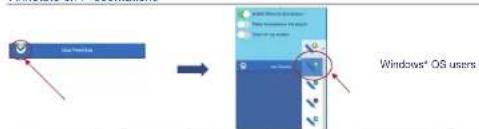
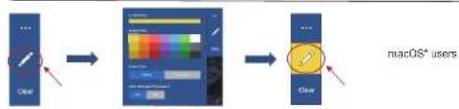
flowchart
graph LR
    A["Clear"] --> B["Color palette adjustment"]
    B --> C["MacOS* users"]
Share Files with other Participants
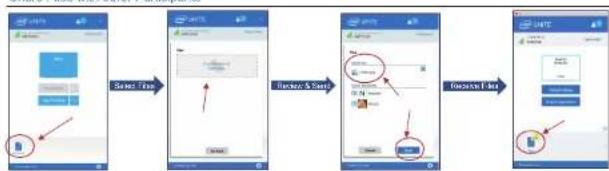
flowchart
graph LR
    A["Start"] --> B["Search Time"]
    B --> C["Browse & Start"]
    C --> D["Purchase Time"]
    D --> E["End"]
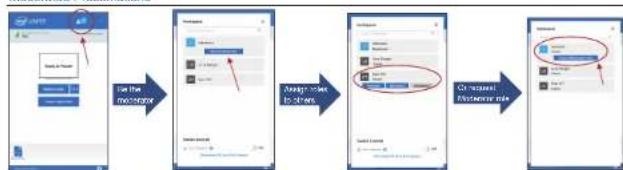
Moderated Presentations
flowchart
graph LR
    A["Input Image"] --> B["Add Data"]
    B --> C{Data Input: 3D}
    C -->|Yes| D["Output Image"]
    C -->|No| E["Add Data"]
    E --> F["Output Image"]
    style A fill:#f9f,stroke:#333
    style F fill:#bbf,stroke:#333
The Moderated sessions feature must be enabled by your system administrator. The "Self Promote model is shown above.
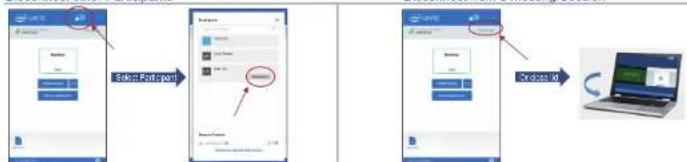
Disconnect other Participants
flowchart
graph LR
    A["Login App"] --> B["Login System"]
    B --> C["Download System"]
    C --> D["Download System"]
    D --> E["Download System"]



http://www.viewsonic.com/support/

中国
http://www.viewsonic.com.cn
电话:4008 988 588
香港
http://www.hk.viewsonic.com
電話:852 3102 2900
澳門
http://www.hk.viewsonic.com
電話:853 2833 8407
台灣
http://www.viewsonic.com.tw
電話:0800 899 880
한국
http://ap.viewsonic.com/kr/
Tel: 080 333 2131
Singapore/Malaysia/Thailand
http://www.viewsonic.com.sg
Tel: 65 6461 6044
India
http://www.in.viewsonic.com
Tel: 1800-419-0959
United States
http://www.viewsonic.com
Tel: 1-800-688-6688
Canada
http://www.viewsonic.com
Tel: 1-866-463-4775
Europe
http://www.viewsoniceurope.com
Australia/New Zealand
http://www.viewsonic.com.au
Tel: 1800 880 818 (AUS)
0800 008 822 (NZ)
South Africa
http://ap.viewsonic.com/za/
Latin America
http://www.viewsonic.com/la/
Chile
Tel: 1230-020-7975
Mexico
Tel: 001-8882328722
Peru
Tel: 0800-54565
Argentina
Tel: 0800-4441185
Puerto Rico & Virgin Islands
http://www.viewsonic.com
Tel: 1-800-688-6688 (English)
1-866-379-1304 (Español)
VPC12-WPO Rev. 1c 07-16-19. Modellnummer: VS17041
Copyright © 2019 ViewSonic Corporation. All rights reserved.

VPC12-WPO
Einsteck-PC-Modul
natural_image
Architectural floor plan showing room layouts and structural elements (no text or labels)IFP6560 / IFP7560 / IFP6530 / IFP7530
natural_image
Technical line drawing of a device interior layout with labeled components (no readable text or symbols)3 Eingangsauswahl
CDE7500 / IFP7500 / CDE8600
flowchart
graph LR
    A["DISPLAY YOUR SCREEN WIRELESSLY"] --> B["Laptop with UI elements"]
    B --> C["Laptop with TV output"]
    C --> D["TV output"]
flowchart
graph LR
    A["User Input"] --> B["User Selection"]
    B --> C["User Output"]
    C --> D["User Selection"]
    D --> E["User Output"]



http://www.viewsonic.com/support/

中国
http://www.viewsonic.com.cn
电话:4008 988 588
香港
http://www.hk.viewsonic.com
電話:852 3102 2900
澳門
http://www.hk.viewsonic.com
電話:853 2833 8407
台灣
http://www.viewsonic.com.tw
電話:0800 899 880
한국
http://ap.viewsonic.com/kr/
Tel: 080 333 2131
Singapore/Malaysia/Thailand
http://www.viewsonic.com.sg
Tel: 65 6461 6044
India
http://www.in.viewsonic.com
Tel: 1800-419-0959
United States
http://www.viewsonic.com
Tel: 1-800-688-6688
Canada
http://www.viewsonic.com
Tel: 1-866-463-4775
Europe
http://www.viewsoniceurope.com
Australia/New Zealand
http://www.viewsonic.com.au
Tel: 1800 880 818 (AUS)
0800 008 822 (NZ)
South Africa
http://ap.viewsonic.com/za/
Latin America
http://www.viewsonic.com/la/
Chile
Tel: 1230-020-7975
Mexico
Tel: 001-8882328722
Peru
Tel: 0800-54565
Argentina
Tel: 0800-4441185
Puerto Rico & Virgin Islands
http://www.viewsonic.com
Tel: 1-800-688-6688 (English)
1-866-379-1304 (Español)
VPC12-WPO Rev. 1c 07-16-19. Número de modelo: VS17041
Copyright © 2019 ViewSonic Corporation. All rights reserved.

ViewSonic
VPC12-WPO
natural_image
Technical line drawing of a mechanical or electronic device interior with no visible text, numbers, or symbols.natural_image
Architectural floor plan showing room layouts and structural elements (no text or labels)IFP6560 / IFP7560 / IFP6530 / IFP7530
flowchart
graph LR
    A["Display Your Screen Wirelessly"] --> B["Laptop with 2D icon"]
    B --> C["Laptop with 3D icon"]
    C --> D["Laptop with 1D icon"]
flowchart
graph LR
    A["User login"] --> B["Product packaging"]
    B --> C["Final packaging with red arrow indicating completion"]
flowchart
graph LR
    A["Color Picker"] --> B["User Interface"]
    B --> C["User Interaction with Timer"]
    C --> D["User Interaction with Timer"]
    D --> E["User Interaction with Timer"]
    style A fill:#f9f,stroke:#333
    style E fill:#bbf,stroke:#333
Australia/New Zealand
http://www.viewsonic.com.au
Tel: 1800 880 818 (AUS)
0800 008 822 (NZ)
South Africa
http://ap.viewsonic.com/za/
Latin America
http://www.viewsonic.com/la/
Chile
Tel: 1230-020-7975
Mexico
Tel: 001-8882328722
Peru
Tel: 0800-54565
Argentina
Tel: 0800-4441185
Puerto Rico & Virgin Islands
http://www.viewsonic.com
Tel: 1-800-688-6688 (English)
1-866-379-1304 (Español)
Copyright © 2019 ViewSonic Corporation. All rights reserved.

VPC12-WPO
Module PC enfichable
natural_image
Top-down architectural floor plan of a multi-room building with visible walls, doorways, and structural elements (no text or labels)IFP6560 / IFP7560 / IFP6530 / IFP7530

flowchart
graph LR
    A["DISPLAY YOUR SCREEN WIRELESSLY"] --> B["User Interface"]
    B --> C["Mobile Device"]
    C --> D["User Interface"]
    D --> E["TV Output"]
flowchart
graph LR
    A["Create new user accounts"] --> B["Add new user accounts with new accounts"]
    B --> C["Add new user accounts with new account"]
    C --> D["Final update with new user accounts"]
Australia/New Zealand
http://www.viewsonic.com.au
Tel: 1800 880 818 (AUS)
0800 008 822 (NZ)
South Africa
http://ap.viewsonic.com/za/
Latin America
http://www.viewsonic.com/la/
Chile
Tel: 1230-020-7975
Mexico
Tel: 001-8882328722
Peru
Tel: 0800-54565
Argentina
Tel: 0800-4441185
Puerto Rico & Virgin Islands
http://www.viewsonic.com
Tel: 1-800-688-6688 (English)
1-866-379-1304 (Español)
VPC12-WPO_Rev. 1c 07-16-19. Номер модели: VS17041
Copyright © 2019 ViewSonic Corporation. All rights reserved.

VPC12-WPO
natural_image
Technical line drawing of a device interior with labeled components and an inset image showing a device (no text or symbols present)natural_image
Architectural floor plan showing room layouts and structural elements (no text or labels)IFP6560 / IFP7560 / IFP6530 / IFP7530
3 Выбор входа
CDE7500 / IFP7500 / CDE8600

flowchart
graph LR
    A["Display your screen wirelessly"] --> B["Laptop with screen icon"]
    B --> C["Laptop with screen icon"]
    C --> D["TV output with screen icon"]
flowchart
graph LR
    A["Input Image"] --> B["User Interface"]
    B --> C["User Interface"]
    C --> D["User Interface"]
    D --> E["Output Image"]
Australia/New Zealand
http://www.viewsonic.com.au
Tel: 1800 880 818 (AUS)
0800 008 822 (NZ)
South Africa
http://ap.viewsonic.com/za/
Latin America
http://www.viewsonic.com/la/
Chile
Tel: 1230-020-7975
Mexico
Tel: 001-8882328722
Peru
Tel: 0800-54565
Argentina
Tel: 0800-4441185
Puerto Rico & Virgin Islands
http://www.viewsonic.com
Tel: 1-800-688-6688 (English)
1-866-379-1304 (Español)
VPC12-WPO_Rev. 1c 07-16-19. Model Numarası: VS17041
Copyright © 2019 ViewSonic Corporation. All rights reserved.

VPC12-WPO
natural_image
Architectural floor plan showing room layouts and structural elements (no text or labels)IFP6560 / IFP7560 / IFP6530 / IFP7530
3 Giriş Seçimi
CDE7500 / IFP7500 / CDE8600
flowchart
graph LR
    A["Start: User Interface"] --> B["Create a new UI component"]
    B --> C["Create a new UI component with buttons"]
    C --> D["End: Create a new UI component with buttons"]
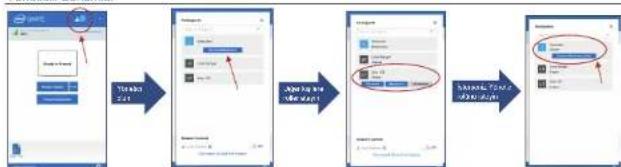
Yöneticili Sunumlar
flowchart
graph LR
    A["Start"] --> B["Initialization"]
    B --> C["Add file name and size"]
    C --> D["Final Output"]
    D --> E["Section 1: File name, size, width"]
    E --> F["Section 2: File name, size, width"]

- 中国
- 香港
- 澳門
- 台灣
- 한국
- Singapore/Malaysia/Thailand
- India
- United States
- Canada
- Europe
- Australia/New Zealand
- South Africa
- Latin America
- Chile
- Mexico
- Peru
- Argentina
- Puerto Rico & Virgin Islands
- Input Selection
- Compliance Information
- FCC Compliance Statement
- CE Conformity for European Countries
- Following information is only for EU-member states:
- Indian Restriction of Hazardous Substances
- Declaration of RoHS2 Compliance
- Specifications
- Eingangsauswahl
- VPC12-WPO
- Module PC enfichable
- Выбор входа
- Giriş Seçimi
Brand : VIEWSONIC
Model : VPC12WPO
Category : Desktop computer