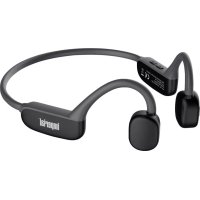
bluTC active 2 - Earplug Imperial - Free user manual and instructions
Find the device manual for free bluTC active 2 Imperial in PDF.



| Product type | Bluetooth bone conduction headset |
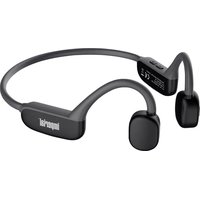
| Model | IMPERIAL bluTC active 2 |
| Bluetooth version | 5.3 |
| Power supply | Lithium battery 180 mAh, charging via USB-C (5V) |
| Bluetooth range | Up to 10 meters |
| Audio frequency | 20 Hz - 20 kHz |
| Impedance | 8 ohms |
| Sensitivity | 86 dB (±3 dB) |
| Internal memory | 32 GB (MP3 playback) |
| Microphone | Built-in for phone calls |
| Maintenance | Clean with a soft, dry cloth |
| Safety | Do not use while driving; keep volume at a moderate level |
| Package contents | Headset, USB-C cable, user manual |
| Spare parts | USB-C cable available |
| General information | CE marking, compliant with RoHS, RED, ErP directives |
Frequently Asked Questions - bluTC active 2 Imperial
User questions about bluTC active 2 Imperial
0 question about this device. Answer the ones you know or ask your own.
Ask a new question about this device
Download the instructions for your Earplug in PDF format for free! Find your manual bluTC active 2 - Imperial and take your electronic device back in hand. On this page are published all the documents necessary for the use of your device. bluTC active 2 by Imperial.
USER MANUAL bluTC active 2 Imperial
12. PROBLEEMOPISSING
Probleem Oplossing
12. PROBLEEMOPLOSSING
Probleem Oplossing
Bone Conduction Headphones

User manual
68
TABLE OF CONTENTS
- Foreword 70
2.SAFETYINSTRUCTIONS. 72
2.1 Explanation of Symbols 72
2.2 Intended Use 73
2.3 Safety Instructions 74
2.4 Cleaning the Device 79 - Package Contents 79
- Wearing the Headphones 80
- Device Overview 80
- Function Overview 81
- Bluetooth Function 82
- Automatic Bluetooth Connection 82
9.MP3 Player function 83 - Charging the Headphones 84
- LED Indicator 84
11.Troubleshooting 85 - Technical Specifications 86
13.Disposal. 87 - CE Marking 88
1. FOREWORD
Dear customer, thank you for choosing this product. Our product complies with legal requirements and has been manufactured under constant quality controls. The technical specifications are up to date at the time of printing.
Subject to change.
The warranty period for the device complies with the legal provisions at the time of purchase.
We also offer our telephone HOTLINE service with professional assistance.
In our service area, professional experts are available to answer any questions you may have regarding the products and provide tips on locating possible causes of errors.
Our technicians are available from Monday to Friday, from 8:00 am to 4:45 pm, at the following telephone number:
Technical Hotline:
+49 2676 / 95 20 101
or by email at: service@telestar.de
If the service hotline is unable to assist you, please send the device, preferably in its original packaging, but securely packaged for transport, to the following address:
1. FOREWORD
TELESTAR-DIGITALGmbH
Service Center
Please read these instructions carefully and keep them for future reference.
If you sell or pass on the device, please be sure to include this user manual.
2. SAFETY INSTRUCTIONS
2.1 Explanation of Symbols
SYMBOL MEANING
GB

Danger
This signal word indicates a high level of risk, where failure to heed the warning could result in death or serious injury.

WARNING!
This signal word indicates a moderate level of risk, where failure to heed the warning could result in death or serious injury.

CAUTION!
This signal word indicates a low level of risk, where failure to heed the warning could result in minor or moderate injury.

NOTE!
This signal word warns of potential property damage.
User manual
2. SAFETY INSTRUCTIONS
2.1 Explanation of Symbols
SYMBOL MEANING

This symbol warns of hazards.

Products marked with this symbol comply with the requirements of the directives of the European Union..
GB
2.2 Intended Use
This Bluetooth headphone is a consumer electronic device. The headphone is designed for wireless playback of audio signals and can also be used as a headset. The headphone is intended for private use only and is not intended for commercial use. Use the headphone only as described in this user manual. Any other use is considered improper and may result in property damage. The manufacturer or retailer assumes no liability for damages caused by improper or incorrect use.
2. SAFETY INSTRUCTIONS
2.2 Intended Use
The manufacturer assumes that the operator of the device has general knowledge in handling consumer electronic devices.
GB
2.3 Safety Instructions
Please inspect the device before use.
In case of damage or defect, do not operate the device.
Use only replacement and accessory parts supplied or approved by the manufacturer.
Do not modify the device or use any additional devices or replacement parts that have not been explicitly approved or supplied by the manufacturer.

DANGER!
Risk of injury!
Do not store the packaging materials [bags, polystyrene pieces, etc.] within the reach of children. Children should not play with the packaging. There is a particular risk of suffocation with packaging films.
2. SAFETY INSTRUCTIONS
2.3 SAFETY INSTRUCTIONS

DANGER!
Impaired perception when using the headphones
Do not use the headphones:
- in road traffic,
- while operating a vehicle,
while cycling, - as a pedestrian in road traffic,
- while operating machinery.
There is a risk that external sounds or warning signals may not be perceived.

WARNING!
Risk of hearing damage
Excessive sound pressure when using headphones can lead to damage or loss of hearing. Listening with earphones or headphones at high volume for an extended period can cause harm to the user. Please check the volume before inserting or wearing earphones or headphones.
2. SAFETY INSTRUCTIONS
2.3 Safety Instructions
Set the volume to a low level and only increase the volume to a level that is still comfortable for you.

CAUTION!
The device contains a battery. Exposing the battery to an environment with extremely high temperatures can result in an explosion or the release of flammable liquids or gases.
Do not throw the device into a fire or disassemble it. There is a risk of a battery short circuit, which can lead to a fire or explosion.
Avoid placing the device in close proximity to heat sources such as radiators, open flames like candles, devices with strong magnetic fields such as speakers. Also, make sure that the device is not exposed to dripping or splashing water.

NOTE!
Please keep the device in a location that is inaccessible to children.
2. SAFETY INSTRUCTIONS
2.3 Safety Instructions
This device can be used by children aged 8 and older and by individuals with reduced physical, sensory, or mental capabilities, or lack of experience and/or knowledge if they have been supervised or instructed on the safe use of the device and understand the resulting risks.
Never leave children unattended when using the device.
Inspect the device for any damage before each use. If you notice visible damage or if the device shows visible damage, do not use it.
If you encounter any technical or mechanical issues, please contact TELESTAR Service.
If you notice unusual noises or odors, immediately turn off the device and remove the charging cable.
2. SAFETY INSTRUCTIONS
2.3 Safety Instructions

DANGER!
Notes on the wireless interface
The device generates an electromagnetic field. Please pay attention to notices in your surroundings that prohibit or restrict the operation of electronic devices. This may apply, for example, in hospitals, gas stations and fueling facilities, or airports. If there are any such warning signs, immediately turn off the device. The components within the device produce electromagnetic energy and magnetic fields, which can interfere with medical devices such as pacemakers or defibrillators. Therefore, please maintain a safe and sufficient distance between medical devices and the headphones. If you have reason to believe that the device is causing interference with a medical device, promptly turn off the device or disconnect it from the power source.
2. SAFETY INSTRUCTIONS
2.4 Clean the device
Before cleaning, make sure to turn off the device. Use a dry, soft cloth to clean the device. Do not use any liquids to clean the device. Avoid using solvents or cleaning agents as they may damage the surface and/or labels of the device. Please remove all parts from the packaging and ensure that all packaging
3. SCOPE OF DELIVERY
materials are completely removed. If any of the specified parts are missing, please contact:
TELESTAR Service Center
Am Weiher 14
56766 Ulmen
Email: service@telestar.de
Quantity Explanation
1 bluTC active 2 Head phone
1 User Manual
1 USB-C charging cable
4. WEARING HEADPHONES
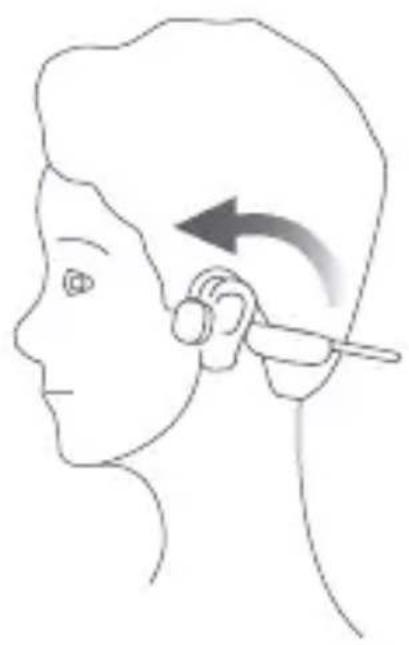
Place the headband over the outer ear so that the speakers rest on the cheekbone. Do not place the speakers inside the ear cup.
5. DEVICE OVERVIEW
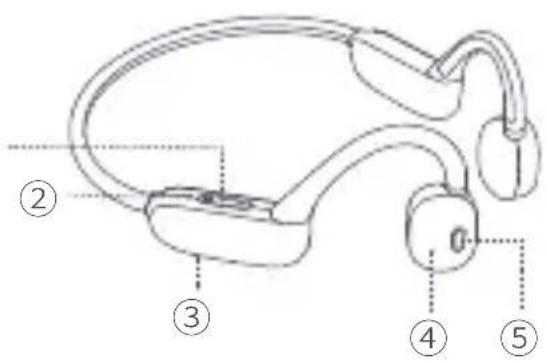
(1) Volume
② LED display
③ USB charging port
(4) Microphone
(5) Multifunction button
User manual
6. FUNCTION OVERVIEW
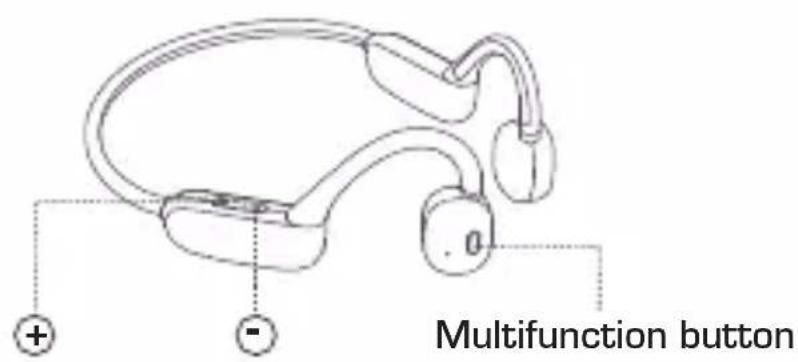
GB
+
Short press > Increases the volume gradually.
Long press > Skips to the next track.
Short press > Decreases the volume gradually.
Long press > Selects the next track.
Multifunction button
Hold down > Power on/off.
Short press > Pauses or starts music playback, ends
a call in phone mode.*
*If a call comes in during an ongoing phone conversation, you can press the multifunction button twice to end the current call and answer the incoming call.
6. FUNCTION OVERVIEW
Press the multifunction
button twice quickly > Switches between Bluetooth playback and playback of saved MP3 files.
GB
7. BLUETOOTH FUNCTION
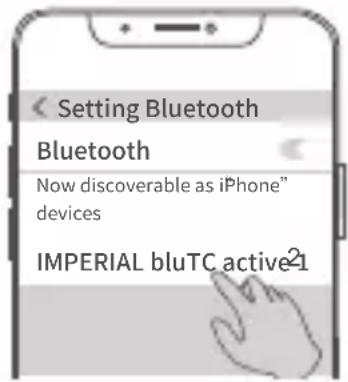
To pair the headphones with a mobile device, please follow the steps below:
Turn on the headphones by pressing and holding the multifunction button for 2 seconds.
You will hear 2 beep sounds from the headphones. The LED indicator will flash alternately in red and blue.
Open the Bluetooth settings on your mobile device and initiate a Bluetooth device search. Select the device named „bluTC active 2".
Once a connection to the headphones is established, you will hear a confirmation tone.
8. AUTOMATIC BLUETOOTH CONNECTION
When you turn on the headphones again, they will automatically attempt to connect to the last paired mobile device. However, if the mobile device is out of range or the device connection is disabled on the mobile device, the headphones will automatically power off after 10 minutes.
GB
9. MP3 PLAYER FUNCTION
The headphones are equipped with a 32 GB internal memory, onto which MP3 music files can be loaded and played. Connect the headphones to a computer or laptop using the provided USB cable and transfer the music files to the headphones.
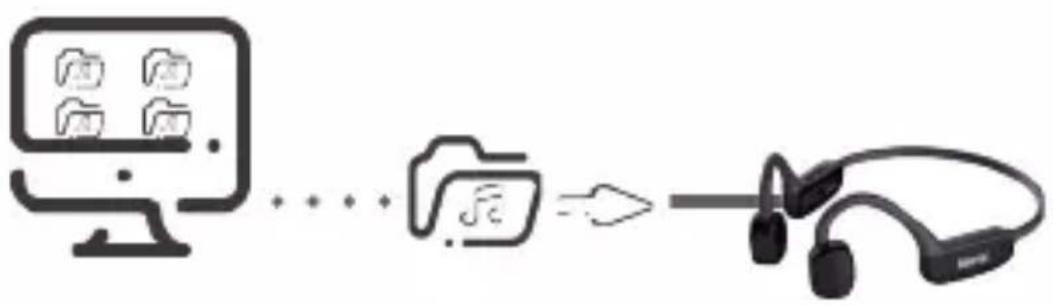
You can switch to the MP3 playback mode using the multifunction button. (see Chapter 6)
10. CHARGE THE HEADPHONES
Connect the headphones to the USB-C port [3] using the provided USB-C charging cable, either to a compatible USB power adapter or the USB port of a computer.
The LED indicator (2) will display the charging status of the battery.

CAUTION!
Use only appropriate USB charging sources. The device should only be charged with charging sources that provide a charging voltage of 5V. Do not use fast chargers that deliver more than 1.5A charging current. Do not use the headphones while they are being charged.
11. LED DISPLAY
Mode LED display Meaning
Charging process Solid red Battery is being charged
Solid blue Battery is fully charged
In operation Blinking red/blue Bluetooth device is being searched
Blinking blue Bluetooth connection is active
User manual
12. TROUBLESHOOTING
| Problem Solution | |
| The headphones can-not be turned on. | The battery level is low. Please charge the headphones. |
| The music in the headphones sounds distorted. | Adjust the volume on the headphones or on the external playback device to a lower level. |
| The headphones cannot be paired with a Bluetooth device. | Bluetooth is disabled. Please enable the Bluetooth function on your Bluetooth device and turn it on before turning on the headphones. |
| The volume of the headphones is too low. | In some Bluetooth devices, the volume cannot be controlled through the headphone's volume control. In this case, you need to adjust the volume on your Bluetooth device to achieve an appropriate volume level. |
11. TROUBLESHOOTING
Problem Solution
Headphones cannot be paired with another Bluetooth device.
Disconnect the headphones from the last connected device before attempting to pair them with another device.
12. TECHNICAL SPECIFICATIONS
Model: IMPERIAL bluTC active 2
BT Version V5.3
Input Voltage: 5V
Battery Capacity: 180mA
BT Frequency Range: 2.402 - 2.480 GHz
Audio Frequency: 20Hz - 20KHz
Impedance - Speaker: 8 Ohm
Transmission
Distance Max: 10m
Sensitivity: 86dB (+ / - 3dB)
Battery Charging Time: approximately 2 hours
14. DISPOSAL
Disposal of packaging
The packaging of your device consists solely of recyclable materials. Please sort and dispose of them accordingly through the „Dual System" recycling program.

Disposal of the device
The symbol of a crossed-out wheeled bin, as shown on the right, indicates that this device is subject to Directive 2012/19/EU. This directive states that at the end of its life cycle, this device should not be
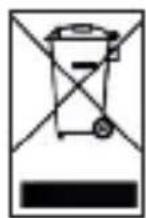
disposed of with regular household waste, but should be taken to designated collection points, recycling centers, or disposal facilities. This disposal process is free of charge for you. Please help protect the environment and dispose of it properly. For more information, please contact your local waste management or municipal authorities.
Battery disposal
The device contains a rechargeable battery. Batteries and accumulators must not be disposed of in household waste. The symbol depicted on the right indicates that, as a consumer, you are obligated to separately dispose of all batteries and accumulators. Collection containers for this purpose are available at specialist retailers and numerous public facilities. You can also obtain information on the disposal

of old batteries and accumulators from specialized disposal companies, as well as from city and municipal administrations. This disposal is free of charge for you. Help protect the environment and dispose of them properly.

An additional chemical symbol of Pb (lead) or Hg (mercury) beneath the crossed-out trash bin indicates that the battery/ accumulator contains more than 0.0005% mercury or 0.004% lead.
15. CE MARKING
Your device bears the CE mark and complies with all necessary EU standards. TELESTAR DIGITAL GmbH hereby declares that the IMPERIAL bluTC active 2 device is in conformity with the essential requirements and other relevant provisions of the RoHS Directive 2011/65/EU, the RE Directive 2014/53/EU, and the ErP Directive 2009/125/EC.
You can obtain the Declaration of Conformity for this product at the following link:
IMPERIAL bluTC active 2
- PROBLEEMOPISSING
- Probleem Oplossing
- PROBLEEMOPLOSSING
- TABLE OF CONTENTS
- FOREWORD
- SAFETY INSTRUCTIONS
- Explanation of Symbols
- SYMBOL MEANING
- Intended Use
- Safety Instructions
- DANGER!
- Risk of injury!
- Impaired perception when using the headphones
- WARNING!
- Risk of hearing damage
- CAUTION!
- NOTE!
- Notes on the wireless interface
- Clean the device
- SCOPE OF DELIVERY
- Quantity Explanation
- WEARING HEADPHONES
- DEVICE OVERVIEW
- FUNCTION OVERVIEW
- BLUETOOTH FUNCTION
- AUTOMATIC BLUETOOTH CONNECTION
- MP3 PLAYER FUNCTION
- CHARGE THE HEADPHONES
- LED DISPLAY
- TROUBLESHOOTING
- TROUBLESHOOTING
- Problem Solution
- TECHNICAL SPECIFICATIONS
- DISPOSAL
- Disposal of packaging
- Disposal of the device
- Battery disposal
- CE MARKING
Brand : Imperial
Model : bluTC active 2
Category : Earplug