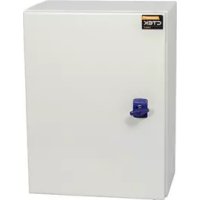
CGC500 400A - Car charger Ctek - Free user manual and instructions
Find the device manual for free CGC500 400A Ctek in PDF.


User questions about CGC500 400A Ctek
0 question about this device. Answer the ones you know or ask your own.
Ask a new question about this device
Download the instructions for your Car charger in PDF format for free! Find your manual CGC500 400A - Ctek and take your electronic device back in hand. On this page are published all the documents necessary for the use of your device. CGC500 400A by Ctek.
USER MANUAL CGC500 400A Ctek
CTEKGRIDCENTRAL-CGCSOOTM 3
Overview 3
Installation 4
Safety 4
Tools 4
Other necessary equipment. 4
General information before installation 4
To install the network cables. 4
To monitor other loads in the load balancing network 5
To check before installation.. 6
To install the EV charging station 6
To configure the EV charging station.. 6
To install the CGC500TM 6
To configure the CGC500TM 7
To verify the installation 8
To recycle the product 8
References 8
CTEK warranty statement 9
Limited warranty. 9
Circumstances that will void the limited warranty. 9
Additional information. 9
National usage restrictions 9
Copyright 9
Revisions 10
CTEK GRID CENTRAL - CGC500TM
The CTEX GRID CENTRAL 500 - CGCSO™ is the high capacity version of CTEX's grid central for NanoGrid™ load balancing and monitoring of electrical vehicle charging networks. The CGCSO™ can monitor and manage up to 500 charging station EV connectors. It can monitor other loads at the installation site for load balancing of the entire power network. CGCSO™ carries in three different versions depending on the chosen current sensor:
- CGC500TM for 100 A and a maximum conductor diameter of 15.7mm (Part no. 40-382)
Supplied with split core current transformers with cable length of 1.8m . - CCG500" for 400 A and a maximum conductor diameter of 38mm (Part no. 40-383) Supplied with split core current transformers with cable length of 1.5m .
- CGC500TM for 4000 A and a maximum conductor diameter of 179 mm (Part no. 4C-384). Supplied with Rogewels coils with cable length of 2 m.
The CGC500TM communicates with the charging stations using a LAN connection.
Overview
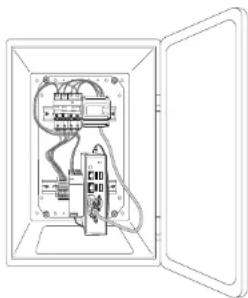
C6C500T consists of the following components:
One enclosure with keys and with the following components mounted inside:
Energy motor
- Current transformers or Rogowski coils (depending on the current rating)
-IndustrialPC
Power supply 24V
FUSE10A
- Terminal blocks for 230VAC
- Triangular key for door
All the components are mounted on a DIN rail.
| Model Height Width Depth | |||
| C6C500*400mm 300 mm 210 mm |
4 SCTEK AB CTEK AB
Installation
Safety
Only an accredited electrician is allowed to perform the installation described in this document.
Read and obey the instructions in this document before installation and operation of the product.
- Installation must fulfil local safety regulations and ensure the IP classification if the box is modified.
- Make sure that the cables in the CGC500m are not loose due to vibrations during transport. If any cables are loose, reconnect the wires and tighten the screws.
- Use safety shoes during installation.
Tools
Recommended tools for installation:
Screwdriver
- Stripping pilers
Spirit level
- Drill
- Ethernet cable
Other necessary equipment
The following parts are also needed to install the entire grid controlling network. These are purchased separately.
- CHARGESTORM CONNECTED (or other CTEK charging stations compatible with the CGC500TM)
- Ethernet switch
- Ethernet cables
- Screw joints for cable foods
- Screws for wall mounting
General information before installation
To install the network cables
CBC500™ and every charging station must be connected to the same switch using Ethernet cables. For instance, if there are slight charging stations in the Installation, nine Ethernet cables will be required. If Internet access is required, the switch must be connected to the appropriate access point.
Note: The Ethernet cables must not be longer than approx. 50 m. If longer cables are needed, repctors must be used to strengthen the signal. The Ethernet cables must be Cat5 or Cat6 cables with an RJ45 connector at each end.
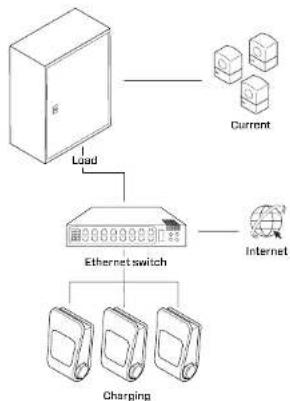

To monitor other loads in the load balancing network
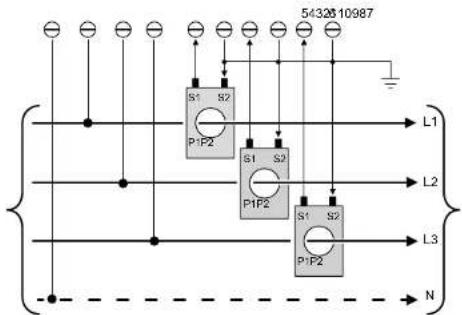
- When other loads in the premises need to be monitored by the load monitor, the current transformer cables must be installed from the energy meter in the CGC60D to the relevant metering point.
- Install one current transformer per phase, i.e. three current transformers: L1, L2 and L3. Below is an example of connection in a 3-phase system.
Note: Current is measured via the current transformers. Make sure that the current transformer is installed in the correct direction, so the value is not inverted. The current and voltage must be measured on the same phase. A neutral conductor must be available.
B/CTEKABCTEKAB
To check before installation
- Plan the installation regarding all subsystems, charging stations, the CCG500TM, Ethernet switch, current transformers and cables.
- Make sure that the placement off all equipment is suitable for normal operations and maintenance.
- Make sure that the wall is suitable for mounting the enclosure of the CCG500TM, CCG500 should be installed close to the measurement point (incoming feeder cables or next to the main fuse). Also make sure that the wall can support the weight of the enclosure with components. The weight is approx. 9 kg.
- If Internet access is via 3G/4G, make sure that there is adequate coverage at the relevant location for the equipment. Do not install an antenna inside the CEC500™ enclosure as this may block the reception.
To install the EV charging station
- Connect the Ethernet and power cables to the EV Charging stations. All Ethernet cables must be connected to the same local area network, LAN.
- Connect the power phases to the EV charging stations. Note the phase rotation. This must be known when the load balance is configured in the software configuration.
To configure the EV charging station
Configuro each individual EV charging station from the built in Web GUI accessed via the mini USB Interface to activate NanoGrid*Rer to "CCU NanoGrid Configuration Manual, Pd_CM_004".
Verify that the each EV charging station's firmware version is R3.6.1 or higher. Remember to reboot after changing the configuration.
To install the CGC500TM
- Locate the mounting holes and mount the enclosure with suitable screws for the wall.
- Insert the incoming cables (electronic, Ethernet and transformer cables) into the enclosure of the top or at the bottom. Separate communication cables and power cables from each other.
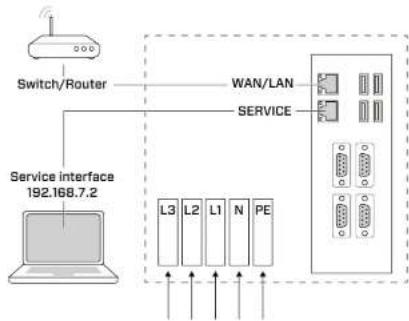
3. Connect the cables according to the schematics.
To configure the CGC500TM
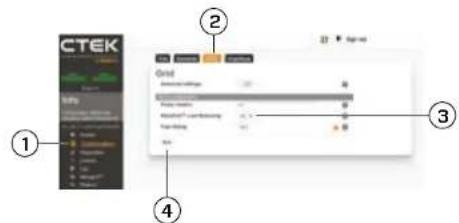
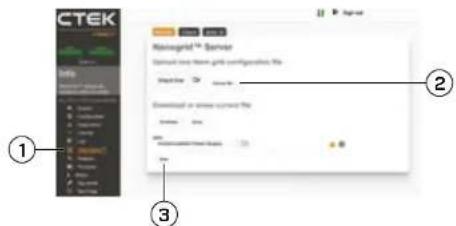
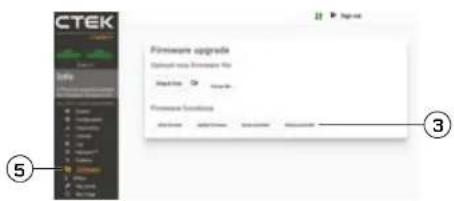
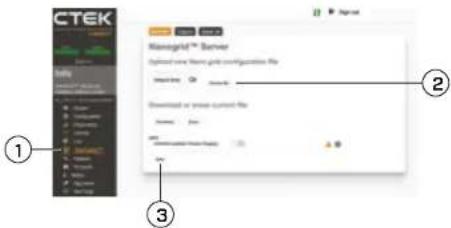
Configure the C6C500TM from the built in Web GUI accessed from the Ethernet interface marked "Service".
Note: To install and activate NanoGrid, see "CCU NanoGrid Configuration Manual", Pd_CM_CD4".
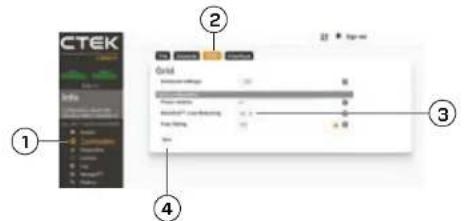
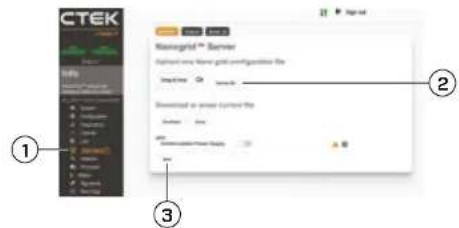
1. Activate NanoGrid
2.UploO NanoGrid.in
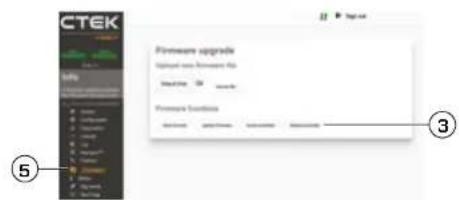
3.Hobopt.
BCTEKABCTEKAB
To verify the installation
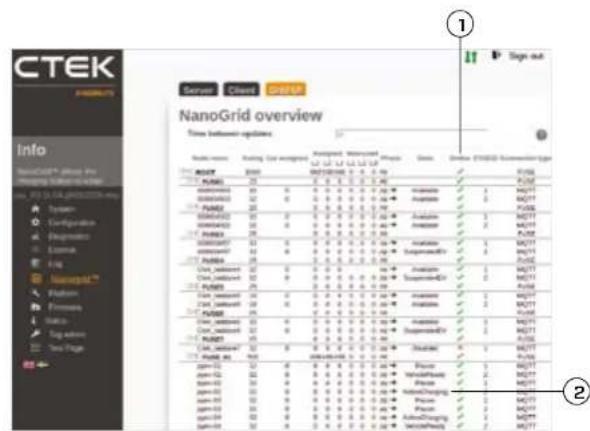
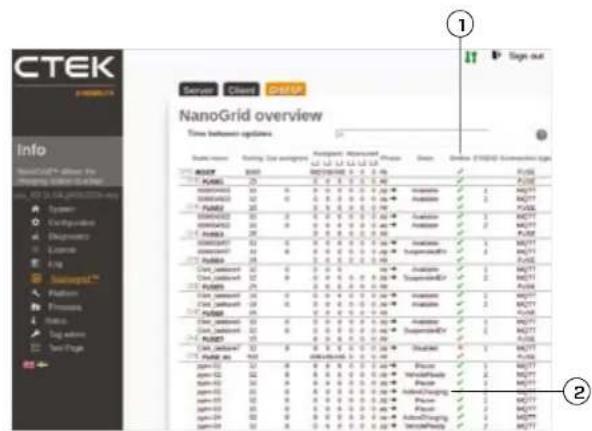
When the CGC500TM is configured and enabled enter: Nanogrid Grid UI in the WebUI.
- Verify that all active charging stations are connected to the CCGSOO with a green mark in the "On-line" column.
- Connect an electric vehicle to a charging station, Verify that the electric vehicle gets allocated current and that "Status" is updated to "ActiveCharging".
To recycle the product
The product must be recycled as electronic equipment. Follow the local requirements for recycling of electronic equipment.
References
1.CCU NanoGrid Configuration Manual, Pd CM 004
CTEK warranty statement
Limited warranty
CTEK issues a limited warranty to the original purchaser of the product. Depending on the product, the limited warranty period will vary. The limited warranty is not transferrable. The warranty applies to manufacturing faults and material defects. The warranty is void if the product has been handled carelessly or repaired by anyone other than CTEK or its authorized representatives. CTEK makes no warranty other than this limited warranty and is not liable for any other costs other than those mentioned above, i.e. no consequential damages. Moreover, CTEK is not obligated to any other warranty other than this warranty.
Circumstances that will void the limited warranty
If the seal of the product is broken, purposely damaged, or in any way modified or altered; including cables, electronics, mechanics or other parts of the product; products that have been repaired by anyone other than CTEK or its authorized representatives; products that have been subject to the use of supplies and accessories other than those approved in writing or supplied by CTEK; improper use or non-compliance with installation, commissioning, operation or maintenance instructions (i.e. not according to the operation and installation manual); unauthorized modifications, changes or attempted repairs; vandalism, destruction through external influence and/or persons/animals; failure to observe applicable safety standards and regulations; faults caused by fire, water, snow, moisture, or other liquids except as specified for normal use; products whose the serial number is dated, altered or removed; any utilization of a product that is inconsistent with either the design of the product or the way CTEK intended the product to be used; any installation and/or modifications that prevent normal service of the product; normal wear and tear and cosmetic damage such as, but not limited to, corrosion, scratches, clots, rust, stains, non-functional parts such as, but not limited to, plastics and finishes; damage, fault, failure and/or impaction caused by abuse, tampering, illegal use, negligence, prolonged use or operation; or faults in any other way caused by the customer/retailer/user.
Additional information
CTEK meckes no other warranty than as set out herein and CTEK shall in no event be liable for any indirect or consequential damages. The faulty product shall
10 11CTEK AB CTEK AB
be returned with the receipt to the retailer/place of purchase together with a fault description. Goods returned to CTEK will be at CTEK's discretion and only valid with an approved Return Material Authorization (RMA) Reference Number issued by CTEK to the purchaser. Products sent directly to CTEK without an RMA will be returned to the sender at the sender's cost. The warranty period for a product is stated in the applicable product user manual supplied with the product. The warranty is only valid if the warranty period has not expired. If the warranty claim of a faulty product is not approved by CTEK, the product will be returned only if the sender explicitly so requests. The customer/retailer/place of purchase will pay the freight. Faulty products will be repaired, or replaced with an exchangeable product, and returned at CTEK's cost. If the warranty period has expired, the product will be returned without further investigation at the cost of the customer/retailer/place of purchase. Faulty products will be scrapped by CTEK if deemed not repairable. CTEK reserves the right to vary, modify or change the terms and conditions herein due to changes(s) in availability of services, products and/or spare parts, or for the purpose of complying with applicable policies, rules, regulations and law, without notice.
National usage restrictions
Some countries, states or provinces have other electrical codas and standards than stated in this manual. The installation and usage of the product shall follow local regulations. The product is intended for use by general public. The product is intended for locations with both restricted access and non-restricted access.
Copyright
These instructions are delivered "as is" and contain content that can change without prior notice. CTEK AB does not guarantee that everything is correct in the instructions. CTEK AB is not responsible for faults or incidents or damage that is caused by not following the instructions in this manual.
Copyright CTEK AB 2022. All rights restricted. Copying, adaptation or translation of these instructions are strictly forbidden without written approval by CTEK AB, except what is regulated by copyright laws.
Revisions
The descriptions, information and specifications contained in this manual were in effect at printing. To make sure that the maintenance instructions are complete and up to date, always read the manual published on our website.
INHALT
- Konfigurationshandbuch CCU NanoGrid, Pd CM BD4
1. Everytonn to NanoGrid

2. AevaeTto apxio NanoGrid ini.
3. Kavte emovekdwyn
2627CTEKABCTEKAB
Tia va eTaantheoote TNY EYkataotaon
Meta in diqopopon kai evpyoioiou CGC500TM, paeBte 0: Nanogrid - > Grid UI o to WebUI.
- EmaBlae an ool yevpoi oepnian xuyuov uovBeo CGC500M kupvivauva ev
- EvbEe EVA NkEETKIOO dyxu eEv OTAUBa FOPTiNG. BeauBHe BtOn to nAekTIOO dyxu kaiBae To pueo Tn ouavetai KAI oN tIcayon "State" (KatraTaN) evmuPovTei AeActiveChargngs (Evspyn FOpion).
Tia vα avakukawaeTe To Tpoiov
TIOPOI pIeTIa oavakukwOoI aNkEePovKoC eotAIuOc. AkoAouBpTe Tc tokeiOe oyHcy iYy avokauokai NnKtpeKoEOTAOO.
Naparotnc
- Eeyep5io biopownt CCU NanoGrid, Pd CM 004
Anawon yyyunongCTEK
TPOTO TOV TELA,TOV WAAH NTOXpOaT.
Nepiopioevn Eyyunon
H CTEK ekdiKa mpe TepiopoiEvyn Eupoc TpO apXiko ayoapTnTOpOvKO.H dApokia Ioyoc nIc TEPiopoiEvynEuyyN OApEeAevy oTo pOyo. H TepiopoiEvyn EvnyEevivetapBapn. H Eyywn Kaumitra KATAKaeKAaTKE AELATUATRA KAt EALATUATRA UkUkW. H Eyywn KaRIATAK OOKU, ePteTtwnu TAnpUAEoic XeipApOuTo pOpoVTo nI ENeKUcN auwO ano OoovDHTOIE Pto kEKs INC STEK CAuTu EeyooAoBmEvouv AnnpotovKn TnC HCTeMapeXyKaJau DAAUYyN Npev Tn NapoAs TepiopoiEvynEvyN Kev DepeEcbuvOn yOtaOoBIOI OAAI DAIIN BVnN pev AuW ovAepeoVtn Mtu Yau OTn OTOBETKUn CkUkw. EmmLev, n TCEK DEV qPeE uBuVEB Boa OtaOoBIOI dAAI EvyN, TePV nIc napovAc
EuVhkeTouKaIoiTuovakupn Tny TePiopioeynyUnon
Eev n cpevivda Tn piovioe Eev axovtei, omuc
muo aauu vEv katoaepaie n aeeavomoin
Tou av eKataatpaeip okotma n av eK
unoeote anoitotne tpoanoin n petaoBn
aumptapeaavopveuvw KauokoiuWuTv
naekxpvivku, uov npayivkai Kau Tuv oMout
Otoeiueiuu Tnu Pioovia Tnu evnoh Eokinuaetel
atto otoovboinre ipto ekic ng CTEK Kau w
eouoaioumvoov auvtipaaunTng Pioovia Tnu
Exywnpoytaooi nee aeAvaovakra Kau dceouad
atou aou Tnu evkyoviva ypaattnc n poybueoe n
CTEK. AkaalAn nn jon n unpntn Gcuoykv
eykoataoanpuu, puHui, Keiouyiae Kau ouynpiaoc
(nTo1 m npnnr Tnu eyyioei kai kyooupyiaoc Kau
eykoataoan. Mte oucoobotyeje VtpoarntoeK,
aalkyaee TnpaamBeie, emekouke Bavaaiuac,
kataatpoei atto eEupetika atta n kai npta otatq
Cua. Abuvayukia TnpaamTnv Oxyeikuo TPOTTOV Kau
kavoivopn apayakias. Baibc Tnu opoeivakra oe
tupkayia, xvi, uyapria n daa uypa, nepav autuv
Tnu npooblokoivra yd m ouvyn Xpifcn. Ipovioia
at to 0toia Oev aapbei o oepikac apilbcs
n Tnu otoiv Tnv oepikac o apilbcs xe
Otioaiyjorte xypn Tnu npoivotoc Nev ouvdei
me n oxeodaoi Tou nTv evckvdujevn xpron Tou
tpoepaie n CTEK. Otioaiyjorte Evkaytaoan ny
kai poinoianou n Tou mboidni n auoiin ovwnipion
Tou npoivzrc. Fuoioaykri qbpopa Ka oogounkees
phioe tvc, evekttikra, dbowoon, patyovcukis,
Baboulouana, okoupiia. Akebc, um kienouyipka
eepatjmoiotc uoc. evekttikra, TaaktaikKa kcvipyinitra.
Baibcphioe, npoaiyata n kai atalekou Tou
opekiovaior ce kaxn xypn, nappebaecic, trapovun
xprn, qaeia, napateapen vprn hntkuyia.
Baibc Tnu exyov npovkbnie me ovothoyntdo
IpooOeTeS mnpoopopies
H CTEK 6evmpaekai kajia aalanyeyunytnepaeutnou tnpaexetai oto npapkai dev gpeai oe kajia pteumuae uevuyi yia epeoee, n atombeke cngie. Taatauattpataa npopovai vce mtpaepoi, paq i ne tv anotbckrny aoyapeu, oto kanaetina mlaanangjzio ayaoa, qae peia npayepaui, tpoTbMgurato, Taipovya tnu emtroppepvai tnt CTEK 8u otkeivai taBdakinknukxuyepiae nCk na nnpompuon tue Ba Bcupepaiu kynpuva npoepoo nCTEK ekj Ekoepaevkyekpjuevo apyjo bocouodtonn emtropaaipov (RMA) npoc npayoeayai. Taipovya tnu amotelaavvnt aaneubieac n CTCK xucic RMA Bc npitcpovai ovo anotmoea me dka tou ecogda Hdpakia ycoag nCnvyyungn evoc npitrovoac awepaeai oto xeyepiaia xpharj n ouovbeuei to npopov H nyaynni ayueo npoepov ov EkiAenjI npdekpaia yucic n Av n CTEK dev evkpiva to aitnau tou kainai yia kaukui enaithaukai npoipovn ao Tny eyuvon, Taipovai Ba mtptepaei nuvo epooov to Cijhnyi pni o aottoorMaLs. Ta ecdo aottoarli Bc npitauappovu ton kien To npinl n Ateuapuaia rpoovia B aemekudau B avtkabikauvt aata avniotya Tnpovia kai B aotepovpuia ne Edoa nCCT KEC AV Egei Ia nepoic Icyocn, Tc npyvwn, Tnpovai B aetnpaepai wucipneapne depvevnian kai m Edoa to kantn, Tou kataatmuao tsokonns n Tou anolou yoadoc avitotoja. Ta ateuatmuqaia npotovya B aataoepovpuia ome Edoa nCCT KEC AV Egei Ia nepoic Icyocn, Tc npyvwn, Tnpovai B aetnpaepai wucipneapne depvevnian kai m Edoa to kantn, Tou kataatmuao tsokonns n Tou anolou yoadoc avitotoja. Ta ateuatmuqaia npotovya B aatotepoecuoi oto Edoa npoeip Kpbiye nDev Emeboqvai Emekeune, H CTEK biapnei To kokaiau ya promontoe, va metraKaHa n vtaAaleq taou daupc Ka hi Nt npitctoeoioe oto Tnpelauabvauvnt oto npopov Aoyu maepawu oto n DcbcaobnTu vum terpnuwiu, Tnpovpiu npwiv h /kai Tu vnvraAakkniu, nvi Aoyouc Otuuppwoongn, me tic iyoouccs To laiknc Kau Tou Oiyovce Kavowcu, Kavoviuoukui Kau Vououc, Xucic npyounyevibioinon.
Piepiopoi xpniogc e 8viko Emted
Opuiuex xupc, troaleic n ctpaeis diaetouv
dapopoeitkoN AEkTPOAIOYKOu Kookei Ka TpOITUa
atua aia Tou apovayotai tao TPOV Eeyepio. H
Eyekatoan Ka n npoyon Tou pIoVToK TpETVa
yivovta oaupuva Jue tou TOTKOKAAVQIOCo. To
TpiOIV npoipCetra yipnon ta 10 eua KNO. To
TpiOIV npoipCetra toa yia KAEIOUc 00 Ka Yia
avOIOuK XUPoac.
AikaiwpatATVEUAPAIKns 1IOkTNOIaS
O1 rappuovc oyniec tripeoviat uoc exovai kai to trepvivcuo tuc mopei va akoiy xuokic ptoikomolny. H CTEK AB dev eyvua tvi mv opbnta iau wuv tv nnpogapnuu tv mepaiabavovat ou acute cn, odinyic, H CTEK AB dev epei kubvni yac Biae, cunjuaqti a jnuei muo evohvat amn tn pntniuyu ooyiyu tv mepuiaaboviat ou raio yexepio.
Copyright CTEK AB 2022. Me mny empuao n KBe Bdkaiuantc. Aatayepaetai auapn a vntynpapn, Ptoopapuy npetapooan autuvw onywny wupic np y pannr nnpykoteBng TNC TCEK AB, u my eapceon bau npAeTneVvpeoia yta Tnvuemuata kdkaiuata.
Avaetewphoeic
Oi npapae, o i npopopoe Koi oipdiaypapeo nou piekovotia oio npadvexpiipbiokovai o ixu kai ivy kienuon. Tia va daqapieei oni o oyinev uunnpnncivai npkek kvepepuivec, daqcte na to yexpiidio tou civ aenooieuvo otov irtono ma.
CONTENU
1. Activez NanoGridTM
2. Telechargez NanocGrid.Int.
CTEKGRIDCENTRAL-CGCSOOTM 3
Overzicht 3
Installatie 4
CTEKGRIDCENTRAL-CGCSOOTM 3
Oversikt 3
Installation 4
Allman information fore installation 4
Att installera natverkskablarna 4
Overvaka andra Iaster Ilastbalanseringsnätverket 5
Attkontroleraforeinstallation.. 6
Installera EV-laddstationen 6
Konfigurera EV-laddstationen 6
Installera CGC500TM 6
Konfigurera CGC500TM 7
Verifiera installationen 8
Atervinnaprodukten 8
Referenser 8
Garantimeddelande CTEK 9