ManualGo.com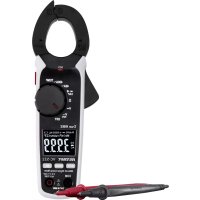
VC522 - Multimeter VOLTCRAFT - Free user manual and instructions
Find the device manual for free VC522 VOLTCRAFT in PDF.



Download the instructions for your Multimeter in PDF format for free! Find your manual VC522 - VOLTCRAFT and take your electronic device back in hand. On this page are published all the documents necessary for the use of your device. VC522 by VOLTCRAFT.
USER MANUAL VC522 VOLTCRAFT
Dear customer, Thank you for purchasing this Voltcraft
produces high-quality measuring, charging and network devices that offer outstanding performance and innovation. From the ambitious hobby enthusiast to the professional user, Voltcraft
products provide the optimal solution for the most demanding tasks. Moreover, our reliable technology all comes at a very affordable price. WearecondentthatyourpurchaseofthisVoltcraft
product will be the beginning of a long, successful relationship. We hope you enjoy your new Voltcraft
product! If there are any technical questions, please contact: www.conrad.com/contact32
2. Explanation of symbols
The symbol with the exclamation mark in the triangle is used to highlight important information in these operating instructions. Always read this information carefully. The triangle containing a lightning symbol indicates the risk of an electric shock or of the impairment of the electrical safety of the device. The lightning symbol in the square permits current measurements on uninsulated, hazardous active con- ductors and warns of the possible hazards. Personal protective equipment must be used. The arrow symbol indicates special information and advice on how to use the product. This product has been CE-tested and meets the relevant European guidelines Protection class 2 (double or reinforced insulation, protective insulation) CAT I Measurement Category I: For measuring circuits of electrical and electronic equipment that is not directly supplied with a mains voltage (e.g. battery-operated devices, safety extra-low voltage systems, and signal/ control voltages). CAT II Measurement Category II: For measuring electrical and electronic devices that are directly supplied with a mains voltage via a mains plug. This category also includes all lower categories (e.g. CAT I for measuring signal and control voltages). CAT III Measurement Category III: For measuring circuits of installations in buildings (e.g. mains sockets or sub- distributions). This category also includes all lower categories (e.g. CAT II for measuring electrical devices). Measuring in CAT III is only permitted with test prods with a maximum free contact length of 4 mm or with cover caps over the test prods. CAT IV Measurement Category IV: For measuring at the origin of a low-voltage installation (e.g. mains distribution, electricity provider’s transfer points to homes) and outdoors (e.g. when conducting tasks on underground cables or overhead lines). This category also includes all lower categories. Measuring in CAT IV is only permitted with test prods with a maximum free contact length of 4 mm or with cover caps over the test prods. Earth potential33
- Measures and displays electrical parameters in measurement category CAT III (up to 600 V). Complies with the EN 61010-1 standard and all lower categories. The multimeter must not be used in the measuring category CAT IV.
- Measures alternating current up to max. 400 A (AC-TrueRMS)
- Measures direct current up to max. 400 A (VC-523/VC-523 SE only)
- Measures DC and AC voltages up to 600 V (AC-TrueRMS)
- Measures frequency up to 10 kHz
- Measures temperature from -20 to +760 °C
- Measuresresistanceupto40MΩ
- Measures capacity up to 1000 µF
- Non-contactalternatingvoltagemeasurement(NCV)≥230V/ACand≤50mmgap The measurement modes are selected using the rotary dial. The measuring range is selected automatically in many measurement modes and can also be set manually. Effective (True RMS) measurements are displayed when measuring AC voltages/currents. Negative polarity readings are indicated with the (-) sign. The current is measured via the current clamp. The circuit does not need to be opened to take a measurement. The current clamp can also be used to take measurements on uninsulated, hazardous conductors. The voltage in the measuring circuit must not exceed 600 V in CAT III. The use of personal protective equipment is recommended for CAT III measurements. Themultimeterispoweredbythree1.5VAAAbatteries.Onlyusebatteriesofthespeciedtype.Donotuse1.2Vre- chargeable batteries. The multimeter switches off automatically to prevent the batteries from draining. The automatic power-off feature can be disabled. Do not use the multimeter when the battery compartment is open or when the battery compartment cover is missing. Do not take measurements in potentially explosive areas, damp rooms or adverse conditions. Adverse conditions include:Moistureorhighhumidity,dustandammablegases,vapoursorsolvents,thunderstorms,andstrongelec- tromagneticelds. Forsafetyreasons,onlyusetestleadsoraccessoriesthatmatchthemultimeter’sspecications. The multimeter must only be used by people who are familiar with the relevant regulations and understand the poten- tial hazards. The use of personal protective equipment is recommended. This product is not intended to be used by people (including children) with impaired physical, sensory or mental capabilities or lack of experience and/or lack of knowledge. The use of measuring devices must be supervised by trained personnel.34 Using this product for any purposes other than those described above may damage the product and result in a short circuit,reorelectricshock.Theproductmustnotbemodiedorreassembled! Read the operating instructions carefully and keep them in a safe place for future reference. Always observe the safety information in these instructions.
- 2x CAT III safety test leads
- Type-K temperature sensor (-20 to +250 °C)
- Type-K measuring adapter
- Operating instructions Up-to-date operating instructions Download the latest operating instructions via the link www.conrad.com/downloads or scan the QR code. Follow the instructions on the website.35
5. Safety instructions
These instructions contain important information on how to use the multimeter correctly. Please readthemcarefullybeforeusingthemultimeterforthersttime. Damage caused due to failure to observe these instructions will void the warranty. We shall not be liable for any consequential damage. We shall not be liable for damage to property or personal injury caused by incorrect handling or failure to observe the safety information! Such cases will void the warranty/guarantee.
- This device was shipped in a safe condition.
- To ensure safe operation and avoid damaging the device, always observe the safety information and warnings in these instructions.
- Theunauthorizedconversionand/ormodicationofthedeviceisnotpermittedforsafetyandapproval reasons.
- Consult a technician if you are not sure how to use or connect the device, or if you suspect that the device is not safe to use.
- Measuring instruments and their accessories are not toys and must be kept out of the reach of children.
- Always comply with the accident prevention regulations for electrical equipment when using the product in commercial facilities.
- In schools, educational facilities, hobby and DIY workshops, measuring devices must be operated under theresponsiblesupervisionofqualiedpersonnel.
- Before each measurement, make sure that the device is not set to a different measurement range.
- When using test leads without protective caps, measurements between the multimeter and the earth potential must not exceed the CAT II measurement category.
- When taking CAT III measurements, the cover caps must be placed on the probe tips to avoid accidental short circuits.
- Push the cover caps onto the probe tips until they click into place. To remove the caps, pull them off the tips with some force.
- Always remove the test probes from the measured object before changing the measurement range.
- The voltage between the multimeter connection points and earth must never exceed 600 V in CAT III.
- Exercise particular caution when working with voltages higher than 33 V (AC) and 70 V (DC). Touching electrical conductors with these voltages may cause a fatal electric shock.
- To prevent an electric shock, do not touch the measuring points when taking measurements, either directly or indirectly. When taking measurements, do not touch any area beyond the grip markings on the test probes and the multimeter.36
- Check the multimeter and test leads for signs of damage before each measurement. Never take meas- urements if the protective insulation is damaged (torn, missing, etc.). The test leads come with a wear indicator. A second layer of insulation will become visible if the lead is damaged (the second layer of insulation is a different colour). If this occurs, discontinue use and replace the measurement accessory.
- Do not use the multimeter immediately prior to, during or just after a storm (risk of electric shock / power surge).Ensurethatyourhands,shoes,clothes,theoor,circuitandcircuitcomponentsaredry.
- Avoid using the device in the immediate vicinity of: -Strongmagneticorelectromagneticelds - Transmitting antennas or HF generators. These may distort the measurements.
- If you suspect that safe operation is no longer possible, discontinue use immediately and prevent unau- thorized use. Safe operation can no longer be assumed if: - There are signs of damage - The device does not function properly - The device was stored under unfavourable conditions for a long period of time - The device was subjected to rough handling during transport
- Do not switch the device on immediately after it has been brought from a cold room into a warm one. The condensation generated may destroy the product. Leave the device switched off and allow it to reach room temperature.
- Do not leave packaging material lying around carelessly, as it may become a dangerous toy for children.
- Observe the safety information in each section.37
6. Operating elements
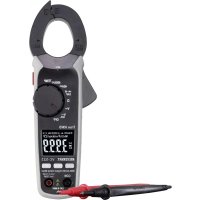
A Cable separator with integrated NCV sensor B Current clamp C Grip markings D NCV signal display E Current clamp opening lever F Rotary dial for selecting the measurement mode G Display H Function buttons MODE button for switching functions RANGE button for manually selecting the range REL button for relative measurements38 I COM measurement terminal (reference potential, “negative”) J Multifunction thread (1/4” UNC, tripod socket) for optional accessories K VΩmeasurementterminal(“positivepotential”fordirectvoltages) L HOLD function button for holding the measured value and for the LED light M Battery compartment N LED light
7. Product description
The digital multimeter (DMM) displays measurements on a backlit digital display. The DMM has a 4000-count display (count = smallest display value). The display can display values from 0 to 3999. The VC-522 is designed to measure alternating currents of up to 400 A. The VC-523/VC-523 SE is designed to measure direct and alternating current of up to 400 A. The multimeter switches off automatically after a period of inactivity. This protects the batteries and extends the bat- tery life. The automatic power-off feature can be disabled. The DMM can be used to take measurements up to CAT III. It is suitable for use in hobby workshops and professional applications. Protective caps may be attached to the angled test lead plugs. Remove these before inserting the test leads into the multimeter. Rotary dial (F) The measurement modes are selected using the rotary dial. Automatic range selection (“AUTO”) is enabled in some measurement modes. This sets the measurement range automatically. To turn the multimeter off, move the control dial to the “OFF” position. Always turn the multimeter off when it is not in use.39
8. Display elements and symbols
The following symbols and letters appear on the device/display. 1 Automatic power-off is enabled 2 Automatic range selection is enabled 3 Diode test symbol 4 Continuity test symbol 5 Symbol for active data hold function 6 Symbol for measuring frequency and pulse duration ratio in % 7 Active relative value measurement 8 Battery status indicator 9 Temperature unit (°Celsius = European, °Fahrenheit = empirical) 10 V = Volt (unit of electrical voltage), mV = Millivolt (exp.-3) A = Ampere (unit of electric current) 11 Measured value 12 Alternating current symbol 13 Prexfornegativereadings 14 Direct current symbol 15 nF = Nanofarad (exp.-9, unit of electrical capacity) = µF Microfarad (exp.-6) 16 Ω=Ohm(unitofelectricalresistance), kΩ=Kilo-Ohm(exp.3), MΩ=Mega-Ohm(exp.6) OFF Move to this position to turn the multimeter off NCV Contactless AC voltage detection (V-AC only) True RMS Actual effective value HOLD Enable/disable data hold function REL Make a relative measurement and set the reference value (not possible for continuity tests, diode tests, frequency and NCV measurements) RANGE Use this button to manually select the measurement range MODE Use this button to switch between different measurement functions OL Overload indicator; the measuring range was exceeded Battery data symbol Diode test function Acoustic continuity test AC Alternating current symbol40 DC Direct current symbol COM Connection for reference potential V Voltage mode (Volt = unit of electrical voltage) A Current mode (Ampere = unit of electric current) Hz% Frequency mode (Hertz = unit of frequency) and pulse duration ratio in % Ω Resistancemode(Ohm=unitofelectricalresistance) CAP Capacity measurement function TEMP Temperature measurement function Position marker for the conductor to ensure the correct current measurement. Button for switching the measurement light on and off
9. Taking measurements
Never exceed the maximum permitted input values. Never touch circuits or parts of circuits when they may contain voltages greater than 33 V/ACrms or 70 V/DC! Fatal hazard! Before measuring, check the connected test leads for damage, such as cuts, tears and kinks. Never use damaged test leads, as this may cause a fatal electric shock! Before working with the multimeter, check that the measuring function is working correctly. Always start by taking a measurement on a known source and monitor the display carefully. A faulty mul- timeter may present a fatal hazard for the user. In the event of a fault, inspect the multimeter and consult a technician if necessary. When taking measurements, do not touch any area beyond the grip markings on the test probes and the multimeter. Only connect the two test leads that you require to take measurements. For safety reasons, remove all unnecessary test leads from the device before taking a measurement. Measurementsincircuitsratedat>33V/ACand>70V/DCmustonlybemadebyqualiedand trained personnel who are familiar with the relevant regulations and the associated hazards. “OL” (overload) indicates that the measuring range has been exceeded. a) Switching on the multimeter The multimeter is turned on and off via the rotary dial. Turn the rotary control (F) to select the desired mode. To turn the multimeter off, move the control dial to the “OFF” position. Always turn the multimeter off when it is not in use.41 The multimeter conducts a short function test after it is switched on. During the function test, all symbols will appear on the display. Insert the batteries before using the multimeter. For more information on inserting/replacing the batteries, see “Cleaning and maintenance”. b) Measuring current Never exceed the maximum permitted input values. Never touch circuits or parts of circuits when they may contain voltages greater than 33 V/ACrms or 70 V/DC! Fatal hazard! Do not measure current on a circuit with a voltage of more than 600 V in CAT III. Pay attention to the necessary safety information, regulations and protective measures for your own safety. Thecurrentismeasuredviathecurrentclamp(B).Thesensorsinthecurrentclampdetectthemagneticeldcreated by current-carrying conductors. You can take measurements on insulated and uninsulated conductors. Ensure that the conductor always passes through the centre of the current clamp (pay attention to the arrow marks) and that the clamp is always closed. A cable separator (A) is located on the tip of the pliers, which allows you to separate tangled cables. This makes it easier to separate the desired cable. Do not use the current clamp to surround more than one conductor. If the supply and return conductors (e.g. L and N) are measured, the currents will cancel each other out and no measurement will be displayed. If several supply conductors (e.g. L1 and L2) are measured, the currents will be added together. At low currents, the conductor can be wound around one side of the cur- rent clamp to increase the total measured current. Divide the measured current by the number of coils. You will then receive the correct current value. Follow the steps below to measure AC (A ) currents:
- Switch on the DMM using the rotary dial (F) and select the “A ” measure- ment mode and the predicted measurement range (40 A / 400 A). “A” and the AC symbol AC will appear on the display.
- The display is automatically set to zero when the current clamp is closed. Ifthereisastrongmagneticeldthataffectsthereading,usetherelative value function (“REL”).
- Press the opening lever (E) to open the current clamp.
- Surround the conductor that you want to measure and close the current clamp. Position the conductor in the middle between the two triangular posi- tion symbols on the clamp.
- The measured current is indicated on the display.
- After taking a measurement, remove the current clamp from the measured object and switch off the DMM. Turn the rotary switch to the “OFF” position.42 Follow the steps below to measure DC (A ) currents (VC-523/VC-523 SE only):
- Switch on the DMM using the rotary dial (F) and select the “A ” measure- ment mode and the predicted measurement range (40 A / 400 A). “A” and the AC symbol AC will appear on the display.
- Press the “MODE” button to switch to DC mode. “DC” will appear on the display.
- The display is automatically set to zero when the current clamp is closed. Ifthereisastrongmagneticeldthataffectsthereading,usetherelative value function (“REL”).
- Press the opening lever (E) to open the current clamp.
- Surround the conductor that you want to measure and close the current clamp. Position the conductor in the middle between the two triangular posi- tion symbols on the clamp. Pay attention to the direction of the current. The positive wire must run from front to back from the current source.
- The measured current is indicated on the display.
- If a negative current is displayed, this indicates that the polarity of the wire isreversedorthecurrentisowingintheoppositedirection(e.g.solarpow- ered or charging devices).
- After taking a measurement, remove the current clamp from the measured object and switch off the DMM. Turn the rotary switch to the “OFF” position. c) Measuring voltage (“V”) Follow the steps below to measure AC (V ) voltages:
- Turn the multimeter on and select “V ” mode.
- Plug the red lead into the V terminal (K) and the black lead into the COM terminal (I).
- Connect both of the test leads to the measured object (e.g. generator or mains voltage) in parallel. The“VDC/AC”voltagerangehasaninputresistanceof≥10MOhm.
- After measuring, remove the test leads from the measured object and turn the multimeter off.43 Follow the steps below to measure DC (V )voltages:
- Turn the DMM on and select “V ” mode.
- Plug the red lead into the V terminal (K) and the black lead into the COM terminal (I).
- Connect both of the test prods to the measured object (battery, circuit etc.) in parallel. Connect the red measuring probe to the positive terminal and the black measuring probe to the negative terminal.
- The measured value is displayed together with the polarity. If “-” appears in front of a direct voltage measurement, this indi- cates that the measured voltage is negative (or that the measuring probes have been connected in reverse). The “V DC/AC” voltage range has an input resistance of ≥10 MOhm.
- After measuring, remove the test leads from the measured object and turn the multimeter off. d) Measuring frequency and pulse duration The multimeter can be used to measure the frequency of a signal voltage (supportsfrequenciesfrom5Hzto10kHz).Observetheinputspecications in the technical data. Proceed as follows to take a frequency measurement:
- Switch on the DMM and select “Hz” mode. “V ” will appear on the dis- play.
- Press the “MODE” button once. “Hz” will appear on the display.
- Plug the red lead into the Hz terminal (K) and the black lead into the COM terminal (I).
- Connect the two measuring probes to the object that you want to measure (e.g. signal generator or circuit).
- The frequency will be displayed together with the corresponding unit..
- After measuring, remove the test leads from the measured object and turn the multimeter off. Measuring the pulse duration in % The DMM can display the pulse duration of an AC voltage signal’s positive half wave as a percentage of the entire period.44 Follow the steps below to measure the pulse duration in %:
- Turn the DMM on and select the “%” measurement mode. “V ” will appear on the display.
- Press the “MODE” button twice. “%” will appear on the display.
- Plug the red lead into the Hz terminal (K) and the black lead into the COM terminal (I).
- Connect the two measuring probes to the object that you want to measure (e.g. signal generator or circuit).
- The pulse duration of the positive half wave is shown as a percentage value on the display. For a symmetrical signal, the pulse duration will be displayed as 50%.
- After taking a measurement, remove the leads from the measured object and switch off the DMM. e) Measuring the temperature When taking a temperature measurement, only allow the temperature probe to come into contact with the surface of the measured object. The multimeter must not be exposed to temperatures below or in excess of the operating temperature, as this may lead to incorrect measurements. The temperature probe must only be used on voltage-free surfaces. The multimeter features a wire sensor that can measure temperatures from -20 to +250 °C. To use the full tem- perature range (-20 to +760 °C), purchase a Type-K thermal sensor. The measurement adapter that comes with the multimeter is required to connect Type-K sensors with a miniature connector. All K-type thermal sensors can be used for taking temperature measurements. The temperature can be displayed in °C or °F. Follow the steps below to measure the temperature:
- Turn on the DMM and select the “TEMP” measurement mode. “°C” will ap- pear on the display.
- Use the “MODE” to change the temperature unit.
- Insert the temperature probe into the temperature measuring adapter in the correct polarity. The thermocouple plug can only be inserted into the measure- ment adapter in the correct polarity. Do not use force when inserting the plug.
- Insert the positive terminal on the measurement adapter into the tempera- ture measurement socket (K) and the negative terminal into the COM meas- urement socket (I).
- The temperature will appear on the display.
- “OL” indicates that the measurement range was exceeded or the sensor was disconnected.
- After measuring, remove the sensor and turn off the multimeter. If no temperature sensor is connected, the ambient temperature of the DMM can be displayed using a jumper between the two meas- urement sockets (“COM” and “Temp”). As the sensor is located inside the housing, the display reacts very slowly to temperature uctuations.ThisfunctionhelpsyoucheckthattheDMMisatthecorrectoperatingtemperatureafterstor- age. An external sensor must be used for quick measurements.45 f) Measuring resistance Make sure that all objects that you wish to measure (including circuit components, circuits and component parts) are disconnected and discharged. Follow the steps below to measure the resistance:
- Check the measuring leads for continuity by connecting both measuring probes to one another. The multimeter should show a resistance value of approx0-0.5Ω(inherentresistanceofthetestleads).
- For low-impedance measurements (<400 Ohm), press the “REL” button to discount the inherent impedance of the test leads in the subsequent resist- ance measurement. “REL” will appear on the display and the main display will show 0 Ohm. Automatic range selection (AUTO) is now disabled. For all other measurements, the inherent resistance of the test leads is negligi- ble. Press the “REL” button again to disable the reference value function. Automatic range selection is now enabled.
- Connect the measuring probes to the object that you want to measure. The measurement will be indicated on the display (provided that the object you are measuring is not highly resistive or disconnected). Wait until the display stabilises. This may take a few seconds for resistances greater than1MΩ.
- “OL” (overload) indicates that the measuring range has been exceeded or that the circuit is broken.
- After taking a measurement, remove the leads from the measured object and switch off the DMM. When taking a resistance measurement, make sure that the points that come into contact with the measur- ing prods are free from dirt, oil, solder and other impurities. These substances may distort the measure- ment.46 g) Conducting a continuity test Make sure that all objects that you wish to measure (includ- ing circuit components, circuits and component parts) are disconnected and discharged.
- Switch on the DMM and select the mode. The continuity test symbol andtheΩsymbolwillappearonthedisplay.Pressthebuttonagainto switch to the next measuring mode.
- Plug the red lead into the V terminal (K) and the black lead into the COM terminal (I).
- An approximate value of <50 Ohm is recognized and you will hear a beep. The continuity test measures resistances of up to 400 Ohm.
- “OL” (overload) indicates that the measuring range has been exceeded or that the circuit is broken.
- After taking a measurement, remove the leads from the measured object and switch off the DMM. h) Diode test Make sure that all objects that you wish to measure (includ- ing circuit components, circuits and component parts) are disconnected and discharged.
- Switch on the DMM and select the mode. Press the “MODE” button to switch measurement modes. The diode test symbol and the V unit will appear on the display. Press the button again to switch to the next measur- ing mode.
- Plug the red lead into the V terminal (K) and the black lead into the COM terminal (I).
- Check the measuring leads for continuity by connecting both measuring probes to one another. A value of approx. 0.000 V should be shown.
- Connect the measuring probes to the object that you want to measure (diode).
- The continuity voltage (“UF”) will be shown in Volts (V). “OL” indicates that the diode is reverse-biased or defective. Try taking the measurement again in the opposite polarity.
- After taking a measurement, remove the leads from the measured object and switch off the DMM.47
i) Measuring capacitance
Make sure that all objects that you wish to measure (includ- ing circuit components, circuits and component parts) are disconnected and discharged. Always pay attention to the polarity when using electrolytic capacitors.
- Turn the DMM on and select “CAP” mode.
- Press the “MODE” button twice to change the measurement mode. “nF” will appear on the display. Press the button again to switch to the next measuring mode.
- Plug the red lead into the V terminal (K) and the black lead into the COM terminal (I). Due to the sensitive measuring input, the display may show a small reading even with “open” test leads. Press the “REL” button to reset the display to “0”. The REL function should only be used for small capacitances.
- Connect the two test probes (red = positive, black = negative) to the object that you want to measure (condenser). The capacitance will be shown on the display after a few seconds. Wait until the display stabilises. This may take a few seconds for capacitances greater than 40 µF.
1. OL” (overload) indicates that the measuring range has been exceeded.
2. After taking a measurement, remove the leads from the measured object and switch off the DMM.
j) Non-contact AC voltage detection (NCV) The voltage detector is only designed for quick tests and by no means replaces a con- tact bipolar voltage test. This function must not be used to check that no voltage is pre- sent before carrying out work. The NCV function (non-contact voltage detection) enables the contactless detection of an AC voltage on electrical con- ductors. The NCV sensor (A) is located on the top of the current clamp.
- Switch the DMM on. The “NCV” function is activated as soon as the DMM is switched on.
- Place the NCV sensor as close as possible to an electrical conductor.
- If an AC voltage is detected, the red NCV LED (D) will turn on.
- The highly sensitive NCV sensor may cause the diode to glow when static electricity is present. This is normal and does not indicate that the multimeter is faulty.48 AlwaystesttheNCVfunctionrstonaknownACvoltagesourcetoavoidincorrectmeasurements.Incor- rect measurements may cause an electric shock. The inner conductors are twisted in many cables. For this reason, move the sensor a few centimetres along the cable to ensure that you cover all parts of the inner conductors.
10. Additional functions
The multimeter comes with the following additional functions that you can use when taking measurements. a) Automatic power-off The multimeter switches off automatically after 15 minutes if no buttons are pressed and the rotary dial is not moved. This protects the batteries and prolongs the battery life. Themultimeterwillbeepvetimesapproximatelyoneminutebeforeswitchingoff.Pressanybuttontokeepthe multimeter switched on for a further 15 minutes. If no buttons are pressed, the multimeter will emit a long beep tone and switch off. If the multimeter switched off automatically, press any button to switch it back on. Alternatively, move the rotary dial over the “OFF” position. The multimeter will switch back on after 1 - 2 seconds. The “ ” symbol indicates that automatic power-off is enabled. Disabling automatic power-off When taking prolonged measurements, it is necessary to disable the automatic power-off feature. To disable this feature, switch off the multimeter. Hold down the “MODE” button and switch on the DMM using the rotary dial. The multimeter will beep three times and the automatic power-off symbol will no longer appear on the display. The multimeter will stay switched on until you switch it off or the batteries are exhausted. Automatic power-off is automatically re-enabled when you switch off the multimeter. b) HOLD function This feature freezes the current reading on the display so that you can record it for future reference. When testing live wires, make sure that this function is disabled before taking any measurements, otherwise the measurement will be incorrect! Press the “HOLD” button (L) on the side of the multimeter to enable this feature. The multimeter will beep and “HOLD” will be displayed. To disable the hold feature, press the “HOLD” button or change the measuring mode.49 c) RANGE function The RANGE button allows you to switch from automatic range selection (AUTO) to manual range selection. This is necessary if the wrong range is selected or the multimeter keeps switching between two ranges. Press the “RANGE” button to select the next measuring range (if the highest measuring range is selected, the multi- meter will go back to the lowest range). To disable manual range selection, hold down the “RANGE” button for approximately one second. This will re-enable automatic range selection. Manual range selection is enabled when “AUTO” is not displayed. d) REL function The REL function allows you to take a reference measurement to avoid possible line losses (e.g. during resistance measurements). This function resets the current measurement to zero. Press the “REL” button to enable this mode and save the reference value. “REL” will appear on the display. The display will be reset to zero and automatic range selection will be disabled. To disable this mode, press the “REL” button again or change the measuring mode using the rotary dial. The REL function is not available in the following modes: Continuity test, diode test, frequency and pulse ratio. e) LED light When the DMM is switched on, the side-mounted light button (L) can be used to switch the LED light on and off. Hold down the button for approximately 2 seconds to switch the light on/off. The light will stay switched on until it is switched off using the light button (L), or until the multimeter is switched off with the rotary dial (“OFF” position) or the automatic power-off feature.50
11. Cleaning and maintenance
a) General The multimeter should be calibrated once a year to ensure that measurements remain accurate. The multimeter does not need to be serviced (apart from occasional cleaning and replacing the battery). Refer to the following sections for instructions on how to change the battery. Regularly check the device and test leads for signs of damage. b) Cleaning Always observe the following safety information before cleaning the device: Opening covers on the product or removing parts that cannot be removed by hand may expose voltage-carrying components. Before cleaning or servicing the multimeter, disconnect all cables from the multimeter and all measured objects. Switch off the multimeter. Do not use abrasive detergents, petrol, alcohol or other similar chemicals to clean the device. These may corrode the surface of the multimeter. In addition, the vapours emitted by these substances are explosive and harmful to your health. Do not use sharp-edged tools, screwdrivers or metal brushes to clean the device. Use a clean, damp, lint-free and antistatic cloth to clean the multimeter, display and test leads. Allow the multimeter to dry out completely before using it again. c) Inserting/changing the batteries The multimeter is powered by three 1.5 V AAA batteries. Insert three new batter- iesbeforeusingthemultimeterforthersttimeorwhenthelowbatterysymbol ( ) is displayed. Proceed as follows to insert/replace the battery:
- Disconnect the connected measuring leads from the measuring circuit and from the multimeter. Disconnect the multimeter from all measured objects. Switch off the multimeter.
- Remove the rear screw on the battery compartment cover (M) using a suitable Phillips screwdriver. The screw cannot be completely removed. Remove the battery compartment cover.
- Replace all used batteries with new ones of the same type. Insert the new bat- teries into the battery compartment in the correct polarity. Refer to the polarity markings in the battery compartment.
- Carefully replace the battery compartment cover.51 Never use the multimeter when it is open. FATAL HAZARD! Do not leave empty batteries in the device. Even leakproof batteries may corrode and destroy the device or release chemicals that are detrimental to your health. Do not leave batteries unattended. They may be swallowed by children or pets. Seek immediate medical attention if a battery is swallowed. If you do not plan to use the multimeter for an extended period, remove the battery to prevent it from leaking. Leaking or damaged batteries may cause acid burns if they come into contact with your skin. Always use protective gloves when handling leaking or damaged batteries. Batteriesmustnotbeshort-circuitedorthrownintoopenames! Donotrechargeordisassemblenon-rechargeablebatteries.Thismaycauseareorexplosion. Use the following item number to order compatible Alkaline batteries: Item no. 65 22 78 (3 pcs, please order 1x). Only use alkaline batteries, as alkaline batteries are more powerful and have a longer lifespan.
Electronic devices are recyclable waste and must not be placed in household waste. At the end of its service life, dispose of the product according to the relevant statutory regulations. Remove the inserted batteries and dispose of them separately from the product. Battery disposal You are required by law to return all used batteries (Battery Ordinance). They must not be placed in household waste! Batteries that contain hazardous substances are labelled with these symbols to indicate that disposal in household waste is forbidden. The abbreviations for heavy metals in batteries are: Cd = Cadmium, Hg = Mercury, Pb = Lead. Used batteries can be returned to local collection points, our stores or battery retailers. Youthusfulllyourstatutoryobligationsandcontributetotheprotectionoftheenvironment.52
The multimeter was designed using the latest technology and is safe to use. However, problems and malfunctions may still occur. This section tells you how to troubleshoot common issues: Always observe the safety information in these instructions. Error Possible cause Solution The multimeter does not function Are the batteries empty? Check the status. Replace the batteries. The measured value does not change. Have you selected the wrong measurement mode (AC/DC)? Check the display (AC/DC) and select another mode if necessary. Are the measuring leads plugged into the measuring sockets correctly? Check that the measuring leads are in the correct position. Is the hold function enabled ("HOLD")? Press the "HOLD" button to disable this function. You measured a DC current. The VC-522 current clamp is only suitable for AC currents. Any repair work other than that described above must be carried out by an authorized technician. If you have questions about the multimeter, please contact our technical support team.53
Overload protection 600 V, 400 A *Measuring position error: Accuracy deviation for non-centred measurement position: ±1% AC voltage Range Resolution Accuracy*
Signal level: > 8 Vrms Pulse ratio “%” Range Resolution Accuracy