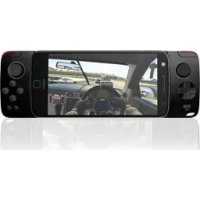
Moto GamePad - Controller MOTOROLA - Free user manual and instructions
Find the device manual for free Moto GamePad MOTOROLA in PDF.



User questions about Moto GamePad MOTOROLA
0 question about this device. Answer the ones you know or ask your own.
Ask a new question about this device
Download the instructions for your Controller in PDF format for free! Find your manual Moto GamePad - MOTOROLA and take your electronic device back in hand. On this page are published all the documents necessary for the use of your device. Moto GamePad by MOTOROLA.
USER MANUAL Moto GamePad MOTOROLA
We'll guide you through attaching and using your Moto Mod.
In this guide:
- "Attach and remove your Moto Mod"
- "Charge your Moto Gamepad"
• "Moto Gamepad controls" - "Download games"
- "Attach a headset"
- "Want more?"
Attach and remove your Moto Mod™
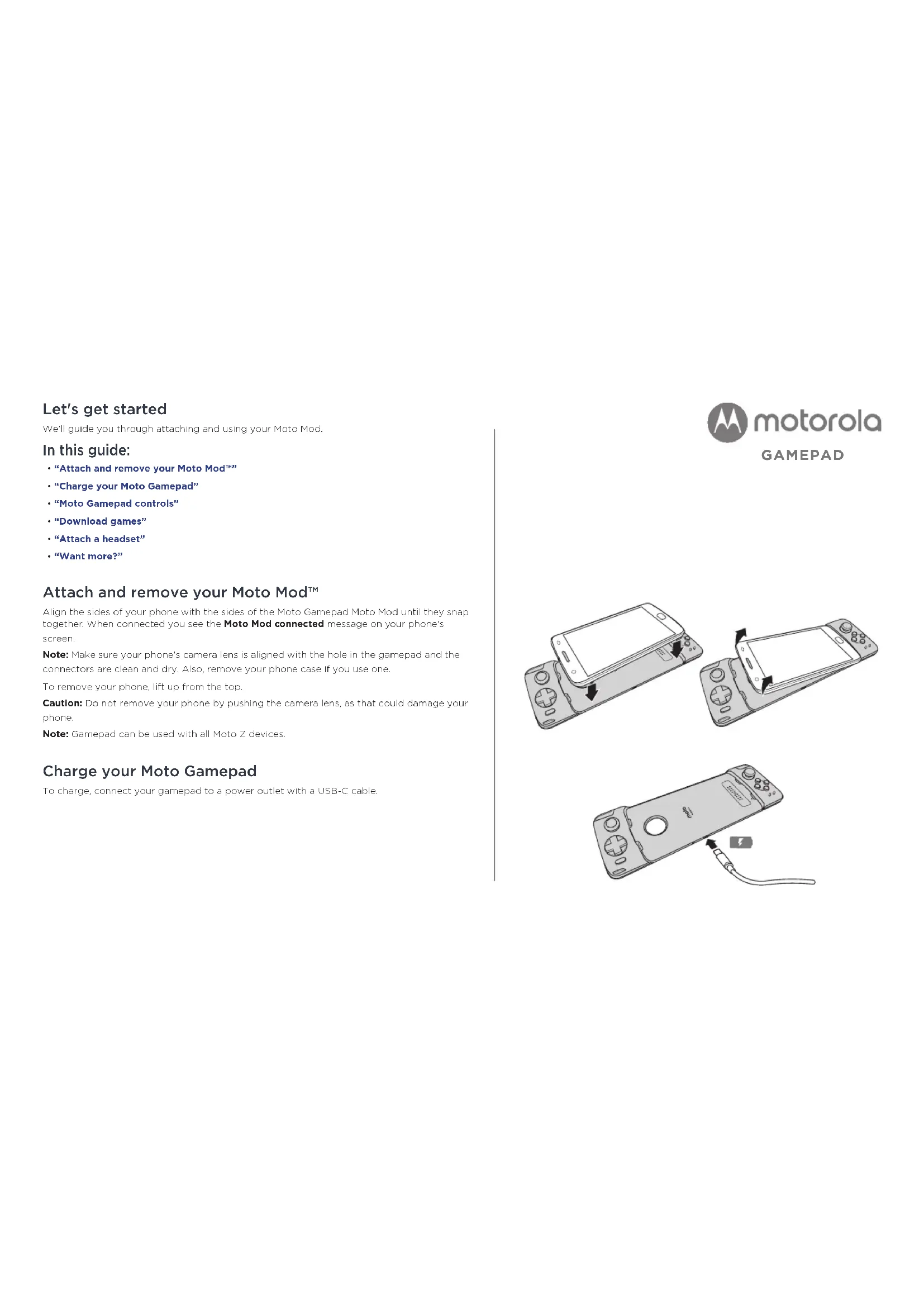
Align the sides of your phone with the sides of the Moto Gamepad Moto Mod until they snap together. When connected you see the Moto Mod connected message on your phone's screen.
Note: Make sure your phone's camera lens is aligned with the hole in the gamepad and the connectors are clean and dry. Also, remove your phone case if you use one.
To remove your phone, lift up from the top.
Caution: Do not remove your phone by pushing the camera lens, as that could damage your phone.
Note: Gamepad can be used with all Moto Z devices.
Charge your Moto Gamepad
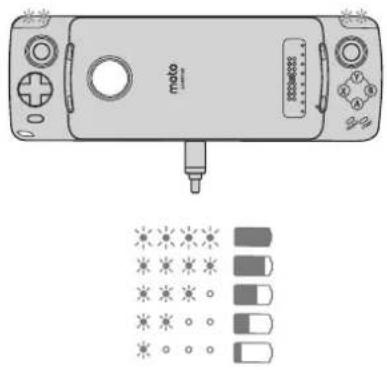
To charge, connect your gamepad to a power outlet with a USB-C cable.

motorola
GAMEPAD
natural_image
Three-step diagram showing a mobile game controller with scroll, battery, and cable connection (no text or symbols)Charge levels
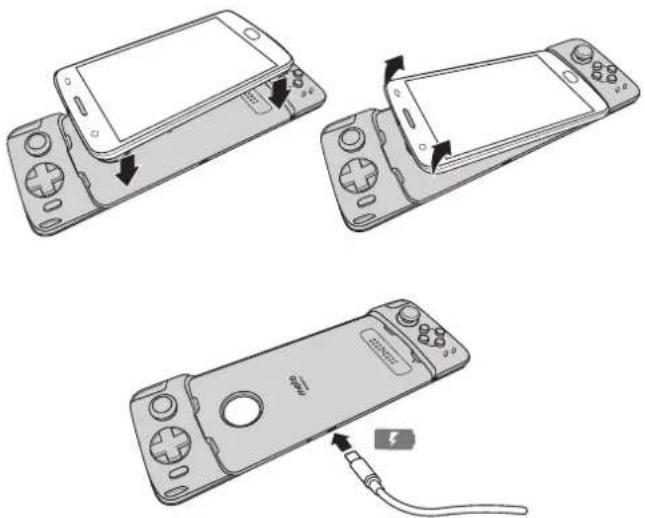
The LEDs indicate the gamepad charge level.
| LEDs Charge % | |
| 4 full brightness 100 | |
| 4 75 to 100 | |
| 3 50 to 75 | |
| 2 25 to 50 | |
| 1 0 to 25 |
Snap your phone into the gamepad and the Y-lamp indicates your phone is charging.
natural_image
Illustration of a vintage mobile phone with control buttons and a screwdriver, alongside a grid of small icons below (no text or symbols)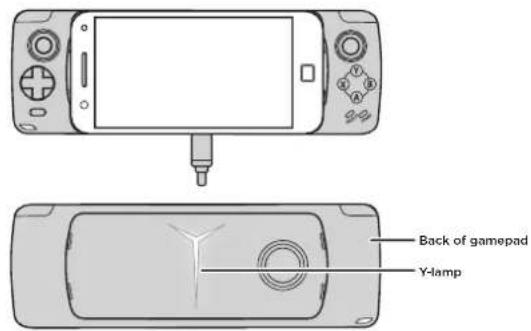
Moto Gamepad controls
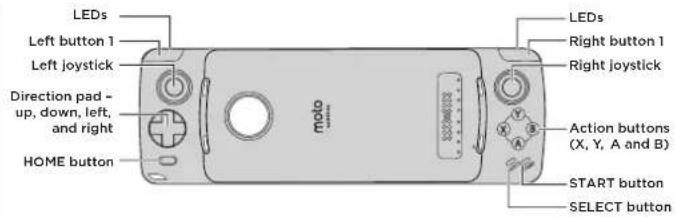
Your gamepad is fully connected and you have full access and control when your phone snaps into the gamepad. Take full control of your gaming experience in a snap.
Note: Controls are game dependent and may vary.
Controls
START button Press to start.
SELECT button Press to select an option.
HOME button Press to return to Home screen.
D-Pad Press to move up, down, left or right.
Action buttons (X, Y, A and B) Press to perform various actions.
Left & right joystick Push up, down, left, right to move an object. Press to select.
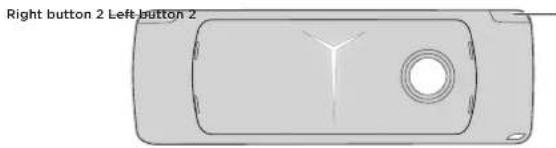
Left button 1 and 2 Press to select
Right button 1 and 2 Press to select.
Note: Press and hold the Home and X buttons to turn on/off LEDs.
Download games
To download games onto your phone.
Find it: Play Store (or App Centre)
You can find compatible games easily on the Moto Game Explorer app (or LeStore).
To install 📄 Moto Game Explorer, search "Moto Game Explorer" on Play Store and install
the app. To download a game, tap it to see details, then tap INSTALL or BUY.
Attach a headset
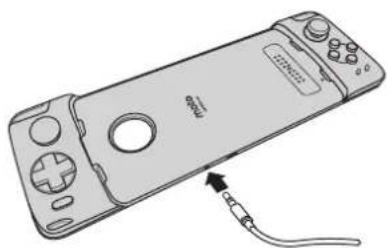
Connect a headset to your gamepad.
Want more?
- Go to www.motorola.com/mymotomods for tutorials, videos and more.
- Moto Mods are sold separately. View the complete collection at www.motomods.com.
natural_image
Line drawing of a handheld gaming device with a cable inserted, showing no text or symbolsChildren
Keep your mobile device and its accessories away from small children. These products are not toys and may be hazardous to small children. For example, a choking hazard may exist for small, detachable parts.
Supervise access. If children use your mobile device and accessories, monitor their access for their safety and to help prevent loss of data or unexpected charges for data or application on purchases.
Seizures, blackouts, eyestrain & discomfort
Prolonged use of any device may cause discomfort in hands, fingers, arms, neck and other parts of your body, and may cause eyestrain and headaches. It is good practice to use your device in a safe area with comfortable ambient lighting, and take frequent breaks if you feel discomfort. Seek medical advice if symptoms persist.
In rare cases, flashing patterns or lights, for example in video games or movies, may cause seizures or blackouts. If you suffer any seizures or blackouts, or have a h story of seizures, stop using your device and seek medical advice.
Copyright & trademarks
Motorola Mobility LC
222 W. Merchandise Mart Plaza
Chicago, IL 60654
www.molorola.com
Certain features, services and applications are network-dependent and may not be available in all areas; additional terms, conditions and/or charges may apply. Contact your service provider for details.
All features, functionality and other product specifications, as well as the information contained in this guide, are based upon the most available information and believed to be accurate at the time of printing. Motorola reserves the right to change or modify any information or specifications without notice or obligation.
Note: the images in this guide are examples on y.
MOTOROLA, the stylesec M logo, MOTO and the MOTO family of marks are trademarks or registered trademarks of Motorola Trademark Holdings, LLC. LTK.OVO is a trademark of 1. Lenovo, Google, Android, Google Play and other marks are trademarks of Google Inc. microSD Logo is a trademark of SD-3C, LLC. All other product or service names are the property of their respective owners. © 2017 Motorola Mobility LLC. All rights reserved.
Product ID: Moto Gamepad (MD1006)
Manual Number: SSC8C20167-A
C'est parti!
natural_image
Three line drawings of a mobile gaming device with control panels and a cable, showing front, side, and top views (no text or symbols)Niveaux de charge
natural_image
Illustration of a vintage mobile phone with control buttons and a screwdriver, alongside a grid of small icons below (no text or symbols)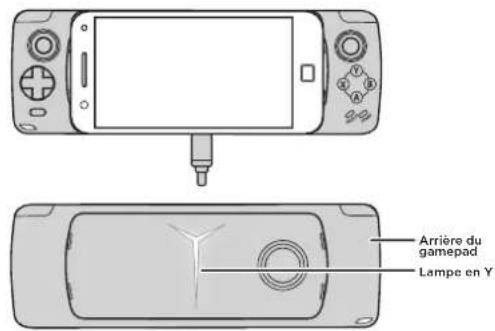
natural_image
Line drawing of a handheld gaming device with a cable inserted, showing no text or symbolsEnfants
Motorola Mobility LLC
222 W Merchandise Mart Plaza
Chicago 11 60654
www.motorola.com
natural_image
Three-step diagram showing a mobile phone with scroll, cable, and display (no text or symbols)Ladezustand
natural_image
Illustration of a vintage mobile phone with control buttons and a screwdriver, alongside a grid of small icons below (no text or symbols)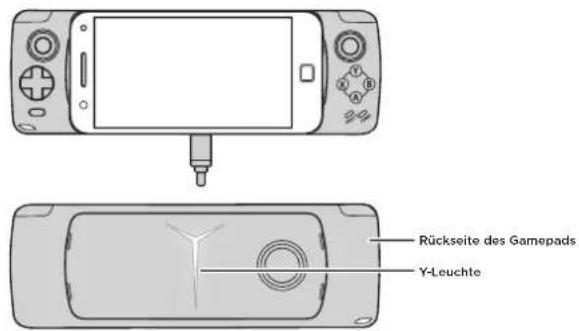
natural_image
Line drawing of a handheld gaming device with a cable inserted, showing no text or symbolsKinder
natural_image
Three-step diagram showing a mobile game controller with scroll, battery, and cable connection (no text or symbols)Livelli di carica
Procedura: Play Store (○ App Center)
natural_image
Line drawing of a handheld gaming device with a cable inserted, showing no text or symbolsBambini
Motorola Mobility LLC
222 W Merchandise Mart Plaza
Chicago 11 60654
www.motorola.com
natural_image
Three line drawings of a mobile gaming device with control buttons and a cable, showing front, side, and top views (no text or symbols)Niveles de carga
natural_image
Line drawing of a handheld gaming device with a cable inserted, showing no text or symbolsNiños
Motorola Mobility LLC
222 W. Merchandise Mart Plaza
natural_image
Three-step diagram showing a mobile game controller with scroll, screen, and cable (no text or symbols)Niveles de carga
natural_image
Line drawing of a handheld gaming device with a cable inserted, showing no text or symbolsNiños
natural_image
Three line drawings of a mobile gaming device with control panels and a cable, showing front, side, and top views (no text or symbols)Laddningsnivåer
natural_image
Line drawing of a handheld gaming device with a cable inserted, showing no text or symbolsBarn
Motorola Mobility, LC
222 W. Merchandise Mart Plaza
Chicago, IL 60654
www.molorola.com
natural_image
Three-step diagram showing a mobile game controller with scroll, battery, and cable connection (no text or symbols)Latauksen taso
natural_image
Illustration of a vintage mobile phone with control buttons and a screwdriver, alongside a grid of small icons below (no text or symbols)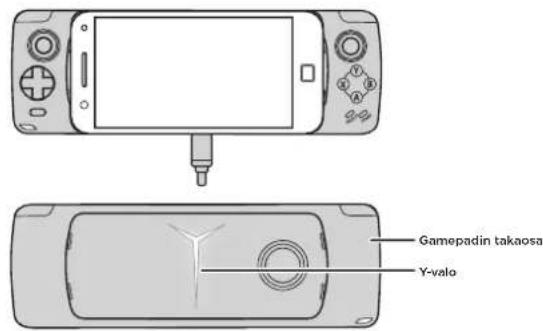
Moto Gamepadin painikkeet
natural_image
Line drawing of a handheld gaming device with a cable inserted, showing no text or symbolsLapset
Motorola Mobility, LC
222 W. Merchandise Mart Plaza
Chicago, IL 60654
www.motorola.com
natural_image
Three-step diagram showing a mobile phone with scroll, cable, and display (no text or symbols)Ladenivåer
LED-lampene angir gamepadens ladenivå.
| LED-lamper Ladeprosent | |
| 4 full lysstyrke 100 | |
| 4 75-100 | |
| 3 50-75 | |
| 2 25-50 | |
| 1 0-25 |
Knepp telefonen på plass i gamepaden, så angir Y-lampen at telefonen lader.
natural_image
Illustration of a vintage mobile phone with control buttons and a screwdriver, alongside a grid of small icons below (no text or symbols)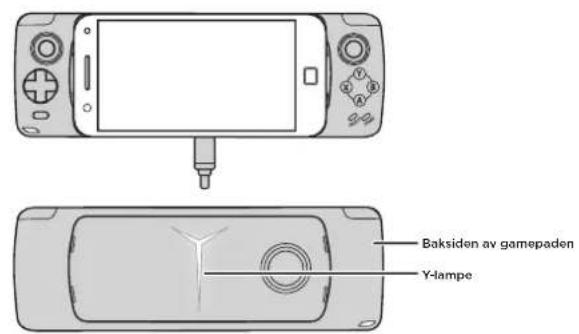
Moto Gamepad-kontroller
natural_image
Line drawing of a handheld gaming device with a cable inserted, showing no text or symbolsBarn
Motorola Mobility, LC
222 W. Merchandise Mart Plaza
Chicago, IL 60654, USA
www.malorela.com
natural_image
Three-step diagram showing a mobile game controller with scroll, screen, and cable (no text or symbols)Şarj düzeyleri
natural_image
Line drawing of a handheld gaming device with a cable inserted, showing no text or symbolsCocuklar
Motorola Mobility LC
222 W. Merchandise Mart Plaza
Chicago, IL 60654
www.molorola.com
natural_image
Three-step diagram showing a mobile phone with scroll, cable, and display (no text or symbols)Opladningsniveauer
Indikatorerne angiver ladetilstanden for dit gamepad.
natural_image
Line drawing of a handheld gaming device with a cable inserted, showing no text or symbolsBørn
Motorola Mobility LC
222 W. Merchandise Mart Plaza
Chicago, IL 60654
www.molorola.com
Motorola Mobility LLC
222 W. Merchandise Mart Plaza
Chicago, IL 60654
www.motorola.com
natural_image
Illustration of a handheld gaming device with a cable inserted, showing no text or symbols on the device itself.تركيب سماعة رأس
natural_image
Three-step diagram showing a mobile phone casing with control buttons and a cable, no text or symbols present.لنيداً الاستخدام