T36FT810NS - Freezer THERMADOR - Free user manual and instructions
Find the device manual for free T36FT810NS THERMADOR in PDF.


User questions about T36FT810NS THERMADOR
0 question about this device. Answer the ones you know or ask your own.
Ask a new question about this device
Download the instructions for your Freezer in PDF format for free! Find your manual T36FT810NS - THERMADOR and take your electronic device back in hand. On this page are published all the documents necessary for the use of your device. T36FT810NS by THERMADOR.
USER MANUAL T36FT810NS THERMADOR
Freezer refrigerator T36FT..
THERMADOR.COM
Table of contents
1 Safety. 4
1.1 Safety definitions 4
1.2 General information 4
1.3 Intended use 4
1.4 Restriction on user group 4
1.5 Safe transport 4
1.6 Safe installation 4
1.7 Safe use 5
1.8 Damaged appliance 6
1.9 State of California Proposition 65Warnings 6
2 Preventing material damage 7
3 Environmental protection and energy-saving 7
3.1 Disposal of packaging.. 7
3.2 Saving energy 7
4 Installation and connection. 7
4.1 Included in delivery 7
4.2 Criteria for the installation location 7
4.3 Installing the appliance 8
4.4 Preparing the appliance for first use.. 8
4.5 Connecting the appliance to the drinking water connection 8
4.6 Connecting the appliance to the electricity supply .... 8
5Familiarizing yourself with your appliance 9
5.1 Appliance 9
5.2 Control panel. 10
5.3 Control panel (submenu) 11
5.4 Control panel (cool-fresh compartment) 12
6 Features 12
6.1 Shelf 12
6.2 Fixed shelf 13
6.3 Pull-out container 13
6.4 Cool-fresh container 13
6.5 Container divider 13
6.6 Flat frozen food container 13
6.7 Frozen food pull-out container 13
6.8 Frozen-food carrying container 13
6.9 Door racks 13
6.10 Ice storage container 13
6.11 Accessories 13
7 Basic Operation 14
7.1 Switching on the appliance 14
7.2 Operating tips 14
7.3 Switching off the appliance 14
7.4 Setting the temperature unit 14
7.5 Setting the temperature 14
7.6 Cool-fresh compartment storage setting 14
8 Additional functions 14
8.1 Super cooling 14
8.2 Super freezing 14
8.3 Vacation mode 15
8.4 Energy-saving mode 15
8.5 Freshness mode 15
8.6 Interior lighting 15
8.7 Sabbath mode 15
8.8 Filter change notification 16
8.9 Filter change status 16
9 Alarm 16
9.1 Door alarm 16
9.2 Temperature alarm 16
10 Home ConnectTM 16
10.1 Connecting the appliance to a WLAN home network (Wi-Fi) with WPS function 17
10.2 Connecting the appliance to a WLAN home network (Wi-Fi) without WPS function 17
10.3 Connecting the appliance to the Home ConnectTM app 17
10.4 Checking the signal strength 18
10.5 Installing updates for the Home Connect software 18
10.6 Resetting the Home ConnectTM settings 18
10.7 Remote diagnostics 18
10.8 Data Protection 18
11 Refrigerator compartment. 18
11.1 Tips for storing food in the refrigerator compartment 18
11.2 Chill zones in the refrigerator compartment 19
12 Cool-fresh compartment 19
12.1 Storage recommendations for the cool-fresh compartment 19
12.2 Storage times in the cool-fresh compartment at 32^(0^) 19
13 Freezer compartment 19
13.1 Tips for storing food in the freezer compartment..... 19
13.2 Tips for freezing fresh food 19
13.3 Shelf life of frozen food at 0^(-18^) 19
13.4 Defrosting methods for frozen food 20
14 Water system 20
14.1 Water filter 20
14.2 Water dispenser 20
14.3 Ice cube maker 21
15 Defrosting 22
15.1 Defrosting in the refrigerator compartment 22
15.2 Defrosting in the cool-fresh compartment 22
15.3 Defrosting in the freezer compartment 22
16 Cleaning and maintenance 22
16.1 Preparing the appliance for cleaning 22
16.2 Cleaning the appliance 22
16.3 Removing the fittings 22
16.4 Removing the appliance components 24
17 Eliminating faults 27
18 Storage and disposal 29
18.1 Taking the appliance out of operation 29
18.2 Disposal of your old appliance 29
19 Customer service 29
19.1 Product number (E-Nr.) and production number (FD) 29

IMPORTANT SAFETY INSTRUCTIONS
READ AND SAVE THESE INSTRUCTIONS
Observe the following safety instructions.
1.1 Safety definitions
Here you can find explanations of the safety signal words used in this manual.

WARNING
This indicates that death or serious injuries may occur as a result of non-observation of this warning.

CAUTION
This indicates that minor or moderate injuries may occur as a result of non-observation of this warning.
NOTICE:
This indicates that damage to the appliance or property may occur as a result of non-compliance with this advisory.
Note: This alerts you to important information and/or tips.
1.2 General information
Read this manual carefully.
- Keep the manual and the product information in a safe place for future reference or for the next owner.
- Do not connect the appliance if it has been damaged in transit.
1.3 Intended use
Only use this appliance:
for chilling and freezing food, making ice and dispensing water.
In private households and in enclosed spaces in a domestic environment.
Up to an altitude of max. 13,100 ft (4000 m) above sea level.
1.4 Restriction on user group
This appliance is not intended for use by persons (including children) with reduced physical, sensory or mental capabilities, or lack of experience and knowledge, unless they have been
given supervision or instruction concerning use of the appliance by a person responsible for their safety.
Do not let children play with the appliance.
Cleaning and user maintenance must not be performed by children unless they are being supervised.
1.5 Safe transport
Risk of injury

WARNING
The high weight of the appliance may result in injury when lifted.
Do not lift the appliance on your own.
1.6 Safe installation
Risk of electric shock

WARNING
Improper installations are dangerous.
Connect and operate the appliance only in accordance with the specifications on the rating plate.
- Connect the appliance to a power supply with alternating current only via a correctly installed socket outlet with grounding.
The protective conductor system of the domestic electrical installation must be properly installed.
- Never equip the appliance with an external switching device, e.g. a timer or remote control.
- When the appliance is installed, the mains plug of the power cord must be freely accessible. If free access is not possible, an all-pole isolating switch must be integrated in the permanent electrical installation according to the installation regulations.
- When installing the appliance, check that the mains cable is not trapped or damaged.
If the insulation of the power cord is damaged, that can be dangerous.
- Never let the power cord come into contact with heat sources.

IMPORTANT SAFETY INSTRUCTIONS
READ AND SAVE THESE INSTRUCTIONS
Risk of explosion
WARNING
If the appliance's ventilation openings are sealed, a leak in the refrigeration circuit may result in a flammable mixture of gas and air.
- Keep ventilation openings, in the appliance enclosure or in the built-in structure, clear of obstruction.
Risk of fire
WARNING
It is dangerous to use an extended power cord and non-approved adapters.
- Do not use extension cables or multiple socket strips.
If the power cord is too short, contact customer service. - Only use adapters approved by the manufacturer.
Portable multiple socket strips or portable power supply units may overheat and cause a fire.
- Do not place portable multiple socket strips or power supply units on the back of the appliance.
1.7 Safe use
Risk of electric shock
WARNING
Penetrating moisture may cause an electric shock.
- Use the appliance in enclosed spaces only.
- Never expose the appliance to intense heat or humidity.
- Do not use any steam cleaners or high-pressure cleaners to clean the appliance.
Risk of suffocation
WARNING
Children may pull packaging material over their heads, or wrap themselves up in it and suffocate.
- Keep packaging material away from children.
Do not allow children to play with packaging material.
Children may breathe in or swallow small parts, causing them to suffocate.
- Keep small parts away from children.
- Do not allow children to play with small parts.
Risk of explosion
WARNING
Mechanical devices or other devices may damage the refrigeration circuit; flammable refrigerant may escape and explode.
To accelerate the defrosting process, do not use any other mechanical devices or devices other than those recommended by the manufacturer.
Products which contain flammable propellants and explosive substances may explode, e.g. spray cans.
- Do not store products which contain flammable propellants (e.g. spray cans) or explosive substances in the appliance.
Risk of fire
WARNING
Electrical devices within the appliance may cause a fire, e.g. heaters or electric ice makers.
- Do not operate electrical devices within the appliance.
Risk of injury
WARNING
Containers which contain carbonated drinks may burst.
Do not store containers that contain carbonated drinks in the cool-fresh compartment below 34^ (1^)
- Do not store containers which contain carbonated drinks in the freezer compartment. Injury to the eyes caused by escaping flammable refrigerant and hazardous gases.
- Do not damage the tubes of the refrigerant circuit or the insulation.
The appliance may tip.
- Do not stand or lean on the base, runners or doors.

IMPORTANT SAFETY INSTRUCTIONS
READ AND SAVE THESE INSTRUCTIONS
Risk of cold burns
WARNING
Contact with frozen food and cold surfaces may cause burns by refrigeration.
- Never put frozen food straight from the freezer compartment into your mouth.
- Avoid prolonged skin contact with frozen food, ice and surfaces in the freezer compartment.
Risk of harm to health
CAUTION
To prevent food from being contaminated, you must observe the following instructions.
Leaving the door open for an extended period of time may lead to a considerable temperature increase in the compartments of the appliance.
Regularly clean the surfaces that may come into contact with food and accessible drain systems.
If water has not been dispensed for 5 days, flush the water system.
- Store raw meat and fish in suitable containers in the refrigerator so that they do not touch or drip on other food.
If the fridge/freezer is empty for an extended period of time, switch off the appliance, defrost it, clean it and leave the door open to prevent the formation of mold.
Metal or metal-style parts in the appliance may contain aluminum. If acidic food comes into contact with aluminum in the appliance, aluminum ions may pass into the food.
Do not consume soiled food.
1.8 Damaged appliance
Risk of electric shock
WARNING
If the appliance or the power cord is damaged, this is dangerous.
- Never operate a damaged appliance.
- Never pull on the power cord to unplug the appliance. Always unplug the appliance at the mains.
If the appliance or the power cord is damaged, immediately unplug the power cord or switch off the fuse in the fuse box and turn off the water tap.
- Call after-sales service. Page 29 Improper repairs are dangerous.
- Only original spare parts may be used to repair the appliance.
If the power cord of this appliance becomes damaged, it must be replaced by the manufacturer, the manufacturer's customer service, or a similarly qualified person in order to prevent injury.
Risk of fire
WARNING
If the tubes are damaged, flammable refrigerant and harmful gases may escape and ignite.
- Keep open flames and ignition sources away from the appliance.
- Ventilate the room.
Switch off the appliance. Page 14
Unplug the appliance from the power source or switch off the circuit breaker in the fuse box. - Call customer service. Page 29
1.9 State of California Proposition 65 Warnings
This product may contain a chemical known to the State of California, which can cause cancer or reproductive harm. Therefore, the packaging of your product may bear the following label as required by California:
STATE OF CALIFORNIA PROPOSITION 65 WARNING: / AVENTISSEMENT ISSUE DE LA PROPOSITION 65 DE L'ETAT DE LA CALIFORNIE:
WARNING / AVERTISSEMENT
Cancer and Reproductive Harm / Cancer et dommages à la reproduction - www.P65Warnings.ca.gov.
2 Preventing material damage
NOTICE:
The high weight of the appliance may damage the floor when it is moved.
- Use a hand-cart and floor protection when moving the appliance.
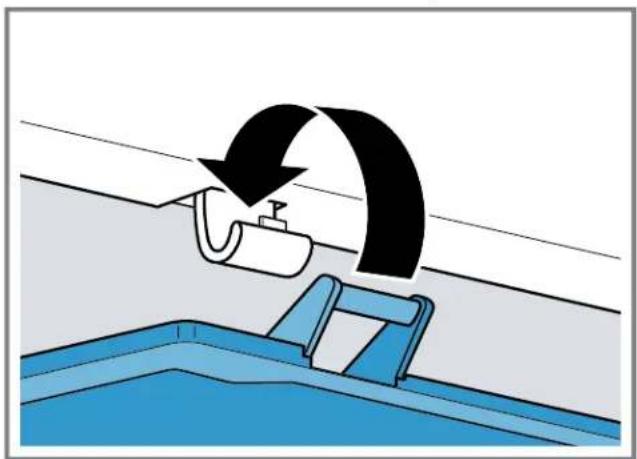
When the appliance door is closed, the mullion rail should be closed (flush with the door edge) or damage may occur.
- Never open the mullion rail manually.
If the mullion rail has been opened, rotate it closed (flush with the door edge) before closing the appliance door.
Using the base, runners or appliance doors as a seat or climbing surface may damage the appliance.
- Do not stand or lean on the base, runners or doors. If the water pressure is too high or too low, this may impair functioning of the appliance.
Make sure that the water pressure in the water supply system is at least 29 psi (200 kPa) and max. 116 psi (800 kPa).
If the water pressure exceeds the maximum value specified, a pressure-reducing valve must be installed between the drinking water connection and the hose set of the appliance.
Modified or damaged water hoses may result in material damage and damage to the appliance.
- Never kink, crush, modify or cut through water hoses.
- Never re-use water hoses that have been used before.
- Never pull on the water hose on the rear panel of the appliance.
Contamination with oil or fat may cause plastic parts and door seals to become porous.
- Keep plastic parts and door seals free of oil and grease. Metal or metal-style parts in the appliance may contain aluminum. Aluminum reacts when it comes into contact with acidic foods.
Do not store unpackaged food in the appliance.
3 Environmental protection and energy-saving
3.1 Disposal of packaging
The packaging materials are environmentally compatible and can be recycled.
- Sort the individual components by type and dispose of them separately.
3.2 Saving energy
If you follow these instructions, your appliance will use less power.
Selecting the installation location
- Keep the appliance out of direct sunlight.
Install the appliance as far away as possible from heating elements, stoves and other heat sources:
- Maintain a 1 14 (30 mm) clearance to electric or gas stoves.
-
Maintain an 11^13 / _16 (300 mm) clearance to oil or solid-fuel stoves.
-
Never cover or block the exterior ventilation grilles.
Saving energy during use
Note: The arrangement of the fittings does not affect the energy consumption of the appliance.
- Open the appliance only briefly.
- Never cover or block the interior ventilation openings on the exterior ventilation grilles.
- Transport purchased food in a cooler and place quickly in the appliance.
- Allow warm food and drinks to cool down before storing them.
Thaw frozen food in the refrigerator compartment to utilize the low temperature of the food.
Always leave some space between the food and to the back panel. - Pack food airtight.
- Open the freezer compartment door only briefly and then close it properly.
Vacuum the external ventilation grilles when they are dusty.
4 Installation and connection
4.1 Included in delivery
After unpacking all the parts, check for any damage in transit and for completeness of delivery. If you have any complaints, contact your dealer or our after-sales service Page 29.
The delivery consists of the following:
Free-standing appliance
Equipment and accessories
Installation material
Installation instructions
- User manual
Explanation of the limited product warranty
Warranty enclosure
Energy label
Information on energy consumption and noises
Information about Home ConnectTM
4.2 Criteria for the installation location
WARNING
Risk of explosion!
If the appliance is in a space that is too small, a leak in the refrigeration circuit may result in a flammable mixture of gas and air.
- Only install the appliance in a space with a volume of at least 35ft^3 ( 1m^3 ) per 0.3 oz ( 8g ) refrigerant. The amount of refrigerant is indicated on the rating label.
"Appliance", Fig. 1/11, Page 10
The weight of the appliance may be up to 345 lbs (155 kg) depending on the model.
The subfloor must be sufficiently stable to bear the weight of the appliance.
4.3 Installing the appliance
Install the appliance in accordance with the enclosed installation instructions.
4.4 Preparing the appliance for first use
- Remove the information material.
- Remove the protective film and transit bolts, e.g. remove the adhesive strips and cardboard.
- Clean the appliance for the first time. Page 22
4.5 Connecting the appliance to the drinking water connection
Requirements
- A shut-off valve must be installed on the water connection and be freely accessible following installation of the appliance.
- Ensure that the water coming from the water connection is potable.
- Rinse the drinking water connection thoroughly until the drinking water is no longer cloudy and contains no deposits.
If the drinking water is still cloudy or contains deposits, install an external water filter system.
- Install the drinking water connection according to the enclosed installation instructions.
4.6 Connecting the appliance to the electricity supply
- Insert the non-heating appliance plug of the power cable into the appliance.
- Insert the mains plug of the appliance's power cable in a socket outlet nearby.
The connection data of the appliance can be found on the rating plate. "Appliance", Fig. 1/11, Page 10
- Check the mains plug is inserted properly.
The appliance is now ready to use.
5 Familiarizing yourself with your appliance
5.1 Appliance
Here you can find an overview of the parts of your appliance.
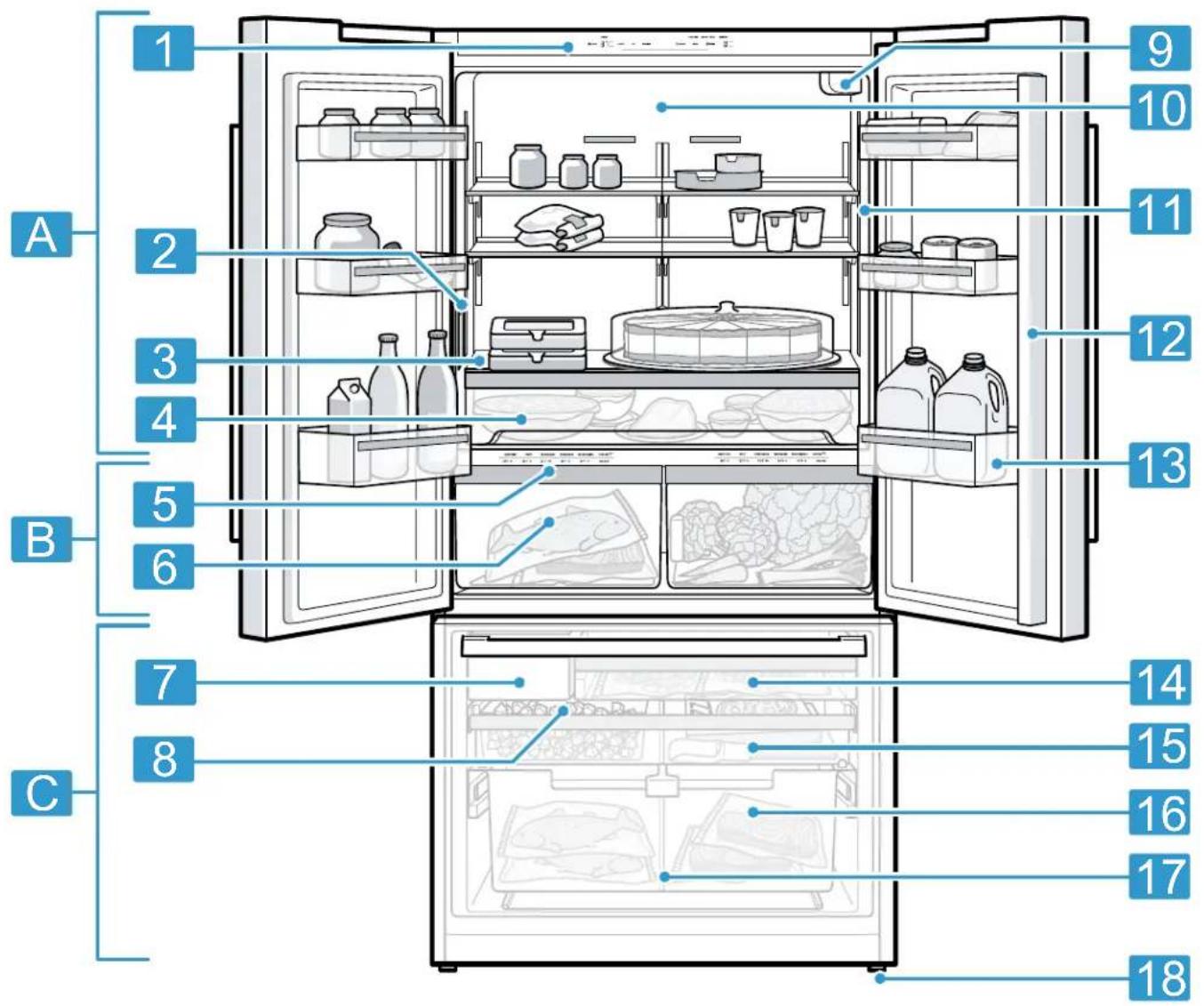
1
A Refrigerator compartment
Cool-fresh compartment
C Freezer compartment
1 Control panel
2 Water dispenser
3 Fixed shelf Page 13
4 Pull-out container Page 13
5 Control panel (cool-fresh compartment)
Cool-fresh container
Ice cube maker
| 8 | Ice storage container → Page 13 |
| 9 | Water filter |
| 10 | Interior lighting |
| 11 | Rating label |
| 12 | Mullion rail with condensation protection |
| 13 | Door rack for large bottles |
| 14 | Frozen-food pull-out container → Page 13 |
| 15 | Flat frozen food container → Page 13 |
| 16 | Frozen-food carrying container → Page 13 |
| 17 | Container divider → Page 13 |
| 18 | Screw foot |
| Note: Your appliance may differ from the diagrams with regard to features and dimensions. | |
5.2 Control panel
You can use the control panel to configure all functions of your appliance and to obtain information about the operating status.
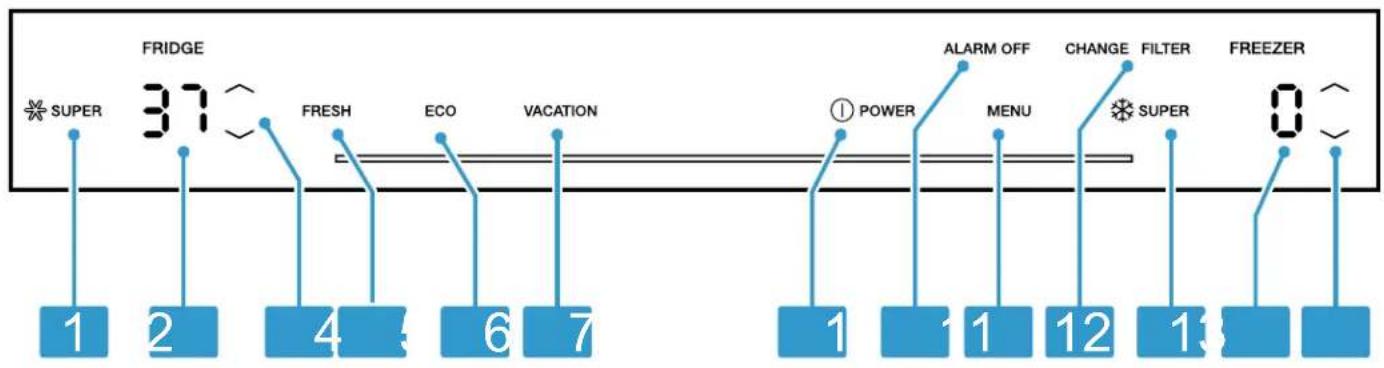
2
| 1 | * SUPER switches Super cooling on or off. |
| 2 | Displays the set temperature for the refrigerator compartment in °F or °C. |
| 3 | / (Refrigerator compartment) sets the temperature of the refrigerator compartment. |
| 4 | FRESH switches freshness mode on or off. |
| 5 | ECO switches energy-saving mode on or off. |
| 6 | VACATION switches holiday mode on or off. |
| 7 | ① POWER switches the appliance on or off. |
| 8 | ALARM OFF switches off the alarm. |
| 9 | MENU opens and closes the menu. |
| 10 | CHANGE FILTER lights up when the filter needs to be replaced. |
| 11 | * SUPER switches Super freezing on or off. |
| 12 | Displays the set temperature for the freezer compartment in °F or °C. |
| 13 | / (Freezer compartment) sets the temperature of the freezer compartment. |
You can configure further settings in the submenu.
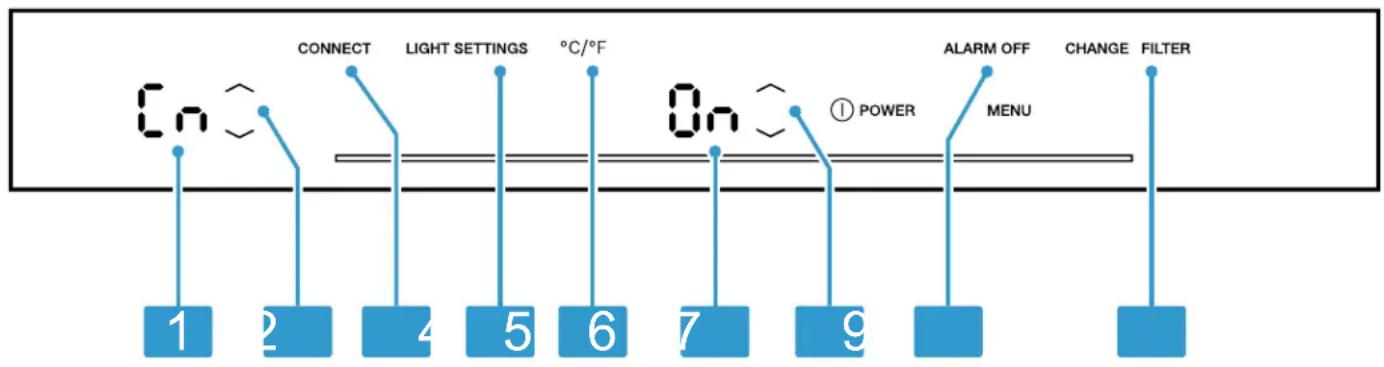
3
1 Displays the selected submenu.
2 / (Submenu) is used to navigate through the submenu.
3 MENU opens the menu for setting Home Connect.
4 LIGHT SETTINGS opens the menu for setting the lighting.
5 ^ C / ^ opens the menu for changing the temperature unit.
6 Displays the settings of the submenu.
7 / (Submenu setting) changes the submenu setting.
8 ALARM OFF opens the menu for setting the door alarm.
9 CHANGE FILTER opens the menu for setting the filter.
5.4 Control panel (cool-fresh compartment)
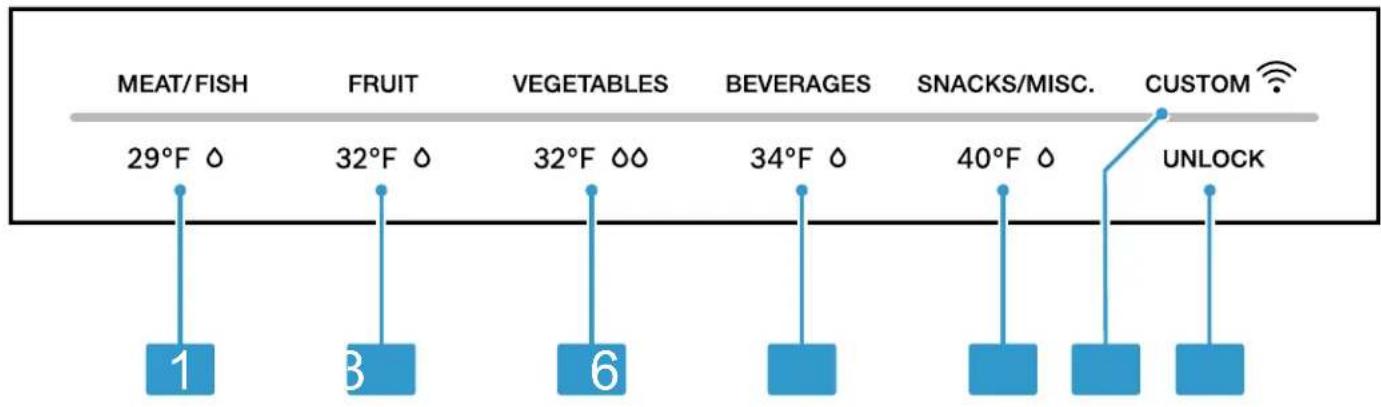
Using the control panel for the cool-fresh compartment, you can set the temperature and humidity in the cool-fresh compartment.
4
1 29^ 0 sets the cool-fresh compartment storage setting for meat and fish.
2 32^ 0 sets the cool-fresh compartment storage setting for fruit.
3 32^ 00 sets the cool-fresh compartment storage setting for vegetables.
4 34^ 0 sets the cool-fresh compartment storage setting for beverages.
40°F 4 sets the cool-fresh compartment storage setting for snacks.
The light bar displays the user-defined settings have been set via the Home Connect™ app. You can find more information in the Home Connect™ app.
7 UNLOCK switches the button lock for the control panel (cool-fresh compartment) off.
6 Features
The features of your appliance depend on the model.
6.1 Shelf
NOTICE:
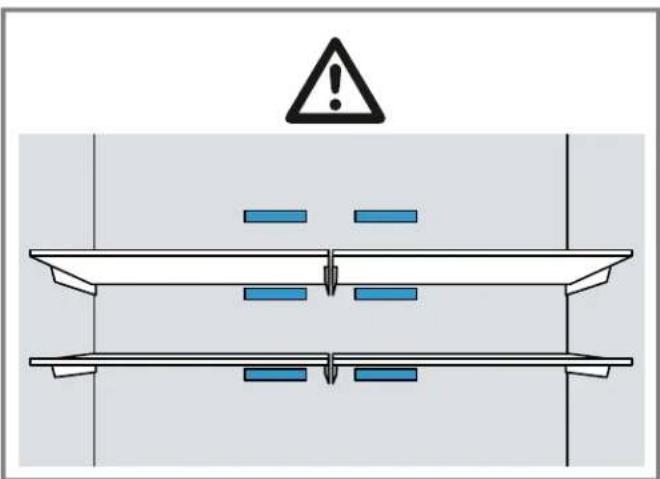
If fitted at an angle, the hooks on the shelf can scratch the rear panel of the refrigerator compartment.
- Ensure that the shelf is horizontal and that the hooks are properly fitted in place.
To vary the shelf as required, you can remove the shelf and re-insert it elsewhere.
"Removing the shelf", Page 22
Note
Do not cover the interior ventilation openings.
6.2 Fixed shelf
Always put the fixed shelf in the specified position.
6.3 Pull-out container
Do not store large plates or containers with processed food which has been covered in the pull-out container.
6.4 Cool-fresh container
To automatically set the cool-fresh container to the right humidity and temperature for your food, use the different cool-fresh container storage settings.
For hygiene reasons, do not store fruit and vegetables in a cool-fresh container with meat and fish.
Store food no higher than the container rim to prevent detaching the lid of the cool-fresh container.
Condensation may form in the cool-fresh container depending on the type and quantity of food stored.
Remove the condensation with a dry cloth.
To ensure that the quality and aroma are retained, store fruit and vegetables that are sensitive to cold outside of the appliance at temperatures of approximately 46^
(8 °C) to 54 °F (12 °C), e.g. pineapple, bananas, citrus fruits, cucumbers, zucchini, bell peppers, tomatoes and potatoes.
6.5 Container divider
WARNING
Risk of suffocation!
Children may climb into the appliance and suffocate.
- Never remove the carrying container dividers of the frozen food container.
NOTICE:
The carrying container divider of the frozen food container will be damaged if removed.
- Never remove the carrying container dividers of the frozen food container.
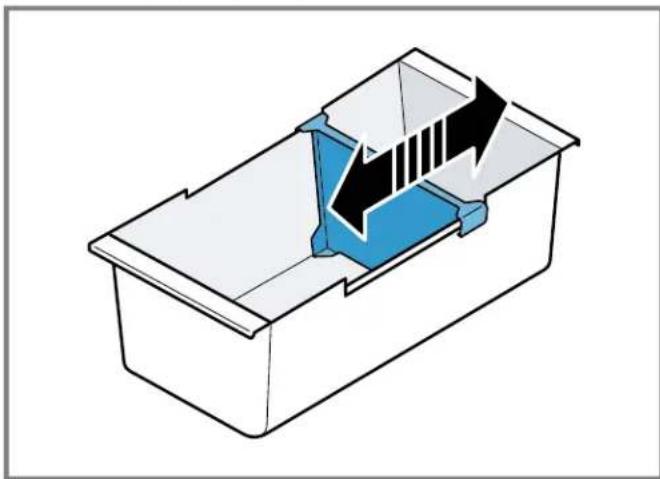
To vary the division of the frozen food container, you can move the container divider.
6.6 Flat frozen food container
Store flat frozen items, the ice storage container and the ice scoop in the flat frozen food container.
6.7 Frozen food pull-out container
In order to achieve an improved overview and to remove frozen food more quickly, remove the frozen food pull-out container.
6.8 Frozen-food carrying container
Store large frozen items in the frozen-food carrying container.
6.9 Door racks
To adjust the door rack as required, you can remove the door rack, and re-insert it elsewhere.
"Removing the door racks", Page 23
6.10 Ice storage container
If ice cube production is switched on, the ice cubes are automatically stored in the ice storage container.
NOTICE:
The ice cube maker may become blocked or damaged by food or objects stored in the ice cube container.
- Never store food or objects in the ice cube container.
6.11 Accessories
Only use original accessories. These are designed especially for your appliance.
The accessories for your appliance depend on the model.
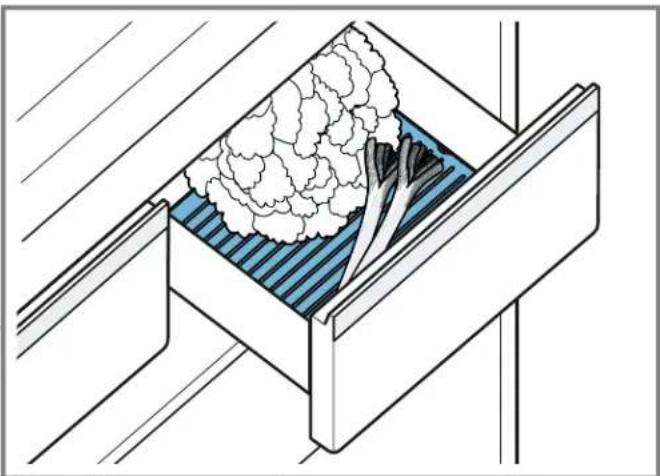
Freshness grille
The freshness grille prevents the build-up of moisture in the food, since the moisture drips through the grille and is collected in a container below.
Ethylene absorber
For important safety instructions and information about installation and use, see the enclosed installation and operating instructions for the ethylene absorber.
The ethylene absorber slows down the ripening of ethylene-sensitive fruit and vegetables to keep them fresher for longer.
Attaching the ethylene absorber
- Attach the ethylene absorber in accordance with the instructions for installation and use for the ethylene absorber.
Using the refill set
- Install the components of the refill set in accordance with the instructions for installation and use for the ethylene absorber.
- Replace the bags and the timer every 6 months following activation.
Note: Refill sets consisting of bags and timer are available from our customer service, your dealer or on our website.
Ice scoop
You can use the ice scoop to remove a portion of ice cubes.
7 Basic Operation
7.1 Switching on the appliance
- Connect the appliance to the electricity supply. Page 8
Note: If the appliance has been previously switched off using the control panel, press ① POWER
The appliance begins to cool.
- Switch off the warning signal withALARM OFF
AlgARMOFF soon as the set temperature has been reached. - Set the required temperature. Page 14
7.2 Operating tips
- Once you have switched on the appliance, the set temperature is only reached after several hours. Do not put any food in the appliance until the temperature has been reached.
- The front and side panels of the housing heat up occasionally. This prevents condensation from forming.
- When you close the door, a vacuum may be created. The door is then difficult to open again. Wait a moment until the vacuum is offset.
7.3 Switching off the appliance
Press ① POWER
7.4 Setting the temperature unit
You can choose between the temperature setting ^ F and ^ C .
- Press MENU
- Press°C/F
- Press / (Submenu setting) until the setting display submenu shows For
- Press MENU
7.5 Setting the temperature
Setting the refrigerator compartment temperature
Press (Refrigerator compartment) repeatedly until the temperature display (refrigerator compartment) shows the required temperature.
The recommended temperature in the refrigerator compartment is 37^ (3^)
Setting the freezer compartment temperature
Press (Freezer compartment) repeatedly until the temperature display (freeze compartment) shows the required temperature.
The recommended temperature in the freezer compartment is 0^(-18^)
7.6 Cool-fresh compartment storage setting
You can set the temperature and humidity of the coolfresh container using predefined storage settings.
Tip: Further settings are available in the Home Connect™ app.
Setting the cool-fresh compartment storage setting
- Press any touch field on the control panel (cool-fresh compartment).
- Press and hold UNbOcklight bar lights up fully.
- Press the storage setting that you require.
8 Additional functions
8.1 Super cooling
With Super cooling, the refrigerator compartment cools so that it as cold as possible.
Switch on Super cooling before placing large quantities of food in the freezer compartment.
Note: When Super cooling is switched on, increased noise may occur.
Switching on Super cooling
Press SUPER
light up.
Note: After approximately 6 hours, the appliance switches to normal operation.
Switching off Super cooling
Press SUPER
The previously set temperature is displayed.
8.2 Super freezing
With Super freezing, the freezer compartment cools so that it as cold as possible.
Switch on Super freezing 1 to 2 hours before placing food weighing 4.4 lbs (2 kg) or more into the freezer compartment.
Use Super freezing to accelerate ice cube production.
Note: When Super freezing is switched on, increased noise may occur.
Switching on Super freezing
Press 串 SUPER
*tgspsup.
Note: After approximately 8 hours, the appliance switches to normal operation.
Switching off Super freezing
Press SUPER
The previously set temperature is displayed.
8.3 Vacation mode
If you are going to be away for a long time, you can switch on energy-saving vacation mode on the appliance.
CAUTION
Risk of harm to health!
The refrigerator compartment heats up while the vacation mode is switched on. The increased temperature may cause bacteria to increase and spoil the food.
- When the vacation mode is switched on, do not store any food in the refrigerator compartment.
The appliance automatically sets the temperatures.
| Refrigerator compartment 43 °F (6 °C) |
| Coolfresh compartment 40 °F (4 °C) |
| Freezer compartment Temperature remains unchanged |
Note: While the vacation mode is activated, the ice cube production and the water dispenser are switched off.
Switching on vacation mode
Press VACATION
VAIGATION
Switching off vacation mode
Press VACATION
The previously set temperature is displayed.
8.4 Energy-saving mode
You can set the appliance to save energy with the energy-saving mode.
The appliance automatically sets the temperatures.
| Refrigerator compartment 43 °F (6 °C) |
| Cool-fresh compartment 32 °F (0 °C) |
| Freezer compartment 6 °F (-14 °C) |
Switching on energy-saving mode
Press ECO
Eeonts up.
Switching off energy-saving mode
Press ECO
The previously set temperature is displayed.
8.5 Freshness mode
In order to keep the food fresh longer, you can switch on the freshness mode on the appliance.
The appliance automatically sets the temperatures.
Refrigerator compartment 36^ (2^)
Cool-fresh compartment 32^ (0^)
Freezer compartment Temperature remains unchanged
Switching on freshness mode
Press FRESH
FRESHup.
Switching off freshness mode
Press FRESH
The previously set temperature is displayed.
8.6 Interior lighting
You can switch the interior lighting off or set the brightness.
| 0 | The interior lighting is switched off |
| 1 | Minimum brightness |
| 5 | Maximum brightness |
Setting the interior lighting
- Press MENU
- PresLIGHT SETTINGS
- Press / (Submenu setting) until the setting display submenu shows the required setting.
- Press MENU
8.7 Sabbath mode
To ensure that you can also use the appliance on the Sabbath, the Sabbath mode switches off all non-essential functions.
During Sabbath mode, the following functions are switched off:
Super cooling
Super freezing
Alarm
Water dispensing
Ice cube production
Interior lighting
Audible signals
- Messages on the control panel
Note: The brightness of the control panel lighting is reduced during the Sabbath mode.
Switching on Sabbath mode
Press and hold VACATIONs until an audible signal sounds.
ALARM lights up.
Note: After approximately 80 hours, the appliance switches to normal operation.
Switching off Sabbath mode
- Press and hold Ab AR mounds until an audible signal sounds.
8.8 Filter change notification
Every 6 months, the filter change notification will come on. CHANGE FILTER lights up.
Note: Increased water consumption switches the filter change notification on sooner.
Switching off the filter change notification
- Replace the water filter.
The bypass cap does not need to be replaced. - Press and hold CHANGE or FILTER
CHANGES FILTER
The filter change status is reset.
8.9 Filter change status
If you replace the filter before the filter change notification, reset the filter change status.
| The measurement of the filter change status is running |
| 0 | Resetting the filter change status |
Resetting the filter change status
- Press MENU
- PressCHANGE FILTER
The submenu setting display shows. - Press (Submenu setting).
The submenu setting display show8. - Press MENU
9 Alarm
9.1 Door alarm
If the appliance door is open for a while, the door alarm switches on.
Switching off the door alarm
- Close the appliance door or press ALARM OFF
The warning tone is switched off.
AlgARMuOFF
Door alarm warning signal
You can activate or deactivate the door alarm warning signal.
| On | Door alarm warning signal activated |
| OF | Door alarm warning signal deactivated |
Activating the door alarm warning signal
- Press MENU
-
PressALARM OFF
-
Press (Submenu setting) until the setting display submenu shows the required setting.
- Press MENU
Deactivating the door alarm warning signal
- Press MENU
- PressALARM OFF
- Press / (Submenu setting) until the setting display submenu shows the required setting.
- Press MENU
9.2 Temperature alarm
If the freezer compartment becomes too warm, the temperature alarm will switch on.
CAUTION
Risk of harm to health!
During the thawing process, bacteria may multiply and spoil the frozen food.
Do not refreeze partly or completely thawed food.
- Refreeze food only after cooking.
The frozen items should no longer be stored for the maximum storage period.
The temperature alarm can be switched on in the following cases:
The appliance is switched on.
Do not store any food until the appliance has reached the set temperature.
Large quantities of fresh food are being placed inside. Switch on Super freezing before placing large quantities of food in the appliance.
- The freezer compartment door is open for too long. Check whether the frozen food has defrosted or thawed.
Switching off the temperature alarm
Press ALARM OFF
The warning tone is switched off.
- The temperature display (freeze compartment) briefly indicates the warmest temperature reached in the freezezer compartment. The temperature display (freeze compartment) then indicates the set temperature again.
From this time on, the warmest temperature is recalculated and saved.
10 Home Connect™
This appliance is network-capable. Connecting your appliance to a mobile device lets you control its functions via the Home Connect™ app.
Home Connect™ services are not available in every country. Availability of the Home Connect™ function depends on the availability of Home Connect™ services in your country. You can find information on this at: www.homeconnect.com.
To be able to use Home Connect™, you must first set up the connection to the WLAN home network (Wi-Fi¹) and to the Home Connect™ app.
After switching on the appliance, wait at least 2 minutes until internal device initialization is complete. Only then should you set up Home ConnectTM.
- Connecting appliance to WLAN home network (Wi-Fi) with WPS function Page 17
- Connecting appliance to WLAN home network (Wi-Fi) without WPS function Page 17
The Home Connect™ app will guide you through the entire registration process. Follow the instructions in the Home Connect™ app to make the settings.
Tips
Please consult the Home Connect™ documents supplied.
- Please also note the information in the Home Connect™ app.
Notes
- Please also note the safety information in this instruction manual and ensure that it is also observed when operating the appliance using the Home Connect™ app.
"Safety", Page 4 - Operating the appliance on the appliance itself always takes priority. It is not possible to operate the appliance using the Home Connect™ app during this time.
10.1 Connecting the appliance to a WLAN home network (Wi-Fi) with WPS function
If your router has a WPS function, you can connect the appliance to your WLAN home network (Wi-Fi) automatically.
1. Press MENU
CONNEcT and the submenu display shows
2. Press (Submenu) repeatedly until the submenu display shows AEnd the submenu setting display shows OF
3. Press (Submenu setting).
- The submenu display shows an animation for 2 minutes. The appliance is ready for automatic connection to the WLAN home network (Wi-Fi).
- Activate the WPS function on the router during this period.
To do this, take note of the information in the documents for your router.
If the connection is successful, flashes in the submenu setting display.
5. If the menu display shows, the appliance was unable to establish a connection to the WLAN home network (Wi-Fi).
- Check whether the appliance is located within the range of the WLAN home network (Wi-Fi).
"Checking the signal strength", Page 18 -
Repeat the process or connect manually Page 17.
-
Connect the appliance to the Home Connect app.
Page 17
10.2 Connecting the appliance to a WLAN home network (Wi-Fi) without WPS function
If your router does not have a WPS function, you can connect the appliance to your WLAN home network (Wi-Fi) manually. The appliance briefly sets up its own WLAN net
work. You can connect a mobile device to the WLAN network and transfer the network information for the WLAN home network (Wi-Fi) to your appliance.
Requirement: The Home Connect™ app has been installed on your mobile device.
1. Press MENU
CONNECTand the submenu display shows [n.
2. Press (Submenu) repeatedly until the submenu display shows and the submenu setting display shows OF
-
Press (Submenu setting).
-
The appliance now sets up its own WLAN network with the network name "HomeConnect".
-
The submenu setting display shows an animation. The appliance is ready for manual connection to the WLAN home network (Wi-Fi).
-
Follow the instructions in the Home Connect™ app on the mobile device.
-
The network information for the WLAN home network (Wi-Fi) is transferred to the appliance.
-
If the connection is successful, flashes in the submenu setting display.
-
If the menu display shows, the appliance was unable to establish a connection to the WLAN home network (Wi-Fi).
-
Check whether the appliance is located within the range of the WLAN home network (Wi-Fi). "Checking the signal strength", Page 18
- Repeat the process.
10.3 Connecting the appliance to the Home Connect™ app
If you have automatically connected your appliance to your WLAN home network (Wi-Fi), you can connect your appliance to the Home Connect™ app.
Requirements
The appliance is connected to the WLAN home network (Wi-Fi). Page 17
- The Home Connect™ app has been installed on your mobile device.
1. Press MENU
CONNECTand the submenu display shows [n.
2. Press / (Submenu) repeatedly until the submenu display shows and the submenu setting display shows OF
-
Press (Submenu setting).
-
The submenu setting display shows an animation.
-
Follow the instructions in the Home Connect™ app until the process is complete.
If the connection is successful, the submenu setting display shows 0n -
If the menu setting display shows the appliance was unable to establish a connection to the Home ConnectTM app.
-
In the Home Connect™ app, check whether the mobile device is connected to the WLAN home network (Wi-Fi).
-
Repeat the process.
-
If the menu setting display shows reset the Home ConnectTM settings. Page 18
10.4 Checking the signal strength
You should check the signal strength if no connection could be established.
- Press MENU
CONNECT and the menu display shows
2. Press (Submenu) repeatedly until the submenu display shows 51
- The submenu display shows a value between setting (no reception) and (full reception).
3. Press MENU
Note: The signal strength should be at least 2
Improving the reception
If the signal strength is too weak, the connection may be interrupted.
-
Carry out one of the solution options:
-
Place the router and refrigerator closer together.
- Ensure that the connection is not interfered with by screening walls.
Install a repeater to strengthen the signal.
10.5 Installing updates for the Home Connect software
The appliance searches for updates to the Home Connect™ software at regular intervals.
Note: If updates are available, the submenu display shows UP
To cancel the update and reset the submenu display to the set temperature, press any touch field.
- Press MENU
CONNEcT and the submenu display shows - Press (Submenu) repeatedly until the submenu display shows and the submenu setting display shows OF
- Press (Submenu setting).
- The submenu setting display shows an animation.
The update is installed.
The control panel is locked during the installation.
If the installation is successful, the submenu setting display shows Qn -
If the submenu setting display shows, the appliance was unable to install the update.
-
Repeat the process at a later point.
-
If the update cannot be completed after several attempts, contact customer service Page 29.
10.6 Resetting the Home Connect™ settings
If your appliance experiences connection problems with the WLAN home network (Wi-Fi) or your appliance wants to log into a different WLAN home network (Wi-Fi), you can reset the Home Connect™ settings.
-
Press MENU
CONNECT and the submenu display shows -
Press (Submenu) repeatedly until the submenu display shows and the submenu setting display shows OF
-
Press (Submenu setting).
-
The submenu setting display shows an animation for approximately 15 seconds.
The submenu setting display then showBn.
The Home Connect™ settings have been reset.
- Press MENU
10.7 Remote diagnostics
The after-sales services can access your appliance via Remote Diagnostics if you ask them to do so, if your appliance is connected to the Home Connect™ server and if Remote Diagnostics is available in the country where you are using the appliance.
Tip: Further information and details about the availability of Remote Diagnostics in your country can be found in the Service/Support section of your local website: www.homeconnect.com
10.8 Data Protection
Please see the information on data protection.
The first time your appliance is registered on a home network connected to the Internet, your appliance will transmit the following types of data to the
Home ConnectTM server (initial registration):
- Unique appliance identification (consisting of appliance codes as well as the MAC address of the installed Wi-Fi communication module).
Security certificate of the Wi-Fi communication module (to ensure a secure data connection).
The current software and hardware version of your appliance.
Status of any previous reset to factory settings.
This initial registration prepares the Home ConnectTM functions for use and is only required when you want to use the Home ConnectTM functions for the first time.
Note: Please note that the Home Connect™ functions can be utilized only with the Home Connect™ app. Information on data protection can be called up in the Home Connect™ app.
11 Refrigerator compartment
You can keep dairy products, eggs, prepared meals, pastries, open preserves and hard cheese in the refrigerator compartment.
The temperature can be set from 33^ (1^) to 43^ (6^) .
The recommended temperature in the refrigerator compartment is 37^ (3^)
The refrigerator compartment can also be used to store highly perishable groceries in the short to medium term. The lower the selected temperature, the longer the food remains fresh.
11.1 Tips for storing food in the refrigerator compartment
Only store food when fresh and undamaged.
- Observe the best-before date or expiration date specified by the manufacturer.
Store food well wrapped or covered. - Allow hot food and drinks to cool down first before placing in the appliance.
11.2 Chill zones in the refrigerator compartment
The air circulation in the refrigerator compartment creates different chill zones.
Coldest zone
The coldest zone is in the pull-out container.
Tip: Store highly perishable food such as fish, sausages and meat in the cool-fresh compartment.
"Cool-fresh compartment", Page 19
Warmest zone
The warmest zone is at the very top of the door.
Tip: Store groceries that do not spoil easily in the warmest zone, e.g. hard cheese and butter. Cheese can then continue to release its flavor and the butter will still be easy to spread.
12 Cool-fresh compartment
In the cool-fresh compartment, you can keep fresh food fresh three times longer than in the refrigerator compartment.
The temperature can be set from 29^(-2^) to 40^ (4^) using pre-defined storage settings.
Storing food in the fresh compartment retains the quality of the food better. The low temperature and the optimum moisture provide ideal storage conditions for fresh food.
12.1 Storage recommendations for the cool-fresh compartment
You can find out here which cool-fresh compartment storage setting you can use.
| Storage setting | Food |
| 29°F 0 | Meat, fish and seafood |
| 32°F 0 | Fruit, mixed load with fruit and vegeta- bles, sausage, cheese and dairy prod- ucts |
| 32°F 00 | Vegetables |
| 34°F 0 | Beverages |
| 40°F 0 | Snacks and other items |
Tip: Fruit, vegetables, drinks and snacks may freeze below 32^ (0^)
Only use the storage setting 209Fneat and fish.
12.2 Storage times in the cool-fresh compartment at 32^ (0^)
The storage times are dependent on the original quality of your food.
Food Storage time
Fresh fish, seafood up to 3 days
Food Storage time
Poultry, meat (boiled/fried) up to 5 days
Beef, pork, lamb, sausage (cold meat) up to 7 days
Smoked fish, broccoli up to 14 days
Salad greens, fennel, apricots, plums up to 21 days
Soft cheese, yogurt, buttermilk, cauliflower up to 30 days flower
13 Freezer compartment
You can store frozen food, freeze food and make ice cubes in the freezer compartment.
The temperature can be set from 6^(-14^) to -7^(-22^) .
Long-term storage of food should be at 0^(-18^) or lower.
The freezer compartment can be used to store perishable food long-term. The low temperatures slow down or stop the spoilage.
13.1 Tips for storing food in the freezer compartment
- To quickly and gently freeze larger quantities of fresh food, place this in the top frozen food container.
- Do not bring food which is to be frozen into contact with frozen food.
13.2 Tips for freezing fresh food
- Freeze fresh and undamaged food only.
- Freeze food in portions.
Cooked food is more suitable than food that can be eaten raw.
Vegetables: Wash, chop up and blanch before freezing. - Fruit: Wash, pit and perhaps peel, possibly add sugar or ascorbic acid solution.
- Food that is suitable for freezing includes baked items, fish and seafood, meat, game, poultry, eggs without shells, cheese, butter and curd cheese, prepared meals and leftovers.
- Food that is unsuitable for freezing includes lettuce, radishes, eggs in shells, grapes, raw apples and pears, yogurt, sour cream, crème fraîche and mayonnaise.
Packing frozen food
If you select suitable packaging material and the correct type of packaging, you can determine the product quality and prevent freezer burn.
- Place the food in the packaging.
- Squeeze out the air.
- Pack food airtight to prevent it from losing flavor or drying out.
- Label the packaging with the contents and the date of freezing.
13.3 Shelf life of frozen food at 0^ (-18^)
Food Storage time
Fish, sausages, prepared meals up to 6 months and baked goods
Food Storage time
Meat, poultry up to 8 months
Vegetables, fruit up to 12 months
13.4 Defrosting methods for frozen food

CAUTION
Risk of harm to health!
During the thawing process, bacteria may multiply and spoil the frozen food.
Do not refreeze partly or completely thawed food.
Refreeze food only after cooking.
The frozen items should no longer be stored for the maximum storage period.
Defrost animal-based food, such as fish, meat, cheese, quark, in the refrigerator compartment.
Defrost bread at room temperature.
Prepare food for immediate consumption in the microwave, in the oven or on the cooktop.
14 Water system
Your appliance is equipped with water-carrying components.
The water system only works if a water filter or a bypass cap is installed.
14.1 Water filter
The water filter filters particles and the taste of chlorine out of the water.
The water filter reduces further contamination, e. g. from chloramines, lead and pharmaceutical products.
Note: The water filter does not filter bacteria or microbes out of the water.
Change the water filter:
every 6 months.
- iCHANGE FILTER
if the water output has visibly reduced.
Tips
- A new water filter can be purchased from customer service, your dealer or our website.
If you do not want to use a water filter in your appliance or an external water filter system is installed, you can permanently replace the water filter with a bypass cap. The bypass cap filters only large particles out of the water and can be cleaned as required.
A bypass cap can be purchased from customer service or our website.
Changing the water filter or replacing it with a bypass cap
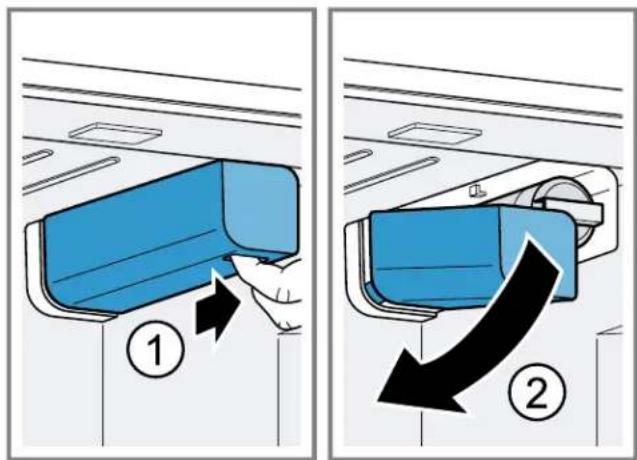
- Reach into the recess below the filter cover, pull it forwards slightly ① and move it to the bottom left .②
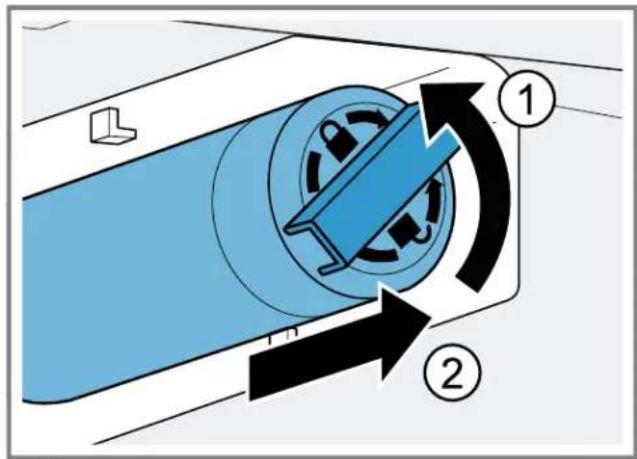
- Turn the water filter counterclockwise by 90^ and remove it ②
Note: When removing it, a small amount of water may drip out of the water filter. Remove the drips of water with a dry cloth.
Tip: You can dispose of the old water filter with your household garbage.
- Insert the new water filter or the bypass cap in the filter opening as far as it will go and turn it 90^ clockwise to the stop.
- Move the filter cover up to the right and slide back as far as it will go.
- Discard the ice cubes produced during the first 24 hours, and dispense water for 5 minutes and discard.
14.2 Water dispenser
Dispense cold water via the water dispenser.
Putting the water dispenser into operation
Once the appliance has been connected or a new water filter has been installed, there will be air in the water system.
- Keep dispensing water until it contains no more air bubbles.
Remove any splashes of water with a dry cloth. - For hygiene reasons, dispense water for 5 minutes and discard.
Dispensing water
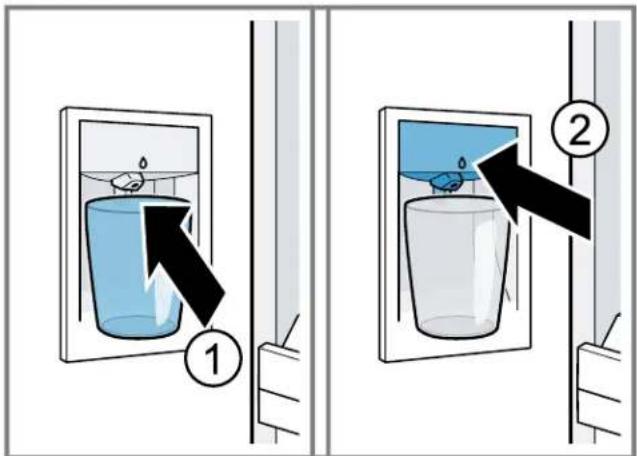
Press and hold the glass against the dispensing button ① or hold the glass under the water dispenser and press 日
Notes
After a while of continuous dispensing, the water stops being dispensed. Wait a few seconds before dispensing water again.
After water has been dispensed several times consecutively, water stops being dispensed. Wait a few minutes before dispensing water again.
14.3 Ice cube maker
Use the ice cube maker to produce ice cubes.

WARNING
Risk of injury!
Rotating parts may cause injury.
- Never reach into or underneath the ice cube maker.
Note: The ice cube maker automatically detects that the ice storage container is full. It could take up to 48 hours until the ice storage container is full.
Tips
- You can accelerate ice cube production by setting a colder freezer compartment temperature or by switching on Super freezing. This will slightly increase energy consumption.
If the ice cubes taste stale, discard them and the cubes produced over the next 24 hours. If the ice cubes still taste stale, change the water filter.
Putting the ice cube maker into operation
Ice cube production starts as soon as the appliance is switched on and the freezer compartment has reached the set temperature.
Note: The first batch of ice cubes will be ready after approximately 4 hours.
For hygiene reasons, discard the ice cubes produced within the first 24 hours.
Switching on ice cube production
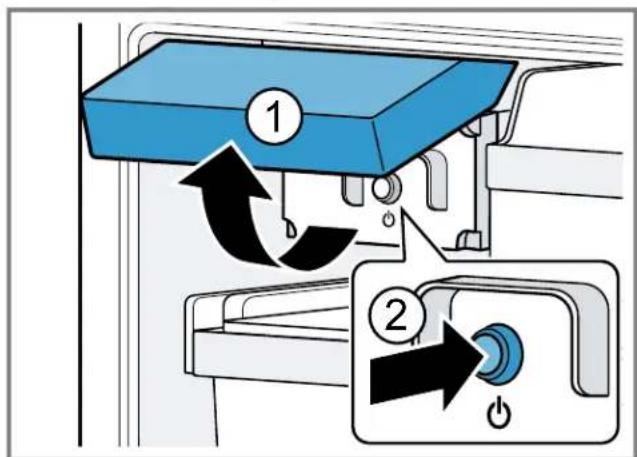
- Lift the ice cube maker cover upwards ① and press the ice cube maker button ②
The ice cube maker button lights up.
Note: If you press and hold the ice cube maker button for 3 seconds, the filter change status is reset.
Switching off ice cube production
- Lift the ice cube maker cover upwards ① and press the ice cube maker button ②
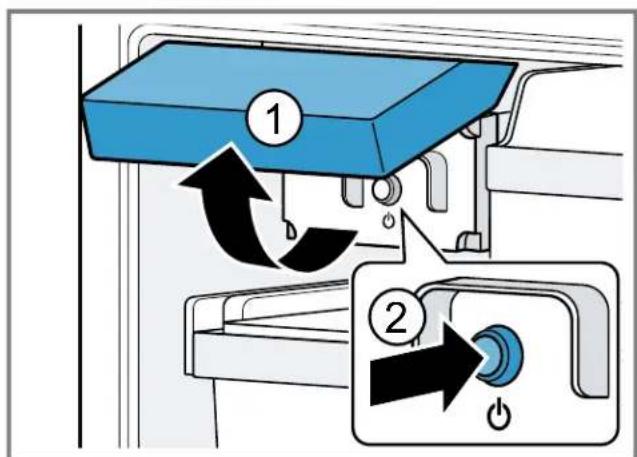
The ice cube maker button goes out.
Note: If you press and hold the ice cube maker button for 3 seconds, the filter change status is reset.
15 Defrosting
15.1 Defrosting in the refrigerator compartment
The refrigerator compartment in your appliance defrosts automatically.
15.2 Defrosting in the cool-fresh compartment
The cool-fresh compartment in your appliance defrosts automatically.
15.3 Defrosting in the freezer compartment
The fully automatic NoFrost system ensures that the freezer compartment remains frost-free. Defrosting is not required.
16 Cleaning and maintenance
To keep your appliance working efficiently for a long time, it is important to clean and maintain it carefully. Customer Service must clean inaccessible points. Cleaning by Customer Service can give rise to costs.
16.1 Preparing the appliance for cleaning
- Switch off the appliance. Page 14
- Disconnect the appliance from the power supply. Unplug the appliance from the power source or switch off the circuit breaker in the fuse box.
- Take out all of the food and store it in a cool place. Place ice packs (if available) onto the food.
- Remove all fittings from the appliance. Page 22
- Remove the following components from the appliance: "Removing the telescopic rails", Page 24 "Removing the refrigerator compartment glass plate", Page 25 "Removing the cool-fresh container cover", Page 26
16.2 Cleaning the appliance
WARNING
Risk of electric shock!
Moisture intrusion may cause an electric shock.
- Do not use any steam cleaners or high-pressure cleaners to clean the appliance.
NOTICE:
Unsuitable cleaning agents may damage the surfaces of the appliance.
- Do not use hard scouring pads or cleaning sponges.
Do not use strong or abrasive cleaning agents. - Do not use cleaning agents with a high alcohol content. If you clean fittings and accessories in the dishwasher, this may cause them to become deformed or discolor.
-
Never clean fittings and accessories in the dishwasher.
-
Prepare the appliance for cleaning. Page 22
- Clean the appliance, the fittings and the door seals with a dish cloth, lukewarm water and a little pH-neutral washing-up liquid.
- Dry thoroughly with a soft, dry cloth.
- Insert the fittings.
- Connect the appliance to the electricity supply.
- Switch on the appliance. Page 14
- Put the food into the appliance.
16.3 Removing the fittings
If you want to clean the fittings thoroughly, remove these from your appliance.
Removing the shelf
Lift the shelf and remove it.②
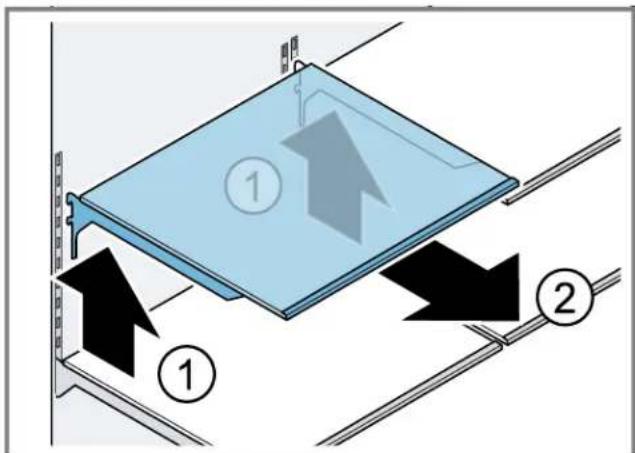
Removing the fixed shelf
- Pull out the pull-out container.
- Lift the fixed shelf at the front ① and remove it ②
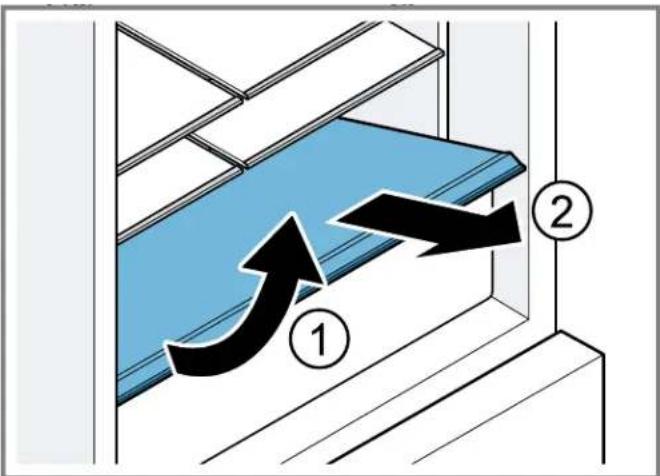
Removing the door racks
- Lift the door rack and remove it.
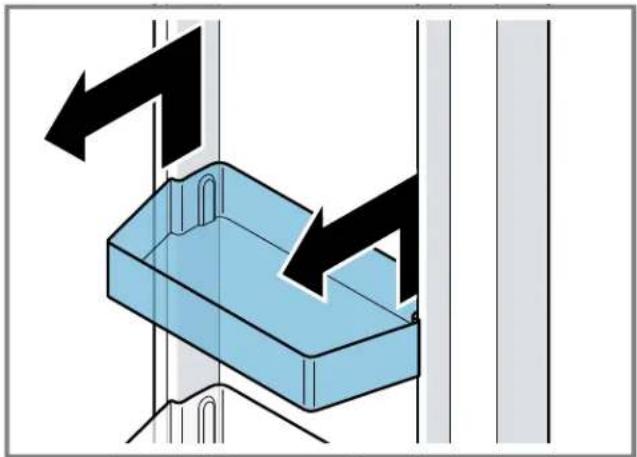
Removing the pull-out containers
- Pull out the pull-out container as far as it will go.
- Lift the pull-out container at the front ① and remove it ②
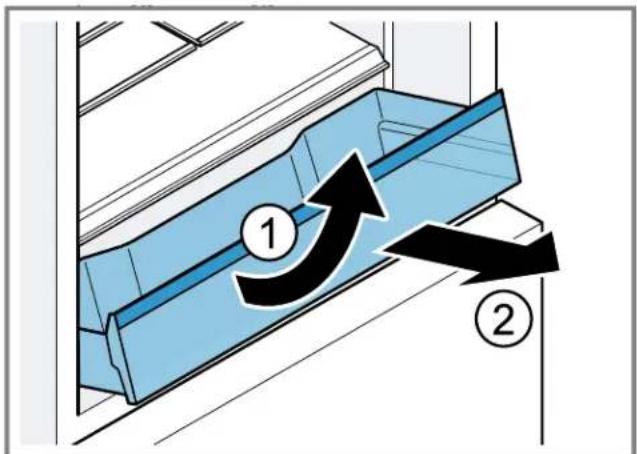
Removing the cool-fresh container
- Pull out the cool-fresh container as far as it will go.
- Lift the cool-fresh container at the front ① and remove it ②
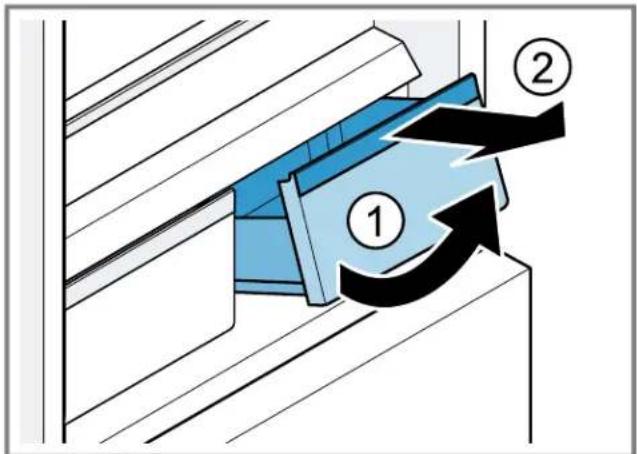
Removing the frozen food pull-out container
- Pull out the frozen food pull-out container as far as it will go.
- Lift the frozen food pull-out container at the front and remove it.
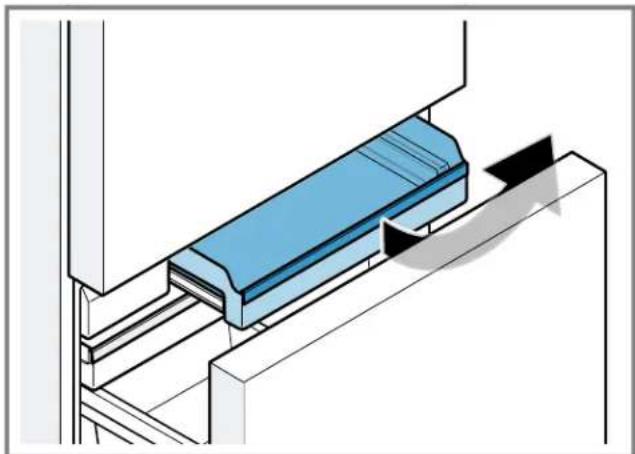
Removing the flat frozen food container
- Pull out the flat frozen food container as far as it will go.
- Lift the flat frozen food container at the front and remove it.
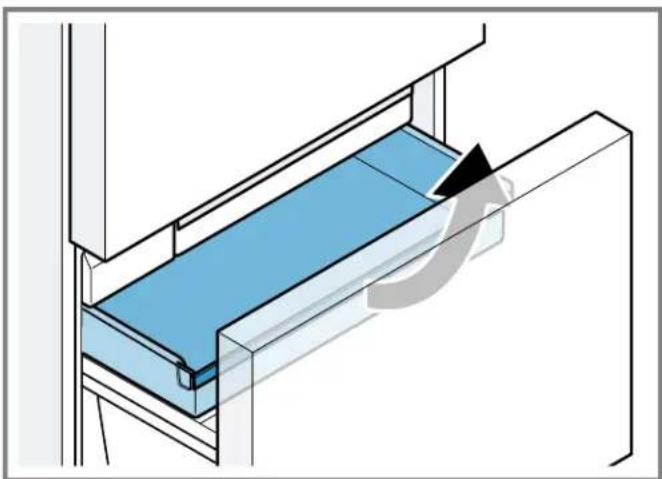
Removing the ice cube container
-
Pull out the flat frozen food container as far as it will go.
-
Lift the ice cube container at the front and remove it.
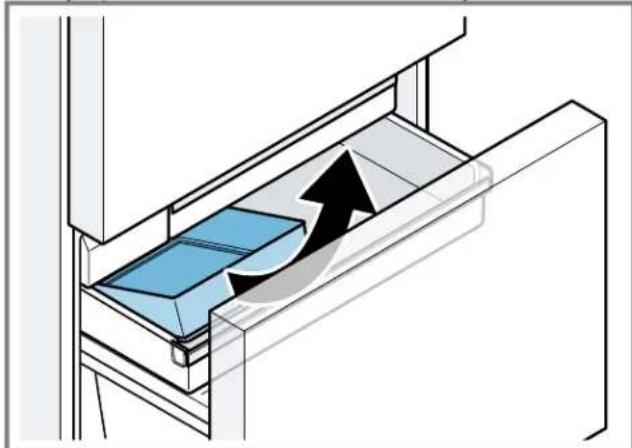
Removing the frozen-food carrying container
- Remove the frozen-food carrying container upwards.
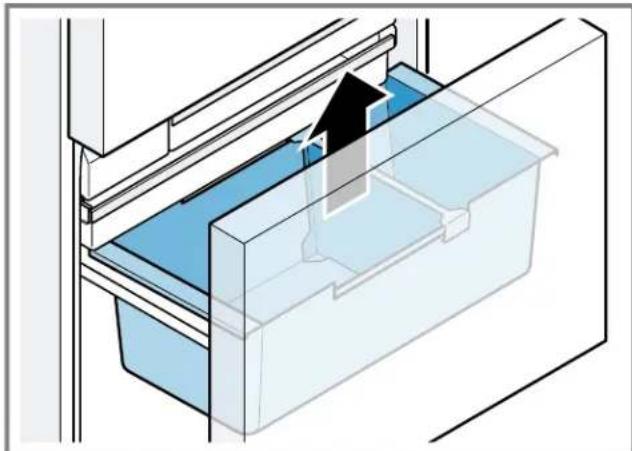
16.4 Removing the appliance components
If you want to clean your appliance thoroughly, you can remove certain components from your appliance.
Telescopic rails
You can remove the telescopic rails in order to clean them thoroughly.
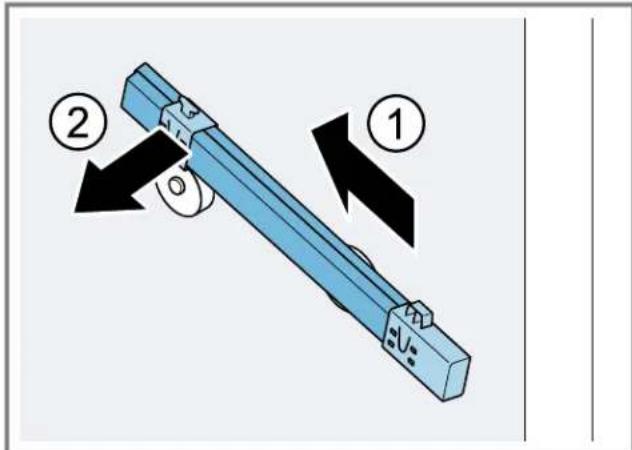
Removing the telescopic rails
- Pull out the telescopic rail.
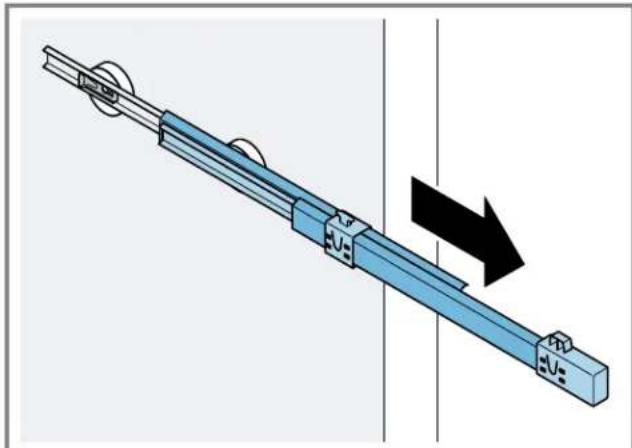
- Move the lock in the direction of the arrow ① and loosen the pin from the rear ②
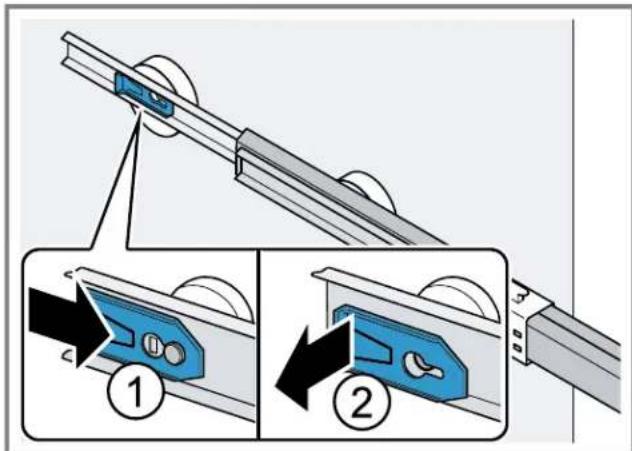
-
Push in the telescopic rail.
-
Push the telescopic rail backwards above the rear pin① and disengage ②
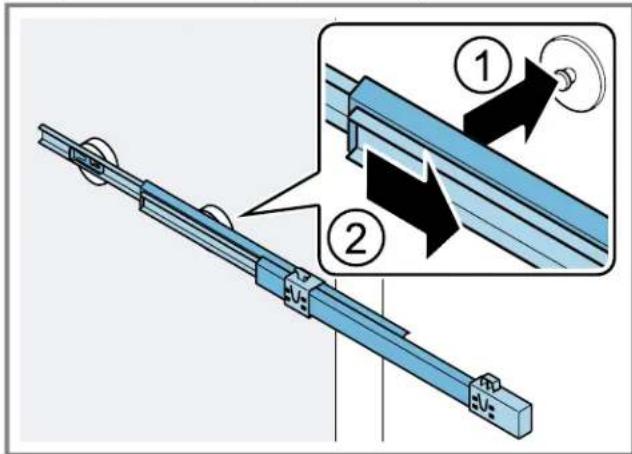
Installing the telescopic rails
- Place the extended telescopic rail on the front pin① and pull it forwards slightly to lock in place ②
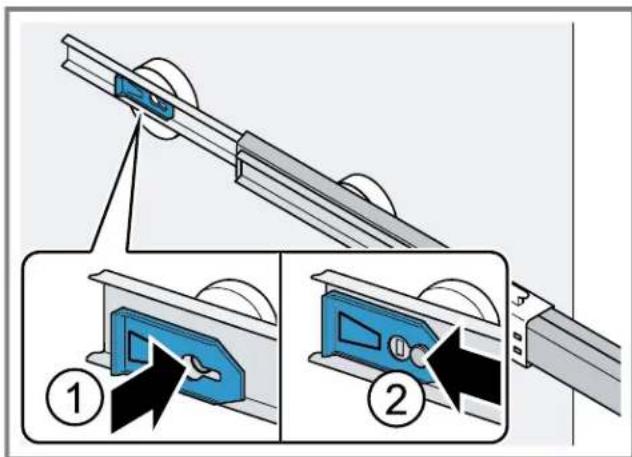
- Place the telescopic rail on the rear pin① and push the locking mechanism back ②
Refrigerator compartment glass plate
To clean the refrigerator compartment glass plate thoroughly, you can remove it.
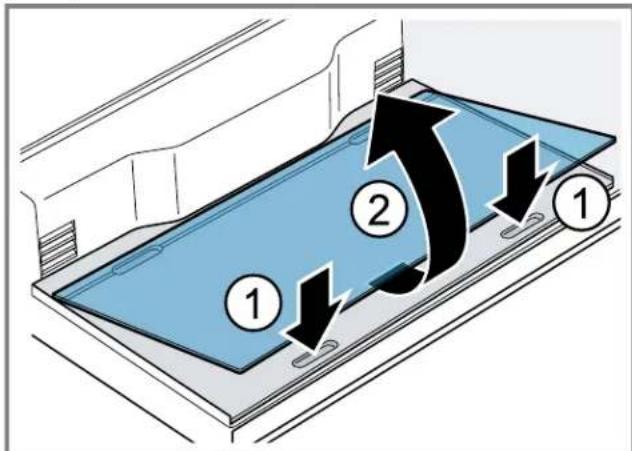
Removing the refrigerator compartment glass plate
- Grip both the rear recesses at the base of the refrigerator compartment and lift the refrigerator compartment glass plate ① Slide the refrigerator compartment glass plate towards the rear ②
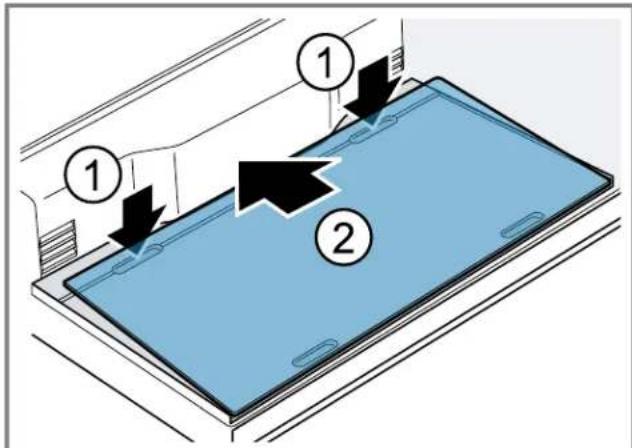
- Grip both the front recesses at the base of the refrigerator compartment ① lift the refrigerator compartment glass plate and remove it ②
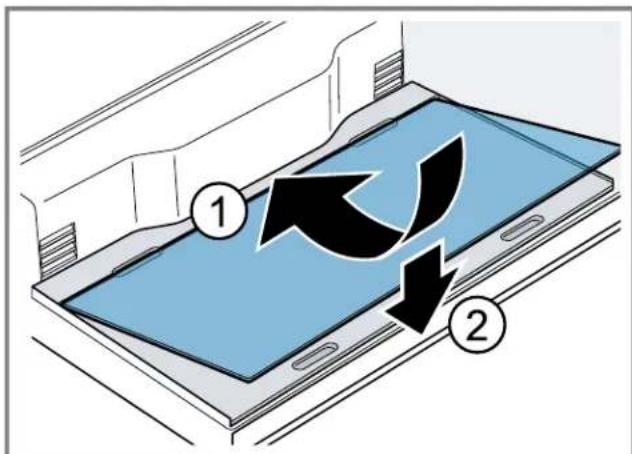
Install the refrigerator compartment glass plate
- Place the refrigerator compartment glass plate at the rear of the base of the refrigerator compartment ① and lower it ②
Cool-fresh container cover
To clean the cool-fresh container cover thoroughly, you can remove it.
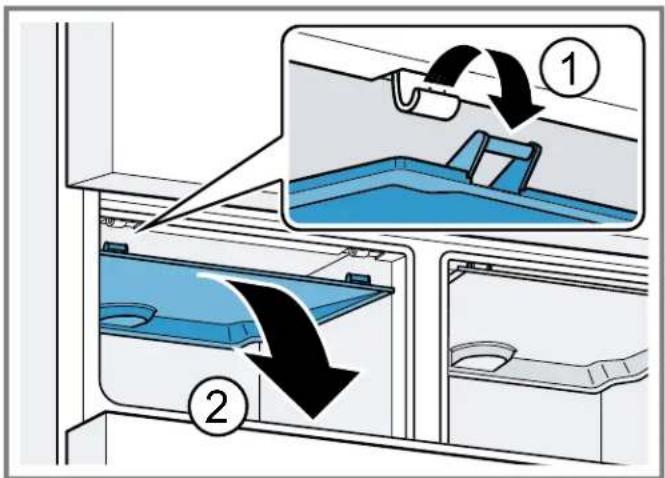
Removing the cool-fresh container cover
- Remove the cool-fresh container.
- Unclip the cool-fresh container cover ① and remove it ②
Fitting the cool-fresh container cover
- Slide the lid of the cool-fresh container symmetrically towards the rear and hook it into place.
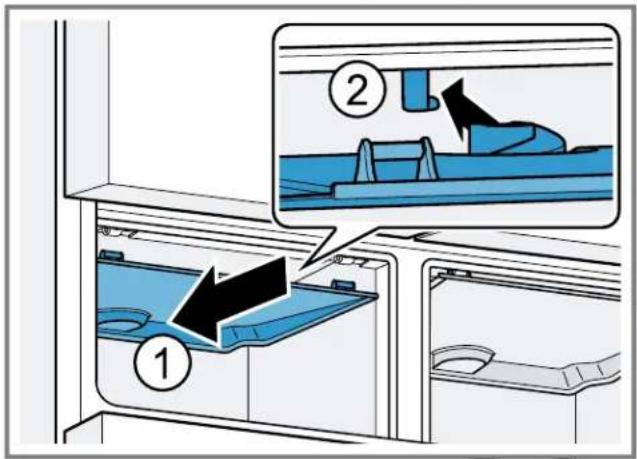
- Click the cool-fresh container lid into place.
- Install the cool-fresh container.
17 Eliminating faults

WARNING
Risk of electric shock!
Improper repairs are dangerous.
- Only original spare parts may be used to repair the appliance.
If the power cord of this appliance becomes damaged, it must be replaced by the manufacturer, the manufacturer's customer service, or a similarly qualified person in order to prevent injury.
| Fault Cause and troubleshooting | |
| The appliance is not cooling, the displays and lighting light up. | Showroom mode is switched on. 1. Press and hold ALARM OFFs until three audible signals sound. √ The lighting on the control panels and the interior lighting switch themselves off briefly. √ ALARM OFFa warning signal sounds. 2. Press ALARM OFF 3. After a short time, check whether your appliance is cooling. |
| The LED lighting does not work. Various causes are possible. ▪ Call customer service. → "Customer service", Page 29 | |
| Home Connect is not working properly. | Various causes are possible. ▪ Go to www.home-connect.com. |
| E or dappars in the temperature display. | The electronics have detected a fault. 1. Switch off the appliance. →Page 14 2. Disconnect the appliance from the power supply. Unplug the power plug or switch off the circuit breaker in the fuse box. 3. Reconnect the appliance after 5 minutes. 4. Switch on the appliance. →Page 14 5. If the message still appears on the display, call customer service. → "Customer service", Page 29 |
| A warning signal sounds and ALARM OFF flashes. | The appliance door is open. ▪ Close the appliance door. |
| The door alarm is switched on. | |
| The temperature display (freezer compartment) flashes, a warning signal sounds and ALARM OFF flashes. The temperature alarm is switched on. | Various causes are possible. 1. Press ALARM OFF √ The alarm is switched off. 2. After several hours, check whether the set freezer compartment temperature has been reached again. The exterior ventilation grilles are blocked. ▪ Remove any obstructions from in front of the exterior ventilation grilles. |
| The temperature differs greatly from the setting. | Various causes are possible. 1. Switch off the appliance. →Page 14 2. Switch the appliance back on after approximately 5 minutes. →Page 14 - If the temperature is too warm, check the temperature again after a couple of hours. - If the temperature is too cold, check the temperature again on the following day. |
| Water is leaking from the appliance. | The water connection cable is not leak-tight. ▪ Check if the water connections are fastened firmly and the water hose is undamaged. If necessary, replace the water hose. |
| Water output is reduced. Low water pressure. | Check the water pressure of the water supply system or the external water filter system. Connect the appliance only to a water connection with sufficient water pressure. |
| The water filter is blocked. ▪ Change the water filter. →Page 20 | |
| Water is dripping from the water dispenser. | Air is in the water system. • Keep dispensing water until it contains no more air. |
| The water dispenser is not functioning. | There is no water supply. • Ensure that there is a water supply and that the shut-off valve on the water con- nection is open. Contact an installer if necessary. |
| Kink in the water hose. • Turn off the water supply and straighten the kink in water hose. If necessary, replace the water hose. | |
| Ice cube production is low. The appliance has only recently been connected. | Wait approximately 4 hours until the first batch of ice cubes is ready. |
| The freezer compartment has been opened frequently or for an extended period of time. • Check ice cube production after a few hours. | |
| Low water pressure. • Check the water pressure of the water supply system or the external water filter system. Connect the appliance only to a water connection with sufficient water pressure. | |
| The water filter is blocked. • Change the water filter. → Page 20 | |
| Food or objects are blocking the fill level sensor for the ice cube maker. • Remove all food or objects from the ice storage container. | |
| The ice cube maker is not function-ing. | Ice cube production is switched off. • Switch on ice cube production. → Page 21 |
| There is no water supply. • Ensure that there is a water supply and that the shut-off valve on the water con- nection is open. Contact an installer if necessary. | |
| Kink in the water hose. • Turn off the water supply and straighten the kink in water hose. If necessary, replace the water hose. | |
| The ice cube maker has no current. • Call customer service. → "Customer service", Page 29 | |
| The appliance hums, bubbles, buzzes, gargles, clicks, crackles or rumbles. | Not an issue. A motor is running, e.g. refrigerating unit, fan. Refrigerant is flowing through the pipes. The motor, switches, solenoid valves or water valves are switch- ing on or off. Automatic defrosting is running. No action required. |
| The appliance makes noises. The appliance is not level. | Align the appliance using a bubble level and the screw feet. |
| The appliance is not free-standing. • Observe the minimum clearances for the appliance. | |
| Fittings wobble or stick. • Check the removable fittings and, if required, replace these. | |
| Bottles or containers are touching. • Move the bottles or containers away from each other. | |
| Super freezing is switched on. No action required. | |
17.1 Power failure
During a power failure, the temperature in the appliance rises; this reduces the storage time and the quality of the frozen food.
Notes
- Open the appliance as little as possible during a power failure and do not place any other food in the appliance.
- Check the quality of the food immediately after a power failure.
- Dispose of any frozen food that has defrosted and is hotter than 41^ ( 5^ ).
- Cook or fry slightly thawed frozen food, and then either consume it or freeze it again.
17.2 Conducting an appliance self-test
- Switch off the appliance. Page 14
- Disconnect the appliance from the power supply.
Unplug the appliance from the power source or switch off the circuit breaker in the fuse box.
- Connect the appliance to the electricity supply after 5 minutes.
- Switch on the appliance. Page 14
- Within the first 2 minutes after switching on, press and hold MENo seconds until an audible signal sounds.
The appliance self-test starts.
- While the appliance self-test is running, a long audible signal sounds.
If, at the end of the appliance self-test, two audible signals sound and the temperature display indicates the set temperature, your appliance is OK. The appliance switches to normal operation.
If, at the end of the appliance self-test, five audible signals sound and the submenu setting display shows Er inform customer service.
18 Storage and disposal
Here you can find out how to prepare your appliance for storage. You can also find out how to dispose of used appliances.
18.1 Taking the appliance out of operation
- Switch off the appliance. Page 14
- Disconnect the appliance from the power supply.
Unplug the appliance from the power source or switch off the circuit breaker in the fuse box.
- Disconnect the appliance from the drinking water connection.
- Remove all of the food.
- Remove the water filter. Page 20
- Clean the appliance. Page 22
- To ensure the ventilation inside the appliance, leave the appliance open.
18.2 Disposal of your old appliance
Environmentally compatible disposal allows valuable raw materials to be recycled.
WARNING
Risk of harm to health!
Children can lock themselves in the appliance, thereby putting their lives at risk.
- Remove the appliance doors and the appliance drawer.
- To prevent children from climbing in, leave shelves and containers in the appliance.
- Keep children away from the discarded appliance.
WARNING
Risk of fire!
If the tubes are damaged, flammable refrigerant and harmful gases may escape and ignite.
- Do not damage the tubes of the refrigerant circuit or the insulation.
- Unplug the appliance from the power supply.
- Cut through the power cord.
- Dispose of the appliance in an environmentally compatible manner.
Information about current disposal methods can be obtained from your specialist dealer or local authority.
19 Customer service
If you have any questions, are unable to eliminate an issue in the appliance yourself, or the appliance needs to be repaired, please contact our Customer Service.
We will work to find an appropriate solution for you thereby avoiding unnecessary visits by a service provider.
With any warranty repair, we will make sure your appliance is repaired by a trained authorized service provider using genuine replacement parts. We use only genuine replacement parts for all repairs.
Detailed information on the warranty period and terms of warranty can be found in the Statement of Limited Product Warranty, from your retailer, or on our website.
If you contact the Customer Service, you will require the product number (E-Nr.) and the production number (FD) of your appliance.
USA:
800-735-4328
www.thermador.com/support
www/store.thermador.com/us
CA:
1-800-735-4328
www.thermador.ca
For assistance with connecting to Home Connect™, you can also view instructions here:
www.home-connect.com/us/en/help-support/set-up
19.1 Product number (E-Nr.) and production number (FD)
You can find the product number (E-Nr.) and the production number (FD) on the appliance's rating plate.
"Appliance", Fig. 1/11, Page 10
Making a note of your appliance's details and the Customer Service telephone number will enable you to find them again quickly.
20 Technical specifications
Refrigerant, cubic capacity and further technical specifications can be found on the rating label.
"Appliance", Fig. 1/11, Page 10
Table des matieres
1 Sécurité 33
13 Compartment congestion 50
"Compartment fraîcheur", Page 49
13 Compartment congélation
www/store.thermador.com/us
CA:
1-800-735-4328
www.thermador.ca
www.home-connect.com/us/en/help-support/set-up
www/store.thermador.com/us
CA:
1-800-735-4328
www.thermador.ca
www.home-connect.com/us/en/help-support/set-up