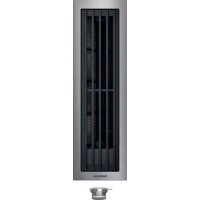
VL414712 - Fan GAGGENAU - Free user manual and instructions
Find the device manual for free VL414712 GAGGENAU in PDF.


| Product type | Cooktop ventilator (downdraft extractor) |
| Brand | Gaggenau |
| Model | VL414712 |
| Operating modes | Air extraction / Recirculation |
| Controls | Rotary knob with light ring |
| Ventilation speeds | 3 speeds + intensive ventilation + automatic mode |
| Special functions | Home Connect, sensor control, timer, intermittent ventilation |
| Power supply | 220-240 V, 50/60 Hz |
| Connectivity | Wi-Fi (2.4 and 5 GHz), LAN, Home Connect |
| Filters | Metal grease filter (cleanable), activated carbon filter (replaceable) |
| Saturation indicator | Yes, for grease filter and carbon filter |
| Grease filter maintenance | Cleaning every 2 months (dishwasher or manual) |
| Carbon filter replacement | According to saturation indicator |
| Safety | Safety cut-out, overheating protection, automatic shutdown |
| Special accessories | Deflector AA 414 010 (for gas cooking) |
| Installation | To be built into the cooktop, connection to a compatible hob |
| Compatibility | Gaggenau hobs compatible with Home Connect |
| Customer service | Contact Gaggenau authorized service (number on rating plate) |
Frequently Asked Questions - VL414712 GAGGENAU
User questions about VL414712 GAGGENAU
0 question about this device. Answer the ones you know or ask your own.
Ask a new question about this device
Download the instructions for your Fan in PDF format for free! Find your manual VL414712 - GAGGENAU and take your electronic device back in hand. On this page are published all the documents necessary for the use of your device. VL414712 by GAGGENAU.
USER MANUAL VL414712 GAGGENAU
Use and care manual 2
IMPORTANT SAFETY INSTRUCTIONS 4
General notes 4
Fire Safety 4
Burn Prevention 6
Child Safety 6
Cleaning Safety 7
Safe use 7
Proper Installation and Maintenance 8
Proposition 65 Warning 10
Causes of damage 11
Protecting the environment 11
Operating modes 11
Air extraction 11
Recirculation 11
Getting to know your appliance 12
Downdraft ventilation 12
Control knob 12
Display on the illuminated ring 12
Special accessories 12
Before using the appliance for the first time 12
Operating the appliance 13
Turning on 13
Turning off 13
Using Home Connect to set the appliance 13
Automatic mode with sensor control 13
Sensor sensitivity 13
Intensive mode 13
Run-on function 14
Intermittent ventilation 14
Saturation notification 14
Ventilation molding 14
Basic Settings 15
Exiting the basic settings menu and saving the settings 15
Home Connect 16
Setting Up 16
Open or close the Home Connect settings menu 16
Overview of the Home Connect settings menu 17
Connecting the appliance to your home network (Wi-Fi) 17
Manual Registration in the Home Network 18
Logging in to your home network automatically (WPS) 18
Exiting the Home Connect settings menu 19
Connecting the appliance to your home network (LAN) 19
Switch the wireless network connection (LAN or WLAN) on or off 20
Changing from Wi-Fi connection to LAN connection 20
Changing from LAN connection to Wi-Fi connection 20
Resetting the Home Connect connections 20
Software Update 21
Remote Diagnostics 21
Information on Data Protection 21
Declaration of Conformity 21
Wi-Fi® Module 21
Connecting the cooktop extractor system to the cooktop 22
Connecting appliances via the home network 23
Connecting appliances directly 23
Cleaning and maintenance 24
Cleaning the appliance 25
Removing and installing the metal grease filter 25
Cleaning the metal grease filter 25
Changing the activated charcoal filter
(only in circulating-air mode) 26
Resetting the saturation indicator 26
Faults-What to Do? 27
Customer service 28
Additional information on products, accessories, replacement parts and services, as well as the Use and care manual and the Installation instructions can be found at www.gaggenau.com and in the online shop www.gaggenau.com/zz/store
Safety Definitions
WARNING
This indicates that death or serious injuries may occur as a result of non-observation of this warning.
CAUTION
This indicates that minor or moderate injuries may occur as a result of non-observation of this warning.
NOTICE
This indicates that damage to the appliance or property may occur as a result of non-compliance with this advisory.
Note: This alerts you to important information and/or tips.

IMPORTANT SAFETY INSTRUCTIONS
READ AND SAVE THESE INSTRUCTIONS
WARNING
When properly cared for, your new appliance has been designed to be safe and reliable. Read all instructions carefully before use. These precautions will reduce the risk of burns, electric shock, fire, and injury to persons. When using kitchen appliances, basic safety precautions must be followed, including those in the following pages.
General notes
This appliance is not intended for operation with an external clock timer or a remote control.
Make sure that no small parts or liquids penetrate into the appliance.
Check device for visible damage after unpacking it. Don't plug in device in the event of transport damage.
Adults and children must never operate the appliance without supervision if they are either physically or mentally incapable or if they lack the necessary knowledge and experience to operate the appliance correctly and safely. Don't let children play with the appliance or packaging material.
Fire Safety
Always have a working smoke detector near the kitchen.
WARNING
Risk of fire!
If the downdraft ventilator is installed next to a gas appliance, an air baffle must be used (available as accessory). This prevents the flame from being drawn into the fan. Thus, a filter soaked in grease cannot be ignited by the gas flame.
WARNING
TO REDUCE THE RISK OF A RANGE TOP GREASE FIRE:
- Never leave surface units unattended at high settings.
Boilovers cause smoking and greasy spillovers that may ignite. Heat oils slowly on low or medium settings. - Always turn hood ON when cooking at high heat.
- Clean ventilating fans frequently. Grease should not be allowed to accumulate on fan or filter.
4.Use proper pan size. Always use cookware appropriate for the size of the surface element.
Do not flambé under the extractor hood or work with a naked flame. When switched on, the extractor hood draws flames into the filter. There is a risk of fire due to deposits on the grease filter!

IMPORTANT SAFETY INSTRUCTIONS
READ AND SAVE THESE INSTRUCTIONS
CAUTION
For general ventilating use only. Do not use to exhaust hazardous or explosive materials and vapors.
Do not operate any fan with a damaged cord or plug. Discard fan or contact an authorized service facility for examination and/or repair.
Do not run cord under carpeting. Do not cover cord with throw rugs, runners, or similar coverings. Do not route cord under furniture or appliances. Arrange cord away from traffic area and where it will not be tripped over.
In the event that personal clothing or hair catches fire, drop and roll immediately to extinguish flames.
Smother flames from food fires other than grease fires with baking soda. Never use water on cooking fires.
WARNING
TO REDUCE THE RISK OF INJURY TO PERSONS IN THE EVENT OF A RANGE TOP GREASE FIRE, OBSERVE THE FOLLOWING:
SMOTHER FLAMES with a close-fitting lid, cookie sheet, or metal tray, then turn off the burner. BE CAREFUL TO PREVENT BURNS. If the flames do not go out immediately, EVACUATE AND CALL THE FIRE DEPARTMENT.
- NEVER PICK UP A FLAMING PAN
- You may be burned.
DO NOT USE WATER, including wet dishcloths or towels - a violent steam explosion will result.
- Use an extinguisher ONLY if:
- You know you have a Class ABC extinguisher, and you already know how to operate it.
- The fire is small and contained in the area where it started.
- The fire department is being called.
- You can fight the fire with your back to an exit.
Have an appropriate fire extinguisher available, nearby, highly visible and easily accessible near the appliance.
Whenever possible, do not operate the ventilation system during a cooktop fire. However, do not reach through fire to turn it off.
WARNING
Risk of fire!
Grease deposits in the grease filter can ignite.
Clean the grease filter at least every two months or as often as necessary.
Never operate the appliance without the grease filter.

IMPORTANT SAFETY INSTRUCTIONS
READ AND SAVE THESE INSTRUCTIONS
WARNING
Risk of fire!
Grease deposits in the grease filter can catch fire. Never work with a naked flame near the appliance (e.g. flambéing). Install the unit near a heat-producing appliance for solid fuels (e.g. wood or coal) only if there is a closed, non-detachable cover. There must be no flying sparks.
WARNING
Risk of fire!
When gas burners are in operation without any cookware placed on them, they can build up a lot of heat. A ventilation appliance installed above the cooker may become damaged or catch fire. Only operate the gas burners with cookware on them.
WARNING
Risk of fire!
Hot oil and fat catch fire fast. Never leave hot oil and fat unsupervised. Never extinguish a fire with water. Switch off the cooking position. Suffocate flames carefully with a lid, a fire blanket or similar.
Burn Prevention
WARNING
Risk of burns!
The accessible parts get hot during operation. Never touch hot parts. Keep children away.
Child Safety
When children become old enough to use the appliance, it is the responsibility of the parents or legal guardians to ensure that they are instructed in safe practices by qualified persons.
Remove all tape and packaging before using the appliance. Destroy the packaging after unpacking the appliance. Never allow children to play with packaging material.
Do not allow anyone to climb, stand, lean, sit, or hang on any part of an appliance, especially a door, warming drawer, or storage drawer. This can damage the appliance, and the unit may tip over, potentially causing severe injury.
Do not allow children to use this appliance unless closely supervised by an adult. Children and pets should not be left alone or unattended in the area where the appliance is in use. They should never be allowed to play in its vicinity, whether or not the appliance is in use.

IMPORTANT SAFETY INSTRUCTIONS
READ AND SAVE THESE INSTRUCTIONS
CAUTION
Items of interest to children should not be stored in an appliance, in cabinets above an appliance or on the backsplash. Children climbing on an appliance to reach items could be seriously injured.
Cleaning Safety
WARNING
Be sure the entire appliance (including the grease filters and light bulbs, if applicable) has cooled and grease has solidified before attempting to clean any part of the appliance.
WARNING
Risk of burns, electrical shock! by appliance. Always let appliance cool down prior to cleaning or maintenance. Turn off fuse or unplug power plug.
Do not use steam cleaners to clean the appliance.
CAUTION
Damage to appliance Do not remove control knobs for cleaning.
Safe use
WARNING
Do not repair, replace or remove any part of the appliance unless specifically recommended in the manuals. Improper installation, service or maintenance can cause injury or property damage. Refer to this manual for guidance. All other servicing should be done by an authorized service provider.
WARNING
Risk of burns! by hot appliance when used with cooking appliances. Keep children away and ensure proper use.
WARNING
Risk of injury, damage! through objects set down on the appliance. Never place objects on the appliance.
WARNING
Risk of short circuit! The cable insulation of electrical appliances can melt. Never place connection cable on the hot cooking zones.

IMPORTANT SAFETY INSTRUCTIONS
READ AND SAVE THESE INSTRUCTIONS
WARNING
Risk of fire!
Overly greasy filters pose a risk of catching fire! Never deep-fry or grill next to the appliance without paying careful attention. Clean grease filters regularly.
Proper Installation and Maintenance
Have the installer show you the location of the circuit breaker or fuse. Mark it for easy reference.
This appliance must be properly installed and grounded by a qualified technician. Connect only to properly grounded outlet. Refer to Installation Instructions for details.
This appliance is intended for normal family household use only. It is not approved for outdoor use. See the Statement of Limited Product Warranty. If you have any questions, contact the manufacturer.
Do not store or use corrosive chemicals, vapors, flammables or nonfood products in or near this appliance. It is specifically designed for use when heating or cooking food. The use of corrosive chemicals in heating or cleaning will damage the appliance and could result in injury.
Do not operate this appliance if it is not working properly, or if it has been damaged. Contact an authorized service provider.
Do not repair or replace any part of the appliance unless specifically recommended in this manual. Refer all servicing to an authorized service provider.
CAUTION
Grease left on filters can remelt and move into the vent.

Hidden surfaces may have sharp edges. Use caution when reaching behind or under appliance.
WARNING
When the hood is operated in exhaust-air mode simultaneously with a different burner which also makes use of the same chimney (such as gas, oil or coal-fired heaters, continuous-flow heaters, hot-water boilers) care must be taken to ensure that there is an adequate supply of fresh air which will be needed by the burner for combustion.
Safe operation is possible provided that the under pressure in the room where the burner is installed does not exceed 4Pa (0.04 mbar).
This can be achieved if combustion air can flow through non-lockable openings, e.g. in doors, windows and via the air-intake/exhaust-air wall box or by other technical measures, such as reciprocal interlocking, etc.

IMPORTANT SAFETY INSTRUCTIONS
READ AND SAVE THESE INSTRUCTIONS
WARNING
Avoid carbon monoxide poisoning - Provide adequate air intake so combustion gases are not drawn back into the room.
An air-intake/exhaust-air wall box by itself is no guarantee that the limiting value will not be exceeded.
Note: When assessing the overall requirement, the combined ventilation system for the entire household must be taken into consideration. This rule does not apply to the use of cooking appliances, such as cooktops and ovens.
WARNING
Mortal danger, risk of poisoning! through back-suctioned combustion gases. Never operate appliance in exhaust air mode simultaneously with a fire-powered appliance that relies on ambient air if sufficient air supply has not been provided for.
Fire-powered appliances that rely on ambient air (e.g. gas, oil, wood or coal-powered heaters, flow heaters, water heaters) draw on combustion air from the room where they're installed and direct the exhaust fumes through an exhaust system (e.g. chimney), out of the building.
In combination with an activated range hood, ambient air is drawn from the kitchen and neighboring rooms-insufficient supply air may cause low pressure. Poisonous gases from the chimney or exhaust shaft may be suctioned back into the living space.
- That's why sufficient supply air must always be provided for.
An air supply / exhaust wall duct alone doesn't ensure adherence to the limit value.
WARNING
Risk of electrical shock! through damaged connection cable. Don't bend or pinch connection cable during installation.
WARNING
Risk of burns, injury! through damaged connection cable. Damaged connection cable must be replaced by an licensed specialist (electrician).
WARNING
Risk of injury!
From sharp edges during installation. Always wear protective gloves while installing the appliance.

IMPORTANT SAFETY INSTRUCTIONS
READ AND SAVE THESE INSTRUCTIONS
Proposition 65 Warning:
This product may contain a chemical known to the State of California, which can cause cancer or reproductive harm. Therefore, the packaging of your product may bear the following label as required by California:
STATE OF CALIFORNIA PROPOSITION 65 WARNING:

WARNING
Cancer and Reproductive Harm - www.P65Warnings.ca.gov
Causes of damage

CAUTION
Risk of damage due to ingress of humidity into the electronic circuitry. Never clean operator controls with a wet cloth.

CAUTION
Surface damage due to strong or abrasive cleaning agents. Never use strong and abrasive cleaning agents.
Protecting the environment
Unpack the appliance and dispose of the packaging in an environmentally friendly manner.
Operating modes
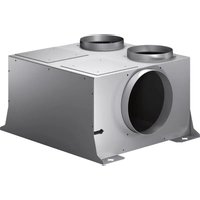
This appliance can be used in air extraction or air recirculation mode depending on the remote fan unit connected.
Air extraction

The air sucked in is cleaned by the grease filters and is routed outdoors through a pipe system.
Note: The extracted air must neither be discharged into an operating smoke or waste gas chimney nor into a shaft that serves to ventilate rooms where heat-producing appliances are installed.
- The local chimney sweep's consent must be obtained if the exhaust air is to be routed to a smoke or waste gas chimney that is not in operation.
- A telescopic wall duct should be used if the exhaust air is routed through the outside wall.
Recirculation

The aspirated air is cleaned by the grease filters and an activated charcoal filter and is returned to the kitchen.
Note: You must install an activated charcoal filter to bind odors in the recirculation mode. Refer to the manual or ask your specialist dealer for details of the various options for operating the appliance in the recirculation mode. You can obtain the necessary accessories from specialist dealers, from our after-sales service or in the online shop.
Getting to know your appliance
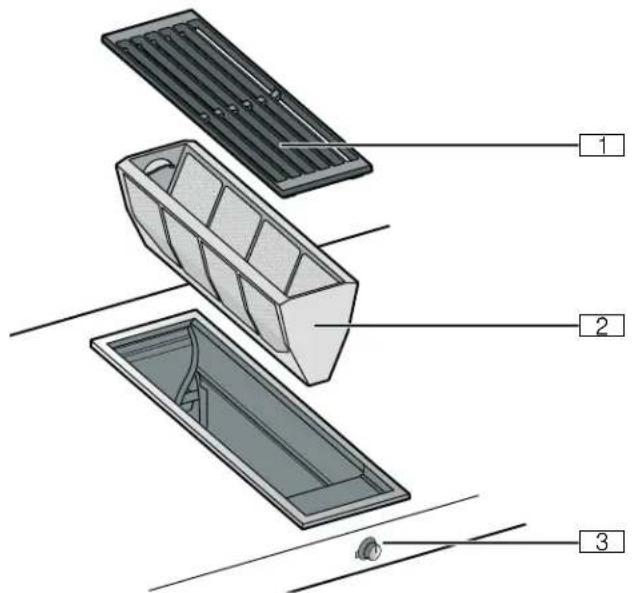
Downdraft ventilation
(Filter cover
0 Metal grease filter
8 Control knobs
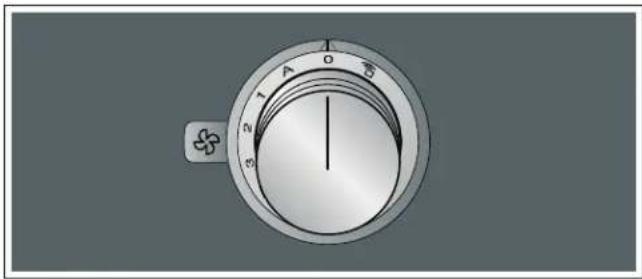
Control knob
Symbol Explanation
| Home Connect | |
| 0 | Switching off the appliance |
| A | Switching on automatic mode |
| 1 | Switches on fan level 1 |
| 2 | Switches on fan level 2 |
| 3 | Switches on fan level 3 |
| » | Switches on intensive mode |
| ◎ | Switches on intermittent ventilation |
| ◎ | Resetsthe saturation indicator |
Display on the illuminated ring
The control knob has an illuminated ring that indicates a number of statuses and functions.
| Display | Meaning | |
| ○ | Off | Appliance OFF |
| ● | Lights up orange | Appliance ON |
| ● | Switch off appliance, slowly flashes white (three times) | Metal grease filter saturation indicator |
| ● | Switch off appliance, rapidly flashes white (six times) | Activated charcoal filter saturation indicator (in circulating-air mode only) |
| ● | Switch off appliance, slowly flashes orange | Fan run-on active |
| ● | Lights up blue | Home Connect |
| ● | Flashes blue | Home Connect |
| ● | Flashes orange and white alternately | Safety shut-off, power failure |
| ● | Flashes yellow and magenta alternately | Appliance fault Call customer service. |
| ● | Lights up green for a few seconds, then turns yellow | Appliance is initializing, only after initial connection or power failure |
The illuminated ring on the control knob lights up orange during operation. You can choose between two shades. If you have several appliances installed next to each other, you can change the shades in the settings for the appliances so that all of the illuminated rings light up in the same shade.
Special accessories
You can order the following accessories from your specialist dealer:
AA 414010 Air conduction rail for operation beside a VG 415/425 gas appliance
Use the accessories only as indicated. The manufacturer assumes no liability for incorrect usage of the accessories.
Before using the appliance for the first time
Before using the appliance and accessory parts for the first time, clean them thoroughly.
Operating the appliance
Turning on
Automatic mode, three fan settings, intensive mode and the intermittent ventilation system are available for extraction.
Push in the control knob and turn it clockwise to the fan setting you require.
The illuminated ring behind the control knob lights up.
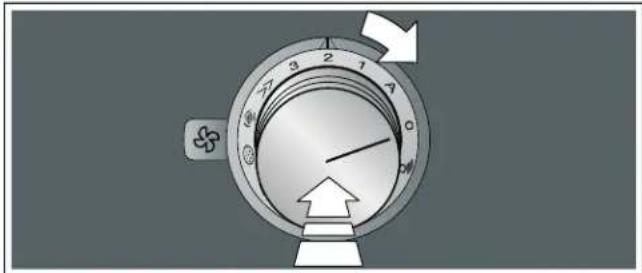
Turning off
Turn the control knob anti-clockwise to position 0.
If the run-on function is activated, the appliance continues to run for a short time after it is switched off. "Run-on function" on page 14
Using Home Connect to set the appliance
You can set the appliance via the Home Connect app and via a hob using the Home Connect app, see and "Connecting the cooktop extractor system to the cooktop" on page 22.
- Set up the Home Connect app.
- Establish the connection to the hob.
3.Push in the control knob and turn it anti-clockwise to the position.
Automatic mode with sensor control
In automatic mode, a sensor in the appliance detects the intensity of the cooking and roasting fumes. The appliance selects the appropriate fan setting automatically.
Switching on
Push in the control knob and turn it clockwise to the A position.
Automatic mode is activated.
The optimum fan setting 1, 2 or 3 is set automatically using a sensor. The illuminated ring behind the control knob lights up orange while the ventilation system is switched on.
If the sensor no longer detects odors, the appliance selects the lowest fan setting. After 20 minutes (in circulating-air mode) or six minutes (in air extraction mode), the ventilation system is switched off. Turn the control knob to the 0 position.
Switching off
Turn the control knob anti-clockwise to position 0.
Sensor sensitivity
In automatic mode, a sensor in the appliance detects the intensity of the cooking and roasting fumes. Depending on the setting of the sensor, the fan automatically switches to another fan setting.
Default sensitivity setting: 2
Lowest sensitivity setting: 1
Highest sensitivity setting: 4
Changing the sensitivity of the sensor
If the sensor control system reacts too quickly or too slowly, change the sensitivity setting.
You can set the sensitivity in the Home Connect app.
Intensive mode
Activate intensive mode if strong odors or large amounts of steam are produced. In this mode, the appliance operates at its maximum fan setting for a short time. After approx. six minutes, the appliance automatically switches back to fan setting 3.
Run-on function
The run-on function leaves the ventilation system running at a low fan setting for a few minutes after it has been switched off. While the run-on function is switched on, the illuminated ring for the control knob slowly flashes orange. The appliance automatically switches off the ventilation after 20 minutes.
The fan run-on removes any remaining kitchen fumes and reduces the condensation in the appliance.
Notes
- You can activate or deactivate the run-on function in the basic settings or in the Home Connect app.
The run-on function does not start unless the appliance has been switched on for at least two minutes.
The run-on function only starts in circulating-air mode.
Switching off the run-on function early
- Turn the control knob to A.
- Turn the control knob to 0.
The appliance switches off the fan run-on early.
Intermittent ventilation
With intermittent ventilation, the fan automatically switches to fan setting 1 for six minutes every hour.
Switching on
Push in the control knob and turn it clockwise to the position.
Intermittent ventilation is activated. The illuminated ring behind the control knob lights up orange while the ventilation system is switched on.
Switching off
Turn the control knob anti-clockwise to position 0.
Saturation notification
When the metal grease filter or the activated charcoal filter (only in circulating-air mode) are saturated, the illuminated ring on the control knob flashes:
Metal grease filter: Three times white, slow flashing
- Activated charcoal filter: Six times white, rapid flashing
Do not wait any longer to clean the metal grease filters or replace or regenerate the activated charcoal filters. "Cleaning and maintenance" on page 24
Ventilation molding
If downdraft ventilation is used next to a gas appliance, a ventilation molding AA 414 010 must be fitted on the gas appliance during cooking. The ventilation molding improves extraction when using gas appliances. The ventilation molding prevents extinction of small flames due to the draft.
Basic Settings
The appliance has various basic settings. You can adapt these basic settings to suit your individual requirements.
To access the basic settings:
- Carry out the following operating steps one after the other without interruption.
- Push in the control knob and turn it counterclockwise to the position. Keep the control knob pressed in.
- Turn the control knob clockwise to position 1. Keep the control knob pressed in.
- Turn the control knob counterclockwise to position 0. The illuminated ring around the control knob lights up yellow.
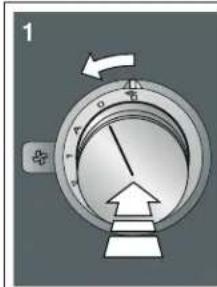
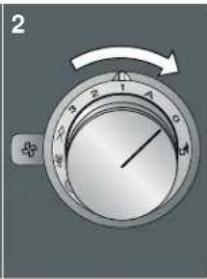
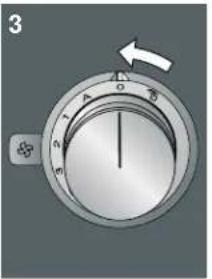
- Select the required setting using the control knob. After approx. 5 seconds, the illuminated ring for the control knob lights up green. Exit the basic settings to save the setting you require.
6.To change the setting back, push in the control knob and turn it counterclockwise to position 0, and use the control knob to select the required setting.
The control knob lights up yellow.
| Control knob position | Function Illuminat- ed ring color: Green | Illuminat- ed ring color: Yel- low |
| A Color selection for the illuminated ring around the control knob | Orange* | Orange (dark) |
| 1 Fan setting 1 for intermittent venti- lation | Selected* | Not selected |
| 2 Fan setting 2 for intermittent venti- lation | Selected | Not selected* |
| 3 Fan setting 3 for intermittent venti- lation | Selected Not selected* |
*Basic setting
| Control | Function | Illuminat- | Illuminat- |
| knob posi- tion | ed ring color: Green | ed ring color: Yel- low | |
| Run-on function Activated* Deacti- vated | |||
| Noise reduction | Activated | Deacti- vated* | |
| *Basic setting | |||
Exiting the basic settings menu and saving the settings
- Carry out the following operating steps one after the other without interruption.
- Push in the control knob and turn it counterclockwise to the position. Keep the control knob pressed in.
- Turn the control knob clockwise to position 1. Keep the control knob pressed in.
- Turn the control knob counterclockwise to position 0.
The illuminated ring around the control knob goes out.
Home Connect
This appliance is LAN- or Wi-Fi-enabled and settings can be sent to the appliance via a mobile device.
If the appliance is not connected to the home network, it will function as an extractor hood with no network connection. The appliance can always be operated via the control knob.
The availability of the Home Connect function depends on the availability of Home Connect services in your country. Home Connect services are not available in every country. You can find more information on this at www.home-connect.com.
Notes
- Ensure that you follow the safety instructions in this user manual and that these are also observed when operating the appliance via the Home Connect app. You must also follow the instructions in the Home Connect app.
Operation via the Home Connect app is only possible if the control knob for the cooktop extractor system is at the position. - Operating the appliance directly from the appliance always takes priority. It is not possible to operate the appliance using the Home Connect app during this time.
Setting Up
To implement settings via Home Connect, you must have installed and set up the Home Connect app on your mobile device.
Note: In networked standby mode, your appliance requires a maximum of 2 W.
Your appliance must also be connected to the home network (router) and to the Home Connect app (on a mobile device, e.g. a smartphone or tablet). You can choose between the following connection types:
- Connection via Wi-Fi: If there is a Wi-Fi connection, you can connect your appliance to your home network manually or automatically. Establish the connection to your home network and then the connection to the Home Connect app.
- Connection via LAN cable: The appliance is connected to the home network automatically following confirmation on the appliance.
Note: The app will guide you through the entire registration process. In case of doubt, follow the instructions in the app.
Setting up the Home Connect app
Note: You require a mobile device with the latest version of the relevant operating system.
- On your mobile device, go to the App Store (Apple devices) or to the Google Play Store (Android devices).
- Enter "Home Connect" in the search field.
- Select the Home Connect app and install it on your mobile device.
4.Start the app and create your Home Connect login details. The app will guide you through the registration process. Make a note of your e-mail address and password.
Open or close the Home Connect settings menu
To connect your appliance to Home Connect or establish the connection to your home network, you will need to open the Home Connect settings menu on your appliance.
Note: It is important to carry out the following operating steps without interruption, one after the other.
- Push in the control knob and turn it one notch counterclockwise to the position. Keep the control knob pressed in.
- Turn the control knob two notches clockwise to the A position. Keep the control knob pressed in.
- Turn the control knob one notch counterclockwise to position 0.
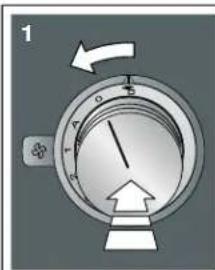
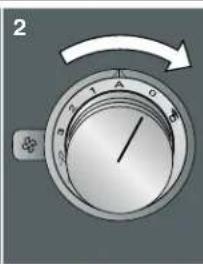
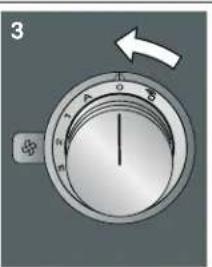
Note: If you select settings in the Home Connect settings menu, you will need to exit the Home Connect menu in the same way to save the settings.
Displays on the illuminated ring on the control knob
While you are in the Home Connect menu, the illuminated ring on the control knob lights up blue.
While the appliance is establishing a connection to the home network, the illuminated ring on the control knob flashes blue.
- If the appliance has established a connection to the home network, the illuminated ring on the control knob lights up green.
- If the appliance was not able to establish a connection to the home network, the illuminated ring on the control knob lights up red. Start the connection process again.
Overview of the Home Connect settings menu
- Manually logging in to the home network (Wi-Fi): To log in to the home network (Wi-Fi) manually, you require the network name (SSID) and password (key) for your home network. "Manual Registration in the Home Network" on page 18
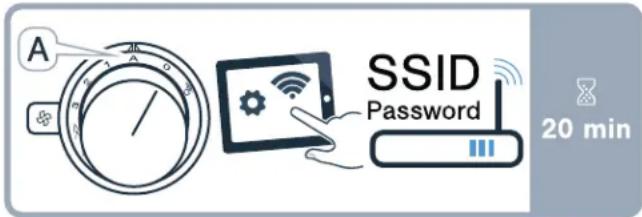
- Log in to the home network (Wi-Fi) with a WPS-enabled router. "Logging in to your home network automatically (WPS)" on page 18
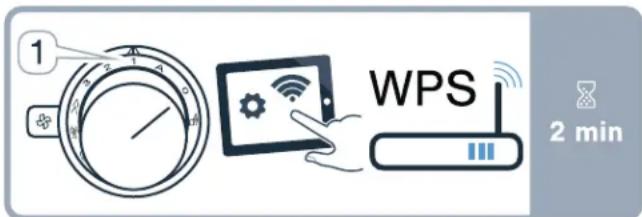
- Direct connection to a compatible cooktop. → "Connecting appliances directly" on page 23
- Switch LAN or Wi-Fi off and on, e.g. while on holiday. "Switch the wireless network connection (LAN or WLAN) on or off" on page 20
- Reset the Home Connect connections, e.g. for a new router, changing to a new Internet service provider. "Resetting the Home Connect connections" on page 20
Connecting the appliance to your home network (Wi-Fi)
- Carry out the following operating steps one after the other without interruption.
- Open the Home Connect settings menu. "Open or close the Home Connect settings menu" on page 16
The illuminated ring around the control knob lights up blue.
Manual Registration in the Home Network
Note: To log in to the home network (Wi-Fi) manually, you require the network name (SSID) and password (key) for your home network.
- Turn the control knob clockwise to the A position. After around 5 seconds, the illuminated ring around the control knob flashes blue and yellow alternately. The appliance is now in manual mode.
- Switch to the general settings menu of your mobile device and call up the Wi-Fi settings.
On your mobile device, the "HomeConnect" Wi-Fi connection is available for around 20 minutes.
- Connect to the "HomeConnect" Wi-Fi connection (password: "HomeConnect").
- Launch the Home Connect app on your mobile device and follow the instructions for network login. Enter the password (key) of the home network. Following successful connection to the router, the illuminated ring around the control knob lights up green for around 3 seconds.
- The illuminated ring around the control knob flashes blue and white alternately. The connection to the mobile device is being established.
The appliance is available in the app on the mobile device once the illuminated ring around the control knob lights up green. If the illuminated ring around the control knob lights up red, it was not possible to establish a connection
6.To save the connection, exit the Home Connect settings menu. "Exiting the Home Connect settings menu" on page 19
7. After successfully connecting, push in the control knob and turn it counterclockwise to the position. Otherwise, it is not possible to operate the appliance using the Home Connect app.
Connection to the router unsuccessful
- If a connection could not be established, check the router and turn the control knob to another position and then back to the A position.
The illuminated ring around the control knob lights up blue. After around 5 seconds, the illuminated ring around the control knob flashes blue and yellow. - Switch to the general settings menu of your mobile device and start the Wi-Fi connection again.
- Check that the password has been entered correctly.
Connection to the mobile device unsuccessful
1.If a connection could not be established, turn the control knob to another position and then back to the A position.
The illuminated ring around the control knob lights up blue. After around 5 seconds, the illuminated ring around the control knob flashes blue and white.
2.Launch the Home Connect app on your mobile device and follow the instructions for automatic network login.
Connecting more mobile devices to the same Home Connect account
In the Home Connect app, you can connect more mobile devices to your appliance.
Connecting more mobile devices to another Home Connect account
Prerequisite: A mobile device is connected to the appliance. The appliance can be found in the Home Connect settings menu.
- Turn the control knob to another position and then back to the A position.
The illuminated ring around the control knob flashes blue and white. The appliance is now ready to connect to another mobile device.
- Launch the Home Connect app on your mobile device and follow the instructions for automatic network login.
The appliance is available in the app on the mobile device once the illuminated ring around the control knob lights up green.
Logging in to your home network automatically (WPS)
You require a router that has WPS functionality. You will find information about this in the manual for your router. You need to be able to access your router.
If this is not the case, follow the steps in "Manual Registration in the Home Network" on page 18.
- Push in the control knob and turn it to position 1.
During the connection process, the illuminated ring around the control knob flashes blue and yellow alternately.
- Press the WPS button on the router within the next 2 minutes.
Following successful connection to the router, the illuminated ring around the control knob lights up green for around 3 seconds. The illuminated ring around the control knob then flashes blue and white alternately. The appliance is now ready to connect to your mobile device.
3.Launch the Home Connect app on your mobile device and follow the instructions for automatic network login.
The appliance is available in the app on the mobile device once the illuminated ring around the control knob lights up green. If the illuminated ring around the control knob lights up red, it was not possible to establish a connection.
4.To save the connection, exit the Home Connect settings menu.
- After successfully connecting, push in the control knob and turn it counterclockwise to the position. Otherwise, it is not possible to operate the appliance using the Home Connect app.
Connection to the router unsuccessful
1.If a connection could not be established, check the router, and turn the control knob to another position and then back to position 1.
The illuminated ring around the control knob lights up blue. After around 5 seconds, the illuminated ring around the control knob flashes blue and yellow.
- Switch to the general settings menu of your mobile device and start the Wi-Fi connection again.
Connection to the mobile device unsuccessful
1.If a connection could not be established, turn the control knob to another position and then back to position 1.
The illuminated ring around the control knob lights up blue. After around 5 seconds, the illuminated ring around the control knob flashes blue and white.
- Launch the Home Connect app on your mobile device and follow the instructions for automatic network login.
Connecting more mobile devices to the same Home Connect account
In the Home Connect app, you can connect more mobile devices to your appliance.
Connecting more mobile devices to another Home Connect account
Prerequisite: A mobile device is connected to the appliance. The appliance can be found in the Home Connect settings menu.
- Turn the control knob to another position and then back to position 1.
The illuminated ring around the control knob flashes blue and white. The appliance is now ready to connect to another mobile device.
- Launch the Home Connect app on your mobile device and follow the instructions for automatic network login.
The appliance is available in the app on the mobile device once the illuminated ring around the control knob lights up green.
Exiting the Home Connect settings menu
- Carry out the following operating steps one after the other without interruption.
- Close the Home Connect settings menu. "Open or close the Home Connect settings menu" on page 16
The illuminated ring on the control knob goes out.
Connecting the appliance to your home network (LAN)
The appliance must be connected to your home network using a LAN cable.
- Connect the LAN cable (RJ45) to the router and the appliance.
- Reset the Home Connect connections. "Resetting the Home Connect connections" on page 20
- Remain in the Home Connect settings menu.
- Turn the control knob to A. The illuminated ring around the control knob flashes blue and white alternately.
5.Start the Home Connect app on the mobile device and follow the instructions. - As soon as the network connection is established, exit the Home Connect settings menu. "Exiting the Home Connect settings menu" on page 19
- push in the control knob and turn it counterclockwise to the position. Otherwise, it is not possible to operate the appliance using the Home Connect app.
Switch the wireless network connection (LAN or WLAN) on or off
You can switch off the LAN or Wi-Fi on your cooktop extractor system at any time (e.g. to save energy during a holiday). The connections to the home network and to the cooktop remain saved. When you switch the LAN or Wi-Fi back on, the saved connections are applied.
- Carry out the following operating steps one after the other without interruption.
- Open the Home Connect settings menu. "Open or close the Home Connect settings menu" on page 16
The illuminated ring around the control knob lights up blue.
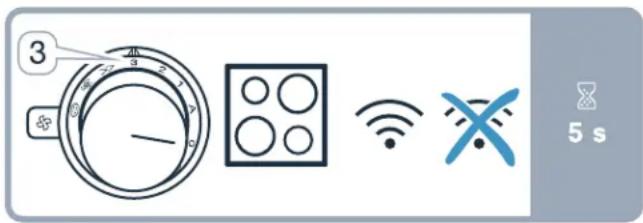
- Turn the control knob clockwise to position 3. The illuminated ring around the control knob lights up green.
After around 5 seconds, the illuminated ring around the control knob flashes blue. After a few seconds, the illuminated ring around the control knob lights up blue. The network connection is deactivated.
- Close the Home Connect settings menu. "Open or close the Home Connect settings menu" on page 16
The illuminated ring on the control knob goes out.
If you want to switch the network connection back on, work through the same operating sequence. The illuminated ring around the control knob lights up blue. After around 5 seconds, the illuminated ring around the control knob flashes blue and then lights up green.
Note: If the cooktop extractor system is directly connected to a cooktop, the Wi-Fi can not be switched off.
Changing from Wi-Fi connection to LAN connection
- Connect the cooktop extractor system to the router (RJ45 cable).
- Carry out the following operating steps one after the other without interruption.
- Open the Home Connect settings menu. "Open or close the Home Connect settings menu" on page 16
The illuminated ring around the control knob lights up green.
- Turn the control knob clockwise to the position.
After approx. 5 seconds, the illuminated ring for the control knob lights up blue. The connection is established via LAN.
- Close the Home Connect settings menu. "Open or close the Home Connect settings menu" on page 16
The illuminated ring on the control knob goes out.
Changing from LAN connection to Wi-Fi connection
- Carry out the following operating steps one after the other without interruption.
- Open the Home Connect settings menu. "Open or close the Home Connect settings menu" on page 16
The illuminated ring around the control knob lights up blue.
- Turn the control knob clockwise to the position.
After approx. 5 seconds, the illuminated ring for the control knob lights up green. The connection is established via Wi-Fi.
4.Disconnect the connection between the cooktop extractor system and the router (RJ45 cable).
Resetting the Home Connect connections
You can reset the connections you have saved for your home network and cooktop at any time.
- Carry out the following operating steps one after the other without interruption.
- Open the Home Connect settings menu. "Open or close the Home Connect settings menu" on page 16
The illuminated ring around the control knob lights up blue.
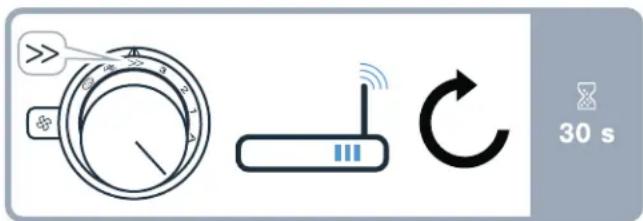
- Turn the control knob clockwise to the position.
After approx. 30 seconds, the illuminated ring for the control knob lights up green. All Home Connect settings have been reset. The appliance will no longer be displayed in the Home Connect app. - Close the Home Connect settings menu. "Open or close the Home Connect settings menu" on page 16
The illuminated ring on the control knob goes out.
Software Update
Using the software update function, your appliance's software can be updated (e.g. for the purpose of optimization, troubleshooting or security updates). To do this, you need to be a registered Home Connect user, have installed the app on your mobile device and be connected to the Home Connect server.
As soon as a software update is available, you will be informed by the Home Connect app, from which you will also be able to download the update.
Notes
- You can continue to use your appliance as normal while updates are downloading.
Depending on your personal settings in the app, software updates can also be set to download automatically.
We recommend that you install security updates as soon as possible.
Remote Diagnostics
Customer Service can use Remote Diagnostics to access your appliance if you contact them, have your appliance connected to the Home Connect server and if Remote Diagnostics is available in the country in which you are using the appliance
Note: For further information and details about the availability of Remote Diagnostics in your country, please visit the Service/Support section of your local website: www.home-connect.com
Information on Data Protection
When your appliance is connected to a WLAN network that is connected to the Internet for the first time, your appliance transmits the following categories of data to the Home Connect server (initial registration):
- Unique appliance identification (consisting of appliance codes as well as the MAC address of the installed Wi-Fi communication module).
- Security certificate of the Wi-Fi communication module (to ensure a secure data connection).
- The current software and hardware version of your appliance.
- Status of any previous resetting to factory settings.
This initial registration prepares the Home Connect functions for use and is only required when you want to use these Home Connect functions for the first time.
Note: Ensure that the Home Connect functions can be used only in conjunction with the Home Connect app. Information on data protection can be accessed in the Home Connect app.
Declaration of Conformity
Gaggenau Hausgeräte GmbH hereby declares that the appliance with Home Connect functionality meets the basic requirements and other relevant provisions of Directive 2014/53/EU.
A detailed RED Declaration of Conformity can be found online at www.gaggenau.com among the additional documents on the product page for your appliance.
C
2.4 GHz band: max. 100 mW
5 GHz band: max. 100 mW
| BE BG CZ DK DE EE IE EL |
| ES FR HR IT CY LV LT LU |
| HU MT NL AT PL PT RO SI |
| SK FI SE UK NO CH TR |
5 GHz WLAN (Wi-Fi): For indoor use only
Wi-Fi® Module
FCC/IC Statements
Model: COM2
FCC ID: 2AHES-COM2
IC: 21152-COM2
The Home Connect module is a communication device designed to provide communication between appliances and smart devices.
This module is integrated at the factory, under direct control of BSH Home Appliances Corporation, and is not user servicable or upgradable. At least 7/8 inch (20 cm) separation distance should be maintained from device to user.
FCC COMPLIANCE STATEMENT

CAUTION
Changes or modifications not expressly approved could void your authority to use this equipment.
This device complies with Part 15 of the FCC Rules. Operation to the following two conditions:
- This device may not cause harmful interference, and
- This device must accept any interference received, including interference that may cause undesired operation.
INDUSTRY CANADA STATEMENT
This device complies with Industry Canada license-exempt RSS standard(s).
Operation is subject to the following two conditions:
- This device may not cause interference, and
- This device must accept any interference, including interference that may cause undesired operation of the device.
Operation in the band 5150-5250 MHz is only for indoor use to reduce the potential for harmful interference to co-channel mobile satellite systems.
Connecting the cooktop extractor system to the cooktop
You can connect this appliance to a compatible cooktop and then control the functions of the cooktop extractor system via your cooktop.
You can connect this appliance to one or two cooktops. You cannot connect multiple cooktop extractor systems to one cooktop.
Notes
- Make sure you follow the safety instructions in the user manual for your cooktop and that these are complied with even when operating the appliance via the hood controls on the cooktop.
- Using the controls on the cooktop extractor system always takes priority. It is not possible to use the hood controls on the cooktop during this time.
Operation via the Home Connect app or via the cooktop is only possible if the control knob for the cooktop extractor system is at the position.
You have the following options for connecting the appliances together:
- Connecting appliances via the home network → "Connecting appliances via the home network" on page 23
- Connecting appliances directly → "Connecting appliances directly" on page 23
Connecting appliances via the home network
If the appliances are connected to each other via your home network, both the hood controls on the cooktop and the Home Connect functions can be used to operate the appliance.
Two appliances can be connected using the Home Connect app provided that both of them are Home Connect-compatible.
Refer to the Home Connect documents supplied for more information.
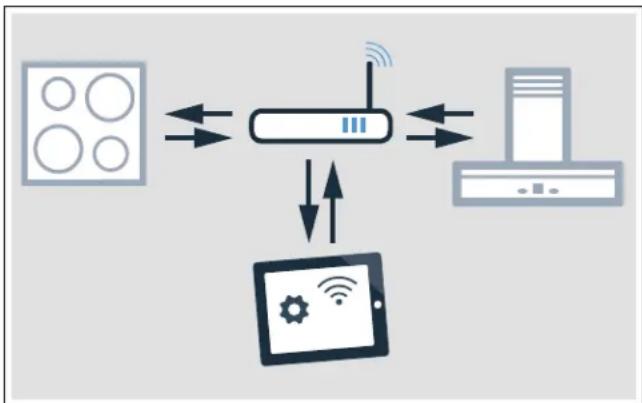
Establishing a connection via the home network
- Open the Home Connect settings menu. "Open or close the Home Connect settings menu" on page 16
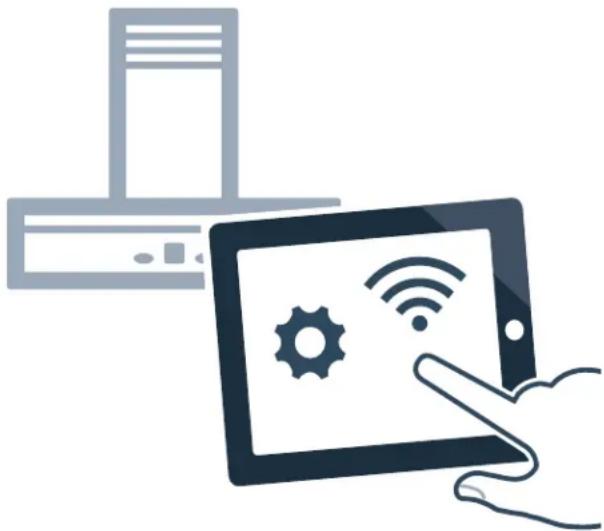
- Log in to the home network manually or automatically; see → "Manual Registration in the Home Network" on page 18 or → "Logging in to your home network automatically (WPS)" on page 18. Once the extractor hood is connected to your home network, you can connect to the cooktop via the Home Connect app. To do this, follow the instructions on your mobile device.
Connecting another cooktop to the extractor hood
- Connect both cooktops to Home Connect.
- Connect the cooktop extractor system to Home Connect.
- In the Home Connect app, connect the first cooktop to the cooktop extractor system.
- In the Home Connect app, connect the second cooktop to the cooktop extractor system.
- Turn the control knob for the cooktop extractor system to the position. Only then is the operation via the cooktop possible
Connecting appliances directly
If the appliance is connected directly to one or several cooktops, it can no longer be connected to your home network. The appliance will function as an extractor hood that is not connected to the network and you can continue to operate it via the control panel.
Before connecting the appliances, reset all existing connections to your home network or other appliances.
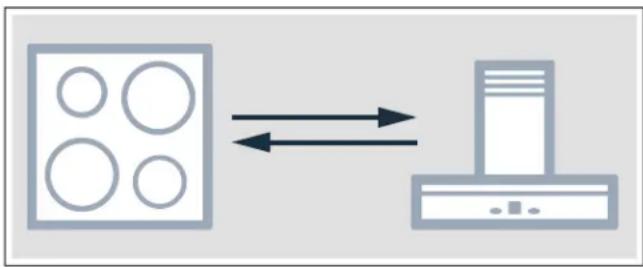
Establishing a direct connection
Make sure that the cooktop is switched on and is in search mode. Search mode means that the connection process on the cooktop has been started.
To do this, refer to the section entitled "Connecting to the extractor hood" in the user manual for your cooktop.
- Open the Home Connect settings menu. "Open or close the Home Connect settings menu" on page 16
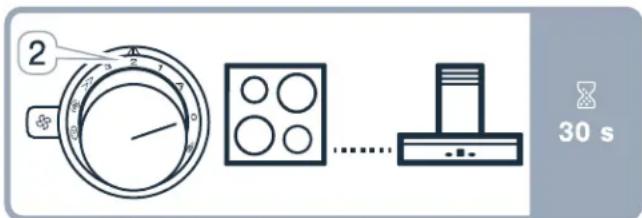
- Turn the control knob clockwise to position 2. After around 5 seconds, the illuminated ring around the control knob flashes blue and yellow alternately. The cooktop is connected to the extractor hood once the illuminated ring on the control knob lights up green.
- Close the Home Connect settings menu. "Open or close the Home Connect settings menu" on page 16 The illuminated ring on the control knob goes out.
- Turn the control knob for the cooktop extractor system to the position. Only then is the operation via the cooktop possible
Direct connection unsuccessful
If, after around 30 seconds, a connection could not be established, the illuminated ring around the control knob lights up red. Turn the control knob to another position and then back to position 2.
The illuminated ring around the control knob lights up blue. After around 5 seconds, the illuminated ring around the control knob flashes blue and yellow. The appliance is trying to establish a connection again.
Connecting another cooktop to the extractor hood
In order to connect another cooktop to the extractor hood, run through the direct connection again with the second cooktop.
- Switch off the Wi-Fi on the first cooktop. To do so, follow the instructions in the user manual for the cooktop.
- Start the connection for the second cooktop, then start the connection for the cooktop extractor system. The connection process may take a few minutes. The cooktop is connected to the cooktop extractor system once the illuminated ring on the control knob lights up green.
- Switch the Wi-Fi on the first cooktop back on again.
Cleaning and maintenance
WARNING
Risk of burns!
The appliance grows hot during operation. Let appliance cool down prior to cleaning.
WARNING
Risk of electrical shock!
Moisture entering the appliance can cause an electrical shock. Don't use a high-pressure cleaner or steam cleaner.
WARNING
Risk of injury!
Components inside the appliance may have sharp edges. Wear protective gloves.
NOTICE
Surface damage
Do not use these cleaning agents
- Caustic or corrosive cleaners
- Oven cleaners
- Cleaners that are caustic, contain chlorine or are aggressive
- Cleaners containing large proportions of alcohol
- Hard, scratchy dish-washing sponges, brushes or scourers
If such an agent comes into contact with the appliance, wipe it off immediately with water.
Thoroughly wash out new sponge cloths before using them.
Note: Only use a minimal amount of water when cleaning so that no water enters the appliance.
Cleaning the appliance
Note: Before cleaning, remove any jewelry from your arms and hands.
In order to ensure the grease absorption level, the grease filter must be cleaned regularly.
Clean the appliance after each use once it has cooled down. Remove spilt liquids immediately and do not allow any food remains to dry on it.
Also clean the inside of the downdraft ventilation regularly with a damp cloth.
| Appliance part/surface | Recommended cleaning |
| Appliance frame | Soapy water - dry with a soft cloth.Use a minimal amount of water when cleaning to prevent water from penetrating the appliance.Soak dried-on food remains with a small amount of soapy water; do not scour. |
| Ventilation grille | Carefully remove for cleaning. Soapy water - dry with a soft cloth.You can also clean the ventilation grille in the dishwasher. This may cause the ventilation grille to discolor, making it lighter. This does not affect its usability. |
Control knob The soapy cloth must not be too wet. Dry with a soft cloth.

CAUTION
Damage to the appliance Do not detach the control knobs to clean them.
Removing and installing the metal grease filter
- Remove the ventilation grille.
2.Pull the metal grease filter up and out of the appliance.
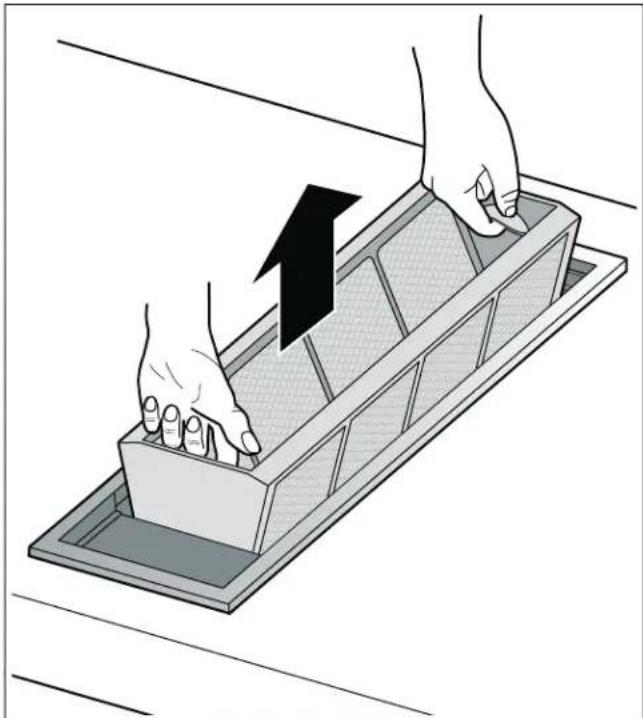
3.Clean the metal grease filter and the ventilation grille.
4. Clean the inside of the downdraft ventilation.
5.Insert the metal grease filter.
6. Place the ventilation grille on top.
Cleaning the metal grease filter

WARNING
Risk of fire!
Grease deposits in the grease filter can ignite.
Clean the grease filter at least every two months or as often as necessary.
Never operate the appliance without the grease filter.
The metal grease filter can be cleaned in the dishwasher or by hand.
Cleaning in the dishwasher
Note: Slight discoloration may occur if cleaning in the dishwasher. This has no effect on the performance of the metal grease filter.
- Place the metal grease filters loosely in the dishwasher with the opening facing down. Do not jam in the metal grease filters.
2.Do not clean heavily soiled metal grease filters together with tableware.
Cleaning by hand
- Soak the metal grease filter in hot soapy water.
- Clean with a brush and then rinse thoroughly.
- Allow the metal grease filter to dry before inserting.
Note: You can use a special degreaser to remove stubborn dirt. It can be ordered via the online shop.
Changing the activated charcoal filter (only in circulating-air mode)
Activated charcoal filters trap the odor-causing compounds from cooking smells. They are only used for air-recirculation mode.
The activated charcoal filter of the remote fan unit must be replaced at regular intervals. The saturation indicator on your appliance tells you how frequently this needs to be done.
Resetting the saturation indicator
If the saturation indicator for the metal grease filter or activated charcoal filter has flashed, you must reset the saturation indicator after cleaning or changing the filter.
1.Push in the control knob and turn it clockwise to the position.
2. The illuminated ring behind the control knob lights up white and goes out for approx. five seconds and lights up white again.
The saturation indicator is reset.
- Turn the control knob back to position 0.
Faults - What to Do?

WARNING
Risk of electric shock!
Incorrect repairs are dangerous. Repairs may only be carried out by an authorized servicer. If the appliance is not functioning properly, unplug the power cord or switch off the fuse in the fuse box. Contact Customer Support.
Faults often have simple explanations. Please read the notes in the table before calling customer service.
| Disruption Possible cause Solution | ||
| The appliance does not work No connection to the remote fan unit. | Check whether the plugs of the connection cable are properly inserted. | |
| Power failure Check whether other kitchen appliances are working. | ||
| Faulty fuse Check in the fuse box to make sure that the fuse for the appliance is in working order. | ||
| After the appliance has been switched off, the illuminated ring flashes white slowly three times. | The metal grease filter is saturated. | Clean the metal grease filter. → "Cleaning and maintenance" on page 24 |
| After the appliance has been switched off, the illuminated ring flashes white rapidly six times. | The activated charcoal filter in the remote fan unit is saturated. | Change the activated charcoal filter in the remote fan unit. → "Cleaning and main-tenance" on page 24 |
| The fan continues to run after the appliance has been switched off. The illuminated ring flashes slowly orange. | The run-on function is switched on. | Further information about the run-on function. → "Run-on function" on page 14 |
| The appliance switches itself off while in use; the illuminated ring flashes orange and white alternately | Safety switch off: The controls on the appliance have not been used for a long time | Turn the control knob to 0, then switch it back on, if required |
| The appliance remains off after a power failure | Turn the control knob to 0, then switch it back on, if required | |
| The window is closed using the window contact switch | Open the window, turn the control knob to 0 and then switch it back on, if required | |
| Appliance runs in automatic mode, illuminated ring flashes yellow and magenta | Automatic sensor is faulty Turn the control knob to 0, then switch it back on | If the illuminated ring continues flashing after you have switched the appliance back on, contact after-sales service |
| Illuminated ring flashes magenta - yellow | Appliance fault Check the cable connection to the remote blower | If the illuminated ring continues flashing after you have switched the appliance back on, contact customer service |
Customer service
If your appliance needs repairs, our customer service is there for you. We work hard to help solve problems quickly and without unnecessary service calls, getting your appliance back up and running correctly in the least amount of time possible.
When you call, please indicate the product number (E-Nr.) and serial number (FD-Nr.) so that we can support you in a qualified manner. You will find the type plate with these numbers on the bottom of the appliance.
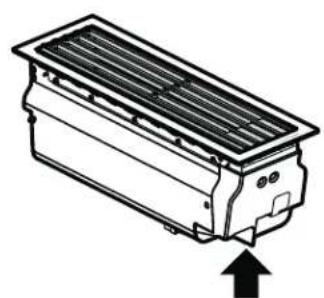
To avoid having to search for a long time when you need it, you can enter your appliance data and the customer support telephone number here.
E-Nr. FD-Nr.
Customer Service
Please read the use and care instructions provided with your appliance. Failure to do so may result in an error in using the appliance. This could result in a service call that instead of fixing a mechanical issue is only needed for customer education. Such calls are not covered by the appliance warranty.
Please find the contact data of all countries in the enclosed customer service list.
To book a service visit and product advice
USA 8774424436
toll-free
CANADA 877 442 4436
toll-free
Table des Matieres
www.P65Warnings.ca.gov
Sources des dommages

ATTENTION
No permitted utilization of the apparatus to persons as adults, no subject to the apparatus. No permit to use the apparatus to persons as adults or to children.
Estemerican Food and Drug Administration (FDA) has recently announced a new regulation for the use of injectable pharmaceuticals in food and food products. The FDA will require that the use of injectable pharmaceuticals in food and food products be approved by the FDA.
Los depositos de grasa en el filtro de grasa seSEOSEOSEOSEOSEOSEOSEOSEOSEOSEOSEOSEOSEOSEOSEOSEOSEOSEOSEOSEOSEOSEOSEOSEOSEOSEOSEOSEOSEOSEOSEOSEOSEOSEOSEOSEOSEOSEOSEOSEOSEOSEOSEOSEOSEOSEOSEOSEOSEOSEOSEOSEOSEOSEOSEOSEOSEOSEOSEOSEOSEOSEOSEOSEOSEOSEOSEOSEOSEOSEOSEOSEOSEOSEOSEOSEOSEOSEOSEOSEOSEOSEOSEOSEOSEOSEOSEOSEOSEOSEOSEOSEOSEOSEOSEOSEOSEOSEOSEOSEO SEOEO SEOEO SEOEO SEOEO SEOEO SEOEO SEOEO SEOEO SEOEO SEOEO SEOEO SEOEO SEOEO SEOEO SEOEO SEOEO SEOEO SEOEO SEOEO SEOEO SEOEO SEOEO SEOEO SEOEO SEOEO SEOEO SEOEO SEOEO SEOEO SEOEO SEOEO SEOEO SEOEO SEOEO SEOEO SEOEO SEOEO SEOEO SEOEO SEOEO SEOEO SEOEO SEOEO SEOEO SEOEO SEOEO SEOEO SEOEO SEOEO SEOEO SEOEQ
1901 Main Street, Suite 600
Irvine, CA 92614
1-877-442-4436
www.gaggenau.com/us
© 2020 BSH Home Appliances
- IMPORTANT SAFETY INSTRUCTIONS 4
- Causes of damage 11
- Protecting the environment 11
- Operating modes 11
- Getting to know your appliance 12
- Before using the appliance for the first time 12
- Operating the appliance 13
- Basic Settings 15
- Home Connect 16
- Connecting the cooktop extractor system to the cooktop 22
- Cleaning and maintenance 24
- Faults-What to Do? 27
- Customer service 28
- Safety Definitions
- WARNING
- CAUTION
- NOTICE
- IMPORTANT SAFETY INSTRUCTIONS
- READ AND SAVE THESE INSTRUCTIONS
- General notes
- Fire Safety
- Burn Prevention
- Child Safety
- Cleaning Safety
- Safe use
- Proper Installation and Maintenance
- Proposition 65 Warning:
- Causes of damage
- Protecting the environment
- Operating modes
- Air extraction
- Recirculation
- Getting to know your appliance
- Display on the illuminated ring
- Special accessories
- Before using the appliance for the first time
- Operating the appliance
- Turning on
- Turning off
- Using Home Connect to set the appliance
- Automatic mode with sensor control
- Switching on
- Switching off
- Sensor sensitivity
- Changing the sensitivity of the sensor
- Intensive mode
- Run-on function
- Notes
- Switching off the run-on function early
- Intermittent ventilation
- Saturation notification
- Ventilation molding
- Basic Settings
- Exiting the basic settings menu and saving the settings
- Home Connect
- Setting Up
- Setting up the Home Connect app
- Open or close the Home Connect settings menu
- Displays on the illuminated ring on the control knob
- Overview of the Home Connect settings menu
- Connecting the appliance to your home network (Wi-Fi)
- Manual Registration in the Home Network
- Connection to the router unsuccessful
- Connection to the mobile device unsuccessful
- Connecting more mobile devices to the same Home Connect account
- Connecting more mobile devices to another Home Connect account
- Logging in to your home network automatically (WPS)
- Exiting the Home Connect settings menu
- Connecting the appliance to your home network (LAN)
- Switch the wireless network connection (LAN or WLAN) on or off
- Changing from Wi-Fi connection to LAN connection
- Changing from LAN connection to Wi-Fi connection
- Resetting the Home Connect connections
- Software Update
- Remote Diagnostics
- Information on Data Protection
- Declaration of Conformity
- C
- Wi-Fi® Module
- FCC/IC Statements
- FCC COMPLIANCE STATEMENT
- INDUSTRY CANADA STATEMENT
- Connecting the cooktop extractor system to the cooktop
- Connecting appliances via the home network
- Establishing a connection via the home network
- Connecting another cooktop to the extractor hood
- Connecting appliances directly
- Establishing a direct connection
- Direct connection unsuccessful
- Cleaning and maintenance
- Risk of burns!
- Risk of electrical shock!
- Risk of injury!
- Surface damage
- Cleaning the appliance
- Removing and installing the metal grease filter
- Cleaning the metal grease filter
- Cleaning in the dishwasher
- Cleaning by hand
- Changing the activated charcoal filter (only in circulating-air mode)
- Resetting the saturation indicator
- Faults - What to Do?
- Risk of electric shock!
- Customer service
- Table des Matieres
- Sources des dommages
- ATTENTION
Brand : GAGGENAU
Model : VL414712
Category : Fan