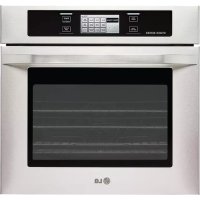
LSWS305ST - Built-in oven LG - Free user manual and instructions
Find the device manual for free LSWS305ST LG in PDF.


| Product type | Electric Built-in Oven |
| Brand | LG |
| Model | LSWS305ST |
| Power Supply | 240 V / 60 Hz (estimated) |
| Power | Approximately 5,000 W (estimated) |
| Capacity | Approximately 4.5 cu ft (128 L) |
| Cavity Dimensions | Width 76 cm, Height 46 cm, Depth 61 cm (estimated) |
| Cooking Modes | Bake, Broil, Roast, Convection Bake, Convection Crisp, Convection Roast, Recipe Bank, Proof, Reheat, Healthy Roast, My Menu |
| Cleaning Type | Self-Cleaning (2 h, 3 h, 4 h cycles) |
| Controls | Touchscreen with Sensitive Keys |
| Display | Digital Display with Adjustable Brightness |
| Lighting | 3 Halogen Lamps (10 W) |
| Temperature Probe | Included (adjustable temperature from 80 °F to 210 °F) |
| Rack | Telescopic Rack (sliding) |
| Included Accessories | Drip Pan, Metal Rack, Temperature Probe |
| Safety | Control Lock, Automatic Door Lock in Self-Cleaning, Error Detection |
| Material | Stainless Steel |
| Net Weight | Approximately 68 kg (150 lb) |
| Warranty | 2 years (parts and labor) in Canada |
| Repairability | Spare parts available through LG authorized service |
Frequently Asked Questions - LSWS305ST LG
User questions about LSWS305ST LG
0 question about this device. Answer the ones you know or ask your own.
Ask a new question about this device
Download the instructions for your Built-in oven in PDF format for free! Find your manual LSWS305ST - LG and take your electronic device back in hand. On this page are published all the documents necessary for the use of your device. LSWS305ST by LG.
USER MANUAL LSWS305ST LG
Please read this guide thoroughly before operating and keep it handy for reference at all times.
LSWS305ST
IMPORTANT SAFETY INFORMATION
Safety Precautions. 3-4
Electrical Safety 4
Safety During Use. 5
Child Safety 5
Safety When Cleaning 6
PARTS AND FEATURES
Parts And Features 7
Control Panel Features 8
OPERATING INSTRUCTIONS
Initial Set Up. 9
Time and Temperature Settings 9
Language Selection 10
Temperature Unit 10
Display Brightness 10
Sound Volume. 11
Convection Auto Conversion. 11
Temperature Adjustment. 12
Clock Time 12
Reset. 12
Timer On/Off 13
Telescopic Rack. 14
Bake. 15
Baking Layer Cakes. 15
Timed Bake. 16
Delayed Timed Bake. 17
Broil. 18
Recommended Broiling Guide. 18-19
Roast. 20
Convection Bake. 21
Crisp Convection. 22
Convection Roast. 23
Recipe Bank. 24
Proof. 25
Warm. 25
Healthier Roast 26
My Menu 27
Cook & Warm. 28
Meat Probe 28-29
Control Lock Feature 29
To Turn On/Off the Oven Light. 29
Self-Clean 30-32
MAINTENANCE
Care & Cleaning. 33-34
Removing & Replacing the Lift-Off Oven Door 35
Door Care Instructions 35
TROUBLESHOOTING
Before Calling for Service 36-38
WARRANTY
Warranty for customers in Canada 39
THANK YOU!
Congratulations on your
purchase and welcome to the
LG family. Your new LG Built-In
Oven combines precision
cooking features with simple
operation and stylish design.
Follow the operating and care
instructions in this manual and
your oven will provide you with
many years of reliable service.
Product Registration Information
Model:
Serial Number:
Date of Purchase:
READ ALL INSTRUCTIONS BEFORE USE
You can download an owner's manual at http://www.lg.com.

This is the safety alert symbol. This symbol alerts you to potential hazards that can kill or hurt you and others. All safety messages will follow the safety alert symbol and either the word WARNING or CAUTION. These words mean:
WARNING This symbol will alert you to hazards or unsafe practices which could cause serious bodily harm or death.
CAUTIONThis symbol will alert you to hazards or unsafe practices which could cause bodily injury or property damage.
SAFETY PRECAUTIONS
DO NOT TOUCH HEATING ELEMENTS OR INTERIOR SURFACES OF OVEN.
- Be certain your appliance is properly installed and grounded by a qualified technician.
- Do not repair or replace any part of the appliance unless specifically recommended in the manual.
- All other servicing should be referred to a qualified technician.
- Always disconnect power to appliance before servicing by unplugging, removing the fuse or switching off the circuit breaker.
Heating elements may be hot even though they are dark in color. Interior surfaces of an oven become hot enough to cause burns. During and after use, do not touch or let clothing or other flammable materials contact heating elements or interior surfaces of oven until they have had sufficient time to cool. Other surfaces of the appliance may become hot enough to cause burns. Among these surfaces are oven vent openings and surfaces near these openings, oven doors, and windows of oven doors.
- Use Care When Opening Door.
Let hot air or steam escape before you remove or replace food in the oven
- Do Not Heat Unopened Food Containers.
Build-up of pressure may cause container to burst and result in injury.
- Keep Oven Vent Ducts Unobstructed. The oven vent could become hot during oven use. Never block this vent and never place plastic or heat-sensitive items on or near the vent.
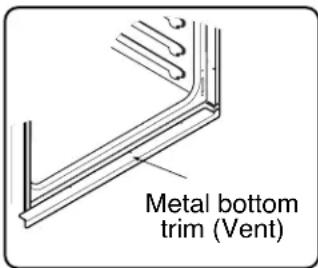
NOTE:
For proper operation vent trim must be installed.
WARNING
- NEVER use your appliance for warming or heating the room.
DO NOT use water on grease fires. Should an oven fire occur, leave the oven door closed and turn the oven off. If the fire continues, throw baking soda on the fire or use a fire extinguisher. - Use dry pot holders only. Moist or damp pot holders on hot surfaces may result in burns from steam. Do not let the pot holder touch hot heating elements. Do not use a towel or other bulky cloth.
- Storage in or on appliance. Flammable materials should not be stored in an oven or near surface elements.
- Wear proper apparel. Loose-fitting or hanging garments should never be worn while using the appliance.

READ ALL INSTRUCTIONS BEFORE USE
SAFETY PRECAUTIONS (cont.)
- Be certain all packing materials are removed from the appliance before operating.
Keep plastics, clothes, and paper away from parts of the appliance that may become hot.
- DO NOT force the door open.
This can damage the automatic door locking system. Use care when opening the oven door after the self-cleaning cycle. Stand to the side of the oven when opening the door to allow hot air or steam to escape. The oven may still be VERY HOT.
- DO NOT use a steel-wool pad.
It will SCRATCH the surface.
DO NOT use harsh etching, abrasive cleaners or sharp metal scrapers to clean the oven door glass since they can scratch the surface. It may result in shattering of the glass. - Be careful when removing and lifting the door.
DO NOT lift the door by the handle. The door is very heavy.
DO NOT step or sit on oven door. Be sure to follow proper installation instructions.
ELECTRICAL SAFETY
- Protective Liners. Do not use aluminum foil or any other material to line the oven bottoms. Improper installation of these liners may result in a risk of electric shock or fire.
- Do Not allow aluminum foil or meat probe to contact heating elements.

WARNING
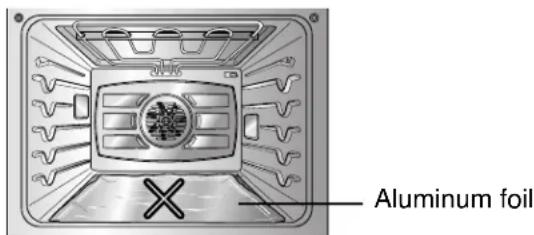
DO NOT place aluminum foil directly on the oven bottom.
- Before replacing your oven light bulb, switch off the electrical power to the oven at the main fuse or circuit breaker panel.
Failure to do so can result in severe personal injury, death, or electrical shock.
- DO NOT line the oven walls, racks, bottom, or any other part of the oven with aluminum foil or any other material.
Doing so will disrupt heat distribution, produce poor baking results and cause permanent damage to the oven interior (aluminum foil will melt to the interior surface of the oven.)
READ ALL INSTRUCTIONS BEFORE USE
SAFETY DURING USE
- Oven Racks. Always place oven racks in desired position while oven is cool.
- Always use pot holders or oven mitt when removing food from the oven.
You can be burned because cookware and plates will be hot.
- Use caution with the TIMED BAKE or DELAYED TIMED BAKE features. Use the automatic timer when cooking cured or frozen meats and most fruits and vegetables. Foods that can easily spoil, such as milk, eggs, fish, meat or poultry, should be chilled in the refrigerator first. Even when chilled, they should not stand in the oven for more than 1 hour before cooking begins, and should be removed promptly when cooking is completed.
Eating spoiled food can result in sickness from food poisoning.
- Should an oven fire occur, leave the oven door closed and turn the oven off. If the fire continues, throw baking soda on the fire or use a fire extinguisher.
DO NOT put water or flour on the fire.
Flour may be explosive and water can cause a grease fire to spread and cause personal injury.
- DO NOT use the broiler pan without the grid.
DO NOT cover the grid with aluminum foil.
CHILD SAFETY
WARNING
Children should be kept away from the oven.
- Accessory parts will become hot when the broiler is in use.
CAUTION
- DO NOT leave small children unattended near the appliance.
During the self-cleaning cycle, the outside of the oven can become very hot to the touch.
CAUTION
Children should not be left alone or unattended in area where appliance is in use. Children should never be allowed to sit or stand on any part of the appliance.
READ ALL INSTRUCTIONS BEFORE USE
SAFETY WHEN CLEANING
- Do Not Clean Door Gasket. The door gasket is essential for a good seal. Care should be taken not to rub, damage, or move the gasket.
- Do Not Use Oven Cleaners. No commercial oven cleaner or oven liner protective coating of any kind should be used in or around any part of the oven.
- Before self cleaning the oven. Remove broiler pan, all oven racks, meat probe and any other utensils from the oven cavity.
-
Never keep pet birds in the kitchen. The health of birds is extremely sensitive to the fumes released during an oven self-clean cycle. Fumes may be harmful or fatal to birds. Move birds to well-ventilated room.
-
Important Instruction. In the event the self clean error code F is displayed, and error melody sounds, the oven is malfunctioning in the self clean mode. Switch off the electrical power to the main fuse or breaker and have serviced by a qualified technician.
- Make sure oven lights are cool before cleaning.
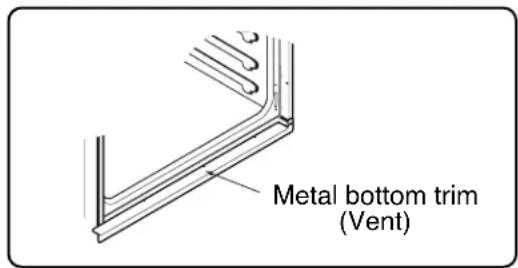
- DO NOT block the oven vent during operation. This can damage the electric parts of the oven. Air must be able to move freely. The metal bottom trim (vent) should be properly assembled on the front bottom of oven before installing the oven door.
PARTS AND FEATURES
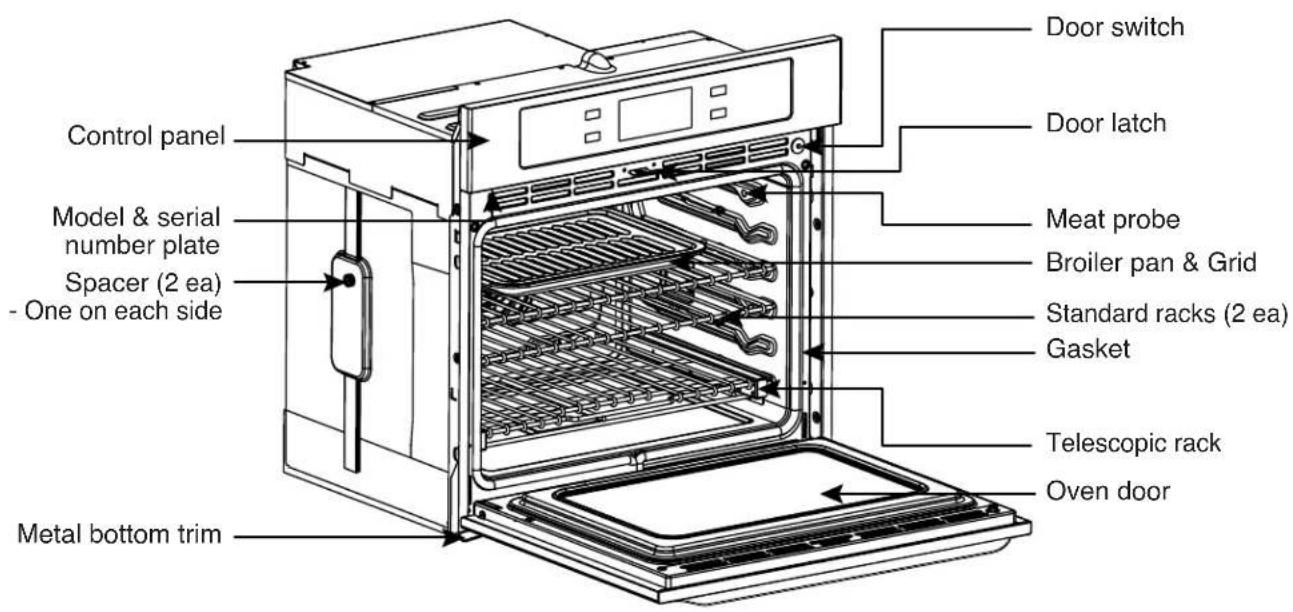
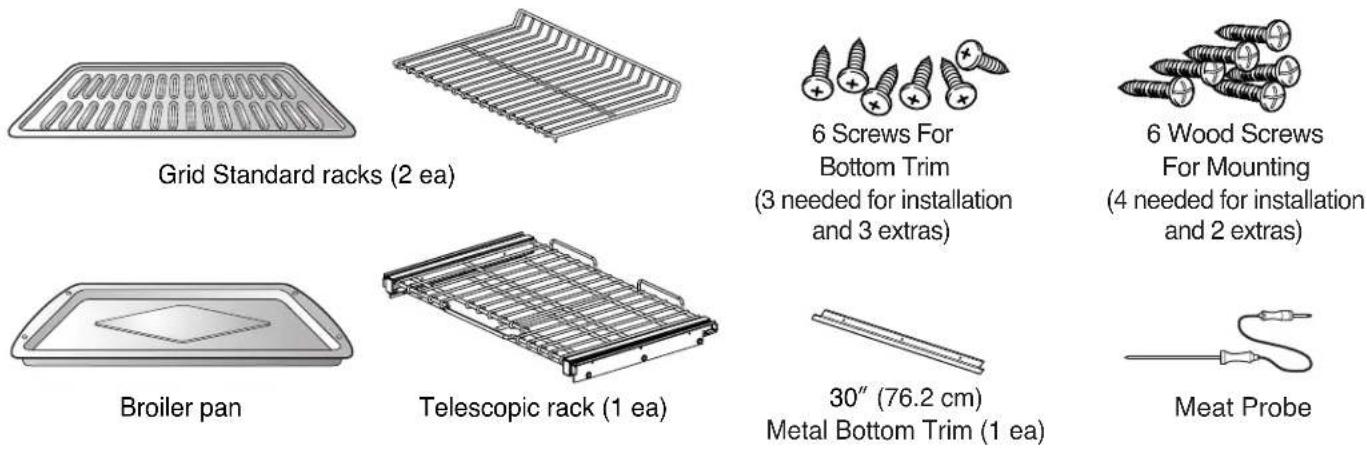
CONTROL PANEL FEATURES
READ THE INSTRUCTIONS CAREFULLY BEFORE USING THE OVEN. For satisfactory use of your oven, become familiar with the various features and functions of the oven as described below.
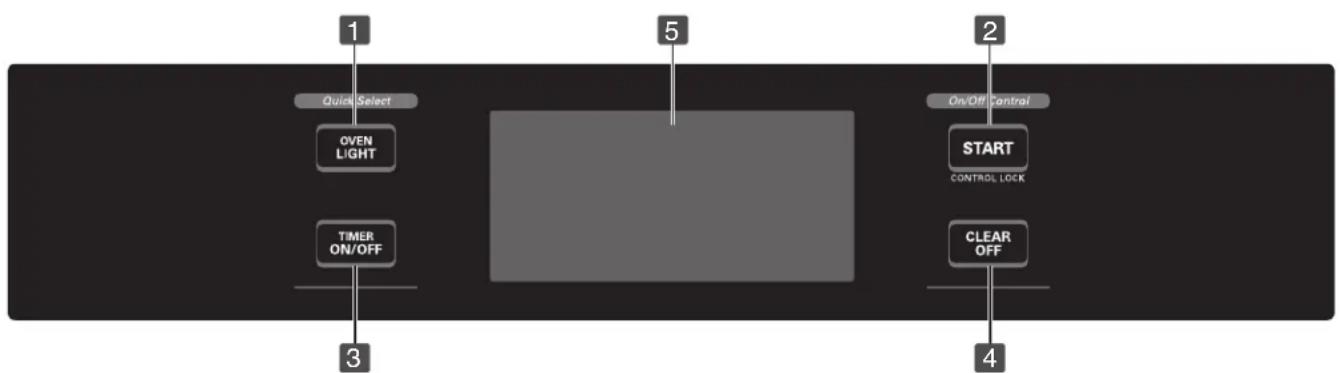
1 OVEN LIGHT: Use to turn the oven lights on and off.
2 START: Use to start all oven features. Activate the CONTROL LOCK for 4 seconds holding.
3 TIMER ON/OFF: Use to set or cancel the timer.
4 CLEAR/OFF: Use to stop cooking or cancel the setting of the oven.
5 Touch Screen: Show the time of day, main menu, and oven temperature; whether the oven is the bake, broil or self-cleaning mode; and the times set for the timer or automatic oven operations. The display panel will go into a "sleep" mode if no activity. Touch the display once to activate and again to make your selection.
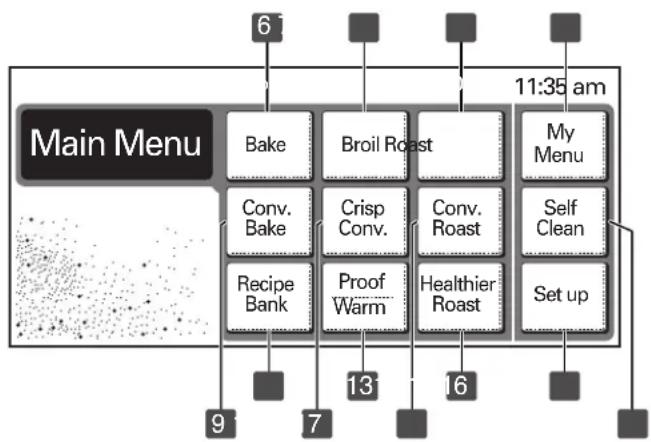
6 Bake: Use to select the normal bake mode.
7 Broil: Use to set the variable broil mode.
8 Roast: Use to select the normal roast mode.
9 Conv. Bake: Use to select the convection bake mode.
10 Crisp Conv.: Use to select the crisp convection mode.
Conv. Roast: Use to select the convection roast mode.
12 Recipe Bank: Use to recall the recipe category of gourmet food.
13 Proof/Warm: Use to proof bread / Use to hold food warm.
14 Healthier Roast: Use to select the healthier roast mode.
My Menu: Use to save or recall the favorite 10 cook mode.
16 Set up: Use to change the special settings.
17 Self Clean: Use to select the self-cleaning cycle.
NOTE:
- Press CLEAR/OFF pad. Allow the oven to cool for one hour. Put back into operation.
- If the function error code repeats, disconnect the power to the oven and call for service.
- If the oven was set for a timed oven operation and a power failure occurred, the clock and all programmed functions must be reset.
The time of day will flash and PF will appear in the display when there has been a power failure.
INITIAL SET UP
When the oven is first powered ON, the oven needs to be programmed for the language and time of day.
To set the language (example below for English display)
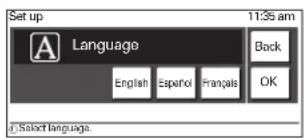
Touch English. Then OK.
To set the clock (example below for for 3:30 pm):
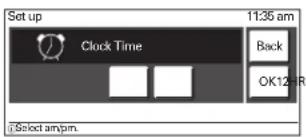
Touch 12HR to use a 12-hour clock. Then touch OK.
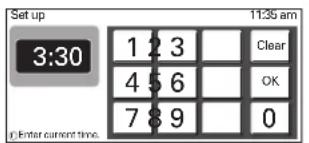
Touch 3 3 0 to set the time of day to 3:30. Then touch OK.
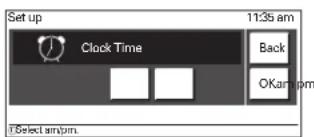
3 Touch pm. Then touch OK.
NOTE: When the power supply to the oven has been interrupted, the time in the display will show when the power failure occurred.
TIME AND TEMPERATURE SETTINGS
All of the features listed have minimum and maximum time or temperature settings that may be entered into the control. An entry acceptance beep will sound each time a control key is touched.
An entry error tone (3 short beeps) will sound if the entry of the temperature or time is below the minimum or above the maximum settings for the feature.
| Feature | Min. Temp. / Time | Max. Temp. / Time |
| BAKE / ROAST | 170°F (80°C) | 550°F (285°C) |
| BROIL [Full / Center] | LO (350°F) | HI (550°F) |
| CONVECTION BAKE/ CONVECTION ROAST/ CRISP CONVECTION | 170°F (80°C) | 550°F (285°C) |
| PROOF | 100°F | |
| WARM | LO (140°F) / 3 hours | HI (200°F) / 3 hours |
| SELF CLEAN | 2 hours | 4 hours |
| PROBE | 80°F (25°C) | 210°F (100°C) |
The following options can be found by touching SET UP on the main menu.
LANGUAGE SELECTION (ENGLISH, ESPÁNOL OR FRANÇAIS)
English, French or Spanish can be set as the display language.
To set language selection
Set up
Touch Set Up.
EnglishSpanish Frangcais
3 Touch English, Espanol (Spanish) or Frangois (French).
1
Touch 1 for language selection.
OK Back
Touch OK to accept the change or touch Back to return to the Set Up menu.
TEMPERATURE UNIT (FAHRENHEIT OR CELSIUS)
The oven control can be set up to display temperatures in Fahrenheit or Celsius.
To set temperature unit.
Set up
Touch Set Up.
Fahr.Colsius
3 Touch Fahr. (F) for Fahrenheit or Celsius (°C) for Celsius.
2
Touch 2 for changing temperature unit.
OK Bank
Touch OK to accept the change or touch Back to return to the Set Up menu.
DISPLAY BRIGHTNESS (BRIGHT, NORMAL OR DARK)
The oven control can be set up to change the brightness of the display touch screen.
To set display brightness
Set up
Touch Set Up.
Bright Normal Dark
Touch Bright or Normal or Dark.
3
Touch 3 for brightness selection.
OK Back
Touch OK to accept the change or touch Back to return to the Set Up menu.
OPERATING INSTRUCTIONS (SET UP)
SOUND VOLUME (MUTE, NORMAL OR LOUD)
The sound volume feature allows you to adjust the volumes to a more acceptable volume. There are three possible volume levels.
To set sound volume

Touch Set Up.
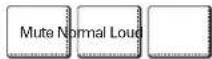
Touch Mute or Normal or Loud.

Touch 4 for changing sound volume.
Touch OK to accept the change or touch Back to return to the Set Up menu.
CONVECTION AUTO CONVERSION (ENABLE OR DISABLE)
This feature allows you to Enable or Disable the Auto Conversion option.
The Auto Conversion feature will automatically convert the Convection temperature. The temperature will be reduced by 25 degrees from the actual temperature set.
If this feature is Enabled, the temperature is automatically reduced by 25 degrees. The display will show 25 degrees lower than the temperature entered. If this feature is Disabled, the temperature will not reduce the 25 degrees.

Touch Set up.

Touch 5 for changing the setting.
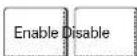
3 Touch Enable or Disable.
Touch OK to accept the change or touch Back to return to the Set Up menu.
TEMPERATURE ADJUSTMENT
The oven cavity temperature can be adjusted if it is running too hot or too cool.
If needed, the temperature can be adjusted +/- 35 degrees.
NOTE: The temperature adjustments made with this feature will change Bake, Convection Bake, Convection Roast, and Crisp Convection temperature.
To adjust the oven temperature

Touch CLEAR/OFF for changing the oven temperature.
Touch Set Up.
3 Touch 6 for temperature adjustment.
To increase the temperature, touch + until the display shows the desired change. To decrease the temperature, touch - until the display shows the desired change.
Touch OK to accept the change or touch Back to return to the Set Up menu.
CLOCK TIME (12 HR, 24 HR)
This feature allows you to choose between a 12 and 24 hour clock. Once the clock has been reset for a 12 or 24 hour clock, the time of day needs to be reset.
To change between 12 or 24 hour time of day

Touch Set Up.
Touch number pads to set the current time of day.
Touch OK to accept the change or touch Clear to reset the time.
Touch am for setting the time before noon or touch pm for setting the time after noon.
NOTE: am and pm selection can be set only for the 12-hour clock.
Touch OK to accept the change or touch Back to return to the Set Up menu.

Touch 7 for setting clock time.

3 Touch 12HR for 12-hour or 24HR for 24-hour.

Touch OK to accept the change or touch Back to return to the Set Up menu.
RESET
The Reset feature allows you to restore changes made in the SET UP menu to the original factory settings.
To reset the control to factory setting

Touch Set Up.
Touch Yes to reset the control or touch No to keep the current setting.
Touch OK to accept the change or touch Back to return to the Set Up menu.
TIMER ON/OFF
The TIMER ON/OFF serves as an extra timer in the kitchen that will beep when the set time has run out. It does not start or stop cooking. The TIMER ON/OFF feature can be used during any of the other oven control functions.
To set the timer (example for 5 minutes):

Touch TIMER ON/OFF.
Touch the number pad to set the desired time in the display (touch 500).
Touch OK or TIMER ON/OFF to start the timer.
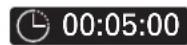
NOTE: The time will count down with 5:00 in the display.
When the set time has run out, Timer End will show in the display. Timer melody will sound every 15 seconds until TIMER ON/OFF is touched.
NOTE:
- If you touch TIMER ON/OFF once, it allows you to set the time in seconds. (For example: if you touch 5 and 6, it means 56 seconds)
- If you touch TIMER ON/OFF twice, it allows you to set the time in minutes. (For example: if you touch 5 and 6, it means 56 minutes)
To cancel the Timer before the set time has run out:

Touch TIMER ON/OFF. The count down time in display will disappear.
NOTE:
Touch Clear if you make a mistake and begin again.

TELESCOPIC RACK
The sliding shelf telescopic rack can be used in any rack position.
Open Position
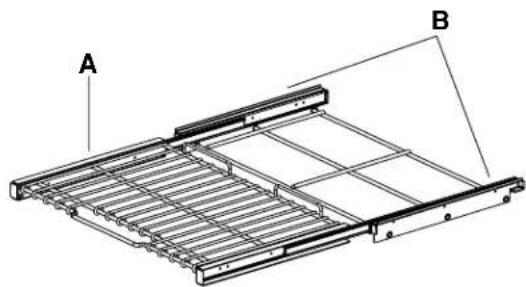
A. Telescopic rack B. Frame
Closed and Engaged Position
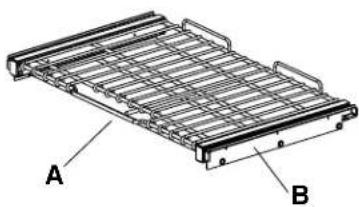
A. Telescopic rack B. Frame
CAUTION
-
DO NOT cover racks with aluminum foil.
-
This will result in poor baking caused by interrupted heat distribution.
Always arrange oven racks when the oven is cool. - Do not place aluminum foil or any other material on the oven bottom.
- Remove all racks including the telescoping rack and frame when using a self clean cycle.
Installing the Telescoping Rack
Step.1
Start with the rack in the "Closed" position. Place one hand in the front near the center, and place your other hand near the right rear corner.
Step.2
Carefully insert rack between the rack guides, to the back of the oven until the shelf slides into place.
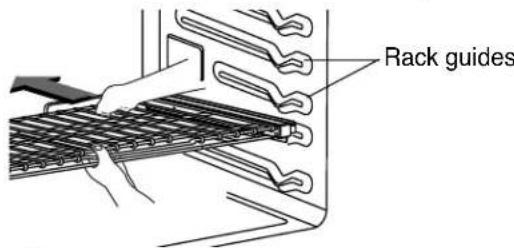
Step. 3
Once the rack is secured in the back, pull the entire rack forward until the rack locks into place.
NOTE: Be sure that the rack is securely positioned and level before use.
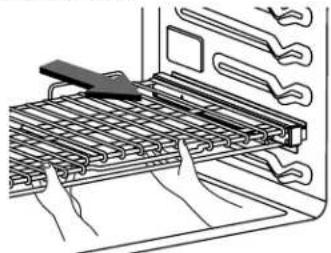
Removing Telescopic Rack
Step.1
With the rack in the "Closed" position, grasp the front of the rack and frame and lift up. Slowly push the rack towards the back wall.
Step. 2
After pushing rack/ frame towards the back wall lift the rear of the rack, and pull the entire rack and frame out between the rack guides.
BAKE
The oven can be programmed to bake at any temperature from 170^ (77^) to 550^ (288^) . Default temperature is 350^ (177^) .
To set the Bake Temperature to 375^

Touch CLEAR/OFF. The display will show the main menu.

Touch Bake. 350^ will appear in the display.
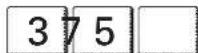
Touch 3,7,and 5.

Touch START. The display will show the actual oven temperature starting at 100^ and the set temperature.
NOTE:
- During the preheating mode, the convection fan operates constantly to circulate the hot air. The convection fan will turn off automatically after the preset temperature is attained.
After any cooking cycle has been completed cooling fans will operate to protect the control panel. This is normal.
BAKING LAYER CAKES
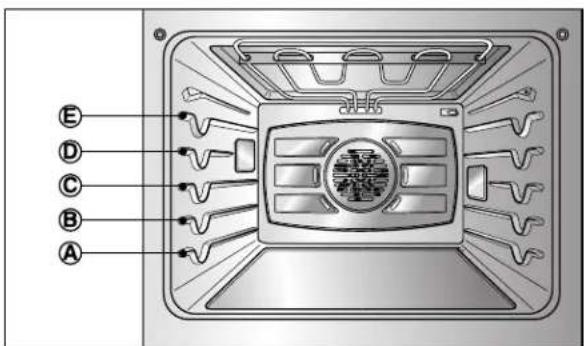
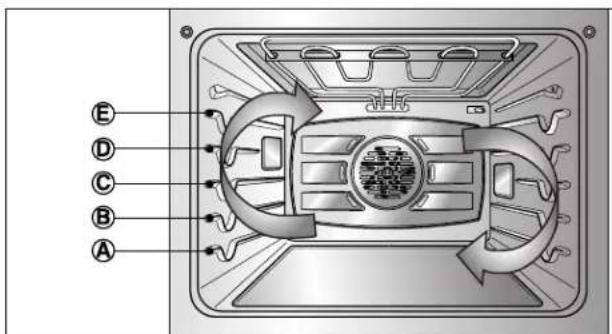
Baking results will be better if baking pans are centered in the oven as much as possible. If baking with more than one pan, place the pans so each has at least 1" to 1-1/2" of air space around it. If cooking on multiple racks, place the oven racks in positions B and D (For 2 racks) Place the cookware as shown in Fig. 1, 2.
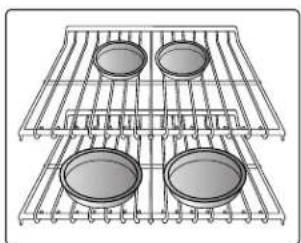
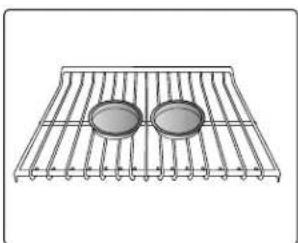
Fig. 1 Fig. 2
To change the Bake Temperature while cooking (example changing from 375^ to 425^ ):

Touch Options.

Touch Temp.
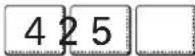
Touch 4,2,and 5.
Touch OK to accept the change or touch Clear to reenter the desired temperature.
NOTE:
Preheating is necessary for good results when baking cakes, cookies, pastries and breads. After the oven has reached the desired temperature, the preheat melody will sound once.
The heating elements turn off immediately when the door is opened. They will turn on again in approximately 5 seconds after the door is closed. If you leave the oven door open for more than 30 minutes, all settings are canceled.
Touch CLEAR/OFF to cancel BAKE at any time.
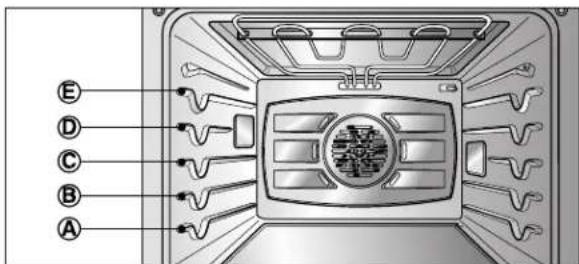
- The oven has 5 rack positions.
| Type of Food | Rack Position |
| Angel food cake, Frozen pies | B |
| Bundt or pound cakes | B |
| Biscuits, Muffins, Brownies, Cookies, Cupcakes, Layer cakes, Pies | C |
| Casseroles | B |
| Turkey, Roast, or Ham | A |
TIMED BAKE
The oven will turn on immediately and bake for a selected length of time. At the end of the cooking time, the oven will turn off automatically.
To set the oven to begin cooking immediately and shut off automatically: (example below to bake at 375^ for 30 minutes):

Touch CLEAR/OFF. The display will show the main menu.

Touch Bake. 350^ will appear in the display.
Touch 3,7,and 5.

Touch Options to set the cook time.

Touch Cook Time.

Touch 3 and 0. NOTE:
Timed cook can be set for 1 minute to 11 hours and 59 minutes.

Touch START. The oven will turn on, and the display will show the cooking time countdown. The oven will continue to cook for the set amount of time, then turn off automatically.
NOTE:
- During the preheating mode, the convection fan operates constantly to circulate the hot air. The convection fan will turn off automatically after the preset temperature is attained.
After any cooking cycle has been completed cooling fans will operate to protect the control panel. This is normal.
IMPORTANT NOTE:
Preheating is necessary for good results when baking cakes, cookies, pastries and breads. After the oven has reached the desired temperature, the preheat alarm melody will sound once.
The heating elements turn off immediately when the door is opened. They will turn on again in approximately 5 seconds after the door is closed. If you leave the oven door open for more than 30 minutes, all settings are canceled.
Touch CLEAR/OFF to cancel Timed Bake at any time.
To change the cooking time while cooking (example changing from 30 minutes to 20 minutes):

Touch Options.

Touch Cook Time.

3 Touch 2 and 0.
Touch OK to accept the change or touch Clear to reset the time you input.
When the Timed Bake finishes:
1 "Cycle Completed" will appear in the display and then the display will show the time of day.

The control will continue to sound the cook end melody every minute until CLEAR/OFF is touched.
DELAYED TIMED BAKE
The automatic timer of the Delayed Timed Bake will turn the oven ON and OFF at the time you select in advance.
To set the oven for a Delayed Start. (example for baking at 375^ for 30 minutes and starting at 4:30 pm):
1 Be sure that the clock is set with the correct time of day.
Touch CLEAR/OFF.
Touch Bake. 350^ will appear in the display.
Touch 3,7,and 5.
Touch Options to set the cook time.
Touch Cook Time.
Touch 3 and 0.
NOTE: Baking time can be set from 1 minute to 11 hours and 59 minutes.
Touch Options.
Touch Start Time.
10 Touch 4, 3, and 0.
Touch Options to select am or pm.
Touch pm.
13 Touch OK or touch Back to return to the previous step.
14 Touch START. At the set time, the start melody will sound. The oven will begin to Bake. When the oven has reached the desired temperature, the preheat alarm melody will sound once and the display will show the programmed information.
IMPORTANT NOTE:
The heating elements turn off immediately when the door is opened. They will turn on again in approximately 5 seconds after the door is closed. If you leave the oven door open for more than 30 minutes, all settings are canceled.
Touch CLEAR/OFF to cancel Delayed Timed Bake at any time.
When the Timed Bake finishes:
"Cycle Completed" will appear in the display and then the display will show the time of day.
The control will continue to sound the cook end melody every minute until CLEAR/OFF is touched.
NOTE:
- During the preheating mode, the convection fan operates constantly to circulate the hot air. The convection fan will turn off automatically after the preset temperature is attained.
After any cooking cycle has been completed cooling fans will operate to protect the control panel. This is normal.
CAUTION
- Use caution with the TIMED COOK or DELAYED TIMED COOK features. Use the automatic timer when cooking cured or frozen meats and most fruits and vegetables. Foods that can easily spoil, such as milk, eggs, fish, meat or poultry, should be chilled in the refrigerator first. Even when chilled, they should not stand in the oven for more than 1 hour before cooking begins, and should be removed promptly when cooking is completed.
- Eating spoiled food can result in sickness from food poisoning.
BROIL
Broiling uses an intense, radiant heat to cook food. Both the inner and outer broil elements heat during full broiling. Only the inner broil element heats during center broiling. The element(s) cycle on and off in intervals to maintain the oven temperature. The meat probe cannot be used with this mode.
IMPORTANT NOTE: Your oven is designed for CLOSED DOOR Broiling.
To set the oven to Broil.
Place your food on the broiling pan grid.

Touch CLEAR/OFF.

3 Touch Broil.
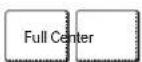
Touch Full or Center.
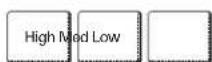
Touch High or Med or Low.

Touch START.
RECOMMENDED BROILING GUIDE
The size, weight, thickness, starting temperature, and your preference of doneness will affect broiling times. This guide is based on meats at refrigerator temperature. It is recommended to preheat the oven for about 3 minutes before placing food in the oven.
For best results when broiling, use a pan designed for broiling (Refer to Fig. 1.)
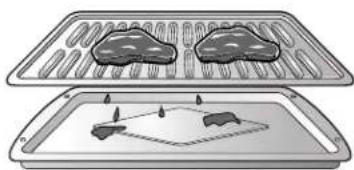
Fig.1
IMPORTANT NOTE:
The heating element(s) turn off immediately when the door is opened. They will turn on again in approximately 5 seconds after the door is closed.
If you leave the oven door open for more than 30 minutes, all settings are canceled.
Touch CLEAR/OFF to cancel Broil at any time.
NOTE:
After any cooking cycle has been completed cooling fans will operate to protect the control panel. This is normal.
RECOMMENDED BROILING GUIDE (cont.)
| Food | Quantity and/ or Thickness | Shelf Position | First Side Time (min.) | Second Side Time (min.) | Comments |
| Ground BeefWell Done | 1 lb. (4 patties)1/2 to 3/4" thick | D or E | 5-7 | 4-5 | Space evenly. Up to 8 patties may be broiled at once. |
| Beef SteaksRareMediumWell Done | 1" thick1 to 1-1/2 lbs. | D D D | 6 7 8 | 2-3 2-3 3-4 | Steaks less than 1" thick cook through before browning.Pan frying is recommended. Remove fat. |
| RareMediumWell Done | 1-1/2" thick2 to 2-1/2 lbs. | D D D | 10 12 14 | 4-6 6-8 8-10 | |
| Chicken | 1 whole cut up2 to 2-1/2 lbs., split lengthwise2 Breasts | C C | 20 20 | 6-8 6-10 | Broil skin-side-down first. |
| Lobster Tails | 2-410 to 12 oz. each | C | 12-14 | Do not turn over. | Cut through back of shell. Spread open.Brush with melted butter before broiling and after half of broiling time. |
| Fish Fillets | 1/4 to 1/2" thick | D or E | 5-6 | 3-4 | Handle and turn very carefully. Brush with lemon butter before and during cooking, if desired. |
| Ham Slices(precooked) | 1/2" thick | D | 5 | 3-5 | Increase time 5 to 10 minutes per side for 1-1/2" thick or home-cured ham. |
| Pork ChopsWell Done | 2 (1/2" thick)2 (1" thick) about 1 lb. | D or E D or E | 7 9-10 | 6-8 7-9 | Remove fat. |
| Lamb ChopsMediumWell Done | 2 (1" thick) about 10 to 12 oz. | D D | 6 8 | 4-6 7-9 | |
| MediumWell Done | 2 (1-1/2" thick) about 1 lb. | D D | 11 13 | 9 9-11 | |
| SalmonSteaks | 2 (1" thick)4 (1" thick) about 1 lb. | D or E D or E | 8 9 | 3-4 4-6 | Grease pan. Brush steaks with melted butter. |

CAUTION
-
Should an oven fire occur, leave the oven door closed and turn the oven off. If the fire continues, throw baking soda on the fire or use a fire extinguisher.
DO NOT put water or flour on the fire. -
Flour may be explosive and water can cause a grease fire to spread and cause personal injury.

CAUTION
DO NOT use the broiler pan without the grid.
- DO NOT cover the grid with aluminum foil.
ROAST
The oven can be programmed to roast. The meat probe may be used in this feature.
To set the Roast feature (example for Meats to cook at 375^ ):

Touch CLEAR/OFF.

Touch Roast.
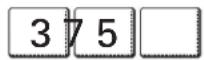
3 Touch 3, 7, and 5.

Touch START.
NOTE:
After any cooking cycle has been completed cooling fans will operate to protect the control panel. This is normal.
To change the Temperature while cooking (example changing from 375^ to 425^ ):

Touch Options.

Touch Temp.
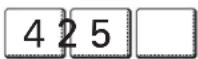
Touch 4,2,and 5.
Touch OK to accept the change or touch Clear to reset the temperature you input.
IMPORTANT NOTE:
The heating elements turn off immediately when the door is opened. They will turn on again in approximately 5 seconds after the door is closed. If you leave the oven door open for more than 30 minutes, all settings are canceled.
When preparing meats for roasting, use the broiler pan and grid. The broiler pan will catch grease spills and the grid will help prevent grease splatters.
Touch CLEAR/OFF to cancel Roast at any time.
CONVECTION BAKE
Benefits of Convection Bake:
Some foods cook up to 25 to 30% faster, saving time and energy.
2 Multiple rack baking.
No special pans or bakeware needed.
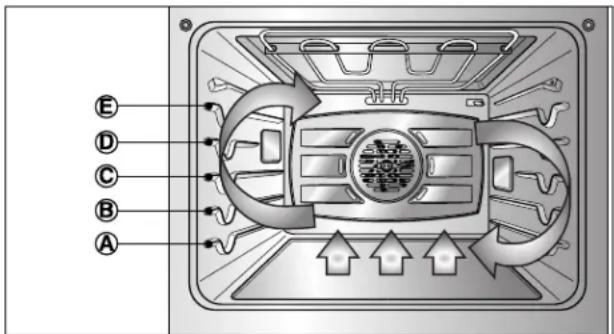
Convection baking uses a fan to circulate the oven's heat evenly and continuously within the oven. This improved heat distribution allows for even cooking and excellent results using multiple racks at the same time. Foods cooked on a single oven rack will generally cook faster and more evenly with Convection Bake. Multiple oven rack cooking may slightly increase cook times for some foods, but the overall result is time saved. Breads and pastries brown more evenly.
Tips for Convection Bake
- Time reductions will vary depending on the amount and type of food to be cooked. Cookies and biscuits should be baked on pans with no sides or very low sides to allow heated air to circulate around the food. Food baked on pans with a dark finish will cook faster.
- When using Convection Bake with a single rack, place oven rack in position C. If cooking on multiple racks, place the oven racks in position B and D.
- Cookies, muffins, biscuits and other quickbreads give very good results when using multiple racks.
To set the oven for Convection Bake 375^
CLEAR OFF
Conv. Bake
Touch CLEAR/OFF.
Touch Conv. Bake.
375
START
Touch 3,7,and 5.
Touch START. The display will show 350^ . The preheat (If Convection Auto Conversion is Enabled) melody will sound when the oven temperature reaches adjusted temperature. But if you set the Convection Auto Conversion disabled, the melody will sound when the oven temperature reaches 375^ .
IMPORTANT NOTE:
The heating elements and a fan turn off immediately when the door is opened. They will turn on again in approximately 5 seconds after the door is closed. If you leave the oven door open for more than 30 minutes, all settings are canceled.
Touch CLEAR/OFF to cancel Convection Bake at any time.
NOTE:
After any cooking cycle has been completed cooling fans will operate to protect the control panel. This is normal.
CRISP CONVECTION
Benefits of Crisp Convection:
This crisp convection feature is best for light colored and delicate baked goods like cakes, tarts, cookies, puff pastries, scones, muffins, biscuits, free from yeast breads etc. The fan circulated hot air continually distributes heat more evenly than the natural movement of air in a standard thermal oven. This movement of hot air maintains cooking foods more evenly, crisping surfaces while sealing in moisture and yielding crustier breads. The low thermal capacity of the heating element itself makes it possible to shorten the cooking time as much as 30% .
The meat probe may be used in this feature.
Tips for Crisp Convection
- Time reductions will vary depending on the amount and type of food to be cooked. Choose cookie sheets without sides and roasting pans with very low sides to allow heated air to circulate around the food. Food baked on pans with a dark finish will cook faster.
- When using Crisp Convection with a single rack, place oven rack in position C. If cooking on multiple racks, place the oven racks in position B and D.
- It is important to uncover foods so that surfaces of food remain exposed to the circulating air, allowing browning and crisping.
- Keep heat loss to a minimum by only opening the oven door when necessary.
To set the oven for Crisp Convection 375^

Touch CLEAR/OFF.

Touch Crisp Conv.
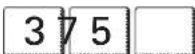
3 Touch 3,7,and 5.

Touch START. The display will show 350^ . The preheat (If Convection Auto Conversion is Enabled) melody will sound when the oven temperature reaches adjusted temperature. But if you set the Convection Auto Conversion disabled, the melody will sound when the oven temperature reaches 375^ .
IMPORTANT NOTE:
The heating elements and a fan turn off immediately when the door is opened. They will turn on again in approximately 5 seconds after the door is closed. If you leave the oven door open for more than 30 minutes, all settings are canceled.
Touch CLEAR/OFF to cancel Crisp Convection at any time.
NOTE:
After any cooking cycle has been completed cooling fans will operate to protect the control panel. This is normal.
CONVECTION ROAST
This Convection Roast feature is designed to give optimum cooking performance for roasting meats and poultry. Preheating is not necessary for meats and poultry. Heated air circulates around the food from all sides, sealing in juices and flavors. Foods are crispy brown on the outside while staying moist on the inside.
Convection Roast is especially good for large tender cuts of meat. The meat probe may be used in this feature.
To set the Convection Roast feature (example for Meats to cook at 375^ ):

Touch CLEAR/OFF.

Touch Conv. Roast.

Touch 3, 7, and 5.

Touch START. The display will show 350^ . The preheat (If Convection Auto Conversion is Enabled) melody will sound when the oven temperature reaches adjusted temperature. But if you set the Convection Auto Conversion disabled, the melody will sound when the oven temperature reaches 375^ .
IMPORTANT NOTE:
The heating elements and a fan turn off immediately when the door is opened. They will turn on again in approximately 5 seconds after the door is closed. If you leave the oven door open for more than 30 minutes, all settings are canceled.
When preparing meats for roasting, use the broiler pan and grid. The broiler pan will catch grease spills and the grid will help prevent grease splatters.
Touch CLEAR/OFF to cancel the Convection Roast feature at any time.
NOTE:
After any cooking cycle has been completed cooling fans will operate to protect the control panel. This is normal.
RECIPEBANK
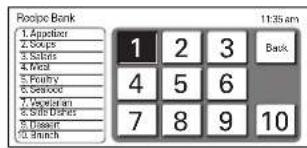
The Recipe bank features 100 recipes, with 10 categories, for the at home chef. Preset cooking cycles are available on many of these recipes.
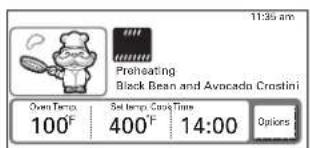
To set the Recipe Bank feature for an automatic cooking (example Black Bean and Avocado Crostini):
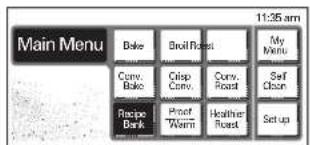

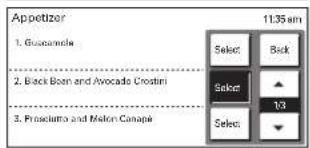
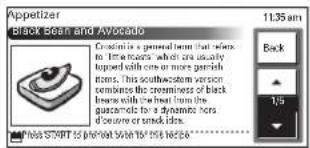
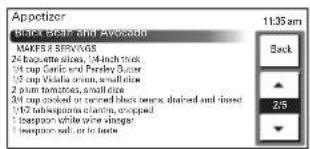
Touch Recipe Bank.
Touch 1 Appetizer.
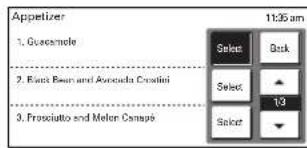
Touch Select next to 2. Black Bean and Avocado Crostini.
Touch the UP or Down arrows to scroll through the recipe.
Touch START. The feature will automatically preheat the oven.
Place your food in the oven and press START. The oven will countdown the cook time and shut off the oven automatically.
To set the Recipe Bank feature only (example Guacamole):
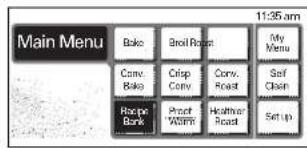
Touch Recipe Bank.
Touch 1 Appetizer.
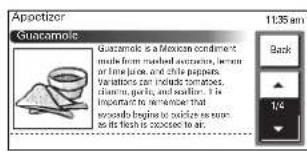
3 Touch Select next to 1 Guacamole.
4 Touch the UP or Down arrows to scroll through the recipe.
IMPORTANT NOTE:
The heating elements or a fan turn off immediately when the door is opened. They will turn on again in approximately 5 seconds after the door is closed. If you leave the oven door open for more than 30 minutes, all settings are canceled.
Touch CLEAR/OFF to cancel Recipe Bank at any time.
You can also change the cook time to your own cook time by touching Options.
NOTE:
After any cooking cycle has been completed cooling fans will operate to protect the control panel. This is normal.
PROOF
The proof feature maintains a warm environment useful for rising yeast-leavened products.
The proof feature automatically provides the optimum temperature for the proof process, and therefore does not have a temperature adjustment. Touch START without touching the numeric keys if you don't want to set a specific proofing time.
How to Set the Oven For Proofing (example for 1 hour):

Touch CLEAR/OFF.

Touch Proof/Warm.

Touch Proof.
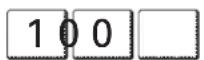
4 Touch 1, 0, and 0.

Touch START.
IMPORTANT NOTE:
The heating elements and a fan turn off immediately when the door is opened. They will turn on again in approximately 5 seconds after the door is closed. If you leave the oven door open for more than 30 minutes, all settings are canceled.
To avoid lowering the oven temperature and lengthening proofing time, do not open the oven door unnecessarily.
Proofing status can be checked with the door closed using the oven light. Check bread products often to avoid over-proofing.
Do not use the proofing mode for warming food or keeping food hot. The proofing oven temperature is not hot enough to hold foods at safe temperatures.
Proofing will not operate when the oven is above 125^ . Oven is Hot will show in the display.
Touch CLEAR/OFF to cancel Proof at any time.
WARM
The Warm feature will maintain an oven temperature less than 200^ . This feature is not designed to reheat cold foods. This feature will keep cooked foods warm for serving up to 3 hours. After 3 hours, the Warm feature will shut the oven off automatically. This feature may be used without any other cooking operations.
The Warm feature can be programmed with the TIMED BAKE OR DELAYED TIMED BAKE when you want the Warm feature to turn ON automatically after cooking has finished. Refer to the USING COOK & WARM feature section on page 28.
The Warm feature has three temperature levels: High = 200^ Med = 170^ Low = 140^
To set the Warm feature

Touch CLEAR/OFF.
NOTE:
After any cooking cycle has been completed cooling fans will operate to protect the control panel. This is normal.

Touch Proof/Warm.

Touch Warm.
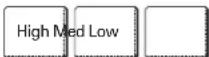
Touch High or Med or Low.

Touch START.
IMPORTANT NOTE:
The heating elements turn off immediately when the door is opened. They will turn on again in approximately 5 seconds after the door is closed. If you leave the oven door open for more than 30 minutes, all settings are canceled.
Do not use plastic containers, lids, or plastic wrap. Cover them with an oven-safe lids or aluminum foil.
Touch CLEAR/OFF to cancel Warm at any time.

HEALTHIER ROAST
This Healthier Roast feature is designed to give cooking results of low fat, low calorie for roasting meats and poultry. Healthier Roasting can reduce the fat up to 20% compared to regular roasting. Fat reduction rate may vary according to the kinds or cuts of meat. This test results based on roast beef by a certified organization.
Preheating is not necessary for meats and poultry. Heating system of the healthier roast feature makes the food from all sides, sealing in juices and flavors. Foods are crispy brown on the outside while staying moist on the inside. Extra cooking time may be needed for this feature.
The meat probe should be used in this feature. (Refer to the HEALTHIER ROASTING CHART)

NOTE: This icon will appear in the display when the oven probe is plugged into the socket.
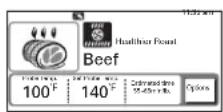
To set the Healthier Roast feature (example for Beef with probe temperature 140^ ):


Before using this feature, insert the meat probe into the meats or poultry.
Touch CLEAR/OFF.
3 Touch Healthier Roast.
Touch Beef.
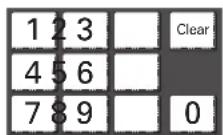
Touch 1, 4, and 0 to set the desired probe temperature or touch Clear to reset the temperature.
Touch START to run this feature. The display will show the current probe temperature and the set probe temperature.

A melody will sound and the display will show Cycle completed and the time of day when the probe temperature reaches the set probe temperature. The oven will shut off automatically. The control will continue to sound the cook end alarm melody every minute until CLEAR/OFF is touched.
IMPORTANT NOTE:
The heating elements turn off immediately when the door is opened. They will turn on again in approximately 5 seconds after the door is closed. If you leave the oven door open for more than 30 minutes, all settings are canceled.
When preparing meats for roasting, use the broiler pan and grid. The broiler pan will catch grease spills and the grid will help prevent grease splatters.
Touch CLEAR/OFF to cancel Healthier Roast at any time.
HEALTHIER ROASTING CHART
| Menu | Meat Probe Temp. | |
| Temp. range | Default Temp. | |
| 1. Beef | 140~170°F(60~77°C) | 160°F(71°C) |
| 2. Pork | 160~190°F(71~88°C) | 170°F(77°C) |
| 3. Lamb | 140~170°F(60~77°C) | 160°F(71°C) |
| 4. Chicken | 165~180°F(74~82°C) | 180°F(82°C) |
| 5. Turkey | 165~180°F(74~82°C) | 175°F(79°C) |
MY MENU
My Menu feature is used to record and recall your favorite recipe settings. This feature may store and recall up to 10 different settings. The My Menu setting may be used with Timed Bake feature. This feature will not work with any other function including Delay Timed Cook feature.
To set the My Menu feature (example recording for Crisp Conv. at 350^ for 30 minutes):

Touch My Menu.

Touch Create.

3 Touch Crisp Conv.
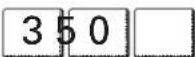
4 Touch 3,5,and 0.

Touch Options.

Touch Cook Time.
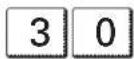
Touch 3,0.

Touch Options.

Touch OK.
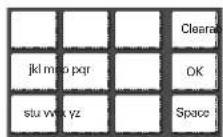
Touch the corresponding pads with the letters you wish to choose. Example for C press the "abc" pad 3 times.

Touch OK.
NOTE:
Touch CLEAR/OFF or Main Menu to go back to the main menu at any time.
It should not be used during broiling, self cleaning, warming, proofing or recipe bank feature.
To set the My Menu feature during setting:

Touch Bake.

Touch Options.

Touch Add to my menu.
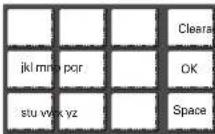
Touch the corresponding pads with the letters you wish to choose. Example for C press the "abc" pad 3 times.

Touch OK.
NOTE:
Touch Main Menu key to go back to the main menu at any time.
To start the My Menu feature recorded:

Touch My Menu.
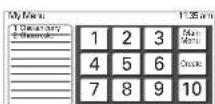
Touch the number you want to recall.

3 Touch START.
To delete the menu from the My Menu feature:

Touch My Menu.
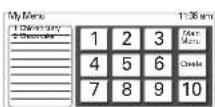
Touch the number you want to delete from the My Menu list.

3 Touch Delete to confirm.
NOTE:
Touch CLEAR/OFF or Main Menu to go back to the main menu at any time.
COOK & WARM
The Cook & Warm feature can only be used with Timed Cook or Delayed Timed Cook feature. This feature is not designed to reheat cold foods. This feature will maintain an oven temperature of 170^ . This feature will keep cooked foods warm for serving up to 3 hours. After 3 hours, the Cook & Warm feature will shut the oven off automatically.
To use the Cook & Warm feature:

1 Follow the Timed Bake steps. See page 16.
The Cook & Warm key will be selectable in the display when the cook has been set. Touch Cook & Warm key. The display will show the Cook & Warm icon (Cook & Warm).
START


Touch START to hold foods warm after the cooking is finished.
4 To turn Cook & Warm OFF, touch Options then touch Cook & Warm.
IMPORTANT NOTE:
The heating elements turn off immediately when the door is opened. They will turn on again in approximately 5 seconds after the door is closed. If you leave the oven door open for more than 30 minutes, all settings are canceled.
Do not use plastic containers, lids, or plastic wrap. Cover them with an oven-safe lids or aluminum foil.
MEAT PROBE
The meat probe accurately measures the internal temperature of meat, poultry and casseroles. It should not be used during broiling, self cleaning, warming, proofing or recipe bank feature. Always unplug and remove the meat probe from the oven when removing food. Before using, insert the probe into the center of the thickest part of meat or into the inner thigh or breast of poultry, away from fat or bone. Place food in the oven and connect the meat probe to the jack. Keep the probe as far away from heat source as possible. Close the oven door. The meat probe icon ( ) will flash and a warning beep will sound until the probe is removed if the oven starts cooking without setting the probe temperature.
To use the Meat Probe feature (example for Roast 375^ with probe temp. 160^ )

Touch CLEAR/OFF to use the main menu.
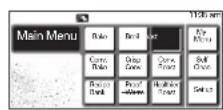
Touch Roast.
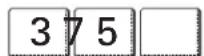
Touch 3,7,and 5.

4 Touch Options.

Touch Probe Temp.
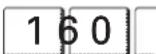
Touch 1, 6, and 0.
START
Touch START.
The default probe temperature is 150^ (66^) , but can be changed to any temperature between 80^ (27^) and 210^ (99^) . The display will show the changing probe temperature. When the set probe temperature is reached, the oven will shut off automatically and Cycle completed will appear on the display.
NOTE:
Calculating a total cooking time by weight is no longer necessary using this feature. Following chart is recommended for setting the probe temperature.
WARNING
Always use an oven mitt to remove temperature probe. Do NOT touch broil element.
- Failure to do so can result in severe personal injury.
MEAT PROBE (cont.)
To change the Meat Probe temperature during cooking:

Touch Options.

Touch Probe Temp.
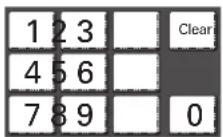
3 Set the probe temperature
START
4 Touch START.
IMPORTANT NOTE:
Touch CLEAR/OFF to cancel Meat Probe at any time.
To avoid breaking the probe, make sure food is completely defrosted before inserting.
RECOMMENDATION CHART FOR PROBE TEMPERATURE
| Doneness | Probe Temp. |
| Beef, Lamb and Veal | |
| Rare | 130°F (54°C) |
| Medium Rare | 140°F (60°C) |
| Medium | 150°F (66°C) |
| Well Done | 160°F (71°C) |
| Pork | |
| Well Done | 170°F (77°C) |
| Poultry | |
| Breast, Well Done | 170°F (77°C) |
| Thigh, Well Done | 180°F (82°C) |
| Stuffing, Well Done | 165°F (74°C) |
CONTROL LOCK FEATURE
The START key controls the Control Lock feature. The Control Lock feature automatically locks most oven controls from being turned ON. It does not disable the timer and the interior oven light. The Control Lock feature will cancel the cooking mode and will lock the oven controls at any time when you activate this feature.
To activate the Control Lock feature:

Touch and hold START for 4 seconds.
Lock melody will sound and the lock icon ( ) will appear in the display.
To Deactivate the Control Lock feature:

Touch and hold START for 4 seconds.
Unlock melody will sound and the lock icon ( ) will clear in the display.
The oven is again fully operational.
The oven lights automatically turn on when the door is opened. The oven lights may also be manually turned ON or OFF by touching the OVEN LIGHT key. Three halogen lamps will light the oven from 3 directions.
IMPORTANT NOTE:
If the oven light is ON by touching the oven light key, the light is ON even if the door is closed. The oven light key can be operated while the door is opened.
The oven lights cannot be turned on if the self-clean feature is active and oven temperature is more than 500^ while the door is unlocking after the self-clean.

SELF-CLEAN
The self-clean cycle uses above normal cooking temperatures to clean the oven's interior automatically.
It is normal for smoking to occur during cleaning if the oven is heavily soiled. It is better to clean the oven regularly rather than to wait until there is a heavy build-up of soil in the oven.
During the cleaning process, the kitchen should be well ventilated to get rid of normal odors associated with cleaning.
CAUTION
- DO NOT leave small children unattended near the appliance.
- During the self-cleaning cycle, the outside of the oven can become very hot to touch.
- Move Birds to another well-ventilated room.
- The health of some birds is extremely sensitive to the fumes given off during the self-cleaning cycle of any oven.
- DO NOT line the oven walls, racks, bottom or any other part of the oven with aluminum foil or any other material.
- Doing so will destroy heat distribution, produce poor baking results and cause permanent damage to the oven interior (aluminum foil will melt to the interior surface of the oven.)
- DO NOT force the door open.
- This can damage the automatic door locking system. Use care when opening the oven door after the self-cleaning cycle. Stand to the side of the oven when opening the door to allow hot air or steam to escape. The oven may still be VERY HOT.
- DO NOT block the oven vent(s) during the self-cleaning cycle.
- This can damage the electric parts of the oven. Air must be able to move freely.
Before a self-clean Cycle
We recommend venting your kitchen with an open window or using a ventilation fan or hood during the first self-clean cycle.
Remove the oven racks, broiler pan, broiler grid, all cookware, and aluminum foil or any other material from the oven.
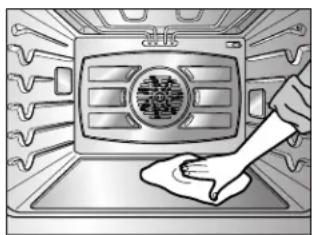
Wipe up heavy soil on the oven bottom.
NOTE:
Remove all racks including the telescoping rack before you begin a self clean cycle.
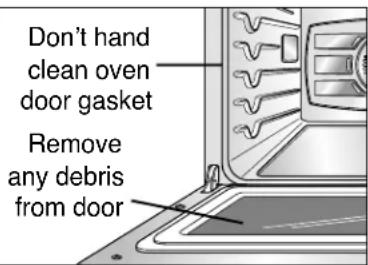
- The silver-colored oven racks can be self-cleaned, but they will darken, lose their luster, and become hard to slide. It is recommended to remove all racks before starting the self clean cycle.
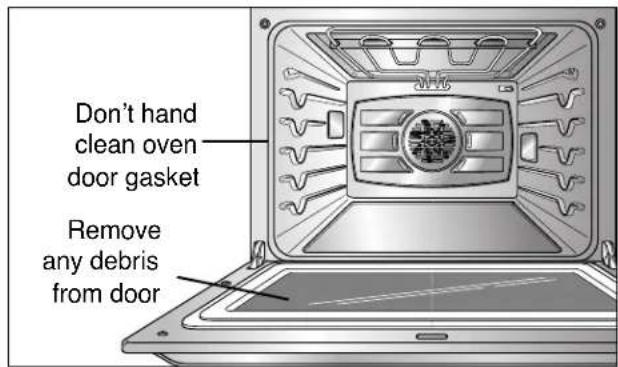
- Soil on the front frame of the range and outside the gasket on the door will need to be cleaned by hand. Clean these areas with hot water, soap-filled steel-wool pads, or cleansers such as Soft Scrub; Rinse well with clean water and dry.
- Do not clean the gasket. The fiberglass material of the oven door gasket cannot withstand abrasion. It is essential for the gasket to remain intact. If you notice it becoming worn or frayed, replace it.
- Wipe up any heavy spillovers on the oven bottom.
- Make sure the oven light bulb cover is in place and the oven light is off.
- Do not leave baking/ pizza stone in the oven during the self-clean cycle.
SELF-CLEAN (cont.)
This SELF-CLEAN key is used to start a self-clean cycle. When used with Start Time key, a delayed self-clean cycle may also be programmed. The self-clean function has cycle times of 2 (Light), 3 (Normal) or 4 (Heavy) hours.
To start an immediate self-clean cycle and shut off automatically
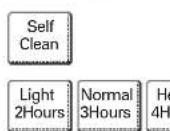
Touch CLEAR/OFF.
Touch Self Clean.
3 Touch Light for light soil or Normal for average soil or Heavy for heavy soil. A Normal (3 hours) self-clean time is recommended for use when cleaning small, contained spills. A Heavy (4 hours) self-clean time is recommended for heavily soiled ovens.
Touch START. The door lock icon ( ) will flash. The oven door will lock automatically. You will not be able to open the oven door until the oven is cooled. The lock will release automatically.
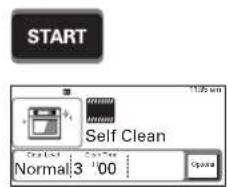
During the self-clean cycle
- You may see some smoke and smell an odor the first few times the oven is cleaned. This is normal and will lessen in time. Smoke may also occur if the oven is heavily soiled or if a broiler pan was left in the oven.
- As the oven heats, you may hear sounds of metal parts expanding and contracting. This is normal and will not damage the oven.
- Do not force the oven door open when LOCK is displayed. The oven door will remained locked until the oven temperature has cooled. Forcing the door open will damage the door.
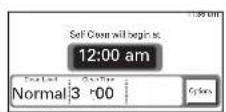
To set a delay start time of 12:00 am
1 Be sure the clock is set with the correct time of day, the oven is empty and the oven door is closed.
Touch CLEAR/OFF.
Touch Self Clean.
Touch Light for light soil or Normal for average soil or Heavy for heavy soil.
Touch Start Time.
Touch the numeric keys in the display (Touch 1, 2, and 0, 0) and then touch Options for selecting am or pm. The oven door will lock and the display will show the start time. If the oven clock is set to 24 hours display, Options will not be able to function for selecting am or pm.
Touch START. The self-cleaning cycle will turn on automatically at the set time.
IMPORTANT NOTE:
If it becomes necessary to stop or interrupt a self-cleaning cycle due to excessive smoke or fire in the oven, touch CLEAR/OFF to cancel self-clean at any time. The door lock will automatically release allowing you to open the oven door after the oven has cooled down.
SELF-CLEAN (cont.)
To change the setting during the operation of this self-clean feature:
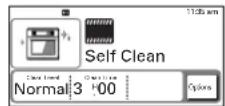
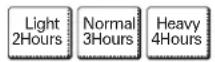

Touch Options.
Touch Light for light soil or Normal for average soil or Heavy for heavy soil.
3 Touch START to confirm the change.
NOTE:
When using the self-clean feature:
- A self-clean cycle cannot be started if Control Lock feature is active.
- Once the SELF CLEAN is set, the oven door will lock automatically. You will not be able to open the oven door until the oven is cooled. The lock will release automatically.
- Once the door has been locked the DOOR LOCKED indicator light will stop flashing and remain on. Allow about 15 seconds for the oven door lock to engage.
- The oven can be set the cycle time and start time again with touching the Options key during the self-clean feature is operating if it is necessary.
When the self-clean cycle is done
- It will not be possible to open the oven door until oven temperature has cooled.
After the self-clean cycle
- You may notice some white ash in the oven. Wipe it off with a damp cloth after the oven cools. These deposits are usually a salt residue that cannot be removed by the clean cycle. If the oven is not clean after one clean cycle, repeat the cycle.
- If oven racks were left in the oven and do not slide smoothly after a clean cycle, wipe racks and rack supports with a small amount of vegetable oil to make them glide easier.
- Fine lines may appear in the porcelain because it went through heating and cooling. This is normal and will not affect performance.
CARE & CLEANING
Changing the Oven Light
The oven light is a standard 10-watt halogen bulb for ovens.
To replace lamps located on the side wall: -Make sure oven and bulb are cool.
- Unplug oven or disconnect power.
- Remove oven racks.
- Slide a flat blade screwdriver between the housing and the glass light cover.
- Support the glass light cover with two fingers to prevent the cover from falling to the bottom of the oven.
- Gently twist the screwdriver blade to loosen the glass light cover.
- Remove bulb from socket.
- Replace bulb, replace light cover by snapping back into place.
- Plug in oven or reconnect power.
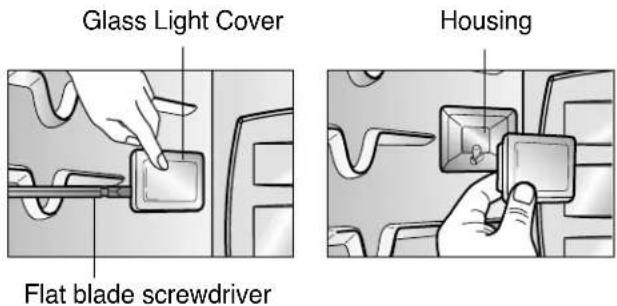
To replace a lamp located on the top wall: -Make sure oven and bulb are cool.
- Unplug oven or disconnect power.
- Remove oven racks.
- Slide a flat blade screwdriver between the housing and the glass light cover.
- Support the glass light cover with two fingers to prevent the cover from falling to the bottom of the oven.
- Gently twist the screwdriver blade to loosen the glass light cover.
- Remove bulb from socket.
- Replace bulb, replace light cover by snapping back into place and push the clip to hold the glass light cover tightly.
- Plug in oven or reconnect power.
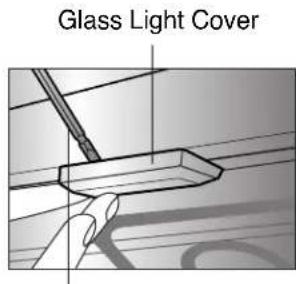
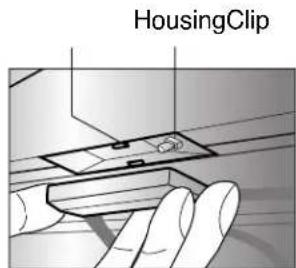
Flat Blade screwdriver
WARNING
- Before replacing your oven light bulb, DISCONNECT the electrical power to the oven at the main fuse or circuit breaker panel.
- Failure to do so can result in severe personal injury, death, or electrical shock.
- Make sure oven and bulb are cool.
Painted Parts and Trim
For general cleaning, use a cloth with hot and soapy water. For more difficult soils and built-up grease, apply a liquid detergent directly onto the soil. Leave on soil for 30 to 60 minutes. Rinse with a damp cloth and dry. DO NOT use abrasive cleaners on any of these materials; they can scratch the parts and trim.
Stainless Steel Surfaces
Do not use a steel-wool pad, it will scratch the surface.
- Place a small amount of Stainless Steel Appliance Cleaner or polish on a damp cloth or damp paper towel.
- Clean a small area, rubbing with the grain of the stainless steel if applicable.
- Dry and buff with a clean, dry paper towel or soft cloth.
- Repeat as necessary.
NOTE: If a mineral oil-based stainless steel appliance cleaner has been used before to clean the appliance, wash the surface with a mild soap and water prior to using the Stainless Steel Appliance Cleaner or polish.
CARE & CLEANING (cont.)
Broiler Pan and Grid Do not clean the broiler pan or grid in a selfcleaning mode.
After broiling, remove the broiler pan from the oven. Remove the grid from the pan. Carefully pour out
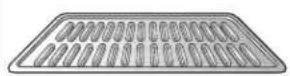
Do not store a soiled broiler pan and grid anywhere in the oven.
the grease from the pan into a proper container.
Wash and rinse the broiler pan and grid in hot water with a soap-filled or plastic scouring pad.
If food has burned on, sprinkle the grid with cleaner while hot and cover with wet paper towels or a dishcloth. Soaking the pan will remove burned-on foods.
Both the broiler pan and grid may be cleaned with a commercial oven cleaner.
Both the broiler pan and grid can also be cleaned in a dishwasher.
Oven Racks
Remove the oven racks before operating the self-clean cycle. Leaving the racks in place could cause discoloration. If food is spilled in the tracks, it could cause the racks to become stuck. If left, clean by using a mild, abrasive cleaner.
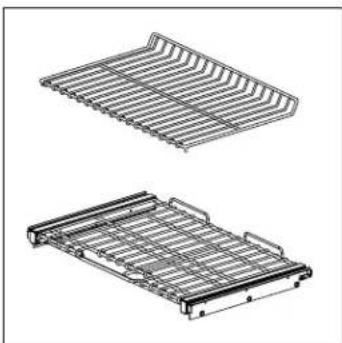
Rinse with clean water and dry. If the racks are cleaned in the self-clean cycle, their color will turn slightly blue and finish will be dull. After the self-clean cycle is complete and the oven has cooled, rub the sides of the racks with wax paper or a cloth containing a small amount of oil. This will make the racks glide easier into the rack tracks.
Oven Cavity
DO NOT use oven cleaners.
NEVER wipe a warm or hot porcelain surface with a damp sponge; it may cause chipping or crazing (tiny hairlike cracks.) Food spills should be cleaned when oven cools. At high temperature, foods react with porcelain and a permanent dull spot can result. When cleaning a spot, use only non-abrasive cleaners or scrubbers.
Oven Door
Use soap and water to thoroughly clean the top, sides, and front of the oven door. Rinse well. You may use a glass cleaner on the outside glass of the oven door.
DO NOT immerse the door in water. DO NOT spray or allow water or the glass cleaner to enter the door vents. DO NOT use oven cleaners, cleaning powders, or any harsh abrasive cleaning materials on the outside of the oven door.
DO NOT clean the oven door gasket. The oven door gasket is made of a woven material which is essential for a good seal. Care should be taken not to rub, damage, or remove this gasket.
CAUTION
DO NOT use harsh abrasive cleaners or sharp metal scrapers to clean the oven door glass since they can scratch the surface.
- It may result in shattering of the glass.
REMOVING & REPLACING THE LIFT-OFF OVEN DOOR

CAUTION
- Be careful when removing and lifting the door.
-
DO NOT lift the door by the handle.
-
The door is very heavy.
To remove the door:
Step.1
Open the door fully.
Step.2
Pull the hinge locks down toward the door frame to the unlocked position.
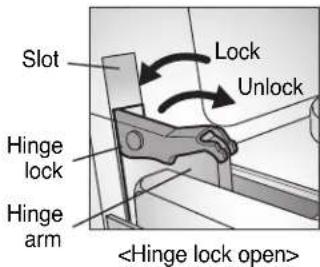
Step. 3
Firmly grasp both sides of the door at the top.
Step. 4
Close door to the door removal position, which is approximately 5 degrees.
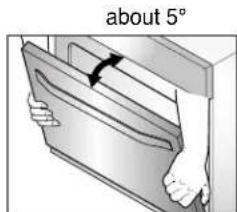
Step. 5
Lift door up and out until the hinge arm is clear of the slot.
To replace the door:
Step.1
Firmly grasp both sides of the door at the top.
Step. 2
With the door at the same angle as the removal position,seat the indentation of the hinge arm into the bottom edge of the hinge slot. The notch in the hinge arm must be fully seated into the bottom of the slot.
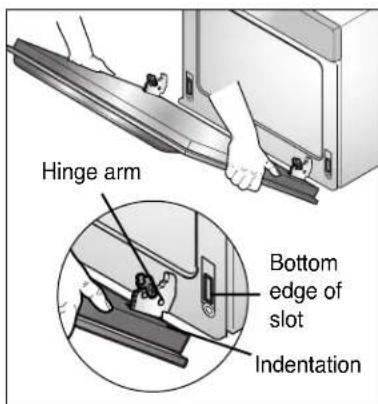
Step. 3
Open the door fully. If the door will not open fully, the indentation is not seated correctly in the bottom edge of the slot.
Step. 4
Push the hinge locks up against the front frame of the oven cavity to the locked position.
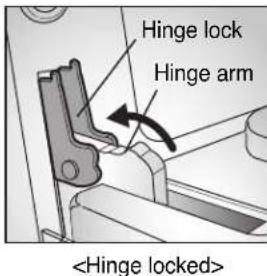
Step. 5
Close the oven door.
DOOR CARE INSTRUCTIONS
- Most oven doors contain glass that can break.
Read the following recommendations:
-
Do not close the oven door until all the oven racks are fully in place.
-
Do not hit the glass with pots, pans, or any other object.
- Scratching, hitting, jarring, or stressing the glass may weaken its structure causing an increased risk of breakage at a later time.
BEFORE CALLING FOR SERVICE
Before you call for service, review this list. It may save you time and expense. The list includes common occurrences that are not the result of defective workmanship or materials in this appliance.
| Problem | Possible Causes / Solutions | |
| Oven control beeps and displays any F code error. | ·Electronic control has detected a fault condition. Press CLEAR/OFF to clear the display and stop beeping. Reprogram oven. If fault reoccurs, record fault number. Press CLEAR/OFF and contact a qualified service technician. | Code Rack Position |
| F-1 Opened oven sensor | ||
| F-2 Shorted oven sensor | ||
| F-3 Touch sensor key error | ||
| F-6 Oven is too hot | ||
| F-8 Shorted meat probe | ||
| F-9 Oven is not heating | ||
| F-10 Door lock fail | ||
| F-11 Communication error | ||
| F-12 EEPROM error | ||
| Oven will not work | ·Plug on oven is not completely inserted in the electrical outlet. - Make sure electrical plug is plugged into a live, properly grounded outlet. ·A fuse in your home may be blown or the circuit breaker tripped. - Replace the fuse or reset the circuit breaker. ·Oven controls improperly set. - See the Using the oven section. ·Oven too hot. - Allow the oven to cool to below locking temperature. | |
| Appliance does not operate. | ·Make sure cord is plugged correctly into outlet. Check circuit breakers. ·Service wiring is not complete. Contact your appliance Servicer for assistance. ·Power outage. Check house lights to be sure. Call your local electric company for service. | |
| Oven light does not work. | ·Replace or tighten bulb. See Changing Oven Light section in this Owner's manual. | |
| Oven smokes excessively during broiling. | ·Control not set properly. Follow instructions under Setting Oven Controls. ·Meat too close to the element. Reposition the rack to provide proper clearance between the meat and the element. Preheat broil element for searing. ·Meat not properly prepared. Remove excess fat from meat. Cut remaining fatty edges to prevent curling, but do not cut into lean. ·Insert on broiler pan wrong side up and grease not draining. Always place grid on the broiler pan with ribs up and slots down to allow grease to drip into pan. ·Grease has built up on oven surfaces. Regular cleaning is necessary when broiling frequently. Old grease or food spatters cause excessive smoking. | |
BEFORE CALLING FOR SERVICE (cont.)
| Problem | Possible Causes / Solutions |
| Food does not bake or roast properly | ·Oven controls improperly set. -See the using the oven section. ·Rack position is incorrect or the rack is not level. -See the using the oven section. ·Incorrect cookware or cookware of improper size being used. -See the using the oven section. ·Oven sensor needs to be adjusted. -See the adjusting your oven temperature in option section. |
| Food does not broil properly | ·Oven controls improperly set. -Make sure you press the BROIL pad. ·Improper rack position being used. -See the Broiling Guide, page 19. ·Cookware not suited for broiling. -Use the broiling pan and grid that came with your oven. ·Aluminum foil used on the the broiling pan and grid has not been fitted properly and slit as recommended. -See the using the oven section. -In some areas the power (voltage) may be low. -Preheat the broil element for 10 minutes. -See the Broiling Guide, page 19. |
| Oven temperature too hot or too cold | ·Oven Sensor needs to be adjusted. -See the adjusting your oven Temperature in option section. |
| Oven will not self-clean | ·The oven temperature is too high to set a self-clean operation. -Allow the oven to cool and reset the controls. ·Oven controls improperly set. -See the using the self-cleaning oven section. ·A self-clean cycle cannot be started if oven door is opened. |
| Crackling or popping sound | ·This is the sound of the metal heating and cooling during both the cooking and cleaning functions. -This is normal. |
| Excessive smoking during a self clean cycle | ·Excessive soil. -Press the CLEAR/OFF pad. Open the windows to rid the room of smoke. Wait until the self-clean mode is cancelled. Wipe up the excess soil and reset the clean. |
| Oven door do not open after a self clean cycle | ·Oven is too hot. -Allow the oven to cool below locking temperature. |
BEFORE CALLING FOR SERVICE (cont.)
| Problem | Possible Causes / Solutions |
| Oven not clean after a self clean cycle | ·Oven controls not properly set. -See the self-clean section, page 30~32. ·Oven was heavily soiled. - Clean up heavy spillovers before starting the clean cycle. Heavily soiled ovens may need to self-clean again or for a longer period of time. |
| DOOR LOCKED icon are on when you want to cook | ·The oven door is locked because the temperature inside the oven has not dropped below the locking temperature. -Press the CLEAR/OFF pad. Allow the oven to cool. |
| Burning or oily odor emitting from the vent | ·This is normal in a new oven and will disappear in time. -To speed the process, set a self-clean cycle for a minimum of 3 hours. See the self-clean section, page 30~32. |
| Cooling fan continues to run after oven is turned off | ·The fan turns off automatically when the electronic components have cooled sufficiently. -This is normal. |
| Warm air venting into kitchen after oven has been turned off. | ·Warm air exhaust is needed to maintain and cool down oven temperatures. It turns off automatically when the heat cools to a safe temperature. -This is normal. |
LG ELECTRONICS CANADA, INC. LG ELECRIC OVEN LIMITED WARRANTY - Canada
WARRANTY: Should your LG Electric Oven ("Product") fail due to a defect in material or workmanship under normal home use during the warranty period set forth below, LG Canada will at its option repair or replace the Product upon receipt of proof of original retail purchase. This warranty is valid only to the original retail purchaser of the product and applies only to a Product distributed in Canada by LG Canada or an authorized Canadian distributor thereof. The warranty only applies to Products located and used within Canada.
| WARRANTY PERIOD: (Note: If the original date of purchase can not be verified, the warranty will begin sixty (60) days from the date of manufacture). | ||
| Electric Oven | Extended Component Warranty (Parts Only) (Consumer will be charged for Labor after Two (2) years from the date of purchase) | |
| Two (2) years from the date of original retail purchase | Ninety (90) days from the date of original retail purchase | Two (2) years from the date of original retail purchase |
| Parts and Labor (internal/functional parts only) | Cosmetic warranty (Scratches and dents) | Glass Cook top Radiant Surface units |
Replacement products and parts are warranted for the remaining portion of the original warranty period or ninety (90) days, whichever is greater.
Replacement products and parts may be new or remanufactured.
LG Authorized Service Center warranties their repair work for thirty (30) days.
LG CANADA'S SOLE LIABILITY IS LIMITED TO THE WARRANTY SET OUT ABOVE. EXCEPT AS EXPRESSLY PROVIDED ABOVE, LG CANADA MAKES NO AND HEREBY DISCLAIMS ALL OTHER WARRANTY AND CONDITIONS RESPECTING THE PRODUCT, WHETHER EXPRESS OR IMPLIED, INCLUDING, BUT NOT LIMITED TO, ANY IMPLIED WARRANTY OR CONDITION OF MERCHANTABILITY OR FITNESS FOR A PARTICULAR PURPOSE, AND NO REPRESENTATIONS SHALL BE BINDING ON LG CANADA. LG CANADA DOES NOT AUTHORIZE ANY PERSON TO CREATE OR ASSUME FOR IT ANY OTHER WARRANTY OBLIGATION OR LIABILITY IN CONNECTION WITH THE PRODUCT. TO THE EXTENT THAT ANY WARRANTY OR CONDITION IS IMPLIED BY LAW, IT IS LIMITED TO THE EXPRESS WARRANTY PERIOD ABOVE.
LG CANADA, THE MANUFACTURER OR DISTRIBUTOR SHALL NOT BE LIABLE FOR ANY INCIDENTAL, CONSEQUENTIAL, SPECIAL, DIRECT OR INDIRECT DAMAGES, LOSS OF GOODWILL, LOST PROFITS, PUNITIVE OR EXEMPLARY DAMAGES OR ANY OTHER DAMAGE, WHETHER ARISING DIRECTLY OR INDIRECTLY FROM ANY CONTRACTUAL BREACH, FUNDAMENTAL OR OTHERWISE, OR FROM ANY ACTS OR OMISSIONS, TORT, OR OTHERWISE.
This warranty gives you specific legal rights. You may have other rights which may vary from province to province depending on applicable provincial laws. Any term of this warranty that negates or varies any implied condition or warranty under provincial law is severable where it conflicts with provincial law without affecting the remainder of this warranty's terms.
THIS LIMITED WARRANTY DOES NOT COVER:
- Service trips to deliver, pick up, or install the product; instructing a customer on operation of the product; repair or replacement of fuses or correction of wiring , or correction of unauthorized repairs/installation.
- Failure of the product to perform during power failures and interruptions or inadequate electrical service.
- Damage caused by leaky or broken water pipes, frozen water pipes, restricted drain lines, inadequate or interrupted water supply or inadequate supply of air.
- Damage resulting from operating the Product in a corrosive atmosphere or contrary to the instructions outlined in the Product owner's manual.
- Damage to the Product caused by accidents, pests and vermin, lightning, wind, fire, floods, or acts of God.
- Damage resulting from the misuse, abuse, improper installation, repair, or maintenance of the Product. Improper repair includes use of parts not approved or specified by LG Canada.
- Damage or product failure caused by unauthorized modification or alteration, or use for other than its intended purpose, or resulting from any water leakage due to improper installation.
- Damage or Product failure caused by incorrect electrical current, voltage, commercial or industrial use, or use of accessories, components, or cleaning products that are not approved by LG Canada.
- Damage caused by transportation and handling, including scratches, dents, chips, and/or other damage to the finish of your product, unless such damage results from defects in materials or workmanship and is reported within one (1) week of delivery.
- Damage or missing items to any display, open box, discounted, or refurbished Product.
- Products with original serial numbers that have been removed, altered, or cannot be readily determined. Model and Serial numbers, along with original retail sales receipt, are required for warranty validation.
- Increases in utility costs and additional utility expenses.
- Replacement of light bulbs, filters, or any consumable parts.
- Repairs when your Product is used in other than normal and usual household use (including, without limitation, commercial use, in offices or recreational facilities) or contrary to the instructions outlined in the Product owner's manual.
- Costs associated with removal of the Product from your home for repairs.
- The removal and reinstallation of the Product if it is installed in an inaccessible location or is not installed in accordance with published installation instructions, including the Product owner's and installation manuals.
17.
All costs associated with the above excluded circumstances shall be borne by the consumer.
For complete warranty details and customer assistance, please call or visit our website:
Call 1-888-542-2623 (24 hours a day, 365 days a year) and select the appropriate option from the menu, or visit our website at http://www.lg.ca
Write your warranty information below:
Product Registration Information:
Model:
Serial Number:
Date of Purchase:
MEMO
MANUEL D'UTILISATION ET
MANUEL DE CUISSON
FOUR ÉLECTRIQUE A
CONVECTION ENCASTRABLE
Register your product Online!
www.lg.com

- IMPORTANT SAFETY INFORMATION
- PARTS AND FEATURES
- OPERATING INSTRUCTIONS
- MAINTENANCE
- TROUBLESHOOTING
- WARRANTY
- THANK YOU!
- Product Registration Information
- READ ALL INSTRUCTIONS BEFORE USE
- SAFETY PRECAUTIONS
- DO NOT TOUCH HEATING ELEMENTS OR INTERIOR SURFACES OF OVEN.
- - Use Care When Opening Door.
- - Do Not Heat Unopened Food Containers.
- NOTE:
- WARNING
- SAFETY PRECAUTIONS (cont.)
- ELECTRICAL SAFETY
- SAFETY DURING USE
- CHILD SAFETY
- CAUTION
- SAFETY WHEN CLEANING
- CONTROL PANEL FEATURES
- INITIAL SET UP
- To set the language (example below for English display)
- To set the clock (example below for for 3:30 pm):
- TIME AND TEMPERATURE SETTINGS
- LANGUAGE SELECTION (ENGLISH, ESPÁNOL OR FRANÇAIS)
- To set language selection
- TEMPERATURE UNIT (FAHRENHEIT OR CELSIUS)
- To set temperature unit.
- DISPLAY BRIGHTNESS (BRIGHT, NORMAL OR DARK)
- To set display brightness
- OPERATING INSTRUCTIONS (SET UP)
- SOUND VOLUME (MUTE, NORMAL OR LOUD)
- To set sound volume
- CONVECTION AUTO CONVERSION (ENABLE OR DISABLE)
- TEMPERATURE ADJUSTMENT
- To adjust the oven temperature
- CLOCK TIME (12 HR, 24 HR)
- To change between 12 or 24 hour time of day
- RESET
- To reset the control to factory setting
- TIMER ON/OFF
- To set the timer (example for 5 minutes):
- To cancel the Timer before the set time has run out:
- TELESCOPIC RACK
- Installing the Telescoping Rack
- Step.1
- Step.2
- Step. 3
- Removing Telescopic Rack
- Step. 2
- BAKE
- To set the Bake Temperature to 375°F
- BAKING LAYER CAKES
- TIMED BAKE
- To set the oven to begin cooking immediately and shut off automatically: (example below to bake at 375°F for 30 minutes):
- IMPORTANT NOTE:
- To change the cooking time while cooking (example changing from 30 minutes to 20 minutes):
- When the Timed Bake finishes:
- DELAYED TIMED BAKE
- To set the oven for a Delayed Start. (example for baking at 375°F for 30 minutes and starting at 4:30 pm):
- BROIL
- To set the oven to Broil.
- RECOMMENDED BROILING GUIDE
- RECOMMENDED BROILING GUIDE (cont.)
- ROAST
- CONVECTION BAKE
- Benefits of Convection Bake:
- Tips for Convection Bake
- To set the oven for Convection Bake 375°F
- CLEAR OFF
- 375
- START
- CRISP CONVECTION
- Benefits of Crisp Convection:
- Tips for Crisp Convection
- To set the oven for Crisp Convection 375°F
- CONVECTION ROAST
- RECIPEBANK
- To set the Recipe Bank feature for an automatic cooking (example Black Bean and Avocado Crostini):
- To set the Recipe Bank feature only (example Guacamole):
- PROOF
- How to Set the Oven For Proofing (example for 1 hour):
- WARM
- To set the Warm feature
- HEALTHIER ROAST
- To set the Healthier Roast feature (example for Beef with probe temperature 140°F ):
- MY MENU
- COOK & WARM
- To use the Cook & Warm feature:
- MEAT PROBE
- To use the Meat Probe feature (example for Roast 375°F with probe temp. 160°F )
- MEAT PROBE (cont.)
- CONTROL LOCK FEATURE
- To activate the Control Lock feature:
- To Deactivate the Control Lock feature:
- SELF-CLEAN
- Before a self-clean Cycle
- SELF-CLEAN (cont.)
- To start an immediate self-clean cycle and shut off automatically
- During the self-clean cycle
- To set a delay start time of 12:00 am
- When the self-clean cycle is done
- After the self-clean cycle
- CARE & CLEANING
- Changing the Oven Light
- To replace lamps located on the side wall: -Make sure oven and bulb are cool.
- To replace a lamp located on the top wall: -Make sure oven and bulb are cool.
- Painted Parts and Trim
- Stainless Steel Surfaces
- CARE & CLEANING (cont.)
- Broiler Pan and Grid Do not clean the broiler pan or grid in a selfcleaning mode.
- Wash and rinse the broiler pan and grid in hot water with a soap-filled or plastic scouring pad.
- Both the broiler pan and grid may be cleaned with a commercial oven cleaner.
- Oven Racks
- Oven Cavity
- Oven Door
- REMOVING & REPLACING THE LIFT-OFF OVEN DOOR
- To remove the door:
- Step. 4
- Step. 5
- To replace the door:
- DOOR CARE INSTRUCTIONS
- Read the following recommendations:
- BEFORE CALLING FOR SERVICE
- BEFORE CALLING FOR SERVICE (cont.)
- LG ELECTRONICS CANADA, INC. LG ELECRIC OVEN LIMITED WARRANTY - Canada
- THIS LIMITED WARRANTY DOES NOT COVER:
- MEMO
- FOUR ÉLECTRIQUE A
- CONVECTION ENCASTRABLE
Brand : LG
Model : LSWS305ST
Category : Built-in oven